




Broker->BackItUp FTP->Synology
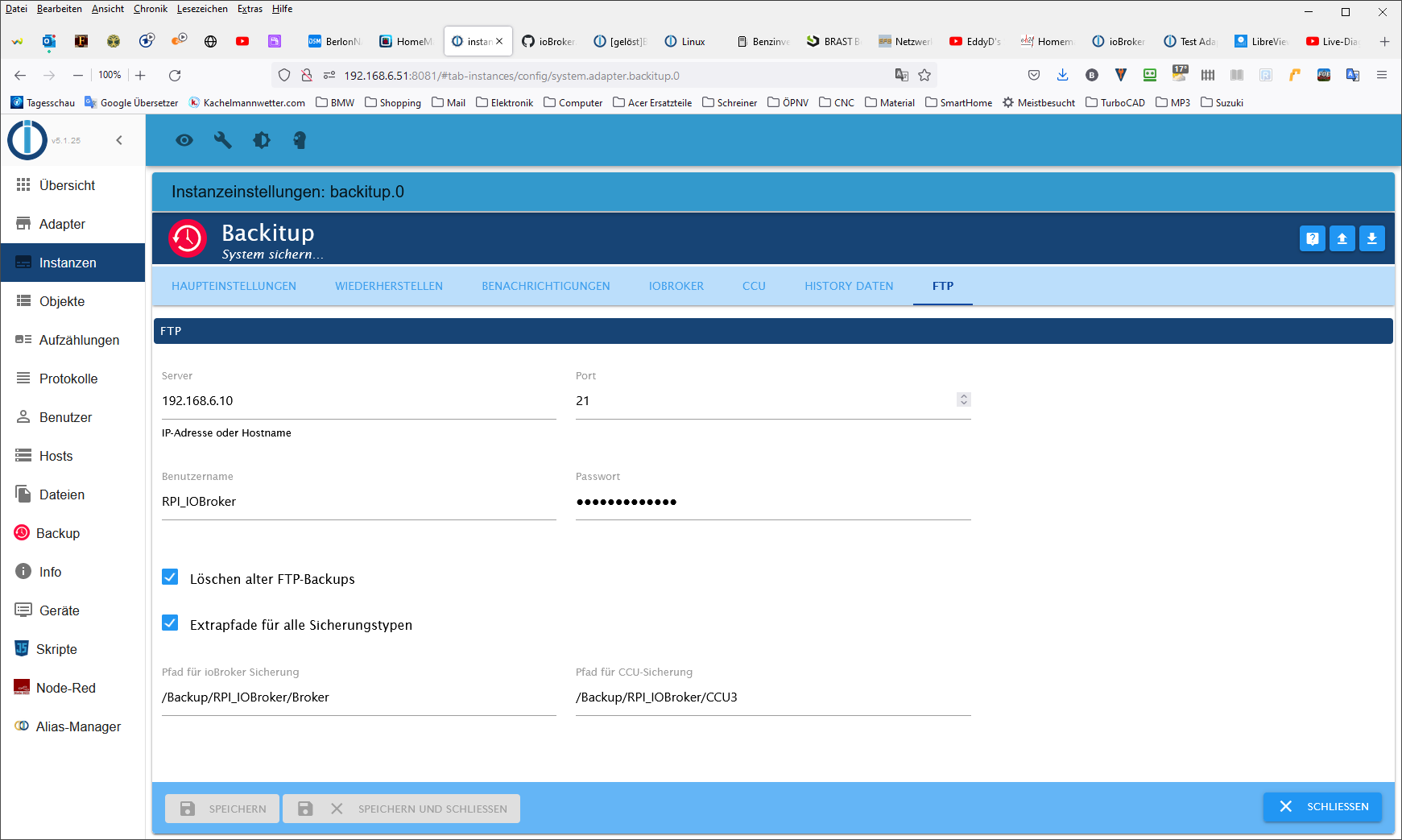
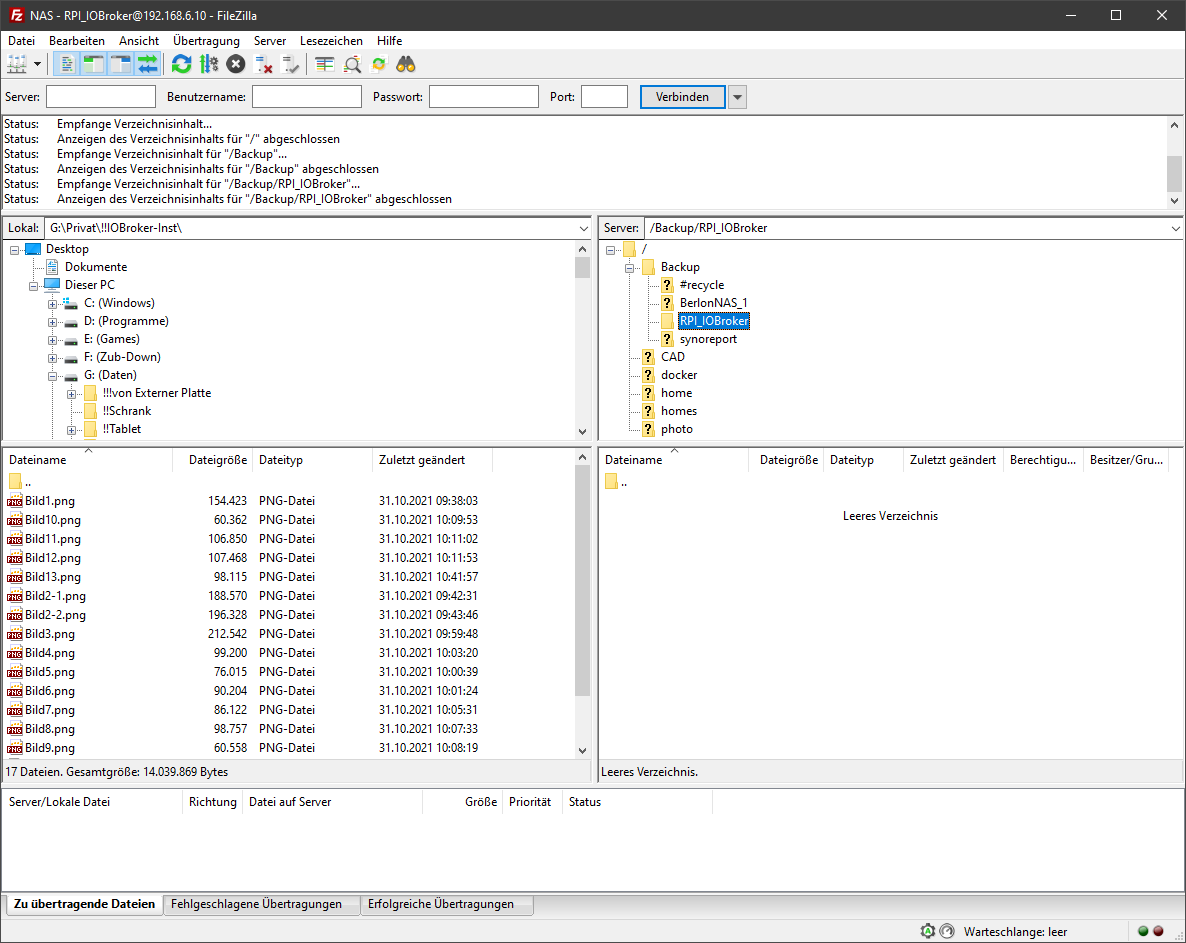
-
@homoran
die fehlenden Ordner habe ich erstellt, aber BackItUp beendet seine Arbeit nicht mehr. Der blaue Balken läuft immer weiter.
Post mal das besher erstellte Log. Auf der Syno sind bisher noch keine Dateien aufgetaucht.Started iobroker ... [DEBUG] [mount] start with {"mountType":"CIFS","type":"storage","source":"local","mount":"//192.168.6.10","debugging":true,"fileDir":"/opt/iobroker/node_modules/iobroker.backitup","wakeOnLAN":false,"macAd":"20:DE:20:DE:20:DE","wolTime":"25","smb":"vers=3.0","sudo":true,"cifsDomain":"","clientInodes":false,"deleteOldBackup":true,"ownDir":true,"dir":"Backup/RPI_IOBroker/IOBroker","dirMinimal":"Backup/RPI_IOBroker/IOBroker","user":"RPI_IOBroker","pass":"****"} [DEBUG] [mount] - noserverino option: false [DEBUG] [mount] - cifs-mount command: "sudo mount -t cifs -o username=RPI_IOBroker,password=****,rw,file_mode=0777,dir_mode=0777,vers=3.0 //192.168.6.10/Backup/RPI_IOBroker/IOBroker /opt/iobroker/backups" [DEBUG] [mount] - first mount attempt with smb option failed. try next mount attempt without smb option ... [DEBUG] [mount] - cifs-mount command: "sudo mount -t cifs -o username=RPI_IOBroker,password=****,rw,file_mode=0777,dir_mode=0777 //192.168.6.10/Backup/RPI_IOBroker/IOBroker /opt/iobroker/backups" [ERROR] [mount] - [undefined Error: Command failed: sudo mount -t cifs -o username=RPI_IOBroker,password=****,rw,file_mode=0777,dir_mode=0777 //192.168.6.10/Backup/RPI_IOBroker/IOBroker /opt/iobroker/backups mount error: cifs filesystem not supported by the system mount error(19): No such device Refer to the mount.cifs(8) manual page (e.g. man mount.cifs) [ERROR] [mount] - [IGNORED] Error: Command failed: sudo mount -t cifs -o username=RPI_IOBroker,password=****,rw,file_mode=0777,dir_mode=0777 //192.168.6.10/Backup/RPI_IOBroker/IOBroker /opt/iobroker/backups mount error: cifs filesystem not supported by the system mount error(19): No such device Refer to the mount.cifs(8) manual page (e.g. man mount.cifs) [DEBUG] [iobroker] start with {"type":"creator","time":"02:00","debugging":true,"everyXDays":"1","deleteBackupAfter":0,"cifs":{"enabled":true,"mountType":"CIFS","type":"storage","source":"local","mount":"//192.168.6.10","debugging":true,"fileDir":"/opt/iobroker/node_modules/iobroker.backitup","wakeOnLAN":false,"macAd":"20:DE:20:DE:20:DE","wolTime":"25","smb":"vers=3.0","sudo":true,"cifsDomain":"","clientInodes":false,"deleteOldBackup":true,"ownDir":true,"dir":"/Backup/RPI_IOBroker/IOBroker","dirMinimal":"Backup/RPI_IOBroker/IOBroker","user":"RPI_IOBroker","pass":"****","context":{"fileNames":[],"errors":{"mount":"Error: Command failed: sudo mount -t cifs -o username=RPI_IOBroker,password=****,rw,file_mode=0777,dir_mode=0777 //192.168.6.10/Backup/RPI_IOBroker/IOBroker /opt/iobroker/backups\nmount error: cifs filesystem not supported by the system\nmount error(19): No such device\nRefer to the mount.cifs(8) manual page (e.g. man mount.cifs)\n"},"done":[],"types":[]},"adapter":null},"dir":"/opt/iobroker","historyDB":{"enabled":true,"type":"creator","ftp":{"enabled":false,"type":"storage","source":"local","host":"192.168.6.10","debugging":true,"deleteOldBackup":true,"ownDir":true,"dir":"/Backup/RPI_IOBroker/Broker","dirMinimal":"/Backup/RPI_IOBroker/Broker","user":"RPI_IOBroker","pass":"****","port":"21"},"cifs":{"enabled":true,"mountType":"CIFS","type":"storage","source":"local","mount":"192.168.6.10","debugging":true,"fileDir":"/opt/iobroker/node_modules/iobroker.backitup","wakeOnLAN":false,"macAd":"20:DE:20:DE:20:DE","wolTime":"25","smb":"vers=3.0","sudo":true,"cifsDomain":"","clientInodes":false,"deleteOldBackup":true,"ownDir":true,"dir":"Backup/RPI_IOBroker/IOBroker","dirMinimal":"Backup/RPI_IOBroker/IOBroker","user":"RPI_IOBroker","pass":"****"},"dropbox":{"enabled":false,"type":"storage","source":"local","debugging":true,"deleteOldBackup":false,"accessToken":"****","ownDir":false,"dir":"/backupDir","dirMinimal":"/backupDir/iobroker"},"webdav":{"enabled":false,"type":"storage","source":"local","debugging":true,"deleteOldBackup":false,"username":"username","pass":"****","url":"https://example.com/remote.php/dav/files/username/","ownDir":false,"dir":"/backupDir","dirMinimal":"/backupDir/iobroker"},"googledrive":{"enabled":false,"type":"storage","source":"local","debugging":true,"deleteOldBackup":false,"accessJson":"****","ownDir":false,"dir":"/backupDir","dirMinimal":"/backupDir/iobroker"},"path":""},"historyHTML":{"enabled":true,"type":"message","entriesNumber":"500","systemLang":"de"},"historyJSON":{"enabled":true,"type":"message","entriesNumber":"500","systemLang":"de"},"telegram":{"enabled":true,"notificationsType":"Telegram","type":"message","instance":"","SilentNotice":false,"NoticeType":"longTelegramNotice","User":"none","onlyError":false,"telegramWaiting":0,"hostName":"","systemLang":"de"},"email":{"enabled":true,"notificationsType":"Telegram","type":"message","instance":"","NoticeType":"longEmailNotice","emailReceiver":"xxx@xxx.com","emailSender":"xxx@xxx.com","onlyError":false,"emailWaiting":0,"hostName":"","systemLang":"de"},"pushover":{"enabled":true,"notificationsType":"Telegram","type":"message","instance":"","SilentNotice":false,"NoticeType":"longPushoverNotice","deviceID":"","onlyError":false,"pushoverWaiting":0,"hostName":"","systemLang":"de"},"whatsapp":{"enabled":true,"notificationsType":"Telegram","type":"message","instance":"","NoticeType":"longWhatsappNotice","onlyError":false,"whatsappWaiting":0,"hostName":"","systemLang":"de"},"backupDir":"/opt/iobroker/backups"} [DEBUG] [iobroker] - host.raspberrypi 9522 states saved [DEBUG] [iobroker] - host.raspberrypi 11459 objects saved [DEBUG] [iobroker] - Backup created: /opt/iobroker/backups/iobroker_2021_10_31-18_16_13_backupiobroker.tar.gz [DEBUG] [iobroker] - done [DEBUG] [historyDB] - compress from historyDB started ... [ERROR] [historyDB] - [IGNORED] Backitup cannot found source "undefined" for compress! [DEBUG] [cifs] - done [DEBUG] [cifs] start with {"mountType":"CIFS","type":"storage","source":"local","mount":"//192.168.6.10","debugging":true,"fileDir":"/opt/iobroker/node_modules/iobroker.backitup","wakeOnLAN":false,"macAd":"20:DE:20:DE:20:DE","wolTime":"25","smb":"vers=3.0","sudo":true,"cifsDomain":"","clientInodes":false,"deleteOldBackup":true,"ownDir":true,"dir":"/Backup/RPI_IOBroker/IOBroker","dirMinimal":"Backup/RPI_IOBroker/IOBroker","user":"RPI_IOBroker","pass":"****","backupDir":"/opt/iobroker/backups","deleteBackupAfter":0} [ERROR] [clean] - Backup files not deleted from /opt/iobroker/backups because some errors. [DEBUG] [clean] - done [DEBUG] [telegram] - done [DEBUG] [telegram] start with {"type":"creator","time":"02:00","debugging":true,"everyXDays":"1","deleteBackupAfter":0,"cifs":{"enabled":true,"mountType":"CIFS","type":"storage","source":"local","mount":"//192.168.6.10","debugging":true,"fileDir":"/opt/iobroker/node_modules/iobroker.backitup","wakeOnLAN":false,"macAd":"20:DE:20:DE:20:DE","wolTime":"25","smb":"vers=3.0","sudo":true,"cifsDomain":"","clientInodes":false,"deleteOldBackup":true,"ownDir":true,"dir":"/Backup/RPI_IOBroker/IOBroker","dirMinimal":"Backup/RPI_IOBroker/IOBroker","user":"RPI_IOBroker","pass":"****","context":{"fileNames":["/opt/iobroker/backups/iobroker_2021_10_31-18_16_13_backupiobroker.tar.gz","/opt/iobroker/backups/historyDB_2021_10_31-18_16_24_backupiobroker.tar.gz"],"errors":{"mount":"Error: Command failed: sudo mount -t cifs -o username=RPI_IOBroker,password=****,rw,file_mode=0777,dir_mode=0777 //192.168.6.10/Backup/RPI_IOBroker/IOBroker /opt/iobroker/backups\nmount error: cifs filesystem not supported by the system\nmount error(19): No such device\nRefer to the mount.cifs(8) manual page (e.g. man mount.cifs)\n","historyDB":"Backitup cannot found source \"undefined\" for compress!"},"done":["iobroker"],"types":["iobroker"]},"adapter":null},"dir":"/opt/iobroker","historyDB":{"enabled":true,"type":"creator","ftp":{"enabled":false,"type":"storage","source":"local","host":"192.168.6.10","debugging":true,"deleteOldBackup":true,"ownDir":true,"dir":"/Backup/RPI_IOBroker/Broker","dirMinimal":"/Backup/RPI_IOBroker/Broker","user":"RPI_IOBroker","pass":"****","port":"21"},"cifs":{"enabled":true,"mountType":"CIFS","type":"storage","source":"local","mount":"192.168.6.10","debugging":true,"fileDir":"/opt/iobroker/node_modules/iobroker.backitup","wakeOnLAN":false,"macAd":"20:DE:20:DE:20:DE","wolTime":"25","smb":"vers=3.0","sudo":true,"cifsDomain":"","clientInodes":false,"deleteOldBackup":true,"ownDir":true,"dir":"Backup/RPI_IOBroker/IOBroker","dirMinimal":"Backup/RPI_IOBroker/IOBroker","user":"RPI_IOBroker","pass":"****"},"dropbox":{"enabled":false,"type":"storage","source":"local","debugging":true,"deleteOldBackup":false,"accessToken":"****","ownDir":false,"dir":"/backupDir","dirMinimal":"/backupDir/iobroker"},"webdav":{"enabled":false,"type":"storage","source":"local","debugging":true,"deleteOldBackup":false,"username":"username","pass":"****","url":"https://example.com/remote.php/dav/files/username/","ownDir":false,"dir":"/backupDir","dirMinimal":"/backupDir/iobroker"},"googledrive":{"enabled":false,"type":"storage","source":"local","debugging":true,"deleteOldBackup":false,"accessJson":"****","ownDir":false,"dir":"/backupDir","dirMinimal":"/backupDir/iobroker"},"path":""},"historyHTML":{"enabled":true,"type":"message","entriesNumber":"500","systemLang":"de"},"historyJSON":{"enabled":true,"type":"message","entriesNumber":"500","systemLang":"de"},"telegram":{"enabled":true,"notificationsType":"Telegram","type":"message","instance":"","SilentNotice":false,"NoticeType":"longTelegramNotice","User":"none","onlyError":false,"telegramWaiting":0,"hostName":"","systemLang":"de","time":"31. Oktober 2021 um 18:16 Uhr"},"email":{"enabled":true,"notificationsType":"Telegram","type":"message","instance":"","NoticeType":"longEmailNotice","emailReceiver":"xxx@xxx.com","emailSender":"xxx@xxx.com","onlyError":false,"emailWaiting":0,"hostName":"","systemLang":"de"},"pushover":{"enabled":true,"notificationsType":"Telegram","type":"message","instance":"","SilentNotice":false,"NoticeType":"longPushoverNotice","deviceID":"","onlyError":false,"pushoverWaiting":0,"hostName":"","systemLang":"de"},"whatsapp":{"enabled":true,"notificationsType":"Telegram","type":"message","instance":"","NoticeType":"longWhatsappNotice","onlyError":false,"whatsappWaiting":0,"hostName":"","systemLang":"de"},"backupDir":"/opt/iobroker/backups"} [DEBUG] [historyHTML] - new history html values created [DEBUG] [historyHTML] - done [DEBUG] [historyJSON] - new history json values created [DEBUG] [historyJSON] - done [DEBUG] [historyHTML] start with {"type":"creator","time":"02:00","debugging":true,"everyXDays":"1","deleteBackupAfter":0,"cifs":{"enabled":true,"mountType":"CIFS","type":"storage","source":"local","mount":"//192.168.6.10","debugging":true,"fileDir":"/opt/iobroker/node_modules/iobroker.backitup","wakeOnLAN":false,"macAd":"20:DE:20:DE:20:DE","wolTime":"25","smb":"vers=3.0","sudo":true,"cifsDomain":"","clientInodes":false,"deleteOldBackup":true,"ownDir":true,"dir":"/Backup/RPI_IOBroker/IOBroker","dirMinimal":"Backup/RPI_IOBroker/IOBroker","user":"RPI_IOBroker","pass":"****","context":{"fileNames":["/opt/iobroker/backups/iobroker_2021_10_31-18_16_13_backupiobroker.tar.gz","/opt/iobroker/backups/historyDB_2021_10_31-18_16_24_backupiobroker.tar.gz"],"errors":{"mount":"Error: Command failed: sudo mount -t cifs -o username=RPI_IOBroker,password=****,rw,file_mode=0777,dir_mode=0777 //192.168.6.10/Backup/RPI_IOBroker/IOBroker /opt/iobroker/backups\nmount error: cifs filesystem not supported by the system\nmount error(19): No such device\nRefer to the mount.cifs(8) manual page (e.g. man mount.cifs)\n","historyDB":"Backitup cannot found source \"undefined\" for compress!"},"done":["iobroker"],"types":["iobroker"]},"adapter":null},"dir":"/opt/iobroker","historyDB":{"enabled":true,"type":"creator","ftp":{"enabled":false,"type":"storage","source":"local","host":"192.168.6.10","debugging":true,"deleteOldBackup":true,"ownDir":true,"dir":"/Backup/RPI_IOBroker/Broker","dirMinimal":"/Backup/RPI_IOBroker/Broker","user":"RPI_IOBroker","pass":"****","port":"21"},"cifs":{"enabled":true,"mountType":"CIFS","type":"storage","source":"local","mount":"192.168.6.10","debugging":true,"fileDir":"/opt/iobroker/node_modules/iobroker.backitup","wakeOnLAN":false,"macAd":"20:DE:20:DE:20:DE","wolTime":"25","smb":"vers=3.0","sudo":true,"cifsDomain":"","clientInodes":false,"deleteOldBackup":true,"ownDir":true,"dir":"Backup/RPI_IOBroker/IOBroker","dirMinimal":"Backup/RPI_IOBroker/IOBroker","user":"RPI_IOBroker","pass":"****"},"dropbox":{"enabled":false,"type":"storage","source":"local","debugging":true,"deleteOldBackup":false,"accessToken":"****","ownDir":false,"dir":"/backupDir","dirMinimal":"/backupDir/iobroker"},"webdav":{"enabled":false,"type":"storage","source":"local","debugging":true,"deleteOldBackup":false,"username":"username","pass":"****","url":"https://example.com/remote.php/dav/files/username/","ownDir":false,"dir":"/backupDir","dirMinimal":"/backupDir/iobroker"},"googledrive":{"enabled":false,"type":"storage","source":"local","debugging":true,"deleteOldBackup":false,"accessJson":"****","ownDir":false,"dir":"/backupDir","dirMinimal":"/backupDir/iobroker"},"path":""},"historyHTML":{"enabled":true,"type":"message","entriesNumber":"500","systemLang":"de","time":"31. Oktober 2021 um 18:16 Uhr"},"historyJSON":{"enabled":true,"type":"message","entriesNumber":"500","systemLang":"de"},"telegram":{"enabled":true,"notificationsType":"Telegram","type":"message","instance":"","SilentNotice":false,"NoticeType":"longTelegramNotice","User":"none","onlyError":false,"telegramWaiting":0,"hostName":"","systemLang":"de"},"email":{"enabled":true,"notificationsType":"Telegram","type":"message","instance":"","NoticeType":"longEmailNotice","emailReceiver":"xxx@xxx.com","emailSender":"xxx@xxx.com","onlyError":false,"emailWaiting":0,"hostName":"","systemLang":"de"},"pushover":{"enabled":true,"notificationsType":"Telegram","type":"message","instance":"","SilentNotice":false,"NoticeType":"longPushoverNotice","deviceID":"","onlyError":false,"pushoverWaiting":0,"hostName":"","systemLang":"de"},"whatsapp":{"enabled":true,"notificationsType":"Telegram","type":"message","instance":"","NoticeType":"longWhatsappNotice","onlyError":false,"whatsappWaiting":0,"hostName":"","systemLang":"de"},"backupDir":"/opt/iobroker/backups"} [DEBUG] [historyJSON] start with {"type":"creator","time":"02:00","debugging":true,"everyXDays":"1","deleteBackupAfter":0,"cifs":{"enabled":true,"mountType":"CIFS","type":"storage","source":"local","mount":"//192.168.6.10","debugging":true,"fileDir":"/opt/iobroker/node_modules/iobroker.backitup","wakeOnLAN":false,"macAd":"20:DE:20:DE:20:DE","wolTime":"25","smb":"vers=3.0","sudo":true,"cifsDomain":"","clientInodes":false,"deleteOldBackup":true,"ownDir":true,"dir":"/Backup/RPI_IOBroker/IOBroker","dirMinimal":"Backup/RPI_IOBroker/IOBroker","user":"RPI_IOBroker","pass":"****","context":{"fileNames":["/opt/iobroker/backups/iobroker_2021_10_31-18_16_13_backupiobroker.tar.gz","/opt/iobroker/backups/historyDB_2021_10_31-18_16_24_backupiobroker.tar.gz"],"errors":{"mount":"Error: Command failed: sudo mount -t cifs -o username=RPI_IOBroker,password=****,rw,file_mode=0777,dir_mode=0777 //192.168.6.10/Backup/RPI_IOBroker/IOBroker /opt/iobroker/backups\nmount error: cifs filesystem not supported by the system\nmount error(19): No such device\nRefer to the mount.cifs(8) manual page (e.g. man mount.cifs)\n","historyDB":"Backitup cannot found source \"undefined\" for compress!"},"done":["iobroker"],"types":["iobroker"]},"adapter":null},"dir":"/opt/iobroker","historyDB":{"enabled":true,"type":"creator","ftp":{"enabled":false,"type":"storage","source":"local","host":"192.168.6.10","debugging":true,"deleteOldBackup":true,"ownDir":true,"dir":"/Backup/RPI_IOBroker/Broker","dirMinimal":"/Backup/RPI_IOBroker/Broker","user":"RPI_IOBroker","pass":"****","port":"21"},"cifs":{"enabled":true,"mountType":"CIFS","type":"storage","source":"local","mount":"192.168.6.10","debugging":true,"fileDir":"/opt/iobroker/node_modules/iobroker.backitup","wakeOnLAN":false,"macAd":"20:DE:20:DE:20:DE","wolTime":"25","smb":"vers=3.0","sudo":true,"cifsDomain":"","clientInodes":false,"deleteOldBackup":true,"ownDir":true,"dir":"Backup/RPI_IOBroker/IOBroker","dirMinimal":"Backup/RPI_IOBroker/IOBroker","user":"RPI_IOBroker","pass":"****"},"dropbox":{"enabled":false,"type":"storage","source":"local","debugging":true,"deleteOldBackup":false,"accessToken":"****","ownDir":false,"dir":"/backupDir","dirMinimal":"/backupDir/iobroker"},"webdav":{"enabled":false,"type":"storage","source":"local","debugging":true,"deleteOldBackup":false,"username":"username","pass":"****","url":"https://example.com/remote.php/dav/files/username/","ownDir":false,"dir":"/backupDir","dirMinimal":"/backupDir/iobroker"},"googledrive":{"enabled":false,"type":"storage","source":"local","debugging":true,"deleteOldBackup":false,"accessJson":"****","ownDir":false,"dir":"/backupDir","dirMinimal":"/backupDir/iobroker"},"path":""},"historyHTML":{"enabled":true,"type":"message","entriesNumber":"500","systemLang":"de"},"historyJSON":{"enabled":true,"type":"message","entriesNumber":"500","systemLang":"de","time":"31. Oktober 2021 um 18:16 Uhr"},"telegram":{"enabled":true,"notificationsType":"Telegram","type":"message","instance":"","SilentNotice":false,"NoticeType":"longTelegramNotice","User":"none","onlyError":false,"telegramWaiting":0,"hostName":"","systemLang":"de"},"email":{"enabled":true,"notificationsType":"Telegram","type":"message","instance":"","NoticeType":"longEmailNotice","emailReceiver":"xxx@xxx.com","emailSender":"xxx@xxx.com","onlyError":false,"emailWaiting":0,"hostName":"","systemLang":"de"},"pushover":{"enabled":true,"notificationsType":"Telegram","type":"message","instance":"","SilentNotice":false,"NoticeType":"longPushoverNotice","deviceID":"","onlyError":false,"pushoverWaiting":0,"hostName":"","systemLang":"de"},"whatsapp":{"enabled":true,"notificationsType":"Telegram","type":"message","instance":"","NoticeType":"longWhatsappNotice","onlyError":false,"whatsappWaiting":0,"hostName":"","systemLang":"de"},"backupDir":"/opt/iobroker/backups"} [DEBUG] [umount] start with {"mountType":"CIFS","type":"storage","source":"local","mount":"//192.168.6.10","debugging":true,"fileDir":"/opt/iobroker/node_modules/iobroker.backitup","wakeOnLAN":false,"macAd":"20:DE:20:DE:20:DE","wolTime":"25","smb":"vers=3.0","sudo":true,"cifsDomain":"","clientInodes":false,"deleteOldBackup":true,"ownDir":true,"dir":"/Backup/RPI_IOBroker/IOBroker","dirMinimal":"Backup/RPI_IOBroker/IOBroker","user":"RPI_IOBroker","pass":"****","backupDir":"/opt/iobroker/backups"}@berlon sagte in Broker->BackItUp FTP->Synology:
Auf der Syno sind bisher noch keine Dateien aufgetaucht.
stimmt der Pfad soweit?
//192.168.6.10/Backup/RPI_IOBroker/IOBrokerwenn du ihn am PC aufrufst?
dein Backup befindet sich auf dem Pi unter
DEBUG] [iobroker] - Backup created: /opt/iobroker/backups/iobroker_2021_10_31-18_16_13_backupiobroker.tar.gzweil der mount nicht klapptmount error: cifs filesystem not supported by the systemWäre jetzt noch herauszufinden warum nicht
kein Support per PN! - Fragen im Forum stellen - Benutzt das Voting rechts unten im Beitrag wenn er euch geholfen hat.
Das Forum freut sich über eine Spende. Benutzt dazu den Spendenbutton oben rechts. Danke!
der Installationsfixer: curl -fsL https://iobroker.net/fix.sh | bash - -
@berlon sagte in Broker->BackItUp FTP->Synology:
Auf der Syno sind bisher noch keine Dateien aufgetaucht.
stimmt der Pfad soweit?
//192.168.6.10/Backup/RPI_IOBroker/IOBrokerwenn du ihn am PC aufrufst?
dein Backup befindet sich auf dem Pi unter
DEBUG] [iobroker] - Backup created: /opt/iobroker/backups/iobroker_2021_10_31-18_16_13_backupiobroker.tar.gzweil der mount nicht klapptmount error: cifs filesystem not supported by the systemWäre jetzt noch herauszufinden warum nicht
Synology 918+ 16GB - ioBroker in Docker v9 , VISO auf Trekstor Primebook C13 13,3" , Hikvision Domkameras mit Surveillance Station .. CCU RaspberryMatic in Synology VM .. Zigbee CC2538+CC2592 .. Sonoff .. KNX .. Modbus ..
-
@berlon sagte in Broker->BackItUp FTP->Synology:
Auf der Syno sind bisher noch keine Dateien aufgetaucht.
stimmt der Pfad soweit?
//192.168.6.10/Backup/RPI_IOBroker/IOBrokerwenn du ihn am PC aufrufst?
dein Backup befindet sich auf dem Pi unter
DEBUG] [iobroker] - Backup created: /opt/iobroker/backups/iobroker_2021_10_31-18_16_13_backupiobroker.tar.gzweil der mount nicht klapptmount error: cifs filesystem not supported by the systemWäre jetzt noch herauszufinden warum nicht
@homoran said in Broker->BackItUp FTP->Synology:
stimmt der Pfad soweit?
//192.168.6.10/Backup/RPI_IOBroker/IOBroker
wenn du ihn am PC aufrufst?im Browser aufgerufen geht der Firefox mit der Oberfläche der Syno auf.
In Firefox eingegeben geht auch die Oberfläche auf. -
@homoran said in Broker->BackItUp FTP->Synology:
stimmt der Pfad soweit?
//192.168.6.10/Backup/RPI_IOBroker/IOBroker
wenn du ihn am PC aufrufst?im Browser aufgerufen geht der Firefox mit der Oberfläche der Syno auf.
In Firefox eingegeben geht auch die Oberfläche auf.@berlon sagte in Broker->BackItUp FTP->Synology:
im Browser aufgerufen geht der Firefox mit der Oberfläche der Syno auf.
nicht im Browser - im Dateiexplorer
-
@berlon sagte in Broker->BackItUp FTP->Synology:
im Browser aufgerufen geht der Firefox mit der Oberfläche der Syno auf.
nicht im Browser - im Dateiexplorer
-
@homoran said in Broker->BackItUp FTP->Synology:
nicht im Browser - im Dateiexplorer
mit dem Browser meinte ich den Dateiexplorer. Hier eingegeben
geht der Firefox mit mit der Oberfläche der Syno auf.@berlon sagte in Broker->BackItUp FTP->Synology:
mit dem Browser meinte ich den Dateiexplorer
da sollte dann aber das Verzeichnis aufgehen
-
@berlon sagte in Broker->BackItUp FTP->Synology:
mit dem Browser meinte ich den Dateiexplorer
da sollte dann aber das Verzeichnis aufgehen
-
@homoran
bei mir geht mit Eingabe einer IP-Adresse im Dateiexplorer der Firefox auf. Gerade auch mit der IP des RasPi versucht.@berlon sagte in Broker->BackItUp FTP->Synology:
bei mir geht mit Eingabe einer IP-Adresse im Dateiexplorer der Firefox auf. Gerade auch mit der IP des RasPi versucht.
hast du die beide // davor gesetzt?
kein Support per PN! - Fragen im Forum stellen - Benutzt das Voting rechts unten im Beitrag wenn er euch geholfen hat.
Das Forum freut sich über eine Spende. Benutzt dazu den Spendenbutton oben rechts. Danke!
der Installationsfixer: curl -fsL https://iobroker.net/fix.sh | bash - -
@glasfaser sagte in Broker->BackItUp FTP->Synology:
@BerlonWas sagt die Ausgabe von
cat /proc/filesystems|grep cifsauf der Pi
Teste mal :
//192.168.6.10/Backup/RPI_IOBroker
/IOBroker
//192.168.6.10/Backup/RPI_IOBroker/IOBrokerSynology 918+ 16GB - ioBroker in Docker v9 , VISO auf Trekstor Primebook C13 13,3" , Hikvision Domkameras mit Surveillance Station .. CCU RaspberryMatic in Synology VM .. Zigbee CC2538+CC2592 .. Sonoff .. KNX .. Modbus ..
-
@berlon sagte in Broker->BackItUp FTP->Synology:
bei mir geht mit Eingabe einer IP-Adresse im Dateiexplorer der Firefox auf. Gerade auch mit der IP des RasPi versucht.
hast du die beide // davor gesetzt?
@homoran sagte in Broker->BackItUp FTP->Synology:
@berlon sagte in Broker->BackItUp FTP->Synology:
bei mir geht mit Eingabe einer IP-Adresse im Dateiexplorer der Firefox auf. Gerade auch mit der IP des RasPi versucht.
hast du die beide // davor gesetzt?
sorry, bei WIN natürlich
\\ -
@berlon sagte in Broker->BackItUp FTP->Synology:
bei mir geht mit Eingabe einer IP-Adresse im Dateiexplorer der Firefox auf. Gerade auch mit der IP des RasPi versucht.
hast du die beide // davor gesetzt?
-
@homoran
mit oder ohne Doppelslash, es grüßt immer der FF@homoran said in Broker->BackItUp FTP->Synology:
sorry, bei WIN natürlich \
ok so passiert was.
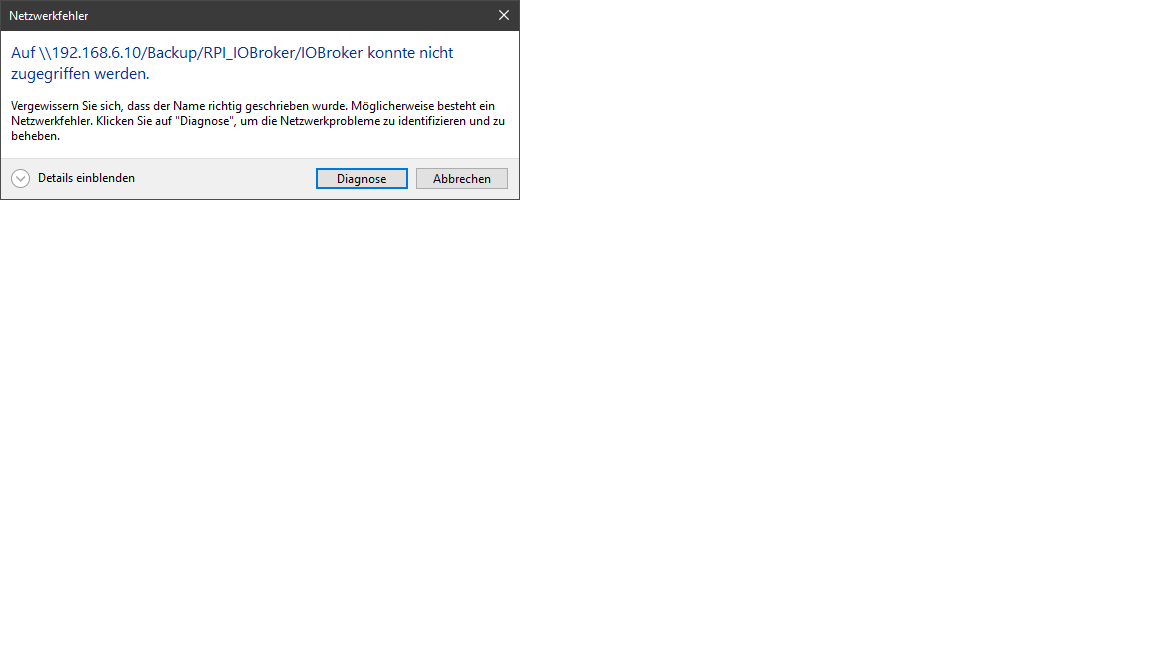
-
@glasfaser sagte in Broker->BackItUp FTP->Synology:
@BerlonWas sagt die Ausgabe von
cat /proc/filesystems|grep cifsauf der Pi
Teste mal :
//192.168.6.10/Backup/RPI_IOBroker
/IOBroker
//192.168.6.10/Backup/RPI_IOBroker/IOBroker@berlon sagte in Broker->BackItUp FTP->Synology:
ok so passiert was.
\192.168.6.10\Backup\RPI_IOBroker\IOBroker
\192.168.6.10\Backup\RPI_IOBroker\IOBroker
\192.168.6.10\Backup\RPI_IOBroker\IOBrokerEDIT :
davor ist natürlich der\\wird nur hier als \ angezeigt , -
@berlon sagte in Broker->BackItUp FTP->Synology:
ok so passiert was.
\192.168.6.10\Backup\RPI_IOBroker\IOBroker
\192.168.6.10\Backup\RPI_IOBroker\IOBroker
\192.168.6.10\Backup\RPI_IOBroker\IOBrokerEDIT :
davor ist natürlich der\\wird nur hier als \ angezeigt ,@glasfaser said in Broker->BackItUp FTP->Synology:
\192.168.6.10\Backup\RPI_IOBroker\IOBroker
hat nach Eingabe der Zugangsdaten vollen Zugriff, auch auf die darüber liegenden Ordner.
-
@glasfaser said in Broker->BackItUp FTP->Synology:
\192.168.6.10\Backup\RPI_IOBroker\IOBroker
hat nach Eingabe der Zugangsdaten vollen Zugriff, auch auf die darüber liegenden Ordner.
@berlon sagte in Broker->BackItUp FTP->Synology:
hat nach Eingabe der Zugangsdaten
die wurden aber doch vorhin nicht abgefragt!
ich dachte
\\192.168.6.10\Backupwäre dein share?
hast du die Rechte doch nicht korrekt vergeben, so dass der User erst im Unterverzeichnis abgefragt wird, oder ist das Unterverzeichnis der share? -
@glasfaser sagte in Broker->BackItUp FTP->Synology:
@BerlonWas sagt die Ausgabe von
cat /proc/filesystems|grep cifsauf der Pi
Teste mal :
//192.168.6.10/Backup/RPI_IOBroker
/IOBroker
//192.168.6.10/Backup/RPI_IOBroker/IOBroker@glasfaser sagte in Broker->BackItUp FTP->Synology:
@Berlon
Was sagt die Ausgabe von
cat /proc/filesystems|grep cifsauf der Pi
Zum dritten
Synology 918+ 16GB - ioBroker in Docker v9 , VISO auf Trekstor Primebook C13 13,3" , Hikvision Domkameras mit Surveillance Station .. CCU RaspberryMatic in Synology VM .. Zigbee CC2538+CC2592 .. Sonoff .. KNX .. Modbus ..
-
@glasfaser sagte in Broker->BackItUp FTP->Synology:
@Berlon
Was sagt die Ausgabe von
cat /proc/filesystems|grep cifsauf der Pi
Zum dritten
@glasfaser sagte in Broker->BackItUp FTP->Synology:
@glasfaser sagte in Broker->BackItUp FTP->Synology:
@Berlon
Was sagt die Ausgabe von
cat /proc/filesystems|grep cifsauf der Pi
Zum dritten
Das Leben ist kein Ponyhof!
kein Support per PN! - Fragen im Forum stellen - Benutzt das Voting rechts unten im Beitrag wenn er euch geholfen hat.
Das Forum freut sich über eine Spende. Benutzt dazu den Spendenbutton oben rechts. Danke!
der Installationsfixer: curl -fsL https://iobroker.net/fix.sh | bash - -
@glasfaser sagte in Broker->BackItUp FTP->Synology:
@glasfaser sagte in Broker->BackItUp FTP->Synology:
@Berlon
Was sagt die Ausgabe von
cat /proc/filesystems|grep cifsauf der Pi
Zum dritten
Das Leben ist kein Ponyhof!
so
ich habe Zugriff auf:
\192.168.6.10\Backup
auf:
\192.168.6.10\Backup\RPI_IOBroker
und:
\192.168.6.10\Backup\RPI_IOBroker\IOBroker
Da sollten die Rechte stimmen.pi@raspberrypi:~ $ cat /proc/filesystems|grep cifs pi@raspberrypi:~ $Keine Ausgabe
Auch mit sudo voran gestellt.
pi@raspberrypi:~ $ sudo cat /proc/filesystems|grep cifs pi@raspberrypi:~ $ -
so
ich habe Zugriff auf:
\192.168.6.10\Backup
auf:
\192.168.6.10\Backup\RPI_IOBroker
und:
\192.168.6.10\Backup\RPI_IOBroker\IOBroker
Da sollten die Rechte stimmen.pi@raspberrypi:~ $ cat /proc/filesystems|grep cifs pi@raspberrypi:~ $Keine Ausgabe
Auch mit sudo voran gestellt.
pi@raspberrypi:~ $ sudo cat /proc/filesystems|grep cifs
pi@raspberrypi:~ $


Hey! Du scheinst an dieser Unterhaltung interessiert zu sein, hast aber noch kein Konto.
Hast du es satt, bei jedem Besuch durch die gleichen Beiträge zu scrollen? Wenn du dich für ein Konto anmeldest, kommst du immer genau dorthin zurück, wo du zuvor warst, und kannst dich über neue Antworten benachrichtigen lassen (entweder per E-Mail oder Push-Benachrichtigung). Du kannst auch Lesezeichen speichern und Beiträge positiv bewerten, um anderen Community-Mitgliedern deine Wertschätzung zu zeigen.
Mit deinem Input könnte dieser Beitrag noch besser werden 💗
Registrieren Anmelden463
Online33.0k
Benutzer83.6k
Themen1.3m
Beiträge