
NEWS




Test Adapter ioBroker.backitup v3.1.x
-
@thomas-braun der Pfad ist angepasst, ich habe zwei Instanzen von Adaptern gestopt, die gerade nicht benötigt werden und jetzt backitup gestartet. Die Weboberfläche ist nicht erreichbar ( backitup wurde vor 15min. Gestartet ). Ich vermute immer noch als Ursache den Speicherverbrauch vom backitup.
Linux tinkerboard 4.4.132+ #8 SMP Thu Aug 13 08:51:08 UTC 2020 armv7l

The programs included with the Debian GNU/Linux system are free software;
the exact distribution terms for each program are described in the
individual files in /usr/share/doc/*/copyright.

Debian GNU/Linux comes with ABSOLUTELY NO WARRANTY, to the extent
permitted by applicable law.
Last login: Wed Sep 29 08:34:38 2021 from 192.168.178.165
pi@tinkerboard:~$ free ht
              total        used        free      shared  buff/cache   available
Mem:        2057272     1966896       48864       21408       41512       53256
Swap:        102396      102396           0
pi@tinkerboard:~$ free ht
              total        used        free      shared  buff/cache   available
Mem:        2057272     1969604       46904       21408       40764       50848
Swap:        102396      102396           0
pi@tinkerboard:~$ free ht
              total        used        free      shared  buff/cache   available
Mem:        2057272     1969584       47864       21408       39824       51284
Swap:        102396      102396           0
pi@tinkerboard:~$ free ht
              total        used        free      shared  buff/cache   available
Mem:        2057272     1973244       45204       21408       38824       48060
Swap:        102396      102396           0
pi@tinkerboard:~$ free ht
              total        used        free      shared  buff/cache   available
Mem:        2057272     1266588       49040       20672      741644      750548
Swap:        102396      102396           0
pi@tinkerboard:~$
Nach iobroker restart
pi@tinkerboard:~$ free ht
              total        used        free      shared  buff/cache   available
Mem:        2057272      942636      348576       20940      766060     1074296
Swap:        102396       83212       19184
pi@tinkerboard:~$ free ht
``
Alle Raspberry ( 5 ) gegen NUC (N100, 16GB Ram und 500GB M2 SSD, extern 2TB SSD ) mit Proxmox 8.3.3 gewechselt. Läuft absolut super !
(Iobroker, Grafana, Teslalogger, Nextcloud, go2rtc, PiHole, IOB-VIS2, Teslamate, homeassistant nur als test) -
@thomas-braun der Pfad ist angepasst, ich habe zwei Instanzen von Adaptern gestopt, die gerade nicht benötigt werden und jetzt backitup gestartet. Die Weboberfläche ist nicht erreichbar ( backitup wurde vor 15min. Gestartet ). Ich vermute immer noch als Ursache den Speicherverbrauch vom backitup.
Linux tinkerboard 4.4.132+ #8 SMP Thu Aug 13 08:51:08 UTC 2020 armv7l

The programs included with the Debian GNU/Linux system are free software;
the exact distribution terms for each program are described in the
individual files in /usr/share/doc/*/copyright.

Debian GNU/Linux comes with ABSOLUTELY NO WARRANTY, to the extent
permitted by applicable law.
Last login: Wed Sep 29 08:34:38 2021 from 192.168.178.165
pi@tinkerboard:~$ free ht
              total        used        free      shared  buff/cache   available
Mem:        2057272     1966896       48864       21408       41512       53256
Swap:        102396      102396           0
pi@tinkerboard:~$ free ht
              total        used        free      shared  buff/cache   available
Mem:        2057272     1969604       46904       21408       40764       50848
Swap:        102396      102396           0
pi@tinkerboard:~$ free ht
              total        used        free      shared  buff/cache   available
Mem:        2057272     1969584       47864       21408       39824       51284
Swap:        102396      102396           0
pi@tinkerboard:~$ free ht
              total        used        free      shared  buff/cache   available
Mem:        2057272     1973244       45204       21408       38824       48060
Swap:        102396      102396           0
pi@tinkerboard:~$ free ht
              total        used        free      shared  buff/cache   available
Mem:        2057272     1266588       49040       20672      741644      750548
Swap:        102396      102396           0
pi@tinkerboard:~$
Nach iobroker restart
pi@tinkerboard:~$ free ht total used free shared buff/cache available Mem: 2057272 942636 348576 20940 766060 1074296 Swap: 102396 83212 19184 pi@tinkerboard:~$ free ht ``@hal Wie groß ist denn dein iobroker Backup und dein Influx Backup?
-
@simatec Ich vermute das Problem bei den von mir kürzlich installierten ring Adapter. Im Backup werden alle jpg und mp4 mit gespeichert und das bläst die "iobroker_2021_09_26-05_05_20_TinkerS_backupiobroker.tar.gz" auf die doppelte Größe ( den speicherpfad habe ich jetzt von /iobroker-data in /home geändert) Grafana wird auch nicht mehr gespeichert, das werde ich mir näher ansehen.
btw gäbe es eine Möglichkeit einzelne kleine shell scripte mit in den backup prozess aufzunehmen ?
Alle Raspberry ( 5 ) gegen NUC (N100, 16GB Ram und 500GB M2 SSD, extern 2TB SSD ) mit Proxmox 8.3.3 gewechselt. Läuft absolut super !
(Iobroker, Grafana, Teslalogger, Nextcloud, go2rtc, PiHole, IOB-VIS2, Teslamate, homeassistant nur als test) -
@simatec Ich vermute das Problem bei den von mir kürzlich installierten ring Adapter. Im Backup werden alle jpg und mp4 mit gespeichert und das bläst die "iobroker_2021_09_26-05_05_20_TinkerS_backupiobroker.tar.gz" auf die doppelte Größe ( den speicherpfad habe ich jetzt von /iobroker-data in /home geändert) Grafana wird auch nicht mehr gespeichert, das werde ich mir näher ansehen.
btw gäbe es eine Möglichkeit einzelne kleine shell scripte mit in den backup prozess aufzunehmen ?
@hal Wenn du Ring verwendest, wird dein Backup schnell riesengroß und kann bei dem vorhandenen RAM zu Problemen führen.
Entweder auslagern oder regelmäßig löschen lassen.
Glaub im Ring Adapter gibt es dafür Optionen -
@hal Wenn du Ring verwendest, wird dein Backup schnell riesengroß und kann bei dem vorhandenen RAM zu Problemen führen.
Entweder auslagern oder regelmäßig löschen lassen.
Glaub im Ring Adapter gibt es dafür Optionen@simatec ich move die Dateien jedes Stunde auf einen samba server, eigentlich sollte die Datei Nachts leer sein. Ich stoße gleich noch mal einen Backup an, lösche vorher alle jpg/mp4.
Das hat leider nichts verbessert. Beim/nach backup ist iobroker nicht mehr erreichbar....
Ich habe jetzt mal nur den iobroker Backup im Adapter aktiviert, aber es passiert genau das gleiche. Die Weboberfläche ist nicht mehr erreichbar.
next try. Adapter gelöscht und von github neu installiert. Nur iobroker backup laufen gelassen und hängt sich wieder auf.
Alle Raspberry ( 5 ) gegen NUC (N100, 16GB Ram und 500GB M2 SSD, extern 2TB SSD ) mit Proxmox 8.3.3 gewechselt. Läuft absolut super !
(Iobroker, Grafana, Teslalogger, Nextcloud, go2rtc, PiHole, IOB-VIS2, Teslamate, homeassistant nur als test) -
@simatec ich move die Dateien jedes Stunde auf einen samba server, eigentlich sollte die Datei Nachts leer sein. Ich stoße gleich noch mal einen Backup an, lösche vorher alle jpg/mp4.
Das hat leider nichts verbessert. Beim/nach backup ist iobroker nicht mehr erreichbar....
Ich habe jetzt mal nur den iobroker Backup im Adapter aktiviert, aber es passiert genau das gleiche. Die Weboberfläche ist nicht mehr erreichbar.
next try. Adapter gelöscht und von github neu installiert. Nur iobroker backup laufen gelassen und hängt sich wieder auf.
@hal
Du hast noch nicht die Frage beantwortet, wie groß das Backup ist?
Wieviel MB hat dein Backup? -
@hal
Du hast noch nicht die Frage beantwortet, wie groß das Backup ist?
Wieviel MB hat dein Backup?@simatec
Ich denke ich habe den Fehler gefunden. Der sitzt wie meistens vor der Konsole. der ring Adapter speichert die jpg + mp4 nicht nur im snapshoot Pfad sondern zusätzlich im Adapter Pfad selbst. Im Adapterpfad waren noch alte Dateien, die den Backup unsinnig aufgeblasen haben.
Nach dem ich jetzt alles bereinigt habe, läuft der Backup durch.
Grösse:
iobroker 11.238k
influxdb 254.801K
Grafana der Backup läuft nicht , den Fehler muß ich noch suchen
Meldung:[DEBUG] [grafana] - Start Grafana Backup ... [DEBUG] [grafana] - Created grafana_tmp directory: "/opt/iobroker/backups/grafana_tmp" [DEBUG] [grafana] - Created dashboard directory [DEBUG] [grafana] - Created dashboards_manually_restore directory [DEBUG] [grafana] - Created datasource directory [DEBUG] [grafana] - start Grafana request ... [DEBUG] [grafana] - Grafana is available ... Status: 200 [DEBUG] [grafana] - Error on Grafana Dashoard Request: Error: Request failed with status code 401 [DEBUG] [grafana] - start Grafana backup compress ... [DEBUG] [grafana] - Try deleting the Grafana tmp directory: "/opt/iobroker/backups/grafana_tmp" [DEBUG] [grafana] - Grafana tmp directory "/opt/iobroker/backups/grafana_tmp" successfully deleted [DEBUG] [grafana] - cannot found Grafana Backup filesAlle Raspberry ( 5 ) gegen NUC (N100, 16GB Ram und 500GB M2 SSD, extern 2TB SSD ) mit Proxmox 8.3.3 gewechselt. Läuft absolut super !
(Iobroker, Grafana, Teslalogger, Nextcloud, go2rtc, PiHole, IOB-VIS2, Teslamate, homeassistant nur als test) -
@simatec
Ich denke ich habe den Fehler gefunden. Der sitzt wie meistens vor der Konsole. der ring Adapter speichert die jpg + mp4 nicht nur im snapshoot Pfad sondern zusätzlich im Adapter Pfad selbst. Im Adapterpfad waren noch alte Dateien, die den Backup unsinnig aufgeblasen haben.
Nach dem ich jetzt alles bereinigt habe, läuft der Backup durch.
Grösse:
iobroker 11.238k
influxdb 254.801K
Grafana der Backup läuft nicht , den Fehler muß ich noch suchen
Meldung:[DEBUG] [grafana] - Start Grafana Backup ... [DEBUG] [grafana] - Created grafana_tmp directory: "/opt/iobroker/backups/grafana_tmp" [DEBUG] [grafana] - Created dashboard directory [DEBUG] [grafana] - Created dashboards_manually_restore directory [DEBUG] [grafana] - Created datasource directory [DEBUG] [grafana] - start Grafana request ... [DEBUG] [grafana] - Grafana is available ... Status: 200 [DEBUG] [grafana] - Error on Grafana Dashoard Request: Error: Request failed with status code 401 [DEBUG] [grafana] - start Grafana backup compress ... [DEBUG] [grafana] - Try deleting the Grafana tmp directory: "/opt/iobroker/backups/grafana_tmp" [DEBUG] [grafana] - Grafana tmp directory "/opt/iobroker/backups/grafana_tmp" successfully deleted [DEBUG] [grafana] - cannot found Grafana Backup files -
Ab sofort steht die Version 2.2.0 auf Github und in kürze auch im latest zur Verfügung.
Die Version enthält einige Neuerungen, die ich hier kurz zusammenfasse.
Eine ausführliche Erklärung zu den neuen Funktionen findet Ihr in der Doku zum Adapter.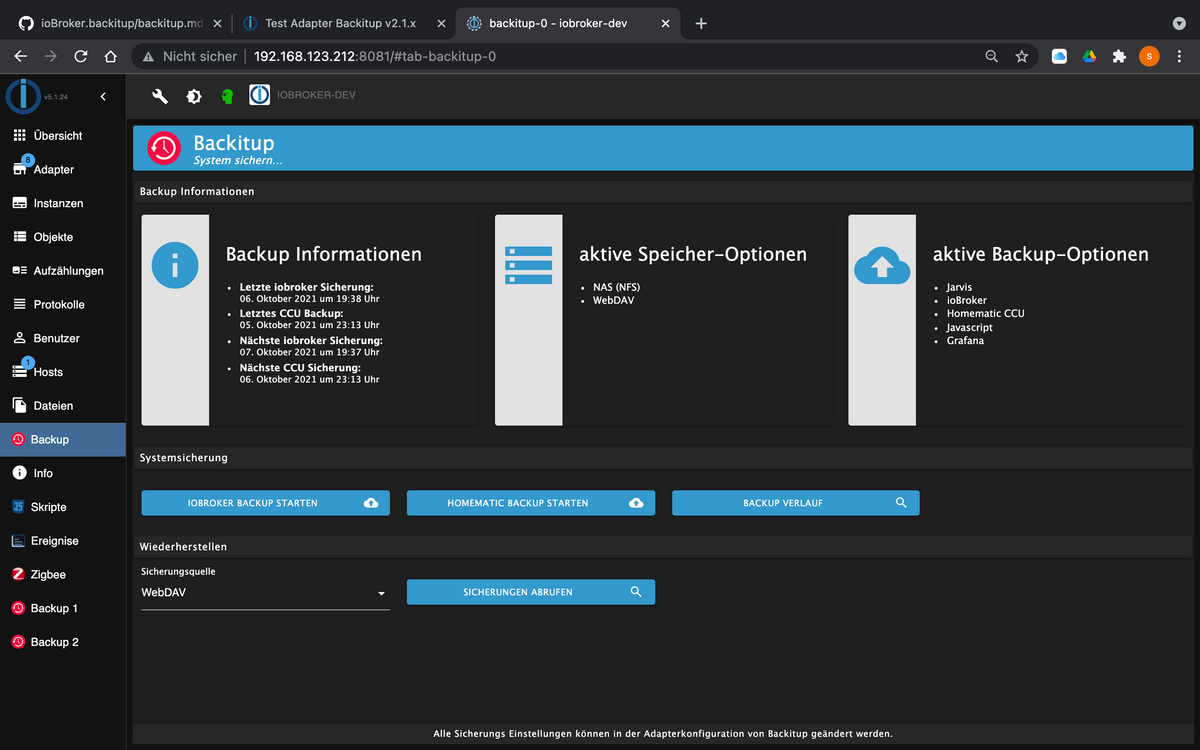
Changelog
2.2.0 (06.10.2021)
- (simatec) multihost function for master/slave systems added
- (simatec) Multi CCU Backup added
- (simatec) Multi InfluxDB Backup added
- (simatec) Multi MySql Backup added
- (simatec) Multi PGSql Backup added
- (simatec) Yahka backup added
- (simatec) Yahka Restore added
- (simatec) new Restore Interface added
- (simatec) new Tab-Menu added
- (simatec) Docker Support added
- (simatec) delete option for temp-directory added
- (simatec) breaking changes!! Javascript Backup from Objects added
- (simatec) breaking changes!! Javascript Restore from Objects added
- (simatec) WebDav option to use self-signed certificates
Wichtige Informationen zum Multihost-Support findet ihr hier
Weitere Informationen zum Docker-Support sind hier zu finden und Änderungen des Javascript-Backup findet ihr hierViel Spaß beim testen ...
-
Vielleicht wurde das folgende Problem ja schon in den letzten >684 Beiträgen behandelt?
Wenn Backitup den Mount für das Backup nicht einbinden kann (zumindest bei einer Windowsfreigabe mit CIFS unter SMB 2.0), dann werden danach keine weiteren Backups durchgeführt. Das Datum für das nächste Backup bleibt "hängen". Man muss die Instanz neu starten damit wieder Backups in der Zukunft erfolgen.
-
Vielleicht wurde das folgende Problem ja schon in den letzten >684 Beiträgen behandelt?
Wenn Backitup den Mount für das Backup nicht einbinden kann (zumindest bei einer Windowsfreigabe mit CIFS unter SMB 2.0), dann werden danach keine weiteren Backups durchgeführt. Das Datum für das nächste Backup bleibt "hängen". Man muss die Instanz neu starten damit wieder Backups in der Zukunft erfolgen.
@dr-bakterius Kannst du dazu bitte den Debug-Log posten
-
@simatec sagte in Test Adapter Backitup v2.2.x:
@dr-bakterius Kannst du dazu bitte den Debug-Log posten
Klar. Ich habe mal die Backup-Zeit umgestellt und den Adapter auf 'debug' gestellt. Dann habe ich die Netzwerkverbindung zu der Windwos-Freigabe getrennt und den Backupprozess durchlaufen lassen. Hier das dazugehörende Log:
2021-10-10 10:19:29.844 - info: backitup.0 (15968) Got terminate signal TERMINATE_YOURSELF
2021-10-10 10:19:29.868 - info: backitup.0 (15968) cleaned everything up...
2021-10-10 10:19:29.869 - info: backitup.0 (15968) terminating
2021-10-10 10:19:29.871 - info: backitup.0 (15968) Terminated (ADAPTER_REQUESTED_TERMINATION): Without reason
2021-10-10 10:19:35.299 - info: backitup.0 (14574) starting. Version 2.1.17 in /opt/iobroker/node_modules/iobroker.backitup, node: v14.17.6, js-controller: 3.3.18
2021-10-10 10:19:35.371 - info: backitup.0 (14574) [iobroker] backup was activated at 10:25 every 1 day(s)
2021-10-10 10:19:35.464 - info: backitup.0 (14574) [ccu] backup was activated at 10:30 every 1 day(s)
2021-10-10 10:19:41.279 - info: backitup.0 (14574) Got terminate signal TERMINATE_YOURSELF
2021-10-10 10:19:41.281 - info: backitup.0 (14574) cleaned everything up...
2021-10-10 10:19:41.284 - info: backitup.0 (14574) terminating
2021-10-10 10:19:41.286 - info: backitup.0 (14574) Terminated (ADAPTER_REQUESTED_TERMINATION): Without reason
2021-10-10 10:19:45.423 - debug: backitup.0 (14688) Redis Objects: Use Redis connection: 127.0.0.1:9001
2021-10-10 10:19:45.469 - debug: backitup.0 (14688) Objects client ready ... initialize now
2021-10-10 10:19:45.471 - debug: backitup.0 (14688) Objects create System PubSub Client
2021-10-10 10:19:45.472 - debug: backitup.0 (14688) Objects create User PubSub Client
2021-10-10 10:19:45.473 - debug: backitup.0 (14688) Objects client initialize lua scripts
2021-10-10 10:19:45.513 - debug: backitup.0 (14688) Objects connected to redis: 127.0.0.1:9001
2021-10-10 10:19:45.522 - debug: backitup.0 (14688) objectDB connected
2021-10-10 10:19:45.524 - debug: backitup.0 (14688) Redis States: Use Redis connection: 127.0.0.1:9000
2021-10-10 10:19:45.558 - debug: backitup.0 (14688) States create System PubSub Client
2021-10-10 10:19:45.560 - debug: backitup.0 (14688) States create User PubSub Client
2021-10-10 10:19:45.606 - debug: backitup.0 (14688) States connected to redis: 127.0.0.1:9000
2021-10-10 10:19:45.607 - debug: backitup.0 (14688) statesDB connected
2021-10-10 10:19:46.210 - debug: backitup.0 (14688) Plugin sentry Do not initialize Plugin (enabled=false)
2021-10-10 10:19:46.261 - debug: backitup.0 (14688) Plugin sentry destroyed because not initialized correctly
2021-10-10 10:19:46.269 - info: backitup.0 (14688) starting. Version 2.1.17 in /opt/iobroker/node_modules/iobroker.backitup, node: v14.17.6, js-controller: 3.3.18
2021-10-10 10:19:46.353 - info: backitup.0 (14688) [iobroker] backup was activated at 10:25 every 1 day(s)
2021-10-10 10:19:46.408 - info: backitup.0 (14688) [ccu] backup was activated at 10:30 every 1 day(s)
2021-10-10 10:19:46.432 - debug: backitup.0 (14688) noserverino option: false
2021-10-10 10:19:46.433 - debug: backitup.0 (14688) cifs-mount command: "sudo mount -t cifs -o username=****,password=****,rw,file_mode=0777,dir_mode=0777,vers=2.0 //192.168.1.10backup/ioBroker /opt/iobroker/backups"
2021-10-10 10:19:46.474 - debug: backitup.0 (14688) first mount attempt with smb option failed. try next mount attempt without smb option ...
2021-10-10 10:19:46.475 - debug: backitup.0 (14688) cifs-mount command: "sudo mount -t cifs -o username=****,password=****,rw,file_mode=0777,dir_mode=0777 //192.168.1.10backup/ioBroker /opt/iobroker/backups"
2021-10-10 10:19:46.544 - debug: backitup.0 (14688) mount successfully completed
2021-10-10 10:19:48.558 - debug: backitup.0 (14688) detect backup file 1 from cifs: iobroker_2021_09_01-02_50_20_backupiobroker.tar.gz
2021-10-10 10:19:48.559 - debug: backitup.0 (14688) detect backup file 2 from cifs: iobroker_2021_09_02-02_50_20_backupiobroker.tar.gz
2021-10-10 10:19:48.560 - debug: backitup.0 (14688) detect backup file 3 from cifs: iobroker_2021_09_03-02_50_20_backupiobroker.tar.gz
2021-10-10 10:19:48.560 - debug: backitup.0 (14688) detect backup file 4 from cifs: iobroker_2021_09_12-02_50_20_backupiobroker.tar.gz
2021-10-10 10:19:48.560 - debug: backitup.0 (14688) detect backup file 5 from cifs: iobroker_2021_09_13-02_50_20_backupiobroker.tar.gz
2021-10-10 10:19:48.561 - debug: backitup.0 (14688) detect backup file 6 from cifs: iobroker_2021_09_14-02_50_25_backupiobroker.tar.gz
2021-10-10 10:19:48.561 - debug: backitup.0 (14688) detect backup file 7 from cifs: iobroker_2021_09_15-02_50_20_backupiobroker.tar.gz
2021-10-10 10:19:48.562 - debug: backitup.0 (14688) detect backup file 8 from cifs: iobroker_2021_09_16-02_50_20_backupiobroker.tar.gz
2021-10-10 10:19:48.562 - debug: backitup.0 (14688) detect backup file 9 from cifs: iobroker_2021_09_17-02_50_20_backupiobroker.tar.gz
2021-10-10 10:19:48.562 - debug: backitup.0 (14688) detect backup file 10 from cifs: iobroker_2021_09_18-02_50_20_backupiobroker.tar.gz
2021-10-10 10:19:48.563 - debug: backitup.0 (14688) detect backup file 11 from cifs: iobroker_2021_09_19-02_50_25_backupiobroker.tar.gz
2021-10-10 10:19:48.563 - debug: backitup.0 (14688) detect backup file 12 from cifs: iobroker_2021_09_20-02_50_20_backupiobroker.tar.gz
2021-10-10 10:19:48.564 - debug: backitup.0 (14688) detect backup file 13 from cifs: iobroker_2021_09_21-02_50_25_backupiobroker.tar.gz
2021-10-10 10:19:48.564 - debug: backitup.0 (14688) detect backup file 14 from cifs: iobroker_2021_09_22-02_50_20_backupiobroker.tar.gz
2021-10-10 10:19:48.564 - debug: backitup.0 (14688) detect backup file 15 from cifs: iobroker_2021_09_23-02_50_20_backupiobroker.tar.gz
2021-10-10 10:19:48.565 - debug: backitup.0 (14688) detect backup file 16 from cifs: iobroker_2021_09_24-02_50_20_backupiobroker.tar.gz
2021-10-10 10:19:48.565 - debug: backitup.0 (14688) detect backup file 17 from cifs: iobroker_2021_09_25-02_50_20_backupiobroker.tar.gz
2021-10-10 10:19:48.566 - debug: backitup.0 (14688) detect backup file 18 from cifs: iobroker_2021_09_26-02_50_20_backupiobroker.tar.gz
2021-10-10 10:19:48.567 - debug: backitup.0 (14688) detect backup file 19 from cifs: iobroker_2021_09_27-02_50_25_backupiobroker.tar.gz
2021-10-10 10:19:48.567 - debug: backitup.0 (14688) detect backup file 20 from cifs: iobroker_2021_09_28-02_50_20_backupiobroker.tar.gz
2021-10-10 10:19:48.568 - debug: backitup.0 (14688) detect backup file 21 from cifs: iobroker_2021_09_29-02_50_20_backupiobroker.tar.gz
2021-10-10 10:19:48.568 - debug: backitup.0 (14688) detect backup file 22 from cifs: iobroker_2021_09_30-02_50_20_backupiobroker.tar.gz
2021-10-10 10:19:48.569 - debug: backitup.0 (14688) detect backup file 23 from cifs: iobroker_2021_10_01-02_50_20_backupiobroker.tar.gz
2021-10-10 10:19:48.570 - debug: backitup.0 (14688) detect backup file 24 from cifs: iobroker_2021_10_02-02_50_20_backupiobroker.tar.gz
2021-10-10 10:19:48.570 - debug: backitup.0 (14688) detect backup file 25 from cifs: iobroker_2021_10_08-02_50_20_backupiobroker.tar.gz
2021-10-10 10:19:48.571 - debug: backitup.0 (14688) detect backup file 26 from cifs: iobroker_2021_10_09-02_50_20_backupiobroker.tar.gz
2021-10-10 10:19:48.571 - debug: backitup.0 (14688) detect backup file 27 from cifs: iobroker_2021_10_10-02_50_20_backupiobroker.tar.gz
2021-10-10 10:19:48.573 - debug: backitup.0 (14688) detect last backup file: iobroker_2021_10_10-02_50_20_backupiobroker.tar.gz
2021-10-10 10:19:56.338 - debug: backitup.0 (14688) mount activ... umount in 2 Seconds!!
2021-10-10 10:19:58.366 - debug: backitup.0 (14688) umount successfully completed
2021-10-10 10:25:10.232 - debug: backitup.0 (14688) Backup has started ...
2021-10-10 10:25:20.233 - debug: backitup.0 (14688) [iobroker/mount] noserverino option: false
2021-10-10 10:25:20.234 - debug: backitup.0 (14688) [iobroker/mount] cifs-mount command: "sudo mount -t cifs -o username=****,password=****,rw,file_mode=0777,dir_mode=0777,vers=2.0 //192.168.1.10/backup/ioBroker /opt/iobroker/backups"
2021-10-10 10:25:26.413 - debug: backitup.0 (14688) [iobroker/mount] first mount attempt with smb option failed. try next mount attempt without smb option ...
2021-10-10 10:25:26.414 - debug: backitup.0 (14688) [iobroker/mount] cifs-mount command: "sudo mount -t cifs -o username=****,password=****,rw,file_mode=0777,dir_mode=0777 //192.168.1.10/backup/ioBroker /opt/iobroker/backups"
2021-10-10 10:25:32.553 - debug: backitup.0 (14688) [iobroker/mount] [undefined Error: Command failed: sudo mount -t cifs -o username=****,password=****,rw,file_mode=0777,dir_mode=0777 //192.168.1.10/backup/ioBroker /opt/iobroker/backups
2021-10-10 10:25:32.553 - debug: backitup.0 (14688) [iobroker/mount] mount: /opt/iobroker/backups: special device //192.168.1.10/backup/ioBroker does not exist.
2021-10-10 10:25:32.554 - debug: backitup.0 (14688) [iobroker/mount] [IGNORED] Error: Command failed: sudo mount -t cifs -o username=****,password=****,rw,file_mode=0777,dir_mode=0777 //192.168.1.10/backup/ioBroker /opt/iobroker/backups
2021-10-10 10:25:32.555 - debug: backitup.0 (14688) [iobroker/mount] mount: /opt/iobroker/backups: special device //192.168.1.10/backup/ioBroker does not exist.
2021-10-10 10:25:35.964 - debug: backitup.0 (14688) [iobroker/iobroker] host.iobroker 11823 states saved
2021-10-10 10:25:35.998 - debug: backitup.0 (14688) [iobroker/iobroker] host.iobroker 11040 objects saved
2021-10-10 10:25:41.152 - debug: backitup.0 (14688) [iobroker/iobroker] Backup created: /opt/iobroker/backups/iobroker_2021_10_10-10_25_32_backupiobroker.tar.gz
2021-10-10 10:25:42.198 - debug: backitup.0 (14688) [iobroker/iobroker] done
2021-10-10 10:26:22.113 - debug: backitup.0 (14688) [iobroker/mysql] Packed 19MB so far...
2021-10-10 10:26:31.720 - debug: backitup.0 (14688) [iobroker/mysql] MySql File deleted!
2021-10-10 10:26:31.728 - debug: backitup.0 (14688) [iobroker/mysql] done
2021-10-10 10:26:33.365 - debug: backitup.0 (14688) [iobroker/javascripts] Backup created: /opt/iobroker/backups/javascripts_2021_10_10-10_26_32_backupiobroker.tar.gz
2021-10-10 10:26:33.366 - debug: backitup.0 (14688) [iobroker/javascripts] done
2021-10-10 10:26:33.672 - debug: backitup.0 (14688) [iobroker/cifs] done
2021-10-10 10:26:34.275 - debug: backitup.0 (14688) [iobroker/clean] Backup files not deleted from /opt/iobroker/backups because some errors.
2021-10-10 10:26:34.275 - debug: backitup.0 (14688) [iobroker/clean] done
2021-10-10 10:26:34.600 - debug: backitup.0 (14688) sendTo "send" to system.adapter.pushover.0 from system.adapter.backitup.0
2021-10-10 10:26:34.601 - debug: backitup.0 (14688) [iobroker/pushover] done
2021-10-10 10:26:35.057 - debug: backitup.0 (14688) [iobroker/historyHTML] new history html values created
2021-10-10 10:26:35.058 - debug: backitup.0 (14688) [iobroker/historyHTML] done
2021-10-10 10:26:35.213 - debug: backitup.0 (14688) [iobroker/historyJSON] new history json values created
2021-10-10 10:26:35.214 - debug: backitup.0 (14688) [iobroker/historyJSON] done
Danach wird um 10:37 Uhr im Adapter folgendes angezeigt:
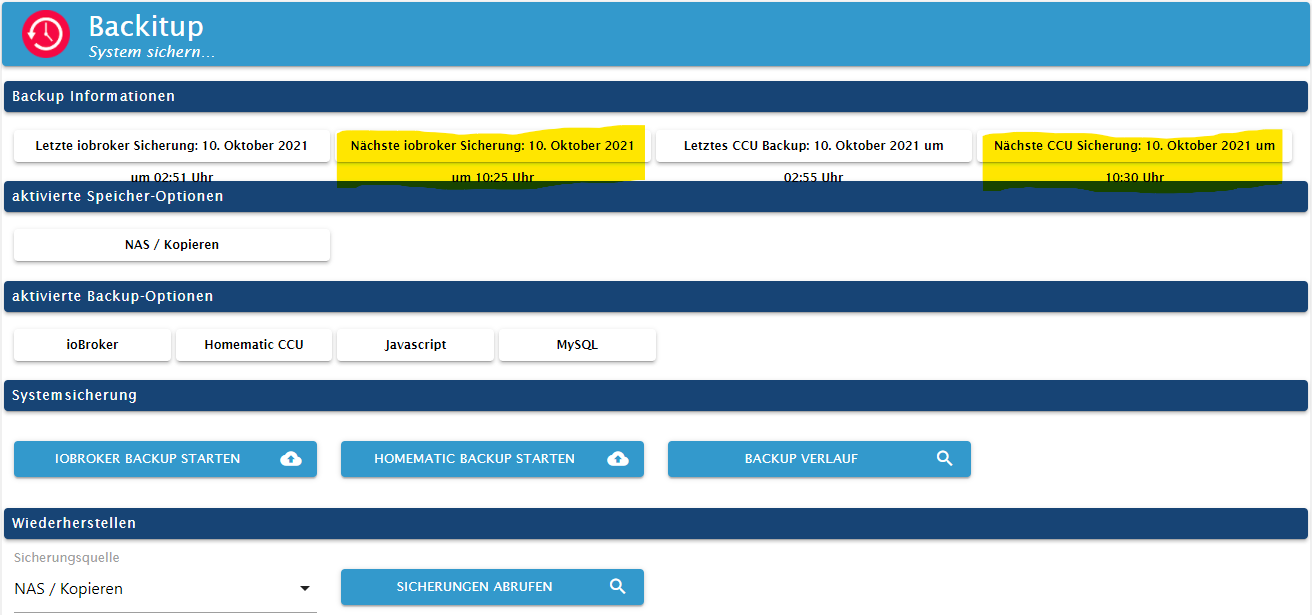
Es bleibt also der alte verstrichene Zeitpunkt erhalten und es werden keine künftigen Backups durchgeführt. Die geplante CCU-Sicherung um 10:30 Uhr wurde erst gar nicht versucht (klappt aber wenn der Mountpunkt vorhanden ist).
-
@simatec sagte in Test Adapter Backitup v2.2.x:
@dr-bakterius Kannst du dazu bitte den Debug-Log posten
Klar. Ich habe mal die Backup-Zeit umgestellt und den Adapter auf 'debug' gestellt. Dann habe ich die Netzwerkverbindung zu der Windwos-Freigabe getrennt und den Backupprozess durchlaufen lassen. Hier das dazugehörende Log:
2021-10-10 10:19:29.844 - info: backitup.0 (15968) Got terminate signal TERMINATE_YOURSELF
2021-10-10 10:19:29.868 - info: backitup.0 (15968) cleaned everything up...
2021-10-10 10:19:29.869 - info: backitup.0 (15968) terminating
2021-10-10 10:19:29.871 - info: backitup.0 (15968) Terminated (ADAPTER_REQUESTED_TERMINATION): Without reason
2021-10-10 10:19:35.299 - info: backitup.0 (14574) starting. Version 2.1.17 in /opt/iobroker/node_modules/iobroker.backitup, node: v14.17.6, js-controller: 3.3.18
2021-10-10 10:19:35.371 - info: backitup.0 (14574) [iobroker] backup was activated at 10:25 every 1 day(s)
2021-10-10 10:19:35.464 - info: backitup.0 (14574) [ccu] backup was activated at 10:30 every 1 day(s)
2021-10-10 10:19:41.279 - info: backitup.0 (14574) Got terminate signal TERMINATE_YOURSELF
2021-10-10 10:19:41.281 - info: backitup.0 (14574) cleaned everything up...
2021-10-10 10:19:41.284 - info: backitup.0 (14574) terminating
2021-10-10 10:19:41.286 - info: backitup.0 (14574) Terminated (ADAPTER_REQUESTED_TERMINATION): Without reason
2021-10-10 10:19:45.423 - debug: backitup.0 (14688) Redis Objects: Use Redis connection: 127.0.0.1:9001
2021-10-10 10:19:45.469 - debug: backitup.0 (14688) Objects client ready ... initialize now
2021-10-10 10:19:45.471 - debug: backitup.0 (14688) Objects create System PubSub Client
2021-10-10 10:19:45.472 - debug: backitup.0 (14688) Objects create User PubSub Client
2021-10-10 10:19:45.473 - debug: backitup.0 (14688) Objects client initialize lua scripts
2021-10-10 10:19:45.513 - debug: backitup.0 (14688) Objects connected to redis: 127.0.0.1:9001
2021-10-10 10:19:45.522 - debug: backitup.0 (14688) objectDB connected
2021-10-10 10:19:45.524 - debug: backitup.0 (14688) Redis States: Use Redis connection: 127.0.0.1:9000
2021-10-10 10:19:45.558 - debug: backitup.0 (14688) States create System PubSub Client
2021-10-10 10:19:45.560 - debug: backitup.0 (14688) States create User PubSub Client
2021-10-10 10:19:45.606 - debug: backitup.0 (14688) States connected to redis: 127.0.0.1:9000
2021-10-10 10:19:45.607 - debug: backitup.0 (14688) statesDB connected
2021-10-10 10:19:46.210 - debug: backitup.0 (14688) Plugin sentry Do not initialize Plugin (enabled=false)
2021-10-10 10:19:46.261 - debug: backitup.0 (14688) Plugin sentry destroyed because not initialized correctly
2021-10-10 10:19:46.269 - info: backitup.0 (14688) starting. Version 2.1.17 in /opt/iobroker/node_modules/iobroker.backitup, node: v14.17.6, js-controller: 3.3.18
2021-10-10 10:19:46.353 - info: backitup.0 (14688) [iobroker] backup was activated at 10:25 every 1 day(s)
2021-10-10 10:19:46.408 - info: backitup.0 (14688) [ccu] backup was activated at 10:30 every 1 day(s)
2021-10-10 10:19:46.432 - debug: backitup.0 (14688) noserverino option: false
2021-10-10 10:19:46.433 - debug: backitup.0 (14688) cifs-mount command: "sudo mount -t cifs -o username=****,password=****,rw,file_mode=0777,dir_mode=0777,vers=2.0 //192.168.1.10backup/ioBroker /opt/iobroker/backups"
2021-10-10 10:19:46.474 - debug: backitup.0 (14688) first mount attempt with smb option failed. try next mount attempt without smb option ...
2021-10-10 10:19:46.475 - debug: backitup.0 (14688) cifs-mount command: "sudo mount -t cifs -o username=****,password=****,rw,file_mode=0777,dir_mode=0777 //192.168.1.10backup/ioBroker /opt/iobroker/backups"
2021-10-10 10:19:46.544 - debug: backitup.0 (14688) mount successfully completed
2021-10-10 10:19:48.558 - debug: backitup.0 (14688) detect backup file 1 from cifs: iobroker_2021_09_01-02_50_20_backupiobroker.tar.gz
2021-10-10 10:19:48.559 - debug: backitup.0 (14688) detect backup file 2 from cifs: iobroker_2021_09_02-02_50_20_backupiobroker.tar.gz
2021-10-10 10:19:48.560 - debug: backitup.0 (14688) detect backup file 3 from cifs: iobroker_2021_09_03-02_50_20_backupiobroker.tar.gz
2021-10-10 10:19:48.560 - debug: backitup.0 (14688) detect backup file 4 from cifs: iobroker_2021_09_12-02_50_20_backupiobroker.tar.gz
2021-10-10 10:19:48.560 - debug: backitup.0 (14688) detect backup file 5 from cifs: iobroker_2021_09_13-02_50_20_backupiobroker.tar.gz
2021-10-10 10:19:48.561 - debug: backitup.0 (14688) detect backup file 6 from cifs: iobroker_2021_09_14-02_50_25_backupiobroker.tar.gz
2021-10-10 10:19:48.561 - debug: backitup.0 (14688) detect backup file 7 from cifs: iobroker_2021_09_15-02_50_20_backupiobroker.tar.gz
2021-10-10 10:19:48.562 - debug: backitup.0 (14688) detect backup file 8 from cifs: iobroker_2021_09_16-02_50_20_backupiobroker.tar.gz
2021-10-10 10:19:48.562 - debug: backitup.0 (14688) detect backup file 9 from cifs: iobroker_2021_09_17-02_50_20_backupiobroker.tar.gz
2021-10-10 10:19:48.562 - debug: backitup.0 (14688) detect backup file 10 from cifs: iobroker_2021_09_18-02_50_20_backupiobroker.tar.gz
2021-10-10 10:19:48.563 - debug: backitup.0 (14688) detect backup file 11 from cifs: iobroker_2021_09_19-02_50_25_backupiobroker.tar.gz
2021-10-10 10:19:48.563 - debug: backitup.0 (14688) detect backup file 12 from cifs: iobroker_2021_09_20-02_50_20_backupiobroker.tar.gz
2021-10-10 10:19:48.564 - debug: backitup.0 (14688) detect backup file 13 from cifs: iobroker_2021_09_21-02_50_25_backupiobroker.tar.gz
2021-10-10 10:19:48.564 - debug: backitup.0 (14688) detect backup file 14 from cifs: iobroker_2021_09_22-02_50_20_backupiobroker.tar.gz
2021-10-10 10:19:48.564 - debug: backitup.0 (14688) detect backup file 15 from cifs: iobroker_2021_09_23-02_50_20_backupiobroker.tar.gz
2021-10-10 10:19:48.565 - debug: backitup.0 (14688) detect backup file 16 from cifs: iobroker_2021_09_24-02_50_20_backupiobroker.tar.gz
2021-10-10 10:19:48.565 - debug: backitup.0 (14688) detect backup file 17 from cifs: iobroker_2021_09_25-02_50_20_backupiobroker.tar.gz
2021-10-10 10:19:48.566 - debug: backitup.0 (14688) detect backup file 18 from cifs: iobroker_2021_09_26-02_50_20_backupiobroker.tar.gz
2021-10-10 10:19:48.567 - debug: backitup.0 (14688) detect backup file 19 from cifs: iobroker_2021_09_27-02_50_25_backupiobroker.tar.gz
2021-10-10 10:19:48.567 - debug: backitup.0 (14688) detect backup file 20 from cifs: iobroker_2021_09_28-02_50_20_backupiobroker.tar.gz
2021-10-10 10:19:48.568 - debug: backitup.0 (14688) detect backup file 21 from cifs: iobroker_2021_09_29-02_50_20_backupiobroker.tar.gz
2021-10-10 10:19:48.568 - debug: backitup.0 (14688) detect backup file 22 from cifs: iobroker_2021_09_30-02_50_20_backupiobroker.tar.gz
2021-10-10 10:19:48.569 - debug: backitup.0 (14688) detect backup file 23 from cifs: iobroker_2021_10_01-02_50_20_backupiobroker.tar.gz
2021-10-10 10:19:48.570 - debug: backitup.0 (14688) detect backup file 24 from cifs: iobroker_2021_10_02-02_50_20_backupiobroker.tar.gz
2021-10-10 10:19:48.570 - debug: backitup.0 (14688) detect backup file 25 from cifs: iobroker_2021_10_08-02_50_20_backupiobroker.tar.gz
2021-10-10 10:19:48.571 - debug: backitup.0 (14688) detect backup file 26 from cifs: iobroker_2021_10_09-02_50_20_backupiobroker.tar.gz
2021-10-10 10:19:48.571 - debug: backitup.0 (14688) detect backup file 27 from cifs: iobroker_2021_10_10-02_50_20_backupiobroker.tar.gz
2021-10-10 10:19:48.573 - debug: backitup.0 (14688) detect last backup file: iobroker_2021_10_10-02_50_20_backupiobroker.tar.gz
2021-10-10 10:19:56.338 - debug: backitup.0 (14688) mount activ... umount in 2 Seconds!!
2021-10-10 10:19:58.366 - debug: backitup.0 (14688) umount successfully completed
2021-10-10 10:25:10.232 - debug: backitup.0 (14688) Backup has started ...
2021-10-10 10:25:20.233 - debug: backitup.0 (14688) [iobroker/mount] noserverino option: false
2021-10-10 10:25:20.234 - debug: backitup.0 (14688) [iobroker/mount] cifs-mount command: "sudo mount -t cifs -o username=****,password=****,rw,file_mode=0777,dir_mode=0777,vers=2.0 //192.168.1.10/backup/ioBroker /opt/iobroker/backups"
2021-10-10 10:25:26.413 - debug: backitup.0 (14688) [iobroker/mount] first mount attempt with smb option failed. try next mount attempt without smb option ...
2021-10-10 10:25:26.414 - debug: backitup.0 (14688) [iobroker/mount] cifs-mount command: "sudo mount -t cifs -o username=****,password=****,rw,file_mode=0777,dir_mode=0777 //192.168.1.10/backup/ioBroker /opt/iobroker/backups"
2021-10-10 10:25:32.553 - debug: backitup.0 (14688) [iobroker/mount] [undefined Error: Command failed: sudo mount -t cifs -o username=****,password=****,rw,file_mode=0777,dir_mode=0777 //192.168.1.10/backup/ioBroker /opt/iobroker/backups
2021-10-10 10:25:32.553 - debug: backitup.0 (14688) [iobroker/mount] mount: /opt/iobroker/backups: special device //192.168.1.10/backup/ioBroker does not exist.
2021-10-10 10:25:32.554 - debug: backitup.0 (14688) [iobroker/mount] [IGNORED] Error: Command failed: sudo mount -t cifs -o username=****,password=****,rw,file_mode=0777,dir_mode=0777 //192.168.1.10/backup/ioBroker /opt/iobroker/backups
2021-10-10 10:25:32.555 - debug: backitup.0 (14688) [iobroker/mount] mount: /opt/iobroker/backups: special device //192.168.1.10/backup/ioBroker does not exist.
2021-10-10 10:25:35.964 - debug: backitup.0 (14688) [iobroker/iobroker] host.iobroker 11823 states saved
2021-10-10 10:25:35.998 - debug: backitup.0 (14688) [iobroker/iobroker] host.iobroker 11040 objects saved
2021-10-10 10:25:41.152 - debug: backitup.0 (14688) [iobroker/iobroker] Backup created: /opt/iobroker/backups/iobroker_2021_10_10-10_25_32_backupiobroker.tar.gz
2021-10-10 10:25:42.198 - debug: backitup.0 (14688) [iobroker/iobroker] done
2021-10-10 10:26:22.113 - debug: backitup.0 (14688) [iobroker/mysql] Packed 19MB so far...
2021-10-10 10:26:31.720 - debug: backitup.0 (14688) [iobroker/mysql] MySql File deleted!
2021-10-10 10:26:31.728 - debug: backitup.0 (14688) [iobroker/mysql] done
2021-10-10 10:26:33.365 - debug: backitup.0 (14688) [iobroker/javascripts] Backup created: /opt/iobroker/backups/javascripts_2021_10_10-10_26_32_backupiobroker.tar.gz
2021-10-10 10:26:33.366 - debug: backitup.0 (14688) [iobroker/javascripts] done
2021-10-10 10:26:33.672 - debug: backitup.0 (14688) [iobroker/cifs] done
2021-10-10 10:26:34.275 - debug: backitup.0 (14688) [iobroker/clean] Backup files not deleted from /opt/iobroker/backups because some errors.
2021-10-10 10:26:34.275 - debug: backitup.0 (14688) [iobroker/clean] done
2021-10-10 10:26:34.600 - debug: backitup.0 (14688) sendTo "send" to system.adapter.pushover.0 from system.adapter.backitup.0
2021-10-10 10:26:34.601 - debug: backitup.0 (14688) [iobroker/pushover] done
2021-10-10 10:26:35.057 - debug: backitup.0 (14688) [iobroker/historyHTML] new history html values created
2021-10-10 10:26:35.058 - debug: backitup.0 (14688) [iobroker/historyHTML] done
2021-10-10 10:26:35.213 - debug: backitup.0 (14688) [iobroker/historyJSON] new history json values created
2021-10-10 10:26:35.214 - debug: backitup.0 (14688) [iobroker/historyJSON] done
Danach wird um 10:37 Uhr im Adapter folgendes angezeigt:
Es bleibt also der alte verstrichene Zeitpunkt erhalten und es werden keine künftigen Backups durchgeführt. Die geplante CCU-Sicherung um 10:30 Uhr wurde erst gar nicht versucht (klappt aber wenn der Mountpunkt vorhanden ist).
@dr-bakterius
OK jetzt verstehe ich dein Problem.
Jeder Prozess während eines Backups hat eine Error Auswertung vorgesehen.
Es gibt aber Prozesse wie z.B. der mount, wo Fehler ignoriert werden.
In dem Fall steht das eigentlichen Backup in der Prio höher und das Backup wird lokal erstellt.Jetzt wäre zu überlegen, ob ich bestimmte Prozesse da konfigurierbar mache. Da muss ich mir mal Gedanken machen.
-
@dr-bakterius
OK jetzt verstehe ich dein Problem.
Jeder Prozess während eines Backups hat eine Error Auswertung vorgesehen.
Es gibt aber Prozesse wie z.B. der mount, wo Fehler ignoriert werden.
In dem Fall steht das eigentlichen Backup in der Prio höher und das Backup wird lokal erstellt.Jetzt wäre zu überlegen, ob ich bestimmte Prozesse da konfigurierbar mache. Da muss ich mir mal Gedanken machen.
@simatec Sorry, aber ich verstehe nicht was das mit der Backupplanung zu tun hat. IMHO sollte nach verstreichen der geplanten Zeit (egal ob das Backup fehlerfrei durchgeführt werden konnte oder nicht) der nächste Backupzeitpunkt geplant werden. Dann werden eben solange lokale Backups durchgeführt bis das Mountziel wieder erreichbar ist.
-
@simatec Sorry, aber ich verstehe nicht was das mit der Backupplanung zu tun hat. IMHO sollte nach verstreichen der geplanten Zeit (egal ob das Backup fehlerfrei durchgeführt werden konnte oder nicht) der nächste Backupzeitpunkt geplant werden. Dann werden eben solange lokale Backups durchgeführt bis das Mountziel wieder erreichbar ist.
-
Hallo,
ich habe zu dem Adapter auch mal eine Frage, wo ich nicht so ganz verstehe, wie dies funktioniert.
Also, ich habe auf einem FreeNAS eine SMB Freigabe, die dem Benutzer "iobroker" gehört.
Dies mounte ich auf dem Pi via BackItUp und "nutze sudo" wegen der Parameter.
Sichern klappt problemlos. Jetzt würde ich gerne die influxDB auf einem anderen Server wiederherstellen.
Dies schlägt fehl mit:backitup.0 2021-10-12 17:12:35.599 error [influxDB] infuxDB Restore not completed backitup.0 2021-10-12 17:12:35.598 error [influxDB] Error: EPERM: operation not permitted, utime '/opt/iobroker/backups/influxDBtmp/'Schaue ich in das Verzeichnis, wo ja gemounted wird, gehören alle Dateien "root". Weiter oben hatte ich dazu etwas gelesen, aber der Schreiber hat es wohl anders hinbekommen.
... wer nicht mit der Zeit geht, geht mit der Zeit ...
Aktuelle Entwicklung: Energiefluss - erweitert (https://forum.iobroker.net/topic/64734)
-
Hallo,
ich habe zu dem Adapter auch mal eine Frage, wo ich nicht so ganz verstehe, wie dies funktioniert.
Also, ich habe auf einem FreeNAS eine SMB Freigabe, die dem Benutzer "iobroker" gehört.
Dies mounte ich auf dem Pi via BackItUp und "nutze sudo" wegen der Parameter.
Sichern klappt problemlos. Jetzt würde ich gerne die influxDB auf einem anderen Server wiederherstellen.
Dies schlägt fehl mit:backitup.0 2021-10-12 17:12:35.599 error [influxDB] infuxDB Restore not completed backitup.0 2021-10-12 17:12:35.598 error [influxDB] Error: EPERM: operation not permitted, utime '/opt/iobroker/backups/influxDBtmp/'Schaue ich in das Verzeichnis, wo ja gemounted wird, gehören alle Dateien "root". Weiter oben hatte ich dazu etwas gelesen, aber der Schreiber hat es wohl anders hinbekommen.
@skb sagte in Test Adapter Backitup v2.2.x:
utime
Aus der man page:
Changing timestamps is permitted when: either the process has appropriate privileges, or the effective user ID equals the user ID of the file, or times is NULL and the process has write
permission for the file.Linux-Werkzeugkasten:
https://forum.iobroker.net/topic/42952/der-kleine-iobroker-linux-werkzeugkasten
NodeJS Fixer Skript:
https://forum.iobroker.net/topic/68035/iob-node-fix-skript
iob_diag: curl -sLf -o diag.sh https://iobroker.net/diag.sh && bash diag.sh -
@skb sagte in Test Adapter Backitup v2.2.x:
utime
Aus der man page:
Changing timestamps is permitted when: either the process has appropriate privileges, or the effective user ID equals the user ID of the file, or times is NULL and the process has write
permission for the file.@thomas-braun Ok, komme ich gerade nicht mit, wenn ich ehrlich bin.
Wieso ist denn der Benutzer root und nicht iobroker? Weil die ID's auf den verschiedenen Systemen unterschiedlich sind?
Wieso muss denn die Zeit geändert werden? Ich möchte nur eine Wiederherstellung.Wenn ich das File aus dem Backup manuell in das /backups/ Verzeichnis kopiere und dann "Restore", geht es ja auch.
... wer nicht mit der Zeit geht, geht mit der Zeit ...
Aktuelle Entwicklung: Energiefluss - erweitert (https://forum.iobroker.net/topic/64734)
-
@thomas-braun Ok, komme ich gerade nicht mit, wenn ich ehrlich bin.
Wieso ist denn der Benutzer root und nicht iobroker? Weil die ID's auf den verschiedenen Systemen unterschiedlich sind?
Wieso muss denn die Zeit geändert werden? Ich möchte nur eine Wiederherstellung.Wenn ich das File aus dem Backup manuell in das /backups/ Verzeichnis kopiere und dann "Restore", geht es ja auch.
Das kann damit zusammenhängen, welches Dateisystem auf dem smb-Server verwendet wird. Wenn das z. B. ntfs ist, dann kennt das die unix-Rechte nicht und das wird dann beim mount 'emuliert'.
Die uid's der user unterscheiden sich auf den Systemen?
Die utime ist der Zeitstempel, wann die Datei 'angefasst' wurde. Die darf nur der Besitzer der Datei oder root verändern.
Linux-Werkzeugkasten:
https://forum.iobroker.net/topic/42952/der-kleine-iobroker-linux-werkzeugkasten
NodeJS Fixer Skript:
https://forum.iobroker.net/topic/68035/iob-node-fix-skript
iob_diag: curl -sLf -o diag.sh https://iobroker.net/diag.sh && bash diag.sh





Hey! Du scheinst an dieser Unterhaltung interessiert zu sein, hast aber noch kein Konto.
Hast du es satt, bei jedem Besuch durch die gleichen Beiträge zu scrollen? Wenn du dich für ein Konto anmeldest, kommst du immer genau dorthin zurück, wo du zuvor warst, und kannst dich über neue Antworten benachrichtigen lassen (entweder per E-Mail oder Push-Benachrichtigung). Du kannst auch Lesezeichen speichern und Beiträge positiv bewerten, um anderen Community-Mitgliedern deine Wertschätzung zu zeigen.
Mit deinem Input könnte dieser Beitrag noch besser werden 💗
Registrieren AnmeldenSupport us
460
Online33.1k
Benutzende83.7k
Themen1.3m
Beiträge