Skip to content
  • Home
  • Aktuell
  • Tags
  • 0 Ungelesen 0
  • Kategorien
  • Unreplied
  • Beliebt
  • GitHub
  • Docu
  • Hilfe
Skins
  • Light
  • Brite
  • Cerulean
  • Cosmo
  • Flatly
  • Journal
  • Litera
  • Lumen
  • Lux
  • Materia
  • Minty
  • Morph
  • Pulse
  • Sandstone
  • Simplex
  • Sketchy
  • Spacelab
  • United
  • Yeti
  • Zephyr
  • Dark
  • Cyborg
  • Darkly
  • Quartz
  • Slate
  • Solar
  • Superhero
  • Vapor

  • Standard: (Kein Skin)
  • Kein Skin
Einklappen
ioBroker Logo

Community Forum

donate donate
  1. ioBroker Community Home
  2. Deutsch
  3. Tester
  4. Admin 1.6.8 und js-controller 0.14.0 Test

NEWS

  • UPDATE 31.10.: Amazon Alexa - ioBroker Skill läuft aus ?
    apollon77A
    apollon77
    48
    3
    8.8k

  • Monatsrückblick – September 2025
    BluefoxB
    Bluefox
    13
    1
    2.2k

  • Neues Video "KI im Smart Home" - ioBroker plus n8n
    BluefoxB
    Bluefox
    16
    1
    3.2k

Admin 1.6.8 und js-controller 0.14.0 Test

Geplant Angeheftet Gesperrt Verschoben Tester
29 Beiträge 12 Kommentatoren 3.9k Aufrufe
  • Älteste zuerst
  • Neuste zuerst
  • Meiste Stimmen
Antworten
  • In einem neuen Thema antworten
Anmelden zum Antworten
Dieses Thema wurde gelöscht. Nur Nutzer mit entsprechenden Rechten können es sehen.
  • S Offline
    S Offline
    Semenchkare
    schrieb am zuletzt editiert von
    #3

    yahoo ist auch bei mir ohne diese updates schwarz. die haben irgend ein Zeitlimit eingebaut.

    Offenbar frägt das Widget zu oft dort nach. Leider habe ich noch keine Einstell-Möglichkeit gefunden, mit der ich die Wetter-Anfragen an Yahoo etwas "strecken" kann.

    Viele Grüße

    Semenchkare

    raspberry 5 8GB mit iobroker,
    raspberry 5 8GB mit Raspberrymatic

    1 Antwort Letzte Antwort
    0
    • S Offline
      S Offline
      stephan61
      schrieb am zuletzt editiert von
      #4

      update durchgeführt

      alles bestens

      Gruß Stephan

      1 Antwort Letzte Antwort
      0
      • ruhr70R Offline
        ruhr70R Offline
        ruhr70
        schrieb am zuletzt editiert von
        #5

        Updates durchgeführt.

        Auf dem ersten Blick keine Auffälligkeiten.

        Adapter: Fritzbox, Unify Circuit
        Skripte: dynamic hue, Bluetooth Scan, Multi-Ereignisliste

        1 Antwort Letzte Antwort
        0
        • A Offline
          A Offline
          akamia
          schrieb am zuletzt editiert von
          #6

          Bei mir auch keine Auffälligkeiten.

          NUC6i3 / ProxMox / HM/FHEM/WifiLight/HUE/Tradfri/KM200/InfluxDB/RFlink/Plex/Smartmeter
          piVCCU, Arduinos, X4000, Z2000, Solo4K, SAMSUNG C & H, NAS OMV4/Win10Pro (JRMC/JRemote), 4x4 HDMImatrix, ...

          1 Antwort Letzte Antwort
          0
          • eric2905E Offline
            eric2905E Offline
            eric2905
            schrieb am zuletzt editiert von
            #7

            Läuft stabil.

            Roses are red, violets are blue,

            if I listen to metal, my neighbours do too

            1 Antwort Letzte Antwort
            0
            • BluefoxB Offline
              BluefoxB Offline
              Bluefox
              schrieb am zuletzt editiert von
              #8

              Sehr gut. Danke, dann werde ich morgen veröffentlichen.

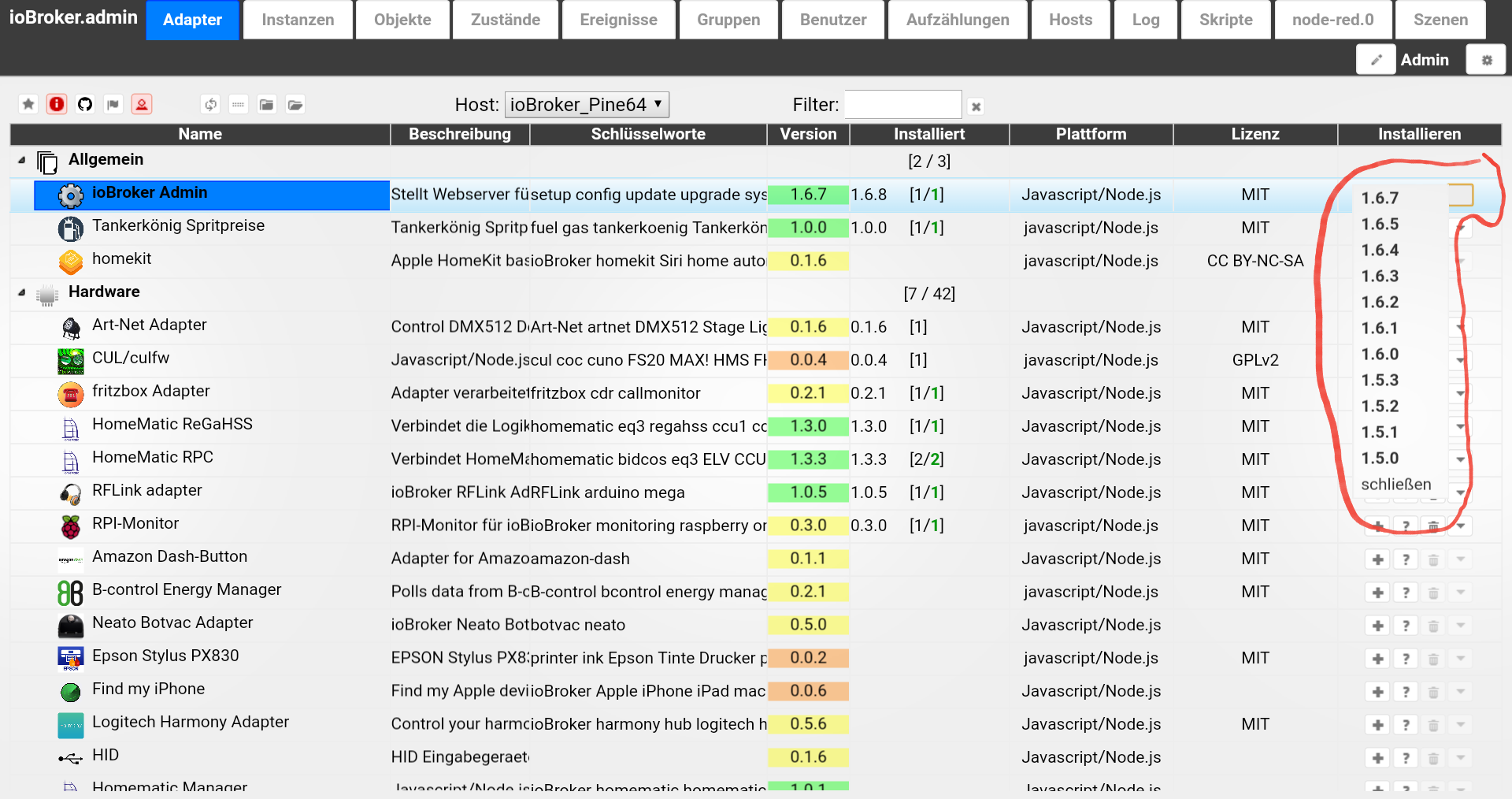
              Da gibt es eine interessante Feature: Installation von einer beliebigen Version von adapter.

              1 Antwort Letzte Antwort
              0
              • HomoranH Nicht stören
                HomoranH Nicht stören
                Homoran
                Global Moderator Administrators
                schrieb am zuletzt editiert von
                #9

                @Bluefox:

                Da gibt es eine interessante Feature: Installation von einer beliebigen Version von adapter. `
                Cool!
                144_20161218_094424.png

                Gruß

                Rainer, der die Doku schon wieder anpassen muss :lol:

                kein Support per PN! - Fragen im Forum stellen - es gibt fast nichts, was nicht auch für andere interessant ist.

                Benutzt das Voting rechts unten im Beitrag wenn er euch geholfen hat.

                der Installationsfixer: curl -fsL https://iobroker.net/fix.sh | bash -

                1 Antwort Letzte Antwort
                0
                • Lenny.CBL Offline
                  Lenny.CBL Offline
                  Lenny.CB
                  Most Active
                  schrieb am zuletzt editiert von
                  #10

                  @Homoran:

                  @Bluefox:

                  Da gibt es eine interessante Feature: Installation von einer beliebigen Version von adapter.
                  ja das ist mal nen cooles Feature, aber das ist doch min. schon seit Version 1.6.7 drin… 983_admin.jpg

                  1 Antwort Letzte Antwort
                  0
                  • BluefoxB Offline
                    BluefoxB Offline
                    Bluefox
                    schrieb am zuletzt editiert von
                    #11

                    @Lenny.CB:

                    @Homoran:

                    @Bluefox:

                    Da gibt es eine interessante Feature: Installation von einer beliebigen Version von adapter.
                    ja das ist mal nen cooles Feature, aber das ist doch min. schon seit Version 1.6.7 drin…admin.jpg `
                    Die hat nicht funktioniert. Admin konnte die Versionen schon anzeigen, aber es war keine Auswirkung. Erst mit js-controller 0.13.4

                    1 Antwort Letzte Antwort
                    0
                    • Lenny.CBL Offline
                      Lenny.CBL Offline
                      Lenny.CB
                      Most Active
                      schrieb am zuletzt editiert von
                      #12

                      @Bluefox:

                      @Lenny.CB:

                      @Homoran: ja das ist mal nen cooles Feature, aber das ist doch min. schon seit Version 1.6.7 drin…admin.jpg
                      Die hat nicht funktioniert. Admin konnte die Versionen schon anzeigen, aber es war keine Auswirkung. Erst mit js-controller 0.13.4 `
                      da haste wieder mal recht! :D

                      1 Antwort Letzte Antwort
                      0
                      • S Offline
                        S Offline
                        Stmiko
                        schrieb am zuletzt editiert von
                        #13

                        Hallo zusammen,

                        bekomme es grad nicht hin:

                        oot@Raspi31:/opt/iobroker# npm -v
                        2.15.11
                        root@Raspi31:/opt/iobroker# node -v
                        v4.6.2
                        root@Raspi31:/opt/iobroker# npm install https://github.com/ioBroker/ioBroker.js-controller --production
                        npm ERR! git clone --template=/root/.npm/_git-remotes/_templates --mirror https://github.com/ioBroker/ioBroker.js-controller.git /root/.npm/_git-remotes/https-github-com-ioBroker-ioBroker-js-controller-git-bafee4ac: undefined
                        npm ERR! git clone --template=/root/.npm/_git-remotes/_templates --mirror https://github.com/ioBroker/ioBroker.js-controller.git /root/.npm/_git-remotes/https-github-com-ioBroker-ioBroker-js-controller-git-bafee4ac: undefined
                        npm ERR! Linux 4.4.34-v7+
                        npm ERR! argv "/usr/bin/nodejs" "/usr/bin/npm" "install" "https://github.com/ioBroker/ioBroker.js-controller" "--production"
                        npm ERR! node v4.6.2
                        npm ERR! npm  v2.15.11
                        npm ERR! code ENOGIT
                        
                        npm ERR! not found: git
                        npm ERR!
                        npm ERR! Failed using git.
                        npm ERR! This is most likely not a problem with npm itself.
                        npm ERR! Please check if you have git installed and in your PATH.
                        
                        npm ERR! Please include the following file with any support request:
                        npm ERR!     /opt/iobroker/npm-debug.log
                        

                        iobroker habe ich natürlich vorher gestoppt, cache ist leer.

                        Hat bisher funktioniert, muss ich noch was beachten?

                        Danke und Gruß

                        iobroker auf Intel NUC mit Proxmox LXC und Raspi3+

                        1 Antwort Letzte Antwort
                        0
                        • BluefoxB Offline
                          BluefoxB Offline
                          Bluefox
                          schrieb am zuletzt editiert von
                          #14

                          @Stmiko:

                          Hallo zusammen,

                          bekomme es grad nicht hin:

                          oot@Raspi31:/opt/iobroker# npm -v
                          2.15.11
                          root@Raspi31:/opt/iobroker# node -v
                          v4.6.2
                          root@Raspi31:/opt/iobroker# npm install https://github.com/ioBroker/ioBroker.js-controller --production
                          npm ERR! git clone --template=/root/.npm/_git-remotes/_templates --mirror https://github.com/ioBroker/ioBroker.js-controller.git /root/.npm/_git-remotes/https-github-com-ioBroker-ioBroker-js-controller-git-bafee4ac: undefined
                          npm ERR! git clone --template=/root/.npm/_git-remotes/_templates --mirror https://github.com/ioBroker/ioBroker.js-controller.git /root/.npm/_git-remotes/https-github-com-ioBroker-ioBroker-js-controller-git-bafee4ac: undefined
                          npm ERR! Linux 4.4.34-v7+
                          npm ERR! argv "/usr/bin/nodejs" "/usr/bin/npm" "install" "https://github.com/ioBroker/ioBroker.js-controller" "--production"
                          npm ERR! node v4.6.2
                          npm ERR! npm  v2.15.11
                          npm ERR! code ENOGIT
                          
                          npm ERR! not found: git
                          npm ERR!
                          npm ERR! Failed using git.
                          npm ERR! This is most likely not a problem with npm itself.
                          npm ERR! Please check if you have git installed and in your PATH.
                          
                          npm ERR! Please include the following file with any support request:
                          npm ERR!     /opt/iobroker/npm-debug.log
                          

                          iobroker habe ich natürlich vorher gestoppt, cache ist leer.

                          Hat bisher funktioniert, muss ich noch was beachten?

                          Danke und Gruß `
                          Du hast vergessen /tarball/master

                          cd /opt/iobroker
                          npm i https://github.com/ioBroker/ioBroker.js-controller/tarball/master --production
                          
                          
                          1 Antwort Letzte Antwort
                          0
                          • S Offline
                            S Offline
                            Stmiko
                            schrieb am zuletzt editiert von
                            #15

                            > Du hast vergessen /tarball/master
                            Danke das wars…..das kommt davon wenn man den link einfach kopiert.

                            iobroker auf Intel NUC mit Proxmox LXC und Raspi3+

                            1 Antwort Letzte Antwort
                            0
                            • HomoranH Nicht stören
                              HomoranH Nicht stören
                              Homoran
                              Global Moderator Administrators
                              schrieb am zuletzt editiert von
                              #16

                              @Stmiko:

                              ..das kommt davon wenn man den link einfach kopiert. `
                              hätte aber auch funktionieren müssen, wenn….

                              @Stmiko:

                              npm ERR! code ENOGIT

                              npm ERR! not found: git `

                              … du noch mit

                              apt-get install git
                              

                              git installiert hättest.

                              Gruß

                              Rainer

                              kein Support per PN! - Fragen im Forum stellen - es gibt fast nichts, was nicht auch für andere interessant ist.

                              Benutzt das Voting rechts unten im Beitrag wenn er euch geholfen hat.

                              der Installationsfixer: curl -fsL https://iobroker.net/fix.sh | bash -

                              1 Antwort Letzte Antwort
                              0
                              • rantanplanR Online
                                rantanplanR Online
                                rantanplan
                                schrieb am zuletzt editiert von
                                #17

                                Hallo

                                Habe jetzt soweit alles aktualisiert.

                                Aber eine Versionsauswahl habe ich nicht.

                                Mit Firefox, Chrome und Edge probiert.

                                147_admin.png

                                Muss man noch irgendetwas einstellen?

                                Grüße

                                Rantanplan

                                CCU3 / MS Server 2019(VM) / Scripten mit Blockly

                                1 Antwort Letzte Antwort
                                0
                                • BluefoxB Offline
                                  BluefoxB Offline
                                  Bluefox
                                  schrieb am zuletzt editiert von
                                  #18

                                  @rantanplan:

                                  Hallo

                                  Habe jetzt soweit alles aktualisiert.

                                  Aber eine Versionsauswahl habe ich nicht.

                                  Mit Firefox, Chrome und Edge probiert.

                                  admin.PNG

                                  Muss man noch irgendetwas einstellen?

                                  Grüße `
                                  Einfach die Seite updaten? Oder Cache löschen?

                                  1 Antwort Letzte Antwort
                                  0
                                  • HomoranH Nicht stören
                                    HomoranH Nicht stören
                                    Homoran
                                    Global Moderator Administrators
                                    schrieb am zuletzt editiert von
                                    #19

                                    @rantanplan:

                                    Muss man noch irgendetwas einstellen? `
                                    ich musste den Experten Modus einschalten

                                    Gruß

                                    Rainer

                                    kein Support per PN! - Fragen im Forum stellen - es gibt fast nichts, was nicht auch für andere interessant ist.

                                    Benutzt das Voting rechts unten im Beitrag wenn er euch geholfen hat.

                                    der Installationsfixer: curl -fsL https://iobroker.net/fix.sh | bash -

                                    1 Antwort Letzte Antwort
                                    0
                                    • rantanplanR Online
                                      rantanplanR Online
                                      rantanplan
                                      schrieb am zuletzt editiert von
                                      #20

                                      Hallo Zusammen

                                      habe ich alles ausprobiert.

                                      Admin 1.6.8

                                      Javascript 3.2.2

                                      JS-Controler 0.14.0

                                      Ich kann auch im VIS-Edit keine Gruppen bilden.

                                      VIS 0.10.15

                                      Grüße

                                      Rantanplan

                                      CCU3 / MS Server 2019(VM) / Scripten mit Blockly

                                      1 Antwort Letzte Antwort
                                      0
                                      • BluefoxB Offline
                                        BluefoxB Offline
                                        Bluefox
                                        schrieb am zuletzt editiert von
                                        #21

                                        @rantanplan:

                                        Hallo Zusammen

                                        habe ich alles ausprobiert.

                                        Admin 1.6.8

                                        Javascript 3.2.2

                                        JS-Controler 0.14.0

                                        Ich kann auch im VIS-Edit keine Gruppen bilden.

                                        VIS 0.10.15

                                        Grüße `
                                        Gruppen erst ab vis 0.12.x

                                        1 Antwort Letzte Antwort
                                        0
                                        • frankjokeF Offline
                                          frankjokeF Offline
                                          frankjoke
                                          schrieb am zuletzt editiert von
                                          #22

                                          Bei mir haut das Installieren vom js-controller vom Git überhaupt nicht hin!

                                          Siehe Fehler, einmal mit sudo und einmal ohne, leider läuft dann iobroker nicht mehr und ich muss in /opt/iobroker das iobroker script löschen und dann iobroker mit –unsave-perm neu installieren damit er wirder läuft (aber natürlich dann mit js-controller von npm und nicht git) :

                                          ! ````
                                          pi@jessi3:/opt/iobroker $ sudo npm install https://github.com/ioBroker/ioBroker.js-controller/tarball/master --production |
                                          unix-dgram@0.2.3 install /opt/iobroker/node_modules/iobroker.js-controller/node_modules/winston-syslog/node_modules/unix-dgram
                                          node-gyp rebuild
                                          ! gyp WARN EACCES user "root" does not have permission to access the dev dir "/root/.node-gyp/4.7.0"
                                          gyp WARN EACCES attempting to reinstall using temporary dev dir "/opt/iobroker/node_modules/iobroker.js-controller/node_modules/winston-syslog/node_modules/unix-dgram/.node-gyp"
                                          make: Entering directory '/opt/iobroker/node_modules/iobroker.js-controller/node_modules/winston-syslog/node_modules/unix-dgram/build'
                                          CXX(target) Release/obj.target/unix_dgram/src/unix_dgram.o
                                          SOLINK_MODULE(target) Release/obj.target/unix_dgram.node
                                          COPY Release/unix_dgram.node
                                          make: Leaving directory '/opt/iobroker/node_modules/iobroker.js-controller/node_modules/winston-syslog/node_modules/unix-dgram/build'
                                          ! > iobroker.js-controller@0.14.0 install /opt/iobroker/node_modules/iobroker.js-controller
                                          node lib/setup.js setup first
                                          ! fs.js:549
                                          return binding.open(pathModule._makeLong(path), stringToFlags(flags), mode);
                                          ^
                                          ! Error: EACCES: permission denied, open '/opt/iobroker/node_modules/iobroker.js-controller/lib/setup/../../../../killall.sh'
                                          at Error (native)
                                          at Object.fs.openSync (fs.js:549:18)
                                          at Object.fs.writeFileSync (fs.js:1156:15)
                                          at Setup.setup (/opt/iobroker/node_modules/iobroker.js-controller/lib/setup/setupSetup.js:88:24)
                                          at /opt/iobroker/node_modules/iobroker.js-controller/lib/setup.js:554:23
                                          at Object. <anonymous>(/opt/iobroker/node_modules/iobroker.js-controller/lib/setup.js:575:11)
                                          at Module._compile (module.js:409:26)
                                          at Object.Module._extensions..js (module.js:416:10)
                                          at Module.load (module.js:343:32)
                                          at Function.Module._load (module.js:300:12)
                                          npm ERR! Linux 4.4.38-v7+
                                          npm ERR! argv "/usr/bin/nodejs" "/usr/bin/npm" "install" "https://github.com/ioBroker/ioBroker.js-controller/tarball/master" "--production"
                                          npm ERR! node v4.7.0
                                          npm ERR! npm v2.15.11
                                          npm ERR! code ELIFECYCLE
                                          ! npm ERR! iobroker.js-controller@0.14.0 install: node lib/setup.js setup first
                                          npm ERR! Exit status 1
                                          npm ERR!
                                          npm ERR! Failed at the iobroker.js-controller@0.14.0 install script 'node lib/setup.js setup first'.
                                          npm ERR! This is most likely a problem with the iobroker.js-controller package,
                                          npm ERR! not with npm itself.
                                          npm ERR! Tell the author that this fails on your system:
                                          npm ERR! node lib/setup.js setup first
                                          npm ERR! You can get information on how to open an issue for this project with:
                                          npm ERR! npm bugs iobroker.js-controller
                                          npm ERR! Or if that isn't available, you can get their info via:
                                          npm ERR!
                                          npm ERR! npm owner ls iobroker.js-controller
                                          npm ERR! There is likely additional logging output above.
                                          ! npm ERR! Please include the following file with any support request:
                                          npm ERR! /opt/iobroker/npm-debug.log
                                          pi@jessi3:/opt/iobroker $ npm install https://github.com/ioBroker/ioBroker.js-controller/tarball/master --production

                                          unix-dgram@0.2.3 install /opt/iobroker/node_modules/iobroker.js-controller/node_modules/winston-syslog/node_modules/unix-dgram
                                          node-gyp rebuild
                                          ! make: Entering directory '/opt/iobroker/node_modules/iobroker.js-controller/node_modules/winston-syslog/node_modules/unix-dgram/build'
                                          CXX(target) Release/obj.target/unix_dgram/src/unix_dgram.o
                                          SOLINK_MODULE(target) Release/obj.target/unix_dgram.node
                                          COPY Release/unix_dgram.node
                                          make: Leaving directory '/opt/iobroker/node_modules/iobroker.js-controller/node_modules/winston-syslog/node_modules/unix-dgram/build'
                                          npm ERR! Linux 4.4.38-v7+
                                          npm ERR! argv "/usr/bin/nodejs" "/usr/bin/npm" "install" "https://github.com/ioBroker/ioBroker.js-controller/tarball/master" "--production"
                                          npm ERR! node v4.7.0
                                          npm ERR! npm v2.15.11
                                          npm ERR! path ../iobroker.js-controller/iobroker.js
                                          npm ERR! code EACCES
                                          npm ERR! errno -13
                                          npm ERR! syscall symlink
                                          ! npm ERR! Error: EACCES: permission denied, symlink '../iobroker.js-controller/iobroker.js' -> '/opt/iobroker/node_modules/.bin/iobroker'
                                          npm ERR! at Error (native)
                                          npm ERR! { [Error: EACCES: permission denied, symlink '../iobroker.js-controller/iobroker.js' -> '/opt/iobroker/node_modules/.bin/iobroker']
                                          npm ERR! errno: -13,
                                          npm ERR! code: 'EACCES',
                                          npm ERR! syscall: 'symlink',
                                          npm ERR! path: '../iobroker.js-controller/iobroker.js',
                                          npm ERR! dest: '/opt/iobroker/node_modules/.bin/iobroker' }
                                          npm ERR!
                                          npm ERR! Please try running this command again as root/Administrator.
                                          ! npm ERR! Please include the following file with any support request:
                                          npm ERR! /opt/iobroker/npm-debug.log
                                          pi@jessi3:/opt/iobroker $ ls
                                          backups etc iobroker iobroker_x killall.sh node_modules package.json
                                          cache install.sh iobroker-data iobroker_y log npm-debug.log reinstall.sh
                                          pi@jessi3:/opt/iobroker $ sudo iobroker start
                                          module.js:327
                                          throw err;
                                          ^
                                          ! Error: Cannot find module '/opt/iobroker/node_modules/iobroker.js-controller/iobroker.js'
                                          at Function.Module._resolveFilename (module.js:325:15)
                                          at Function.Module._load (module.js:276:25)
                                          at Function.Module.runMain (module.js:441:10)
                                          at startup (node.js:139:18)
                                          at node.js:990:3</anonymous>

                                          Frank,

                                          NUC's, VM's und Raspi's unter Raspian, Ubuntu und Debian zum Testen.
                                          Adapter die ich selbst beigesteuert habe: BMW, broadlink2, radar2, systeminfo, km200, xs1 und einige im Anmarsch!

                                          1 Antwort Letzte Antwort
                                          0
                                          Antworten
                                          • In einem neuen Thema antworten
                                          Anmelden zum Antworten
                                          • Älteste zuerst
                                          • Neuste zuerst
                                          • Meiste Stimmen


                                          Support us

                                          ioBroker
                                          Community Adapters
                                          Donate

                                          800

                                          Online

                                          32.4k

                                          Benutzer

                                          81.5k

                                          Themen

                                          1.3m

                                          Beiträge
                                          Community
                                          Impressum | Datenschutz-Bestimmungen | Nutzungsbedingungen | Einwilligungseinstellungen
                                          ioBroker Community 2014-2025
                                          logo
                                          • Anmelden

                                          • Du hast noch kein Konto? Registrieren

                                          • Anmelden oder registrieren, um zu suchen
                                          • Erster Beitrag
                                            Letzter Beitrag
                                          0
                                          • Home
                                          • Aktuell
                                          • Tags
                                          • Ungelesen 0
                                          • Kategorien
                                          • Unreplied
                                          • Beliebt
                                          • GitHub
                                          • Docu
                                          • Hilfe