




Test Adapter mihome-vacuum v2.0.x
-
which nodejs && nodejs -v && which node && node -v && which npm && npm -v && apt policy nodejscd /opt/iobroker npm cache clean --force npm install authenticate-pam/usr/bin/nodejs v12.20.1 /usr/bin/node v12.20.1 /usr/bin/npm 6.14.10 nodejs: Installiert: 12.20.1-1nodesource1 Installationskandidat: 12.20.1-1nodesource1 Versionstabelle: *** 12.20.1-1nodesource1 500 500 https://deb.nodesource.com/node_12.x buster/main armhf Packages 100 /var/lib/dpkg/status 10.23.1~dfsg-1~deb10u1 500 500 http://raspbian.raspberrypi.org/raspbian buster/main armhf Packages/opt/iobroker $ npm cache clean --force npm WARN using --force I sure hope you know what you are doing.npm install authenticate-pam > authenticate-pam@1.0.2 install /opt/iobroker/node_modules/authenticate-pam > node-gyp rebuild make: Verzeichnis „/opt/iobroker/node_modules/authenticate-pam/build“ wird betreten CXX(target) Release/obj.target/authenticate_pam/authenticate_pam.o In file included from ../authenticate_pam.cc:23: ../../nan/nan.h: In function ‘void Nan::AsyncQueueWorker(Nan::AsyncWorker*)’: ../../nan/nan.h:2294:62: warning: cast between incompatible function types from ‘void (*)(uv_work_t*)’ {aka ‘void (*)(uv_work_s*)’} to ‘uv_after_work_cb’ {aka ‘void (*)(uv_work_s*, int)’} [-Wcast-function-type] , reinterpret_cast<uv_after_work_cb>(AsyncExecuteComplete) ^ ../authenticate_pam.cc: In function ‘void after_doing_auth(uv_work_t*, int)’: ../authenticate_pam.cc:107:87: warning: ‘v8::Local<v8::Value> Nan::MakeCallback(v8::Local<v8::Object>, v8::Local<v8::Function>, int, v8::Local<v8::Value>*)’ is deprecated [-Wdeprecated-declarations] keCallback(Nan::GetCurrentContext()->Global(), Nan::New(m->callback), 1, args); ^ In file included from ../authenticate_pam.cc:23: ../../nan/nan.h:1026:46: note: declared here NAN_DEPRECATED inline v8::Local<v8::Value> MakeCallback( ^~~~~~~~~~~~ ../authenticate_pam.cc:107:87: warning: ‘v8::Local<v8::Value> Nan::MakeCallback(v8::Local<v8::Object>, v8::Local<v8::Function>, int, v8::Local<v8::Value>*)’ is deprecated [-Wdeprecated-declarations] keCallback(Nan::GetCurrentContext()->Global(), Nan::New(m->callback), 1, args); ^ In file included from ../authenticate_pam.cc:23: ../../nan/nan.h:1026:46: note: declared here NAN_DEPRECATED inline v8::Local<v8::Value> MakeCallback( ^~~~~~~~~~~~ ../authenticate_pam.cc: In function ‘Nan::NAN_METHOD_RETURN_TYPE Authenticate(Nan::NAN_METHOD_ARGS_TYPE)’: ../authenticate_pam.cc:147:83: warning: ‘v8::Local<v8::Value> v8::Object::Get(v8::Local<v8::Value>)’ is deprecated: Use maybe version [-Wdeprecated-declarations] al<Value> res = options->Get(Nan::New<String>("serviceName").ToLocalChecked()); ^ In file included from /home/iobroker/.cache/node-gyp/12.20.1/include/node/v8-internal.h:14, from /home/iobroker/.cache/node-gyp/12.20.1/include/node/v8.h:27, from /home/iobroker/.cache/node-gyp/12.20.1/include/node/node.h:67, from ../../nan/nan.h:56, from ../authenticate_pam.cc:23: /home/iobroker/.cache/node-gyp/12.20.1/include/node/v8.h:3553:51: note: declared here V8_DEPRECATED("Use maybe version", Local<Value> Get(Local<Value> key)); ^~~ /home/iobroker/.cache/node-gyp/12.20.1/include/node/v8config.h:328:3: note: in definition of macro ‘V8_DEPRECATED’ declarator __attribute__((deprecated(message))) ^~~~~~~~~~ ../authenticate_pam.cc:150:69: error: no matching function for call to ‘v8::String::WriteUtf8(char [128], unsigned int)’ serviceName->WriteUtf8(m->serviceName, sizeof(m->serviceName) - 1); ^ In file included from /home/iobroker/.cache/node-gyp/12.20.1/include/node/node.h:67, from ../../nan/nan.h:56, from ../authenticate_pam.cc:23: /home/iobroker/.cache/node-gyp/12.20.1/include/node/v8.h:2878:7: note: candidate: ‘int v8::String::WriteUtf8(v8::Isolate*, char*, int, int*, int) const’ int WriteUtf8(Isolate* isolate, char* buffer, int length = -1, ^~~~~~~~~ /home/iobroker/.cache/node-gyp/12.20.1/include/node/v8.h:2878:7: note: no known conversion for argument 1 from ‘char [128]’ to ‘v8::Isolate*’ ../authenticate_pam.cc:152:69: warning: ‘v8::Local<v8::Value> v8::Object::Get(v8::Local<v8::Value>)’ is deprecated: Use maybe version [-Wdeprecated-declarations] res = options->Get(Nan::New<String>("remoteHost").ToLocalChecked()); ^ In file included from /home/iobroker/.cache/node-gyp/12.20.1/include/node/v8-internal.h:14, from /home/iobroker/.cache/node-gyp/12.20.1/include/node/v8.h:27, from /home/iobroker/.cache/node-gyp/12.20.1/include/node/node.h:67, from ../../nan/nan.h:56, from ../authenticate_pam.cc:23: /home/iobroker/.cache/node-gyp/12.20.1/include/node/v8.h:3553:51: note: declared here V8_DEPRECATED("Use maybe version", Local<Value> Get(Local<Value> key)); ^~~ /home/iobroker/.cache/node-gyp/12.20.1/include/node/v8config.h:328:3: note: in definition of macro ‘V8_DEPRECATED’ declarator __attribute__((deprecated(message))) ^~~~~~~~~~ ../authenticate_pam.cc:155:66: error: no matching function for call to ‘v8::String::WriteUtf8(char [128], unsigned int)’ remoteHost->WriteUtf8(m->remoteHost, sizeof(m->remoteHost) - 1); ^ In file included from /home/iobroker/.cache/node-gyp/12.20.1/include/node/node.h:67, from ../../nan/nan.h:56, from ../authenticate_pam.cc:23: /home/iobroker/.cache/node-gyp/12.20.1/include/node/v8.h:2878:7: note: candidate: ‘int v8::String::WriteUtf8(v8::Isolate*, char*, int, int*, int) const’ int WriteUtf8(Isolate* isolate, char* buffer, int length = -1, ^~~~~~~~~ /home/iobroker/.cache/node-gyp/12.20.1/include/node/v8.h:2878:7: note: no known conversion for argument 1 from ‘char [128]’ to ‘v8::Isolate*’ ../authenticate_pam.cc:160:58: error: no matching function for call to ‘v8::String::WriteUtf8(char [128], unsigned int)’ username->WriteUtf8(m->username, sizeof(m->username) - 1); ^ In file included from /home/iobroker/.cache/node-gyp/12.20.1/include/node/node.h:67, from ../../nan/nan.h:56, from ../authenticate_pam.cc:23: /home/iobroker/.cache/node-gyp/12.20.1/include/node/v8.h:2878:7: note: candidate: ‘int v8::String::WriteUtf8(v8::Isolate*, char*, int, int*, int) const’ int WriteUtf8(Isolate* isolate, char* buffer, int length = -1, ^~~~~~~~~ /home/iobroker/.cache/node-gyp/12.20.1/include/node/v8.h:2878:7: note: no known conversion for argument 1 from ‘char [128]’ to ‘v8::Isolate*’ ../authenticate_pam.cc:161:58: error: no matching function for call to ‘v8::String::WriteUtf8(char [128], unsigned int)’ password->WriteUtf8(m->password, sizeof(m->password) - 1); ^ In file included from /home/iobroker/.cache/node-gyp/12.20.1/include/node/node.h:67, from ../../nan/nan.h:56, from ../authenticate_pam.cc:23: /home/iobroker/.cache/node-gyp/12.20.1/include/node/v8.h:2878:7: note: candidate: ‘int v8::String::WriteUtf8(v8::Isolate*, char*, int, int*, int) const’ int WriteUtf8(Isolate* isolate, char* buffer, int length = -1, ^~~~~~~~~ /home/iobroker/.cache/node-gyp/12.20.1/include/node/v8.h:2878:7: note: no known conversion for argument 1 from ‘char [128]’ to ‘v8::Isolate*’ ../authenticate_pam.cc: At global scope: ../authenticate_pam.cc:170:11: error: variable or field ‘init’ declared void void init(Handle<Object> exports) { ^~~~~~ ../authenticate_pam.cc:170:11: error: ‘Handle’ was not declared in this scope ../authenticate_pam.cc:170:11: note: suggested alternative: ‘rand_r’ void init(Handle<Object> exports) { ^~~~~~ rand_r ../authenticate_pam.cc:170:24: error: expected primary-expression before ‘>’ token void init(Handle<Object> exports) { ^ ../authenticate_pam.cc:170:26: error: ‘exports’ was not declared in this scope void init(Handle<Object> exports) { ^~~~~~~ In file included from ../../nan/nan.h:56, from ../authenticate_pam.cc:23: ../authenticate_pam.cc:175:31: error: ‘init’ was not declared in this scope NODE_MODULE(authenticate_pam, init); ^~~~ /home/iobroker/.cache/node-gyp/12.20.1/include/node/node.h:737:36: note: in definition of macro ‘NODE_MODULE_X’ (node::addon_register_func) (regfunc), \ ^~~~~~~ ../authenticate_pam.cc:175:1: note: in expansion of macro ‘NODE_MODULE’ NODE_MODULE(authenticate_pam, init); ^~~~~~~~~~~ ../authenticate_pam.cc:175:31: note: suggested alternative: ‘int’ NODE_MODULE(authenticate_pam, init); ^~~~ /home/iobroker/.cache/node-gyp/12.20.1/include/node/node.h:737:36: note: in definition of macro ‘NODE_MODULE_X’ (node::addon_register_func) (regfunc), \ ^~~~~~~ ../authenticate_pam.cc:175:1: note: in expansion of macro ‘NODE_MODULE’ NODE_MODULE(authenticate_pam, init); ^~~~~~~~~~~ make: *** [authenticate_pam.target.mk:109: Release/obj.target/authenticate_pam/authenticate_pam.o] Fehler 1 make: Verzeichnis „/opt/iobroker/node_modules/authenticate-pam/build“ wird verlassen gyp ERR! build error gyp ERR! stack Error: `make` failed with exit code: 2 gyp ERR! stack at ChildProcess.onExit (/usr/lib/node_modules/npm/node_modules/node-gyp/lib/build.js:194:23) gyp ERR! stack at ChildProcess.emit (events.js:314:20) gyp ERR! stack at Process.ChildProcess._handle.onexit (internal/child_process.js:276:12) gyp ERR! System Linux 5.4.83-v7l+ gyp ERR! command "/usr/bin/node" "/usr/lib/node_modules/npm/node_modules/node-gyp/bin/node-gyp.js" "rebuild" gyp ERR! cwd /opt/iobroker/node_modules/authenticate-pam gyp ERR! node -v v12.20.1 gyp ERR! node-gyp -v v5.1.0 gyp ERR! not ok npm WARN optional SKIPPING OPTIONAL DEPENDENCY: fsevents@2.3.1 (node_modules/fsevents): npm WARN notsup SKIPPING OPTIONAL DEPENDENCY: Unsupported platform for fsevents@2.3.1: wanted {"os":"darwin","arch":"any"} (current: {"os":"linux","arch":"arm"}) npm WARN optional SKIPPING OPTIONAL DEPENDENCY: osx-temperature-sensor@1.0.7 (node_modules/osx-temperature-sensor): npm WARN notsup SKIPPING OPTIONAL DEPENDENCY: Unsupported platform for osx-temperature-sensor@1.0.7: wanted {"os":"darwin","arch":"any"} (current: {"os":"linux","arch":"arm"}) npm WARN optional SKIPPING OPTIONAL DEPENDENCY: fsevents@2.1.3 (node_modules/zigbee-herdsman-converters/node_modules/fsevents): npm WARN notsup SKIPPING OPTIONAL DEPENDENCY: Unsupported platform for fsevents@2.1.3: wanted {"os":"darwin","arch":"any"} (current: {"os":"linux","arch":"arm"}) npm WARN optional SKIPPING OPTIONAL DEPENDENCY: fsevents@2.1.3 (node_modules/zigbee-herdsman/node_modules/chokidar/node_modules/fsevents): npm WARN notsup SKIPPING OPTIONAL DEPENDENCY: Unsupported platform for fsevents@2.1.3: wanted {"os":"darwin","arch":"any"} (current: {"os":"linux","arch":"arm"}) npm WARN optional SKIPPING OPTIONAL DEPENDENCY: fsevents@1.2.13 (node_modules/zigbee-herdsman/node_modules/fsevents): npm WARN notsup SKIPPING OPTIONAL DEPENDENCY: Unsupported platform for fsevents@1.2.13: wanted {"os":"darwin","arch":"any"} (current: {"os":"linux","arch":"arm"}) npm WARN optional SKIPPING OPTIONAL DEPENDENCY: fsevents@2.1.3 (node_modules/zigbee-herdsman/node_modules/jest-haste-map/node_modules/fsevents): npm WARN notsup SKIPPING OPTIONAL DEPENDENCY: Unsupported platform for fsevents@2.1.3: wanted {"os":"darwin","arch":"any"} (current: {"os":"linux","arch":"arm"}) npm ERR! code ELIFECYCLE npm ERR! errno 1 npm ERR! authenticate-pam@1.0.2 install: `node-gyp rebuild` npm ERR! Exit status 1 npm ERR! npm ERR! Failed at the authenticate-pam@1.0.2 install script. npm ERR! This is probably not a problem with npm. There is likely additional logging output above. npm ERR! A complete log of this run can be found in: npm ERR! /home/iobroker/.npm/_logs/2021-01-24T16_44_12_411Z-debug.log pi@raspberrypi4-iob:/opt/iobroker $da ist wieder dieser doofe gyp ERR! -.-
-
/usr/bin/nodejs
v12.20.1
/usr/bin/node
v12.20.1
/usr/bin/npm
6.14.10
nodejs:
  Installiert:           12.20.1-1nodesource1
  Installationskandidat: 12.20.1-1nodesource1
  Versionstabelle:
 *** 12.20.1-1nodesource1 500
        500 https://deb.nodesource.com/node_12.x buster/main armhf Packages
        100 /var/lib/dpkg/status
     10.23.1~dfsg-1~deb10u1 500
        500 http://raspbian.raspberrypi.org/raspbian buster/main armhf Packages
/opt/iobroker $ npm cache clean --force npm WARN using --force I sure hope you know what you are doing.npm install authenticate-pam > authenticate-pam@1.0.2 install /opt/iobroker/node_modules/authenticate-pam > node-gyp rebuild make: Verzeichnis „/opt/iobroker/node_modules/authenticate-pam/build“ wird betreten CXX(target) Release/obj.target/authenticate_pam/authenticate_pam.o In file included from ../authenticate_pam.cc:23: ../../nan/nan.h: In function ‘void Nan::AsyncQueueWorker(Nan::AsyncWorker*)’: ../../nan/nan.h:2294:62: warning: cast between incompatible function types from ‘void (*)(uv_work_t*)’ {aka ‘void (*)(uv_work_s*)’} to ‘uv_after_work_cb’ {aka ‘void (*)(uv_work_s*, int)’} [-Wcast-function-type] , reinterpret_cast<uv_after_work_cb>(AsyncExecuteComplete) ^ ../authenticate_pam.cc: In function ‘void after_doing_auth(uv_work_t*, int)’: ../authenticate_pam.cc:107:87: warning: ‘v8::Local<v8::Value> Nan::MakeCallback(v8::Local<v8::Object>, v8::Local<v8::Function>, int, v8::Local<v8::Value>*)’ is deprecated [-Wdeprecated-declarations] keCallback(Nan::GetCurrentContext()->Global(), Nan::New(m->callback), 1, args); ^ In file included from ../authenticate_pam.cc:23: ../../nan/nan.h:1026:46: note: declared here NAN_DEPRECATED inline v8::Local<v8::Value> MakeCallback( ^~~~~~~~~~~~ ../authenticate_pam.cc:107:87: warning: ‘v8::Local<v8::Value> Nan::MakeCallback(v8::Local<v8::Object>, v8::Local<v8::Function>, int, v8::Local<v8::Value>*)’ is deprecated [-Wdeprecated-declarations] keCallback(Nan::GetCurrentContext()->Global(), Nan::New(m->callback), 1, args); ^ In file included from ../authenticate_pam.cc:23: ../../nan/nan.h:1026:46: note: declared here NAN_DEPRECATED inline v8::Local<v8::Value> MakeCallback( ^~~~~~~~~~~~ ../authenticate_pam.cc: In function ‘Nan::NAN_METHOD_RETURN_TYPE Authenticate(Nan::NAN_METHOD_ARGS_TYPE)’: ../authenticate_pam.cc:147:83: warning: ‘v8::Local<v8::Value> v8::Object::Get(v8::Local<v8::Value>)’ is deprecated: Use maybe version [-Wdeprecated-declarations] al<Value> res = options->Get(Nan::New<String>("serviceName").ToLocalChecked()); ^ In file included from /home/iobroker/.cache/node-gyp/12.20.1/include/node/v8-internal.h:14, from /home/iobroker/.cache/node-gyp/12.20.1/include/node/v8.h:27, from /home/iobroker/.cache/node-gyp/12.20.1/include/node/node.h:67, from ../../nan/nan.h:56, from ../authenticate_pam.cc:23: /home/iobroker/.cache/node-gyp/12.20.1/include/node/v8.h:3553:51: note: declared here V8_DEPRECATED("Use maybe version", Local<Value> Get(Local<Value> key)); ^~~ /home/iobroker/.cache/node-gyp/12.20.1/include/node/v8config.h:328:3: note: in definition of macro ‘V8_DEPRECATED’ declarator __attribute__((deprecated(message))) ^~~~~~~~~~ ../authenticate_pam.cc:150:69: error: no matching function for call to ‘v8::String::WriteUtf8(char [128], unsigned int)’ serviceName->WriteUtf8(m->serviceName, sizeof(m->serviceName) - 1); ^ In file included from /home/iobroker/.cache/node-gyp/12.20.1/include/node/node.h:67, from ../../nan/nan.h:56, from ../authenticate_pam.cc:23: /home/iobroker/.cache/node-gyp/12.20.1/include/node/v8.h:2878:7: note: candidate: ‘int v8::String::WriteUtf8(v8::Isolate*, char*, int, int*, int) const’ int WriteUtf8(Isolate* isolate, char* buffer, int length = -1, ^~~~~~~~~ /home/iobroker/.cache/node-gyp/12.20.1/include/node/v8.h:2878:7: note: no known conversion for argument 1 from ‘char [128]’ to ‘v8::Isolate*’ ../authenticate_pam.cc:152:69: warning: ‘v8::Local<v8::Value> v8::Object::Get(v8::Local<v8::Value>)’ is deprecated: Use maybe version [-Wdeprecated-declarations] res = options->Get(Nan::New<String>("remoteHost").ToLocalChecked()); ^ In file included from /home/iobroker/.cache/node-gyp/12.20.1/include/node/v8-internal.h:14, from /home/iobroker/.cache/node-gyp/12.20.1/include/node/v8.h:27, from /home/iobroker/.cache/node-gyp/12.20.1/include/node/node.h:67, from ../../nan/nan.h:56, from ../authenticate_pam.cc:23: /home/iobroker/.cache/node-gyp/12.20.1/include/node/v8.h:3553:51: note: declared here V8_DEPRECATED("Use maybe version", Local<Value> Get(Local<Value> key)); ^~~ /home/iobroker/.cache/node-gyp/12.20.1/include/node/v8config.h:328:3: note: in definition of macro ‘V8_DEPRECATED’ declarator __attribute__((deprecated(message))) ^~~~~~~~~~ ../authenticate_pam.cc:155:66: error: no matching function for call to ‘v8::String::WriteUtf8(char [128], unsigned int)’ remoteHost->WriteUtf8(m->remoteHost, sizeof(m->remoteHost) - 1); ^ In file included from /home/iobroker/.cache/node-gyp/12.20.1/include/node/node.h:67, from ../../nan/nan.h:56, from ../authenticate_pam.cc:23: /home/iobroker/.cache/node-gyp/12.20.1/include/node/v8.h:2878:7: note: candidate: ‘int v8::String::WriteUtf8(v8::Isolate*, char*, int, int*, int) const’ int WriteUtf8(Isolate* isolate, char* buffer, int length = -1, ^~~~~~~~~ /home/iobroker/.cache/node-gyp/12.20.1/include/node/v8.h:2878:7: note: no known conversion for argument 1 from ‘char [128]’ to ‘v8::Isolate*’ ../authenticate_pam.cc:160:58: error: no matching function for call to ‘v8::String::WriteUtf8(char [128], unsigned int)’ username->WriteUtf8(m->username, sizeof(m->username) - 1); ^ In file included from /home/iobroker/.cache/node-gyp/12.20.1/include/node/node.h:67, from ../../nan/nan.h:56, from ../authenticate_pam.cc:23: /home/iobroker/.cache/node-gyp/12.20.1/include/node/v8.h:2878:7: note: candidate: ‘int v8::String::WriteUtf8(v8::Isolate*, char*, int, int*, int) const’ int WriteUtf8(Isolate* isolate, char* buffer, int length = -1, ^~~~~~~~~ /home/iobroker/.cache/node-gyp/12.20.1/include/node/v8.h:2878:7: note: no known conversion for argument 1 from ‘char [128]’ to ‘v8::Isolate*’ ../authenticate_pam.cc:161:58: error: no matching function for call to ‘v8::String::WriteUtf8(char [128], unsigned int)’ password->WriteUtf8(m->password, sizeof(m->password) - 1); ^ In file included from /home/iobroker/.cache/node-gyp/12.20.1/include/node/node.h:67, from ../../nan/nan.h:56, from ../authenticate_pam.cc:23: /home/iobroker/.cache/node-gyp/12.20.1/include/node/v8.h:2878:7: note: candidate: ‘int v8::String::WriteUtf8(v8::Isolate*, char*, int, int*, int) const’ int WriteUtf8(Isolate* isolate, char* buffer, int length = -1, ^~~~~~~~~ /home/iobroker/.cache/node-gyp/12.20.1/include/node/v8.h:2878:7: note: no known conversion for argument 1 from ‘char [128]’ to ‘v8::Isolate*’ ../authenticate_pam.cc: At global scope: ../authenticate_pam.cc:170:11: error: variable or field ‘init’ declared void void init(Handle<Object> exports) { ^~~~~~ ../authenticate_pam.cc:170:11: error: ‘Handle’ was not declared in this scope ../authenticate_pam.cc:170:11: note: suggested alternative: ‘rand_r’ void init(Handle<Object> exports) { ^~~~~~ rand_r ../authenticate_pam.cc:170:24: error: expected primary-expression before ‘>’ token void init(Handle<Object> exports) { ^ ../authenticate_pam.cc:170:26: error: ‘exports’ was not declared in this scope void init(Handle<Object> exports) { ^~~~~~~ In file included from ../../nan/nan.h:56, from ../authenticate_pam.cc:23: ../authenticate_pam.cc:175:31: error: ‘init’ was not declared in this scope NODE_MODULE(authenticate_pam, init); ^~~~ /home/iobroker/.cache/node-gyp/12.20.1/include/node/node.h:737:36: note: in definition of macro ‘NODE_MODULE_X’ (node::addon_register_func) (regfunc), \ ^~~~~~~ ../authenticate_pam.cc:175:1: note: in expansion of macro ‘NODE_MODULE’ NODE_MODULE(authenticate_pam, init); ^~~~~~~~~~~ ../authenticate_pam.cc:175:31: note: suggested alternative: ‘int’ NODE_MODULE(authenticate_pam, init); ^~~~ /home/iobroker/.cache/node-gyp/12.20.1/include/node/node.h:737:36: note: in definition of macro ‘NODE_MODULE_X’ (node::addon_register_func) (regfunc), \ ^~~~~~~ ../authenticate_pam.cc:175:1: note: in expansion of macro ‘NODE_MODULE’ NODE_MODULE(authenticate_pam, init); ^~~~~~~~~~~ make: *** [authenticate_pam.target.mk:109: Release/obj.target/authenticate_pam/authenticate_pam.o] Fehler 1 make: Verzeichnis „/opt/iobroker/node_modules/authenticate-pam/build“ wird verlassen gyp ERR! build error gyp ERR! stack Error: `make` failed with exit code: 2 gyp ERR! stack at ChildProcess.onExit (/usr/lib/node_modules/npm/node_modules/node-gyp/lib/build.js:194:23) gyp ERR! stack at ChildProcess.emit (events.js:314:20) gyp ERR! stack at Process.ChildProcess._handle.onexit (internal/child_process.js:276:12) gyp ERR! System Linux 5.4.83-v7l+ gyp ERR! command "/usr/bin/node" "/usr/lib/node_modules/npm/node_modules/node-gyp/bin/node-gyp.js" "rebuild" gyp ERR! cwd /opt/iobroker/node_modules/authenticate-pam gyp ERR! node -v v12.20.1 gyp ERR! node-gyp -v v5.1.0 gyp ERR! not ok npm WARN optional SKIPPING OPTIONAL DEPENDENCY: fsevents@2.3.1 (node_modules/fsevents): npm WARN notsup SKIPPING OPTIONAL DEPENDENCY: Unsupported platform for fsevents@2.3.1: wanted {"os":"darwin","arch":"any"} (current: {"os":"linux","arch":"arm"}) npm WARN optional SKIPPING OPTIONAL DEPENDENCY: osx-temperature-sensor@1.0.7 (node_modules/osx-temperature-sensor): npm WARN notsup SKIPPING OPTIONAL DEPENDENCY: Unsupported platform for osx-temperature-sensor@1.0.7: wanted {"os":"darwin","arch":"any"} (current: {"os":"linux","arch":"arm"}) npm WARN optional SKIPPING OPTIONAL DEPENDENCY: fsevents@2.1.3 (node_modules/zigbee-herdsman-converters/node_modules/fsevents): npm WARN notsup SKIPPING OPTIONAL DEPENDENCY: Unsupported platform for fsevents@2.1.3: wanted {"os":"darwin","arch":"any"} (current: {"os":"linux","arch":"arm"}) npm WARN optional SKIPPING OPTIONAL DEPENDENCY: fsevents@2.1.3 (node_modules/zigbee-herdsman/node_modules/chokidar/node_modules/fsevents): npm WARN notsup SKIPPING OPTIONAL DEPENDENCY: Unsupported platform for fsevents@2.1.3: wanted {"os":"darwin","arch":"any"} (current: {"os":"linux","arch":"arm"}) npm WARN optional SKIPPING OPTIONAL DEPENDENCY: fsevents@1.2.13 (node_modules/zigbee-herdsman/node_modules/fsevents): npm WARN notsup SKIPPING OPTIONAL DEPENDENCY: Unsupported platform for fsevents@1.2.13: wanted {"os":"darwin","arch":"any"} (current: {"os":"linux","arch":"arm"}) npm WARN optional SKIPPING OPTIONAL DEPENDENCY: fsevents@2.1.3 (node_modules/zigbee-herdsman/node_modules/jest-haste-map/node_modules/fsevents): npm WARN notsup SKIPPING OPTIONAL DEPENDENCY: Unsupported platform for fsevents@2.1.3: wanted {"os":"darwin","arch":"any"} (current: {"os":"linux","arch":"arm"}) npm ERR! code ELIFECYCLE npm ERR! errno 1 npm ERR! authenticate-pam@1.0.2 install: `node-gyp rebuild` npm ERR! Exit status 1 npm ERR! npm ERR! Failed at the authenticate-pam@1.0.2 install script. npm ERR! This is probably not a problem with npm. There is likely additional logging output above. npm ERR! A complete log of this run can be found in: npm ERR! /home/iobroker/.npm/_logs/2021-01-24T16_44_12_411Z-debug.log pi@raspberrypi4-iob:/opt/iobroker $da ist wieder dieser doofe gyp ERR! -.-
authenticate_pam
Keine Ahnung. Vielleicht baut das Modul nicht mehr gegen aktuelle node-Versionen. Das ist ja schon über ein Jahr nicht mehr angefasst worden.
Welcher Adapter braucht das Ding eigentlich?npm list authenticate-pamDürfte der terminal-Adapter sein. Braucht eh keiner.
iobroker del terminal
cd /opt/iobroker
npm cache clean --force
Danach sollte Ruhe von der Seite sein.
-
authenticate_pam
Keine Ahnung. Vielleicht baut das Modul nicht mehr gegen aktuelle node-Versionen. Das ist ja schon über ein Jahr nicht mehr angefasst worden.
Welcher Adapter braucht das Ding eigentlich?npm list authenticate-pamDürfte der terminal-Adapter sein. Braucht eh keiner.
iobroker del terminal
cd /opt/iobroker
npm cache clean --force
Danach sollte Ruhe von der Seite sein.
Hatte lange Zeit ein ioBroker (mit altem Stand ohne Updates einzuspielen) auf einem Igel laufen
mit dem ich meinen S50 per Szene gesteuert habe.Konkret hatte ich eine Szene "MAP_EG_Laden" erstellt.
Hierin wurde per SSH auf dem Roborock die Map Dateien getauscht und anschließend kurz gestartet und pausiert um die Karten auch wirklich zu laden.

Diese Szene habe ich dann vor jede andere Szene gepackt um dann die einzelnen Zonen anzufahren:

Das hat auch immer zuverlässig funktioniert.
Habe nun auf einen Raspberry mit aktueller Version gewechselt und da klappt es leider nicht mehr.
Immer wieder erscheint die Meldung
"should trigger cleaning all , but is currently active(5). Add to queue"
Der S50 reagiert dann auch überhaupt nicht, wenn ich z.B. Start auf true setze.Muss ich z.B. den Pause Befehl manuell wieder auf false setzten um z.B. die Zonenreinigung zu starten?
Manchmal funktioniert es wieder wenn ich vor den Befehlen den "Home" Befehl mit rein nehme.Es scheint eine neue Funktion der Queue zu geben, die ich hier scheinbar falsch bediene.
Das hier funktioniert z.B. manchmal:
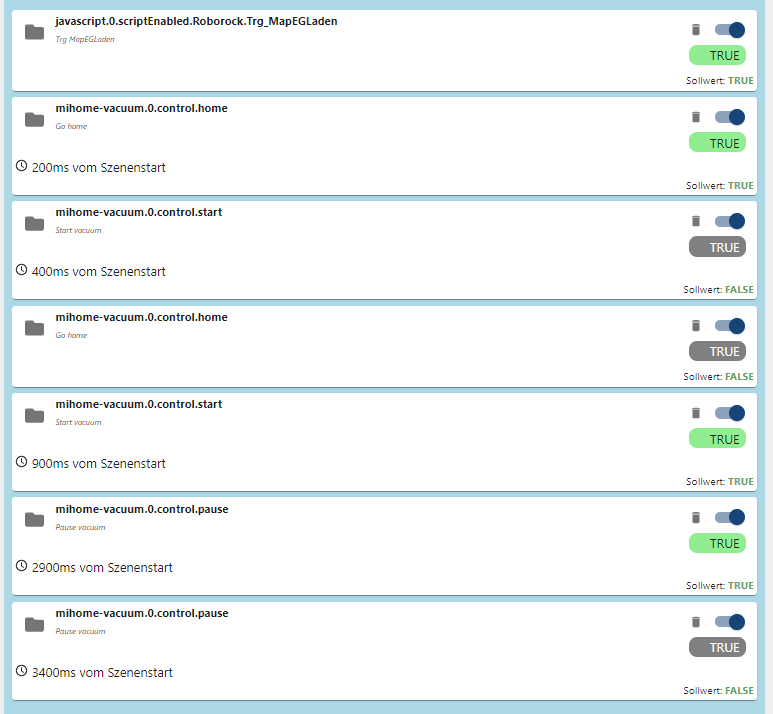
Hier noch der obere Teil im aufgeklappten Zustand:
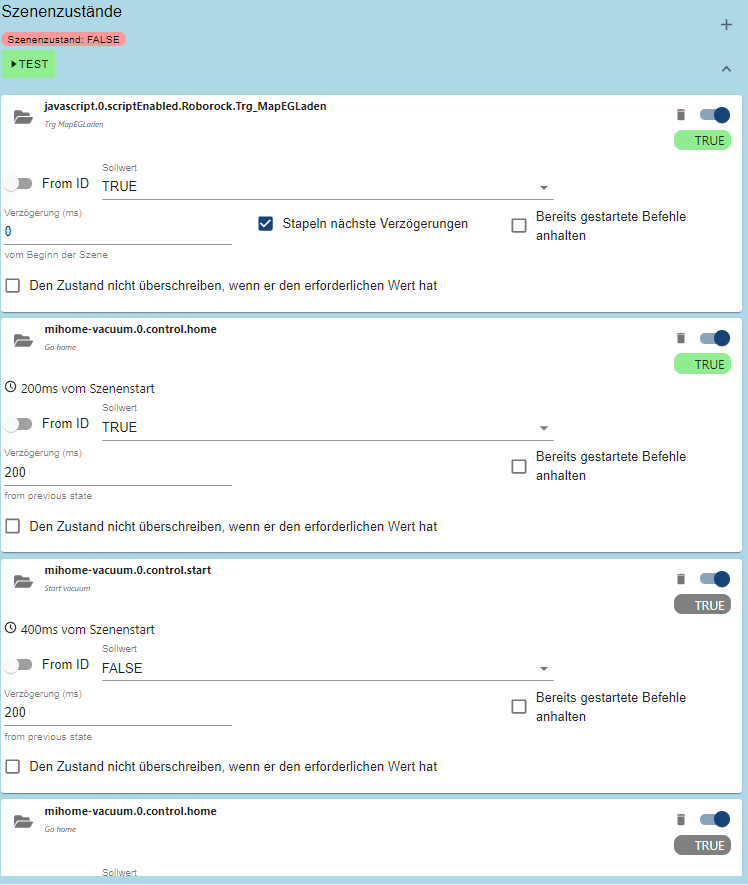
Aber auch hier kommt manchmal die Meldung mit der Queue.
Habe auch schon mal versucht "clearQueue" auf true zwischendurch einzusetzen. Aber auch das hilft nicht.
Leider verstehe ich da das Konzept der Queue auch nicht so recht.Kann man die Queue Funktion irgendwie abschalten?
Wie kann ich die Queue eventuell löschen um den S50 zu "befreien" sodass er wieder Befehle annimmt?
Wie sollte ich hier am besten vorgehen um es wieder wie vorher zum laufen zu bekommen?Gruß Nu
-
Hatte lange Zeit ein ioBroker (mit altem Stand ohne Updates einzuspielen) auf einem Igel laufen
mit dem ich meinen S50 per Szene gesteuert habe.Konkret hatte ich eine Szene "MAP_EG_Laden" erstellt.
Hierin wurde per SSH auf dem Roborock die Map Dateien getauscht und anschließend kurz gestartet und pausiert um die Karten auch wirklich zu laden.
Diese Szene habe ich dann vor jede andere Szene gepackt um dann die einzelnen Zonen anzufahren:
Das hat auch immer zuverlässig funktioniert.
Habe nun auf einen Raspberry mit aktueller Version gewechselt und da klappt es leider nicht mehr.
Immer wieder erscheint die Meldung
"should trigger cleaning all , but is currently active(5). Add to queue"
Der S50 reagiert dann auch überhaupt nicht, wenn ich z.B. Start auf true setze.Muss ich z.B. den Pause Befehl manuell wieder auf false setzten um z.B. die Zonenreinigung zu starten?
Manchmal funktioniert es wieder wenn ich vor den Befehlen den "Home" Befehl mit rein nehme.Es scheint eine neue Funktion der Queue zu geben, die ich hier scheinbar falsch bediene.
Das hier funktioniert z.B. manchmal:
Hier noch der obere Teil im aufgeklappten Zustand:
Aber auch hier kommt manchmal die Meldung mit der Queue.
Habe auch schon mal versucht "clearQueue" auf true zwischendurch einzusetzen. Aber auch das hilft nicht.
Leider verstehe ich da das Konzept der Queue auch nicht so recht.Kann man die Queue Funktion irgendwie abschalten?
Wie kann ich die Queue eventuell löschen um den S50 zu "befreien" sodass er wieder Befehle annimmt?
Wie sollte ich hier am besten vorgehen um es wieder wie vorher zum laufen zu bekommen?Gruß Nu
-
@nu_81 die queue ist dafür da, dass du einfach mehrere Räume starten kannst unser die dann nacheinander abarbeitet.
Wenn er nicht startet hat er eher verbindindungsprobleme. Sobald er wieder verbunden ist, sollte er starten. -
Glaube nicht dass es Verbindungsprobleme sind.
Er reagiert z.B. überhaupt nicht auf start, gibt stattdessen die Meldung ins Log.
Auf z.B. auf Home oder "Wo bist du" reagiert er sofort. -
Hallo,
kurze Frage...
Meine beiden Robrock (S5 und S6) wollen ein Firmware-Update durchführen.
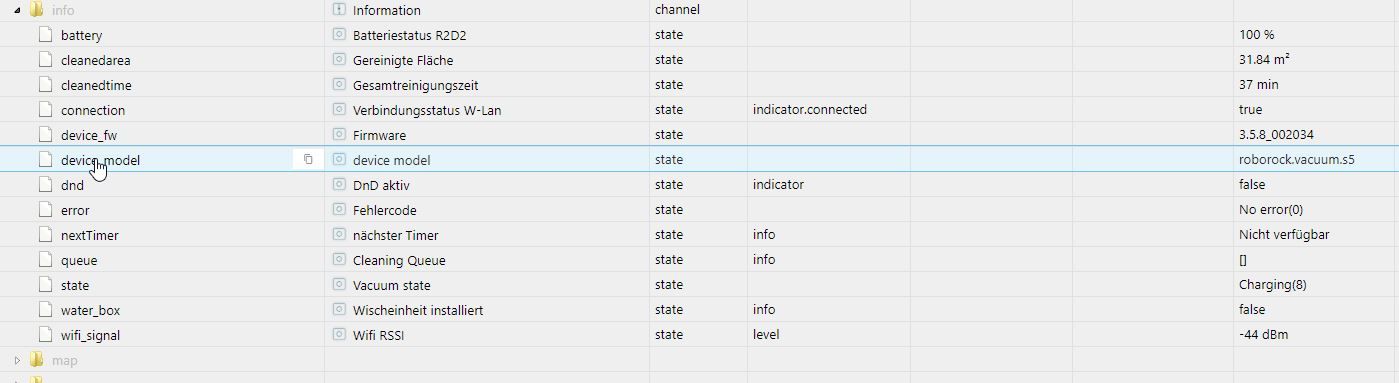
Von Version 3.5.8_2076 auf 3.5.8_2652 beim S6 bzw. 3.5.7_002008 auf 3.5.8_002034.Da momentan aber alles super funktioniert will ich nicht einfach ein Update fahren und deshalb mal nachfragen ob jemand von euch Erfahrungen dies bzgl. hat. Angeblich handelt es sich dabei nur ein Bugfix?!
Beste Grüße
-
keine probleme hier
-
Hallo,
kurze Frage...
Meine beiden Robrock (S5 und S6) wollen ein Firmware-Update durchführen.
Von Version 3.5.8_2076 auf 3.5.8_2652 beim S6 bzw. 3.5.7_002008 auf 3.5.8_002034.Da momentan aber alles super funktioniert will ich nicht einfach ein Update fahren und deshalb mal nachfragen ob jemand von euch Erfahrungen dies bzgl. hat. Angeblich handelt es sich dabei nur ein Bugfix?!
Beste Grüße
@sweatchuck
nee, meine 4 auch, mach doch mal, dann wissen wir ja, obs dann noch geht.. :-) -
keine probleme hier
@jackdaniel mit Adapter Version ..??
-
bei mir läuft die 2.2.4
-
Puh, bin gerade echt am verzweifeln. Ich habe nichts weiter gemacht (zumindest nicht, dass ich wüsste), aber die Map lädt nicht mehr und es kommt immer folgender Fehler:
answer map_slot is currently not supported!Was kann ich machen?
EDIT: Hab die Lösung gefunden. Für alle, die das gleiche Problem haben:
https://github.com/iobroker-community-adapters/ioBroker.mihome-vacuum/issues/119
Lag am Update von NodeJS...
-
DANKE erstmal für diesen tollen Adapter und die kontinuierliche Arbeit daran.
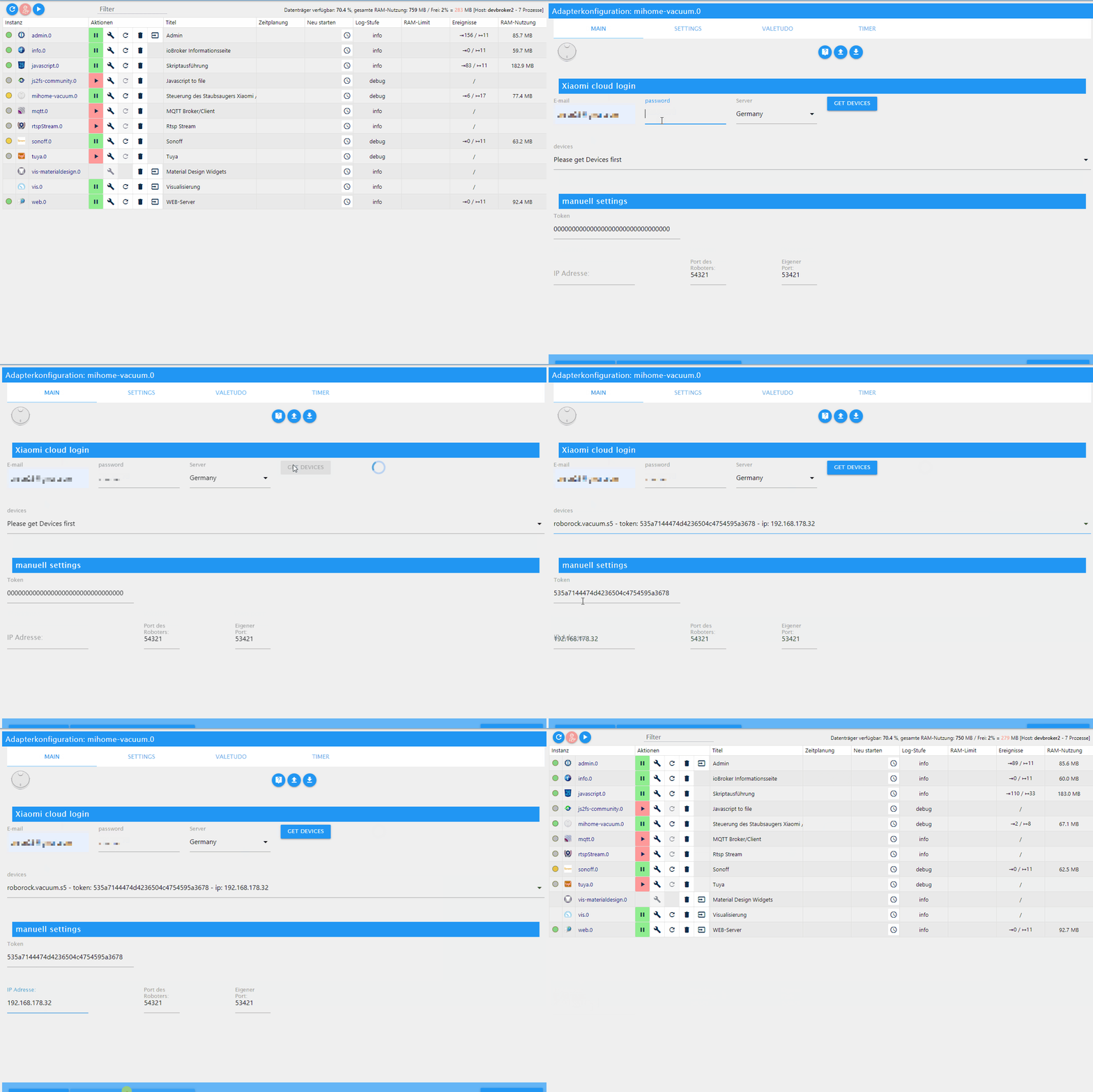
Wegen einem bevorstehenden Wechsel von einem ASUS TinkerBoard S auf ein Windows10 Ubunto-System habe ich aktuell 2 Versionen von dem Adapter laufen.
Auf dem TinkerBoard S habe ich die Version 1.1.5 installiert und kann nicht auf die Version 2.1.1 updaten. Das Update wird stets mit einem Fehler beendet und der Adpater ist dann auch aus der VIS verschwunden. Ansonsten läuft diese Version zu meiner vollen Zufriedenheit.Mein Hauptproblem ist jedoch das der Adapter auf dem Ubuntu in der Version 2.1.1 bei "Gelb" bleibt. Ich kann zwar den Server (Germany) abfragen und den S6 übernehmen, doch der Adapter bleibt "Gelb".
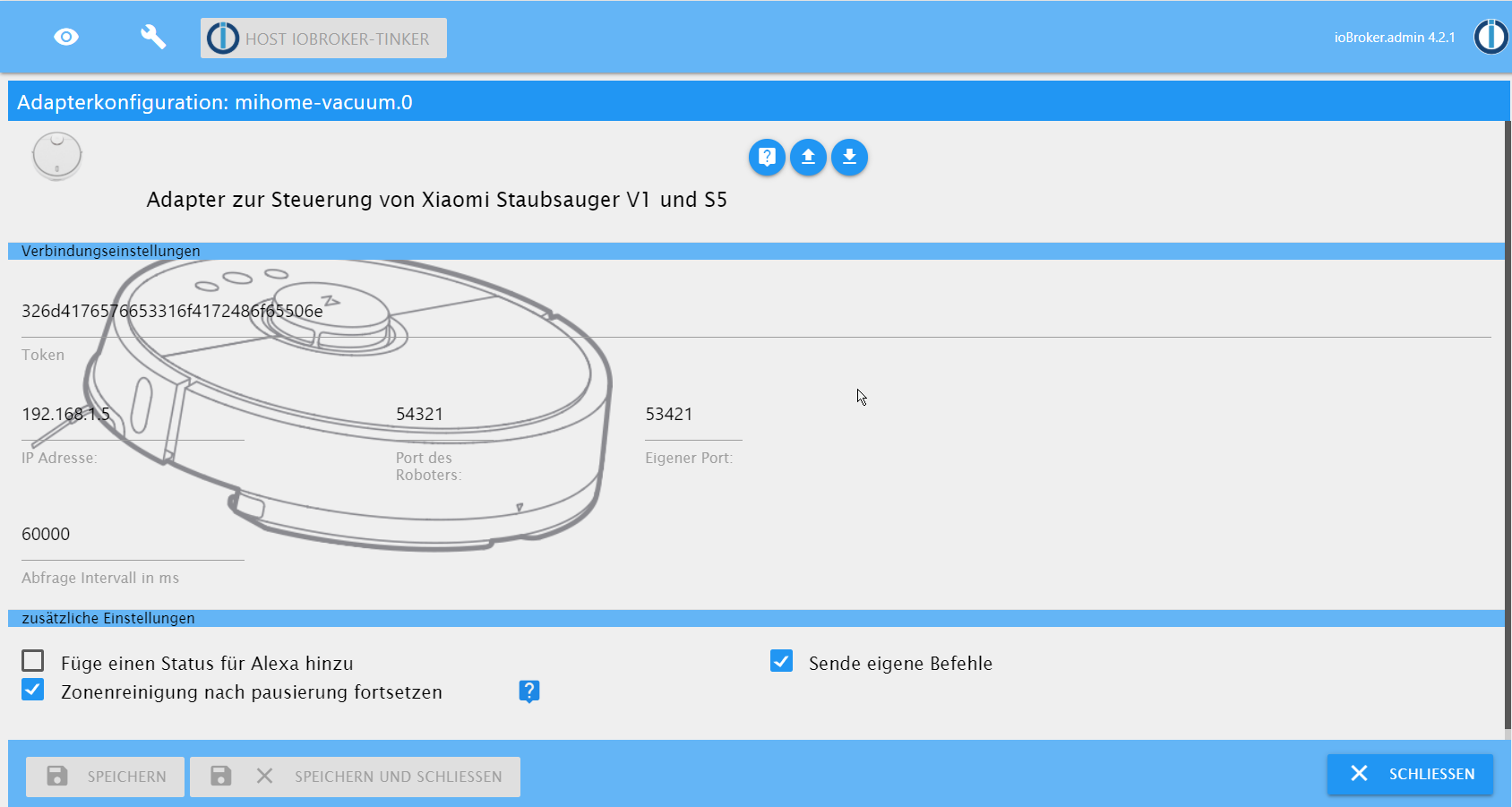
Die Konfigurationen sind gleich, wie auf den Screenshots zu sehen.
Ich freue mich über jede Hilfe.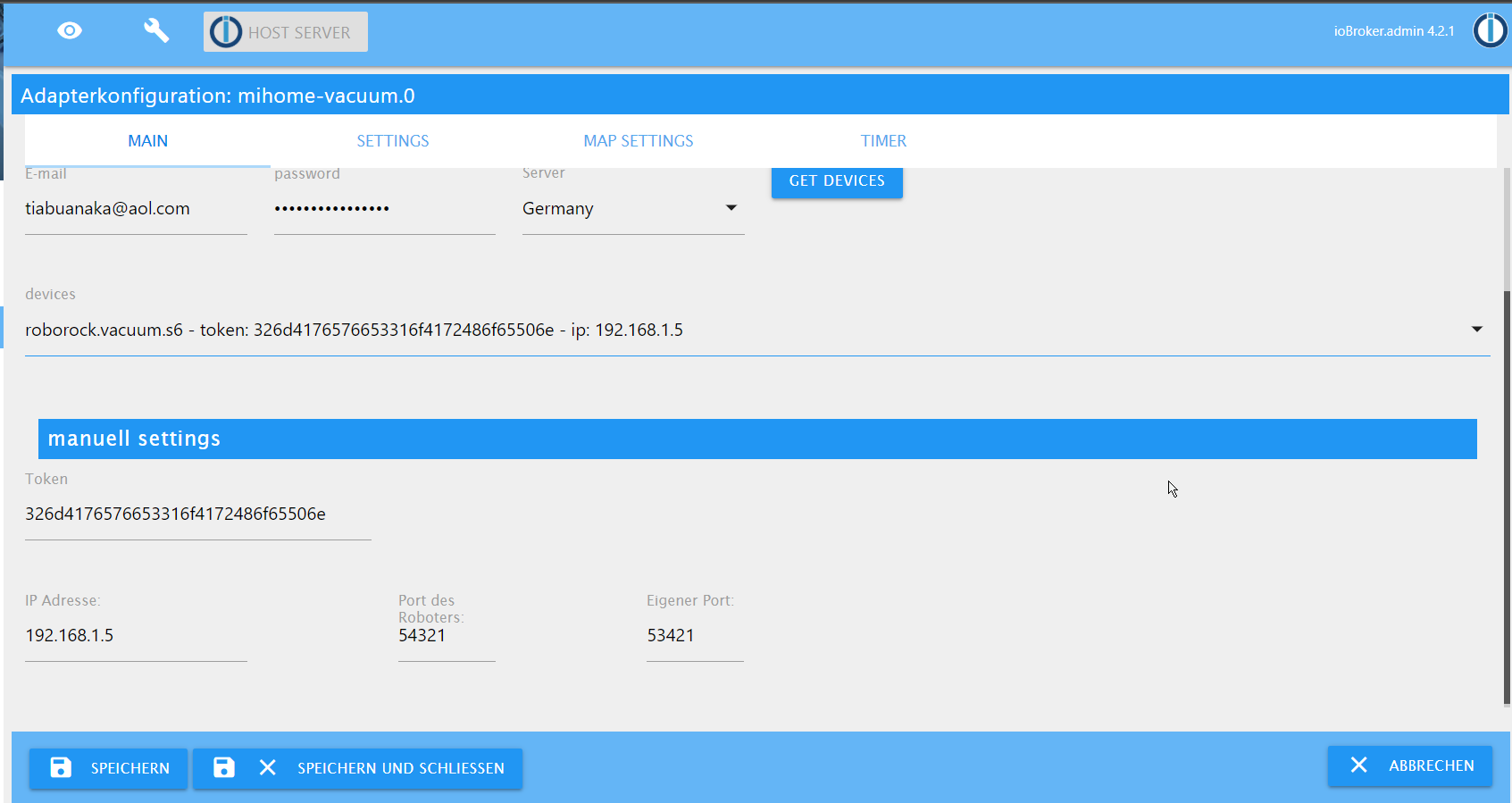
Der LOG von dem Ubuntu-System ist folgender:2021-02-18 14:02:03.591 - info: host.Server stopInstance system.adapter.mihome-vacuum.0 (force=false, process=true) 2021-02-18 14:02:03.593 - info: host.Server stopInstance system.adapter.mihome-vacuum.0 send kill signal 2021-02-18 14:02:03.594 - info: mihome-vacuum.0 (915) Got terminate signal TERMINATE_YOURSELF 2021-02-18 14:02:03.595 - info: mihome-vacuum.0 (915) terminating 2021-02-18 14:02:03.595 - info: mihome-vacuum.0 (915) Terminated (ADAPTER_REQUESTED_TERMINATION): Without reason 2021-02-18 14:02:04.111 - info: host.Server instance system.adapter.mihome-vacuum.0 terminated with code 11 (ADAPTER_REQUESTED_TERMINATION) 2021-02-18 14:02:06.615 - info: host.Server instance system.adapter.mihome-vacuum.0 started with pid 1020 2021-02-18 14:02:07.105 - info: mihome-vacuum.0 (1020) starting. Version 2.1.1 in /opt/iobroker/node_modules/iobroker.mihome-vacuum, node: v12.20.2, js-controller: 3.1.6 2021-02-18 14:02:07.146 - info: mihome-vacuum.0 (1020) Expert mode enabled, states created 2021-02-18 14:02:07.146 - info: mihome-vacuum.0 (1020) Create state clean_home for controlling by cloud adapter 2021-02-18 14:02:07.671 - info: mihome-vacuum.0 (1020) set nächster Timer: Nicht verfügbar 2021-02-18 14:02:08.330 - info: tr-064.0 (726) forEachConfiguredDevice: in GetSpecificHostEntry 1(Mandy/ A8:DB:03:65:DB:6F) device seems offline but we never saw it since adapter was started:Error: sendSOAPActionRequest Error action=GetSpecificHostEntry serviceType=urn:dslforum-org:service:Hosts:1: 500 - {"code":500} 2021-02-18 14:03:09.810 - info: tr-064.0 (726) forEachConfiguredDevice: in GetSpecificHostEntry 1(Mandy/ A8:DB:03:65:DB:6F) device seems offline but we never saw it since adapter was started:Error: sendSOAPActionRequest Error action=GetSpecificHostEntry serviceType=urn:dslforum-org:service:Hosts:1: 500 - {"code":500} 2021-02-18 14:04:11.431 - info: tr-064.0 (726) forEachConfiguredDevice: in GetSpecificHostEntry 1(Mandy/ A8:DB:03:65:DB:6F) device seems offline but we never saw it since adapter was started:Error: sendSOAPActionRequest Error action=GetSpecificHostEntry serviceType=urn:dslforum-org:service:Hosts:1: 500 - {"code":500} 2021-02-18 14:05:00.020 - info: host.Server instance system.adapter.dwd.0 started with pid 1035 2021-02-18 14:05:00.580 - info: dwd.0 (1035) starting. Version 2.5.2 in /opt/iobroker/node_modules/iobroker.dwd, node: v12.20.2, js-controller: 3.1.6 2021-02-18 14:05:00.940 - info: dwd.0 (1035) Terminated (ADAPTER_REQUESTED_TERMINATION): Without reason 2021-02-18 14:05:01.450 - info: host.Server instance system.adapter.dwd.0 terminated with code 11 (ADAPTER_REQUESTED_TERMINATION) 2021-02-18 14:05:13.192 - info: tr-064.0 (726) forEachConfiguredDevice: in GetSpecificHostEntry 1(Mandy/ A8:DB:03:65:DB:6F) device seems offline but we never saw it since adapter was started:Error: sendSOAPActionRequest Error action=GetSpecificHostEntry serviceType=urn:dslforum-org:service:Hosts:1: 500 - {"code":500} 2021-02-18 14:06:14.647 - info: tr-064.0 (726) forEachConfiguredDevice: in GetSpecificHostEntry 1(Mandy/ A8:DB:03:65:DB:6F) device seems offline but we never saw it since adapter was started:Error: sendSOAPActionRequest Error action=GetSpecificHostEntry serviceType=urn:dslforum-org:service:Hosts:1: 500 - {"code":500} 2021-02-18 14:07:16.150 - info: tr-064.0 (726) forEachConfiguredDevice: in GetSpecificHostEntry 1(Mandy/ A8:DB:03:65:DB:6F) device seems offline but we never saw it since adapter was started:Error: sendSOAPActionRequest Error action=GetSpecificHostEntry serviceType=urn:dslforum-org:service:Hosts:1: 500 - {"code":500} 2021-02-18 14:08:01.090 - info: hm-rpc.0 (536) xmlrpc <- listDevices ["hm-rpc.0"] 2021-02-18 14:08:01.117 - info: hm-rpc.0 (536) xmlrpc -> 0 devices 2021-02-18 14:08:01.223 - info: hm-rpc.0 (536) xmlrpc <- newDevices 170 2021-02-18 14:08:01.246 - info: hm-rpc.0 (536) new HMIP devices/channels after filter: 0 2021-02-18 14:08:17.620 - info: tr-064.0 (726) forEachConfiguredDevice: in GetSpecificHostEntry 1(Mandy/ A8:DB:03:65:DB:6F) device seems offline but we never saw it since adapter was started:Error: sendSOAPActionRequest Error action=GetSpecificHostEntry serviceType=urn:dslforum-org:service:Hosts:1: 500 - {"code":500} 2021-02-18 14:09:19.121 - info: tr-064.0 (726) forEachConfiguredDevice: in GetSpecificHostEntry 1(Mandy/ A8:DB:03:65:DB:6F) device seems offline but we never saw it since adapter was started:Error: sendSOAPActionRequest Error action=GetSpecificHostEntry serviceType=urn:dslforum-org:service:Hosts:1: 500 - {"code":500} 2021-02-18 14:10:00.023 - info: host.Server instance system.adapter.dwd.0 started with pid 1050 2021-02-18 14:10:00.597 - info: dwd.0 (1050) starting. Version 2.5.2 in /opt/iobroker/node_modules/iobroker.dwd, node: v12.20.2, js-controller: 3.1.6 2021-02-18 14:10:00.983 - info: dwd.0 (1050) Terminated (ADAPTER_REQUESTED_TERMINATION): Without reason 2021-02-18 14:10:01.493 - info: host.Server instance system.adapter.dwd.0 terminated with code 11 (ADAPTER_REQUESTED_TERMINATION) 2021-02-18 14:10:20.475 - info: tr-064.0 (726) forEachConfiguredDevice: in GetSpecificHostEntry 1(Mandy/ A8:DB:03:65:DB:6F) device seems offline but we never saw it since adapter was started:Error: sendSOAPActionRequest Error action=GetSpecificHostEntry serviceType=urn:dslforum-org:service:Hosts:1: 500 - {"code":500} 2021-02-18 14:11:22.013 - info: tr-064.0 (726) forEachConfiguredDevice: in GetSpecificHostEntry 1(Mandy/ A8:DB:03:65:DB:6F) device seems offline but we never saw it since adapter was started:Error: sendSOAPActionRequest Error action=GetSpecificHostEntry serviceType=urn:dslforum-org:service:Hosts:1: 500 - {"code":500} 2021-02-18 14:11:55.186 - info: host.Server "system.adapter.mihome-vacuum.0" disabled 2021-02-18 14:11:55.188 - info: host.Server stopInstance system.adapter.mihome-vacuum.0 (force=false, process=true) 2021-02-18 14:11:55.188 - info: host.Server stopInstance system.adapter.mihome-vacuum.0 send kill signal 2021-02-18 14:11:55.190 - info: mihome-vacuum.0 (1020) Got terminate signal TERMINATE_YOURSELF 2021-02-18 14:11:55.191 - info: mihome-vacuum.0 (1020) terminating 2021-02-18 14:11:55.191 - info: mihome-vacuum.0 (1020) Terminated (ADAPTER_REQUESTED_TERMINATION): Without reason 2021-02-18 14:11:55.707 - info: host.Server instance system.adapter.mihome-vacuum.0 terminated with code 11 (ADAPTER_REQUESTED_TERMINATION) 2021-02-18 14:11:57.923 - info: host.Server "system.adapter.mihome-vacuum.0" enabled 2021-02-18 14:11:57.941 - info: host.Server instance system.adapter.mihome-vacuum.0 started with pid 1065 2021-02-18 14:11:58.436 - info: mihome-vacuum.0 (1065) starting. Version 2.1.1 in /opt/iobroker/node_modules/iobroker.mihome-vacuum, node: v12.20.2, js-controller: 3.1.6 2021-02-18 14:11:58.478 - info: mihome-vacuum.0 (1065) Expert mode enabled, states created 2021-02-18 14:11:58.478 - info: mihome-vacuum.0 (1065) Create state clean_home for controlling by cloud adapter 2021-02-18 14:11:59.004 - info: mihome-vacuum.0 (1065) set nächster Timer: Nicht verfügbar 2021-02-18 14:12:00.045 - info: host.Server instance system.adapter.weatherunderground.1 started with pid 1080 2021-02-18 14:12:00.519 - info: weatherunderground.1 (1080) starting. Version 3.2.1 in /opt/iobroker/node_modules/iobroker.weatherunderground, node: v12.20.2, js-controller: 3.1.6 2021-02-18 14:12:03.888 - info: weatherunderground.1 (1080) Terminated (NO_ERROR): Without reason 2021-02-18 14:12:04.068 - info: host.Server instance system.adapter.weatherunderground.0 started with pid 1095 2021-02-18 14:12:04.393 - info: host.Server instance system.adapter.weatherunderground.1 terminated with code 0 (NO_ERROR) 2021-02-18 14:12:04.544 - info: weatherunderground.0 (1095) starting. Version 3.2.1 in /opt/iobroker/node_modules/iobroker.weatherunderground, node: v12.20.2, js-controller: 3.1.6 2021-02-18 14:12:08.195 - info: weatherunderground.0 (1095) Terminated (NO_ERROR): Without reason 2021-02-18 14:12:08.705 - info: host.Server instance system.adapter.weatherunderground.0 terminated with code 0 (NO_ERROR) -
DANKE erstmal für diesen tollen Adapter und die kontinuierliche Arbeit daran.
Wegen einem bevorstehenden Wechsel von einem ASUS TinkerBoard S auf ein Windows10 Ubunto-System habe ich aktuell 2 Versionen von dem Adapter laufen.
Auf dem TinkerBoard S habe ich die Version 1.1.5 installiert und kann nicht auf die Version 2.1.1 updaten. Das Update wird stets mit einem Fehler beendet und der Adpater ist dann auch aus der VIS verschwunden. Ansonsten läuft diese Version zu meiner vollen Zufriedenheit.Mein Hauptproblem ist jedoch das der Adapter auf dem Ubuntu in der Version 2.1.1 bei "Gelb" bleibt. Ich kann zwar den Server (Germany) abfragen und den S6 übernehmen, doch der Adapter bleibt "Gelb".
Die Konfigurationen sind gleich, wie auf den Screenshots zu sehen.
Ich freue mich über jede Hilfe.
Der LOG von dem Ubuntu-System ist folgender:2021-02-18 14:02:03.591 - info: host.Server stopInstance system.adapter.mihome-vacuum.0 (force=false, process=true) 2021-02-18 14:02:03.593 - info: host.Server stopInstance system.adapter.mihome-vacuum.0 send kill signal 2021-02-18 14:02:03.594 - info: mihome-vacuum.0 (915) Got terminate signal TERMINATE_YOURSELF 2021-02-18 14:02:03.595 - info: mihome-vacuum.0 (915) terminating 2021-02-18 14:02:03.595 - info: mihome-vacuum.0 (915) Terminated (ADAPTER_REQUESTED_TERMINATION): Without reason 2021-02-18 14:02:04.111 - info: host.Server instance system.adapter.mihome-vacuum.0 terminated with code 11 (ADAPTER_REQUESTED_TERMINATION) 2021-02-18 14:02:06.615 - info: host.Server instance system.adapter.mihome-vacuum.0 started with pid 1020 2021-02-18 14:02:07.105 - info: mihome-vacuum.0 (1020) starting. Version 2.1.1 in /opt/iobroker/node_modules/iobroker.mihome-vacuum, node: v12.20.2, js-controller: 3.1.6 2021-02-18 14:02:07.146 - info: mihome-vacuum.0 (1020) Expert mode enabled, states created 2021-02-18 14:02:07.146 - info: mihome-vacuum.0 (1020) Create state clean_home for controlling by cloud adapter 2021-02-18 14:02:07.671 - info: mihome-vacuum.0 (1020) set nächster Timer: Nicht verfügbar 2021-02-18 14:02:08.330 - info: tr-064.0 (726) forEachConfiguredDevice: in GetSpecificHostEntry 1(Mandy/ A8:DB:03:65:DB:6F) device seems offline but we never saw it since adapter was started:Error: sendSOAPActionRequest Error action=GetSpecificHostEntry serviceType=urn:dslforum-org:service:Hosts:1: 500 - {"code":500} 2021-02-18 14:03:09.810 - info: tr-064.0 (726) forEachConfiguredDevice: in GetSpecificHostEntry 1(Mandy/ A8:DB:03:65:DB:6F) device seems offline but we never saw it since adapter was started:Error: sendSOAPActionRequest Error action=GetSpecificHostEntry serviceType=urn:dslforum-org:service:Hosts:1: 500 - {"code":500} 2021-02-18 14:04:11.431 - info: tr-064.0 (726) forEachConfiguredDevice: in GetSpecificHostEntry 1(Mandy/ A8:DB:03:65:DB:6F) device seems offline but we never saw it since adapter was started:Error: sendSOAPActionRequest Error action=GetSpecificHostEntry serviceType=urn:dslforum-org:service:Hosts:1: 500 - {"code":500} 2021-02-18 14:05:00.020 - info: host.Server instance system.adapter.dwd.0 started with pid 1035 2021-02-18 14:05:00.580 - info: dwd.0 (1035) starting. Version 2.5.2 in /opt/iobroker/node_modules/iobroker.dwd, node: v12.20.2, js-controller: 3.1.6 2021-02-18 14:05:00.940 - info: dwd.0 (1035) Terminated (ADAPTER_REQUESTED_TERMINATION): Without reason 2021-02-18 14:05:01.450 - info: host.Server instance system.adapter.dwd.0 terminated with code 11 (ADAPTER_REQUESTED_TERMINATION) 2021-02-18 14:05:13.192 - info: tr-064.0 (726) forEachConfiguredDevice: in GetSpecificHostEntry 1(Mandy/ A8:DB:03:65:DB:6F) device seems offline but we never saw it since adapter was started:Error: sendSOAPActionRequest Error action=GetSpecificHostEntry serviceType=urn:dslforum-org:service:Hosts:1: 500 - {"code":500} 2021-02-18 14:06:14.647 - info: tr-064.0 (726) forEachConfiguredDevice: in GetSpecificHostEntry 1(Mandy/ A8:DB:03:65:DB:6F) device seems offline but we never saw it since adapter was started:Error: sendSOAPActionRequest Error action=GetSpecificHostEntry serviceType=urn:dslforum-org:service:Hosts:1: 500 - {"code":500} 2021-02-18 14:07:16.150 - info: tr-064.0 (726) forEachConfiguredDevice: in GetSpecificHostEntry 1(Mandy/ A8:DB:03:65:DB:6F) device seems offline but we never saw it since adapter was started:Error: sendSOAPActionRequest Error action=GetSpecificHostEntry serviceType=urn:dslforum-org:service:Hosts:1: 500 - {"code":500} 2021-02-18 14:08:01.090 - info: hm-rpc.0 (536) xmlrpc <- listDevices ["hm-rpc.0"] 2021-02-18 14:08:01.117 - info: hm-rpc.0 (536) xmlrpc -> 0 devices 2021-02-18 14:08:01.223 - info: hm-rpc.0 (536) xmlrpc <- newDevices 170 2021-02-18 14:08:01.246 - info: hm-rpc.0 (536) new HMIP devices/channels after filter: 0 2021-02-18 14:08:17.620 - info: tr-064.0 (726) forEachConfiguredDevice: in GetSpecificHostEntry 1(Mandy/ A8:DB:03:65:DB:6F) device seems offline but we never saw it since adapter was started:Error: sendSOAPActionRequest Error action=GetSpecificHostEntry serviceType=urn:dslforum-org:service:Hosts:1: 500 - {"code":500} 2021-02-18 14:09:19.121 - info: tr-064.0 (726) forEachConfiguredDevice: in GetSpecificHostEntry 1(Mandy/ A8:DB:03:65:DB:6F) device seems offline but we never saw it since adapter was started:Error: sendSOAPActionRequest Error action=GetSpecificHostEntry serviceType=urn:dslforum-org:service:Hosts:1: 500 - {"code":500} 2021-02-18 14:10:00.023 - info: host.Server instance system.adapter.dwd.0 started with pid 1050 2021-02-18 14:10:00.597 - info: dwd.0 (1050) starting. Version 2.5.2 in /opt/iobroker/node_modules/iobroker.dwd, node: v12.20.2, js-controller: 3.1.6 2021-02-18 14:10:00.983 - info: dwd.0 (1050) Terminated (ADAPTER_REQUESTED_TERMINATION): Without reason 2021-02-18 14:10:01.493 - info: host.Server instance system.adapter.dwd.0 terminated with code 11 (ADAPTER_REQUESTED_TERMINATION) 2021-02-18 14:10:20.475 - info: tr-064.0 (726) forEachConfiguredDevice: in GetSpecificHostEntry 1(Mandy/ A8:DB:03:65:DB:6F) device seems offline but we never saw it since adapter was started:Error: sendSOAPActionRequest Error action=GetSpecificHostEntry serviceType=urn:dslforum-org:service:Hosts:1: 500 - {"code":500} 2021-02-18 14:11:22.013 - info: tr-064.0 (726) forEachConfiguredDevice: in GetSpecificHostEntry 1(Mandy/ A8:DB:03:65:DB:6F) device seems offline but we never saw it since adapter was started:Error: sendSOAPActionRequest Error action=GetSpecificHostEntry serviceType=urn:dslforum-org:service:Hosts:1: 500 - {"code":500} 2021-02-18 14:11:55.186 - info: host.Server "system.adapter.mihome-vacuum.0" disabled 2021-02-18 14:11:55.188 - info: host.Server stopInstance system.adapter.mihome-vacuum.0 (force=false, process=true) 2021-02-18 14:11:55.188 - info: host.Server stopInstance system.adapter.mihome-vacuum.0 send kill signal 2021-02-18 14:11:55.190 - info: mihome-vacuum.0 (1020) Got terminate signal TERMINATE_YOURSELF 2021-02-18 14:11:55.191 - info: mihome-vacuum.0 (1020) terminating 2021-02-18 14:11:55.191 - info: mihome-vacuum.0 (1020) Terminated (ADAPTER_REQUESTED_TERMINATION): Without reason 2021-02-18 14:11:55.707 - info: host.Server instance system.adapter.mihome-vacuum.0 terminated with code 11 (ADAPTER_REQUESTED_TERMINATION) 2021-02-18 14:11:57.923 - info: host.Server "system.adapter.mihome-vacuum.0" enabled 2021-02-18 14:11:57.941 - info: host.Server instance system.adapter.mihome-vacuum.0 started with pid 1065 2021-02-18 14:11:58.436 - info: mihome-vacuum.0 (1065) starting. Version 2.1.1 in /opt/iobroker/node_modules/iobroker.mihome-vacuum, node: v12.20.2, js-controller: 3.1.6 2021-02-18 14:11:58.478 - info: mihome-vacuum.0 (1065) Expert mode enabled, states created 2021-02-18 14:11:58.478 - info: mihome-vacuum.0 (1065) Create state clean_home for controlling by cloud adapter 2021-02-18 14:11:59.004 - info: mihome-vacuum.0 (1065) set nächster Timer: Nicht verfügbar 2021-02-18 14:12:00.045 - info: host.Server instance system.adapter.weatherunderground.1 started with pid 1080 2021-02-18 14:12:00.519 - info: weatherunderground.1 (1080) starting. Version 3.2.1 in /opt/iobroker/node_modules/iobroker.weatherunderground, node: v12.20.2, js-controller: 3.1.6 2021-02-18 14:12:03.888 - info: weatherunderground.1 (1080) Terminated (NO_ERROR): Without reason 2021-02-18 14:12:04.068 - info: host.Server instance system.adapter.weatherunderground.0 started with pid 1095 2021-02-18 14:12:04.393 - info: host.Server instance system.adapter.weatherunderground.1 terminated with code 0 (NO_ERROR) 2021-02-18 14:12:04.544 - info: weatherunderground.0 (1095) starting. Version 3.2.1 in /opt/iobroker/node_modules/iobroker.weatherunderground, node: v12.20.2, js-controller: 3.1.6 2021-02-18 14:12:08.195 - info: weatherunderground.0 (1095) Terminated (NO_ERROR): Without reason 2021-02-18 14:12:08.705 - info: host.Server instance system.adapter.weatherunderground.0 terminated with code 0 (NO_ERROR) -
Ich kann nur raten, aber im rechten Screenshot steht für V1 und S5 und Du hast einen S6.....
-
@haselchen das mit dem S6 ist mir klar, doch der Adapter läuft ja, lässt sich nur nicht updaten.
Wichtiger wäre mir jedoch den Ubuntu ans laufen zu bekommen, der andere wird eh irgendwann abgeschaltet.Pragmatische Lösung , wenn es geht, die 1.1.5 auf Ubuntu installieren?
Das war die letzte Version, mit der dein Sauger funktionierte?Edit:
Laufen beide Adapter gleichzeitig? (Tinker und Ubuntu?)
Oder hast du mal das WIFI resettet, dass der Token nicht mehr stimmt? -
Pragmatische Lösung , wenn es geht, die 1.1.5 auf Ubuntu installieren?
Das war die letzte Version, mit der dein Sauger funktionierte?Edit:
Laufen beide Adapter gleichzeitig? (Tinker und Ubuntu?)
Oder hast du mal das WIFI resettet, dass der Token nicht mehr stimmt?@haselchen danke für den Tipp, ich musste zwar erstmal auf den 2.0.7 zurück um überhaupt den 1.1.5 angezeigt zu bekommen, doch hat es endgültig geklappt. Leider ist das Problem damit nicht gelöst, der Adapter bleibt "gelb"
Ja aktuell laufen beide ioBroker und somit auch beide Adapter gleichzeitig. Doch auch die vorübergehende Deaktiverung des ThinkerBoardS Adapters bringt beim Ubuntu keine Besserung. Der Token muss noch stimmen, sonst könnte der ThinkerBoardS Adapter nicht funktionieren und ich würde über die Server Suche einen den Neuen finden, oder?
Hier dazu mein letzter Log:2021-02-18 19:23:00.831 - info: mihome-vacuum.0 (3441) Got terminate signal TERMINATE_YOURSELF 2021-02-18 19:23:00.831 - info: mihome-vacuum.0 (3441) terminating 2021-02-18 19:23:00.832 - info: mihome-vacuum.0 (3441) Terminated (ADAPTER_REQUESTED_TERMINATION): Without reason 2021-02-18 19:23:01.347 - info: host.Server instance system.adapter.mihome-vacuum.0 terminated with code 11 (ADAPTER_REQUESTED_TERMINATION) 2021-02-18 19:23:03.854 - info: host.Server instance system.adapter.mihome-vacuum.0 started with pid 3456 2021-02-18 19:23:04.287 - warn: mihome-vacuum.0 (3456) Object mihome-vacuum.0.info.dnd is invalid: obj.common.type has an invalid value (switch) but has to be one of number, string, boolean, array, object, mixed, file, json 2021-02-18 19:23:04.288 - warn: mihome-vacuum.0 (3456) This object will not be created in future versions. Please report this to the developer. 2021-02-18 19:23:04.351 - info: mihome-vacuum.0 (3456) starting. Version 2.0.7 in /opt/iobroker/node_modules/iobroker.mihome-vacuum, node: v12.20.2, js-controller: 3.1.6 2021-02-18 19:23:04.370 - info: mihome-vacuum.0 (3456) Expert mode disabled, states deleted 2021-02-18 19:23:04.371 - info: mihome-vacuum.0 (3456) Cloud control disabled 2021-02-18 19:23:04.375 - info: mihome-vacuum.0 (3456) Disconnect 2021-02-18 19:23:04.900 - info: mihome-vacuum.0 (3456) set nächster Timer: Nicht verfügbar 2021-02-18 19:23:20.469 - info: host.Server iobroker upgrade mihome-vacuum@1.1.5 2021-02-18 19:23:21.486 - info: host.Server iobroker Update mihome-vacuum from @2.0.7 to @1.1.5 2021-02-18 19:23:21.674 - info: host.Server iobroker NPM version: 6.14.11 2021-02-18 19:23:21.675 - info: host.Server iobroker npm install iobroker.mihome-vacuum@1.1.5 --loglevel error --unsafe-perm --prefix "/opt/iobroker" (System call) 2021-02-18 19:23:23.918 - info: tr-064.0 (726) forEachConfiguredDevice: in GetSpecificHostEntry 1(Mandy/ A8:DB:03:65:DB:6F) device seems offline but we never saw it since adapter was started:Error: sendSOAPActionRequest Error action=GetSpecificHostEntry serviceType=urn:dslforum-org:service:Hosts:1: 500 - {"code":500} 2021-02-18 19:23:24.376 - info: mihome-vacuum.0 (3456) Disconnect 2021-02-18 19:23:25.458 - info: host.Server iobroker upload [4] mihome-vacuum.admin /opt/iobroker/node_modules/iobroker.mihome-vacuum/admin/words.js words.js application/javascript 2021-02-18 19:23:25.491 - info: host.Server iobroker Update "system.adapter.mihome-vacuum.0" 2021-02-18 19:23:25.497 - info: host.Server stopInstance system.adapter.mihome-vacuum.0 (force=false, process=true) 2021-02-18 19:23:25.499 - info: host.Server stopInstance system.adapter.mihome-vacuum.0 send kill signal 2021-02-18 19:23:25.499 - info: mihome-vacuum.0 (3456) Got terminate signal TERMINATE_YOURSELF 2021-02-18 19:23:25.500 - info: mihome-vacuum.0 (3456) terminating 2021-02-18 19:23:25.500 - info: mihome-vacuum.0 (3456) Terminated (ADAPTER_REQUESTED_TERMINATION): Without reason 2021-02-18 19:23:25.551 - info: host.Server iobroker upload [3] mihome-vacuum.admin /opt/iobroker/node_modules/iobroker.mihome-vacuum/admin/mihome-vacuum.png mihome-vacuum.png image/png 2021-02-18 19:23:25.605 - info: host.Server iobroker upload [2] mihome-vacuum.admin /opt/iobroker/node_modules/iobroker.mihome-vacuum/admin/index_m.html index_m.html text/html 2021-02-18 19:23:25.667 - info: host.Server iobroker upload [1] mihome-vacuum.admin /opt/iobroker/node_modules/iobroker.mihome-vacuum/admin/index.html index.html text/html 2021-02-18 19:23:25.730 - info: host.Server iobroker upload [0] mihome-vacuum.admin /opt/iobroker/node_modules/iobroker.mihome-vacuum/admin/S5.png S5.png image/png 2021-02-18 19:23:25.783 - info: host.Server iobroker Adapter "mihome-vacuum" updated 2021-02-18 19:23:26.009 - info: host.Server instance system.adapter.mihome-vacuum.0 terminated with code 11 (ADAPTER_REQUESTED_TERMINATION) 2021-02-18 19:23:26.793 - info: host.Server iobroker exit 0 2021-02-18 19:23:28.517 - info: host.Server instance system.adapter.mihome-vacuum.0 started with pid 3502 2021-02-18 19:23:28.836 - warn: mihome-vacuum.0 (3502) Object mihome-vacuum.0.info.dnd is invalid: obj.common.type has an invalid value (switch) but has to be one of number, string, boolean, array, object, mixed, file, json 2021-02-18 19:23:28.836 - warn: mihome-vacuum.0 (3502) This object will not be created in future versions. Please report this to the developer. 2021-02-18 19:23:28.908 - info: mihome-vacuum.0 (3502) starting. Version 1.1.5 in /opt/iobroker/node_modules/iobroker.mihome-vacuum, node: v12.20.2, js-controller: 3.1.6 2021-02-18 19:23:28.925 - info: mihome-vacuum.0 (3502) Expert mode disabled, states deleded 2021-02-18 19:23:28.925 - info: mihome-vacuum.0 (3502) Cloud control disabled 2021-02-18 19:23:36.444 - info: host.Server stopInstance system.adapter.mihome-vacuum.0 (force=false, process=true) 2021-02-18 19:23:36.445 - info: host.Server stopInstance system.adapter.mihome-vacuum.0 send kill signal 2021-02-18 19:23:36.447 - info: mihome-vacuum.0 (3502) Got terminate signal TERMINATE_YOURSELF 2021-02-18 19:23:36.448 - info: mihome-vacuum.0 (3502) terminating 2021-02-18 19:23:36.449 - info: mihome-vacuum.0 (3502) Terminated (ADAPTER_REQUESTED_TERMINATION): Without reason 2021-02-18 19:23:36.960 - info: host.Server instance system.adapter.mihome-vacuum.0 terminated with code 11 (ADAPTER_REQUESTED_TERMINATION) 2021-02-18 19:23:39.469 - info: host.Server instance system.adapter.mihome-vacuum.0 started with pid 3517 2021-02-18 19:23:39.775 - warn: mihome-vacuum.0 (3517) Object mihome-vacuum.0.info.dnd is invalid: obj.common.type has an invalid value (switch) but has to be one of number, string, boolean, array, object, mixed, file, json 2021-02-18 19:23:39.776 - warn: mihome-vacuum.0 (3517) This object will not be created in future versions. Please report this to the developer. 2021-02-18 19:23:39.845 - info: mihome-vacuum.0 (3517) starting. Version 1.1.5 in /opt/iobroker/node_modules/iobroker.mihome-vacuum, node: v12.20.2, js-controller: 3.1.6 2021-02-18 19:23:39.863 - info: mihome-vacuum.0 (3517) Expert mode disabled, states deleded 2021-02-18 19:23:39.863 - info: mihome-vacuum.0 (3517) Cloud control disabled 2021-02-18 19:23:44.595 - info: host.Server stopInstance system.adapter.mihome-vacuum.0 (force=false, process=true) 2021-02-18 19:23:44.595 - info: host.Server stopInstance system.adapter.mihome-vacuum.0 send kill signal 2021-02-18 19:23:44.596 - info: mihome-vacuum.0 (3517) Got terminate signal TERMINATE_YOURSELF 2021-02-18 19:23:44.597 - info: mihome-vacuum.0 (3517) terminating 2021-02-18 19:23:44.597 - info: mihome-vacuum.0 (3517) Terminated (ADAPTER_REQUESTED_TERMINATION): Without reason 2021-02-18 19:23:45.109 - info: host.Server instance system.adapter.mihome-vacuum.0 terminated with code 11 (ADAPTER_REQUESTED_TERMINATION) 2021-02-18 19:23:47.618 - info: host.Server instance system.adapter.mihome-vacuum.0 started with pid 3532 2021-02-18 19:23:47.922 - warn: mihome-vacuum.0 (3532) Object mihome-vacuum.0.info.dnd is invalid: obj.common.type has an invalid value (switch) but has to be one of number, string, boolean, array, object, mixed, file, json 2021-02-18 19:23:47.922 - warn: mihome-vacuum.0 (3532) This object will not be created in future versions. Please report this to the developer. 2021-02-18 19:23:47.982 - info: mihome-vacuum.0 (3532) starting. Version 1.1.5 in /opt/iobroker/node_modules/iobroker.mihome-vacuum, node: v12.20.2, js-controller: 3.1.6 2021-02-18 19:23:47.999 - info: mihome-vacuum.0 (3532) Expert mode enabled, states created 2021-02-18 19:23:48.000 - info: mihome-vacuum.0 (3532) Cloud control disabled 2021-02-18 19:23:52.233 - info: host.Server stopInstance system.adapter.mihome-vacuum.0 (force=false, process=true) 2021-02-18 19:23:52.234 - info: host.Server stopInstance system.adapter.mihome-vacuum.0 send kill signal 2021-02-18 19:23:52.235 - info: mihome-vacuum.0 (3532) Got terminate signal TERMINATE_YOURSELF 2021-02-18 19:23:52.235 - info: mihome-vacuum.0 (3532) terminating 2021-02-18 19:23:52.236 - info: mihome-vacuum.0 (3532) Terminated (ADAPTER_REQUESTED_TERMINATION): Without reason 2021-02-18 19:23:52.747 - info: host.Server instance system.adapter.mihome-vacuum.0 terminated with code 11 (ADAPTER_REQUESTED_TERMINATION) 2021-02-18 19:23:55.258 - info: host.Server instance system.adapter.mihome-vacuum.0 started with pid 3547 2021-02-18 19:23:55.563 - warn: mihome-vacuum.0 (3547) Object mihome-vacuum.0.info.dnd is invalid: obj.common.type has an invalid value (switch) but has to be one of number, string, boolean, array, object, mixed, file, json 2021-02-18 19:23:55.563 - warn: mihome-vacuum.0 (3547) This object will not be created in future versions. Please report this to the developer. 2021-02-18 19:23:55.626 - info: mihome-vacuum.0 (3547) starting. Version 1.1.5 in /opt/iobroker/node_modules/iobroker.mihome-vacuum, node: v12.20.2, js-controller: 3.1.6 2021-02-18 19:23:55.644 - info: mihome-vacuum.0 (3547) Expert mode enabled, states created 2021-02-18 19:23:55.644 - info: mihome-vacuum.0 (3547) Cloud control disabled -
@haselchen danke für den Tipp, ich musste zwar erstmal auf den 2.0.7 zurück um überhaupt den 1.1.5 angezeigt zu bekommen, doch hat es endgültig geklappt. Leider ist das Problem damit nicht gelöst, der Adapter bleibt "gelb"
Ja aktuell laufen beide ioBroker und somit auch beide Adapter gleichzeitig. Doch auch die vorübergehende Deaktiverung des ThinkerBoardS Adapters bringt beim Ubuntu keine Besserung. Der Token muss noch stimmen, sonst könnte der ThinkerBoardS Adapter nicht funktionieren und ich würde über die Server Suche einen den Neuen finden, oder?
Hier dazu mein letzter Log:2021-02-18 19:23:00.831 - info: mihome-vacuum.0 (3441) Got terminate signal TERMINATE_YOURSELF 2021-02-18 19:23:00.831 - info: mihome-vacuum.0 (3441) terminating 2021-02-18 19:23:00.832 - info: mihome-vacuum.0 (3441) Terminated (ADAPTER_REQUESTED_TERMINATION): Without reason 2021-02-18 19:23:01.347 - info: host.Server instance system.adapter.mihome-vacuum.0 terminated with code 11 (ADAPTER_REQUESTED_TERMINATION) 2021-02-18 19:23:03.854 - info: host.Server instance system.adapter.mihome-vacuum.0 started with pid 3456 2021-02-18 19:23:04.287 - warn: mihome-vacuum.0 (3456) Object mihome-vacuum.0.info.dnd is invalid: obj.common.type has an invalid value (switch) but has to be one of number, string, boolean, array, object, mixed, file, json 2021-02-18 19:23:04.288 - warn: mihome-vacuum.0 (3456) This object will not be created in future versions. Please report this to the developer. 2021-02-18 19:23:04.351 - info: mihome-vacuum.0 (3456) starting. Version 2.0.7 in /opt/iobroker/node_modules/iobroker.mihome-vacuum, node: v12.20.2, js-controller: 3.1.6 2021-02-18 19:23:04.370 - info: mihome-vacuum.0 (3456) Expert mode disabled, states deleted 2021-02-18 19:23:04.371 - info: mihome-vacuum.0 (3456) Cloud control disabled 2021-02-18 19:23:04.375 - info: mihome-vacuum.0 (3456) Disconnect 2021-02-18 19:23:04.900 - info: mihome-vacuum.0 (3456) set nächster Timer: Nicht verfügbar 2021-02-18 19:23:20.469 - info: host.Server iobroker upgrade mihome-vacuum@1.1.5 2021-02-18 19:23:21.486 - info: host.Server iobroker Update mihome-vacuum from @2.0.7 to @1.1.5 2021-02-18 19:23:21.674 - info: host.Server iobroker NPM version: 6.14.11 2021-02-18 19:23:21.675 - info: host.Server iobroker npm install iobroker.mihome-vacuum@1.1.5 --loglevel error --unsafe-perm --prefix "/opt/iobroker" (System call) 2021-02-18 19:23:23.918 - info: tr-064.0 (726) forEachConfiguredDevice: in GetSpecificHostEntry 1(Mandy/ A8:DB:03:65:DB:6F) device seems offline but we never saw it since adapter was started:Error: sendSOAPActionRequest Error action=GetSpecificHostEntry serviceType=urn:dslforum-org:service:Hosts:1: 500 - {"code":500} 2021-02-18 19:23:24.376 - info: mihome-vacuum.0 (3456) Disconnect 2021-02-18 19:23:25.458 - info: host.Server iobroker upload [4] mihome-vacuum.admin /opt/iobroker/node_modules/iobroker.mihome-vacuum/admin/words.js words.js application/javascript 2021-02-18 19:23:25.491 - info: host.Server iobroker Update "system.adapter.mihome-vacuum.0" 2021-02-18 19:23:25.497 - info: host.Server stopInstance system.adapter.mihome-vacuum.0 (force=false, process=true) 2021-02-18 19:23:25.499 - info: host.Server stopInstance system.adapter.mihome-vacuum.0 send kill signal 2021-02-18 19:23:25.499 - info: mihome-vacuum.0 (3456) Got terminate signal TERMINATE_YOURSELF 2021-02-18 19:23:25.500 - info: mihome-vacuum.0 (3456) terminating 2021-02-18 19:23:25.500 - info: mihome-vacuum.0 (3456) Terminated (ADAPTER_REQUESTED_TERMINATION): Without reason 2021-02-18 19:23:25.551 - info: host.Server iobroker upload [3] mihome-vacuum.admin /opt/iobroker/node_modules/iobroker.mihome-vacuum/admin/mihome-vacuum.png mihome-vacuum.png image/png 2021-02-18 19:23:25.605 - info: host.Server iobroker upload [2] mihome-vacuum.admin /opt/iobroker/node_modules/iobroker.mihome-vacuum/admin/index_m.html index_m.html text/html 2021-02-18 19:23:25.667 - info: host.Server iobroker upload [1] mihome-vacuum.admin /opt/iobroker/node_modules/iobroker.mihome-vacuum/admin/index.html index.html text/html 2021-02-18 19:23:25.730 - info: host.Server iobroker upload [0] mihome-vacuum.admin /opt/iobroker/node_modules/iobroker.mihome-vacuum/admin/S5.png S5.png image/png 2021-02-18 19:23:25.783 - info: host.Server iobroker Adapter "mihome-vacuum" updated 2021-02-18 19:23:26.009 - info: host.Server instance system.adapter.mihome-vacuum.0 terminated with code 11 (ADAPTER_REQUESTED_TERMINATION) 2021-02-18 19:23:26.793 - info: host.Server iobroker exit 0 2021-02-18 19:23:28.517 - info: host.Server instance system.adapter.mihome-vacuum.0 started with pid 3502 2021-02-18 19:23:28.836 - warn: mihome-vacuum.0 (3502) Object mihome-vacuum.0.info.dnd is invalid: obj.common.type has an invalid value (switch) but has to be one of number, string, boolean, array, object, mixed, file, json 2021-02-18 19:23:28.836 - warn: mihome-vacuum.0 (3502) This object will not be created in future versions. Please report this to the developer. 2021-02-18 19:23:28.908 - info: mihome-vacuum.0 (3502) starting. Version 1.1.5 in /opt/iobroker/node_modules/iobroker.mihome-vacuum, node: v12.20.2, js-controller: 3.1.6 2021-02-18 19:23:28.925 - info: mihome-vacuum.0 (3502) Expert mode disabled, states deleded 2021-02-18 19:23:28.925 - info: mihome-vacuum.0 (3502) Cloud control disabled 2021-02-18 19:23:36.444 - info: host.Server stopInstance system.adapter.mihome-vacuum.0 (force=false, process=true) 2021-02-18 19:23:36.445 - info: host.Server stopInstance system.adapter.mihome-vacuum.0 send kill signal 2021-02-18 19:23:36.447 - info: mihome-vacuum.0 (3502) Got terminate signal TERMINATE_YOURSELF 2021-02-18 19:23:36.448 - info: mihome-vacuum.0 (3502) terminating 2021-02-18 19:23:36.449 - info: mihome-vacuum.0 (3502) Terminated (ADAPTER_REQUESTED_TERMINATION): Without reason 2021-02-18 19:23:36.960 - info: host.Server instance system.adapter.mihome-vacuum.0 terminated with code 11 (ADAPTER_REQUESTED_TERMINATION) 2021-02-18 19:23:39.469 - info: host.Server instance system.adapter.mihome-vacuum.0 started with pid 3517 2021-02-18 19:23:39.775 - warn: mihome-vacuum.0 (3517) Object mihome-vacuum.0.info.dnd is invalid: obj.common.type has an invalid value (switch) but has to be one of number, string, boolean, array, object, mixed, file, json 2021-02-18 19:23:39.776 - warn: mihome-vacuum.0 (3517) This object will not be created in future versions. Please report this to the developer. 2021-02-18 19:23:39.845 - info: mihome-vacuum.0 (3517) starting. Version 1.1.5 in /opt/iobroker/node_modules/iobroker.mihome-vacuum, node: v12.20.2, js-controller: 3.1.6 2021-02-18 19:23:39.863 - info: mihome-vacuum.0 (3517) Expert mode disabled, states deleded 2021-02-18 19:23:39.863 - info: mihome-vacuum.0 (3517) Cloud control disabled 2021-02-18 19:23:44.595 - info: host.Server stopInstance system.adapter.mihome-vacuum.0 (force=false, process=true) 2021-02-18 19:23:44.595 - info: host.Server stopInstance system.adapter.mihome-vacuum.0 send kill signal 2021-02-18 19:23:44.596 - info: mihome-vacuum.0 (3517) Got terminate signal TERMINATE_YOURSELF 2021-02-18 19:23:44.597 - info: mihome-vacuum.0 (3517) terminating 2021-02-18 19:23:44.597 - info: mihome-vacuum.0 (3517) Terminated (ADAPTER_REQUESTED_TERMINATION): Without reason 2021-02-18 19:23:45.109 - info: host.Server instance system.adapter.mihome-vacuum.0 terminated with code 11 (ADAPTER_REQUESTED_TERMINATION) 2021-02-18 19:23:47.618 - info: host.Server instance system.adapter.mihome-vacuum.0 started with pid 3532 2021-02-18 19:23:47.922 - warn: mihome-vacuum.0 (3532) Object mihome-vacuum.0.info.dnd is invalid: obj.common.type has an invalid value (switch) but has to be one of number, string, boolean, array, object, mixed, file, json 2021-02-18 19:23:47.922 - warn: mihome-vacuum.0 (3532) This object will not be created in future versions. Please report this to the developer. 2021-02-18 19:23:47.982 - info: mihome-vacuum.0 (3532) starting. Version 1.1.5 in /opt/iobroker/node_modules/iobroker.mihome-vacuum, node: v12.20.2, js-controller: 3.1.6 2021-02-18 19:23:47.999 - info: mihome-vacuum.0 (3532) Expert mode enabled, states created 2021-02-18 19:23:48.000 - info: mihome-vacuum.0 (3532) Cloud control disabled 2021-02-18 19:23:52.233 - info: host.Server stopInstance system.adapter.mihome-vacuum.0 (force=false, process=true) 2021-02-18 19:23:52.234 - info: host.Server stopInstance system.adapter.mihome-vacuum.0 send kill signal 2021-02-18 19:23:52.235 - info: mihome-vacuum.0 (3532) Got terminate signal TERMINATE_YOURSELF 2021-02-18 19:23:52.235 - info: mihome-vacuum.0 (3532) terminating 2021-02-18 19:23:52.236 - info: mihome-vacuum.0 (3532) Terminated (ADAPTER_REQUESTED_TERMINATION): Without reason 2021-02-18 19:23:52.747 - info: host.Server instance system.adapter.mihome-vacuum.0 terminated with code 11 (ADAPTER_REQUESTED_TERMINATION) 2021-02-18 19:23:55.258 - info: host.Server instance system.adapter.mihome-vacuum.0 started with pid 3547 2021-02-18 19:23:55.563 - warn: mihome-vacuum.0 (3547) Object mihome-vacuum.0.info.dnd is invalid: obj.common.type has an invalid value (switch) but has to be one of number, string, boolean, array, object, mixed, file, json 2021-02-18 19:23:55.563 - warn: mihome-vacuum.0 (3547) This object will not be created in future versions. Please report this to the developer. 2021-02-18 19:23:55.626 - info: mihome-vacuum.0 (3547) starting. Version 1.1.5 in /opt/iobroker/node_modules/iobroker.mihome-vacuum, node: v12.20.2, js-controller: 3.1.6 2021-02-18 19:23:55.644 - info: mihome-vacuum.0 (3547) Expert mode enabled, states created 2021-02-18 19:23:55.644 - info: mihome-vacuum.0 (3547) Cloud control disabled -
@schwabe installiere den aktuellen Adapter, Stelle den Adapter mal auf debug und poste das hier. Denk dran, das es manchmal dauern kann, bis er sich connected. Oft hilft es auch, wenn man gleichzeitig in die mihome App geht
@dirkhe Danke für die Hilfe.
Ich habe den Adapter aktualisiert und auf Debug gestellt. Dann habe ich ein paar Einstellungen vorgenommen und den Adapter einmal neu gestartet. Zudem ist seit über 12 Stunden der Adapter auf dem TinkerBoardS deaktiviert. Der Adpater bleibt weiterhin "Gelb".
Hier der LOG:mihome-vacuum.0 2021-02-19 08:05:06.261 debug (8721) Xiaomi Cloud: Login successful mihome-vacuum.0 2021-02-19 08:05:04.771 info (8721) set nächster Timer: Nicht verfügbar mihome-vacuum.0 2021-02-19 08:05:04.264 debug (8721) No suitable Lua script, fallback to keys!: function(doc) { if (doc.type === 'state') emit(doc._id, doc) } mihome-vacuum.0 2021-02-19 08:05:04.253 debug (8721) server started on 0.0.0.0:53421 mihome-vacuum.0 2021-02-19 08:05:04.250 info (8721) Create state clean_home for controlling by cloud adapter mihome-vacuum.0 2021-02-19 08:05:04.250 info (8721) Expert mode enabled, states created mihome-vacuum.0 2021-02-19 08:05:04.247 debug (8721) Xiaomi Cloud: Logging in mihome-vacuum.0 2021-02-19 08:05:04.247 debug (8721) load Map creator... true mihome-vacuum.0 2021-02-19 08:05:04.209 info (8721) starting. Version 2.1.1 in /opt/iobroker/node_modules/iobroker.mihome-vacuum, node: v12.20.2, js-controller: 3.1.6 mihome-vacuum.0 2021-02-19 08:05:04.107 debug (8721) statesDB connected mihome-vacuum.0 2021-02-19 08:05:04.107 debug (8721) States connected to redis: 127.0.0.1:9000 mihome-vacuum.0 2021-02-19 08:05:04.102 debug (8721) States create System PubSub Client mihome-vacuum.0 2021-02-19 08:05:04.102 debug (8721) States create User PubSub Client mihome-vacuum.0 2021-02-19 08:05:04.099 debug (8721) Redis States: Use Redis connection: 127.0.0.1:9000 mihome-vacuum.0 2021-02-19 08:05:04.098 debug (8721) objectDB connected mihome-vacuum.0 2021-02-19 08:05:04.097 debug (8721) Objects connected to redis: 127.0.0.1:9001 mihome-vacuum.0 2021-02-19 08:05:04.088 debug (8721) Objects client initialize lua scripts mihome-vacuum.0 2021-02-19 08:05:04.088 debug (8721) Objects create User PubSub Client mihome-vacuum.0 2021-02-19 08:05:04.088 debug (8721) Objects create System PubSub Client mihome-vacuum.0 2021-02-19 08:05:04.087 debug (8721) Objects client ready ... initialize now mihome-vacuum.0 2021-02-19 08:05:04.077 debug (8721) Redis Objects: Use Redis connection: 127.0.0.1:9001 host.Server 2021-02-19 08:05:03.708 info instance system.adapter.mihome-vacuum.0 started with pid 8721 host.Server 2021-02-19 08:05:01.434 info instance system.adapter.dwd.0 terminated with code 11 (ADAPTER_REQUESTED_TERMINATION) host.Server 2021-02-19 08:05:01.201 info instance system.adapter.mihome-vacuum.0 terminated with code 11 (ADAPTER_REQUESTED_TERMINATION) dwd.0 2021-02-19 08:05:00.926 info (8706) Terminated (ADAPTER_REQUESTED_TERMINATION): Without reason mihome-vacuum.0 2021-02-19 08:05:00.688 info (8691) Terminated (ADAPTER_REQUESTED_TERMINATION): Without reason mihome-vacuum.0 2021-02-19 08:05:00.688 info (8691) terminating mihome-vacuum.0 2021-02-19 08:05:00.687 info (8691) Got terminate signal TERMINATE_YOURSELF host.Server 2021-02-19 08:05:00.686 info stopInstance system.adapter.mihome-vacuum.0 send kill signal host.Server 2021-02-19 08:05:00.686 info stopInstance system.adapter.mihome-vacuum.0 (force=false, process=true) dwd.0 2021-02-19 08:05:00.613 info (8706) starting. Version 2.5.2 in /opt/iobroker/node_modules/iobroker.dwd, node: v12.20.2, js-controller: 3.1.6 host.Server 2021-02-19 08:05:00.033 info instance system.adapter.dwd.0 started with pid 8706 mihome-vacuum.0 2021-02-19 08:04:56.597 debug (8691) Xiaomi Cloud: Login successful mihome-vacuum.0 2021-02-19 08:04:55.360 info (8691) set nächster Timer: Nicht verfügbar mihome-vacuum.0 2021-02-19 08:04:54.857 debug (8691) No suitable Lua script, fallback to keys!: function(doc) { if (doc.type === 'state') emit(doc._id, doc) } mihome-vacuum.0 2021-02-19 08:04:54.846 debug (8691) server started on 0.0.0.0:53421 mihome-vacuum.0 2021-02-19 08:04:54.843 info (8691) Create state clean_home for controlling by cloud adapter mihome-vacuum.0 2021-02-19 08:04:54.842 info (8691) Expert mode enabled, states created mihome-vacuum.0 2021-02-19 08:04:54.840 debug (8691) Xiaomi Cloud: Logging in mihome-vacuum.0 2021-02-19 08:04:54.840 debug (8691) load Map creator... true mihome-vacuum.0 2021-02-19 08:04:54.799 info (8691) starting. Version 2.1.1 in /opt/iobroker/node_modules/iobroker.mihome-vacuum, node: v12.20.2, js-controller: 3.1.6 mihome-vacuum.0 2021-02-19 08:04:54.700 debug (8691) statesDB connected mihome-vacuum.0 2021-02-19 08:04:54.700 debug (8691) States connected to redis: 127.0.0.1:9000 mihome-vacuum.0 2021-02-19 08:04:54.694 debug (8691) States create System PubSub Client mihome-vacuum.0 2021-02-19 08:04:54.693 debug (8691) States create User PubSub Client mihome-vacuum.0 2021-02-19 08:04:54.691 debug (8691) Redis States: Use Redis connection: 127.0.0.1:9000 mihome-vacuum.0 2021-02-19 08:04:54.690 debug (8691) objectDB connected mihome-vacuum.0 2021-02-19 08:04:54.689 debug (8691) Objects connected to redis: 127.0.0.1:9001 mihome-vacuum.0 2021-02-19 08:04:54.681 debug (8691) Objects client initialize lua scripts mihome-vacuum.0 2021-02-19 08:04:54.681 debug (8691) Objects create User PubSub Client mihome-vacuum.0 2021-02-19 08:04:54.681 debug (8691) Objects create System PubSub Client mihome-vacuum.0 2021-02-19 08:04:54.680 debug (8691) Objects client ready ... initialize now mihome-vacuum.0 2021-02-19 08:04:54.670 debug (8691) Redis Objects: Use Redis connection: 127.0.0.1:9001 host.Server 2021-02-19 08:04:54.303 info instance system.adapter.mihome-vacuum.0 started with pid 8691 host.Server 2021-02-19 08:04:51.842 info instance system.adapter.mihome-vacuum.0 terminated with code 11 (ADAPTER_REQUESTED_TERMINATION) mihome-vacuum.0 2021-02-19 08:04:51.284 info (8676) Terminated (ADAPTER_REQUESTED_TERMINATION): Without reason mihome-vacuum.0 2021-02-19 08:04:51.283 info (8676) terminating mihome-vacuum.0 2021-02-19 08:04:51.283 info (8676) Got terminate signal TERMINATE_YOURSELF host.Server 2021-02-19 08:04:51.280 info stopInstance system.adapter.mihome-vacuum.0 send kill signal host.Server 2021-02-19 08:04:51.279 info stopInstance system.adapter.mihome-vacuum.0 (force=false, process=true) mihome-vacuum.0 2021-02-19 08:04:42.923 debug (8676) Xiaomi Cloud: Login successful mihome-vacuum.0 2021-02-19 08:04:40.900 info (8676) set nächster Timer: Nicht verfügbar mihome-vacuum.0 2021-02-19 08:04:40.394 debug (8676) No suitable Lua script, fallback to keys!: function(doc) { if (doc.type === 'state') emit(doc._id, doc) } mihome-vacuum.0 2021-02-19 08:04:40.383 debug (8676) server started on 0.0.0.0:53421 mihome-vacuum.0 2021-02-19 08:04:40.380 info (8676) Create state clean_home for controlling by cloud adapter mihome-vacuum.0 2021-02-19 08:04:40.380 info (8676) Expert mode enabled, states created mihome-vacuum.0 2021-02-19 08:04:40.377 debug (8676) Xiaomi Cloud: Logging in mihome-vacuum.0 2021-02-19 08:04:40.377 debug (8676) load Map creator... true mihome-vacuum.0 2021-02-19 08:04:40.280 info (8676) starting. Version 2.1.1 in /opt/iobroker/node_modules/iobroker.mihome-vacuum, node: v12.20.2, js-controller: 3.1.6 mihome-vacuum.0 2021-02-19 08:04:40.188 debug (8676) statesDB connected mihome-vacuum.0 2021-02-19 08:04:40.188 debug (8676) States connected to redis: 127.0.0.1:9000 mihome-vacuum.0 2021-02-19 08:04:40.183 debug (8676) States create System PubSub Client mihome-vacuum.0 2021-02-19 08:04:40.182 debug (8676) States create User PubSub Client mihome-vacuum.0 2021-02-19 08:04:40.179 debug (8676) Redis States: Use Redis connection: 127.0.0.1:9000 mihome-vacuum.0 2021-02-19 08:04:40.179 debug (8676) objectDB connected mihome-vacuum.0 2021-02-19 08:04:40.178 debug (8676) Objects connected to redis: 127.0.0.1:9001 mihome-vacuum.0 2021-02-19 08:04:40.170 debug (8676) Objects client initialize lua scripts mihome-vacuum.0 2021-02-19 08:04:40.170 debug (8676) Objects create User PubSub Client mihome-vacuum.0 2021-02-19 08:04:40.169 debug (8676) Objects create System PubSub Client mihome-vacuum.0 2021-02-19 08:04:40.167 debug (8676) Objects client ready ... initialize now mihome-vacuum.0 2021-02-19 08:04:40.157 debug (8676) Redis Objects: Use Redis connection: 127.0.0.1:9001 host.Server 2021-02-19 08:04:39.786 info instance system.adapter.mihome-vacuum.0 started with pid 8676 host.Server 2021-02-19 08:04:37.278 info instance system.adapter.mihome-vacuum.0 terminated with code 11 (ADAPTER_REQUESTED_TERMINATION) mihome-vacuum.0 2021-02-19 08:04:36.764 info (6066) Terminated (ADAPTER_REQUESTED_TERMINATION): Without reason mihome-vacuum.0 2021-02-19 08:04:36.764 info (6066) terminating mihome-vacuum.0 2021-02-19 08:04:36.763 info (6066) Got terminate signal TERMINATE_YOURSELF host.Server 2021-02-19 08:04:36.761 info stopInstance system.adapter.mihome-vacuum.0 send kill signal host.Server 2021-02-19 08:04:36.760 info stopInstance system.adapter.mihome-vacuum.0 (force=false, process=true) tr-064.0 2021-02-19 08:04:34.434 info (726) forEachConfiguredDevice: in GetSpecificHostEntry 1(Mandy/ A8:DB:03:65:DB:6F) device seems offline but we never saw it since adapter was started:Error: sendSOAPActionRequest Error action=GetSpec mihome-vacuum.0 2021-02-19 08:04:08.726 debug (6066) sendTo "discovery" to system.adapter.admin.0 from system.adapter.mihome-vacuum.0 mihome-vacuum.0 2021-02-19 08:04:08.726 debug (6066) discover__[{"did":"259591246","token":"3657354e664a5a4b4b74306d524c6f52","longitude":"0.00000000","latitude":"0.00000000","name":"Eltern","pid":"0","localip":"192.168.1.135","mac":"04:CF:8C:F8 mihome-vacuum.0 2021-02-19 08:04:08.724 debug (6066) {"code":0,"message":"ok","result":{"list":[{"did":"259591246","token":"3657354e664a5a4b4b74306d524c6f52","longitude":"0.00000000","latitude":"0.00000000","name":"Eltern","pid":"0","localip":"1 mihome-vacuum.0 2021-02-19 08:04:08.564 debug (6066) GET devices from:https://de.api.io.mi.com/app/home/device_list mihome-vacuum.0 2021-02-19 08:04:08.546 debug (6066) Xiaomi Cloud: Login successful mihome-vacuum.0 2021-02-19 08:04:06.695 debug (6066) Xiaomi Cloud: Logging in mihome-vacuum.0 2021-02-19 08:03:51.246 debug (6066) system.adapter.admin.0: logging true mihome-vacuum.0 2021-02-19 08:03:47.255 debug (6066) system.adapter.admin.0: logging false -
@dirkhe Danke für die Hilfe.
Ich habe den Adapter aktualisiert und auf Debug gestellt. Dann habe ich ein paar Einstellungen vorgenommen und den Adapter einmal neu gestartet. Zudem ist seit über 12 Stunden der Adapter auf dem TinkerBoardS deaktiviert. Der Adpater bleibt weiterhin "Gelb".
Hier der LOG:mihome-vacuum.0 2021-02-19 08:05:06.261 debug (8721) Xiaomi Cloud: Login successful mihome-vacuum.0 2021-02-19 08:05:04.771 info (8721) set nächster Timer: Nicht verfügbar mihome-vacuum.0 2021-02-19 08:05:04.264 debug (8721) No suitable Lua script, fallback to keys!: function(doc) { if (doc.type === 'state') emit(doc._id, doc) } mihome-vacuum.0 2021-02-19 08:05:04.253 debug (8721) server started on 0.0.0.0:53421 mihome-vacuum.0 2021-02-19 08:05:04.250 info (8721) Create state clean_home for controlling by cloud adapter mihome-vacuum.0 2021-02-19 08:05:04.250 info (8721) Expert mode enabled, states created mihome-vacuum.0 2021-02-19 08:05:04.247 debug (8721) Xiaomi Cloud: Logging in mihome-vacuum.0 2021-02-19 08:05:04.247 debug (8721) load Map creator... true mihome-vacuum.0 2021-02-19 08:05:04.209 info (8721) starting. Version 2.1.1 in /opt/iobroker/node_modules/iobroker.mihome-vacuum, node: v12.20.2, js-controller: 3.1.6 mihome-vacuum.0 2021-02-19 08:05:04.107 debug (8721) statesDB connected mihome-vacuum.0 2021-02-19 08:05:04.107 debug (8721) States connected to redis: 127.0.0.1:9000 mihome-vacuum.0 2021-02-19 08:05:04.102 debug (8721) States create System PubSub Client mihome-vacuum.0 2021-02-19 08:05:04.102 debug (8721) States create User PubSub Client mihome-vacuum.0 2021-02-19 08:05:04.099 debug (8721) Redis States: Use Redis connection: 127.0.0.1:9000 mihome-vacuum.0 2021-02-19 08:05:04.098 debug (8721) objectDB connected mihome-vacuum.0 2021-02-19 08:05:04.097 debug (8721) Objects connected to redis: 127.0.0.1:9001 mihome-vacuum.0 2021-02-19 08:05:04.088 debug (8721) Objects client initialize lua scripts mihome-vacuum.0 2021-02-19 08:05:04.088 debug (8721) Objects create User PubSub Client mihome-vacuum.0 2021-02-19 08:05:04.088 debug (8721) Objects create System PubSub Client mihome-vacuum.0 2021-02-19 08:05:04.087 debug (8721) Objects client ready ... initialize now mihome-vacuum.0 2021-02-19 08:05:04.077 debug (8721) Redis Objects: Use Redis connection: 127.0.0.1:9001 host.Server 2021-02-19 08:05:03.708 info instance system.adapter.mihome-vacuum.0 started with pid 8721 host.Server 2021-02-19 08:05:01.434 info instance system.adapter.dwd.0 terminated with code 11 (ADAPTER_REQUESTED_TERMINATION) host.Server 2021-02-19 08:05:01.201 info instance system.adapter.mihome-vacuum.0 terminated with code 11 (ADAPTER_REQUESTED_TERMINATION) dwd.0 2021-02-19 08:05:00.926 info (8706) Terminated (ADAPTER_REQUESTED_TERMINATION): Without reason mihome-vacuum.0 2021-02-19 08:05:00.688 info (8691) Terminated (ADAPTER_REQUESTED_TERMINATION): Without reason mihome-vacuum.0 2021-02-19 08:05:00.688 info (8691) terminating mihome-vacuum.0 2021-02-19 08:05:00.687 info (8691) Got terminate signal TERMINATE_YOURSELF host.Server 2021-02-19 08:05:00.686 info stopInstance system.adapter.mihome-vacuum.0 send kill signal host.Server 2021-02-19 08:05:00.686 info stopInstance system.adapter.mihome-vacuum.0 (force=false, process=true) dwd.0 2021-02-19 08:05:00.613 info (8706) starting. Version 2.5.2 in /opt/iobroker/node_modules/iobroker.dwd, node: v12.20.2, js-controller: 3.1.6 host.Server 2021-02-19 08:05:00.033 info instance system.adapter.dwd.0 started with pid 8706 mihome-vacuum.0 2021-02-19 08:04:56.597 debug (8691) Xiaomi Cloud: Login successful mihome-vacuum.0 2021-02-19 08:04:55.360 info (8691) set nächster Timer: Nicht verfügbar mihome-vacuum.0 2021-02-19 08:04:54.857 debug (8691) No suitable Lua script, fallback to keys!: function(doc) { if (doc.type === 'state') emit(doc._id, doc) } mihome-vacuum.0 2021-02-19 08:04:54.846 debug (8691) server started on 0.0.0.0:53421 mihome-vacuum.0 2021-02-19 08:04:54.843 info (8691) Create state clean_home for controlling by cloud adapter mihome-vacuum.0 2021-02-19 08:04:54.842 info (8691) Expert mode enabled, states created mihome-vacuum.0 2021-02-19 08:04:54.840 debug (8691) Xiaomi Cloud: Logging in mihome-vacuum.0 2021-02-19 08:04:54.840 debug (8691) load Map creator... true mihome-vacuum.0 2021-02-19 08:04:54.799 info (8691) starting. Version 2.1.1 in /opt/iobroker/node_modules/iobroker.mihome-vacuum, node: v12.20.2, js-controller: 3.1.6 mihome-vacuum.0 2021-02-19 08:04:54.700 debug (8691) statesDB connected mihome-vacuum.0 2021-02-19 08:04:54.700 debug (8691) States connected to redis: 127.0.0.1:9000 mihome-vacuum.0 2021-02-19 08:04:54.694 debug (8691) States create System PubSub Client mihome-vacuum.0 2021-02-19 08:04:54.693 debug (8691) States create User PubSub Client mihome-vacuum.0 2021-02-19 08:04:54.691 debug (8691) Redis States: Use Redis connection: 127.0.0.1:9000 mihome-vacuum.0 2021-02-19 08:04:54.690 debug (8691) objectDB connected mihome-vacuum.0 2021-02-19 08:04:54.689 debug (8691) Objects connected to redis: 127.0.0.1:9001 mihome-vacuum.0 2021-02-19 08:04:54.681 debug (8691) Objects client initialize lua scripts mihome-vacuum.0 2021-02-19 08:04:54.681 debug (8691) Objects create User PubSub Client mihome-vacuum.0 2021-02-19 08:04:54.681 debug (8691) Objects create System PubSub Client mihome-vacuum.0 2021-02-19 08:04:54.680 debug (8691) Objects client ready ... initialize now mihome-vacuum.0 2021-02-19 08:04:54.670 debug (8691) Redis Objects: Use Redis connection: 127.0.0.1:9001 host.Server 2021-02-19 08:04:54.303 info instance system.adapter.mihome-vacuum.0 started with pid 8691 host.Server 2021-02-19 08:04:51.842 info instance system.adapter.mihome-vacuum.0 terminated with code 11 (ADAPTER_REQUESTED_TERMINATION) mihome-vacuum.0 2021-02-19 08:04:51.284 info (8676) Terminated (ADAPTER_REQUESTED_TERMINATION): Without reason mihome-vacuum.0 2021-02-19 08:04:51.283 info (8676) terminating mihome-vacuum.0 2021-02-19 08:04:51.283 info (8676) Got terminate signal TERMINATE_YOURSELF host.Server 2021-02-19 08:04:51.280 info stopInstance system.adapter.mihome-vacuum.0 send kill signal host.Server 2021-02-19 08:04:51.279 info stopInstance system.adapter.mihome-vacuum.0 (force=false, process=true) mihome-vacuum.0 2021-02-19 08:04:42.923 debug (8676) Xiaomi Cloud: Login successful mihome-vacuum.0 2021-02-19 08:04:40.900 info (8676) set nächster Timer: Nicht verfügbar mihome-vacuum.0 2021-02-19 08:04:40.394 debug (8676) No suitable Lua script, fallback to keys!: function(doc) { if (doc.type === 'state') emit(doc._id, doc) } mihome-vacuum.0 2021-02-19 08:04:40.383 debug (8676) server started on 0.0.0.0:53421 mihome-vacuum.0 2021-02-19 08:04:40.380 info (8676) Create state clean_home for controlling by cloud adapter mihome-vacuum.0 2021-02-19 08:04:40.380 info (8676) Expert mode enabled, states created mihome-vacuum.0 2021-02-19 08:04:40.377 debug (8676) Xiaomi Cloud: Logging in mihome-vacuum.0 2021-02-19 08:04:40.377 debug (8676) load Map creator... true mihome-vacuum.0 2021-02-19 08:04:40.280 info (8676) starting. Version 2.1.1 in /opt/iobroker/node_modules/iobroker.mihome-vacuum, node: v12.20.2, js-controller: 3.1.6 mihome-vacuum.0 2021-02-19 08:04:40.188 debug (8676) statesDB connected mihome-vacuum.0 2021-02-19 08:04:40.188 debug (8676) States connected to redis: 127.0.0.1:9000 mihome-vacuum.0 2021-02-19 08:04:40.183 debug (8676) States create System PubSub Client mihome-vacuum.0 2021-02-19 08:04:40.182 debug (8676) States create User PubSub Client mihome-vacuum.0 2021-02-19 08:04:40.179 debug (8676) Redis States: Use Redis connection: 127.0.0.1:9000 mihome-vacuum.0 2021-02-19 08:04:40.179 debug (8676) objectDB connected mihome-vacuum.0 2021-02-19 08:04:40.178 debug (8676) Objects connected to redis: 127.0.0.1:9001 mihome-vacuum.0 2021-02-19 08:04:40.170 debug (8676) Objects client initialize lua scripts mihome-vacuum.0 2021-02-19 08:04:40.170 debug (8676) Objects create User PubSub Client mihome-vacuum.0 2021-02-19 08:04:40.169 debug (8676) Objects create System PubSub Client mihome-vacuum.0 2021-02-19 08:04:40.167 debug (8676) Objects client ready ... initialize now mihome-vacuum.0 2021-02-19 08:04:40.157 debug (8676) Redis Objects: Use Redis connection: 127.0.0.1:9001 host.Server 2021-02-19 08:04:39.786 info instance system.adapter.mihome-vacuum.0 started with pid 8676 host.Server 2021-02-19 08:04:37.278 info instance system.adapter.mihome-vacuum.0 terminated with code 11 (ADAPTER_REQUESTED_TERMINATION) mihome-vacuum.0 2021-02-19 08:04:36.764 info (6066) Terminated (ADAPTER_REQUESTED_TERMINATION): Without reason mihome-vacuum.0 2021-02-19 08:04:36.764 info (6066) terminating mihome-vacuum.0 2021-02-19 08:04:36.763 info (6066) Got terminate signal TERMINATE_YOURSELF host.Server 2021-02-19 08:04:36.761 info stopInstance system.adapter.mihome-vacuum.0 send kill signal host.Server 2021-02-19 08:04:36.760 info stopInstance system.adapter.mihome-vacuum.0 (force=false, process=true) tr-064.0 2021-02-19 08:04:34.434 info (726) forEachConfiguredDevice: in GetSpecificHostEntry 1(Mandy/ A8:DB:03:65:DB:6F) device seems offline but we never saw it since adapter was started:Error: sendSOAPActionRequest Error action=GetSpec mihome-vacuum.0 2021-02-19 08:04:08.726 debug (6066) sendTo "discovery" to system.adapter.admin.0 from system.adapter.mihome-vacuum.0 mihome-vacuum.0 2021-02-19 08:04:08.726 debug (6066) discover__[{"did":"259591246","token":"3657354e664a5a4b4b74306d524c6f52","longitude":"0.00000000","latitude":"0.00000000","name":"Eltern","pid":"0","localip":"192.168.1.135","mac":"04:CF:8C:F8 mihome-vacuum.0 2021-02-19 08:04:08.724 debug (6066) {"code":0,"message":"ok","result":{"list":[{"did":"259591246","token":"3657354e664a5a4b4b74306d524c6f52","longitude":"0.00000000","latitude":"0.00000000","name":"Eltern","pid":"0","localip":"1 mihome-vacuum.0 2021-02-19 08:04:08.564 debug (6066) GET devices from:https://de.api.io.mi.com/app/home/device_list mihome-vacuum.0 2021-02-19 08:04:08.546 debug (6066) Xiaomi Cloud: Login successful mihome-vacuum.0 2021-02-19 08:04:06.695 debug (6066) Xiaomi Cloud: Logging in mihome-vacuum.0 2021-02-19 08:03:51.246 debug (6066) system.adapter.admin.0: logging true mihome-vacuum.0 2021-02-19 08:03:47.255 debug (6066) system.adapter.admin.0: logging false



Hey! Du scheinst an dieser Unterhaltung interessiert zu sein, hast aber noch kein Konto.
Hast du es satt, bei jedem Besuch durch die gleichen Beiträge zu scrollen? Wenn du dich für ein Konto anmeldest, kommst du immer genau dorthin zurück, wo du zuvor warst, und kannst dich über neue Antworten benachrichtigen lassen (entweder per E-Mail oder Push-Benachrichtigung). Du kannst auch Lesezeichen speichern und Beiträge positiv bewerten, um anderen Community-Mitgliedern deine Wertschätzung zu zeigen.
Mit deinem Input könnte dieser Beitrag noch besser werden 💗
Registrieren AnmeldenSupport us
468
Online33.1k
Benutzende83.9k
Themen1.4m
Beiträge