
NEWS




BackItUp für InfluxDB
-
Server 1 (iobroker; 192.168.1.19; influxdb ohne db/user/etc.)
Server 2 (influxdb; 192.168.1.10; bind 0.0.0.0:8088)
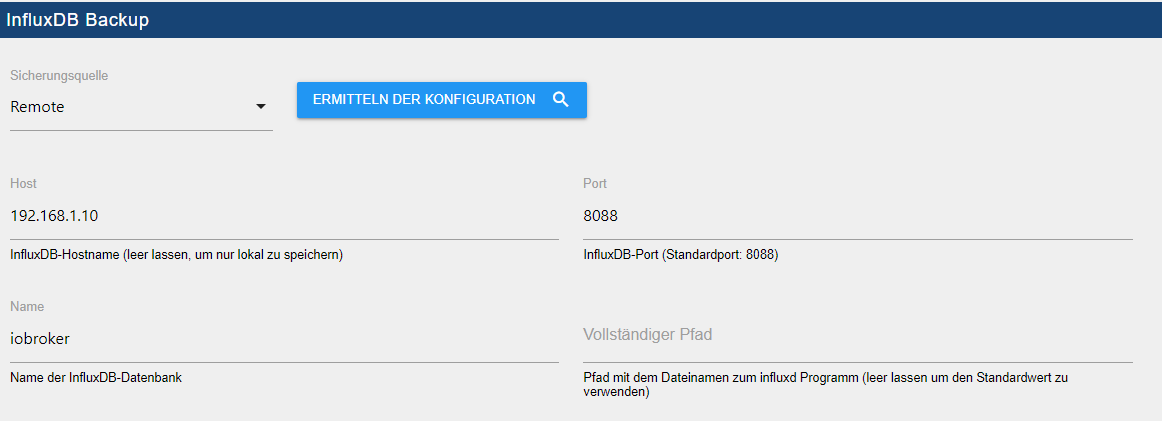
@passuff sagte in BackItUp für InfluxDB:
192.168.1.10; bind 0.0.0.0:8088
Trage mal bitte als remote bind folgendes ein und starte im Anschluss influxdb oder besser dein komplettes System mal neu
bind 192.168.1.10:8088Zeige hier mal bitte die influxdb.conf
-
@passuff sagte in BackItUp für InfluxDB:
192.168.1.10; bind 0.0.0.0:8088
Trage mal bitte als remote bind folgendes ein und starte im Anschluss influxdb oder besser dein komplettes System mal neu
bind 192.168.1.10:8088Zeige hier mal bitte die influxdb.conf
-
welche influxdb.conf soll ich ändern bzw zeigen? Es gibt ja zwei:
- Server 1 (ioboker + influxdb)
- ListenpunktServer 2 (influxdb - aktive db)
-
@passuff
Nur die von Server 2. Server 1 ist egal ... Da wird nur die influxd zur Backupausführung benötigt@simatec Ich habe leider auch einen Fehler beim backup der Influx-Datenbank und weiß nicht so recht wo ich anfangen muss den Fehler zu suchen:
Started...
[DEBUG] [iobroker] - host.iobroker 9481 states saved

[DEBUG] [iobroker] - host.iobroker 10225 objects saved

[DEBUG] [iobroker] - Backup created: /opt/iobroker/backups/iobroker_2021_02_02-14_19_01_backupiobroker.tar.gz

[DEBUG] [iobroker] - done
[DEBUG] [influxDB] - Start infulxDB Backup ...
[DEBUG] [influxDB] - Created InfuxDB Backup dir
[DEBUG] [influxDB] - exec: influxd backup -portable -database iobroker -host 192.168.100.12:8088 /opt/iobroker/backups/influxDB_2021_02_02-14_19_19_backupiobroker
[DEBUG] [influxDB] - Try deleting the InfluxDB tmp directory
[DEBUG] [influxDB] - InfluxDB tmp directory was successfully deleted
[ERROR] [influxDB] - [IGNORED] Error: Command failed: influxd backup -portable -database iobroker -host 192.168.100.12:8088 /opt/iobroker/backups/influxDB_2021_02_02-14_19_19_backupiobroker
/bin/sh: 1: influxd: not found

[DEBUG] [googledrive] - Google Drive: Copy iobroker_2021_02_02-14_19_01_backupiobroker.tar.gz...
[ERROR] [googledrive] - Google Drive: File "/opt/iobroker/backups/influxDB_2021_02_02-14_19_19_backupiobroker.tar.gz" not found
[DEBUG] [googledrive] - done
[DEBUG] [clean] - done
[DEBUG] [pushover] - done
[DEBUG] [historyHTML] - new history html values created
[DEBUG] [historyHTML] - done
[DEBUG] [historyJSON] - new history json values created
[DEBUG] [historyJSON] - done
[EXIT] 0
Kannst du hier helfen?
-
@simatec Ich habe leider auch einen Fehler beim backup der Influx-Datenbank und weiß nicht so recht wo ich anfangen muss den Fehler zu suchen:
Started...
[DEBUG] [iobroker] - host.iobroker 9481 states saved

[DEBUG] [iobroker] - host.iobroker 10225 objects saved

[DEBUG] [iobroker] - Backup created: /opt/iobroker/backups/iobroker_2021_02_02-14_19_01_backupiobroker.tar.gz

[DEBUG] [iobroker] - done
[DEBUG] [influxDB] - Start infulxDB Backup ...
[DEBUG] [influxDB] - Created InfuxDB Backup dir
[DEBUG] [influxDB] - exec: influxd backup -portable -database iobroker -host 192.168.100.12:8088 /opt/iobroker/backups/influxDB_2021_02_02-14_19_19_backupiobroker
[DEBUG] [influxDB] - Try deleting the InfluxDB tmp directory
[DEBUG] [influxDB] - InfluxDB tmp directory was successfully deleted
[ERROR] [influxDB] - [IGNORED] Error: Command failed: influxd backup -portable -database iobroker -host 192.168.100.12:8088 /opt/iobroker/backups/influxDB_2021_02_02-14_19_19_backupiobroker
/bin/sh: 1: influxd: not found

[DEBUG] [googledrive] - Google Drive: Copy iobroker_2021_02_02-14_19_01_backupiobroker.tar.gz...
[ERROR] [googledrive] - Google Drive: File "/opt/iobroker/backups/influxDB_2021_02_02-14_19_19_backupiobroker.tar.gz" not found
[DEBUG] [googledrive] - done
[DEBUG] [clean] - done
[DEBUG] [pushover] - done
[DEBUG] [historyHTML] - new history html values created
[DEBUG] [historyHTML] - done
[DEBUG] [historyJSON] - new history json values created
[DEBUG] [historyJSON] - done
[EXIT] 0
Kannst du hier helfen?
@markus84
Bitte mach ein Update auf die Version 1.8.5 oder auf die Github-Version 2.0.0-beta.2
Des Weiteren muss Influx auf dem ioboker System laufen, wobei die Datenbank auf einem anderen Server liegen kann.
In der Conf von Influx "bind auf 0.0.0.0:8088" anpassen -
@markus84
Bitte mach ein Update auf die Version 1.8.5 oder auf die Github-Version 2.0.0-beta.2
Des Weiteren muss Influx auf dem ioboker System laufen, wobei die Datenbank auf einem anderen Server liegen kann.
In der Conf von Influx "bind auf 0.0.0.0:8088" anpassen@simatec Ich habe über Github die aktuelle Beta installiert. Leider erhalte ich die gleiche Fehlermeldung:
Started iobroker ... [DEBUG] [iobroker] - host.iobroker 9475 states saved [DEBUG] [iobroker] - host.iobroker 10224 objects saved [DEBUG] [iobroker] - Backup created: /opt/iobroker/backups/iobroker_2021_02_02-14_49_49_backupiobroker.tar.gz [DEBUG] [iobroker] - done [DEBUG] [influxDB] - Start InfluxDB Backup ... [DEBUG] [influxDB] - InfluxDB Backup tmp directory created [DEBUG] [influxDB] - Try deleting the InfluxDB tmp directory [DEBUG] [influxDB] - InfluxDB tmp directory was successfully deleted [ERROR] [influxDB] - [IGNORED] Error: Command failed: influxd backup -portable -database iobroker -host 192.168.100.12:8088 "/opt/iobroker/backups/influxDB_2021_02_02-14_50_06_backupiobroker" /bin/sh: 1: influxd: not found [DEBUG] [googledrive] - Google Drive: Copy iobroker_2021_02_02-14_49_49_backupiobroker.tar.gz... [ERROR] [googledrive] - Google Drive: File "/opt/iobroker/backups/influxDB_2021_02_02-14_50_06_backupiobroker.tar.gz" not found [DEBUG] [googledrive] - done [ERROR] [clean] - Backup files not deleted from /opt/iobroker/backups because some errors. [DEBUG] [clean] - done [DEBUG] [pushover] - done [DEBUG] [historyHTML] - new history html values created [DEBUG] [historyHTML] - done [DEBUG] [historyJSON] - new history json values created [DEBUG] [historyJSON] - done [EXIT] 0 -
@simatec Ich habe über Github die aktuelle Beta installiert. Leider erhalte ich die gleiche Fehlermeldung:
Started iobroker ... [DEBUG] [iobroker] - host.iobroker 9475 states saved [DEBUG] [iobroker] - host.iobroker 10224 objects saved [DEBUG] [iobroker] - Backup created: /opt/iobroker/backups/iobroker_2021_02_02-14_49_49_backupiobroker.tar.gz [DEBUG] [iobroker] - done [DEBUG] [influxDB] - Start InfluxDB Backup ... [DEBUG] [influxDB] - InfluxDB Backup tmp directory created [DEBUG] [influxDB] - Try deleting the InfluxDB tmp directory [DEBUG] [influxDB] - InfluxDB tmp directory was successfully deleted [ERROR] [influxDB] - [IGNORED] Error: Command failed: influxd backup -portable -database iobroker -host 192.168.100.12:8088 "/opt/iobroker/backups/influxDB_2021_02_02-14_50_06_backupiobroker" /bin/sh: 1: influxd: not found [DEBUG] [googledrive] - Google Drive: Copy iobroker_2021_02_02-14_49_49_backupiobroker.tar.gz... [ERROR] [googledrive] - Google Drive: File "/opt/iobroker/backups/influxDB_2021_02_02-14_50_06_backupiobroker.tar.gz" not found [DEBUG] [googledrive] - done [ERROR] [clean] - Backup files not deleted from /opt/iobroker/backups because some errors. [DEBUG] [clean] - done [DEBUG] [pushover] - done [DEBUG] [historyHTML] - new history html values created [DEBUG] [historyHTML] - done [DEBUG] [historyJSON] - new history json values created [DEBUG] [historyJSON] - done [EXIT] 0@markus84 sagte in BackItUp für InfluxDB:
in/sh: 1: influxd: not found
Du musst Influx auf deinem iobroker System installiert haben.
In der influxdb.conf auf deinem Influx-Server muss in den Remote-Einstellungen dann folgendes geändert werdenbind <IP des Servers>:8088oder
bind 0.0.0.0:8088Im Anschluss Influx neustarten
-
@markus84 sagte in BackItUp für InfluxDB:
in/sh: 1: influxd: not found
Du musst Influx auf deinem iobroker System installiert haben.
In der influxdb.conf auf deinem Influx-Server muss in den Remote-Einstellungen dann folgendes geändert werdenbind <IP des Servers>:8088oder
bind 0.0.0.0:8088Im Anschluss Influx neustarten
@simatec Danke, das probiere ich gleich mal aus. Hätte ich das irgendwo in der Anleitung finden können? Ich hab gerade mal geschaut, aber nur den Issue#390 zu diesem Thema auf Github gefunden.
Meine Frage zielt darauf ab, ob ich einfach nur Influx installieren muss oder ob das auch in irgendeiner Form laufen muss (was ja wiederum Ressourcen benötigt). Nur das Installieren kostet ja nur ein paar MB Speicherplatz und ist nicht tragisch...
Insofern aber noch der Hinweis, dass der Fehler nicht im log steht (wo ich mich eigentlich drauf verlassen hätte) und auch nicht im Datenpunkt backitup.0.history.iobrokerSuccess als false ausgegeben wird. Letzteres verstehe ich noch, da es ja nicht das ioBroker-Backup an sich betrifft. Könnte man für die weiteren Backup-Optionen (Grafana, Influx, etc.) entsprechende Datenpunkte unter history anlegen, um die Backups zu überwachen? Ist diesbezüglich etwas geplant?
-
@simatec Danke, das probiere ich gleich mal aus. Hätte ich das irgendwo in der Anleitung finden können? Ich hab gerade mal geschaut, aber nur den Issue#390 zu diesem Thema auf Github gefunden.
Meine Frage zielt darauf ab, ob ich einfach nur Influx installieren muss oder ob das auch in irgendeiner Form laufen muss (was ja wiederum Ressourcen benötigt). Nur das Installieren kostet ja nur ein paar MB Speicherplatz und ist nicht tragisch...
Insofern aber noch der Hinweis, dass der Fehler nicht im log steht (wo ich mich eigentlich drauf verlassen hätte) und auch nicht im Datenpunkt backitup.0.history.iobrokerSuccess als false ausgegeben wird. Letzteres verstehe ich noch, da es ja nicht das ioBroker-Backup an sich betrifft. Könnte man für die weiteren Backup-Optionen (Grafana, Influx, etc.) entsprechende Datenpunkte unter history anlegen, um die Backups zu überwachen? Ist diesbezüglich etwas geplant?
-
@markus84
Die Doku wird aktuell von mir für Version 2.0.0 überarbeitet. Dort wird dann auch alles zu Influx stehen@simatec Super, ich frag nur nicht gerne, wenn ich es auch einfach hätte selbst irgendwo lesen können...
Noch eine Frage/Hinweis: Der "Backup now" button ist unter dem Reiter ioBroker. Ist das noch logisch, da ja weit mehr als der ioBroker mit diesem button geupdatet werden kann?
-
@simatec Super, ich frag nur nicht gerne, wenn ich es auch einfach hätte selbst irgendwo lesen können...
Noch eine Frage/Hinweis: Der "Backup now" button ist unter dem Reiter ioBroker. Ist das noch logisch, da ja weit mehr als der ioBroker mit diesem button geupdatet werden kann?
-
Leider erhalte ich noch Fehlermeldungen im Log. Influx ist auf dem ioBroker RPI installiert, das Binding ist eingetragen in der influxdb.conf auf meinem Grafana/Influxdb RPI. Neu gestartet habe ich auch.
Bezüglich Grafana: Trotz Fehlermeldung wurde ein Grafana Backup gespeichert. Ob es sich restoren lassen würde habe ich allerdings nicht getestet.
Started iobroker ... [DEBUG] [iobroker] - host.iobroker 9480 states saved [DEBUG] [iobroker] - host.iobroker 10222 objects saved [DEBUG] [iobroker] - Backup created: /opt/iobroker/backups/iobroker_2021_02_03-05_31_29_backupiobroker.tar.gz [DEBUG] [iobroker] - done [DEBUG] [influxDB] - Start InfluxDB Backup ... [DEBUG] [influxDB] - InfluxDB Backup tmp directory created [DEBUG] [influxDB] - Try deleting the InfluxDB tmp directory [DEBUG] [influxDB] - InfluxDB tmp directory was successfully deleted [ERROR] [influxDB] - [IGNORED] Error: Command failed: influxd backup -portable -database iobroker -host 192.168.100.12:8088 "/opt/iobroker/backups/influxDB_2021_02_03-05_31_47_backupiobroker" 2021/02/03 05:31:47 Download shard 0 failed dial tcp 192.168.100.12:8088: connect: connection refused. Waiting 2s and retrying (0)... 2021/02/03 05:31:49 Download shard 0 failed dial tcp 192.168.100.12:8088: connect: connection refused. Waiting 2s and retrying (1)... 2021/02/03 05:31:51 Download shard 0 failed dial tcp 192.168.100.12:8088: connect: connection refused. Waiting 2s and retrying (2)... 2021/02/03 05:31:53 Download shard 0 failed dial tcp 192.168.100.12:8088: connect: connection refused. Waiting 2s and retrying (3)... 2021/02/03 05:31:55 Download shard 0 failed dial tcp 192.168.100.12:8088: connect: connection refused. Waiting 2s and retrying (4)... 2021/02/03 05:31:57 Download shard 0 failed dial tcp 192.168.100.12:8088: connect: connection refused. Waiting 2s and retrying (5)... 2021/02/03 05:31:59 Download shard 0 failed dial tcp 192.168.100.12:8088: connect: connection refused. Waiting 3.01s and retrying (6)... 2021/02/03 05:32:02 Download shard 0 failed dial tcp 192.168.100.12:8088: connect: connection refused. Waiting 11.441s and retrying (7)... 2021/02/03 05:32:13 Download shard 0 failed dial tcp 192.168.100.12:8088: connect: connection refused. Waiting 43.477s and retrying (8)... 2021/02/03 05:32:57 Download shard 0 failed dial tcp 192.168.100.12:8088: connect: connection refused. Waiting 2m45.216s and retrying (9)... backup: dial tcp 192.168.100.12:8088: connect: connection refused [DEBUG] [grafana] - Start Grafana Backup ... [DEBUG] [grafana] - Created grafana_tmp directory [DEBUG] [grafana] - Created dashboard directory [DEBUG] [grafana] - Created dashboards_manually_restore directory [DEBUG] [grafana] - Created datasource directory [DEBUG] [grafana] - start Grafana request ... [DEBUG] [grafana] - Grafana is available ... Status: 200 [DEBUG] [grafana] - Error on Grafana Dashoard Request: Error: Request failed with status code 401 [DEBUG] [grafana] - start Grafana backup compress ... [DEBUG] [grafana] - Backup created: /opt/iobroker/backups/grafana_2021_02_03-05_35_43_backupiobroker.tar.gz [DEBUG] [grafana] - Try deleting the Grafana tmp directory: "/opt/iobroker/backups/grafana_tmp" [DEBUG] [grafana] - Grafana tmp directory "/opt/iobroker/backups/grafana_tmp" successfully deleted [DEBUG] [grafana] - done [DEBUG] [googledrive] - Google Drive: Copy iobroker_2021_02_03-05_31_29_backupiobroker.tar.gz... [ERROR] [googledrive] - Google Drive: File "/opt/iobroker/backups/influxDB_2021_02_03-05_31_47_backupiobroker.tar.gz" not found [DEBUG] [googledrive] - Google Drive: Copy grafana_2021_02_03-05_35_43_backupiobroker.tar.gz... [DEBUG] [googledrive] - done [ERROR] [clean] - Backup files not deleted from /opt/iobroker/backups because some errors. [DEBUG] [clean] - done [DEBUG] [pushover] - done [DEBUG] [historyHTML] - new history html values created [DEBUG] [historyHTML] - done [DEBUG] [historyJSON] - new history json values created [DEBUG] [historyJSON] - done [EXIT] 0 -
Leider erhalte ich noch Fehlermeldungen im Log. Influx ist auf dem ioBroker RPI installiert, das Binding ist eingetragen in der influxdb.conf auf meinem Grafana/Influxdb RPI. Neu gestartet habe ich auch.
Bezüglich Grafana: Trotz Fehlermeldung wurde ein Grafana Backup gespeichert. Ob es sich restoren lassen würde habe ich allerdings nicht getestet.
Started iobroker ... [DEBUG] [iobroker] - host.iobroker 9480 states saved [DEBUG] [iobroker] - host.iobroker 10222 objects saved [DEBUG] [iobroker] - Backup created: /opt/iobroker/backups/iobroker_2021_02_03-05_31_29_backupiobroker.tar.gz [DEBUG] [iobroker] - done [DEBUG] [influxDB] - Start InfluxDB Backup ... [DEBUG] [influxDB] - InfluxDB Backup tmp directory created [DEBUG] [influxDB] - Try deleting the InfluxDB tmp directory [DEBUG] [influxDB] - InfluxDB tmp directory was successfully deleted [ERROR] [influxDB] - [IGNORED] Error: Command failed: influxd backup -portable -database iobroker -host 192.168.100.12:8088 "/opt/iobroker/backups/influxDB_2021_02_03-05_31_47_backupiobroker" 2021/02/03 05:31:47 Download shard 0 failed dial tcp 192.168.100.12:8088: connect: connection refused. Waiting 2s and retrying (0)... 2021/02/03 05:31:49 Download shard 0 failed dial tcp 192.168.100.12:8088: connect: connection refused. Waiting 2s and retrying (1)... 2021/02/03 05:31:51 Download shard 0 failed dial tcp 192.168.100.12:8088: connect: connection refused. Waiting 2s and retrying (2)... 2021/02/03 05:31:53 Download shard 0 failed dial tcp 192.168.100.12:8088: connect: connection refused. Waiting 2s and retrying (3)... 2021/02/03 05:31:55 Download shard 0 failed dial tcp 192.168.100.12:8088: connect: connection refused. Waiting 2s and retrying (4)... 2021/02/03 05:31:57 Download shard 0 failed dial tcp 192.168.100.12:8088: connect: connection refused. Waiting 2s and retrying (5)... 2021/02/03 05:31:59 Download shard 0 failed dial tcp 192.168.100.12:8088: connect: connection refused. Waiting 3.01s and retrying (6)... 2021/02/03 05:32:02 Download shard 0 failed dial tcp 192.168.100.12:8088: connect: connection refused. Waiting 11.441s and retrying (7)... 2021/02/03 05:32:13 Download shard 0 failed dial tcp 192.168.100.12:8088: connect: connection refused. Waiting 43.477s and retrying (8)... 2021/02/03 05:32:57 Download shard 0 failed dial tcp 192.168.100.12:8088: connect: connection refused. Waiting 2m45.216s and retrying (9)... backup: dial tcp 192.168.100.12:8088: connect: connection refused [DEBUG] [grafana] - Start Grafana Backup ... [DEBUG] [grafana] - Created grafana_tmp directory [DEBUG] [grafana] - Created dashboard directory [DEBUG] [grafana] - Created dashboards_manually_restore directory [DEBUG] [grafana] - Created datasource directory [DEBUG] [grafana] - start Grafana request ... [DEBUG] [grafana] - Grafana is available ... Status: 200 [DEBUG] [grafana] - Error on Grafana Dashoard Request: Error: Request failed with status code 401 [DEBUG] [grafana] - start Grafana backup compress ... [DEBUG] [grafana] - Backup created: /opt/iobroker/backups/grafana_2021_02_03-05_35_43_backupiobroker.tar.gz [DEBUG] [grafana] - Try deleting the Grafana tmp directory: "/opt/iobroker/backups/grafana_tmp" [DEBUG] [grafana] - Grafana tmp directory "/opt/iobroker/backups/grafana_tmp" successfully deleted [DEBUG] [grafana] - done [DEBUG] [googledrive] - Google Drive: Copy iobroker_2021_02_03-05_31_29_backupiobroker.tar.gz... [ERROR] [googledrive] - Google Drive: File "/opt/iobroker/backups/influxDB_2021_02_03-05_31_47_backupiobroker.tar.gz" not found [DEBUG] [googledrive] - Google Drive: Copy grafana_2021_02_03-05_35_43_backupiobroker.tar.gz... [DEBUG] [googledrive] - done [ERROR] [clean] - Backup files not deleted from /opt/iobroker/backups because some errors. [DEBUG] [clean] - done [DEBUG] [pushover] - done [DEBUG] [historyHTML] - new history html values created [DEBUG] [historyHTML] - done [DEBUG] [historyJSON] - new history json values created [DEBUG] [historyJSON] - done [EXIT] 0@markus84
Zeige mal bitte deine influxdb.conf
Hast du Influx nach Änderung der bind neugestartet?Zu Grafana. Hast du einen API-Key in Grafana erzeugt und diesen auch in Backitup eingetragen?
Stimmen deine Grafana User-Daten?Zeige mal bitte den Inhalt des Grafana Backups. Einfach mal mit 7Zip entpacken
-
@markus84
Zeige mal bitte deine influxdb.conf
Hast du Influx nach Änderung der bind neugestartet?Zu Grafana. Hast du einen API-Key in Grafana erzeugt und diesen auch in Backitup eingetragen?
Stimmen deine Grafana User-Daten?Zeige mal bitte den Inhalt des Grafana Backups. Einfach mal mit 7Zip entpacken
-
remote backup aufs nas funktioniert für iobroker & grafana. für die influxdb bekomme ich aber einen fehler:
[DEBUG] [iobroker] - done
[DEBUG] [influxDB] - Start InfluxDB Backup ...
[DEBUG] [influxDB] - InfluxDB Backup tmp directory created
[DEBUG] [influxDB] - Try deleting the InfluxDB tmp directory
[DEBUG] [influxDB] - InfluxDB tmp directory was successfully deleted
[ERROR] [influxDB] - [IGNORED] Error: Command failed: influxd backup -portable -database iobroker -host 192.168.0.80:8086 "/opt/iobroker/backups/influxDB_2021_02_03-10_57_37_backupiobroker"
/bin/sh: 1: influxd: not found
Zur Info, die influx läuft bei mir als container direkt am nas, der iobroker aber am pi
-
@passuff sagte in BackItUp für InfluxDB:
192.168.1.10; bind 0.0.0.0:8088
Trage mal bitte als remote bind folgendes ein und starte im Anschluss influxdb oder besser dein komplettes System mal neu
bind 192.168.1.10:8088Zeige hier mal bitte die influxdb.conf
@simatec sagte in BackItUp für InfluxDB:
@passuff sagte in BackItUp für InfluxDB:
192.168.1.10; bind 0.0.0.0:8088
Trage mal bitte als remote bind folgendes ein und starte im Anschluss influxdb oder besser dein komplettes System mal neu
bind 192.168.1.10:8088Zeige hier mal bitte die influxdb.conf
So funktioniert es perfekt. Danke Dir! :)
-
remote backup aufs nas funktioniert für iobroker & grafana. für die influxdb bekomme ich aber einen fehler:
[DEBUG] [iobroker] - done
[DEBUG] [influxDB] - Start InfluxDB Backup ...
[DEBUG] [influxDB] - InfluxDB Backup tmp directory created
[DEBUG] [influxDB] - Try deleting the InfluxDB tmp directory
[DEBUG] [influxDB] - InfluxDB tmp directory was successfully deleted
[ERROR] [influxDB] - [IGNORED] Error: Command failed: influxd backup -portable -database iobroker -host 192.168.0.80:8086 "/opt/iobroker/backups/influxDB_2021_02_03-10_57_37_backupiobroker"
/bin/sh: 1: influxd: not found
Zur Info, die influx läuft bei mir als container direkt am nas, der iobroker aber am pi
@massiveattack
Bitte die Anleitung beachten ...
https://github.com/simatec/ioBroker.backitup/blob/master/docs/de/backitup.md#InfluxDB-Backup -
@massiveattack
Bitte die Anleitung beachten ...
https://github.com/simatec/ioBroker.backitup/blob/master/docs/de/backitup.md#InfluxDB-Backup -
@simatec
danke, genau das habe ich gesucht.wie kann ich den influx daemon am pi installieren? brauche ich dazu wirkich die ganze instanz? sprich sudo apt install influxdb
@massiveattack
Soweit ich weiß, gibt es da keinen anderen Weg. Allerdings ist die Auslastung au meinen Testsystemen minimal, da keine Datenbanken laufen. -
@massiveattack
Soweit ich weiß, gibt es da keinen anderen Weg. Allerdings ist die Auslastung au meinen Testsystemen minimal, da keine Datenbanken laufen.danke, werde ich mal testen.
besten dank :)



Hey! Du scheinst an dieser Unterhaltung interessiert zu sein, hast aber noch kein Konto.
Hast du es satt, bei jedem Besuch durch die gleichen Beiträge zu scrollen? Wenn du dich für ein Konto anmeldest, kommst du immer genau dorthin zurück, wo du zuvor warst, und kannst dich über neue Antworten benachrichtigen lassen (entweder per E-Mail oder Push-Benachrichtigung). Du kannst auch Lesezeichen speichern und Beiträge positiv bewerten, um anderen Community-Mitgliedern deine Wertschätzung zu zeigen.
Mit deinem Input könnte dieser Beitrag noch besser werden 💗
Registrieren Anmelden210
Online33.1k
Benutzende83.7k
Themen1.3m
Beiträge