Skip to content
  • Home
  • Aktuell
  • Tags
  • 0 Ungelesen 0
  • Kategorien
  • Unreplied
  • Beliebt
  • GitHub
  • Docu
  • Hilfe
Skins
  • Light
  • Brite
  • Cerulean
  • Cosmo
  • Flatly
  • Journal
  • Litera
  • Lumen
  • Lux
  • Materia
  • Minty
  • Morph
  • Pulse
  • Sandstone
  • Simplex
  • Sketchy
  • Spacelab
  • United
  • Yeti
  • Zephyr
  • Dark
  • Cyborg
  • Darkly
  • Quartz
  • Slate
  • Solar
  • Superhero
  • Vapor

  • Standard: (Kein Skin)
  • Kein Skin
Einklappen
ioBroker Logo

Community Forum

donate donate
  1. ioBroker Community Home
  2. Deutsch
  3. ioBroker Allgemein
  4. [gelöst] synology adapter gelb

NEWS

  • Neuer Blogbeitrag: Monatsrückblick - Dezember 2025 🎄
    BluefoxB
    Bluefox
    11
    1
    343

  • Weihnachtsangebot 2025! 🎄
    BluefoxB
    Bluefox
    24
    1
    1.6k

  • UPDATE 31.10.: Amazon Alexa - ioBroker Skill läuft aus ?
    apollon77A
    apollon77
    48
    3
    9.5k

[gelöst] synology adapter gelb
Geplant Angeheftet Gesperrt Verschoben ioBroker Allgemein
synology
59 Beiträge 7 Kommentatoren 5.7k Aufrufe 6 Watching
  • Älteste zuerst
  • Neuste zuerst
  • Meiste Stimmen
Antworten
  • In einem neuen Thema antworten
Anmelden zum Antworten
Dieses Thema wurde gelöscht. Nur Nutzer mit entsprechenden Rechten können es sehen.
  • GlasfaserG Glasfaser

    @Alero

    To use the adapter, the user must be in the Administrators group! code: 400 message: No such account or incorrect password

    Lies dir mal den Thread ioBroker Synology Adapter durch , dort habe ich sehr viele Screenshos drin , was zu beachten ist bei der Synology , zwecks Administrators group

    A Offline
    A Offline
    Alero
    schrieb am zuletzt editiert von
    #29

    @Glasfaser
    Hi,

    habe sogar meinen admin account kopiert und einen neuen user draus gemacht. Gleicher Fehler. Er will sich nicht anmelden.

    Alero

    da_WoodyD GlasfaserG 2 Antworten Letzte Antwort
    0
    • A Alero

      @Glasfaser
      Hi,

      habe sogar meinen admin account kopiert und einen neuen user draus gemacht. Gleicher Fehler. Er will sich nicht anmelden.

      Alero

      da_WoodyD Online
      da_WoodyD Online
      da_Woody
      schrieb am zuletzt editiert von
      #30

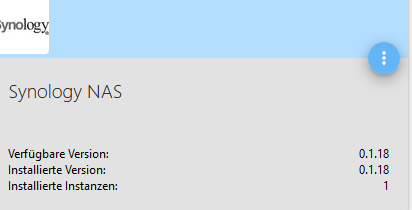
      @Alero also wenn die adapterversion 0.1.18 ist, dann fällt mir im moment auch nix mehr ein... :(

      gruß vom Woody
      HAPPINESS is not a DESTINATION, it's a WAY of LIFE!

      A 1 Antwort Letzte Antwort
      0
      • da_WoodyD da_Woody

        @Alero also wenn die adapterversion 0.1.18 ist, dann fällt mir im moment auch nix mehr ein... :(

        A Offline
        A Offline
        Alero
        schrieb am zuletzt editiert von
        #31

        @da_Woody
        c5536e77-99d3-4bd2-8e17-149e7e9606dd-grafik.png
        alero

        1 Antwort Letzte Antwort
        0
        • A Alero

          @Glasfaser
          Hi,

          habe sogar meinen admin account kopiert und einen neuen user draus gemacht. Gleicher Fehler. Er will sich nicht anmelden.

          Alero

          GlasfaserG Offline
          GlasfaserG Offline
          Glasfaser
          schrieb am zuletzt editiert von
          #32

          @Alero

          also ... innerhalb von 5 Minuten den Thread durchlesen ist Sportlich ....

          hast du alles beachtet ...

          Synology 918+ 16GB - ioBroker in Docker v9 , VISO auf Trekstor Primebook C13 13,3" , Hikvision Domkameras mit Surveillance Station .. CCU RaspberryMatic in Synology VM .. Zigbee CC2538+CC2592 .. Sonoff .. KNX .. Modbus ..

          A 1 Antwort Letzte Antwort
          0
          • GlasfaserG Glasfaser

            @Alero

            also ... innerhalb von 5 Minuten den Thread durchlesen ist Sportlich ....

            hast du alles beachtet ...

            A Offline
            A Offline
            Alero
            schrieb am zuletzt editiert von Alero
            #33

            @Glasfaser
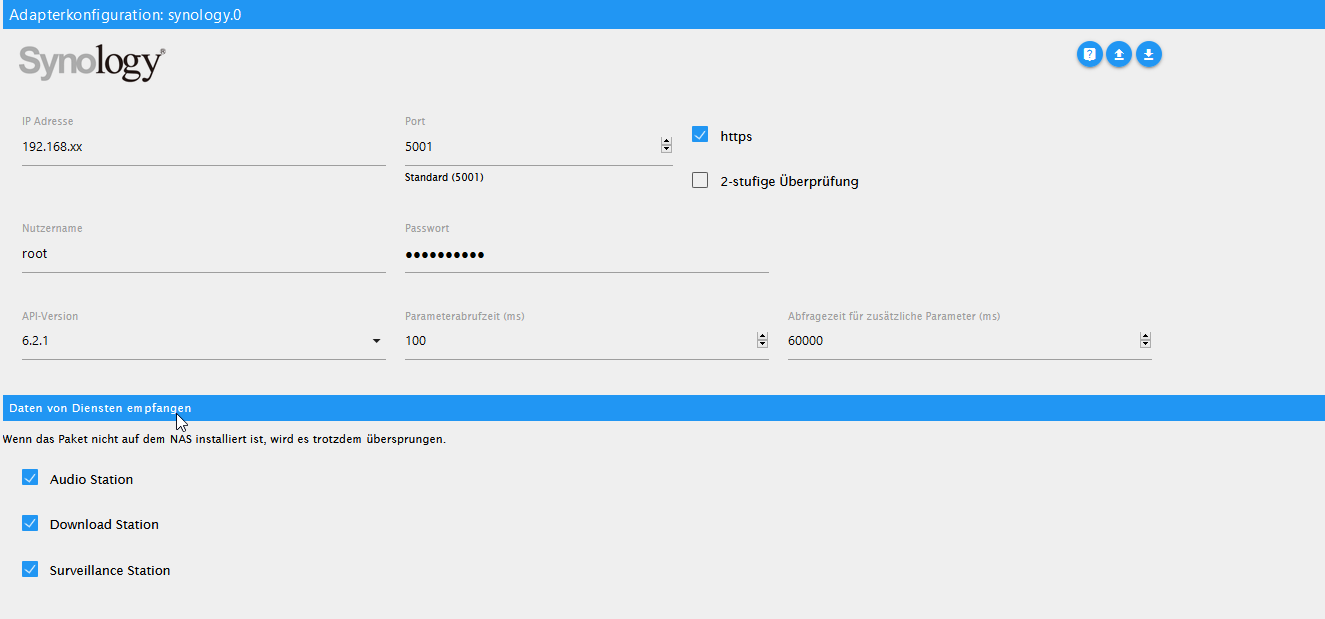
            ich fasse noch einmal zusammen.
            Adapter
            449ade23-4df5-4292-a27d-10e9b41a467f-grafik.png
            Admin user kopiert und als neuen User angelegt (User=Hardware) auch in der Gruppe Admimistrators
            meine Einstellungen im Adapter sehen so aus
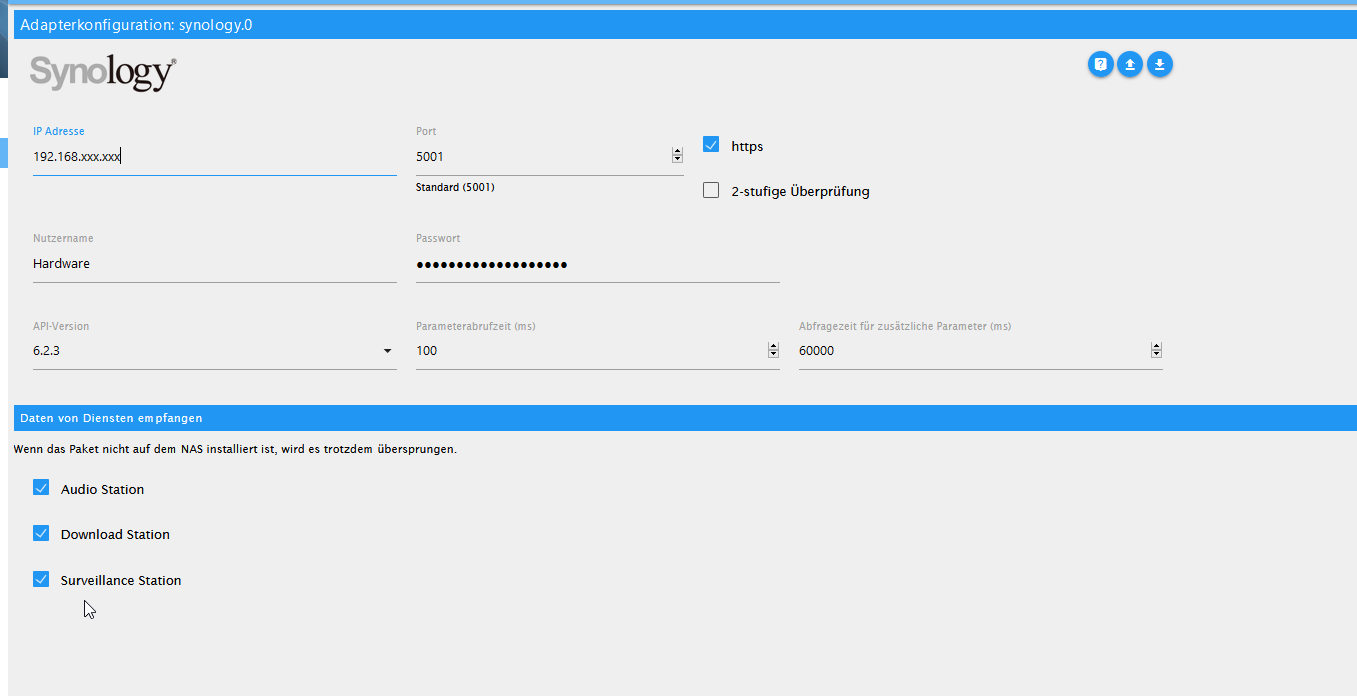
            2734cd69-2cea-4c7a-a69f-54dfe435d11f-grafik.png
            xxx.xxx durch entsprechende adresse ergänzt.
            Syno ist auf den neusten Stand

            1f873e8e-66c4-476e-bebe-5ca5a5a7fd2e-grafik.png
            Alero

            GlasfaserG 1 Antwort Letzte Antwort
            0
            • A Alero

              @Glasfaser
              ich fasse noch einmal zusammen.
              Adapter
              449ade23-4df5-4292-a27d-10e9b41a467f-grafik.png
              Admin user kopiert und als neuen User angelegt (User=Hardware) auch in der Gruppe Admimistrators
              meine Einstellungen im Adapter sehen so aus
              2734cd69-2cea-4c7a-a69f-54dfe435d11f-grafik.png
              xxx.xxx durch entsprechende adresse ergänzt.
              Syno ist auf den neusten Stand
              1f873e8e-66c4-476e-bebe-5ca5a5a7fd2e-grafik.png
              Alero

              GlasfaserG Offline
              GlasfaserG Offline
              Glasfaser
              schrieb am zuletzt editiert von Glasfaser
              #34

              @Alero

              Nur kurz ... test mal mit HTTP Verbindung ...
              also Haken raus beim Adapter ... den Rest dann bei der Synology umstellen .

              Synology 918+ 16GB - ioBroker in Docker v9 , VISO auf Trekstor Primebook C13 13,3" , Hikvision Domkameras mit Surveillance Station .. CCU RaspberryMatic in Synology VM .. Zigbee CC2538+CC2592 .. Sonoff .. KNX .. Modbus ..

              A 1 Antwort Letzte Antwort
              0
              • GlasfaserG Glasfaser

                @Alero

                Nur kurz ... test mal mit HTTP Verbindung ...
                also Haken raus beim Adapter ... den Rest dann bei der Synology umstellen .

                A Offline
                A Offline
                Alero
                schrieb am zuletzt editiert von Alero
                #35

                @Glasfaser
                Habe ich gerade versucht. Geht auch nicht.
                Das Problem liegt an der Anmeldung.
                Siehe Log

                e718d1b2-c475-4f62-a04d-9fc7100a3603-grafik.png
                status gelb:
                f22e7a2a-1df8-4501-a377-19689becd0ab-grafik.png
                Alero

                GlasfaserG 1 Antwort Letzte Antwort
                0
                • A Alero

                  @Glasfaser
                  Habe ich gerade versucht. Geht auch nicht.
                  Das Problem liegt an der Anmeldung.
                  Siehe Log
                  e718d1b2-c475-4f62-a04d-9fc7100a3603-grafik.png
                  status gelb:
                  f22e7a2a-1df8-4501-a377-19689becd0ab-grafik.png
                  Alero

                  GlasfaserG Offline
                  GlasfaserG Offline
                  Glasfaser
                  schrieb am zuletzt editiert von Glasfaser
                  #36

                  @Alero

                  Der Log sagt nicht viel aus ,stelle den Synology Adapter mal auf DEBUG !

                  Was sagt dann der Log ?

                  weil .... Code 400

                  Synology 918+ 16GB - ioBroker in Docker v9 , VISO auf Trekstor Primebook C13 13,3" , Hikvision Domkameras mit Surveillance Station .. CCU RaspberryMatic in Synology VM .. Zigbee CC2538+CC2592 .. Sonoff .. KNX .. Modbus ..

                  A 1 Antwort Letzte Antwort
                  0
                  • GlasfaserG Glasfaser

                    @Alero

                    Der Log sagt nicht viel aus ,stelle den Synology Adapter mal auf DEBUG !

                    Was sagt dann der Log ?

                    weil .... Code 400

                    A Offline
                    A Offline
                    Alero
                    schrieb am zuletzt editiert von
                    #37

                    @Glasfaser
                    hi, wo kann ich das auf debug umstellen. finde es nicht.

                    GlasfaserG 1 Antwort Letzte Antwort
                    0
                    • A Alero

                      @Glasfaser
                      hi, wo kann ich das auf debug umstellen. finde es nicht.

                      GlasfaserG Offline
                      GlasfaserG Offline
                      Glasfaser
                      schrieb am zuletzt editiert von
                      #38

                      @Alero

                      https://www.iobroker.net/#de/documentation/admin/instances.md

                      Nennt sich Log-Stufe

                      Synology 918+ 16GB - ioBroker in Docker v9 , VISO auf Trekstor Primebook C13 13,3" , Hikvision Domkameras mit Surveillance Station .. CCU RaspberryMatic in Synology VM .. Zigbee CC2538+CC2592 .. Sonoff .. KNX .. Modbus ..

                      A 1 Antwort Letzte Antwort
                      0
                      • GlasfaserG Glasfaser

                        @Alero

                        https://www.iobroker.net/#de/documentation/admin/instances.md

                        Nennt sich Log-Stufe

                        A Offline
                        A Offline
                        Alero
                        schrieb am zuletzt editiert von
                        #39

                        @Glasfaser
                        Hi, ich weiss. hatte es nicht gefunden weil der expertenmodus nicht drin war. :-)

                        synology.0	2021-01-06 10:22:51.713	debug	(21472) * Get info from (firstPoll) api: DSM method: getPollingData params: {}
                        synology.0	2021-01-06 10:22:51.713	debug	(21472) * sendPolling. namePolling = firstPoll | iteration = 0 | typeof poll = object | poll = {"api":"dsm","method":"getPollingData","params":{}}
                        synology.0	2021-01-06 10:22:51.712	debug	(21472) -----------------------------------------------------------------------------------------------------
                        synology.0	2021-01-06 10:22:51.236	info	(21472) starting. Version 0.1.18 in /opt/iobroker/node_modules/iobroker.synology, node: v10.20.1
                        synology.0	2021-01-06 10:22:50.929	debug	(21472) statesDB connected
                        synology.0	2021-01-06 10:22:50.928	debug	(21472) States connected to redis: 127.0.0.1:9000
                        synology.0	2021-01-06 10:22:50.924	debug	(21472) States create System PubSub Client
                        synology.0	2021-01-06 10:22:50.923	debug	(21472) States create User PubSub Client
                        synology.0	2021-01-06 10:22:50.921	debug	(21472) Redis States: Use Redis connection: 127.0.0.1:9000
                        synology.0	2021-01-06 10:22:50.920	debug	(21472) objectDB connected
                        synology.0	2021-01-06 10:22:50.918	debug	(21472) Objects connected to redis: 127.0.0.1:9001
                        synology.0	2021-01-06 10:22:50.912	debug	(21472) Objects client initialize lua scripts
                        synology.0	2021-01-06 10:22:50.912	debug	(21472) Objects create User PubSub Client
                        synology.0	2021-01-06 10:22:50.912	debug	(21472) Objects create System PubSub Client
                        synology.0	2021-01-06 10:22:50.911	debug	(21472) Objects client ready ... initialize now
                        synology.0	2021-01-06 10:22:50.899	debug	(21472) Redis Objects: Use Redis connection: 127.0.0.1:9001
                        
                        GlasfaserG 1 Antwort Letzte Antwort
                        0
                        • A Alero

                          @Glasfaser
                          Hi, ich weiss. hatte es nicht gefunden weil der expertenmodus nicht drin war. :-)

                          synology.0	2021-01-06 10:22:51.713	debug	(21472) * Get info from (firstPoll) api: DSM method: getPollingData params: {}
                          synology.0	2021-01-06 10:22:51.713	debug	(21472) * sendPolling. namePolling = firstPoll | iteration = 0 | typeof poll = object | poll = {"api":"dsm","method":"getPollingData","params":{}}
                          synology.0	2021-01-06 10:22:51.712	debug	(21472) -----------------------------------------------------------------------------------------------------
                          synology.0	2021-01-06 10:22:51.236	info	(21472) starting. Version 0.1.18 in /opt/iobroker/node_modules/iobroker.synology, node: v10.20.1
                          synology.0	2021-01-06 10:22:50.929	debug	(21472) statesDB connected
                          synology.0	2021-01-06 10:22:50.928	debug	(21472) States connected to redis: 127.0.0.1:9000
                          synology.0	2021-01-06 10:22:50.924	debug	(21472) States create System PubSub Client
                          synology.0	2021-01-06 10:22:50.923	debug	(21472) States create User PubSub Client
                          synology.0	2021-01-06 10:22:50.921	debug	(21472) Redis States: Use Redis connection: 127.0.0.1:9000
                          synology.0	2021-01-06 10:22:50.920	debug	(21472) objectDB connected
                          synology.0	2021-01-06 10:22:50.918	debug	(21472) Objects connected to redis: 127.0.0.1:9001
                          synology.0	2021-01-06 10:22:50.912	debug	(21472) Objects client initialize lua scripts
                          synology.0	2021-01-06 10:22:50.912	debug	(21472) Objects create User PubSub Client
                          synology.0	2021-01-06 10:22:50.912	debug	(21472) Objects create System PubSub Client
                          synology.0	2021-01-06 10:22:50.911	debug	(21472) Objects client ready ... initialize now
                          synology.0	2021-01-06 10:22:50.899	debug	(21472) Redis Objects: Use Redis connection: 127.0.0.1:9001
                          
                          GlasfaserG Offline
                          GlasfaserG Offline
                          Glasfaser
                          schrieb am zuletzt editiert von
                          #40

                          @Alero

                          da fehlt sehr viel !

                          stoppe den Adapter und dann starten ...

                          und dann ab Adapterstart den ganzen LOG zeigen !

                          Synology 918+ 16GB - ioBroker in Docker v9 , VISO auf Trekstor Primebook C13 13,3" , Hikvision Domkameras mit Surveillance Station .. CCU RaspberryMatic in Synology VM .. Zigbee CC2538+CC2592 .. Sonoff .. KNX .. Modbus ..

                          A 2 Antworten Letzte Antwort
                          0
                          • GlasfaserG Glasfaser

                            @Alero

                            da fehlt sehr viel !

                            stoppe den Adapter und dann starten ...

                            und dann ab Adapterstart den ganzen LOG zeigen !

                            A Offline
                            A Offline
                            Alero
                            schrieb am zuletzt editiert von Alero
                            #41

                            @Glasfaser hi, da ist leider nicht mehr.
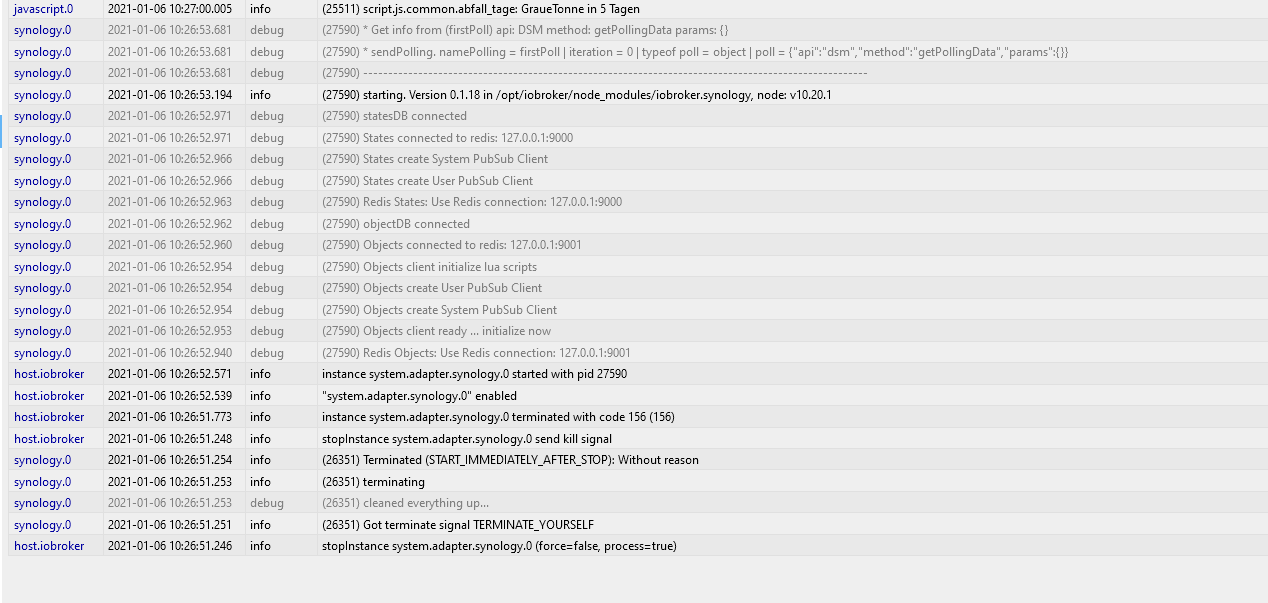
                            6281b758-5c3d-440e-8877-cf39f6c12ca2-grafik.png

                            1 Antwort Letzte Antwort
                            0
                            • GlasfaserG Glasfaser

                              @Alero

                              da fehlt sehr viel !

                              stoppe den Adapter und dann starten ...

                              und dann ab Adapterstart den ganzen LOG zeigen !

                              A Offline
                              A Offline
                              Alero
                              schrieb am zuletzt editiert von
                              #42

                              @Glasfaser
                              Hi, weiso port 9000 und 9001?

                              Alero

                              GlasfaserG 1 Antwort Letzte Antwort
                              0
                              • A Alero

                                @Glasfaser
                                Hi, weiso port 9000 und 9001?

                                Alero

                                GlasfaserG Offline
                                GlasfaserG Offline
                                Glasfaser
                                schrieb am zuletzt editiert von
                                #43

                                @Alero sagte in synology adapter gelb:

                                Hi, weiso port 9000 und 9001?

                                Bitte nicht beachten ... das ist REDIS !

                                wo ist denn die Error Meldung ?

                                Synology 918+ 16GB - ioBroker in Docker v9 , VISO auf Trekstor Primebook C13 13,3" , Hikvision Domkameras mit Surveillance Station .. CCU RaspberryMatic in Synology VM .. Zigbee CC2538+CC2592 .. Sonoff .. KNX .. Modbus ..

                                A 1 Antwort Letzte Antwort
                                0
                                • GlasfaserG Glasfaser

                                  @Alero sagte in synology adapter gelb:

                                  Hi, weiso port 9000 und 9001?

                                  Bitte nicht beachten ... das ist REDIS !

                                  wo ist denn die Error Meldung ?

                                  A Offline
                                  A Offline
                                  Alero
                                  schrieb am zuletzt editiert von
                                  #44

                                  @Glasfaser
                                  hi, die kommt später scheinbar.

                                  hier

                                  4c72eef9-48b1-4c8a-be54-330918c541c4-grafik.png

                                  GlasfaserG 1 Antwort Letzte Antwort
                                  0
                                  • A Alero

                                    @Glasfaser
                                    hi, die kommt später scheinbar.

                                    hier

                                    4c72eef9-48b1-4c8a-be54-330918c541c4-grafik.png

                                    GlasfaserG Offline
                                    GlasfaserG Offline
                                    Glasfaser
                                    schrieb am zuletzt editiert von
                                    #45

                                    @Alero

                                    Was ist das für eine IP ???

                                    Synology 918+ 16GB - ioBroker in Docker v9 , VISO auf Trekstor Primebook C13 13,3" , Hikvision Domkameras mit Surveillance Station .. CCU RaspberryMatic in Synology VM .. Zigbee CC2538+CC2592 .. Sonoff .. KNX .. Modbus ..

                                    A 1 Antwort Letzte Antwort
                                    0
                                    • GlasfaserG Glasfaser

                                      @Alero

                                      Was ist das für eine IP ???

                                      A Offline
                                      A Offline
                                      Alero
                                      schrieb am zuletzt editiert von
                                      #46

                                      @Glasfaser
                                      das wollte ich auch gerade fragen

                                      GlasfaserG 1 Antwort Letzte Antwort
                                      0
                                      • A Alero

                                        @Glasfaser
                                        das wollte ich auch gerade fragen

                                        GlasfaserG Offline
                                        GlasfaserG Offline
                                        Glasfaser
                                        schrieb am zuletzt editiert von
                                        #47

                                        @Alero

                                        Die Error Meldung ist aber neu ... hat nichts mit deiner anderen Meldung zu tun .
                                        Was hast du denn verändert .

                                        Synology 918+ 16GB - ioBroker in Docker v9 , VISO auf Trekstor Primebook C13 13,3" , Hikvision Domkameras mit Surveillance Station .. CCU RaspberryMatic in Synology VM .. Zigbee CC2538+CC2592 .. Sonoff .. KNX .. Modbus ..

                                        A 1 Antwort Letzte Antwort
                                        0
                                        • GlasfaserG Glasfaser

                                          @Alero

                                          Die Error Meldung ist aber neu ... hat nichts mit deiner anderen Meldung zu tun .
                                          Was hast du denn verändert .

                                          A Offline
                                          A Offline
                                          Alero
                                          schrieb am zuletzt editiert von Alero
                                          #48

                                          @Glasfaser
                                          Fehler gefunden für die falsche IP.
                                          hier das neue Log.

                                          synology.0	2021-01-06 10:37:20.785	debug	(10931) * Get info from (firstPoll) api: DSM method: getPollingData params: {}
                                          synology.0	2021-01-06 10:37:20.784	debug	(10931) * sendPolling. namePolling = firstPoll | iteration = 0 | typeof poll = object | poll = {"api":"dsm","method":"getPollingData","params":{}}
                                          synology.0	2021-01-06 10:37:20.784	debug	(10931) -----------------------------------------------------------------------------------------------------
                                          synology.0	2021-01-06 10:37:20.783	error	(10931) *** ERROR : src: sendPolling syno[dsm][getPollingData] To use the adapter, the user must be in the Administrators group! code: 400 message: No such account or incorrect password
                                          synology.0	2021-01-06 10:37:20.783	debug	(10931) * No response, read next.
                                          synology.0	2021-01-06 10:37:19.552	debug	(10931) * Get info from (firstPoll) api: DSM method: getPollingData params: {}
                                          synology.0	2021-01-06 10:37:19.552	debug	(10931) * sendPolling. namePolling = firstPoll | iteration = 0 | typeof poll = object | poll = {"api":"dsm","method":"getPollingData","params":{}}
                                          synology.0	2021-01-06 10:37:19.552	debug	(10931) -----------------------------------------------------------------------------------------------------
                                          synology.0	2021-01-06 10:37:19.551	error	(10931) *** ERROR : src: sendPolling syno[dsm][getPollingData] To use the adapter, the user must be in the Administrators group! code: 400 message: No such account or incorrect password
                                          synology.0	2021-01-06 10:37:19.550	debug	(10931) * No response, read next.
                                          synology.0	2021-01-06 10:37:18.424	debug	(10931) * Get info from (firstPoll) api: DSM method: getPollingData params: {}
                                          synology.0	2021-01-06 10:37:18.423	debug	(10931) * sendPolling. namePolling = firstPoll | iteration = 0 | typeof poll = object | poll = {"api":"dsm","method":"getPollingData","params":{}}
                                          synology.0	2021-01-06 10:37:18.423	debug	(10931) -----------------------------------------------------------------------------------------------------
                                          synology.0	2021-01-06 10:37:18.422	error	(10931) *** ERROR : src: sendPolling syno[dsm][getPollingData] To use the adapter, the user must be in the Administrators group! code: 400 message: No such account or incorrect password
                                          synology.0	2021-01-06 10:37:18.421	debug	(10931) * No response, read next.
                                          synology.0	2021-01-06 10:37:16.976	silly	(10931) States system redis pmessage system.adapter.synology.0.logLevel/system.adapter.synology.0.logLevel:{"val":"silly","ack":true,"ts":1609925836970,"q":0,"from":"system.adapter.synology.0","lc":1
                                          synology.0	2021-01-06 10:37:16.955	debug	(10931) * Get info from (firstPoll) api: DSM method: getPollingData params: {}
                                          synology.0	2021-01-06 10:37:16.955	debug	(10931) * sendPolling. namePolling = firstPoll | iteration = 0 | typeof poll = object | poll = {"api":"dsm","method":"getPollingData","params":{}}
                                          synology.0	2021-01-06 10:37:16.955	debug	(10931) -----------------------------------------------------------------------------------------------------
                                          synology.0	2021-01-06 10:37:16.458	info	(10931) starting. Version 0.1.18 in /opt/iobroker/node_modules/iobroker.synology, node: v10.20.1

                                          synology.0	2021-01-06 10:37:16.280	debug	(10931) statesDB connected
                                          synology.0	2021-01-06 10:37:16.279	debug	(10931) States connected to redis: 127.0.0.1:9000
                                          synology.0	2021-01-06 10:37:16.275	debug	(10931) States create System PubSub Client
                                          synology.0	2021-01-06 10:37:16.274	debug	(10931) States create User PubSub Client
                                          synology.0	2021-01-06 10:37:16.271	debug	(10931) Redis States: Use Redis connection: 127.0.0.1:9000
                                          synology.0	2021-01-06 10:37:16.271	debug	(10931) objectDB connected
                                          synology.0	2021-01-06 10:37:16.269	debug	(10931) Objects connected to redis: 127.0.0.1:9001
                                          synology.0	2021-01-06 10:37:16.263	debug	(10931) Objects client initialize lua scripts
                                          synology.0	2021-01-06 10:37:16.263	debug	(10931) Objects create User PubSub Client
                                          synology.0	2021-01-06 10:37:16.262	debug	(10931) Objects create System PubSub Client
                                          synology.0	2021-01-06 10:37:16.261	debug	(10931) Objects client ready ... initialize now
                                          synology.0	2021-01-06 10:37:16.249	debug	(10931) Redis Objects: Use Redis connection: 127.0.0.1:9001
                                          host.iobroker	2021-01-06 10:37:15.898	info	instance system.adapter.synology.0 started with pid 10931
                                          synology.0	2021-01-06 10:37:16.976	silly	(10931) States system redis pmessage system.adapter.synology.0.logLevel/system.adapter.synology.0.logLevel:{"val":"silly","ack":true,"ts":1609925836970,"q":0,"from":"system.adapter.synology.0","lc":16
                                          synology.0	2021-01-06 10:37:16.955	debug	(10931) * Get info from (firstPoll) api: DSM method: getPollingData params: {}
                                          synology.0	2021-01-06 10:37:16.955	debug	(10931) * sendPolling. namePolling = firstPoll | iteration = 0 | typeof poll = object | poll = {"api":"dsm","method":"getPollingData","params":{}}
                                          synology.0	2021-01-06 10:37:16.955	debug	(10931) -----------------------------------------------------------------------------------------------------
                                          synology.0	2021-01-06 10:37:16.458	info	(10931) starting. Version 0.1.18 in /opt/iobroker/node_modules/iobroker.synology, node: v10.20.1

                                          
                                          GlasfaserG 1 Antwort Letzte Antwort
                                          0
                                          Antworten
                                          • In einem neuen Thema antworten
                                          Anmelden zum Antworten
                                          • Älteste zuerst
                                          • Neuste zuerst
                                          • Meiste Stimmen


                                          Support us

                                          ioBroker
                                          Community Adapters
                                          Donate
                                          FAQ Cloud / IOT
                                          HowTo: Node.js-Update
                                          HowTo: Backup/Restore
                                          Downloads
                                          BLOG

                                          719

                                          Online

                                          32.5k

                                          Benutzer

                                          81.7k

                                          Themen

                                          1.3m

                                          Beiträge
                                          Community
                                          Impressum | Datenschutz-Bestimmungen | Nutzungsbedingungen | Einwilligungseinstellungen
                                          ioBroker Community 2014-2025
                                          logo
                                          • Anmelden

                                          • Du hast noch kein Konto? Registrieren

                                          • Anmelden oder registrieren, um zu suchen
                                          • Erster Beitrag
                                            Letzter Beitrag
                                          0
                                          • Home
                                          • Aktuell
                                          • Tags
                                          • Ungelesen 0
                                          • Kategorien
                                          • Unreplied
                                          • Beliebt
                                          • GitHub
                                          • Docu
                                          • Hilfe