Skip to content
  • Home
  • Aktuell
  • Tags
  • 0 Ungelesen 0
  • Kategorien
  • Unreplied
  • Beliebt
  • GitHub
  • Docu
  • Hilfe
Skins
  • Light
  • Brite
  • Cerulean
  • Cosmo
  • Flatly
  • Journal
  • Litera
  • Lumen
  • Lux
  • Materia
  • Minty
  • Morph
  • Pulse
  • Sandstone
  • Simplex
  • Sketchy
  • Spacelab
  • United
  • Yeti
  • Zephyr
  • Dark
  • Cyborg
  • Darkly
  • Quartz
  • Slate
  • Solar
  • Superhero
  • Vapor

  • Standard: (Kein Skin)
  • Kein Skin
Einklappen
ioBroker Logo

Community Forum

donate donate
  1. ioBroker Community Home
  2. Deutsch
  3. ioBroker Allgemein
  4. [gelöst] synology adapter gelb

NEWS

  • Neuer Blogbeitrag: Monatsrückblick - Dezember 2025 🎄
    BluefoxB
    Bluefox
    10
    1
    186

  • Weihnachtsangebot 2025! 🎄
    BluefoxB
    Bluefox
    24
    1
    1.4k

  • UPDATE 31.10.: Amazon Alexa - ioBroker Skill läuft aus ?
    apollon77A
    apollon77
    48
    3
    9.4k

[gelöst] synology adapter gelb
Geplant Angeheftet Gesperrt Verschoben ioBroker Allgemein
synology
59 Beiträge 7 Kommentatoren 5.7k Aufrufe 6 Watching
  • Älteste zuerst
  • Neuste zuerst
  • Meiste Stimmen
Antworten
  • In einem neuen Thema antworten
Anmelden zum Antworten
Dieses Thema wurde gelöscht. Nur Nutzer mit entsprechenden Rechten können es sehen.
  • GlasfaserG Glasfaser

    @Alero

    also ... innerhalb von 5 Minuten den Thread durchlesen ist Sportlich ....

    hast du alles beachtet ...

    A Offline
    A Offline
    Alero
    schrieb am zuletzt editiert von Alero
    #33

    @Glasfaser
    ich fasse noch einmal zusammen.
    Adapter
    449ade23-4df5-4292-a27d-10e9b41a467f-grafik.png
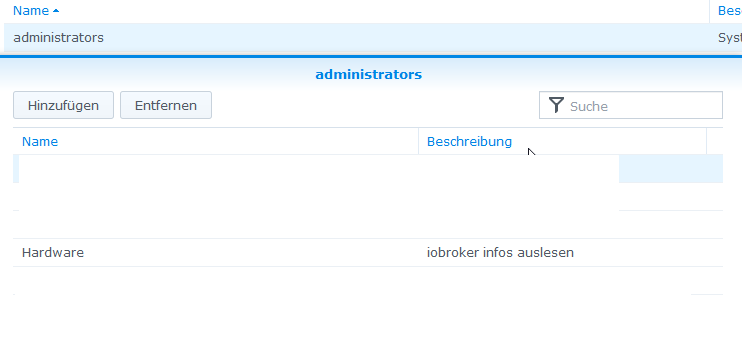
    Admin user kopiert und als neuen User angelegt (User=Hardware) auch in der Gruppe Admimistrators
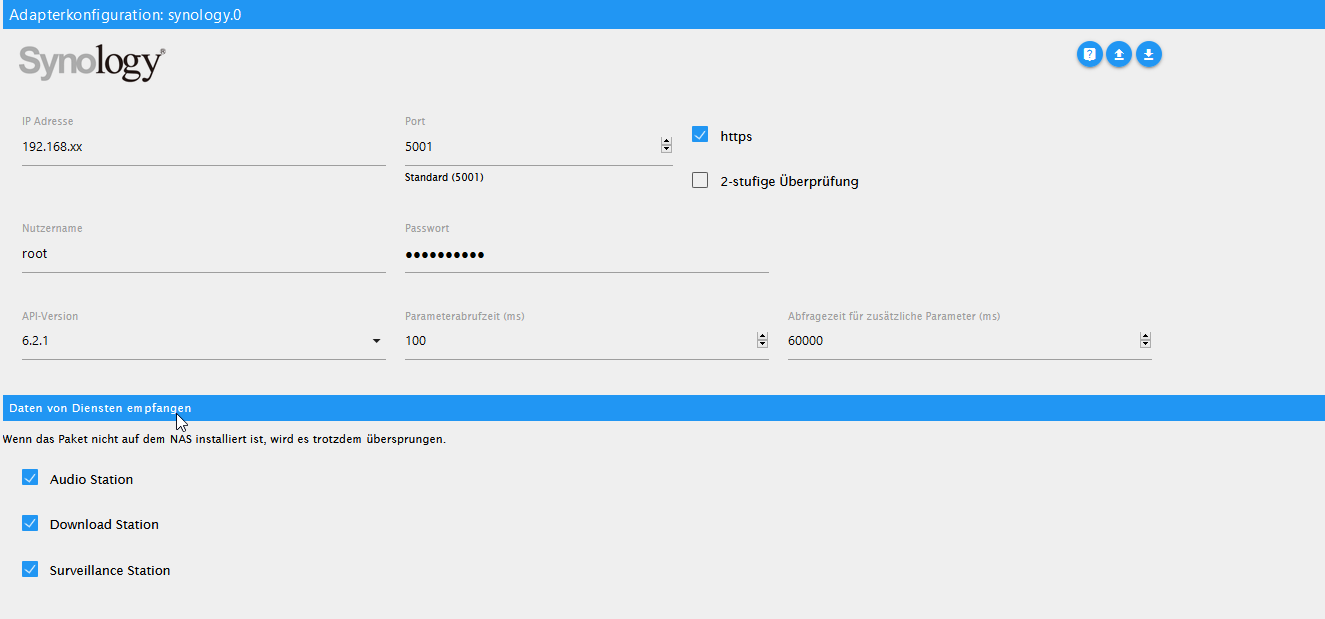
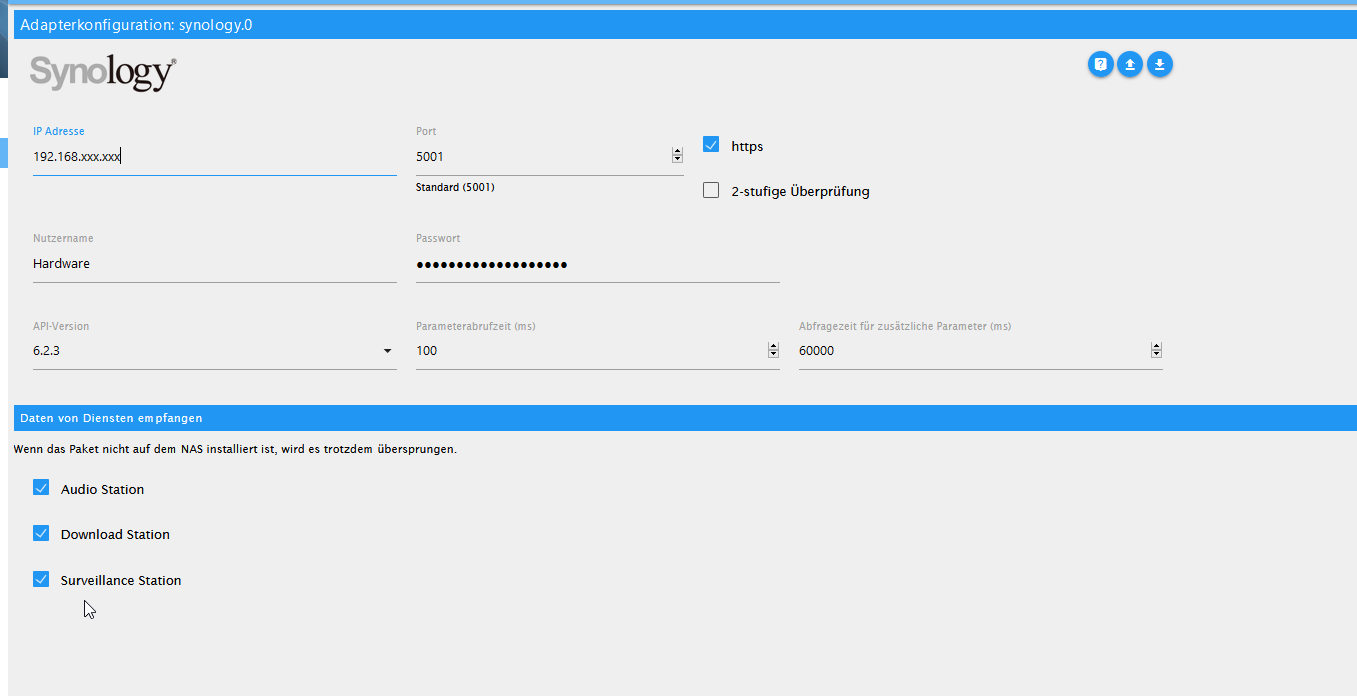
    meine Einstellungen im Adapter sehen so aus
    2734cd69-2cea-4c7a-a69f-54dfe435d11f-grafik.png
    xxx.xxx durch entsprechende adresse ergänzt.
    Syno ist auf den neusten Stand

    1f873e8e-66c4-476e-bebe-5ca5a5a7fd2e-grafik.png
    Alero

    GlasfaserG 1 Antwort Letzte Antwort
    0
    • A Alero

      @Glasfaser
      ich fasse noch einmal zusammen.
      Adapter
      449ade23-4df5-4292-a27d-10e9b41a467f-grafik.png
      Admin user kopiert und als neuen User angelegt (User=Hardware) auch in der Gruppe Admimistrators
      meine Einstellungen im Adapter sehen so aus
      2734cd69-2cea-4c7a-a69f-54dfe435d11f-grafik.png
      xxx.xxx durch entsprechende adresse ergänzt.
      Syno ist auf den neusten Stand
      1f873e8e-66c4-476e-bebe-5ca5a5a7fd2e-grafik.png
      Alero

      GlasfaserG Offline
      GlasfaserG Offline
      Glasfaser
      schrieb am zuletzt editiert von Glasfaser
      #34

      @Alero

      Nur kurz ... test mal mit HTTP Verbindung ...
      also Haken raus beim Adapter ... den Rest dann bei der Synology umstellen .

      Synology 918+ 16GB - ioBroker in Docker v9 , VISO auf Trekstor Primebook C13 13,3" , Hikvision Domkameras mit Surveillance Station .. CCU RaspberryMatic in Synology VM .. Zigbee CC2538+CC2592 .. Sonoff .. KNX .. Modbus ..

      A 1 Antwort Letzte Antwort
      0
      • GlasfaserG Glasfaser

        @Alero

        Nur kurz ... test mal mit HTTP Verbindung ...
        also Haken raus beim Adapter ... den Rest dann bei der Synology umstellen .

        A Offline
        A Offline
        Alero
        schrieb am zuletzt editiert von Alero
        #35

        @Glasfaser
        Habe ich gerade versucht. Geht auch nicht.
        Das Problem liegt an der Anmeldung.
        Siehe Log

        e718d1b2-c475-4f62-a04d-9fc7100a3603-grafik.png
        status gelb:
        f22e7a2a-1df8-4501-a377-19689becd0ab-grafik.png
        Alero

        GlasfaserG 1 Antwort Letzte Antwort
        0
        • A Alero

          @Glasfaser
          Habe ich gerade versucht. Geht auch nicht.
          Das Problem liegt an der Anmeldung.
          Siehe Log
          e718d1b2-c475-4f62-a04d-9fc7100a3603-grafik.png
          status gelb:
          f22e7a2a-1df8-4501-a377-19689becd0ab-grafik.png
          Alero

          GlasfaserG Offline
          GlasfaserG Offline
          Glasfaser
          schrieb am zuletzt editiert von Glasfaser
          #36

          @Alero

          Der Log sagt nicht viel aus ,stelle den Synology Adapter mal auf DEBUG !

          Was sagt dann der Log ?

          weil .... Code 400

          Synology 918+ 16GB - ioBroker in Docker v9 , VISO auf Trekstor Primebook C13 13,3" , Hikvision Domkameras mit Surveillance Station .. CCU RaspberryMatic in Synology VM .. Zigbee CC2538+CC2592 .. Sonoff .. KNX .. Modbus ..

          A 1 Antwort Letzte Antwort
          0
          • GlasfaserG Glasfaser

            @Alero

            Der Log sagt nicht viel aus ,stelle den Synology Adapter mal auf DEBUG !

            Was sagt dann der Log ?

            weil .... Code 400

            A Offline
            A Offline
            Alero
            schrieb am zuletzt editiert von
            #37

            @Glasfaser
            hi, wo kann ich das auf debug umstellen. finde es nicht.

            GlasfaserG 1 Antwort Letzte Antwort
            0
            • A Alero

              @Glasfaser
              hi, wo kann ich das auf debug umstellen. finde es nicht.

              GlasfaserG Offline
              GlasfaserG Offline
              Glasfaser
              schrieb am zuletzt editiert von
              #38

              @Alero

              https://www.iobroker.net/#de/documentation/admin/instances.md

              Nennt sich Log-Stufe

              Synology 918+ 16GB - ioBroker in Docker v9 , VISO auf Trekstor Primebook C13 13,3" , Hikvision Domkameras mit Surveillance Station .. CCU RaspberryMatic in Synology VM .. Zigbee CC2538+CC2592 .. Sonoff .. KNX .. Modbus ..

              A 1 Antwort Letzte Antwort
              0
              • GlasfaserG Glasfaser

                @Alero

                https://www.iobroker.net/#de/documentation/admin/instances.md

                Nennt sich Log-Stufe

                A Offline
                A Offline
                Alero
                schrieb am zuletzt editiert von
                #39

                @Glasfaser
                Hi, ich weiss. hatte es nicht gefunden weil der expertenmodus nicht drin war. :-)

                synology.0	2021-01-06 10:22:51.713	debug	(21472) * Get info from (firstPoll) api: DSM method: getPollingData params: {}
                synology.0	2021-01-06 10:22:51.713	debug	(21472) * sendPolling. namePolling = firstPoll | iteration = 0 | typeof poll = object | poll = {"api":"dsm","method":"getPollingData","params":{}}
                synology.0	2021-01-06 10:22:51.712	debug	(21472) -----------------------------------------------------------------------------------------------------
                synology.0	2021-01-06 10:22:51.236	info	(21472) starting. Version 0.1.18 in /opt/iobroker/node_modules/iobroker.synology, node: v10.20.1
                synology.0	2021-01-06 10:22:50.929	debug	(21472) statesDB connected
                synology.0	2021-01-06 10:22:50.928	debug	(21472) States connected to redis: 127.0.0.1:9000
                synology.0	2021-01-06 10:22:50.924	debug	(21472) States create System PubSub Client
                synology.0	2021-01-06 10:22:50.923	debug	(21472) States create User PubSub Client
                synology.0	2021-01-06 10:22:50.921	debug	(21472) Redis States: Use Redis connection: 127.0.0.1:9000
                synology.0	2021-01-06 10:22:50.920	debug	(21472) objectDB connected
                synology.0	2021-01-06 10:22:50.918	debug	(21472) Objects connected to redis: 127.0.0.1:9001
                synology.0	2021-01-06 10:22:50.912	debug	(21472) Objects client initialize lua scripts
                synology.0	2021-01-06 10:22:50.912	debug	(21472) Objects create User PubSub Client
                synology.0	2021-01-06 10:22:50.912	debug	(21472) Objects create System PubSub Client
                synology.0	2021-01-06 10:22:50.911	debug	(21472) Objects client ready ... initialize now
                synology.0	2021-01-06 10:22:50.899	debug	(21472) Redis Objects: Use Redis connection: 127.0.0.1:9001
                
                GlasfaserG 1 Antwort Letzte Antwort
                0
                • A Alero

                  @Glasfaser
                  Hi, ich weiss. hatte es nicht gefunden weil der expertenmodus nicht drin war. :-)

                  synology.0	2021-01-06 10:22:51.713	debug	(21472) * Get info from (firstPoll) api: DSM method: getPollingData params: {}
                  synology.0	2021-01-06 10:22:51.713	debug	(21472) * sendPolling. namePolling = firstPoll | iteration = 0 | typeof poll = object | poll = {"api":"dsm","method":"getPollingData","params":{}}
                  synology.0	2021-01-06 10:22:51.712	debug	(21472) -----------------------------------------------------------------------------------------------------
                  synology.0	2021-01-06 10:22:51.236	info	(21472) starting. Version 0.1.18 in /opt/iobroker/node_modules/iobroker.synology, node: v10.20.1
                  synology.0	2021-01-06 10:22:50.929	debug	(21472) statesDB connected
                  synology.0	2021-01-06 10:22:50.928	debug	(21472) States connected to redis: 127.0.0.1:9000
                  synology.0	2021-01-06 10:22:50.924	debug	(21472) States create System PubSub Client
                  synology.0	2021-01-06 10:22:50.923	debug	(21472) States create User PubSub Client
                  synology.0	2021-01-06 10:22:50.921	debug	(21472) Redis States: Use Redis connection: 127.0.0.1:9000
                  synology.0	2021-01-06 10:22:50.920	debug	(21472) objectDB connected
                  synology.0	2021-01-06 10:22:50.918	debug	(21472) Objects connected to redis: 127.0.0.1:9001
                  synology.0	2021-01-06 10:22:50.912	debug	(21472) Objects client initialize lua scripts
                  synology.0	2021-01-06 10:22:50.912	debug	(21472) Objects create User PubSub Client
                  synology.0	2021-01-06 10:22:50.912	debug	(21472) Objects create System PubSub Client
                  synology.0	2021-01-06 10:22:50.911	debug	(21472) Objects client ready ... initialize now
                  synology.0	2021-01-06 10:22:50.899	debug	(21472) Redis Objects: Use Redis connection: 127.0.0.1:9001
                  
                  GlasfaserG Offline
                  GlasfaserG Offline
                  Glasfaser
                  schrieb am zuletzt editiert von
                  #40

                  @Alero

                  da fehlt sehr viel !

                  stoppe den Adapter und dann starten ...

                  und dann ab Adapterstart den ganzen LOG zeigen !

                  Synology 918+ 16GB - ioBroker in Docker v9 , VISO auf Trekstor Primebook C13 13,3" , Hikvision Domkameras mit Surveillance Station .. CCU RaspberryMatic in Synology VM .. Zigbee CC2538+CC2592 .. Sonoff .. KNX .. Modbus ..

                  A 2 Antworten Letzte Antwort
                  0
                  • GlasfaserG Glasfaser

                    @Alero

                    da fehlt sehr viel !

                    stoppe den Adapter und dann starten ...

                    und dann ab Adapterstart den ganzen LOG zeigen !

                    A Offline
                    A Offline
                    Alero
                    schrieb am zuletzt editiert von Alero
                    #41

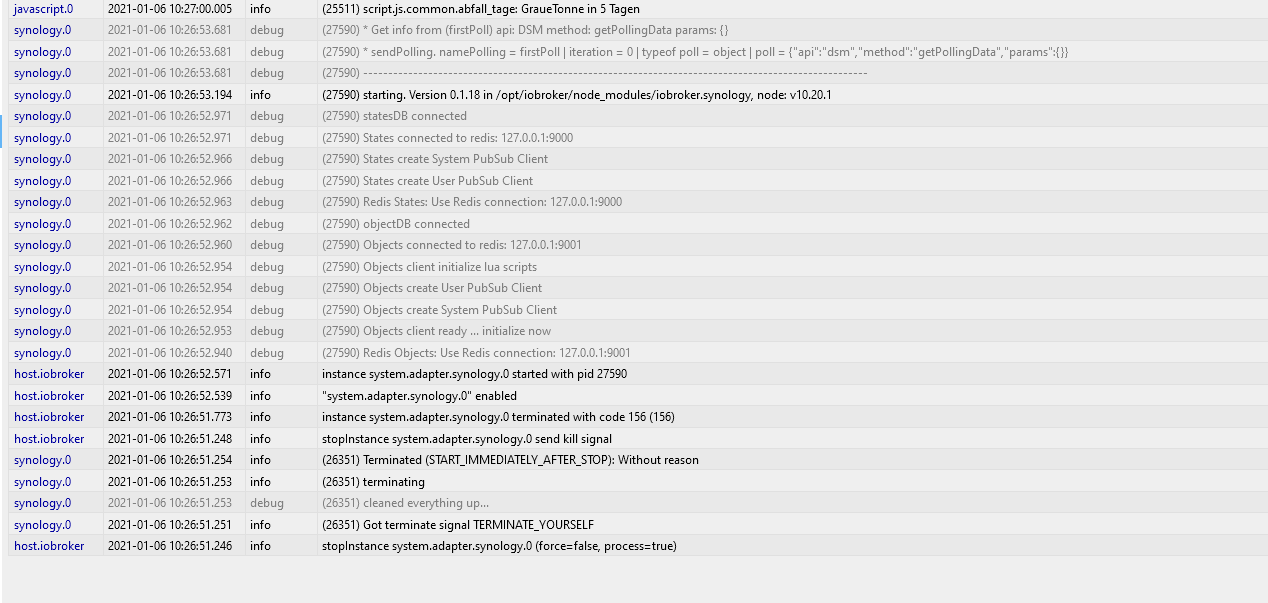
                    @Glasfaser hi, da ist leider nicht mehr.
                    6281b758-5c3d-440e-8877-cf39f6c12ca2-grafik.png

                    1 Antwort Letzte Antwort
                    0
                    • GlasfaserG Glasfaser

                      @Alero

                      da fehlt sehr viel !

                      stoppe den Adapter und dann starten ...

                      und dann ab Adapterstart den ganzen LOG zeigen !

                      A Offline
                      A Offline
                      Alero
                      schrieb am zuletzt editiert von
                      #42

                      @Glasfaser
                      Hi, weiso port 9000 und 9001?

                      Alero

                      GlasfaserG 1 Antwort Letzte Antwort
                      0
                      • A Alero

                        @Glasfaser
                        Hi, weiso port 9000 und 9001?

                        Alero

                        GlasfaserG Offline
                        GlasfaserG Offline
                        Glasfaser
                        schrieb am zuletzt editiert von
                        #43

                        @Alero sagte in synology adapter gelb:

                        Hi, weiso port 9000 und 9001?

                        Bitte nicht beachten ... das ist REDIS !

                        wo ist denn die Error Meldung ?

                        Synology 918+ 16GB - ioBroker in Docker v9 , VISO auf Trekstor Primebook C13 13,3" , Hikvision Domkameras mit Surveillance Station .. CCU RaspberryMatic in Synology VM .. Zigbee CC2538+CC2592 .. Sonoff .. KNX .. Modbus ..

                        A 1 Antwort Letzte Antwort
                        0
                        • GlasfaserG Glasfaser

                          @Alero sagte in synology adapter gelb:

                          Hi, weiso port 9000 und 9001?

                          Bitte nicht beachten ... das ist REDIS !

                          wo ist denn die Error Meldung ?

                          A Offline
                          A Offline
                          Alero
                          schrieb am zuletzt editiert von
                          #44

                          @Glasfaser
                          hi, die kommt später scheinbar.

                          hier

                          4c72eef9-48b1-4c8a-be54-330918c541c4-grafik.png

                          GlasfaserG 1 Antwort Letzte Antwort
                          0
                          • A Alero

                            @Glasfaser
                            hi, die kommt später scheinbar.

                            hier

                            4c72eef9-48b1-4c8a-be54-330918c541c4-grafik.png

                            GlasfaserG Offline
                            GlasfaserG Offline
                            Glasfaser
                            schrieb am zuletzt editiert von
                            #45

                            @Alero

                            Was ist das für eine IP ???

                            Synology 918+ 16GB - ioBroker in Docker v9 , VISO auf Trekstor Primebook C13 13,3" , Hikvision Domkameras mit Surveillance Station .. CCU RaspberryMatic in Synology VM .. Zigbee CC2538+CC2592 .. Sonoff .. KNX .. Modbus ..

                            A 1 Antwort Letzte Antwort
                            0
                            • GlasfaserG Glasfaser

                              @Alero

                              Was ist das für eine IP ???

                              A Offline
                              A Offline
                              Alero
                              schrieb am zuletzt editiert von
                              #46

                              @Glasfaser
                              das wollte ich auch gerade fragen

                              GlasfaserG 1 Antwort Letzte Antwort
                              0
                              • A Alero

                                @Glasfaser
                                das wollte ich auch gerade fragen

                                GlasfaserG Offline
                                GlasfaserG Offline
                                Glasfaser
                                schrieb am zuletzt editiert von
                                #47

                                @Alero

                                Die Error Meldung ist aber neu ... hat nichts mit deiner anderen Meldung zu tun .
                                Was hast du denn verändert .

                                Synology 918+ 16GB - ioBroker in Docker v9 , VISO auf Trekstor Primebook C13 13,3" , Hikvision Domkameras mit Surveillance Station .. CCU RaspberryMatic in Synology VM .. Zigbee CC2538+CC2592 .. Sonoff .. KNX .. Modbus ..

                                A 1 Antwort Letzte Antwort
                                0
                                • GlasfaserG Glasfaser

                                  @Alero

                                  Die Error Meldung ist aber neu ... hat nichts mit deiner anderen Meldung zu tun .
                                  Was hast du denn verändert .

                                  A Offline
                                  A Offline
                                  Alero
                                  schrieb am zuletzt editiert von Alero
                                  #48

                                  @Glasfaser
                                  Fehler gefunden für die falsche IP.
                                  hier das neue Log.

                                  synology.0	2021-01-06 10:37:20.785	debug	(10931) * Get info from (firstPoll) api: DSM method: getPollingData params: {}
                                  synology.0	2021-01-06 10:37:20.784	debug	(10931) * sendPolling. namePolling = firstPoll | iteration = 0 | typeof poll = object | poll = {"api":"dsm","method":"getPollingData","params":{}}
                                  synology.0	2021-01-06 10:37:20.784	debug	(10931) -----------------------------------------------------------------------------------------------------
                                  synology.0	2021-01-06 10:37:20.783	error	(10931) *** ERROR : src: sendPolling syno[dsm][getPollingData] To use the adapter, the user must be in the Administrators group! code: 400 message: No such account or incorrect password
                                  synology.0	2021-01-06 10:37:20.783	debug	(10931) * No response, read next.
                                  synology.0	2021-01-06 10:37:19.552	debug	(10931) * Get info from (firstPoll) api: DSM method: getPollingData params: {}
                                  synology.0	2021-01-06 10:37:19.552	debug	(10931) * sendPolling. namePolling = firstPoll | iteration = 0 | typeof poll = object | poll = {"api":"dsm","method":"getPollingData","params":{}}
                                  synology.0	2021-01-06 10:37:19.552	debug	(10931) -----------------------------------------------------------------------------------------------------
                                  synology.0	2021-01-06 10:37:19.551	error	(10931) *** ERROR : src: sendPolling syno[dsm][getPollingData] To use the adapter, the user must be in the Administrators group! code: 400 message: No such account or incorrect password
                                  synology.0	2021-01-06 10:37:19.550	debug	(10931) * No response, read next.
                                  synology.0	2021-01-06 10:37:18.424	debug	(10931) * Get info from (firstPoll) api: DSM method: getPollingData params: {}
                                  synology.0	2021-01-06 10:37:18.423	debug	(10931) * sendPolling. namePolling = firstPoll | iteration = 0 | typeof poll = object | poll = {"api":"dsm","method":"getPollingData","params":{}}
                                  synology.0	2021-01-06 10:37:18.423	debug	(10931) -----------------------------------------------------------------------------------------------------
                                  synology.0	2021-01-06 10:37:18.422	error	(10931) *** ERROR : src: sendPolling syno[dsm][getPollingData] To use the adapter, the user must be in the Administrators group! code: 400 message: No such account or incorrect password
                                  synology.0	2021-01-06 10:37:18.421	debug	(10931) * No response, read next.
                                  synology.0	2021-01-06 10:37:16.976	silly	(10931) States system redis pmessage system.adapter.synology.0.logLevel/system.adapter.synology.0.logLevel:{"val":"silly","ack":true,"ts":1609925836970,"q":0,"from":"system.adapter.synology.0","lc":1
                                  synology.0	2021-01-06 10:37:16.955	debug	(10931) * Get info from (firstPoll) api: DSM method: getPollingData params: {}
                                  synology.0	2021-01-06 10:37:16.955	debug	(10931) * sendPolling. namePolling = firstPoll | iteration = 0 | typeof poll = object | poll = {"api":"dsm","method":"getPollingData","params":{}}
                                  synology.0	2021-01-06 10:37:16.955	debug	(10931) -----------------------------------------------------------------------------------------------------
                                  synology.0	2021-01-06 10:37:16.458	info	(10931) starting. Version 0.1.18 in /opt/iobroker/node_modules/iobroker.synology, node: v10.20.1
                                  synology.0	2021-01-06 10:37:16.280	debug	(10931) statesDB connected
                                  synology.0	2021-01-06 10:37:16.279	debug	(10931) States connected to redis: 127.0.0.1:9000
                                  synology.0	2021-01-06 10:37:16.275	debug	(10931) States create System PubSub Client
                                  synology.0	2021-01-06 10:37:16.274	debug	(10931) States create User PubSub Client
                                  synology.0	2021-01-06 10:37:16.271	debug	(10931) Redis States: Use Redis connection: 127.0.0.1:9000
                                  synology.0	2021-01-06 10:37:16.271	debug	(10931) objectDB connected
                                  synology.0	2021-01-06 10:37:16.269	debug	(10931) Objects connected to redis: 127.0.0.1:9001
                                  synology.0	2021-01-06 10:37:16.263	debug	(10931) Objects client initialize lua scripts
                                  synology.0	2021-01-06 10:37:16.263	debug	(10931) Objects create User PubSub Client
                                  synology.0	2021-01-06 10:37:16.262	debug	(10931) Objects create System PubSub Client
                                  synology.0	2021-01-06 10:37:16.261	debug	(10931) Objects client ready ... initialize now
                                  synology.0	2021-01-06 10:37:16.249	debug	(10931) Redis Objects: Use Redis connection: 127.0.0.1:9001
                                  host.iobroker	2021-01-06 10:37:15.898	info	instance system.adapter.synology.0 started with pid 10931
                                  synology.0	2021-01-06 10:37:16.976	silly	(10931) States system redis pmessage system.adapter.synology.0.logLevel/system.adapter.synology.0.logLevel:{"val":"silly","ack":true,"ts":1609925836970,"q":0,"from":"system.adapter.synology.0","lc":16
                                  synology.0	2021-01-06 10:37:16.955	debug	(10931) * Get info from (firstPoll) api: DSM method: getPollingData params: {}
                                  synology.0	2021-01-06 10:37:16.955	debug	(10931) * sendPolling. namePolling = firstPoll | iteration = 0 | typeof poll = object | poll = {"api":"dsm","method":"getPollingData","params":{}}
                                  synology.0	2021-01-06 10:37:16.955	debug	(10931) -----------------------------------------------------------------------------------------------------
                                  synology.0	2021-01-06 10:37:16.458	info	(10931) starting. Version 0.1.18 in /opt/iobroker/node_modules/iobroker.synology, node: v10.20.1
                                  
                                  GlasfaserG 1 Antwort Letzte Antwort
                                  0
                                  • A Alero

                                    @Glasfaser
                                    Fehler gefunden für die falsche IP.
                                    hier das neue Log.

                                    synology.0	2021-01-06 10:37:20.785	debug	(10931) * Get info from (firstPoll) api: DSM method: getPollingData params: {}
                                    synology.0	2021-01-06 10:37:20.784	debug	(10931) * sendPolling. namePolling = firstPoll | iteration = 0 | typeof poll = object | poll = {"api":"dsm","method":"getPollingData","params":{}}
                                    synology.0	2021-01-06 10:37:20.784	debug	(10931) -----------------------------------------------------------------------------------------------------
                                    synology.0	2021-01-06 10:37:20.783	error	(10931) *** ERROR : src: sendPolling syno[dsm][getPollingData] To use the adapter, the user must be in the Administrators group! code: 400 message: No such account or incorrect password
                                    synology.0	2021-01-06 10:37:20.783	debug	(10931) * No response, read next.
                                    synology.0	2021-01-06 10:37:19.552	debug	(10931) * Get info from (firstPoll) api: DSM method: getPollingData params: {}
                                    synology.0	2021-01-06 10:37:19.552	debug	(10931) * sendPolling. namePolling = firstPoll | iteration = 0 | typeof poll = object | poll = {"api":"dsm","method":"getPollingData","params":{}}
                                    synology.0	2021-01-06 10:37:19.552	debug	(10931) -----------------------------------------------------------------------------------------------------
                                    synology.0	2021-01-06 10:37:19.551	error	(10931) *** ERROR : src: sendPolling syno[dsm][getPollingData] To use the adapter, the user must be in the Administrators group! code: 400 message: No such account or incorrect password
                                    synology.0	2021-01-06 10:37:19.550	debug	(10931) * No response, read next.
                                    synology.0	2021-01-06 10:37:18.424	debug	(10931) * Get info from (firstPoll) api: DSM method: getPollingData params: {}
                                    synology.0	2021-01-06 10:37:18.423	debug	(10931) * sendPolling. namePolling = firstPoll | iteration = 0 | typeof poll = object | poll = {"api":"dsm","method":"getPollingData","params":{}}
                                    synology.0	2021-01-06 10:37:18.423	debug	(10931) -----------------------------------------------------------------------------------------------------
                                    synology.0	2021-01-06 10:37:18.422	error	(10931) *** ERROR : src: sendPolling syno[dsm][getPollingData] To use the adapter, the user must be in the Administrators group! code: 400 message: No such account or incorrect password
                                    synology.0	2021-01-06 10:37:18.421	debug	(10931) * No response, read next.
                                    synology.0	2021-01-06 10:37:16.976	silly	(10931) States system redis pmessage system.adapter.synology.0.logLevel/system.adapter.synology.0.logLevel:{"val":"silly","ack":true,"ts":1609925836970,"q":0,"from":"system.adapter.synology.0","lc":1
                                    synology.0	2021-01-06 10:37:16.955	debug	(10931) * Get info from (firstPoll) api: DSM method: getPollingData params: {}
                                    synology.0	2021-01-06 10:37:16.955	debug	(10931) * sendPolling. namePolling = firstPoll | iteration = 0 | typeof poll = object | poll = {"api":"dsm","method":"getPollingData","params":{}}
                                    synology.0	2021-01-06 10:37:16.955	debug	(10931) -----------------------------------------------------------------------------------------------------
                                    synology.0	2021-01-06 10:37:16.458	info	(10931) starting. Version 0.1.18 in /opt/iobroker/node_modules/iobroker.synology, node: v10.20.1
                                    synology.0	2021-01-06 10:37:16.280	debug	(10931) statesDB connected
                                    synology.0	2021-01-06 10:37:16.279	debug	(10931) States connected to redis: 127.0.0.1:9000
                                    synology.0	2021-01-06 10:37:16.275	debug	(10931) States create System PubSub Client
                                    synology.0	2021-01-06 10:37:16.274	debug	(10931) States create User PubSub Client
                                    synology.0	2021-01-06 10:37:16.271	debug	(10931) Redis States: Use Redis connection: 127.0.0.1:9000
                                    synology.0	2021-01-06 10:37:16.271	debug	(10931) objectDB connected
                                    synology.0	2021-01-06 10:37:16.269	debug	(10931) Objects connected to redis: 127.0.0.1:9001
                                    synology.0	2021-01-06 10:37:16.263	debug	(10931) Objects client initialize lua scripts
                                    synology.0	2021-01-06 10:37:16.263	debug	(10931) Objects create User PubSub Client
                                    synology.0	2021-01-06 10:37:16.262	debug	(10931) Objects create System PubSub Client
                                    synology.0	2021-01-06 10:37:16.261	debug	(10931) Objects client ready ... initialize now
                                    synology.0	2021-01-06 10:37:16.249	debug	(10931) Redis Objects: Use Redis connection: 127.0.0.1:9001
                                    host.iobroker	2021-01-06 10:37:15.898	info	instance system.adapter.synology.0 started with pid 10931
                                    synology.0	2021-01-06 10:37:16.976	silly	(10931) States system redis pmessage system.adapter.synology.0.logLevel/system.adapter.synology.0.logLevel:{"val":"silly","ack":true,"ts":1609925836970,"q":0,"from":"system.adapter.synology.0","lc":16
                                    synology.0	2021-01-06 10:37:16.955	debug	(10931) * Get info from (firstPoll) api: DSM method: getPollingData params: {}
                                    synology.0	2021-01-06 10:37:16.955	debug	(10931) * sendPolling. namePolling = firstPoll | iteration = 0 | typeof poll = object | poll = {"api":"dsm","method":"getPollingData","params":{}}
                                    synology.0	2021-01-06 10:37:16.955	debug	(10931) -----------------------------------------------------------------------------------------------------
                                    synology.0	2021-01-06 10:37:16.458	info	(10931) starting. Version 0.1.18 in /opt/iobroker/node_modules/iobroker.synology, node: v10.20.1
                                    
                                    GlasfaserG Offline
                                    GlasfaserG Offline
                                    Glasfaser
                                    schrieb am zuletzt editiert von
                                    #49

                                    @Alero sagte in synology adapter gelb:

                                    code: 400

                                    Was mich wundert ist der Code 400 , der sonst nicht dabei ist wenn die Administrators group nicht eingehalten wird.

                                    Synology 918+ 16GB - ioBroker in Docker v9 , VISO auf Trekstor Primebook C13 13,3" , Hikvision Domkameras mit Surveillance Station .. CCU RaspberryMatic in Synology VM .. Zigbee CC2538+CC2592 .. Sonoff .. KNX .. Modbus ..

                                    A 1 Antwort Letzte Antwort
                                    0
                                    • GlasfaserG Glasfaser

                                      @Alero sagte in synology adapter gelb:

                                      code: 400

                                      Was mich wundert ist der Code 400 , der sonst nicht dabei ist wenn die Administrators group nicht eingehalten wird.

                                      A Offline
                                      A Offline
                                      Alero
                                      schrieb am zuletzt editiert von Alero
                                      #50

                                      @Glasfaser

                                      hier noch die EInstellungen meiner syno

                                      23d446bb-85d5-4e3a-8a1a-f9a1794209c2-grafik.png
                                      und der gruppe
                                      b25ff467-c715-4430-9f01-5df55fd8d8d5-grafik.png
                                      Sowohl User als auch pw wurden in den Adapter kopiert um Schreibfehler zu vermeiden.

                                      Alero

                                      GlasfaserG da_WoodyD 2 Antworten Letzte Antwort
                                      0
                                      • A Alero

                                        @Glasfaser

                                        hier noch die EInstellungen meiner syno
                                        23d446bb-85d5-4e3a-8a1a-f9a1794209c2-grafik.png
                                        und der gruppe
                                        b25ff467-c715-4430-9f01-5df55fd8d8d5-grafik.png
                                        Sowohl User als auch pw wurden in den Adapter kopiert um Schreibfehler zu vermeiden.

                                        Alero

                                        GlasfaserG Offline
                                        GlasfaserG Offline
                                        Glasfaser
                                        schrieb am zuletzt editiert von
                                        #51

                                        @Alero
                                        Bei den retuschierten Screenshots kann man nicht viel erkennen .

                                        Ich habe gerade im main.js vom Adapter geschaut , die Meldungen sind neu eingepflegt .

                                        Ich würde dann auch auf die Meldung HTTP 400 Error (Bad Request) tippen das es dann so gemeint ist

                                        Synology 918+ 16GB - ioBroker in Docker v9 , VISO auf Trekstor Primebook C13 13,3" , Hikvision Domkameras mit Surveillance Station .. CCU RaspberryMatic in Synology VM .. Zigbee CC2538+CC2592 .. Sonoff .. KNX .. Modbus ..

                                        A 2 Antworten Letzte Antwort
                                        0
                                        • GlasfaserG Glasfaser

                                          @Alero
                                          Bei den retuschierten Screenshots kann man nicht viel erkennen .

                                          Ich habe gerade im main.js vom Adapter geschaut , die Meldungen sind neu eingepflegt .

                                          Ich würde dann auch auf die Meldung HTTP 400 Error (Bad Request) tippen das es dann so gemeint ist

                                          A Offline
                                          A Offline
                                          Alero
                                          schrieb am zuletzt editiert von
                                          #52

                                          @Glasfaser
                                          die letzten Bilder sollten nur dokumentieren das der User "Hardware" heist und in der Administrators Gruppe vorhanden ist.
                                          Dan ist es ein Zugrtiffsproblem?

                                          Alero

                                          1 Antwort Letzte Antwort
                                          0
                                          Antworten
                                          • In einem neuen Thema antworten
                                          Anmelden zum Antworten
                                          • Älteste zuerst
                                          • Neuste zuerst
                                          • Meiste Stimmen


                                          Support us

                                          ioBroker
                                          Community Adapters
                                          Donate
                                          FAQ Cloud / IOT
                                          HowTo: Node.js-Update
                                          HowTo: Backup/Restore
                                          Downloads
                                          BLOG

                                          880

                                          Online

                                          32.5k

                                          Benutzer

                                          81.7k

                                          Themen

                                          1.3m

                                          Beiträge
                                          Community
                                          Impressum | Datenschutz-Bestimmungen | Nutzungsbedingungen | Einwilligungseinstellungen
                                          ioBroker Community 2014-2025
                                          logo
                                          • Anmelden

                                          • Du hast noch kein Konto? Registrieren

                                          • Anmelden oder registrieren, um zu suchen
                                          • Erster Beitrag
                                            Letzter Beitrag
                                          0
                                          • Home
                                          • Aktuell
                                          • Tags
                                          • Ungelesen 0
                                          • Kategorien
                                          • Unreplied
                                          • Beliebt
                                          • GitHub
                                          • Docu
                                          • Hilfe