Skip to content
  • Home
  • Aktuell
  • Tags
  • 0 Ungelesen 0
  • Kategorien
  • Unreplied
  • Beliebt
  • GitHub
  • Docu
  • Hilfe
Skins
  • Light
  • Brite
  • Cerulean
  • Cosmo
  • Flatly
  • Journal
  • Litera
  • Lumen
  • Lux
  • Materia
  • Minty
  • Morph
  • Pulse
  • Sandstone
  • Simplex
  • Sketchy
  • Spacelab
  • United
  • Yeti
  • Zephyr
  • Dark
  • Cyborg
  • Darkly
  • Quartz
  • Slate
  • Solar
  • Superhero
  • Vapor

  • Standard: (Kein Skin)
  • Kein Skin
Einklappen
ioBroker Logo

Community Forum

donate donate
  1. ioBroker Community Home
  2. Deutsch
  3. ioBroker Allgemein
  4. Aktualisierungen der Adapter funktionieren nicht

NEWS

  • Neuer Blogbeitrag: Monatsrückblick - Dezember 2025 🎄
    BluefoxB
    Bluefox
    11
    1
    509

  • Weihnachtsangebot 2025! 🎄
    BluefoxB
    Bluefox
    24
    1
    1.7k

  • UPDATE 31.10.: Amazon Alexa - ioBroker Skill läuft aus ?
    apollon77A
    apollon77
    48
    3
    9.6k

Aktualisierungen der Adapter funktionieren nicht

Geplant Angeheftet Gesperrt Verschoben ioBroker Allgemein
adapter update error
44 Beiträge 5 Kommentatoren 3.6k Aufrufe 3 Watching
  • Älteste zuerst
  • Neuste zuerst
  • Meiste Stimmen
Antworten
  • In einem neuen Thema antworten
Anmelden zum Antworten
Dieses Thema wurde gelöscht. Nur Nutzer mit entsprechenden Rechten können es sehen.
  • Guido SpoltmannG Guido Spoltmann

    @Thomas-Braun sagte in Aktualisierungen der Adapter funktionieren nicht:

    npm i iobroker.js-controller@3.1.6 --production

    Hab ich mir schon fast gedacht....

    pi@raspberrypi:~ $ iobroker -v
    internal/modules/cjs/loader.js:818
      throw err;
      ^
    
    Error: Cannot find module '/opt/iobroker/node_modules/iobroker.js-controller/iobroker.js'
        at Function.Module._resolveFilename (internal/modules/cjs/loader.js:815:15)
        at Function.Module._load (internal/modules/cjs/loader.js:667:27)
        at Function.executeUserEntryPoint [as runMain] (internal/modules/run_main.js:60:12)
        at internal/main/run_main_module.js:17:47 {
      code: 'MODULE_NOT_FOUND',
      requireStack: []
    }
    pi@raspberrypi:~ $ iobroker status
    internal/modules/cjs/loader.js:818
      throw err;
      ^
    
    Error: Cannot find module '/opt/iobroker/node_modules/iobroker.js-controller/iobroker.js'
        at Function.Module._resolveFilename (internal/modules/cjs/loader.js:815:15)
        at Function.Module._load (internal/modules/cjs/loader.js:667:27)
        at Function.executeUserEntryPoint [as runMain] (internal/modules/run_main.js:60:12)
        at internal/main/run_main_module.js:17:47 {
      code: 'MODULE_NOT_FOUND',
      requireStack: []
    }
    pi@raspberrypi:~ $ cd /opt/iobroker
    pi@raspberrypi:/opt/iobroker $ npm i iobroker.js-controller@3.1.6 --production
    npm ERR! code EAI_AGAIN
    npm ERR! errno EAI_AGAIN
    npm ERR! request to https://registry.npmjs.org/iobroker.js-controller failed, reason: getaddrinfo EAI_AGAIN registry.npmjs.org
    
    npm ERR! A complete log of this run can be found in:
    npm ERR!     /home/iobroker/.npm/_logs/2020-12-27T12_42_34_286Z-debug.log
    pi@raspberrypi:/opt/iobroker $
    
    
    Thomas BraunT Online
    Thomas BraunT Online
    Thomas Braun
    Most Active
    schrieb am zuletzt editiert von
    #29

    @Guido-Spoltmann Immer noch ein Knoten in deinem lokalen Netz, würde ich sagen.

    Linux-Werkzeugkasten:
    https://forum.iobroker.net/topic/42952/der-kleine-iobroker-linux-werkzeugkasten
    NodeJS Fixer Skript:
    https://forum.iobroker.net/topic/68035/iob-node-fix-skript
    iob_diag: curl -sLf -o diag.sh https://iobroker.net/diag.sh && bash diag.sh

    1 Antwort Letzte Antwort
    0
    • Guido SpoltmannG Guido Spoltmann

      @Thomas-Braun sagte in Aktualisierungen der Adapter funktionieren nicht:

      npm i iobroker.js-controller@3.1.6 --production

      Hab ich mir schon fast gedacht....

      pi@raspberrypi:~ $ iobroker -v
      internal/modules/cjs/loader.js:818
        throw err;
        ^
      
      Error: Cannot find module '/opt/iobroker/node_modules/iobroker.js-controller/iobroker.js'
          at Function.Module._resolveFilename (internal/modules/cjs/loader.js:815:15)
          at Function.Module._load (internal/modules/cjs/loader.js:667:27)
          at Function.executeUserEntryPoint [as runMain] (internal/modules/run_main.js:60:12)
          at internal/main/run_main_module.js:17:47 {
        code: 'MODULE_NOT_FOUND',
        requireStack: []
      }
      pi@raspberrypi:~ $ iobroker status
      internal/modules/cjs/loader.js:818
        throw err;
        ^
      
      Error: Cannot find module '/opt/iobroker/node_modules/iobroker.js-controller/iobroker.js'
          at Function.Module._resolveFilename (internal/modules/cjs/loader.js:815:15)
          at Function.Module._load (internal/modules/cjs/loader.js:667:27)
          at Function.executeUserEntryPoint [as runMain] (internal/modules/run_main.js:60:12)
          at internal/main/run_main_module.js:17:47 {
        code: 'MODULE_NOT_FOUND',
        requireStack: []
      }
      pi@raspberrypi:~ $ cd /opt/iobroker
      pi@raspberrypi:/opt/iobroker $ npm i iobroker.js-controller@3.1.6 --production
      npm ERR! code EAI_AGAIN
      npm ERR! errno EAI_AGAIN
      npm ERR! request to https://registry.npmjs.org/iobroker.js-controller failed, reason: getaddrinfo EAI_AGAIN registry.npmjs.org
      
      npm ERR! A complete log of this run can be found in:
      npm ERR!     /home/iobroker/.npm/_logs/2020-12-27T12_42_34_286Z-debug.log
      pi@raspberrypi:/opt/iobroker $
      
      
      Thomas BraunT Online
      Thomas BraunT Online
      Thomas Braun
      Most Active
      schrieb am zuletzt editiert von
      #30

      @Guido-Spoltmann

      ping npmjs.org
      traceroute npmjs.org
      

      Linux-Werkzeugkasten:
      https://forum.iobroker.net/topic/42952/der-kleine-iobroker-linux-werkzeugkasten
      NodeJS Fixer Skript:
      https://forum.iobroker.net/topic/68035/iob-node-fix-skript
      iob_diag: curl -sLf -o diag.sh https://iobroker.net/diag.sh && bash diag.sh

      Guido SpoltmannG 1 Antwort Letzte Antwort
      0
      • Thomas BraunT Thomas Braun

        @Guido-Spoltmann

        ping npmjs.org
        traceroute npmjs.org
        
        Guido SpoltmannG Offline
        Guido SpoltmannG Offline
        Guido Spoltmann
        schrieb am zuletzt editiert von
        #31

        @Thomas-Braun sagte in Aktualisierungen der Adapter funktionieren nicht:

        traceroute npmjs.org

        pi@raspberrypi:/opt/iobroker $ ping npmjs.org
        ping: npmjs.org: Temporary failure in name resolution
        pi@raspberrypi:/opt/iobroker $ traceroute npmjs.org
        npmjs.org: Temporary failure in name resolution
        Cannot handle "host" cmdline arg `npmjs.org' on position 1 (argc 1)
        pi@raspberrypi:/opt/iobroker $


        Platform linux
        Betriebssystem linux
        Architektur arm
        CPUs 4
        Geschwindigkeit 600 MHz
        Modell ARMv7 Processor rev 3 (v7l)
        RAM 3.73 GB
        Node.js v12.20.0
        NPM 6.14.8
        Festplatte Größe 26.51 GB

        Thomas BraunT 1 Antwort Letzte Antwort
        0
        • Guido SpoltmannG Guido Spoltmann

          @Thomas-Braun sagte in Aktualisierungen der Adapter funktionieren nicht:

          traceroute npmjs.org

          pi@raspberrypi:/opt/iobroker $ ping npmjs.org
          ping: npmjs.org: Temporary failure in name resolution
          pi@raspberrypi:/opt/iobroker $ traceroute npmjs.org
          npmjs.org: Temporary failure in name resolution
          Cannot handle "host" cmdline arg `npmjs.org' on position 1 (argc 1)
          pi@raspberrypi:/opt/iobroker $
          
          
          Thomas BraunT Online
          Thomas BraunT Online
          Thomas Braun
          Most Active
          schrieb am zuletzt editiert von Thomas Braun
          #32

          @Guido-Spoltmann
          Tjoar...
          Ohne DNS auch keine Namensauflösung. Hast du da irgendwas in der Fritzbox umgefummelt?

          cat /etc/resolv.conf
          

          Linux-Werkzeugkasten:
          https://forum.iobroker.net/topic/42952/der-kleine-iobroker-linux-werkzeugkasten
          NodeJS Fixer Skript:
          https://forum.iobroker.net/topic/68035/iob-node-fix-skript
          iob_diag: curl -sLf -o diag.sh https://iobroker.net/diag.sh && bash diag.sh

          Guido SpoltmannG 1 Antwort Letzte Antwort
          0
          • Thomas BraunT Thomas Braun

            @Guido-Spoltmann
            Tjoar...
            Ohne DNS auch keine Namensauflösung. Hast du da irgendwas in der Fritzbox umgefummelt?

            cat /etc/resolv.conf
            
            Guido SpoltmannG Offline
            Guido SpoltmannG Offline
            Guido Spoltmann
            schrieb am zuletzt editiert von Guido Spoltmann
            #33

            @Thomas-Braun
            Hi nein es läuft hie auch alles, habe 4 Teenies die mich sofort informiert hätten das das Internet nicht geht.

            pi@raspberrypi:/opt/iobroker $ cat /etc/resolv.conf
            # Generated by resolvconf
            domain fritz.box
            nameserver 192.168.178.1
            nameserver fd00::464e:6dff:fe26:9597


            Platform linux
            Betriebssystem linux
            Architektur arm
            CPUs 4
            Geschwindigkeit 600 MHz
            Modell ARMv7 Processor rev 3 (v7l)
            RAM 3.73 GB
            Node.js v12.20.0
            NPM 6.14.8
            Festplatte Größe 26.51 GB

            Thomas BraunT 1 Antwort Letzte Antwort
            0
            • Guido SpoltmannG Guido Spoltmann

              @Thomas-Braun
              Hi nein es läuft hie auch alles, habe 4 Teenies die mich sofort informiert hätten das das Internet nicht geht.

              pi@raspberrypi:/opt/iobroker $ cat /etc/resolv.conf
              # Generated by resolvconf
              domain fritz.box
              nameserver 192.168.178.1
              nameserver fd00::464e:6dff:fe26:9597
              
              
              Thomas BraunT Online
              Thomas BraunT Online
              Thomas Braun
              Most Active
              schrieb am zuletzt editiert von
              #34

              @Guido-Spoltmann

              ping 104.16.22.35
              

              Linux-Werkzeugkasten:
              https://forum.iobroker.net/topic/42952/der-kleine-iobroker-linux-werkzeugkasten
              NodeJS Fixer Skript:
              https://forum.iobroker.net/topic/68035/iob-node-fix-skript
              iob_diag: curl -sLf -o diag.sh https://iobroker.net/diag.sh && bash diag.sh

              Guido SpoltmannG 1 Antwort Letzte Antwort
              0
              • Thomas BraunT Thomas Braun

                @Guido-Spoltmann

                ping 104.16.22.35
                
                Guido SpoltmannG Offline
                Guido SpoltmannG Offline
                Guido Spoltmann
                schrieb am zuletzt editiert von
                #35

                @Thomas-Braun sagte in Aktualisierungen der Adapter funktionieren nicht:

                ping 104.16.22.35

                pi@raspberrypi:/opt/iobroker $ ping 104.16.22.35
                PING 104.16.22.35 (104.16.22.35) 56(84) bytes of data.
                64 bytes from 104.16.22.35: icmp_seq=1 ttl=58 time=10.4 ms
                64 bytes from 104.16.22.35: icmp_seq=2 ttl=58 time=9.59 ms
                64 bytes from 104.16.22.35: icmp_seq=3 ttl=58 time=9.53 ms
                64 bytes from 104.16.22.35: icmp_seq=4 ttl=58 time=9.33 ms
                64 bytes from 104.16.22.35: icmp_seq=5 ttl=58 time=8.94 ms
                64 bytes from 104.16.22.35: icmp_seq=6 ttl=58 time=9.68 ms
                64 bytes from 104.16.22.35: icmp_seq=7 ttl=58 time=9.41 ms
                64 bytes from 104.16.22.35: icmp_seq=8 ttl=58 time=9.49 ms
                64 bytes from 104.16.22.35: icmp_seq=9 ttl=58 time=9.28 ms
                64 bytes from 104.16.22.35: icmp_seq=10 ttl=58 time=9.39 ms
                64 bytes from 104.16.22.35: icmp_seq=11 ttl=58 time=23.2 ms
                64 bytes from 104.16.22.35: icmp_seq=12 ttl=58 time=22.3 ms
                64 bytes from 104.16.22.35: icmp_seq=13 ttl=58 time=9.21 ms
                64 bytes from 104.16.22.35: icmp_seq=14 ttl=58 time=9.29 ms
                64 bytes from 104.16.22.35: icmp_seq=15 ttl=58 time=9.27 ms
                64 bytes from 104.16.22.35: icmp_seq=16 ttl=58 time=9.45 ms
                64 bytes from 104.16.22.35: icmp_seq=17 ttl=58 time=30.4 ms
                64 bytes from 104.16.22.35: icmp_seq=18 ttl=58 time=9.33 ms
                64 bytes from 104.16.22.35: icmp_seq=19 ttl=58 time=25.3 ms
                64 bytes from 104.16.22.35: icmp_seq=20 ttl=58 time=8.86 ms
                64 bytes from 104.16.22.35: icmp_seq=21 ttl=58 time=9.44 ms
                64 bytes from 104.16.22.35: icmp_seq=22 ttl=58 time=9.70 ms
                ^C
                --- 104.16.22.35 ping statistics ---
                22 packets transmitted, 22 received, 0% packet loss, time 54ms
                rtt min/avg/max/mdev = 8.855/12.307/30.355/6.268 ms


                Platform linux
                Betriebssystem linux
                Architektur arm
                CPUs 4
                Geschwindigkeit 600 MHz
                Modell ARMv7 Processor rev 3 (v7l)
                RAM 3.73 GB
                Node.js v12.20.0
                NPM 6.14.8
                Festplatte Größe 26.51 GB

                Thomas BraunT 1 Antwort Letzte Antwort
                0
                • Guido SpoltmannG Guido Spoltmann

                  @Thomas-Braun sagte in Aktualisierungen der Adapter funktionieren nicht:

                  ping 104.16.22.35

                  pi@raspberrypi:/opt/iobroker $ ping 104.16.22.35
                  PING 104.16.22.35 (104.16.22.35) 56(84) bytes of data.
                  64 bytes from 104.16.22.35: icmp_seq=1 ttl=58 time=10.4 ms
                  64 bytes from 104.16.22.35: icmp_seq=2 ttl=58 time=9.59 ms
                  64 bytes from 104.16.22.35: icmp_seq=3 ttl=58 time=9.53 ms
                  64 bytes from 104.16.22.35: icmp_seq=4 ttl=58 time=9.33 ms
                  64 bytes from 104.16.22.35: icmp_seq=5 ttl=58 time=8.94 ms
                  64 bytes from 104.16.22.35: icmp_seq=6 ttl=58 time=9.68 ms
                  64 bytes from 104.16.22.35: icmp_seq=7 ttl=58 time=9.41 ms
                  64 bytes from 104.16.22.35: icmp_seq=8 ttl=58 time=9.49 ms
                  64 bytes from 104.16.22.35: icmp_seq=9 ttl=58 time=9.28 ms
                  64 bytes from 104.16.22.35: icmp_seq=10 ttl=58 time=9.39 ms
                  64 bytes from 104.16.22.35: icmp_seq=11 ttl=58 time=23.2 ms
                  64 bytes from 104.16.22.35: icmp_seq=12 ttl=58 time=22.3 ms
                  64 bytes from 104.16.22.35: icmp_seq=13 ttl=58 time=9.21 ms
                  64 bytes from 104.16.22.35: icmp_seq=14 ttl=58 time=9.29 ms
                  64 bytes from 104.16.22.35: icmp_seq=15 ttl=58 time=9.27 ms
                  64 bytes from 104.16.22.35: icmp_seq=16 ttl=58 time=9.45 ms
                  64 bytes from 104.16.22.35: icmp_seq=17 ttl=58 time=30.4 ms
                  64 bytes from 104.16.22.35: icmp_seq=18 ttl=58 time=9.33 ms
                  64 bytes from 104.16.22.35: icmp_seq=19 ttl=58 time=25.3 ms
                  64 bytes from 104.16.22.35: icmp_seq=20 ttl=58 time=8.86 ms
                  64 bytes from 104.16.22.35: icmp_seq=21 ttl=58 time=9.44 ms
                  64 bytes from 104.16.22.35: icmp_seq=22 ttl=58 time=9.70 ms
                  ^C
                  --- 104.16.22.35 ping statistics ---
                  22 packets transmitted, 22 received, 0% packet loss, time 54ms
                  rtt min/avg/max/mdev = 8.855/12.307/30.355/6.268 ms
                  
                  
                  Thomas BraunT Online
                  Thomas BraunT Online
                  Thomas Braun
                  Most Active
                  schrieb am zuletzt editiert von
                  #36

                  @Guido-Spoltmann Gut, also raus kommst du. Nur die Namensauflösung tickt nicht sauber.
                  Ich vermute ja immer noch eine Einstellung in der Fritzbox.

                  Kannst du die mal durchstarten?

                  Linux-Werkzeugkasten:
                  https://forum.iobroker.net/topic/42952/der-kleine-iobroker-linux-werkzeugkasten
                  NodeJS Fixer Skript:
                  https://forum.iobroker.net/topic/68035/iob-node-fix-skript
                  iob_diag: curl -sLf -o diag.sh https://iobroker.net/diag.sh && bash diag.sh

                  Guido SpoltmannG 1 Antwort Letzte Antwort
                  0
                  • Thomas BraunT Thomas Braun

                    @Guido-Spoltmann Gut, also raus kommst du. Nur die Namensauflösung tickt nicht sauber.
                    Ich vermute ja immer noch eine Einstellung in der Fritzbox.

                    Kannst du die mal durchstarten?

                    Guido SpoltmannG Offline
                    Guido SpoltmannG Offline
                    Guido Spoltmann
                    schrieb am zuletzt editiert von
                    #37

                    @Thomas-Braun
                    So Neustart ist erledigt...
                    Habe jetzt nochmal die letzten Befehle in Putty eingetragen:

                    pi@raspberrypi:/opt/iobroker $ ping npmjs.org
                    PING npmjs.org(2606:4700::6810:1a23 (2606:4700::6810:1a23)) 56 data bytes
                    64 bytes from 2606:4700::6810:1a23 (2606:4700::6810:1a23): icmp_seq=1 ttl=57 tim                                                                                                                                                             e=9.73 ms
                    64 bytes from 2606:4700::6810:1a23 (2606:4700::6810:1a23): icmp_seq=2 ttl=57 tim                                                                                                                                                             e=9.47 ms
                    64 bytes from 2606:4700::6810:1a23 (2606:4700::6810:1a23): icmp_seq=3 ttl=57 tim                                                                                                                                                             e=9.08 ms
                    64 bytes from 2606:4700::6810:1a23 (2606:4700::6810:1a23): icmp_seq=4 ttl=57 tim                                                                                                                                                             e=9.29 ms
                    64 bytes from 2606:4700::6810:1a23 (2606:4700::6810:1a23): icmp_seq=5 ttl=57 tim                                                                                                                                                             e=9.33 ms
                    64 bytes from 2606:4700::6810:1a23 (2606:4700::6810:1a23): icmp_seq=6 ttl=57 time=32.2 ms
                    64 bytes from 2606:4700::6810:1a23 (2606:4700::6810:1a23): icmp_seq=7 ttl=57 time=39.2 ms
                    64 bytes from 2606:4700::6810:1a23 (2606:4700::6810:1a23): icmp_seq=8 ttl=57 time=9.58 ms
                    64 bytes from 2606:4700::6810:1a23 (2606:4700::6810:1a23): icmp_seq=9 ttl=57 time=9.51 ms
                    64 bytes from 2606:4700::6810:1a23 (2606:4700::6810:1a23): icmp_seq=10 ttl=57 time=9.27 ms
                    64 bytes from 2606:4700::6810:1a23 (2606:4700::6810:1a23): icmp_seq=11 ttl=57 time=9.20 ms
                    64 bytes from 2606:4700::6810:1a23 (2606:4700::6810:1a23): icmp_seq=12 ttl=57 time=36.5 ms
                    ^C
                    --- npmjs.org ping statistics ---
                    12 packets transmitted, 12 received, 0% packet loss, time 25ms
                    rtt min/avg/max/mdev = 9.079/16.029/39.242/11.600 ms
                    pi@raspberrypi:/opt/iobroker $ traceroute npmjs.org
                    traceroute to npmjs.org (104.16.20.35), 30 hops max, 60 byte packets
                     1  fritz.box (192.168.178.1)  0.392 ms  0.350 ms  0.295 ms
                     2  185.113.144.6 (185.113.144.6)  4.897 ms  4.829 ms  4.719 ms
                     3  185.113.144.2 (185.113.144.2)  4.658 ms  4.552 ms  4.622 ms
                     4  185.113.144.1 (185.113.144.1)  4.555 ms  4.445 ms  4.381 ms
                     5  ae0-408.dus10.core-backbone.com (81.95.15.37)  9.165 ms  9.097 ms  9.078 ms
                     6  ae15-2029.fra30.core-backbone.com (81.95.15.70)  12.090 ms  10.177 ms  9.994 ms
                     7  core-backbone.cloudflare.com (80.255.9.34)  10.854 ms  10.597 ms  10.815 ms
                     8  104.16.20.35 (104.16.20.35)  10.522 ms  10.632 ms  10.632 ms
                    pi@raspberrypi:/opt/iobroker $
                    

                    Sieht besser aus oder?

                    Platform linux
                    Betriebssystem linux
                    Architektur arm
                    CPUs 4
                    Geschwindigkeit 600 MHz
                    Modell ARMv7 Processor rev 3 (v7l)
                    RAM 3.73 GB
                    Node.js v12.20.0
                    NPM 6.14.8
                    Festplatte Größe 26.51 GB

                    1 Antwort Letzte Antwort
                    0
                    • wendy2702W Offline
                      wendy2702W Offline
                      wendy2702
                      schrieb am zuletzt editiert von
                      #38

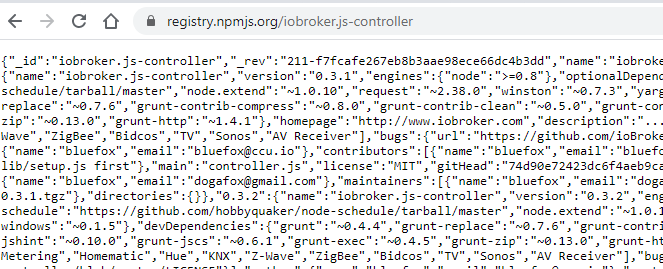
                      @Guido-Spoltmann sagte in Aktualisierungen der Adapter funktionieren nicht:

                      https://registry.npmjs.org/iobroker.js-controller

                      Kannst das auch mal an einem PC in einem Browser eingeben und schauen ob die Seite erreichbar ist.

                      Klappt das liegt es wohl am PI.

                      Klappt es nicht: Netzwerk bzw. Fritzbox

                      Bitte keine Fragen per PN, die gehören ins Forum!

                      Benutzt das Voting rechts unten im Beitrag wenn er euch geholfen hat.

                      Guido SpoltmannG 1 Antwort Letzte Antwort
                      0
                      • wendy2702W wendy2702

                        @Guido-Spoltmann sagte in Aktualisierungen der Adapter funktionieren nicht:

                        https://registry.npmjs.org/iobroker.js-controller

                        Kannst das auch mal an einem PC in einem Browser eingeben und schauen ob die Seite erreichbar ist.

                        Klappt das liegt es wohl am PI.

                        Klappt es nicht: Netzwerk bzw. Fritzbox

                        Guido SpoltmannG Offline
                        Guido SpoltmannG Offline
                        Guido Spoltmann
                        schrieb am zuletzt editiert von
                        #39

                        @wendy2702 sagte in Aktualisierungen der Adapter funktionieren nicht:

                        https://registry.npmjs.org/iobroker.js-controller

                        Ja klappt...27-12-_2020_14-39-31.png

                        Platform linux
                        Betriebssystem linux
                        Architektur arm
                        CPUs 4
                        Geschwindigkeit 600 MHz
                        Modell ARMv7 Processor rev 3 (v7l)
                        RAM 3.73 GB
                        Node.js v12.20.0
                        NPM 6.14.8
                        Festplatte Größe 26.51 GB

                        Thomas BraunT 1 Antwort Letzte Antwort
                        0
                        • Guido SpoltmannG Guido Spoltmann

                          @wendy2702 sagte in Aktualisierungen der Adapter funktionieren nicht:

                          https://registry.npmjs.org/iobroker.js-controller

                          Ja klappt...27-12-_2020_14-39-31.png

                          Thomas BraunT Online
                          Thomas BraunT Online
                          Thomas Braun
                          Most Active
                          schrieb am zuletzt editiert von
                          #40

                          @Guido-Spoltmann Dann sollte es ja jetzt funktionieren.

                          Linux-Werkzeugkasten:
                          https://forum.iobroker.net/topic/42952/der-kleine-iobroker-linux-werkzeugkasten
                          NodeJS Fixer Skript:
                          https://forum.iobroker.net/topic/68035/iob-node-fix-skript
                          iob_diag: curl -sLf -o diag.sh https://iobroker.net/diag.sh && bash diag.sh

                          1 Antwort Letzte Antwort
                          0
                          • Thomas BraunT Thomas Braun

                            @Guido-Spoltmann
                            Das ist nicht gut...

                            iobroker -v
                            iobroker status
                            
                            cd /opt/iobroker
                            npm i iobroker.js-controller@3.1.6 --production
                            
                            wendy2702W Offline
                            wendy2702W Offline
                            wendy2702
                            schrieb am zuletzt editiert von
                            #41

                            @Thomas-Braun sagte in Aktualisierungen der Adapter funktionieren nicht:

                            @Guido-Spoltmann
                            Das ist nicht gut...

                            iobroker -v
                            iobroker status
                            
                            cd /opt/iobroker
                            npm i iobroker.js-controller@3.1.6 --production
                            

                            Dann das erneut ausführen

                            Bitte keine Fragen per PN, die gehören ins Forum!

                            Benutzt das Voting rechts unten im Beitrag wenn er euch geholfen hat.

                            Thomas BraunT 1 Antwort Letzte Antwort
                            0
                            • wendy2702W wendy2702

                              @Thomas-Braun sagte in Aktualisierungen der Adapter funktionieren nicht:

                              @Guido-Spoltmann
                              Das ist nicht gut...

                              iobroker -v
                              iobroker status
                              
                              cd /opt/iobroker
                              npm i iobroker.js-controller@3.1.6 --production
                              

                              Dann das erneut ausführen

                              Thomas BraunT Online
                              Thomas BraunT Online
                              Thomas Braun
                              Most Active
                              schrieb am zuletzt editiert von
                              #42

                              @wendy2702 Aber nicht die Zeile mit npm i..., wenn es schon läuft.

                              Linux-Werkzeugkasten:
                              https://forum.iobroker.net/topic/42952/der-kleine-iobroker-linux-werkzeugkasten
                              NodeJS Fixer Skript:
                              https://forum.iobroker.net/topic/68035/iob-node-fix-skript
                              iob_diag: curl -sLf -o diag.sh https://iobroker.net/diag.sh && bash diag.sh

                              Guido SpoltmannG wendy2702W 2 Antworten Letzte Antwort
                              1
                              • Thomas BraunT Thomas Braun

                                @wendy2702 Aber nicht die Zeile mit npm i..., wenn es schon läuft.

                                Guido SpoltmannG Offline
                                Guido SpoltmannG Offline
                                Guido Spoltmann
                                schrieb am zuletzt editiert von
                                #43

                                @Thomas-Braun
                                Bin im Admin Bereich angekommen, vielen Dank für die Unterstützung. Hab ja nebenbei wieder was dazu gelernt.
                                LG
                                Guido

                                Platform linux
                                Betriebssystem linux
                                Architektur arm
                                CPUs 4
                                Geschwindigkeit 600 MHz
                                Modell ARMv7 Processor rev 3 (v7l)
                                RAM 3.73 GB
                                Node.js v12.20.0
                                NPM 6.14.8
                                Festplatte Größe 26.51 GB

                                1 Antwort Letzte Antwort
                                0
                                • Thomas BraunT Thomas Braun

                                  @wendy2702 Aber nicht die Zeile mit npm i..., wenn es schon läuft.

                                  wendy2702W Offline
                                  wendy2702W Offline
                                  wendy2702
                                  schrieb am zuletzt editiert von
                                  #44

                                  @Thomas-Braun sagte in Aktualisierungen der Adapter funktionieren nicht:

                                  @wendy2702 Aber nicht die Zeile mit npm i..., wenn es schon läuft.

                                  Das stimmt, allerdings konnte ich kein logfile sehen in dem die Installation bzw. Der Start als erfolgreich zu erkennen war.

                                  Gucke aber auch nur am Handy und habe es vielleicht übersehen oder überlesen.

                                  Bitte keine Fragen per PN, die gehören ins Forum!

                                  Benutzt das Voting rechts unten im Beitrag wenn er euch geholfen hat.

                                  1 Antwort Letzte Antwort
                                  0
                                  Antworten
                                  • In einem neuen Thema antworten
                                  Anmelden zum Antworten
                                  • Älteste zuerst
                                  • Neuste zuerst
                                  • Meiste Stimmen


                                  Support us

                                  ioBroker
                                  Community Adapters
                                  Donate
                                  FAQ Cloud / IOT
                                  HowTo: Node.js-Update
                                  HowTo: Backup/Restore
                                  Downloads
                                  BLOG

                                  613

                                  Online

                                  32.5k

                                  Benutzer

                                  81.8k

                                  Themen

                                  1.3m

                                  Beiträge
                                  Community
                                  Impressum | Datenschutz-Bestimmungen | Nutzungsbedingungen | Einwilligungseinstellungen
                                  ioBroker Community 2014-2025
                                  logo
                                  • Anmelden

                                  • Du hast noch kein Konto? Registrieren

                                  • Anmelden oder registrieren, um zu suchen
                                  • Erster Beitrag
                                    Letzter Beitrag
                                  0
                                  • Home
                                  • Aktuell
                                  • Tags
                                  • Ungelesen 0
                                  • Kategorien
                                  • Unreplied
                                  • Beliebt
                                  • GitHub
                                  • Docu
                                  • Hilfe