




Test Adapter iQontrol 2.0.x Vis (Entwicklungs-Thread)

-
@CrazyFloyd
Ich habe auf der Hauptansicht eine Kachel für das aktuelle Wetter:
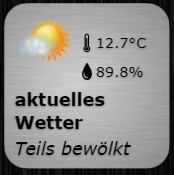
Temperatur und Feuchtigkeit sind live Werte von einem Außensensor, der Text "Teils bewölkt" kommt aus dem Adapter "daswetter".
Wenn ich auf diese Kachel klicke, kommt eine eigene "Wetter-Seite" mit Vorschau für die nächsten 5 Tage, alle Daten dazu kommen aus dem "daswetter" Adapter:

Reicht dir das so?
@blackeagle998 sagte in Test Adapter iQontrol 1.2.x:
@CrazyFloyd
Ich habe auf der Hauptansicht eine Kachel für das aktuelle Wetter:
Temperatur und Feuchtigkeit sind live Werte von einem Außensensor, der Text "Teils bewölkt" kommt aus dem Adapter "daswetter".
Wenn ich auf diese Kachel klicke, kommt eine eigene "Wetter-Seite" mit Vorschau für die nächsten 5 Tage, alle Daten dazu kommen aus dem "daswetter" Adapter:
Reicht dir das so?
Prima hat schon mal geholfen und sofort umgesetzt.
Sag mal hast du eigentlich wechselnde Symbole je nach Wetter Status? Wenn ja wie hast du das gemacht. -
@CrazyFloyd sagte in Test Adapter iQontrol 1.2.x:
Guten Morgen, ich habe einmal einen großen Wunsch. Besteht die Möglichkeit im Heizungs Thermostat Modul einen Punkt zu implementieren womit das Thermostat wieder in den Auto Modus gebracht werden kann nachdem die Temperatur vorher manuell geändert wurde. Bei meinen Tado Thermostaten benötige ich einfach einen kurzen True Impuls für den Datenpunkt "Clear Overlay". Ansonsten besten Dank für die hervorragende Arbeit. Macht immer noch richtig Spass das Modul zu nutzen.
Unter CONTOL_MODE kann man einen Datenpunkt angeben, den man mit dem Schraubenschlüssel weiter konfigurieren kann. Hier kann man eine VALUE-List anlegen, die die verschiedenen Betriebsmodi enthält. Man kann dann über die TARGET_VALUE_LIST verschiedene Ziel-Datenpunkte angeben, auf die der Befehl ggf. weitergeleitet werden soll. Damit denke ich, es sollte gehen... Schau mal hier:
https://github.com/sbormann/ioBroker.iqontrol#modifying-datapoint-configurationWenn Du es hinbekommen hast, poste mal bitte (am besten mit Screenshot), wie es genau für Tado geht, dann können wir das in das WIKI für andere Benutzer stellen:
https://github.com/sbormann/ioBroker.iqontrol/wiki
VG
@s-bormann sagte in Test Adapter iQontrol 1.2.x:
@CrazyFloyd sagte in Test Adapter iQontrol 1.2.x:
Guten Morgen, ich habe einmal einen großen Wunsch. Besteht die Möglichkeit im Heizungs Thermostat Modul einen Punkt zu implementieren womit das Thermostat wieder in den Auto Modus gebracht werden kann nachdem die Temperatur vorher manuell geändert wurde. Bei meinen Tado Thermostaten benötige ich einfach einen kurzen True Impuls für den Datenpunkt "Clear Overlay". Ansonsten besten Dank für die hervorragende Arbeit. Macht immer noch richtig Spass das Modul zu nutzen.
Unter CONTOL_MODE kann man einen Datenpunkt angeben, den man mit dem Schraubenschlüssel weiter konfigurieren kann. Hier kann man eine VALUE-List anlegen, die die verschiedenen Betriebsmodi enthält. Man kann dann über die TARGET_VALUE_LIST verschiedene Ziel-Datenpunkte angeben, auf die der Befehl ggf. weitergeleitet werden soll. Damit denke ich, es sollte gehen... Schau mal hier:
https://github.com/sbormann/ioBroker.iqontrol#modifying-datapoint-configurationWenn Du es hinbekommen hast, poste mal bitte (am besten mit Screenshot), wie es genau für Tado geht, dann können wir das in das WIKI für andere Benutzer stellen:
https://github.com/sbormann/ioBroker.iqontrol/wiki
VG
Bin schon am basteln und es ganz gut hinbekommen. Mir ist dabei was aufgefallen. Wenn ich den Haken "Add option to enter free text" weg nehme wird meine angelegte Value List nicht mehr angezeigt.
-
@s-bormann sagte in Test Adapter iQontrol 1.2.x:
@CrazyFloyd sagte in Test Adapter iQontrol 1.2.x:
Guten Morgen, ich habe einmal einen großen Wunsch. Besteht die Möglichkeit im Heizungs Thermostat Modul einen Punkt zu implementieren womit das Thermostat wieder in den Auto Modus gebracht werden kann nachdem die Temperatur vorher manuell geändert wurde. Bei meinen Tado Thermostaten benötige ich einfach einen kurzen True Impuls für den Datenpunkt "Clear Overlay". Ansonsten besten Dank für die hervorragende Arbeit. Macht immer noch richtig Spass das Modul zu nutzen.
Unter CONTOL_MODE kann man einen Datenpunkt angeben, den man mit dem Schraubenschlüssel weiter konfigurieren kann. Hier kann man eine VALUE-List anlegen, die die verschiedenen Betriebsmodi enthält. Man kann dann über die TARGET_VALUE_LIST verschiedene Ziel-Datenpunkte angeben, auf die der Befehl ggf. weitergeleitet werden soll. Damit denke ich, es sollte gehen... Schau mal hier:
https://github.com/sbormann/ioBroker.iqontrol#modifying-datapoint-configurationWenn Du es hinbekommen hast, poste mal bitte (am besten mit Screenshot), wie es genau für Tado geht, dann können wir das in das WIKI für andere Benutzer stellen:
https://github.com/sbormann/ioBroker.iqontrol/wiki
VG
Bin schon am basteln und es ganz gut hinbekommen. Mir ist dabei was aufgefallen. Wenn ich den Haken "Add option to enter free text" weg nehme wird meine angelegte Value List nicht mehr angezeigt.
Hallo zusammen,
ich war jetzt schon länger nicht mehr im iobroker unterwegs und wollte soeben die Adapter updaten. Aktuell wird mir der iQontrol Adapter in Version 1.0.0 als installiert angezeigt mit einem verfügbaren Update auf 1.1.5.
Update-Log:
$ ./iobroker upgrade iqontrol
Update iqontrol from @1.0.0 to @1.1.5
NPM version: 6.11.3
npm install iobroker.iqontrol@1.1.5 --loglevel error --prefix "/opt/iobroker" (System call)
Package pixman-1 was not found in the pkg-config search path.Perhaps you should add the directory containing `pixman-1.pc'to the PKG_CONFIG_PATH environment variableNo package 'pixman-1' found
gyp: Call to 'pkg-config pixman-1 --libs' returned exit status 1 while in binding.gyp. while trying to load binding.gyp
gyp
 ERR! configure error
gyp ERR! stack Error: `gyp` failed with exit code: 1gyp ERR! stack     at ChildProcess.onCpExit (/usr/lib/node_modules/npm/node_modules/node-gyp/lib/configure.js:344:16)gyp ERR! stack     at ChildProcess.emit (events.js:198:13)gyp ERR!
stack     at Process.ChildProcess._handle.onexit (internal/child_process.js:248:12)gyp ERR! System Linux 4.19.75-v7l+gyp ERR! command "/usr/bin/node" "/usr/lib/node_modules/npm/node_modules/node-gyp/bin/node-gyp.js" "configure" "--fallback-to-build" "--module=/opt/iobroker/node_modules/canvas/build/Release/canvas.node" "--module_name=canvas" "--module_path=/opt/iobroker/node_modules/canvas/build/Release" "--napi_version=5" "--node_abi_napi=napi" "--napi_build_version=0" "--node_napi_label=node-v64"gyp ERR! cwd /opt/iobroker/node_modules/canvasgyp ERR! node -v v10.17.0gyp ERR! node-gyp -v v5.0.3gyp ERR! not ok
node-pre-gyp ERR! build error node-pre-gyp ERR! stack Error: Failed to execute '/usr/bin/node /usr/lib/node_modules/npm/node_modules/node-gyp/bin/node-gyp.js configure --fallback-to-build --module=/opt/iobroker/node_modules/canvas/build/Release/canvas.node --module_name=canvas --module_path=/opt/iobroker/node_modules/canvas/build/Release --napi_version=5 --node_abi_napi=napi --napi_build_version=0 --node_napi_label=node-v64' (1)node-pre-gyp ERR! stack     at ChildProcess.<anonymous> (/opt/iobroker/node_modules/canvas/node_modules/node-pre-gyp/lib/util/compile.js:83:29)node-pre-gyp ERR! stack     at ChildProcess.emit (events.js:198:13)node-pre-gyp ERR! stack     at maybeClose (internal/child_process.js:982:16)node-pre-gyp ERR! stack     at Process.ChildProcess._handle.onexit (internal/child_process.js:259:5)node-pre-gyp ERR! System Linux 4.19.75-v7l+node-pre-gyp ERR! command "/usr/bin/node" "/opt/iobroker/node_modules/canvas/node_modules/.bin/node-pre-gyp" "install" "--fallback-to-build"node-pre-gyp ERR! cwd /opt/iobroker/node_modules/canvasnode-pre-gyp ERR! node -v v10.17.0node-pre-gyp ERR! node-pre-gyp -v v0.11.0node-pre-gyp ERR! not ok
npm
 ERR! code ELIFECYCLEnpm ERR! errno 1
npm ERR! canvas@2.6.1 install: `node-pre-gyp install --fallback-to-build`npm ERR! Exit status 1npm ERR! npm ERR! Failed at the canvas@2.6.1 install script.npm ERR! This is probably not a problem with npm. There is likely additional logging output above.

npm ERR! A complete log of this run can be found in:npm ERR!     /home/iobroker/.npm/_logs/2020-09-10T15_25_37_625Z-debug.log
upload [20] iqontrol.admin /opt/iobroker/node_modules/iobroker.iqontrol/admin/materialize-colorpicker/img/materialize-colorpicker/alpha.png materialize-colorpicker/img/materialize-colorpicker/alpha.png image/png
upload [19] iqontrol.admin /opt/iobroker/node_modules/iobroker.iqontrol/admin/materialize-colorpicker/img/materialize-colorpicker/alpha-horizontal.png materialize-colorpicker/img/materialize-colorpicker/alpha-horizontal.png image/png
upload [18] iqontrol.admin /opt/iobroker/node_modules/iobroker.iqontrol/admin/materialize-colorpicker/css/materialize-colorpicker.min.css materialize-colorpicker/css/materialize-colorpicker.min.css text/css
upload [17] iqontrol.admin /opt/iobroker/node_modules/iobroker.iqontrol/admin/materialize-colorpicker/css/materialize-colorpicker.css materialize-colorpicker/css/materialize-colorpicker.css text/css
upload [16] iqontrol.admin /opt/iobroker/node_modules/iobroker.iqontrol/admin/jQueryIcons.jpg jQueryIcons.jpg image/jpeg
upload [15] iqontrol.admin /opt/iobroker/node_modules/iobroker.iqontrol/admin/iqontrol.png iqontrol.png image/png
upload [14] iqontrol.admin /opt/iobroker/node_modules/iobroker.iqontrol/admin/index_m.js index_m.js application/javascript
upload [13] iqontrol.admin /opt/iobroker/node_modules/iobroker.iqontrol/admin/index_m.html index_m.html text/html
upload [12] iqontrol.admin /opt/iobroker/node_modules/iobroker.iqontrol/admin/img/info-big.png img/info-big.png image/png
upload [11] iqontrol.admin /opt/iobroker/node_modules/iobroker.iqontrol/admin/fonts/font_verdana.png fonts/font_verdana.png image/png
upload [10] iqontrol.admin /opt/iobroker/node_modules/iobroker.iqontrol/admin/fonts/font_trebuchet.png fonts/font_trebuchet.png image/png
upload [9] iqontrol.admin /opt/iobroker/node_modules/iobroker.iqontrol/admin/fonts/font_times.png fonts/font_times.png image/png
upload [8] iqontrol.admin /opt/iobroker/node_modules/iobroker.iqontrol/admin/fonts/font_impact.png fonts/font_impact.png image/png
upload [500] iqontrol /opt/iobroker/node_modules/iobroker.iqontrol/www/userimages/usericons/inbuilt/panic_on.png userimages/usericons/inbuilt/panic_on.png image/png
upload [7] iqontrol.admin /opt/iobroker/node_modules/iobroker.iqontrol/admin/fonts/font_georgia.png fonts/font_georgia.png image/png
upload [6] iqontrol.admin /opt/iobroker/node_modules/iobroker.iqontrol/admin/fonts/font_garamond.png fonts/font_garamond.png image/png
upload [5] iqontrol.admin /opt/iobroker/node_modules/iobroker.iqontrol/admin/fonts/font_courier.png fonts/font_courier.png image/png
upload [4] iqontrol.admin /opt/iobroker/node_modules/iobroker.iqontrol/admin/fonts/font_comic.png fonts/font_comic.png image/png
upload [3] iqontrol.admin /opt/iobroker/node_modules/iobroker.iqontrol/admin/fonts/font_arial.png fonts/font_arial.png image/png
upload [2] iqontrol.admin /opt/iobroker/node_modules/iobroker.iqontrol/admin/custom_m.html custom_m.html text/html
upload [1] iqontrol.admin /opt/iobroker/node_modules/iobroker.iqontrol/admin/conn.js conn.js application/javascript
upload [0] iqontrol.admin /opt/iobroker/node_modules/iobroker.iqontrol/admin/admin.d.ts admin.d.ts video/mp2t
upload [450] iqontrol /opt/iobroker/node_modules/iobroker.iqontrol/www/userimages/usericons/inbuilt/button.png userimages/usericons/inbuilt/button.png image/png
upload [400] iqontrol /opt/iobroker/node_modules/iobroker.iqontrol/www/jquery/images/icons-svg/tag-white.svg jquery/images/icons-svg/tag-white.svg image/svg+xml
upload [350] iqontrol /opt/iobroker/node_modules/iobroker.iqontrol/www/jquery/images/icons-svg/cloud-white.svg jquery/images/icons-svg/cloud-white.svg image/svg+xml
upload [300] iqontrol /opt/iobroker/node_modules/iobroker.iqontrol/www/jquery/images/icons-png/tag-white.png jquery/images/icons-png/tag-white.png image/png
upload [250] iqontrol /opt/iobroker/node_modules/iobroker.iqontrol/www/jquery/images/icons-png/cloud-white.png jquery/images/icons-png/cloud-white.png image/png
upload [200] iqontrol /opt/iobroker/node_modules/iobroker.iqontrol/www/index.html index.html text/html
upload [150] iqontrol /opt/iobroker/node_modules/iobroker.iqontrol/www/images/icons/window_toplight_closed.png images/icons/window_toplight_closed.png image/png
upload [100] iqontrol /opt/iobroker/node_modules/iobroker.iqontrol/www/images/icons/kitchenhood_on.png images/icons/kitchenhood_on.png image/png
upload [90] iqontrol /opt/iobroker/node_modules/iobroker.iqontrol/www/images/icons/indicator_grey.png images/icons/indicator_grey.png image/png
upload [80] iqontrol /opt/iobroker/node_modules/iobroker.iqontrol/www/images/icons/garagedoor_opened.png images/icons/garagedoor_opened.png image/png
upload [70] iqontrol /opt/iobroker/node_modules/iobroker.iqontrol/www/images/icons/fire_off.png images/icons/fire_off.png image/png
upload [60] iqontrol /opt/iobroker/node_modules/iobroker.iqontrol/www/images/icons/camera_ptz_on.png images/icons/camera_ptz_on.png image/png
upload [50] iqontrol /opt/iobroker/node_modules/iobroker.iqontrol/www/images/icons/blind_closed.png images/icons/blind_closed.png image/png
upload [40] iqontrol /opt/iobroker/node_modules/iobroker.iqontrol/www/images/icons/battery_50.png images/icons/battery_50.png image/png
upload [30] iqontrol /opt/iobroker/node_modules/iobroker.iqontrol/www/images/hue.png images/hue.png image/png
upload [20] iqontrol /opt/iobroker/node_modules/iobroker.iqontrol/www/images/config.png images/config.png image/png
upload [19] iqontrol /opt/iobroker/node_modules/iobroker.iqontrol/www/images/colortemperature.png images/colortemperature.png image/png
upload [18] iqontrol /opt/iobroker/node_modules/iobroker.iqontrol/www/images/color.png images/color.png image/png
upload [17] iqontrol /opt/iobroker/node_modules/iobroker.iqontrol/www/images/brightness.png images/brightness.png image/png
upload [16] iqontrol /opt/iobroker/node_modules/iobroker.iqontrol/www/images/battery.png images/battery.png image/png
upload [15] iqontrol /opt/iobroker/node_modules/iobroker.iqontrol/www/images/background.png images/background.png image/png
upload [14] iqontrol /opt/iobroker/node_modules/iobroker.iqontrol/www/i18n/zh-cn/translations.json i18n/zh-cn/translations.json application/json
upload [13] iqontrol /opt/iobroker/node_modules/iobroker.iqontrol/www/i18n/ru/translations.json i18n/ru/translations.json application/json
upload [12] iqontrol /opt/iobroker/node_modules/iobroker.iqontrol/www/i18n/pt/translations.json i18n/pt/translations.json application/json
upload [11] iqontrol /opt/iobroker/node_modules/iobroker.iqontrol/www/i18n/pl/translations.json i18n/pl/translations.json application/json
upload [10] iqontrol /opt/iobroker/node_modules/iobroker.iqontrol/www/i18n/nl/translations.json i18n/nl/translations.json application/json
upload [9] iqontrol /opt/iobroker/node_modules/iobroker.iqontrol/www/i18n/it/translations.json i18n/it/translations.json application/json
upload [8] iqontrol /opt/iobroker/node_modules/iobroker.iqontrol/www/i18n/fr/translations.json i18n/fr/translations.json application/json
upload [7] iqontrol /opt/iobroker/node_modules/iobroker.iqontrol/www/i18n/es/translations.json i18n/es/translations.json application/json
upload [6] iqontrol /opt/iobroker/node_modules/iobroker.iqontrol/www/i18n/en/translations.json i18n/en/translations.json application/json
upload [5] iqontrol /opt/iobroker/node_modules/iobroker.iqontrol/www/i18n/de/translations.json i18n/de/translations.json application/json
upload [4] iqontrol /opt/iobroker/node_modules/iobroker.iqontrol/www/favicon_big.png favicon_big.png image/png
upload [3] iqontrol /opt/iobroker/node_modules/iobroker.iqontrol/www/favicon.png favicon.png image/png
upload [2] iqontrol /opt/iobroker/node_modules/iobroker.iqontrol/www/favicon.ico favicon.ico image/vnd.microsoft.icon
upload [1] iqontrol /opt/iobroker/node_modules/iobroker.iqontrol/www/conn.js conn.js application/javascript
upload [0] iqontrol /opt/iobroker/node_modules/iobroker.iqontrol/www/cache.manifest cache.manifest text/cache-manifest
Update "system.adapter.iqontrol.0"
Adapter "iqontrol" updated
process exited with code 0
Jedoch scheint das Update nicht wirklich zu funktionieren. Auch nach dem Update steht dort als installierte Version 1.0.0.
Was kann ich tun? Vielen Dank für Eure Unterstützung.
-
@s-bormann sagte in Test Adapter iQontrol 1.2.x:
@acme2020 sagte in Test Adapter iQontrol 1.2.x:
@s-bormann sagte in Test Adapter iQontrol 1.2.x:
@acme2020 Hi, bitte schick mir einfach mal das LOG, wenn Du die Seite aufrufst.
Welches LOG meinst du? Das Console Log vom Browser?
Edit:
In der Cosole vom Browser steht:
- Add timestamp to Messzeitpunkt with value 2020-09-09 20:49:37 - index.js:5998
- Starting marquee - index.js:6154
Wenn ich mit F12 im Chrome die Console öffne und dann die Seite öffne, läuft der Text. Im Firefox klappt das auch.
Hmm, sehr merkwürdig. Ich schaue nach, ob mir dazu was einfällt.
@acme2020 Schau mal bitte, ob es mit der aktuellen Github-Version weg ist! Upload nach Installation von Github aber nicht vergessen :)
@s-bormann sagte in Test Adapter iQontrol 1.2.x:
@s-bormann sagte in Test Adapter iQontrol 1.2.x:
@acme2020 sagte in Test Adapter iQontrol 1.2.x:
@s-bormann sagte in Test Adapter iQontrol 1.2.x:
@acme2020 Hi, bitte schick mir einfach mal das LOG, wenn Du die Seite aufrufst.
Welches LOG meinst du? Das Console Log vom Browser?
Edit:
In der Cosole vom Browser steht:
- Add timestamp to Messzeitpunkt with value 2020-09-09 20:49:37 - index.js:5998
- Starting marquee - index.js:6154
Wenn ich mit F12 im Chrome die Console öffne und dann die Seite öffne, läuft der Text. Im Firefox klappt das auch.
Hmm, sehr merkwürdig. Ich schaue nach, ob mir dazu was einfällt.
@acme2020 Schau mal bitte, ob es mit der aktuellen Github-Version weg ist! Upload nach Installation von Github aber nicht vergessen :)
Cool. Hab die aktuelle Github-Version installiert und nun läuft wieder alles, wie bisher.
Danke für den superschnellen Fix.

-
Hallo zusammen,
ich war jetzt schon länger nicht mehr im iobroker unterwegs und wollte soeben die Adapter updaten. Aktuell wird mir der iQontrol Adapter in Version 1.0.0 als installiert angezeigt mit einem verfügbaren Update auf 1.1.5.
Update-Log:
$ ./iobroker upgrade iqontrol
Update iqontrol from @1.0.0 to @1.1.5
NPM version: 6.11.3
npm install iobroker.iqontrol@1.1.5 --loglevel error --prefix "/opt/iobroker" (System call)
Package pixman-1 was not found in the pkg-config search path.Perhaps you should add the directory containing `pixman-1.pc'to the PKG_CONFIG_PATH environment variableNo package 'pixman-1' found
gyp: Call to 'pkg-config pixman-1 --libs' returned exit status 1 while in binding.gyp. while trying to load binding.gyp
gyp
 ERR! configure error
gyp ERR! stack Error: `gyp` failed with exit code: 1gyp ERR! stack     at ChildProcess.onCpExit (/usr/lib/node_modules/npm/node_modules/node-gyp/lib/configure.js:344:16)gyp ERR! stack     at ChildProcess.emit (events.js:198:13)gyp ERR!
stack     at Process.ChildProcess._handle.onexit (internal/child_process.js:248:12)gyp ERR! System Linux 4.19.75-v7l+gyp ERR! command "/usr/bin/node" "/usr/lib/node_modules/npm/node_modules/node-gyp/bin/node-gyp.js" "configure" "--fallback-to-build" "--module=/opt/iobroker/node_modules/canvas/build/Release/canvas.node" "--module_name=canvas" "--module_path=/opt/iobroker/node_modules/canvas/build/Release" "--napi_version=5" "--node_abi_napi=napi" "--napi_build_version=0" "--node_napi_label=node-v64"gyp ERR! cwd /opt/iobroker/node_modules/canvasgyp ERR! node -v v10.17.0gyp ERR! node-gyp -v v5.0.3gyp ERR! not ok
node-pre-gyp ERR! build error node-pre-gyp ERR! stack Error: Failed to execute '/usr/bin/node /usr/lib/node_modules/npm/node_modules/node-gyp/bin/node-gyp.js configure --fallback-to-build --module=/opt/iobroker/node_modules/canvas/build/Release/canvas.node --module_name=canvas --module_path=/opt/iobroker/node_modules/canvas/build/Release --napi_version=5 --node_abi_napi=napi --napi_build_version=0 --node_napi_label=node-v64' (1)node-pre-gyp ERR! stack     at ChildProcess.<anonymous> (/opt/iobroker/node_modules/canvas/node_modules/node-pre-gyp/lib/util/compile.js:83:29)node-pre-gyp ERR! stack     at ChildProcess.emit (events.js:198:13)node-pre-gyp ERR! stack     at maybeClose (internal/child_process.js:982:16)node-pre-gyp ERR! stack     at Process.ChildProcess._handle.onexit (internal/child_process.js:259:5)node-pre-gyp ERR! System Linux 4.19.75-v7l+node-pre-gyp ERR! command "/usr/bin/node" "/opt/iobroker/node_modules/canvas/node_modules/.bin/node-pre-gyp" "install" "--fallback-to-build"node-pre-gyp ERR! cwd /opt/iobroker/node_modules/canvasnode-pre-gyp ERR! node -v v10.17.0node-pre-gyp ERR! node-pre-gyp -v v0.11.0node-pre-gyp ERR! not ok
npm
 ERR! code ELIFECYCLEnpm ERR! errno 1
npm ERR! canvas@2.6.1 install: `node-pre-gyp install --fallback-to-build`npm ERR! Exit status 1npm ERR! npm ERR! Failed at the canvas@2.6.1 install script.npm ERR! This is probably not a problem with npm. There is likely additional logging output above.

npm ERR! A complete log of this run can be found in:npm ERR!     /home/iobroker/.npm/_logs/2020-09-10T15_25_37_625Z-debug.log
upload [20] iqontrol.admin /opt/iobroker/node_modules/iobroker.iqontrol/admin/materialize-colorpicker/img/materialize-colorpicker/alpha.png materialize-colorpicker/img/materialize-colorpicker/alpha.png image/png
upload [19] iqontrol.admin /opt/iobroker/node_modules/iobroker.iqontrol/admin/materialize-colorpicker/img/materialize-colorpicker/alpha-horizontal.png materialize-colorpicker/img/materialize-colorpicker/alpha-horizontal.png image/png
upload [18] iqontrol.admin /opt/iobroker/node_modules/iobroker.iqontrol/admin/materialize-colorpicker/css/materialize-colorpicker.min.css materialize-colorpicker/css/materialize-colorpicker.min.css text/css
upload [17] iqontrol.admin /opt/iobroker/node_modules/iobroker.iqontrol/admin/materialize-colorpicker/css/materialize-colorpicker.css materialize-colorpicker/css/materialize-colorpicker.css text/css
upload [16] iqontrol.admin /opt/iobroker/node_modules/iobroker.iqontrol/admin/jQueryIcons.jpg jQueryIcons.jpg image/jpeg
upload [15] iqontrol.admin /opt/iobroker/node_modules/iobroker.iqontrol/admin/iqontrol.png iqontrol.png image/png
upload [14] iqontrol.admin /opt/iobroker/node_modules/iobroker.iqontrol/admin/index_m.js index_m.js application/javascript
upload [13] iqontrol.admin /opt/iobroker/node_modules/iobroker.iqontrol/admin/index_m.html index_m.html text/html
upload [12] iqontrol.admin /opt/iobroker/node_modules/iobroker.iqontrol/admin/img/info-big.png img/info-big.png image/png
upload [11] iqontrol.admin /opt/iobroker/node_modules/iobroker.iqontrol/admin/fonts/font_verdana.png fonts/font_verdana.png image/png
upload [10] iqontrol.admin /opt/iobroker/node_modules/iobroker.iqontrol/admin/fonts/font_trebuchet.png fonts/font_trebuchet.png image/png
upload [9] iqontrol.admin /opt/iobroker/node_modules/iobroker.iqontrol/admin/fonts/font_times.png fonts/font_times.png image/png
upload [8] iqontrol.admin /opt/iobroker/node_modules/iobroker.iqontrol/admin/fonts/font_impact.png fonts/font_impact.png image/png
upload [500] iqontrol /opt/iobroker/node_modules/iobroker.iqontrol/www/userimages/usericons/inbuilt/panic_on.png userimages/usericons/inbuilt/panic_on.png image/png
upload [7] iqontrol.admin /opt/iobroker/node_modules/iobroker.iqontrol/admin/fonts/font_georgia.png fonts/font_georgia.png image/png
upload [6] iqontrol.admin /opt/iobroker/node_modules/iobroker.iqontrol/admin/fonts/font_garamond.png fonts/font_garamond.png image/png
upload [5] iqontrol.admin /opt/iobroker/node_modules/iobroker.iqontrol/admin/fonts/font_courier.png fonts/font_courier.png image/png
upload [4] iqontrol.admin /opt/iobroker/node_modules/iobroker.iqontrol/admin/fonts/font_comic.png fonts/font_comic.png image/png
upload [3] iqontrol.admin /opt/iobroker/node_modules/iobroker.iqontrol/admin/fonts/font_arial.png fonts/font_arial.png image/png
upload [2] iqontrol.admin /opt/iobroker/node_modules/iobroker.iqontrol/admin/custom_m.html custom_m.html text/html
upload [1] iqontrol.admin /opt/iobroker/node_modules/iobroker.iqontrol/admin/conn.js conn.js application/javascript
upload [0] iqontrol.admin /opt/iobroker/node_modules/iobroker.iqontrol/admin/admin.d.ts admin.d.ts video/mp2t
upload [450] iqontrol /opt/iobroker/node_modules/iobroker.iqontrol/www/userimages/usericons/inbuilt/button.png userimages/usericons/inbuilt/button.png image/png
upload [400] iqontrol /opt/iobroker/node_modules/iobroker.iqontrol/www/jquery/images/icons-svg/tag-white.svg jquery/images/icons-svg/tag-white.svg image/svg+xml
upload [350] iqontrol /opt/iobroker/node_modules/iobroker.iqontrol/www/jquery/images/icons-svg/cloud-white.svg jquery/images/icons-svg/cloud-white.svg image/svg+xml
upload [300] iqontrol /opt/iobroker/node_modules/iobroker.iqontrol/www/jquery/images/icons-png/tag-white.png jquery/images/icons-png/tag-white.png image/png
upload [250] iqontrol /opt/iobroker/node_modules/iobroker.iqontrol/www/jquery/images/icons-png/cloud-white.png jquery/images/icons-png/cloud-white.png image/png
upload [200] iqontrol /opt/iobroker/node_modules/iobroker.iqontrol/www/index.html index.html text/html
upload [150] iqontrol /opt/iobroker/node_modules/iobroker.iqontrol/www/images/icons/window_toplight_closed.png images/icons/window_toplight_closed.png image/png
upload [100] iqontrol /opt/iobroker/node_modules/iobroker.iqontrol/www/images/icons/kitchenhood_on.png images/icons/kitchenhood_on.png image/png
upload [90] iqontrol /opt/iobroker/node_modules/iobroker.iqontrol/www/images/icons/indicator_grey.png images/icons/indicator_grey.png image/png
upload [80] iqontrol /opt/iobroker/node_modules/iobroker.iqontrol/www/images/icons/garagedoor_opened.png images/icons/garagedoor_opened.png image/png
upload [70] iqontrol /opt/iobroker/node_modules/iobroker.iqontrol/www/images/icons/fire_off.png images/icons/fire_off.png image/png
upload [60] iqontrol /opt/iobroker/node_modules/iobroker.iqontrol/www/images/icons/camera_ptz_on.png images/icons/camera_ptz_on.png image/png
upload [50] iqontrol /opt/iobroker/node_modules/iobroker.iqontrol/www/images/icons/blind_closed.png images/icons/blind_closed.png image/png
upload [40] iqontrol /opt/iobroker/node_modules/iobroker.iqontrol/www/images/icons/battery_50.png images/icons/battery_50.png image/png
upload [30] iqontrol /opt/iobroker/node_modules/iobroker.iqontrol/www/images/hue.png images/hue.png image/png
upload [20] iqontrol /opt/iobroker/node_modules/iobroker.iqontrol/www/images/config.png images/config.png image/png
upload [19] iqontrol /opt/iobroker/node_modules/iobroker.iqontrol/www/images/colortemperature.png images/colortemperature.png image/png
upload [18] iqontrol /opt/iobroker/node_modules/iobroker.iqontrol/www/images/color.png images/color.png image/png
upload [17] iqontrol /opt/iobroker/node_modules/iobroker.iqontrol/www/images/brightness.png images/brightness.png image/png
upload [16] iqontrol /opt/iobroker/node_modules/iobroker.iqontrol/www/images/battery.png images/battery.png image/png
upload [15] iqontrol /opt/iobroker/node_modules/iobroker.iqontrol/www/images/background.png images/background.png image/png
upload [14] iqontrol /opt/iobroker/node_modules/iobroker.iqontrol/www/i18n/zh-cn/translations.json i18n/zh-cn/translations.json application/json
upload [13] iqontrol /opt/iobroker/node_modules/iobroker.iqontrol/www/i18n/ru/translations.json i18n/ru/translations.json application/json
upload [12] iqontrol /opt/iobroker/node_modules/iobroker.iqontrol/www/i18n/pt/translations.json i18n/pt/translations.json application/json
upload [11] iqontrol /opt/iobroker/node_modules/iobroker.iqontrol/www/i18n/pl/translations.json i18n/pl/translations.json application/json
upload [10] iqontrol /opt/iobroker/node_modules/iobroker.iqontrol/www/i18n/nl/translations.json i18n/nl/translations.json application/json
upload [9] iqontrol /opt/iobroker/node_modules/iobroker.iqontrol/www/i18n/it/translations.json i18n/it/translations.json application/json
upload [8] iqontrol /opt/iobroker/node_modules/iobroker.iqontrol/www/i18n/fr/translations.json i18n/fr/translations.json application/json
upload [7] iqontrol /opt/iobroker/node_modules/iobroker.iqontrol/www/i18n/es/translations.json i18n/es/translations.json application/json
upload [6] iqontrol /opt/iobroker/node_modules/iobroker.iqontrol/www/i18n/en/translations.json i18n/en/translations.json application/json
upload [5] iqontrol /opt/iobroker/node_modules/iobroker.iqontrol/www/i18n/de/translations.json i18n/de/translations.json application/json
upload [4] iqontrol /opt/iobroker/node_modules/iobroker.iqontrol/www/favicon_big.png favicon_big.png image/png
upload [3] iqontrol /opt/iobroker/node_modules/iobroker.iqontrol/www/favicon.png favicon.png image/png
upload [2] iqontrol /opt/iobroker/node_modules/iobroker.iqontrol/www/favicon.ico favicon.ico image/vnd.microsoft.icon
upload [1] iqontrol /opt/iobroker/node_modules/iobroker.iqontrol/www/conn.js conn.js application/javascript
upload [0] iqontrol /opt/iobroker/node_modules/iobroker.iqontrol/www/cache.manifest cache.manifest text/cache-manifest
Update "system.adapter.iqontrol.0"
Adapter "iqontrol" updated
process exited with code 0
Jedoch scheint das Update nicht wirklich zu funktionieren. Auch nach dem Update steht dort als installierte Version 1.0.0.
Was kann ich tun? Vielen Dank für Eure Unterstützung.
@MarkoFFM sagte in Test Adapter iQontrol 1.2.x:
Hallo zusammen,
ich war jetzt schon länger nicht mehr im iobroker unterwegs und wollte soeben die Adapter updaten. Aktuell wird mir der iQontrol Adapter in Version 1.0.0 als installiert angezeigt mit einem verfügbaren Update auf 1.1.5.
Update-Log:
$ ./iobroker upgrade iqontrol
Update iqontrol from @1.0.0 to @1.1.5
NPM version: 6.11.3
npm install iobroker.iqontrol@1.1.5 --loglevel error --prefix "/opt/iobroker" (System call)
Package pixman-1 was not found in the pkg-config search path.Perhaps you should add the directory containing `pixman-1.pc'to the PKG_CONFIG_PATH environment variableNo package 'pixman-1' found
gyp: Call to 'pkg-config pixman-1 --libs' returned exit status 1 while in binding.gyp. while trying to load binding.gyp
gyp
 ERR! configure error
gyp ERR! stack Error: `gyp` failed with exit code: 1gyp ERR! stack     at ChildProcess.onCpExit (/usr/lib/node_modules/npm/node_modules/node-gyp/lib/configure.js:344:16)gyp ERR! stack     at ChildProcess.emit (events.js:198:13)gyp ERR!
stack     at Process.ChildProcess._handle.onexit (internal/child_process.js:248:12)gyp ERR! System Linux 4.19.75-v7l+gyp ERR! command "/usr/bin/node" "/usr/lib/node_modules/npm/node_modules/node-gyp/bin/node-gyp.js" "configure" "--fallback-to-build" "--module=/opt/iobroker/node_modules/canvas/build/Release/canvas.node" "--module_name=canvas" "--module_path=/opt/iobroker/node_modules/canvas/build/Release" "--napi_version=5" "--node_abi_napi=napi" "--napi_build_version=0" "--node_napi_label=node-v64"gyp ERR! cwd /opt/iobroker/node_modules/canvasgyp ERR! node -v v10.17.0gyp ERR! node-gyp -v v5.0.3gyp ERR! not ok
node-pre-gyp ERR! build error node-pre-gyp ERR! stack Error: Failed to execute '/usr/bin/node /usr/lib/node_modules/npm/node_modules/node-gyp/bin/node-gyp.js configure --fallback-to-build --module=/opt/iobroker/node_modules/canvas/build/Release/canvas.node --module_name=canvas --module_path=/opt/iobroker/node_modules/canvas/build/Release --napi_version=5 --node_abi_napi=napi --napi_build_version=0 --node_napi_label=node-v64' (1)node-pre-gyp ERR! stack     at ChildProcess.<anonymous> (/opt/iobroker/node_modules/canvas/node_modules/node-pre-gyp/lib/util/compile.js:83:29)node-pre-gyp ERR! stack     at ChildProcess.emit (events.js:198:13)node-pre-gyp ERR! stack     at maybeClose (internal/child_process.js:982:16)node-pre-gyp ERR! stack     at Process.ChildProcess._handle.onexit (internal/child_process.js:259:5)node-pre-gyp ERR! System Linux 4.19.75-v7l+node-pre-gyp ERR! command "/usr/bin/node" "/opt/iobroker/node_modules/canvas/node_modules/.bin/node-pre-gyp" "install" "--fallback-to-build"node-pre-gyp ERR! cwd /opt/iobroker/node_modules/canvasnode-pre-gyp ERR! node -v v10.17.0node-pre-gyp ERR! node-pre-gyp -v v0.11.0node-pre-gyp ERR! not ok
npm
 ERR! code ELIFECYCLEnpm ERR! errno 1
npm ERR! canvas@2.6.1 install: `node-pre-gyp install --fallback-to-build`npm ERR! Exit status 1npm ERR! npm ERR! Failed at the canvas@2.6.1 install script.npm ERR! This is probably not a problem with npm. There is likely additional logging output above.

npm ERR! A complete log of this run can be found in:npm ERR!     /home/iobroker/.npm/_logs/2020-09-10T15_25_37_625Z-debug.log
upload [20] iqontrol.admin /opt/iobroker/node_modules/iobroker.iqontrol/admin/materialize-colorpicker/img/materialize-colorpicker/alpha.png materialize-colorpicker/img/materialize-colorpicker/alpha.png image/png
upload [19] iqontrol.admin /opt/iobroker/node_modules/iobroker.iqontrol/admin/materialize-colorpicker/img/materialize-colorpicker/alpha-horizontal.png materialize-colorpicker/img/materialize-colorpicker/alpha-horizontal.png image/png
upload [18] iqontrol.admin /opt/iobroker/node_modules/iobroker.iqontrol/admin/materialize-colorpicker/css/materialize-colorpicker.min.css materialize-colorpicker/css/materialize-colorpicker.min.css text/css
upload [17] iqontrol.admin /opt/iobroker/node_modules/iobroker.iqontrol/admin/materialize-colorpicker/css/materialize-colorpicker.css materialize-colorpicker/css/materialize-colorpicker.css text/css
upload [16] iqontrol.admin /opt/iobroker/node_modules/iobroker.iqontrol/admin/jQueryIcons.jpg jQueryIcons.jpg image/jpeg
upload [15] iqontrol.admin /opt/iobroker/node_modules/iobroker.iqontrol/admin/iqontrol.png iqontrol.png image/png
upload [14] iqontrol.admin /opt/iobroker/node_modules/iobroker.iqontrol/admin/index_m.js index_m.js application/javascript
upload [13] iqontrol.admin /opt/iobroker/node_modules/iobroker.iqontrol/admin/index_m.html index_m.html text/html
upload [12] iqontrol.admin /opt/iobroker/node_modules/iobroker.iqontrol/admin/img/info-big.png img/info-big.png image/png
upload [11] iqontrol.admin /opt/iobroker/node_modules/iobroker.iqontrol/admin/fonts/font_verdana.png fonts/font_verdana.png image/png
upload [10] iqontrol.admin /opt/iobroker/node_modules/iobroker.iqontrol/admin/fonts/font_trebuchet.png fonts/font_trebuchet.png image/png
upload [9] iqontrol.admin /opt/iobroker/node_modules/iobroker.iqontrol/admin/fonts/font_times.png fonts/font_times.png image/png
upload [8] iqontrol.admin /opt/iobroker/node_modules/iobroker.iqontrol/admin/fonts/font_impact.png fonts/font_impact.png image/png
upload [500] iqontrol /opt/iobroker/node_modules/iobroker.iqontrol/www/userimages/usericons/inbuilt/panic_on.png userimages/usericons/inbuilt/panic_on.png image/png
upload [7] iqontrol.admin /opt/iobroker/node_modules/iobroker.iqontrol/admin/fonts/font_georgia.png fonts/font_georgia.png image/png
upload [6] iqontrol.admin /opt/iobroker/node_modules/iobroker.iqontrol/admin/fonts/font_garamond.png fonts/font_garamond.png image/png
upload [5] iqontrol.admin /opt/iobroker/node_modules/iobroker.iqontrol/admin/fonts/font_courier.png fonts/font_courier.png image/png
upload [4] iqontrol.admin /opt/iobroker/node_modules/iobroker.iqontrol/admin/fonts/font_comic.png fonts/font_comic.png image/png
upload [3] iqontrol.admin /opt/iobroker/node_modules/iobroker.iqontrol/admin/fonts/font_arial.png fonts/font_arial.png image/png
upload [2] iqontrol.admin /opt/iobroker/node_modules/iobroker.iqontrol/admin/custom_m.html custom_m.html text/html
upload [1] iqontrol.admin /opt/iobroker/node_modules/iobroker.iqontrol/admin/conn.js conn.js application/javascript
upload [0] iqontrol.admin /opt/iobroker/node_modules/iobroker.iqontrol/admin/admin.d.ts admin.d.ts video/mp2t
upload [450] iqontrol /opt/iobroker/node_modules/iobroker.iqontrol/www/userimages/usericons/inbuilt/button.png userimages/usericons/inbuilt/button.png image/png
upload [400] iqontrol /opt/iobroker/node_modules/iobroker.iqontrol/www/jquery/images/icons-svg/tag-white.svg jquery/images/icons-svg/tag-white.svg image/svg+xml
upload [350] iqontrol /opt/iobroker/node_modules/iobroker.iqontrol/www/jquery/images/icons-svg/cloud-white.svg jquery/images/icons-svg/cloud-white.svg image/svg+xml
upload [300] iqontrol /opt/iobroker/node_modules/iobroker.iqontrol/www/jquery/images/icons-png/tag-white.png jquery/images/icons-png/tag-white.png image/png
upload [250] iqontrol /opt/iobroker/node_modules/iobroker.iqontrol/www/jquery/images/icons-png/cloud-white.png jquery/images/icons-png/cloud-white.png image/png
upload [200] iqontrol /opt/iobroker/node_modules/iobroker.iqontrol/www/index.html index.html text/html
upload [150] iqontrol /opt/iobroker/node_modules/iobroker.iqontrol/www/images/icons/window_toplight_closed.png images/icons/window_toplight_closed.png image/png
upload [100] iqontrol /opt/iobroker/node_modules/iobroker.iqontrol/www/images/icons/kitchenhood_on.png images/icons/kitchenhood_on.png image/png
upload [90] iqontrol /opt/iobroker/node_modules/iobroker.iqontrol/www/images/icons/indicator_grey.png images/icons/indicator_grey.png image/png
upload [80] iqontrol /opt/iobroker/node_modules/iobroker.iqontrol/www/images/icons/garagedoor_opened.png images/icons/garagedoor_opened.png image/png
upload [70] iqontrol /opt/iobroker/node_modules/iobroker.iqontrol/www/images/icons/fire_off.png images/icons/fire_off.png image/png
upload [60] iqontrol /opt/iobroker/node_modules/iobroker.iqontrol/www/images/icons/camera_ptz_on.png images/icons/camera_ptz_on.png image/png
upload [50] iqontrol /opt/iobroker/node_modules/iobroker.iqontrol/www/images/icons/blind_closed.png images/icons/blind_closed.png image/png
upload [40] iqontrol /opt/iobroker/node_modules/iobroker.iqontrol/www/images/icons/battery_50.png images/icons/battery_50.png image/png
upload [30] iqontrol /opt/iobroker/node_modules/iobroker.iqontrol/www/images/hue.png images/hue.png image/png
upload [20] iqontrol /opt/iobroker/node_modules/iobroker.iqontrol/www/images/config.png images/config.png image/png
upload [19] iqontrol /opt/iobroker/node_modules/iobroker.iqontrol/www/images/colortemperature.png images/colortemperature.png image/png
upload [18] iqontrol /opt/iobroker/node_modules/iobroker.iqontrol/www/images/color.png images/color.png image/png
upload [17] iqontrol /opt/iobroker/node_modules/iobroker.iqontrol/www/images/brightness.png images/brightness.png image/png
upload [16] iqontrol /opt/iobroker/node_modules/iobroker.iqontrol/www/images/battery.png images/battery.png image/png
upload [15] iqontrol /opt/iobroker/node_modules/iobroker.iqontrol/www/images/background.png images/background.png image/png
upload [14] iqontrol /opt/iobroker/node_modules/iobroker.iqontrol/www/i18n/zh-cn/translations.json i18n/zh-cn/translations.json application/json
upload [13] iqontrol /opt/iobroker/node_modules/iobroker.iqontrol/www/i18n/ru/translations.json i18n/ru/translations.json application/json
upload [12] iqontrol /opt/iobroker/node_modules/iobroker.iqontrol/www/i18n/pt/translations.json i18n/pt/translations.json application/json
upload [11] iqontrol /opt/iobroker/node_modules/iobroker.iqontrol/www/i18n/pl/translations.json i18n/pl/translations.json application/json
upload [10] iqontrol /opt/iobroker/node_modules/iobroker.iqontrol/www/i18n/nl/translations.json i18n/nl/translations.json application/json
upload [9] iqontrol /opt/iobroker/node_modules/iobroker.iqontrol/www/i18n/it/translations.json i18n/it/translations.json application/json
upload [8] iqontrol /opt/iobroker/node_modules/iobroker.iqontrol/www/i18n/fr/translations.json i18n/fr/translations.json application/json
upload [7] iqontrol /opt/iobroker/node_modules/iobroker.iqontrol/www/i18n/es/translations.json i18n/es/translations.json application/json
upload [6] iqontrol /opt/iobroker/node_modules/iobroker.iqontrol/www/i18n/en/translations.json i18n/en/translations.json application/json
upload [5] iqontrol /opt/iobroker/node_modules/iobroker.iqontrol/www/i18n/de/translations.json i18n/de/translations.json application/json
upload [4] iqontrol /opt/iobroker/node_modules/iobroker.iqontrol/www/favicon_big.png favicon_big.png image/png
upload [3] iqontrol /opt/iobroker/node_modules/iobroker.iqontrol/www/favicon.png favicon.png image/png
upload [2] iqontrol /opt/iobroker/node_modules/iobroker.iqontrol/www/favicon.ico favicon.ico image/vnd.microsoft.icon
upload [1] iqontrol /opt/iobroker/node_modules/iobroker.iqontrol/www/conn.js conn.js application/javascript
upload [0] iqontrol /opt/iobroker/node_modules/iobroker.iqontrol/www/cache.manifest cache.manifest text/cache-manifest
Update "system.adapter.iqontrol.0"
Adapter "iqontrol" updated
process exited with code 0
Jedoch scheint das Update nicht wirklich zu funktionieren. Auch nach dem Update steht dort als installierte Version 1.0.0.
Was kann ich tun? Vielen Dank für Eure Unterstützung.
Versuch mal den Install-Fixer drüber laufen zu lassen. Ich meine mich zu erinnern, dass gyp-Probleme mit Schreibrechten zu tun hatte...
https://forum.iobroker.net/topic/20211/iobroker-installation-fixer-beta-verfügbar
Befehl:
curl -sL https://iobroker.net/fix.sh | bash - -
@s-bormann sagte in Test Adapter iQontrol 1.2.x:
@CrazyFloyd sagte in Test Adapter iQontrol 1.2.x:
Guten Morgen, ich habe einmal einen großen Wunsch. Besteht die Möglichkeit im Heizungs Thermostat Modul einen Punkt zu implementieren womit das Thermostat wieder in den Auto Modus gebracht werden kann nachdem die Temperatur vorher manuell geändert wurde. Bei meinen Tado Thermostaten benötige ich einfach einen kurzen True Impuls für den Datenpunkt "Clear Overlay". Ansonsten besten Dank für die hervorragende Arbeit. Macht immer noch richtig Spass das Modul zu nutzen.
Unter CONTOL_MODE kann man einen Datenpunkt angeben, den man mit dem Schraubenschlüssel weiter konfigurieren kann. Hier kann man eine VALUE-List anlegen, die die verschiedenen Betriebsmodi enthält. Man kann dann über die TARGET_VALUE_LIST verschiedene Ziel-Datenpunkte angeben, auf die der Befehl ggf. weitergeleitet werden soll. Damit denke ich, es sollte gehen... Schau mal hier:
https://github.com/sbormann/ioBroker.iqontrol#modifying-datapoint-configurationWenn Du es hinbekommen hast, poste mal bitte (am besten mit Screenshot), wie es genau für Tado geht, dann können wir das in das WIKI für andere Benutzer stellen:
https://github.com/sbormann/ioBroker.iqontrol/wiki
VG
Bin schon am basteln und es ganz gut hinbekommen. Mir ist dabei was aufgefallen. Wenn ich den Haken "Add option to enter free text" weg nehme wird meine angelegte Value List nicht mehr angezeigt.
@CrazyFloyd sagte in Test Adapter iQontrol 1.2.x:
@s-bormann sagte in Test Adapter iQontrol 1.2.x:
@CrazyFloyd sagte in Test Adapter iQontrol 1.2.x:
Guten Morgen, ich habe einmal einen großen Wunsch. Besteht die Möglichkeit im Heizungs Thermostat Modul einen Punkt zu implementieren womit das Thermostat wieder in den Auto Modus gebracht werden kann nachdem die Temperatur vorher manuell geändert wurde. Bei meinen Tado Thermostaten benötige ich einfach einen kurzen True Impuls für den Datenpunkt "Clear Overlay". Ansonsten besten Dank für die hervorragende Arbeit. Macht immer noch richtig Spass das Modul zu nutzen.
Unter CONTOL_MODE kann man einen Datenpunkt angeben, den man mit dem Schraubenschlüssel weiter konfigurieren kann. Hier kann man eine VALUE-List anlegen, die die verschiedenen Betriebsmodi enthält. Man kann dann über die TARGET_VALUE_LIST verschiedene Ziel-Datenpunkte angeben, auf die der Befehl ggf. weitergeleitet werden soll. Damit denke ich, es sollte gehen... Schau mal hier:
https://github.com/sbormann/ioBroker.iqontrol#modifying-datapoint-configurationWenn Du es hinbekommen hast, poste mal bitte (am besten mit Screenshot), wie es genau für Tado geht, dann können wir das in das WIKI für andere Benutzer stellen:
https://github.com/sbormann/ioBroker.iqontrol/wiki
VG
Bin schon am basteln und es ganz gut hinbekommen. Mir ist dabei was aufgefallen. Wenn ich den Haken "Add option to enter free text" weg nehme wird meine angelegte Value List nicht mehr angezeigt.
Hi,
eine ValueList wird angezeigt, wenn eine ValueList definiert wurde und- bei type numbers exakt so viele Einträge in der ValueList enthalten sind, wie zwischen min und max des Datenpunktes liegen oder
- bei type boolean, der nicht die Rolle "switch" hat oder
- bei type string oder
- wenn "Add option to enter free text" aktiviert ist
VG
-
@blackeagle998 sagte in Test Adapter iQontrol 1.2.x:
@s-bormann
Bei Sonos ist der Link immer gleich, nur das Bild ändert sich. Siehst du irgendeine Möglichkeit nach Betätigung von Play das neu zu laden (mit etwas Verzögerung)?Das lässt sich bestimmt machen, schau ich mir an. VG!
@s-bormann sagte in Test Adapter iQontrol 1.2.x:
@blackeagle998 sagte in Test Adapter iQontrol 1.2.x:
@s-bormann
Bei Sonos ist der Link immer gleich, nur das Bild ändert sich. Siehst du irgendeine Möglichkeit nach Betätigung von Play das neu zu laden (mit etwas Verzögerung)?Das lässt sich bestimmt machen, schau ich mir an. VG!
Hi,
hab gerade nachgeschaut. Eigentlich sollte das Bild neu geladen werden, wenn sich- die URL ändert oder sich
- ARTIST, ALBUM, TITLE, TRACK, SEASON oder EPISODE ändert
Wenn also z.B. ein neuer Titel angezeigt wird, dann sollte auch das Bild neu geladen werden.
Hast Du eine aktuelle Version installiert?
VG
-
@s-bormann sagte in Test Adapter iQontrol 1.2.x:
@blackeagle998 sagte in Test Adapter iQontrol 1.2.x:
@s-bormann
Bei Sonos ist der Link immer gleich, nur das Bild ändert sich. Siehst du irgendeine Möglichkeit nach Betätigung von Play das neu zu laden (mit etwas Verzögerung)?Das lässt sich bestimmt machen, schau ich mir an. VG!
Hi,
hab gerade nachgeschaut. Eigentlich sollte das Bild neu geladen werden, wenn sich- die URL ändert oder sich
- ARTIST, ALBUM, TITLE, TRACK, SEASON oder EPISODE ändert
Wenn also z.B. ein neuer Titel angezeigt wird, dann sollte auch das Bild neu geladen werden.
Hast Du eine aktuelle Version installiert?
VG
@s-bormann
Ja, die Versionen sind aktuell:
iQontrol: 1.2.3
Sonos: 2.1.0Das Cover ist auch definitiv an der URL hinterlegt, sonst würde er es beim Reload der iQontrol Seite nicht anzeigen.
Die genannten Felder ändern sich, sobald ich ein neues Album abspiele.Auszug aus der Entwicklerkonsole:
index.js:3705 Return after time - timer started (treshold: 300s, destinationView: )
index.js:6179 CLICK
index.js:2624 Button 0_userdata.0.Sonos.Play.Album.Kinder.Vaiana --> 1
index.js:2221 >>>>>> setState 0_userdata.0.Sonos.Play.Album.Kinder.Vaiana: true --> 1
index.js:2250        converted state to boolean. New value is: true
index.js:3889 Find active Toolbar Index
index.js:1643 deliverState done
index.js:2439 >> ack: false val: true newVal: true
index.js:5998 Add timestamp to Player with value <b>Disney - Die Eiskönigin</b> - Die Eiskönigin - Völlig Unverfroren (Das Original-Hörspiel zum Film) - <i>Kapitel 01: Die Eiskönigin</i>
index.js:5936 ["active"]
index.js:5998 Add timestamp to Player with value <b>Disney - Die Eiskönigin</b> - Die Eiskönigin - Völlig Unverfroren (Das Original-Hörspiel zum Film)
index.js:5998 Add timestamp to Player with value <b>Disney - Die Eiskönigin</b>
index.js:5998 Add timestamp to Player with value
index.js:2439 >> ack: false val: true newVal: true
index.js:5954 Shuffle! resizeObserver 100
index.js:5958 Shuffle! resizeObserver 1250
index.js:5998 Add timestamp to Player with value
index.js:5998 Add timestamp to Player with value <i>Kapitel 01: Vaiana</i>
index.js:5998 Add timestamp to Player with value Vaiana (Das Original-Hörspiel zum Film) - <i>Kapitel 01: Vaiana</i>
2index.js:5998 Add timestamp to Player with value <b>Disney - Vaiana</b> - Vaiana (Das Original-Hörspiel zum Film) - <i>Kapitel 01: Vaiana</i>
index.js:5936 ["active"]
3index.js:5998 Add timestamp to Player with value <b>Disney - Vaiana</b> - Vaiana (Das Original-Hörspiel zum Film) - <i>Kapitel 01: Vaiana</i>
index.js:5954 Shuffle! resizeObserver 100
index.js:2317 << preventUpdate dexpired.
index.js:5958 Shuffle! resizeObserver 1250
index.js:6154 Starting marquee
Wenn ich sonst noch was liefern kann, lass es mich wissen :-)
-
@blackeagle998 sagte in Test Adapter iQontrol 1.2.x:
@CrazyFloyd
Ich habe auf der Hauptansicht eine Kachel für das aktuelle Wetter:
Temperatur und Feuchtigkeit sind live Werte von einem Außensensor, der Text "Teils bewölkt" kommt aus dem Adapter "daswetter".
Wenn ich auf diese Kachel klicke, kommt eine eigene "Wetter-Seite" mit Vorschau für die nächsten 5 Tage, alle Daten dazu kommen aus dem "daswetter" Adapter:
Reicht dir das so?
Prima hat schon mal geholfen und sofort umgesetzt.
Sag mal hast du eigentlich wechselnde Symbole je nach Wetter Status? Wenn ja wie hast du das gemacht.@CrazyFloyd
Zum Thema wechselnde Wetter-Symbole:
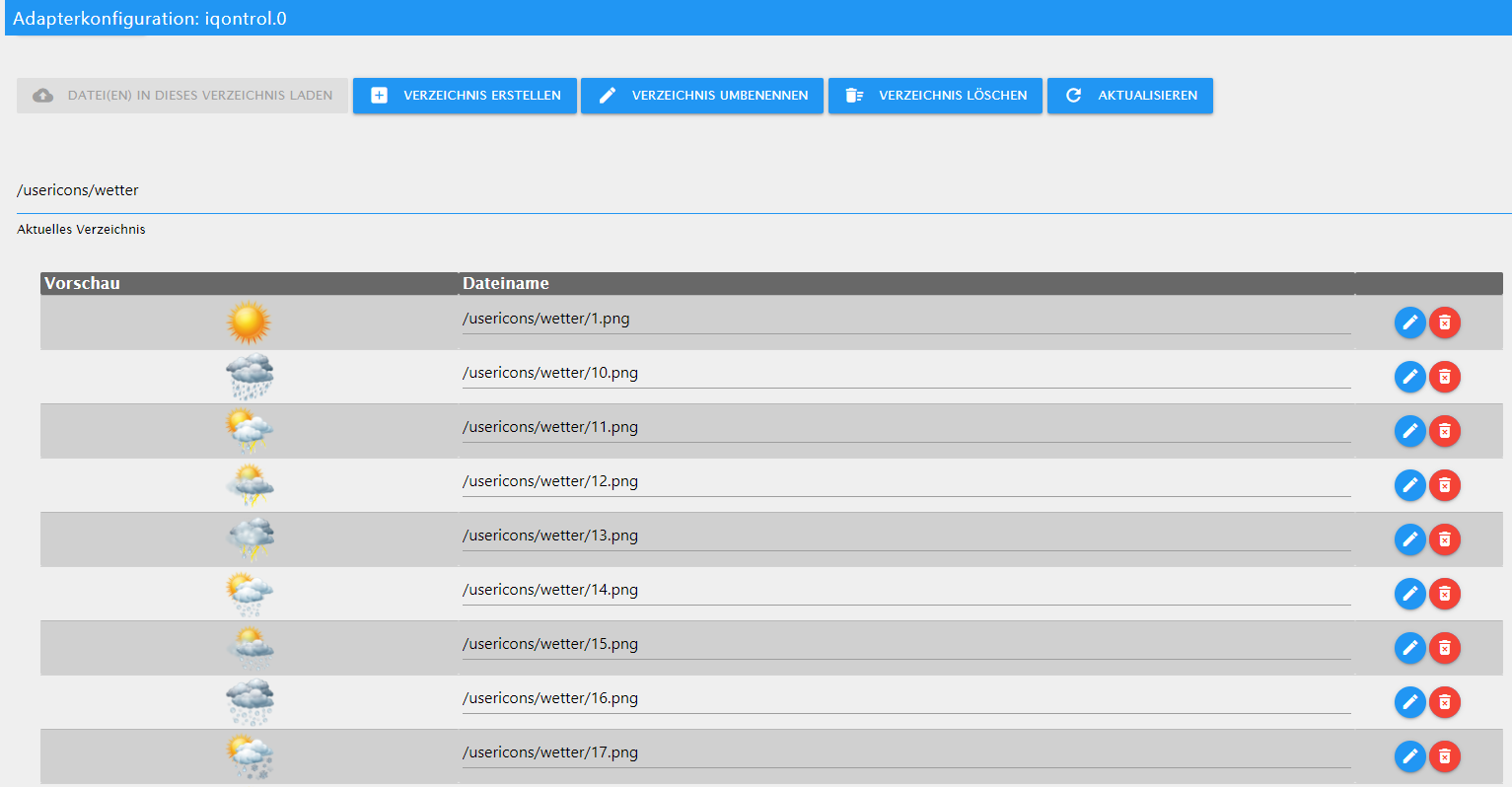
In der iQontrol Instanz gehst du auf Bilder und erstellst im Ordner /usericons einen neuen Ordner, meiner heißt "wetter".
Dort lädst du die Wettersymbole aus folgender .zip Datei hoch:
Wettersymbole.zipDas sollte dann so aussehen:
Danach erstellst du eine Kachel (meine sind vom Typ Wert, Temperatursensor geht auch) und gibst im Feld ICON folgendes ein:
./../iqontrol.meta/userimages/usericons/wetter/1.png|./../iqontrol.meta/userimages/usericons/wetter/{daswetter.0.NextHours.Location_1.Day_1.symbol_value}.pngkurze Erklärung:
Wenn die Seite geladen wird, nimmt er erstmal als ICON die Bilddatei
"./../iqontrol.meta/userimages/usericons/wetter/1.png".Danach zieht er sich vom Server die Bilddatei "./../iqontrol.meta/userimages/usericons/wetter/{daswetter.0.NextHours.Location_1.Day_1.symbol_value}.png", wobei {daswetter.0.NextHours.Location_1.Day_1.symbol_value} der Wert des Datenpunktes ist. Da sich dieser ändern kann, ändert sich dann auch das gezogene PNG file und somit hat man dynamische ICONs.
Achtung:
Wenn dein ICON-Ordner nicht "wetter" heißt, musst du das natürlich beim ICON Link anpassen. -
@s-bormann
Ja, die Versionen sind aktuell:
iQontrol: 1.2.3
Sonos: 2.1.0Das Cover ist auch definitiv an der URL hinterlegt, sonst würde er es beim Reload der iQontrol Seite nicht anzeigen.
Die genannten Felder ändern sich, sobald ich ein neues Album abspiele.Auszug aus der Entwicklerkonsole:
index.js:3705 Return after time - timer started (treshold: 300s, destinationView: )
index.js:6179 CLICK
index.js:2624 Button 0_userdata.0.Sonos.Play.Album.Kinder.Vaiana --> 1
index.js:2221 >>>>>> setState 0_userdata.0.Sonos.Play.Album.Kinder.Vaiana: true --> 1
index.js:2250        converted state to boolean. New value is: true
index.js:3889 Find active Toolbar Index
index.js:1643 deliverState done
index.js:2439 >> ack: false val: true newVal: true
index.js:5998 Add timestamp to Player with value <b>Disney - Die Eiskönigin</b> - Die Eiskönigin - Völlig Unverfroren (Das Original-Hörspiel zum Film) - <i>Kapitel 01: Die Eiskönigin</i>
index.js:5936 ["active"]
index.js:5998 Add timestamp to Player with value <b>Disney - Die Eiskönigin</b> - Die Eiskönigin - Völlig Unverfroren (Das Original-Hörspiel zum Film)
index.js:5998 Add timestamp to Player with value <b>Disney - Die Eiskönigin</b>
index.js:5998 Add timestamp to Player with value
index.js:2439 >> ack: false val: true newVal: true
index.js:5954 Shuffle! resizeObserver 100
index.js:5958 Shuffle! resizeObserver 1250
index.js:5998 Add timestamp to Player with value
index.js:5998 Add timestamp to Player with value <i>Kapitel 01: Vaiana</i>
index.js:5998 Add timestamp to Player with value Vaiana (Das Original-Hörspiel zum Film) - <i>Kapitel 01: Vaiana</i>
2index.js:5998 Add timestamp to Player with value <b>Disney - Vaiana</b> - Vaiana (Das Original-Hörspiel zum Film) - <i>Kapitel 01: Vaiana</i>
index.js:5936 ["active"]
3index.js:5998 Add timestamp to Player with value <b>Disney - Vaiana</b> - Vaiana (Das Original-Hörspiel zum Film) - <i>Kapitel 01: Vaiana</i>
index.js:5954 Shuffle! resizeObserver 100
index.js:2317 << preventUpdate dexpired.
index.js:5958 Shuffle! resizeObserver 1250
index.js:6154 Starting marquee
Wenn ich sonst noch was liefern kann, lass es mich wissen :-)
-
@MarkoFFM sagte in Test Adapter iQontrol 1.2.x:
Hallo zusammen,
ich war jetzt schon länger nicht mehr im iobroker unterwegs und wollte soeben die Adapter updaten. Aktuell wird mir der iQontrol Adapter in Version 1.0.0 als installiert angezeigt mit einem verfügbaren Update auf 1.1.5.
Update-Log:
$ ./iobroker upgrade iqontrol
Update iqontrol from @1.0.0 to @1.1.5
NPM version: 6.11.3
npm install iobroker.iqontrol@1.1.5 --loglevel error --prefix "/opt/iobroker" (System call)
Package pixman-1 was not found in the pkg-config search path.Perhaps you should add the directory containing `pixman-1.pc'to the PKG_CONFIG_PATH environment variableNo package 'pixman-1' found
gyp: Call to 'pkg-config pixman-1 --libs' returned exit status 1 while in binding.gyp. while trying to load binding.gyp
gyp
 ERR! configure error
gyp ERR! stack Error: `gyp` failed with exit code: 1gyp ERR! stack     at ChildProcess.onCpExit (/usr/lib/node_modules/npm/node_modules/node-gyp/lib/configure.js:344:16)gyp ERR! stack     at ChildProcess.emit (events.js:198:13)gyp ERR!
stack     at Process.ChildProcess._handle.onexit (internal/child_process.js:248:12)gyp ERR! System Linux 4.19.75-v7l+gyp ERR! command "/usr/bin/node" "/usr/lib/node_modules/npm/node_modules/node-gyp/bin/node-gyp.js" "configure" "--fallback-to-build" "--module=/opt/iobroker/node_modules/canvas/build/Release/canvas.node" "--module_name=canvas" "--module_path=/opt/iobroker/node_modules/canvas/build/Release" "--napi_version=5" "--node_abi_napi=napi" "--napi_build_version=0" "--node_napi_label=node-v64"gyp ERR! cwd /opt/iobroker/node_modules/canvasgyp ERR! node -v v10.17.0gyp ERR! node-gyp -v v5.0.3gyp ERR! not ok
node-pre-gyp ERR! build error node-pre-gyp ERR! stack Error: Failed to execute '/usr/bin/node /usr/lib/node_modules/npm/node_modules/node-gyp/bin/node-gyp.js configure --fallback-to-build --module=/opt/iobroker/node_modules/canvas/build/Release/canvas.node --module_name=canvas --module_path=/opt/iobroker/node_modules/canvas/build/Release --napi_version=5 --node_abi_napi=napi --napi_build_version=0 --node_napi_label=node-v64' (1)node-pre-gyp ERR! stack     at ChildProcess.<anonymous> (/opt/iobroker/node_modules/canvas/node_modules/node-pre-gyp/lib/util/compile.js:83:29)node-pre-gyp ERR! stack     at ChildProcess.emit (events.js:198:13)node-pre-gyp ERR! stack     at maybeClose (internal/child_process.js:982:16)node-pre-gyp ERR! stack     at Process.ChildProcess._handle.onexit (internal/child_process.js:259:5)node-pre-gyp ERR! System Linux 4.19.75-v7l+node-pre-gyp ERR! command "/usr/bin/node" "/opt/iobroker/node_modules/canvas/node_modules/.bin/node-pre-gyp" "install" "--fallback-to-build"node-pre-gyp ERR! cwd /opt/iobroker/node_modules/canvasnode-pre-gyp ERR! node -v v10.17.0node-pre-gyp ERR! node-pre-gyp -v v0.11.0node-pre-gyp ERR! not ok
npm
 ERR! code ELIFECYCLEnpm ERR! errno 1
npm ERR! canvas@2.6.1 install: `node-pre-gyp install --fallback-to-build`npm ERR! Exit status 1npm ERR! npm ERR! Failed at the canvas@2.6.1 install script.npm ERR! This is probably not a problem with npm. There is likely additional logging output above.

npm ERR! A complete log of this run can be found in:npm ERR!     /home/iobroker/.npm/_logs/2020-09-10T15_25_37_625Z-debug.log
upload [20] iqontrol.admin /opt/iobroker/node_modules/iobroker.iqontrol/admin/materialize-colorpicker/img/materialize-colorpicker/alpha.png materialize-colorpicker/img/materialize-colorpicker/alpha.png image/png
upload [19] iqontrol.admin /opt/iobroker/node_modules/iobroker.iqontrol/admin/materialize-colorpicker/img/materialize-colorpicker/alpha-horizontal.png materialize-colorpicker/img/materialize-colorpicker/alpha-horizontal.png image/png
upload [18] iqontrol.admin /opt/iobroker/node_modules/iobroker.iqontrol/admin/materialize-colorpicker/css/materialize-colorpicker.min.css materialize-colorpicker/css/materialize-colorpicker.min.css text/css
upload [17] iqontrol.admin /opt/iobroker/node_modules/iobroker.iqontrol/admin/materialize-colorpicker/css/materialize-colorpicker.css materialize-colorpicker/css/materialize-colorpicker.css text/css
upload [16] iqontrol.admin /opt/iobroker/node_modules/iobroker.iqontrol/admin/jQueryIcons.jpg jQueryIcons.jpg image/jpeg
upload [15] iqontrol.admin /opt/iobroker/node_modules/iobroker.iqontrol/admin/iqontrol.png iqontrol.png image/png
upload [14] iqontrol.admin /opt/iobroker/node_modules/iobroker.iqontrol/admin/index_m.js index_m.js application/javascript
upload [13] iqontrol.admin /opt/iobroker/node_modules/iobroker.iqontrol/admin/index_m.html index_m.html text/html
upload [12] iqontrol.admin /opt/iobroker/node_modules/iobroker.iqontrol/admin/img/info-big.png img/info-big.png image/png
upload [11] iqontrol.admin /opt/iobroker/node_modules/iobroker.iqontrol/admin/fonts/font_verdana.png fonts/font_verdana.png image/png
upload [10] iqontrol.admin /opt/iobroker/node_modules/iobroker.iqontrol/admin/fonts/font_trebuchet.png fonts/font_trebuchet.png image/png
upload [9] iqontrol.admin /opt/iobroker/node_modules/iobroker.iqontrol/admin/fonts/font_times.png fonts/font_times.png image/png
upload [8] iqontrol.admin /opt/iobroker/node_modules/iobroker.iqontrol/admin/fonts/font_impact.png fonts/font_impact.png image/png
upload [500] iqontrol /opt/iobroker/node_modules/iobroker.iqontrol/www/userimages/usericons/inbuilt/panic_on.png userimages/usericons/inbuilt/panic_on.png image/png
upload [7] iqontrol.admin /opt/iobroker/node_modules/iobroker.iqontrol/admin/fonts/font_georgia.png fonts/font_georgia.png image/png
upload [6] iqontrol.admin /opt/iobroker/node_modules/iobroker.iqontrol/admin/fonts/font_garamond.png fonts/font_garamond.png image/png
upload [5] iqontrol.admin /opt/iobroker/node_modules/iobroker.iqontrol/admin/fonts/font_courier.png fonts/font_courier.png image/png
upload [4] iqontrol.admin /opt/iobroker/node_modules/iobroker.iqontrol/admin/fonts/font_comic.png fonts/font_comic.png image/png
upload [3] iqontrol.admin /opt/iobroker/node_modules/iobroker.iqontrol/admin/fonts/font_arial.png fonts/font_arial.png image/png
upload [2] iqontrol.admin /opt/iobroker/node_modules/iobroker.iqontrol/admin/custom_m.html custom_m.html text/html
upload [1] iqontrol.admin /opt/iobroker/node_modules/iobroker.iqontrol/admin/conn.js conn.js application/javascript
upload [0] iqontrol.admin /opt/iobroker/node_modules/iobroker.iqontrol/admin/admin.d.ts admin.d.ts video/mp2t
upload [450] iqontrol /opt/iobroker/node_modules/iobroker.iqontrol/www/userimages/usericons/inbuilt/button.png userimages/usericons/inbuilt/button.png image/png
upload [400] iqontrol /opt/iobroker/node_modules/iobroker.iqontrol/www/jquery/images/icons-svg/tag-white.svg jquery/images/icons-svg/tag-white.svg image/svg+xml
upload [350] iqontrol /opt/iobroker/node_modules/iobroker.iqontrol/www/jquery/images/icons-svg/cloud-white.svg jquery/images/icons-svg/cloud-white.svg image/svg+xml
upload [300] iqontrol /opt/iobroker/node_modules/iobroker.iqontrol/www/jquery/images/icons-png/tag-white.png jquery/images/icons-png/tag-white.png image/png
upload [250] iqontrol /opt/iobroker/node_modules/iobroker.iqontrol/www/jquery/images/icons-png/cloud-white.png jquery/images/icons-png/cloud-white.png image/png
upload [200] iqontrol /opt/iobroker/node_modules/iobroker.iqontrol/www/index.html index.html text/html
upload [150] iqontrol /opt/iobroker/node_modules/iobroker.iqontrol/www/images/icons/window_toplight_closed.png images/icons/window_toplight_closed.png image/png
upload [100] iqontrol /opt/iobroker/node_modules/iobroker.iqontrol/www/images/icons/kitchenhood_on.png images/icons/kitchenhood_on.png image/png
upload [90] iqontrol /opt/iobroker/node_modules/iobroker.iqontrol/www/images/icons/indicator_grey.png images/icons/indicator_grey.png image/png
upload [80] iqontrol /opt/iobroker/node_modules/iobroker.iqontrol/www/images/icons/garagedoor_opened.png images/icons/garagedoor_opened.png image/png
upload [70] iqontrol /opt/iobroker/node_modules/iobroker.iqontrol/www/images/icons/fire_off.png images/icons/fire_off.png image/png
upload [60] iqontrol /opt/iobroker/node_modules/iobroker.iqontrol/www/images/icons/camera_ptz_on.png images/icons/camera_ptz_on.png image/png
upload [50] iqontrol /opt/iobroker/node_modules/iobroker.iqontrol/www/images/icons/blind_closed.png images/icons/blind_closed.png image/png
upload [40] iqontrol /opt/iobroker/node_modules/iobroker.iqontrol/www/images/icons/battery_50.png images/icons/battery_50.png image/png
upload [30] iqontrol /opt/iobroker/node_modules/iobroker.iqontrol/www/images/hue.png images/hue.png image/png
upload [20] iqontrol /opt/iobroker/node_modules/iobroker.iqontrol/www/images/config.png images/config.png image/png
upload [19] iqontrol /opt/iobroker/node_modules/iobroker.iqontrol/www/images/colortemperature.png images/colortemperature.png image/png
upload [18] iqontrol /opt/iobroker/node_modules/iobroker.iqontrol/www/images/color.png images/color.png image/png
upload [17] iqontrol /opt/iobroker/node_modules/iobroker.iqontrol/www/images/brightness.png images/brightness.png image/png
upload [16] iqontrol /opt/iobroker/node_modules/iobroker.iqontrol/www/images/battery.png images/battery.png image/png
upload [15] iqontrol /opt/iobroker/node_modules/iobroker.iqontrol/www/images/background.png images/background.png image/png
upload [14] iqontrol /opt/iobroker/node_modules/iobroker.iqontrol/www/i18n/zh-cn/translations.json i18n/zh-cn/translations.json application/json
upload [13] iqontrol /opt/iobroker/node_modules/iobroker.iqontrol/www/i18n/ru/translations.json i18n/ru/translations.json application/json
upload [12] iqontrol /opt/iobroker/node_modules/iobroker.iqontrol/www/i18n/pt/translations.json i18n/pt/translations.json application/json
upload [11] iqontrol /opt/iobroker/node_modules/iobroker.iqontrol/www/i18n/pl/translations.json i18n/pl/translations.json application/json
upload [10] iqontrol /opt/iobroker/node_modules/iobroker.iqontrol/www/i18n/nl/translations.json i18n/nl/translations.json application/json
upload [9] iqontrol /opt/iobroker/node_modules/iobroker.iqontrol/www/i18n/it/translations.json i18n/it/translations.json application/json
upload [8] iqontrol /opt/iobroker/node_modules/iobroker.iqontrol/www/i18n/fr/translations.json i18n/fr/translations.json application/json
upload [7] iqontrol /opt/iobroker/node_modules/iobroker.iqontrol/www/i18n/es/translations.json i18n/es/translations.json application/json
upload [6] iqontrol /opt/iobroker/node_modules/iobroker.iqontrol/www/i18n/en/translations.json i18n/en/translations.json application/json
upload [5] iqontrol /opt/iobroker/node_modules/iobroker.iqontrol/www/i18n/de/translations.json i18n/de/translations.json application/json
upload [4] iqontrol /opt/iobroker/node_modules/iobroker.iqontrol/www/favicon_big.png favicon_big.png image/png
upload [3] iqontrol /opt/iobroker/node_modules/iobroker.iqontrol/www/favicon.png favicon.png image/png
upload [2] iqontrol /opt/iobroker/node_modules/iobroker.iqontrol/www/favicon.ico favicon.ico image/vnd.microsoft.icon
upload [1] iqontrol /opt/iobroker/node_modules/iobroker.iqontrol/www/conn.js conn.js application/javascript
upload [0] iqontrol /opt/iobroker/node_modules/iobroker.iqontrol/www/cache.manifest cache.manifest text/cache-manifest
Update "system.adapter.iqontrol.0"
Adapter "iqontrol" updated
process exited with code 0
Jedoch scheint das Update nicht wirklich zu funktionieren. Auch nach dem Update steht dort als installierte Version 1.0.0.
Was kann ich tun? Vielen Dank für Eure Unterstützung.
Versuch mal den Install-Fixer drüber laufen zu lassen. Ich meine mich zu erinnern, dass gyp-Probleme mit Schreibrechten zu tun hatte...
https://forum.iobroker.net/topic/20211/iobroker-installation-fixer-beta-verfügbar
Befehl:
curl -sL https://iobroker.net/fix.sh | bash -@s-bormann said in Test Adapter iQontrol 1.2.x:
curl -sL https://iobroker.net/fix.sh | bash -
Hallo s.bormann,
vielen Dank. Nach dem Fix scheint es geklappt zu haben. Nun wird die 1.1.5 als installiert angezeigt. Wie kriege ich die neuen Versionen installiert? Aktuell ist ja v1.2.3.
Toll, wie hier das ganze supportet wird, weiter so!
-
@CrazyFloyd
Zum Thema wechselnde Wetter-Symbole:
In der iQontrol Instanz gehst du auf Bilder und erstellst im Ordner /usericons einen neuen Ordner, meiner heißt "wetter".
Dort lädst du die Wettersymbole aus folgender .zip Datei hoch:
Wettersymbole.zipDas sollte dann so aussehen:
Danach erstellst du eine Kachel (meine sind vom Typ Wert, Temperatursensor geht auch) und gibst im Feld ICON folgendes ein:
./../iqontrol.meta/userimages/usericons/wetter/1.png|./../iqontrol.meta/userimages/usericons/wetter/{daswetter.0.NextHours.Location_1.Day_1.symbol_value}.pngkurze Erklärung:
Wenn die Seite geladen wird, nimmt er erstmal als ICON die Bilddatei
"./../iqontrol.meta/userimages/usericons/wetter/1.png".Danach zieht er sich vom Server die Bilddatei "./../iqontrol.meta/userimages/usericons/wetter/{daswetter.0.NextHours.Location_1.Day_1.symbol_value}.png", wobei {daswetter.0.NextHours.Location_1.Day_1.symbol_value} der Wert des Datenpunktes ist. Da sich dieser ändern kann, ändert sich dann auch das gezogene PNG file und somit hat man dynamische ICONs.
Achtung:
Wenn dein ICON-Ordner nicht "wetter" heißt, musst du das natürlich beim ICON Link anpassen.@blackeagle998 sagte in Test Adapter iQontrol 1.2.x:
@CrazyFloyd
Zum Thema wechselnde Wetter-Symbole:
In der iQontrol Instanz gehst du auf Bilder und erstellst im Ordner /usericons einen neuen Ordner, meiner heißt "wetter".
Dort lädst du die Wettersymbole aus folgender .zip Datei hoch:
Wettersymbole.zipDas sollte dann so aussehen:
Danach erstellst du eine Kachel (meine sind vom Typ Wert, Temperatursensor geht auch) und gibst im Feld ICON folgendes ein:
./../iqontrol.meta/userimages/usericons/wetter/1.png|./../iqontrol.meta/userimages/usericons/wetter/{daswetter.0.NextHours.Location_1.Day_1.symbol_value}.pngkurze Erklärung:
Wenn die Seite geladen wird, nimmt er erstmal als ICON die Bilddatei
"./../iqontrol.meta/userimages/usericons/wetter/1.png".Danach zieht er sich vom Server die Bilddatei "./../iqontrol.meta/userimages/usericons/wetter/{daswetter.0.NextHours.Location_1.Day_1.symbol_value}.png", wobei {daswetter.0.NextHours.Location_1.Day_1.symbol_value} der Wert des Datenpunktes ist. Da sich dieser ändern kann, ändert sich dann auch das gezogene PNG file und somit hat man dynamische ICONs.
Achtung:
Wenn dein ICON-Ordner nicht "wetter" heißt, musst du das natürlich beim ICON Link anpassen.Danke dir herzlichst. Was alles so geht. Mann lernt nie aus.
-
@blackeagle998 sagte in Test Adapter iQontrol 1.2.x:
@CrazyFloyd
Zum Thema wechselnde Wetter-Symbole:
In der iQontrol Instanz gehst du auf Bilder und erstellst im Ordner /usericons einen neuen Ordner, meiner heißt "wetter".
Dort lädst du die Wettersymbole aus folgender .zip Datei hoch:
Wettersymbole.zipDas sollte dann so aussehen:
Danach erstellst du eine Kachel (meine sind vom Typ Wert, Temperatursensor geht auch) und gibst im Feld ICON folgendes ein:
./../iqontrol.meta/userimages/usericons/wetter/1.png|./../iqontrol.meta/userimages/usericons/wetter/{daswetter.0.NextHours.Location_1.Day_1.symbol_value}.pngkurze Erklärung:
Wenn die Seite geladen wird, nimmt er erstmal als ICON die Bilddatei
"./../iqontrol.meta/userimages/usericons/wetter/1.png".Danach zieht er sich vom Server die Bilddatei "./../iqontrol.meta/userimages/usericons/wetter/{daswetter.0.NextHours.Location_1.Day_1.symbol_value}.png", wobei {daswetter.0.NextHours.Location_1.Day_1.symbol_value} der Wert des Datenpunktes ist. Da sich dieser ändern kann, ändert sich dann auch das gezogene PNG file und somit hat man dynamische ICONs.
Achtung:
Wenn dein ICON-Ordner nicht "wetter" heißt, musst du das natürlich beim ICON Link anpassen.Danke dir herzlichst. Was alles so geht. Mann lernt nie aus.
@CrazyFloyd said in Test Adapter iQontrol 1.2.x:
./../iqontrol.meta/userimages/usericons/wetter/1.png|./../iqontrol.meta/userimages/usericons/wetter/{daswetter.0.NextHours.Location_1.Day_1.symbol_value}.png
Ich finde das interessant und würde das auch gerne versuchen aber ich finde wenn ich die Kachel als Wert erstelle nicht den Ordner ICON wo man das einfügen soll. Die Wettersymbole habe ich alle importiert.
-
@CrazyFloyd
Zum Thema wechselnde Wetter-Symbole:
In der iQontrol Instanz gehst du auf Bilder und erstellst im Ordner /usericons einen neuen Ordner, meiner heißt "wetter".
Dort lädst du die Wettersymbole aus folgender .zip Datei hoch:
Wettersymbole.zipDas sollte dann so aussehen:
Danach erstellst du eine Kachel (meine sind vom Typ Wert, Temperatursensor geht auch) und gibst im Feld ICON folgendes ein:
./../iqontrol.meta/userimages/usericons/wetter/1.png|./../iqontrol.meta/userimages/usericons/wetter/{daswetter.0.NextHours.Location_1.Day_1.symbol_value}.pngkurze Erklärung:
Wenn die Seite geladen wird, nimmt er erstmal als ICON die Bilddatei
"./../iqontrol.meta/userimages/usericons/wetter/1.png".Danach zieht er sich vom Server die Bilddatei "./../iqontrol.meta/userimages/usericons/wetter/{daswetter.0.NextHours.Location_1.Day_1.symbol_value}.png", wobei {daswetter.0.NextHours.Location_1.Day_1.symbol_value} der Wert des Datenpunktes ist. Da sich dieser ändern kann, ändert sich dann auch das gezogene PNG file und somit hat man dynamische ICONs.
Achtung:
Wenn dein ICON-Ordner nicht "wetter" heißt, musst du das natürlich beim ICON Link anpassen.@blackeagle998 sagte in Test Adapter iQontrol 1.2.x:
./../iqontrol.meta/userimages/usericons/wetter/1.png|./../iqontrol.meta/userimages/usericons/wetter/{daswetter.0.NextHours.Location_1.Day_1.symbol_value}.png
Super gut erklärt. Danke das hab ich auch mal sofort umgesetzt. Da kann man ja fast ein Wiki machen

-
@CrazyFloyd said in Test Adapter iQontrol 1.2.x:
./../iqontrol.meta/userimages/usericons/wetter/1.png|./../iqontrol.meta/userimages/usericons/wetter/{daswetter.0.NextHours.Location_1.Day_1.symbol_value}.png
Ich finde das interessant und würde das auch gerne versuchen aber ich finde wenn ich die Kachel als Wert erstelle nicht den Ordner ICON wo man das einfügen soll. Die Wettersymbole habe ich alle importiert.
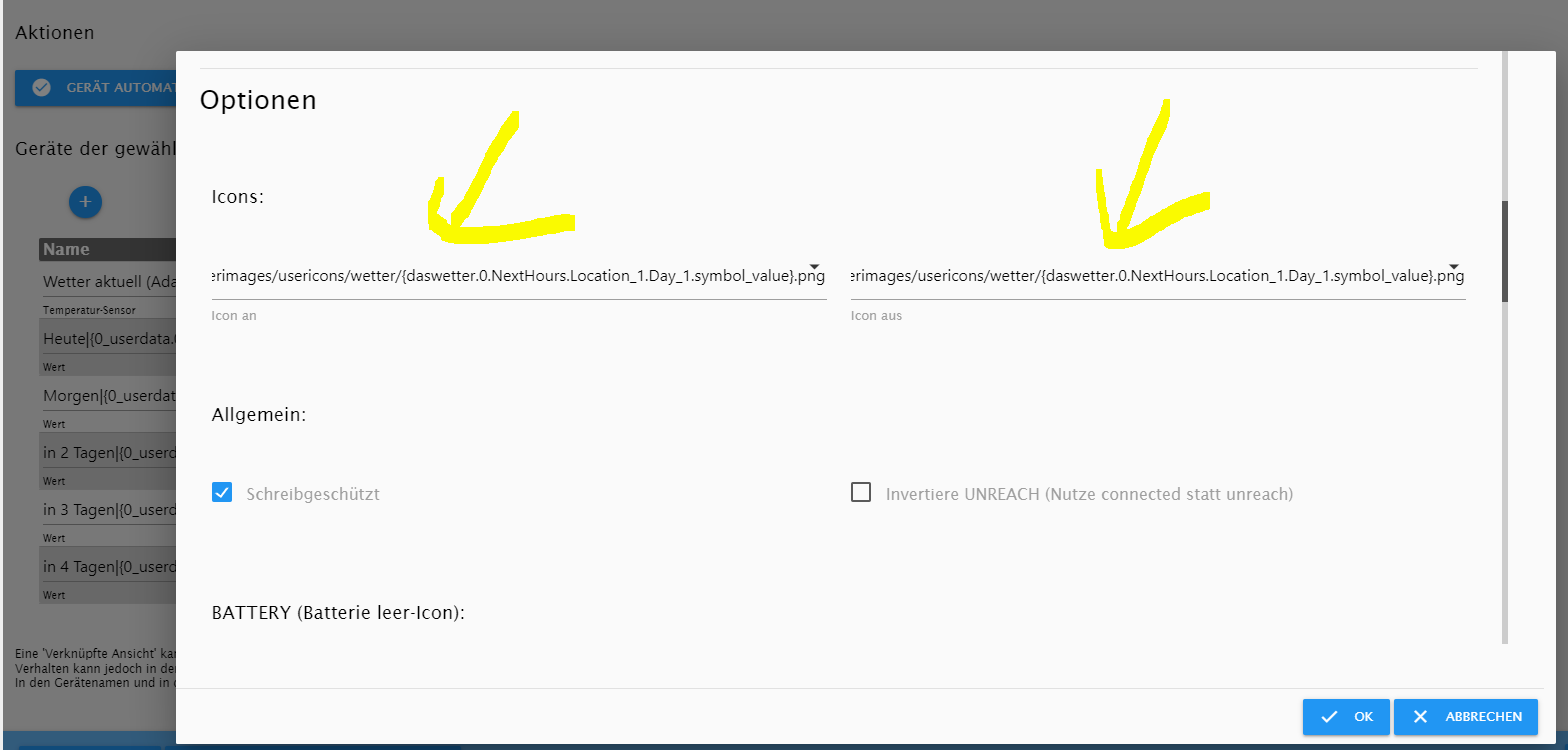
@biker1602
Du kannst doch bei jeder Kachel ein Icon auswählen, bei manchen Kacheln sogar zwei Icons je für aktiv und inaktiv.
Und genau da kopierst du den Text von mir rein.Einen Ordner gibt es nur da, wo du die Bilder hochladen musst.
Ist das so etwas verständlicher?
-
@CrazyFloyd said in Test Adapter iQontrol 1.2.x:
./../iqontrol.meta/userimages/usericons/wetter/1.png|./../iqontrol.meta/userimages/usericons/wetter/{daswetter.0.NextHours.Location_1.Day_1.symbol_value}.png
Ich finde das interessant und würde das auch gerne versuchen aber ich finde wenn ich die Kachel als Wert erstelle nicht den Ordner ICON wo man das einfügen soll. Die Wettersymbole habe ich alle importiert.
@biker1602
Schau mal hier (in den Einstellungen der Kachel):
-
@s-bormann
Gibt es eine Möglichkeit hinter einer Kachel einen Zeilenumbruch festzulegen ohne eine Unterüberschrift verwenden zu müssen? -
@CrazyFloyd
Zum Thema wechselnde Wetter-Symbole:
In der iQontrol Instanz gehst du auf Bilder und erstellst im Ordner /usericons einen neuen Ordner, meiner heißt "wetter".
Dort lädst du die Wettersymbole aus folgender .zip Datei hoch:
Wettersymbole.zipDas sollte dann so aussehen:
Danach erstellst du eine Kachel (meine sind vom Typ Wert, Temperatursensor geht auch) und gibst im Feld ICON folgendes ein:
./../iqontrol.meta/userimages/usericons/wetter/1.png|./../iqontrol.meta/userimages/usericons/wetter/{daswetter.0.NextHours.Location_1.Day_1.symbol_value}.pngkurze Erklärung:
Wenn die Seite geladen wird, nimmt er erstmal als ICON die Bilddatei
"./../iqontrol.meta/userimages/usericons/wetter/1.png".Danach zieht er sich vom Server die Bilddatei "./../iqontrol.meta/userimages/usericons/wetter/{daswetter.0.NextHours.Location_1.Day_1.symbol_value}.png", wobei {daswetter.0.NextHours.Location_1.Day_1.symbol_value} der Wert des Datenpunktes ist. Da sich dieser ändern kann, ändert sich dann auch das gezogene PNG file und somit hat man dynamische ICONs.
Achtung:
Wenn dein ICON-Ordner nicht "wetter" heißt, musst du das natürlich beim ICON Link anpassen.@blackeagle998 said in Test Adapter iQontrol 1.2.x:
@CrazyFloyd
Zum Thema wechselnde Wetter-Symbole:
In der iQontrol Instanz gehst du auf Bilder und erstellst im Ordner /usericons einen neuen Ordner, meiner heißt "wetter".
Dort lädst du die Wettersymbole aus folgender .zip Datei hoch:
Wettersymbole.zipDas sollte dann so aussehen:
Danach erstellst du eine Kachel (meine sind vom Typ Wert, Temperatursensor geht auch) und gibst im Feld ICON folgendes ein:
./../iqontrol.meta/userimages/usericons/wetter/1.png|./../iqontrol.meta/userimages/usericons/wetter/{daswetter.0.NextHours.Location_1.Day_1.symbol_value}.pngkurze Erklärung:
Wenn die Seite geladen wird, nimmt er erstmal als ICON die Bilddatei
"./../iqontrol.meta/userimages/usericons/wetter/1.png".Danach zieht er sich vom Server die Bilddatei "./../iqontrol.meta/userimages/usericons/wetter/{daswetter.0.NextHours.Location_1.Day_1.symbol_value}.png", wobei {daswetter.0.NextHours.Location_1.Day_1.symbol_value} der Wert des Datenpunktes ist. Da sich dieser ändern kann, ändert sich dann auch das gezogene PNG file und somit hat man dynamische ICONs.
Achtung:
Wenn dein ICON-Ordner nicht "wetter" heißt, musst du das natürlich beim ICON Link anpassen.Hi,
danke für die Anleitung. Ich hab es so gemacht und die Infos werden auch richtig angezeigt. Ich suche nur irgendwie den Wert für die aktuelle Temperatur. Mir wird der maxvalue und der minvalue angezeigt, aber wo finde ich den aktuellen Wert?Ich habe übrigens einen anderen Pfad zum Icon genommen, das der Pfad oben bei mir nicht funktioniert:
./../iqontrol.meta/userimages/usericons/wetter/1.png|./../iqontrol.meta/userimages/usericons/wetter/{daswetter.0.NextDaysDetailed.Location_1.Day_1.symbol_value}.pngLiegt evtl dran welches XML man einbindet.
@blackeagle998 : Wie hast du die Beschriftung der Kachel dynamisch gemacht? Also das da immer das entsprechende Datum steht?
ciao
Martin -
Wer "Weitere Informationen" gleich aufgeklappt haben möchte:
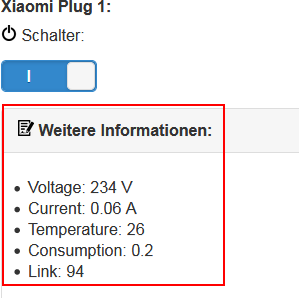
der sucht in
/opt/iobroker/node_modules/iobroker.iqontrol/www/index.js
/opt/iobroker/iobroker-data/files/iqontrol/index.js
(weiß nicht genau wo, habe beide geändert) nach <div id='DialogAdditionalInfosContent'>
2 Zeilen drüber muss div Parameter um fett hervorgehobenen Text ergänzt werden:
dialogContent += "<div data-role='collapsible' class='collapsibleAnimated' data-iconpos='right' data-inset='true' data-collapsed='false' >";
Dann muss iobroker restart ausgeführt werden (Instanzen IQontrol & web.0 neuzustarten hat nichts gebracht).
Bestimmt kann jemand meine Lösung verbessern:)@s-bormann vllt. als Feature?
-
Wer "Weitere Informationen" gleich aufgeklappt haben möchte:
der sucht in
/opt/iobroker/node_modules/iobroker.iqontrol/www/index.js
/opt/iobroker/iobroker-data/files/iqontrol/index.js
(weiß nicht genau wo, habe beide geändert) nach <div id='DialogAdditionalInfosContent'>
2 Zeilen drüber muss div Parameter um fett hervorgehobenen Text ergänzt werden:
dialogContent += "<div data-role='collapsible' class='collapsibleAnimated' data-iconpos='right' data-inset='true' data-collapsed='false' >";
Dann muss iobroker restart ausgeführt werden (Instanzen IQontrol & web.0 neuzustarten hat nichts gebracht).
Bestimmt kann jemand meine Lösung verbessern:)@s-bormann vllt. als Feature?
@Vod said in Test Adapter iQontrol 1.2.x:
Wer "Weitere Informationen" gleich aufgeklappt haben möchte:
der sucht in
/opt/iobroker/node_modules/iobroker.iqontrol/www/index.js
/opt/iobroker/iobroker-data/files/iqontrol/index.js
(weiß nicht genau wo, habe beide geändert) nach <div id='DialogAdditionalInfosContent'>
2 Zeilen drüber muss div Parameter um fett hervorgehobenen Text ergänzt werden:
dialogContent += "<div data-role='collapsible' class='collapsibleAnimated' data-iconpos='right' data-inset='true' data-collapsed='false' >";
Dann muss iobroker restart ausgeführt werden (Instanzen IQontrol & web.0 neuzustarten hat nichts gebracht).
Bestimmt kann jemand meine Lösung verbessern:)@s-bormann vllt. als Feature?
Super!
Genau das habe ich mir immer gewünscht. Vielleicht wäre es möglich das als Option für die Geräte hinzuzufügen?

Hey! Du scheinst an dieser Unterhaltung interessiert zu sein, hast aber noch kein Konto.
Hast du es satt, bei jedem Besuch durch die gleichen Beiträge zu scrollen? Wenn du dich für ein Konto anmeldest, kommst du immer genau dorthin zurück, wo du zuvor warst, und kannst dich über neue Antworten benachrichtigen lassen (entweder per E-Mail oder Push-Benachrichtigung). Du kannst auch Lesezeichen speichern und Beiträge positiv bewerten, um anderen Community-Mitgliedern deine Wertschätzung zu zeigen.
Mit deinem Input könnte dieser Beitrag noch besser werden 💗
Registrieren AnmeldenSupport us
465
Online33.0k
Benutzer83.6k
Themen1.3m
Beiträge