
NEWS




Test Adapter mihome-vacuum v2.0.x
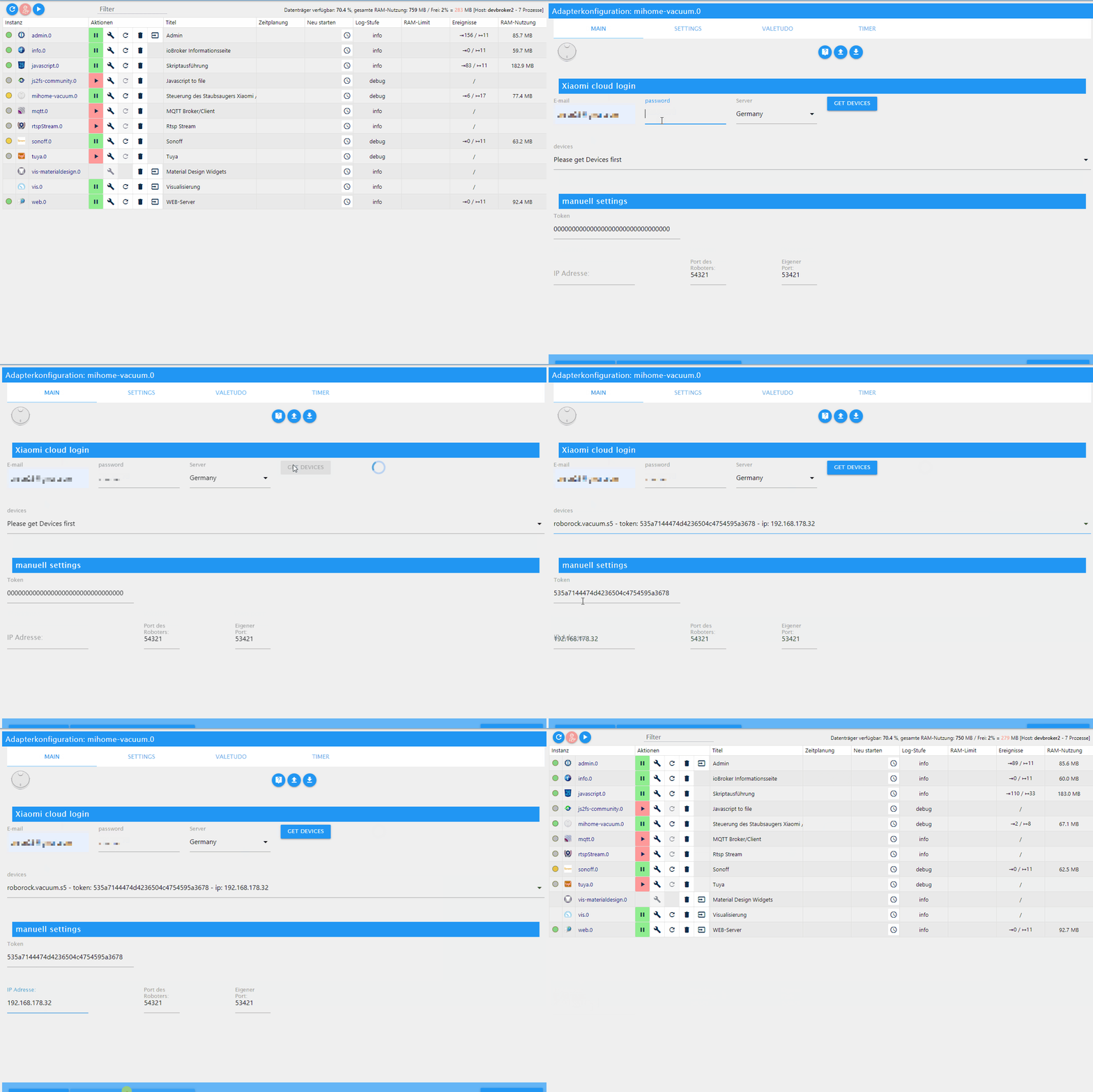
-
@baeri das ist dann aber eher ein iot Problem. Je nachdem, ob das Auto konfiguriert ist oder manuell. Räume wirst du ja sicher schon hinzugefügt haben. Wahrscheinlich musst du auch noch eine Funktion hinzufügen ...
-
@dirkhe Wenn man pro Raum unterschiedliche Saugstärken einstellt und diese Räume erst durch die Warteliste abgearbeitet werden, dann wirft er die Saugstärken durcheinander.
- bei mir ist default Saugstärke Turbo
- Raum 1 wird direkt gestartet und hat als roomFanPower aber "Max"
- Sauger fährt los und geht auf Max
- Ich trigger Raum 2 mit Turbo und dieser landet im queue
- Sauger stellt sich sofort auf Turbo zurück und saugt Raum 1 mit falscher Stärke
- Ich stelle manuell im Adapter "fan_power" wieder auf Max passend zu Raum 1
- Sauger saugt Raum 1 mit Max zu Ende und stellt bei Start von Raum 2 nicht auf Turbo wie es für Raum 2 definiert ist
Die roomFanPower dürften bei den Räumen auch erst an fan_power übergeben werden wenn der Raum tatsächlich begonnen wird.
-
@dirkhe Wenn man pro Raum unterschiedliche Saugstärken einstellt und diese Räume erst durch die Warteliste abgearbeitet werden, dann wirft er die Saugstärken durcheinander.
- bei mir ist default Saugstärke Turbo
- Raum 1 wird direkt gestartet und hat als roomFanPower aber "Max"
- Sauger fährt los und geht auf Max
- Ich trigger Raum 2 mit Turbo und dieser landet im queue
- Sauger stellt sich sofort auf Turbo zurück und saugt Raum 1 mit falscher Stärke
- Ich stelle manuell im Adapter "fan_power" wieder auf Max passend zu Raum 1
- Sauger saugt Raum 1 mit Max zu Ende und stellt bei Start von Raum 2 nicht auf Turbo wie es für Raum 2 definiert ist
Die roomFanPower dürften bei den Räumen auch erst an fan_power übergeben werden wenn der Raum tatsächlich begonnen wird.
-
Servus. Hab auch gerade geupdated. Kann mir jemand sagen warum ich im ioBroker die Version 2.0.7 angezeigt bekomme obwohl laut Github 2.0.9 die neuste ist? Wie komme ich auf die neuste Version?
Hab eine Frage zum MultiRoomClean. Wo und in welchem Format muss ich die Raumindexe eintragen damit ich mehrere Räume gleichzeitig reinigen kann?
Gruß Jaschkopf
-
Wichtig ist die Version, die im Log steht, wenn der Adapter startet. Wo grnau die version aus ioBroker herkommt, weiss ich auch nicht. Aber entweder nimmt man den aus ioBroker oder von github. Dann sollte man eh immer den aktuellen Thread mitlesen.
Für multiroom wählst du die ioBroker Räume aus. Die müssen natürlich auch an den einzelnen Channels verknüpft sein. Du kannst aber auch einen Timer anlegen, den du ioBroker Räume oder Channels zuweist. Der kann dann auch inaktiv gestellt werden und immer manuell ausgewählt werden. -
Wichtig ist die Version, die im Log steht, wenn der Adapter startet. Wo grnau die version aus ioBroker herkommt, weiss ich auch nicht. Aber entweder nimmt man den aus ioBroker oder von github. Dann sollte man eh immer den aktuellen Thread mitlesen.
Für multiroom wählst du die ioBroker Räume aus. Die müssen natürlich auch an den einzelnen Channels verknüpft sein. Du kannst aber auch einen Timer anlegen, den du ioBroker Räume oder Channels zuweist. Der kann dann auch inaktiv gestellt werden und immer manuell ausgewählt werden.@dirkhe wie verknüpfe ich die Räume mit dem channels? Und wie wähle ich die dann aus? Ich dachte eigentlich es gibt einen Kanal wo ich die Index eintragen (z.b. 1,2,3) und dann über den Button MultiRoomClean starten kann. Aber das klappt nicht 😅
Gruß Jaschkopf
-
@dirkhe wie verknüpfe ich die Räume mit dem channels? Und wie wähle ich die dann aus? Ich dachte eigentlich es gibt einen Kanal wo ich die Index eintragen (z.b. 1,2,3) und dann über den Button MultiRoomClean starten kann. Aber das klappt nicht 😅
Gruß Jaschkopf
@Jaschkopf Wäre schon fair sich die Mühe zu machen den Thread bzw die zum Adapter gehörenden wenigstens zu lesen.
Das ist alles inkl Screenshots mehr als einmal erklärt. -
Hallo zusammen,
kann mir jemand erklären wie ich von meinem Gen1 mit ValetudoRE 0.8.1 / Firmware 3.3.9 - 3468 die bereits in Valetudo angelegten Zonen in ioBroker importieren und ansteuern kann?
Hab irgendwie den Überblick verloren und bekomme es so nicht hin.... -
@Jaschkopf Wäre schon fair sich die Mühe zu machen den Thread bzw die zum Adapter gehörenden wenigstens zu lesen.
Das ist alles inkl Screenshots mehr als einmal erklärt. -
@Diginix Entschuldigung das ich keine Zeit hatte die letzten 600 Beiträge zu lesen und die Frechheit besaß eine Frage zu stellen...
@Jaschkopf Jeder wie er es für richtig hält.
So hat der nächste dann eine Ausrede weil es 601 Posts sind.
Kann ja auch nicht jeder Suchende mit Suchfunktionen umgehen. Dafür gibt es hier dann eben freundliche Entwickler die Fragen gern mehrfach beantworten, als die Zeit für Entwicklung zu nutzen.
Passt schon. Danke. -
Kann mir jemand auf die schnelle helfen wie ich mit Blockly der Variable "MultiRoomClean" die Räume zuweisen kann? Finde dazu keine Funktion wie ich den Wert "Raum" steuern kann. Über die manuelle Raumzuweisung in der Objektliste klappt es, aber möchte gerne unterschiedliche Zonen zusammen legen.
Gruß Jaschkopf
-
Hab gerade auf 2.0.9 über github geupdated und jetzt stürzen die Instanzen permanent ab. Hier ein Log:
mihome-vacuum.0 2020-03-13 17:25:19.053 info (17352) set nächster Timer: Nicht verfügbar mihome-vacuum.0 2020-03-13 17:25:18.606 info (17352) connecting, this can take up to 10 minutes ... mihome-vacuum.0 2020-03-13 17:25:18.577 info (17352) New generation or new fw(3.5.7,002008) detected, create new states goto and zoneclean mihome-vacuum.0 2020-03-13 17:25:18.576 info (17352) extend state mop for State control.fan_power mihome-vacuum.0 2020-03-13 17:25:18.574 info (17352) change states from State control.fan_power mihome-vacuum.0 2020-03-13 17:25:18.500 info (17352) Cloud control disabled mihome-vacuum.0 2020-03-13 17:25:18.498 info (17352) Expert mode disabled, states deleted mihome-vacuum.0 2020-03-13 17:25:18.401 info (17352) starting. Version 2.0.9-RC03 in /opt/iobroker/node_modules/iobroker.mihome-vacuum, node: v10.18.0 mihome-vacuum.1 2020-03-13 17:25:16.432 info (17232) set nächster Timer: Nicht verfügbar mihome-vacuum.1 2020-03-13 17:25:15.979 info (17232) connecting, this can take up to 10 minutes ... mihome-vacuum.1 2020-03-13 17:25:15.927 info (17232) New generation or new fw(3.5.7,002008) detected, create new states goto and zoneclean mihome-vacuum.1 2020-03-13 17:25:15.925 info (17232) extend state mop for State control.fan_power mihome-vacuum.1 2020-03-13 17:25:15.924 info (17232) change states from State control.fan_power mihome-vacuum.1 2020-03-13 17:25:15.894 info (17232) Cloud control disabled mihome-vacuum.1 2020-03-13 17:25:15.891 info (17232) Expert mode disabled, states deleted mihome-vacuum.1 2020-03-13 17:25:15.847 info (17232) starting. Version 2.0.9-RC03 in /opt/iobroker/node_modules/iobroker.mihome-vacuum, node: v10.18.0 host.raspberrypi 2020-03-13 17:25:15.566 info Restart adapter system.adapter.mihome-vacuum.0 because enabled host.raspberrypi 2020-03-13 17:25:15.565 error instance system.adapter.mihome-vacuum.0 terminated with code 156 (156) mihome-vacuum.0 2020-03-13 17:25:15.043 warn (15936) Got terminate signal. Checking desired PID: 17352 vs own PID 15936 mihome-vacuum.0 2020-03-13 17:25:15.040 info (15936) Terminated (START_IMMEDIATELY_AFTER_STOP): Without reason mihome-vacuum.0 2020-03-13 17:25:15.039 info (15936) terminating mihome-vacuum.0 2020-03-13 17:25:15.036 warn (15936) Got terminate signal. Checking desired PID: 0 vs own PID 15936 host.raspberrypi 2020-03-13 17:25:15.031 info instance system.adapter.mihome-vacuum.0 started with pid 17352 host.raspberrypi 2020-03-13 17:25:13.415 info Restart adapter system.adapter.mihome-vacuum.1 because enabled host.raspberrypi 2020-03-13 17:25:13.414 error instance system.adapter.mihome-vacuum.1 terminated with code 156 (156) mihome-vacuum.1 2020-03-13 17:25:12.888 warn (15746) Got terminate signal. Checking desired PID: 17232 vs own PID 15746 mihome-vacuum.1 2020-03-13 17:25:12.883 info (15746) Terminated (START_IMMEDIATELY_AFTER_STOP): Without reason mihome-vacuum.1 2020-03-13 17:25:12.881 info (15746) terminating mihome-vacuum.1 2020-03-13 17:25:12.877 warn (15746) Got terminate signal. Checking desired PID: 0 vs own PID 15746 host.raspberrypi 2020-03-13 17:25:12.870 info instance system.adapter.mihome-vacuum.1 started with pid 17232 mihome-vacuum.0 2020-03-13 17:25:07.880 info (15936) connecting, this can take up to 10 minutes ... mihome-vacuum.0 2020-03-13 17:25:07.880 warn (15936) Time difference between Mihome Vacuum and ioBroker: 1 sec mihome-vacuum.1 2020-03-13 17:25:05.913 info (15746) connecting, this can take up to 10 minutes ... mihome-vacuum.0 2020-03-13 17:24:48.390 info (15936) set nächster Timer: Nicht verfügbar mihome-vacuum.0 2020-03-13 17:24:47.963 info (15936) connecting, this can take up to 10 minutes ... mihome-vacuum.0 2020-03-13 17:24:47.962 warn (15936) Time difference between Mihome Vacuum and ioBroker: 1 sec mihome-vacuum.0 2020-03-13 17:24:47.932 info (15936) New generation or new fw(3.5.7,002008) detected, create new states goto and zoneclean mihome-vacuum.0 2020-03-13 17:24:47.930 info (15936) extend state mop for State control.fan_power mihome-vacuum.0 2020-03-13 17:24:47.929 info (15936) change states from State control.fan_power mihome-vacuum.0 2020-03-13 17:24:47.863 info (15936) Cloud control disabled mihome-vacuum.0 2020-03-13 17:24:47.862 info (15936) Expert mode disabled, states deleted mihome-vacuum.0 2020-03-13 17:24:47.703 info (15936) starting. Version 2.0.9-RC03 in /opt/iobroker/node_modules/iobroker.mihome-vacuum, node: v10.18.0 mihome-vacuum.1 2020-03-13 17:24:46.424 info (15746) set nächster Timer: Nicht verfügbar mihome-vacuum.1 2020-03-13 17:24:45.995 info (15746) connecting, this can take up to 10 minutes ... mihome-vacuum.1 2020-03-13 17:24:45.933 info (15746) New generation or new fw(3.5.7,002008) detected, create new states goto and zoneclean mihome-vacuum.1 2020-03-13 17:24:45.931 info (15746) extend state mop for State control.fan_power mihome-vacuum.1 2020-03-13 17:24:45.930 info (15746) change states from State control.fan_power mihome-vacuum.1 2020-03-13 17:24:45.894 info (15746) Cloud control disabled mihome-vacuum.1 2020-03-13 17:24:45.891 info (15746) Expert mode disabled, states deleted mihome-vacuum.1 2020-03-13 17:24:45.839 info (15746) starting. Version 2.0.9-RC03 in /opt/iobroker/node_modules/iobroker.mihome-vacuum, node: v10.18.0 host.raspberrypi 2020-03-13 17:24:45.009 info Restart adapter system.adapter.mihome-vacuum.0 because enabled host.raspberrypi 2020-03-13 17:24:45.009 error instance system.adapter.mihome-vacuum.0 terminated with code 156 (156) mihome-vacuum.0 2020-03-13 17:24:44.487 warn (14925) Got terminate signal. Checking desired PID: 15936 vs own PID 14925 mihome-vacuum.0 2020-03-13 17:24:44.479 info (14925) Terminated (START_IMMEDIATELY_AFTER_STOP): Without reason mihome-vacuum.0 2020-03-13 17:24:44.476 info (14925) terminating mihome-vacuum.0 2020-03-13 17:24:44.469 warn (14925) Got terminate signal. Checking desired PID: 0 vs own PID 14925 host.raspberrypi 2020-03-13 17:24:44.463 info instance system.adapter.mihome-vacuum.0 started with pid 15936 host.raspberrypi 2020-03-13 17:24:42.832 info Restart adapter system.adapter.mihome-vacuum.1 because enabled host.raspberrypi 2020-03-13 17:24:42.831 error instance system.adapter.mihome-vacuum.1 terminated with code 156 (156) mihome-vacuum.1 2020-03-13 17:24:42.291 warn (14897) Got terminate signal. Checking desired PID: 15746 vs own PID 14897 mihome-vacuum.1 2020-03-13 17:24:42.287 info (14897) Terminated (START_IMMEDIATELY_AFTER_STOP): Without reason mihome-vacuum.1 2020-03-13 17:24:42.286 info (14897) terminating mihome-vacuum.1 2020-03-13 17:24:42.284 warn (14897) Got terminate signal. Checking desired PID: 0 vs own PID 14897 host.raspberrypi 2020-03-13 17:24:42.273 info instance system.adapter.mihome-vacuum.1 started with pid 15746 mihome-vacuum.0 2020-03-13 17:24:37.726 info (14925) connecting, this can take up to 10 minutes ... mihome-vacuum.1 2020-03-13 17:24:36.488 info (14897) connecting, this can take up to 10 minutes ... mihome-vacuum.0 2020-03-13 17:24:18.880 info (14925) connecting, this can take up to 10 minutes ... mihome-vacuum.0 2020-03-13 17:24:18.880 warn (14925) Time difference between Mihome Vacuum and ioBroker: 1 sec mihome-vacuum.0 2020-03-13 17:24:18.864 info (14925) set nächster Timer: Nicht verfügbar mihome-vacuum.0 2020-03-13 17:24:17.776 info (14925) New generation or new fw(3.5.7,002008) detected, create new states goto and zoneclean mihome-vacuum.0 2020-03-13 17:24:17.775 info (14925) extend state mop for State control.fan_power mihome-vacuum.0 2020-03-13 17:24:17.774 info (14925) change states from State control.fan_power mihome-vacuum.0 2020-03-13 17:24:17.705 info (14925) Cloud control disabled mihome-vacuum.0 2020-03-13 17:24:17.703 info (14925) Expert mode disabled, states deleted mihome-vacuum.0 2020-03-13 17:24:17.608 info (14925) starting. Version 2.0.9-RC03 in /opt/iobroker/node_modules/iobroker.mihome-vacuum, node: v10.18.0 mihome-vacuum.1 2020-03-13 17:24:15.944 info (14897) set nächster Timer: Nicht verfügbar mihome-vacuum.1 2020-03-13 17:24:15.484 info (14897) connecting, this can take up to 10 minutes ... mihome-vacuum.1 2020-03-13 17:24:15.451 info (14897) New generation or new fw(3.5.7,002008) detected, create new states goto and zoneclean mihome-vacuum.1 2020-03-13 17:24:15.449 info (14897) extend state mop for State control.fan_power mihome-vacuum.1 2020-03-13 17:24:15.448 info (14897) change states from State control.fan_power mihome-vacuum.1 2020-03-13 17:24:15.412 info (14897) Cloud control disabled mihome-vacuum.1 2020-03-13 17:24:15.409 info (14897) Expert mode disabled, states deleted mihome-vacuum.1 2020-03-13 17:24:15.365 info (14897) starting. Version 2.0.9-RC03 in /opt/iobroker/node_modules/iobroker.mihome-vacuum, node: v10.18.0 host.raspberrypi 2020-03-13 17:24:14.429 info Restart adapter system.adapter.mihome-vacuum.0 because enabled host.raspberrypi 2020-03-13 17:24:14.429 error instance system.adapter.mihome-vacuum.0 terminated with code 156 (156) mihome-vacuum.0 2020-03-13 17:24:13.903 warn (13853) Got terminate signal. Checking desired PID: 14925 vs own PID 13853 mihome-vacuum.0 2020-03-13 17:24:13.900 info (13853) Terminated (START_IMMEDIATELY_AFTER_STOP): Without reason mihome-vacuum.0 2020-03-13 17:24:13.899 info (13853) terminating mihome-vacuum.0 2020-03-13 17:24:13.897 warn (13853) Got terminate signal. Checking desired PID: 0 vs own PID 13853 host.raspberrypi 2020-03-13 17:24:13.894 info instance system.adapter.mihome-vacuum.0 started with pid 14925 host.raspberrypi 2020-03-13 17:24:12.252 info Restart adapter system.adapter.mihome-vacuum.1 because enabled host.raspberrypi 2020-03-13 17:24:12.250 error instance system.adapter.mihome-vacuum.1 terminated with code 156 (156) mihome-vacuum.1 2020-03-13 17:24:11.728 warn (13825) Got terminate signal. Checking desired PID: 14897 vs own PID 13825 mihome-vacuum.1 2020-03-13 17:24:11.724 info (13825) Terminated (START_IMMEDIATELY_AFTER_STOP): Without reason mihome-vacuum.1 2020-03-13 17:24:11.722 info (13825) terminating mihome-vacuum.1 2020-03-13 17:24:11.718 warn (13825) Got terminate signal. Checking desired PID: 0 vs own PID 13825 host.raspberrypi 2020-03-13 17:24:11.712 info instance system.adapter.mihome-vacuum.1 started with pid 14897 mihome-vacuum.0 2020-03-13 17:24:06.409 info (13853) connecting, this can take up to 10 minutes ... mihome-vacuum.1 2020-03-13 17:24:04.362 info (13825) connecting, this can take up to 10 minutes ... mihome-vacuum.0 2020-03-13 17:23:46.924 info (13853) set nächster Timer: Nicht verfügbar mihome-vacuum.0 2020-03-13 17:23:46.546 info (13853) connecting, this can take up to 10 minutes ... mihome-vacuum.0 2020-03-13 17:23:46.501 info (13853) New generation or new fw(3.5.7,002008) detected, create new states goto and zoneclean mihome-vacuum.0 2020-03-13 17:23:46.498 info (13853) extend state mop for State control.fan_power mihome-vacuum.0 2020-03-13 17:23:46.496 info (13853) change states from State control.fan_power mihome-vacuum.0 2020-03-13 17:23:46.392 info (13853) Cloud control disabled mihome-vacuum.0 2020-03-13 17:23:46.391 info (13853) Expert mode disabled, states deleted mihome-vacuum.0 2020-03-13 17:23:46.292 info (13853) starting. Version 2.0.9-RC03 in /opt/iobroker/node_modules/iobroker.mihome-vacuum, node: v10.18.0 mihome-vacuum.1 2020-03-13 17:23:44.873 info (13825) set nächster Timer: Nicht verfügbar mihome-vacuum.1 2020-03-13 17:23:44.486 info (13825) connecting, this can take up to 10 minutes ... mihome-vacuum.1 2020-03-13 17:23:44.404 info (13825) New generation or new fw(3.5.7,002008) detected, create new states goto and zoneclean mihome-vacuum.1 2020-03-13 17:23:44.387 info (13825) extend state mop for State control.fan_power mihome-vacuum.1 2020-03-13 17:23:44.384 info (13825) change states from State control.fan_power mihome-vacuum.1 2020-03-13 17:23:44.340 info (13825) Cloud control disabled mihome-vacuum.1 2020-03-13 17:23:44.338 info (13825) Expert mode disabled, states deleted mihome-vacuum.1 2020-03-13 17:23:44.294 info (13825) starting. Version 2.0.9-RC03 in /opt/iobroker/node_modules/iobroker.mihome-vacuum, node: v10.18.0 host.raspberrypi 2020-03-13 17:23:43.876 info Restart adapter system.adapter.mihome-vacuum.0 because enabled host.raspberrypi 2020-03-13 17:23:43.876 error instance system.adapter.mihome-vacuum.0 terminated with code 156 (156) mihome-vacuum.0 2020-03-13 17:23:43.354 warn (12840) Got terminate signal. Checking desired PID: 13853 vs own PID 12840 mihome-vacuum.0 2020-03-13 17:23:43.344 info (12840) Terminated (START_IMMEDIATELY_AFTER_STOP): Without reason mihome-vacuum.0 2020-03-13 17:23:43.343 info (12840) terminating mihome-vacuum.0 2020-03-13 17:23:43.341 warn (12840) Got terminate signal. Checking desired PID: 0 vs own PID 12840 host.raspberrypi 2020-03-13 17:23:43.338 info instance system.adapter.mihome-vacuum.0 started with pid 13853 host.raspberrypi 2020-03-13 17:23:41.674 info Restart adapter system.adapter.mihome-vacuum.1 because enabled host.raspberrypi 2020-03-13 17:23:41.673 error instance system.adapter.mihome-vacuum.1 terminated with code 156 (156) mihome-vacuum.1 2020-03-13 17:23:41.155 warn (12812) Got terminate signal. Checking desired PID: 13825 vs own PID 12812 mihome-vacuum.1 2020-03-13 17:23:41.149 info (12812) Terminated (START_IMMEDIATELY_AFTER_STOP): Without reason mihome-vacuum.1 2020-03-13 17:23:41.147 info (12812) terminating mihome-vacuum.1 2020-03-13 17:23:41.143 warn (12812) Got terminate signal. Checking desired PID: 0 vs own PID 12812 host.raspberrypi 2020-03-13 17:23:41.137 info instance system.adapter.mihome-vacuum.1 started with pid 13825 mihome-vacuum.0 2020-03-13 17:23:36.598 info (12840) connecting, this can take up to 10 minutes ... mihome-vacuum.1 2020-03-13 17:23:33.629 info (12812) connecting, this can take up to 10 minutes ... mihome-vacuum.0 2020-03-13 17:23:16.466 info (12840) set nächster Timer: Nicht verfügbar mihome-vacuum.0 2020-03-13 17:23:16.029 info (12840) connecting, this can take up to 10 minutes ... mihome-vacuum.0 2020-03-13 17:23:15.997 info (12840) New generation or new fw(3.5.7,002008) detected, create new states goto and zoneclean mihome-vacuum.0 2020-03-13 17:23:15.994 info (12840) extend state mop for State control.fan_power mihome-vacuum.0 2020-03-13 17:23:15.992 info (12840) change states from State control.fan_power mihome-vacuum.0 2020-03-13 17:23:15.917 info (12840) Cloud control disabled mihome-vacuum.0 2020-03-13 17:23:15.915 info (12840) Expert mode disabled, states deleted mihome-vacuum.0 2020-03-13 17:23:15.817 info (12840) starting. Version 2.0.9-RC03 in /opt/iobroker/node_modules/iobroker.mihome-vacuum, node: v10.18.0 mihome-vacuum.1 2020-03-13 17:23:14.146 info (12812) set nächster Timer: Nicht verfügbar mihome-vacuum.1 2020-03-13 17:23:13.722 info (12812) connecting, this can take up to 10 minutes ... mihome-vacuum.1 2020-03-13 17:23:13.653 info (12812) New generation or new fw(3.5.7,002008) detected, create new states goto and zoneclean mihome-vacuum.1 2020-03-13 17:23:13.651 info (12812) extend state mop for State control.fan_power mihome-vacuum.1 2020-03-13 17:23:13.650 info (12812) change states from State control.fan_power mihome-vacuum.1 2020-03-13 17:23:13.605 info (12812) Cloud control disabled mihome-vacuum.1 2020-03-13 17:23:13.603 info (12812) Expert mode disabled, states deleted mihome-vacuum.1 2020-03-13 17:23:13.557 info (12812) starting. Version 2.0.9-RC03 in /opt/iobroker/node_modules/iobroker.mihome-vacuum, node: v10.18.0 host.raspberrypi 2020-03-13 17:23:13.322 info Restart adapter system.adapter.mihome-vacuum.0 because enabled host.raspberrypi 2020-03-13 17:23:13.321 error instance system.adapter.mihome-vacuum.0 terminated with code 156 (156) mihome-vacuum.0 2020-03-13 17:23:12.798 warn (11748) Got terminate signal. Checking desired PID: 12840 vs own PID 11748 mihome-vacuum.0 2020-03-13 17:23:12.794 info (11748) Terminated (START_IMMEDIATELY_AFTER_STOP): Without reason mihome-vacuum.0 2020-03-13 17:23:12.792 info (11748) terminating mihome-vacuum.0 2020-03-13 17:23:12.789 warn (11748) Got terminate signal. Checking desired PID: 0 vs own PID 11748 host.raspberrypi 2020-03-13 17:23:12.786 info instance system.adapter.mihome-vacuum.0 started with pid 12840 host.raspberrypi 2020-03-13 17:23:11.104 info Restart adapter system.adapter.mihome-vacuum.1 because enabled host.raspberrypi 2020-03-13 17:23:11.104 error instance system.adapter.mihome-vacuum.1 terminated with code 156 (156) mihome-vacuum.1 2020-03-13 17:23:10.571 warn (11714) Got terminate signal. Checking desired PID: 12812 vs own PID 11714 -
Hab gerade auf 2.0.9 über github geupdated und jetzt stürzen die Instanzen permanent ab. Hier ein Log:
mihome-vacuum.0 2020-03-13 17:25:19.053 info (17352) set nächster Timer: Nicht verfügbar mihome-vacuum.0 2020-03-13 17:25:18.606 info (17352) connecting, this can take up to 10 minutes ... mihome-vacuum.0 2020-03-13 17:25:18.577 info (17352) New generation or new fw(3.5.7,002008) detected, create new states goto and zoneclean mihome-vacuum.0 2020-03-13 17:25:18.576 info (17352) extend state mop for State control.fan_power mihome-vacuum.0 2020-03-13 17:25:18.574 info (17352) change states from State control.fan_power mihome-vacuum.0 2020-03-13 17:25:18.500 info (17352) Cloud control disabled mihome-vacuum.0 2020-03-13 17:25:18.498 info (17352) Expert mode disabled, states deleted mihome-vacuum.0 2020-03-13 17:25:18.401 info (17352) starting. Version 2.0.9-RC03 in /opt/iobroker/node_modules/iobroker.mihome-vacuum, node: v10.18.0 mihome-vacuum.1 2020-03-13 17:25:16.432 info (17232) set nächster Timer: Nicht verfügbar mihome-vacuum.1 2020-03-13 17:25:15.979 info (17232) connecting, this can take up to 10 minutes ... mihome-vacuum.1 2020-03-13 17:25:15.927 info (17232) New generation or new fw(3.5.7,002008) detected, create new states goto and zoneclean mihome-vacuum.1 2020-03-13 17:25:15.925 info (17232) extend state mop for State control.fan_power mihome-vacuum.1 2020-03-13 17:25:15.924 info (17232) change states from State control.fan_power mihome-vacuum.1 2020-03-13 17:25:15.894 info (17232) Cloud control disabled mihome-vacuum.1 2020-03-13 17:25:15.891 info (17232) Expert mode disabled, states deleted mihome-vacuum.1 2020-03-13 17:25:15.847 info (17232) starting. Version 2.0.9-RC03 in /opt/iobroker/node_modules/iobroker.mihome-vacuum, node: v10.18.0 host.raspberrypi 2020-03-13 17:25:15.566 info Restart adapter system.adapter.mihome-vacuum.0 because enabled host.raspberrypi 2020-03-13 17:25:15.565 error instance system.adapter.mihome-vacuum.0 terminated with code 156 (156) mihome-vacuum.0 2020-03-13 17:25:15.043 warn (15936) Got terminate signal. Checking desired PID: 17352 vs own PID 15936 mihome-vacuum.0 2020-03-13 17:25:15.040 info (15936) Terminated (START_IMMEDIATELY_AFTER_STOP): Without reason mihome-vacuum.0 2020-03-13 17:25:15.039 info (15936) terminating mihome-vacuum.0 2020-03-13 17:25:15.036 warn (15936) Got terminate signal. Checking desired PID: 0 vs own PID 15936 host.raspberrypi 2020-03-13 17:25:15.031 info instance system.adapter.mihome-vacuum.0 started with pid 17352 host.raspberrypi 2020-03-13 17:25:13.415 info Restart adapter system.adapter.mihome-vacuum.1 because enabled host.raspberrypi 2020-03-13 17:25:13.414 error instance system.adapter.mihome-vacuum.1 terminated with code 156 (156) mihome-vacuum.1 2020-03-13 17:25:12.888 warn (15746) Got terminate signal. Checking desired PID: 17232 vs own PID 15746 mihome-vacuum.1 2020-03-13 17:25:12.883 info (15746) Terminated (START_IMMEDIATELY_AFTER_STOP): Without reason mihome-vacuum.1 2020-03-13 17:25:12.881 info (15746) terminating mihome-vacuum.1 2020-03-13 17:25:12.877 warn (15746) Got terminate signal. Checking desired PID: 0 vs own PID 15746 host.raspberrypi 2020-03-13 17:25:12.870 info instance system.adapter.mihome-vacuum.1 started with pid 17232 mihome-vacuum.0 2020-03-13 17:25:07.880 info (15936) connecting, this can take up to 10 minutes ... mihome-vacuum.0 2020-03-13 17:25:07.880 warn (15936) Time difference between Mihome Vacuum and ioBroker: 1 sec mihome-vacuum.1 2020-03-13 17:25:05.913 info (15746) connecting, this can take up to 10 minutes ... mihome-vacuum.0 2020-03-13 17:24:48.390 info (15936) set nächster Timer: Nicht verfügbar mihome-vacuum.0 2020-03-13 17:24:47.963 info (15936) connecting, this can take up to 10 minutes ... mihome-vacuum.0 2020-03-13 17:24:47.962 warn (15936) Time difference between Mihome Vacuum and ioBroker: 1 sec mihome-vacuum.0 2020-03-13 17:24:47.932 info (15936) New generation or new fw(3.5.7,002008) detected, create new states goto and zoneclean mihome-vacuum.0 2020-03-13 17:24:47.930 info (15936) extend state mop for State control.fan_power mihome-vacuum.0 2020-03-13 17:24:47.929 info (15936) change states from State control.fan_power mihome-vacuum.0 2020-03-13 17:24:47.863 info (15936) Cloud control disabled mihome-vacuum.0 2020-03-13 17:24:47.862 info (15936) Expert mode disabled, states deleted mihome-vacuum.0 2020-03-13 17:24:47.703 info (15936) starting. Version 2.0.9-RC03 in /opt/iobroker/node_modules/iobroker.mihome-vacuum, node: v10.18.0 mihome-vacuum.1 2020-03-13 17:24:46.424 info (15746) set nächster Timer: Nicht verfügbar mihome-vacuum.1 2020-03-13 17:24:45.995 info (15746) connecting, this can take up to 10 minutes ... mihome-vacuum.1 2020-03-13 17:24:45.933 info (15746) New generation or new fw(3.5.7,002008) detected, create new states goto and zoneclean mihome-vacuum.1 2020-03-13 17:24:45.931 info (15746) extend state mop for State control.fan_power mihome-vacuum.1 2020-03-13 17:24:45.930 info (15746) change states from State control.fan_power mihome-vacuum.1 2020-03-13 17:24:45.894 info (15746) Cloud control disabled mihome-vacuum.1 2020-03-13 17:24:45.891 info (15746) Expert mode disabled, states deleted mihome-vacuum.1 2020-03-13 17:24:45.839 info (15746) starting. Version 2.0.9-RC03 in /opt/iobroker/node_modules/iobroker.mihome-vacuum, node: v10.18.0 host.raspberrypi 2020-03-13 17:24:45.009 info Restart adapter system.adapter.mihome-vacuum.0 because enabled host.raspberrypi 2020-03-13 17:24:45.009 error instance system.adapter.mihome-vacuum.0 terminated with code 156 (156) mihome-vacuum.0 2020-03-13 17:24:44.487 warn (14925) Got terminate signal. Checking desired PID: 15936 vs own PID 14925 mihome-vacuum.0 2020-03-13 17:24:44.479 info (14925) Terminated (START_IMMEDIATELY_AFTER_STOP): Without reason mihome-vacuum.0 2020-03-13 17:24:44.476 info (14925) terminating mihome-vacuum.0 2020-03-13 17:24:44.469 warn (14925) Got terminate signal. Checking desired PID: 0 vs own PID 14925 host.raspberrypi 2020-03-13 17:24:44.463 info instance system.adapter.mihome-vacuum.0 started with pid 15936 host.raspberrypi 2020-03-13 17:24:42.832 info Restart adapter system.adapter.mihome-vacuum.1 because enabled host.raspberrypi 2020-03-13 17:24:42.831 error instance system.adapter.mihome-vacuum.1 terminated with code 156 (156) mihome-vacuum.1 2020-03-13 17:24:42.291 warn (14897) Got terminate signal. Checking desired PID: 15746 vs own PID 14897 mihome-vacuum.1 2020-03-13 17:24:42.287 info (14897) Terminated (START_IMMEDIATELY_AFTER_STOP): Without reason mihome-vacuum.1 2020-03-13 17:24:42.286 info (14897) terminating mihome-vacuum.1 2020-03-13 17:24:42.284 warn (14897) Got terminate signal. Checking desired PID: 0 vs own PID 14897 host.raspberrypi 2020-03-13 17:24:42.273 info instance system.adapter.mihome-vacuum.1 started with pid 15746 mihome-vacuum.0 2020-03-13 17:24:37.726 info (14925) connecting, this can take up to 10 minutes ... mihome-vacuum.1 2020-03-13 17:24:36.488 info (14897) connecting, this can take up to 10 minutes ... mihome-vacuum.0 2020-03-13 17:24:18.880 info (14925) connecting, this can take up to 10 minutes ... mihome-vacuum.0 2020-03-13 17:24:18.880 warn (14925) Time difference between Mihome Vacuum and ioBroker: 1 sec mihome-vacuum.0 2020-03-13 17:24:18.864 info (14925) set nächster Timer: Nicht verfügbar mihome-vacuum.0 2020-03-13 17:24:17.776 info (14925) New generation or new fw(3.5.7,002008) detected, create new states goto and zoneclean mihome-vacuum.0 2020-03-13 17:24:17.775 info (14925) extend state mop for State control.fan_power mihome-vacuum.0 2020-03-13 17:24:17.774 info (14925) change states from State control.fan_power mihome-vacuum.0 2020-03-13 17:24:17.705 info (14925) Cloud control disabled mihome-vacuum.0 2020-03-13 17:24:17.703 info (14925) Expert mode disabled, states deleted mihome-vacuum.0 2020-03-13 17:24:17.608 info (14925) starting. Version 2.0.9-RC03 in /opt/iobroker/node_modules/iobroker.mihome-vacuum, node: v10.18.0 mihome-vacuum.1 2020-03-13 17:24:15.944 info (14897) set nächster Timer: Nicht verfügbar mihome-vacuum.1 2020-03-13 17:24:15.484 info (14897) connecting, this can take up to 10 minutes ... mihome-vacuum.1 2020-03-13 17:24:15.451 info (14897) New generation or new fw(3.5.7,002008) detected, create new states goto and zoneclean mihome-vacuum.1 2020-03-13 17:24:15.449 info (14897) extend state mop for State control.fan_power mihome-vacuum.1 2020-03-13 17:24:15.448 info (14897) change states from State control.fan_power mihome-vacuum.1 2020-03-13 17:24:15.412 info (14897) Cloud control disabled mihome-vacuum.1 2020-03-13 17:24:15.409 info (14897) Expert mode disabled, states deleted mihome-vacuum.1 2020-03-13 17:24:15.365 info (14897) starting. Version 2.0.9-RC03 in /opt/iobroker/node_modules/iobroker.mihome-vacuum, node: v10.18.0 host.raspberrypi 2020-03-13 17:24:14.429 info Restart adapter system.adapter.mihome-vacuum.0 because enabled host.raspberrypi 2020-03-13 17:24:14.429 error instance system.adapter.mihome-vacuum.0 terminated with code 156 (156) mihome-vacuum.0 2020-03-13 17:24:13.903 warn (13853) Got terminate signal. Checking desired PID: 14925 vs own PID 13853 mihome-vacuum.0 2020-03-13 17:24:13.900 info (13853) Terminated (START_IMMEDIATELY_AFTER_STOP): Without reason mihome-vacuum.0 2020-03-13 17:24:13.899 info (13853) terminating mihome-vacuum.0 2020-03-13 17:24:13.897 warn (13853) Got terminate signal. Checking desired PID: 0 vs own PID 13853 host.raspberrypi 2020-03-13 17:24:13.894 info instance system.adapter.mihome-vacuum.0 started with pid 14925 host.raspberrypi 2020-03-13 17:24:12.252 info Restart adapter system.adapter.mihome-vacuum.1 because enabled host.raspberrypi 2020-03-13 17:24:12.250 error instance system.adapter.mihome-vacuum.1 terminated with code 156 (156) mihome-vacuum.1 2020-03-13 17:24:11.728 warn (13825) Got terminate signal. Checking desired PID: 14897 vs own PID 13825 mihome-vacuum.1 2020-03-13 17:24:11.724 info (13825) Terminated (START_IMMEDIATELY_AFTER_STOP): Without reason mihome-vacuum.1 2020-03-13 17:24:11.722 info (13825) terminating mihome-vacuum.1 2020-03-13 17:24:11.718 warn (13825) Got terminate signal. Checking desired PID: 0 vs own PID 13825 host.raspberrypi 2020-03-13 17:24:11.712 info instance system.adapter.mihome-vacuum.1 started with pid 14897 mihome-vacuum.0 2020-03-13 17:24:06.409 info (13853) connecting, this can take up to 10 minutes ... mihome-vacuum.1 2020-03-13 17:24:04.362 info (13825) connecting, this can take up to 10 minutes ... mihome-vacuum.0 2020-03-13 17:23:46.924 info (13853) set nächster Timer: Nicht verfügbar mihome-vacuum.0 2020-03-13 17:23:46.546 info (13853) connecting, this can take up to 10 minutes ... mihome-vacuum.0 2020-03-13 17:23:46.501 info (13853) New generation or new fw(3.5.7,002008) detected, create new states goto and zoneclean mihome-vacuum.0 2020-03-13 17:23:46.498 info (13853) extend state mop for State control.fan_power mihome-vacuum.0 2020-03-13 17:23:46.496 info (13853) change states from State control.fan_power mihome-vacuum.0 2020-03-13 17:23:46.392 info (13853) Cloud control disabled mihome-vacuum.0 2020-03-13 17:23:46.391 info (13853) Expert mode disabled, states deleted mihome-vacuum.0 2020-03-13 17:23:46.292 info (13853) starting. Version 2.0.9-RC03 in /opt/iobroker/node_modules/iobroker.mihome-vacuum, node: v10.18.0 mihome-vacuum.1 2020-03-13 17:23:44.873 info (13825) set nächster Timer: Nicht verfügbar mihome-vacuum.1 2020-03-13 17:23:44.486 info (13825) connecting, this can take up to 10 minutes ... mihome-vacuum.1 2020-03-13 17:23:44.404 info (13825) New generation or new fw(3.5.7,002008) detected, create new states goto and zoneclean mihome-vacuum.1 2020-03-13 17:23:44.387 info (13825) extend state mop for State control.fan_power mihome-vacuum.1 2020-03-13 17:23:44.384 info (13825) change states from State control.fan_power mihome-vacuum.1 2020-03-13 17:23:44.340 info (13825) Cloud control disabled mihome-vacuum.1 2020-03-13 17:23:44.338 info (13825) Expert mode disabled, states deleted mihome-vacuum.1 2020-03-13 17:23:44.294 info (13825) starting. Version 2.0.9-RC03 in /opt/iobroker/node_modules/iobroker.mihome-vacuum, node: v10.18.0 host.raspberrypi 2020-03-13 17:23:43.876 info Restart adapter system.adapter.mihome-vacuum.0 because enabled host.raspberrypi 2020-03-13 17:23:43.876 error instance system.adapter.mihome-vacuum.0 terminated with code 156 (156) mihome-vacuum.0 2020-03-13 17:23:43.354 warn (12840) Got terminate signal. Checking desired PID: 13853 vs own PID 12840 mihome-vacuum.0 2020-03-13 17:23:43.344 info (12840) Terminated (START_IMMEDIATELY_AFTER_STOP): Without reason mihome-vacuum.0 2020-03-13 17:23:43.343 info (12840) terminating mihome-vacuum.0 2020-03-13 17:23:43.341 warn (12840) Got terminate signal. Checking desired PID: 0 vs own PID 12840 host.raspberrypi 2020-03-13 17:23:43.338 info instance system.adapter.mihome-vacuum.0 started with pid 13853 host.raspberrypi 2020-03-13 17:23:41.674 info Restart adapter system.adapter.mihome-vacuum.1 because enabled host.raspberrypi 2020-03-13 17:23:41.673 error instance system.adapter.mihome-vacuum.1 terminated with code 156 (156) mihome-vacuum.1 2020-03-13 17:23:41.155 warn (12812) Got terminate signal. Checking desired PID: 13825 vs own PID 12812 mihome-vacuum.1 2020-03-13 17:23:41.149 info (12812) Terminated (START_IMMEDIATELY_AFTER_STOP): Without reason mihome-vacuum.1 2020-03-13 17:23:41.147 info (12812) terminating mihome-vacuum.1 2020-03-13 17:23:41.143 warn (12812) Got terminate signal. Checking desired PID: 0 vs own PID 12812 host.raspberrypi 2020-03-13 17:23:41.137 info instance system.adapter.mihome-vacuum.1 started with pid 13825 mihome-vacuum.0 2020-03-13 17:23:36.598 info (12840) connecting, this can take up to 10 minutes ... mihome-vacuum.1 2020-03-13 17:23:33.629 info (12812) connecting, this can take up to 10 minutes ... mihome-vacuum.0 2020-03-13 17:23:16.466 info (12840) set nächster Timer: Nicht verfügbar mihome-vacuum.0 2020-03-13 17:23:16.029 info (12840) connecting, this can take up to 10 minutes ... mihome-vacuum.0 2020-03-13 17:23:15.997 info (12840) New generation or new fw(3.5.7,002008) detected, create new states goto and zoneclean mihome-vacuum.0 2020-03-13 17:23:15.994 info (12840) extend state mop for State control.fan_power mihome-vacuum.0 2020-03-13 17:23:15.992 info (12840) change states from State control.fan_power mihome-vacuum.0 2020-03-13 17:23:15.917 info (12840) Cloud control disabled mihome-vacuum.0 2020-03-13 17:23:15.915 info (12840) Expert mode disabled, states deleted mihome-vacuum.0 2020-03-13 17:23:15.817 info (12840) starting. Version 2.0.9-RC03 in /opt/iobroker/node_modules/iobroker.mihome-vacuum, node: v10.18.0 mihome-vacuum.1 2020-03-13 17:23:14.146 info (12812) set nächster Timer: Nicht verfügbar mihome-vacuum.1 2020-03-13 17:23:13.722 info (12812) connecting, this can take up to 10 minutes ... mihome-vacuum.1 2020-03-13 17:23:13.653 info (12812) New generation or new fw(3.5.7,002008) detected, create new states goto and zoneclean mihome-vacuum.1 2020-03-13 17:23:13.651 info (12812) extend state mop for State control.fan_power mihome-vacuum.1 2020-03-13 17:23:13.650 info (12812) change states from State control.fan_power mihome-vacuum.1 2020-03-13 17:23:13.605 info (12812) Cloud control disabled mihome-vacuum.1 2020-03-13 17:23:13.603 info (12812) Expert mode disabled, states deleted mihome-vacuum.1 2020-03-13 17:23:13.557 info (12812) starting. Version 2.0.9-RC03 in /opt/iobroker/node_modules/iobroker.mihome-vacuum, node: v10.18.0 host.raspberrypi 2020-03-13 17:23:13.322 info Restart adapter system.adapter.mihome-vacuum.0 because enabled host.raspberrypi 2020-03-13 17:23:13.321 error instance system.adapter.mihome-vacuum.0 terminated with code 156 (156) mihome-vacuum.0 2020-03-13 17:23:12.798 warn (11748) Got terminate signal. Checking desired PID: 12840 vs own PID 11748 mihome-vacuum.0 2020-03-13 17:23:12.794 info (11748) Terminated (START_IMMEDIATELY_AFTER_STOP): Without reason mihome-vacuum.0 2020-03-13 17:23:12.792 info (11748) terminating mihome-vacuum.0 2020-03-13 17:23:12.789 warn (11748) Got terminate signal. Checking desired PID: 0 vs own PID 11748 host.raspberrypi 2020-03-13 17:23:12.786 info instance system.adapter.mihome-vacuum.0 started with pid 12840 host.raspberrypi 2020-03-13 17:23:11.104 info Restart adapter system.adapter.mihome-vacuum.1 because enabled host.raspberrypi 2020-03-13 17:23:11.104 error instance system.adapter.mihome-vacuum.1 terminated with code 156 (156) mihome-vacuum.1 2020-03-13 17:23:10.571 warn (11714) Got terminate signal. Checking desired PID: 12812 vs own PID 11714@Jaschkopf
Raumzuweisung geht nicht per Skript, schon gar nicht mit eingeschränktem Blockly. War hier auch schon Thema.Dein Absturz kommt durch mind ein Zombieprozess. Entweder killst du die PID in der Kommandozeile oder startest alles komplett neu durch.
-
Kann mir jemand auf die schnelle helfen wie ich mit Blockly der Variable "MultiRoomClean" die Räume zuweisen kann? Finde dazu keine Funktion wie ich den Wert "Raum" steuern kann. Über die manuelle Raumzuweisung in der Objektliste klappt es, aber möchte gerne unterschiedliche Zonen zusammen legen.
Gruß Jaschkopf
-
@dirkhe Wenn man pro Raum unterschiedliche Saugstärken einstellt und diese Räume erst durch die Warteliste abgearbeitet werden, dann wirft er die Saugstärken durcheinander.
- bei mir ist default Saugstärke Turbo
- Raum 1 wird direkt gestartet und hat als roomFanPower aber "Max"
- Sauger fährt los und geht auf Max
- Ich trigger Raum 2 mit Turbo und dieser landet im queue
- Sauger stellt sich sofort auf Turbo zurück und saugt Raum 1 mit falscher Stärke
- Ich stelle manuell im Adapter "fan_power" wieder auf Max passend zu Raum 1
- Sauger saugt Raum 1 mit Max zu Ende und stellt bei Start von Raum 2 nicht auf Turbo wie es für Raum 2 definiert ist
Die roomFanPower dürften bei den Räumen auch erst an fan_power übergeben werden wenn der Raum tatsächlich begonnen wird.
-
Hallo zusammen,
kann mir jemand erklären wie ich von meinem Gen1 mit ValetudoRE 0.8.1 / Firmware 3.3.9 - 3468 die bereits in Valetudo angelegten Zonen in ioBroker importieren und ansteuern kann?
Hab irgendwie den Überblick verloren und bekomme es so nicht hin....@0018 sagte in Test Adapter mihome-vacuum v2.0.x:
Hallo zusammen,
kann mir jemand erklären wie ich von meinem Gen1 mit ValetudoRE 0.8.1 / Firmware 3.3.9 - 3468 die bereits in Valetudo angelegten Zonen in ioBroker importieren und ansteuern kann?
Jemand ne Auskunft für mich? Ist das mit Gen1 möglich oder wird dieser nicht in dem Adapter integriert?
Mfg
0018 -
@0018 sagte in Test Adapter mihome-vacuum v2.0.x:
Hallo zusammen,
kann mir jemand erklären wie ich von meinem Gen1 mit ValetudoRE 0.8.1 / Firmware 3.3.9 - 3468 die bereits in Valetudo angelegten Zonen in ioBroker importieren und ansteuern kann?
Jemand ne Auskunft für mich? Ist das mit Gen1 möglich oder wird dieser nicht in dem Adapter integriert?
-
Hallo
Ich wollte von Version 1.1.5 stable auf die 2.07 last Version updaten.
Leider bekomme ich immer die Fehlermeldung "Fertig mit Fehler: host.tinkerboard Cannot install iobroker.mihome-vacuum@2.0.7: 1"$ ./iobroker upgrade mihome-vacuum Update mihome-vacuum from @1.1.5 to @2.0.7 NPM version: 6.13.4 npm install iobroker.mihome-vacuum@2.0.7 --unsafe-perm --loglevel error --prefix "/opt/iobroker" (System call) Package pixman-1 was not found in the pkg-config search path.Perhaps you should add the directory containing `pixman-1.pc'to the PKG_CONFIG_PATH environment variableNo package 'pixman-1' found gyp: Call to 'pkg-config pixman-1 --libs' returned exit status 1 while in binding.gyp. while trying to load binding.gyp gyp ERR! configure error gyp ERR! stack Error: `gyp` failed with exit code: 1gyp ERR! stack at ChildProcess.onCpExit (/usr/lib/node_modules/npm/node_modules/node-gyp/lib/configure.js:351:16)gyp ERR! stack at ChildProcess.emit (events.js:198:13)gyp ERR! stack at Process.ChildProcess._handle.onexit (internal/child_process.js:248:12)gyp ERR! System Linux 4.19.69-rockchipgyp ERR! command "/usr/bin/node" "/usr/lib/node_modules/npm/node_modules/node-gyp/bin/node-gyp.js" "configure" "--fallback-to-build" "--module=/opt/iobroker/node_modules/canvas/build/Release/canvas.node" "--module_name=canvas" "--module_path=/opt/iobroker/node_modules/canvas/build/Release" "--napi_version=5" "--node_abi_napi=napi" "--napi_build_version=0" "--node_napi_label=node-v64"gyp ERR! cwd /opt/iobroker/node_modules/canvasgyp ERR! node -v v10.19.0gyp ERR! node-gyp -v v5.0.5gyp ERR! not ok node-pre-gyp ERR! build error node-pre-gyp ERR! stack Error: Failed to execute '/usr/bin/node /usr/lib/node_modules/npm/node_modules/node-gyp/bin/node-gyp.js configure --fallback-to-build --module=/opt/iobroker/node_modules/canvas/build/Release/canvas.node --module_name=canvas --module_path=/opt/iobroker/node_modules/canvas/build/Release --napi_version=5 --node_abi_napi=napi --napi_build_version=0 --node_napi_label=node-v64' (1)node-pre-gyp ERR! stack at ChildProcess.<anonymous> (/opt/iobroker/node_modules/canvas/node_modules/node-pre-gyp/lib/util/compile.js:83:29)node-pre-gyp ERR! stack at ChildProcess.emit (events.js:198:13)node-pre-gyp ERR! stack at maybeClose (internal/child_process.js:982:16)node-pre-gyp ERR! stack at Process.ChildProcess._handle.onexit (internal/child_process.js:259:5) node-pre-gyp ERR! System Linux 4.19.69-rockchipnode-pre-gyp ERR! command "/usr/bin/node" "/opt/iobroker/node_modules/canvas/node_modules/.bin/node-pre-gyp" "install" "--fallback-to-build"node-pre-gyp ERR! cwd /opt/iobroker/node_modules/canvasnode-pre-gyp ERR! node -v v10.19.0node-pre-gyp ERR! node-pre-gyp -v v0.11.0node-pre-gyp ERR! not ok npm ERR! code ELIFECYCLEnpm ERR! errno 1 npm ERR! canvas@2.6.1 install: `node-pre-gyp install --fallback-to-build`npm ERR! Exit status 1npm ERR! npm ERR! Failed at the canvas@2.6.1 install script.npm ERR! This is probably not a problem with npm. There is likely additional logging output above. npm ERR! A complete log of this run can be found in:npm ERR! /root/.npm/_logs/2020-03-15T16_15_09_710Z-debug.log ERROR: host.tinkerboard Cannot install iobroker.mihome-vacuum@2.0.7: 1 ERROR: process exited with code 25Was mach ich falsch?
MFG Kludi
-


Hey! Du scheinst an dieser Unterhaltung interessiert zu sein, hast aber noch kein Konto.
Hast du es satt, bei jedem Besuch durch die gleichen Beiträge zu scrollen? Wenn du dich für ein Konto anmeldest, kommst du immer genau dorthin zurück, wo du zuvor warst, und kannst dich über neue Antworten benachrichtigen lassen (entweder per E-Mail oder Push-Benachrichtigung). Du kannst auch Lesezeichen speichern und Beiträge positiv bewerten, um anderen Community-Mitgliedern deine Wertschätzung zu zeigen.
Mit deinem Input könnte dieser Beitrag noch besser werden 💗
Registrieren AnmeldenSupport us
366
Online33.1k
Benutzende83.7k
Themen1.3m
Beiträge