




IoBroker läuft nicht stabiel, stürzt ab
-
@RalfEngelberth: Was für ein Netzteil hast du für den Raspi? Wenn das zu schwach ausgelegt
ist stürzt der auch gerne mal ab. Das Problem hatte ich zu Anfang gehabt.@lesiflo sagte in IoBroker läuft nicht stabiel, stürzt ab:
@RalfEngelberth: Was für ein Netzteil hast du für den Raspi? Wenn das zu schwach ausgelegt
ist stürzt der auch gerne mal ab. Das Problem hatte ich zu Anfang gehabt.Das Netzteil habe ich schon gewechselt. Hatte aber genug Power
-
Meine Geräte:
IoBroker auf einem Raspberry 3, ELV Charly mit Raspberry 4B, eq3 und CCU3. Software RaspberryMatic
Update aktuelIoBroker stürzt ständig ab.
Nach dem Absturz muss ich den Netzstecker am Raspberry ziehen um ihn wieder zu starten.Hab hier mal den Log vom Absturz.
Absturz um 2:25
Kann mir hier einer helfen?2019-11-02 02:24:13.390 - info: javascript.0 (1268) script.js.common.Kostal_Umrichter_Abfrage_mehrmals: Piko 5.5 auslesen 2019-11-02 02:24:13.854 - info: web.0 (667) <==Disconnect system.user.admin from ::ffff:192.168.1.20 2019-11-02 02:24:14.043 - info: web.0 (667) <==Disconnect system.user.admin from ::ffff:192.168.1.67 2019-11-02 02:24:14.049 - info: web.0 (667) <==Disconnect system.user.admin from ::ffff:192.168.1.20 vis.0 2019-11-02 02:24:14.051 - info: web.0 (667) <==Disconnect system.user.admin from ::ffff:192.168.1.67 2019-11-02 02:24:14.053 - info: web.0 (667) <==Disconnect system.user.admin from ::ffff:192.168.1.67 2019-11-02 02:24:14.073 - info: web.0 (667) <==Disconnect system.user.admin from ::ffff:192.168.1.67 2019-11-02 02:24:14.087 - info: web.0 (667) <==Disconnect system.user.admin from ::ffff:192.168.1.67 vis.0 2019-11-02 02:24:14.507 - info: javascript.0 (1268) script.js.common.Kostal_Umrichter_Abfrage_mehrmals: Auslöser: Schedule 2019-11-02 02:24:14.613 - info: hm-rpc.0 (2832) xmlrpc <- listDevices ["hm-rpc.0"] 2019-11-02 02:25:04.371 - info: hm-rpc.0 (2832) xmlrpc <- listDevices ["hm-rpc.0"] 2019-11-02 02:25:04.449 - info: hm-rpc.0 (2832) xmlrpc <- listDevices ["hm-rpc.0"] 2019-11-02 02:25:04.714 - warn: host.raspberrypi instance system.adapter.daswetter.0 already running with pid 26629 2019-11-02 02:25:04.970 - warn: host.raspberrypi instance system.adapter.dwd.0 already running with pid 27393 2019-11-02 02:25:07.139 - warn: host.raspberrypi instance system.adapter.javascript.0 terminated due to SIGKILL 2019-11-02 02:25:07.140 - info: host.raspberrypi instance system.adapter.javascript.0 terminated with code NaN () 2019-11-02 02:25:07.141 - info: host.raspberrypi Restart adapter system.adapter.javascript.0 because enabled 2019-11-02 02:25:07.144 - warn: host.raspberrypi instance system.adapter.yr.0 already running with pid 26551 2019-11-02 02:25:07.150 - warn: host.raspberrypi instance system.adapter.weatherunderground.0 already running with pid 26566 2019-11-02 02:25:07.274 - warn: host.raspberrypi instance system.adapter.dwd.0 already running with pid 27393 2019-11-02 02:25:07.508 - warn: host.raspberrypi instance system.adapter.daswetter.0 already running with pid 26629 2019-11-02 02:25:07.692 - warn: host.raspberrypi instance system.adapter.openweathermap.0 already running with pid 27400 2019-11-02 02:25:08.293 - info: web.0 (667) ==>Connected system.user.admin from ::ffff:192.168.1.20 2019-11-02 02:25:08.375 - info: web.0 (667) ==>Connected system.user.admin from ::ffff:192.168.1.20 2019-11-02 02:25:19.892 - info: host.raspberrypi iobroker.js-controller version 2.0.39 js-controller starting 2019-11-02 02:25:19.913 - info: host.raspberrypi Copyright (c) 2014-2019 bluefox, 2014 hobbyquaker 2019-11-02 02:25:19.916 - info: host.raspberrypi hostname: raspberrypi, node: v10.17.0 2019-11-02 02:25:19.922 - info: host.raspberrypi ip addresses: 192.168.1.54 2003:ce:c71a:f100:67e5:fad9:8d9a:849 fec0::8be3:3298:9264:245e fe80::4fe3:6694:39c8:48c9 2019-11-02 02:25:22.159 - info: host.raspberrypi connected to Objects and States 2019-11-02 02:25:22.627 - info: host.raspberrypi 50 instances found 2019-11-02 02:25:22.923 - info: host.raspberrypi starting 39 instances 2019-11-02 02:25:23.044 - info: host.raspberrypi instance system.adapter.admin.0 started with pid 603 2019-11-02 02:25:26.949 - info: host.raspberrypi instance system.adapter.discovery.0 started with pid 614 2019-11-02 02:25:28.551 - info: admin.0 (603) starting. Version 3.6.10 in /opt/iobroker/node_modules/iobroker.admin, node: v10.17.0 2019-11-02 02:25:28.679 - info: admin.0 (603) requesting all states 2019-11-02 02:25:28.681 - info: admin.0 (603) requesting all objects 2019-11-02 02:25:31.232 - info: host.raspberrypi instance system.adapter.info.0 started with pid 629 2019-11-02 02:25:32.319 - info: discovery.0 (614) starting. Version 2.0.0 in /opt/iobroker/node_modules/iobroker.discovery, node: v10.17.0 2019-11-02 02:25:32.612 - info: admin.0 (603) received all objects 2019-11-02 02:25:34.967 - info: host.raspberrypi instance system.adapter.web.0 started with pid 648 2019-11-02 02:25:33.250 - info: admin.0 (603) http server listening on port 8081 2019-11-02 02:25:33.251 - info: admin.0 (603) Use link "http://localhost:8081" to configure. 2019-11-02 02:25:38.153 - info: web.0 (648) starting. Version 2.4.8 in /opt/iobroker/node_modules/iobroker.web, node: v10.17.0 2019-11-02 02:25:40.630 - info: web.0 (648) socket.io server listening on port 8082 2019-11-02 02:25:40.687 - info: web.0 (648) Install extension on /proxy.0/sonos/ 2019-11-02 06:56:02.544 - info: web.0 (648) {"target":"http://localhost:8083","ws":true,"secure":false,"changeOrigin":false,"proxyTimeout":10000,"xfwd":true,"pathRewrite":{"^/proxy.0/sonos/":"/"}} 2019-11-02 06:56:02.568 - info: web.0 (648) Install extension on /proxy.0/api/ 2019-11-02 06:56:02.569 - info: web.0 (648) {"target":"http://localhost:8084","ws":true,"secure":false,"changeOrigin":false,"proxyTimeout":10000,"xfwd":true,"pathRewrite":{"^/proxy.0/api/":"/"}} 2019-11-02 06:56:02.572 - info: web.0 (648) Install extension on /proxy.0/node-red/ 2019-11-02 06:56:02.572 - info: web.0 (648) {"target":"http://localhost:1880","ws":true,"secure":false,"changeOrigin":false,"proxyTimeout":10000,"xfwd":true,"pathRewrite":{"^/proxy.0/node-red/":"/"}} 2019-11-02 06:56:02.575 - info: web.0 (648) Connect extension "proxy/lib/proxy.js" 2019-11-02 06:56:02.580 - info: web.0 (648) http server listening on port 8082 2019-11-02 06:56:02.647 - info: vis.0 (679) starting. Version 1.2.2 in /opt/iobroker/node_modules/iobroker.vis, node: v10.17.0 2019-11-02 06:56:02.766 - info: web.0 (648) ==>Connected system.user.admin from ::ffff:192.168.1.202019-11-02 02:08:09.654 - info: web.0 (667) ==>Connected system.user.admin from ::ffff:192.168.1.67 2019-11-02 02:08:09.658 - info: web.0 (667) ==>Connected system.user.admin from ::ffff:192.168.1.67 2019-11-02 02:08:09.790 - warn: dwd.0 (25921) Terminated (UNCAUGHT_EXCEPTION): Without reason 2019-11-02 02:08:11.000 - info: host.raspberrypi instance system.adapter.info.0 started with pid 26613 2019-11-02 02:08:11.058 - info: host.raspberrypi instance system.adapter.landroid.0 started with pid 26622 2019-11-02 02:08:11.067 - warn: host.raspberrypi instance system.adapter.dwd.0 already running with pid 25921 2019-11-02 02:08:11.113 - info: host.raspberrypi instance system.adapter.daswetter.0 started with pid 26629 2019-11-02 02:08:11.146 - info: host.raspberrypi instance system.adapter.ical.0 terminated with code 0 (NO_ERROR) 2019-11-02 02:08:11.148 - error: host.raspberrypi instance system.adapter.dwd.0 terminated with code 6 (UNCAUGHT_EXCEPTION) 2019-11-02 02:08:13.556 - info: hm-rpc.0 (2832) xmlrpc <- listDevices ["hm-rpc.0"] 2019-11-02 02:08:18.581 - info: hm-rpc.0 (2832) xmlrpc <- listDevices ["hm-rpc.0"] 2019-11-02 02:08:20.546 - warn: landroid.0 (26622) no connection to objects DB 2019-11-02 02:08:20.565 - warn: weatherunderground.0 (26566) no connection to objects DB 2019-11-02 02:08:20.584 - warn: daswetter.0 (26629) no connection to objects DB 2019-11-02 02:08:21.769 - warn: info.0 (26613) no connection to objects DB 2019-11-02 02:08:23.734 - info: host.raspberrypi instance system.adapter.dwd.0 started with pid 27393 2019-11-02 02:08:27.856 - info: host.raspberrypi instance system.adapter.openweathermap.0 started with pid 27400 2019-11-02 02:08:28.563 - info: hm-rpc.0 (2832) xmlrpc -> 0 devices 2019-11-02 02:08:29.687 - info: hm-rpc.0 (2832) xmlrpc -> 0 devices 2019-11-02 02:08:29.836 - info: hm-rpc.0 (2832) xmlrpc -> 0 devices 2019-11-02 02:08:31.714 - warn: daswetter.0 (26629) no connection to states DB 2019-11-02 02:08:31.756 - warn: info.0 (26613) no connection to states DB 2019-11-02 02:08:31.757 - warn: weatherunderground.0 (26566) no connection to states DB 2019-11-02 02:08:31.773 - warn: landroid.0 (26622) no connection to states DB 2019-11-02 02:08:36.038 - info: host.raspberrypi instance system.adapter.ical.0 started with pid 27407 2019-11-02 02:24:13.389 - info: javascript.0 (1268) script.js.common.Kostal_Umrichter_Abfrage_mehrmals: Auslöser: Schedule 2019-11-02 02:24:13.852 - info: web.0 (667) <==Disconnect system.user.admin from ::ffff:192.168.1.67 2019-11-02 02:24:13.390 - info: javascript.0 (1268) script.js.common.Kostal_Umrichter_Abfrage_mehrmals: Piko 5.5 auslesen 2019-11-02 02:24:13.854 - info: web.0 (667) <==Disconnect system.user.admin from ::ffff:192.168.1.202019-11-02 02:08:07.861 - info: web.0 (667) <==Disconnect system.user.admin from ::ffff:192.168.1.67
2019-11-02 02:08:07.866 - info: web.0 (667) <==Disconnect system.user.admin from ::ffff:192.168.1.67
2019-11-02 02:08:08.418 - info: web.0 (667) <==Disconnect system.user.admin from ::ffff:192.168.1.67 vis.0
2019-11-02 02:08:08.524 - info: web.0 (667) <==Disconnect system.user.admin from ::ffff:192.168.1.20 vis.0
2019-11-02 02:08:08.526 - info: web.0 (667) <==Disconnect system.user.admin from ::ffff:192.168.1.20 vis.0
2019-11-02 02:08:08.598 - error: hm-rpc.0 (2832) init error: Error: socket hang up
2019-11-02 02:08:08.781 - error: dwd.0 (25921) uncaught exception: Cannot read property 'info' of undefined
2019-11-02 02:08:08.785 - error: dwd.0 (25921) TypeError: Cannot read property 'info' of undefined
at Timeout.setTimeout [as _onTimeout] (/opt/iobroker/node_modules/iobroker.dwd/main.js:228:17)
at ontimeout (timers.js:436:11)
at tryOnTimeout (timers.js:300:5)
at listOnTimeout (timers.js:263:5)
at Timer.processTimers (timers.js:223:10)
2019-11-02 02:08:08.601 - error: hm-rpc.0 (2832) init error: Error: socket hang up
2019-11-02 02:08:08.609 - error: hm-rpc.0 (2832) init error: Error: socket hang up
2019-11-02 02:08:08.611 - error: hm-rpc.0 (2832) init error: Error: socket hang up
2019-11-02 02:08:08.828 - info: hm-rpc.0 (2832) xmlrpc <- listDevices ["hm-rpc.0"]
2019-11-02 02:08:07.889 - info: javascript.0 (1268) script.js.common.Kostal_Umrichter_Abfrage_mehrmals: Piko 5.5 auslesen
2019-11-02 02:08:09.059 - info: web.0 (667) ==>Connected system.user.admin from ::ffff:192.168.1.67@RalfEngelberth sagte in IoBroker läuft nicht stabiel, stürzt ab:
Meine Geräte:
IoBroker auf einem Raspberry 3, ELV Charly mit Raspberry 4B, eq3 und CCU3. Software RaspberryMatic
Update aktuelIoBroker stürzt ständig ab.
Nach dem Absturz muss ich den Netzstecker am Raspberry ziehen um ihn wieder zu starten.Hab hier mal den Log vom Absturz.
Absturz um 2:25
Kann mir hier einer helfen?2019-11-02 02:24:13.390 - info: javascript.0 (1268) script.js.common.Kostal_Umrichter_Abfrage_mehrmals: Piko 5.5 auslesen 2019-11-02 02:24:13.854 - info: web.0 (667) <==Disconnect system.user.admin from ::ffff:192.168.1.20 2019-11-02 02:24:14.043 - info: web.0 (667) <==Disconnect system.user.admin from ::ffff:192.168.1.67 2019-11-02 02:24:14.049 - info: web.0 (667) <==Disconnect system.user.admin from ::ffff:192.168.1.20 vis.0 2019-11-02 02:24:14.051 - info: web.0 (667) <==Disconnect system.user.admin from ::ffff:192.168.1.67 2019-11-02 02:24:14.053 - info: web.0 (667) <==Disconnect system.user.admin from ::ffff:192.168.1.67 2019-11-02 02:24:14.073 - info: web.0 (667) <==Disconnect system.user.admin from ::ffff:192.168.1.67 2019-11-02 02:24:14.087 - info: web.0 (667) <==Disconnect system.user.admin from ::ffff:192.168.1.67 vis.0 2019-11-02 02:24:14.507 - info: javascript.0 (1268) script.js.common.Kostal_Umrichter_Abfrage_mehrmals: Auslöser: Schedule 2019-11-02 02:24:14.613 - info: hm-rpc.0 (2832) xmlrpc <- listDevices ["hm-rpc.0"] 2019-11-02 02:25:04.371 - info: hm-rpc.0 (2832) xmlrpc <- listDevices ["hm-rpc.0"] 2019-11-02 02:25:04.449 - info: hm-rpc.0 (2832) xmlrpc <- listDevices ["hm-rpc.0"] 2019-11-02 02:25:04.714 - warn: host.raspberrypi instance system.adapter.daswetter.0 already running with pid 26629 2019-11-02 02:25:04.970 - warn: host.raspberrypi instance system.adapter.dwd.0 already running with pid 27393 2019-11-02 02:25:07.139 - warn: host.raspberrypi instance system.adapter.javascript.0 terminated due to SIGKILL 2019-11-02 02:25:07.140 - info: host.raspberrypi instance system.adapter.javascript.0 terminated with code NaN () 2019-11-02 02:25:07.141 - info: host.raspberrypi Restart adapter system.adapter.javascript.0 because enabled 2019-11-02 02:25:07.144 - warn: host.raspberrypi instance system.adapter.yr.0 already running with pid 26551 2019-11-02 02:25:07.150 - warn: host.raspberrypi instance system.adapter.weatherunderground.0 already running with pid 26566 2019-11-02 02:25:07.274 - warn: host.raspberrypi instance system.adapter.dwd.0 already running with pid 27393 2019-11-02 02:25:07.508 - warn: host.raspberrypi instance system.adapter.daswetter.0 already running with pid 26629 2019-11-02 02:25:07.692 - warn: host.raspberrypi instance system.adapter.openweathermap.0 already running with pid 27400 2019-11-02 02:25:08.293 - info: web.0 (667) ==>Connected system.user.admin from ::ffff:192.168.1.20 2019-11-02 02:25:08.375 - info: web.0 (667) ==>Connected system.user.admin from ::ffff:192.168.1.20 2019-11-02 02:25:19.892 - info: host.raspberrypi iobroker.js-controller version 2.0.39 js-controller starting 2019-11-02 02:25:19.913 - info: host.raspberrypi Copyright (c) 2014-2019 bluefox, 2014 hobbyquaker 2019-11-02 02:25:19.916 - info: host.raspberrypi hostname: raspberrypi, node: v10.17.0 2019-11-02 02:25:19.922 - info: host.raspberrypi ip addresses: 192.168.1.54 2003:ce:c71a:f100:67e5:fad9:8d9a:849 fec0::8be3:3298:9264:245e fe80::4fe3:6694:39c8:48c9 2019-11-02 02:25:22.159 - info: host.raspberrypi connected to Objects and States 2019-11-02 02:25:22.627 - info: host.raspberrypi 50 instances found 2019-11-02 02:25:22.923 - info: host.raspberrypi starting 39 instances 2019-11-02 02:25:23.044 - info: host.raspberrypi instance system.adapter.admin.0 started with pid 603 2019-11-02 02:25:26.949 - info: host.raspberrypi instance system.adapter.discovery.0 started with pid 614 2019-11-02 02:25:28.551 - info: admin.0 (603) starting. Version 3.6.10 in /opt/iobroker/node_modules/iobroker.admin, node: v10.17.0 2019-11-02 02:25:28.679 - info: admin.0 (603) requesting all states 2019-11-02 02:25:28.681 - info: admin.0 (603) requesting all objects 2019-11-02 02:25:31.232 - info: host.raspberrypi instance system.adapter.info.0 started with pid 629 2019-11-02 02:25:32.319 - info: discovery.0 (614) starting. Version 2.0.0 in /opt/iobroker/node_modules/iobroker.discovery, node: v10.17.0 2019-11-02 02:25:32.612 - info: admin.0 (603) received all objects 2019-11-02 02:25:34.967 - info: host.raspberrypi instance system.adapter.web.0 started with pid 648 2019-11-02 02:25:33.250 - info: admin.0 (603) http server listening on port 8081 2019-11-02 02:25:33.251 - info: admin.0 (603) Use link "http://localhost:8081" to configure. 2019-11-02 02:25:38.153 - info: web.0 (648) starting. Version 2.4.8 in /opt/iobroker/node_modules/iobroker.web, node: v10.17.0 2019-11-02 02:25:40.630 - info: web.0 (648) socket.io server listening on port 8082 2019-11-02 02:25:40.687 - info: web.0 (648) Install extension on /proxy.0/sonos/ 2019-11-02 06:56:02.544 - info: web.0 (648) {"target":"http://localhost:8083","ws":true,"secure":false,"changeOrigin":false,"proxyTimeout":10000,"xfwd":true,"pathRewrite":{"^/proxy.0/sonos/":"/"}} 2019-11-02 06:56:02.568 - info: web.0 (648) Install extension on /proxy.0/api/ 2019-11-02 06:56:02.569 - info: web.0 (648) {"target":"http://localhost:8084","ws":true,"secure":false,"changeOrigin":false,"proxyTimeout":10000,"xfwd":true,"pathRewrite":{"^/proxy.0/api/":"/"}} 2019-11-02 06:56:02.572 - info: web.0 (648) Install extension on /proxy.0/node-red/ 2019-11-02 06:56:02.572 - info: web.0 (648) {"target":"http://localhost:1880","ws":true,"secure":false,"changeOrigin":false,"proxyTimeout":10000,"xfwd":true,"pathRewrite":{"^/proxy.0/node-red/":"/"}} 2019-11-02 06:56:02.575 - info: web.0 (648) Connect extension "proxy/lib/proxy.js" 2019-11-02 06:56:02.580 - info: web.0 (648) http server listening on port 8082 2019-11-02 06:56:02.647 - info: vis.0 (679) starting. Version 1.2.2 in /opt/iobroker/node_modules/iobroker.vis, node: v10.17.0 2019-11-02 06:56:02.766 - info: web.0 (648) ==>Connected system.user.admin from ::ffff:192.168.1.202019-11-02 02:08:09.654 - info: web.0 (667) ==>Connected system.user.admin from ::ffff:192.168.1.67 2019-11-02 02:08:09.658 - info: web.0 (667) ==>Connected system.user.admin from ::ffff:192.168.1.67 2019-11-02 02:08:09.790 - warn: dwd.0 (25921) Terminated (UNCAUGHT_EXCEPTION): Without reason 2019-11-02 02:08:11.000 - info: host.raspberrypi instance system.adapter.info.0 started with pid 26613 2019-11-02 02:08:11.058 - info: host.raspberrypi instance system.adapter.landroid.0 started with pid 26622 2019-11-02 02:08:11.067 - warn: host.raspberrypi instance system.adapter.dwd.0 already running with pid 25921 2019-11-02 02:08:11.113 - info: host.raspberrypi instance system.adapter.daswetter.0 started with pid 26629 2019-11-02 02:08:11.146 - info: host.raspberrypi instance system.adapter.ical.0 terminated with code 0 (NO_ERROR) 2019-11-02 02:08:11.148 - error: host.raspberrypi instance system.adapter.dwd.0 terminated with code 6 (UNCAUGHT_EXCEPTION) 2019-11-02 02:08:13.556 - info: hm-rpc.0 (2832) xmlrpc <- listDevices ["hm-rpc.0"] 2019-11-02 02:08:18.581 - info: hm-rpc.0 (2832) xmlrpc <- listDevices ["hm-rpc.0"] 2019-11-02 02:08:20.546 - warn: landroid.0 (26622) no connection to objects DB 2019-11-02 02:08:20.565 - warn: weatherunderground.0 (26566) no connection to objects DB 2019-11-02 02:08:20.584 - warn: daswetter.0 (26629) no connection to objects DB 2019-11-02 02:08:21.769 - warn: info.0 (26613) no connection to objects DB 2019-11-02 02:08:23.734 - info: host.raspberrypi instance system.adapter.dwd.0 started with pid 27393 2019-11-02 02:08:27.856 - info: host.raspberrypi instance system.adapter.openweathermap.0 started with pid 27400 2019-11-02 02:08:28.563 - info: hm-rpc.0 (2832) xmlrpc -> 0 devices 2019-11-02 02:08:29.687 - info: hm-rpc.0 (2832) xmlrpc -> 0 devices 2019-11-02 02:08:29.836 - info: hm-rpc.0 (2832) xmlrpc -> 0 devices 2019-11-02 02:08:31.714 - warn: daswetter.0 (26629) no connection to states DB 2019-11-02 02:08:31.756 - warn: info.0 (26613) no connection to states DB 2019-11-02 02:08:31.757 - warn: weatherunderground.0 (26566) no connection to states DB 2019-11-02 02:08:31.773 - warn: landroid.0 (26622) no connection to states DB 2019-11-02 02:08:36.038 - info: host.raspberrypi instance system.adapter.ical.0 started with pid 27407 2019-11-02 02:24:13.389 - info: javascript.0 (1268) script.js.common.Kostal_Umrichter_Abfrage_mehrmals: Auslöser: Schedule 2019-11-02 02:24:13.852 - info: web.0 (667) <==Disconnect system.user.admin from ::ffff:192.168.1.67 2019-11-02 02:24:13.390 - info: javascript.0 (1268) script.js.common.Kostal_Umrichter_Abfrage_mehrmals: Piko 5.5 auslesen 2019-11-02 02:24:13.854 - info: web.0 (667) <==Disconnect system.user.admin from ::ffff:192.168.1.20> 2019-11-02 02:08:07.861 - info: web.0 (667) <==Disconnect system.user.admin from ::ffff:192.168.1.67 > 2019-11-02 02:08:07.866 - info: web.0 (667) <==Disconnect system.user.admin from ::ffff:192.168.1.67 > 2019-11-02 02:08:08.418 - info: web.0 (667) <==Disconnect system.user.admin from ::ffff:192.168.1.67 vis.0 > 2019-11-02 02:08:08.524 - info: web.0 (667) <==Disconnect system.user.admin from ::ffff:192.168.1.20 vis.0 > 2019-11-02 02:08:08.526 - info: web.0 (667) <==Disconnect system.user.admin from ::ffff:192.168.1.20 vis.0 > 2019-11-02 02:08:08.598 - error: hm-rpc.0 (2832) init error: Error: socket hang up > 2019-11-02 02:08:08.781 - error: dwd.0 (25921) uncaught exception: Cannot read property 'info' of undefined > 2019-11-02 02:08:08.785 - error: dwd.0 (25921) TypeError: Cannot read property 'info' of undefined > at Timeout.setTimeout [as _onTimeout] (/opt/iobroker/node_modules/iobroker.dwd/main.js:228:17) > at ontimeout (timers.js:436:11) > at tryOnTimeout (timers.js:300:5) > at listOnTimeout (timers.js:263:5) > at Timer.processTimers (timers.js:223:10) > 2019-11-02 02:08:08.601 - error: hm-rpc.0 (2832) init error: Error: socket hang up > 2019-11-02 02:08:08.609 - error: hm-rpc.0 (2832) init error: Error: socket hang up > 2019-11-02 02:08:08.611 - error: hm-rpc.0 (2832) init error: Error: socket hang up > 2019-11-02 02:08:08.828 - info: hm-rpc.0 (2832) xmlrpc <- listDevices ["hm-rpc.0"] > 2019-11-02 02:08:07.889 - info: javascript.0 (1268) script.js.common.Kostal_Umrichter_Abfrage_mehrmals: Piko 5.5 auslesen > 2019-11-02 02:08:09.059 - info: web.0 (667) ==>Connected system.user.admin from ::ffff:192.168.1.67 -
Meine Geräte:
IoBroker auf einem Raspberry 3, ELV Charly mit Raspberry 4B, eq3 und CCU3. Software RaspberryMatic
Update aktuelIoBroker stürzt ständig ab.
Nach dem Absturz muss ich den Netzstecker am Raspberry ziehen um ihn wieder zu starten.Hab hier mal den Log vom Absturz.
Absturz um 2:25
Kann mir hier einer helfen?2019-11-02 02:24:13.390 - info: javascript.0 (1268) script.js.common.Kostal_Umrichter_Abfrage_mehrmals: Piko 5.5 auslesen 2019-11-02 02:24:13.854 - info: web.0 (667) <==Disconnect system.user.admin from ::ffff:192.168.1.20 2019-11-02 02:24:14.043 - info: web.0 (667) <==Disconnect system.user.admin from ::ffff:192.168.1.67 2019-11-02 02:24:14.049 - info: web.0 (667) <==Disconnect system.user.admin from ::ffff:192.168.1.20 vis.0 2019-11-02 02:24:14.051 - info: web.0 (667) <==Disconnect system.user.admin from ::ffff:192.168.1.67 2019-11-02 02:24:14.053 - info: web.0 (667) <==Disconnect system.user.admin from ::ffff:192.168.1.67 2019-11-02 02:24:14.073 - info: web.0 (667) <==Disconnect system.user.admin from ::ffff:192.168.1.67 2019-11-02 02:24:14.087 - info: web.0 (667) <==Disconnect system.user.admin from ::ffff:192.168.1.67 vis.0 2019-11-02 02:24:14.507 - info: javascript.0 (1268) script.js.common.Kostal_Umrichter_Abfrage_mehrmals: Auslöser: Schedule 2019-11-02 02:24:14.613 - info: hm-rpc.0 (2832) xmlrpc <- listDevices ["hm-rpc.0"] 2019-11-02 02:25:04.371 - info: hm-rpc.0 (2832) xmlrpc <- listDevices ["hm-rpc.0"] 2019-11-02 02:25:04.449 - info: hm-rpc.0 (2832) xmlrpc <- listDevices ["hm-rpc.0"] 2019-11-02 02:25:04.714 - warn: host.raspberrypi instance system.adapter.daswetter.0 already running with pid 26629 2019-11-02 02:25:04.970 - warn: host.raspberrypi instance system.adapter.dwd.0 already running with pid 27393 2019-11-02 02:25:07.139 - warn: host.raspberrypi instance system.adapter.javascript.0 terminated due to SIGKILL 2019-11-02 02:25:07.140 - info: host.raspberrypi instance system.adapter.javascript.0 terminated with code NaN () 2019-11-02 02:25:07.141 - info: host.raspberrypi Restart adapter system.adapter.javascript.0 because enabled 2019-11-02 02:25:07.144 - warn: host.raspberrypi instance system.adapter.yr.0 already running with pid 26551 2019-11-02 02:25:07.150 - warn: host.raspberrypi instance system.adapter.weatherunderground.0 already running with pid 26566 2019-11-02 02:25:07.274 - warn: host.raspberrypi instance system.adapter.dwd.0 already running with pid 27393 2019-11-02 02:25:07.508 - warn: host.raspberrypi instance system.adapter.daswetter.0 already running with pid 26629 2019-11-02 02:25:07.692 - warn: host.raspberrypi instance system.adapter.openweathermap.0 already running with pid 27400 2019-11-02 02:25:08.293 - info: web.0 (667) ==>Connected system.user.admin from ::ffff:192.168.1.20 2019-11-02 02:25:08.375 - info: web.0 (667) ==>Connected system.user.admin from ::ffff:192.168.1.20 2019-11-02 02:25:19.892 - info: host.raspberrypi iobroker.js-controller version 2.0.39 js-controller starting 2019-11-02 02:25:19.913 - info: host.raspberrypi Copyright (c) 2014-2019 bluefox, 2014 hobbyquaker 2019-11-02 02:25:19.916 - info: host.raspberrypi hostname: raspberrypi, node: v10.17.0 2019-11-02 02:25:19.922 - info: host.raspberrypi ip addresses: 192.168.1.54 2003:ce:c71a:f100:67e5:fad9:8d9a:849 fec0::8be3:3298:9264:245e fe80::4fe3:6694:39c8:48c9 2019-11-02 02:25:22.159 - info: host.raspberrypi connected to Objects and States 2019-11-02 02:25:22.627 - info: host.raspberrypi 50 instances found 2019-11-02 02:25:22.923 - info: host.raspberrypi starting 39 instances 2019-11-02 02:25:23.044 - info: host.raspberrypi instance system.adapter.admin.0 started with pid 603 2019-11-02 02:25:26.949 - info: host.raspberrypi instance system.adapter.discovery.0 started with pid 614 2019-11-02 02:25:28.551 - info: admin.0 (603) starting. Version 3.6.10 in /opt/iobroker/node_modules/iobroker.admin, node: v10.17.0 2019-11-02 02:25:28.679 - info: admin.0 (603) requesting all states 2019-11-02 02:25:28.681 - info: admin.0 (603) requesting all objects 2019-11-02 02:25:31.232 - info: host.raspberrypi instance system.adapter.info.0 started with pid 629 2019-11-02 02:25:32.319 - info: discovery.0 (614) starting. Version 2.0.0 in /opt/iobroker/node_modules/iobroker.discovery, node: v10.17.0 2019-11-02 02:25:32.612 - info: admin.0 (603) received all objects 2019-11-02 02:25:34.967 - info: host.raspberrypi instance system.adapter.web.0 started with pid 648 2019-11-02 02:25:33.250 - info: admin.0 (603) http server listening on port 8081 2019-11-02 02:25:33.251 - info: admin.0 (603) Use link "http://localhost:8081" to configure. 2019-11-02 02:25:38.153 - info: web.0 (648) starting. Version 2.4.8 in /opt/iobroker/node_modules/iobroker.web, node: v10.17.0 2019-11-02 02:25:40.630 - info: web.0 (648) socket.io server listening on port 8082 2019-11-02 02:25:40.687 - info: web.0 (648) Install extension on /proxy.0/sonos/ 2019-11-02 06:56:02.544 - info: web.0 (648) {"target":"http://localhost:8083","ws":true,"secure":false,"changeOrigin":false,"proxyTimeout":10000,"xfwd":true,"pathRewrite":{"^/proxy.0/sonos/":"/"}} 2019-11-02 06:56:02.568 - info: web.0 (648) Install extension on /proxy.0/api/ 2019-11-02 06:56:02.569 - info: web.0 (648) {"target":"http://localhost:8084","ws":true,"secure":false,"changeOrigin":false,"proxyTimeout":10000,"xfwd":true,"pathRewrite":{"^/proxy.0/api/":"/"}} 2019-11-02 06:56:02.572 - info: web.0 (648) Install extension on /proxy.0/node-red/ 2019-11-02 06:56:02.572 - info: web.0 (648) {"target":"http://localhost:1880","ws":true,"secure":false,"changeOrigin":false,"proxyTimeout":10000,"xfwd":true,"pathRewrite":{"^/proxy.0/node-red/":"/"}} 2019-11-02 06:56:02.575 - info: web.0 (648) Connect extension "proxy/lib/proxy.js" 2019-11-02 06:56:02.580 - info: web.0 (648) http server listening on port 8082 2019-11-02 06:56:02.647 - info: vis.0 (679) starting. Version 1.2.2 in /opt/iobroker/node_modules/iobroker.vis, node: v10.17.0 2019-11-02 06:56:02.766 - info: web.0 (648) ==>Connected system.user.admin from ::ffff:192.168.1.202019-11-02 02:08:09.654 - info: web.0 (667) ==>Connected system.user.admin from ::ffff:192.168.1.67 2019-11-02 02:08:09.658 - info: web.0 (667) ==>Connected system.user.admin from ::ffff:192.168.1.67 2019-11-02 02:08:09.790 - warn: dwd.0 (25921) Terminated (UNCAUGHT_EXCEPTION): Without reason 2019-11-02 02:08:11.000 - info: host.raspberrypi instance system.adapter.info.0 started with pid 26613 2019-11-02 02:08:11.058 - info: host.raspberrypi instance system.adapter.landroid.0 started with pid 26622 2019-11-02 02:08:11.067 - warn: host.raspberrypi instance system.adapter.dwd.0 already running with pid 25921 2019-11-02 02:08:11.113 - info: host.raspberrypi instance system.adapter.daswetter.0 started with pid 26629 2019-11-02 02:08:11.146 - info: host.raspberrypi instance system.adapter.ical.0 terminated with code 0 (NO_ERROR) 2019-11-02 02:08:11.148 - error: host.raspberrypi instance system.adapter.dwd.0 terminated with code 6 (UNCAUGHT_EXCEPTION) 2019-11-02 02:08:13.556 - info: hm-rpc.0 (2832) xmlrpc <- listDevices ["hm-rpc.0"] 2019-11-02 02:08:18.581 - info: hm-rpc.0 (2832) xmlrpc <- listDevices ["hm-rpc.0"] 2019-11-02 02:08:20.546 - warn: landroid.0 (26622) no connection to objects DB 2019-11-02 02:08:20.565 - warn: weatherunderground.0 (26566) no connection to objects DB 2019-11-02 02:08:20.584 - warn: daswetter.0 (26629) no connection to objects DB 2019-11-02 02:08:21.769 - warn: info.0 (26613) no connection to objects DB 2019-11-02 02:08:23.734 - info: host.raspberrypi instance system.adapter.dwd.0 started with pid 27393 2019-11-02 02:08:27.856 - info: host.raspberrypi instance system.adapter.openweathermap.0 started with pid 27400 2019-11-02 02:08:28.563 - info: hm-rpc.0 (2832) xmlrpc -> 0 devices 2019-11-02 02:08:29.687 - info: hm-rpc.0 (2832) xmlrpc -> 0 devices 2019-11-02 02:08:29.836 - info: hm-rpc.0 (2832) xmlrpc -> 0 devices 2019-11-02 02:08:31.714 - warn: daswetter.0 (26629) no connection to states DB 2019-11-02 02:08:31.756 - warn: info.0 (26613) no connection to states DB 2019-11-02 02:08:31.757 - warn: weatherunderground.0 (26566) no connection to states DB 2019-11-02 02:08:31.773 - warn: landroid.0 (26622) no connection to states DB 2019-11-02 02:08:36.038 - info: host.raspberrypi instance system.adapter.ical.0 started with pid 27407 2019-11-02 02:24:13.389 - info: javascript.0 (1268) script.js.common.Kostal_Umrichter_Abfrage_mehrmals: Auslöser: Schedule 2019-11-02 02:24:13.852 - info: web.0 (667) <==Disconnect system.user.admin from ::ffff:192.168.1.67 2019-11-02 02:24:13.390 - info: javascript.0 (1268) script.js.common.Kostal_Umrichter_Abfrage_mehrmals: Piko 5.5 auslesen 2019-11-02 02:24:13.854 - info: web.0 (667) <==Disconnect system.user.admin from ::ffff:192.168.1.202019-11-02 02:08:07.861 - info: web.0 (667) <==Disconnect system.user.admin from ::ffff:192.168.1.67
2019-11-02 02:08:07.866 - info: web.0 (667) <==Disconnect system.user.admin from ::ffff:192.168.1.67
2019-11-02 02:08:08.418 - info: web.0 (667) <==Disconnect system.user.admin from ::ffff:192.168.1.67 vis.0
2019-11-02 02:08:08.524 - info: web.0 (667) <==Disconnect system.user.admin from ::ffff:192.168.1.20 vis.0
2019-11-02 02:08:08.526 - info: web.0 (667) <==Disconnect system.user.admin from ::ffff:192.168.1.20 vis.0
2019-11-02 02:08:08.598 - error: hm-rpc.0 (2832) init error: Error: socket hang up
2019-11-02 02:08:08.781 - error: dwd.0 (25921) uncaught exception: Cannot read property 'info' of undefined
2019-11-02 02:08:08.785 - error: dwd.0 (25921) TypeError: Cannot read property 'info' of undefined
at Timeout.setTimeout [as _onTimeout] (/opt/iobroker/node_modules/iobroker.dwd/main.js:228:17)
at ontimeout (timers.js:436:11)
at tryOnTimeout (timers.js:300:5)
at listOnTimeout (timers.js:263:5)
at Timer.processTimers (timers.js:223:10)
2019-11-02 02:08:08.601 - error: hm-rpc.0 (2832) init error: Error: socket hang up
2019-11-02 02:08:08.609 - error: hm-rpc.0 (2832) init error: Error: socket hang up
2019-11-02 02:08:08.611 - error: hm-rpc.0 (2832) init error: Error: socket hang up
2019-11-02 02:08:08.828 - info: hm-rpc.0 (2832) xmlrpc <- listDevices ["hm-rpc.0"]
2019-11-02 02:08:07.889 - info: javascript.0 (1268) script.js.common.Kostal_Umrichter_Abfrage_mehrmals: Piko 5.5 auslesen
2019-11-02 02:08:09.059 - info: web.0 (667) ==>Connected system.user.admin from ::ffff:192.168.1.67@RalfEngelberth sagte in IoBroker läuft nicht stabiel, stürzt ab:
hm-rpc.0
Deaktiviere den Adapter mal vorübergehend.
-
@RalfEngelberth sagte in IoBroker läuft nicht stabiel, stürzt ab:
hm-rpc.0
Deaktiviere den Adapter mal vorübergehend.
@sigi234 sagte in IoBroker läuft nicht stabiel, stürzt ab:
@RalfEngelberth sagte in IoBroker läuft nicht stabiel, stürzt ab:
hm-rpc.0
Deaktiviere den Adapter mal vorübergehend.
Werde ich mal ausprobieren.
Melde mich dann wieder -
Ich hatte die letzten Stunden keinen Absturz von IoBroker mehr.
Scheinbar hat es an dem hm-rpc.0 gelegen.
Diesen hatte ich ja gestoppt.Was mache ich denn jetzt weiter?
Wie bekomme ich den hm-rpc.0 wieder zum laufen, ohne dass er die Abstürze verursacht?
Gibt ein Fix für solche Fehler? -
Ich hatte die letzten Stunden keinen Absturz von IoBroker mehr.
Scheinbar hat es an dem hm-rpc.0 gelegen.
Diesen hatte ich ja gestoppt.Was mache ich denn jetzt weiter?
Wie bekomme ich den hm-rpc.0 wieder zum laufen, ohne dass er die Abstürze verursacht?
Gibt ein Fix für solche Fehler?@RalfEngelberth sagte in IoBroker läuft nicht stabiel, stürzt ab:
hm-rpc.0
Welche Version hast du? Zeig mal die Einstellungen davon.
-
@RalfEngelberth sagte in IoBroker läuft nicht stabiel, stürzt ab:
hm-rpc.0
Welche Version hast du? Zeig mal die Einstellungen davon.
@sigi234
Ich bin gerade unterwegsDie Version ist die Aktuellste.
Schicke in den nächsten Tagen die Konfiguration -
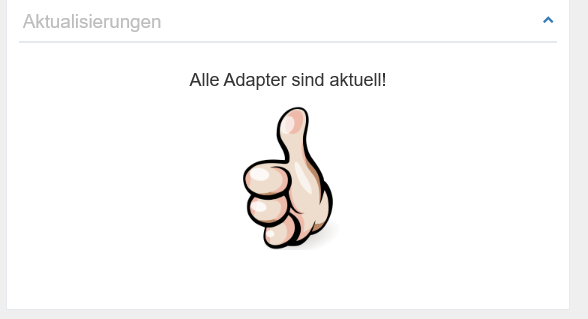
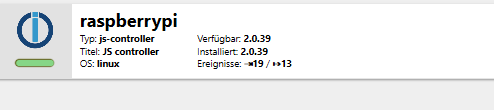
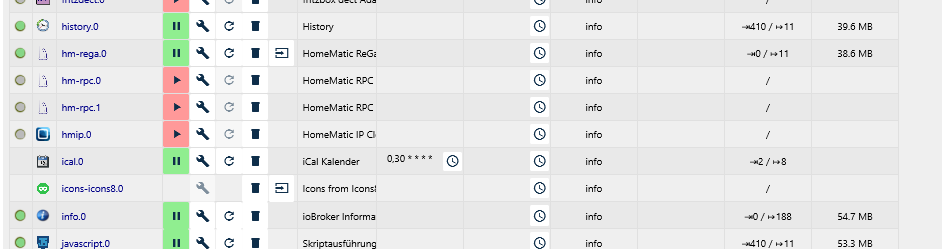
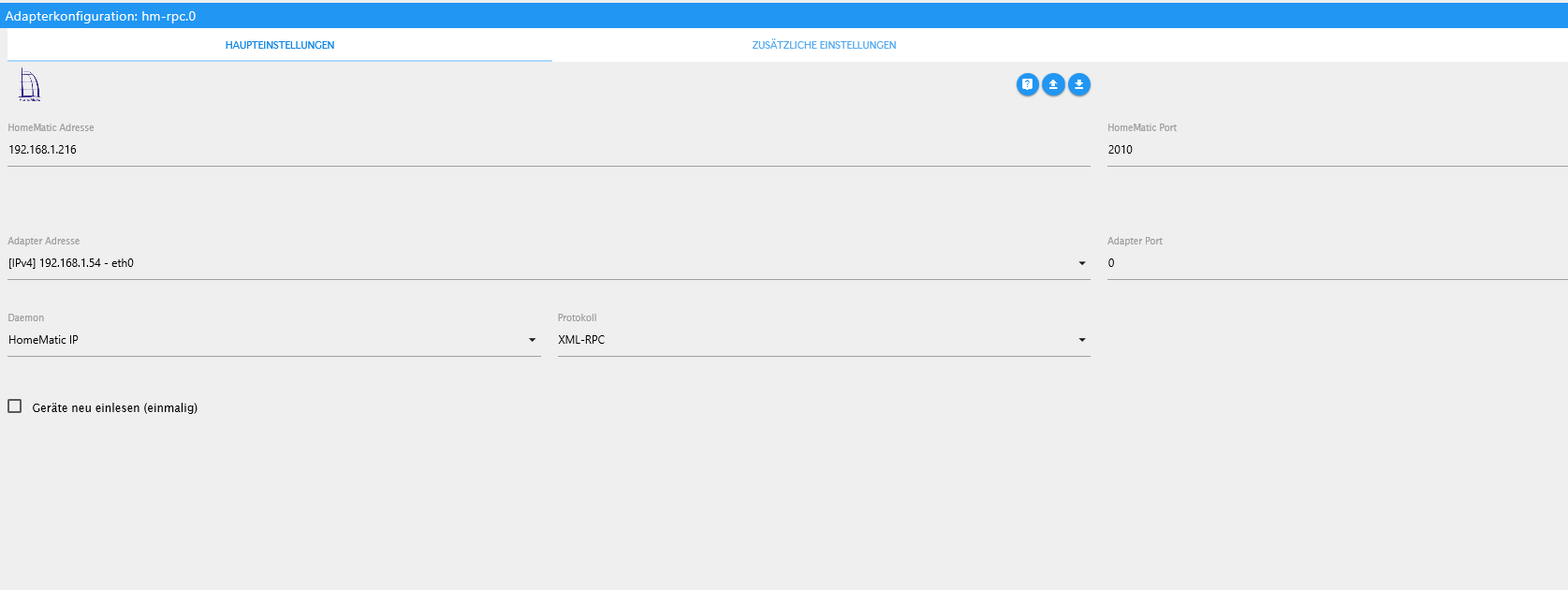
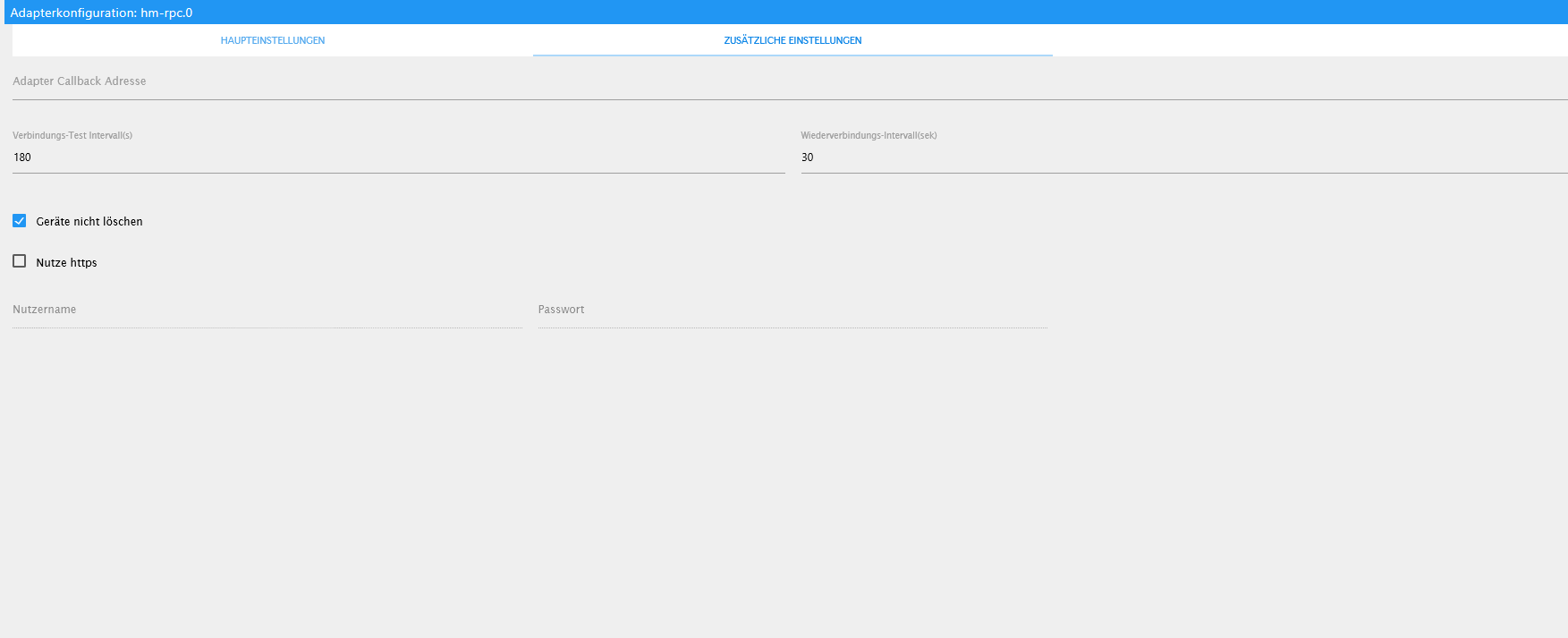
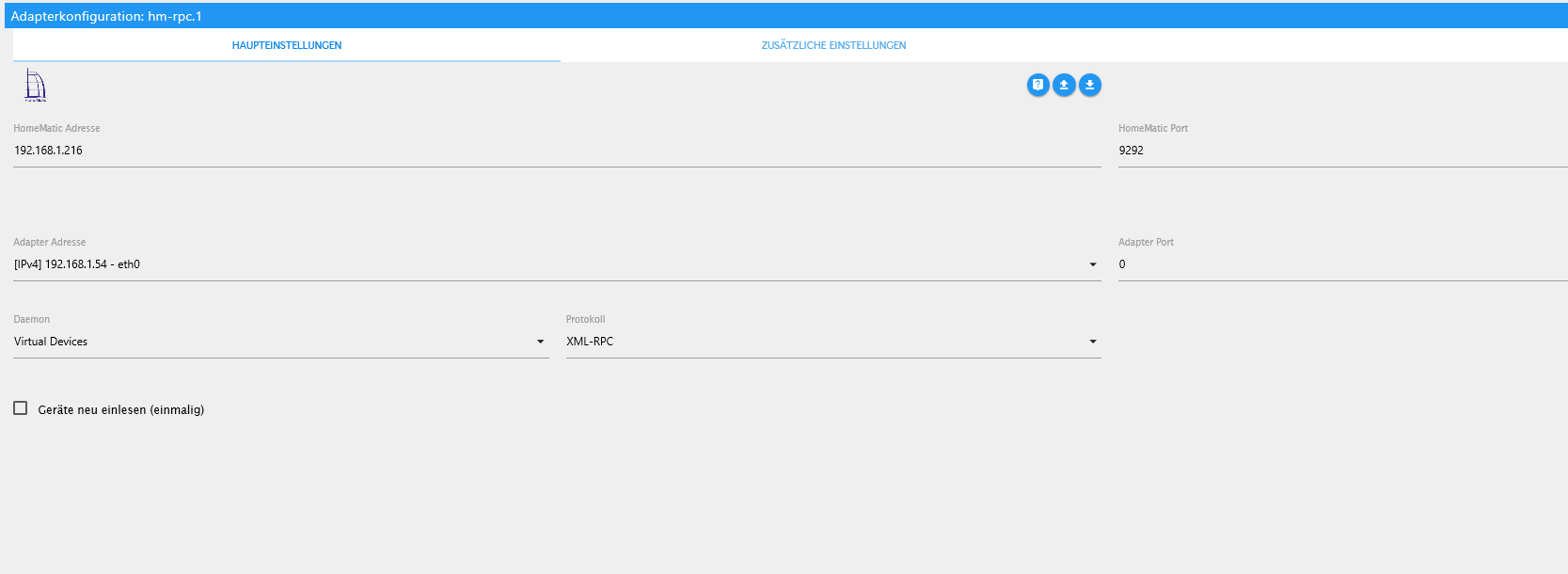
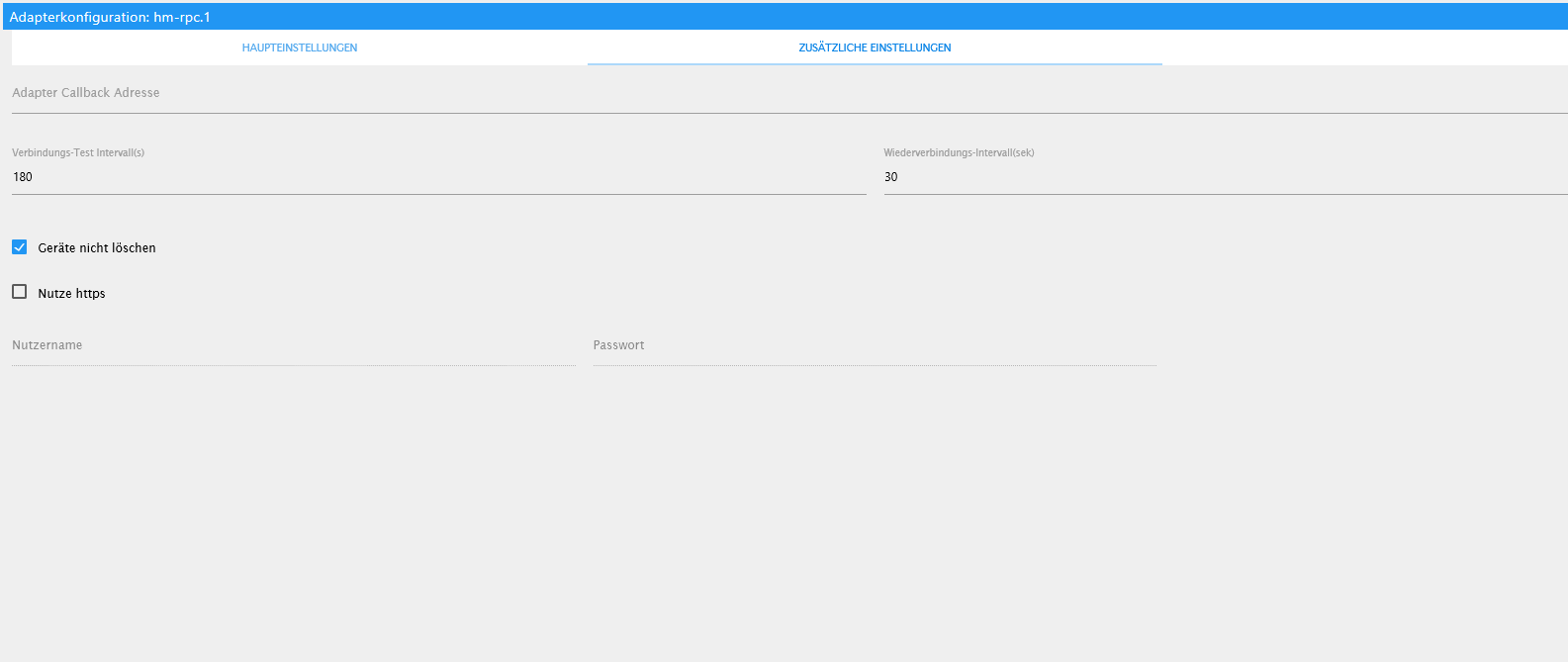
Hallo sigi234, hab hier mal die benötigten Informationen.
Den hm-rpc.0 und hmrpc.1 habe ich z.Z. aus.
Beim Erstellen dieser Informationen und Aufrufen der Einstellungen von hm-rpc.0 ist IoBroker wieder abgestürzt.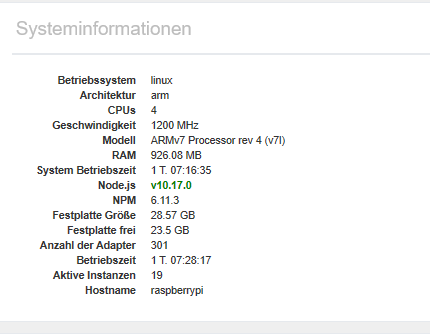
-
Hallo sigi234, hab hier mal die benötigten Informationen.
Den hm-rpc.0 und hmrpc.1 habe ich z.Z. aus.
Beim Erstellen dieser Informationen und Aufrufen der Einstellungen von hm-rpc.0 ist IoBroker wieder abgestürzt.
Die CCU IP ist Richtig?
-
Die CCU IP ist Richtig?
-
@RalfEngelberth sagte in IoBroker läuft nicht stabiel, stürzt ab:
@sigi234 sagte in IoBroker läuft nicht stabiel, stürzt ab:
Die CCU IP ist Richtig?
Ja
Ok, alle Homematic deinstallieren und neu installieren schon mal gemacht?
-
@RalfEngelberth sagte in IoBroker läuft nicht stabiel, stürzt ab:
@sigi234 sagte in IoBroker läuft nicht stabiel, stürzt ab:
Die CCU IP ist Richtig?
Ja
Ok, alle Homematic deinstallieren und neu installieren schon mal gemacht?
@sigi234 sagte in IoBroker läuft nicht stabiel, stürzt ab:
@RalfEngelberth sagte in IoBroker läuft nicht stabiel, stürzt ab:
@sigi234 sagte in IoBroker läuft nicht stabiel, stürzt ab:
Die CCU IP ist Richtig?
Ja
Ok, alle Homematic deinstallieren und neu installieren schon mal gemacht?
Nein noch nicht.
Werde ich machen.
Komme aber erst morgen dazu.
Melde mich wieder. -
@sigi234 sagte in IoBroker läuft nicht stabiel, stürzt ab:
@RalfEngelberth sagte in IoBroker läuft nicht stabiel, stürzt ab:
@sigi234 sagte in IoBroker läuft nicht stabiel, stürzt ab:
Die CCU IP ist Richtig?
Ja
Ok, alle Homematic deinstallieren und neu installieren schon mal gemacht?
Nein noch nicht.
Werde ich machen.
Komme aber erst morgen dazu.
Melde mich wieder.@RalfEngelberth sagte in IoBroker läuft nicht stabiel, stürzt ab:
@sigi234 sagte in IoBroker läuft nicht stabiel, stürzt ab:
@RalfEngelberth sagte in IoBroker läuft nicht stabiel, stürzt ab:
@sigi234 sagte in IoBroker läuft nicht stabiel, stürzt ab:
Die CCU IP ist Richtig?
Ja
Ok, alle Homematic deinstallieren und neu installieren schon mal gemacht?
Nein noch nicht.
Werde ich machen.
Komme aber erst morgen dazu.
Melde mich wieder.Ok, installiere dann mal nur den IP Adapter
-
@RalfEngelberth sagte in IoBroker läuft nicht stabiel, stürzt ab:
@sigi234 sagte in IoBroker läuft nicht stabiel, stürzt ab:
@RalfEngelberth sagte in IoBroker läuft nicht stabiel, stürzt ab:
@sigi234 sagte in IoBroker läuft nicht stabiel, stürzt ab:
Die CCU IP ist Richtig?
Ja
Ok, alle Homematic deinstallieren und neu installieren schon mal gemacht?
Nein noch nicht.
Werde ich machen.
Komme aber erst morgen dazu.
Melde mich wieder.Ok, installiere dann mal nur den IP Adapter
@sigi234 sagte in IoBroker läuft nicht stabiel, stürzt ab:
@RalfEngelberth sagte in IoBroker läuft nicht stabiel, stürzt ab:
@sigi234 sagte in IoBroker läuft nicht stabiel, stürzt ab:
@RalfEngelberth sagte in IoBroker läuft nicht stabiel, stürzt ab:
@sigi234 sagte in IoBroker läuft nicht stabiel, stürzt ab:
Die CCU IP ist Richtig?
Ja
Ok, alle Homematic deinstallieren und neu installieren schon mal gemacht?
Nein noch nicht.
Werde ich machen.
Komme aber erst morgen dazu.
Melde mich wieder.Ok, installiere dann mal nur den IP Adapter
Meinst du den hmip.0 ?
An dem kann es aber nicht liegen, den hatte ich fast immer aus.
Oder was ist der IP Adapter -
@sigi234 sagte in IoBroker läuft nicht stabiel, stürzt ab:
@RalfEngelberth sagte in IoBroker läuft nicht stabiel, stürzt ab:
@sigi234 sagte in IoBroker läuft nicht stabiel, stürzt ab:
@RalfEngelberth sagte in IoBroker läuft nicht stabiel, stürzt ab:
@sigi234 sagte in IoBroker läuft nicht stabiel, stürzt ab:
Die CCU IP ist Richtig?
Ja
Ok, alle Homematic deinstallieren und neu installieren schon mal gemacht?
Nein noch nicht.
Werde ich machen.
Komme aber erst morgen dazu.
Melde mich wieder.Ok, installiere dann mal nur den IP Adapter
Meinst du den hmip.0 ?
An dem kann es aber nicht liegen, den hatte ich fast immer aus.
Oder was ist der IP Adapter -
Habe gestern alles gelöscht und neu geladen.
Bis eben lief alles prima.
Jetzt wollte ich den Script Engine aktualisieren und schon stürzt IoBroker wieder ab.
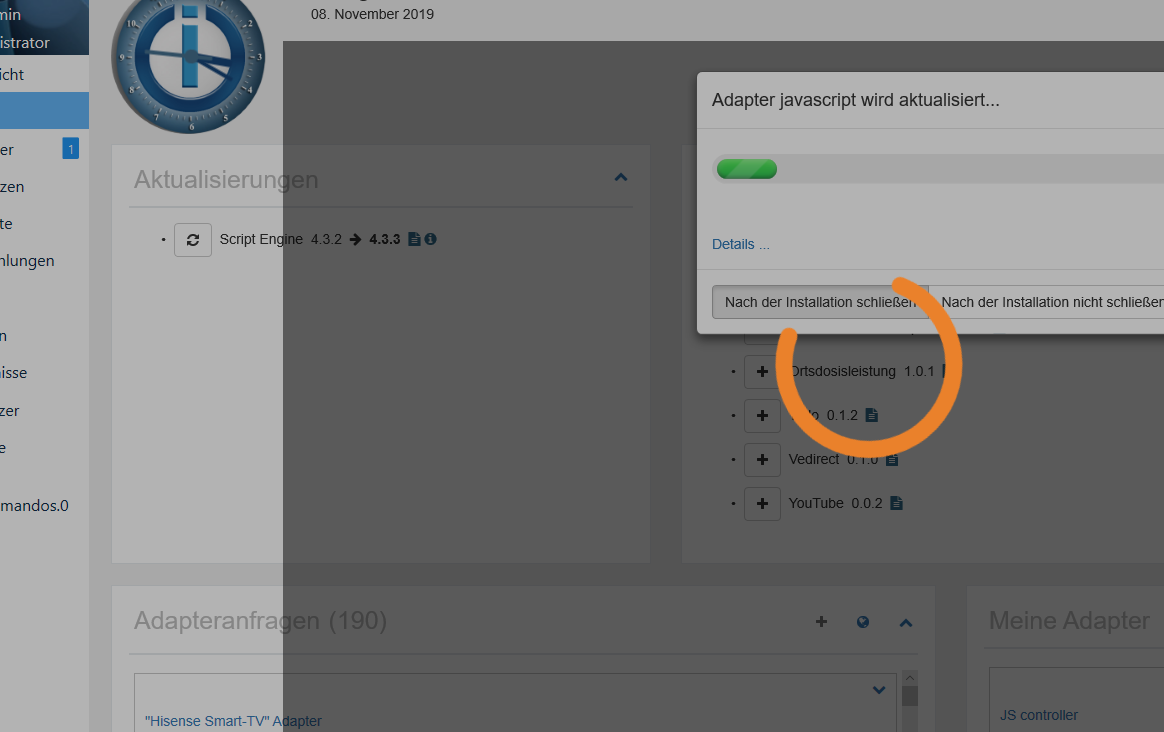
Diese Abstürze waren aber auch teilweise vorher schon.
Nach dem Neustart funktionierte das durchführen des UpdateEben hatte ich wieder einen Absturz.
Ich habe mit VIS auf meinem Pad auf den IoBroker zugegriffen.
Warum sind eigentlich die Uhrzeiten im LOG so durcheinander?
Der Absturz war ca. 21:32 und 21:17 steht auf einmal dazwischen.web.0 2019-11-08 21:17:35.358 info (650) ==>Connected system.user.admin from ::ffff:192.168.1.67 web.0 2019-11-08 21:17:35.306 info (650) ==>Connected system.user.admin from ::ffff:192.168.1.67 web.0 2019-11-08 21:17:35.293 info (650) ==>Connected system.user.admin from ::ffff:192.168.1.67 web.0 2019-11-08 21:17:34.962 info (650) http server listening on port 8082 web.0 2019-11-08 21:17:34.956 info (650) Connect extension "proxy/lib/proxy.js" web.0 2019-11-08 21:17:34.953 info (650) {"target":"http://localhost:1880","ws":true,"secure":false,"changeOrigin":false,"proxyTimeout":10000,"xfwd":true,"pathRewrite":{"^/proxy.0/node-red/":"/"}} web.0 2019-11-08 21:17:34.952 info (650) Install extension on /proxy.0/node-red/ web.0 2019-11-08 21:17:34.948 info (650) {"target":"http://localhost:8084","ws":true,"secure":false,"changeOrigin":false,"proxyTimeout":10000,"xfwd":true,"pathRewrite":{"^/proxy.0/api/":"/"}} web.0 2019-11-08 21:17:34.944 info (650) Install extension on /proxy.0/api/ web.0 2019-11-08 21:17:34.916 info (650) {"target":"http://localhost:8083","ws":true,"secure":false,"changeOrigin":false,"proxyTimeout":10000,"xfwd":true,"pathRewrite":{"^/proxy.0/sonos/":"/"}} web.0 2019-11-08 21:17:33.724 info (650) Install extension on /proxy.0/sonos/ web.0 2019-11-08 21:17:33.672 info (650) socket.io server listening on port 8082 web.0 2019-11-08 21:17:32.444 info (650) starting. Version 2.4.9 in /opt/iobroker/node_modules/iobroker.web, node: v10.17.0 host.raspberrypi 2019-11-08 21:17:29.659 info instance system.adapter.web.0 started with pid 650 admin.0 2019-11-08 21:17:28.989 info (601) Use link "http://localhost:8081" to configure. admin.0 2019-11-08 21:17:28.988 info (601) http server listening on port 8081 admin.0 2019-11-08 21:17:28.386 info (601) received all objects discovery.0 2019-11-08 21:17:27.947 info (612) starting. Version 2.0.0 in /opt/iobroker/node_modules/iobroker.discovery, node: v10.17.0 host.raspberrypi 2019-11-08 21:17:26.173 info instance system.adapter.info.0 started with pid 627 admin.0 2019-11-08 21:17:24.590 info (601) requesting all objects admin.0 2019-11-08 21:17:24.588 info (601) requesting all states admin.0 2019-11-08 21:17:24.460 info (601) starting. Version 3.6.12 in /opt/iobroker/node_modules/iobroker.admin, node: v10.17.0 host.raspberrypi 2019-11-08 21:17:21.649 info instance system.adapter.discovery.0 started with pid 612 host.raspberrypi 2019-11-08 21:17:17.782 info instance system.adapter.admin.0 started with pid 601 host.raspberrypi 2019-11-08 21:17:17.622 info starting 36 instances host.raspberrypi 2019-11-08 21:17:17.328 info 50 instances found host.raspberrypi 2019-11-08 21:17:16.890 info connected to Objects and States host.raspberrypi 2019-11-08 21:17:14.760 info ip addresses: 192.168.1.54 2003:ce:c71a:f100:67e5:fad9:8d9a:849 fec0::8be3:3298:9264:245e fe80::4fe3:6694:39c8:48c9 host.raspberrypi 2019-11-08 21:17:14.757 info hostname: raspberrypi, node: v10.17.0 host.raspberrypi 2019-11-08 21:17:14.755 info Copyright (c) 2014-2019 bluefox, 2014 hobbyquaker host.raspberrypi 2019-11-08 21:17:14.743 info iobroker.js-controller version 2.0.39 js-controller starting web.0 2019-11-08 21:32:23.722 info (664) ==>Connected system.user.admin from ::ffff:192.168.1.20 web.0 2019-11-08 21:32:23.634 info (664) ==>Connected system.user.admin from ::ffff:192.168.1.20 web.0 2019-11-08 21:32:23.417 info (664) ==>Connected system.user.admin from ::ffff:192.168.1.20 web.0 2019-11-08 21:32:23.409 info (664) ==>Connected system.user.admin from ::ffff:192.168.1.20 web.0 2019-11-08 21:32:23.275 info (664) ==>Connected system.user.admin from ::ffff:192.168.1.20 web.0 2019-11-08 21:32:23.271 info (664) ==>Connected system.user.admin from ::ffff:192.168.1.20 web.0 2019-11-08 21:32:23.146 info (664) ==>Connected system.user.admin from ::ffff:192.168.1.21 web.0 2019-11-08 21:32:23.142 info (664) ==>Connected system.user.admin from ::ffff:192.168.1.21 web.0 2019-11-08 21:32:23.120 info (664) ==>Connected system.user.admin from ::ffff:192.168.1.21 web.0 2019-11-08 21:32:21.550 info (664) <==Disconnect system.user.admin from ::ffff:192.168.1.67 vis.0 web.0 2019-11-08 21:32:21.536 info (664) <==Disconnect system.user.admin from ::ffff:192.168.1.20 flot web.0 2019-11-08 21:32:21.534 info (664) <==Disconnect system.user.admin from ::ffff:192.168.1.20 flot web.0 2019-11-08 21:32:21.532 info (664) <==Disconnect system.user.admin from ::ffff:192.168.1.20 flot web.0 2019-11-08 21:32:21.530 info (664) <==Disconnect system.user.admin from ::ffff:192.168.1.21 vis.0 web.0 2019-11-08 21:32:21.284 info (664) <==Disconnect system.user.admin from ::ffff:192.168.1.20 vis.0 web.0 2019-11-08 21:32:21.259 info (664) <==Disconnect system.user.admin from ::ffff:192.168.1.21 flot web.0 2019-11-08 21:32:21.256 info (664) <==Disconnect system.user.admin from ::ffff:192.168.1.21 flot web.0 2019-11-08 21:32:21.246 info (664) <==Disconnect system.user.admin from ::ffff:192.168.1.67 flot web.0 2019-11-08 21:32:21.238 info (664) <==Disconnect system.user.admin from ::ffff:192.168.1.67 flot web.0 2019-11-08 21:32:21.230 info (664) <==Disconnect system.user.admin from ::ffff:192.168.1.67 flot web.0 2019-11-08 21:32:21.221 info (664) <==Disconnect system.user.admin from ::ffff:192.168.1.20 vis.0 web.0 2019-11-08 21:32:21.212 info (664) <==Disconnect system.user.admin from ::ffff:192.168.1.21 vis.0 web.0 2019-11-08 21:32:21.210 info (664) <==Disconnect system.user.admin from ::ffff:192.168.1.21 flot web.0 2019-11-08 21:32:21.207 info (664) <==Disconnect system.user.admin from ::ffff:192.168.1.21 flot daswetter.0 2019-11-08 21:32:21.175 warn (16854) Terminated (15): Without reason web.0 2019-11-08 21:32:21.204 info (664) <==Disconnect system.user.admin from ::ffff:192.168.1.21 flot daswetter.0 2019-11-08 21:32:21.002 error (16854) force terminate, objects still in list: 3510 -
@sigi234
Hallo Sigi234, kann es auch sein, dass mein System überlastet wird?
Ich habe in Flot einiges an Kennlinien und über Vis werden diese dann ja aufgerufen. -
Hatte heute wieder einen Absturz um 7:34
Ich hatte in IoBroker unter Objekte die Historydaten abfragen wollen.
Hier der LOG2019-11-10 07:34:12.882 - info: web.0 (30403) <==Disconnect system.user.admin from ::ffff:192.168.1.67 flot 2019-11-10 07:34:12.936 - info: web.0 (30403) ==>Connected system.user.admin from ::ffff:192.168.1.67 2019-11-10 07:34:14.097 - info: web.0 (30403) <==Disconnect system.user.admin from ::ffff:192.168.1.20 flot 2019-11-10 07:34:28.156 - info: host.raspberrypi Update repository "latest" under "http://download.iobroker.net/sources-dist-latest.json" 2019-11-10 07:17:13.294 - info: host.raspberrypi iobroker.js-controller version 2.0.39 js-controller starting 2019-11-10 07:17:13.307 - info: host.raspberrypi Copyright (c) 2014-2019 bluefox, 2014 hobbyquaker 2019-11-10 07:17:13.308 - info: host.raspberrypi hostname: raspberrypi, node: v10.17.0 2019-11-10 07:17:13.312 - info: host.raspberrypi ip addresses: 192.168.1.54 2003:ce:c71a:f100:67e5:fad9:8d9a:849 fec0::8be3:3298:9264:245e fe80::4fe3:6694:39c8:48c9 2019-11-10 07:17:15.520 - info: host.raspberrypi connected to Objects and States 2019-11-10 07:17:15.979 - info: host.raspberrypi 50 instances found 2019-11-10 07:17:16.254 - info: host.raspberrypi starting 36 instances 2019-11-10 07:17:16.414 - info: host.raspberrypi instance system.adapter.admin.0 started with pid 609 2019-11-10 07:17:20.291 - info: host.raspberrypi instance system.adapter.discovery.0 started with pid 620 2019-11-10 07:17:20.774 - info: admin.0 (609) starting. Version 3.6.12 in /opt/iobroker/node_modules/iobroker.admin, node: v10.17.0 2019-11-10 07:17:20.919 - info: admin.0 (609) requesting all states 2019-11-10 07:17:20.921 - info: admin.0 (609) requesting all objects 2019-11-10 07:17:24.668 - info: host.raspberrypi instance system.adapter.info.0 started with pid 635 2019-11-10 07:17:25.487 - info: admin.0 (609) received all objects 2019-11-10 07:17:25.567 - info: discovery.0 (620) starting. Version 2.0.0 in /opt/iobroker/node_modules/iobroker.discovery, node: v10.17.0 2019-11-10 07:17:26.183 - info: admin.0 (609) http server listening on port 8081 2019-11-10 07:17:26.184 - info: admin.0 (609) Use link "http://localhost:8081" to configure. 2019-11-10 07:17:28.281 - info: host.raspberrypi instance system.adapter.web.0 started with pid 670 2019-11-10 07:17:31.384 - info: web.0 (670) starting. Version 2.4.9 in /opt/iobroker/node_modules/iobroker.web, node: v10.17.0 2019-11-10 07:17:32.153 - info: web.0 (670) socket.io server listening on port 8082 2019-11-10 07:17:33.361 - info: info.0 (635) starting. Version 1.5.6 in /opt/iobroker/node_modules/iobroker.info, node: v10.17.0 2019-11-10 07:17:32.225 - info: web.0 (670) Install extension on /proxy.0/sonos/ 2019-11-10 07:17:33.318 - info: web.0 (670) {"target":"http://localhost:8083","ws":true,"secure":false,"changeOrigin":false,"proxyTimeout":10000,"xfwd":true,"pathRewrite":{"^/proxy.0/sonos/":"/"}} 2019-11-10 07:17:33.357 - info: web.0 (670) Install extension on /proxy.0/api/ 2019-11-10 07:17:33.359 - info: web.0 (670) {"target":"http://localhost:8084","ws":true,"secure":false,"changeOrigin":false,"proxyTimeout":10000,"xfwd":true,"pathRewrite":{"^/proxy.0/api/":"/"}} 2019-11-10 07:17:33.364 - info: web.0 (670) Install extension on /proxy.0/node-red/ 2019-11-10 07:17:33.365 - info: web.0 (670) {"target":"http://localhost:1880","ws":true,"secure":false,"changeOrigin":false,"proxyTimeout":10000,"xfwd":true,"pathRewrite":{"^/proxy.0/node-red/":"/"}} 2019-11-10 07:17:33.368 - info: web.0 (670) Connect extension "proxy/lib/proxy.js" 2019-11-10 07:17:33.375 - info: web.0 (670) http server listening on port 8082 2019-11-10 07:43:25.353 - info: info.0 (635) Reading CPU current speed every 3 seconds. 2019-11-10 07:43:25.389 - info: info.0 (635) Reading CPU data every 3 seconds. 2019-11-10 07:43:25.451 - warn: vis.0 (685) no connection to objects DB 2019-11-10 07:43:25.543 - info: host.raspberrypi instance system.adapter.backitup.0 started with pid 851 2019-11-10 07:43:25.584 - info: info.0 (635) Reading disk data every 8 seconds. 2019-11-10 07:43:25.759 - info: info.0 (635) Reading memory data every 3 seconds. -
Hatte heute wieder einen Absturz um 7:34
Ich hatte in IoBroker unter Objekte die Historydaten abfragen wollen.
Hier der LOG2019-11-10 07:34:12.882 - info: web.0 (30403) <==Disconnect system.user.admin from ::ffff:192.168.1.67 flot 2019-11-10 07:34:12.936 - info: web.0 (30403) ==>Connected system.user.admin from ::ffff:192.168.1.67 2019-11-10 07:34:14.097 - info: web.0 (30403) <==Disconnect system.user.admin from ::ffff:192.168.1.20 flot 2019-11-10 07:34:28.156 - info: host.raspberrypi Update repository "latest" under "http://download.iobroker.net/sources-dist-latest.json" 2019-11-10 07:17:13.294 - info: host.raspberrypi iobroker.js-controller version 2.0.39 js-controller starting 2019-11-10 07:17:13.307 - info: host.raspberrypi Copyright (c) 2014-2019 bluefox, 2014 hobbyquaker 2019-11-10 07:17:13.308 - info: host.raspberrypi hostname: raspberrypi, node: v10.17.0 2019-11-10 07:17:13.312 - info: host.raspberrypi ip addresses: 192.168.1.54 2003:ce:c71a:f100:67e5:fad9:8d9a:849 fec0::8be3:3298:9264:245e fe80::4fe3:6694:39c8:48c9 2019-11-10 07:17:15.520 - info: host.raspberrypi connected to Objects and States 2019-11-10 07:17:15.979 - info: host.raspberrypi 50 instances found 2019-11-10 07:17:16.254 - info: host.raspberrypi starting 36 instances 2019-11-10 07:17:16.414 - info: host.raspberrypi instance system.adapter.admin.0 started with pid 609 2019-11-10 07:17:20.291 - info: host.raspberrypi instance system.adapter.discovery.0 started with pid 620 2019-11-10 07:17:20.774 - info: admin.0 (609) starting. Version 3.6.12 in /opt/iobroker/node_modules/iobroker.admin, node: v10.17.0 2019-11-10 07:17:20.919 - info: admin.0 (609) requesting all states 2019-11-10 07:17:20.921 - info: admin.0 (609) requesting all objects 2019-11-10 07:17:24.668 - info: host.raspberrypi instance system.adapter.info.0 started with pid 635 2019-11-10 07:17:25.487 - info: admin.0 (609) received all objects 2019-11-10 07:17:25.567 - info: discovery.0 (620) starting. Version 2.0.0 in /opt/iobroker/node_modules/iobroker.discovery, node: v10.17.0 2019-11-10 07:17:26.183 - info: admin.0 (609) http server listening on port 8081 2019-11-10 07:17:26.184 - info: admin.0 (609) Use link "http://localhost:8081" to configure. 2019-11-10 07:17:28.281 - info: host.raspberrypi instance system.adapter.web.0 started with pid 670 2019-11-10 07:17:31.384 - info: web.0 (670) starting. Version 2.4.9 in /opt/iobroker/node_modules/iobroker.web, node: v10.17.0 2019-11-10 07:17:32.153 - info: web.0 (670) socket.io server listening on port 8082 2019-11-10 07:17:33.361 - info: info.0 (635) starting. Version 1.5.6 in /opt/iobroker/node_modules/iobroker.info, node: v10.17.0 2019-11-10 07:17:32.225 - info: web.0 (670) Install extension on /proxy.0/sonos/ 2019-11-10 07:17:33.318 - info: web.0 (670) {"target":"http://localhost:8083","ws":true,"secure":false,"changeOrigin":false,"proxyTimeout":10000,"xfwd":true,"pathRewrite":{"^/proxy.0/sonos/":"/"}} 2019-11-10 07:17:33.357 - info: web.0 (670) Install extension on /proxy.0/api/ 2019-11-10 07:17:33.359 - info: web.0 (670) {"target":"http://localhost:8084","ws":true,"secure":false,"changeOrigin":false,"proxyTimeout":10000,"xfwd":true,"pathRewrite":{"^/proxy.0/api/":"/"}} 2019-11-10 07:17:33.364 - info: web.0 (670) Install extension on /proxy.0/node-red/ 2019-11-10 07:17:33.365 - info: web.0 (670) {"target":"http://localhost:1880","ws":true,"secure":false,"changeOrigin":false,"proxyTimeout":10000,"xfwd":true,"pathRewrite":{"^/proxy.0/node-red/":"/"}} 2019-11-10 07:17:33.368 - info: web.0 (670) Connect extension "proxy/lib/proxy.js" 2019-11-10 07:17:33.375 - info: web.0 (670) http server listening on port 8082 2019-11-10 07:43:25.353 - info: info.0 (635) Reading CPU current speed every 3 seconds. 2019-11-10 07:43:25.389 - info: info.0 (635) Reading CPU data every 3 seconds. 2019-11-10 07:43:25.451 - warn: vis.0 (685) no connection to objects DB 2019-11-10 07:43:25.543 - info: host.raspberrypi instance system.adapter.backitup.0 started with pid 851 2019-11-10 07:43:25.584 - info: info.0 (635) Reading disk data every 8 seconds. 2019-11-10 07:43:25.759 - info: info.0 (635) Reading memory data every 3 seconds.@RalfEngelberth
ist das nicht ein etwas kurzes Intervall?2019-11-10 07:43:25.353 - info: info.0 (635) Reading CPU current speed every 3 seconds. 2019-11-10 07:43:25.389 - info: info.0 (635) Reading CPU data every 3 seconds. 2019-11-10 07:43:25.451 - warn: vis.0 (685) no connection to objects DB 2019-11-10 07:43:25.543 - info: host.raspberrypi instance system.adapter.backitup.0 started with pid 851 2019-11-10 07:43:25.584 - info: info.0 (635) Reading disk data every 8 seconds. 2019-11-10 07:43:25.759 - info: info.0 (635) Reading memory data every 3 seconds. -
@RalfEngelberth
ist das nicht ein etwas kurzes Intervall?2019-11-10 07:43:25.353 - info: info.0 (635) Reading CPU current speed every 3 seconds. 2019-11-10 07:43:25.389 - info: info.0 (635) Reading CPU data every 3 seconds. 2019-11-10 07:43:25.451 - warn: vis.0 (685) no connection to objects DB 2019-11-10 07:43:25.543 - info: host.raspberrypi instance system.adapter.backitup.0 started with pid 851 2019-11-10 07:43:25.584 - info: info.0 (635) Reading disk data every 8 seconds. 2019-11-10 07:43:25.759 - info: info.0 (635) Reading memory data every 3 seconds.@Jan1 sagte in IoBroker läuft nicht stabiel, stürzt ab:
@RalfEngelberth
ist das nicht ein etwas kurzes Intervall?2019-11-10 07:43:25.353 - info: info.0 (635) Reading CPU current speed every 3 seconds. 2019-11-10 07:43:25.389 - info: info.0 (635) Reading CPU data every 3 seconds. 2019-11-10 07:43:25.451 - warn: vis.0 (685) no connection to objects DB 2019-11-10 07:43:25.543 - info: host.raspberrypi instance system.adapter.backitup.0 started with pid 851 2019-11-10 07:43:25.584 - info: info.0 (635) Reading disk data every 8 seconds. 2019-11-10 07:43:25.759 - info: info.0 (635) Reading memory data every 3 seconds.Wie kann ich das ändern?

Hey! Du scheinst an dieser Unterhaltung interessiert zu sein, hast aber noch kein Konto.
Hast du es satt, bei jedem Besuch durch die gleichen Beiträge zu scrollen? Wenn du dich für ein Konto anmeldest, kommst du immer genau dorthin zurück, wo du zuvor warst, und kannst dich über neue Antworten benachrichtigen lassen (entweder per E-Mail oder Push-Benachrichtigung). Du kannst auch Lesezeichen speichern und Beiträge positiv bewerten, um anderen Community-Mitgliedern deine Wertschätzung zu zeigen.
Mit deinem Input könnte dieser Beitrag noch besser werden 💗
Registrieren Anmelden388
Online33.0k
Benutzende83.7k
Themen1.3m
Beiträge