Weiter zum Inhalt
  • Home
  • Aktuell
  • Tags
  • 0 Ungelesen 0
  • Kategorien
  • Unreplied
  • Beliebt
  • GitHub
  • Docu
  • Hilfe
Skins
  • Hell
  • Brite
  • Cerulean
  • Cosmo
  • Flatly
  • Journal
  • Litera
  • Lumen
  • Lux
  • Materia
  • Minty
  • Morph
  • Pulse
  • Sandstone
  • Simplex
  • Sketchy
  • Spacelab
  • United
  • Yeti
  • Zephyr
  • Dunkel
  • Cyborg
  • Darkly
  • Quartz
  • Slate
  • Solar
  • Superhero
  • Vapor

  • Standard: (Kein Skin)
  • Kein Skin
Einklappen
ioBroker Logo

Community Forum

donate donate
  1. ioBroker Community Home
  2. Deutsch
  3. ioBroker Allgemein
  4. PI4 Lässt JS Kontrolle nicht updaten

NEWS

  • Neues YouTube-Video: Visualisierung im Devices-Adapter
    BluefoxB
    Bluefox
    11
    1
    291

  • Neuer ioBroker-Blog online: Monatsrückblick März/April 2026
    BluefoxB
    Bluefox
    8
    1
    1.8k

  • Verwendung von KI bitte immer deutlich kennzeichnen
    HomoranH
    Homoran
    11
    1
    775

PI4 Lässt JS Kontrolle nicht updaten

Geplant Angeheftet Gesperrt Verschoben ioBroker Allgemein
js-controller 2.0.25
106 Beiträge 8 Kommentatoren 11.9k Aufrufe 9 Beobachtet
  • Älteste zuerst
  • Neuste zuerst
  • Meiste Stimmen
Antworten
  • In einem neuen Thema antworten
Anmelden zum Antworten
Dieses Thema wurde gelöscht. Nur Nutzer mit entsprechenden Rechten können es sehen.
  • F freaktech

    hat noch wer eine Idee?

    lg
    tom

    sigi234S Online
    sigi234S Online
    sigi234
    Forum Testing Most Active
    schrieb am zuletzt editiert von
    #14

    @freaktech sagte in PI4 Lässt JS Kontrolle nicht updaten:

    hat noch wer eine Idee?

    lg
    tom

    Schon 2.0.29 latest installiert?

    Bitte benutzt das Voting rechts unten im Beitrag wenn er euch geholfen hat.
    Immer Daten sichern!

    AlCalzoneA 1 Antwort Letzte Antwort
    0
    • sigi234S sigi234

      @freaktech sagte in PI4 Lässt JS Kontrolle nicht updaten:

      hat noch wer eine Idee?

      lg
      tom

      Schon 2.0.29 latest installiert?

      AlCalzoneA Offline
      AlCalzoneA Offline
      AlCalzone
      Developer
      schrieb am zuletzt editiert von
      #15

      @sigi234 Das versucht er doch

      Warum `sudo` böse ist: https://forum.iobroker.net/post/17109

      sigi234S 1 Antwort Letzte Antwort
      0
      • F freaktech

        hat noch wer eine Idee?

        lg
        tom

        AlCalzoneA Offline
        AlCalzoneA Offline
        AlCalzone
        Developer
        schrieb am zuletzt editiert von AlCalzone
        #16

        @freaktech sagte in PI4 Lässt JS Kontrolle nicht updaten:

        hat noch wer eine Idee?

        Die Holzhammer-Methode (bitte vorher Backup machen, falls die Installation dann immer noch nicht klappt):

        cd /opt/iobroker
        rm package-lock.json
        rm -rf node_modules
        npm cache clear --force
        npm i --production --ignore-scripts
        

        Warum `sudo` böse ist: https://forum.iobroker.net/post/17109

        AphofisA 1 Antwort Letzte Antwort
        0
        • AlCalzoneA AlCalzone

          @sigi234 Das versucht er doch

          sigi234S Online
          sigi234S Online
          sigi234
          Forum Testing Most Active
          schrieb am zuletzt editiert von
          #17

          @AlCalzone sagte in PI4 Lässt JS Kontrolle nicht updaten:

          @sigi234 Das versucht er doch

          Ja, aber nochmal

          Bitte benutzt das Voting rechts unten im Beitrag wenn er euch geholfen hat.
          Immer Daten sichern!

          AlCalzoneA 1 Antwort Letzte Antwort
          0
          • sigi234S sigi234

            @AlCalzone sagte in PI4 Lässt JS Kontrolle nicht updaten:

            @sigi234 Das versucht er doch

            Ja, aber nochmal

            AlCalzoneA Offline
            AlCalzoneA Offline
            AlCalzone
            Developer
            schrieb am zuletzt editiert von
            #18

            @sigi234 Bitte lesen... Er versucht es - npm lässt ihn nicht...

            Warum `sudo` böse ist: https://forum.iobroker.net/post/17109

            sigi234S 1 Antwort Letzte Antwort
            0
            • AlCalzoneA AlCalzone

              @sigi234 Bitte lesen... Er versucht es - npm lässt ihn nicht...

              sigi234S Online
              sigi234S Online
              sigi234
              Forum Testing Most Active
              schrieb am zuletzt editiert von
              #19

              @AlCalzone sagte in PI4 Lässt JS Kontrolle nicht updaten:

              @sigi234 Bitte lesen... Er versucht es - npm lässt ihn nicht...

              Ja dachte weil Warning ENODATA: Cache input stream was empty

              Bitte benutzt das Voting rechts unten im Beitrag wenn er euch geholfen hat.
              Immer Daten sichern!

              1 Antwort Letzte Antwort
              0
              • F Offline
                F Offline
                freaktech
                schrieb am zuletzt editiert von
                #20

                genau, geht heute genausowenig wie gestern

                pi@iobrocker:/opt/iobroker $ sudo iobroker upgrade self
                Update js-controller from @1.5.14 to @2.0.25
                NPM version: 6.12.0
                npm install iobroker.js-controller@2.0.25 --unsafe-perm --production --save --prefix "/opt/iobroker" (System call)
                npm WARN registry Unexpected warning for https://registry.npmjs.org/: Miscellaneous Warning ENODATA: Cache input stream was empty
                npm WARN registry Using stale data from https://registry.npmjs.org/ due to a request error during revalidation.
                npm ERR! code EINTEGRITY
                npm ERR! errno EINTEGRITY
                npm ERR! Invalid response body while trying to fetch https://registry.npmjs.org/y18n: Integrity verification failed for sha512-nT7014PDaWpa3jrXmq1tS07aiudLEjWmD1iEbLzOxO/4+6DMqVptZ1Scz5PnnN/haHCZTAmWOMNvHKfY32wv9A== (/home/iobroker/.npm/_cacache/content-v2/sha512/9d/3e/f4d783c3696a5ade3ad79aad6d4b4eda8ae74b1235a60f58846cbccec4eff8fba0cca95a6d67549ccf93e79cdfe16870994c099638c36f1ca7d8df6c2ff4)

                npm ERR! A complete log of this run can be found in:
                npm ERR! /home/iobroker/.npm/_logs/2019-10-14T07_22_48_474Z-debug.log
                Host "iobrocker" (linux) updated
                Execute: chmod -R 777 /opt/iobroker
                Chmod finished. Restart controller
                Starting node restart.js

                1 Antwort Letzte Antwort
                0
                • F Offline
                  F Offline
                  freaktech
                  schrieb am zuletzt editiert von
                  #21

                  @AlCalzone said in PI4 Lässt JS Kontrolle nicht updaten:

                                                                                                                                              cd /opt/iobroker                                                                                                                                                                            rm package-lock.json                                                                                                                                                                            rm -rf node_modules                                                                                                                                                                            npm cache clear --force                                                                                                                                                                            npm i production --ignore-scripts                                            
                  

                  soll ich das probieren?

                  sigi234S 1 Antwort Letzte Antwort
                  0
                  • F freaktech

                    @AlCalzone said in PI4 Lässt JS Kontrolle nicht updaten:

                                                                                                                                                cd /opt/iobroker                                                                                                                                                                            rm package-lock.json                                                                                                                                                                            rm -rf node_modules                                                                                                                                                                            npm cache clear --force                                                                                                                                                                            npm i production --ignore-scripts                                            
                    

                    soll ich das probieren?

                    sigi234S Online
                    sigi234S Online
                    sigi234
                    Forum Testing Most Active
                    schrieb am zuletzt editiert von
                    #22

                    @freaktech sagte in PI4 Lässt JS Kontrolle nicht updaten:

                    @AlCalzone said in PI4 Lässt JS Kontrolle nicht updaten:

                                                                                                                                                cd /opt/iobroker                                                                                                                                                                            rm package-lock.json                                                                                                                                                                            rm -rf node_modules                                                                                                                                                                            npm cache clear --force                                                                                                                                                                            npm i production --ignore-scripts                                            
                    

                    soll ich das probieren?

                    Was kommt bei:

                    cd /opt/iobroker
                    iobroker list instances
                    node -v
                    nodejs -v
                    npm -v

                    Bitte benutzt das Voting rechts unten im Beitrag wenn er euch geholfen hat.
                    Immer Daten sichern!

                    AlCalzoneA 1 Antwort Letzte Antwort
                    0
                    • sigi234S sigi234

                      @freaktech sagte in PI4 Lässt JS Kontrolle nicht updaten:

                      @AlCalzone said in PI4 Lässt JS Kontrolle nicht updaten:

                                                                                                                                                  cd /opt/iobroker                                                                                                                                                                            rm package-lock.json                                                                                                                                                                            rm -rf node_modules                                                                                                                                                                            npm cache clear --force                                                                                                                                                                            npm i production --ignore-scripts                                            
                      

                      soll ich das probieren?

                      Was kommt bei:

                      cd /opt/iobroker
                      iobroker list instances
                      node -v
                      nodejs -v
                      npm -v

                      AlCalzoneA Offline
                      AlCalzoneA Offline
                      AlCalzone
                      Developer
                      schrieb am zuletzt editiert von
                      #23

                      @sigi234 Es ist nett dass du helfen willst, aber bitte kein Durcheinander hier rein bringen.
                      Das Problem liegt nicht an ioBroker, sondern npm. Die Version von npm steht oben bereits.

                      @freaktech Ja, aber bitte mit den richtigen Zeilenumbrüchen 😬

                      Warum `sudo` böse ist: https://forum.iobroker.net/post/17109

                      sigi234S 1 Antwort Letzte Antwort
                      0
                      • AlCalzoneA AlCalzone

                        @sigi234 Es ist nett dass du helfen willst, aber bitte kein Durcheinander hier rein bringen.
                        Das Problem liegt nicht an ioBroker, sondern npm. Die Version von npm steht oben bereits.

                        @freaktech Ja, aber bitte mit den richtigen Zeilenumbrüchen 😬

                        sigi234S Online
                        sigi234S Online
                        sigi234
                        Forum Testing Most Active
                        schrieb am zuletzt editiert von
                        #24

                        @AlCalzone sagte in PI4 Lässt JS Kontrolle nicht updaten:

                        @sigi234 Es ist nett dass du helfen willst, aber bitte kein Durcheinander hier rein bringen.
                        Das Problem liegt nicht an ioBroker, sondern npm. Die Version von npm steht oben bereits.

                        Duck und weg.

                        Bitte benutzt das Voting rechts unten im Beitrag wenn er euch geholfen hat.
                        Immer Daten sichern!

                        1 Antwort Letzte Antwort
                        1
                        • F Offline
                          F Offline
                          freaktech
                          schrieb am zuletzt editiert von
                          #25

                          ich hab jetzt das gemacht, scheinbar startet iobroker nun nicht mehr, bitte um Hilfe

                          [boolean]

                          pi@iobrocker:/opt/iobroker $ sudo iobroker upgrade self
                          Update js-controller from @1.5.14 to @2.0.25
                          NPM version: 6.12.0
                          npm install iobroker.js-controller@2.0.25 --unsafe-perm --production --save --prefix "/opt/iobroker" (System call)
                          npm WARN registry Unexpected warning for https://registry.npmjs.org/: Miscellaneous Warning ENODATA: Cache input stream was empty
                          npm WARN registry Using stale data from https://registry.npmjs.org/ due to a request error during revalidation.
                          npm ERR! code EINTEGRITY
                          npm ERR! errno EINTEGRITY
                          npm ERR! Invalid response body while trying to fetch https://registry.npmjs.org/y18n: Integrity verification failed for sha512-nT7014PDaWpa3jrXmq1tS07aiudLEjWmD1iEbLzOxO/4+6DMqVptZ1Scz5PnnN/haHCZTAmWOMNvHKfY32wv9A== (/home/iobroker/.npm/_cacache/content-v2/sha512/9d/3e/f4d783c3696a5ade3ad79aad6d4b4eda8ae74b1235a60f58846cbccec4eff8fba0cca95a6d67549ccf93e79cdfe16870994c099638c36f1ca7d8df6c2ff4)

                          npm ERR! A complete log of this run can be found in:
                          npm ERR! /home/iobroker/.npm/_logs/2019-10-14T07_22_48_474Z-debug.log
                          Host "iobrocker" (linux) updated
                          Execute: chmod -R 777 /opt/iobroker
                          Chmod finished. Restart controller
                          Starting node restart.js
                          pi@iobrocker:/opt/iobroker $ sudo iobroker start
                          pi@iobrocker:/opt/iobroker $ ^C
                          pi@iobrocker:/opt/iobroker $ rm package-lock.json
                          rm: das Entfernen von 'package-lock.json' ist nicht möglich: Datei oder Verzeichnis nicht gefunden
                          pi@iobrocker:/opt/iobroker $ rm -rf node_modules
                          pi@iobrocker:/opt/iobroker $ npm cache clear --force
                          npm WARN using --force I sure hope you know what you are doing.
                          pi@iobrocker:/opt/iobroker $ npm i production --ignore-scripts
                          npm WARN deprecated CSSselect@0.7.0: the module is now available as 'css-select'
                          npm WARN deprecated CSSwhat@0.4.7: the module is now available as 'css-what'

                          • production@0.0.2
                            added 29 packages from 55 contributors and audited 34 packages in 9.087s
                            found 3 moderate severity vulnerabilities
                            run npm audit fix to fix them, or npm audit for details
                            pi@iobrocker:/opt/iobroker $ sudo iobroker upgrade self
                            internal/modules/cjs/loader.js:583
                            throw err;
                            ^

                          Error: Cannot find module '/opt/iobroker/node_modules/iobroker.js-controller/iobroker.js'
                          at Function.Module._resolveFilename (internal/modules/cjs/loader.js:581:15)
                          at Function.Module._load (internal/modules/cjs/loader.js:507:25)
                          at Function.Module.runMain (internal/modules/cjs/loader.js:742:12)
                          at startup (internal/bootstrap/node.js:283:19)
                          at bootstrapNodeJSCore (internal/bootstrap/node.js:743:3)
                          pi@iobrocker:/opt/iobroker $ sudo iobroker update
                          internal/modules/cjs/loader.js:583
                          throw err;
                          ^

                          Error: Cannot find module '/opt/iobroker/node_modules/iobroker.js-controller/iobroker.js'
                          at Function.Module._resolveFilename (internal/modules/cjs/loader.js:581:15)
                          at Function.Module._load (internal/modules/cjs/loader.js:507:25)
                          at Function.Module.runMain (internal/modules/cjs/loader.js:742:12)
                          at startup (internal/bootstrap/node.js:283:19)
                          at bootstrapNodeJSCore (internal/bootstrap/node.js:743:3)
                          pi@iobrocker:/opt/iobroker $ sudo iobroker stop

                          pi@iobrocker:/opt/iobroker $
                          pi@iobrocker:/opt/iobroker $ sudo iobroker upgrade self
                          internal/modules/cjs/loader.js:583
                          throw err;
                          ^

                          Error: Cannot find module '/opt/iobroker/node_modules/iobroker.js-controller/iobroker.js'
                          at Function.Module._resolveFilename (internal/modules/cjs/loader.js:581:15)
                          at Function.Module._load (internal/modules/cjs/loader.js:507:25)
                          at Function.Module.runMain (internal/modules/cjs/loader.js:742:12)
                          at startup (internal/bootstrap/node.js:283:19)
                          at bootstrapNodeJSCore (internal/bootstrap/node.js:743:3)
                          pi@iobrocker:/opt/iobroker $ sudo iobroker update
                          internal/modules/cjs/loader.js:583
                          throw err;
                          ^

                          Error: Cannot find module '/opt/iobroker/node_modules/iobroker.js-controller/iobroker.js'
                          at Function.Module._resolveFilename (internal/modules/cjs/loader.js:581:15)
                          at Function.Module._load (internal/modules/cjs/loader.js:507:25)
                          at Function.Module.runMain (internal/modules/cjs/loader.js:742:12)
                          at startup (internal/bootstrap/node.js:283:19)
                          at bootstrapNodeJSCore (internal/bootstrap/node.js:743:3)
                          pi@iobrocker:/opt/iobroker $ sudo iobroker start
                          pi@iobrocker:/opt/iobroker $

                          AlCalzoneA 1 Antwort Letzte Antwort
                          0
                          • F freaktech

                            ich hab jetzt das gemacht, scheinbar startet iobroker nun nicht mehr, bitte um Hilfe

                            [boolean]

                            pi@iobrocker:/opt/iobroker $ sudo iobroker upgrade self
                            Update js-controller from @1.5.14 to @2.0.25
                            NPM version: 6.12.0
                            npm install iobroker.js-controller@2.0.25 --unsafe-perm --production --save --prefix "/opt/iobroker" (System call)
                            npm WARN registry Unexpected warning for https://registry.npmjs.org/: Miscellaneous Warning ENODATA: Cache input stream was empty
                            npm WARN registry Using stale data from https://registry.npmjs.org/ due to a request error during revalidation.
                            npm ERR! code EINTEGRITY
                            npm ERR! errno EINTEGRITY
                            npm ERR! Invalid response body while trying to fetch https://registry.npmjs.org/y18n: Integrity verification failed for sha512-nT7014PDaWpa3jrXmq1tS07aiudLEjWmD1iEbLzOxO/4+6DMqVptZ1Scz5PnnN/haHCZTAmWOMNvHKfY32wv9A== (/home/iobroker/.npm/_cacache/content-v2/sha512/9d/3e/f4d783c3696a5ade3ad79aad6d4b4eda8ae74b1235a60f58846cbccec4eff8fba0cca95a6d67549ccf93e79cdfe16870994c099638c36f1ca7d8df6c2ff4)

                            npm ERR! A complete log of this run can be found in:
                            npm ERR! /home/iobroker/.npm/_logs/2019-10-14T07_22_48_474Z-debug.log
                            Host "iobrocker" (linux) updated
                            Execute: chmod -R 777 /opt/iobroker
                            Chmod finished. Restart controller
                            Starting node restart.js
                            pi@iobrocker:/opt/iobroker $ sudo iobroker start
                            pi@iobrocker:/opt/iobroker $ ^C
                            pi@iobrocker:/opt/iobroker $ rm package-lock.json
                            rm: das Entfernen von 'package-lock.json' ist nicht möglich: Datei oder Verzeichnis nicht gefunden
                            pi@iobrocker:/opt/iobroker $ rm -rf node_modules
                            pi@iobrocker:/opt/iobroker $ npm cache clear --force
                            npm WARN using --force I sure hope you know what you are doing.
                            pi@iobrocker:/opt/iobroker $ npm i production --ignore-scripts
                            npm WARN deprecated CSSselect@0.7.0: the module is now available as 'css-select'
                            npm WARN deprecated CSSwhat@0.4.7: the module is now available as 'css-what'

                            • production@0.0.2
                              added 29 packages from 55 contributors and audited 34 packages in 9.087s
                              found 3 moderate severity vulnerabilities
                              run npm audit fix to fix them, or npm audit for details
                              pi@iobrocker:/opt/iobroker $ sudo iobroker upgrade self
                              internal/modules/cjs/loader.js:583
                              throw err;
                              ^

                            Error: Cannot find module '/opt/iobroker/node_modules/iobroker.js-controller/iobroker.js'
                            at Function.Module._resolveFilename (internal/modules/cjs/loader.js:581:15)
                            at Function.Module._load (internal/modules/cjs/loader.js:507:25)
                            at Function.Module.runMain (internal/modules/cjs/loader.js:742:12)
                            at startup (internal/bootstrap/node.js:283:19)
                            at bootstrapNodeJSCore (internal/bootstrap/node.js:743:3)
                            pi@iobrocker:/opt/iobroker $ sudo iobroker update
                            internal/modules/cjs/loader.js:583
                            throw err;
                            ^

                            Error: Cannot find module '/opt/iobroker/node_modules/iobroker.js-controller/iobroker.js'
                            at Function.Module._resolveFilename (internal/modules/cjs/loader.js:581:15)
                            at Function.Module._load (internal/modules/cjs/loader.js:507:25)
                            at Function.Module.runMain (internal/modules/cjs/loader.js:742:12)
                            at startup (internal/bootstrap/node.js:283:19)
                            at bootstrapNodeJSCore (internal/bootstrap/node.js:743:3)
                            pi@iobrocker:/opt/iobroker $ sudo iobroker stop

                            pi@iobrocker:/opt/iobroker $
                            pi@iobrocker:/opt/iobroker $ sudo iobroker upgrade self
                            internal/modules/cjs/loader.js:583
                            throw err;
                            ^

                            Error: Cannot find module '/opt/iobroker/node_modules/iobroker.js-controller/iobroker.js'
                            at Function.Module._resolveFilename (internal/modules/cjs/loader.js:581:15)
                            at Function.Module._load (internal/modules/cjs/loader.js:507:25)
                            at Function.Module.runMain (internal/modules/cjs/loader.js:742:12)
                            at startup (internal/bootstrap/node.js:283:19)
                            at bootstrapNodeJSCore (internal/bootstrap/node.js:743:3)
                            pi@iobrocker:/opt/iobroker $ sudo iobroker update
                            internal/modules/cjs/loader.js:583
                            throw err;
                            ^

                            Error: Cannot find module '/opt/iobroker/node_modules/iobroker.js-controller/iobroker.js'
                            at Function.Module._resolveFilename (internal/modules/cjs/loader.js:581:15)
                            at Function.Module._load (internal/modules/cjs/loader.js:507:25)
                            at Function.Module.runMain (internal/modules/cjs/loader.js:742:12)
                            at startup (internal/bootstrap/node.js:283:19)
                            at bootstrapNodeJSCore (internal/bootstrap/node.js:743:3)
                            pi@iobrocker:/opt/iobroker $ sudo iobroker start
                            pi@iobrocker:/opt/iobroker $

                            AlCalzoneA Offline
                            AlCalzoneA Offline
                            AlCalzone
                            Developer
                            schrieb am zuletzt editiert von AlCalzone
                            #26

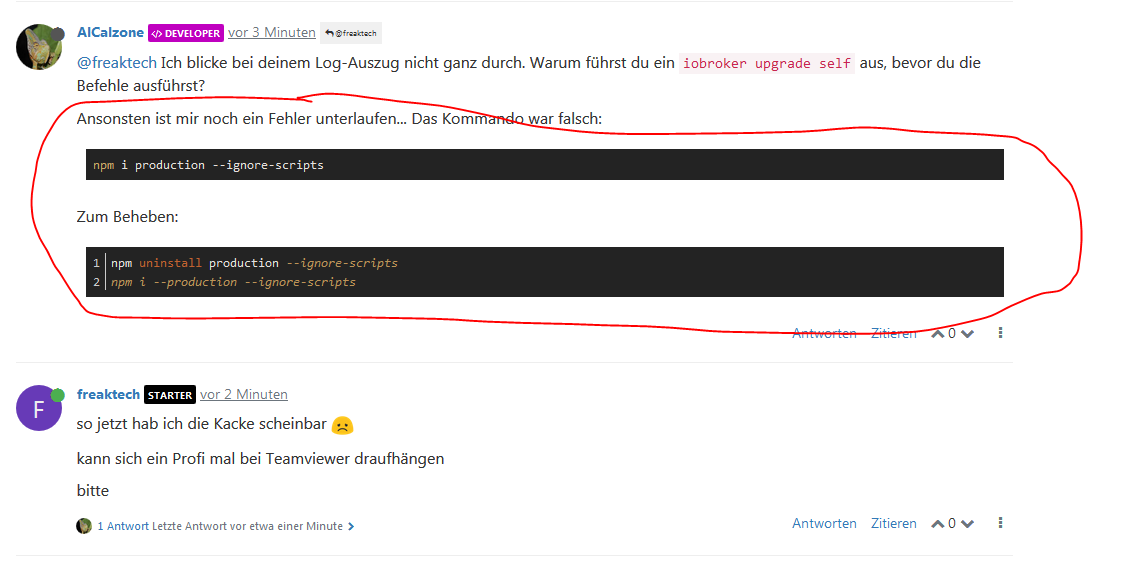
                            @freaktech Ich blicke bei deinem Log-Auszug nicht ganz durch. Warum führst du ein iobroker upgrade self aus, bevor du die Befehle ausführst?

                            Ansonsten ist mir noch ein Fehler unterlaufen... Das Kommando war falsch:

                            npm i production --ignore-scripts
                            

                            Zum Beheben:

                            cd /opt/iobroker
                            npm uninstall production --ignore-scripts
                            npm i --production --ignore-scripts
                            

                            Warum `sudo` böse ist: https://forum.iobroker.net/post/17109

                            1 Antwort Letzte Antwort
                            0
                            • F Offline
                              F Offline
                              freaktech
                              schrieb am zuletzt editiert von
                              #27

                              so jetzt hab ich die Kacke scheinbar :-(

                              kann sich ein Profi mal bei Teamviewer draufhängen

                              bitte

                              AlCalzoneA 1 Antwort Letzte Antwort
                              0
                              • F freaktech

                                so jetzt hab ich die Kacke scheinbar :-(

                                kann sich ein Profi mal bei Teamviewer draufhängen

                                bitte

                                AlCalzoneA Offline
                                AlCalzoneA Offline
                                AlCalzone
                                Developer
                                schrieb am zuletzt editiert von AlCalzone
                                #28

                                @freaktech Ich hab dir gerade geantwortet. Zumindest npm scheint ja wieder zu tun - d.h. ich bin guter Hoffnung, dass es jetzt weiter geht.

                                Ansonsten gehts ja sicher jederzeit zurück mit dem Backup, welches du vor der Holzhammermethode laut Anweisung erstellt hast?

                                2d36a0bb-1567-4b4b-b1c9-5dc0b1374f7b-grafik.png

                                Warum `sudo` böse ist: https://forum.iobroker.net/post/17109

                                1 Antwort Letzte Antwort
                                0
                                • F Offline
                                  F Offline
                                  freaktech
                                  schrieb am zuletzt editiert von
                                  #29

                                  ich kenn mich ja nicht aus

                                  hab gestern abend ein Backup uber backitup in die cloud gemacht

                                  nur keine Ahnung was nun

                                  AlCalzoneA 2 Antworten Letzte Antwort
                                  0
                                  • F freaktech

                                    ich kenn mich ja nicht aus

                                    hab gestern abend ein Backup uber backitup in die cloud gemacht

                                    nur keine Ahnung was nun

                                    AlCalzoneA Offline
                                    AlCalzoneA Offline
                                    AlCalzone
                                    Developer
                                    schrieb am zuletzt editiert von
                                    #30

                                    @freaktech sagte in PI4 Lässt JS Kontrolle nicht updaten:

                                    nur keine Ahnung was nun
                                    6dee47ff-b805-4954-b18a-b46b34cb1e57-grafik.png

                                    Bitte im Ordner /opt/iobroker

                                    Warum `sudo` böse ist: https://forum.iobroker.net/post/17109

                                    F 1 Antwort Letzte Antwort
                                    0
                                    • F freaktech

                                      ich kenn mich ja nicht aus

                                      hab gestern abend ein Backup uber backitup in die cloud gemacht

                                      nur keine Ahnung was nun

                                      AlCalzoneA Offline
                                      AlCalzoneA Offline
                                      AlCalzone
                                      Developer
                                      schrieb am zuletzt editiert von
                                      #31

                                      @freaktech sagte in PI4 Lässt JS Kontrolle nicht updaten:

                                      hab gestern abend ein Backup uber backitup in die cloud gemacht

                                      Für die Zukunft: Vorm Schrauben am Kern bzw. JS-Controller ein richtiges Backup machen - d.h. SD-Karte kopieren.
                                      Alles was du mit Backitup machst, hilft dir nicht viel, wenn ioBroker selbst nicht mehr läuft.

                                      Warum `sudo` böse ist: https://forum.iobroker.net/post/17109

                                      1 Antwort Letzte Antwort
                                      0
                                      • AlCalzoneA AlCalzone

                                        @freaktech sagte in PI4 Lässt JS Kontrolle nicht updaten:

                                        nur keine Ahnung was nun

                                        6dee47ff-b805-4954-b18a-b46b34cb1e57-grafik.png

                                        Bitte im Ordner /opt/iobroker

                                        F Offline
                                        F Offline
                                        freaktech
                                        schrieb am zuletzt editiert von
                                        #32

                                        @AlCalzone

                                        hab ich grad gemacht und nun?

                                        pi@iobrocker:/opt/iobroker $
                                        pi@iobrocker:/opt/iobroker $
                                        pi@iobrocker:/opt/iobroker $ npm i production --ignore-scripts
                                        npm WARN deprecated CSSselect@0.7.0: the module is now available as 'css-select'
                                        npm WARN deprecated CSSwhat@0.4.7: the module is now available as 'css-what'
                                        npm WARN optional SKIPPING OPTIONAL DEPENDENCY: osx-temperature-sensor@1.0.4 (node_modules/osx-temperature-sensor):
                                        npm WARN notsup SKIPPING OPTIONAL DEPENDENCY: Unsupported platform for osx-temperature-sensor@1.0.4: wanted {"os":"darwin","arch":"any"} (current: {"os":"linux","arch":"arm"})

                                        • production@0.0.2
                                          added 29 packages from 55 contributors and audited 1563 packages in 15.581s
                                          found 42 vulnerabilities (28 low, 3 moderate, 11 high)
                                          run npm audit fix to fix them, or npm audit for details
                                          pi@iobrocker:/opt/iobroker $ npm uninstall production --ignore-scripts
                                          npm WARN optional SKIPPING OPTIONAL DEPENDENCY: osx-temperature-sensor@1.0.4 (node_modules/osx-temperature-sensor):
                                          npm WARN notsup SKIPPING OPTIONAL DEPENDENCY: Unsupported platform for osx-temperature-sensor@1.0.4: wanted {"os":"darwin","arch":"any"} (current: {"os":"linux","arch":"arm"})

                                        removed 29 packages and audited 1529 packages in 12.734s
                                        found 39 vulnerabilities (28 low, 11 high)
                                        run npm audit fix to fix them, or npm audit for details
                                        pi@iobrocker:/opt/iobroker $ npm i --production --ignore-scripts
                                        npm WARN optional SKIPPING OPTIONAL DEPENDENCY: osx-temperature-sensor@1.0.4 (node_modules/osx-temperature-sensor):
                                        npm WARN notsup SKIPPING OPTIONAL DEPENDENCY: Unsupported platform for osx-temperature-sensor@1.0.4: wanted {"os":"darwin","arch":"any"} (current: {"os":"linux","arch":"arm"})

                                        up to date in 20.908s
                                        pi@iobrocker:/opt/iobroker $

                                        AlCalzoneA 1 Antwort Letzte Antwort
                                        0
                                        • F freaktech

                                          @AlCalzone

                                          hab ich grad gemacht und nun?

                                          pi@iobrocker:/opt/iobroker $
                                          pi@iobrocker:/opt/iobroker $
                                          pi@iobrocker:/opt/iobroker $ npm i production --ignore-scripts
                                          npm WARN deprecated CSSselect@0.7.0: the module is now available as 'css-select'
                                          npm WARN deprecated CSSwhat@0.4.7: the module is now available as 'css-what'
                                          npm WARN optional SKIPPING OPTIONAL DEPENDENCY: osx-temperature-sensor@1.0.4 (node_modules/osx-temperature-sensor):
                                          npm WARN notsup SKIPPING OPTIONAL DEPENDENCY: Unsupported platform for osx-temperature-sensor@1.0.4: wanted {"os":"darwin","arch":"any"} (current: {"os":"linux","arch":"arm"})

                                          • production@0.0.2
                                            added 29 packages from 55 contributors and audited 1563 packages in 15.581s
                                            found 42 vulnerabilities (28 low, 3 moderate, 11 high)
                                            run npm audit fix to fix them, or npm audit for details
                                            pi@iobrocker:/opt/iobroker $ npm uninstall production --ignore-scripts
                                            npm WARN optional SKIPPING OPTIONAL DEPENDENCY: osx-temperature-sensor@1.0.4 (node_modules/osx-temperature-sensor):
                                            npm WARN notsup SKIPPING OPTIONAL DEPENDENCY: Unsupported platform for osx-temperature-sensor@1.0.4: wanted {"os":"darwin","arch":"any"} (current: {"os":"linux","arch":"arm"})

                                          removed 29 packages and audited 1529 packages in 12.734s
                                          found 39 vulnerabilities (28 low, 11 high)
                                          run npm audit fix to fix them, or npm audit for details
                                          pi@iobrocker:/opt/iobroker $ npm i --production --ignore-scripts
                                          npm WARN optional SKIPPING OPTIONAL DEPENDENCY: osx-temperature-sensor@1.0.4 (node_modules/osx-temperature-sensor):
                                          npm WARN notsup SKIPPING OPTIONAL DEPENDENCY: Unsupported platform for osx-temperature-sensor@1.0.4: wanted {"os":"darwin","arch":"any"} (current: {"os":"linux","arch":"arm"})

                                          up to date in 20.908s
                                          pi@iobrocker:/opt/iobroker $

                                          AlCalzoneA Offline
                                          AlCalzoneA Offline
                                          AlCalzone
                                          Developer
                                          schrieb am zuletzt editiert von
                                          #33

                                          @freaktech Das sieht doch gut aus... Probier jetzt nochmal das iobroker upgrade self

                                          Warum `sudo` böse ist: https://forum.iobroker.net/post/17109

                                          1 Antwort Letzte Antwort
                                          0

                                          Hey! Du scheinst an dieser Unterhaltung interessiert zu sein, hast aber noch kein Konto.

                                          Hast du es satt, bei jedem Besuch durch die gleichen Beiträge zu scrollen? Wenn du dich für ein Konto anmeldest, kommst du immer genau dorthin zurück, wo du zuvor warst, und kannst dich über neue Antworten benachrichtigen lassen (entweder per E-Mail oder Push-Benachrichtigung). Du kannst auch Lesezeichen speichern und Beiträge positiv bewerten, um anderen Community-Mitgliedern deine Wertschätzung zu zeigen.

                                          Mit deinem Input könnte dieser Beitrag noch besser werden 💗

                                          Registrieren Anmelden
                                          Antworten
                                          • In einem neuen Thema antworten
                                          Anmelden zum Antworten
                                          • Älteste zuerst
                                          • Neuste zuerst
                                          • Meiste Stimmen


                                          Support us

                                          ioBroker
                                          Community Adapters
                                          Donate
                                          FAQ Cloud / IOT
                                          HowTo: Node.js-Update
                                          HowTo: Backup/Restore
                                          Downloads
                                          BLOG

                                          516

                                          Online

                                          32.9k

                                          Benutzer

                                          83.0k

                                          Themen

                                          1.3m

                                          Beiträge
                                          Community
                                          Impressum | Datenschutz-Bestimmungen | Nutzungsbedingungen | Einwilligungseinstellungen
                                          ioBroker Community 2014-2025
                                          logo
                                          • Anmelden

                                          • Du hast noch kein Konto? Registrieren

                                          • Anmelden oder registrieren, um zu suchen
                                          • Erster Beitrag
                                            Letzter Beitrag
                                          0
                                          • Home
                                          • Aktuell
                                          • Tags
                                          • Ungelesen 0
                                          • Kategorien
                                          • Unreplied
                                          • Beliebt
                                          • GitHub
                                          • Docu
                                          • Hilfe