



Skip to content
  • Home
  • Aktuell
  • Tags
  • 0 Ungelesen 0
  • Kategorien
  • Unreplied
  • Beliebt
  • GitHub
  • Docu
  • Hilfe
Skins
  • Light
  • Brite
  • Cerulean
  • Cosmo
  • Flatly
  • Journal
  • Litera
  • Lumen
  • Lux
  • Materia
  • Minty
  • Morph
  • Pulse
  • Sandstone
  • Simplex
  • Sketchy
  • Spacelab
  • United
  • Yeti
  • Zephyr
  • Dark
  • Cyborg
  • Darkly
  • Quartz
  • Slate
  • Solar
  • Superhero
  • Vapor

  • Standard: (Kein Skin)
  • Kein Skin
Einklappen
ioBroker Logo

Community Forum

donate donate
  1. ioBroker Community Home
  2. Deutsch
  3. ioBroker Allgemein
  4. Kein TTY vorhanden und kein »askpass«-

NEWS

  • Jahresrückblick 2025 – unser neuer Blogbeitrag ist online! ✨
    BluefoxB
    Bluefox
    17
    1
    3.5k

  • Neuer Blogbeitrag: Monatsrückblick - Dezember 2025 🎄
    BluefoxB
    Bluefox
    13
    1
    1.1k

  • Weihnachtsangebot 2025! 🎄
    BluefoxB
    Bluefox
    25
    1
    2.5k

Kein TTY vorhanden und kein »askpass«-

Geplant Angeheftet Gesperrt Verschoben ioBroker Allgemein
kein ttyraspi setup
21 Beiträge 4 Kommentatoren 2.3k Aufrufe 4 Watching
  • Älteste zuerst
  • Neuste zuerst
  • Meiste Stimmen
Antworten
  • In einem neuen Thema antworten
Anmelden zum Antworten
Dieses Thema wurde gelöscht. Nur Nutzer mit entsprechenden Rechten können es sehen.
  • NegaleinN Negalein

    @Stabilostick sagte in [erledigt] Kein TTY vorhanden und kein »askpass«-:

    Funktioniert

    Ich glaub jetzt geht nichts mehr!

    Nachdem ich die ganze Konfig durchgemacht hatte, hat er rebootet.
    Multihost hat auch funktioniert.
    Raspi ist der Slave.

    Jetzt komm ich über 10.0.1.93:8081 nicht mehr auf den Raspi.

    pi@ioBroker-RasPi4:/opt/iobroker $ iobroker start admin
    events.js:174
          throw er; // Unhandled 'error' event
          ^
    
    Error: listen EADDRNOTAVAIL: address not available 10.0.1.200:9001
        at Server.setupListenHandle [as _listen2] (net.js:1262:19)
        at listenInCluster (net.js:1327:12)
        at doListen (net.js:1460:7)
        at process._tickCallback (internal/process/next_tick.js:63:19)
    Emitted 'error' event at:
        at emitErrorNT (net.js:1306:8)
        at process._tickCallback (internal/process/next_tick.js:63:19)
    pi@ioBroker-RasPi4:/opt/iobroker $
    

    10.0.1.200 ist der Master
    was ist Port 9001?

    Am Master wird mir bei Host kein Slave angezeigt.

    StabilostickS Offline
    StabilostickS Offline
    Stabilostick
    schrieb am zuletzt editiert von Stabilostick
    #7

    @Negalein

    unter Port 9001 läuft eine der beiden ioBroker-DBs auf dem Master sofern Du nicht redis verwendest. Der Slave verwendet die DBs des Masters. Deswegen der connect.

    NegaleinN 1 Antwort Letzte Antwort
    0
    • sigi234S sigi234

      @Negalein

      Was kommt bei:

      cd /opt/iobroker
      iobroker list instances
      node -v
      nodejs -v
      npm -v

      NegaleinN Offline
      NegaleinN Offline
      Negalein
      Global Moderator
      schrieb am zuletzt editiert von
      #8

      @sigi234 sagte in Kein TTY vorhanden und kein »askpass«-:

      @Negalein

      Was kommt bei:

      cd /opt/iobroker
      iobroker list instances

      pi@ioBroker-RasPi4:~ $ cd /opt/iobroker
      pi@ioBroker-RasPi4:/opt/iobroker $ iobroker list instances
      events.js:174
            throw er; // Unhandled 'error' event
            ^
      
      Error: listen EADDRNOTAVAIL: address not available 10.0.1.200:9001
          at Server.setupListenHandle [as _listen2] (net.js:1262:19)
          at listenInCluster (net.js:1327:12)
          at doListen (net.js:1460:7)
          at process._tickCallback (internal/process/next_tick.js:63:19)
      Emitted 'error' event at:
          at emitErrorNT (net.js:1306:8)
          at process._tickCallback (internal/process/next_tick.js:63:19)
      

      node -v
      nodejs -v
      npm -v

      pi@ioBroker-RasPi4:/opt/iobroker $ node -v
      v10.16.3
      pi@ioBroker-RasPi4:/opt/iobroker $ nodejs -v
      v10.16.3
      pi@ioBroker-RasPi4:/opt/iobroker $ npm -v
      6.9.0


      ° Node.js & System Update ---> sudo apt update, iob stop, sudo apt full-upgrade
      ° Node.js Fixer ---> iob nodejs-update
      ° Fixer ---> iob fix

      sigi234S 1 Antwort Letzte Antwort
      0
      • NegaleinN Negalein

        @sigi234 sagte in Kein TTY vorhanden und kein »askpass«-:

        @Negalein

        Was kommt bei:

        cd /opt/iobroker
        iobroker list instances

        pi@ioBroker-RasPi4:~ $ cd /opt/iobroker
        pi@ioBroker-RasPi4:/opt/iobroker $ iobroker list instances
        events.js:174
              throw er; // Unhandled 'error' event
              ^
        
        Error: listen EADDRNOTAVAIL: address not available 10.0.1.200:9001
            at Server.setupListenHandle [as _listen2] (net.js:1262:19)
            at listenInCluster (net.js:1327:12)
            at doListen (net.js:1460:7)
            at process._tickCallback (internal/process/next_tick.js:63:19)
        Emitted 'error' event at:
            at emitErrorNT (net.js:1306:8)
            at process._tickCallback (internal/process/next_tick.js:63:19)
        

        node -v
        nodejs -v
        npm -v

        pi@ioBroker-RasPi4:/opt/iobroker $ node -v
        v10.16.3
        pi@ioBroker-RasPi4:/opt/iobroker $ nodejs -v
        v10.16.3
        pi@ioBroker-RasPi4:/opt/iobroker $ npm -v
        6.9.0
        
        
        sigi234S Online
        sigi234S Online
        sigi234
        Forum Testing Most Active
        schrieb am zuletzt editiert von
        #9

        @Negalein

        netstat -n -a -p TCP

        Bitte benutzt das Voting rechts unten im Beitrag wenn er euch geholfen hat.
        Immer Daten sichern!

        NegaleinN 1 Antwort Letzte Antwort
        0
        • StabilostickS Stabilostick

          @Negalein

          unter Port 9001 läuft eine der beiden ioBroker-DBs auf dem Master sofern Du nicht redis verwendest. Der Slave verwendet die DBs des Masters. Deswegen der connect.

          NegaleinN Offline
          NegaleinN Offline
          Negalein
          Global Moderator
          schrieb am zuletzt editiert von
          #10

          @Stabilostick sagte in Kein TTY vorhanden und kein »askpass«-:

          @Negalein

          unter Port 9001 läuft eine der beiden ioBroker-DBs auf dem Master sofern Du nicht redis verwendest. Der Slave verwendet die DBs des Masters. Deswegen der connect.

          Nein, kein Redis (wenn das was mit CCU zu tun hat).

          Aber warum kommt dann ein address not available?

          Auf den iobroker unter 10.0.1.200:8081 komm ich ganz normal rauf.

          ° Node.js & System Update ---> sudo apt update, iob stop, sudo apt full-upgrade
          ° Node.js Fixer ---> iob nodejs-update
          ° Fixer ---> iob fix

          StabilostickS 1 Antwort Letzte Antwort
          0
          • sigi234S sigi234

            @Negalein

            netstat -n -a -p TCP

            NegaleinN Offline
            NegaleinN Offline
            Negalein
            Global Moderator
            schrieb am zuletzt editiert von
            #11

            @sigi234 sagte in Kein TTY vorhanden und kein »askpass«-:

            @Negalein

            netstat -n -a -p TCP

            pi@ioBroker-RasPi4:/opt/iobroker $ netstat -n -a -p TCP
            (Es konnten nicht alle Prozesse identifiziert werden; Informationen über
            nicht-eigene Processe werden nicht angezeigt; Root kann sie anzeigen.)
            Aktive Internetverbindungen (Server und stehende Verbindungen)
            Proto Recv-Q Send-Q Local Address           Foreign Address         State       PID/Program name
            tcp        0      0 0.0.0.0:22              0.0.0.0:*               LISTEN      -
            tcp        0    272 10.0.1.93:22            10.0.1.31:58704         VERBUNDEN   -
            tcp6       0      0 :::22                   :::*                    LISTEN      -
            udp        0      0 0.0.0.0:5353            0.0.0.0:*                           -
            udp        0      0 0.0.0.0:68              0.0.0.0:*                           -
            udp        0      0 0.0.0.0:41143           0.0.0.0:*                           -
            udp6       0      0 :::5353                 :::*                                -
            udp6       0      0 :::57788                :::*                                -
            raw6       0      0 :::58                   :::*                    7           -
            Aktive Sockets in der UNIX-Domäne (Server und stehende Verbindungen)
            Proto RefCnt Flags       Type       State         I-Node   PID/Program name     Pfad
            unix  2      [ ACC ]     STREAM     HÖRT         9234     -                    /run/systemd/fsck.progress
            unix  2      [ ACC ]     SEQPAKET   HÖRT         9240     -                    /run/udev/control
            unix  2      [ ]         DGRAM                    26195    4778/systemd         /run/user/1000/systemd/notify
            unix  2      [ ACC ]     STREAM     HÖRT         26199    4778/systemd         /run/user/1000/systemd/private
            unix  2      [ ACC ]     STREAM     HÖRT         26205    4778/systemd         /run/user/1000/gnupg/S.gpg-agent
            unix  2      [ ACC ]     STREAM     HÖRT         26209    4778/systemd         /run/user/1000/gnupg/S.dirmngr
            unix  2      [ ACC ]     STREAM     HÖRT         26211    4778/systemd         /run/user/1000/gnupg/S.gpg-agent.extra
            unix  2      [ ACC ]     STREAM     HÖRT         26214    4778/systemd         /run/user/1000/gnupg/S.gpg-agent.browser
            unix  2      [ ACC ]     STREAM     HÖRT         26216    4778/systemd         /run/user/1000/gnupg/S.gpg-agent.ssh
            unix  2      [ ]         DGRAM                    13685    -                    /var/run/wpa_supplicant/p2p-dev-wlan0
            unix  2      [ ACC ]     STREAM     HÖRT         12417    -                    /var/run/dhcpcd.sock
            unix  2      [ ACC ]     STREAM     HÖRT         12419    -                    /var/run/dhcpcd.unpriv.sock
            unix  3      [ ]         DGRAM                    7575     -                    /run/systemd/notify
            unix  2      [ ]         DGRAM                    12697    -                    /var/run/wpa_supplicant/wlan0
            unix  2      [ ACC ]     STREAM     HÖRT         7579     -                    /run/systemd/private
            unix  2      [ ]         DGRAM                    7595     -                    /run/systemd/journal/syslog
            unix  13     [ ]         DGRAM                    7599     -                    /run/systemd/journal/dev-log
            unix  2      [ ACC ]     STREAM     HÖRT         7603     -                    /run/systemd/journal/stdout
            unix  7      [ ]         DGRAM                    7606     -                    /run/systemd/journal/socket
            unix  2      [ ACC ]     STREAM     HÖRT         12018    -                    /var/run/dbus/system_bus_socket
            unix  2      [ ACC ]     STREAM     HÖRT         12023    -                    /run/thd.socket
            unix  2      [ ACC ]     STREAM     HÖRT         12026    -                    /run/avahi-daemon/socket
            unix  3      [ ]         STREAM     VERBUNDEN     11957    -
            unix  2      [ ]         DGRAM                    7809     -
            unix  3      [ ]         STREAM     VERBUNDEN     14397    -                    /var/run/dbus/system_bus_socket
            unix  3      [ ]         STREAM     VERBUNDEN     17300    -                    /run/systemd/journal/stdout
            unix  3      [ ]         STREAM     VERBUNDEN     6721     -                    /run/systemd/journal/stdout
            unix  3      [ ]         STREAM     VERBUNDEN     15771    -                    /run/systemd/journal/stdout
            unix  3      [ ]         STREAM     VERBUNDEN     8006     -
            unix  3      [ ]         STREAM     VERBUNDEN     12899    -
            unix  2      [ ]         DGRAM                    14391    -
            unix  3      [ ]         STREAM     VERBUNDEN     14396    -
            unix  3      [ ]         STREAM     VERBUNDEN     9146     -
            unix  3      [ ]         STREAM     VERBUNDEN     12481    -                    /var/run/dbus/system_bus_socket
            unix  3      [ ]         STREAM     VERBUNDEN     12480    -                    /var/run/dbus/system_bus_socket
            unix  3      [ ]         DGRAM                    7578     -
            unix  3      [ ]         DGRAM                    7577     -
            unix  2      [ ]         DGRAM                    12448    -
            unix  3      [ ]         STREAM     VERBUNDEN     9138     -
            unix  3      [ ]         STREAM     VERBUNDEN     12457    -
            unix  2      [ ]         DGRAM                    9135     -
            unix  3      [ ]         STREAM     VERBUNDEN     9137     -
            unix  2      [ ]         DGRAM                    9115     -
            unix  3      [ ]         STREAM     VERBUNDEN     12477    -
            unix  3      [ ]         STREAM     VERBUNDEN     12476    -
            unix  2      [ ]         DGRAM                    12734    -
            unix  3      [ ]         STREAM     VERBUNDEN     10059    -                    /run/systemd/journal/stdout
            unix  2      [ ]         DGRAM                    7163     -
            unix  3      [ ]         DGRAM                    8013     -
            unix  2      [ ]         DGRAM                    8010     -
            unix  3      [ ]         DGRAM                    8014     -
            unix  3      [ ]         STREAM     VERBUNDEN     25194    -                    /var/run/dbus/system_bus_socket
            unix  3      [ ]         STREAM     VERBUNDEN     26201    4778/systemd
            unix  3      [ ]         DGRAM                    26198    4778/systemd
            unix  3      [ ]         DGRAM                    26197    4778/systemd
            unix  2      [ ]         DGRAM                    26183    4778/systemd
            unix  2      [ ]         DGRAM                    26180    -
            unix  3      [ ]         STREAM     VERBUNDEN     24425    -                    /run/systemd/journal/stdout
            unix  2      [ ]         DGRAM                    12063    -
            unix  3      [ ]         DGRAM                    12011    -
            unix  2      [ ]         DGRAM                    12007    -
            unix  3      [ ]         DGRAM                    12010    -
            unix  3      [ ]         DGRAM                    12013    -
            unix  3      [ ]         DGRAM                    12012    -
            unix  2      [ ]         DGRAM                    12090    -
            unix  3      [ ]         STREAM     VERBUNDEN     10145    -                    /run/systemd/journal/stdout
            unix  3      [ ]         STREAM     VERBUNDEN     20089    -
            unix  3      [ ]         STREAM     VERBUNDEN     10144    -
            unix  3      [ ]         STREAM     VERBUNDEN     9002     -
            unix  3      [ ]         STREAM     VERBUNDEN     13481    -                    /run/systemd/journal/stdout
            unix  3      [ ]         STREAM     VERBUNDEN     13424    -                    /run/systemd/journal/stdout
            unix  2      [ ]         DGRAM                    6629     -
            unix  3      [ ]         STREAM     VERBUNDEN     12347    -
            unix  3      [ ]         STREAM     VERBUNDEN     8791     -                    /run/systemd/journal/stdout
            unix  3      [ ]         STREAM     VERBUNDEN     7107     -
            unix  3      [ ]         STREAM     VERBUNDEN     12478    -                    /var/run/dbus/system_bus_socket
            unix  3      [ ]         STREAM     VERBUNDEN     12404    -
            unix  3      [ ]         STREAM     VERBUNDEN     13482    -                    /run/systemd/journal/stdout
            unix  2      [ ]         DGRAM                    12446    -
            unix  2      [ ]         DGRAM                    26112    -
            unix  3      [ ]         STREAM     VERBUNDEN     13546    -
            unix  3      [ ]         STREAM     VERBUNDEN     26222    -
            unix  3      [ ]         STREAM     VERBUNDEN     12073    -                    /run/systemd/journal/stdout
            unix  3      [ ]         STREAM     VERBUNDEN     26223    -
            unix  3      [ ]         STREAM     VERBUNDEN     26176    4778/systemd
            unix  3      [ ]         STREAM     VERBUNDEN     12482    -                    /var/run/dbus/system_bus_socket
            unix  3      [ ]         STREAM     VERBUNDEN     12043    -
            unix  3      [ ]         STREAM     VERBUNDEN     8950     -
            unix  3      [ ]         STREAM     VERBUNDEN     12479    -                    /var/run/dbus/system_bus_socket
            unix  3      [ ]         STREAM     VERBUNDEN     8899     -
            unix  3      [ ]         STREAM     VERBUNDEN     9158     -
            unix  2      [ ]         DGRAM                    9151     -
            unix  3      [ ]         STREAM     VERBUNDEN     12691    -
            unix  3      [ ]         STREAM     VERBUNDEN     13422    -                    /run/systemd/journal/stdout
            unix  2      [ ]         STREAM     VERBUNDEN     26105    -
            unix  3      [ ]         STREAM     VERBUNDEN     14373    -                    /run/systemd/journal/stdout


            ° Node.js & System Update ---> sudo apt update, iob stop, sudo apt full-upgrade
            ° Node.js Fixer ---> iob nodejs-update
            ° Fixer ---> iob fix

            1 Antwort Letzte Antwort
            0
            • NegaleinN Negalein

              @Stabilostick sagte in Kein TTY vorhanden und kein »askpass«-:

              @Negalein

              unter Port 9001 läuft eine der beiden ioBroker-DBs auf dem Master sofern Du nicht redis verwendest. Der Slave verwendet die DBs des Masters. Deswegen der connect.

              Nein, kein Redis (wenn das was mit CCU zu tun hat).

              Aber warum kommt dann ein address not available?

              Auf den iobroker unter 10.0.1.200:8081 komm ich ganz normal rauf.

              StabilostickS Offline
              StabilostickS Offline
              Stabilostick
              schrieb am zuletzt editiert von
              #12

              @Negalein

              telnet  10.0.1.200 9001
              

              Wird der Bildschirm schwarz -> ok
              sonst -> Port nicht offen

              NegaleinN 2 Antworten Letzte Antwort
              0
              • StabilostickS Stabilostick

                @Negalein

                telnet  10.0.1.200 9001
                

                Wird der Bildschirm schwarz -> ok
                sonst -> Port nicht offen

                NegaleinN Offline
                NegaleinN Offline
                Negalein
                Global Moderator
                schrieb am zuletzt editiert von
                #13

                @Stabilostick sagte in Kein TTY vorhanden und kein »askpass«-:

                @Negalein

                telnet  10.0.1.200 9001
                

                in Putty?

                ° Node.js & System Update ---> sudo apt update, iob stop, sudo apt full-upgrade
                ° Node.js Fixer ---> iob nodejs-update
                ° Fixer ---> iob fix

                StabilostickS 1 Antwort Letzte Antwort
                0
                • NegaleinN Negalein

                  @Stabilostick sagte in Kein TTY vorhanden und kein »askpass«-:

                  @Negalein

                  telnet  10.0.1.200 9001
                  

                  in Putty?

                  StabilostickS Offline
                  StabilostickS Offline
                  Stabilostick
                  schrieb am zuletzt editiert von
                  #14

                  @Negalein

                  Ja. oder vom Windows aus.

                  NegaleinN 1 Antwort Letzte Antwort
                  0
                  • StabilostickS Stabilostick

                    @Negalein

                    Ja. oder vom Windows aus.

                    NegaleinN Offline
                    NegaleinN Offline
                    Negalein
                    Global Moderator
                    schrieb am zuletzt editiert von
                    #15

                    @Stabilostick sagte in Kein TTY vorhanden und kein »askpass«-:

                    @Negalein

                    Ja. oder vom Windows aus.

                    pi@ioBroker-RasPi4:/opt/iobroker $ telnet 10.0.1.200 9001
                    -bash: telnet: Kommando nicht gefunden.
                    

                    ° Node.js & System Update ---> sudo apt update, iob stop, sudo apt full-upgrade
                    ° Node.js Fixer ---> iob nodejs-update
                    ° Fixer ---> iob fix

                    StabilostickS 1 Antwort Letzte Antwort
                    0
                    • NegaleinN Negalein

                      @Stabilostick sagte in Kein TTY vorhanden und kein »askpass«-:

                      @Negalein

                      Ja. oder vom Windows aus.

                      pi@ioBroker-RasPi4:/opt/iobroker $ telnet 10.0.1.200 9001
                      -bash: telnet: Kommando nicht gefunden.
                      
                      StabilostickS Offline
                      StabilostickS Offline
                      Stabilostick
                      schrieb am zuletzt editiert von Stabilostick
                      #16

                      @Negalein

                      :sunglasses:

                      sudo apt-get i telnet
                      

                      Mach auch mal das netstat-Kommando auf dem Master.

                      NegaleinN 1 Antwort Letzte Antwort
                      0
                      • StabilostickS Stabilostick

                        @Negalein

                        :sunglasses:

                        sudo apt-get i telnet
                        

                        Mach auch mal das netstat-Kommando auf dem Master.

                        NegaleinN Offline
                        NegaleinN Offline
                        Negalein
                        Global Moderator
                        schrieb am zuletzt editiert von
                        #17

                        @Stabilostick sagte in Kein TTY vorhanden und kein »askpass«-:

                        @Negalein
                        telnet 10.0.1.200 9001

                        pi@ioBroker-RasPi4:/opt/iobroker $ telnet 10.0.1.200 9001
                        Trying 10.0.1.200...
                        telnet: Unable to connect to remote host: Connection refused
                        

                        Mach auch mal das netstat-Kommando auf dem Master.

                        root@iobroker:/opt/iobroker# netstat -n -a -p TCP
                        bash: netstat: Kommando nicht gefunden.
                        

                        ° Node.js & System Update ---> sudo apt update, iob stop, sudo apt full-upgrade
                        ° Node.js Fixer ---> iob nodejs-update
                        ° Fixer ---> iob fix

                        1 Antwort Letzte Antwort
                        0
                        • StabilostickS Stabilostick

                          @Negalein

                          telnet  10.0.1.200 9001
                          

                          Wird der Bildschirm schwarz -> ok
                          sonst -> Port nicht offen

                          NegaleinN Offline
                          NegaleinN Offline
                          Negalein
                          Global Moderator
                          schrieb am zuletzt editiert von
                          #18

                          @Stabilostick sagte in Kein TTY vorhanden und kein »askpass«-:

                          @Negalein

                          telnet  10.0.1.200 9001
                          

                          Es scheint jetzt zu funktionieren.

                          pi@ioBroker-RasPi4:~ $ telnet 10.0.1.200 9001
                          Trying 10.0.1.200...
                          Connected to 10.0.1.200.
                          Escape character is '^]'.
                          Connection closed by foreign host.
                          

                          Am Master scheint jetzt auch der Slave auf.
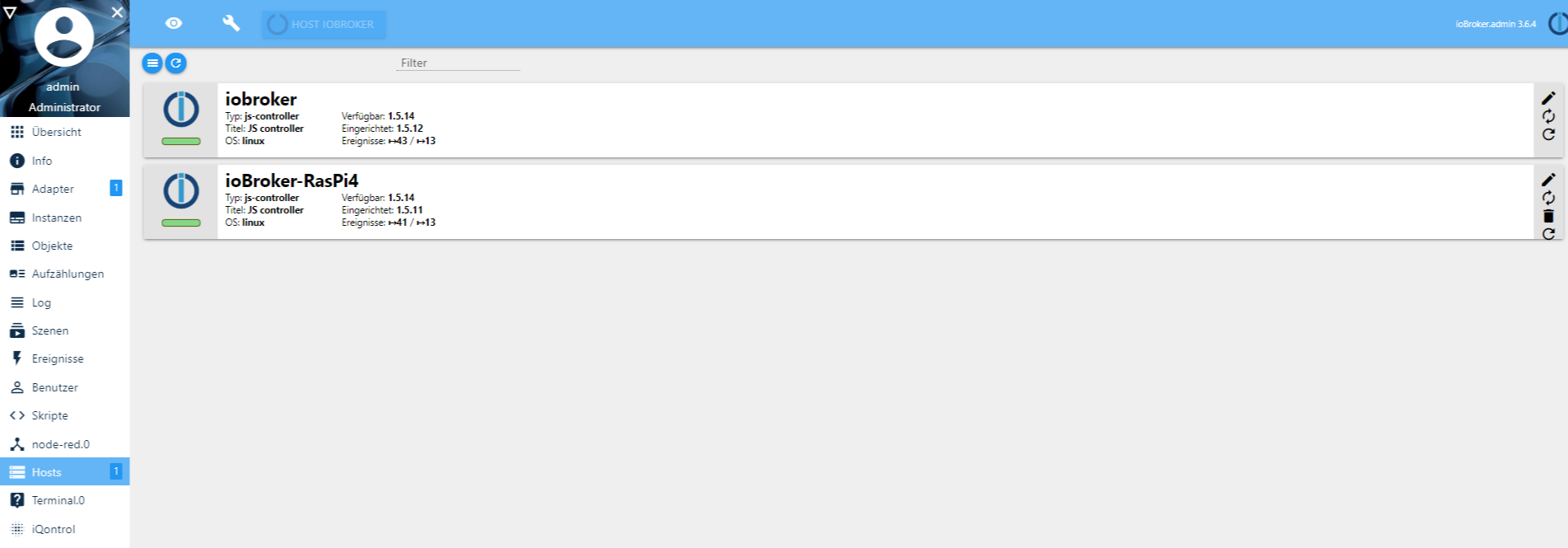
                          hosts - ioBroker.png

                          Konfiguriere ich jetzt den Slave nur über den Master?
                          Mit SlaveIP:8081 komm ich nicht auf den Slave um zB den Lesekopf für den Stromzähler zu installieren.
                          Adapter für den Slave werden übern Master installiert ?

                          ° Node.js & System Update ---> sudo apt update, iob stop, sudo apt full-upgrade
                          ° Node.js Fixer ---> iob nodejs-update
                          ° Fixer ---> iob fix

                          AsgothianA StabilostickS 2 Antworten Letzte Antwort
                          0
                          • NegaleinN Negalein

                            @Stabilostick sagte in Kein TTY vorhanden und kein »askpass«-:

                            @Negalein

                            telnet  10.0.1.200 9001
                            

                            Es scheint jetzt zu funktionieren.

                            pi@ioBroker-RasPi4:~ $ telnet 10.0.1.200 9001
                            Trying 10.0.1.200...
                            Connected to 10.0.1.200.
                            Escape character is '^]'.
                            Connection closed by foreign host.
                            

                            Am Master scheint jetzt auch der Slave auf.
                            hosts - ioBroker.png

                            Konfiguriere ich jetzt den Slave nur über den Master?
                            Mit SlaveIP:8081 komm ich nicht auf den Slave um zB den Lesekopf für den Stromzähler zu installieren.
                            Adapter für den Slave werden übern Master installiert ?

                            AsgothianA Offline
                            AsgothianA Offline
                            Asgothian
                            Developer
                            schrieb am zuletzt editiert von
                            #19

                            @Negalein sagte in Kein TTY vorhanden und kein »askpass«-:

                            Konfiguriere ich jetzt den Slave nur über den Master?
                            Mit SlaveIP:8081 komm ich nicht auf den Slave um zB den Lesekopf für den Stromzähler zu installieren.
                            Adapter für den Slave werden übern Master installiert ?

                            Ja.

                            ioBroker auf RPi4 - Hardware soweit wie möglich via Zigbee.
                            "Shit don't work" ist keine Fehlermeldung, sondern ein Fluch.

                            1 Antwort Letzte Antwort
                            0
                            • NegaleinN Negalein

                              @Stabilostick sagte in Kein TTY vorhanden und kein »askpass«-:

                              @Negalein

                              telnet  10.0.1.200 9001
                              

                              Es scheint jetzt zu funktionieren.

                              pi@ioBroker-RasPi4:~ $ telnet 10.0.1.200 9001
                              Trying 10.0.1.200...
                              Connected to 10.0.1.200.
                              Escape character is '^]'.
                              Connection closed by foreign host.
                              

                              Am Master scheint jetzt auch der Slave auf.
                              hosts - ioBroker.png

                              Konfiguriere ich jetzt den Slave nur über den Master?
                              Mit SlaveIP:8081 komm ich nicht auf den Slave um zB den Lesekopf für den Stromzähler zu installieren.
                              Adapter für den Slave werden übern Master installiert ?

                              StabilostickS Offline
                              StabilostickS Offline
                              Stabilostick
                              schrieb am zuletzt editiert von Stabilostick
                              #20

                              @Negalein

                              1. Für die anderen Mitleser: was hast Du denn jetzt gemacht, damit Multihost geht? Bzw. wo lag das Problem?

                              2. Ist das mit dem sudo im ioBroker-Terminal Adapter bei jedem so? Ist das was für ein GitHub-Issue?

                              NegaleinN 1 Antwort Letzte Antwort
                              0
                              • StabilostickS Stabilostick

                                @Negalein

                                1. Für die anderen Mitleser: was hast Du denn jetzt gemacht, damit Multihost geht? Bzw. wo lag das Problem?

                                2. Ist das mit dem sudo im ioBroker-Terminal Adapter bei jedem so? Ist das was für ein GitHub-Issue?

                                NegaleinN Offline
                                NegaleinN Offline
                                Negalein
                                Global Moderator
                                schrieb am zuletzt editiert von
                                #21

                                @Stabilostick sagte in Kein TTY vorhanden und kein »askpass«-:

                                @Negalein

                                1. So für die anderen Mitleser: was hast Du denn jetzt gemacht, damit Multihost geht? Bzw. wo lag das Problem?

                                Der Port 9001 war auf der Synology nicht freigegeben.

                                ° Node.js & System Update ---> sudo apt update, iob stop, sudo apt full-upgrade
                                ° Node.js Fixer ---> iob nodejs-update
                                ° Fixer ---> iob fix

                                1 Antwort Letzte Antwort
                                0
                                Antworten
                                • In einem neuen Thema antworten
                                Anmelden zum Antworten
                                • Älteste zuerst
                                • Neuste zuerst
                                • Meiste Stimmen


                                Support us

                                ioBroker
                                Community Adapters
                                Donate
                                FAQ Cloud / IOT
                                HowTo: Node.js-Update
                                HowTo: Backup/Restore
                                Downloads
                                BLOG

                                326

                                Online

                                32.7k

                                Benutzer

                                82.4k

                                Themen

                                1.3m

                                Beiträge
                                Community
                                Impressum | Datenschutz-Bestimmungen | Nutzungsbedingungen | Einwilligungseinstellungen
                                ioBroker Community 2014-2025
                                logo
                                • Anmelden

                                • Du hast noch kein Konto? Registrieren

                                • Anmelden oder registrieren, um zu suchen
                                • Erster Beitrag
                                  Letzter Beitrag
                                0
                                • Home
                                • Aktuell
                                • Tags
                                • Ungelesen 0
                                • Kategorien
                                • Unreplied
                                • Beliebt
                                • GitHub
                                • Docu
                                • Hilfe



