




Zigbee Adapter startet nicht? Kann jemand helfen?


-
Ich habe noch folgenden LOG der mich zum verzweifeln bringt:
- host.raspberrypi 2019-01-19 14:33:05.236 error instance system.adapter.zigbee.0 terminated with code 1 ()
host.raspberrypi 2019-01-19 14:33:05.236 error Caught by controller[0]: at Function.Module._load (module.js:498:3) host.raspberrypi 2019-01-19 14:33:05.236 error Caught by controller[0]: at tryModuleLoad (module.js:506:12) host.raspberrypi 2019-01-19 14:33:05.236 error Caught by controller[0]: at Module.load (module.js:566:32) host.raspberrypi 2019-01-19 14:33:05.236 error Caught by controller[0]: at Object.Module._extensions..js (module.js:664:10) host.raspberrypi 2019-01-19 14:33:05.235 error Caught by controller[0]: at Module._compile (module.js:653:30) host.raspberrypi 2019-01-19 14:33:05.235 error Caught by controller[0]: at Object. <anonymous>(/opt/iobroker/node_modules/zigbee-shepherd/lib/shepherd.js:9:9) host.raspberrypi 2019-01-19 14:33:05.235 error Caught by controller[0]: at require (internal/module.js:11:18) host.raspberrypi 2019-01-19 14:33:05.235 error Caught by controller[0]: at Module.require (module.js:597:17) host.raspberrypi 2019-01-19 14:33:05.235 error Caught by controller[0]: at Function.Module._load (module.js:475:25) host.raspberrypi 2019-01-19 14:33:05.235 error Caught by controller[0]: at Function.Module._resolveFilename (module.js:548:15) host.raspberrypi 2019-01-19 14:33:05.235 error Caught by controller[0]: Error: Cannot find module 'busyman' host.raspberrypi 2019-01-19 14:33:05.235 error Caught by controller[0]: ^ host.raspberrypi 2019-01-19 14:33:05.235 error Caught by controller[0]: throw err; host.raspberrypi 2019-01-19 14:33:05.234 error Caught by controller[0]: module.js:550 host.raspberrypi 2019-01-19 14:33:04.748 info instance system.adapter.zigbee.0 started with pid 1612 host.raspberrypi 2019-01-19 14:32:34.725 info Restart adapter system.adapter.zigbee.0 because enabled</anonymous> -
Hallo Helfende,
meine Konfiguration lautet:
node -v: 8.15.0
nodejs -v: 8.15.0
npm -v: 6.7.0
irgendwie will mein zwave Adapter nicht grün werden. Er lief ein parr Tage und nun nicht mehr. folgende Fehlermeldung gibt er aus.
host.zbox-debian 2019-01-25 15:06:29.998 info instance system.adapter.zwave.0 started with pid 6022
host.zbox-debian 2019-01-25 15:05:59.991 info Restart adapter system.adapter.zwave.0 because enabled
host.zbox-debian 2019-01-25 15:05:59.991 error instance system.adapter.zwave.0 terminated with code 0 (OK)
host.zbox-debian 2019-01-25 15:05:59.991 error Caught by controller[0]: at Module.load (module.js:566:32)
host.zbox-debian 2019-01-25 15:05:59.991 error Caught by controller[0]: at Object.Module._extensions..js (module.js:664:10)
host.zbox-debian 2019-01-25 15:05:59.991 error Caught by controller[0]: at Module._compile (module.js:653:30)
host.zbox-debian 2019-01-25 15:05:59.991 error Caught by controller[0]: at Object. <anonymous>(/opt/iobroker/node_modules/openzwave-shared/lib/openzwave-shared.js:24:22)
host.zbox-debian 2019-01-25 15:05:59.991 error Caught by controller[0]: at require (internal/module.js:11:18)
host.zbox-debian 2019-01-25 15:05:59.991 error Caught by controller[0]: at Module.require (module.js:597:17)
host.zbox-debian 2019-01-25 15:05:59.991 error Caught by controller[0]: at Function.Module._load (module.js:498:3)
host.zbox-debian 2019-01-25 15:05:59.991 error Caught by controller[0]: at tryModuleLoad (module.js:506:12)
host.zbox-debian 2019-01-25 15:05:59.991 error Caught by controller[0]: at Module.load (module.js:566:32)
host.zbox-debian 2019-01-25 15:05:59.991 error Caught by controller[0]: at Object.Module._extensions..node (module.js:682:18)
host.zbox-debian 2019-01-25 15:05:59.991 error Caught by controller[0]: Error: libopenzwave.so.1.4: cannot open shared object file: No such file or directory
zwave.0 2019-01-25 15:05:59.984 error Error: libopenzwave.so.1.4: cannot open shared object file: No such file or directory at Object.Module._extensions..node (module.js:682:18) at Module.load (module.js:566:32) at tryModuleLo
zwave.0 2019-01-25 15:05:59.984 error uncaught exception: libopenzwave.so.1.4: cannot open shared object file: No such file or directory
zwave.0 2019-01-25 15:05:59.984 debug received all objects
zwave.0 2019-01-25 15:05:59.970 info starting. Version 1.3.2 in /opt/iobroker/node_modules/iobroker.zwave, node: v8.15.0
Was kann ich tun, damit alles wieder läuft?
Vielen Dank
Gruß René</anonymous>
-
Hallo ich bekomme den folgenden Fehler muß ich wirklich ein Downgrade durchführen?
host.ioBroker-Rock 2019-05-14 20:08:41.936 error instance system.adapter.zigbee.1 terminated with code 1 ()
host.ioBroker-Rock 2019-05-14 20:08:41.936 error Caught by controller[0]: at Object.Module._extensions..js (module.js:664:10)
host.ioBroker-Rock 2019-05-14 20:08:41.936 error Caught by controller[0]: at Module._compile (module.js:653:30)
host.ioBroker-Rock 2019-05-14 20:08:41.936 error Caught by controller[0]: at Object.<anonymous> (/opt/iobroker/node_modules/iobroker.zigbee/node_modules/serialport/lib/bindings/linux.js:2:36)
host.ioBroker-Rock 2019-05-14 20:08:41.936 error Caught by controller[0]: at bindings (/opt/iobroker/node_modules/iobroker.zigbee/node_modules/bindings/bindings.js:81:44)
host.ioBroker-Rock 2019-05-14 20:08:41.936 error Caught by controller[0]: at require (internal/module.js:11:18)
host.ioBroker-Rock 2019-05-14 20:08:41.935 error Caught by controller[0]: at Module.require (module.js:597:17)
host.ioBroker-Rock 2019-05-14 20:08:41.935 error Caught by controller[0]: at Function.Module._load (module.js:498:3)
host.ioBroker-Rock 2019-05-14 20:08:41.932 error Caught by controller[0]: at tryModuleLoad (module.js:506:12)
host.ioBroker-Rock 2019-05-14 20:08:41.932 error Caught by controller[0]: at Module.load (module.js:566:32)
host.ioBroker-Rock 2019-05-14 20:08:41.931 error Caught by controller[0]: at Object.Module._extensions..node (module.js:682:18)
host.ioBroker-Rock 2019-05-14 20:08:41.931 error Caught by controller[0]: Error: /opt/iobroker/node_modules/iobroker.zigbee/node_modules/serialport/build/Release/serialport.node: wrong ELF class: ELFCLASS32
host.ioBroker-Rock 2019-05-14 20:08:41.931 error Caught by controller[0]: ^
host.ioBroker-Rock 2019-05-14 20:08:41.930 error Caught by controller[0]: throw e
host.ioBroker-Rock 2019-05-14 20:08:41.929 error Caught by controller[0]: /opt/iobroker/node_modules/iobroker.zigbee/node_modules/bindings/bindings.js:88ioBroker-Rock
Betriebssystem linux
Architektur arm64
CPUs 4
Geschwindigkeit 600 MHz
Modell unknown
RAM 3.9 GB
Node.js v8.16.0
NPM 6.4.1
Anzahl der Adapter 239
Betriebszeit 01:02:23
Hostname ioBroker-Rock -
Hallo ich bekomme den folgenden Fehler muß ich wirklich ein Downgrade durchführen?
host.ioBroker-Rock 2019-05-14 20:08:41.936 error instance system.adapter.zigbee.1 terminated with code 1 ()
host.ioBroker-Rock 2019-05-14 20:08:41.936 error Caught by controller[0]: at Object.Module._extensions..js (module.js:664:10)
host.ioBroker-Rock 2019-05-14 20:08:41.936 error Caught by controller[0]: at Module._compile (module.js:653:30)
host.ioBroker-Rock 2019-05-14 20:08:41.936 error Caught by controller[0]: at Object.<anonymous> (/opt/iobroker/node_modules/iobroker.zigbee/node_modules/serialport/lib/bindings/linux.js:2:36)
host.ioBroker-Rock 2019-05-14 20:08:41.936 error Caught by controller[0]: at bindings (/opt/iobroker/node_modules/iobroker.zigbee/node_modules/bindings/bindings.js:81:44)
host.ioBroker-Rock 2019-05-14 20:08:41.936 error Caught by controller[0]: at require (internal/module.js:11:18)
host.ioBroker-Rock 2019-05-14 20:08:41.935 error Caught by controller[0]: at Module.require (module.js:597:17)
host.ioBroker-Rock 2019-05-14 20:08:41.935 error Caught by controller[0]: at Function.Module._load (module.js:498:3)
host.ioBroker-Rock 2019-05-14 20:08:41.932 error Caught by controller[0]: at tryModuleLoad (module.js:506:12)
host.ioBroker-Rock 2019-05-14 20:08:41.932 error Caught by controller[0]: at Module.load (module.js:566:32)
host.ioBroker-Rock 2019-05-14 20:08:41.931 error Caught by controller[0]: at Object.Module._extensions..node (module.js:682:18)
host.ioBroker-Rock 2019-05-14 20:08:41.931 error Caught by controller[0]: Error: /opt/iobroker/node_modules/iobroker.zigbee/node_modules/serialport/build/Release/serialport.node: wrong ELF class: ELFCLASS32
host.ioBroker-Rock 2019-05-14 20:08:41.931 error Caught by controller[0]: ^
host.ioBroker-Rock 2019-05-14 20:08:41.930 error Caught by controller[0]: throw e
host.ioBroker-Rock 2019-05-14 20:08:41.929 error Caught by controller[0]: /opt/iobroker/node_modules/iobroker.zigbee/node_modules/bindings/bindings.js:88ioBroker-Rock
Betriebssystem linux
Architektur arm64
CPUs 4
Geschwindigkeit 600 MHz
Modell unknown
RAM 3.9 GB
Node.js v8.16.0
NPM 6.4.1
Anzahl der Adapter 239
Betriebszeit 01:02:23
Hostname ioBroker-Rock@vogtländer welches Betriebsystem ??
-
Estmal Entschuldigung für die den zweiten thread.
Das Betriebssystem:
Armbian Debian Stretch Server - (Rock64 Image von der ioBroker Seite) -
Hallo ich habe heute den ganzen Tag versucht das Probelm zu beheben leider
ohne Erfolg. Das Interessante ist das der gleiche Fehler kommt auch ohne Stick. -
Hallo ich habe heute den ganzen Tag versucht das Probelm zu beheben leider
ohne Erfolg. Das Interessante ist das der gleiche Fehler kommt auch ohne Stick.@vogtländer sagte in Zigbee Adapter startet nicht? Kann jemand helfen?:
Hallo ich habe heute den ganzen Tag versucht das Probelm zu beheben leider
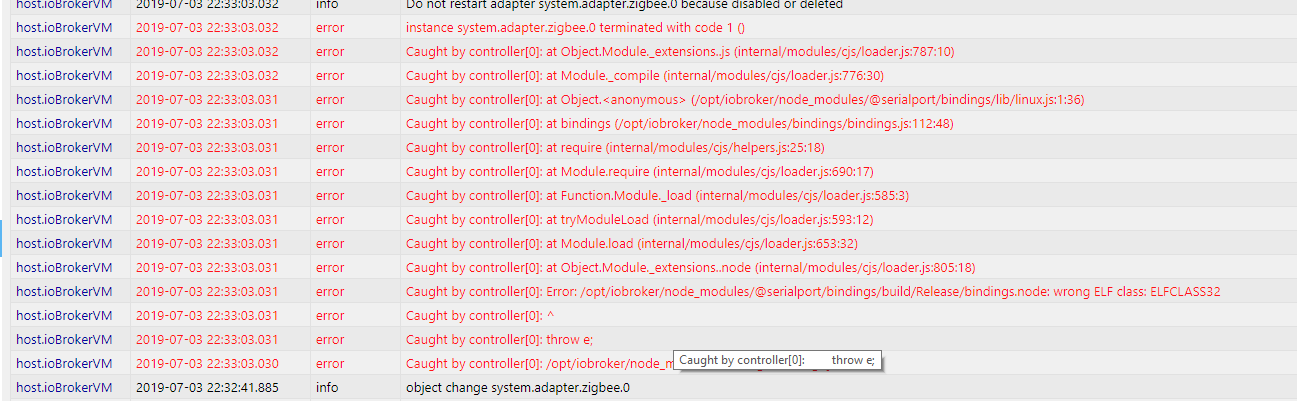
ohne Erfolg. Das Interessante ist das der gleiche Fehler kommt auch ohne Stick.Hast du bereits eine Lösung dafür gefunden? Erhalten ebenfalls folgende Meldung:
-
@vogtländer sagte in Zigbee Adapter startet nicht? Kann jemand helfen?:
Hallo ich habe heute den ganzen Tag versucht das Probelm zu beheben leider
ohne Erfolg. Das Interessante ist das der gleiche Fehler kommt auch ohne Stick.Hast du bereits eine Lösung dafür gefunden? Erhalten ebenfalls folgende Meldung:
-
Hallo,
leider habe das gleiche Problem. Ein "npm install @serialport/bindings" brachte leider nicht den gewünschten erfolg.
host.ioBroker-RasPi 2019-07-05 14:06:07.914 error instance system.adapter.zigbee.0 terminated with code 1 ()
host.ioBroker-RasPi 2019-07-05 14:06:07.913 error Caught by controller[0]: at Object.Module._extensions..js (internal/modules/cjs/loader.js:787:10)
host.ioBroker-RasPi 2019-07-05 14:06:07.913 error Caught by controller[0]: at Module._compile (internal/modules/cjs/loader.js:776:30)
host.ioBroker-RasPi 2019-07-05 14:06:07.912 error Caught by controller[0]: at Object.<anonymous> (/opt/iobroker/node_modules/serialport/lib/bindings/linux.js:2:36)
host.ioBroker-RasPi 2019-07-05 14:06:07.911 error Caught by controller[0]: at bindings (/opt/iobroker/node_modules/serialport/node_modules/bindings/bindings.js:81:44)
host.ioBroker-RasPi 2019-07-05 14:06:07.911 error Caught by controller[0]: at require (internal/modules/cjs/helpers.js:25:18)
host.ioBroker-RasPi 2019-07-05 14:06:07.910 error Caught by controller[0]: at Module.require (internal/modules/cjs/loader.js:690:17)
host.ioBroker-RasPi 2019-07-05 14:06:07.909 error Caught by controller[0]: at Function.Module._load (internal/modules/cjs/loader.js:585:3)
host.ioBroker-RasPi 2019-07-05 14:06:07.909 error Caught by controller[0]: at tryModuleLoad (internal/modules/cjs/loader.js:593:12)
host.ioBroker-RasPi 2019-07-05 14:06:07.908 error Caught by controller[0]: at Module.load (internal/modules/cjs/loader.js:653:32)
host.ioBroker-RasPi 2019-07-05 14:06:07.907 error Caught by controller[0]: at Object.Module._extensions..node (internal/modules/cjs/loader.js:805:18)
host.ioBroker-RasPi 2019-07-05 14:06:07.906 error Caught by controller[0]: the module (for instance, usingnpm rebuildornpm install).
host.ioBroker-RasPi 2019-07-05 14:06:07.906 error Caught by controller[0]: NODE_MODULE_VERSION 64. Please try re-compiling or re-installing
host.ioBroker-RasPi 2019-07-05 14:06:07.905 error Caught by controller[0]: NODE_MODULE_VERSION 57. This version of Node.js requires
host.ioBroker-RasPi 2019-07-05 14:06:07.904 error Caught by controller[0]: was compiled against a different Node.js version using
host.ioBroker-RasPi 2019-07-05 14:06:07.903 error Caught by controller[0]: Error: The module '/opt/iobroker/node_modules/serialport/build/Release/serialport.node'
host.ioBroker-RasPi 2019-07-05 14:06:07.902 error Caught by controller[0]: ^
host.ioBroker-RasPi 2019-07-05 14:06:07.902 error Caught by controller[0]: throw e
host.ioBroker-RasPi 2019-07-05 14:06:07.901 error Caught by controller[0]: /opt/iobroker/node_modules/serialport/node_modules/bindings/bindings.js:88
host.ioBroker-RasPi 2019-07-05 14:06:05.912 info instance system.adapter.zigbee.0 started with pid 3105
host.ioBroker-RasPi 2019-07-05 14:05:35.922 info Restart adapter system.adapter.zigbee.0 because enabledHat jemand ggf. noch eine Idee woran es liegen könnte?
Grüße
Sven -
Hallo,
leider habe das gleiche Problem. Ein "npm install @serialport/bindings" brachte leider nicht den gewünschten erfolg.
host.ioBroker-RasPi 2019-07-05 14:06:07.914 error instance system.adapter.zigbee.0 terminated with code 1 ()
host.ioBroker-RasPi 2019-07-05 14:06:07.913 error Caught by controller[0]: at Object.Module._extensions..js (internal/modules/cjs/loader.js:787:10)
host.ioBroker-RasPi 2019-07-05 14:06:07.913 error Caught by controller[0]: at Module._compile (internal/modules/cjs/loader.js:776:30)
host.ioBroker-RasPi 2019-07-05 14:06:07.912 error Caught by controller[0]: at Object.<anonymous> (/opt/iobroker/node_modules/serialport/lib/bindings/linux.js:2:36)
host.ioBroker-RasPi 2019-07-05 14:06:07.911 error Caught by controller[0]: at bindings (/opt/iobroker/node_modules/serialport/node_modules/bindings/bindings.js:81:44)
host.ioBroker-RasPi 2019-07-05 14:06:07.911 error Caught by controller[0]: at require (internal/modules/cjs/helpers.js:25:18)
host.ioBroker-RasPi 2019-07-05 14:06:07.910 error Caught by controller[0]: at Module.require (internal/modules/cjs/loader.js:690:17)
host.ioBroker-RasPi 2019-07-05 14:06:07.909 error Caught by controller[0]: at Function.Module._load (internal/modules/cjs/loader.js:585:3)
host.ioBroker-RasPi 2019-07-05 14:06:07.909 error Caught by controller[0]: at tryModuleLoad (internal/modules/cjs/loader.js:593:12)
host.ioBroker-RasPi 2019-07-05 14:06:07.908 error Caught by controller[0]: at Module.load (internal/modules/cjs/loader.js:653:32)
host.ioBroker-RasPi 2019-07-05 14:06:07.907 error Caught by controller[0]: at Object.Module._extensions..node (internal/modules/cjs/loader.js:805:18)
host.ioBroker-RasPi 2019-07-05 14:06:07.906 error Caught by controller[0]: the module (for instance, usingnpm rebuildornpm install).
host.ioBroker-RasPi 2019-07-05 14:06:07.906 error Caught by controller[0]: NODE_MODULE_VERSION 64. Please try re-compiling or re-installing
host.ioBroker-RasPi 2019-07-05 14:06:07.905 error Caught by controller[0]: NODE_MODULE_VERSION 57. This version of Node.js requires
host.ioBroker-RasPi 2019-07-05 14:06:07.904 error Caught by controller[0]: was compiled against a different Node.js version using
host.ioBroker-RasPi 2019-07-05 14:06:07.903 error Caught by controller[0]: Error: The module '/opt/iobroker/node_modules/serialport/build/Release/serialport.node'
host.ioBroker-RasPi 2019-07-05 14:06:07.902 error Caught by controller[0]: ^
host.ioBroker-RasPi 2019-07-05 14:06:07.902 error Caught by controller[0]: throw e
host.ioBroker-RasPi 2019-07-05 14:06:07.901 error Caught by controller[0]: /opt/iobroker/node_modules/serialport/node_modules/bindings/bindings.js:88
host.ioBroker-RasPi 2019-07-05 14:06:05.912 info instance system.adapter.zigbee.0 started with pid 3105
host.ioBroker-RasPi 2019-07-05 14:05:35.922 info Restart adapter system.adapter.zigbee.0 because enabledHat jemand ggf. noch eine Idee woran es liegen könnte?
Grüße
SvenIch noch mal.
Das Problem konnte ich nun doch lösen indem ich folgt vorgegangen bin:
Adapter Deinstalliert. Über die "Katze" den Adapter noch mal runtergeladen. Dann in Experteneinstellung beim Adapter auf die 3 Punkte geklickt und auf das + zum installieren..
den COM Anschluss Pfad dann noch eingetragen und jetzt läuft es wie es soll.
Grüße
Sven -
Muss ich den Zigbee Adapter unbedingt neu installieren und alle Geräte neu verbinden? Ich habe zur noch Zeit node v6.10.0 laufen. Sobald ich auf 8.x updatete, geht der Adapter nicht mehr.
Danke
@Maxim sagte in Zigbee Adapter startet nicht? Kann jemand helfen?:
Muss ich den Zigbee Adapter unbedingt neu installieren und alle Geräte neu verbinden? Ich habe zur noch Zeit node v6.10.0 laufen. Sobald ich auf 8.x updatete, geht der Adapter nicht mehr.
Danke
Neu installieren - ja.
Geräte neu anlernen- nein.A.
-
@Maxim sagte in Zigbee Adapter startet nicht? Kann jemand helfen?:
Muss ich den Zigbee Adapter unbedingt neu installieren und alle Geräte neu verbinden? Ich habe zur noch Zeit node v6.10.0 laufen. Sobald ich auf 8.x updatete, geht der Adapter nicht mehr.
Danke
Neu installieren - ja.
Geräte neu anlernen- nein.A.
@Asgothian und wie genau? Einfach Adapter löschen und installieren? Muss es eine bestimmte Version sein?
-
@Asgothian und wie genau? Einfach Adapter löschen und installieren? Muss es eine bestimmte Version sein?



Hey! Du scheinst an dieser Unterhaltung interessiert zu sein, hast aber noch kein Konto.
Hast du es satt, bei jedem Besuch durch die gleichen Beiträge zu scrollen? Wenn du dich für ein Konto anmeldest, kommst du immer genau dorthin zurück, wo du zuvor warst, und kannst dich über neue Antworten benachrichtigen lassen (entweder per E-Mail oder Push-Benachrichtigung). Du kannst auch Lesezeichen speichern und Beiträge positiv bewerten, um anderen Community-Mitgliedern deine Wertschätzung zu zeigen.
Mit deinem Input könnte dieser Beitrag noch besser werden 💗
Registrieren Anmelden451
Online33.0k
Benutzende83.7k
Themen1.3m
Beiträge