




getting started with visualisations
-
-
@Bluefox I have, and I think I followed the instructions, but if I reinstall my adaptor using "from custom URL", nothing much seems to change, even if I restart iobroker.
Clearly I'm doing something wrong?
@Taragorm I do it like this.
My folder structure is like this one:
/opt/iobroker
        iobroker.my-new-adapter
        node_modules
               ...
               iobroker.js-controle
               iobroker.xxxx
               ...
Then I install my new adapter by writing
npm i iobroker.my-new-adapterin/opt/iobroker.
As result the npm creates a sym-link to my developer folder:/opt/iobroker iobroker.my-new-adapter node_modules ... iobroker.js-controle iobroker.my-new-adapter (symlink) iobroker.xxxx ...after that I develop my adapter as usual in
/opt/iobroker/iobroker.my-new-adaptereven as a git repo.after every change I write
iobroker r vis && iobroker u visThis should work 100%.Additionally I can write
iobroker visdebug my-new-adapterand if I see the output
Disable cacheI restart the iobroker (only for the first time).After that I can directly modify the file
/opt/iobroker/iobroker-data/files/vis/widgets/my-new-adapter.htmland after every browser refresh it will be loaded anew from disk. So you can fast see your changes.But, the changes in
/opt/iobroker/iobroker-data/files/vis/widgets/my-new-adapter.htmlmust be copied to/opt/iobroker/iobroker.my-new-adapter/widgets/manually and you may not calliobroker u vistill you do that, else they will be overwritten -
Hmm.
The module is iobroker.vis-taragorm
iobroker@iobrokerdev /o/iobroker> iobroker visdebug vis-taragorm

/opt/iobroker/node_modules/iobroker.js-controller/lib/setup/setupVisDebug.js:64
            if (!adapterDir) throw 'Adapter not found. Tried: ' + adapterNames2Try.join(', ');
                             ^
Adapter not found. Tried: vis-vis-taragorm, vis-taragorm
iobroker@iobrokerdev /o/iobroker>
however, vis-taragorm.html does exist in widgets, and there is an instance installed ok. I can't see my widget in the list though.
Possiby unrelated, I should also note that I got some errors installing (and many warnings, but I didn't include those):
unix_dgram.target.mk:101: recipe for target 'Release/obj.target/unix_dgram/src/unix_dgram.o' failed
make: *** [Release/obj.target/unix_dgram/src/unix_dgram.o] Error 1
make: Leaving directory '/opt/iobroker/node_modules/unix-dgram/build'
gyp ERR! build error
gyp ERR! stack Error: `make` failed with exit code: 2
gyp ERR! stack     at ChildProcess.onExit (/usr/lib/node_modules/npm/node_modules/node-gyp/lib/build.js:262:23)
gyp ERR! stack     at ChildProcess.emit (events.js:197:13)
gyp ERR! stack     at Process.ChildProcess._handle.onexit (internal/child_process.js:254:12)
gyp ERR! System Linux 4.9.0-8-amd64
gyp ERR! command "/usr/bin/node" "/usr/lib/node_modules/npm/node_modules/node-gyp/bin/node-gyp.js" "rebuild"
gyp ERR! cwd /opt/iobroker/node_modules/unix-dgram
gyp ERR! node -v v11.10.1
gyp ERR! node-gyp -v v3.8.0
gyp ERR! not ok
npm WARN optional SKIPPING OPTIONAL DEPENDENCY: unix-dgram@0.2.3 (node_modules/unix-dgram):
npm WARN optional SKIPPING OPTIONAL DEPENDENCY: unix-dgram@0.2.3 install: `node-gyp rebuild`
npm WARN optional SKIPPING OPTIONAL DEPENDENCY: Exit status 1
The last message implies this isn't fatal, but I'm new to NodeJS...
The dev env is Debian Stretch
iobroker@iobrokerdev ~/projects> uname -a Linux iobrokerdev 4.9.0-8-amd64 #1 SMP Debian 4.9.130-2 (2018-10-27) x86_64 GNU/Linux -
Участник @Taragorm написал в getting started with visualisations:
/opt/iobroker/node_modules/iobroker.js-controller/
It would be easier, if I can see the repo on github.
Do you have file/opt/iobroker/node_modules/iobroker.vis-taragorm/widgets/taragorm.html? -
BTW, you can deliver in your adapter https://github.com/Taragorm/ioBroker.evohome the widgets too. It is even better.
-
Thanks for the quick response!
The repo is up at: https://github.com/Taragorm/ioBroker.vis-taragorm
It's mostly template right now.
This is intended for some generic visualisations (and to practice in) so I didn't include it in the evohome repo. I'll add some specific visualisations there once I know what I'm doing.
-
Участник @Taragorm написал в getting started with visualisations:
/opt/iobroker/node_modules/iobroker.js-controller/
It would be easier, if I can see the repo on github.
Do you have file/opt/iobroker/node_modules/iobroker.vis-taragorm/widgets/taragorm.html?iobroker@iobrokerdev ~/projects> ls -l /opt/iobroker/node_modules/iobroker.vis-taragorm/widgets total 12 drwxrwxrwx+ 4 iobroker iobroker 4096 Mar 2 10:26 vis-taragorm/ -rw-r--r--+ 1 iobroker iobroker 6521 Mar 2 11:47 vis-taragorm.htmlSeems to be there...
-
iobroker@iobrokerdev ~/projects> ls -l /opt/iobroker/node_modules/iobroker.vis-taragorm/widgets
total 12
drwxrwxrwx+ 4 iobroker iobroker 4096 Mar  2 10:26 vis-taragorm/
-rw-r--r--+ 1 iobroker iobroker 6521 Mar  2 11:47 vis-taragorm.html
Seems to be there...
-
Something broken with my install, maybe?
I added a bit of logging to the empty catch block (line 24 here):
    this.enableDebug = function (widgetset) {
        console.log( "widgetset=" + widgetset );

        if (widgetset) {
            // Try to find out the adapter directory out of a list of options
            var adapterDir;
            var adapterNames2Try = ['vis-' + widgetset, widgetset];
            if (adapterNames2Try[0] === adapterNames2Try[1]) adapterNames2Try.splice(1, 1);
            for (var i = 0; i < adapterNames2Try.length; i++) {
                try {
                    var adapterDir2Try = tools.getAdapterDir(adapterNames2Try[i]);
                    // Query the entry
                    var stats = fs.lstatSync(adapterDir2Try);

                    console.log(stats.toString() );

                    // Is it a directory?
                    if (stats.isDirectory()) {
                        //found it!
                        adapterDir = adapterDir2Try;
                        break;
                    }
                } catch (e) {
                    console.error(e);
                }
            }

            if (!adapterDir) throw 'Adapter not found. Tried: ' + adapterNames2Try.join(', ');
        }
and got this:
obroker@iobrokerdev /o/iobroker> iobroker visdebug vis-taragorm widgetset=vis-taragorm TypeError [ERR_INVALID_ARG_TYPE]: The "path" argument must be one of type string, Buffer, or URL. Received type object at Object.lstatSync (fs.js:857:3) at VisDebug.enableDebug (/opt/iobroker/node_modules/iobroker.js-controller/lib/setup/setupVisDebug.js:52:36) at /opt/iobroker/node_modules/iobroker.js-controller/lib/setup.js:2464:30 at Object.connected (/opt/iobroker/node_modules/iobroker.js-controller/lib/setup.js:3145:70) at Socket.<anonymous> (/opt/iobroker/node_modules/iobroker.js-controller/lib/states/statesInMemClient.js:87:68) at Socket.Emitter.emit (/opt/iobroker/node_modules/iobroker.js-controller/node_modules/component-emitter/index.js:133:20) at Socket.emit (/opt/iobroker/node_modules/iobroker.js-controller/node_modules/socket.io-client/lib/socket.js:138:10) at Socket.onconnect (/opt/iobroker/node_modules/iobroker.js-controller/node_modules/socket.io-client/lib/socket.js:335:8) at Socket.onpacket (/opt/iobroker/node_modules/iobroker.js-controller/node_modules/socket.io-client/lib/socket.js:232:12) at Manager.<anonymous> (/opt/iobroker/node_modules/component-bind/index.js:21:15) [object Object] /opt/iobroker/node_modules/iobroker.js-controller/lib/setup/setupVisDebug.js:67 if (!adapterDir) throw 'Adapter not found. Tried: ' + adapterNames2Try.join(', '); ^ Adapter not found. Tried: vis-vis-taragorm, vis-taragorm- T
-
Something broken with my install, maybe?
I added a bit of logging to the empty catch block (line 24 here):
    this.enableDebug = function (widgetset) {
        console.log( "widgetset=" + widgetset );

        if (widgetset) {
            // Try to find out the adapter directory out of a list of options
            var adapterDir;
            var adapterNames2Try = ['vis-' + widgetset, widgetset];
            if (adapterNames2Try[0] === adapterNames2Try[1]) adapterNames2Try.splice(1, 1);
            for (var i = 0; i < adapterNames2Try.length; i++) {
                try {
                    var adapterDir2Try = tools.getAdapterDir(adapterNames2Try[i]);
                    // Query the entry
                    var stats = fs.lstatSync(adapterDir2Try);

                    console.log(stats.toString() );

                    // Is it a directory?
                    if (stats.isDirectory()) {
                        //found it!
                        adapterDir = adapterDir2Try;
                        break;
                    }
                } catch (e) {
                    console.error(e);
                }
            }

            if (!adapterDir) throw 'Adapter not found. Tried: ' + adapterNames2Try.join(', ');
        }
and got this:
obroker@iobrokerdev /o/iobroker> iobroker visdebug vis-taragorm widgetset=vis-taragorm TypeError [ERR_INVALID_ARG_TYPE]: The "path" argument must be one of type string, Buffer, or URL. Received type object at Object.lstatSync (fs.js:857:3) at VisDebug.enableDebug (/opt/iobroker/node_modules/iobroker.js-controller/lib/setup/setupVisDebug.js:52:36) at /opt/iobroker/node_modules/iobroker.js-controller/lib/setup.js:2464:30 at Object.connected (/opt/iobroker/node_modules/iobroker.js-controller/lib/setup.js:3145:70) at Socket.<anonymous> (/opt/iobroker/node_modules/iobroker.js-controller/lib/states/statesInMemClient.js:87:68) at Socket.Emitter.emit (/opt/iobroker/node_modules/iobroker.js-controller/node_modules/component-emitter/index.js:133:20) at Socket.emit (/opt/iobroker/node_modules/iobroker.js-controller/node_modules/socket.io-client/lib/socket.js:138:10) at Socket.onconnect (/opt/iobroker/node_modules/iobroker.js-controller/node_modules/socket.io-client/lib/socket.js:335:8) at Socket.onpacket (/opt/iobroker/node_modules/iobroker.js-controller/node_modules/socket.io-client/lib/socket.js:232:12) at Manager.<anonymous> (/opt/iobroker/node_modules/component-bind/index.js:21:15) [object Object] /opt/iobroker/node_modules/iobroker.js-controller/lib/setup/setupVisDebug.js:67 if (!adapterDir) throw 'Adapter not found. Tried: ' + adapterNames2Try.join(', '); ^ Adapter not found. Tried: vis-vis-taragorm, vis-taragorm- T
-
Certainly looks to be 1.4.2
iobroker@iobrokerdev /o/iobroker> npm outdated
Package                 Current  Wanted  Latest  Location
iobroker.js-controller    1.4.2   1.4.2   1.5.7  iobroker.inst
yargs                     7.1.0   7.1.0  13.2.2  iobroker.inst
main iobroker package calls for "stable", rather than a particular rev - do I just alter the depend there and
npm update- or is there a "proper" way to do it? -
Certainly looks to be 1.4.2
iobroker@iobrokerdev /o/iobroker> npm outdated
Package                 Current  Wanted  Latest  Location
iobroker.js-controller    1.4.2   1.4.2   1.5.7  iobroker.inst
yargs                     7.1.0   7.1.0  13.2.2  iobroker.inst
main iobroker package calls for "stable", rather than a particular rev - do I just alter the depend there and
npm update- or is there a "proper" way to do it? -
Update
Reloaded iobroker from scratch, just to be sure
Updated iob.js-controller to 1.5.7iobroker@iobrokerdev /o/iobroker> npm list iobroker.js-controller iobroker.inst@2.0.2 /opt/iobroker └── iobroker.js-controller@1.5.7Same error on iob visdebug
Also
Lots of warnings caused by this:
iobroker.inst@2.0.2 /opt/iobroker
└─┬ iobroker.js-controller@1.5.7
  └─┬ winston-syslog@1.2.6
    └── UNMET OPTIONAL DEPENDENCY unix-dgram@~0.2.1
Is there any way to suppress it? I hate clutter in the logfiles!
Also2
I can't see my widget in the vis builder. There's no obvious error in the log tho.
-
done a bit more digging into the visdebug error, and it seems like the project folder isn't being recognised as a directory:
Trying:/opt/iobroker/iobroker.vis-taragorm
Got stats:{"dev":2049,"mode":41471,"nlink":1,"uid":1001,"gid":1001,"rdev":0,"blksize":4096,"ino":792374,"size":24,"blocks":0,"atimeMs":1552471012718.894,"mtimeMs":1552471012714.892,"ctimeMs":1552471012714.892,"birthtimeMs":1552471012714.892,"atime":"2019-03-13T09:56:52.719Z","mtime":"2019-03-13T09:56:52.715Z","ctime":"2019-03-13T09:56:52.715Z","birthtime":"2019-03-13T09:56:52.715Z"}  isDir=false
trace code:
                    console.log("Trying:" + process.cwd() + "/" + adapterNames2Try[i]);
                    var adapterDir2Try = tools.getAdapterDir(adapterNames2Try[i]);
                    // Query the entry
                    var stats = fs.lstatSync(adapterDir2Try);
                    console.log("Got stats:" + JSON.stringify(stats) + "  isDir=" + stats.isDirectory());
But it surely is a dir:
iobroker@iobrokerdev /o/iobroker> ls -l
total 248
-rw-rwxr--+   1 iobroker iobroker   1474 Mar 13 09:40 CHANGELOG_INSTALLER_LINUX.md*
drwxrwxr-x+   3 iobroker iobroker   4096 Mar 13 09:40 install/
-rwxrwxrwx+   1 iobroker iobroker    169 Mar 13 09:41 INSTALLER_INFO.txt*
lrwxrwxrwx    1 iobroker iobroker     22 Mar 13 09:41 iob -> /opt/iobroker/iobroker*
-rwxrwxr-x+   1 iobroker iobroker    209 Mar 13 09:41 iobroker*
drwxrwxrwx+   4 iobroker iobroker   4096 Mar 13 09:42 iobroker-data/
drwxrwxrwx+   8 iobroker iobroker   4096 Mar 13 09:59 iobroker.vis-taragorm/
-rw-rwxrw-+   1 iobroker iobroker     92 Mar 13 09:41 killall.sh*
drwxrwxr-x+   2 iobroker iobroker   4096 Mar 13 09:40 lib/
-rw-rwxr--+   1 iobroker iobroker   1137 Mar 13 09:40 LICENSE*
drwxrwxrwx+   2 iobroker iobroker   4096 Mar 13 09:41 log/
drwxrwxr-x+ 451 iobroker iobroker  20480 Mar 13 09:56 node_modules/
-rw-rwxrw-+   1 iobroker iobroker    658 Mar 13 09:56 package.json*
-rw-rwxrw-+   1 iobroker iobroker 166878 Mar 13 09:41 package-lock.json*
-rw-rwxr--+   1 iobroker iobroker   6101 Mar 13 09:40 README.md*
-rw-rw-rw-+   1 iobroker iobroker   5868 Mar 13 09:51 reinstall.js
-rw-rwxrw-+   1 iobroker iobroker    709 Mar 13 09:41 reinstall.sh*
it's as if
fsis misbehaving? -
done a bit more digging into the visdebug error, and it seems like the project folder isn't being recognised as a directory:
Trying:/opt/iobroker/iobroker.vis-taragorm
Got stats:{"dev":2049,"mode":41471,"nlink":1,"uid":1001,"gid":1001,"rdev":0,"blksize":4096,"ino":792374,"size":24,"blocks":0,"atimeMs":1552471012718.894,"mtimeMs":1552471012714.892,"ctimeMs":1552471012714.892,"birthtimeMs":1552471012714.892,"atime":"2019-03-13T09:56:52.719Z","mtime":"2019-03-13T09:56:52.715Z","ctime":"2019-03-13T09:56:52.715Z","birthtime":"2019-03-13T09:56:52.715Z"}  isDir=false
trace code:
                    console.log("Trying:" + process.cwd() + "/" + adapterNames2Try[i]);
                    var adapterDir2Try = tools.getAdapterDir(adapterNames2Try[i]);
                    // Query the entry
                    var stats = fs.lstatSync(adapterDir2Try);
                    console.log("Got stats:" + JSON.stringify(stats) + "  isDir=" + stats.isDirectory());
But it surely is a dir:
iobroker@iobrokerdev /o/iobroker> ls -l
total 248
-rw-rwxr--+   1 iobroker iobroker   1474 Mar 13 09:40 CHANGELOG_INSTALLER_LINUX.md*
drwxrwxr-x+   3 iobroker iobroker   4096 Mar 13 09:40 install/
-rwxrwxrwx+   1 iobroker iobroker    169 Mar 13 09:41 INSTALLER_INFO.txt*
lrwxrwxrwx    1 iobroker iobroker     22 Mar 13 09:41 iob -> /opt/iobroker/iobroker*
-rwxrwxr-x+   1 iobroker iobroker    209 Mar 13 09:41 iobroker*
drwxrwxrwx+   4 iobroker iobroker   4096 Mar 13 09:42 iobroker-data/
drwxrwxrwx+   8 iobroker iobroker   4096 Mar 13 09:59 iobroker.vis-taragorm/
-rw-rwxrw-+   1 iobroker iobroker     92 Mar 13 09:41 killall.sh*
drwxrwxr-x+   2 iobroker iobroker   4096 Mar 13 09:40 lib/
-rw-rwxr--+   1 iobroker iobroker   1137 Mar 13 09:40 LICENSE*
drwxrwxrwx+   2 iobroker iobroker   4096 Mar 13 09:41 log/
drwxrwxr-x+ 451 iobroker iobroker  20480 Mar 13 09:56 node_modules/
-rw-rwxrw-+   1 iobroker iobroker    658 Mar 13 09:56 package.json*
-rw-rwxrw-+   1 iobroker iobroker 166878 Mar 13 09:41 package-lock.json*
-rw-rwxr--+   1 iobroker iobroker   6101 Mar 13 09:40 README.md*
-rw-rw-rw-+   1 iobroker iobroker   5868 Mar 13 09:51 reinstall.js
-rw-rwxrw-+   1 iobroker iobroker    709 Mar 13 09:41 reinstall.sh*
it's as if
fsis misbehaving?@Taragorm is the normal
iobroker upload visdoes not work?You can force all the steps manually.
- Copy your widgets files into /opt/iobroker/node_modules/iobroker.vis/www/widgets directory.
- Change /opt/iobroker/node_modules/iobroker.vis/www/js/config.js
- Change /opt/iobroker/node_modules/iobroker.vis/www/cache.manifest (just add/change some char to change the hash)
- iobroker u vis
- To be sure clear the browser cache
-
fyi, in enableDebug I think:
var stats = fs.lstatSync(adapterDir2Try);maybe should be
var stats = fs.statSync(adapterDir2Try);As diagnostics suggest we're finding the link, and lstatSync() returns the link itself, rather than the target of the link.
Changing it, lets things go a bit further, but it still fails somewhat messily:
Trying:/opt/iobroker/iobroker.vis-taragorm
Got stats:{"dev":2049,"mode":16895,"nlink":8,"uid":1001,"gid":1001,"rdev":0,"blksize":4096,"ino":791105,"size":4096,"blocks":8,"atimeMs":1552471286715.824,"mtimeMs":1552471172270.63,"ctimeMs":1552471172270.63,"birthtimeMs":1552471172270.63,"atime":"2019-03-13T10:01:26.716Z","mtime":"2019-03-13T09:59:32.271Z","ctime":"2019-03-13T09:59:32.271Z","birthtime":"2019-03-13T09:59:32.271Z"}  isDir=true isLink=false
Upload "/opt/iobroker/node_modules/iobroker.vis/www/index.html.original"
fs.js:119
    throw err;
    ^

Error: ENOENT: no such file or directory, open '/opt/iobroker/node_modules/iobroker.js-controller/lib/setup/../../../iobroker.vis/www/index.html.original'
    at Object.openSync (fs.js:448:3)
    at Object.readFileSync (fs.js:348:35)
    at VisDebug.enableDebug (/opt/iobroker/node_modules/iobroker.js-controller/lib/setup/setupVisDebug.js:91:23)
    at _objects (/opt/iobroker/node_modules/iobroker.js-controller/lib/setup.js:2460:30)
    at Object.connected (/opt/iobroker/node_modules/iobroker.js-controller/lib/setup.js:3133:17)
    at Socket.<anonymous> (/opt/iobroker/node_modules/iobroker.js-controller/lib/states/statesInMemClient.js:87:68)
    at Socket.Emitter.emit (/opt/iobroker/node_modules/socket.io-client/node_modules/component-emitter/index.js:133:20)
    at Socket.emit (/opt/iobroker/node_modules/socket.io-client/lib/socket.js:136:10)
    at Socket.onconnect (/opt/iobroker/node_modules/socket.io-client/lib/socket.js:328:8)
    at Socket.onpacket (/opt/iobroker/node_modules/socket.io-client/lib/socket.js:224:12)
For now, I'm going to switch my development environment to Windows, as that seems to be working for you.
-
fyi, in enableDebug I think:
var stats = fs.lstatSync(adapterDir2Try);maybe should be
var stats = fs.statSync(adapterDir2Try);As diagnostics suggest we're finding the link, and lstatSync() returns the link itself, rather than the target of the link.
Changing it, lets things go a bit further, but it still fails somewhat messily:
Trying:/opt/iobroker/iobroker.vis-taragorm
Got stats:{"dev":2049,"mode":16895,"nlink":8,"uid":1001,"gid":1001,"rdev":0,"blksize":4096,"ino":791105,"size":4096,"blocks":8,"atimeMs":1552471286715.824,"mtimeMs":1552471172270.63,"ctimeMs":1552471172270.63,"birthtimeMs":1552471172270.63,"atime":"2019-03-13T10:01:26.716Z","mtime":"2019-03-13T09:59:32.271Z","ctime":"2019-03-13T09:59:32.271Z","birthtime":"2019-03-13T09:59:32.271Z"}  isDir=true isLink=false
Upload "/opt/iobroker/node_modules/iobroker.vis/www/index.html.original"
fs.js:119
    throw err;
    ^

Error: ENOENT: no such file or directory, open '/opt/iobroker/node_modules/iobroker.js-controller/lib/setup/../../../iobroker.vis/www/index.html.original'
    at Object.openSync (fs.js:448:3)
    at Object.readFileSync (fs.js:348:35)
    at VisDebug.enableDebug (/opt/iobroker/node_modules/iobroker.js-controller/lib/setup/setupVisDebug.js:91:23)
    at _objects (/opt/iobroker/node_modules/iobroker.js-controller/lib/setup.js:2460:30)
    at Object.connected (/opt/iobroker/node_modules/iobroker.js-controller/lib/setup.js:3133:17)
    at Socket.<anonymous> (/opt/iobroker/node_modules/iobroker.js-controller/lib/states/statesInMemClient.js:87:68)
    at Socket.Emitter.emit (/opt/iobroker/node_modules/socket.io-client/node_modules/component-emitter/index.js:133:20)
    at Socket.emit (/opt/iobroker/node_modules/socket.io-client/lib/socket.js:136:10)
    at Socket.onconnect (/opt/iobroker/node_modules/socket.io-client/lib/socket.js:328:8)
    at Socket.onpacket (/opt/iobroker/node_modules/socket.io-client/lib/socket.js:224:12)
For now, I'm going to switch my development environment to Windows, as that seems to be working for you.
@Taragorm It is very well, that you want to get the visbebug runnnig, but
I don't understand, why you ignore my other suggestions:- https://forum.iobroker.net/topic/19929/getting-started-with-visualisations/15
- https://forum.iobroker.net/topic/19929/getting-started-with-visualisations/8
The problem with non existing index.html.original is fixed only on github.
-
@Taragorm No matter. With
iobroker r vis && iobroker u visit should work.
Not Fast, but work.Just tried to execute (windows):
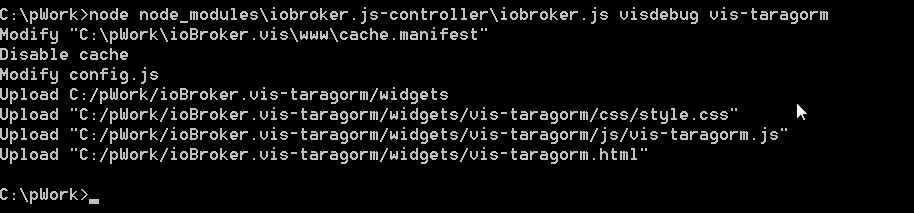
and cannot see any errors@Bluefox I
@Bluefox said in getting started with visualisations:
@Taragorm No matter. With
iobroker r vis && iobroker u visit should work.
Not Fast, but work.Just tried to execute (windows):
and cannot see any errorsI tried this; I don't get any errors, but I don't get a visualisation in the toolbox either.
That's why I trying to enable debug.
-
@Taragorm I do it like this.
My folder structure is like this one:
/opt/iobroker
        iobroker.my-new-adapter
        node_modules
               ...
               iobroker.js-controle
               iobroker.xxxx
               ...
Then I install my new adapter by writing
npm i iobroker.my-new-adapterin/opt/iobroker.
As result the npm creates a sym-link to my developer folder:/opt/iobroker iobroker.my-new-adapter node_modules ... iobroker.js-controle iobroker.my-new-adapter (symlink) iobroker.xxxx ...after that I develop my adapter as usual in
/opt/iobroker/iobroker.my-new-adaptereven as a git repo.after every change I write
iobroker r vis && iobroker u visThis should work 100%.Additionally I can write
iobroker visdebug my-new-adapterand if I see the output
Disable cacheI restart the iobroker (only for the first time).After that I can directly modify the file
/opt/iobroker/iobroker-data/files/vis/widgets/my-new-adapter.htmland after every browser refresh it will be loaded anew from disk. So you can fast see your changes.But, the changes in
/opt/iobroker/iobroker-data/files/vis/widgets/my-new-adapter.htmlmust be copied to/opt/iobroker/iobroker.my-new-adapter/widgets/manually and you may not calliobroker u vistill you do that, else they will be overwritten@Bluefox said in getting started with visualisations:
@Taragorm I do it like this.
My folder structure is like this one:
/opt/iobroker
        iobroker.my-new-adapter
        node_modules
               ...
               iobroker.js-controle
               iobroker.xxxx
               ...
Then I install my new adapter by writing
npm i iobroker.my-new-adapterin/opt/iobroker.
As result the npm creates a sym-link to my developer folder:/opt/iobroker iobroker.my-new-adapter node_modules ... iobroker.js-controle iobroker.my-new-adapter (symlink) iobroker.xxxx ...after that I develop my adapter as usual in
/opt/iobroker/iobroker.my-new-adaptereven as a git repo.after every change I write
iobroker r vis && iobroker u visThis should work 100%.Additionally I can write
iobroker visdebug my-new-adapterand if I see the output
Disable cacheI restart the iobroker (only for the first time).After that I can directly modify the file
/opt/iobroker/iobroker-data/files/vis/widgets/my-new-adapter.htmland after every browser refresh it will be loaded anew from disk. So you can fast see your changes.But, the changes in
/opt/iobroker/iobroker-data/files/vis/widgets/my-new-adapter.htmlmust be copied to/opt/iobroker/iobroker.my-new-adapter/widgets/manually and you may not calliobroker u vistill you do that, else they will be overwritten...and I have also set my environment up like this.
Hey! Du scheinst an dieser Unterhaltung interessiert zu sein, hast aber noch kein Konto.
Hast du es satt, bei jedem Besuch durch die gleichen Beiträge zu scrollen? Wenn du dich für ein Konto anmeldest, kommst du immer genau dorthin zurück, wo du zuvor warst, und kannst dich über neue Antworten benachrichtigen lassen (entweder per E-Mail oder Push-Benachrichtigung). Du kannst auch Lesezeichen speichern und Beiträge positiv bewerten, um anderen Community-Mitgliedern deine Wertschätzung zu zeigen.
Mit deinem Input könnte dieser Beitrag noch besser werden 💗
Registrieren AnmeldenSupport us
267
Online33.1k
Benutzende84.0k
Themen1.4m
Beiträge