



Skip to content
  • Home
  • Aktuell
  • Tags
  • 0 Ungelesen 0
  • Kategorien
  • Unreplied
  • Beliebt
  • GitHub
  • Docu
  • Hilfe
Skins
  • Light
  • Brite
  • Cerulean
  • Cosmo
  • Flatly
  • Journal
  • Litera
  • Lumen
  • Lux
  • Materia
  • Minty
  • Morph
  • Pulse
  • Sandstone
  • Simplex
  • Sketchy
  • Spacelab
  • United
  • Yeti
  • Zephyr
  • Dark
  • Cyborg
  • Darkly
  • Quartz
  • Slate
  • Solar
  • Superhero
  • Vapor

  • Standard: (Kein Skin)
  • Kein Skin
Einklappen
ioBroker Logo

Community Forum

donate donate
  1. ioBroker Community Home
  2. Deutsch
  3. ioBroker Allgemein
  4. Installation ioBroker auf Cubietruck

NEWS

  • UPDATE 31.10.: Amazon Alexa - ioBroker Skill läuft aus ?
    apollon77A
    apollon77
    48
    3
    8.9k

  • Monatsrückblick – September 2025
    BluefoxB
    Bluefox
    13
    1
    2.3k

  • Neues Video "KI im Smart Home" - ioBroker plus n8n
    BluefoxB
    Bluefox
    16
    1
    3.6k

Installation ioBroker auf Cubietruck

Geplant Angeheftet Gesperrt Verschoben ioBroker Allgemein
176 Beiträge 19 Kommentatoren 44.6k Aufrufe
  • Älteste zuerst
  • Neuste zuerst
  • Meiste Stimmen
Antworten
  • In einem neuen Thema antworten
Anmelden zum Antworten
Dieses Thema wurde gelöscht. Nur Nutzer mit entsprechenden Rechten können es sehen.
  • E Offline
    E Offline
    electric69
    schrieb am zuletzt editiert von
    #133

    Ich habe, warum dann nicht schafft Datei iobroker(linux).

    1 Antwort Letzte Antwort
    0
    • HomoranH Nicht stören
      HomoranH Nicht stören
      Homoran
      Global Moderator Administrators
      schrieb am zuletzt editiert von
      #134

      sorry ich spreche kein russisch,

      sorry, no russian speaking
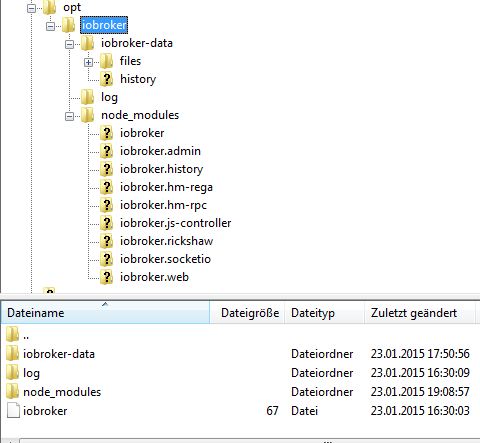
      144_iobroker_inst_path.jpg

      Gruß

      Rainer

      kein Support per PN! - Fragen im Forum stellen - es gibt fast nichts, was nicht auch für andere interessant ist.

      Benutzt das Voting rechts unten im Beitrag wenn er euch geholfen hat.

      der Installationsfixer: curl -fsL https://iobroker.net/fix.sh | bash -

      1 Antwort Letzte Antwort
      0
      • HomoranH Nicht stören
        HomoranH Nicht stören
        Homoran
        Global Moderator Administrators
        schrieb am zuletzt editiert von
        #135

        Habe eben update gefahren.

        Jetzt kommt folgende Fehlermeldung

        root@cubie:/opt/iobroker# ./iobroker update

        module.js:340

        throw err;

        ^

        Error: Cannot find module '/opt/iobroker/node_modules/iobroker.js-controller/iobroker.js'

        at Function.Module._resolveFilename (module.js:338:15)

        at Function.Module._load (module.js:280:25)

        at Function.Module.runMain (module.js:497:10)

        at startup (node.js:119:16)

        at node.js:901:3

        Gesendet von meinem Cynus T7 mit Tapatalk
        48_lars_1f8amdiett.txt

        kein Support per PN! - Fragen im Forum stellen - es gibt fast nichts, was nicht auch für andere interessant ist.

        Benutzt das Voting rechts unten im Beitrag wenn er euch geholfen hat.

        der Installationsfixer: curl -fsL https://iobroker.net/fix.sh | bash -

        1 Antwort Letzte Antwort
        0
        • BluefoxB Offline
          BluefoxB Offline
          Bluefox
          schrieb am zuletzt editiert von
          #136

          @Homoran:

          Habe eben update gefahren.

          Jetzt kommt folgende Fehlermeldung

          root@cubie:/opt/iobroker# ./iobroker update

          module.js:340

          throw err;

          ^

          Error: Cannot find module '/opt/iobroker/node_modules/iobroker.js-controller/iobroker.js'

          at Function.Module._resolveFilename (module.js:338:15)

          at Function.Module._load (module.js:280:25)

          at Function.Module.runMain (module.js:497:10)

          at startup (node.js:119:16)

          at node.js:901:3

          Gesendet von meinem Cynus T7 mit Tapatalk `
          Ist Datei da? Oder ist Verzeichnis "/opt/iobroker/node_modules/iobroker.js-controller/" leer?

          1 Antwort Letzte Antwort
          0
          • HomoranH Nicht stören
            HomoranH Nicht stören
            Homoran
            Global Moderator Administrators
            schrieb am zuletzt editiert von
            #137

            Da ist nur noch ein Ordner drin:

            root@cubie:/opt/iobroker/node_modules/iobroker.js-controller# dir

            node_modules

            Und darin ist npm

            Gesendet von meinem Cynus T7 mit Tapatalk

            kein Support per PN! - Fragen im Forum stellen - es gibt fast nichts, was nicht auch für andere interessant ist.

            Benutzt das Voting rechts unten im Beitrag wenn er euch geholfen hat.

            der Installationsfixer: curl -fsL https://iobroker.net/fix.sh | bash -

            1 Antwort Letzte Antwort
            0
            • BluefoxB Offline
              BluefoxB Offline
              Bluefox
              schrieb am zuletzt editiert von
              #138

              @Homoran:

              Da ist nur noch ein Ordner drin:

              root@cubie:/opt/iobroker/node_modules/iobroker.js-controller# dir

              node_modules

              Und darin ist npm

              Gesendet von meinem Cynus T7 mit Tapatalk `
              Schreib in "/opt/iobroker":

              npm install iobroker.js-controller --production
              npm install iobroker.admin --production


              Es ist was schiff gelaufen mit 0.5.1.

              1 Antwort Letzte Antwort
              0
              • E Offline
                E Offline
                exv2
                schrieb am zuletzt editiert von
                #139

                Guten Abend

                das ist für mich hier alles neuland

                ich habe jetzt mit viel Mühe eine 0.4.2 zum laufen bekommen

                mir wurde im Adminbereich erst ein Update auf 0.5.0 angezeit

                nach Update war der adminbereich nicht mehr zu erreichen also wieder die 0.4.2 installiert und alles lief wieder

                das gleiche ist jetzt mit dem Update auf 0.5.1

                was mache ich falsch und wo kann ich nach fehlermeldungen schauen ?

                noch einen schönen Abend

                Nobse

                1 Antwort Letzte Antwort
                0
                • A Offline
                  A Offline
                  akamia
                  schrieb am zuletzt editiert von
                  #140

                  Probier mal der Reihenfolge nach - wie BlueFox geschrieben hat:

                  npm install iobroker.js-controller –production

                  npm install iobroker.admin --production

                  Bei mir wird jetzt die 0.5.4 angezeigt. Die Logs gehen auch wieder.

                  akamia

                  NUC6i3 / ProxMox / HM/FHEM/WifiLight/HUE/Tradfri/KM200/InfluxDB/RFlink/Plex/Smartmeter
                  piVCCU, Arduinos, X4000, Z2000, Solo4K, SAMSUNG C & H, NAS OMV4/Win10Pro (JRMC/JRemote), 4x4 HDMImatrix, ...

                  1 Antwort Letzte Antwort
                  0
                  • E Offline
                    E Offline
                    exv2
                    schrieb am zuletzt editiert von
                    #141

                    @akamia:

                    Probier mal der Reihenfolge nach - wie BlueFox geschrieben hat:

                    npm install iobroker.js-controller –production

                    npm install iobroker.admin --production

                    Bei mir wird jetzt die 0.5.4 angezeigt. Die Logs gehen auch wieder.

                    akamia `

                    Danke akamie

                    habe es jetzt mal so gemacht. Und bekomme dabei folgende Meldungen

                    sudo npm install iobroker.js-controller –production

                    npm WARN package.json daemonize2@0.4.2 No repository field.
                    
                    > ws@0.5.0 install /node_modules/iobroker.js-controller/node_modules/socket.io/node_modules/engine.io/node_modules/ws
                    > (node-gyp rebuild 2> builderror.log) || (exit 0)
                    
                    npm WARN engine hawk@0.10.2: wanted: {"node":"0.8.x"} (current: {"node":"0.10.35","npm":"1.4.28"})
                    npm WARN engine hoek@0.7.6: wanted: {"node":"0.8.x"} (current: {"node":"0.10.35","npm":"1.4.28"})
                    npm WARN engine sntp@0.1.4: wanted: {"node":"0.8.x"} (current: {"node":"0.10.35","npm":"1.4.28"})
                    npm WARN engine boom@0.3.8: wanted: {"node":"0.8.x"} (current: {"node":"0.10.35","npm":"1.4.28"})
                    npm WARN engine cryptiles@0.1.3: wanted: {"node":"0.8.x"} (current: {"node":"0.10.35","npm":"1.4.28"})
                    
                    > ws@0.4.31 install /node_modules/iobroker.js-controller/node_modules/socket.io-client/node_modules/engine.io-client/node_modules/ws
                    > (node-gyp rebuild 2> builderror.log) || (exit 0)
                    
                    > iobroker.js-controller@0.5.4 install /node_modules/iobroker.js-controller
                    > node lib/setup.js setup first
                    
                    creating conf/iobroker.json
                    
                    fs.js:654
                      return binding.mkdir(pathModule._makeLong(path),
                                     ^
                    Error: EACCES, permission denied '/node_modules/iobroker.js-controller/lib/../../../iobroker-data/'
                        at Object.fs.mkdirSync (fs.js:654:18)
                        at mkpathSync (/node_modules/iobroker.js-controller/lib/setup.js:746:20)
                        at setup (/node_modules/iobroker.js-controller/lib/setup.js:828:9)
                        at Object. <anonymous>(/node_modules/iobroker.js-controller/lib/setup.js:236:13)
                        at Module._compile (module.js:456:26)
                        at Object.Module._extensions..js (module.js:474:10)
                        at Module.load (module.js:356:32)
                        at Function.Module._load (module.js:312:12)
                        at Function.Module.runMain (module.js:497:10)
                        at startup (node.js:119:16)
                    
                    npm ERR! iobroker.js-controller@0.5.4 install: `node lib/setup.js setup first`
                    npm ERR! Exit status 8
                    npm ERR!
                    npm ERR! Failed at the iobroker.js-controller@0.5.4 install script.
                    npm ERR! This is most likely a problem with the iobroker.js-controller package,
                    npm ERR! not with npm itself.
                    npm ERR! Tell the author that this fails on your system:
                    npm ERR!     node lib/setup.js setup first
                    npm ERR! You can get their info via:
                    npm ERR!     npm owner ls iobroker.js-controller
                    npm ERR! There is likely additional logging output above.
                    npm ERR! System Linux 3.12.35+
                    npm ERR! command "/usr/local/bin/node" "/usr/local/bin/npm" "install" "iobroker.js-controller" "--production"
                    npm ERR! cwd /
                    npm ERR! node -v v0.10.35
                    npm ERR! npm -v 1.4.28
                    npm ERR! code ELIFECYCLE
                    npm ERR! not ok code 0</anonymous>
                    

                    sudo npm install iobroker.admin –production

                    npm WARN package.json daemonize2@0.4.2 No repository field.
                    npm WARN deprecated object-keys@0.2.0: Please update to the latest object-keys
                    
                    > ws@0.4.31 install /node_modules/iobroker.admin/node_modules/socket.io/node_modules/engine.io/node_modules/ws
                    > (node-gyp rebuild 2> builderror.log) || (exit 0)
                    
                    make: Entering directory '/node_modules/iobroker.admin/node_modules/socket.io/node_modules/engine.io/node_modules/ws/build'
                      CXX(target) Release/obj.target/bufferutil/src/bufferutil.o
                      SOLINK_MODULE(target) Release/obj.target/bufferutil.node
                      SOLINK_MODULE(target) Release/obj.target/bufferutil.node: Finished
                      COPY Release/bufferutil.node
                      CXX(target) Release/obj.target/validation/src/validation.o
                      SOLINK_MODULE(target) Release/obj.target/validation.node
                      SOLINK_MODULE(target) Release/obj.target/validation.node: Finished
                      COPY Release/validation.node
                    make: Leaving directory '/node_modules/iobroker.admin/node_modules/socket.io/node_modules/engine.io/node_modules/ws/build'
                    
                    > ws@0.4.31 install /node_modules/iobroker.admin/node_modules/socket.io/node_modules/socket.io-client/node_modules/engine.io-client/node_modules/ws
                    > (node-gyp rebuild 2> builderror.log) || (exit 0)
                    
                    make: Entering directory '/node_modules/iobroker.admin/node_modules/socket.io/node_modules/socket.io-client/node_modules/engine.io-client/node_modules/ws/build'
                      CXX(target) Release/obj.target/bufferutil/src/bufferutil.o
                      SOLINK_MODULE(target) Release/obj.target/bufferutil.node
                      SOLINK_MODULE(target) Release/obj.target/bufferutil.node: Finished
                      COPY Release/bufferutil.node
                      CXX(target) Release/obj.target/validation/src/validation.o
                      SOLINK_MODULE(target) Release/obj.target/validation.node
                      SOLINK_MODULE(target) Release/obj.target/validation.node: Finished
                      COPY Release/validation.node
                    make: Leaving directory '/node_modules/iobroker.admin/node_modules/socket.io/node_modules/socket.io-client/node_modules/engine.io-client/node_modules/ws/build'
                    iobroker.admin@0.3.14 node_modules/iobroker.admin
                    +-- connect-flash@0.1.1
                    +-- cookie-parser@1.3.3 (cookie@0.1.2, cookie-signature@1.0.5)
                    +-- passport-local@1.0.0 (passport-strategy@1.0.0)
                    +-- passport@0.2.1 (pause@0.0.1, passport-strategy@1.0.0)
                    +-- xtend@2.0.6 (is-object@0.1.2, object-keys@0.2.0)
                    +-- express-session@1.7.6 (utils-merge@1.0.0, cookie@0.1.2, cookie-signature@1.0.4, on-headers@1.0.0, parseurl@1.3.0, buffer-crc32@0.2.3, depd@0.4.4, debug@1.0.4, uid-safe@1.0.1)
                    +-- body-parser@1.5.2 (qs@0.6.6, media-typer@0.2.0, bytes@1.0.0, raw-body@1.3.0, depd@0.4.4, type-is@1.3.2, iconv-lite@0.4.4)
                    +-- express@4.4.5 (parseurl@1.0.1, utils-merge@1.0.0, merge-descriptors@0.0.2, cookie@0.1.2, escape-html@1.0.1, cookie-signature@1.0.4, range-parser@1.0.0, fresh@0.2.2, vary@0.1.0, qs@0.6.6, methods@1.0.1, serve-static@1.2.3, buffer-crc32@0.2.3, path-to-regexp@0.1.2, debug@1.0.2, proxy-addr@1.0.1, send@0.4.3, type-is@1.2.1, accepts@1.0.7)
                    +-- request@2.38.0 (json-stringify-safe@5.0.0, aws-sign2@0.5.0, forever-agent@0.5.2, qs@0.6.6, oauth-sign@0.3.0, stringstream@0.0.4, tunnel-agent@0.4.0, node-uuid@1.4.2, mime-types@1.0.2, form-data@0.1.4, http-signature@0.10.1, tough-cookie@0.12.1, hawk@1.1.1)
                    +-- socket.io@1.0.6 (debug@0.7.4, has-binary-data@0.1.1, socket.io-parser@2.2.0, socket.io-adapter@0.2.0, engine.io@1.3.1, socket.io-client@1.0.6)
                    

                    Der Adminbereich läst sich danach aufrufen aber unter Hosts werden keine Versionsnummern mehr angezeigt.

                    Auch unter Apapters ist alles leer.

                    Jemand eine Idee.

                    Vielen Dank Nobse

                    1 Antwort Letzte Antwort
                    0
                    • HomoranH Nicht stören
                      HomoranH Nicht stören
                      Homoran
                      Global Moderator Administrators
                      schrieb am zuletzt editiert von
                      #142

                      Ich hatte auch einige Probleme. Zumal ich gerade eine multihost-installation teste. Gestern hat es dann doch wieder geklappt.

                      Ich habe einfach immer wieder diese beiden befehle probiert. Es gab ja immer wieder updates zwischendrin.

                      Und zwischendurch auch mal einen reboot des cubie gemacht.

                      Gesendet von meinem Cynus T7 mit Tapatalk

                      kein Support per PN! - Fragen im Forum stellen - es gibt fast nichts, was nicht auch für andere interessant ist.

                      Benutzt das Voting rechts unten im Beitrag wenn er euch geholfen hat.

                      der Installationsfixer: curl -fsL https://iobroker.net/fix.sh | bash -

                      1 Antwort Letzte Antwort
                      0
                      • BluefoxB Offline
                        BluefoxB Offline
                        Bluefox
                        schrieb am zuletzt editiert von
                        #143

                        @exv2:

                        sudo npm install iobroker.js-controller –production

                        <code>npm WARN package.json daemonize2@0.4.2 No repository field.
                        
                        > ws@0.5.0 install /node_modules/iobroker.js-controller/node_modules/socket.io/node_modules/engine.io/node_modules/ws
                        Vielen Dank Nobse
                        Du solltest natürlich die beide Befehle immer in einem Verzeichnis ausführen, wo ioBroker steht. z.B. /opt/iobroker
                        Es sieht so aus, als ob du in root Verzeichnis das ausgeführt hast.</code>
                        ``` ` 
                        1 Antwort Letzte Antwort
                        0
                        • E Offline
                          E Offline
                          exv2
                          schrieb am zuletzt editiert von
                          #144

                          Hallo

                          • habe jetzt die 0.4.2 neu installiert

                          • nach installation läuft alles

                          • im Adminbereich Update auf 0.5.4 ausgeführt

                          • Adminbereich läst sich nicht mehr aufrufen

                          • also Installation von Hand aufgerufen aus dem Verzeichnis opt/iobroker

                          • folgende Meldungen kommen beim Update

                          pi@raspberrypi /opt/iobroker $ sudo npm install iobroker.js-controller --production
                          npm WARN package.json daemonize2@0.4.2 No repository field.
                          npm WARN install Refusing to install iobroker.js-controller as a dependency of itself
                          
                          pi@raspberrypi /opt/iobroker $ sudo npm install iobroker.admin --production
                          npm WARN package.json daemonize2@0.4.2 No repository field.
                          npm WARN deprecated object-keys@0.2.0: Please update to the latest object-keys
                          npm ERR! cb() never called!
                          npm ERR! not ok code 0
                          pi@raspberrypi /opt/iobroker $


                          Habe ich nun wieder was falsch gemacht?

                          Gruß Norbert und allen einen schönen Abend

                          1 Antwort Letzte Antwort
                          0
                          • HomoranH Nicht stören
                            HomoranH Nicht stören
                            Homoran
                            Global Moderator Administrators
                            schrieb am zuletzt editiert von
                            #145

                            Setzte doch den cubie neu auf.

                            Dann:

                            mkdir /opt/iobroker

                            cd /opt/iobroker

                            npm install iobroker

                            Die Pfade haben sich mittlerweile geändert.

                            Gesendet von meinem Cynus T7 mit Tapatalk

                            kein Support per PN! - Fragen im Forum stellen - es gibt fast nichts, was nicht auch für andere interessant ist.

                            Benutzt das Voting rechts unten im Beitrag wenn er euch geholfen hat.

                            der Installationsfixer: curl -fsL https://iobroker.net/fix.sh | bash -

                            1 Antwort Letzte Antwort
                            0
                            • E Offline
                              E Offline
                              exv2
                              schrieb am zuletzt editiert von
                              #146

                              Danke für die gedult.

                              Aber auch das geht nicht. Die installation bricht sofort ab.

                              Failed at the iobroker@0.2.2 install script.

                              This is most likely a problem with the iobroker package,

                              not with npm itself.

                              Da ich mit Linux nichts am Hut habe gebe ich an dieser Stelle auf. Muss ich mir wohl eine andere Visualisierung suchen.

                              Wünsche euch ein schönes WE

                              1 Antwort Letzte Antwort
                              0
                              • HomoranH Nicht stören
                                HomoranH Nicht stören
                                Homoran
                                Global Moderator Administrators
                                schrieb am zuletzt editiert von
                                #147

                                Nur falls du es nicht weißt:

                                IoBroker ist noch lange nicht fertig. es befindet sich noch nicht einmal im beta Stadium.

                                Also: aufgeben gilt nicht [emoji2]

                                Hast du node.js installiert?

                                Hast du auf Bluefox gehört und die Installation aus /opt/iobroker gestartet?

                                EDIT:

                                Bin davon ausgegangen dass du auf einem cubietruck installierst - das ist der cubie thread.

                                Anscheinend willst du als user pi auf dem raspberry installieren. Das geht nicht!

                                Du musst root sein!

                                Gesendet von meinem Cynus T7 mit Tapatalk

                                kein Support per PN! - Fragen im Forum stellen - es gibt fast nichts, was nicht auch für andere interessant ist.

                                Benutzt das Voting rechts unten im Beitrag wenn er euch geholfen hat.

                                der Installationsfixer: curl -fsL https://iobroker.net/fix.sh | bash -

                                1 Antwort Letzte Antwort
                                0
                                • BluefoxB Offline
                                  BluefoxB Offline
                                  Bluefox
                                  schrieb am zuletzt editiert von
                                  #148

                                  habe heute Raspbery PI 2 B bestellt: 4x900Mhz, 1 GB Ram. Ansonsten alte gute Raspbery PI B+ Platine.

                                  1 Antwort Letzte Antwort
                                  0
                                  • HomoranH Nicht stören
                                    HomoranH Nicht stören
                                    Homoran
                                    Global Moderator Administrators
                                    schrieb am zuletzt editiert von
                                    #149

                                    @Bluefox:

                                    habe heute Raspbery PI 2 B bestellt: 4x900Mhz, 1 GB Ram. Ansonsten alte gute Raspbery PI B+ Platine. `
                                    Wo?

                                    Und wie bist du mit dem odroid zufrieden

                                    Emmc oder SD-card

                                    Gesendet von meinem Cynus T7 mit Tapatalk

                                    kein Support per PN! - Fragen im Forum stellen - es gibt fast nichts, was nicht auch für andere interessant ist.

                                    Benutzt das Voting rechts unten im Beitrag wenn er euch geholfen hat.

                                    der Installationsfixer: curl -fsL https://iobroker.net/fix.sh | bash -

                                    1 Antwort Letzte Antwort
                                    0
                                    • BluefoxB Offline
                                      BluefoxB Offline
                                      Bluefox
                                      schrieb am zuletzt editiert von
                                      #150

                                      @Homoran:

                                      @Bluefox:

                                      habe heute Raspbery PI 2 B bestellt: 4x900Mhz, 1 GB Ram. Ansonsten alte gute Raspbery PI B+ Platine. `
                                      Wo?

                                      Und wie bist du mit dem odroid zufrieden

                                      Emmc oder SD-card

                                      Gesendet von meinem Cynus T7 mit Tapatalk `
                                      http://www.reichelt.de/RASPBERRY-PI-2-B … rry+pi+2+b

                                      Bin mit odroid sehr zufrieden. Aber ich will ioBroker auf rPI2 ausprobieren.

                                      1 Antwort Letzte Antwort
                                      0
                                      • S Offline
                                        S Offline
                                        starfish
                                        schrieb am zuletzt editiert von
                                        #151

                                        @Bluefox:

                                        Bin mit odroid sehr zufrieden. Aber ich will ioBroker auf rPI2 ausprobieren. `
                                        welcher Typ Odroid? und welche Linux-Version (distr.) verwendest Du? Ich habe vor ein paar Tagen selbst Odroid C1 bestellt.

                                        Gruss

                                        starfish

                                        1 Antwort Letzte Antwort
                                        0
                                        • BluefoxB Offline
                                          BluefoxB Offline
                                          Bluefox
                                          schrieb am zuletzt editiert von
                                          #152

                                          @starfish:

                                          @Bluefox:

                                          Bin mit odroid sehr zufrieden. Aber ich will ioBroker auf rPI2 ausprobieren. `
                                          welcher Typ Odroid? und welche Linux-Version (distr.) verwendest Du? Ich habe vor ein paar Tagen selbst Odroid C1 bestellt.

                                          Gruss

                                          starfish `
                                          Ich habe vor einem Jahr aus Süd-Korea ODROID-U3 mit 8Gb eMMC bestellt und Ubuntu installiert (http://forum.odroid.com/viewtopic.php?f=29&t=5234)

                                          Damals ältere. Ubuntu GUI habe ich irgendwie deaktiviert.

                                          1 Antwort Letzte Antwort
                                          0
                                          Antworten
                                          • In einem neuen Thema antworten
                                          Anmelden zum Antworten
                                          • Älteste zuerst
                                          • Neuste zuerst
                                          • Meiste Stimmen


                                          Support us

                                          ioBroker
                                          Community Adapters
                                          Donate
                                          FAQ Cloud / IOT
                                          HowTo: Node.js-Update
                                          HowTo: Backup/Restore
                                          Downloads
                                          BLOG

                                          899

                                          Online

                                          32.5k

                                          Benutzer

                                          81.6k

                                          Themen

                                          1.3m

                                          Beiträge
                                          Community
                                          Impressum | Datenschutz-Bestimmungen | Nutzungsbedingungen | Einwilligungseinstellungen
                                          ioBroker Community 2014-2025
                                          logo
                                          • Anmelden

                                          • Du hast noch kein Konto? Registrieren

                                          • Anmelden oder registrieren, um zu suchen
                                          • Erster Beitrag
                                            Letzter Beitrag
                                          0
                                          • Home
                                          • Aktuell
                                          • Tags
                                          • Ungelesen 0
                                          • Kategorien
                                          • Unreplied
                                          • Beliebt
                                          • GitHub
                                          • Docu
                                          • Hilfe