



Skip to content
  • Home
  • Aktuell
  • Tags
  • 0 Ungelesen 0
  • Kategorien
  • Unreplied
  • Beliebt
  • GitHub
  • Docu
  • Hilfe
Skins
  • Light
  • Brite
  • Cerulean
  • Cosmo
  • Flatly
  • Journal
  • Litera
  • Lumen
  • Lux
  • Materia
  • Minty
  • Morph
  • Pulse
  • Sandstone
  • Simplex
  • Sketchy
  • Spacelab
  • United
  • Yeti
  • Zephyr
  • Dark
  • Cyborg
  • Darkly
  • Quartz
  • Slate
  • Solar
  • Superhero
  • Vapor

  • Standard: (Kein Skin)
  • Kein Skin
Einklappen
ioBroker Logo

Community Forum

donate donate
  1. ioBroker Community Home
  2. Deutsch
  3. Tester
  4. [Aufruf] BLE Adapter testen (v0.6.0)

NEWS

  • UPDATE 31.10.: Amazon Alexa - ioBroker Skill läuft aus ?
    apollon77A
    apollon77
    48
    3
    8.9k

  • Monatsrückblick – September 2025
    BluefoxB
    Bluefox
    13
    1
    2.3k

  • Neues Video "KI im Smart Home" - ioBroker plus n8n
    BluefoxB
    Bluefox
    16
    1
    3.5k

[Aufruf] BLE Adapter testen (v0.6.0)

Geplant Angeheftet Gesperrt Verschoben Tester
370 Beiträge 59 Kommentatoren 93.0k Aufrufe 11 Watching
  • Älteste zuerst
  • Neuste zuerst
  • Meiste Stimmen
Antworten
  • In einem neuen Thema antworten
Anmelden zum Antworten
Dieses Thema wurde gelöscht. Nur Nutzer mit entsprechenden Rechten können es sehen.
  • F Offline
    F Offline
    fromfuture
    schrieb am zuletzt editiert von
    #232

    Genau daran lag es.

    Jetzt funktioniert es.

    Danke [emoji106][emoji4]

    Gesendet von meinem BKL-L04 mit Tapatalk

    1 Antwort Letzte Antwort
    0
    • Deanna4711D Offline
      Deanna4711D Offline
      Deanna4711
      schrieb am zuletzt editiert von
      #233

      @fromfuture:

      Genau daran lag es.

      Jetzt funktioniert es.

      Danke [emoji106][emoji4] `
      Schön, dass ich auch mal helfen konnte… :D

      Ich verzweifel etwas, ich muss es irgendwie schaffen, das````
      sudo hcitool lescan

      
      Manuell über die Konsole geht es, aber automatisch per Cronjob oder Eintrag in die rc.local kriege ich es nicht hin.
      1 Antwort Letzte Antwort
      0
      • F Offline
        F Offline
        fromfuture
        schrieb am zuletzt editiert von
        #234

        Da kann ich leider nicht helfen.

        Kann man eigentlich mehrere xiaomi einbinden?

        Und wenn gibt es da eine Grenze?

        Gesendet von meinem BKL-L04 mit Tapatalk

        1 Antwort Letzte Antwort
        0
        • A Offline
          A Offline
          Arnulf
          schrieb am zuletzt editiert von
          #235

          ich bringe noch einmal die alte Frage wieder auf:

          Gibt es Aussichten, den Batterie-Level der Pflanzensensoren zu bekommen?

          Habe ich eine (vielleicht auch schon bekannte) Diskusion darüber erhalten:

          https://www.open-homeautomation.com/de/ … nt-sensor/

          Da ich aber zu wenig Know-How habe, kam ich damit wenig weiter.

          Habe zwar das GATTTOOL gefunden und auch nutzen können. Allerdings nicht viele Ergebnisse erhalten.

          Und. So lange BLE auf dem ioBroker läuft, funktioniert dasGATTTOOL nicht parallel

          1 Antwort Letzte Antwort
          0
          • AlCalzoneA Offline
            AlCalzoneA Offline
            AlCalzone
            Developer
            schrieb am zuletzt editiert von
            #236

            @Arnulf:

            Gibt es Aussichten, den Batterie-Level der Pflanzensensoren zu bekommen? `

            Das setzt eine aktive Verbindung voraus, die aktuell nicht im Adapter enthalten ist. Mit dem Sensor habe ich allerdings ein Gerät zum Testen, was ich bisher nicht auf dem Schirm hatte. Zugegeben, meine Priorität liegt momentan bei anderen Baustellen, aber vielleicht klappts über die Feiertage.

            Warum `sudo` böse ist: https://forum.iobroker.net/post/17109

            1 Antwort Letzte Antwort
            0
            • R Offline
              R Offline
              reini
              schrieb am zuletzt editiert von
              #237

              wenn du das mit dem Batterie-Level hinbekommen würdest wäre das natürlich top und somit bei mir bestens im Garten einsetzbar 8-)

              1 Antwort Letzte Antwort
              0
              • AlCalzoneA Offline
                AlCalzoneA Offline
                AlCalzone
                Developer
                schrieb am zuletzt editiert von
                #238

                @lobomau:

                Ich würde gerne nur meine bekannten Geräte einfangen und keine neuen mehr speichern. Kann man das einstellen? `

                Ich habe soeben 0.6.0 auf npm veröffentlicht (sollte dann morgen im latest sein).

                Da gibts jetzt eine Option, keine neuen Geräte mehr aufzunehmen.
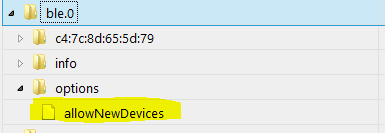
                1097_unbenannt.png
                Die Option deaktivieren und alle Devices aus Objekte löschen, die nicht bekannt sind.

                –-

                Außerdem an Board: NodeJS-10-Unterstützung. Ich konnte es allerdings noch nicht selbst testen. Wer also schon auf NodeJS 10 ist, darf gerne testen.

                Warum `sudo` böse ist: https://forum.iobroker.net/post/17109

                1 Antwort Letzte Antwort
                0
                • S Offline
                  S Offline
                  Siegfried
                  Forum Testing
                  schrieb am zuletzt editiert von
                  #239

                  Habe auf die v0.6.0 geupdatet trotzdem scheint bei mir scheint die Möglichkeit nicht auf

                  1 Antwort Letzte Antwort
                  0
                  • AlCalzoneA Offline
                    AlCalzoneA Offline
                    AlCalzone
                    Developer
                    schrieb am zuletzt editiert von
                    #240

                    Wie hast du geupdated?

                    Warum `sudo` böse ist: https://forum.iobroker.net/post/17109

                    1 Antwort Letzte Antwort
                    0
                    • S Offline
                      S Offline
                      Siegfried
                      Forum Testing
                      schrieb am zuletzt editiert von
                      #241

                      erst über git …dann habe ich versucht zu deinstallieren und neu zu installieren ...

                      aber immer hat sich nichts geändert

                      1 Antwort Letzte Antwort
                      0
                      • S Offline
                        S Offline
                        Siegfried
                        Forum Testing
                        schrieb am zuletzt editiert von
                        #242

                        nochmal aus git probiert …

                        Nun hab ich den fehler: unhandled promise rejection: Error: Cannot find module '@abandonware/bluetooth-hci-socket'

                        1 Antwort Letzte Antwort
                        0
                        • AlCalzoneA Offline
                          AlCalzoneA Offline
                          AlCalzone
                          Developer
                          schrieb am zuletzt editiert von
                          #243

                          @Siegfried:

                          erst über git `
                          Da ist das Problem. Bei Installation von git wird kein Upload ausgeführt.

                          Sofern nicht explizit dazu aufgefordert, bitte immer normal über die Adapter-Liste installieren.

                          @Siegfried:

                          Cannot find module '@abandonware/bluetooth-hci-socket' `
                          Was steht im Installer-Log? Da muss irgendein Fehler aufgetreten sein.

                          Warum `sudo` böse ist: https://forum.iobroker.net/post/17109

                          1 Antwort Letzte Antwort
                          0
                          • S Offline
                            S Offline
                            Siegfried
                            Forum Testing
                            schrieb am zuletzt editiert von
                            #244

                            da steht:

                            ! ````
                            $ ./iobroker url "https://github.com/AlCalzone/ioBroker.ble"
                            install https://github.com/AlCalzone/ioBroker.ble/tarball/master
                            npm install https://github.com/AlCalzone/ioBroker.ble/tarball/master --production --save --prefix "/opt/iobroker" (System call)
                            npm

                            ERR!

                            path
                            /root/.npm/_logs
                            npm

                            ERR!

                            code
                            EACCES
                            npm
                            ERR! errno -13npm
                            ERR! syscall scandirnpm

                            ERR!
                            Error: EACCES: permission denied, scandir '/root/.npm/_logs'
                            npm
                            ERR! { Error: EACCES: permission denied, scandir '/root/.npm/_logs'npm
                            ERR! stack: 'Error: EACCES: permission denied, scandir '/root/.npm/_logs'',npm ERR! errno: -13,

                            ! npm ERR! code: 'EACCES',npm
                            ERR! syscall: 'scandir',npm ERR!
                            path: '/root/.npm/_logs' }npm ERR!
                            npm ERR! The operation was rejected by your operating system.
                            ! npm ERR! It is likely you do not have the permissions to access this file as the current usernpm
                            ERR! npm ERR! If you believe this might be a permissions issue, please double-check the
                            ! npm ERR! permissions of the file and its containing directories, or try runningnpm ERR! the command again as root/Administrator (though this is not recommended).
                            ! glob error { Error: EACCES: permission denied, scandir '/root/.npm/_logs' stack: 'Error: EACCES: permission denied, scandir '/root/.npm/_logs'',
                            errno: -13,
                            code: 'EACCES',
                            syscall: 'scandir',
                            path: '/root/.npm/_logs' }
                            ! npm

                            ERR!

                            path
                            /root/.npm/_cacache/index-v5/f6/d3/856f4e146dc3e8cb995652c4d6a1e16806d6bca7e87878fd9046e55ea74f
                            npm

                            ERR!

                            code
                            EACCESnpm
                            ERR! errno
                            -13npm ERR! syscall
                            opennpm

                            ERR! Error: EACCES: permission denied, open '/root/.npm/_cacache/index-v5/f6/d3/856f4e146dc3e8cb995652c4d6a1e16806d6bca7e87878fd9046e55ea74f'npm ERR! { Error: EACCES: permission denied, open '/root/.npm/_cacache/index-v5/f6/d3/856f4e146dc3e8cb995652c4d6a1e16806d6bca7e87878fd9046e55ea74f'

                            ! npm ERR! cause: npm
                            ERR! { Error: EACCES: permission denied, open '/root/.npm/_cacache/index-v5/f6/d3/856f4e146dc3e8cb995652c4d6a1e16806d6bca7e87878fd9046e55ea74f'npm ERR! errno: -13,
                            npm ERR! code: 'EACCES',
                            npm ERR! syscall: 'open',
                            npm ERR! path: '/root/.npm/_cacache/index-v5/f6/d3/856f4e146dc3e8cb995652c4d6a1e16806d6bca7e87878fd9046e55ea74f' },
                            npm ERR! isOperational: true,
                            npm ERR! stack: 'Error: EACCES: permission denied, open '/root/.npm/_cacache/index-v5/f6/d3/856f4e146dc3e8cb995652c4d6a1e16806d6bca7e87878fd9046e55ea74f'',
                            npm ERR! errno: -13,
                            npm ERR! code: 'EACCES',
                            npm ERR! syscall: 'open',
                            npm ERR! path: '/root/.npm/_cacache/index-v5/f6/d3/856f4e146dc3e8cb995652c4d6a1e16806d6bca7e87878fd9046e55ea74f' }
                            npm ERR!
                            npm ERR! The operation was rejected by your operating system.
                            ! npm ERR! It is likely you do not have the permissions to access this file as the current usernpm ERR!
                            npm ERR! If you believe this might be a permissions issue, please double-check the
                            npm ERR!
                            permissions of the file and its containing directories, or try runningnpm ERR! the command again as root/Administrator (though this is not recommended).
                            ! npm

                            WARN
                            react-beautiful-dnd@9.0.2 requires a peer of react@^16.3.1 but none is installed. You must install peer dependencies yourself.
                            npm

                            WARN
                            react-motion@0.5.2 requires a peer of react@^0.14.9 || ^15.3.0 || ^16.0.0 but none is installed. You must install peer dependencies yourself.
                            npm

                            WARN
                            react-redux@5.0.7 requires a peer of react@^0.14.0 || ^15.0.0-0 || ^16.0.0-0 but none is installed. You must install peer dependencies yourself.
                            npm
                            WARN react-beautiful-dnd@9.0.2 requires a peer of react@^16.3.1 but none is installed. You must install peer dependencies yourself.
                            npm WARN react-motion@0.5.2 requires a peer of react@^0.14.9 || ^15.3.0 || ^16.0.0 but none is installed. You must install peer dependencies yourself.
                            npm WARN react-redux@5.0.7 requires a peer of react@^0.14.0 || ^15.0.0-0 || ^16.0.0-0 but none is installed. You must install peer dependencies yourself.npm
                            WARN optional SKIPPING OPTIONAL DEPENDENCY: xpc-connection@0.1.4 (node_modules/xpc-connection):npm
                            WARN notsup SKIPPING OPTIONAL DEPENDENCY: Unsupported platform for xpc-connection@0.1.4: wanted {"os":"darwin","arch":"any"} (current: {"os":"linux","arch":"x64"})npm

                            WARN optional SKIPPING OPTIONAL DEPENDENCY: @abandonware/bluetooth-hci-socket@0.5.3-1 (node_modules/@abandonware/bluetooth-hci-socket):npm
                            WARN optional
                            SKIPPING OPTIONAL DEPENDENCY: @abandonware/bluetooth-hci-socket@0.5.3-1 preinstall: npm install node-pre-gyp
                            npm
                            WARN optional SKIPPING OPTIONAL DEPENDENCY: Exit status 243

                            ! process exited with code 0

                            
                            ****EDIT: Code in Code und Spoiler-Tags ; Homoran(Admin)****
                            1 Antwort Letzte Antwort
                            0
                            • AlCalzoneA Offline
                              AlCalzoneA Offline
                              AlCalzone
                              Developer
                              schrieb am zuletzt editiert von
                              #245

                              Dachte ich es mir doch. Du hast mal mit sudo installiert.

                              => Lesen und befolgen: viewtopic.php?f=8&t=19209

                              => Nochmal den Adapter über die Admin-UI installieren.

                              Warum `sudo` böse ist: https://forum.iobroker.net/post/17109

                              1 Antwort Letzte Antwort
                              0
                              • S Offline
                                S Offline
                                Siegfried
                                Forum Testing
                                schrieb am zuletzt editiert von
                                #246

                                hm bekomme es irgendwie nicht hin.

                                entweder ich bekomme den fehler oder es läuft wieder die alte version.

                                Habe auch den Befehl.````
                                sudo chown -R $(whoami) ~/.npm

                                
                                Reicht das? Oder sollte ich das in Klammern mit was ersetzten.
                                1 Antwort Letzte Antwort
                                0
                                • S Offline
                                  S Offline
                                  Siegfried
                                  Forum Testing
                                  schrieb am zuletzt editiert von
                                  #247

                                  jetzt läuft es …hab nun mit einem anderen Adapter probleme :-(

                                  1 Antwort Letzte Antwort
                                  0
                                  • AlCalzoneA Offline
                                    AlCalzoneA Offline
                                    AlCalzone
                                    Developer
                                    schrieb am zuletzt editiert von
                                    #248

                                    Dann machst du am besten einen neuen Thread dazu auf ;)

                                    Warum `sudo` böse ist: https://forum.iobroker.net/post/17109

                                    1 Antwort Letzte Antwort
                                    0
                                    • S Offline
                                      S Offline
                                      Shaky79
                                      schrieb am zuletzt editiert von
                                      #249

                                      Hallo zusammen,

                                      bei mir findet er zwar das @abandonware/bluetooth-hci socket, aber er sagt mir schon wieder falsche node Version. (Siehe Anhang)

                                      Ich dachte es gäbe jetzt Node10 Support? Sorry bin immer noch Anfänger mit Linux. Was mache ich hier falsch?

                                      Ich hab nochmal neu installiert.

                                      Bei der Installation kommt tatsächlich auch eine Fehlermeldung bei Bluetooth. Werde da aber nicht draus schlau. Bzw. weiß nicht was ich tun soll.

                                      $ ./iobroker add ble  --host phoscon
                                      NPM version: 6.5.0
                                      npm install iobroker.ble --production --save --prefix "/opt/iobroker" (System call)
                                      ../src/BluetoothHciSocket.cpp: In member function ‘void BluetoothHciSocket::poll()’:../src/BluetoothHciSocket.cpp:251:95: warning: ‘v8::Local <v8::value>Nan::MakeCallback(v8::Local<v8::object>, v8::Local<v8::string>, int, v8::Local<v8::value>*)’ is deprecated [-Wdeprecated-declarations]
                                           Nan::MakeCallback(Nan::New<object>(this->This), Nan::New("emit").ToLocalChecked(), 2, argv);
                                                                                                                                     ^
                                      In file included from ../src/BluetoothHciSocket.cpp:8:0:
                                      ../../../../nan/nan.h:979:46: note: declared here
                                         NAN_DEPRECATED inline v8::Local <v8::value>MakeCallback(
                                                                                    ^~~~~~~~~~~~
                                      ../src/BluetoothHciSocket.cpp: In member function ‘void BluetoothHciSocket::emitErrnoError()’:
                                      ../src/BluetoothHciSocket.cpp:275:72: error: no matching function for call to ‘v8::Function::NewInstance(int, v8::Local <v8::value>[1])’
                                         Local <value>error = errorConstructor->NewInstance(1, constructorArgs);
                                                                                                              ^
                                      In file included from /root/.node-gyp/10.14.2/include/node/node.h:63:0,
                                                       from /root/.node-gyp/10.14.2/include/node/node_buffer.h:25,
                                                       from ../src/BluetoothHciSocket.cpp:7:
                                      /root/.node-gyp/10.14.2/include/node/v8.h:3993:44: note: candidate: v8::MaybeLocal <v8::object>v8::Function::NewInstance(v8::Local<v8::context>, int, v8::Local<v8::value>*) const
                                         V8_WARN_UNUSED_RESULT MaybeLocal <object>NewInstance(
                                                                                  ^~~~~~~~~~~
                                      /root/.node-gyp/10.14.2/include/node/v8.h:3993:44: note:   candidate expects 3 arguments, 2 provided
                                      /root/.node-gyp/10.14.2/include/node/v8.h:3996:44: note: candidate: v8::MaybeLocal <v8::object>v8::Function::NewInstance(v8::Local<v8::context>) const
                                         V8_WARN_UNUSED_RESULT MaybeLocal <object>NewInstance(
                                                                                  ^~~~~~~~~~~
                                      /root/.node-gyp/10.14.2/include/node/v8.h:3996:44: note:   candidate expects 1 argument, 2 provided
                                      ../src/BluetoothHciSocket.cpp:282:93: warning: ‘v8::Local <v8::value>Nan::MakeCallback(v8::Local<v8::object>, v8::Local<v8::string>, int, v8::Local<v8::value>*)’ is deprecated [-Wdeprecated-declarations]
                                         Nan::MakeCallback(Nan::New<object>(this->This), Nan::New("emit").ToLocalChecked(), 2, argv);
                                                                                                                                   ^
                                      In file included from ../src/BluetoothHciSocket.cpp:8:0:
                                      ../../../../nan/nan.h:979:46: note: declared here
                                         NAN_DEPRECATED inline v8::Local <v8::value>MakeCallback(
                                                                                    ^~~~~~~~~~~~
                                      ../src/BluetoothHciSocket.cpp: In static member function ‘static Nan::NAN_METHOD_RETURN_TYPE BluetoothHciSocket::BindRaw(Nan::NAN_METHOD_ARGS_TYPE)’:
                                      ../src/BluetoothHciSocket.cpp:395:34: warning: ‘int64_t v8::Value::IntegerValue() const’ is deprecated: Use maybe version [-Wdeprecated-declarations]
                                             devId = arg0->IntegerValue();
                                                                        ^
                                      In file included from /root/.node-gyp/10.14.2/include/node/v8.h:26:0,
                                                       from /root/.node-gyp/10.14.2/include/node/node.h:63,
                                                       from /root/.node-gyp/10.14.2/include/node/node_buffer.h:25,
                                                       from ../src/BluetoothHciSocket.cpp:7:
                                      /root/.node-gyp/10.14.2/include/node/v8.h:2476:46: note: declared here
                                         V8_DEPRECATED("Use maybe version", int64_t IntegerValue() const);
                                                                                    ^
                                      /root/.node-gyp/10.14.2/include/node/v8config.h:324:3: note: in definition of macro ‘V8_DEPRECATED’
                                         declarator __attribute__((deprecated(message)))
                                         ^~~~~~~~~~
                                      ../src/BluetoothHciSocket.cpp: In static member function ‘static Nan::NAN_METHOD_RETURN_TYPE BluetoothHciSocket::BindUser(Nan::NAN_METHOD_ARGS_TYPE)’:
                                      ../src/BluetoothHciSocket.cpp:417:34: warning: ‘int64_t v8::Value::IntegerValue() const’ is deprecated: Use maybe version [-Wdeprecated-declarations]
                                             devId = arg0->IntegerValue();
                                                                        ^
                                      In file included from /root/.node-gyp/10.14.2/include/node/v8.h:26:0,
                                                       from /root/.node-gyp/10.14.2/include/node/node.h:63,
                                                       from /root/.node-gyp/10.14.2/include/node/node_buffer.h:25,
                                                       from ../src/BluetoothHciSocket.cpp:7:
                                      /root/.node-gyp/10.14.2/include/node/v8.h:2476:46: note: declared here
                                         V8_DEPRECATED("Use maybe version", int64_t IntegerValue() const);
                                                                                    ^
                                      /root/.node-gyp/10.14.2/include/node/v8config.h:324:3: note: in definition of macro ‘V8_DEPRECATED’
                                         declarator __attribute__((deprecated(message)))
                                         ^~~~~~~~~~
                                      
                                      make: *** [Release/obj.target/binding/src/BluetoothHciSocket.o] Error 1
                                      gyp
                                       ERR! build error 
                                      gyp ERR! stack Error: `make` failed with exit code: 2gyp ERR! stack     at ChildProcess.onExit (/usr/local/lib/node_modules/npm/node_modules/node-gyp/lib/build.js:262:23)
                                      gyp ERR! stack     at ChildProcess.emit (events.js:182:13)
                                      gyp ERR! stack     at Process.ChildProcess._handle.onexit (internal/child_process.js:240:12)
                                      
                                      gyp ERR! System Linux 4.14.79-v7+gyp ERR! command "/usr/local/bin/node" "/usr/local/lib/node_modules/npm/node_modules/node-gyp/bin/node-gyp.js" "rebuild"
                                      gyp ERR! cwd /opt/iobroker/node_modules/noble/node_modules/bluetooth-hci-socket
                                      gyp ERR! node -v v10.14.2
                                      gyp ERR! node-gyp -v v3.8.0
                                      gyp ERR! not ok 
                                      
                                      npm
                                       WARN enoent ENOENT: no such file or directory, open '/opt/iobroker/node_modules/bluetooth-hci-socket/package.json'
                                      npm 
                                      WARN babel-eslint@5.0.4 requires a peer of eslint@<2.3.0 but none is installed. You must install peer dependencies yourself.
                                      npm
                                       WARN
                                       optional
                                       SKIPPING OPTIONAL DEPENDENCY: bluetooth-hci-socket@0.5.1 (node_modules/noble/node_modules/bluetooth-hci-socket):
                                      npm WARN
                                       optional SKIPPING OPTIONAL DEPENDENCY: bluetooth-hci-socket@0.5.1 install: `node-gyp rebuild`npm WARN optional SKIPPING OPTIONAL DEPENDENCY: Exit status 1
                                      
                                      host.phoscon install adapter ble
                                      got /opt/iobroker/node_modules/iobroker.ble/admin
                                      upload [2] ble.admin /opt/iobroker/node_modules/iobroker.ble/admin/words.js words.js application/javascript
                                      upload [1] ble.admin /opt/iobroker/node_modules/iobroker.ble/admin/index.html index.html text/html
                                      upload [0] ble.admin /opt/iobroker/node_modules/iobroker.ble/admin/ble.png ble.png image/png
                                      host.phoscon object system.adapter.ble created
                                      host.phoscon create instance ble
                                      host.phoscon object ble.0.options.allowNewDevices created
                                      host.phoscon object ble.0.options created
                                      host.phoscon object ble.0.info.driverState created
                                      host.phoscon object ble.0.info.connection created
                                      host.phoscon object ble.0.info created
                                      host.phoscon object system.adapter.ble.0.outputCount created
                                      host.phoscon object system.adapter.ble.0.inputCount created
                                      host.phoscon object system.adapter.ble.0.uptime created
                                      host.phoscon object system.adapter.ble.0.memRss created
                                      host.phoscon object system.adapter.ble.0.memHeapTotal created
                                      host.phoscon object system.adapter.ble.0.memHeapUsed created
                                      host.phoscon object system.adapter.ble.0.connected created
                                      host.phoscon object system.adapter.ble.0.alive created
                                      host.phoscon object system.adapter.ble.0 created
                                      process exited with code 0
                                      
                                      Fehlermeldung mit falscher Node Version bleibt aber die gleich. 
                                      
                                      Lampe im Broker dann auf gelb
                                      
                                      Gruss
                                        [10504_bleadapter.jpg](/assets/uploads/files/10504_bleadapter.jpg)</v8::value></object></v8::value></v8::string></v8::object></v8::value></object></v8::context></v8::object></object></v8::value></v8::context></v8::object></value></v8::value></v8::value></object></v8::value></v8::string></v8::object></v8::value> 
                                      
                                      1 Antwort Letzte Antwort
                                      0
                                      • AlCalzoneA Offline
                                        AlCalzoneA Offline
                                        AlCalzone
                                        Developer
                                        schrieb am zuletzt editiert von
                                        #250

                                        Nach einem NodeJS-Update kommst du um eine Neukompilierung der nativen Module nicht herum.

                                        Das kannst du erledigen mit

                                        cd /opt/iobroker
                                        npm rebuild


                                        Das wird eine Weile dauern.

                                        Außerdem ist scheinbar noch eine alte Version des Adapters installiert. Bitte mal komplett löschen und neu installieren:

                                        iobroker del ble
                                        iobroker add ble



                                        Warum `sudo` böse ist: https://forum.iobroker.net/post/17109

                                        1 Antwort Letzte Antwort
                                        0
                                        • S Offline
                                          S Offline
                                          Shaky79
                                          schrieb am zuletzt editiert von
                                          #251

                                          Danke schonmal . Rebuild wirft mir direkt ein paar EAccess Fehlermeldungen raus. Mach ich das auch mit diesem unsafe perm oder kann ich da sudo verwenden

                                          Gesendet von iPhone mit Tapatalk

                                          1 Antwort Letzte Antwort
                                          0
                                          Antworten
                                          • In einem neuen Thema antworten
                                          Anmelden zum Antworten
                                          • Älteste zuerst
                                          • Neuste zuerst
                                          • Meiste Stimmen


                                          Support us

                                          ioBroker
                                          Community Adapters
                                          Donate

                                          785

                                          Online

                                          32.4k

                                          Benutzer

                                          81.6k

                                          Themen

                                          1.3m

                                          Beiträge
                                          Community
                                          Impressum | Datenschutz-Bestimmungen | Nutzungsbedingungen | Einwilligungseinstellungen
                                          ioBroker Community 2014-2025
                                          logo
                                          • Anmelden

                                          • Du hast noch kein Konto? Registrieren

                                          • Anmelden oder registrieren, um zu suchen
                                          • Erster Beitrag
                                            Letzter Beitrag
                                          0
                                          • Home
                                          • Aktuell
                                          • Tags
                                          • Ungelesen 0
                                          • Kategorien
                                          • Unreplied
                                          • Beliebt
                                          • GitHub
                                          • Docu
                                          • Hilfe
