


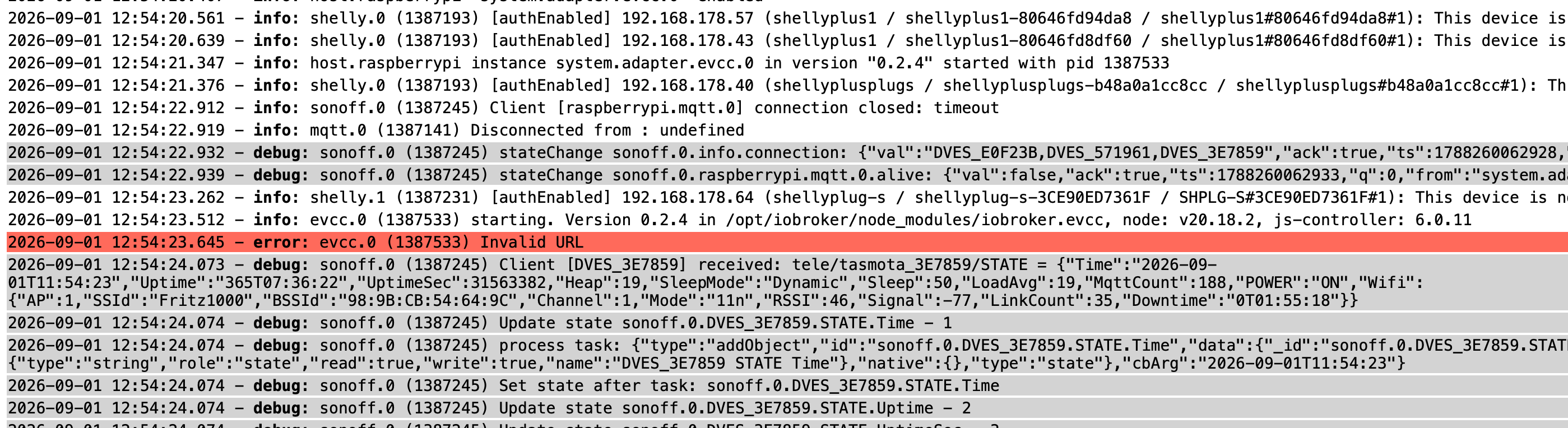
EVCC wird nicht grün
-
Das ist die Ausgabe
lrwxrwxrwx 1 root root 13 Sep 7 10:50 platform-fd500000.pcie-pci-0000:01:00.0-usb-0:1.1.1:1.0-port0 -> ../../ttyUSB0
lrwxrwxrwx 1 root root 13 Sep 7 10:50 platform-fd500000.pcie-pci-0000:01:00.0-usb-0:1.1.2:1.0-port0 -> ../../ttyUSB1
lrwxrwxrwx 1 root root 13 Sep 7 10:50 platform-fd500000.pcie-pci-0000:01:00.0-usb-0:1.1.3:1.0-port0 -> ../../ttyUSB2
lrwxrwxrwx 1 root root 13 Sep 7 10:50 platform-fd500000.pcie-pci-0000:01:00.0-usb-0:1.1.4:1.0-port0 -> ../../ttyUSB3
lrwxrwxrwx 1 root root 13 Sep 7 10:50 platform-fd500000.pcie-pci-0000:01:00.0-usbv2-0:1.1.1:1.0-port0 -> ../../ttyUSB0
lrwxrwxrwx 1 root root 13 Sep 7 10:50 platform-fd500000.pcie-pci-0000:01:00.0-usbv2-0:1.1.2:1.0-port0 -> ../../ttyUSB1
lrwxrwxrwx 1 root root 13 Sep 7 10:50 platform-fd500000.pcie-pci-0000:01:00.0-usbv2-0:1.1.3:1.0-port0 -> ../../ttyUSB2
lrwxrwxrwx 1 root root 13 Sep 7 10:50 platform-fd500000.pcie-pci-0000:01:00.0-usbv2-0:1.1.4:1.0-port0 -> ../../ttyUSB3 -
Das ist die Ausgabe
lrwxrwxrwx 1 root root 13 Sep 7 10:50 platform-fd500000.pcie-pci-0000:01:00.0-usb-0:1.1.1:1.0-port0 -> ../../ttyUSB0
lrwxrwxrwx 1 root root 13 Sep 7 10:50 platform-fd500000.pcie-pci-0000:01:00.0-usb-0:1.1.2:1.0-port0 -> ../../ttyUSB1
lrwxrwxrwx 1 root root 13 Sep 7 10:50 platform-fd500000.pcie-pci-0000:01:00.0-usb-0:1.1.3:1.0-port0 -> ../../ttyUSB2
lrwxrwxrwx 1 root root 13 Sep 7 10:50 platform-fd500000.pcie-pci-0000:01:00.0-usb-0:1.1.4:1.0-port0 -> ../../ttyUSB3
lrwxrwxrwx 1 root root 13 Sep 7 10:50 platform-fd500000.pcie-pci-0000:01:00.0-usbv2-0:1.1.1:1.0-port0 -> ../../ttyUSB0
lrwxrwxrwx 1 root root 13 Sep 7 10:50 platform-fd500000.pcie-pci-0000:01:00.0-usbv2-0:1.1.2:1.0-port0 -> ../../ttyUSB1
lrwxrwxrwx 1 root root 13 Sep 7 10:50 platform-fd500000.pcie-pci-0000:01:00.0-usbv2-0:1.1.3:1.0-port0 -> ../../ttyUSB2
lrwxrwxrwx 1 root root 13 Sep 7 10:50 platform-fd500000.pcie-pci-0000:01:00.0-usbv2-0:1.1.4:1.0-port0 -> ../../ttyUSB3 -
ls -lA /dev/ttyUSB1
crw-rw----+ 1 root plugdev 188, 1 Sep 7 10:50 /dev/ttyUSB1 -
ls -lA /dev/ttyUSB1
crw-rw----+ 1 root plugdev 188, 1 Sep 7 10:50 /dev/ttyUSB1getfacl /dev/ttyUSB1Die generelle Gruppe ist aber auch nicht dialout sondern plugdev.
Der user 'evcc' müsste also in 'plugdev' rein:sudo usermod -aG plugdev evcc -
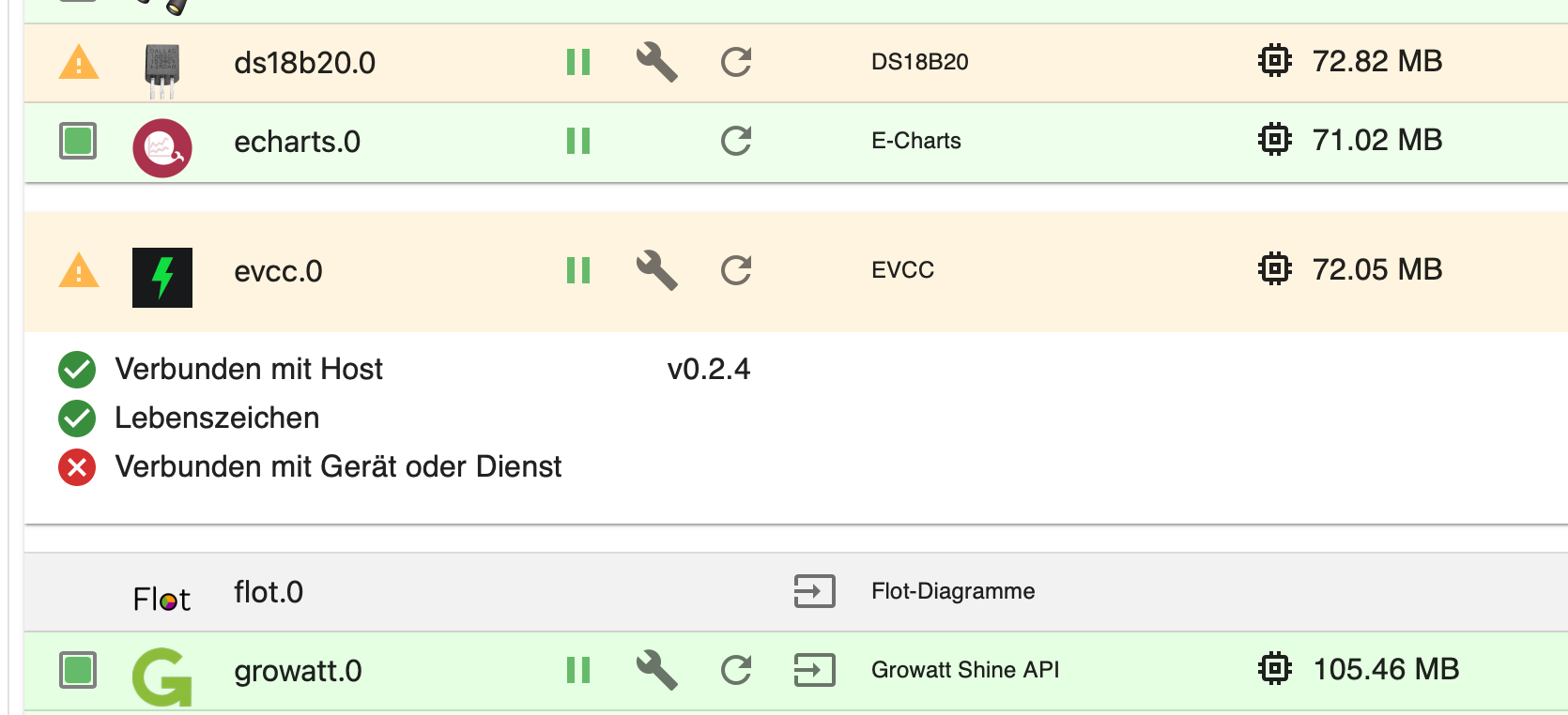
Jetzt habe ich nur noch das Problem, das evcc in dem Instanzen nicht grün wird. Da gibt es ja nicht viel einzustellen.
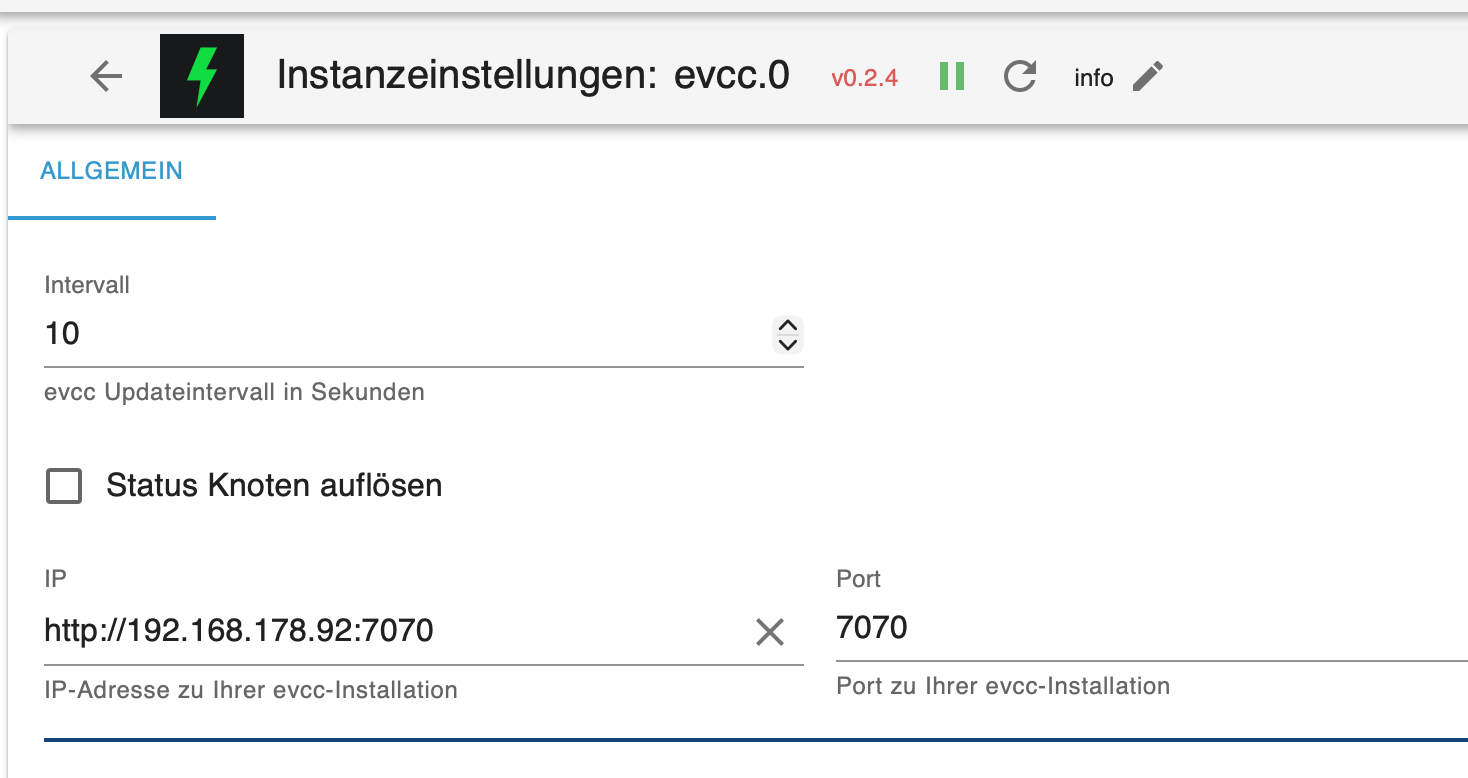
Die IP Adresse ist OK der Port auch. Status Knoten ist kein Haken drinBackitup ist auch nicht mehr grün und mir fehlt der Button für manuelles sichern.
-
Jetzt habe ich nur noch das Problem, das evcc in dem Instanzen nicht grün wird. Da gibt es ja nicht viel einzustellen.
Die IP Adresse ist OK der Port auch. Status Knoten ist kein Haken drinBackitup ist auch nicht mehr grün und mir fehlt der Button für manuelles sichern.
Hast du den user 'evcc' nach der Änderung der Gruppen mal ein- und wieder ausgeloggt?
Alternativ den ganzen Host sauber neugestartet? -
Ich habe sudo reboot eingeben. iobroker ist bei gestartet und EVCC auch.
Ich habe aber bei allen Skripten oben stehen "Instanz ist deaktiviert"
Die Skripte laufen nicht. Was ist da denn jetzt passiert.
Read from remote host meinbroker: Connection reset by peer
Connection to meinbroker closed.
client_loop: send disconnect: Broken pipe -
Ich habe sudo reboot eingeben. iobroker ist bei gestartet und EVCC auch.
Ich habe aber bei allen Skripten oben stehen "Instanz ist deaktiviert"
Die Skripte laufen nicht. Was ist da denn jetzt passiert.
Read from remote host meinbroker: Connection reset by peer
Connection to meinbroker closed.
client_loop: send disconnect: Broken pipeDie Skripte laufen nicht. Was ist da denn jetzt passiert.
Keine Ahnung, Ausgabe von
iob diagzeigen.
-
iob diag
[sudo] password for karl-heinz:
/usr/bin/iob: line 21: /home/iobroker/iob_diag.log: Permission deniedDas war mir jetzt noch nicht aufgefallen, weil ich im Moment mit EVCC zu tun hatte.
-
iob diag
[sudo] password for karl-heinz:
/usr/bin/iob: line 21: /home/iobroker/iob_diag.log: Permission deniedDas war mir jetzt noch nicht aufgefallen, weil ich im Moment mit EVCC zu tun hatte.
Nach der Erstinstallation ist zwingend ein
iob stop
iob fix
sudo reboot
durchzuführen. Steht auch so in der Ausgabe des Installlationsskriptes drin.
-
Habe ich gemacht. Aber die Skripte laufen noch nicht.
Steht immer noch bei allen "Instanz ist deaktiviert" -
Habe ich gemacht. Aber die Skripte laufen noch nicht.
Steht immer noch bei allen "Instanz ist deaktiviert" -
Hatte ich auch geschickt musst du 3 Fenster höher schauen.
Hier nochmal:
iob diag
[sudo] password for karl-heinz:
/usr/bin/iob: line 21: /home/iobroker/iob_diag.log: Permission denied -
Hatte ich auch geschickt musst du 3 Fenster höher schauen.
Hier nochmal:
iob diag
[sudo] password for karl-heinz:
/usr/bin/iob: line 21: /home/iobroker/iob_diag.log: Permission denied -
karl-heinz adm dialout cdrom sudo audio video plugdev games users netdev lpadmin gpio i2c spi render input iobroker
-
karl-heinz adm dialout cdrom sudo audio video plugdev games users netdev lpadmin gpio i2c spi render input iobroker
Bitte gewöhn dir an die Konsolen EIN- wie AUSgaben komplett zu posten, in CodeTags </> eingebettet.
Mittlerweile mal neugestartet? Die Gruppen werden erst bei einem erneuten LogIn des users eingelesen. -
Ich wusste bis eben nicht wo man die CodeTags findet
Das waren die letzten Ausgaben
Die Skripte laufen noch nicht sind alle "deaktiviert"karl-heinz@meinbroker:~ $ sudo reboot [sudo] password for karl-heinz: karl-heinz@meinbroker:~ $ Read from remote host meinbroker: Connection reset by peer Connection to meinbroker closed. client_loop: send disconnect: Broken pipe euronicsxxlwunstorf@Mac ~ % iobroker start zsh: command not found: iobroker euronicsxxlwunstorf@Mac ~ % ssh karl-heinz@meinbroker karl-heinz@meinbroker's password: Linux meinbroker 6.18.39+rpt-rpi-v8 #1 SMP PREEMPT Debian 1:6.18.39-1+rpt1 (2026-07-29) aarch64 The programs included with the Debian GNU/Linux system are free software; the exact distribution terms for each program are described in the individual files in /usr/share/doc/*/copyright. Debian GNU/Linux comes with ABSOLUTELY NO WARRANTY, to the extent permitted by applicable law. Last login: Mon Sep 7 15:56:32 2026 from 192.168.178.153 karl-heinz@meinbroker:~ $ -
Ich wusste bis eben nicht wo man die CodeTags findet
Das waren die letzten Ausgaben
Die Skripte laufen noch nicht sind alle "deaktiviert"karl-heinz@meinbroker:~ $ sudo reboot [sudo] password for karl-heinz: karl-heinz@meinbroker:~ $ Read from remote host meinbroker: Connection reset by peer Connection to meinbroker closed. client_loop: send disconnect: Broken pipe euronicsxxlwunstorf@Mac ~ % iobroker start zsh: command not found: iobroker euronicsxxlwunstorf@Mac ~ % ssh karl-heinz@meinbroker karl-heinz@meinbroker's password: Linux meinbroker 6.18.39+rpt-rpi-v8 #1 SMP PREEMPT Debian 1:6.18.39-1+rpt1 (2026-07-29) aarch64 The programs included with the Debian GNU/Linux system are free software; the exact distribution terms for each program are described in the individual files in /usr/share/doc/*/copyright. Debian GNU/Linux comes with ABSOLUTELY NO WARRANTY, to the extent permitted by applicable law. Last login: Mon Sep 7 15:56:32 2026 from 192.168.178.153 karl-heinz@meinbroker:~ $euronicsxxlwunstorf@Mac ~ % iobroker start
zsh: command not found: iobrokerDa turnst du auf dem Mac herum. Das kann nicht funktionieren.
iob stop
iob fix
sagt?
-
Nein, da habe ich nicht richtig hingeguckt und war nicht angemeldet.
karl-heinz@meinbroker:~ $ iob fix Your system is booting into 'graphical.target', which means that a user interface or desktop is available. Usually a server is running without a desktop to have more RAM available. Do you want to switch to 'multi-user.target'? (y/N) library: loaded Library version=2026-04-11 ========================================================================== Welcome to the ioBroker installation fixer! Script version: 2025-09-18 You might need to enter your password a couple of times. ========================================================================== ========================================================================== Installing prerequisites (1/5) ========================================================================== Hit:1 http://deb.debian.org/debian trixie InRelease Hit:2 http://deb.debian.org/debian trixie-updates InRelease Get:3 http://archive.raspberrypi.com/debian trixie InRelease [54.9 kB] Get:4 http://deb.debian.org/debian-security trixie-security InRelease [43.4 kB] Get:5 https://dl.evcc.io/public/evcc/stable/deb/debian trixie InRelease Get:6 http://deb.debian.org/debian-security trixie-security/main armhf Packages [232 kB] Hit:7 https://deb.nodesource.com/node_22.x nodistro InRelease Get:8 http://archive.raspberrypi.com/debian trixie/main arm64 Packages [470 kB] Get:9 http://deb.debian.org/debian-security trixie-security/main arm64 Packages [252 kB] Get:10 http://archive.raspberrypi.com/debian trixie/main armhf Packages [461 kB] Get:11 https://dl.evcc.io/public/evcc/stable/deb/debian bookworm InRelease Err:11 https://dl.evcc.io/public/evcc/stable/deb/debian bookworm InRelease Sub-process /usr/bin/sqv returned an error code (1), error message is: Missing key 99685CA9149A5389F6AC7B06EAD5D0E07B0EC0FD, which is needed to verify signature. Fetched 1,537 kB in 0s (3,082 kB/s) Reading package lists... Done W: https://dl.evcc.io/public/evcc/stable/deb/debian/dists/bookworm/InRelease: The key(s) in the keyring /etc/apt/trusted.gpg.d/evcc-stable.asc are ignored as the file has an unsupported filetype. W: An error occurred during the signature verification. The repository is not updated and the previous index files will be used. OpenPGP signature verification failed: https://dl.evcc.io/public/evcc/stable/deb/debian bookworm InRelease: Sub-process /usr/bin/sqv returned an error code (1), error message is: Missing key 99685CA9149A5389F6AC7B06EAD5D0E07B0EC0FD, which is needed to verify signature. W: Failed to fetch https://dl.evcc.io/public/evcc/stable/deb/debian/dists/bookworm/InRelease Sub-process /usr/bin/sqv returned an error code (1), error message is: Missing key 99685CA9149A5389F6AC7B06EAD5D0E07B0EC0FD, which is needed to verify signature. W: Some index files failed to download. They have been ignored, or old ones used instead. ========================================================================== Checking ioBroker user and directory permissions (2/5) ========================================================================== Created /etc/sudoers.d/iobroker Fixing directory permissions... ACL enabled: true ========================================================================== Check and cleanup npm temporary directories (3/5) ========================================================================== Done. ========================================================================== Database maintenance (4/5) ========================================================================== Checking for uncompressed JSONL databases... This might take a while! Compressing /opt/iobroker/iobroker-data/states.jsonl Compressing /opt/iobroker/iobroker-data/objects.jsonl Compressed 2 JSONL files. Done ========================================================================== Checking autostart (5/5) ========================================================================== ==== AUTHENTICATING FOR org.freedesktop.systemd1.manage-units ==== Authentication is required to stop 'iobroker.service'. Authenticating as: Raspberry Pi OS (karl-heinz) Password: ==== AUTHENTICATION COMPLETE ==== Enabling autostart... Autostart enabled! ========================================================================== Your installation was fixed successfully Run iobroker start to start ioBroker again! ========================================================================== karl-heinz@meinbroker:~ $ -
Nein, da habe ich nicht richtig hingeguckt und war nicht angemeldet.
karl-heinz@meinbroker:~ $ iob fix Your system is booting into 'graphical.target', which means that a user interface or desktop is available. Usually a server is running without a desktop to have more RAM available. Do you want to switch to 'multi-user.target'? (y/N) library: loaded Library version=2026-04-11 ========================================================================== Welcome to the ioBroker installation fixer! Script version: 2025-09-18 You might need to enter your password a couple of times. ========================================================================== ========================================================================== Installing prerequisites (1/5) ========================================================================== Hit:1 http://deb.debian.org/debian trixie InRelease Hit:2 http://deb.debian.org/debian trixie-updates InRelease Get:3 http://archive.raspberrypi.com/debian trixie InRelease [54.9 kB] Get:4 http://deb.debian.org/debian-security trixie-security InRelease [43.4 kB] Get:5 https://dl.evcc.io/public/evcc/stable/deb/debian trixie InRelease Get:6 http://deb.debian.org/debian-security trixie-security/main armhf Packages [232 kB] Hit:7 https://deb.nodesource.com/node_22.x nodistro InRelease Get:8 http://archive.raspberrypi.com/debian trixie/main arm64 Packages [470 kB] Get:9 http://deb.debian.org/debian-security trixie-security/main arm64 Packages [252 kB] Get:10 http://archive.raspberrypi.com/debian trixie/main armhf Packages [461 kB] Get:11 https://dl.evcc.io/public/evcc/stable/deb/debian bookworm InRelease Err:11 https://dl.evcc.io/public/evcc/stable/deb/debian bookworm InRelease Sub-process /usr/bin/sqv returned an error code (1), error message is: Missing key 99685CA9149A5389F6AC7B06EAD5D0E07B0EC0FD, which is needed to verify signature. Fetched 1,537 kB in 0s (3,082 kB/s) Reading package lists... Done W: https://dl.evcc.io/public/evcc/stable/deb/debian/dists/bookworm/InRelease: The key(s) in the keyring /etc/apt/trusted.gpg.d/evcc-stable.asc are ignored as the file has an unsupported filetype. W: An error occurred during the signature verification. The repository is not updated and the previous index files will be used. OpenPGP signature verification failed: https://dl.evcc.io/public/evcc/stable/deb/debian bookworm InRelease: Sub-process /usr/bin/sqv returned an error code (1), error message is: Missing key 99685CA9149A5389F6AC7B06EAD5D0E07B0EC0FD, which is needed to verify signature. W: Failed to fetch https://dl.evcc.io/public/evcc/stable/deb/debian/dists/bookworm/InRelease Sub-process /usr/bin/sqv returned an error code (1), error message is: Missing key 99685CA9149A5389F6AC7B06EAD5D0E07B0EC0FD, which is needed to verify signature. W: Some index files failed to download. They have been ignored, or old ones used instead. ========================================================================== Checking ioBroker user and directory permissions (2/5) ========================================================================== Created /etc/sudoers.d/iobroker Fixing directory permissions... ACL enabled: true ========================================================================== Check and cleanup npm temporary directories (3/5) ========================================================================== Done. ========================================================================== Database maintenance (4/5) ========================================================================== Checking for uncompressed JSONL databases... This might take a while! Compressing /opt/iobroker/iobroker-data/states.jsonl Compressing /opt/iobroker/iobroker-data/objects.jsonl Compressed 2 JSONL files. Done ========================================================================== Checking autostart (5/5) ========================================================================== ==== AUTHENTICATING FOR org.freedesktop.systemd1.manage-units ==== Authentication is required to stop 'iobroker.service'. Authenticating as: Raspberry Pi OS (karl-heinz) Password: ==== AUTHENTICATION COMPLETE ==== Enabling autostart... Autostart enabled! ========================================================================== Your installation was fixed successfully Run iobroker start to start ioBroker again! ========================================================================== karl-heinz@meinbroker:~ $Das ist übrigens der Grund, warum evcc nicht läuft. Das kann so gar nicht erst installiert werden. Musst du mal in einer gescheiten Anleitung zu evcc schauen, wie das richtig gemacht wird.
W: https://dl.evcc.io/public/evcc/stable/deb/debian/dists/bookworm/InRelease: The key(s) in the keyring /etc/apt/trusted.gpg.d/evcc-stable.asc are ignored as the file has an unsupported filetype.
W: An error occurred during the signature verification. The repository is not updated and the previous index files will be used. OpenPGP signature verification failed: https://dl.evcc.io/public/evcc/stable/deb/debian bookworm InRelease: Sub-process /usr/bin/sqv returned an error code (1), error message is: Missing key 99685CA9149A5389F6AC7B06EAD5D0E07B0EC0FD, which is needed to verify signature.
W: Failed to fetch https://dl.evcc.io/public/evcc/stable/deb/debian/dists/bookworm/InRelease Sub-process /usr/bin/sqv returned an error code (1), error message is: Missing key 99685CA9149A5389F6AC7B06EAD5D0E07B0EC0FD, which is needed to verify signature.
W: Some index files failed to download. They have been ignored, or old ones used instead.Funktioniert denn
iob diagnun?
Wenn nicht:curl -sLf -o diag.sh https://iobroker.net/diag.sh && bash diag.sh

Hey! Du scheinst an dieser Unterhaltung interessiert zu sein, hast aber noch kein Konto.
Hast du es satt, bei jedem Besuch durch die gleichen Beiträge zu scrollen? Wenn du dich für ein Konto anmeldest, kommst du immer genau dorthin zurück, wo du zuvor warst, und kannst dich über neue Antworten benachrichtigen lassen (entweder per E-Mail oder Push-Benachrichtigung). Du kannst auch Lesezeichen speichern und Beiträge positiv bewerten, um anderen Community-Mitgliedern deine Wertschätzung zu zeigen.
Mit deinem Input könnte dieser Beitrag noch besser werden 💗
Registrieren Anmelden408
Online33.1k
Benutzer84.1k
Themen1.4m
Beiträge