




ESPHome fordert neue Pillow Version
-
@thomas-braun Besten Dank.
Noch eine kleine Fragen, weil es Thematisch finde ich dazu passt. Im IOB bei den Adaptern steht beim ESPHome Adapter "Nicht gewartet". Was verbirgt sich hinter der Aussage? Bedeutet dies, dass die Versionsnummer nicht gewartet wird (Weil Spalte Versionsnummer)?

Besten Dank und Grüße
Bernd
-
@thomas-braun Besten Dank.
Noch eine kleine Fragen, weil es Thematisch finde ich dazu passt. Im IOB bei den Adaptern steht beim ESPHome Adapter "Nicht gewartet". Was verbirgt sich hinter der Aussage? Bedeutet dies, dass die Versionsnummer nicht gewartet wird (Weil Spalte Versionsnummer)?
Besten Dank und Grüße
Bernd
Was verbirgt sich hinter der Aussage?
Das bedeutet, dass der Adapter nicht über das bei dir aktive Repository geführt wird sondern 'wild' daran vorbei installiert wurde.
esphome
github:	0.7.0-beta.4
latest:	0.7.0-beta.1 for 76 days
stable:	-.-.-
Du hast vermutlich (zu Recht) das stable-Repo aktiv.
-
@thomas-braun Hm, eigentlich nicht. Ich hab ESPHome unter den Adapter ausgewählt, Installiert und dann eine Instanz hinzugefügt. Also hier:

Danach kamen eben die Fehlermeldungen, wie ich Sie am Anfang des Threads beschrieben hab.
Egal. Ich wollt nur sagen, dass ESPHome out of the box evtl. herausfordernd ist. Im Prinzip reicht es, wenn man einen IOB testhalber neu installiert und dann den ESPHome Adapter installiert. Dann sollte man die Fehlermeldungen sehen und nachvollziehen können was ich meine.
-
@thomas-braun Hm, eigentlich nicht. Ich hab ESPHome unter den Adapter ausgewählt, Installiert und dann eine Instanz hinzugefügt. Also hier:
Danach kamen eben die Fehlermeldungen, wie ich Sie am Anfang des Threads beschrieben hab.
Egal. Ich wollt nur sagen, dass ESPHome out of the box evtl. herausfordernd ist. Im Prinzip reicht es, wenn man einen IOB testhalber neu installiert und dann den ESPHome Adapter installiert. Dann sollte man die Fehlermeldungen sehen und nachvollziehen können was ich meine.
eigentlich nicht
Welches Repo hast und hattest du aktiv?
Dass es jetzt, nach der Installation so zu finden ist, sagt nichts aus.
Bitte iob diag posten
-
Thomas-Braun sagte:
esphome
Übrigens:
thomas@testpi:~ $ iob add esphome --debug
NPM version: 10.9.7
Installing iobroker.esphome@0.6.3... (System call)
npm warn deprecated @mongodb-js/zstd@1.2.2: 1.x versions of this package are deprecated, please use 2.x instead
npm warn deprecated @mongodb-js/zstd-linux-arm64-gnu@1.2.2: Package no longer supported. Contact Support at https://www.npmjs.com/support for more info.

added 120 packages in 19s

124 packages are looking for funding
  run `npm fund` for details
host.testpi install adapter esphome
upload [26] esphome.admin /opt/iobroker/node_modules/iobroker.esphome/admin/admin.d.ts admin.d.ts video/mp2t
upload [20] esphome.admin /opt/iobroker/node_modules/iobroker.esphome/admin/i18n/it/translations.json i18n/it/translations.json application/json
upload [19] esphome.admin /opt/iobroker/node_modules/iobroker.esphome/admin/i18n/nl/translations.json i18n/nl/translations.json application/json
upload [18] esphome.admin /opt/iobroker/node_modules/iobroker.esphome/admin/i18n/pl/translations.json i18n/pl/translations.json application/json
upload [17] esphome.admin /opt/iobroker/node_modules/iobroker.esphome/admin/i18n/pt/translations.json i18n/pt/translations.json application/json
upload [16] esphome.admin /opt/iobroker/node_modules/iobroker.esphome/admin/i18n/ru/translations.json i18n/ru/translations.json application/json
upload [15] esphome.admin /opt/iobroker/node_modules/iobroker.esphome/admin/i18n/uk/translations.json i18n/uk/translations.json application/json
upload [14] esphome.admin /opt/iobroker/node_modules/iobroker.esphome/admin/i18n/zh-cn/translations.json i18n/zh-cn/translations.json application/json
upload [13] esphome.admin /opt/iobroker/node_modules/iobroker.esphome/admin/img/ESPHomeDashboardUrl.png img/ESPHomeDashboardUrl.png image/png
upload [12] esphome.admin /opt/iobroker/node_modules/iobroker.esphome/admin/img/ESPhomeDashboardIP.png img/ESPhomeDashboardIP.png image/png
upload [11] esphome.admin /opt/iobroker/node_modules/iobroker.esphome/admin/img/connectionIssue.png img/connectionIssue.png image/png
upload [10] esphome.admin /opt/iobroker/node_modules/iobroker.esphome/admin/img/connectionOK.png img/connectionOK.png image/png
upload [9] esphome.admin /opt/iobroker/node_modules/iobroker.esphome/admin/img/dashboard.png img/dashboard.png image/png
upload [8] esphome.admin /opt/iobroker/node_modules/iobroker.esphome/admin/img/deviceTabEmpty.png img/deviceTabEmpty.png image/png
upload [7] esphome.admin /opt/iobroker/node_modules/iobroker.esphome/admin/img/deviceTree.png img/deviceTree.png image/png
upload [6] esphome.admin /opt/iobroker/node_modules/iobroker.esphome/admin/img/flashFromThisComputer.png img/flashFromThisComputer.png image/png
upload [5] esphome.admin /opt/iobroker/node_modules/iobroker.esphome/admin/img/proxy.png img/proxy.png image/png
upload [4] esphome.admin /opt/iobroker/node_modules/iobroker.esphome/admin/index_m.html index_m.html text/html
upload [3] esphome.admin /opt/iobroker/node_modules/iobroker.esphome/admin/jsonConfig.json5 jsonConfig.json5 application/json5
upload [2] esphome.admin /opt/iobroker/node_modules/iobroker.esphome/admin/style.css style.css text/css
upload [1] esphome.admin /opt/iobroker/node_modules/iobroker.esphome/admin/tsconfig.json tsconfig.json application/json
upload [0] esphome.admin /opt/iobroker/node_modules/iobroker.esphome/admin/words.js words.js application/javascript
host.testpi object system.adapter.esphome created/updated
Updating objects from io-package.json for adapter "esphome" with version "0.6.3"
host.testpi create instance esphome
host.testpi object system.adapter.esphome.0.alive created
host.testpi object system.adapter.esphome.0.connected created
host.testpi object system.adapter.esphome.0.compactMode created
host.testpi object system.adapter.esphome.0.cpu created
host.testpi object system.adapter.esphome.0.cputime created
host.testpi object system.adapter.esphome.0.memHeapUsed created
host.testpi object system.adapter.esphome.0.memHeapTotal created
host.testpi object system.adapter.esphome.0.memRss created
host.testpi object system.adapter.esphome.0.uptime created
host.testpi object system.adapter.esphome.0.inputCount created
host.testpi object system.adapter.esphome.0.outputCount created
host.testpi object system.adapter.esphome.0.eventLoopLag created
host.testpi object system.adapter.esphome.0.sigKill created
host.testpi object system.adapter.esphome.0.logLevel created
host.testpi object esphome.0.info created
host.testpi object esphome.0.info.connection created
host.testpi Set default value of esphome.0.info.connection: false
host.testpi object system.adapter.esphome.0 created
Lässt sich heute ohne Klimmzüge im ersten Anlauf installieren. Wo allerdings die Version 0.7.0-beta.1 abgeblieben ist weiß wohl nur der Maintainer.
Über github per
iobroker url DrozmotiX/ioBroker.esphome --debuggeht es aber auch:
Installing DrozmotiX/ioBroker.esphome... (System call) npm warn skipping integrity check for git dependency ssh://git@github.com/SimonFischer04/autopy.git 124 packages are looking for funding run `npm fund` for details upload [26] esphome.admin /opt/iobroker/node_modules/iobroker.esphome/admin/admin.d.ts admin.d.ts video/mp2t upload [20] esphome.admin /opt/iobroker/node_modules/iobroker.esphome/admin/i18n/it/translations.json i18n/it/translations.json application/json upload [19] esphome.admin /opt/iobroker/node_modules/iobroker.esphome/admin/i18n/nl/translations.json i18n/nl/translations.json application/json upload [18] esphome.admin /opt/iobroker/node_modules/iobroker.esphome/admin/i18n/pl/translations.json i18n/pl/translations.json application/json upload [17] esphome.admin /opt/iobroker/node_modules/iobroker.esphome/admin/i18n/pt/translations.json i18n/pt/translations.json application/json upload [16] esphome.admin /opt/iobroker/node_modules/iobroker.esphome/admin/i18n/ru/translations.json i18n/ru/translations.json application/json upload [15] esphome.admin /opt/iobroker/node_modules/iobroker.esphome/admin/i18n/uk/translations.json i18n/uk/translations.json application/json upload [14] esphome.admin /opt/iobroker/node_modules/iobroker.esphome/admin/i18n/zh-cn/translations.json i18n/zh-cn/translations.json application/json upload [13] esphome.admin /opt/iobroker/node_modules/iobroker.esphome/admin/img/ESPHomeDashboardUrl.png img/ESPHomeDashboardUrl.png image/png upload [12] esphome.admin /opt/iobroker/node_modules/iobroker.esphome/admin/img/ESPhomeDashboardIP.png img/ESPhomeDashboardIP.png image/png upload [11] esphome.admin /opt/iobroker/node_modules/iobroker.esphome/admin/img/connectionIssue.png img/connectionIssue.png image/png upload [10] esphome.admin /opt/iobroker/node_modules/iobroker.esphome/admin/img/connectionOK.png img/connectionOK.png image/png upload [9] esphome.admin /opt/iobroker/node_modules/iobroker.esphome/admin/img/dashboard.png img/dashboard.png image/png upload [8] esphome.admin /opt/iobroker/node_modules/iobroker.esphome/admin/img/deviceTabEmpty.png img/deviceTabEmpty.png image/png upload [7] esphome.admin /opt/iobroker/node_modules/iobroker.esphome/admin/img/deviceTree.png img/deviceTree.png image/png upload [6] esphome.admin /opt/iobroker/node_modules/iobroker.esphome/admin/img/flashFromThisComputer.png img/flashFromThisComputer.png image/png upload [5] esphome.admin /opt/iobroker/node_modules/iobroker.esphome/admin/img/proxy.png img/proxy.png image/png upload [4] esphome.admin /opt/iobroker/node_modules/iobroker.esphome/admin/index_m.html index_m.html text/html upload [3] esphome.admin /opt/iobroker/node_modules/iobroker.esphome/admin/jsonConfig.json5 jsonConfig.json5 application/json5 upload [2] esphome.admin /opt/iobroker/node_modules/iobroker.esphome/admin/style.css style.css text/css upload [1] esphome.admin /opt/iobroker/node_modules/iobroker.esphome/admin/tsconfig.json tsconfig.json application/json upload [0] esphome.admin /opt/iobroker/node_modules/iobroker.esphome/admin/words.js words.js application/javascript Updating objects from io-package.json for adapter "esphome" with version "0.7.0-beta.4" Update "system.adapter.esphome.0" Process exited with code 0) -
Tja, da hat der Maintainer wohl manuell deployed or manuell an den npm Tags rumgespielt:
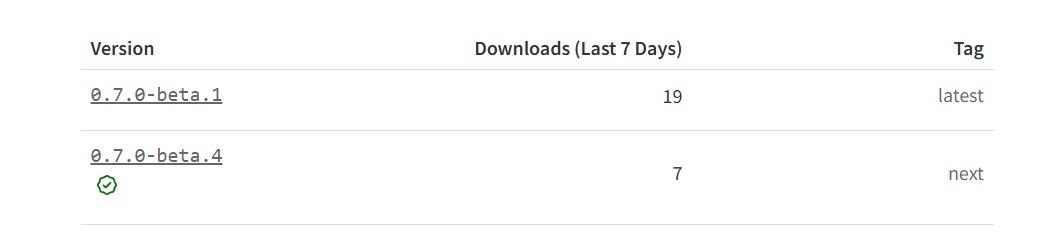
Bei einem normalen deploy via standard script wäre die 0.7.0-beta.1 nicht mit dem npm tag latest versehen worden. Als LATES werden nur reguläre Versionen (1.2.3) akzepotiert und auch nur diese kommen ins repository. Alpha Versionen (und das ist die 0.7.0-beta.1 auch wenn da textual beta steht) sollten als next getagged sein. Wenn hie rmanuell deployed wird und / oder manuell npm tags gesetzt werden kann das bei einer Installation außerdelb des repos schon mal choatisch werden...
Im LATEST Repository wird richtiger Weise 0.6.3 ausgeliefert:
"esphome": {
"meta": "https://raw.githubusercontent.com/DrozmotiX/ioBroker.esphome/main/io-package.json",
"icon": "esphome.png",
"type": "hardware",
"stars": 25,
"issues": 20,
"score": 1,
"weekDownloads": 0,
"stat": 1272,
"name": "esphome",
"version": "0.6.3",Alpha Versionen wären entweder durch Angabe von @next (iob url iobroker.esphome@next) oder der expliziten gewünschetn Version (iob url iobroker.esphome@0.7.0-alpha.97) zu installieren.
Entwicklung u Betreuung: envertech-pv, hoymiles-ms, ns-client, pid, snmp Adapter;
Support Repositoryverwaltung.Wer 'nen Kaffee spendieren will: https://paypal.me
-
Tja, da hat der Maintainer wohl manuell deployed or manuell an den npm Tags rumgespielt:
Bei einem normalen deploy via standard script wäre die 0.7.0-beta.1 nicht mit dem npm tag latest versehen worden. Als LATES werden nur reguläre Versionen (1.2.3) akzepotiert und auch nur diese kommen ins repository. Alpha Versionen (und das ist die 0.7.0-beta.1 auch wenn da textual beta steht) sollten als next getagged sein. Wenn hie rmanuell deployed wird und / oder manuell npm tags gesetzt werden kann das bei einer Installation außerdelb des repos schon mal choatisch werden...
Im LATEST Repository wird richtiger Weise 0.6.3 ausgeliefert:
"esphome": {
"meta": "https://raw.githubusercontent.com/DrozmotiX/ioBroker.esphome/main/io-package.json",
"icon": "esphome.png",
"type": "hardware",
"stars": 25,
"issues": 20,
"score": 1,
"weekDownloads": 0,
"stat": 1272,
"name": "esphome",
"version": "0.6.3",Alpha Versionen wären entweder durch Angabe von @next (iob url iobroker.esphome@next) oder der expliziten gewünschetn Version (iob url iobroker.esphome@0.7.0-alpha.97) zu installieren.
mcm1957 sagte:
Tja, da hat der Maintainer wohl manuell deployed or manuell an den npm Tags rumgespielt:
Bei einem normalen deploy via standard script wäre die 0.7.0-beta.1 nicht mit dem npm tag latest versehen worden. Als LATES werden nur reguläre Versionen (1.2.3) akzepotiert und auch nur diese kommen ins repository. Alpha Versionen (und das ist die 0.7.0-beta.1 auch wenn da textual beta steht) sollten als next getagged sein. Wenn hie rmanuell deployed wird und / oder manuell npm tags gesetzt werden kann das bei einer Installation außerdelb des repos schon mal choatisch werden...
Im LATEST Repository wird richtiger Weise 0.6.3 ausgeliefert:
"esphome": {
"meta": "https://raw.githubusercontent.com/DrozmotiX/ioBroker.esphome/main/io-package.json",
"icon": "esphome.png",
"type": "hardware",
"stars": 25,
"issues": 20,
"score": 1,
"weekDownloads": 0,
"stat": 1272,
"name": "esphome",
"version": "0.6.3",Alpha Versionen wären entweder durch Angabe von @next (iob url iobroker.esphome@next) oder der expliziten gewünschetn Version (iob url iobroker.esphome@0.7.0-alpha.97) zu installieren.
Edit:
Grad gesehn - die 0.7.0-alpha.1 ist auch nicht signiert. Ergo ziemlich sicher manuell rumgeschoben statt den Workflow zu verwenden.Entwicklung u Betreuung: envertech-pv, hoymiles-ms, ns-client, pid, snmp Adapter;
Support Repositoryverwaltung.Wer 'nen Kaffee spendieren will: https://paypal.me
-
mcm1957 sagte:
Tja, da hat der Maintainer wohl manuell deployed or manuell an den npm Tags rumgespielt:
Bei einem normalen deploy via standard script wäre die 0.7.0-beta.1 nicht mit dem npm tag latest versehen worden. Als LATES werden nur reguläre Versionen (1.2.3) akzepotiert und auch nur diese kommen ins repository. Alpha Versionen (und das ist die 0.7.0-beta.1 auch wenn da textual beta steht) sollten als next getagged sein. Wenn hie rmanuell deployed wird und / oder manuell npm tags gesetzt werden kann das bei einer Installation außerdelb des repos schon mal choatisch werden...
Im LATEST Repository wird richtiger Weise 0.6.3 ausgeliefert:
"esphome": {
"meta": "https://raw.githubusercontent.com/DrozmotiX/ioBroker.esphome/main/io-package.json",
"icon": "esphome.png",
"type": "hardware",
"stars": 25,
"issues": 20,
"score": 1,
"weekDownloads": 0,
"stat": 1272,
"name": "esphome",
"version": "0.6.3",Alpha Versionen wären entweder durch Angabe von @next (iob url iobroker.esphome@next) oder der expliziten gewünschetn Version (iob url iobroker.esphome@0.7.0-alpha.97) zu installieren.
Edit:
Grad gesehn - die 0.7.0-alpha.1 ist auch nicht signiert. Ergo ziemlich sicher manuell rumgeschoben statt den Workflow zu verwenden.Ergo ziemlich sicher manuell rumgeschoben statt den Workflow zu verwenden.
Schon gar nicht im stable!
Ich hab ESPHome unter den Adapter ausgewählt, Installiert und dann eine Instanz hinzugefügt. Also hier:
Und nur da kommt die Meldung "nicht gewartet"
kein Support per PN! - Fragen im Forum stellen - Benutzt das Voting rechts unten im Beitrag wenn er euch geholfen hat.
Das Forum freut sich über eine Spende. Benutzt dazu den Spendenbutton oben rechts. Danke!
der Installationsfixer: curl -fsL https://iobroker.net/fix.sh | bash - -
Ok, hier die Kopie von iob diag:
```bash
Script v.2026-01-31

*** BASE SYSTEM ***
Operating System: Debian GNU/Linux 13 (trixie)
 Static hostname: raspi5
       Icon name: computer
          Kernel: Linux 6.12.75+rpt-rpi-2712
    Architecture: arm64
OS is similar to:

Model           : Raspberry Pi 5 Model B Rev 1.0
Docker          : false
Virtualization  : none
Kernel          : aarch64
Userland        : 64 bit

Systemuptime and Load:
 16:38:24 up 5 days,  8:08,  2 users,  load average: 0.12, 0.08, 0.02
CPU threads: 4


*** LIFE CYCLE STATUS ***
Operating System is the current Debian stable version codenamed 'trixie'!

*** RASPBERRY THROTTLING ***
Current issues:
No throttling issues detected.

Previously detected issues:
No throttling issues detected.

*** TIME AND TIMEZONES ***
               Local time: Thu 2026-05-14 16:38:24 CEST
           Universal time: Thu 2026-05-14 14:38:24 UTC
                 RTC time: Thu 2026-05-14 14:38:24
                Time zone: Europe/Berlin (CEST, +0200)
System clock synchronized: yes
              NTP service: active
          RTC in local TZ: no

*** Users and Groups ***
User that called 'iob diag':
bernd
HOME=/home/bernd
GROUPS=bernd adm dialout cdrom sudo audio video plugdev games users netdev gpio i2c spi render input iobroker

User that is running 'js-controller':
js-controller is not running

*** DISPLAY-SERVER SETUP ***
Display-Server:         false
Unit display-manager.service could not be found.
Display-Manager:
Desktop:
Session:                tty

*** MEMORY ***
               total        used        free      shared  buff/cache   available
Mem:            4.2G        385M        2.8G         23M        1.2G        3.9G
Swap:           2.1G        2.1M        2.1G
Total:          6.4G        387M        5.0G

Active iob-Instances:   1

         4045 M total memory
          367 M used memory
          243 M active memory
          815 M inactive memory
         2716 M free memory
          147 M buffer memory
          972 M swap cache
         2047 M total swap
            2 M used swap
         2045 M free swap

*** top - Table Of Processes  ***
top - 16:38:25 up 5 days,  8:08,  2 users,  load average: 0.12, 0.08, 0.02
Tasks: 188 total,   1 running, 187 sleeping,   0 stopped,   0 zombie
%Cpu(s):  0.0 us,  0.0 sy,  0.0 ni,100.0 id,  0.0 wa,  0.0 hi,  0.0 si,  0.0 st
MiB Mem :   4045.7 total,   2715.3 free,    368.3 used,   1120.0 buff/cache
MiB Swap:   2048.0 total,   2046.0 free,      2.0 used.   3677.4 avail Mem

*** FAILED SERVICES ***

  UNIT             LOAD   ACTIVE SUB    DESCRIPTION
* iobroker.service loaded failed failed ioBroker Server

Legend: LOAD   -> Reflects whether the unit definition was properly loaded.
        ACTIVE -> The high-level unit activation state, i.e. generalization of SUB.
        SUB    -> The low-level unit activation state, values depend on unit type.

1 loaded units listed.


*** DMESG CRITICAL ERRORS ***
No critical errors detected

*** FILESYSTEM ***
Filesystem     Type      Size  Used Avail Use% Mounted on
udev           devtmpfs  2.0G     0  2.0G   0% /dev
tmpfs          tmpfs     810M   15M  796M   2% /run
/dev/sda2      ext4      229G  7.5G  213G   4% /
tmpfs          tmpfs     2.0G     0  2.0G   0% /dev/shm
tmpfs          tmpfs     5.0M   48K  5.0M   1% /run/lock
tmpfs          tmpfs     1.0M     0  1.0M   0% /run/credentials/systemd-journald.service
tmpfs          tmpfs     2.0G  9.3M  2.0G   1% /tmp
/dev/sda1      vfat      510M   66M  445M  13% /boot/firmware
tmpfs          tmpfs     1.0M     0  1.0M   0% /run/credentials/serial-getty@ttyAMA10.service
tmpfs          tmpfs     1.0M     0  1.0M   0% /run/credentials/getty@tty1.service
tmpfs          tmpfs     405M   32K  405M   1% /run/user/1000

Messages concerning ext4 filesystem in dmesg:
[Sat May  9 08:30:10 2026] EXT4-fs (sda2): orphan cleanup on readonly fs
[Sat May  9 08:30:10 2026] EXT4-fs (sda2): mounted filesystem 21724cc6-e5a3-48a1-8643-7917dba3a9fb ro with ordered data mode. Quota mode: none.
[Sat May  9 08:30:11 2026] EXT4-fs (sda2): re-mounted 21724cc6-e5a3-48a1-8643-7917dba3a9fb r/w.

Show mounted filesystems:
TARGET           SOURCE    FSTYPE OPTIONS
/                /dev/sda2 ext4   rw,noatime
`-/boot/firmware /dev/sda1 vfat   rw,relatime,fmask=0022,dmask=0022,codepage=437,iocharset=ascii,shortname=mixed,errors=remount-ro

Files in neuralgic directories:

/var:
2.5G    /var/
245M    /var/cache
240M    /var/cache/apt
183M    /var/lib
147M    /var/lib/apt

Archived and active journals take up 8M in the file system.

/opt/iobroker/backups:
42M     /opt/iobroker/backups/

/opt/iobroker/iobroker-data:
335M    /opt/iobroker/iobroker-data/
166M    /opt/iobroker/iobroker-data/files
107M    /opt/iobroker/iobroker-data/backup-objects
47M     /opt/iobroker/iobroker-data/files/admin.admin
46M     /opt/iobroker/iobroker-data/files/admin.admin/custom/assets

The five largest files in iobroker-data are:
16M     /opt/iobroker/iobroker-data/objects.jsonl
8.2M    /opt/iobroker/iobroker-data/files/backitup.admin/assets/index-BDfRPp5J.js
4.6M    /opt/iobroker/iobroker-data/files/javascript.admin/vs/language/typescript/tsWorker.js
4.4M    /opt/iobroker/iobroker-data/backup-objects/2026-05-14_16-30_objects.jsonl.gz
4.4M    /opt/iobroker/iobroker-data/backup-objects/2026-05-14_14-30_objects.jsonl.gz

USB-Devices by-id:
USB-Sticks - Avoid direct links to /dev/tty* in your adapter setups,
please always prefer the links 'by-id':

/dev/serial/by-id/usb-Silicon_Labs_Sonoff_Zigbee_3.0_USB_Dongle_Plus_0001-if00-port0

*** ZigBee Settings ***

✓ Your zigbee.0 COM-Port is matching 'by-id'. Very good!

Zigbee Network Settings on your coordinator/in nvbackup are:

zigbee.X
Extended Pan ID:
*** MASKED ***
Pan ID:
*** MASKED ***
Channel:
*** MASKED ***
Network Key:
*** MASKED ***

To unmask the settings run 'iob diag --unmask'


*** NodeJS-Installation ***

/usr/bin/nodejs         v22.22.2
/usr/bin/node           v22.22.2
/usr/bin/npm            10.9.7
/usr/bin/npx            10.9.7

✓ Node.js installation is correct

nodejs:
  Installed: 22.22.2-1nodesource1
  Candidate: 22.22.2-1nodesource1
  Version table:
 *** 22.22.2-1nodesource1 1001
        500 https://deb.nodesource.com/node_22.x nodistro/main arm64 Packages
        100 /var/lib/dpkg/status
     22.22.1-1nodesource1 1001
        500 https://deb.nodesource.com/node_22.x nodistro/main arm64 Packages
     22.22.0-1nodesource1 1001
        500 https://deb.nodesource.com/node_22.x nodistro/main arm64 Packages
     22.21.0-1nodesource1 1001
        500 https://deb.nodesource.com/node_22.x nodistro/main arm64 Packages
     22.20.0-1nodesource1 1001
        500 https://deb.nodesource.com/node_22.x nodistro/main arm64 Packages
     22.19.0-1nodesource1 1001
        500 https://deb.nodesource.com/node_22.x nodistro/main arm64 Packages
     22.18.0-1nodesource1 1001
        500 https://deb.nodesource.com/node_22.x nodistro/main arm64 Packages
     22.17.1-1nodesource1 1001
        500 https://deb.nodesource.com/node_22.x nodistro/main arm64 Packages
     22.17.0-1nodesource1 1001
        500 https://deb.nodesource.com/node_22.x nodistro/main arm64 Packages
     22.16.0-1nodesource1 1001
        500 https://deb.nodesource.com/node_22.x nodistro/main arm64 Packages
     22.15.1-1nodesource1 1001
        500 https://deb.nodesource.com/node_22.x nodistro/main arm64 Packages
     22.15.0-1nodesource1 1001
        500 https://deb.nodesource.com/node_22.x nodistro/main arm64 Packages
     22.14.0-1nodesource1 1001
        500 https://deb.nodesource.com/node_22.x nodistro/main arm64 Packages
     22.13.1-1nodesource1 1001
        500 https://deb.nodesource.com/node_22.x nodistro/main arm64 Packages
     22.13.0-1nodesource1 1001
        500 https://deb.nodesource.com/node_22.x nodistro/main arm64 Packages
     22.12.0-1nodesource1 1001
        500 https://deb.nodesource.com/node_22.x nodistro/main arm64 Packages
     22.11.0-1nodesource1 1001
        500 https://deb.nodesource.com/node_22.x nodistro/main arm64 Packages
     22.10.0-1nodesource1 1001
        500 https://deb.nodesource.com/node_22.x nodistro/main arm64 Packages
     22.9.0-1nodesource1 1001
        500 https://deb.nodesource.com/node_22.x nodistro/main arm64 Packages
     22.8.0-1nodesource1 1001
        500 https://deb.nodesource.com/node_22.x nodistro/main arm64 Packages
     22.7.0-1nodesource1 1001
        500 https://deb.nodesource.com/node_22.x nodistro/main arm64 Packages
     22.6.0-1nodesource1 1001
        500 https://deb.nodesource.com/node_22.x nodistro/main arm64 Packages
     22.5.1-1nodesource1 1001
        500 https://deb.nodesource.com/node_22.x nodistro/main arm64 Packages
     22.5.0-1nodesource1 1001
        500 https://deb.nodesource.com/node_22.x nodistro/main arm64 Packages
     22.4.1-1nodesource1 1001
        500 https://deb.nodesource.com/node_22.x nodistro/main arm64 Packages
     22.4.0-1nodesource1 1001
        500 https://deb.nodesource.com/node_22.x nodistro/main arm64 Packages
     22.3.0-1nodesource1 1001
        500 https://deb.nodesource.com/node_22.x nodistro/main arm64 Packages
     22.2.0-1nodesource1 1001
        500 https://deb.nodesource.com/node_22.x nodistro/main arm64 Packages
     22.1.0-1nodesource1 1001
        500 https://deb.nodesource.com/node_22.x nodistro/main arm64 Packages
     22.0.0-1nodesource1 1001
        500 https://deb.nodesource.com/node_22.x nodistro/main arm64 Packages
     20.19.2+dfsg-1+deb13u2 500
        500 http://deb.debian.org/debian-security trixie-security/main arm64 Packages
     20.19.2+dfsg-1 500
        500 http://deb.debian.org/debian trixie/main arm64 Packages

Temp directories causing deletion problem: 0
No problems detected

Errors in npm tree: 0
No problems detected

Checking for nodejs vulnerability:


 █████  ██      ██           ██████   ██████   ██████  ██████         ██
██   ██ ██      ██          ██       ██    ██ ██    ██ ██   ██     ██  ██
███████ ██      ██          ██   ███ ██    ██ ██    ██ ██   ██         ██
██   ██ ██      ██          ██    ██ ██    ██ ██    ██ ██   ██     ██  ██
██   ██ ███████ ███████      ██████   ██████   ██████  ██████         ██


*** ioBroker-Installation ***

ioBroker Status
iobroker is not running on this host.


Objects type: jsonl
States  type: jsonl

Hosts:
raspi5              raspi5 (version: 7.0.7, hostname: raspi5        , alive, uptime: 461126)

Core adapters versions
js-controller:  7.0.7
admin:          7.7.22
javascript:     9.0.18

nodejs modules from github:     0

Adapter State
  system.adapter.admin.0                  : admin                 : raspi5                                   -  enabled, port: 8081, bind: 0.0.0.0, run as: admin
  system.adapter.backitup.0               : backitup              : raspi5                                   -  enabled
  system.adapter.cloud.0                  : cloud                 : raspi5                                   - disabled
  system.adapter.devices.0                : devices               : raspi5                                   -  enabled
  system.adapter.discovery.0              : discovery             : raspi5                                   - disabled
  system.adapter.echarts.0                : echarts               : raspi5                                   -  enabled
  system.adapter.esphome.0                : esphome               : raspi5                                   -  enabled
  system.adapter.feiertage.0              : feiertage             : raspi5                                   -  enabled
  system.adapter.history.0                : history               : raspi5                                   -  enabled
  system.adapter.hm-rega.0                : hm-rega               : raspi5                                   -  enabled
  system.adapter.hm-rpc.0                 : hm-rpc                : raspi5                                   -  enabled, port: 0
  system.adapter.hm-rpc.1                 : hm-rpc                : raspi5                                   -  enabled, port: 0
  system.adapter.hmip.0                   : hmip                  : raspi5                                   -  enabled
  system.adapter.ical.0                   : ical                  : raspi5                                   -  enabled
  system.adapter.javascript.0             : javascript            : raspi5                                   -  enabled
  system.adapter.mqtt.0                   : mqtt                  : raspi5                                   -  enabled, port: 1883, bind: 0.0.0.0
  system.adapter.ping.0                   : ping                  : raspi5                                   -  enabled
  system.adapter.telegram.0               : telegram              : raspi5                                   -  enabled, port: 8443, bind: 0.0.0.0
  system.adapter.trashschedule.0          : trashschedule         : raspi5                                   -  enabled
  system.adapter.vis.0                    : vis                   : raspi5                                   -  enabled
  system.adapter.web.0                    : web                   : raspi5                                   -  enabled, port: 8082, bind: 192.168.0.5, run as: admin
  system.adapter.zigbee.0                 : zigbee                : raspi5                                   -  enabled, port: /dev/serial/by-id/usb-Silicon_Labs_Sonoff_Zigbee_3.0_USB_Dongle_Plus_0001-if00-port0

+ instance is alive

Enabled adapters with bindings
  system.adapter.admin.0                  : admin                 : raspi5                                   -  enabled, port: 8081, bind: 0.0.0.0, run as: admin
  system.adapter.hm-rpc.0                 : hm-rpc                : raspi5                                   -  enabled, port: 0
  system.adapter.hm-rpc.1                 : hm-rpc                : raspi5                                   -  enabled, port: 0
  system.adapter.mqtt.0                   : mqtt                  : raspi5                                   -  enabled, port: 1883, bind: 0.0.0.0
  system.adapter.telegram.0               : telegram              : raspi5                                   -  enabled, port: 8443, bind: 0.0.0.0
  system.adapter.web.0                    : web                   : raspi5                                   -  enabled, port: 8082, bind: 192.168.0.5, run as: admin
  system.adapter.zigbee.0                 : zigbee                : raspi5                                   -  enabled, port: /dev/serial/by-id/usb-Silicon_Labs_Sonoff_Zigbee_3.0_USB_Dongle_Plus_0001-if00-port0

ioBroker-Repositories
┌─────────┬──────────┬─────────────────────────────────────────────────────────┬──────────────┐
│ (index) │ name     │ url                                                     │ auto upgrade │
├─────────┼──────────┼─────────────────────────────────────────────────────────┼──────────────┤
│ 0       │ 'stable' │ 'http://download.iobroker.net/sources-dist.json'        │ false        │
│ 1       │ 'beta'   │ 'http://download.iobroker.net/sources-dist-latest.json' │ false        │
└─────────┴──────────┴─────────────────────────────────────────────────────────┴──────────────┘

Active repo(s): stable
Upgrade policy: none

Installed ioBroker-Adapters
Used repository: stable
Adapter    "admin"        : 7.8.23   , installed 7.7.22 [Updatable]
Adapter    "backitup"     : 3.3.14   , installed 3.3.14
Adapter    "cloud"        : 6.0.1    , installed 5.0.1  [Updatable]
Adapter    "devices"      : 1.2.14   , installed 1.2.14
Adapter    "discovery"    : 5.0.0    , installed 5.0.0
Adapter    "echarts"      : 3.1.0    , installed 3.1.0
Adapter    "feiertage"    : 1.3.0    , installed 1.3.0
Adapter    "history"      : 4.0.0    , installed 4.0.0
Adapter    "hm-rega"      : 5.1.0    , installed 5.1.0
Adapter    "hm-rpc"       : 3.0.1    , installed 3.0.1
Adapter    "hmip"         : 1.27.0   , installed 1.27.0
Adapter    "ical"         : 1.20.0   , installed 1.20.0
Adapter    "javascript"   : 9.0.18   , installed 9.0.18
Controller "js-controller": 7.0.7    , installed 7.0.7
Adapter    "mqtt"         : 6.1.4    , installed 6.1.4
Adapter    "ping"         : 1.7.9    , installed 1.7.9
Adapter    "socketio"     : 7.1.3    , installed 7.1.3
Adapter    "telegram"     : 4.1.0    , installed 4.1.0
Adapter    "trashschedule": 3.3.0    , installed 3.3.0
Adapter    "vis"          : 1.5.6    , installed 1.5.6
Adapter    "web"          : 8.0.0    , installed 8.0.0
Adapter    "ws"           : 4.0.0    , installed 4.0.0
Adapter    "zigbee"       : 3.3.5    , installed 3.3.5

Objects and States
Please stand by - This may take a while
Objects:        3385
States:         2368

*** OS-Repositories and Updates ***
Hit:1 http://deb.debian.org/debian trixie InRelease
Hit:2 http://archive.raspberrypi.com/debian trixie InRelease
Hit:3 http://deb.debian.org/debian trixie-updates InRelease
Hit:4 http://deb.debian.org/debian-security trixie-security InRelease
Hit:5 https://deb.nodesource.com/node_22.x nodistro InRelease
Reading package lists...
Pending systemupdates: 41

*** Listening Ports ***
Active Internet connections (only servers)
Proto Recv-Q Send-Q Local Address           Foreign Address         State       User       Inode      PID/Program name
tcp        0      0 0.0.0.0:22              0.0.0.0:*               LISTEN      0          6106       920/sshd: /usr/sbin
tcp        0      0 0.0.0.0:111             0.0.0.0:*               LISTEN      0          4213       1/init
tcp6       0      0 :::22                   :::*                    LISTEN      0          6108       920/sshd: /usr/sbin
tcp6       0      0 :::111                  :::*                    LISTEN      0          3774       1/init
udp        0      0 0.0.0.0:111             0.0.0.0:*                           0          5178       1/init
udp        0      0 0.0.0.0:35466           0.0.0.0:*                           101        6483       701/avahi-daemon: r
udp        0      0 0.0.0.0:5353            0.0.0.0:*                           101        6481       701/avahi-daemon: r
udp6       0      0 :::111                  :::*                                0          4214       1/init
udp6       0      0 :::5353                 :::*                                101        6482       701/avahi-daemon: r
udp6       0      0 :::34049                :::*                                101        6484       701/avahi-daemon: r

*** Log File - Last 25 Lines ***

2026-05-14 16:35:51.819  - info: hmip.0 (1215) terminating
2026-05-14 16:35:51.823  - info: telegram.0 (29290) terminating
2026-05-14 16:35:51.824  - info: telegram.0 (29290) Terminated (ADAPTER_REQUESTED_TERMINATION): Without reason
2026-05-14 16:35:51.837  - info: trashschedule.0 (1295) terminating
2026-05-14 16:35:51.844  - info: zigbee.0 (1142) Saved local configuration data
2026-05-14 16:35:51.875  - info: host.raspi5 instance system.adapter.mqtt.0 terminated with code 0 (NO_ERROR)
2026-05-14 16:35:51.920  - info: host.raspi5 instance system.adapter.backitup.0 terminated with code 0 (NO_ERROR)
2026-05-14 16:35:51.920  - info: host.raspi5 instance system.adapter.hmip.0 terminated with code 0 (NO_ERROR)
2026-05-14 16:35:51.945  - info: host.raspi5 instance system.adapter.admin.0 terminated with code 0 (NO_ERROR)
2026-05-14 16:35:51.945  - info: host.raspi5 instance system.adapter.hm-rpc.0 terminated with code 0 (NO_ERROR)
2026-05-14 16:35:51.966  - info: host.raspi5 instance system.adapter.hm-rega.0 terminated with code 0 (NO_ERROR)
2026-05-14 16:35:51.997  - info: host.raspi5 instance system.adapter.history.0 terminated with code 0 (NO_ERROR)
2026-05-14 16:35:51.997  - info: host.raspi5 instance system.adapter.trashschedule.0 terminated with code 0 (NO_ERROR)
2026-05-14 16:35:52.015  - info: host.raspi5 instance system.adapter.javascript.0 terminated with code 0 (NO_ERROR)
2026-05-14 16:35:52.062  - info: host.raspi5 instance system.adapter.hm-rpc.1 terminated with code 0 (NO_ERROR)
2026-05-14 16:35:52.310  - info: host.raspi5 instance system.adapter.ping.0 terminated with code 0 (NO_ERROR)
2026-05-14 16:35:52.314  - info: host.raspi5 stopInstance timeout system.adapter.telegram.0 killing pid 29290
2026-05-14 16:35:52.334  - warn: host.raspi5 instance system.adapter.telegram.0 terminated due to SIGKILL
2026-05-14 16:35:52.334  - info: host.raspi5 instance system.adapter.telegram.0 terminated with code null ()
2026-05-14 16:35:52.345  - info: host.raspi5 instance system.adapter.web.0 terminated with code 0 (NO_ERROR)
2026-05-14 16:35:52.356  - info: host.raspi5 instance system.adapter.echarts.0 terminated with code 0 (NO_ERROR)
2026-05-14 16:35:55.367  - info: zigbee.0 (1142) Terminated (ADAPTER_REQUESTED_TERMINATION): Without reason
2026-05-14 16:36:01.027  - info: host.raspi5 instance system.adapter.zigbee.0 terminated with code 11 (ADAPTER_REQUESTED_TERMINATION)
2026-05-14 16:36:01.027  - info: host.raspi5 All instances are stopped.
2026-05-14 16:36:01.101  - info: host.raspi5 terminated
============ Mark until here for C&P =============
-
Ok, hier die Kopie von iob diag:
```bash
Script v.2026-01-31

*** BASE SYSTEM ***
Operating System: Debian GNU/Linux 13 (trixie)
 Static hostname: raspi5
       Icon name: computer
          Kernel: Linux 6.12.75+rpt-rpi-2712
    Architecture: arm64
OS is similar to:

Model           : Raspberry Pi 5 Model B Rev 1.0
Docker          : false
Virtualization  : none
Kernel          : aarch64
Userland        : 64 bit

Systemuptime and Load:
 16:38:24 up 5 days,  8:08,  2 users,  load average: 0.12, 0.08, 0.02
CPU threads: 4


*** LIFE CYCLE STATUS ***
Operating System is the current Debian stable version codenamed 'trixie'!

*** RASPBERRY THROTTLING ***
Current issues:
No throttling issues detected.

Previously detected issues:
No throttling issues detected.

*** TIME AND TIMEZONES ***
               Local time: Thu 2026-05-14 16:38:24 CEST
           Universal time: Thu 2026-05-14 14:38:24 UTC
                 RTC time: Thu 2026-05-14 14:38:24
                Time zone: Europe/Berlin (CEST, +0200)
System clock synchronized: yes
              NTP service: active
          RTC in local TZ: no

*** Users and Groups ***
User that called 'iob diag':
bernd
HOME=/home/bernd
GROUPS=bernd adm dialout cdrom sudo audio video plugdev games users netdev gpio i2c spi render input iobroker

User that is running 'js-controller':
js-controller is not running

*** DISPLAY-SERVER SETUP ***
Display-Server:         false
Unit display-manager.service could not be found.
Display-Manager:
Desktop:
Session:                tty

*** MEMORY ***
               total        used        free      shared  buff/cache   available
Mem:            4.2G        385M        2.8G         23M        1.2G        3.9G
Swap:           2.1G        2.1M        2.1G
Total:          6.4G        387M        5.0G

Active iob-Instances:   1

         4045 M total memory
          367 M used memory
          243 M active memory
          815 M inactive memory
         2716 M free memory
          147 M buffer memory
          972 M swap cache
         2047 M total swap
            2 M used swap
         2045 M free swap

*** top - Table Of Processes  ***
top - 16:38:25 up 5 days,  8:08,  2 users,  load average: 0.12, 0.08, 0.02
Tasks: 188 total,   1 running, 187 sleeping,   0 stopped,   0 zombie
%Cpu(s):  0.0 us,  0.0 sy,  0.0 ni,100.0 id,  0.0 wa,  0.0 hi,  0.0 si,  0.0 st
MiB Mem :   4045.7 total,   2715.3 free,    368.3 used,   1120.0 buff/cache
MiB Swap:   2048.0 total,   2046.0 free,      2.0 used.   3677.4 avail Mem

*** FAILED SERVICES ***

  UNIT             LOAD   ACTIVE SUB    DESCRIPTION
* iobroker.service loaded failed failed ioBroker Server

Legend: LOAD   -> Reflects whether the unit definition was properly loaded.
        ACTIVE -> The high-level unit activation state, i.e. generalization of SUB.
        SUB    -> The low-level unit activation state, values depend on unit type.

1 loaded units listed.


*** DMESG CRITICAL ERRORS ***
No critical errors detected

*** FILESYSTEM ***
Filesystem     Type      Size  Used Avail Use% Mounted on
udev           devtmpfs  2.0G     0  2.0G   0% /dev
tmpfs          tmpfs     810M   15M  796M   2% /run
/dev/sda2      ext4      229G  7.5G  213G   4% /
tmpfs          tmpfs     2.0G     0  2.0G   0% /dev/shm
tmpfs          tmpfs     5.0M   48K  5.0M   1% /run/lock
tmpfs          tmpfs     1.0M     0  1.0M   0% /run/credentials/systemd-journald.service
tmpfs          tmpfs     2.0G  9.3M  2.0G   1% /tmp
/dev/sda1      vfat      510M   66M  445M  13% /boot/firmware
tmpfs          tmpfs     1.0M     0  1.0M   0% /run/credentials/serial-getty@ttyAMA10.service
tmpfs          tmpfs     1.0M     0  1.0M   0% /run/credentials/getty@tty1.service
tmpfs          tmpfs     405M   32K  405M   1% /run/user/1000

Messages concerning ext4 filesystem in dmesg:
[Sat May  9 08:30:10 2026] EXT4-fs (sda2): orphan cleanup on readonly fs
[Sat May  9 08:30:10 2026] EXT4-fs (sda2): mounted filesystem 21724cc6-e5a3-48a1-8643-7917dba3a9fb ro with ordered data mode. Quota mode: none.
[Sat May  9 08:30:11 2026] EXT4-fs (sda2): re-mounted 21724cc6-e5a3-48a1-8643-7917dba3a9fb r/w.

Show mounted filesystems:
TARGET           SOURCE    FSTYPE OPTIONS
/                /dev/sda2 ext4   rw,noatime
`-/boot/firmware /dev/sda1 vfat   rw,relatime,fmask=0022,dmask=0022,codepage=437,iocharset=ascii,shortname=mixed,errors=remount-ro

Files in neuralgic directories:

/var:
2.5G    /var/
245M    /var/cache
240M    /var/cache/apt
183M    /var/lib
147M    /var/lib/apt

Archived and active journals take up 8M in the file system.

/opt/iobroker/backups:
42M     /opt/iobroker/backups/

/opt/iobroker/iobroker-data:
335M    /opt/iobroker/iobroker-data/
166M    /opt/iobroker/iobroker-data/files
107M    /opt/iobroker/iobroker-data/backup-objects
47M     /opt/iobroker/iobroker-data/files/admin.admin
46M     /opt/iobroker/iobroker-data/files/admin.admin/custom/assets

The five largest files in iobroker-data are:
16M     /opt/iobroker/iobroker-data/objects.jsonl
8.2M    /opt/iobroker/iobroker-data/files/backitup.admin/assets/index-BDfRPp5J.js
4.6M    /opt/iobroker/iobroker-data/files/javascript.admin/vs/language/typescript/tsWorker.js
4.4M    /opt/iobroker/iobroker-data/backup-objects/2026-05-14_16-30_objects.jsonl.gz
4.4M    /opt/iobroker/iobroker-data/backup-objects/2026-05-14_14-30_objects.jsonl.gz

USB-Devices by-id:
USB-Sticks - Avoid direct links to /dev/tty* in your adapter setups,
please always prefer the links 'by-id':

/dev/serial/by-id/usb-Silicon_Labs_Sonoff_Zigbee_3.0_USB_Dongle_Plus_0001-if00-port0

*** ZigBee Settings ***

✓ Your zigbee.0 COM-Port is matching 'by-id'. Very good!

Zigbee Network Settings on your coordinator/in nvbackup are:

zigbee.X
Extended Pan ID:
*** MASKED ***
Pan ID:
*** MASKED ***
Channel:
*** MASKED ***
Network Key:
*** MASKED ***

To unmask the settings run 'iob diag --unmask'


*** NodeJS-Installation ***

/usr/bin/nodejs         v22.22.2
/usr/bin/node           v22.22.2
/usr/bin/npm            10.9.7
/usr/bin/npx            10.9.7

✓ Node.js installation is correct

nodejs:
  Installed: 22.22.2-1nodesource1
  Candidate: 22.22.2-1nodesource1
  Version table:
 *** 22.22.2-1nodesource1 1001
        500 https://deb.nodesource.com/node_22.x nodistro/main arm64 Packages
        100 /var/lib/dpkg/status
     22.22.1-1nodesource1 1001
        500 https://deb.nodesource.com/node_22.x nodistro/main arm64 Packages
     22.22.0-1nodesource1 1001
        500 https://deb.nodesource.com/node_22.x nodistro/main arm64 Packages
     22.21.0-1nodesource1 1001
        500 https://deb.nodesource.com/node_22.x nodistro/main arm64 Packages
     22.20.0-1nodesource1 1001
        500 https://deb.nodesource.com/node_22.x nodistro/main arm64 Packages
     22.19.0-1nodesource1 1001
        500 https://deb.nodesource.com/node_22.x nodistro/main arm64 Packages
     22.18.0-1nodesource1 1001
        500 https://deb.nodesource.com/node_22.x nodistro/main arm64 Packages
     22.17.1-1nodesource1 1001
        500 https://deb.nodesource.com/node_22.x nodistro/main arm64 Packages
     22.17.0-1nodesource1 1001
        500 https://deb.nodesource.com/node_22.x nodistro/main arm64 Packages
     22.16.0-1nodesource1 1001
        500 https://deb.nodesource.com/node_22.x nodistro/main arm64 Packages
     22.15.1-1nodesource1 1001
        500 https://deb.nodesource.com/node_22.x nodistro/main arm64 Packages
     22.15.0-1nodesource1 1001
        500 https://deb.nodesource.com/node_22.x nodistro/main arm64 Packages
     22.14.0-1nodesource1 1001
        500 https://deb.nodesource.com/node_22.x nodistro/main arm64 Packages
     22.13.1-1nodesource1 1001
        500 https://deb.nodesource.com/node_22.x nodistro/main arm64 Packages
     22.13.0-1nodesource1 1001
        500 https://deb.nodesource.com/node_22.x nodistro/main arm64 Packages
     22.12.0-1nodesource1 1001
        500 https://deb.nodesource.com/node_22.x nodistro/main arm64 Packages
     22.11.0-1nodesource1 1001
        500 https://deb.nodesource.com/node_22.x nodistro/main arm64 Packages
     22.10.0-1nodesource1 1001
        500 https://deb.nodesource.com/node_22.x nodistro/main arm64 Packages
     22.9.0-1nodesource1 1001
        500 https://deb.nodesource.com/node_22.x nodistro/main arm64 Packages
     22.8.0-1nodesource1 1001
        500 https://deb.nodesource.com/node_22.x nodistro/main arm64 Packages
     22.7.0-1nodesource1 1001
        500 https://deb.nodesource.com/node_22.x nodistro/main arm64 Packages
     22.6.0-1nodesource1 1001
        500 https://deb.nodesource.com/node_22.x nodistro/main arm64 Packages
     22.5.1-1nodesource1 1001
        500 https://deb.nodesource.com/node_22.x nodistro/main arm64 Packages
     22.5.0-1nodesource1 1001
        500 https://deb.nodesource.com/node_22.x nodistro/main arm64 Packages
     22.4.1-1nodesource1 1001
        500 https://deb.nodesource.com/node_22.x nodistro/main arm64 Packages
     22.4.0-1nodesource1 1001
        500 https://deb.nodesource.com/node_22.x nodistro/main arm64 Packages
     22.3.0-1nodesource1 1001
        500 https://deb.nodesource.com/node_22.x nodistro/main arm64 Packages
     22.2.0-1nodesource1 1001
        500 https://deb.nodesource.com/node_22.x nodistro/main arm64 Packages
     22.1.0-1nodesource1 1001
        500 https://deb.nodesource.com/node_22.x nodistro/main arm64 Packages
     22.0.0-1nodesource1 1001
        500 https://deb.nodesource.com/node_22.x nodistro/main arm64 Packages
     20.19.2+dfsg-1+deb13u2 500
        500 http://deb.debian.org/debian-security trixie-security/main arm64 Packages
     20.19.2+dfsg-1 500
        500 http://deb.debian.org/debian trixie/main arm64 Packages

Temp directories causing deletion problem: 0
No problems detected

Errors in npm tree: 0
No problems detected

Checking for nodejs vulnerability:


 █████  ██      ██           ██████   ██████   ██████  ██████         ██
██   ██ ██      ██          ██       ██    ██ ██    ██ ██   ██     ██  ██
███████ ██      ██          ██   ███ ██    ██ ██    ██ ██   ██         ██
██   ██ ██      ██          ██    ██ ██    ██ ██    ██ ██   ██     ██  ██
██   ██ ███████ ███████      ██████   ██████   ██████  ██████         ██


*** ioBroker-Installation ***

ioBroker Status
iobroker is not running on this host.


Objects type: jsonl
States  type: jsonl

Hosts:
raspi5              raspi5 (version: 7.0.7, hostname: raspi5        , alive, uptime: 461126)

Core adapters versions
js-controller:  7.0.7
admin:          7.7.22
javascript:     9.0.18

nodejs modules from github:     0

Adapter State
  system.adapter.admin.0                  : admin                 : raspi5                                   -  enabled, port: 8081, bind: 0.0.0.0, run as: admin
  system.adapter.backitup.0               : backitup              : raspi5                                   -  enabled
  system.adapter.cloud.0                  : cloud                 : raspi5                                   - disabled
  system.adapter.devices.0                : devices               : raspi5                                   -  enabled
  system.adapter.discovery.0              : discovery             : raspi5                                   - disabled
  system.adapter.echarts.0                : echarts               : raspi5                                   -  enabled
  system.adapter.esphome.0                : esphome               : raspi5                                   -  enabled
  system.adapter.feiertage.0              : feiertage             : raspi5                                   -  enabled
  system.adapter.history.0                : history               : raspi5                                   -  enabled
  system.adapter.hm-rega.0                : hm-rega               : raspi5                                   -  enabled
  system.adapter.hm-rpc.0                 : hm-rpc                : raspi5                                   -  enabled, port: 0
  system.adapter.hm-rpc.1                 : hm-rpc                : raspi5                                   -  enabled, port: 0
  system.adapter.hmip.0                   : hmip                  : raspi5                                   -  enabled
  system.adapter.ical.0                   : ical                  : raspi5                                   -  enabled
  system.adapter.javascript.0             : javascript            : raspi5                                   -  enabled
  system.adapter.mqtt.0                   : mqtt                  : raspi5                                   -  enabled, port: 1883, bind: 0.0.0.0
  system.adapter.ping.0                   : ping                  : raspi5                                   -  enabled
  system.adapter.telegram.0               : telegram              : raspi5                                   -  enabled, port: 8443, bind: 0.0.0.0
  system.adapter.trashschedule.0          : trashschedule         : raspi5                                   -  enabled
  system.adapter.vis.0                    : vis                   : raspi5                                   -  enabled
  system.adapter.web.0                    : web                   : raspi5                                   -  enabled, port: 8082, bind: 192.168.0.5, run as: admin
  system.adapter.zigbee.0                 : zigbee                : raspi5                                   -  enabled, port: /dev/serial/by-id/usb-Silicon_Labs_Sonoff_Zigbee_3.0_USB_Dongle_Plus_0001-if00-port0

+ instance is alive

Enabled adapters with bindings
  system.adapter.admin.0                  : admin                 : raspi5                                   -  enabled, port: 8081, bind: 0.0.0.0, run as: admin
  system.adapter.hm-rpc.0                 : hm-rpc                : raspi5                                   -  enabled, port: 0
  system.adapter.hm-rpc.1                 : hm-rpc                : raspi5                                   -  enabled, port: 0
  system.adapter.mqtt.0                   : mqtt                  : raspi5                                   -  enabled, port: 1883, bind: 0.0.0.0
  system.adapter.telegram.0               : telegram              : raspi5                                   -  enabled, port: 8443, bind: 0.0.0.0
  system.adapter.web.0                    : web                   : raspi5                                   -  enabled, port: 8082, bind: 192.168.0.5, run as: admin
  system.adapter.zigbee.0                 : zigbee                : raspi5                                   -  enabled, port: /dev/serial/by-id/usb-Silicon_Labs_Sonoff_Zigbee_3.0_USB_Dongle_Plus_0001-if00-port0

ioBroker-Repositories
┌─────────┬──────────┬─────────────────────────────────────────────────────────┬──────────────┐
│ (index) │ name     │ url                                                     │ auto upgrade │
├─────────┼──────────┼─────────────────────────────────────────────────────────┼──────────────┤
│ 0       │ 'stable' │ 'http://download.iobroker.net/sources-dist.json'        │ false        │
│ 1       │ 'beta'   │ 'http://download.iobroker.net/sources-dist-latest.json' │ false        │
└─────────┴──────────┴─────────────────────────────────────────────────────────┴──────────────┘

Active repo(s): stable
Upgrade policy: none

Installed ioBroker-Adapters
Used repository: stable
Adapter    "admin"        : 7.8.23   , installed 7.7.22 [Updatable]
Adapter    "backitup"     : 3.3.14   , installed 3.3.14
Adapter    "cloud"        : 6.0.1    , installed 5.0.1  [Updatable]
Adapter    "devices"      : 1.2.14   , installed 1.2.14
Adapter    "discovery"    : 5.0.0    , installed 5.0.0
Adapter    "echarts"      : 3.1.0    , installed 3.1.0
Adapter    "feiertage"    : 1.3.0    , installed 1.3.0
Adapter    "history"      : 4.0.0    , installed 4.0.0
Adapter    "hm-rega"      : 5.1.0    , installed 5.1.0
Adapter    "hm-rpc"       : 3.0.1    , installed 3.0.1
Adapter    "hmip"         : 1.27.0   , installed 1.27.0
Adapter    "ical"         : 1.20.0   , installed 1.20.0
Adapter    "javascript"   : 9.0.18   , installed 9.0.18
Controller "js-controller": 7.0.7    , installed 7.0.7
Adapter    "mqtt"         : 6.1.4    , installed 6.1.4
Adapter    "ping"         : 1.7.9    , installed 1.7.9
Adapter    "socketio"     : 7.1.3    , installed 7.1.3
Adapter    "telegram"     : 4.1.0    , installed 4.1.0
Adapter    "trashschedule": 3.3.0    , installed 3.3.0
Adapter    "vis"          : 1.5.6    , installed 1.5.6
Adapter    "web"          : 8.0.0    , installed 8.0.0
Adapter    "ws"           : 4.0.0    , installed 4.0.0
Adapter    "zigbee"       : 3.3.5    , installed 3.3.5

Objects and States
Please stand by - This may take a while
Objects:        3385
States:         2368

*** OS-Repositories and Updates ***
Hit:1 http://deb.debian.org/debian trixie InRelease
Hit:2 http://archive.raspberrypi.com/debian trixie InRelease
Hit:3 http://deb.debian.org/debian trixie-updates InRelease
Hit:4 http://deb.debian.org/debian-security trixie-security InRelease
Hit:5 https://deb.nodesource.com/node_22.x nodistro InRelease
Reading package lists...
Pending systemupdates: 41

*** Listening Ports ***
Active Internet connections (only servers)
Proto Recv-Q Send-Q Local Address           Foreign Address         State       User       Inode      PID/Program name
tcp        0      0 0.0.0.0:22              0.0.0.0:*               LISTEN      0          6106       920/sshd: /usr/sbin
tcp        0      0 0.0.0.0:111             0.0.0.0:*               LISTEN      0          4213       1/init
tcp6       0      0 :::22                   :::*                    LISTEN      0          6108       920/sshd: /usr/sbin
tcp6       0      0 :::111                  :::*                    LISTEN      0          3774       1/init
udp        0      0 0.0.0.0:111             0.0.0.0:*                           0          5178       1/init
udp        0      0 0.0.0.0:35466           0.0.0.0:*                           101        6483       701/avahi-daemon: r
udp        0      0 0.0.0.0:5353            0.0.0.0:*                           101        6481       701/avahi-daemon: r
udp6       0      0 :::111                  :::*                                0          4214       1/init
udp6       0      0 :::5353                 :::*                                101        6482       701/avahi-daemon: r
udp6       0      0 :::34049                :::*                                101        6484       701/avahi-daemon: r

*** Log File - Last 25 Lines ***

2026-05-14 16:35:51.819  - info: hmip.0 (1215) terminating
2026-05-14 16:35:51.823  - info: telegram.0 (29290) terminating
2026-05-14 16:35:51.824  - info: telegram.0 (29290) Terminated (ADAPTER_REQUESTED_TERMINATION): Without reason
2026-05-14 16:35:51.837  - info: trashschedule.0 (1295) terminating
2026-05-14 16:35:51.844  - info: zigbee.0 (1142) Saved local configuration data
2026-05-14 16:35:51.875  - info: host.raspi5 instance system.adapter.mqtt.0 terminated with code 0 (NO_ERROR)
2026-05-14 16:35:51.920  - info: host.raspi5 instance system.adapter.backitup.0 terminated with code 0 (NO_ERROR)
2026-05-14 16:35:51.920  - info: host.raspi5 instance system.adapter.hmip.0 terminated with code 0 (NO_ERROR)
2026-05-14 16:35:51.945  - info: host.raspi5 instance system.adapter.admin.0 terminated with code 0 (NO_ERROR)
2026-05-14 16:35:51.945  - info: host.raspi5 instance system.adapter.hm-rpc.0 terminated with code 0 (NO_ERROR)
2026-05-14 16:35:51.966  - info: host.raspi5 instance system.adapter.hm-rega.0 terminated with code 0 (NO_ERROR)
2026-05-14 16:35:51.997  - info: host.raspi5 instance system.adapter.history.0 terminated with code 0 (NO_ERROR)
2026-05-14 16:35:51.997  - info: host.raspi5 instance system.adapter.trashschedule.0 terminated with code 0 (NO_ERROR)
2026-05-14 16:35:52.015  - info: host.raspi5 instance system.adapter.javascript.0 terminated with code 0 (NO_ERROR)
2026-05-14 16:35:52.062  - info: host.raspi5 instance system.adapter.hm-rpc.1 terminated with code 0 (NO_ERROR)
2026-05-14 16:35:52.310  - info: host.raspi5 instance system.adapter.ping.0 terminated with code 0 (NO_ERROR)
2026-05-14 16:35:52.314  - info: host.raspi5 stopInstance timeout system.adapter.telegram.0 killing pid 29290
2026-05-14 16:35:52.334  - warn: host.raspi5 instance system.adapter.telegram.0 terminated due to SIGKILL
2026-05-14 16:35:52.334  - info: host.raspi5 instance system.adapter.telegram.0 terminated with code null ()
2026-05-14 16:35:52.345  - info: host.raspi5 instance system.adapter.web.0 terminated with code 0 (NO_ERROR)
2026-05-14 16:35:52.356  - info: host.raspi5 instance system.adapter.echarts.0 terminated with code 0 (NO_ERROR)
2026-05-14 16:35:55.367  - info: zigbee.0 (1142) Terminated (ADAPTER_REQUESTED_TERMINATION): Without reason
2026-05-14 16:36:01.027  - info: host.raspi5 instance system.adapter.zigbee.0 terminated with code 11 (ADAPTER_REQUESTED_TERMINATION)
2026-05-14 16:36:01.027  - info: host.raspi5 All instances are stopped.
2026-05-14 16:36:01.101  - info: host.raspi5 terminated
============ Mark until here for C&P =============
Active repo(s): stable
Upgrade policy: noneDas ist gut so!
Aber darüber hättest du niemals wie von dir beschrieben installieren können. -
Ergo ziemlich sicher manuell rumgeschoben statt den Workflow zu verwenden.
Schon gar nicht im stable!
Ich hab ESPHome unter den Adapter ausgewählt, Installiert und dann eine Instanz hinzugefügt. Also hier:
Und nur da kommt die Meldung "nicht gewartet"
Ergo ziemlich sicher manuell rumgeschoben statt den Workflow zu verwenden.
Schon gar nicht im stable!
Ich hab ESPHome unter den Adapter ausgewählt, Installiert und dann eine Instanz hinzugefügt. Also hier:
Und nur da kommt die Meldung "nicht gewartet"
Was meinst du mit stable?
Der Adapter ist gar nicht im Stable. Natürlich kommt beim Adapter die Meldung "nicht gewartet" wenn du das stable Repository aktiv hast und einen Adapter verwendest der nicht als stabil eingestuft wurde - sprich nicht im stable ist. Das ist für alle Adapter so die oihre Maintainer noch nicht als stabil und für produktive Systeme geeignet eingestuft haben."nicht gewartet" heißt dass sie im einegstellten Repoistory keine Wartung und Updates erhalten. Und das timmt jedenfalls.
Und was diese Anzeige betrifft - die ist (bekanntermaßen) fehlerhaft falls npm nicht richtig verwendet wird:
esphome
github: 0.7.0-beta.4
latest: 0.7.0-beta.1 for 76 days
stable: -.-.-Hier wid das npm Tag und nicht wie richtig die im Lates Repository angebitene Version (die auch im Admin angeziegt wird) verwendet.
-
Ok, hier die Kopie von iob diag:
```bash
Script v.2026-01-31

*** BASE SYSTEM ***
Operating System: Debian GNU/Linux 13 (trixie)
 Static hostname: raspi5
       Icon name: computer
          Kernel: Linux 6.12.75+rpt-rpi-2712
    Architecture: arm64
OS is similar to:

Model           : Raspberry Pi 5 Model B Rev 1.0
Docker          : false
Virtualization  : none
Kernel          : aarch64
Userland        : 64 bit

Systemuptime and Load:
 16:38:24 up 5 days,  8:08,  2 users,  load average: 0.12, 0.08, 0.02
CPU threads: 4


*** LIFE CYCLE STATUS ***
Operating System is the current Debian stable version codenamed 'trixie'!

*** RASPBERRY THROTTLING ***
Current issues:
No throttling issues detected.

Previously detected issues:
No throttling issues detected.

*** TIME AND TIMEZONES ***
               Local time: Thu 2026-05-14 16:38:24 CEST
           Universal time: Thu 2026-05-14 14:38:24 UTC
                 RTC time: Thu 2026-05-14 14:38:24
                Time zone: Europe/Berlin (CEST, +0200)
System clock synchronized: yes
              NTP service: active
          RTC in local TZ: no

*** Users and Groups ***
User that called 'iob diag':
bernd
HOME=/home/bernd
GROUPS=bernd adm dialout cdrom sudo audio video plugdev games users netdev gpio i2c spi render input iobroker

User that is running 'js-controller':
js-controller is not running

*** DISPLAY-SERVER SETUP ***
Display-Server:         false
Unit display-manager.service could not be found.
Display-Manager:
Desktop:
Session:                tty

*** MEMORY ***
               total        used        free      shared  buff/cache   available
Mem:            4.2G        385M        2.8G         23M        1.2G        3.9G
Swap:           2.1G        2.1M        2.1G
Total:          6.4G        387M        5.0G

Active iob-Instances:   1

         4045 M total memory
          367 M used memory
          243 M active memory
          815 M inactive memory
         2716 M free memory
          147 M buffer memory
          972 M swap cache
         2047 M total swap
            2 M used swap
         2045 M free swap

*** top - Table Of Processes  ***
top - 16:38:25 up 5 days,  8:08,  2 users,  load average: 0.12, 0.08, 0.02
Tasks: 188 total,   1 running, 187 sleeping,   0 stopped,   0 zombie
%Cpu(s):  0.0 us,  0.0 sy,  0.0 ni,100.0 id,  0.0 wa,  0.0 hi,  0.0 si,  0.0 st
MiB Mem :   4045.7 total,   2715.3 free,    368.3 used,   1120.0 buff/cache
MiB Swap:   2048.0 total,   2046.0 free,      2.0 used.   3677.4 avail Mem

*** FAILED SERVICES ***

  UNIT             LOAD   ACTIVE SUB    DESCRIPTION
* iobroker.service loaded failed failed ioBroker Server

Legend: LOAD   -> Reflects whether the unit definition was properly loaded.
        ACTIVE -> The high-level unit activation state, i.e. generalization of SUB.
        SUB    -> The low-level unit activation state, values depend on unit type.

1 loaded units listed.


*** DMESG CRITICAL ERRORS ***
No critical errors detected

*** FILESYSTEM ***
Filesystem     Type      Size  Used Avail Use% Mounted on
udev           devtmpfs  2.0G     0  2.0G   0% /dev
tmpfs          tmpfs     810M   15M  796M   2% /run
/dev/sda2      ext4      229G  7.5G  213G   4% /
tmpfs          tmpfs     2.0G     0  2.0G   0% /dev/shm
tmpfs          tmpfs     5.0M   48K  5.0M   1% /run/lock
tmpfs          tmpfs     1.0M     0  1.0M   0% /run/credentials/systemd-journald.service
tmpfs          tmpfs     2.0G  9.3M  2.0G   1% /tmp
/dev/sda1      vfat      510M   66M  445M  13% /boot/firmware
tmpfs          tmpfs     1.0M     0  1.0M   0% /run/credentials/serial-getty@ttyAMA10.service
tmpfs          tmpfs     1.0M     0  1.0M   0% /run/credentials/getty@tty1.service
tmpfs          tmpfs     405M   32K  405M   1% /run/user/1000

Messages concerning ext4 filesystem in dmesg:
[Sat May  9 08:30:10 2026] EXT4-fs (sda2): orphan cleanup on readonly fs
[Sat May  9 08:30:10 2026] EXT4-fs (sda2): mounted filesystem 21724cc6-e5a3-48a1-8643-7917dba3a9fb ro with ordered data mode. Quota mode: none.
[Sat May  9 08:30:11 2026] EXT4-fs (sda2): re-mounted 21724cc6-e5a3-48a1-8643-7917dba3a9fb r/w.

Show mounted filesystems:
TARGET           SOURCE    FSTYPE OPTIONS
/                /dev/sda2 ext4   rw,noatime
`-/boot/firmware /dev/sda1 vfat   rw,relatime,fmask=0022,dmask=0022,codepage=437,iocharset=ascii,shortname=mixed,errors=remount-ro

Files in neuralgic directories:

/var:
2.5G    /var/
245M    /var/cache
240M    /var/cache/apt
183M    /var/lib
147M    /var/lib/apt

Archived and active journals take up 8M in the file system.

/opt/iobroker/backups:
42M     /opt/iobroker/backups/

/opt/iobroker/iobroker-data:
335M    /opt/iobroker/iobroker-data/
166M    /opt/iobroker/iobroker-data/files
107M    /opt/iobroker/iobroker-data/backup-objects
47M     /opt/iobroker/iobroker-data/files/admin.admin
46M     /opt/iobroker/iobroker-data/files/admin.admin/custom/assets

The five largest files in iobroker-data are:
16M     /opt/iobroker/iobroker-data/objects.jsonl
8.2M    /opt/iobroker/iobroker-data/files/backitup.admin/assets/index-BDfRPp5J.js
4.6M    /opt/iobroker/iobroker-data/files/javascript.admin/vs/language/typescript/tsWorker.js
4.4M    /opt/iobroker/iobroker-data/backup-objects/2026-05-14_16-30_objects.jsonl.gz
4.4M    /opt/iobroker/iobroker-data/backup-objects/2026-05-14_14-30_objects.jsonl.gz

USB-Devices by-id:
USB-Sticks - Avoid direct links to /dev/tty* in your adapter setups,
please always prefer the links 'by-id':

/dev/serial/by-id/usb-Silicon_Labs_Sonoff_Zigbee_3.0_USB_Dongle_Plus_0001-if00-port0

*** ZigBee Settings ***

✓ Your zigbee.0 COM-Port is matching 'by-id'. Very good!

Zigbee Network Settings on your coordinator/in nvbackup are:

zigbee.X
Extended Pan ID:
*** MASKED ***
Pan ID:
*** MASKED ***
Channel:
*** MASKED ***
Network Key:
*** MASKED ***

To unmask the settings run 'iob diag --unmask'


*** NodeJS-Installation ***

/usr/bin/nodejs         v22.22.2
/usr/bin/node           v22.22.2
/usr/bin/npm            10.9.7
/usr/bin/npx            10.9.7

✓ Node.js installation is correct

nodejs:
  Installed: 22.22.2-1nodesource1
  Candidate: 22.22.2-1nodesource1
  Version table:
 *** 22.22.2-1nodesource1 1001
        500 https://deb.nodesource.com/node_22.x nodistro/main arm64 Packages
        100 /var/lib/dpkg/status
     22.22.1-1nodesource1 1001
        500 https://deb.nodesource.com/node_22.x nodistro/main arm64 Packages
     22.22.0-1nodesource1 1001
        500 https://deb.nodesource.com/node_22.x nodistro/main arm64 Packages
     22.21.0-1nodesource1 1001
        500 https://deb.nodesource.com/node_22.x nodistro/main arm64 Packages
     22.20.0-1nodesource1 1001
        500 https://deb.nodesource.com/node_22.x nodistro/main arm64 Packages
     22.19.0-1nodesource1 1001
        500 https://deb.nodesource.com/node_22.x nodistro/main arm64 Packages
     22.18.0-1nodesource1 1001
        500 https://deb.nodesource.com/node_22.x nodistro/main arm64 Packages
     22.17.1-1nodesource1 1001
        500 https://deb.nodesource.com/node_22.x nodistro/main arm64 Packages
     22.17.0-1nodesource1 1001
        500 https://deb.nodesource.com/node_22.x nodistro/main arm64 Packages
     22.16.0-1nodesource1 1001
        500 https://deb.nodesource.com/node_22.x nodistro/main arm64 Packages
     22.15.1-1nodesource1 1001
        500 https://deb.nodesource.com/node_22.x nodistro/main arm64 Packages
     22.15.0-1nodesource1 1001
        500 https://deb.nodesource.com/node_22.x nodistro/main arm64 Packages
     22.14.0-1nodesource1 1001
        500 https://deb.nodesource.com/node_22.x nodistro/main arm64 Packages
     22.13.1-1nodesource1 1001
        500 https://deb.nodesource.com/node_22.x nodistro/main arm64 Packages
     22.13.0-1nodesource1 1001
        500 https://deb.nodesource.com/node_22.x nodistro/main arm64 Packages
     22.12.0-1nodesource1 1001
        500 https://deb.nodesource.com/node_22.x nodistro/main arm64 Packages
     22.11.0-1nodesource1 1001
        500 https://deb.nodesource.com/node_22.x nodistro/main arm64 Packages
     22.10.0-1nodesource1 1001
        500 https://deb.nodesource.com/node_22.x nodistro/main arm64 Packages
     22.9.0-1nodesource1 1001
        500 https://deb.nodesource.com/node_22.x nodistro/main arm64 Packages
     22.8.0-1nodesource1 1001
        500 https://deb.nodesource.com/node_22.x nodistro/main arm64 Packages
     22.7.0-1nodesource1 1001
        500 https://deb.nodesource.com/node_22.x nodistro/main arm64 Packages
     22.6.0-1nodesource1 1001
        500 https://deb.nodesource.com/node_22.x nodistro/main arm64 Packages
     22.5.1-1nodesource1 1001
        500 https://deb.nodesource.com/node_22.x nodistro/main arm64 Packages
     22.5.0-1nodesource1 1001
        500 https://deb.nodesource.com/node_22.x nodistro/main arm64 Packages
     22.4.1-1nodesource1 1001
        500 https://deb.nodesource.com/node_22.x nodistro/main arm64 Packages
     22.4.0-1nodesource1 1001
        500 https://deb.nodesource.com/node_22.x nodistro/main arm64 Packages
     22.3.0-1nodesource1 1001
        500 https://deb.nodesource.com/node_22.x nodistro/main arm64 Packages
     22.2.0-1nodesource1 1001
        500 https://deb.nodesource.com/node_22.x nodistro/main arm64 Packages
     22.1.0-1nodesource1 1001
        500 https://deb.nodesource.com/node_22.x nodistro/main arm64 Packages
     22.0.0-1nodesource1 1001
        500 https://deb.nodesource.com/node_22.x nodistro/main arm64 Packages
     20.19.2+dfsg-1+deb13u2 500
        500 http://deb.debian.org/debian-security trixie-security/main arm64 Packages
     20.19.2+dfsg-1 500
        500 http://deb.debian.org/debian trixie/main arm64 Packages

Temp directories causing deletion problem: 0
No problems detected

Errors in npm tree: 0
No problems detected

Checking for nodejs vulnerability:


 █████  ██      ██           ██████   ██████   ██████  ██████         ██
██   ██ ██      ██          ██       ██    ██ ██    ██ ██   ██     ██  ██
███████ ██      ██          ██   ███ ██    ██ ██    ██ ██   ██         ██
██   ██ ██      ██          ██    ██ ██    ██ ██    ██ ██   ██     ██  ██
██   ██ ███████ ███████      ██████   ██████   ██████  ██████         ██


*** ioBroker-Installation ***

ioBroker Status
iobroker is not running on this host.


Objects type: jsonl
States  type: jsonl

Hosts:
raspi5              raspi5 (version: 7.0.7, hostname: raspi5        , alive, uptime: 461126)

Core adapters versions
js-controller:  7.0.7
admin:          7.7.22
javascript:     9.0.18

nodejs modules from github:     0

Adapter State
  system.adapter.admin.0                  : admin                 : raspi5                                   -  enabled, port: 8081, bind: 0.0.0.0, run as: admin
  system.adapter.backitup.0               : backitup              : raspi5                                   -  enabled
  system.adapter.cloud.0                  : cloud                 : raspi5                                   - disabled
  system.adapter.devices.0                : devices               : raspi5                                   -  enabled
  system.adapter.discovery.0              : discovery             : raspi5                                   - disabled
  system.adapter.echarts.0                : echarts               : raspi5                                   -  enabled
  system.adapter.esphome.0                : esphome               : raspi5                                   -  enabled
  system.adapter.feiertage.0              : feiertage             : raspi5                                   -  enabled
  system.adapter.history.0                : history               : raspi5                                   -  enabled
  system.adapter.hm-rega.0                : hm-rega               : raspi5                                   -  enabled
  system.adapter.hm-rpc.0                 : hm-rpc                : raspi5                                   -  enabled, port: 0
  system.adapter.hm-rpc.1                 : hm-rpc                : raspi5                                   -  enabled, port: 0
  system.adapter.hmip.0                   : hmip                  : raspi5                                   -  enabled
  system.adapter.ical.0                   : ical                  : raspi5                                   -  enabled
  system.adapter.javascript.0             : javascript            : raspi5                                   -  enabled
  system.adapter.mqtt.0                   : mqtt                  : raspi5                                   -  enabled, port: 1883, bind: 0.0.0.0
  system.adapter.ping.0                   : ping                  : raspi5                                   -  enabled
  system.adapter.telegram.0               : telegram              : raspi5                                   -  enabled, port: 8443, bind: 0.0.0.0
  system.adapter.trashschedule.0          : trashschedule         : raspi5                                   -  enabled
  system.adapter.vis.0                    : vis                   : raspi5                                   -  enabled
  system.adapter.web.0                    : web                   : raspi5                                   -  enabled, port: 8082, bind: 192.168.0.5, run as: admin
  system.adapter.zigbee.0                 : zigbee                : raspi5                                   -  enabled, port: /dev/serial/by-id/usb-Silicon_Labs_Sonoff_Zigbee_3.0_USB_Dongle_Plus_0001-if00-port0

+ instance is alive

Enabled adapters with bindings
  system.adapter.admin.0                  : admin                 : raspi5                                   -  enabled, port: 8081, bind: 0.0.0.0, run as: admin
  system.adapter.hm-rpc.0                 : hm-rpc                : raspi5                                   -  enabled, port: 0
  system.adapter.hm-rpc.1                 : hm-rpc                : raspi5                                   -  enabled, port: 0
  system.adapter.mqtt.0                   : mqtt                  : raspi5                                   -  enabled, port: 1883, bind: 0.0.0.0
  system.adapter.telegram.0               : telegram              : raspi5                                   -  enabled, port: 8443, bind: 0.0.0.0
  system.adapter.web.0                    : web                   : raspi5                                   -  enabled, port: 8082, bind: 192.168.0.5, run as: admin
  system.adapter.zigbee.0                 : zigbee                : raspi5                                   -  enabled, port: /dev/serial/by-id/usb-Silicon_Labs_Sonoff_Zigbee_3.0_USB_Dongle_Plus_0001-if00-port0

ioBroker-Repositories
┌─────────┬──────────┬─────────────────────────────────────────────────────────┬──────────────┐
│ (index) │ name     │ url                                                     │ auto upgrade │
├─────────┼──────────┼─────────────────────────────────────────────────────────┼──────────────┤
│ 0       │ 'stable' │ 'http://download.iobroker.net/sources-dist.json'        │ false        │
│ 1       │ 'beta'   │ 'http://download.iobroker.net/sources-dist-latest.json' │ false        │
└─────────┴──────────┴─────────────────────────────────────────────────────────┴──────────────┘

Active repo(s): stable
Upgrade policy: none

Installed ioBroker-Adapters
Used repository: stable
Adapter    "admin"        : 7.8.23   , installed 7.7.22 [Updatable]
Adapter    "backitup"     : 3.3.14   , installed 3.3.14
Adapter    "cloud"        : 6.0.1    , installed 5.0.1  [Updatable]
Adapter    "devices"      : 1.2.14   , installed 1.2.14
Adapter    "discovery"    : 5.0.0    , installed 5.0.0
Adapter    "echarts"      : 3.1.0    , installed 3.1.0
Adapter    "feiertage"    : 1.3.0    , installed 1.3.0
Adapter    "history"      : 4.0.0    , installed 4.0.0
Adapter    "hm-rega"      : 5.1.0    , installed 5.1.0
Adapter    "hm-rpc"       : 3.0.1    , installed 3.0.1
Adapter    "hmip"         : 1.27.0   , installed 1.27.0
Adapter    "ical"         : 1.20.0   , installed 1.20.0
Adapter    "javascript"   : 9.0.18   , installed 9.0.18
Controller "js-controller": 7.0.7    , installed 7.0.7
Adapter    "mqtt"         : 6.1.4    , installed 6.1.4
Adapter    "ping"         : 1.7.9    , installed 1.7.9
Adapter    "socketio"     : 7.1.3    , installed 7.1.3
Adapter    "telegram"     : 4.1.0    , installed 4.1.0
Adapter    "trashschedule": 3.3.0    , installed 3.3.0
Adapter    "vis"          : 1.5.6    , installed 1.5.6
Adapter    "web"          : 8.0.0    , installed 8.0.0
Adapter    "ws"           : 4.0.0    , installed 4.0.0
Adapter    "zigbee"       : 3.3.5    , installed 3.3.5

Objects and States
Please stand by - This may take a while
Objects:        3385
States:         2368

*** OS-Repositories and Updates ***
Hit:1 http://deb.debian.org/debian trixie InRelease
Hit:2 http://archive.raspberrypi.com/debian trixie InRelease
Hit:3 http://deb.debian.org/debian trixie-updates InRelease
Hit:4 http://deb.debian.org/debian-security trixie-security InRelease
Hit:5 https://deb.nodesource.com/node_22.x nodistro InRelease
Reading package lists...
Pending systemupdates: 41

*** Listening Ports ***
Active Internet connections (only servers)
Proto Recv-Q Send-Q Local Address           Foreign Address         State       User       Inode      PID/Program name
tcp        0      0 0.0.0.0:22              0.0.0.0:*               LISTEN      0          6106       920/sshd: /usr/sbin
tcp        0      0 0.0.0.0:111             0.0.0.0:*               LISTEN      0          4213       1/init
tcp6       0      0 :::22                   :::*                    LISTEN      0          6108       920/sshd: /usr/sbin
tcp6       0      0 :::111                  :::*                    LISTEN      0          3774       1/init
udp        0      0 0.0.0.0:111             0.0.0.0:*                           0          5178       1/init
udp        0      0 0.0.0.0:35466           0.0.0.0:*                           101        6483       701/avahi-daemon: r
udp        0      0 0.0.0.0:5353            0.0.0.0:*                           101        6481       701/avahi-daemon: r
udp6       0      0 :::111                  :::*                                0          4214       1/init
udp6       0      0 :::5353                 :::*                                101        6482       701/avahi-daemon: r
udp6       0      0 :::34049                :::*                                101        6484       701/avahi-daemon: r

*** Log File - Last 25 Lines ***

2026-05-14 16:35:51.819  - info: hmip.0 (1215) terminating
2026-05-14 16:35:51.823  - info: telegram.0 (29290) terminating
2026-05-14 16:35:51.824  - info: telegram.0 (29290) Terminated (ADAPTER_REQUESTED_TERMINATION): Without reason
2026-05-14 16:35:51.837  - info: trashschedule.0 (1295) terminating
2026-05-14 16:35:51.844  - info: zigbee.0 (1142) Saved local configuration data
2026-05-14 16:35:51.875  - info: host.raspi5 instance system.adapter.mqtt.0 terminated with code 0 (NO_ERROR)
2026-05-14 16:35:51.920  - info: host.raspi5 instance system.adapter.backitup.0 terminated with code 0 (NO_ERROR)
2026-05-14 16:35:51.920  - info: host.raspi5 instance system.adapter.hmip.0 terminated with code 0 (NO_ERROR)
2026-05-14 16:35:51.945  - info: host.raspi5 instance system.adapter.admin.0 terminated with code 0 (NO_ERROR)
2026-05-14 16:35:51.945  - info: host.raspi5 instance system.adapter.hm-rpc.0 terminated with code 0 (NO_ERROR)
2026-05-14 16:35:51.966  - info: host.raspi5 instance system.adapter.hm-rega.0 terminated with code 0 (NO_ERROR)
2026-05-14 16:35:51.997  - info: host.raspi5 instance system.adapter.history.0 terminated with code 0 (NO_ERROR)
2026-05-14 16:35:51.997  - info: host.raspi5 instance system.adapter.trashschedule.0 terminated with code 0 (NO_ERROR)
2026-05-14 16:35:52.015  - info: host.raspi5 instance system.adapter.javascript.0 terminated with code 0 (NO_ERROR)
2026-05-14 16:35:52.062  - info: host.raspi5 instance system.adapter.hm-rpc.1 terminated with code 0 (NO_ERROR)
2026-05-14 16:35:52.310  - info: host.raspi5 instance system.adapter.ping.0 terminated with code 0 (NO_ERROR)
2026-05-14 16:35:52.314  - info: host.raspi5 stopInstance timeout system.adapter.telegram.0 killing pid 29290
2026-05-14 16:35:52.334  - warn: host.raspi5 instance system.adapter.telegram.0 terminated due to SIGKILL
2026-05-14 16:35:52.334  - info: host.raspi5 instance system.adapter.telegram.0 terminated with code null ()
2026-05-14 16:35:52.345  - info: host.raspi5 instance system.adapter.web.0 terminated with code 0 (NO_ERROR)
2026-05-14 16:35:52.356  - info: host.raspi5 instance system.adapter.echarts.0 terminated with code 0 (NO_ERROR)
2026-05-14 16:35:55.367  - info: zigbee.0 (1142) Terminated (ADAPTER_REQUESTED_TERMINATION): Without reason
2026-05-14 16:36:01.027  - info: host.raspi5 instance system.adapter.zigbee.0 terminated with code 11 (ADAPTER_REQUESTED_TERMINATION)
2026-05-14 16:36:01.027  - info: host.raspi5 All instances are stopped.
2026-05-14 16:36:01.101  - info: host.raspi5 terminated
============ Mark until here for C&P =============
Pending systemupdates: 41
Bring das Ding dringend auf Stand...
iob stop
sudo apt update
sudo apt full-upgrade
sudo reboot
Die ioBroker-Adapter danch auch aktualisieren.
-
Active repo(s): stable
Upgrade policy: noneDas ist gut so!
Aber darüber hättest du niemals wie von dir beschrieben installieren können.@Homoran Sorry, ich hab so gut es geht versucht zu beschreiben, was ich getutet hab.
Kleine Frage. Wenn meine ESPHome Installation wenig optimal ist. Kann/Soll ich dann den Adapter deinstallieren und nochmal installieren? Und dann prüfen ob alles gut ist?
-
Pending systemupdates: 41
Bring das Ding dringend auf Stand...
iob stop
sudo apt update
sudo apt full-upgrade
sudo reboot
Die ioBroker-Adapter danch auch aktualisieren.
@Thomas-Braun Ich hab das Ding mit Dringlichkeit auf Stand gebracht und die Adapter aktualisiert.
Die Frage über meinen ESPHome Adapter bleibt noch: Soll ich den deinstallieren und dann mit:
iob add esphome --debug
neu installieren?
-
@Thomas-Braun Ich hab das Ding mit Dringlichkeit auf Stand gebracht und die Adapter aktualisiert.
Die Frage über meinen ESPHome Adapter bleibt noch: Soll ich den deinstallieren und dann mit:
iob add esphome --debug
neu installieren?
Soll ich den deinstallieren
Im Moment ist der gar nicht installiert.
Wenn deine Installation jetzt in Gänze auf Stand ist würde ich kurzzeitig das Beta-Repo aktivieren, den esphome von dort installieren und dann wieder auf das stable-Repository wechseln. -
Soll ich den deinstallieren
Im Moment ist der gar nicht installiert.
Wenn deine Installation jetzt in Gänze auf Stand ist würde ich kurzzeitig das Beta-Repo aktivieren, den esphome von dort installieren und dann wieder auf das stable-Repository wechseln. -
@Thomas-Braun mal so zwischen durch.... danke für deine Geduld :-)
Ok, also... der ESPHome Adapter ist aber installiert. Ich war auch verwundert in der IOB diag steht der nicht gell?
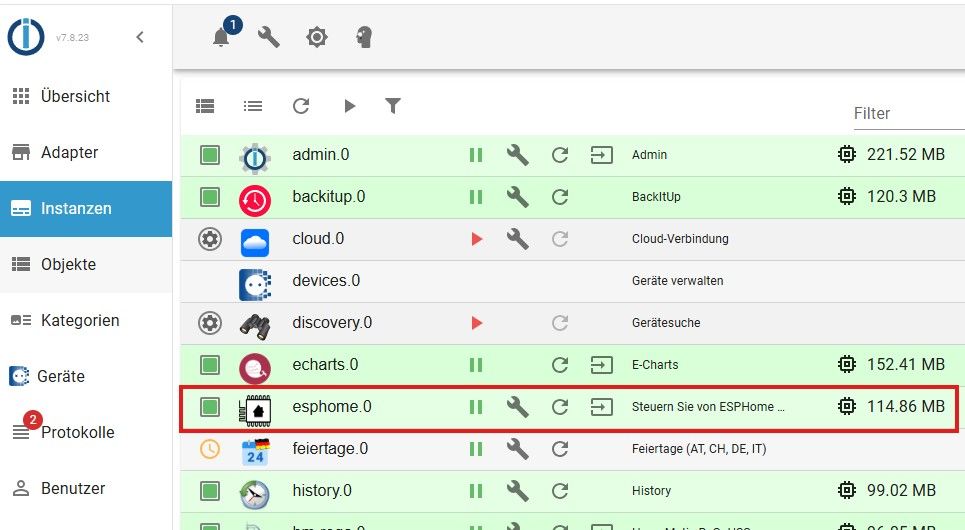
der ESPHome Adapter ist aber installiert. Ich war auch verwundert in der IOB diag steht der nicht gell?
Dann ist zwar die Instanzenkonfiguration noch da, aber due Adapterinstallation schief.
Also einfach drüberinstallieren
-
der ESPHome Adapter ist aber installiert. Ich war auch verwundert in der IOB diag steht der nicht gell?
Dann ist zwar die Instanzenkonfiguration noch da, aber due Adapterinstallation schief.
Also einfach drüberinstallieren
-
Ok, hier die Kopie von iob diag:
```bash
Script v.2026-01-31

*** BASE SYSTEM ***
Operating System: Debian GNU/Linux 13 (trixie)
 Static hostname: raspi5
       Icon name: computer
          Kernel: Linux 6.12.75+rpt-rpi-2712
    Architecture: arm64
OS is similar to:

Model           : Raspberry Pi 5 Model B Rev 1.0
Docker          : false
Virtualization  : none
Kernel          : aarch64
Userland        : 64 bit

Systemuptime and Load:
 16:38:24 up 5 days,  8:08,  2 users,  load average: 0.12, 0.08, 0.02
CPU threads: 4


*** LIFE CYCLE STATUS ***
Operating System is the current Debian stable version codenamed 'trixie'!

*** RASPBERRY THROTTLING ***
Current issues:
No throttling issues detected.

Previously detected issues:
No throttling issues detected.

*** TIME AND TIMEZONES ***
               Local time: Thu 2026-05-14 16:38:24 CEST
           Universal time: Thu 2026-05-14 14:38:24 UTC
                 RTC time: Thu 2026-05-14 14:38:24
                Time zone: Europe/Berlin (CEST, +0200)
System clock synchronized: yes
              NTP service: active
          RTC in local TZ: no

*** Users and Groups ***
User that called 'iob diag':
bernd
HOME=/home/bernd
GROUPS=bernd adm dialout cdrom sudo audio video plugdev games users netdev gpio i2c spi render input iobroker

User that is running 'js-controller':
js-controller is not running

*** DISPLAY-SERVER SETUP ***
Display-Server:         false
Unit display-manager.service could not be found.
Display-Manager:
Desktop:
Session:                tty

*** MEMORY ***
               total        used        free      shared  buff/cache   available
Mem:            4.2G        385M        2.8G         23M        1.2G        3.9G
Swap:           2.1G        2.1M        2.1G
Total:          6.4G        387M        5.0G

Active iob-Instances:   1

         4045 M total memory
          367 M used memory
          243 M active memory
          815 M inactive memory
         2716 M free memory
          147 M buffer memory
          972 M swap cache
         2047 M total swap
            2 M used swap
         2045 M free swap

*** top - Table Of Processes  ***
top - 16:38:25 up 5 days,  8:08,  2 users,  load average: 0.12, 0.08, 0.02
Tasks: 188 total,   1 running, 187 sleeping,   0 stopped,   0 zombie
%Cpu(s):  0.0 us,  0.0 sy,  0.0 ni,100.0 id,  0.0 wa,  0.0 hi,  0.0 si,  0.0 st
MiB Mem :   4045.7 total,   2715.3 free,    368.3 used,   1120.0 buff/cache
MiB Swap:   2048.0 total,   2046.0 free,      2.0 used.   3677.4 avail Mem

*** FAILED SERVICES ***

  UNIT             LOAD   ACTIVE SUB    DESCRIPTION
* iobroker.service loaded failed failed ioBroker Server

Legend: LOAD   -> Reflects whether the unit definition was properly loaded.
        ACTIVE -> The high-level unit activation state, i.e. generalization of SUB.
        SUB    -> The low-level unit activation state, values depend on unit type.

1 loaded units listed.


*** DMESG CRITICAL ERRORS ***
No critical errors detected

*** FILESYSTEM ***
Filesystem     Type      Size  Used Avail Use% Mounted on
udev           devtmpfs  2.0G     0  2.0G   0% /dev
tmpfs          tmpfs     810M   15M  796M   2% /run
/dev/sda2      ext4      229G  7.5G  213G   4% /
tmpfs          tmpfs     2.0G     0  2.0G   0% /dev/shm
tmpfs          tmpfs     5.0M   48K  5.0M   1% /run/lock
tmpfs          tmpfs     1.0M     0  1.0M   0% /run/credentials/systemd-journald.service
tmpfs          tmpfs     2.0G  9.3M  2.0G   1% /tmp
/dev/sda1      vfat      510M   66M  445M  13% /boot/firmware
tmpfs          tmpfs     1.0M     0  1.0M   0% /run/credentials/serial-getty@ttyAMA10.service
tmpfs          tmpfs     1.0M     0  1.0M   0% /run/credentials/getty@tty1.service
tmpfs          tmpfs     405M   32K  405M   1% /run/user/1000

Messages concerning ext4 filesystem in dmesg:
[Sat May  9 08:30:10 2026] EXT4-fs (sda2): orphan cleanup on readonly fs
[Sat May  9 08:30:10 2026] EXT4-fs (sda2): mounted filesystem 21724cc6-e5a3-48a1-8643-7917dba3a9fb ro with ordered data mode. Quota mode: none.
[Sat May  9 08:30:11 2026] EXT4-fs (sda2): re-mounted 21724cc6-e5a3-48a1-8643-7917dba3a9fb r/w.

Show mounted filesystems:
TARGET           SOURCE    FSTYPE OPTIONS
/                /dev/sda2 ext4   rw,noatime
`-/boot/firmware /dev/sda1 vfat   rw,relatime,fmask=0022,dmask=0022,codepage=437,iocharset=ascii,shortname=mixed,errors=remount-ro

Files in neuralgic directories:

/var:
2.5G    /var/
245M    /var/cache
240M    /var/cache/apt
183M    /var/lib
147M    /var/lib/apt

Archived and active journals take up 8M in the file system.

/opt/iobroker/backups:
42M     /opt/iobroker/backups/

/opt/iobroker/iobroker-data:
335M    /opt/iobroker/iobroker-data/
166M    /opt/iobroker/iobroker-data/files
107M    /opt/iobroker/iobroker-data/backup-objects
47M     /opt/iobroker/iobroker-data/files/admin.admin
46M     /opt/iobroker/iobroker-data/files/admin.admin/custom/assets

The five largest files in iobroker-data are:
16M     /opt/iobroker/iobroker-data/objects.jsonl
8.2M    /opt/iobroker/iobroker-data/files/backitup.admin/assets/index-BDfRPp5J.js
4.6M    /opt/iobroker/iobroker-data/files/javascript.admin/vs/language/typescript/tsWorker.js
4.4M    /opt/iobroker/iobroker-data/backup-objects/2026-05-14_16-30_objects.jsonl.gz
4.4M    /opt/iobroker/iobroker-data/backup-objects/2026-05-14_14-30_objects.jsonl.gz

USB-Devices by-id:
USB-Sticks - Avoid direct links to /dev/tty* in your adapter setups,
please always prefer the links 'by-id':

/dev/serial/by-id/usb-Silicon_Labs_Sonoff_Zigbee_3.0_USB_Dongle_Plus_0001-if00-port0

*** ZigBee Settings ***

✓ Your zigbee.0 COM-Port is matching 'by-id'. Very good!

Zigbee Network Settings on your coordinator/in nvbackup are:

zigbee.X
Extended Pan ID:
*** MASKED ***
Pan ID:
*** MASKED ***
Channel:
*** MASKED ***
Network Key:
*** MASKED ***

To unmask the settings run 'iob diag --unmask'


*** NodeJS-Installation ***

/usr/bin/nodejs         v22.22.2
/usr/bin/node           v22.22.2
/usr/bin/npm            10.9.7
/usr/bin/npx            10.9.7

✓ Node.js installation is correct

nodejs:
  Installed: 22.22.2-1nodesource1
  Candidate: 22.22.2-1nodesource1
  Version table:
 *** 22.22.2-1nodesource1 1001
        500 https://deb.nodesource.com/node_22.x nodistro/main arm64 Packages
        100 /var/lib/dpkg/status
     22.22.1-1nodesource1 1001
        500 https://deb.nodesource.com/node_22.x nodistro/main arm64 Packages
     22.22.0-1nodesource1 1001
        500 https://deb.nodesource.com/node_22.x nodistro/main arm64 Packages
     22.21.0-1nodesource1 1001
        500 https://deb.nodesource.com/node_22.x nodistro/main arm64 Packages
     22.20.0-1nodesource1 1001
        500 https://deb.nodesource.com/node_22.x nodistro/main arm64 Packages
     22.19.0-1nodesource1 1001
        500 https://deb.nodesource.com/node_22.x nodistro/main arm64 Packages
     22.18.0-1nodesource1 1001
        500 https://deb.nodesource.com/node_22.x nodistro/main arm64 Packages
     22.17.1-1nodesource1 1001
        500 https://deb.nodesource.com/node_22.x nodistro/main arm64 Packages
     22.17.0-1nodesource1 1001
        500 https://deb.nodesource.com/node_22.x nodistro/main arm64 Packages
     22.16.0-1nodesource1 1001
        500 https://deb.nodesource.com/node_22.x nodistro/main arm64 Packages
     22.15.1-1nodesource1 1001
        500 https://deb.nodesource.com/node_22.x nodistro/main arm64 Packages
     22.15.0-1nodesource1 1001
        500 https://deb.nodesource.com/node_22.x nodistro/main arm64 Packages
     22.14.0-1nodesource1 1001
        500 https://deb.nodesource.com/node_22.x nodistro/main arm64 Packages
     22.13.1-1nodesource1 1001
        500 https://deb.nodesource.com/node_22.x nodistro/main arm64 Packages
     22.13.0-1nodesource1 1001
        500 https://deb.nodesource.com/node_22.x nodistro/main arm64 Packages
     22.12.0-1nodesource1 1001
        500 https://deb.nodesource.com/node_22.x nodistro/main arm64 Packages
     22.11.0-1nodesource1 1001
        500 https://deb.nodesource.com/node_22.x nodistro/main arm64 Packages
     22.10.0-1nodesource1 1001
        500 https://deb.nodesource.com/node_22.x nodistro/main arm64 Packages
     22.9.0-1nodesource1 1001
        500 https://deb.nodesource.com/node_22.x nodistro/main arm64 Packages
     22.8.0-1nodesource1 1001
        500 https://deb.nodesource.com/node_22.x nodistro/main arm64 Packages
     22.7.0-1nodesource1 1001
        500 https://deb.nodesource.com/node_22.x nodistro/main arm64 Packages
     22.6.0-1nodesource1 1001
        500 https://deb.nodesource.com/node_22.x nodistro/main arm64 Packages
     22.5.1-1nodesource1 1001
        500 https://deb.nodesource.com/node_22.x nodistro/main arm64 Packages
     22.5.0-1nodesource1 1001
        500 https://deb.nodesource.com/node_22.x nodistro/main arm64 Packages
     22.4.1-1nodesource1 1001
        500 https://deb.nodesource.com/node_22.x nodistro/main arm64 Packages
     22.4.0-1nodesource1 1001
        500 https://deb.nodesource.com/node_22.x nodistro/main arm64 Packages
     22.3.0-1nodesource1 1001
        500 https://deb.nodesource.com/node_22.x nodistro/main arm64 Packages
     22.2.0-1nodesource1 1001
        500 https://deb.nodesource.com/node_22.x nodistro/main arm64 Packages
     22.1.0-1nodesource1 1001
        500 https://deb.nodesource.com/node_22.x nodistro/main arm64 Packages
     22.0.0-1nodesource1 1001
        500 https://deb.nodesource.com/node_22.x nodistro/main arm64 Packages
     20.19.2+dfsg-1+deb13u2 500
        500 http://deb.debian.org/debian-security trixie-security/main arm64 Packages
     20.19.2+dfsg-1 500
        500 http://deb.debian.org/debian trixie/main arm64 Packages

Temp directories causing deletion problem: 0
No problems detected

Errors in npm tree: 0
No problems detected

Checking for nodejs vulnerability:


 █████  ██      ██           ██████   ██████   ██████  ██████         ██
██   ██ ██      ██          ██       ██    ██ ██    ██ ██   ██     ██  ██
███████ ██      ██          ██   ███ ██    ██ ██    ██ ██   ██         ██
██   ██ ██      ██          ██    ██ ██    ██ ██    ██ ██   ██     ██  ██
██   ██ ███████ ███████      ██████   ██████   ██████  ██████         ██


*** ioBroker-Installation ***

ioBroker Status
iobroker is not running on this host.


Objects type: jsonl
States  type: jsonl

Hosts:
raspi5              raspi5 (version: 7.0.7, hostname: raspi5        , alive, uptime: 461126)

Core adapters versions
js-controller:  7.0.7
admin:          7.7.22
javascript:     9.0.18

nodejs modules from github:     0

Adapter State
  system.adapter.admin.0                  : admin                 : raspi5                                   -  enabled, port: 8081, bind: 0.0.0.0, run as: admin
  system.adapter.backitup.0               : backitup              : raspi5                                   -  enabled
  system.adapter.cloud.0                  : cloud                 : raspi5                                   - disabled
  system.adapter.devices.0                : devices               : raspi5                                   -  enabled
  system.adapter.discovery.0              : discovery             : raspi5                                   - disabled
  system.adapter.echarts.0                : echarts               : raspi5                                   -  enabled
  system.adapter.esphome.0                : esphome               : raspi5                                   -  enabled
  system.adapter.feiertage.0              : feiertage             : raspi5                                   -  enabled
  system.adapter.history.0                : history               : raspi5                                   -  enabled
  system.adapter.hm-rega.0                : hm-rega               : raspi5                                   -  enabled
  system.adapter.hm-rpc.0                 : hm-rpc                : raspi5                                   -  enabled, port: 0
  system.adapter.hm-rpc.1                 : hm-rpc                : raspi5                                   -  enabled, port: 0
  system.adapter.hmip.0                   : hmip                  : raspi5                                   -  enabled
  system.adapter.ical.0                   : ical                  : raspi5                                   -  enabled
  system.adapter.javascript.0             : javascript            : raspi5                                   -  enabled
  system.adapter.mqtt.0                   : mqtt                  : raspi5                                   -  enabled, port: 1883, bind: 0.0.0.0
  system.adapter.ping.0                   : ping                  : raspi5                                   -  enabled
  system.adapter.telegram.0               : telegram              : raspi5                                   -  enabled, port: 8443, bind: 0.0.0.0
  system.adapter.trashschedule.0          : trashschedule         : raspi5                                   -  enabled
  system.adapter.vis.0                    : vis                   : raspi5                                   -  enabled
  system.adapter.web.0                    : web                   : raspi5                                   -  enabled, port: 8082, bind: 192.168.0.5, run as: admin
  system.adapter.zigbee.0                 : zigbee                : raspi5                                   -  enabled, port: /dev/serial/by-id/usb-Silicon_Labs_Sonoff_Zigbee_3.0_USB_Dongle_Plus_0001-if00-port0

+ instance is alive

Enabled adapters with bindings
  system.adapter.admin.0                  : admin                 : raspi5                                   -  enabled, port: 8081, bind: 0.0.0.0, run as: admin
  system.adapter.hm-rpc.0                 : hm-rpc                : raspi5                                   -  enabled, port: 0
  system.adapter.hm-rpc.1                 : hm-rpc                : raspi5                                   -  enabled, port: 0
  system.adapter.mqtt.0                   : mqtt                  : raspi5                                   -  enabled, port: 1883, bind: 0.0.0.0
  system.adapter.telegram.0               : telegram              : raspi5                                   -  enabled, port: 8443, bind: 0.0.0.0
  system.adapter.web.0                    : web                   : raspi5                                   -  enabled, port: 8082, bind: 192.168.0.5, run as: admin
  system.adapter.zigbee.0                 : zigbee                : raspi5                                   -  enabled, port: /dev/serial/by-id/usb-Silicon_Labs_Sonoff_Zigbee_3.0_USB_Dongle_Plus_0001-if00-port0

ioBroker-Repositories
┌─────────┬──────────┬─────────────────────────────────────────────────────────┬──────────────┐
│ (index) │ name     │ url                                                     │ auto upgrade │
├─────────┼──────────┼─────────────────────────────────────────────────────────┼──────────────┤
│ 0       │ 'stable' │ 'http://download.iobroker.net/sources-dist.json'        │ false        │
│ 1       │ 'beta'   │ 'http://download.iobroker.net/sources-dist-latest.json' │ false        │
└─────────┴──────────┴─────────────────────────────────────────────────────────┴──────────────┘

Active repo(s): stable
Upgrade policy: none

Installed ioBroker-Adapters
Used repository: stable
Adapter    "admin"        : 7.8.23   , installed 7.7.22 [Updatable]
Adapter    "backitup"     : 3.3.14   , installed 3.3.14
Adapter    "cloud"        : 6.0.1    , installed 5.0.1  [Updatable]
Adapter    "devices"      : 1.2.14   , installed 1.2.14
Adapter    "discovery"    : 5.0.0    , installed 5.0.0
Adapter    "echarts"      : 3.1.0    , installed 3.1.0
Adapter    "feiertage"    : 1.3.0    , installed 1.3.0
Adapter    "history"      : 4.0.0    , installed 4.0.0
Adapter    "hm-rega"      : 5.1.0    , installed 5.1.0
Adapter    "hm-rpc"       : 3.0.1    , installed 3.0.1
Adapter    "hmip"         : 1.27.0   , installed 1.27.0
Adapter    "ical"         : 1.20.0   , installed 1.20.0
Adapter    "javascript"   : 9.0.18   , installed 9.0.18
Controller "js-controller": 7.0.7    , installed 7.0.7
Adapter    "mqtt"         : 6.1.4    , installed 6.1.4
Adapter    "ping"         : 1.7.9    , installed 1.7.9
Adapter    "socketio"     : 7.1.3    , installed 7.1.3
Adapter    "telegram"     : 4.1.0    , installed 4.1.0
Adapter    "trashschedule": 3.3.0    , installed 3.3.0
Adapter    "vis"          : 1.5.6    , installed 1.5.6
Adapter    "web"          : 8.0.0    , installed 8.0.0
Adapter    "ws"           : 4.0.0    , installed 4.0.0
Adapter    "zigbee"       : 3.3.5    , installed 3.3.5

Objects and States
Please stand by - This may take a while
Objects:        3385
States:         2368

*** OS-Repositories and Updates ***
Hit:1 http://deb.debian.org/debian trixie InRelease
Hit:2 http://archive.raspberrypi.com/debian trixie InRelease
Hit:3 http://deb.debian.org/debian trixie-updates InRelease
Hit:4 http://deb.debian.org/debian-security trixie-security InRelease
Hit:5 https://deb.nodesource.com/node_22.x nodistro InRelease
Reading package lists...
Pending systemupdates: 41

*** Listening Ports ***
Active Internet connections (only servers)
Proto Recv-Q Send-Q Local Address           Foreign Address         State       User       Inode      PID/Program name
tcp        0      0 0.0.0.0:22              0.0.0.0:*               LISTEN      0          6106       920/sshd: /usr/sbin
tcp        0      0 0.0.0.0:111             0.0.0.0:*               LISTEN      0          4213       1/init
tcp6       0      0 :::22                   :::*                    LISTEN      0          6108       920/sshd: /usr/sbin
tcp6       0      0 :::111                  :::*                    LISTEN      0          3774       1/init
udp        0      0 0.0.0.0:111             0.0.0.0:*                           0          5178       1/init
udp        0      0 0.0.0.0:35466           0.0.0.0:*                           101        6483       701/avahi-daemon: r
udp        0      0 0.0.0.0:5353            0.0.0.0:*                           101        6481       701/avahi-daemon: r
udp6       0      0 :::111                  :::*                                0          4214       1/init
udp6       0      0 :::5353                 :::*                                101        6482       701/avahi-daemon: r
udp6       0      0 :::34049                :::*                                101        6484       701/avahi-daemon: r

*** Log File - Last 25 Lines ***

2026-05-14 16:35:51.819  - info: hmip.0 (1215) terminating
2026-05-14 16:35:51.823  - info: telegram.0 (29290) terminating
2026-05-14 16:35:51.824  - info: telegram.0 (29290) Terminated (ADAPTER_REQUESTED_TERMINATION): Without reason
2026-05-14 16:35:51.837  - info: trashschedule.0 (1295) terminating
2026-05-14 16:35:51.844  - info: zigbee.0 (1142) Saved local configuration data
2026-05-14 16:35:51.875  - info: host.raspi5 instance system.adapter.mqtt.0 terminated with code 0 (NO_ERROR)
2026-05-14 16:35:51.920  - info: host.raspi5 instance system.adapter.backitup.0 terminated with code 0 (NO_ERROR)
2026-05-14 16:35:51.920  - info: host.raspi5 instance system.adapter.hmip.0 terminated with code 0 (NO_ERROR)
2026-05-14 16:35:51.945  - info: host.raspi5 instance system.adapter.admin.0 terminated with code 0 (NO_ERROR)
2026-05-14 16:35:51.945  - info: host.raspi5 instance system.adapter.hm-rpc.0 terminated with code 0 (NO_ERROR)
2026-05-14 16:35:51.966  - info: host.raspi5 instance system.adapter.hm-rega.0 terminated with code 0 (NO_ERROR)
2026-05-14 16:35:51.997  - info: host.raspi5 instance system.adapter.history.0 terminated with code 0 (NO_ERROR)
2026-05-14 16:35:51.997  - info: host.raspi5 instance system.adapter.trashschedule.0 terminated with code 0 (NO_ERROR)
2026-05-14 16:35:52.015  - info: host.raspi5 instance system.adapter.javascript.0 terminated with code 0 (NO_ERROR)
2026-05-14 16:35:52.062  - info: host.raspi5 instance system.adapter.hm-rpc.1 terminated with code 0 (NO_ERROR)
2026-05-14 16:35:52.310  - info: host.raspi5 instance system.adapter.ping.0 terminated with code 0 (NO_ERROR)
2026-05-14 16:35:52.314  - info: host.raspi5 stopInstance timeout system.adapter.telegram.0 killing pid 29290
2026-05-14 16:35:52.334  - warn: host.raspi5 instance system.adapter.telegram.0 terminated due to SIGKILL
2026-05-14 16:35:52.334  - info: host.raspi5 instance system.adapter.telegram.0 terminated with code null ()
2026-05-14 16:35:52.345  - info: host.raspi5 instance system.adapter.web.0 terminated with code 0 (NO_ERROR)
2026-05-14 16:35:52.356  - info: host.raspi5 instance system.adapter.echarts.0 terminated with code 0 (NO_ERROR)
2026-05-14 16:35:55.367  - info: zigbee.0 (1142) Terminated (ADAPTER_REQUESTED_TERMINATION): Without reason
2026-05-14 16:36:01.027  - info: host.raspi5 instance system.adapter.zigbee.0 terminated with code 11 (ADAPTER_REQUESTED_TERMINATION)
2026-05-14 16:36:01.027  - info: host.raspi5 All instances are stopped.
2026-05-14 16:36:01.101  - info: host.raspi5 terminated
============ Mark until here for C&P =============
iob repo unset stable
iob repo set beta
iob update
iob add esphome --host raspi5 --debug
iob repo unset beta
iob repo set stable
iob update
Und dann nochmal zeigen was danach im
iob diagausgespuckt wird.
-
@Homoran Auch danke an dich für deine Geduld :-)
Drüber installieren bedeutet das ausführen:
iob add esphome --debug
?
Drüber installieren bedeutet
Umstellen auf beta
Repo neu laden
Installieren wie du es beschrieben hast


Hey! Du scheinst an dieser Unterhaltung interessiert zu sein, hast aber noch kein Konto.
Hast du es satt, bei jedem Besuch durch die gleichen Beiträge zu scrollen? Wenn du dich für ein Konto anmeldest, kommst du immer genau dorthin zurück, wo du zuvor warst, und kannst dich über neue Antworten benachrichtigen lassen (entweder per E-Mail oder Push-Benachrichtigung). Du kannst auch Lesezeichen speichern und Beiträge positiv bewerten, um anderen Community-Mitgliedern deine Wertschätzung zu zeigen.
Mit deinem Input könnte dieser Beitrag noch besser werden 💗
Registrieren AnmeldenSupport us
423
Online33.0k
Benutzer83.6k
Themen1.3m
Beiträge