




Sourceanalytics ohne funktion
-
Auf nodejs22 bringen.
Pending systemupdates: 53
Künftig dann regelmäßiger und häufiger updaten.
NEIN, definitiv nicht, denn dass war es was mir am 18.03. alles zerschossen hatte, danach funktionierten die Backup und der sourceanalyticx nicht mehr, und einige Button die in der VIS hatte, waren auch weg.
Never touch a running system.
Mir wäre wichtig dass der sourceanalytics wieder läuft, wobei für 2026 meine aufzeichnungen fürn Arsch sind
-
Auf nodejs22 bringen.
Pending systemupdates: 53
Künftig dann regelmäßiger und häufiger updaten.
NEIN, definitiv nicht, denn dass war es was mir am 18.03. alles zerschossen hatte, danach funktionierten die Backup und der sourceanalyticx nicht mehr, und einige Button die in der VIS hatte, waren auch weg.
Never touch a running system.
Mir wäre wichtig dass der sourceanalytics wieder läuft, wobei für 2026 meine aufzeichnungen fürn Arsch sind
-
Auf nodejs22 bringen.
Pending systemupdates: 53
Künftig dann regelmäßiger und häufiger updaten.
NEIN, definitiv nicht, denn dass war es was mir am 18.03. alles zerschossen hatte, danach funktionierten die Backup und der sourceanalyticx nicht mehr, und einige Button die in der VIS hatte, waren auch weg.
Never touch a running system.
Mir wäre wichtig dass der sourceanalytics wieder läuft, wobei für 2026 meine aufzeichnungen fürn Arsch sind
dass war es was mir am 18.03. alles zerschossen hatte,
Nein, definitiv nicht!
Da du sowieso eine Neuinstallation machen musst, machst du die (parallel) auf einer neuen SD-Karte, spielst da das Backup zurück und hast immer noch die alte Karte mit der veralteten und unsicheren Installation.
Wir suchen mit dir in der neuen Installation nach Lösungen.
Viele Adapter(updates) benötigen auch eine aktuelle Basis
Wenn du weiter mit der alten "arbeiten" willst ist das deine Entscheidung.
-
dass war es was mir am 18.03. alles zerschossen hatte,
Nein, definitiv nicht!
Da du sowieso eine Neuinstallation machen musst, machst du die (parallel) auf einer neuen SD-Karte, spielst da das Backup zurück und hast immer noch die alte Karte mit der veralteten und unsicheren Installation.
Wir suchen mit dir in der neuen Installation nach Lösungen.
Viele Adapter(updates) benötigen auch eine aktuelle Basis
Wenn du weiter mit der alten "arbeiten" willst ist das deine Entscheidung.
dass war es was mir am 18.03. alles zerschossen hatte,
Nein, definitiv nicht!
Sondern?
Fakt ist das am Tag nach den ganzen Updates, weder der sourceanalytix weiter funktionierte (was im übrigen auch im Adapter stand. einen Meldung gibts hier im Forum drüber) noch hat anscheinend Backitup funktioniert, da nämlich auch keine Meldungen über erfolgreiche Backups angezeigt werden und auf meinem NAS auch nur bis zum 18.04. backups vorliegen.Folglich MUSS es irgendwas mit den Updates zu tun haben. Ich hab sonst ja nix verändert.
Da du sowieso eine Neuinstallation machen musst, machst du die (parallel) auf einer neuen SD-Karte, spielst da das Backup zurück und hast immer noch die alte Karte mit der veralteten und unsicheren Installation.
Das heisst was genau? und da komm ich an meine Grenzen.
Wir suchen mit dir in der neuen Installation nach Lösungen.
Viele Adapter(updates) benötigen auch eine aktuelle Basis
Wenn du weiter mit der alten "arbeiten" willst ist das deine Entscheidung.
Naja die alt hat ja seit 2 Jahren reibungslos funktioniert.
Jetzt hab ich gedacht ich mach dem System was gutes und mach die nötigen Updates....ZACK.. funktioniert einiges nicht mehr. Im übrigen auch die ganzen erstellten Hintergründe in der VIS waren weg, sprich nur noch diese Quer gestrichelten Hintergründe zu sehen.Mir kommt es so vor dass einige Adapter mit den Updates nicht zurecht kamen, bzw. einiges geändert wurde und daher meine Ansicht nicht mehr passte.
Was ich allerdings nicht versteh:
warum der SA ver. 0.4.14 nach dem einspielen des Backup weiterhin nicht funktioniert, versteh ich nicht.
Ich dachte immer ein Backup ist dazu da um ein System wieder auf einen Stand zubringen, wo alles ok war.
Ich bin aber auch kein ITler oder kenn mich besonders gut in dem bereich aus.also, wie gehts nun weiter, bitte gebt mir genau anleitungen weil mit der Aussage "musst eh neuinstallation machen" kann ich nicht viel anfangen. Ich ärgere mich gerade so dermasen dass ich die scheiß Updates gemacht hab. es ist alles so gut gelaufen und meine Dokumentation ist nun auch im Arsch durch die Fehltage.
Grüße
-
dass war es was mir am 18.03. alles zerschossen hatte,
Nein, definitiv nicht!
Sondern?
Fakt ist das am Tag nach den ganzen Updates, weder der sourceanalytix weiter funktionierte (was im übrigen auch im Adapter stand. einen Meldung gibts hier im Forum drüber) noch hat anscheinend Backitup funktioniert, da nämlich auch keine Meldungen über erfolgreiche Backups angezeigt werden und auf meinem NAS auch nur bis zum 18.04. backups vorliegen.Folglich MUSS es irgendwas mit den Updates zu tun haben. Ich hab sonst ja nix verändert.
Da du sowieso eine Neuinstallation machen musst, machst du die (parallel) auf einer neuen SD-Karte, spielst da das Backup zurück und hast immer noch die alte Karte mit der veralteten und unsicheren Installation.
Das heisst was genau? und da komm ich an meine Grenzen.
Wir suchen mit dir in der neuen Installation nach Lösungen.
Viele Adapter(updates) benötigen auch eine aktuelle Basis
Wenn du weiter mit der alten "arbeiten" willst ist das deine Entscheidung.
Naja die alt hat ja seit 2 Jahren reibungslos funktioniert.
Jetzt hab ich gedacht ich mach dem System was gutes und mach die nötigen Updates....ZACK.. funktioniert einiges nicht mehr. Im übrigen auch die ganzen erstellten Hintergründe in der VIS waren weg, sprich nur noch diese Quer gestrichelten Hintergründe zu sehen.Mir kommt es so vor dass einige Adapter mit den Updates nicht zurecht kamen, bzw. einiges geändert wurde und daher meine Ansicht nicht mehr passte.
Was ich allerdings nicht versteh:
warum der SA ver. 0.4.14 nach dem einspielen des Backup weiterhin nicht funktioniert, versteh ich nicht.
Ich dachte immer ein Backup ist dazu da um ein System wieder auf einen Stand zubringen, wo alles ok war.
Ich bin aber auch kein ITler oder kenn mich besonders gut in dem bereich aus.also, wie gehts nun weiter, bitte gebt mir genau anleitungen weil mit der Aussage "musst eh neuinstallation machen" kann ich nicht viel anfangen. Ich ärgere mich gerade so dermasen dass ich die scheiß Updates gemacht hab. es ist alles so gut gelaufen und meine Dokumentation ist nun auch im Arsch durch die Fehltage.
Grüße
und
iob nodejs-updateIch bin aber auch kein ITler oder kenn mich besonders gut in dem bereich aus.
Und dann meinst du beurteilen zu können, dass Updates für dich nicht relevant sind? Gerade dann musst du dich auf das Wissen von anderen verlassen und jedes Update einspielen.
-
und
iob nodejs-updateIch bin aber auch kein ITler oder kenn mich besonders gut in dem bereich aus.
Und dann meinst du beurteilen zu können, dass Updates für dich nicht relevant sind? Gerade dann musst du dich auf das Wissen von anderen verlassen und jedes Update einspielen.
siehste, da gehts nämlich schon los.... Zitat:
gleichen CPU-Architektur aus möglich.und
Also Debian 12 'Bookworm' und z.B. arch64. CrossUpgrades von 32Bit 'armhf' auf 'arm64' sind nicht möglich (nur für echte Pinguine!) und bedingen eine Neuinstallation.Puhhhh.... Ich versteh nur Bahnhof. Ich hab nen Pi 5, mehr weiss ich nicht.
und
iob nodejs-updateIch bin aber auch kein ITler oder kenn mich besonders gut in dem bereich aus.
Und dann meinst du beurteilen zu können, dass Updates für dich nicht relevant sind? Gerade dann musst du dich auf das Wissen von anderen verlassen und jedes Update einspielen.
Theoretisch hast du da Recht, Praktisch ist halt so:
Wenn ich als Laie Updates mache, danach irgendwie nur die hälfte noch funktioniert, dann schreckt das erst mal ab. Wenn ich dann als Laie mehrer Stunden benötige um ein Backup einzuspielen, was dann auch nicht wieder alles herstellt und funktioniert, dann ist das erst mal sehr frustrieren und nimmt mir den glauben daran, das Updates was gutes sind.
Das klingt vielleicht Traurig, ist aber wahr.Das Problem ist für mich halt auch, wenn ein "Profi" oder halt jemand der sich besser auskennt, etwas Schreibt/erklärt und irgendwelche Fachbegriffe auftauchen, dann ist das für mich als Laie erst mal mit sehr vielen ? verbunden. oft geh ich dann her und versuch mich über Google einzulesen/informieren, und das führt dann meistens dazu dass ich total vom eigentlichen Ziel abweiche und alles meisten schlimmer mache.
Deswegen schrieb ich ja, ich bräucht am besten eine Anleitung, schritt für schritt.Ich hoffe ihr versteht was ich meine.
-
siehste, da gehts nämlich schon los.... Zitat:
gleichen CPU-Architektur aus möglich.und
Also Debian 12 'Bookworm' und z.B. arch64. CrossUpgrades von 32Bit 'armhf' auf 'arm64' sind nicht möglich (nur für echte Pinguine!) und bedingen eine Neuinstallation.Puhhhh.... Ich versteh nur Bahnhof. Ich hab nen Pi 5, mehr weiss ich nicht.
und
iob nodejs-updateIch bin aber auch kein ITler oder kenn mich besonders gut in dem bereich aus.
Und dann meinst du beurteilen zu können, dass Updates für dich nicht relevant sind? Gerade dann musst du dich auf das Wissen von anderen verlassen und jedes Update einspielen.
Theoretisch hast du da Recht, Praktisch ist halt so:
Wenn ich als Laie Updates mache, danach irgendwie nur die hälfte noch funktioniert, dann schreckt das erst mal ab. Wenn ich dann als Laie mehrer Stunden benötige um ein Backup einzuspielen, was dann auch nicht wieder alles herstellt und funktioniert, dann ist das erst mal sehr frustrieren und nimmt mir den glauben daran, das Updates was gutes sind.
Das klingt vielleicht Traurig, ist aber wahr.Das Problem ist für mich halt auch, wenn ein "Profi" oder halt jemand der sich besser auskennt, etwas Schreibt/erklärt und irgendwelche Fachbegriffe auftauchen, dann ist das für mich als Laie erst mal mit sehr vielen ? verbunden. oft geh ich dann her und versuch mich über Google einzulesen/informieren, und das führt dann meistens dazu dass ich total vom eigentlichen Ziel abweiche und alles meisten schlimmer mache.
Deswegen schrieb ich ja, ich bräucht am besten eine Anleitung, schritt für schritt.Ich hoffe ihr versteht was ich meine.
ich bräucht am besten eine Anleitung, schritt für schritt.
Siehe mein Post davor...
Umsetzen musst du es selber.Deine Ausgangsbasis ist bereits auf reinem 64Bit, mit CrossUpgrades oder anderen CPU-Architekturen hast du also nichts zu tun.
Aus deinemiob diagvon oben:*** BASE SYSTEM *** Operating System: Debian GNU/Linux 12 (bookworm) Static hostname: raspberrypi5 Icon name: computer Kernel: Linux 6.12.34+rpt-rpi-2712 Architecture: arm64 OS is similar to: Model : Raspberry Pi 5 Model B Rev 1.0 Docker : false Virtualization : none Kernel : aarch64 Userland : 64 bit -
ich bräucht am besten eine Anleitung, schritt für schritt.
Siehe mein Post davor...
Umsetzen musst du es selber.Deine Ausgangsbasis ist bereits auf reinem 64Bit, mit CrossUpgrades oder anderen CPU-Architekturen hast du also nichts zu tun.
Aus deinemiob diagvon oben:*** BASE SYSTEM *** Operating System: Debian GNU/Linux 12 (bookworm) Static hostname: raspberrypi5 Icon name: computer Kernel: Linux 6.12.34+rpt-rpi-2712 Architecture: arm64 OS is similar to: Model : Raspberry Pi 5 Model B Rev 1.0 Docker : false Virtualization : none Kernel : aarch64 Userland : 64 bitich bräucht am besten eine Anleitung, schritt für schritt.
Siehe mein Post davor...
Umsetzen musst du es selber.Frage:
Erst das trixie installieren und dann Node.js oder andersrum?und muss ich ein backup vom Pi machen? IOB backup ist von heute nacht gemacht bzw. das vom 17.04. gesichert
-
ich bräucht am besten eine Anleitung, schritt für schritt.
Siehe mein Post davor...
Umsetzen musst du es selber.Frage:
Erst das trixie installieren und dann Node.js oder andersrum?und muss ich ein backup vom Pi machen? IOB backup ist von heute nacht gemacht bzw. das vom 17.04. gesichert
Kannste machen wie ein Dachdecker.
-
Kannste machen wie ein Dachdecker.
-
siehste, da gehts nämlich schon los.... Zitat:
gleichen CPU-Architektur aus möglich.und
Also Debian 12 'Bookworm' und z.B. arch64. CrossUpgrades von 32Bit 'armhf' auf 'arm64' sind nicht möglich (nur für echte Pinguine!) und bedingen eine Neuinstallation.Puhhhh.... Ich versteh nur Bahnhof. Ich hab nen Pi 5, mehr weiss ich nicht.
und
iob nodejs-updateIch bin aber auch kein ITler oder kenn mich besonders gut in dem bereich aus.
Und dann meinst du beurteilen zu können, dass Updates für dich nicht relevant sind? Gerade dann musst du dich auf das Wissen von anderen verlassen und jedes Update einspielen.
Theoretisch hast du da Recht, Praktisch ist halt so:
Wenn ich als Laie Updates mache, danach irgendwie nur die hälfte noch funktioniert, dann schreckt das erst mal ab. Wenn ich dann als Laie mehrer Stunden benötige um ein Backup einzuspielen, was dann auch nicht wieder alles herstellt und funktioniert, dann ist das erst mal sehr frustrieren und nimmt mir den glauben daran, das Updates was gutes sind.
Das klingt vielleicht Traurig, ist aber wahr.Das Problem ist für mich halt auch, wenn ein "Profi" oder halt jemand der sich besser auskennt, etwas Schreibt/erklärt und irgendwelche Fachbegriffe auftauchen, dann ist das für mich als Laie erst mal mit sehr vielen ? verbunden. oft geh ich dann her und versuch mich über Google einzulesen/informieren, und das führt dann meistens dazu dass ich total vom eigentlichen Ziel abweiche und alles meisten schlimmer mache.
Deswegen schrieb ich ja, ich bräucht am besten eine Anleitung, schritt für schritt.Ich hoffe ihr versteht was ich meine.
Wenn ich als Laie Updates mache, danach irgendwie nur die hälfte noch funktioniert, dann schreckt das erst mal ab
Klar, aber deine Schlussfolgerung ist falsch.
Nur mal als alternative Möglichkeiten:
- Beim Update hat es das Dateisystem auf einer Billig-Sd-Karte geschreddert.
- Beim Download einer Datei ist es zu Störungen im Netzwerk gekommen, und die Datei war defekt.
- Das Update ist nicht korrekt durchgeführt worden
- Adapter benötigen bestimmte nodejs Versionen
- Nodejs benötigt bestimmte Betriebssystemversionen.
- Das Betriebssystem muss zur Hardware passen.
Aber lange Rede, kurzer Sinn:
Fang so wie beschrieben neu an, wir werden dich führen!WICHTIG:
Unbedingt lieber zu oft, als zu wenig nachfragen.Schritt 1: NEUE SD-Karte besorgen und aktuelles Raspberry OS Trixie lite installieren
dann Node.js oder
Nodejs kommt automatisch richtig mit der iobroker Installation!
Das sollte auch nicht manuell "zusammengeschustert" werden
-
Wenn ich als Laie Updates mache, danach irgendwie nur die hälfte noch funktioniert, dann schreckt das erst mal ab
Klar, aber deine Schlussfolgerung ist falsch.
Nur mal als alternative Möglichkeiten:
- Beim Update hat es das Dateisystem auf einer Billig-Sd-Karte geschreddert.
- Beim Download einer Datei ist es zu Störungen im Netzwerk gekommen, und die Datei war defekt.
- Das Update ist nicht korrekt durchgeführt worden
- Adapter benötigen bestimmte nodejs Versionen
- Nodejs benötigt bestimmte Betriebssystemversionen.
- Das Betriebssystem muss zur Hardware passen.
Aber lange Rede, kurzer Sinn:
Fang so wie beschrieben neu an, wir werden dich führen!WICHTIG:
Unbedingt lieber zu oft, als zu wenig nachfragen.Schritt 1: NEUE SD-Karte besorgen und aktuelles Raspberry OS Trixie lite installieren
dann Node.js oder
Nodejs kommt automatisch richtig mit der iobroker Installation!
Das sollte auch nicht manuell "zusammengeschustert" werden
> Nur mal als alternative Möglichkeiten:
> * Beim Update hat es das Dateisystem auf einer Billig-Sd-Karte geschreddert.
Nein, keine SD....SSD, da läuft das system drauf
> * Beim Download einer Datei ist es zu Störungen im Netzwerk gekommen, und die Datei war defekt.
> * Das Update ist nicht korrekt durchgeführt worden
>   * Adapter benötigen bestimmte nodejs Versionen
>   * Nodejs benötigt bestimmte Betriebssystemversionen.
>   * Das Betriebssystem muss zur Hardware passen.
Das kann ich natürlich nicht mit Sicherheit ausschliessen.
iob diag inside:
```bash Script v.2026-01-31 *** BASE SYSTEM *** Operating System: Debian GNU/Linux 13 (trixie) Static hostname: raspberrypi5 Icon name: computer Kernel: Linux 6.12.75+rpt-rpi-2712 Architecture: arm64 OS is similar to: Model : Raspberry Pi 5 Model B Rev 1.0 Docker : false Virtualization : none Kernel : aarch64 Userland : 64 bit Systemuptime and Load: 12:40:05 up 7 min, 1 user, load average: 0.11, 0.35, 0.23 CPU threads: 4 *** LIFE CYCLE STATUS *** Operating System is the current Debian stable version codenamed 'trixie'! *** RASPBERRY THROTTLING *** Current issues: No throttling issues detected. Previously detected issues: No throttling issues detected. *** TIME AND TIMEZONES *** Local time: Fri 2026-05-01 12:40:06 CEST Universal time: Fri 2026-05-01 10:40:06 UTC RTC time: Fri 2026-05-01 10:40:06 Time zone: Europe/Berlin (CEST, +0200) System clock synchronized: yes NTP service: active RTC in local TZ: no *** Users and Groups *** User that called 'iob diag': Bernd HOME=/home/Bernd GROUPS=Bernd adm dialout cdrom sudo audio video plugdev games users input render netdev gpio i2c spi iobroker User that is running 'js-controller': iobroker HOME=/home/iobroker SUDO_HOME=/home/Bernd GROUPS=iobroker tty dialout audio video plugdev bluetooth gpio i2c *** DISPLAY-SERVER SETUP *** Display-Server: false Unit display-manager.service could not be found. Display-Manager: Desktop: Session: tty *** MEMORY *** total used free shared buff/cache available Mem: 8.5G 2.8G 4.9G 15M 901M 5.7G Swap: 209M 0B 209M Total: 8.7G 2.8G 5.1G Active iob-Instances: 31 8062 M total memory 2628 M used memory 2450 M active memory 568 M inactive memory 4673 M free memory 87 M buffer memory 772 M swap cache 199 M total swap 0 M used swap 199 M free swap *** top - Table Of Processes *** top - 12:40:06 up 7 min, 1 user, load average: 0.18, 0.36, 0.24 Tasks: 225 total, 2 running, 223 sleeping, 0 stopped, 0 zombie %Cpu(s): 6.7 us, 0.0 sy, 0.0 ni, 91.1 id, 2.2 wa, 0.0 hi, 0.0 si, 0.0 st MiB Mem : 8062.9 total, 4670.2 free, 2630.3 used, 860.9 buff/cache MiB Swap: 200.0 total, 200.0 free, 0.0 used. 5432.6 avail Mem *** FAILED SERVICES *** UNIT LOAD ACTIVE SUB DESCRIPTION 0 loaded units listed. *** DMESG CRITICAL ERRORS *** No critical errors detected *** FILESYSTEM *** Filesystem Type Size Used Avail Use% Mounted on udev devtmpfs 3.9G 0 3.9G 0% /dev tmpfs tmpfs 1.6G 15M 1.6G 1% /run /dev/mmcblk0p2 ext4 29G 12G 16G 42% / tmpfs tmpfs 4.0G 0 4.0G 0% /dev/shm tmpfs tmpfs 5.0M 48K 5.0M 1% /run/lock tmpfs tmpfs 4.0G 96K 4.0G 1% /tmp tmpfs tmpfs 1.0M 0 1.0M 0% /run/credentials/systemd-journald.service /dev/mmcblk0p1 vfat 510M 74M 437M 15% /boot/firmware tmpfs tmpfs 1.0M 0 1.0M 0% /run/credentials/getty@tty1.service tmpfs tmpfs 1.0M 0 1.0M 0% /run/credentials/serial-getty@ttyAMA10.service //192.168.178.37/home/backup/iobroker cifs 2.7T 1.8T 955G 66% /opt/iobroker/backups tmpfs tmpfs 807M 32K 807M 1% /run/user/1000 Messages concerning ext4 filesystem in dmesg: [Fri May 1 12:32:23 2026] EXT4-fs (mmcblk0p2): mounted filesystem 56f80fa2-e005-4cca-86e6-19da1069914d ro with ordered data mode. Quota mode: none. [Fri May 1 12:32:25 2026] EXT4-fs (mmcblk0p2): re-mounted 56f80fa2-e005-4cca-86e6-19da1069914d r/w. Show mounted filesystems: TARGET SOURCE FSTYPE OPTIONS / /dev/mmcblk0p2 ext4 rw,noatime |-/boot/firmware /dev/mmcblk0p1 vfat rw,relatime,fmask=0022,dmask=0022,codepage=437,iocharset=ascii,shortname=mixed,errors=remount-ro `-/opt/iobroker/backups //192.168.178.37/home/backup/iobroker cifs rw,relatime,vers=3.1.1,cache=strict,upcall_target=app,username=backup,uid=1001,forceuid,gid=1001,forcegid,addr=192.168.178.37,file_mode=0777,dir_mode=0777,soft,nounix,serverino,mapposix,reparse=nfs,rsize=4194304,wsize=4194304,bsize=1048576,retrans=1,echo_interval=60,actimeo=1,closetimeo=1 Files in neuralgic directories: /var: 3.6G /var/ 2.8G /var/log/journal/9ba9919aad384e6eaaa1e9cb2eaa4832 2.8G /var/log/journal 2.8G /var/log 373M /var/cache Archived and active journals take up 2.7G in the file system. /opt/iobroker/backups: 185M /opt/iobroker/backups/ /opt/iobroker/iobroker-data: 858M /opt/iobroker/iobroker-data/ 504M /opt/iobroker/iobroker-data/files 194M /opt/iobroker/iobroker-data/history 121M /opt/iobroker/iobroker-data/files/vis 114M /opt/iobroker/iobroker-data/files/vis/widgets The five largest files in iobroker-data are: 28M /opt/iobroker/iobroker-data/objects.jsonl 27M /opt/iobroker/iobroker-data/files/tankerkoenig.admin/build/index.js.map 18M /opt/iobroker/iobroker-data/states.jsonl 16M /opt/iobroker/iobroker-data/files/vis-2.0/New project/vis-views.json 15M /opt/iobroker/iobroker-data/files/vis-2.0/vis-views.json USB-Devices by-id: USB-Sticks - Avoid direct links to /dev/tty* in your adapter setups, please always prefer the links 'by-id': No Devices found 'by-id' No nvbackup.json found. *** NodeJS-Installation *** /usr/bin/nodejs v20.20.2 /usr/bin/node v20.20.2 /usr/bin/npm 10.8.2 /usr/bin/npx 10.8.2 ✓ Node.js installation is correct nodejs: Installed: 20.20.2-1nodesource1 Candidate: 20.20.2-1nodesource1 Version table: *** 20.20.2-1nodesource1 1001 500 https://deb.nodesource.com/node_20.x nodistro/main arm64 Packages 100 /var/lib/dpkg/status 20.20.1-1nodesource1 1001 500 https://deb.nodesource.com/node_20.x nodistro/main arm64 Packages 20.20.0-1nodesource1 1001 500 https://deb.nodesource.com/node_20.x nodistro/main arm64 Packages 20.19.6-1nodesource1 1001 500 https://deb.nodesource.com/node_20.x nodistro/main arm64 Packages 20.19.5-1nodesource1 1001 500 https://deb.nodesource.com/node_20.x nodistro/main arm64 Packages 20.19.4-1nodesource1 1001 500 https://deb.nodesource.com/node_20.x nodistro/main arm64 Packages 20.19.3-1nodesource1 1001 500 https://deb.nodesource.com/node_20.x nodistro/main arm64 Packages 20.19.2+dfsg-1+deb13u2 500 500 http://deb.debian.org/debian-security trixie-security/main arm64 Packages 20.19.2+dfsg-1 500 500 http://deb.debian.org/debian trixie/main arm64 Packages 20.19.2-1nodesource1 1001 500 https://deb.nodesource.com/node_20.x nodistro/main arm64 Packages 20.19.1-1nodesource1 1001 500 https://deb.nodesource.com/node_20.x nodistro/main arm64 Packages 20.19.0-1nodesource1 1001 500 https://deb.nodesource.com/node_20.x nodistro/main arm64 Packages 20.18.3-1nodesource1 1001 500 https://deb.nodesource.com/node_20.x nodistro/main arm64 Packages 20.18.2-1nodesource1 1001 500 https://deb.nodesource.com/node_20.x nodistro/main arm64 Packages 20.18.1-1nodesource1 1001 500 https://deb.nodesource.com/node_20.x nodistro/main arm64 Packages 20.18.0-1nodesource1 1001 500 https://deb.nodesource.com/node_20.x nodistro/main arm64 Packages 20.17.0-1nodesource1 1001 500 https://deb.nodesource.com/node_20.x nodistro/main arm64 Packages 20.16.0-1nodesource1 1001 500 https://deb.nodesource.com/node_20.x nodistro/main arm64 Packages 20.15.1-1nodesource1 1001 500 https://deb.nodesource.com/node_20.x nodistro/main arm64 Packages 20.15.0-1nodesource1 1001 500 https://deb.nodesource.com/node_20.x nodistro/main arm64 Packages 20.14.0-1nodesource1 1001 500 https://deb.nodesource.com/node_20.x nodistro/main arm64 Packages 20.13.1-1nodesource1 1001 500 https://deb.nodesource.com/node_20.x nodistro/main arm64 Packages 20.13.0-1nodesource1 1001 500 https://deb.nodesource.com/node_20.x nodistro/main arm64 Packages 20.12.2-1nodesource1 1001 500 https://deb.nodesource.com/node_20.x nodistro/main arm64 Packages 20.12.1-1nodesource1 1001 500 https://deb.nodesource.com/node_20.x nodistro/main arm64 Packages 20.12.0-1nodesource1 1001 500 https://deb.nodesource.com/node_20.x nodistro/main arm64 Packages 20.11.1-1nodesource1 1001 500 https://deb.nodesource.com/node_20.x nodistro/main arm64 Packages 20.11.0-1nodesource1 1001 500 https://deb.nodesource.com/node_20.x nodistro/main arm64 Packages 20.10.0-1nodesource1 1001 500 https://deb.nodesource.com/node_20.x nodistro/main arm64 Packages 20.9.0-1nodesource1 1001 500 https://deb.nodesource.com/node_20.x nodistro/main arm64 Packages 20.8.1-1nodesource1 1001 500 https://deb.nodesource.com/node_20.x nodistro/main arm64 Packages 20.8.0-1nodesource1 1001 500 https://deb.nodesource.com/node_20.x nodistro/main arm64 Packages 20.7.0-1nodesource1 1001 500 https://deb.nodesource.com/node_20.x nodistro/main arm64 Packages 20.6.1-1nodesource1 1001 500 https://deb.nodesource.com/node_20.x nodistro/main arm64 Packages 20.6.0-1nodesource1 1001 500 https://deb.nodesource.com/node_20.x nodistro/main arm64 Packages 20.5.1-1nodesource1 1001 500 https://deb.nodesource.com/node_20.x nodistro/main arm64 Packages 20.5.0-1nodesource1 1001 500 https://deb.nodesource.com/node_20.x nodistro/main arm64 Packages 20.4.0-1nodesource1 1001 500 https://deb.nodesource.com/node_20.x nodistro/main arm64 Packages 20.3.1-1nodesource1 1001 500 https://deb.nodesource.com/node_20.x nodistro/main arm64 Packages 20.3.0-1nodesource1 1001 500 https://deb.nodesource.com/node_20.x nodistro/main arm64 Packages 20.2.0-1nodesource1 1001 500 https://deb.nodesource.com/node_20.x nodistro/main arm64 Packages 20.1.0-1nodesource1 1001 500 https://deb.nodesource.com/node_20.x nodistro/main arm64 Packages 20.0.0-1nodesource1 1001 500 https://deb.nodesource.com/node_20.x nodistro/main arm64 Packages Temp directories causing deletion problem: 0 No problems detected Errors in npm tree: 0 No problems detected Checking for nodejs vulnerability: ██████ █████ ███ ██ ██████ ███████ ███████ ██ ██ ██ ██ ████ ██ ██ ██ ██ ██ ██ ██ ███████ ██ ██ ██ ██ ███ █████ ███████ ██ ██ ██ ██ ██ ██ ██ ██ ██ ██ ██ ██ ██████ ██ ██ ██ ████ ██████ ███████ ██ ██ v20.20.2 is end-of-life. There are high chances of being vulnerable. Please upgrade it. *** ioBroker-Installation *** ioBroker Status iobroker is running on this host. Objects type: jsonl States type: jsonl Hosts: raspberrypi5 raspberrypi5 (version: 7.0.7, hostname: raspberrypi5 , alive, uptime: 453) Core adapters versions js-controller: 7.0.7 admin: 7.7.22 javascript: 9.0.18 nodejs modules from github: 1 | +-- syno@3.0.0 (git+https://git@github.com/MeisterTR/syno.git#0104a973d33fe332aa6b1ab5be7fe8c57d3c68b0) Adapter State + system.adapter.admin.0 : admin : raspberrypi5 - enabled, port: 8081, bind: 0.0.0.0, run as: admin system.adapter.alias-manager.0 : alias-manager : raspberrypi5 - disabled + system.adapter.backitup.0 : backitup : raspberrypi5 - enabled + system.adapter.cloud.0 : cloud : raspberrypi5 - enabled system.adapter.daswetter.0 : daswetter : raspberrypi5 - disabled system.adapter.devices.0 : devices : raspberrypi5 - disabled + system.adapter.discovery.0 : discovery : raspberrypi5 - enabled system.adapter.dwd.0 : dwd : raspberrypi5 - disabled + system.adapter.echarts.0 : echarts : raspberrypi5 - enabled system.adapter.feiertage.0 : feiertage : raspberrypi5 - disabled + system.adapter.fronius-solarweb.0 : fronius-solarweb : raspberrypi5 - enabled + system.adapter.fronius.0 : fronius : raspberrypi5 - enabled + system.adapter.fronius.1 : fronius : raspberrypi5 - enabled + system.adapter.history.0 : history : raspberrypi5 - enabled system.adapter.ical.0 : ical : raspberrypi5 - enabled system.adapter.icons-addictive-flavour-png.0: icons-addictive-flavour-png: raspberrypi5 - disabled system.adapter.icons-mfd-png.0 : icons-mfd-png : raspberrypi5 - disabled system.adapter.influxdb.0 : influxdb : raspberrypi5 - disabled, port: 8086 + system.adapter.iot.0 : iot : raspberrypi5 - enabled + system.adapter.iqontrol.0 : iqontrol : raspberrypi5 - enabled + system.adapter.jarvis.0 : jarvis : raspberrypi5 - enabled, port: 8082, bind: 0.0.0.0, run as: admin + system.adapter.javascript.0 : javascript : raspberrypi5 - enabled + system.adapter.mqtt.0 : mqtt : raspberrypi5 - enabled, port: 1884, bind: 0.0.0.0 + system.adapter.node-red.0 : node-red : raspberrypi5 - enabled, port: 1880, bind: 0.0.0.0 + system.adapter.ping.0 : ping : raspberrypi5 - enabled + system.adapter.rpi2.0 : rpi2 : raspberrypi5 - enabled + system.adapter.scenes.0 : scenes : raspberrypi5 - enabled + system.adapter.shelly.0 : shelly : raspberrypi5 - enabled, port: 1882, bind: 0.0.0.0 + system.adapter.shelly.1 : shelly : raspberrypi5 - enabled, port: 1882, bind: 0.0.0.0 + system.adapter.sonoff.0 : sonoff : raspberrypi5 - enabled, port: 1883, bind: 0.0.0.0 + system.adapter.sourceanalytix.0 : sourceanalytix : raspberrypi5 - enabled system.adapter.sql.0 : sql : raspberrypi5 - disabled, port: 3306 + system.adapter.synology.0 : synology : raspberrypi5 - enabled, port: 5000 + system.adapter.tankerkoenig.0 : tankerkoenig : raspberrypi5 - enabled + system.adapter.telegram.0 : telegram : raspberrypi5 - enabled, port: 8443, bind: 0.0.0.0 + system.adapter.tr-064.0 : tr-064 : raspberrypi5 - enabled + system.adapter.trashschedule.0 : trashschedule : raspberrypi5 - enabled system.adapter.vis-2-widgets-energy.0 : vis-2-widgets-energy : raspberrypi5 - disabled system.adapter.vis-2-widgets-gauges.0 : vis-2-widgets-gauges : raspberrypi5 - disabled system.adapter.vis-2-widgets-inventwo.0 : vis-2-widgets-inventwo: raspberrypi5 - disabled system.adapter.vis-2-widgets-jaeger-design.0: vis-2-widgets-jaeger-design: raspberrypi5 - disabled system.adapter.vis-2-widgets-material.0 : vis-2-widgets-material: raspberrypi5 - disabled + system.adapter.vis-2.0 : vis-2 : raspberrypi5 - enabled system.adapter.vis-canvas-gauges.0 : vis-canvas-gauges : raspberrypi5 - disabled system.adapter.vis-hqwidgets.0 : vis-hqwidgets : raspberrypi5 - disabled system.adapter.vis-metro.0 : vis-metro : raspberrypi5 - disabled system.adapter.vis-plumb.0 : vis-plumb : raspberrypi5 - disabled system.adapter.vis-timeandweather.0 : vis-timeandweather : raspberrypi5 - disabled system.adapter.vis-weather.0 : vis-weather : raspberrypi5 - disabled system.adapter.vis.0 : vis : raspberrypi5 - enabled system.adapter.weatherunderground.0 : weatherunderground : raspberrypi5 - enabled + system.adapter.web.0 : web : raspberrypi5 - enabled, port: 8082, bind: 0.0.0.0, run as: admin + system.adapter.whatsapp-cmb.0 : whatsapp-cmb : raspberrypi5 - enabled + instance is alive Enabled adapters with bindings + system.adapter.admin.0 : admin : raspberrypi5 - enabled, port: 8081, bind: 0.0.0.0, run as: admin + system.adapter.jarvis.0 : jarvis : raspberrypi5 - enabled, port: 8082, bind: 0.0.0.0, run as: admin + system.adapter.mqtt.0 : mqtt : raspberrypi5 - enabled, port: 1884, bind: 0.0.0.0 + system.adapter.node-red.0 : node-red : raspberrypi5 - enabled, port: 1880, bind: 0.0.0.0 + system.adapter.shelly.0 : shelly : raspberrypi5 - enabled, port: 1882, bind: 0.0.0.0 + system.adapter.shelly.1 : shelly : raspberrypi5 - enabled, port: 1882, bind: 0.0.0.0 + system.adapter.sonoff.0 : sonoff : raspberrypi5 - enabled, port: 1883, bind: 0.0.0.0 + system.adapter.synology.0 : synology : raspberrypi5 - enabled, port: 5000 + system.adapter.telegram.0 : telegram : raspberrypi5 - enabled, port: 8443, bind: 0.0.0.0 + system.adapter.web.0 : web : raspberrypi5 - enabled, port: 8082, bind: 0.0.0.0, run as: admin ioBroker-Repositories ┌─────────┬──────────┬─────────────────────────────────────────────────────────┬──────────────┐ │ (index) │ name │ url │ auto upgrade │ ├─────────┼──────────┼─────────────────────────────────────────────────────────┼──────────────┤ │ 0 │ 'stable' │ 'http://download.iobroker.net/sources-dist.json' │ false │ │ 1 │ 'beta' │ 'http://download.iobroker.net/sources-dist-latest.json' │ false │ └─────────┴──────────┴─────────────────────────────────────────────────────────┴──────────────┘ Active repo(s): stable Upgrade policy: none Installed ioBroker-Adapters Used repository: stable Adapter "admin" : 7.7.22 , installed 7.7.22 Adapter "alias-manager": 2.1.0 , installed 2.1.0 Adapter "backitup" : 3.3.14 , installed 3.3.14 Adapter "cloud" : 5.0.1 , installed 5.0.1 Adapter "daswetter" : 4.5.3 , installed 4.5.3 Adapter "devices" : 1.2.14 , installed 1.2.14 Adapter "discovery" : 5.0.0 , installed 5.0.0 Adapter "dwd" : 2.8.5 , installed 2.8.5 Adapter "echarts" : 3.1.0 , installed 3.1.0 Adapter "feiertage" : 1.3.0 , installed 1.3.0 Adapter "fronius" : 2.2.0 , installed 2.2.0 Adapter "fronius-solarweb": 0.0.3 , installed 0.0.3 Adapter "history" : 4.0.0 , installed 4.0.0 Adapter "ical" : 1.20.0 , installed 1.20.0 Adapter "icons-addictive-flavour-png": 0.1.0, installed 0.1.0 Adapter "icons-mfd-png": 1.2.1 , installed 1.2.1 Adapter "influxdb" : 4.0.2 , installed 4.0.2 Adapter "iot" : 5.0.12 , installed 5.0.12 Adapter "iqontrol" : 3.0.0 , installed 3.0.0 Adapter "jarvis" : 3.1.8 , installed 3.1.8 Adapter "javascript" : 9.0.18 , installed 9.0.18 Controller "js-controller": 7.0.7 , installed 7.0.7 Adapter "mqtt" : 6.1.4 , installed 6.1.4 Adapter "node-red" : 6.0.7 , installed 6.0.7 Adapter "ping" : 1.7.9 , installed 1.7.9 Adapter "rpi2" : 3.0.2 , installed 2.4.0 [Updatable] Adapter "scenes" : 4.0.4 , installed 4.0.4 Adapter "shelly" : 10.6.1 , installed 10.6.1 Adapter "socketio" : 7.0.8 , installed 7.1.3 Adapter "sonoff" : 3.3.0 , installed 3.3.0 Adapter "sql" : 3.0.1 , installed 3.0.1 Adapter "synology" : 3.1.0 , installed 3.1.0 Adapter "tankerkoenig" : 3.4.0 , installed 3.4.0 Adapter "telegram" : 4.1.0 , installed 4.1.0 Adapter "tr-064" : 4.3.0 , installed 4.3.0 Adapter "trashschedule": 3.3.0 , installed 3.3.0 Adapter "vis" : 1.5.6 , installed 1.5.6 Adapter "vis-2" : 2.13.8 , installed 2.13.8 Adapter "vis-2-widgets-energy": 1.0.2, installed 1.0.2 Adapter "vis-2-widgets-gauges": 2.0.2, installed 2.0.2 Adapter "vis-2-widgets-inventwo": 0.7.2, installed 0.7.2 Adapter "vis-2-widgets-jaeger-design": 1.4.19, installed 1.4.19 Adapter "vis-2-widgets-material": 1.6.1, installed 1.6.1 Adapter "vis-canvas-gauges": 1.0.1, installed 1.0.1 Adapter "vis-hqwidgets": 1.6.0 , installed 1.6.0 Adapter "vis-metro" : 1.2.0 , installed 1.2.0 Adapter "vis-plumb" : 1.0.2 , installed 1.0.2 Adapter "vis-timeandweather": 1.2.2, installed 1.2.2 Adapter "vis-weather" : 2.5.13 , installed 2.5.13 Adapter "weatherunderground": 3.7.0, installed 3.7.0 Adapter "web" : 8.0.0 , installed 8.0.0 Adapter "whatsapp-cmb" : 0.3.0 , installed 0.3.0 Adapter "ws" : 4.0.0 , installed 4.0.0 Objects and States Please stand by - This may take a while Objects: 14053 States: 11479 *** OS-Repositories and Updates *** W: An error occurred during the signature verification. The repository is not updated and the previous index files will be used. OpenPGP signature verification failed: https://deb.nodesource.com/node_20.x nodistro InRelease: Sub-process /usr/bin/sqv returned an error code (1), error message is: Signing key on 6F71F525282841EEDAF851B42F59B5F99B1BE0B4 is not bound: No binding signature at time 2026-04-30T12:44:55Z because: Policy rejected non-revocation signature (PositiveCertification) requiring second pre-image resistance because: SHA1 is not considered secure since 2026-02-01T00:00:00Z W: Failed to fetch https://deb.nodesource.com/node_20.x/dists/nodistro/InRelease Sub-process /usr/bin/sqv returned an error code (1), error message is: Signing key on 6F71F525282841EEDAF851B42F59B5F99B1BE0B4 is not bound: No binding signature at time 2026-04-30T12:44:55Z because: Policy rejected non-revocation signature (PositiveCertification) requiring second pre-image resistance because: SHA1 is not considered secure since 2026-02-01T00:00:00Z W: Some index files failed to download. They have been ignored, or old ones used instead. Hit:1 http://deb.debian.org/debian trixie InRelease Hit:2 http://deb.debian.org/debian-security trixie-security InRelease Hit:3 http://deb.debian.org/debian trixie-updates InRelease Hit:4 http://archive.raspberrypi.com/debian trixie InRelease Hit:5 https://deb.nodesource.com/node_20.x nodistro InRelease Err:5 https://deb.nodesource.com/node_20.x nodistro InRelease Sub-process /usr/bin/sqv returned an error code (1), error message is: Signing key on 6F71F525282841EEDAF851B42F59B5F99B1BE0B4 is not bound: No binding signature at time 2026-04-30T12:44:55Z because: Policy rejected non-revocation signature (PositiveCertification) requiring second pre-image resistance because: SHA1 is not considered secure since 2026-02-01T00:00:00Z Reading package lists... W: An error occurred during the signature verification. The repository is not updated and the previous index files will be used. OpenPGP signature verification failed: https://deb.nodesource.com/node_20.x nodistro InRelease: Sub-process /usr/bin/sqv returned an error code (1), error message is: Signing key on 6F71F525282841EEDAF851B42F59B5F99B1BE0B4 is not bound: No binding signature at time 2026-04-30T12:44:55Z because: Policy rejected non-revocation signature (PositiveCertification) requiring second pre-image resistance because: SHA1 is not considered secure since 2026-02-01T00:00:00Z W: Failed to fetch https://deb.nodesource.com/node_20.x/dists/nodistro/InRelease Sub-process /usr/bin/sqv returned an error code (1), error message is: Signing key on 6F71F525282841EEDAF851B42F59B5F99B1BE0B4 is not bound: No binding signature at time 2026-04-30T12:44:55Z because: Policy rejected non-revocation signature (PositiveCertification) requiring second pre-image resistance because: SHA1 is not considered secure since 2026-02-01T00:00:00Z W: Some index files failed to download. They have been ignored, or old ones used instead. Pending systemupdates: 0 *** Listening Ports *** Active Internet connections (only servers) Proto Recv-Q Send-Q Local Address Foreign Address State User Inode PID/Program name tcp 0 0 127.0.0.1:25 0.0.0.0:* LISTEN 0 7574 1172/exim4 tcp 0 0 0.0.0.0:8400 0.0.0.0:* LISTEN 1001 10227 1730/io.jarvis.0 tcp 0 0 0.0.0.0:22 0.0.0.0:* LISTEN 0 7457 885/sshd: /usr/sbin tcp 0 0 127.0.0.1:9001 0.0.0.0:* LISTEN 1001 7001 874/iobroker.js-con tcp 0 0 127.0.0.1:9000 0.0.0.0:* LISTEN 1001 8368 874/iobroker.js-con tcp 0 0 0.0.0.0:1880 0.0.0.0:* LISTEN 1001 9573 1335/node-red tcp 0 0 0.0.0.0:1882 0.0.0.0:* LISTEN 1001 8943 1538/io.shelly.0 tcp 0 0 0.0.0.0:1883 0.0.0.0:* LISTEN 1001 9954 1603/io.sonoff.0 tcp 0 0 0.0.0.0:1884 0.0.0.0:* LISTEN 1001 10658 1586/io.mqtt.0 tcp6 0 0 :::22 :::* LISTEN 0 7459 885/sshd: /usr/sbin tcp6 0 0 ::1:25 :::* LISTEN 0 7575 1172/exim4 tcp6 0 0 :::8081 :::* LISTEN 1001 10265 906/io.admin.0 tcp6 0 0 :::8082 :::* LISTEN 1001 10749 1665/io.web.0 udp 0 0 0.0.0.0:46980 0.0.0.0:* 104 7340 698/avahi-daemon: r udp 0 0 0.0.0.0:5353 0.0.0.0:* 104 7338 698/avahi-daemon: r udp 0 0 0.0.0.0:5683 0.0.0.0:* 1001 9920 1571/io.shelly.1 udp6 0 0 fe80::5c42:ca8c:448:546 :::* 0 8529 788/NetworkManager udp6 0 0 fe80::dc25:f03d:c31:546 :::* 0 8410 788/NetworkManager udp6 0 0 :::5353 :::* 104 7339 698/avahi-daemon: r udp6 0 0 :::34331 :::* 104 7341 698/avahi-daemon: r *** Log File - Last 25 Lines *** 2026-05-01 12:34:50.786 - info: shelly.0 (1538) [authEnabled] 192.168.178.101 (shellyplus2pm / shellyplus2pm-a0dd6cbe021c / shellyplus2pm#a0dd6cbe021c#1): This device is not protected via restricted login (see adapter documentation for details) 2026-05-01 12:35:06.037 - info: shelly.0 (1538) [authEnabled] 192.168.178.101 (shellyplus2pm / shellyplus2pm-a0dd6cbe021c / shellyplus2pm#a0dd6cbe021c#1): This device is not protected via restricted login (see adapter documentation for details) 2026-05-01 12:35:21.293 - info: shelly.0 (1538) [authEnabled] 192.168.178.101 (shellyplus2pm / shellyplus2pm-a0dd6cbe021c / shellyplus2pm#a0dd6cbe021c#1): This device is not protected via restricted login (see adapter documentation for details) 2026-05-01 12:35:36.637 - info: shelly.0 (1538) [authEnabled] 192.168.178.101 (shellyplus2pm / shellyplus2pm-a0dd6cbe021c / shellyplus2pm#a0dd6cbe021c#1): This device is not protected via restricted login (see adapter documentation for details) 2026-05-01 12:35:51.914 - info: shelly.0 (1538) [authEnabled] 192.168.178.101 (shellyplus2pm / shellyplus2pm-a0dd6cbe021c / shellyplus2pm#a0dd6cbe021c#1): This device is not protected via restricted login (see adapter documentation for details) 2026-05-01 12:36:07.201 - info: shelly.0 (1538) [authEnabled] 192.168.178.101 (shellyplus2pm / shellyplus2pm-a0dd6cbe021c / shellyplus2pm#a0dd6cbe021c#1): This device is not protected via restricted login (see adapter documentation for details) 2026-05-01 12:36:22.492 - info: shelly.0 (1538) [authEnabled] 192.168.178.101 (shellyplus2pm / shellyplus2pm-a0dd6cbe021c / shellyplus2pm#a0dd6cbe021c#1): This device is not protected via restricted login (see adapter documentation for details) 2026-05-01 12:36:37.847 - info: shelly.0 (1538) [authEnabled] 192.168.178.101 (shellyplus2pm / shellyplus2pm-a0dd6cbe021c / shellyplus2pm#a0dd6cbe021c#1): This device is not protected via restricted login (see adapter documentation for details) 2026-05-01 12:36:53.115 - info: shelly.0 (1538) [authEnabled] 192.168.178.101 (shellyplus2pm / shellyplus2pm-a0dd6cbe021c / shellyplus2pm#a0dd6cbe021c#1): This device is not protected via restricted login (see adapter documentation for details) 2026-05-01 12:37:08.405 - info: shelly.0 (1538) [authEnabled] 192.168.178.101 (shellyplus2pm / shellyplus2pm-a0dd6cbe021c / shellyplus2pm#a0dd6cbe021c#1): This device is not protected via restricted login (see adapter documentation for details) 2026-05-01 12:37:23.664 - info: shelly.0 (1538) [authEnabled] 192.168.178.101 (shellyplus2pm / shellyplus2pm-a0dd6cbe021c / shellyplus2pm#a0dd6cbe021c#1): This device is not protected via restricted login (see adapter documentation for details) 2026-05-01 12:37:38.922 - info: shelly.0 (1538) [authEnabled] 192.168.178.101 (shellyplus2pm / shellyplus2pm-a0dd6cbe021c / shellyplus2pm#a0dd6cbe021c#1): This device is not protected via restricted login (see adapter documentation for details) 2026-05-01 12:37:54.175 - info: shelly.0 (1538) [authEnabled] 192.168.178.101 (shellyplus2pm / shellyplus2pm-a0dd6cbe021c / shellyplus2pm#a0dd6cbe021c#1): This device is not protected via restricted login (see adapter documentation for details) 2026-05-01 12:38:09.454 - info: shelly.0 (1538) [authEnabled] 192.168.178.101 (shellyplus2pm / shellyplus2pm-a0dd6cbe021c / shellyplus2pm#a0dd6cbe021c#1): This device is not protected via restricted login (see adapter documentation for details) 2026-05-01 12:38:24.728 - info: shelly.0 (1538) [authEnabled] 192.168.178.101 (shellyplus2pm / shellyplus2pm-a0dd6cbe021c / shellyplus2pm#a0dd6cbe021c#1): This device is not protected via restricted login (see adapter documentation for details) 2026-05-01 12:38:29.624 - info: shelly.0 (1538) [MQTT] Device with client id "shellytrv-8CF681B6FADA" connected from 192.168.178.94! 2026-05-01 12:38:33.465 - info: shelly.0 (1538) [MQTT] Device with client id "shellytrv-8CF681B6FADA" initialized. 2026-05-01 12:38:39.996 - info: shelly.0 (1538) [authEnabled] 192.168.178.101 (shellyplus2pm / shellyplus2pm-a0dd6cbe021c / shellyplus2pm#a0dd6cbe021c#1): This device is not protected via restricted login (see adapter documentation for details) 2026-05-01 12:38:55.338 - info: shelly.0 (1538) [authEnabled] 192.168.178.101 (shellyplus2pm / shellyplus2pm-a0dd6cbe021c / shellyplus2pm#a0dd6cbe021c#1): This device is not protected via restricted login (see adapter documentation for details) 2026-05-01 12:39:10.633 - info: shelly.0 (1538) [authEnabled] 192.168.178.101 (shellyplus2pm / shellyplus2pm-a0dd6cbe021c / shellyplus2pm#a0dd6cbe021c#1): This device is not protected via restricted login (see adapter documentation for details) 2026-05-01 12:39:25.902 - info: shelly.0 (1538) [authEnabled] 192.168.178.101 (shellyplus2pm / shellyplus2pm-a0dd6cbe021c / shellyplus2pm#a0dd6cbe021c#1): This device is not protected via restricted login (see adapter documentation for details) 2026-05-01 12:39:41.181 - info: shelly.0 (1538) [authEnabled] 192.168.178.101 (shellyplus2pm / shellyplus2pm-a0dd6cbe021c / shellyplus2pm#a0dd6cbe021c#1): This device is not protected via restricted login (see adapter documentation for details) 2026-05-01 12:39:56.484 - info: shelly.0 (1538) [authEnabled] 192.168.178.101 (shellyplus2pm / shellyplus2pm-a0dd6cbe021c / shellyplus2pm#a0dd6cbe021c#1): This device is not protected via restricted login (see adapter documentation for details) 2026-05-01 12:40:11.764 - info: shelly.0 (1538) [authEnabled] 192.168.178.101 (shellyplus2pm / shellyplus2pm-a0dd6cbe021c / shellyplus2pm#a0dd6cbe021c#1): This device is not protected via restricted login (see adapter documentation for details) 2026-05-01 12:40:27.045 - info: shelly.0 (1538) [authEnabled] 192.168.178.101 (shellyplus2pm / shellyplus2pm-a0dd6cbe021c / shellyplus2pm#a0dd6cbe021c#1): This device is not protected via restricted login (see adapter documentation for details) -
> Nur mal als alternative Möglichkeiten:
> * Beim Update hat es das Dateisystem auf einer Billig-Sd-Karte geschreddert.
Nein, keine SD....SSD, da läuft das system drauf
> * Beim Download einer Datei ist es zu Störungen im Netzwerk gekommen, und die Datei war defekt.
> * Das Update ist nicht korrekt durchgeführt worden
>   * Adapter benötigen bestimmte nodejs Versionen
>   * Nodejs benötigt bestimmte Betriebssystemversionen.
>   * Das Betriebssystem muss zur Hardware passen.
Das kann ich natürlich nicht mit Sicherheit ausschliessen.
iob diag inside:
```bash Script v.2026-01-31 *** BASE SYSTEM *** Operating System: Debian GNU/Linux 13 (trixie) Static hostname: raspberrypi5 Icon name: computer Kernel: Linux 6.12.75+rpt-rpi-2712 Architecture: arm64 OS is similar to: Model : Raspberry Pi 5 Model B Rev 1.0 Docker : false Virtualization : none Kernel : aarch64 Userland : 64 bit Systemuptime and Load: 12:40:05 up 7 min, 1 user, load average: 0.11, 0.35, 0.23 CPU threads: 4 *** LIFE CYCLE STATUS *** Operating System is the current Debian stable version codenamed 'trixie'! *** RASPBERRY THROTTLING *** Current issues: No throttling issues detected. Previously detected issues: No throttling issues detected. *** TIME AND TIMEZONES *** Local time: Fri 2026-05-01 12:40:06 CEST Universal time: Fri 2026-05-01 10:40:06 UTC RTC time: Fri 2026-05-01 10:40:06 Time zone: Europe/Berlin (CEST, +0200) System clock synchronized: yes NTP service: active RTC in local TZ: no *** Users and Groups *** User that called 'iob diag': Bernd HOME=/home/Bernd GROUPS=Bernd adm dialout cdrom sudo audio video plugdev games users input render netdev gpio i2c spi iobroker User that is running 'js-controller': iobroker HOME=/home/iobroker SUDO_HOME=/home/Bernd GROUPS=iobroker tty dialout audio video plugdev bluetooth gpio i2c *** DISPLAY-SERVER SETUP *** Display-Server: false Unit display-manager.service could not be found. Display-Manager: Desktop: Session: tty *** MEMORY *** total used free shared buff/cache available Mem: 8.5G 2.8G 4.9G 15M 901M 5.7G Swap: 209M 0B 209M Total: 8.7G 2.8G 5.1G Active iob-Instances: 31 8062 M total memory 2628 M used memory 2450 M active memory 568 M inactive memory 4673 M free memory 87 M buffer memory 772 M swap cache 199 M total swap 0 M used swap 199 M free swap *** top - Table Of Processes *** top - 12:40:06 up 7 min, 1 user, load average: 0.18, 0.36, 0.24 Tasks: 225 total, 2 running, 223 sleeping, 0 stopped, 0 zombie %Cpu(s): 6.7 us, 0.0 sy, 0.0 ni, 91.1 id, 2.2 wa, 0.0 hi, 0.0 si, 0.0 st MiB Mem : 8062.9 total, 4670.2 free, 2630.3 used, 860.9 buff/cache MiB Swap: 200.0 total, 200.0 free, 0.0 used. 5432.6 avail Mem *** FAILED SERVICES *** UNIT LOAD ACTIVE SUB DESCRIPTION 0 loaded units listed. *** DMESG CRITICAL ERRORS *** No critical errors detected *** FILESYSTEM *** Filesystem Type Size Used Avail Use% Mounted on udev devtmpfs 3.9G 0 3.9G 0% /dev tmpfs tmpfs 1.6G 15M 1.6G 1% /run /dev/mmcblk0p2 ext4 29G 12G 16G 42% / tmpfs tmpfs 4.0G 0 4.0G 0% /dev/shm tmpfs tmpfs 5.0M 48K 5.0M 1% /run/lock tmpfs tmpfs 4.0G 96K 4.0G 1% /tmp tmpfs tmpfs 1.0M 0 1.0M 0% /run/credentials/systemd-journald.service /dev/mmcblk0p1 vfat 510M 74M 437M 15% /boot/firmware tmpfs tmpfs 1.0M 0 1.0M 0% /run/credentials/getty@tty1.service tmpfs tmpfs 1.0M 0 1.0M 0% /run/credentials/serial-getty@ttyAMA10.service //192.168.178.37/home/backup/iobroker cifs 2.7T 1.8T 955G 66% /opt/iobroker/backups tmpfs tmpfs 807M 32K 807M 1% /run/user/1000 Messages concerning ext4 filesystem in dmesg: [Fri May 1 12:32:23 2026] EXT4-fs (mmcblk0p2): mounted filesystem 56f80fa2-e005-4cca-86e6-19da1069914d ro with ordered data mode. Quota mode: none. [Fri May 1 12:32:25 2026] EXT4-fs (mmcblk0p2): re-mounted 56f80fa2-e005-4cca-86e6-19da1069914d r/w. Show mounted filesystems: TARGET SOURCE FSTYPE OPTIONS / /dev/mmcblk0p2 ext4 rw,noatime |-/boot/firmware /dev/mmcblk0p1 vfat rw,relatime,fmask=0022,dmask=0022,codepage=437,iocharset=ascii,shortname=mixed,errors=remount-ro `-/opt/iobroker/backups //192.168.178.37/home/backup/iobroker cifs rw,relatime,vers=3.1.1,cache=strict,upcall_target=app,username=backup,uid=1001,forceuid,gid=1001,forcegid,addr=192.168.178.37,file_mode=0777,dir_mode=0777,soft,nounix,serverino,mapposix,reparse=nfs,rsize=4194304,wsize=4194304,bsize=1048576,retrans=1,echo_interval=60,actimeo=1,closetimeo=1 Files in neuralgic directories: /var: 3.6G /var/ 2.8G /var/log/journal/9ba9919aad384e6eaaa1e9cb2eaa4832 2.8G /var/log/journal 2.8G /var/log 373M /var/cache Archived and active journals take up 2.7G in the file system. /opt/iobroker/backups: 185M /opt/iobroker/backups/ /opt/iobroker/iobroker-data: 858M /opt/iobroker/iobroker-data/ 504M /opt/iobroker/iobroker-data/files 194M /opt/iobroker/iobroker-data/history 121M /opt/iobroker/iobroker-data/files/vis 114M /opt/iobroker/iobroker-data/files/vis/widgets The five largest files in iobroker-data are: 28M /opt/iobroker/iobroker-data/objects.jsonl 27M /opt/iobroker/iobroker-data/files/tankerkoenig.admin/build/index.js.map 18M /opt/iobroker/iobroker-data/states.jsonl 16M /opt/iobroker/iobroker-data/files/vis-2.0/New project/vis-views.json 15M /opt/iobroker/iobroker-data/files/vis-2.0/vis-views.json USB-Devices by-id: USB-Sticks - Avoid direct links to /dev/tty* in your adapter setups, please always prefer the links 'by-id': No Devices found 'by-id' No nvbackup.json found. *** NodeJS-Installation *** /usr/bin/nodejs v20.20.2 /usr/bin/node v20.20.2 /usr/bin/npm 10.8.2 /usr/bin/npx 10.8.2 ✓ Node.js installation is correct nodejs: Installed: 20.20.2-1nodesource1 Candidate: 20.20.2-1nodesource1 Version table: *** 20.20.2-1nodesource1 1001 500 https://deb.nodesource.com/node_20.x nodistro/main arm64 Packages 100 /var/lib/dpkg/status 20.20.1-1nodesource1 1001 500 https://deb.nodesource.com/node_20.x nodistro/main arm64 Packages 20.20.0-1nodesource1 1001 500 https://deb.nodesource.com/node_20.x nodistro/main arm64 Packages 20.19.6-1nodesource1 1001 500 https://deb.nodesource.com/node_20.x nodistro/main arm64 Packages 20.19.5-1nodesource1 1001 500 https://deb.nodesource.com/node_20.x nodistro/main arm64 Packages 20.19.4-1nodesource1 1001 500 https://deb.nodesource.com/node_20.x nodistro/main arm64 Packages 20.19.3-1nodesource1 1001 500 https://deb.nodesource.com/node_20.x nodistro/main arm64 Packages 20.19.2+dfsg-1+deb13u2 500 500 http://deb.debian.org/debian-security trixie-security/main arm64 Packages 20.19.2+dfsg-1 500 500 http://deb.debian.org/debian trixie/main arm64 Packages 20.19.2-1nodesource1 1001 500 https://deb.nodesource.com/node_20.x nodistro/main arm64 Packages 20.19.1-1nodesource1 1001 500 https://deb.nodesource.com/node_20.x nodistro/main arm64 Packages 20.19.0-1nodesource1 1001 500 https://deb.nodesource.com/node_20.x nodistro/main arm64 Packages 20.18.3-1nodesource1 1001 500 https://deb.nodesource.com/node_20.x nodistro/main arm64 Packages 20.18.2-1nodesource1 1001 500 https://deb.nodesource.com/node_20.x nodistro/main arm64 Packages 20.18.1-1nodesource1 1001 500 https://deb.nodesource.com/node_20.x nodistro/main arm64 Packages 20.18.0-1nodesource1 1001 500 https://deb.nodesource.com/node_20.x nodistro/main arm64 Packages 20.17.0-1nodesource1 1001 500 https://deb.nodesource.com/node_20.x nodistro/main arm64 Packages 20.16.0-1nodesource1 1001 500 https://deb.nodesource.com/node_20.x nodistro/main arm64 Packages 20.15.1-1nodesource1 1001 500 https://deb.nodesource.com/node_20.x nodistro/main arm64 Packages 20.15.0-1nodesource1 1001 500 https://deb.nodesource.com/node_20.x nodistro/main arm64 Packages 20.14.0-1nodesource1 1001 500 https://deb.nodesource.com/node_20.x nodistro/main arm64 Packages 20.13.1-1nodesource1 1001 500 https://deb.nodesource.com/node_20.x nodistro/main arm64 Packages 20.13.0-1nodesource1 1001 500 https://deb.nodesource.com/node_20.x nodistro/main arm64 Packages 20.12.2-1nodesource1 1001 500 https://deb.nodesource.com/node_20.x nodistro/main arm64 Packages 20.12.1-1nodesource1 1001 500 https://deb.nodesource.com/node_20.x nodistro/main arm64 Packages 20.12.0-1nodesource1 1001 500 https://deb.nodesource.com/node_20.x nodistro/main arm64 Packages 20.11.1-1nodesource1 1001 500 https://deb.nodesource.com/node_20.x nodistro/main arm64 Packages 20.11.0-1nodesource1 1001 500 https://deb.nodesource.com/node_20.x nodistro/main arm64 Packages 20.10.0-1nodesource1 1001 500 https://deb.nodesource.com/node_20.x nodistro/main arm64 Packages 20.9.0-1nodesource1 1001 500 https://deb.nodesource.com/node_20.x nodistro/main arm64 Packages 20.8.1-1nodesource1 1001 500 https://deb.nodesource.com/node_20.x nodistro/main arm64 Packages 20.8.0-1nodesource1 1001 500 https://deb.nodesource.com/node_20.x nodistro/main arm64 Packages 20.7.0-1nodesource1 1001 500 https://deb.nodesource.com/node_20.x nodistro/main arm64 Packages 20.6.1-1nodesource1 1001 500 https://deb.nodesource.com/node_20.x nodistro/main arm64 Packages 20.6.0-1nodesource1 1001 500 https://deb.nodesource.com/node_20.x nodistro/main arm64 Packages 20.5.1-1nodesource1 1001 500 https://deb.nodesource.com/node_20.x nodistro/main arm64 Packages 20.5.0-1nodesource1 1001 500 https://deb.nodesource.com/node_20.x nodistro/main arm64 Packages 20.4.0-1nodesource1 1001 500 https://deb.nodesource.com/node_20.x nodistro/main arm64 Packages 20.3.1-1nodesource1 1001 500 https://deb.nodesource.com/node_20.x nodistro/main arm64 Packages 20.3.0-1nodesource1 1001 500 https://deb.nodesource.com/node_20.x nodistro/main arm64 Packages 20.2.0-1nodesource1 1001 500 https://deb.nodesource.com/node_20.x nodistro/main arm64 Packages 20.1.0-1nodesource1 1001 500 https://deb.nodesource.com/node_20.x nodistro/main arm64 Packages 20.0.0-1nodesource1 1001 500 https://deb.nodesource.com/node_20.x nodistro/main arm64 Packages Temp directories causing deletion problem: 0 No problems detected Errors in npm tree: 0 No problems detected Checking for nodejs vulnerability: ██████ █████ ███ ██ ██████ ███████ ███████ ██ ██ ██ ██ ████ ██ ██ ██ ██ ██ ██ ██ ███████ ██ ██ ██ ██ ███ █████ ███████ ██ ██ ██ ██ ██ ██ ██ ██ ██ ██ ██ ██ ██████ ██ ██ ██ ████ ██████ ███████ ██ ██ v20.20.2 is end-of-life. There are high chances of being vulnerable. Please upgrade it. *** ioBroker-Installation *** ioBroker Status iobroker is running on this host. Objects type: jsonl States type: jsonl Hosts: raspberrypi5 raspberrypi5 (version: 7.0.7, hostname: raspberrypi5 , alive, uptime: 453) Core adapters versions js-controller: 7.0.7 admin: 7.7.22 javascript: 9.0.18 nodejs modules from github: 1 | +-- syno@3.0.0 (git+https://git@github.com/MeisterTR/syno.git#0104a973d33fe332aa6b1ab5be7fe8c57d3c68b0) Adapter State + system.adapter.admin.0 : admin : raspberrypi5 - enabled, port: 8081, bind: 0.0.0.0, run as: admin system.adapter.alias-manager.0 : alias-manager : raspberrypi5 - disabled + system.adapter.backitup.0 : backitup : raspberrypi5 - enabled + system.adapter.cloud.0 : cloud : raspberrypi5 - enabled system.adapter.daswetter.0 : daswetter : raspberrypi5 - disabled system.adapter.devices.0 : devices : raspberrypi5 - disabled + system.adapter.discovery.0 : discovery : raspberrypi5 - enabled system.adapter.dwd.0 : dwd : raspberrypi5 - disabled + system.adapter.echarts.0 : echarts : raspberrypi5 - enabled system.adapter.feiertage.0 : feiertage : raspberrypi5 - disabled + system.adapter.fronius-solarweb.0 : fronius-solarweb : raspberrypi5 - enabled + system.adapter.fronius.0 : fronius : raspberrypi5 - enabled + system.adapter.fronius.1 : fronius : raspberrypi5 - enabled + system.adapter.history.0 : history : raspberrypi5 - enabled system.adapter.ical.0 : ical : raspberrypi5 - enabled system.adapter.icons-addictive-flavour-png.0: icons-addictive-flavour-png: raspberrypi5 - disabled system.adapter.icons-mfd-png.0 : icons-mfd-png : raspberrypi5 - disabled system.adapter.influxdb.0 : influxdb : raspberrypi5 - disabled, port: 8086 + system.adapter.iot.0 : iot : raspberrypi5 - enabled + system.adapter.iqontrol.0 : iqontrol : raspberrypi5 - enabled + system.adapter.jarvis.0 : jarvis : raspberrypi5 - enabled, port: 8082, bind: 0.0.0.0, run as: admin + system.adapter.javascript.0 : javascript : raspberrypi5 - enabled + system.adapter.mqtt.0 : mqtt : raspberrypi5 - enabled, port: 1884, bind: 0.0.0.0 + system.adapter.node-red.0 : node-red : raspberrypi5 - enabled, port: 1880, bind: 0.0.0.0 + system.adapter.ping.0 : ping : raspberrypi5 - enabled + system.adapter.rpi2.0 : rpi2 : raspberrypi5 - enabled + system.adapter.scenes.0 : scenes : raspberrypi5 - enabled + system.adapter.shelly.0 : shelly : raspberrypi5 - enabled, port: 1882, bind: 0.0.0.0 + system.adapter.shelly.1 : shelly : raspberrypi5 - enabled, port: 1882, bind: 0.0.0.0 + system.adapter.sonoff.0 : sonoff : raspberrypi5 - enabled, port: 1883, bind: 0.0.0.0 + system.adapter.sourceanalytix.0 : sourceanalytix : raspberrypi5 - enabled system.adapter.sql.0 : sql : raspberrypi5 - disabled, port: 3306 + system.adapter.synology.0 : synology : raspberrypi5 - enabled, port: 5000 + system.adapter.tankerkoenig.0 : tankerkoenig : raspberrypi5 - enabled + system.adapter.telegram.0 : telegram : raspberrypi5 - enabled, port: 8443, bind: 0.0.0.0 + system.adapter.tr-064.0 : tr-064 : raspberrypi5 - enabled + system.adapter.trashschedule.0 : trashschedule : raspberrypi5 - enabled system.adapter.vis-2-widgets-energy.0 : vis-2-widgets-energy : raspberrypi5 - disabled system.adapter.vis-2-widgets-gauges.0 : vis-2-widgets-gauges : raspberrypi5 - disabled system.adapter.vis-2-widgets-inventwo.0 : vis-2-widgets-inventwo: raspberrypi5 - disabled system.adapter.vis-2-widgets-jaeger-design.0: vis-2-widgets-jaeger-design: raspberrypi5 - disabled system.adapter.vis-2-widgets-material.0 : vis-2-widgets-material: raspberrypi5 - disabled + system.adapter.vis-2.0 : vis-2 : raspberrypi5 - enabled system.adapter.vis-canvas-gauges.0 : vis-canvas-gauges : raspberrypi5 - disabled system.adapter.vis-hqwidgets.0 : vis-hqwidgets : raspberrypi5 - disabled system.adapter.vis-metro.0 : vis-metro : raspberrypi5 - disabled system.adapter.vis-plumb.0 : vis-plumb : raspberrypi5 - disabled system.adapter.vis-timeandweather.0 : vis-timeandweather : raspberrypi5 - disabled system.adapter.vis-weather.0 : vis-weather : raspberrypi5 - disabled system.adapter.vis.0 : vis : raspberrypi5 - enabled system.adapter.weatherunderground.0 : weatherunderground : raspberrypi5 - enabled + system.adapter.web.0 : web : raspberrypi5 - enabled, port: 8082, bind: 0.0.0.0, run as: admin + system.adapter.whatsapp-cmb.0 : whatsapp-cmb : raspberrypi5 - enabled + instance is alive Enabled adapters with bindings + system.adapter.admin.0 : admin : raspberrypi5 - enabled, port: 8081, bind: 0.0.0.0, run as: admin + system.adapter.jarvis.0 : jarvis : raspberrypi5 - enabled, port: 8082, bind: 0.0.0.0, run as: admin + system.adapter.mqtt.0 : mqtt : raspberrypi5 - enabled, port: 1884, bind: 0.0.0.0 + system.adapter.node-red.0 : node-red : raspberrypi5 - enabled, port: 1880, bind: 0.0.0.0 + system.adapter.shelly.0 : shelly : raspberrypi5 - enabled, port: 1882, bind: 0.0.0.0 + system.adapter.shelly.1 : shelly : raspberrypi5 - enabled, port: 1882, bind: 0.0.0.0 + system.adapter.sonoff.0 : sonoff : raspberrypi5 - enabled, port: 1883, bind: 0.0.0.0 + system.adapter.synology.0 : synology : raspberrypi5 - enabled, port: 5000 + system.adapter.telegram.0 : telegram : raspberrypi5 - enabled, port: 8443, bind: 0.0.0.0 + system.adapter.web.0 : web : raspberrypi5 - enabled, port: 8082, bind: 0.0.0.0, run as: admin ioBroker-Repositories ┌─────────┬──────────┬─────────────────────────────────────────────────────────┬──────────────┐ │ (index) │ name │ url │ auto upgrade │ ├─────────┼──────────┼─────────────────────────────────────────────────────────┼──────────────┤ │ 0 │ 'stable' │ 'http://download.iobroker.net/sources-dist.json' │ false │ │ 1 │ 'beta' │ 'http://download.iobroker.net/sources-dist-latest.json' │ false │ └─────────┴──────────┴─────────────────────────────────────────────────────────┴──────────────┘ Active repo(s): stable Upgrade policy: none Installed ioBroker-Adapters Used repository: stable Adapter "admin" : 7.7.22 , installed 7.7.22 Adapter "alias-manager": 2.1.0 , installed 2.1.0 Adapter "backitup" : 3.3.14 , installed 3.3.14 Adapter "cloud" : 5.0.1 , installed 5.0.1 Adapter "daswetter" : 4.5.3 , installed 4.5.3 Adapter "devices" : 1.2.14 , installed 1.2.14 Adapter "discovery" : 5.0.0 , installed 5.0.0 Adapter "dwd" : 2.8.5 , installed 2.8.5 Adapter "echarts" : 3.1.0 , installed 3.1.0 Adapter "feiertage" : 1.3.0 , installed 1.3.0 Adapter "fronius" : 2.2.0 , installed 2.2.0 Adapter "fronius-solarweb": 0.0.3 , installed 0.0.3 Adapter "history" : 4.0.0 , installed 4.0.0 Adapter "ical" : 1.20.0 , installed 1.20.0 Adapter "icons-addictive-flavour-png": 0.1.0, installed 0.1.0 Adapter "icons-mfd-png": 1.2.1 , installed 1.2.1 Adapter "influxdb" : 4.0.2 , installed 4.0.2 Adapter "iot" : 5.0.12 , installed 5.0.12 Adapter "iqontrol" : 3.0.0 , installed 3.0.0 Adapter "jarvis" : 3.1.8 , installed 3.1.8 Adapter "javascript" : 9.0.18 , installed 9.0.18 Controller "js-controller": 7.0.7 , installed 7.0.7 Adapter "mqtt" : 6.1.4 , installed 6.1.4 Adapter "node-red" : 6.0.7 , installed 6.0.7 Adapter "ping" : 1.7.9 , installed 1.7.9 Adapter "rpi2" : 3.0.2 , installed 2.4.0 [Updatable] Adapter "scenes" : 4.0.4 , installed 4.0.4 Adapter "shelly" : 10.6.1 , installed 10.6.1 Adapter "socketio" : 7.0.8 , installed 7.1.3 Adapter "sonoff" : 3.3.0 , installed 3.3.0 Adapter "sql" : 3.0.1 , installed 3.0.1 Adapter "synology" : 3.1.0 , installed 3.1.0 Adapter "tankerkoenig" : 3.4.0 , installed 3.4.0 Adapter "telegram" : 4.1.0 , installed 4.1.0 Adapter "tr-064" : 4.3.0 , installed 4.3.0 Adapter "trashschedule": 3.3.0 , installed 3.3.0 Adapter "vis" : 1.5.6 , installed 1.5.6 Adapter "vis-2" : 2.13.8 , installed 2.13.8 Adapter "vis-2-widgets-energy": 1.0.2, installed 1.0.2 Adapter "vis-2-widgets-gauges": 2.0.2, installed 2.0.2 Adapter "vis-2-widgets-inventwo": 0.7.2, installed 0.7.2 Adapter "vis-2-widgets-jaeger-design": 1.4.19, installed 1.4.19 Adapter "vis-2-widgets-material": 1.6.1, installed 1.6.1 Adapter "vis-canvas-gauges": 1.0.1, installed 1.0.1 Adapter "vis-hqwidgets": 1.6.0 , installed 1.6.0 Adapter "vis-metro" : 1.2.0 , installed 1.2.0 Adapter "vis-plumb" : 1.0.2 , installed 1.0.2 Adapter "vis-timeandweather": 1.2.2, installed 1.2.2 Adapter "vis-weather" : 2.5.13 , installed 2.5.13 Adapter "weatherunderground": 3.7.0, installed 3.7.0 Adapter "web" : 8.0.0 , installed 8.0.0 Adapter "whatsapp-cmb" : 0.3.0 , installed 0.3.0 Adapter "ws" : 4.0.0 , installed 4.0.0 Objects and States Please stand by - This may take a while Objects: 14053 States: 11479 *** OS-Repositories and Updates *** W: An error occurred during the signature verification. The repository is not updated and the previous index files will be used. OpenPGP signature verification failed: https://deb.nodesource.com/node_20.x nodistro InRelease: Sub-process /usr/bin/sqv returned an error code (1), error message is: Signing key on 6F71F525282841EEDAF851B42F59B5F99B1BE0B4 is not bound: No binding signature at time 2026-04-30T12:44:55Z because: Policy rejected non-revocation signature (PositiveCertification) requiring second pre-image resistance because: SHA1 is not considered secure since 2026-02-01T00:00:00Z W: Failed to fetch https://deb.nodesource.com/node_20.x/dists/nodistro/InRelease Sub-process /usr/bin/sqv returned an error code (1), error message is: Signing key on 6F71F525282841EEDAF851B42F59B5F99B1BE0B4 is not bound: No binding signature at time 2026-04-30T12:44:55Z because: Policy rejected non-revocation signature (PositiveCertification) requiring second pre-image resistance because: SHA1 is not considered secure since 2026-02-01T00:00:00Z W: Some index files failed to download. They have been ignored, or old ones used instead. Hit:1 http://deb.debian.org/debian trixie InRelease Hit:2 http://deb.debian.org/debian-security trixie-security InRelease Hit:3 http://deb.debian.org/debian trixie-updates InRelease Hit:4 http://archive.raspberrypi.com/debian trixie InRelease Hit:5 https://deb.nodesource.com/node_20.x nodistro InRelease Err:5 https://deb.nodesource.com/node_20.x nodistro InRelease Sub-process /usr/bin/sqv returned an error code (1), error message is: Signing key on 6F71F525282841EEDAF851B42F59B5F99B1BE0B4 is not bound: No binding signature at time 2026-04-30T12:44:55Z because: Policy rejected non-revocation signature (PositiveCertification) requiring second pre-image resistance because: SHA1 is not considered secure since 2026-02-01T00:00:00Z Reading package lists... W: An error occurred during the signature verification. The repository is not updated and the previous index files will be used. OpenPGP signature verification failed: https://deb.nodesource.com/node_20.x nodistro InRelease: Sub-process /usr/bin/sqv returned an error code (1), error message is: Signing key on 6F71F525282841EEDAF851B42F59B5F99B1BE0B4 is not bound: No binding signature at time 2026-04-30T12:44:55Z because: Policy rejected non-revocation signature (PositiveCertification) requiring second pre-image resistance because: SHA1 is not considered secure since 2026-02-01T00:00:00Z W: Failed to fetch https://deb.nodesource.com/node_20.x/dists/nodistro/InRelease Sub-process /usr/bin/sqv returned an error code (1), error message is: Signing key on 6F71F525282841EEDAF851B42F59B5F99B1BE0B4 is not bound: No binding signature at time 2026-04-30T12:44:55Z because: Policy rejected non-revocation signature (PositiveCertification) requiring second pre-image resistance because: SHA1 is not considered secure since 2026-02-01T00:00:00Z W: Some index files failed to download. They have been ignored, or old ones used instead. Pending systemupdates: 0 *** Listening Ports *** Active Internet connections (only servers) Proto Recv-Q Send-Q Local Address Foreign Address State User Inode PID/Program name tcp 0 0 127.0.0.1:25 0.0.0.0:* LISTEN 0 7574 1172/exim4 tcp 0 0 0.0.0.0:8400 0.0.0.0:* LISTEN 1001 10227 1730/io.jarvis.0 tcp 0 0 0.0.0.0:22 0.0.0.0:* LISTEN 0 7457 885/sshd: /usr/sbin tcp 0 0 127.0.0.1:9001 0.0.0.0:* LISTEN 1001 7001 874/iobroker.js-con tcp 0 0 127.0.0.1:9000 0.0.0.0:* LISTEN 1001 8368 874/iobroker.js-con tcp 0 0 0.0.0.0:1880 0.0.0.0:* LISTEN 1001 9573 1335/node-red tcp 0 0 0.0.0.0:1882 0.0.0.0:* LISTEN 1001 8943 1538/io.shelly.0 tcp 0 0 0.0.0.0:1883 0.0.0.0:* LISTEN 1001 9954 1603/io.sonoff.0 tcp 0 0 0.0.0.0:1884 0.0.0.0:* LISTEN 1001 10658 1586/io.mqtt.0 tcp6 0 0 :::22 :::* LISTEN 0 7459 885/sshd: /usr/sbin tcp6 0 0 ::1:25 :::* LISTEN 0 7575 1172/exim4 tcp6 0 0 :::8081 :::* LISTEN 1001 10265 906/io.admin.0 tcp6 0 0 :::8082 :::* LISTEN 1001 10749 1665/io.web.0 udp 0 0 0.0.0.0:46980 0.0.0.0:* 104 7340 698/avahi-daemon: r udp 0 0 0.0.0.0:5353 0.0.0.0:* 104 7338 698/avahi-daemon: r udp 0 0 0.0.0.0:5683 0.0.0.0:* 1001 9920 1571/io.shelly.1 udp6 0 0 fe80::5c42:ca8c:448:546 :::* 0 8529 788/NetworkManager udp6 0 0 fe80::dc25:f03d:c31:546 :::* 0 8410 788/NetworkManager udp6 0 0 :::5353 :::* 104 7339 698/avahi-daemon: r udp6 0 0 :::34331 :::* 104 7341 698/avahi-daemon: r *** Log File - Last 25 Lines *** 2026-05-01 12:34:50.786 - info: shelly.0 (1538) [authEnabled] 192.168.178.101 (shellyplus2pm / shellyplus2pm-a0dd6cbe021c / shellyplus2pm#a0dd6cbe021c#1): This device is not protected via restricted login (see adapter documentation for details) 2026-05-01 12:35:06.037 - info: shelly.0 (1538) [authEnabled] 192.168.178.101 (shellyplus2pm / shellyplus2pm-a0dd6cbe021c / shellyplus2pm#a0dd6cbe021c#1): This device is not protected via restricted login (see adapter documentation for details) 2026-05-01 12:35:21.293 - info: shelly.0 (1538) [authEnabled] 192.168.178.101 (shellyplus2pm / shellyplus2pm-a0dd6cbe021c / shellyplus2pm#a0dd6cbe021c#1): This device is not protected via restricted login (see adapter documentation for details) 2026-05-01 12:35:36.637 - info: shelly.0 (1538) [authEnabled] 192.168.178.101 (shellyplus2pm / shellyplus2pm-a0dd6cbe021c / shellyplus2pm#a0dd6cbe021c#1): This device is not protected via restricted login (see adapter documentation for details) 2026-05-01 12:35:51.914 - info: shelly.0 (1538) [authEnabled] 192.168.178.101 (shellyplus2pm / shellyplus2pm-a0dd6cbe021c / shellyplus2pm#a0dd6cbe021c#1): This device is not protected via restricted login (see adapter documentation for details) 2026-05-01 12:36:07.201 - info: shelly.0 (1538) [authEnabled] 192.168.178.101 (shellyplus2pm / shellyplus2pm-a0dd6cbe021c / shellyplus2pm#a0dd6cbe021c#1): This device is not protected via restricted login (see adapter documentation for details) 2026-05-01 12:36:22.492 - info: shelly.0 (1538) [authEnabled] 192.168.178.101 (shellyplus2pm / shellyplus2pm-a0dd6cbe021c / shellyplus2pm#a0dd6cbe021c#1): This device is not protected via restricted login (see adapter documentation for details) 2026-05-01 12:36:37.847 - info: shelly.0 (1538) [authEnabled] 192.168.178.101 (shellyplus2pm / shellyplus2pm-a0dd6cbe021c / shellyplus2pm#a0dd6cbe021c#1): This device is not protected via restricted login (see adapter documentation for details) 2026-05-01 12:36:53.115 - info: shelly.0 (1538) [authEnabled] 192.168.178.101 (shellyplus2pm / shellyplus2pm-a0dd6cbe021c / shellyplus2pm#a0dd6cbe021c#1): This device is not protected via restricted login (see adapter documentation for details) 2026-05-01 12:37:08.405 - info: shelly.0 (1538) [authEnabled] 192.168.178.101 (shellyplus2pm / shellyplus2pm-a0dd6cbe021c / shellyplus2pm#a0dd6cbe021c#1): This device is not protected via restricted login (see adapter documentation for details) 2026-05-01 12:37:23.664 - info: shelly.0 (1538) [authEnabled] 192.168.178.101 (shellyplus2pm / shellyplus2pm-a0dd6cbe021c / shellyplus2pm#a0dd6cbe021c#1): This device is not protected via restricted login (see adapter documentation for details) 2026-05-01 12:37:38.922 - info: shelly.0 (1538) [authEnabled] 192.168.178.101 (shellyplus2pm / shellyplus2pm-a0dd6cbe021c / shellyplus2pm#a0dd6cbe021c#1): This device is not protected via restricted login (see adapter documentation for details) 2026-05-01 12:37:54.175 - info: shelly.0 (1538) [authEnabled] 192.168.178.101 (shellyplus2pm / shellyplus2pm-a0dd6cbe021c / shellyplus2pm#a0dd6cbe021c#1): This device is not protected via restricted login (see adapter documentation for details) 2026-05-01 12:38:09.454 - info: shelly.0 (1538) [authEnabled] 192.168.178.101 (shellyplus2pm / shellyplus2pm-a0dd6cbe021c / shellyplus2pm#a0dd6cbe021c#1): This device is not protected via restricted login (see adapter documentation for details) 2026-05-01 12:38:24.728 - info: shelly.0 (1538) [authEnabled] 192.168.178.101 (shellyplus2pm / shellyplus2pm-a0dd6cbe021c / shellyplus2pm#a0dd6cbe021c#1): This device is not protected via restricted login (see adapter documentation for details) 2026-05-01 12:38:29.624 - info: shelly.0 (1538) [MQTT] Device with client id "shellytrv-8CF681B6FADA" connected from 192.168.178.94! 2026-05-01 12:38:33.465 - info: shelly.0 (1538) [MQTT] Device with client id "shellytrv-8CF681B6FADA" initialized. 2026-05-01 12:38:39.996 - info: shelly.0 (1538) [authEnabled] 192.168.178.101 (shellyplus2pm / shellyplus2pm-a0dd6cbe021c / shellyplus2pm#a0dd6cbe021c#1): This device is not protected via restricted login (see adapter documentation for details) 2026-05-01 12:38:55.338 - info: shelly.0 (1538) [authEnabled] 192.168.178.101 (shellyplus2pm / shellyplus2pm-a0dd6cbe021c / shellyplus2pm#a0dd6cbe021c#1): This device is not protected via restricted login (see adapter documentation for details) 2026-05-01 12:39:10.633 - info: shelly.0 (1538) [authEnabled] 192.168.178.101 (shellyplus2pm / shellyplus2pm-a0dd6cbe021c / shellyplus2pm#a0dd6cbe021c#1): This device is not protected via restricted login (see adapter documentation for details) 2026-05-01 12:39:25.902 - info: shelly.0 (1538) [authEnabled] 192.168.178.101 (shellyplus2pm / shellyplus2pm-a0dd6cbe021c / shellyplus2pm#a0dd6cbe021c#1): This device is not protected via restricted login (see adapter documentation for details) 2026-05-01 12:39:41.181 - info: shelly.0 (1538) [authEnabled] 192.168.178.101 (shellyplus2pm / shellyplus2pm-a0dd6cbe021c / shellyplus2pm#a0dd6cbe021c#1): This device is not protected via restricted login (see adapter documentation for details) 2026-05-01 12:39:56.484 - info: shelly.0 (1538) [authEnabled] 192.168.178.101 (shellyplus2pm / shellyplus2pm-a0dd6cbe021c / shellyplus2pm#a0dd6cbe021c#1): This device is not protected via restricted login (see adapter documentation for details) 2026-05-01 12:40:11.764 - info: shelly.0 (1538) [authEnabled] 192.168.178.101 (shellyplus2pm / shellyplus2pm-a0dd6cbe021c / shellyplus2pm#a0dd6cbe021c#1): This device is not protected via restricted login (see adapter documentation for details) 2026-05-01 12:40:27.045 - info: shelly.0 (1538) [authEnabled] 192.168.178.101 (shellyplus2pm / shellyplus2pm-a0dd6cbe021c / shellyplus2pm#a0dd6cbe021c#1): This device is not protected via restricted login (see adapter documentation for details)Nein, keine SD....SSD, da läuft das system drauf
Nein, das stimmt nicht:
/dev/mmcblk0p2 ext4 29G 12G 16G 42% /sowie
Show mounted filesystems:
TARGET                  SOURCE                                FSTYPE OPTIONS
/                       /dev/mmcblk0p2                        ext4   rw,noatime
|-/boot/firmware        /dev/mmcblk0p1                        vfat   rw,relatime,fmask=0022,dmask=0022,codepage=437,iocharset=ascii,shortname=mixed,errors=remount-ro
`-/opt/iobroker/backups //192.168.178.37/home/backup/iobroker cifs   rw,relatime,vers=3.1.1,cache=strict,upcall_target=app,username=backup,uid=1001,forceuid,gid=1001,forcegid,addr=192.168.178.37,file_mode=0777,dir_mode=0777,soft,nounix,serverino,mapposix,reparse=nfs,rsize=4194304,wsize=4194304,bsize=1048576,retrans=1,echo_interval=60,actimeo=1,closetimeo=1
zeigen, dass dein System auf einer SD-Karte liegt. SSDs werden als /dev/sdXY angelegt. So wie auf meinem System z. B.:
/dev/sda2      ext4      110G   16G   89G  16% /


Show mounted filesystems:
TARGET           SOURCE    FSTYPE OPTIONS
/                /dev/sda2 ext4   rw,noatime
`-/boot/firmware /dev/sda1 vfat   rw,relatime,fmask=0022,dmask=0022,codepage=437,iocharset=ascii,shortname=mixed,errors=remount-ro
Jetzt noch nodejs auf Version 22 bringen.
iob nodejs-update 22 -
Nein, keine SD....SSD, da läuft das system drauf
Nein, das stimmt nicht:
/dev/mmcblk0p2 ext4 29G 12G 16G 42% /sowie
Show mounted filesystems:
TARGET                  SOURCE                                FSTYPE OPTIONS
/                       /dev/mmcblk0p2                        ext4   rw,noatime
|-/boot/firmware        /dev/mmcblk0p1                        vfat   rw,relatime,fmask=0022,dmask=0022,codepage=437,iocharset=ascii,shortname=mixed,errors=remount-ro
`-/opt/iobroker/backups //192.168.178.37/home/backup/iobroker cifs   rw,relatime,vers=3.1.1,cache=strict,upcall_target=app,username=backup,uid=1001,forceuid,gid=1001,forcegid,addr=192.168.178.37,file_mode=0777,dir_mode=0777,soft,nounix,serverino,mapposix,reparse=nfs,rsize=4194304,wsize=4194304,bsize=1048576,retrans=1,echo_interval=60,actimeo=1,closetimeo=1
zeigen, dass dein System auf einer SD-Karte liegt. SSDs werden als /dev/sdXY angelegt. So wie auf meinem System z. B.:
/dev/sda2      ext4      110G   16G   89G  16% /


Show mounted filesystems:
TARGET           SOURCE    FSTYPE OPTIONS
/                /dev/sda2 ext4   rw,noatime
`-/boot/firmware /dev/sda1 vfat   rw,relatime,fmask=0022,dmask=0022,codepage=437,iocharset=ascii,shortname=mixed,errors=remount-ro
Jetzt noch nodejs auf Version 22 bringen.
iob nodejs-update 22Jetzt noch nodejs auf Version 22 bringen.Erledigt:
```bash Script v.2026-01-31 *** BASE SYSTEM *** Operating System: Debian GNU/Linux 13 (trixie) Static hostname: raspberrypi5 Icon name: computer Kernel: Linux 6.12.75+rpt-rpi-2712 Architecture: arm64 OS is similar to: Model : Raspberry Pi 5 Model B Rev 1.0 Docker : false Virtualization : none Kernel : aarch64 Userland : 64 bit Systemuptime and Load: 15:23:51 up 2:51, 1 user, load average: 0.37, 0.30, 0.37 CPU threads: 4 *** LIFE CYCLE STATUS *** Operating System is the current Debian stable version codenamed 'trixie'! *** RASPBERRY THROTTLING *** Current issues: No throttling issues detected. Previously detected issues: No throttling issues detected. *** TIME AND TIMEZONES *** Local time: Fri 2026-05-01 15:23:51 CEST Universal time: Fri 2026-05-01 13:23:51 UTC RTC time: Fri 2026-05-01 13:23:51 Time zone: Europe/Berlin (CEST, +0200) System clock synchronized: yes NTP service: active RTC in local TZ: no *** Users and Groups *** User that called 'iob diag': Bernd HOME=/home/Bernd GROUPS=Bernd adm dialout cdrom sudo audio video plugdev games users input render netdev gpio i2c spi iobroker User that is running 'js-controller': iobroker HOME=/home/iobroker SUDO_HOME=/home/Bernd GROUPS=iobroker tty dialout audio video plugdev bluetooth gpio i2c *** DISPLAY-SERVER SETUP *** Display-Server: false Unit display-manager.service could not be found. Display-Manager: Desktop: Session: tty *** MEMORY *** total used free shared buff/cache available Mem: 8.5G 3.3G 3.0G 25M 2.2G 5.1G Swap: 209M 0B 209M Total: 8.7G 3.3G 3.3G Active iob-Instances: 31 8062 M total memory 3190 M used memory 2902 M active memory 1765 M inactive memory 2903 M free memory 297 M buffer memory 1782 M swap cache 199 M total swap 0 M used swap 199 M free swap *** top - Table Of Processes *** top - 15:23:52 up 2:51, 1 user, load average: 0.37, 0.30, 0.37 Tasks: 218 total, 1 running, 217 sleeping, 0 stopped, 0 zombie %Cpu(s): 2.4 us, 0.0 sy, 0.0 ni, 97.6 id, 0.0 wa, 0.0 hi, 0.0 si, 0.0 st MiB Mem : 8062.9 total, 2901.2 free, 3192.6 used, 2080.0 buff/cache MiB Swap: 200.0 total, 200.0 free, 0.0 used. 4870.3 avail Mem *** FAILED SERVICES *** UNIT LOAD ACTIVE SUB DESCRIPTION 0 loaded units listed. *** DMESG CRITICAL ERRORS *** No critical errors detected *** FILESYSTEM *** Filesystem Type Size Used Avail Use% Mounted on udev devtmpfs 3.9G 0 3.9G 0% /dev tmpfs tmpfs 1.6G 15M 1.6G 1% /run /dev/mmcblk0p2 ext4 29G 12G 16G 42% / tmpfs tmpfs 4.0G 0 4.0G 0% /dev/shm tmpfs tmpfs 5.0M 48K 5.0M 1% /run/lock tmpfs tmpfs 4.0G 8.9M 4.0G 1% /tmp tmpfs tmpfs 1.0M 0 1.0M 0% /run/credentials/systemd-journald.service /dev/mmcblk0p1 vfat 510M 74M 437M 15% /boot/firmware tmpfs tmpfs 1.0M 0 1.0M 0% /run/credentials/getty@tty1.service tmpfs tmpfs 1.0M 0 1.0M 0% /run/credentials/serial-getty@ttyAMA10.service tmpfs tmpfs 807M 32K 807M 1% /run/user/1000 Messages concerning ext4 filesystem in dmesg: [Fri May 1 12:32:23 2026] EXT4-fs (mmcblk0p2): mounted filesystem 56f80fa2-e005-4cca-86e6-19da1069914d ro with ordered data mode. Quota mode: none. [Fri May 1 12:32:25 2026] EXT4-fs (mmcblk0p2): re-mounted 56f80fa2-e005-4cca-86e6-19da1069914d r/w. Show mounted filesystems: TARGET SOURCE FSTYPE OPTIONS / /dev/mmcblk0p2 ext4 rw,noatime `-/boot/firmware /dev/mmcblk0p1 vfat rw,relatime,fmask=0022,dmask=0022,codepage=437,iocharset=ascii,shortname=mixed,errors=remount-ro Files in neuralgic directories: /var: 3.6G /var/ 2.8G /var/log/journal/9ba9919aad384e6eaaa1e9cb2eaa4832 2.8G /var/log/journal 2.8G /var/log 408M /var/cache Archived and active journals take up 2.7G in the file system. /opt/iobroker/backups: 284M /opt/iobroker/backups/ /opt/iobroker/iobroker-data: 851M /opt/iobroker/iobroker-data/ 504M /opt/iobroker/iobroker-data/files 194M /opt/iobroker/iobroker-data/history 121M /opt/iobroker/iobroker-data/files/vis 114M /opt/iobroker/iobroker-data/files/vis/widgets The five largest files in iobroker-data are: 27M /opt/iobroker/iobroker-data/files/tankerkoenig.admin/build/index.js.map 25M /opt/iobroker/iobroker-data/objects.jsonl 16M /opt/iobroker/iobroker-data/files/vis-2.0/New project/vis-views.json 15M /opt/iobroker/iobroker-data/files/vis-2.0/vis-views.json 14M /opt/iobroker/iobroker-data/states.jsonl USB-Devices by-id: USB-Sticks - Avoid direct links to /dev/tty* in your adapter setups, please always prefer the links 'by-id': No Devices found 'by-id' No nvbackup.json found. *** NodeJS-Installation *** /usr/bin/nodejs v22.22.2 /usr/bin/node v22.22.2 /usr/bin/npm 10.9.7 /usr/bin/npx 10.9.7 ✓ Node.js installation is correct nodejs: Installed: 22.22.2-1nodesource1 Candidate: 22.22.2-1nodesource1 Version table: *** 22.22.2-1nodesource1 1001 500 https://deb.nodesource.com/node_22.x nodistro/main arm64 Packages 100 /var/lib/dpkg/status 22.22.1-1nodesource1 1001 500 https://deb.nodesource.com/node_22.x nodistro/main arm64 Packages 22.22.0-1nodesource1 1001 500 https://deb.nodesource.com/node_22.x nodistro/main arm64 Packages 22.21.0-1nodesource1 1001 500 https://deb.nodesource.com/node_22.x nodistro/main arm64 Packages 22.20.0-1nodesource1 1001 500 https://deb.nodesource.com/node_22.x nodistro/main arm64 Packages 22.19.0-1nodesource1 1001 500 https://deb.nodesource.com/node_22.x nodistro/main arm64 Packages 22.18.0-1nodesource1 1001 500 https://deb.nodesource.com/node_22.x nodistro/main arm64 Packages 22.17.1-1nodesource1 1001 500 https://deb.nodesource.com/node_22.x nodistro/main arm64 Packages 22.17.0-1nodesource1 1001 500 https://deb.nodesource.com/node_22.x nodistro/main arm64 Packages 22.16.0-1nodesource1 1001 500 https://deb.nodesource.com/node_22.x nodistro/main arm64 Packages 22.15.1-1nodesource1 1001 500 https://deb.nodesource.com/node_22.x nodistro/main arm64 Packages 22.15.0-1nodesource1 1001 500 https://deb.nodesource.com/node_22.x nodistro/main arm64 Packages 22.14.0-1nodesource1 1001 500 https://deb.nodesource.com/node_22.x nodistro/main arm64 Packages 22.13.1-1nodesource1 1001 500 https://deb.nodesource.com/node_22.x nodistro/main arm64 Packages 22.13.0-1nodesource1 1001 500 https://deb.nodesource.com/node_22.x nodistro/main arm64 Packages 22.12.0-1nodesource1 1001 500 https://deb.nodesource.com/node_22.x nodistro/main arm64 Packages 22.11.0-1nodesource1 1001 500 https://deb.nodesource.com/node_22.x nodistro/main arm64 Packages 22.10.0-1nodesource1 1001 500 https://deb.nodesource.com/node_22.x nodistro/main arm64 Packages 22.9.0-1nodesource1 1001 500 https://deb.nodesource.com/node_22.x nodistro/main arm64 Packages 22.8.0-1nodesource1 1001 500 https://deb.nodesource.com/node_22.x nodistro/main arm64 Packages 22.7.0-1nodesource1 1001 500 https://deb.nodesource.com/node_22.x nodistro/main arm64 Packages 22.6.0-1nodesource1 1001 500 https://deb.nodesource.com/node_22.x nodistro/main arm64 Packages 22.5.1-1nodesource1 1001 500 https://deb.nodesource.com/node_22.x nodistro/main arm64 Packages 22.5.0-1nodesource1 1001 500 https://deb.nodesource.com/node_22.x nodistro/main arm64 Packages 22.4.1-1nodesource1 1001 500 https://deb.nodesource.com/node_22.x nodistro/main arm64 Packages 22.4.0-1nodesource1 1001 500 https://deb.nodesource.com/node_22.x nodistro/main arm64 Packages 22.3.0-1nodesource1 1001 500 https://deb.nodesource.com/node_22.x nodistro/main arm64 Packages 22.2.0-1nodesource1 1001 500 https://deb.nodesource.com/node_22.x nodistro/main arm64 Packages 22.1.0-1nodesource1 1001 500 https://deb.nodesource.com/node_22.x nodistro/main arm64 Packages 22.0.0-1nodesource1 1001 500 https://deb.nodesource.com/node_22.x nodistro/main arm64 Packages 20.19.2+dfsg-1+deb13u2 500 500 http://deb.debian.org/debian-security trixie-security/main arm64 Packages 20.19.2+dfsg-1 500 500 http://deb.debian.org/debian trixie/main arm64 Packages Temp directories causing deletion problem: 0 No problems detected Errors in npm tree: 0 No problems detected Checking for nodejs vulnerability: █████ ██ ██ ██████ ██████ ██████ ██████ ██ ██ ██ ██ ██ ██ ██ ██ ██ ██ ██ ██ ██ ██ ███████ ██ ██ ██ ███ ██ ██ ██ ██ ██ ██ ██ ██ ██ ██ ██ ██ ██ ██ ██ ██ ██ ██ ██ ██ ██ ██ ██ ███████ ███████ ██████ ██████ ██████ ██████ ██ *** ioBroker-Installation *** ioBroker Status iobroker is running on this host. Objects type: jsonl States type: jsonl Hosts: raspberrypi5 raspberrypi5 (version: 7.0.7, hostname: raspberrypi5 , alive, uptime: 1127) Core adapters versions js-controller: 7.0.7 admin: 7.7.22 javascript: 9.0.18 nodejs modules from github: 1 | +-- syno@3.0.0 (git+https://git@github.com/MeisterTR/syno.git#0104a973d33fe332aa6b1ab5be7fe8c57d3c68b0) Adapter State + system.adapter.admin.0 : admin : raspberrypi5 - enabled, port: 8081, bind: 0.0.0.0, run as: admin system.adapter.alias-manager.0 : alias-manager : raspberrypi5 - disabled + system.adapter.backitup.0 : backitup : raspberrypi5 - enabled + system.adapter.cloud.0 : cloud : raspberrypi5 - enabled system.adapter.daswetter.0 : daswetter : raspberrypi5 - disabled system.adapter.devices.0 : devices : raspberrypi5 - disabled + system.adapter.discovery.0 : discovery : raspberrypi5 - enabled system.adapter.dwd.0 : dwd : raspberrypi5 - disabled + system.adapter.echarts.0 : echarts : raspberrypi5 - enabled system.adapter.feiertage.0 : feiertage : raspberrypi5 - disabled + system.adapter.fronius-solarweb.0 : fronius-solarweb : raspberrypi5 - enabled + system.adapter.fronius.0 : fronius : raspberrypi5 - enabled + system.adapter.fronius.1 : fronius : raspberrypi5 - enabled + system.adapter.history.0 : history : raspberrypi5 - enabled system.adapter.ical.0 : ical : raspberrypi5 - enabled system.adapter.icons-addictive-flavour-png.0: icons-addictive-flavour-png: raspberrypi5 - disabled system.adapter.icons-mfd-png.0 : icons-mfd-png : raspberrypi5 - disabled system.adapter.influxdb.0 : influxdb : raspberrypi5 - disabled, port: 8086 + system.adapter.iot.0 : iot : raspberrypi5 - enabled + system.adapter.iqontrol.0 : iqontrol : raspberrypi5 - enabled + system.adapter.jarvis.0 : jarvis : raspberrypi5 - enabled, port: 8082, bind: 0.0.0.0, run as: admin + system.adapter.javascript.0 : javascript : raspberrypi5 - enabled + system.adapter.mqtt.0 : mqtt : raspberrypi5 - enabled, port: 1884, bind: 0.0.0.0 + system.adapter.node-red.0 : node-red : raspberrypi5 - enabled, port: 1880, bind: 0.0.0.0 + system.adapter.ping.0 : ping : raspberrypi5 - enabled + system.adapter.rpi2.0 : rpi2 : raspberrypi5 - enabled + system.adapter.scenes.0 : scenes : raspberrypi5 - enabled + system.adapter.shelly.0 : shelly : raspberrypi5 - enabled, port: 1882, bind: 0.0.0.0 + system.adapter.shelly.1 : shelly : raspberrypi5 - enabled, port: 1882, bind: 0.0.0.0 + system.adapter.sonoff.0 : sonoff : raspberrypi5 - enabled, port: 1883, bind: 0.0.0.0 + system.adapter.sourceanalytix.0 : sourceanalytix : raspberrypi5 - enabled system.adapter.sql.0 : sql : raspberrypi5 - disabled, port: 3306 + system.adapter.synology.0 : synology : raspberrypi5 - enabled, port: 5000 + system.adapter.tankerkoenig.0 : tankerkoenig : raspberrypi5 - enabled + system.adapter.telegram.0 : telegram : raspberrypi5 - enabled, port: 8443, bind: 0.0.0.0 + system.adapter.tr-064.0 : tr-064 : raspberrypi5 - enabled + system.adapter.trashschedule.0 : trashschedule : raspberrypi5 - enabled system.adapter.vis-2-widgets-energy.0 : vis-2-widgets-energy : raspberrypi5 - disabled system.adapter.vis-2-widgets-gauges.0 : vis-2-widgets-gauges : raspberrypi5 - disabled system.adapter.vis-2-widgets-inventwo.0 : vis-2-widgets-inventwo: raspberrypi5 - disabled system.adapter.vis-2-widgets-jaeger-design.0: vis-2-widgets-jaeger-design: raspberrypi5 - disabled system.adapter.vis-2-widgets-material.0 : vis-2-widgets-material: raspberrypi5 - disabled + system.adapter.vis-2.0 : vis-2 : raspberrypi5 - enabled system.adapter.vis-canvas-gauges.0 : vis-canvas-gauges : raspberrypi5 - disabled system.adapter.vis-hqwidgets.0 : vis-hqwidgets : raspberrypi5 - disabled system.adapter.vis-metro.0 : vis-metro : raspberrypi5 - disabled system.adapter.vis-plumb.0 : vis-plumb : raspberrypi5 - disabled system.adapter.vis-timeandweather.0 : vis-timeandweather : raspberrypi5 - disabled system.adapter.vis-weather.0 : vis-weather : raspberrypi5 - disabled system.adapter.vis.0 : vis : raspberrypi5 - enabled system.adapter.weatherunderground.0 : weatherunderground : raspberrypi5 - enabled + system.adapter.web.0 : web : raspberrypi5 - enabled, port: 8082, bind: 0.0.0.0, run as: admin + system.adapter.whatsapp-cmb.0 : whatsapp-cmb : raspberrypi5 - enabled + instance is alive Enabled adapters with bindings + system.adapter.admin.0 : admin : raspberrypi5 - enabled, port: 8081, bind: 0.0.0.0, run as: admin + system.adapter.jarvis.0 : jarvis : raspberrypi5 - enabled, port: 8082, bind: 0.0.0.0, run as: admin + system.adapter.mqtt.0 : mqtt : raspberrypi5 - enabled, port: 1884, bind: 0.0.0.0 + system.adapter.node-red.0 : node-red : raspberrypi5 - enabled, port: 1880, bind: 0.0.0.0 + system.adapter.shelly.0 : shelly : raspberrypi5 - enabled, port: 1882, bind: 0.0.0.0 + system.adapter.shelly.1 : shelly : raspberrypi5 - enabled, port: 1882, bind: 0.0.0.0 + system.adapter.sonoff.0 : sonoff : raspberrypi5 - enabled, port: 1883, bind: 0.0.0.0 + system.adapter.synology.0 : synology : raspberrypi5 - enabled, port: 5000 + system.adapter.telegram.0 : telegram : raspberrypi5 - enabled, port: 8443, bind: 0.0.0.0 + system.adapter.web.0 : web : raspberrypi5 - enabled, port: 8082, bind: 0.0.0.0, run as: admin ioBroker-Repositories ┌─────────┬──────────┬─────────────────────────────────────────────────────────┬──────────────┐ │ (index) │ name │ url │ auto upgrade │ ├─────────┼──────────┼─────────────────────────────────────────────────────────┼──────────────┤ │ 0 │ 'stable' │ 'http://download.iobroker.net/sources-dist.json' │ false │ │ 1 │ 'beta' │ 'http://download.iobroker.net/sources-dist-latest.json' │ false │ └─────────┴──────────┴─────────────────────────────────────────────────────────┴──────────────┘ Active repo(s): stable Upgrade policy: none Installed ioBroker-Adapters Used repository: stable Adapter "admin" : 7.7.22 , installed 7.7.22 Adapter "alias-manager": 2.1.0 , installed 2.1.0 Adapter "backitup" : 3.3.14 , installed 3.3.14 Adapter "cloud" : 5.0.1 , installed 5.0.1 Adapter "daswetter" : 4.5.3 , installed 4.5.3 Adapter "devices" : 1.2.14 , installed 1.2.14 Adapter "discovery" : 5.0.0 , installed 5.0.0 Adapter "dwd" : 2.8.5 , installed 2.8.5 Adapter "echarts" : 3.1.0 , installed 3.1.0 Adapter "feiertage" : 1.3.0 , installed 1.3.0 Adapter "fronius" : 2.2.0 , installed 2.2.0 Adapter "fronius-solarweb": 0.0.3 , installed 0.0.3 Adapter "history" : 4.0.0 , installed 4.0.0 Adapter "ical" : 1.20.0 , installed 1.20.0 Adapter "icons-addictive-flavour-png": 0.1.0, installed 0.1.0 Adapter "icons-mfd-png": 1.2.1 , installed 1.2.1 Adapter "influxdb" : 4.0.2 , installed 4.0.2 Adapter "iot" : 5.0.12 , installed 5.0.12 Adapter "iqontrol" : 3.0.0 , installed 3.0.0 Adapter "jarvis" : 3.1.8 , installed 3.1.8 Adapter "javascript" : 9.0.18 , installed 9.0.18 Controller "js-controller": 7.0.7 , installed 7.0.7 Adapter "mqtt" : 6.1.4 , installed 6.1.4 Adapter "node-red" : 6.0.7 , installed 6.0.7 Adapter "ping" : 1.7.9 , installed 1.7.9 Adapter "rpi2" : 3.0.2 , installed 2.4.0 [Updatable] Adapter "scenes" : 4.0.4 , installed 4.0.4 Adapter "shelly" : 10.6.1 , installed 10.6.1 Adapter "socketio" : 7.0.8 , installed 7.1.3 Adapter "sonoff" : 3.3.0 , installed 3.3.0 Adapter "sql" : 3.0.1 , installed 3.0.1 Adapter "synology" : 3.1.0 , installed 3.1.0 Adapter "tankerkoenig" : 3.4.0 , installed 3.4.0 Adapter "telegram" : 4.1.0 , installed 4.1.0 Adapter "tr-064" : 4.3.0 , installed 4.3.0 Adapter "trashschedule": 3.3.0 , installed 3.3.0 Adapter "vis" : 1.5.6 , installed 1.5.6 Adapter "vis-2" : 2.13.8 , installed 2.13.8 Adapter "vis-2-widgets-energy": 1.0.2, installed 1.0.2 Adapter "vis-2-widgets-gauges": 2.0.2, installed 2.0.2 Adapter "vis-2-widgets-inventwo": 0.7.2, installed 0.7.2 Adapter "vis-2-widgets-jaeger-design": 1.4.19, installed 1.4.19 Adapter "vis-2-widgets-material": 1.6.1, installed 1.6.1 Adapter "vis-canvas-gauges": 1.0.1, installed 1.0.1 Adapter "vis-hqwidgets": 1.6.0 , installed 1.6.0 Adapter "vis-metro" : 1.2.0 , installed 1.2.0 Adapter "vis-plumb" : 1.0.2 , installed 1.0.2 Adapter "vis-timeandweather": 1.2.2, installed 1.2.2 Adapter "vis-weather" : 2.5.13 , installed 2.5.13 Adapter "weatherunderground": 3.7.0, installed 3.7.0 Adapter "web" : 8.0.0 , installed 8.0.0 Adapter "whatsapp-cmb" : 0.3.0 , installed 0.3.0 Adapter "ws" : 4.0.0 , installed 4.0.0 Objects and States Please stand by - This may take a while Objects: 14320 States: 11737 *** OS-Repositories and Updates *** Hit:1 http://deb.debian.org/debian trixie InRelease Hit:2 http://deb.debian.org/debian-security trixie-security InRelease Hit:3 http://archive.raspberrypi.com/debian trixie InRelease Hit:4 http://deb.debian.org/debian trixie-updates InRelease Hit:5 https://deb.nodesource.com/node_22.x nodistro InRelease Reading package lists... Pending systemupdates: 0 *** Listening Ports *** Active Internet connections (only servers) Proto Recv-Q Send-Q Local Address Foreign Address State User Inode PID/Program name tcp 0 0 127.0.0.1:25 0.0.0.0:* LISTEN 0 7574 1172/exim4 tcp 0 0 0.0.0.0:8400 0.0.0.0:* LISTEN 1001 365179 8198/io.jarvis.0 tcp 0 0 0.0.0.0:22 0.0.0.0:* LISTEN 0 7457 885/sshd: /usr/sbin tcp 0 0 127.0.0.1:9001 0.0.0.0:* LISTEN 1001 363025 7597/iobroker.js-co tcp 0 0 127.0.0.1:9000 0.0.0.0:* LISTEN 1001 363030 7597/iobroker.js-co tcp 0 0 0.0.0.0:1880 0.0.0.0:* LISTEN 1001 362300 7787/node-red tcp 0 0 0.0.0.0:1882 0.0.0.0:* LISTEN 1001 365774 7994/io.shelly.0 tcp 0 0 0.0.0.0:1883 0.0.0.0:* LISTEN 1001 364810 8062/io.sonoff.0 tcp 0 0 0.0.0.0:1884 0.0.0.0:* LISTEN 1001 364759 8045/io.mqtt.0 tcp6 0 0 :::22 :::* LISTEN 0 7459 885/sshd: /usr/sbin tcp6 0 0 ::1:25 :::* LISTEN 0 7575 1172/exim4 tcp6 0 0 :::8081 :::* LISTEN 1001 362102 7621/io.admin.0 tcp6 0 0 :::8082 :::* LISTEN 1001 365036 8129/io.web.0 udp 0 0 0.0.0.0:46980 0.0.0.0:* 104 7340 698/avahi-daemon: r udp 0 0 0.0.0.0:5353 0.0.0.0:* 104 7338 698/avahi-daemon: r udp 0 0 0.0.0.0:5683 0.0.0.0:* 1001 364725 8029/io.shelly.1 udp6 0 0 fe80::5c42:ca8c:448:546 :::* 0 8529 788/NetworkManager udp6 0 0 fe80::dc25:f03d:c31:546 :::* 0 8410 788/NetworkManager udp6 0 0 :::5353 :::* 104 7339 698/avahi-daemon: r udp6 0 0 :::34331 :::* 104 7341 698/avahi-daemon: r *** Log File - Last 25 Lines *** 2026-05-01 15:20:22.608 - info: shelly.0 (7994) [authEnabled] 192.168.178.101 (shellyplus2pm / shellyplus2pm-a0dd6cbe021c / shellyplus2pm#a0dd6cbe021c#1): This device is not protected via restricted login (see adapter documentation for details) 2026-05-01 15:20:37.864 - info: shelly.0 (7994) [authEnabled] 192.168.178.101 (shellyplus2pm / shellyplus2pm-a0dd6cbe021c / shellyplus2pm#a0dd6cbe021c#1): This device is not protected via restricted login (see adapter documentation for details) 2026-05-01 15:20:53.118 - info: shelly.0 (7994) [authEnabled] 192.168.178.101 (shellyplus2pm / shellyplus2pm-a0dd6cbe021c / shellyplus2pm#a0dd6cbe021c#1): This device is not protected via restricted login (see adapter documentation for details) 2026-05-01 15:21:08.428 - info: shelly.0 (7994) [authEnabled] 192.168.178.101 (shellyplus2pm / shellyplus2pm-a0dd6cbe021c / shellyplus2pm#a0dd6cbe021c#1): This device is not protected via restricted login (see adapter documentation for details) 2026-05-01 15:21:23.819 - info: shelly.0 (7994) [authEnabled] 192.168.178.101 (shellyplus2pm / shellyplus2pm-a0dd6cbe021c / shellyplus2pm#a0dd6cbe021c#1): This device is not protected via restricted login (see adapter documentation for details) 2026-05-01 15:21:28.622 - info: web.0 (8129) <== Disconnect system.user.admin from ::ffff:192.168.178.22 2026-05-01 15:21:29.633 - info: web.0 (8129) ==> Connected system.user.admin from ::ffff:192.168.178.22 2026-05-01 15:21:39.077 - info: web.0 (8129) <== Disconnect system.user.admin from ::ffff:192.168.178.22 2026-05-01 15:21:39.129 - info: shelly.0 (7994) [authEnabled] 192.168.178.101 (shellyplus2pm / shellyplus2pm-a0dd6cbe021c / shellyplus2pm#a0dd6cbe021c#1): This device is not protected via restricted login (see adapter documentation for details) 2026-05-01 15:21:40.055 - info: web.0 (8129) ==> Connected system.user.admin from ::ffff:192.168.178.22 2026-05-01 15:21:54.415 - info: shelly.0 (7994) [authEnabled] 192.168.178.101 (shellyplus2pm / shellyplus2pm-a0dd6cbe021c / shellyplus2pm#a0dd6cbe021c#1): This device is not protected via restricted login (see adapter documentation for details) 2026-05-01 15:22:02.608 - info: admin.0 (7621) ==> Connected system.user.admin from ::ffff:192.168.178.22 2026-05-01 15:22:09.808 - info: shelly.0 (7994) [authEnabled] 192.168.178.101 (shellyplus2pm / shellyplus2pm-a0dd6cbe021c / shellyplus2pm#a0dd6cbe021c#1): This device is not protected via restricted login (see adapter documentation for details) 2026-05-01 15:22:25.588 - info: shelly.0 (7994) [authEnabled] 192.168.178.101 (shellyplus2pm / shellyplus2pm-a0dd6cbe021c / shellyplus2pm#a0dd6cbe021c#1): This device is not protected via restricted login (see adapter documentation for details) 2026-05-01 15:22:27.252 - info: admin.0 (7621) ==> Connected system.user.admin from ::ffff:192.168.178.22 2026-05-01 15:22:40.914 - info: shelly.0 (7994) [authEnabled] 192.168.178.101 (shellyplus2pm / shellyplus2pm-a0dd6cbe021c / shellyplus2pm#a0dd6cbe021c#1): This device is not protected via restricted login (see adapter documentation for details) 2026-05-01 15:22:56.201 - info: shelly.0 (7994) [authEnabled] 192.168.178.101 (shellyplus2pm / shellyplus2pm-a0dd6cbe021c / shellyplus2pm#a0dd6cbe021c#1): This device is not protected via restricted login (see adapter documentation for details) 2026-05-01 15:23:05.864 - warn: backitup.0 (7799) [iobroker/clean] No older backup files are deleted, because this backup was started manually 2026-05-01 15:23:11.495 - info: shelly.0 (7994) [authEnabled] 192.168.178.101 (shellyplus2pm / shellyplus2pm-a0dd6cbe021c / shellyplus2pm#a0dd6cbe021c#1): This device is not protected via restricted login (see adapter documentation for details) 2026-05-01 15:23:25.210 - info: web.0 (8129) <== Disconnect system.user.admin from ::ffff:192.168.178.22 2026-05-01 15:23:26.085 - info: web.0 (8129) ==> Connected system.user.admin from ::ffff:192.168.178.22 2026-05-01 15:23:26.781 - info: shelly.0 (7994) [authEnabled] 192.168.178.101 (shellyplus2pm / shellyplus2pm-a0dd6cbe021c / shellyplus2pm#a0dd6cbe021c#1): This device is not protected via restricted login (see adapter documentation for details) 2026-05-01 15:23:42.086 - info: shelly.0 (7994) [authEnabled] 192.168.178.101 (shellyplus2pm / shellyplus2pm-a0dd6cbe021c / shellyplus2pm#a0dd6cbe021c#1): This device is not protected via restricted login (see adapter documentation for details) 2026-05-01 15:23:57.350 - info: shelly.0 (7994) [authEnabled] 192.168.178.101 (shellyplus2pm / shellyplus2pm-a0dd6cbe021c / shellyplus2pm#a0dd6cbe021c#1): This device is not protected via restricted login (see adapter documentation for details) 2026-05-01 15:24:12.629 - info: shelly.0 (7994) [authEnabled] 192.168.178.101 (shellyplus2pm / shellyplus2pm-a0dd6cbe021c / shellyplus2pm#a0dd6cbe021c#1): This device is not protected via restricted login (see adapter documentation for details) -
Jetzt noch nodejs auf Version 22 bringen.Erledigt:
```bash Script v.2026-01-31 *** BASE SYSTEM *** Operating System: Debian GNU/Linux 13 (trixie) Static hostname: raspberrypi5 Icon name: computer Kernel: Linux 6.12.75+rpt-rpi-2712 Architecture: arm64 OS is similar to: Model : Raspberry Pi 5 Model B Rev 1.0 Docker : false Virtualization : none Kernel : aarch64 Userland : 64 bit Systemuptime and Load: 15:23:51 up 2:51, 1 user, load average: 0.37, 0.30, 0.37 CPU threads: 4 *** LIFE CYCLE STATUS *** Operating System is the current Debian stable version codenamed 'trixie'! *** RASPBERRY THROTTLING *** Current issues: No throttling issues detected. Previously detected issues: No throttling issues detected. *** TIME AND TIMEZONES *** Local time: Fri 2026-05-01 15:23:51 CEST Universal time: Fri 2026-05-01 13:23:51 UTC RTC time: Fri 2026-05-01 13:23:51 Time zone: Europe/Berlin (CEST, +0200) System clock synchronized: yes NTP service: active RTC in local TZ: no *** Users and Groups *** User that called 'iob diag': Bernd HOME=/home/Bernd GROUPS=Bernd adm dialout cdrom sudo audio video plugdev games users input render netdev gpio i2c spi iobroker User that is running 'js-controller': iobroker HOME=/home/iobroker SUDO_HOME=/home/Bernd GROUPS=iobroker tty dialout audio video plugdev bluetooth gpio i2c *** DISPLAY-SERVER SETUP *** Display-Server: false Unit display-manager.service could not be found. Display-Manager: Desktop: Session: tty *** MEMORY *** total used free shared buff/cache available Mem: 8.5G 3.3G 3.0G 25M 2.2G 5.1G Swap: 209M 0B 209M Total: 8.7G 3.3G 3.3G Active iob-Instances: 31 8062 M total memory 3190 M used memory 2902 M active memory 1765 M inactive memory 2903 M free memory 297 M buffer memory 1782 M swap cache 199 M total swap 0 M used swap 199 M free swap *** top - Table Of Processes *** top - 15:23:52 up 2:51, 1 user, load average: 0.37, 0.30, 0.37 Tasks: 218 total, 1 running, 217 sleeping, 0 stopped, 0 zombie %Cpu(s): 2.4 us, 0.0 sy, 0.0 ni, 97.6 id, 0.0 wa, 0.0 hi, 0.0 si, 0.0 st MiB Mem : 8062.9 total, 2901.2 free, 3192.6 used, 2080.0 buff/cache MiB Swap: 200.0 total, 200.0 free, 0.0 used. 4870.3 avail Mem *** FAILED SERVICES *** UNIT LOAD ACTIVE SUB DESCRIPTION 0 loaded units listed. *** DMESG CRITICAL ERRORS *** No critical errors detected *** FILESYSTEM *** Filesystem Type Size Used Avail Use% Mounted on udev devtmpfs 3.9G 0 3.9G 0% /dev tmpfs tmpfs 1.6G 15M 1.6G 1% /run /dev/mmcblk0p2 ext4 29G 12G 16G 42% / tmpfs tmpfs 4.0G 0 4.0G 0% /dev/shm tmpfs tmpfs 5.0M 48K 5.0M 1% /run/lock tmpfs tmpfs 4.0G 8.9M 4.0G 1% /tmp tmpfs tmpfs 1.0M 0 1.0M 0% /run/credentials/systemd-journald.service /dev/mmcblk0p1 vfat 510M 74M 437M 15% /boot/firmware tmpfs tmpfs 1.0M 0 1.0M 0% /run/credentials/getty@tty1.service tmpfs tmpfs 1.0M 0 1.0M 0% /run/credentials/serial-getty@ttyAMA10.service tmpfs tmpfs 807M 32K 807M 1% /run/user/1000 Messages concerning ext4 filesystem in dmesg: [Fri May 1 12:32:23 2026] EXT4-fs (mmcblk0p2): mounted filesystem 56f80fa2-e005-4cca-86e6-19da1069914d ro with ordered data mode. Quota mode: none. [Fri May 1 12:32:25 2026] EXT4-fs (mmcblk0p2): re-mounted 56f80fa2-e005-4cca-86e6-19da1069914d r/w. Show mounted filesystems: TARGET SOURCE FSTYPE OPTIONS / /dev/mmcblk0p2 ext4 rw,noatime `-/boot/firmware /dev/mmcblk0p1 vfat rw,relatime,fmask=0022,dmask=0022,codepage=437,iocharset=ascii,shortname=mixed,errors=remount-ro Files in neuralgic directories: /var: 3.6G /var/ 2.8G /var/log/journal/9ba9919aad384e6eaaa1e9cb2eaa4832 2.8G /var/log/journal 2.8G /var/log 408M /var/cache Archived and active journals take up 2.7G in the file system. /opt/iobroker/backups: 284M /opt/iobroker/backups/ /opt/iobroker/iobroker-data: 851M /opt/iobroker/iobroker-data/ 504M /opt/iobroker/iobroker-data/files 194M /opt/iobroker/iobroker-data/history 121M /opt/iobroker/iobroker-data/files/vis 114M /opt/iobroker/iobroker-data/files/vis/widgets The five largest files in iobroker-data are: 27M /opt/iobroker/iobroker-data/files/tankerkoenig.admin/build/index.js.map 25M /opt/iobroker/iobroker-data/objects.jsonl 16M /opt/iobroker/iobroker-data/files/vis-2.0/New project/vis-views.json 15M /opt/iobroker/iobroker-data/files/vis-2.0/vis-views.json 14M /opt/iobroker/iobroker-data/states.jsonl USB-Devices by-id: USB-Sticks - Avoid direct links to /dev/tty* in your adapter setups, please always prefer the links 'by-id': No Devices found 'by-id' No nvbackup.json found. *** NodeJS-Installation *** /usr/bin/nodejs v22.22.2 /usr/bin/node v22.22.2 /usr/bin/npm 10.9.7 /usr/bin/npx 10.9.7 ✓ Node.js installation is correct nodejs: Installed: 22.22.2-1nodesource1 Candidate: 22.22.2-1nodesource1 Version table: *** 22.22.2-1nodesource1 1001 500 https://deb.nodesource.com/node_22.x nodistro/main arm64 Packages 100 /var/lib/dpkg/status 22.22.1-1nodesource1 1001 500 https://deb.nodesource.com/node_22.x nodistro/main arm64 Packages 22.22.0-1nodesource1 1001 500 https://deb.nodesource.com/node_22.x nodistro/main arm64 Packages 22.21.0-1nodesource1 1001 500 https://deb.nodesource.com/node_22.x nodistro/main arm64 Packages 22.20.0-1nodesource1 1001 500 https://deb.nodesource.com/node_22.x nodistro/main arm64 Packages 22.19.0-1nodesource1 1001 500 https://deb.nodesource.com/node_22.x nodistro/main arm64 Packages 22.18.0-1nodesource1 1001 500 https://deb.nodesource.com/node_22.x nodistro/main arm64 Packages 22.17.1-1nodesource1 1001 500 https://deb.nodesource.com/node_22.x nodistro/main arm64 Packages 22.17.0-1nodesource1 1001 500 https://deb.nodesource.com/node_22.x nodistro/main arm64 Packages 22.16.0-1nodesource1 1001 500 https://deb.nodesource.com/node_22.x nodistro/main arm64 Packages 22.15.1-1nodesource1 1001 500 https://deb.nodesource.com/node_22.x nodistro/main arm64 Packages 22.15.0-1nodesource1 1001 500 https://deb.nodesource.com/node_22.x nodistro/main arm64 Packages 22.14.0-1nodesource1 1001 500 https://deb.nodesource.com/node_22.x nodistro/main arm64 Packages 22.13.1-1nodesource1 1001 500 https://deb.nodesource.com/node_22.x nodistro/main arm64 Packages 22.13.0-1nodesource1 1001 500 https://deb.nodesource.com/node_22.x nodistro/main arm64 Packages 22.12.0-1nodesource1 1001 500 https://deb.nodesource.com/node_22.x nodistro/main arm64 Packages 22.11.0-1nodesource1 1001 500 https://deb.nodesource.com/node_22.x nodistro/main arm64 Packages 22.10.0-1nodesource1 1001 500 https://deb.nodesource.com/node_22.x nodistro/main arm64 Packages 22.9.0-1nodesource1 1001 500 https://deb.nodesource.com/node_22.x nodistro/main arm64 Packages 22.8.0-1nodesource1 1001 500 https://deb.nodesource.com/node_22.x nodistro/main arm64 Packages 22.7.0-1nodesource1 1001 500 https://deb.nodesource.com/node_22.x nodistro/main arm64 Packages 22.6.0-1nodesource1 1001 500 https://deb.nodesource.com/node_22.x nodistro/main arm64 Packages 22.5.1-1nodesource1 1001 500 https://deb.nodesource.com/node_22.x nodistro/main arm64 Packages 22.5.0-1nodesource1 1001 500 https://deb.nodesource.com/node_22.x nodistro/main arm64 Packages 22.4.1-1nodesource1 1001 500 https://deb.nodesource.com/node_22.x nodistro/main arm64 Packages 22.4.0-1nodesource1 1001 500 https://deb.nodesource.com/node_22.x nodistro/main arm64 Packages 22.3.0-1nodesource1 1001 500 https://deb.nodesource.com/node_22.x nodistro/main arm64 Packages 22.2.0-1nodesource1 1001 500 https://deb.nodesource.com/node_22.x nodistro/main arm64 Packages 22.1.0-1nodesource1 1001 500 https://deb.nodesource.com/node_22.x nodistro/main arm64 Packages 22.0.0-1nodesource1 1001 500 https://deb.nodesource.com/node_22.x nodistro/main arm64 Packages 20.19.2+dfsg-1+deb13u2 500 500 http://deb.debian.org/debian-security trixie-security/main arm64 Packages 20.19.2+dfsg-1 500 500 http://deb.debian.org/debian trixie/main arm64 Packages Temp directories causing deletion problem: 0 No problems detected Errors in npm tree: 0 No problems detected Checking for nodejs vulnerability: █████ ██ ██ ██████ ██████ ██████ ██████ ██ ██ ██ ██ ██ ██ ██ ██ ██ ██ ██ ██ ██ ██ ███████ ██ ██ ██ ███ ██ ██ ██ ██ ██ ██ ██ ██ ██ ██ ██ ██ ██ ██ ██ ██ ██ ██ ██ ██ ██ ██ ██ ███████ ███████ ██████ ██████ ██████ ██████ ██ *** ioBroker-Installation *** ioBroker Status iobroker is running on this host. Objects type: jsonl States type: jsonl Hosts: raspberrypi5 raspberrypi5 (version: 7.0.7, hostname: raspberrypi5 , alive, uptime: 1127) Core adapters versions js-controller: 7.0.7 admin: 7.7.22 javascript: 9.0.18 nodejs modules from github: 1 | +-- syno@3.0.0 (git+https://git@github.com/MeisterTR/syno.git#0104a973d33fe332aa6b1ab5be7fe8c57d3c68b0) Adapter State + system.adapter.admin.0 : admin : raspberrypi5 - enabled, port: 8081, bind: 0.0.0.0, run as: admin system.adapter.alias-manager.0 : alias-manager : raspberrypi5 - disabled + system.adapter.backitup.0 : backitup : raspberrypi5 - enabled + system.adapter.cloud.0 : cloud : raspberrypi5 - enabled system.adapter.daswetter.0 : daswetter : raspberrypi5 - disabled system.adapter.devices.0 : devices : raspberrypi5 - disabled + system.adapter.discovery.0 : discovery : raspberrypi5 - enabled system.adapter.dwd.0 : dwd : raspberrypi5 - disabled + system.adapter.echarts.0 : echarts : raspberrypi5 - enabled system.adapter.feiertage.0 : feiertage : raspberrypi5 - disabled + system.adapter.fronius-solarweb.0 : fronius-solarweb : raspberrypi5 - enabled + system.adapter.fronius.0 : fronius : raspberrypi5 - enabled + system.adapter.fronius.1 : fronius : raspberrypi5 - enabled + system.adapter.history.0 : history : raspberrypi5 - enabled system.adapter.ical.0 : ical : raspberrypi5 - enabled system.adapter.icons-addictive-flavour-png.0: icons-addictive-flavour-png: raspberrypi5 - disabled system.adapter.icons-mfd-png.0 : icons-mfd-png : raspberrypi5 - disabled system.adapter.influxdb.0 : influxdb : raspberrypi5 - disabled, port: 8086 + system.adapter.iot.0 : iot : raspberrypi5 - enabled + system.adapter.iqontrol.0 : iqontrol : raspberrypi5 - enabled + system.adapter.jarvis.0 : jarvis : raspberrypi5 - enabled, port: 8082, bind: 0.0.0.0, run as: admin + system.adapter.javascript.0 : javascript : raspberrypi5 - enabled + system.adapter.mqtt.0 : mqtt : raspberrypi5 - enabled, port: 1884, bind: 0.0.0.0 + system.adapter.node-red.0 : node-red : raspberrypi5 - enabled, port: 1880, bind: 0.0.0.0 + system.adapter.ping.0 : ping : raspberrypi5 - enabled + system.adapter.rpi2.0 : rpi2 : raspberrypi5 - enabled + system.adapter.scenes.0 : scenes : raspberrypi5 - enabled + system.adapter.shelly.0 : shelly : raspberrypi5 - enabled, port: 1882, bind: 0.0.0.0 + system.adapter.shelly.1 : shelly : raspberrypi5 - enabled, port: 1882, bind: 0.0.0.0 + system.adapter.sonoff.0 : sonoff : raspberrypi5 - enabled, port: 1883, bind: 0.0.0.0 + system.adapter.sourceanalytix.0 : sourceanalytix : raspberrypi5 - enabled system.adapter.sql.0 : sql : raspberrypi5 - disabled, port: 3306 + system.adapter.synology.0 : synology : raspberrypi5 - enabled, port: 5000 + system.adapter.tankerkoenig.0 : tankerkoenig : raspberrypi5 - enabled + system.adapter.telegram.0 : telegram : raspberrypi5 - enabled, port: 8443, bind: 0.0.0.0 + system.adapter.tr-064.0 : tr-064 : raspberrypi5 - enabled + system.adapter.trashschedule.0 : trashschedule : raspberrypi5 - enabled system.adapter.vis-2-widgets-energy.0 : vis-2-widgets-energy : raspberrypi5 - disabled system.adapter.vis-2-widgets-gauges.0 : vis-2-widgets-gauges : raspberrypi5 - disabled system.adapter.vis-2-widgets-inventwo.0 : vis-2-widgets-inventwo: raspberrypi5 - disabled system.adapter.vis-2-widgets-jaeger-design.0: vis-2-widgets-jaeger-design: raspberrypi5 - disabled system.adapter.vis-2-widgets-material.0 : vis-2-widgets-material: raspberrypi5 - disabled + system.adapter.vis-2.0 : vis-2 : raspberrypi5 - enabled system.adapter.vis-canvas-gauges.0 : vis-canvas-gauges : raspberrypi5 - disabled system.adapter.vis-hqwidgets.0 : vis-hqwidgets : raspberrypi5 - disabled system.adapter.vis-metro.0 : vis-metro : raspberrypi5 - disabled system.adapter.vis-plumb.0 : vis-plumb : raspberrypi5 - disabled system.adapter.vis-timeandweather.0 : vis-timeandweather : raspberrypi5 - disabled system.adapter.vis-weather.0 : vis-weather : raspberrypi5 - disabled system.adapter.vis.0 : vis : raspberrypi5 - enabled system.adapter.weatherunderground.0 : weatherunderground : raspberrypi5 - enabled + system.adapter.web.0 : web : raspberrypi5 - enabled, port: 8082, bind: 0.0.0.0, run as: admin + system.adapter.whatsapp-cmb.0 : whatsapp-cmb : raspberrypi5 - enabled + instance is alive Enabled adapters with bindings + system.adapter.admin.0 : admin : raspberrypi5 - enabled, port: 8081, bind: 0.0.0.0, run as: admin + system.adapter.jarvis.0 : jarvis : raspberrypi5 - enabled, port: 8082, bind: 0.0.0.0, run as: admin + system.adapter.mqtt.0 : mqtt : raspberrypi5 - enabled, port: 1884, bind: 0.0.0.0 + system.adapter.node-red.0 : node-red : raspberrypi5 - enabled, port: 1880, bind: 0.0.0.0 + system.adapter.shelly.0 : shelly : raspberrypi5 - enabled, port: 1882, bind: 0.0.0.0 + system.adapter.shelly.1 : shelly : raspberrypi5 - enabled, port: 1882, bind: 0.0.0.0 + system.adapter.sonoff.0 : sonoff : raspberrypi5 - enabled, port: 1883, bind: 0.0.0.0 + system.adapter.synology.0 : synology : raspberrypi5 - enabled, port: 5000 + system.adapter.telegram.0 : telegram : raspberrypi5 - enabled, port: 8443, bind: 0.0.0.0 + system.adapter.web.0 : web : raspberrypi5 - enabled, port: 8082, bind: 0.0.0.0, run as: admin ioBroker-Repositories ┌─────────┬──────────┬─────────────────────────────────────────────────────────┬──────────────┐ │ (index) │ name │ url │ auto upgrade │ ├─────────┼──────────┼─────────────────────────────────────────────────────────┼──────────────┤ │ 0 │ 'stable' │ 'http://download.iobroker.net/sources-dist.json' │ false │ │ 1 │ 'beta' │ 'http://download.iobroker.net/sources-dist-latest.json' │ false │ └─────────┴──────────┴─────────────────────────────────────────────────────────┴──────────────┘ Active repo(s): stable Upgrade policy: none Installed ioBroker-Adapters Used repository: stable Adapter "admin" : 7.7.22 , installed 7.7.22 Adapter "alias-manager": 2.1.0 , installed 2.1.0 Adapter "backitup" : 3.3.14 , installed 3.3.14 Adapter "cloud" : 5.0.1 , installed 5.0.1 Adapter "daswetter" : 4.5.3 , installed 4.5.3 Adapter "devices" : 1.2.14 , installed 1.2.14 Adapter "discovery" : 5.0.0 , installed 5.0.0 Adapter "dwd" : 2.8.5 , installed 2.8.5 Adapter "echarts" : 3.1.0 , installed 3.1.0 Adapter "feiertage" : 1.3.0 , installed 1.3.0 Adapter "fronius" : 2.2.0 , installed 2.2.0 Adapter "fronius-solarweb": 0.0.3 , installed 0.0.3 Adapter "history" : 4.0.0 , installed 4.0.0 Adapter "ical" : 1.20.0 , installed 1.20.0 Adapter "icons-addictive-flavour-png": 0.1.0, installed 0.1.0 Adapter "icons-mfd-png": 1.2.1 , installed 1.2.1 Adapter "influxdb" : 4.0.2 , installed 4.0.2 Adapter "iot" : 5.0.12 , installed 5.0.12 Adapter "iqontrol" : 3.0.0 , installed 3.0.0 Adapter "jarvis" : 3.1.8 , installed 3.1.8 Adapter "javascript" : 9.0.18 , installed 9.0.18 Controller "js-controller": 7.0.7 , installed 7.0.7 Adapter "mqtt" : 6.1.4 , installed 6.1.4 Adapter "node-red" : 6.0.7 , installed 6.0.7 Adapter "ping" : 1.7.9 , installed 1.7.9 Adapter "rpi2" : 3.0.2 , installed 2.4.0 [Updatable] Adapter "scenes" : 4.0.4 , installed 4.0.4 Adapter "shelly" : 10.6.1 , installed 10.6.1 Adapter "socketio" : 7.0.8 , installed 7.1.3 Adapter "sonoff" : 3.3.0 , installed 3.3.0 Adapter "sql" : 3.0.1 , installed 3.0.1 Adapter "synology" : 3.1.0 , installed 3.1.0 Adapter "tankerkoenig" : 3.4.0 , installed 3.4.0 Adapter "telegram" : 4.1.0 , installed 4.1.0 Adapter "tr-064" : 4.3.0 , installed 4.3.0 Adapter "trashschedule": 3.3.0 , installed 3.3.0 Adapter "vis" : 1.5.6 , installed 1.5.6 Adapter "vis-2" : 2.13.8 , installed 2.13.8 Adapter "vis-2-widgets-energy": 1.0.2, installed 1.0.2 Adapter "vis-2-widgets-gauges": 2.0.2, installed 2.0.2 Adapter "vis-2-widgets-inventwo": 0.7.2, installed 0.7.2 Adapter "vis-2-widgets-jaeger-design": 1.4.19, installed 1.4.19 Adapter "vis-2-widgets-material": 1.6.1, installed 1.6.1 Adapter "vis-canvas-gauges": 1.0.1, installed 1.0.1 Adapter "vis-hqwidgets": 1.6.0 , installed 1.6.0 Adapter "vis-metro" : 1.2.0 , installed 1.2.0 Adapter "vis-plumb" : 1.0.2 , installed 1.0.2 Adapter "vis-timeandweather": 1.2.2, installed 1.2.2 Adapter "vis-weather" : 2.5.13 , installed 2.5.13 Adapter "weatherunderground": 3.7.0, installed 3.7.0 Adapter "web" : 8.0.0 , installed 8.0.0 Adapter "whatsapp-cmb" : 0.3.0 , installed 0.3.0 Adapter "ws" : 4.0.0 , installed 4.0.0 Objects and States Please stand by - This may take a while Objects: 14320 States: 11737 *** OS-Repositories and Updates *** Hit:1 http://deb.debian.org/debian trixie InRelease Hit:2 http://deb.debian.org/debian-security trixie-security InRelease Hit:3 http://archive.raspberrypi.com/debian trixie InRelease Hit:4 http://deb.debian.org/debian trixie-updates InRelease Hit:5 https://deb.nodesource.com/node_22.x nodistro InRelease Reading package lists... Pending systemupdates: 0 *** Listening Ports *** Active Internet connections (only servers) Proto Recv-Q Send-Q Local Address Foreign Address State User Inode PID/Program name tcp 0 0 127.0.0.1:25 0.0.0.0:* LISTEN 0 7574 1172/exim4 tcp 0 0 0.0.0.0:8400 0.0.0.0:* LISTEN 1001 365179 8198/io.jarvis.0 tcp 0 0 0.0.0.0:22 0.0.0.0:* LISTEN 0 7457 885/sshd: /usr/sbin tcp 0 0 127.0.0.1:9001 0.0.0.0:* LISTEN 1001 363025 7597/iobroker.js-co tcp 0 0 127.0.0.1:9000 0.0.0.0:* LISTEN 1001 363030 7597/iobroker.js-co tcp 0 0 0.0.0.0:1880 0.0.0.0:* LISTEN 1001 362300 7787/node-red tcp 0 0 0.0.0.0:1882 0.0.0.0:* LISTEN 1001 365774 7994/io.shelly.0 tcp 0 0 0.0.0.0:1883 0.0.0.0:* LISTEN 1001 364810 8062/io.sonoff.0 tcp 0 0 0.0.0.0:1884 0.0.0.0:* LISTEN 1001 364759 8045/io.mqtt.0 tcp6 0 0 :::22 :::* LISTEN 0 7459 885/sshd: /usr/sbin tcp6 0 0 ::1:25 :::* LISTEN 0 7575 1172/exim4 tcp6 0 0 :::8081 :::* LISTEN 1001 362102 7621/io.admin.0 tcp6 0 0 :::8082 :::* LISTEN 1001 365036 8129/io.web.0 udp 0 0 0.0.0.0:46980 0.0.0.0:* 104 7340 698/avahi-daemon: r udp 0 0 0.0.0.0:5353 0.0.0.0:* 104 7338 698/avahi-daemon: r udp 0 0 0.0.0.0:5683 0.0.0.0:* 1001 364725 8029/io.shelly.1 udp6 0 0 fe80::5c42:ca8c:448:546 :::* 0 8529 788/NetworkManager udp6 0 0 fe80::dc25:f03d:c31:546 :::* 0 8410 788/NetworkManager udp6 0 0 :::5353 :::* 104 7339 698/avahi-daemon: r udp6 0 0 :::34331 :::* 104 7341 698/avahi-daemon: r *** Log File - Last 25 Lines *** 2026-05-01 15:20:22.608 - info: shelly.0 (7994) [authEnabled] 192.168.178.101 (shellyplus2pm / shellyplus2pm-a0dd6cbe021c / shellyplus2pm#a0dd6cbe021c#1): This device is not protected via restricted login (see adapter documentation for details) 2026-05-01 15:20:37.864 - info: shelly.0 (7994) [authEnabled] 192.168.178.101 (shellyplus2pm / shellyplus2pm-a0dd6cbe021c / shellyplus2pm#a0dd6cbe021c#1): This device is not protected via restricted login (see adapter documentation for details) 2026-05-01 15:20:53.118 - info: shelly.0 (7994) [authEnabled] 192.168.178.101 (shellyplus2pm / shellyplus2pm-a0dd6cbe021c / shellyplus2pm#a0dd6cbe021c#1): This device is not protected via restricted login (see adapter documentation for details) 2026-05-01 15:21:08.428 - info: shelly.0 (7994) [authEnabled] 192.168.178.101 (shellyplus2pm / shellyplus2pm-a0dd6cbe021c / shellyplus2pm#a0dd6cbe021c#1): This device is not protected via restricted login (see adapter documentation for details) 2026-05-01 15:21:23.819 - info: shelly.0 (7994) [authEnabled] 192.168.178.101 (shellyplus2pm / shellyplus2pm-a0dd6cbe021c / shellyplus2pm#a0dd6cbe021c#1): This device is not protected via restricted login (see adapter documentation for details) 2026-05-01 15:21:28.622 - info: web.0 (8129) <== Disconnect system.user.admin from ::ffff:192.168.178.22 2026-05-01 15:21:29.633 - info: web.0 (8129) ==> Connected system.user.admin from ::ffff:192.168.178.22 2026-05-01 15:21:39.077 - info: web.0 (8129) <== Disconnect system.user.admin from ::ffff:192.168.178.22 2026-05-01 15:21:39.129 - info: shelly.0 (7994) [authEnabled] 192.168.178.101 (shellyplus2pm / shellyplus2pm-a0dd6cbe021c / shellyplus2pm#a0dd6cbe021c#1): This device is not protected via restricted login (see adapter documentation for details) 2026-05-01 15:21:40.055 - info: web.0 (8129) ==> Connected system.user.admin from ::ffff:192.168.178.22 2026-05-01 15:21:54.415 - info: shelly.0 (7994) [authEnabled] 192.168.178.101 (shellyplus2pm / shellyplus2pm-a0dd6cbe021c / shellyplus2pm#a0dd6cbe021c#1): This device is not protected via restricted login (see adapter documentation for details) 2026-05-01 15:22:02.608 - info: admin.0 (7621) ==> Connected system.user.admin from ::ffff:192.168.178.22 2026-05-01 15:22:09.808 - info: shelly.0 (7994) [authEnabled] 192.168.178.101 (shellyplus2pm / shellyplus2pm-a0dd6cbe021c / shellyplus2pm#a0dd6cbe021c#1): This device is not protected via restricted login (see adapter documentation for details) 2026-05-01 15:22:25.588 - info: shelly.0 (7994) [authEnabled] 192.168.178.101 (shellyplus2pm / shellyplus2pm-a0dd6cbe021c / shellyplus2pm#a0dd6cbe021c#1): This device is not protected via restricted login (see adapter documentation for details) 2026-05-01 15:22:27.252 - info: admin.0 (7621) ==> Connected system.user.admin from ::ffff:192.168.178.22 2026-05-01 15:22:40.914 - info: shelly.0 (7994) [authEnabled] 192.168.178.101 (shellyplus2pm / shellyplus2pm-a0dd6cbe021c / shellyplus2pm#a0dd6cbe021c#1): This device is not protected via restricted login (see adapter documentation for details) 2026-05-01 15:22:56.201 - info: shelly.0 (7994) [authEnabled] 192.168.178.101 (shellyplus2pm / shellyplus2pm-a0dd6cbe021c / shellyplus2pm#a0dd6cbe021c#1): This device is not protected via restricted login (see adapter documentation for details) 2026-05-01 15:23:05.864 - warn: backitup.0 (7799) [iobroker/clean] No older backup files are deleted, because this backup was started manually 2026-05-01 15:23:11.495 - info: shelly.0 (7994) [authEnabled] 192.168.178.101 (shellyplus2pm / shellyplus2pm-a0dd6cbe021c / shellyplus2pm#a0dd6cbe021c#1): This device is not protected via restricted login (see adapter documentation for details) 2026-05-01 15:23:25.210 - info: web.0 (8129) <== Disconnect system.user.admin from ::ffff:192.168.178.22 2026-05-01 15:23:26.085 - info: web.0 (8129) ==> Connected system.user.admin from ::ffff:192.168.178.22 2026-05-01 15:23:26.781 - info: shelly.0 (7994) [authEnabled] 192.168.178.101 (shellyplus2pm / shellyplus2pm-a0dd6cbe021c / shellyplus2pm#a0dd6cbe021c#1): This device is not protected via restricted login (see adapter documentation for details) 2026-05-01 15:23:42.086 - info: shelly.0 (7994) [authEnabled] 192.168.178.101 (shellyplus2pm / shellyplus2pm-a0dd6cbe021c / shellyplus2pm#a0dd6cbe021c#1): This device is not protected via restricted login (see adapter documentation for details) 2026-05-01 15:23:57.350 - info: shelly.0 (7994) [authEnabled] 192.168.178.101 (shellyplus2pm / shellyplus2pm-a0dd6cbe021c / shellyplus2pm#a0dd6cbe021c#1): This device is not protected via restricted login (see adapter documentation for details) 2026-05-01 15:24:12.629 - info: shelly.0 (7994) [authEnabled] 192.168.178.101 (shellyplus2pm / shellyplus2pm-a0dd6cbe021c / shellyplus2pm#a0dd6cbe021c#1): This device is not protected via restricted login (see adapter documentation for details)Dann ist jetzt ja deine Basis auf einem aktuellen Stand und du kannst weiter machen.
rpi2-Adapter z. B. noch updaten. -
Dann ist jetzt ja deine Basis auf einem aktuellen Stand und du kannst weiter machen.
rpi2-Adapter z. B. noch updaten.Dann ist jetzt ja deine Basis auf einem aktuellen Stand und du kannst weiter machen.
rpi2-Adapter z. B. noch updaten.den nutz ich aktuell eh nicht und der interessiert mich gerade auch ned wirklich.
der SA muss wieder funktionieren.
Also die Pfade in der VIS passen, der SA spuckt keine werte, bzw nur 0 aus.und was heisst weiter machen, womit denn?
-
Dann ist jetzt ja deine Basis auf einem aktuellen Stand und du kannst weiter machen.
rpi2-Adapter z. B. noch updaten.den nutz ich aktuell eh nicht und der interessiert mich gerade auch ned wirklich.
der SA muss wieder funktionieren.
Also die Pfade in der VIS passen, der SA spuckt keine werte, bzw nur 0 aus.und was heisst weiter machen, womit denn?
-
und was heisst weiter machen, womit denn?
Dann damit deine verwendeten Adapter in Betrieb zu nehmen.
Die laufen doch jetzt soweit alle, bis auf den SA.
Und schmeiß nicht verwendete Adapter raus. Macht die Codebasis kleiner, macht das System stabiler und leichter zu unterhalten.
ja müsste ich mal machen tatsächlich
-
und was heisst weiter machen, womit denn?
Dann damit deine verwendeten Adapter in Betrieb zu nehmen.
Die laufen doch jetzt soweit alle, bis auf den SA.
Und schmeiß nicht verwendete Adapter raus. Macht die Codebasis kleiner, macht das System stabiler und leichter zu unterhalten.
ja müsste ich mal machen tatsächlich
-
Dann halt mit dem weiter machen...
Was soll ich mit dem machen, wenn er nicht gewartet wird?
Er funktioniert seid den Updates nicht mehr.die neuere Version hatte ich ja schon drauf bevor ich das Backup eingespielt habe, die hatte ja auch nicht mehr funktioniert.
ich hatte vorhin nochmal versucht den SA upzudaten, der hat auch irgendwas installiert, bleibt aber bei der 14er version
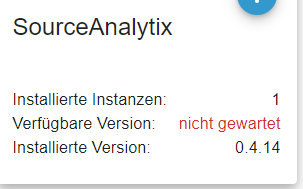


Hey! Du scheinst an dieser Unterhaltung interessiert zu sein, hast aber noch kein Konto.
Hast du es satt, bei jedem Besuch durch die gleichen Beiträge zu scrollen? Wenn du dich für ein Konto anmeldest, kommst du immer genau dorthin zurück, wo du zuvor warst, und kannst dich über neue Antworten benachrichtigen lassen (entweder per E-Mail oder Push-Benachrichtigung). Du kannst auch Lesezeichen speichern und Beiträge positiv bewerten, um anderen Community-Mitgliedern deine Wertschätzung zu zeigen.
Mit deinem Input könnte dieser Beitrag noch besser werden 💗
Registrieren AnmeldenSupport us
350
Online33.0k
Benutzer83.4k
Themen1.3m
Beiträge