Weiter zum Inhalt
  • Home
  • Aktuell
  • Tags
  • 0 Ungelesen 0
  • Kategorien
  • Unreplied
  • Beliebt
  • GitHub
  • Docu
  • Hilfe
Skins
  • Hell
  • Brite
  • Cerulean
  • Cosmo
  • Flatly
  • Journal
  • Litera
  • Lumen
  • Lux
  • Materia
  • Minty
  • Morph
  • Pulse
  • Sandstone
  • Simplex
  • Sketchy
  • Spacelab
  • United
  • Yeti
  • Zephyr
  • Dunkel
  • Cyborg
  • Darkly
  • Quartz
  • Slate
  • Solar
  • Superhero
  • Vapor

  • Standard: (Kein Skin)
  • Kein Skin
Einklappen
ioBroker Logo

Community Forum

donate donate
  1. ioBroker Community Home
  2. Deutsch
  3. ioBroker Allgemein
  4. (Erledigt) upnp nicht kompatibel mit aktuellem admin ?

NEWS

  • Monatsrückblick Januar/Februar 2026 ist online!
    BluefoxB
    Bluefox
    18
    1
    702

  • Jahresrückblick 2025 – unser neuer Blogbeitrag ist online! ✨
    BluefoxB
    Bluefox
    18
    1
    5.8k

  • Neuer Blogbeitrag: Monatsrückblick - Dezember 2025 🎄
    BluefoxB
    Bluefox
    13
    1
    1.5k

(Erledigt) upnp nicht kompatibel mit aktuellem admin ?

Geplant Angeheftet Gesperrt Verschoben ioBroker Allgemein
29 Beiträge 4 Kommentatoren 93 Aufrufe 4 Beobachtet
  • Älteste zuerst
  • Neuste zuerst
  • Meiste Stimmen
Antworten
  • In einem neuen Thema antworten
Anmelden zum Antworten
Dieses Thema wurde gelöscht. Nur Nutzer mit entsprechenden Rechten können es sehen.
  • amg_666A Offline
    amg_666A Offline
    amg_666
    schrieb am zuletzt editiert von
    #3

    ups, nodejs v20.19.5, sollte ich mal updaten (?)

    iobroker auf proxmox container

    Thomas BraunT 2 Antworten Letzte Antwort
    0
    • amg_666A amg_666

      ups, nodejs v20.19.5, sollte ich mal updaten (?)

      Thomas BraunT Online
      Thomas BraunT Online
      Thomas Braun
      Most Active
      schrieb am zuletzt editiert von
      #4

      @amg_666 sagte:

      sollte ich mal updaten (?)

      Ersetze das Fragezeichen mit ganz vielen Ausrufezeichen...

      Ja!!!!!!!!!!!!!!!!!!!!!!!!!!!!!!!!!!!!!!!!!!!!!!!!!!!!!!!!!!!!!!!!!!!!!!!!!!!!!!!!!!!!!!!!!!!!!!!!!

      Linux-Werkzeugkasten:
      https://forum.iobroker.net/topic/42952/der-kleine-iobroker-linux-werkzeugkasten
      NodeJS Fixer Skript:
      https://forum.iobroker.net/topic/68035/iob-node-fix-skript
      iob_diag: curl -sLf -o diag.sh https://iobroker.net/diag.sh && bash diag.sh

      1 Antwort Letzte Antwort
      1
      • amg_666A amg_666

        ups, nodejs v20.19.5, sollte ich mal updaten (?)

        Thomas BraunT Online
        Thomas BraunT Online
        Thomas Braun
        Most Active
        schrieb am zuletzt editiert von
        #5

        @amg_666

        Übrigens ist gestern upnp

        latest: 1.1.5 for 1 days

        veröffentlicht worden.

        Linux-Werkzeugkasten:
        https://forum.iobroker.net/topic/42952/der-kleine-iobroker-linux-werkzeugkasten
        NodeJS Fixer Skript:
        https://forum.iobroker.net/topic/68035/iob-node-fix-skript
        iob_diag: curl -sLf -o diag.sh https://iobroker.net/diag.sh && bash diag.sh

        1 Antwort Letzte Antwort
        0
        • amg_666A Offline
          amg_666A Offline
          amg_666
          schrieb am zuletzt editiert von amg_666
          #6

          bin ich grade dabei upzudaten, dann ist aber die Fehlermeldung mit dem Verweis auf Admin Version etwas verwirrend.
          die upnp 1.1.5 zeigt er mir (noch) nicht an

          iobroker auf proxmox container

          Thomas BraunT 1 Antwort Letzte Antwort
          0
          • amg_666A amg_666

            bin ich grade dabei upzudaten, dann ist aber die Fehlermeldung mit dem Verweis auf Admin Version etwas verwirrend.
            die upnp 1.1.5 zeigt er mir (noch) nicht an

            Thomas BraunT Online
            Thomas BraunT Online
            Thomas Braun
            Most Active
            schrieb am zuletzt editiert von
            #7

            @amg_666 sagte:

            dann ist aber die Fehlermeldung mit dem Verweis auf Admin Version etwas verwirrend.

            Warum? Die Dependencies für upnp werden sich geändert haben.

            Linux-Werkzeugkasten:
            https://forum.iobroker.net/topic/42952/der-kleine-iobroker-linux-werkzeugkasten
            NodeJS Fixer Skript:
            https://forum.iobroker.net/topic/68035/iob-node-fix-skript
            iob_diag: curl -sLf -o diag.sh https://iobroker.net/diag.sh && bash diag.sh

            1 Antwort Letzte Antwort
            0
            • ilovegymI Offline
              ilovegymI Offline
              ilovegym
              schrieb am zuletzt editiert von
              #8

              wenn man schon den aktuellsten Beta-Channel Release faehrt, dann sollte man wirklich auch sein System aktuell halten.. sonst passt das nicht. - Thema "stehts bemueht.." :)

              ilovegym66 – ioBroker Projekte & Automationen
              GitHub: https://github.com/Ilovegym66 | Austausch im Discord: https://discord.gg/yC65zjr5uq

              1 Antwort Letzte Antwort
              0
              • amg_666A Offline
                amg_666A Offline
                amg_666
                schrieb am zuletzt editiert von
                #9

                Also jetzt habe ich node-js v 20.20.2, darunter zeigt er mir die v22.22.2 mit "Updatekringel" an, wenn ich da drauf klicke kommt die Meldung, dass die aktuelle nodes version installiert wird. Wenn iob dann wieder komplett läuft steht da immer noch die v20.20.2

                host.iobroker
                	2026-04-02 12:52:18.882	info	ip addresses: 192.168.1.23 fe80::be24:11ff:fe49:fd9e
                host.iobroker
                	2026-04-02 12:52:18.881	info	hostname: iobroker, node: v20.20.2
                host.iobroker
                	2026-04-02 12:52:18.880	info	Copyright (c) 2014-2024 bluefox, 2014 hobbyquaker
                host.iobroker
                	2026-04-02 12:52:18.875	info	iobroker.js-controller version 7.1.0 js-controller starting
                

                Soll ich auf die 22.22.2 updaten im Terminal ?
                upnp ist immer noch rot

                iobroker auf proxmox container

                Thomas BraunT 1 Antwort Letzte Antwort
                0
                • amg_666A amg_666

                  Also jetzt habe ich node-js v 20.20.2, darunter zeigt er mir die v22.22.2 mit "Updatekringel" an, wenn ich da drauf klicke kommt die Meldung, dass die aktuelle nodes version installiert wird. Wenn iob dann wieder komplett läuft steht da immer noch die v20.20.2

                  host.iobroker
                  	2026-04-02 12:52:18.882	info	ip addresses: 192.168.1.23 fe80::be24:11ff:fe49:fd9e
                  host.iobroker
                  	2026-04-02 12:52:18.881	info	hostname: iobroker, node: v20.20.2
                  host.iobroker
                  	2026-04-02 12:52:18.880	info	Copyright (c) 2014-2024 bluefox, 2014 hobbyquaker
                  host.iobroker
                  	2026-04-02 12:52:18.875	info	iobroker.js-controller version 7.1.0 js-controller starting
                  

                  Soll ich auf die 22.22.2 updaten im Terminal ?
                  upnp ist immer noch rot

                  Thomas BraunT Online
                  Thomas BraunT Online
                  Thomas Braun
                  Most Active
                  schrieb am zuletzt editiert von
                  #10

                  @amg_666 sagte:

                  Soll ich auf die 22.22.2 updaten im Terminal ?

                  Mach es mit

                  iob nodejs-update
                  

                  Linux-Werkzeugkasten:
                  https://forum.iobroker.net/topic/42952/der-kleine-iobroker-linux-werkzeugkasten
                  NodeJS Fixer Skript:
                  https://forum.iobroker.net/topic/68035/iob-node-fix-skript
                  iob_diag: curl -sLf -o diag.sh https://iobroker.net/diag.sh && bash diag.sh

                  1 Antwort Letzte Antwort
                  0
                  • amg_666A Offline
                    amg_666A Offline
                    amg_666
                    schrieb am zuletzt editiert von
                    #11

                    Hm, da sagt er mir, dass die 20.20.2 aktuell ist (?)

                    No recommendation for a nodejs version found on your system. We recommend to install latest version from nodejs v22 tree.
                    
                    Your current setup is:
                    /usr/bin/nodejs         v20.20.2
                    /usr/bin/node           v20.20.2
                    /usr/bin/npm            10.8.2
                    /usr/bin/npx            10.8.2
                    
                    We found these nodejs versions available for installation:
                    
                    nodejs:
                      Installed: 20.20.2-1nodesource1
                      Candidate: 20.20.2-1nodesource1
                    

                    Aber adminoberfläche:
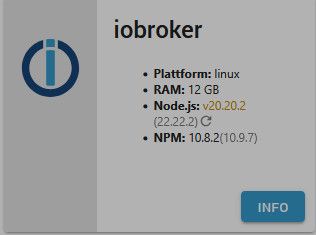
                    28cc76d3-5b93-4f97-89a3-299b88e53202-image.jpeg

                    iobroker auf proxmox container

                    Thomas BraunT 2 Antworten Letzte Antwort
                    0
                    • amg_666A amg_666

                      Hm, da sagt er mir, dass die 20.20.2 aktuell ist (?)

                      No recommendation for a nodejs version found on your system. We recommend to install latest version from nodejs v22 tree.
                      
                      Your current setup is:
                      /usr/bin/nodejs         v20.20.2
                      /usr/bin/node           v20.20.2
                      /usr/bin/npm            10.8.2
                      /usr/bin/npx            10.8.2
                      
                      We found these nodejs versions available for installation:
                      
                      nodejs:
                        Installed: 20.20.2-1nodesource1
                        Candidate: 20.20.2-1nodesource1
                      

                      Aber adminoberfläche:
                      28cc76d3-5b93-4f97-89a3-299b88e53202-image.jpeg

                      Thomas BraunT Online
                      Thomas BraunT Online
                      Thomas Braun
                      Most Active
                      schrieb am zuletzt editiert von
                      #12

                      @amg_666

                      Dann per

                      iob nodejs-update 22
                      

                      Linux-Werkzeugkasten:
                      https://forum.iobroker.net/topic/42952/der-kleine-iobroker-linux-werkzeugkasten
                      NodeJS Fixer Skript:
                      https://forum.iobroker.net/topic/68035/iob-node-fix-skript
                      iob_diag: curl -sLf -o diag.sh https://iobroker.net/diag.sh && bash diag.sh

                      1 Antwort Letzte Antwort
                      0
                      • amg_666A amg_666

                        Hm, da sagt er mir, dass die 20.20.2 aktuell ist (?)

                        No recommendation for a nodejs version found on your system. We recommend to install latest version from nodejs v22 tree.
                        
                        Your current setup is:
                        /usr/bin/nodejs         v20.20.2
                        /usr/bin/node           v20.20.2
                        /usr/bin/npm            10.8.2
                        /usr/bin/npx            10.8.2
                        
                        We found these nodejs versions available for installation:
                        
                        nodejs:
                          Installed: 20.20.2-1nodesource1
                          Candidate: 20.20.2-1nodesource1
                        

                        Aber adminoberfläche:
                        28cc76d3-5b93-4f97-89a3-299b88e53202-image.jpeg

                        Thomas BraunT Online
                        Thomas BraunT Online
                        Thomas Braun
                        Most Active
                        schrieb am zuletzt editiert von
                        #13

                        @amg_666 sagte:

                        Hm, da sagt er mir, dass die 20.20.2 aktuell ist (?)

                        Da müsste aber eigentlich eine Rückfrage kommen. Das ist doch nicht die ganze Ausgabe des Befehls.

                        Linux-Werkzeugkasten:
                        https://forum.iobroker.net/topic/42952/der-kleine-iobroker-linux-werkzeugkasten
                        NodeJS Fixer Skript:
                        https://forum.iobroker.net/topic/68035/iob-node-fix-skript
                        iob_diag: curl -sLf -o diag.sh https://iobroker.net/diag.sh && bash diag.sh

                        1 Antwort Letzte Antwort
                        0
                        • mcm1957M Online
                          mcm1957M Online
                          mcm1957
                          schrieb am zuletzt editiert von
                          #14

                          Die falsche gepinnte admin Version wurde in der neuesten Adapterversion korrigiert:

                          7b433501-4d12-4df7-981a-30a4c87bc879-image.jpeg

                          Entwicklung u Betreuung: envertech-pv, hoymiles-ms, ns-client, pid, snmp Adapter;
                          Support Repositoryverwaltung.

                          Wer 'nen Kaffee spendieren will: https://paypal.me

                          LESEN - gute Forenbeitrage

                          1 Antwort Letzte Antwort
                          0
                          • amg_666A Offline
                            amg_666A Offline
                            amg_666
                            schrieb am zuletzt editiert von
                            #15

                            Mittlerweile zeigt er mir auch das upnp Update an, mit V1.1.5 funzt es wieder.

                            iobroker auf proxmox container

                            Thomas BraunT 1 Antwort Letzte Antwort
                            0
                            • amg_666A amg_666

                              Mittlerweile zeigt er mir auch das upnp Update an, mit V1.1.5 funzt es wieder.

                              Thomas BraunT Online
                              Thomas BraunT Online
                              Thomas Braun
                              Most Active
                              schrieb am zuletzt editiert von
                              #16

                              @amg_666

                              Und hast du jetzt nodejs@22 am Start?

                              Linux-Werkzeugkasten:
                              https://forum.iobroker.net/topic/42952/der-kleine-iobroker-linux-werkzeugkasten
                              NodeJS Fixer Skript:
                              https://forum.iobroker.net/topic/68035/iob-node-fix-skript
                              iob_diag: curl -sLf -o diag.sh https://iobroker.net/diag.sh && bash diag.sh

                              1 Antwort Letzte Antwort
                              0
                              • amg_666A Offline
                                amg_666A Offline
                                amg_666
                                schrieb am zuletzt editiert von
                                #17

                                Ja, ich hab das jetzt über Konsole installiert (iob node-js-update 22). Da kam dann noch die Abfrage ob er das System reparieren soll (oder so ähnlich), hab ich mit ja beantwortet und dann hat er "ewig" gerödelt. Danach hab ich noch iob diag laufen lassen, alles ok. Im Admin wird jetzt auch die 22 angezeigt und kein "Updatekringel" mehr.
                                Nochmals danke!

                                iobroker auf proxmox container

                                Thomas BraunT 1 Antwort Letzte Antwort
                                0
                                • amg_666A amg_666

                                  Ja, ich hab das jetzt über Konsole installiert (iob node-js-update 22). Da kam dann noch die Abfrage ob er das System reparieren soll (oder so ähnlich), hab ich mit ja beantwortet und dann hat er "ewig" gerödelt. Danach hab ich noch iob diag laufen lassen, alles ok. Im Admin wird jetzt auch die 22 angezeigt und kein "Updatekringel" mehr.
                                  Nochmals danke!

                                  Thomas BraunT Online
                                  Thomas BraunT Online
                                  Thomas Braun
                                  Most Active
                                  schrieb am zuletzt editiert von
                                  #18

                                  @amg_666 sagte:

                                  Danach hab ich noch iob diag laufen lassen, alles ok.

                                  Zeig das mal.

                                  Linux-Werkzeugkasten:
                                  https://forum.iobroker.net/topic/42952/der-kleine-iobroker-linux-werkzeugkasten
                                  NodeJS Fixer Skript:
                                  https://forum.iobroker.net/topic/68035/iob-node-fix-skript
                                  iob_diag: curl -sLf -o diag.sh https://iobroker.net/diag.sh && bash diag.sh

                                  1 Antwort Letzte Antwort
                                  0
                                  • amg_666A Offline
                                    amg_666A Offline
                                    amg_666
                                    schrieb am zuletzt editiert von
                                    #19
                                    ========== Start marking the full check here ===========
                                    
                                    ```bash
                                    Script v.2026-01-31
                                    
                                    *** BASE SYSTEM ***
                                    Operating System: Debian GNU/Linux 12 (bookworm)
                                     Static hostname: iobroker
                                           Icon name: computer-container
                                             Chassis: container ☐
                                      Virtualization: lxc
                                              Kernel: Linux 6.17.13-2-pve
                                        Architecture: x86-64
                                    OS is similar to: 
                                    
                                    model name      : Intel(R) Celeron(R) CPU J3455 @ 1.50GHz
                                    Docker          : false
                                    Virtualization  : lxc
                                    Kernel          : x86_64
                                    Userland        : 64 bit
                                    
                                    Systemuptime and Load:
                                     20:21:55 up 19 days,  2:12,  2 users,  load average: 0.85, 0.68, 0.72
                                    CPU threads: 4
                                    
                                    
                                    *** LIFE CYCLE STATUS ***
                                    Debian 'bookworm' is the current oldstable version. Please upgrade to the latest stable release 'trixie' in due time!
                                    
                                    *** TIME AND TIMEZONES ***
                                                   Local time: Thu 2026-04-02 20:21:55 CEST
                                               Universal time: Thu 2026-04-02 18:21:55 UTC
                                                     RTC time: n/a
                                                    Time zone: Europe/Berlin (CEST, +0200)
                                    System clock synchronized: yes
                                                  NTP service: inactive
                                              RTC in local TZ: no
                                    
                                    *** Users and Groups ***
                                    User that called 'iob diag':
                                    Andreas
                                    HOME=/home/Andreas
                                    GROUPS=Andreas sudo iobroker
                                    
                                    User that is running 'js-controller':
                                    js-controller is not running
                                    
                                    *** DISPLAY-SERVER SETUP ***
                                    Display-Server:         false
                                    Unit display-manager.service could not be found.
                                    Display-Manager: 
                                    Desktop: 
                                    Session: 
                                    
                                    *** MEMORY ***
                                                   total        used        free      shared  buff/cache   available
                                    Mem:             12G         17M         12G         94K        238M         12G
                                    Swap:           4.3G         20K        4.3G
                                    Total:           17G         17M         16G
                                    
                                    Active iob-Instances:   1
                                    
                                            12288 M total memory
                                               17 M used memory
                                              151 M active memory
                                               26 M inactive memory
                                            12043 M free memory
                                                0 M buffer memory
                                              227 M swap cache
                                             4096 M total swap
                                                0 M used swap
                                             4095 M free swap
                                    
                                    *** top - Table Of Processes  ***
                                    top - 20:21:55 up 19 days,  2:12,  2 users,  load average: 0.85, 0.68, 0.72
                                    Tasks:  25 total,   1 running,  24 sleeping,   0 stopped,   0 zombie
                                    %Cpu(s):  0.0 us,  0.0 sy,  0.0 ni,100.0 id,  0.0 wa,  0.0 hi,  0.0 si,  0.0 st 
                                    MiB Mem :  12288.0 total,  12042.5 free,     18.4 used,    227.2 buff/cache     
                                    MiB Swap:   4096.0 total,   4096.0 free,      0.0 used.  12269.6 avail Mem 
                                    
                                    *** FAILED SERVICES ***
                                    
                                      UNIT                    LOAD   ACTIVE SUB    DESCRIPTION
                                    * run-rpc_pipefs.mount    loaded failed failed RPC Pipe File System
                                    * sys-kernel-config.mount loaded failed failed Kernel Configuration File System
                                    * iobroker.service        loaded failed failed ioBroker Server
                                    
                                    LOAD   = Reflects whether the unit definition was properly loaded.
                                    ACTIVE = The high-level unit activation state, i.e. generalization of SUB.
                                    SUB    = The low-level unit activation state, values depend on unit type.
                                    3 loaded units listed.
                                    
                                    
                                    *** DMESG CRITICAL ERRORS ***
                                    dmesg: read kernel buffer failed: Operation not permitted
                                    No critical errors detected
                                    
                                    *** FILESYSTEM ***
                                    Filesystem                  Type      Size  Used Avail Use% Mounted on
                                    HA-Volume/subvol-100-disk-0 zfs       150G   17G  134G  11% /
                                    none                        tmpfs     492K  4.0K  488K   1% /dev
                                    udev                        devtmpfs  7.7G     0  7.7G   0% /dev/tty
                                    tmpfs                       tmpfs     7.8G     0  7.8G   0% /dev/shm
                                    tmpfs                       tmpfs     3.1G  108K  3.1G   1% /run
                                    tmpfs                       tmpfs     5.0M     0  5.0M   0% /run/lock
                                    
                                    Messages concerning ext4 filesystem in dmesg:
                                    dmesg: read kernel buffer failed: Operation not permitted
                                    
                                    Show mounted filesystems:
                                    TARGET SOURCE                      FSTYPE OPTIONS
                                    /      HA-Volume/subvol-100-disk-0 zfs    rw,relatime,xattr,posixacl,casesensitive
                                    
                                    Files in neuralgic directories:
                                    
                                    /var:
                                    445M    /var/
                                    316M    /var/cache
                                    314M    /var/cache/apt
                                    267M    /var/cache/apt/archives
                                    69M     /var/lib
                                    
                                    Hint: You are currently not seeing messages from other users and the system.
                                          Users in groups 'adm', 'systemd-journal' can see all messages.
                                          Pass -q to turn off this notice.
                                    Archived and active journals take up 3.8M in the file system.
                                    
                                    /opt/iobroker/backups:
                                    3.1G    /opt/iobroker/backups/
                                    
                                    /opt/iobroker/iobroker-data:
                                    2.1G    /opt/iobroker/iobroker-data/
                                    1.6G    /opt/iobroker/iobroker-data/history
                                    319M    /opt/iobroker/iobroker-data/files
                                    179M    /opt/iobroker/iobroker-data/backup-objects
                                    78M     /opt/iobroker/iobroker-data/files/vis
                                    
                                    The five largest files in iobroker-data are:
                                    16M     /opt/iobroker/iobroker-data/files/vis-2/assets/index-DqJdyjgH.js.map
                                    16M     /opt/iobroker/iobroker-data/files/vis-2/assets/index-CrLrNq4s.js.map
                                    13M     /opt/iobroker/iobroker-data/objects.jsonl
                                    7.5M    /opt/iobroker/iobroker-data/objects.json.migrated
                                    7.5M    /opt/iobroker/iobroker-data/objects.json.bak.migrated
                                    
                                    USB-Devices by-id:
                                    USB-Sticks - Avoid direct links to /dev/tty* in your adapter setups,
                                    please always prefer the links 'by-id':
                                    
                                    No Devices found 'by-id'
                                    
                                    *** ZigBee Settings ***
                                    
                                    ⚠ HINT:
                                    Your zigbee.2 COM-Port is NOT matching 'by-id'.
                                    Please check your setting:
                                    tcp
                                    
                                    Zigbee Network Settings on your coordinator/in nvbackup are:
                                    
                                    zigbee.X
                                    Extended Pan ID:
                                    *** MASKED ***
                                    Pan ID:
                                    *** MASKED ***
                                    Channel:
                                    *** MASKED ***
                                    Network Key:
                                    *** MASKED ***
                                    
                                    To unmask the settings run 'iob diag --unmask'
                                    
                                    
                                    *** NodeJS-Installation ***
                                    
                                    /usr/bin/nodejs         v22.22.2
                                    /usr/bin/node           v22.22.2
                                    /usr/bin/npm            10.9.7
                                    /usr/bin/npx            10.9.7
                                    
                                    ✓ Node.js installation is correct
                                    
                                    nodejs:
                                      Installed: 22.22.2-1nodesource1
                                      Candidate: 22.22.2-1nodesource1
                                      Version table:
                                     *** 22.22.2-1nodesource1 1001
                                            500 https://deb.nodesource.com/node_22.x nodistro/main amd64 Packages
                                            100 /var/lib/dpkg/status
                                         22.22.1-1nodesource1 1001
                                            500 https://deb.nodesource.com/node_22.x nodistro/main amd64 Packages
                                         22.22.0-1nodesource1 1001
                                            500 https://deb.nodesource.com/node_22.x nodistro/main amd64 Packages
                                         22.21.0-1nodesource1 1001
                                            500 https://deb.nodesource.com/node_22.x nodistro/main amd64 Packages
                                         22.20.0-1nodesource1 1001
                                            500 https://deb.nodesource.com/node_22.x nodistro/main amd64 Packages
                                         22.19.0-1nodesource1 1001
                                            500 https://deb.nodesource.com/node_22.x nodistro/main amd64 Packages
                                         22.18.0-1nodesource1 1001
                                            500 https://deb.nodesource.com/node_22.x nodistro/main amd64 Packages
                                         22.17.1-1nodesource1 1001
                                            500 https://deb.nodesource.com/node_22.x nodistro/main amd64 Packages
                                         22.17.0-1nodesource1 1001
                                            500 https://deb.nodesource.com/node_22.x nodistro/main amd64 Packages
                                         22.16.0-1nodesource1 1001
                                            500 https://deb.nodesource.com/node_22.x nodistro/main amd64 Packages
                                         22.15.1-1nodesource1 1001
                                            500 https://deb.nodesource.com/node_22.x nodistro/main amd64 Packages
                                         22.15.0-1nodesource1 1001
                                            500 https://deb.nodesource.com/node_22.x nodistro/main amd64 Packages
                                         22.14.0-1nodesource1 1001
                                            500 https://deb.nodesource.com/node_22.x nodistro/main amd64 Packages
                                         22.13.1-1nodesource1 1001
                                            500 https://deb.nodesource.com/node_22.x nodistro/main amd64 Packages
                                         22.13.0-1nodesource1 1001
                                            500 https://deb.nodesource.com/node_22.x nodistro/main amd64 Packages
                                         22.12.0-1nodesource1 1001
                                            500 https://deb.nodesource.com/node_22.x nodistro/main amd64 Packages
                                         22.11.0-1nodesource1 1001
                                            500 https://deb.nodesource.com/node_22.x nodistro/main amd64 Packages
                                         22.10.0-1nodesource1 1001
                                            500 https://deb.nodesource.com/node_22.x nodistro/main amd64 Packages
                                         22.9.0-1nodesource1 1001
                                            500 https://deb.nodesource.com/node_22.x nodistro/main amd64 Packages
                                         22.8.0-1nodesource1 1001
                                            500 https://deb.nodesource.com/node_22.x nodistro/main amd64 Packages
                                         22.7.0-1nodesource1 1001
                                            500 https://deb.nodesource.com/node_22.x nodistro/main amd64 Packages
                                         22.6.0-1nodesource1 1001
                                            500 https://deb.nodesource.com/node_22.x nodistro/main amd64 Packages
                                         22.5.1-1nodesource1 1001
                                            500 https://deb.nodesource.com/node_22.x nodistro/main amd64 Packages
                                         22.5.0-1nodesource1 1001
                                            500 https://deb.nodesource.com/node_22.x nodistro/main amd64 Packages
                                         22.4.1-1nodesource1 1001
                                            500 https://deb.nodesource.com/node_22.x nodistro/main amd64 Packages
                                         22.4.0-1nodesource1 1001
                                            500 https://deb.nodesource.com/node_22.x nodistro/main amd64 Packages
                                         22.3.0-1nodesource1 1001
                                            500 https://deb.nodesource.com/node_22.x nodistro/main amd64 Packages
                                         22.2.0-1nodesource1 1001
                                            500 https://deb.nodesource.com/node_22.x nodistro/main amd64 Packages
                                         22.1.0-1nodesource1 1001
                                            500 https://deb.nodesource.com/node_22.x nodistro/main amd64 Packages
                                         22.0.0-1nodesource1 1001
                                            500 https://deb.nodesource.com/node_22.x nodistro/main amd64 Packages
                                         18.20.4+dfsg-1~deb12u1 500
                                            500 http://deb.debian.org/debian bookworm/main amd64 Packages
                                            500 http://security.debian.org bookworm-security/main amd64 Packages
                                    
                                    Temp directories causing deletion problem: 0
                                    No problems detected
                                    
                                    Errors in npm tree: 0
                                    No problems detected
                                    
                                    Checking for nodejs vulnerability:
                                    
                                    
                                     █████  ██      ██           ██████   ██████   ██████  ██████         ██
                                    ██   ██ ██      ██          ██       ██    ██ ██    ██ ██   ██     ██  ██
                                    ███████ ██      ██          ██   ███ ██    ██ ██    ██ ██   ██         ██
                                    ██   ██ ██      ██          ██    ██ ██    ██ ██    ██ ██   ██     ██  ██
                                    ██   ██ ███████ ███████      ██████   ██████   ██████  ██████         ██


                                    *** ioBroker-Installation ***
                                    
                                    ioBroker Status
                                    Server Configured backup period 7200000 is larger than the supported maximum of 35791 minutes. Defaulting to 120 minutes.
                                    Server Configured backup period 7200000 is larger than the supported maximum of 35791 minutes. Defaulting to 120 minutes.
                                    iobroker is not running on this host.
                                    
                                    
                                    Objects type: jsonl
                                    States  type: jsonl
                                    
                                    Hosts:
                                    Server Configured backup period 7200000 is larger than the supported maximum of 35791 minutes. Defaulting to 120 minutes.
                                    Server Configured backup period 7200000 is larger than the supported maximum of 35791 minutes. Defaulting to 120 minutes.
                                    iobroker            iobroker (version: 7.1.0, hostname: iobroker      , alive, uptime: 24189)
                                    
                                    Core adapters versions
                                    js-controller:  7.1.0
                                    admin:          7.8.20
                                    javascript:     9.1.1
                                    
                                    nodejs modules from github:     1
                                    | +-- node-milight-promise@0.3.2 (git+ssh://git@github.com/Steiger04/node-milight-promise.git#f1089feac9b7990727adf2016891029436729d33)
                                    
                                    Adapter State
                                    Server Configured backup period 7200000 is larger than the supported maximum of 35791 minutes. Defaulting to 120 minutes.
                                    Server Configured backup period 7200000 is larger than the supported maximum of 35791 minutes. Defaulting to 120 minutes.
                                      system.adapter.admin.0                  : admin                 : iobroker                                 -  enabled, port: 8081, bind: 0.0.0.0, run as: admin
                                      system.adapter.alexa2.0                 : alexa2                : iobroker                                 -  enabled
                                      system.adapter.alias-manager.0          : alias-manager         : iobroker                                 - disabled
                                      system.adapter.awtrix-light.0           : awtrix-light          : iobroker                                 -  enabled
                                      system.adapter.awtrix-light.1           : awtrix-light          : iobroker                                 -  enabled
                                      system.adapter.backitup.0               : backitup              : iobroker                                 -  enabled
                                      system.adapter.bydbatt.0                : bydbatt               : iobroker                                 -  enabled
                                      system.adapter.bydhvs.0                 : bydhvs                : iobroker                                 - disabled
                                      system.adapter.daswetter.0              : daswetter             : iobroker                                 - disabled
                                      system.adapter.device-watcher.0         : device-watcher        : iobroker                                 - disabled
                                      system.adapter.discovery.0              : discovery             : iobroker                                 - disabled
                                      system.adapter.echarts.0                : echarts               : iobroker                                 -  enabled
                                      system.adapter.email.0                  : email                 : iobroker                                 -  enabled
                                      system.adapter.energiefluss.0           : energiefluss          : iobroker                                 - disabled
                                      system.adapter.feiertage.0              : feiertage             : iobroker                                 -  enabled
                                      system.adapter.flot.0                   : flot                  : iobroker                                 - disabled
                                      system.adapter.fullcalendar.0           : fullcalendar          : iobroker                                 -  enabled
                                      system.adapter.history.0                : history               : iobroker                                 -  enabled
                                      system.adapter.hm-rega.0                : hm-rega               : iobroker                                 -  enabled
                                      system.adapter.hm-rpc.0                 : hm-rpc                : iobroker                                 -  enabled, port: 0
                                      system.adapter.hm-rpc.1                 : hm-rpc                : iobroker                                 -  enabled, port: 0
                                      system.adapter.hm-rpc.2                 : hm-rpc                : iobroker                                 -  enabled, port: 0
                                      system.adapter.hm-rpc.3                 : hm-rpc                : iobroker                                 -  enabled, port: 0
                                      system.adapter.ical.0                   : ical                  : iobroker                                 -  enabled
                                      system.adapter.ical.1                   : ical                  : iobroker                                 -  enabled
                                      system.adapter.ical.2                   : ical                  : iobroker                                 -  enabled
                                      system.adapter.ical.3                   : ical                  : iobroker                                 -  enabled
                                      system.adapter.ical.6                   : ical                  : iobroker                                 -  enabled
                                      system.adapter.iot.0                    : iot                   : iobroker                                 -  enabled
                                      system.adapter.javascript.0             : javascript            : iobroker                                 -  enabled
                                      system.adapter.klf200.0                 : klf200                : iobroker                                 -  enabled
                                      system.adapter.lgtv.0                   : lgtv                  : iobroker                                 -  enabled
                                      system.adapter.lgtv.1                   : lgtv                  : iobroker                                 -  enabled
                                      system.adapter.milight-smart-light.0    : milight-smart-light   : iobroker                                 -  enabled
                                      system.adapter.mqtt.0                   : mqtt                  : iobroker                                 -  enabled, port: 1884, bind: 0.0.0.0
                                      system.adapter.nina.0                   : nina                  : iobroker                                 -  enabled
                                      system.adapter.openweathermap.0         : openweathermap        : iobroker                                 -  enabled
                                      system.adapter.phantomjs.0              : phantomjs             : iobroker                                 - disabled
                                      system.adapter.ping.0                   : ping                  : iobroker                                 -  enabled
                                      system.adapter.plenticore.0             : plenticore            : iobroker                                 -  enabled, port: 80
                                      system.adapter.proxmox.0                : proxmox               : iobroker                                 -  enabled, port: 8006
                                      system.adapter.rssfeed.0                : rssfeed               : iobroker                                 -  enabled
                                      system.adapter.schoolfree.0             : schoolfree            : iobroker                                 -  enabled
                                      system.adapter.shelly.0                 : shelly                : iobroker                                 -  enabled, port: 1885, bind: 0.0.0.0
                                      system.adapter.shelly.1                 : shelly                : iobroker                                 -  enabled, port: 1886, bind: 0.0.0.0
                                      system.adapter.shuttercontrol.0         : shuttercontrol        : iobroker                                 -  enabled
                                      system.adapter.snmp.0                   : snmp                  : iobroker                                 -  enabled
                                      system.adapter.sonoff.0                 : sonoff                : iobroker                                 -  enabled, port: 1883, bind: 0.0.0.0
                                      system.adapter.sourceanalytix.0         : sourceanalytix        : iobroker                                 -  enabled
                                      system.adapter.tankerkoenig.0           : tankerkoenig          : iobroker                                 -  enabled
                                      system.adapter.telegram.0               : telegram              : iobroker                                 -  enabled, port: 8443, bind: 0.0.0.0
                                      system.adapter.tr-064.0                 : tr-064                : iobroker                                 -  enabled
                                      system.adapter.tr-064.2                 : tr-064                : iobroker                                 -  enabled
                                      system.adapter.tr-064.3                 : tr-064                : iobroker                                 -  enabled
                                      system.adapter.trashschedule.0          : trashschedule         : iobroker                                 -  enabled
                                      system.adapter.tuya.0                   : tuya                  : iobroker                                 - disabled
                                      system.adapter.unifi.0                  : unifi                 : iobroker                                 -  enabled
                                      system.adapter.upnp.0                   : upnp                  : iobroker                                 -  enabled
                                      system.adapter.vis-2-beta.0             : vis-2-beta            : iobroker                                 - disabled
                                      system.adapter.vis-2-widgets-gauges.0   : vis-2-widgets-gauges  : iobroker                                 - disabled
                                      system.adapter.vis-2.0                  : vis-2                 : iobroker                                 - disabled
                                      system.adapter.vis-bars.0               : vis-bars              : iobroker                                 - disabled
                                      system.adapter.vis-canvas-gauges.0      : vis-canvas-gauges     : iobroker                                 - disabled
                                      system.adapter.vis-colorpicker.0        : vis-colorpicker       : iobroker                                 - disabled
                                      system.adapter.vis-hqwidgets.0          : vis-hqwidgets         : iobroker                                 - disabled
                                      system.adapter.vis-icontwo.0            : vis-icontwo           : iobroker                                 - disabled
                                      system.adapter.vis-inventwo.0           : vis-inventwo          : iobroker                                 -  enabled
                                      system.adapter.vis-jqui-mfd.0           : vis-jqui-mfd          : iobroker                                 - disabled
                                      system.adapter.vis-jsontemplate.0       : vis-jsontemplate      : iobroker                                 -  enabled
                                      system.adapter.vis-justgage.0           : vis-justgage          : iobroker                                 - disabled
                                      system.adapter.vis-map.0                : vis-map               : iobroker                                 - disabled
                                      system.adapter.vis-materialdesign.0     : vis-materialdesign    : iobroker                                 -  enabled
                                      system.adapter.vis-timeandweather.0     : vis-timeandweather    : iobroker                                 - disabled
                                      system.adapter.vis.0                    : vis                   : iobroker                                 -  enabled
                                      system.adapter.vw-connect.0             : vw-connect            : iobroker                                 -  enabled
                                      system.adapter.web.0                    : web                   : iobroker                                 -  enabled, port: 8082, bind: 0.0.0.0, run as: admin
                                      system.adapter.web.1                    : web                   : iobroker                                 -  enabled, port: 20002, bind: 0.0.0.0, run as: admin
                                      system.adapter.webcal.0                 : webcal                : iobroker                                 - disabled
                                      system.adapter.wifilight.0              : wifilight             : iobroker                                 - disabled
                                      system.adapter.wolf.0                   : wolf                  : iobroker                                 -  enabled, port: 12004, bind: 0.0.0.0
                                      system.adapter.zigbee.2                 : zigbee                : iobroker                                 -  enabled, port: tcp://192.168.1.224:1053
                                    
                                    + instance is alive
                                    
                                    Enabled adapters with bindings
                                      system.adapter.admin.0                  : admin                 : iobroker                                 -  enabled, port: 8081, bind: 0.0.0.0, run as: admin
                                      system.adapter.hm-rpc.0                 : hm-rpc                : iobroker                                 -  enabled, port: 0
                                      system.adapter.hm-rpc.1                 : hm-rpc                : iobroker                                 -  enabled, port: 0
                                      system.adapter.hm-rpc.2                 : hm-rpc                : iobroker                                 -  enabled, port: 0
                                      system.adapter.hm-rpc.3                 : hm-rpc                : iobroker                                 -  enabled, port: 0
                                      system.adapter.mqtt.0                   : mqtt                  : iobroker                                 -  enabled, port: 1884, bind: 0.0.0.0
                                      system.adapter.plenticore.0             : plenticore            : iobroker                                 -  enabled, port: 80
                                      system.adapter.proxmox.0                : proxmox               : iobroker                                 -  enabled, port: 8006
                                      system.adapter.shelly.0                 : shelly                : iobroker                                 -  enabled, port: 1885, bind: 0.0.0.0
                                      system.adapter.shelly.1                 : shelly                : iobroker                                 -  enabled, port: 1886, bind: 0.0.0.0
                                      system.adapter.sonoff.0                 : sonoff                : iobroker                                 -  enabled, port: 1883, bind: 0.0.0.0
                                      system.adapter.telegram.0               : telegram              : iobroker                                 -  enabled, port: 8443, bind: 0.0.0.0
                                      system.adapter.web.0                    : web                   : iobroker                                 -  enabled, port: 8082, bind: 0.0.0.0, run as: admin
                                      system.adapter.web.1                    : web                   : iobroker                                 -  enabled, port: 20002, bind: 0.0.0.0, run as: admin
                                      system.adapter.wolf.0                   : wolf                  : iobroker                                 -  enabled, port: 12004, bind: 0.0.0.0
                                      system.adapter.zigbee.2                 : zigbee                : iobroker                                 -  enabled, port: tcp://192.168.1.224:1053
                                    
                                    ioBroker-Repositories
                                    Server Configured backup period 7200000 is larger than the supported maximum of 35791 minutes. Defaulting to 120 minutes.
                                    Server Configured backup period 7200000 is larger than the supported maximum of 35791 minutes. Defaulting to 120 minutes.
                                    ┌─────────┬──────────┬─────────────────────────────────────────────────────────┬──────────────┐
                                    │ (index) │ name     │ url                                                     │ auto upgrade │
                                    ├─────────┼──────────┼─────────────────────────────────────────────────────────┼──────────────┤
                                    │ 0       │ 'stable' │ 'http://download.iobroker.net/sources-dist.json'        │ false        │
                                    │ 1       │ 'beta'   │ 'http://download.iobroker.net/sources-dist-latest.json' │ false        │
                                    └─────────┴──────────┴─────────────────────────────────────────────────────────┴──────────────┘
                                    
                                    Active repo(s): beta
                                    Upgrade policy: none
                                    
                                    Installed ioBroker-Adapters
                                    Server Configured backup period 7200000 is larger than the supported maximum of 35791 minutes. Defaulting to 120 minutes.
                                    Server Configured backup period 7200000 is larger than the supported maximum of 35791 minutes. Defaulting to 120 minutes.
                                    Used repository: beta
                                    Adapter    "admin"        : 7.8.20   , installed 7.8.20
                                    Adapter    "alexa2"       : 3.27.4   , installed 3.27.4
                                    Adapter    "alias-manager": 2.1.0    , installed 2.1.0
                                    Adapter    "awtrix-light" : 3.0.0    , installed 3.0.0
                                    Adapter    "backitup"     : 3.3.14   , installed 3.3.14
                                    Adapter    "bydbatt"      : 1.1.0    , installed 1.1.0
                                    Adapter    "bydhvs"       : 1.5.4    , installed 1.5.4
                                    Adapter    "daswetter"    : 4.5.3    , installed 4.5.3
                                    Adapter    "device-watcher": 2.15.5  , installed 2.15.5
                                    Adapter    "discovery"    : 5.0.0    , installed 5.0.0
                                    Adapter    "echarts"      : 3.1.0    , installed 3.1.0
                                    Adapter    "email"        : 2.0.4    , installed 2.0.4
                                    Adapter    "energiefluss" : 3.6.2    , installed 3.6.2
                                    Adapter    "feiertage"    : 1.3.0    , installed 1.3.0
                                    Adapter    "flot"         : 1.12.0   , installed 1.12.0
                                    Adapter    "fullcalendar" : 2.4.5    , installed 2.4.5
                                    Adapter    "history"      : 4.0.0    , installed 4.0.0
                                    Adapter    "hm-rega"      : 5.1.0    , installed 5.1.0
                                    Adapter    "hm-rpc"       : 3.0.1    , installed 3.0.1
                                    Adapter    "ical"         : 1.19.7   , installed 1.19.7
                                    Adapter    "iot"          : 5.0.13   , installed 5.0.13
                                    Adapter    "javascript"   : 9.1.1    , installed 9.1.1
                                    Controller "js-controller": 7.1.0    , installed 7.1.0
                                    Adapter    "klf200"       : 1.3.5    , installed 1.3.5
                                    Adapter    "lgtv"         : 2.5.0    , installed 2.5.0
                                    Adapter    "milight-smart-light": 1.2.2, installed 1.2.1 [Updatable]
                                    Adapter    "mqtt"         : 6.1.4    , installed 6.1.4
                                    Adapter    "nina"         : 0.0.26   , installed 0.0.26
                                    Adapter    "openweathermap": 1.4.0   , installed 1.4.0
                                    Adapter    "phantomjs"    : 1.1.3    , installed 1.1.3
                                    Adapter    "ping"         : 2.1.0    , installed 2.1.0
                                    Adapter    "plenticore"   : 2.3.1    , installed 2.3.1
                                    Adapter    "proxmox"      : 2.4.10   , installed 2.4.10
                                    Adapter    "rssfeed"      : 4.0.3    , installed 4.0.3
                                    Adapter    "schoolfree"   : 1.1.14   , installed 1.1.14
                                    Adapter    "shelly"       : 10.6.1   , installed 10.6.1
                                    Adapter    "shuttercontrol": 2.0.12  , installed 2.0.12
                                    Adapter    "snmp"         : 3.4.0    , installed 3.4.0
                                    Adapter    "socketio"     : 7.0.8    , installed 7.0.8
                                    Adapter    "sonoff"       : 3.3.0    , installed 3.3.0
                                    Adapter    "sourceanalytix": 0.4.14  , installed 0.4.14
                                    Adapter    "tankerkoenig" : 3.4.0    , installed 3.4.0
                                    Adapter    "telegram"     : 4.1.0    , installed 4.1.0
                                    Adapter    "tr-064"       : 4.3.0    , installed 4.3.0
                                    Adapter    "trashschedule": 5.2.1    , installed 5.2.1
                                    Adapter    "tuya"         : 3.17.0   , installed 3.17.0
                                    Adapter    "unifi"        : 0.7.0    , installed 0.7.0
                                    Adapter    "upnp"         : 1.1.5    , installed 1.1.5
                                    Adapter    "vis"          : 1.5.6    , installed 1.5.6
                                    Adapter    "vis-2"        : 2.13.17  , installed 2.13.17
                                    Adapter    "vis-2-widgets-gauges": 2.0.2, installed 2.0.2
                                    Adapter    "vis-bars"     : 0.1.4    , installed 0.1.4
                                    Adapter    "vis-canvas-gauges": 1.0.1, installed 1.0.1
                                    Adapter    "vis-colorpicker": 2.1.0  , installed 2.1.0
                                    Adapter    "vis-hqwidgets": 1.6.0    , installed 1.6.0
                                    Adapter    "vis-icontwo"  : 2.11.3   , installed 2.11.3
                                    Adapter    "vis-inventwo" : 3.3.5    , installed 3.3.5
                                    Adapter    "vis-jqui-mfd" : 1.1.3    , installed 1.1.3
                                    Adapter    "vis-jsontemplate": 4.4.0 , installed 4.4.0
                                    Adapter    "vis-justgage" : 2.1.7    , installed 2.1.7
                                    Adapter    "vis-map"      : 1.1.2    , installed 1.1.2
                                    Adapter    "vis-materialdesign": 0.5.9, installed 0.5.9
                                    Adapter    "vis-timeandweather": 1.2.2, installed 1.2.2
                                    Adapter    "vw-connect"   : 0.7.16   , installed 0.7.16
                                    Adapter    "web"          : 8.0.0    , installed 8.0.0
                                    Adapter    "webcal"       : 1.4.0    , installed 1.4.0
                                    Adapter    "wifilight"    : 2.0.3    , installed 2.0.3
                                    Adapter    "wolf"         : 1.7.0    , installed 1.7.0
                                    Adapter    "ws"           : 4.0.0    , installed 4.0.0
                                    Adapter    "zigbee"       : 3.3.5    , installed 3.3.5
                                    
                                    Objects and States
                                    Please stand by - This may take a while
                                    Objects:        24399
                                    States:         18957
                                    
                                    *** OS-Repositories and Updates ***
                                    Hit:1 http://deb.debian.org/debian bookworm InRelease
                                    Hit:2 http://deb.debian.org/debian bookworm-updates InRelease
                                    Hit:3 http://security.debian.org bookworm-security InRelease
                                    Hit:4 https://deb.nodesource.com/node_22.x nodistro InRelease
                                    Reading package lists...
                                    Pending systemupdates: 0
                                    
                                    *** Listening Ports ***
                                    Active Internet connections (only servers)
                                    Proto Recv-Q Send-Q Local Address           Foreign Address         State       User       Inode      PID/Program name    
                                    tcp        0      0 127.0.0.1:25            0.0.0.0:*               LISTEN      0          17677      357/master          
                                    tcp        0      0 0.0.0.0:111             0.0.0.0:*               LISTEN      0          12055      1/init              
                                    tcp6       0      0 ::1:25                  :::*                    LISTEN      0          17678      357/master          
                                    tcp6       0      0 :::111                  :::*                    LISTEN      0          12057      1/init              
                                    tcp6       0      0 :::22                   :::*                    LISTEN      0          17415      1/init              
                                    udp        0      0 0.0.0.0:111             0.0.0.0:*                           0          12056      1/init              
                                    udp6       0      0 :::111                  :::*                                0          12058      1/init              
                                    
                                    *** Log File - Last 25 Lines ***
                                    
                                    2026-04-02 20:11:17.442  - warn: host.iobroker instance system.adapter.shelly.0 terminated due to SIGKILL
                                    2026-04-02 20:11:17.442  - info: host.iobroker instance system.adapter.shelly.0 terminated with code null ()
                                    2026-04-02 20:11:17.480  - warn: host.iobroker instance system.adapter.hm-rpc.1 terminated due to SIGKILL
                                    2026-04-02 20:11:17.481  - info: host.iobroker instance system.adapter.hm-rpc.1 terminated with code null ()
                                    2026-04-02 20:11:17.632  - warn: host.iobroker instance system.adapter.hm-rpc.2 terminated due to SIGKILL
                                    2026-04-02 20:11:17.632  - info: host.iobroker instance system.adapter.hm-rpc.2 terminated with code null ()
                                    2026-04-02 20:11:17.716  - warn: host.iobroker instance system.adapter.ping.0 terminated due to SIGKILL
                                    2026-04-02 20:11:17.716  - info: host.iobroker instance system.adapter.ping.0 terminated with code null ()
                                    2026-04-02 20:11:17.716  - warn: host.iobroker instance system.adapter.shelly.1 terminated due to SIGKILL
                                    2026-04-02 20:11:17.716  - info: host.iobroker instance system.adapter.shelly.1 terminated with code null ()
                                    2026-04-02 20:11:17.750  - warn: host.iobroker instance system.adapter.awtrix-light.0 terminated due to SIGKILL
                                    2026-04-02 20:11:17.751  - info: host.iobroker instance system.adapter.awtrix-light.0 terminated with code null ()
                                    2026-04-02 20:11:17.783  - warn: host.iobroker instance system.adapter.echarts.0 terminated due to SIGKILL
                                    2026-04-02 20:11:17.783  - info: host.iobroker instance system.adapter.echarts.0 terminated with code null ()
                                    2026-04-02 20:11:17.821  - warn: host.iobroker instance system.adapter.iot.0 terminated due to SIGKILL
                                    2026-04-02 20:11:17.822  - info: host.iobroker instance system.adapter.iot.0 terminated with code null ()
                                    2026-04-02 20:11:17.896  - warn: host.iobroker instance system.adapter.klf200.0 terminated due to SIGKILL
                                    2026-04-02 20:11:17.896  - info: host.iobroker instance system.adapter.klf200.0 terminated with code null ()
                                    2026-04-02 20:11:17.897  - warn: host.iobroker instance system.adapter.web.0 terminated due to SIGKILL
                                    2026-04-02 20:11:17.897  - info: host.iobroker instance system.adapter.web.0 terminated with code null ()
                                    2026-04-02 20:11:17.961  - warn: host.iobroker instance system.adapter.web.1 terminated due to SIGKILL
                                    2026-04-02 20:11:17.962  - info: host.iobroker instance system.adapter.web.1 terminated with code null ()
                                    2026-04-02 20:11:17.991  - info: host.iobroker instance system.adapter.history.0 terminated with code 0 (NO_ERROR)
                                    2026-04-02 20:11:24.734  - info: host.iobroker force terminating
                                    2026-04-02 20:11:24.735  - info: host.iobroker Adapter zigbee still running


                                    ============ Mark until here for C&P =============

                                    iob diag has finished.

                                    iobroker auf proxmox container

                                    Thomas BraunT 1 Antwort Letzte Antwort
                                    0
                                    • amg_666A amg_666
                                      ========== Start marking the full check here ===========
                                      
                                      ```bash
                                      Script v.2026-01-31
                                      
                                      *** BASE SYSTEM ***
                                      Operating System: Debian GNU/Linux 12 (bookworm)
                                       Static hostname: iobroker
                                             Icon name: computer-container
                                               Chassis: container ☐
                                        Virtualization: lxc
                                                Kernel: Linux 6.17.13-2-pve
                                          Architecture: x86-64
                                      OS is similar to: 
                                      
                                      model name      : Intel(R) Celeron(R) CPU J3455 @ 1.50GHz
                                      Docker          : false
                                      Virtualization  : lxc
                                      Kernel          : x86_64
                                      Userland        : 64 bit
                                      
                                      Systemuptime and Load:
                                       20:21:55 up 19 days,  2:12,  2 users,  load average: 0.85, 0.68, 0.72
                                      CPU threads: 4
                                      
                                      
                                      *** LIFE CYCLE STATUS ***
                                      Debian 'bookworm' is the current oldstable version. Please upgrade to the latest stable release 'trixie' in due time!
                                      
                                      *** TIME AND TIMEZONES ***
                                                     Local time: Thu 2026-04-02 20:21:55 CEST
                                                 Universal time: Thu 2026-04-02 18:21:55 UTC
                                                       RTC time: n/a
                                                      Time zone: Europe/Berlin (CEST, +0200)
                                      System clock synchronized: yes
                                                    NTP service: inactive
                                                RTC in local TZ: no
                                      
                                      *** Users and Groups ***
                                      User that called 'iob diag':
                                      Andreas
                                      HOME=/home/Andreas
                                      GROUPS=Andreas sudo iobroker
                                      
                                      User that is running 'js-controller':
                                      js-controller is not running
                                      
                                      *** DISPLAY-SERVER SETUP ***
                                      Display-Server:         false
                                      Unit display-manager.service could not be found.
                                      Display-Manager: 
                                      Desktop: 
                                      Session: 
                                      
                                      *** MEMORY ***
                                                     total        used        free      shared  buff/cache   available
                                      Mem:             12G         17M         12G         94K        238M         12G
                                      Swap:           4.3G         20K        4.3G
                                      Total:           17G         17M         16G
                                      
                                      Active iob-Instances:   1
                                      
                                              12288 M total memory
                                                 17 M used memory
                                                151 M active memory
                                                 26 M inactive memory
                                              12043 M free memory
                                                  0 M buffer memory
                                                227 M swap cache
                                               4096 M total swap
                                                  0 M used swap
                                               4095 M free swap
                                      
                                      *** top - Table Of Processes  ***
                                      top - 20:21:55 up 19 days,  2:12,  2 users,  load average: 0.85, 0.68, 0.72
                                      Tasks:  25 total,   1 running,  24 sleeping,   0 stopped,   0 zombie
                                      %Cpu(s):  0.0 us,  0.0 sy,  0.0 ni,100.0 id,  0.0 wa,  0.0 hi,  0.0 si,  0.0 st 
                                      MiB Mem :  12288.0 total,  12042.5 free,     18.4 used,    227.2 buff/cache     
                                      MiB Swap:   4096.0 total,   4096.0 free,      0.0 used.  12269.6 avail Mem 
                                      
                                      *** FAILED SERVICES ***
                                      
                                        UNIT                    LOAD   ACTIVE SUB    DESCRIPTION
                                      * run-rpc_pipefs.mount    loaded failed failed RPC Pipe File System
                                      * sys-kernel-config.mount loaded failed failed Kernel Configuration File System
                                      * iobroker.service        loaded failed failed ioBroker Server
                                      
                                      LOAD   = Reflects whether the unit definition was properly loaded.
                                      ACTIVE = The high-level unit activation state, i.e. generalization of SUB.
                                      SUB    = The low-level unit activation state, values depend on unit type.
                                      3 loaded units listed.
                                      
                                      
                                      *** DMESG CRITICAL ERRORS ***
                                      dmesg: read kernel buffer failed: Operation not permitted
                                      No critical errors detected
                                      
                                      *** FILESYSTEM ***
                                      Filesystem                  Type      Size  Used Avail Use% Mounted on
                                      HA-Volume/subvol-100-disk-0 zfs       150G   17G  134G  11% /
                                      none                        tmpfs     492K  4.0K  488K   1% /dev
                                      udev                        devtmpfs  7.7G     0  7.7G   0% /dev/tty
                                      tmpfs                       tmpfs     7.8G     0  7.8G   0% /dev/shm
                                      tmpfs                       tmpfs     3.1G  108K  3.1G   1% /run
                                      tmpfs                       tmpfs     5.0M     0  5.0M   0% /run/lock
                                      
                                      Messages concerning ext4 filesystem in dmesg:
                                      dmesg: read kernel buffer failed: Operation not permitted
                                      
                                      Show mounted filesystems:
                                      TARGET SOURCE                      FSTYPE OPTIONS
                                      /      HA-Volume/subvol-100-disk-0 zfs    rw,relatime,xattr,posixacl,casesensitive
                                      
                                      Files in neuralgic directories:
                                      
                                      /var:
                                      445M    /var/
                                      316M    /var/cache
                                      314M    /var/cache/apt
                                      267M    /var/cache/apt/archives
                                      69M     /var/lib
                                      
                                      Hint: You are currently not seeing messages from other users and the system.
                                            Users in groups 'adm', 'systemd-journal' can see all messages.
                                            Pass -q to turn off this notice.
                                      Archived and active journals take up 3.8M in the file system.
                                      
                                      /opt/iobroker/backups:
                                      3.1G    /opt/iobroker/backups/
                                      
                                      /opt/iobroker/iobroker-data:
                                      2.1G    /opt/iobroker/iobroker-data/
                                      1.6G    /opt/iobroker/iobroker-data/history
                                      319M    /opt/iobroker/iobroker-data/files
                                      179M    /opt/iobroker/iobroker-data/backup-objects
                                      78M     /opt/iobroker/iobroker-data/files/vis
                                      
                                      The five largest files in iobroker-data are:
                                      16M     /opt/iobroker/iobroker-data/files/vis-2/assets/index-DqJdyjgH.js.map
                                      16M     /opt/iobroker/iobroker-data/files/vis-2/assets/index-CrLrNq4s.js.map
                                      13M     /opt/iobroker/iobroker-data/objects.jsonl
                                      7.5M    /opt/iobroker/iobroker-data/objects.json.migrated
                                      7.5M    /opt/iobroker/iobroker-data/objects.json.bak.migrated
                                      
                                      USB-Devices by-id:
                                      USB-Sticks - Avoid direct links to /dev/tty* in your adapter setups,
                                      please always prefer the links 'by-id':
                                      
                                      No Devices found 'by-id'
                                      
                                      *** ZigBee Settings ***
                                      
                                      ⚠ HINT:
                                      Your zigbee.2 COM-Port is NOT matching 'by-id'.
                                      Please check your setting:
                                      tcp
                                      
                                      Zigbee Network Settings on your coordinator/in nvbackup are:
                                      
                                      zigbee.X
                                      Extended Pan ID:
                                      *** MASKED ***
                                      Pan ID:
                                      *** MASKED ***
                                      Channel:
                                      *** MASKED ***
                                      Network Key:
                                      *** MASKED ***
                                      
                                      To unmask the settings run 'iob diag --unmask'
                                      
                                      
                                      *** NodeJS-Installation ***
                                      
                                      /usr/bin/nodejs         v22.22.2
                                      /usr/bin/node           v22.22.2
                                      /usr/bin/npm            10.9.7
                                      /usr/bin/npx            10.9.7
                                      
                                      ✓ Node.js installation is correct
                                      
                                      nodejs:
                                        Installed: 22.22.2-1nodesource1
                                        Candidate: 22.22.2-1nodesource1
                                        Version table:
                                       *** 22.22.2-1nodesource1 1001
                                              500 https://deb.nodesource.com/node_22.x nodistro/main amd64 Packages
                                              100 /var/lib/dpkg/status
                                           22.22.1-1nodesource1 1001
                                              500 https://deb.nodesource.com/node_22.x nodistro/main amd64 Packages
                                           22.22.0-1nodesource1 1001
                                              500 https://deb.nodesource.com/node_22.x nodistro/main amd64 Packages
                                           22.21.0-1nodesource1 1001
                                              500 https://deb.nodesource.com/node_22.x nodistro/main amd64 Packages
                                           22.20.0-1nodesource1 1001
                                              500 https://deb.nodesource.com/node_22.x nodistro/main amd64 Packages
                                           22.19.0-1nodesource1 1001
                                              500 https://deb.nodesource.com/node_22.x nodistro/main amd64 Packages
                                           22.18.0-1nodesource1 1001
                                              500 https://deb.nodesource.com/node_22.x nodistro/main amd64 Packages
                                           22.17.1-1nodesource1 1001
                                              500 https://deb.nodesource.com/node_22.x nodistro/main amd64 Packages
                                           22.17.0-1nodesource1 1001
                                              500 https://deb.nodesource.com/node_22.x nodistro/main amd64 Packages
                                           22.16.0-1nodesource1 1001
                                              500 https://deb.nodesource.com/node_22.x nodistro/main amd64 Packages
                                           22.15.1-1nodesource1 1001
                                              500 https://deb.nodesource.com/node_22.x nodistro/main amd64 Packages
                                           22.15.0-1nodesource1 1001
                                              500 https://deb.nodesource.com/node_22.x nodistro/main amd64 Packages
                                           22.14.0-1nodesource1 1001
                                              500 https://deb.nodesource.com/node_22.x nodistro/main amd64 Packages
                                           22.13.1-1nodesource1 1001
                                              500 https://deb.nodesource.com/node_22.x nodistro/main amd64 Packages
                                           22.13.0-1nodesource1 1001
                                              500 https://deb.nodesource.com/node_22.x nodistro/main amd64 Packages
                                           22.12.0-1nodesource1 1001
                                              500 https://deb.nodesource.com/node_22.x nodistro/main amd64 Packages
                                           22.11.0-1nodesource1 1001
                                              500 https://deb.nodesource.com/node_22.x nodistro/main amd64 Packages
                                           22.10.0-1nodesource1 1001
                                              500 https://deb.nodesource.com/node_22.x nodistro/main amd64 Packages
                                           22.9.0-1nodesource1 1001
                                              500 https://deb.nodesource.com/node_22.x nodistro/main amd64 Packages
                                           22.8.0-1nodesource1 1001
                                              500 https://deb.nodesource.com/node_22.x nodistro/main amd64 Packages
                                           22.7.0-1nodesource1 1001
                                              500 https://deb.nodesource.com/node_22.x nodistro/main amd64 Packages
                                           22.6.0-1nodesource1 1001
                                              500 https://deb.nodesource.com/node_22.x nodistro/main amd64 Packages
                                           22.5.1-1nodesource1 1001
                                              500 https://deb.nodesource.com/node_22.x nodistro/main amd64 Packages
                                           22.5.0-1nodesource1 1001
                                              500 https://deb.nodesource.com/node_22.x nodistro/main amd64 Packages
                                           22.4.1-1nodesource1 1001
                                              500 https://deb.nodesource.com/node_22.x nodistro/main amd64 Packages
                                           22.4.0-1nodesource1 1001
                                              500 https://deb.nodesource.com/node_22.x nodistro/main amd64 Packages
                                           22.3.0-1nodesource1 1001
                                              500 https://deb.nodesource.com/node_22.x nodistro/main amd64 Packages
                                           22.2.0-1nodesource1 1001
                                              500 https://deb.nodesource.com/node_22.x nodistro/main amd64 Packages
                                           22.1.0-1nodesource1 1001
                                              500 https://deb.nodesource.com/node_22.x nodistro/main amd64 Packages
                                           22.0.0-1nodesource1 1001
                                              500 https://deb.nodesource.com/node_22.x nodistro/main amd64 Packages
                                           18.20.4+dfsg-1~deb12u1 500
                                              500 http://deb.debian.org/debian bookworm/main amd64 Packages
                                              500 http://security.debian.org bookworm-security/main amd64 Packages
                                      
                                      Temp directories causing deletion problem: 0
                                      No problems detected
                                      
                                      Errors in npm tree: 0
                                      No problems detected
                                      
                                      Checking for nodejs vulnerability:
                                      
                                      
                                       █████  ██      ██           ██████   ██████   ██████  ██████         ██
                                      ██   ██ ██      ██          ██       ██    ██ ██    ██ ██   ██     ██  ██
                                      ███████ ██      ██          ██   ███ ██    ██ ██    ██ ██   ██         ██
                                      ██   ██ ██      ██          ██    ██ ██    ██ ██    ██ ██   ██     ██  ██
                                      ██   ██ ███████ ███████      ██████   ██████   ██████  ██████         ██


                                      *** ioBroker-Installation ***
                                      
                                      ioBroker Status
                                      Server Configured backup period 7200000 is larger than the supported maximum of 35791 minutes. Defaulting to 120 minutes.
                                      Server Configured backup period 7200000 is larger than the supported maximum of 35791 minutes. Defaulting to 120 minutes.
                                      iobroker is not running on this host.
                                      
                                      
                                      Objects type: jsonl
                                      States  type: jsonl
                                      
                                      Hosts:
                                      Server Configured backup period 7200000 is larger than the supported maximum of 35791 minutes. Defaulting to 120 minutes.
                                      Server Configured backup period 7200000 is larger than the supported maximum of 35791 minutes. Defaulting to 120 minutes.
                                      iobroker            iobroker (version: 7.1.0, hostname: iobroker      , alive, uptime: 24189)
                                      
                                      Core adapters versions
                                      js-controller:  7.1.0
                                      admin:          7.8.20
                                      javascript:     9.1.1
                                      
                                      nodejs modules from github:     1
                                      | +-- node-milight-promise@0.3.2 (git+ssh://git@github.com/Steiger04/node-milight-promise.git#f1089feac9b7990727adf2016891029436729d33)
                                      
                                      Adapter State
                                      Server Configured backup period 7200000 is larger than the supported maximum of 35791 minutes. Defaulting to 120 minutes.
                                      Server Configured backup period 7200000 is larger than the supported maximum of 35791 minutes. Defaulting to 120 minutes.
                                        system.adapter.admin.0                  : admin                 : iobroker                                 -  enabled, port: 8081, bind: 0.0.0.0, run as: admin
                                        system.adapter.alexa2.0                 : alexa2                : iobroker                                 -  enabled
                                        system.adapter.alias-manager.0          : alias-manager         : iobroker                                 - disabled
                                        system.adapter.awtrix-light.0           : awtrix-light          : iobroker                                 -  enabled
                                        system.adapter.awtrix-light.1           : awtrix-light          : iobroker                                 -  enabled
                                        system.adapter.backitup.0               : backitup              : iobroker                                 -  enabled
                                        system.adapter.bydbatt.0                : bydbatt               : iobroker                                 -  enabled
                                        system.adapter.bydhvs.0                 : bydhvs                : iobroker                                 - disabled
                                        system.adapter.daswetter.0              : daswetter             : iobroker                                 - disabled
                                        system.adapter.device-watcher.0         : device-watcher        : iobroker                                 - disabled
                                        system.adapter.discovery.0              : discovery             : iobroker                                 - disabled
                                        system.adapter.echarts.0                : echarts               : iobroker                                 -  enabled
                                        system.adapter.email.0                  : email                 : iobroker                                 -  enabled
                                        system.adapter.energiefluss.0           : energiefluss          : iobroker                                 - disabled
                                        system.adapter.feiertage.0              : feiertage             : iobroker                                 -  enabled
                                        system.adapter.flot.0                   : flot                  : iobroker                                 - disabled
                                        system.adapter.fullcalendar.0           : fullcalendar          : iobroker                                 -  enabled
                                        system.adapter.history.0                : history               : iobroker                                 -  enabled
                                        system.adapter.hm-rega.0                : hm-rega               : iobroker                                 -  enabled
                                        system.adapter.hm-rpc.0                 : hm-rpc                : iobroker                                 -  enabled, port: 0
                                        system.adapter.hm-rpc.1                 : hm-rpc                : iobroker                                 -  enabled, port: 0
                                        system.adapter.hm-rpc.2                 : hm-rpc                : iobroker                                 -  enabled, port: 0
                                        system.adapter.hm-rpc.3                 : hm-rpc                : iobroker                                 -  enabled, port: 0
                                        system.adapter.ical.0                   : ical                  : iobroker                                 -  enabled
                                        system.adapter.ical.1                   : ical                  : iobroker                                 -  enabled
                                        system.adapter.ical.2                   : ical                  : iobroker                                 -  enabled
                                        system.adapter.ical.3                   : ical                  : iobroker                                 -  enabled
                                        system.adapter.ical.6                   : ical                  : iobroker                                 -  enabled
                                        system.adapter.iot.0                    : iot                   : iobroker                                 -  enabled
                                        system.adapter.javascript.0             : javascript            : iobroker                                 -  enabled
                                        system.adapter.klf200.0                 : klf200                : iobroker                                 -  enabled
                                        system.adapter.lgtv.0                   : lgtv                  : iobroker                                 -  enabled
                                        system.adapter.lgtv.1                   : lgtv                  : iobroker                                 -  enabled
                                        system.adapter.milight-smart-light.0    : milight-smart-light   : iobroker                                 -  enabled
                                        system.adapter.mqtt.0                   : mqtt                  : iobroker                                 -  enabled, port: 1884, bind: 0.0.0.0
                                        system.adapter.nina.0                   : nina                  : iobroker                                 -  enabled
                                        system.adapter.openweathermap.0         : openweathermap        : iobroker                                 -  enabled
                                        system.adapter.phantomjs.0              : phantomjs             : iobroker                                 - disabled
                                        system.adapter.ping.0                   : ping                  : iobroker                                 -  enabled
                                        system.adapter.plenticore.0             : plenticore            : iobroker                                 -  enabled, port: 80
                                        system.adapter.proxmox.0                : proxmox               : iobroker                                 -  enabled, port: 8006
                                        system.adapter.rssfeed.0                : rssfeed               : iobroker                                 -  enabled
                                        system.adapter.schoolfree.0             : schoolfree            : iobroker                                 -  enabled
                                        system.adapter.shelly.0                 : shelly                : iobroker                                 -  enabled, port: 1885, bind: 0.0.0.0
                                        system.adapter.shelly.1                 : shelly                : iobroker                                 -  enabled, port: 1886, bind: 0.0.0.0
                                        system.adapter.shuttercontrol.0         : shuttercontrol        : iobroker                                 -  enabled
                                        system.adapter.snmp.0                   : snmp                  : iobroker                                 -  enabled
                                        system.adapter.sonoff.0                 : sonoff                : iobroker                                 -  enabled, port: 1883, bind: 0.0.0.0
                                        system.adapter.sourceanalytix.0         : sourceanalytix        : iobroker                                 -  enabled
                                        system.adapter.tankerkoenig.0           : tankerkoenig          : iobroker                                 -  enabled
                                        system.adapter.telegram.0               : telegram              : iobroker                                 -  enabled, port: 8443, bind: 0.0.0.0
                                        system.adapter.tr-064.0                 : tr-064                : iobroker                                 -  enabled
                                        system.adapter.tr-064.2                 : tr-064                : iobroker                                 -  enabled
                                        system.adapter.tr-064.3                 : tr-064                : iobroker                                 -  enabled
                                        system.adapter.trashschedule.0          : trashschedule         : iobroker                                 -  enabled
                                        system.adapter.tuya.0                   : tuya                  : iobroker                                 - disabled
                                        system.adapter.unifi.0                  : unifi                 : iobroker                                 -  enabled
                                        system.adapter.upnp.0                   : upnp                  : iobroker                                 -  enabled
                                        system.adapter.vis-2-beta.0             : vis-2-beta            : iobroker                                 - disabled
                                        system.adapter.vis-2-widgets-gauges.0   : vis-2-widgets-gauges  : iobroker                                 - disabled
                                        system.adapter.vis-2.0                  : vis-2                 : iobroker                                 - disabled
                                        system.adapter.vis-bars.0               : vis-bars              : iobroker                                 - disabled
                                        system.adapter.vis-canvas-gauges.0      : vis-canvas-gauges     : iobroker                                 - disabled
                                        system.adapter.vis-colorpicker.0        : vis-colorpicker       : iobroker                                 - disabled
                                        system.adapter.vis-hqwidgets.0          : vis-hqwidgets         : iobroker                                 - disabled
                                        system.adapter.vis-icontwo.0            : vis-icontwo           : iobroker                                 - disabled
                                        system.adapter.vis-inventwo.0           : vis-inventwo          : iobroker                                 -  enabled
                                        system.adapter.vis-jqui-mfd.0           : vis-jqui-mfd          : iobroker                                 - disabled
                                        system.adapter.vis-jsontemplate.0       : vis-jsontemplate      : iobroker                                 -  enabled
                                        system.adapter.vis-justgage.0           : vis-justgage          : iobroker                                 - disabled
                                        system.adapter.vis-map.0                : vis-map               : iobroker                                 - disabled
                                        system.adapter.vis-materialdesign.0     : vis-materialdesign    : iobroker                                 -  enabled
                                        system.adapter.vis-timeandweather.0     : vis-timeandweather    : iobroker                                 - disabled
                                        system.adapter.vis.0                    : vis                   : iobroker                                 -  enabled
                                        system.adapter.vw-connect.0             : vw-connect            : iobroker                                 -  enabled
                                        system.adapter.web.0                    : web                   : iobroker                                 -  enabled, port: 8082, bind: 0.0.0.0, run as: admin
                                        system.adapter.web.1                    : web                   : iobroker                                 -  enabled, port: 20002, bind: 0.0.0.0, run as: admin
                                        system.adapter.webcal.0                 : webcal                : iobroker                                 - disabled
                                        system.adapter.wifilight.0              : wifilight             : iobroker                                 - disabled
                                        system.adapter.wolf.0                   : wolf                  : iobroker                                 -  enabled, port: 12004, bind: 0.0.0.0
                                        system.adapter.zigbee.2                 : zigbee                : iobroker                                 -  enabled, port: tcp://192.168.1.224:1053
                                      
                                      + instance is alive
                                      
                                      Enabled adapters with bindings
                                        system.adapter.admin.0                  : admin                 : iobroker                                 -  enabled, port: 8081, bind: 0.0.0.0, run as: admin
                                        system.adapter.hm-rpc.0                 : hm-rpc                : iobroker                                 -  enabled, port: 0
                                        system.adapter.hm-rpc.1                 : hm-rpc                : iobroker                                 -  enabled, port: 0
                                        system.adapter.hm-rpc.2                 : hm-rpc                : iobroker                                 -  enabled, port: 0
                                        system.adapter.hm-rpc.3                 : hm-rpc                : iobroker                                 -  enabled, port: 0
                                        system.adapter.mqtt.0                   : mqtt                  : iobroker                                 -  enabled, port: 1884, bind: 0.0.0.0
                                        system.adapter.plenticore.0             : plenticore            : iobroker                                 -  enabled, port: 80
                                        system.adapter.proxmox.0                : proxmox               : iobroker                                 -  enabled, port: 8006
                                        system.adapter.shelly.0                 : shelly                : iobroker                                 -  enabled, port: 1885, bind: 0.0.0.0
                                        system.adapter.shelly.1                 : shelly                : iobroker                                 -  enabled, port: 1886, bind: 0.0.0.0
                                        system.adapter.sonoff.0                 : sonoff                : iobroker                                 -  enabled, port: 1883, bind: 0.0.0.0
                                        system.adapter.telegram.0               : telegram              : iobroker                                 -  enabled, port: 8443, bind: 0.0.0.0
                                        system.adapter.web.0                    : web                   : iobroker                                 -  enabled, port: 8082, bind: 0.0.0.0, run as: admin
                                        system.adapter.web.1                    : web                   : iobroker                                 -  enabled, port: 20002, bind: 0.0.0.0, run as: admin
                                        system.adapter.wolf.0                   : wolf                  : iobroker                                 -  enabled, port: 12004, bind: 0.0.0.0
                                        system.adapter.zigbee.2                 : zigbee                : iobroker                                 -  enabled, port: tcp://192.168.1.224:1053
                                      
                                      ioBroker-Repositories
                                      Server Configured backup period 7200000 is larger than the supported maximum of 35791 minutes. Defaulting to 120 minutes.
                                      Server Configured backup period 7200000 is larger than the supported maximum of 35791 minutes. Defaulting to 120 minutes.
                                      ┌─────────┬──────────┬─────────────────────────────────────────────────────────┬──────────────┐
                                      │ (index) │ name     │ url                                                     │ auto upgrade │
                                      ├─────────┼──────────┼─────────────────────────────────────────────────────────┼──────────────┤
                                      │ 0       │ 'stable' │ 'http://download.iobroker.net/sources-dist.json'        │ false        │
                                      │ 1       │ 'beta'   │ 'http://download.iobroker.net/sources-dist-latest.json' │ false        │
                                      └─────────┴──────────┴─────────────────────────────────────────────────────────┴──────────────┘
                                      
                                      Active repo(s): beta
                                      Upgrade policy: none
                                      
                                      Installed ioBroker-Adapters
                                      Server Configured backup period 7200000 is larger than the supported maximum of 35791 minutes. Defaulting to 120 minutes.
                                      Server Configured backup period 7200000 is larger than the supported maximum of 35791 minutes. Defaulting to 120 minutes.
                                      Used repository: beta
                                      Adapter    "admin"        : 7.8.20   , installed 7.8.20
                                      Adapter    "alexa2"       : 3.27.4   , installed 3.27.4
                                      Adapter    "alias-manager": 2.1.0    , installed 2.1.0
                                      Adapter    "awtrix-light" : 3.0.0    , installed 3.0.0
                                      Adapter    "backitup"     : 3.3.14   , installed 3.3.14
                                      Adapter    "bydbatt"      : 1.1.0    , installed 1.1.0
                                      Adapter    "bydhvs"       : 1.5.4    , installed 1.5.4
                                      Adapter    "daswetter"    : 4.5.3    , installed 4.5.3
                                      Adapter    "device-watcher": 2.15.5  , installed 2.15.5
                                      Adapter    "discovery"    : 5.0.0    , installed 5.0.0
                                      Adapter    "echarts"      : 3.1.0    , installed 3.1.0
                                      Adapter    "email"        : 2.0.4    , installed 2.0.4
                                      Adapter    "energiefluss" : 3.6.2    , installed 3.6.2
                                      Adapter    "feiertage"    : 1.3.0    , installed 1.3.0
                                      Adapter    "flot"         : 1.12.0   , installed 1.12.0
                                      Adapter    "fullcalendar" : 2.4.5    , installed 2.4.5
                                      Adapter    "history"      : 4.0.0    , installed 4.0.0
                                      Adapter    "hm-rega"      : 5.1.0    , installed 5.1.0
                                      Adapter    "hm-rpc"       : 3.0.1    , installed 3.0.1
                                      Adapter    "ical"         : 1.19.7   , installed 1.19.7
                                      Adapter    "iot"          : 5.0.13   , installed 5.0.13
                                      Adapter    "javascript"   : 9.1.1    , installed 9.1.1
                                      Controller "js-controller": 7.1.0    , installed 7.1.0
                                      Adapter    "klf200"       : 1.3.5    , installed 1.3.5
                                      Adapter    "lgtv"         : 2.5.0    , installed 2.5.0
                                      Adapter    "milight-smart-light": 1.2.2, installed 1.2.1 [Updatable]
                                      Adapter    "mqtt"         : 6.1.4    , installed 6.1.4
                                      Adapter    "nina"         : 0.0.26   , installed 0.0.26
                                      Adapter    "openweathermap": 1.4.0   , installed 1.4.0
                                      Adapter    "phantomjs"    : 1.1.3    , installed 1.1.3
                                      Adapter    "ping"         : 2.1.0    , installed 2.1.0
                                      Adapter    "plenticore"   : 2.3.1    , installed 2.3.1
                                      Adapter    "proxmox"      : 2.4.10   , installed 2.4.10
                                      Adapter    "rssfeed"      : 4.0.3    , installed 4.0.3
                                      Adapter    "schoolfree"   : 1.1.14   , installed 1.1.14
                                      Adapter    "shelly"       : 10.6.1   , installed 10.6.1
                                      Adapter    "shuttercontrol": 2.0.12  , installed 2.0.12
                                      Adapter    "snmp"         : 3.4.0    , installed 3.4.0
                                      Adapter    "socketio"     : 7.0.8    , installed 7.0.8
                                      Adapter    "sonoff"       : 3.3.0    , installed 3.3.0
                                      Adapter    "sourceanalytix": 0.4.14  , installed 0.4.14
                                      Adapter    "tankerkoenig" : 3.4.0    , installed 3.4.0
                                      Adapter    "telegram"     : 4.1.0    , installed 4.1.0
                                      Adapter    "tr-064"       : 4.3.0    , installed 4.3.0
                                      Adapter    "trashschedule": 5.2.1    , installed 5.2.1
                                      Adapter    "tuya"         : 3.17.0   , installed 3.17.0
                                      Adapter    "unifi"        : 0.7.0    , installed 0.7.0
                                      Adapter    "upnp"         : 1.1.5    , installed 1.1.5
                                      Adapter    "vis"          : 1.5.6    , installed 1.5.6
                                      Adapter    "vis-2"        : 2.13.17  , installed 2.13.17
                                      Adapter    "vis-2-widgets-gauges": 2.0.2, installed 2.0.2
                                      Adapter    "vis-bars"     : 0.1.4    , installed 0.1.4
                                      Adapter    "vis-canvas-gauges": 1.0.1, installed 1.0.1
                                      Adapter    "vis-colorpicker": 2.1.0  , installed 2.1.0
                                      Adapter    "vis-hqwidgets": 1.6.0    , installed 1.6.0
                                      Adapter    "vis-icontwo"  : 2.11.3   , installed 2.11.3
                                      Adapter    "vis-inventwo" : 3.3.5    , installed 3.3.5
                                      Adapter    "vis-jqui-mfd" : 1.1.3    , installed 1.1.3
                                      Adapter    "vis-jsontemplate": 4.4.0 , installed 4.4.0
                                      Adapter    "vis-justgage" : 2.1.7    , installed 2.1.7
                                      Adapter    "vis-map"      : 1.1.2    , installed 1.1.2
                                      Adapter    "vis-materialdesign": 0.5.9, installed 0.5.9
                                      Adapter    "vis-timeandweather": 1.2.2, installed 1.2.2
                                      Adapter    "vw-connect"   : 0.7.16   , installed 0.7.16
                                      Adapter    "web"          : 8.0.0    , installed 8.0.0
                                      Adapter    "webcal"       : 1.4.0    , installed 1.4.0
                                      Adapter    "wifilight"    : 2.0.3    , installed 2.0.3
                                      Adapter    "wolf"         : 1.7.0    , installed 1.7.0
                                      Adapter    "ws"           : 4.0.0    , installed 4.0.0
                                      Adapter    "zigbee"       : 3.3.5    , installed 3.3.5
                                      
                                      Objects and States
                                      Please stand by - This may take a while
                                      Objects:        24399
                                      States:         18957
                                      
                                      *** OS-Repositories and Updates ***
                                      Hit:1 http://deb.debian.org/debian bookworm InRelease
                                      Hit:2 http://deb.debian.org/debian bookworm-updates InRelease
                                      Hit:3 http://security.debian.org bookworm-security InRelease
                                      Hit:4 https://deb.nodesource.com/node_22.x nodistro InRelease
                                      Reading package lists...
                                      Pending systemupdates: 0
                                      
                                      *** Listening Ports ***
                                      Active Internet connections (only servers)
                                      Proto Recv-Q Send-Q Local Address           Foreign Address         State       User       Inode      PID/Program name    
                                      tcp        0      0 127.0.0.1:25            0.0.0.0:*               LISTEN      0          17677      357/master          
                                      tcp        0      0 0.0.0.0:111             0.0.0.0:*               LISTEN      0          12055      1/init              
                                      tcp6       0      0 ::1:25                  :::*                    LISTEN      0          17678      357/master          
                                      tcp6       0      0 :::111                  :::*                    LISTEN      0          12057      1/init              
                                      tcp6       0      0 :::22                   :::*                    LISTEN      0          17415      1/init              
                                      udp        0      0 0.0.0.0:111             0.0.0.0:*                           0          12056      1/init              
                                      udp6       0      0 :::111                  :::*                                0          12058      1/init              
                                      
                                      *** Log File - Last 25 Lines ***
                                      
                                      2026-04-02 20:11:17.442  - warn: host.iobroker instance system.adapter.shelly.0 terminated due to SIGKILL
                                      2026-04-02 20:11:17.442  - info: host.iobroker instance system.adapter.shelly.0 terminated with code null ()
                                      2026-04-02 20:11:17.480  - warn: host.iobroker instance system.adapter.hm-rpc.1 terminated due to SIGKILL
                                      2026-04-02 20:11:17.481  - info: host.iobroker instance system.adapter.hm-rpc.1 terminated with code null ()
                                      2026-04-02 20:11:17.632  - warn: host.iobroker instance system.adapter.hm-rpc.2 terminated due to SIGKILL
                                      2026-04-02 20:11:17.632  - info: host.iobroker instance system.adapter.hm-rpc.2 terminated with code null ()
                                      2026-04-02 20:11:17.716  - warn: host.iobroker instance system.adapter.ping.0 terminated due to SIGKILL
                                      2026-04-02 20:11:17.716  - info: host.iobroker instance system.adapter.ping.0 terminated with code null ()
                                      2026-04-02 20:11:17.716  - warn: host.iobroker instance system.adapter.shelly.1 terminated due to SIGKILL
                                      2026-04-02 20:11:17.716  - info: host.iobroker instance system.adapter.shelly.1 terminated with code null ()
                                      2026-04-02 20:11:17.750  - warn: host.iobroker instance system.adapter.awtrix-light.0 terminated due to SIGKILL
                                      2026-04-02 20:11:17.751  - info: host.iobroker instance system.adapter.awtrix-light.0 terminated with code null ()
                                      2026-04-02 20:11:17.783  - warn: host.iobroker instance system.adapter.echarts.0 terminated due to SIGKILL
                                      2026-04-02 20:11:17.783  - info: host.iobroker instance system.adapter.echarts.0 terminated with code null ()
                                      2026-04-02 20:11:17.821  - warn: host.iobroker instance system.adapter.iot.0 terminated due to SIGKILL
                                      2026-04-02 20:11:17.822  - info: host.iobroker instance system.adapter.iot.0 terminated with code null ()
                                      2026-04-02 20:11:17.896  - warn: host.iobroker instance system.adapter.klf200.0 terminated due to SIGKILL
                                      2026-04-02 20:11:17.896  - info: host.iobroker instance system.adapter.klf200.0 terminated with code null ()
                                      2026-04-02 20:11:17.897  - warn: host.iobroker instance system.adapter.web.0 terminated due to SIGKILL
                                      2026-04-02 20:11:17.897  - info: host.iobroker instance system.adapter.web.0 terminated with code null ()
                                      2026-04-02 20:11:17.961  - warn: host.iobroker instance system.adapter.web.1 terminated due to SIGKILL
                                      2026-04-02 20:11:17.962  - info: host.iobroker instance system.adapter.web.1 terminated with code null ()
                                      2026-04-02 20:11:17.991  - info: host.iobroker instance system.adapter.history.0 terminated with code 0 (NO_ERROR)
                                      2026-04-02 20:11:24.734  - info: host.iobroker force terminating
                                      2026-04-02 20:11:24.735  - info: host.iobroker Adapter zigbee still running


                                      ============ Mark until here for C&P =============

                                      iob diag has finished.

                                      Thomas BraunT Online
                                      Thomas BraunT Online
                                      Thomas Braun
                                      Most Active
                                      schrieb am zuletzt editiert von
                                      #20

                                      @amg_666 sagte:

                                      iobroker is not running on this host.

                                      Linux-Werkzeugkasten:
                                      https://forum.iobroker.net/topic/42952/der-kleine-iobroker-linux-werkzeugkasten
                                      NodeJS Fixer Skript:
                                      https://forum.iobroker.net/topic/68035/iob-node-fix-skript
                                      iob_diag: curl -sLf -o diag.sh https://iobroker.net/diag.sh && bash diag.sh

                                      amg_666A 1 Antwort Letzte Antwort
                                      0
                                      • amg_666A Offline
                                        amg_666A Offline
                                        amg_666
                                        schrieb am zuletzt editiert von
                                        #21

                                        Update von Debian auf Trixie muss ich noch in Ruhe machen, ich war 4 Monate im Ausland und komme erst jetzt dazu, hier wieder alles auf Vordermann zu bringen...

                                        Mir läuft jetzt aber leider das Log voll mit Fehlermeldungen vom Plenticore Adapter. Kann das an der neuen node-js liegen?

                                        host.iobroker
                                        	2026-04-02 20:34:17.919	error	Caught by controller[0]: (Use `node --trace-deprecation ...` to show where the warning was created)
                                        host.iobroker
                                        	2026-04-02 20:34:17.918	error	Caught by controller[0]: (node:793117) [DEP0040] DeprecationWarning: The `punycode` module is deprecated. Please use a userland alternative instead.
                                        plenticore.0
                                        	2026-04-02 20:34:17.503	error	Cannot read properties of undefined (reading 'sky')
                                        plenticore.0
                                        	2026-04-02 20:34:17.502	error	TypeError: Cannot read properties of undefined (reading 'sky') at checkStoreSunPanelSkyData (/opt/iobroker/node_modules/iobroker.plenticore/lib/plenticore.js:1068:48) at Object.storeSunPanelData (/opt/iobroker/node_modules/iobroker.plenticore/lib/plenticore.js:1526:2) at /opt/iobroker/node_modules/iobroker.plenticore/main.js:221:15 at loginSuccess (/opt/iobroker/node_modules/iobroker.plenticore/lib/plenticore.js:2718:14) at /opt/iobroker/node_modules/iobroker.plenticore/lib/plenticore.js:2677:5 at IncomingMessage.<anonymous> (/opt/iobroker/node_modules/iobroker.plenticore/lib/plenticore.js:1585:16) at IncomingMessage.emit (node:events:531:35) at endReadableNT (node:internal/streams/readable:1698:12) at process.processTicksAndRejections (node:internal/process/task_queues:89:21)
                                        plenticore.0
                                        	2026-04-02 20:34:17.500	error	uncaught exception: Cannot read properties of undefined (reading 'sky')
                                        vw-connect.0
                                        	2026-04-02 20:34:12.829	error	MQTT Error: ErrorWithReasonCode: Connection refused: Not authorized
                                        host.iobroker
                                        	2026-04-02 20:33:43.029	error	Caught by controller[0]: (Use `node --trace-deprecation ...` to show where the warning was created)
                                        host.iobroker
                                        	2026-04-02 20:33:43.029	error	Caught by controller[0]: (node:793085) [DEP0040] DeprecationWarning: The `punycode` module is deprecated. Please use a userland alternative instead.
                                        plenticore.0
                                        	2026-04-02 20:33:42.500	error	Cannot read properties of undefined (reading 'sky')
                                        

                                        iobroker auf proxmox container

                                        Thomas BraunT 1 Antwort Letzte Antwort
                                        0
                                        • amg_666A amg_666

                                          Update von Debian auf Trixie muss ich noch in Ruhe machen, ich war 4 Monate im Ausland und komme erst jetzt dazu, hier wieder alles auf Vordermann zu bringen...

                                          Mir läuft jetzt aber leider das Log voll mit Fehlermeldungen vom Plenticore Adapter. Kann das an der neuen node-js liegen?

                                          host.iobroker
                                          	2026-04-02 20:34:17.919	error	Caught by controller[0]: (Use `node --trace-deprecation ...` to show where the warning was created)
                                          host.iobroker
                                          	2026-04-02 20:34:17.918	error	Caught by controller[0]: (node:793117) [DEP0040] DeprecationWarning: The `punycode` module is deprecated. Please use a userland alternative instead.
                                          plenticore.0
                                          	2026-04-02 20:34:17.503	error	Cannot read properties of undefined (reading 'sky')
                                          plenticore.0
                                          	2026-04-02 20:34:17.502	error	TypeError: Cannot read properties of undefined (reading 'sky') at checkStoreSunPanelSkyData (/opt/iobroker/node_modules/iobroker.plenticore/lib/plenticore.js:1068:48) at Object.storeSunPanelData (/opt/iobroker/node_modules/iobroker.plenticore/lib/plenticore.js:1526:2) at /opt/iobroker/node_modules/iobroker.plenticore/main.js:221:15 at loginSuccess (/opt/iobroker/node_modules/iobroker.plenticore/lib/plenticore.js:2718:14) at /opt/iobroker/node_modules/iobroker.plenticore/lib/plenticore.js:2677:5 at IncomingMessage.<anonymous> (/opt/iobroker/node_modules/iobroker.plenticore/lib/plenticore.js:1585:16) at IncomingMessage.emit (node:events:531:35) at endReadableNT (node:internal/streams/readable:1698:12) at process.processTicksAndRejections (node:internal/process/task_queues:89:21)
                                          plenticore.0
                                          	2026-04-02 20:34:17.500	error	uncaught exception: Cannot read properties of undefined (reading 'sky')
                                          vw-connect.0
                                          	2026-04-02 20:34:12.829	error	MQTT Error: ErrorWithReasonCode: Connection refused: Not authorized
                                          host.iobroker
                                          	2026-04-02 20:33:43.029	error	Caught by controller[0]: (Use `node --trace-deprecation ...` to show where the warning was created)
                                          host.iobroker
                                          	2026-04-02 20:33:43.029	error	Caught by controller[0]: (node:793085) [DEP0040] DeprecationWarning: The `punycode` module is deprecated. Please use a userland alternative instead.
                                          plenticore.0
                                          	2026-04-02 20:33:42.500	error	Cannot read properties of undefined (reading 'sky')
                                          
                                          Thomas BraunT Online
                                          Thomas BraunT Online
                                          Thomas Braun
                                          Most Active
                                          schrieb am zuletzt editiert von
                                          #22

                                          @amg_666

                                          So alt wie das Ding ist:
                                          Ja.

                                          plenticore
                                          latest:	2.3.1 for 30 months
                                          stable:	2.2.0 for 58 months

                                          

                                          Linux-Werkzeugkasten:
                                          https://forum.iobroker.net/topic/42952/der-kleine-iobroker-linux-werkzeugkasten
                                          NodeJS Fixer Skript:
                                          https://forum.iobroker.net/topic/68035/iob-node-fix-skript
                                          iob_diag: curl -sLf -o diag.sh https://iobroker.net/diag.sh && bash diag.sh

                                          1 Antwort Letzte Antwort
                                          0

                                          Hey! Du scheinst an dieser Unterhaltung interessiert zu sein, hast aber noch kein Konto.

                                          Hast du es satt, bei jedem Besuch durch die gleichen Beiträge zu scrollen? Wenn du dich für ein Konto anmeldest, kommst du immer genau dorthin zurück, wo du zuvor warst, und kannst dich über neue Antworten benachrichtigen lassen (entweder per E-Mail oder Push-Benachrichtigung). Du kannst auch Lesezeichen speichern und Beiträge positiv bewerten, um anderen Community-Mitgliedern deine Wertschätzung zu zeigen.

                                          Mit deinem Input könnte dieser Beitrag noch besser werden 💗

                                          Registrieren Anmelden
                                          Antworten
                                          • In einem neuen Thema antworten
                                          Anmelden zum Antworten
                                          • Älteste zuerst
                                          • Neuste zuerst
                                          • Meiste Stimmen


                                          Support us

                                          ioBroker
                                          Community Adapters
                                          Donate
                                          FAQ Cloud / IOT
                                          HowTo: Node.js-Update
                                          HowTo: Backup/Restore
                                          Downloads
                                          BLOG

                                          611

                                          Online

                                          32.7k

                                          Benutzer

                                          82.6k

                                          Themen

                                          1.3m

                                          Beiträge
                                          Community
                                          Impressum | Datenschutz-Bestimmungen | Nutzungsbedingungen | Einwilligungseinstellungen
                                          ioBroker Community 2014-2025
                                          logo
                                          • Anmelden

                                          • Du hast noch kein Konto? Registrieren

                                          • Anmelden oder registrieren, um zu suchen
                                          • Erster Beitrag
                                            Letzter Beitrag
                                          0
                                          • Home
                                          • Aktuell
                                          • Tags
                                          • Ungelesen 0
                                          • Kategorien
                                          • Unreplied
                                          • Beliebt
                                          • GitHub
                                          • Docu
                                          • Hilfe