




Update / Upgrade-einen Adapter nicht automatisch updaten
-
Also ist es ein Fehler wenn trotz eingestelltm none die Aktualisierung erfolgt? Das ist doch ne gute Information und genau wonach ich gefragt habe. Danke.
Gehort das Issue dann zum Admin Adapter?@Rushmed sagte in Update / Upgrade-einen Adapter nicht automatisch updaten:
Also ist es ein Fehler wenn trotz eingestelltm none die Aktualisierung erfolgt? Das ist doch ne gute Information und genau wonach ich gefragt habe. Danke.
Gehort das Issue dann zum Admin Adapter?Ich glaube da gibts ein Missverständinis.
Die von dir gezeigte Einstellung kontrolliter ob Updates installiert werden OHNE dass du irgendwelche Aktionen setzt. Isr also ein wenig mit Windows Update vergleibar - sobald eine neue Version existiert und die eingestellte Bedingunge rfüllt ist wird der Upgrade installiert.
Was du wahrscheinlich meinst ist dass du auf der Commandline iob upgrade eingibts - ohne explizit zu sagen welchen Adapter du aktualisiseren wilslt. Bei CLI Befehlen oder bei Aktualisiseren in der UI (Admin alle Adapter aktualisiseren) wirkt diese EInstellung nicht. Sie betrifft ausschließlich die unbeobachtete automatische Aktualisiserung.
Sollte wirklich ein Update erfolgen obwohl die KEINE manuelle Aktion gesetzte hast (also keine Aktualisiserungsbefehl auf der Commandline oder in der Admin UI) dann wäre das allerdings ein Bug.
-
Da ist mein Problem wieder.
Jetzt gibt es ein Problem mit dem WLED Adapter 0.7.3.
https://forum.iobroker.net/topic/83910/gel%C3%B6st-wled-warnungen-nach-update-auf-0.7.3/5?_=1771363092492
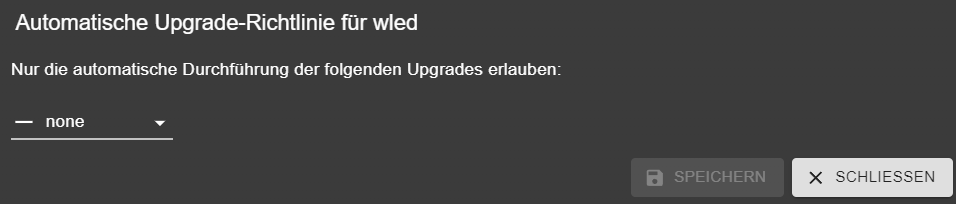
Trotzdem werde ich nach einem Downgrade auf 0.7.2 wieder automatisch hoch gezogen. -
Da ist mein Problem wieder.
Jetzt gibt es ein Problem mit dem WLED Adapter 0.7.3.
https://forum.iobroker.net/topic/83910/gel%C3%B6st-wled-warnungen-nach-update-auf-0.7.3/5?_=1771363092492
Trotzdem werde ich nach einem Downgrade auf 0.7.2 wieder automatisch hoch gezogen.@Rushmed sagte in Update / Upgrade-einen Adapter nicht automatisch updaten:
Trotzdem werde ich nach einem Downgrade auf 0.7.2 wieder automatisch hoch gezogen.
Wann und wie 'automatisch'? Logs dazu?
Akteulle Versionen für wled sind:
latest: 0.9.2 for 1 days stable: 0.7.3 for 15 months -
Wo soll ich anfangen?
Wenn ich im log von heute nach "wled.0" suche bekomme ich 1642 Ergebnisse.
Die Suche nach"wled from @" zeigt nur die Downgrades. -
@Thomas-Braun Natürlich nicht, weil kein normalrer Endnutzer auf sowas kommt.
pi@Smartazamba:~ $ grep update /opt/iobroker/log/iobroker.current.log 2026-02-17 03:32:57.535 - info: admin.0 (3209217) Adapter rating updated -
@Thomas-Braun Natürlich nicht, weil kein normalrer Endnutzer auf sowas kommt.
pi@Smartazamba:~ $ grep update /opt/iobroker/log/iobroker.current.log 2026-02-17 03:32:57.535 - info: admin.0 (3209217) Adapter rating updatedAlso im laufenden Log steht zu updates soweit nix drin.
Gib mal die Ausgabe voniob diagzum Besten.
-
Sehr gerne, auch hier wieder mit der Bitte um Rückmeldung falls Probleme sichtbar sind die diese Angelegenheit nicht betreffen.
WLED hab' ich wieder down gegraded.*** BASE SYSTEM *** Operating System: Debian GNU/Linux 13 (trixie) Static hostname: Smartazamba Icon name: computer Kernel: Linux 6.12.62+rpt-rpi-v8 Architecture: arm64 OS is similar to: Model : Raspberry Pi 4 Model B Rev 1.4 Docker : false Virtualization : none Kernel : aarch64 Userland : 64 bit Systemuptime and Load: 22:53:31 up 4 days, 4:06, 2 users, load average: 2.23, 2.28, 2.29 CPU threads: 4 *** LIFE CYCLE STATUS *** Operating System is the current Debian stable version codenamed 'trixie'! *** RASPBERRY THROTTLING *** Current issues: No throttling issues detected. Previously detected issues: No throttling issues detected. *** TIME AND TIMEZONES *** Local time: Tue 2026-02-17 22:53:31 CET Universal time: Tue 2026-02-17 21:53:31 UTC RTC time: n/a Time zone: Europe/Berlin (CET, +0100) System clock synchronized: yes NTP service: active RTC in local TZ: no *** Users and Groups *** User that called 'iob diag': pi HOME=/home/pi GROUPS=pi adm dialout cdrom sudo audio video plugdev games users input render netdev gpio i2c spi iobroker User that is running 'js-controller': iobroker HOME=/home/iobroker SUDO_HOME=/home/pi GROUPS=iobroker tty dialout audio video plugdev bluetooth gpio i2c *** DISPLAY-SERVER SETUP *** Display-Server: false Unit display-manager.service could not be found. Display-Manager: Desktop: Session: tty *** MEMORY *** total used free shared buff/cache available Mem: 8.2G 5.3G 252M 137M 2.9G 2.9G Swap: 2.1G 544M 1.6G Total: 10G 5.9G 1.9G Active iob-Instances: 39 7819 M total memory 5095 M used memory 3213 M active memory 3812 M inactive memory 240 M free memory 129 M buffer memory 2679 M swap cache 2047 M total swap 519 M used swap 1528 M free swap *** top - Table Of Processes *** top - 22:53:32 up 4 days, 4:06, 2 users, load average: 2.23, 2.28, 2.29 Tasks: 256 total, 1 running, 255 sleeping, 0 stopped, 0 zombie %Cpu(s): 57.8 us, 6.7 sy, 0.0 ni, 35.6 id, 0.0 wa, 0.0 hi, 0.0 si, 0.0 st MiB Mem : 7819.7 total, 239.5 free, 5096.2 used, 2809.3 buff/cache MiB Swap: 2048.0 total, 1528.6 free, 519.4 used. 2723.5 avail Mem *** FAILED SERVICES *** UNIT LOAD ACTIVE SUB DESCRIPTION * logrotate.service loaded failed failed Rotate log files Legend: LOAD -> Reflects whether the unit definition was properly loaded. ACTIVE -> The high-level unit activation state, i.e. generalization of SUB. SUB -> The low-level unit activation state, values depend on unit type. 1 loaded units listed. *** DMESG CRITICAL ERRORS *** No critical errors detected *** FILESYSTEM *** df: /media/HDD3@NAS: Host is down Filesystem Type Size Used Avail Use% Mounted on /dev/root ext4 110G 25G 83G 23% / devtmpfs devtmpfs 3.6G 0 3.6G 0% /dev tmpfs tmpfs 3.9G 0 3.9G 0% /dev/shm tmpfs tmpfs 1.6G 195M 1.4G 13% /run tmpfs tmpfs 5.0M 16K 5.0M 1% /run/lock tmpfs tmpfs 3.9G 6.8M 3.9G 1% /tmp tmpfs tmpfs 1.0M 0 1.0M 0% /run/credentials/systemd-journald.service /dev/sda1 vfat 253M 49M 204M 20% /boot/firmware /dev/sdc ext4 5.5T 2.8T 2.5T 53% /media/HDD2 /dev/sdb1 ext4 4.6T 2.8T 1.6T 65% /media/HDD1 tmpfs tmpfs 1.0M 0 1.0M 0% /run/credentials/getty@tty1.service tmpfs tmpfs 1.0M 0 1.0M 0% /run/credentials/serial-getty@ttyAMA0.service tmpfs tmpfs 782M 8.0K 782M 1% /run/user/1000 Messages concerning ext4 filesystem in dmesg: [Fri Feb 13 18:46:55 2026] EXT4-fs (sda2): mounted filesystem 1943b829-a99b-45b8-9fe5-7136dbea4c4a ro with ordered data mode. Quota mode: none. [Fri Feb 13 18:46:55 2026] VFS: Mounted root (ext4 filesystem) readonly on device 8:2. [Fri Feb 13 18:47:00 2026] EXT4-fs (sda2): re-mounted 1943b829-a99b-45b8-9fe5-7136dbea4c4a r/w. [Fri Feb 13 18:47:03 2026] EXT4-fs (sdc): mounted filesystem b85c7b90-8154-43e5-bcae-a07f1c446bec r/w with ordered data mode. Quota mode: none. [Fri Feb 13 18:47:03 2026] EXT4-fs (sdb1): mounted filesystem f79cb025-aab2-4bd5-bd49-84de9b0f60b4 r/w with ordered data mode. Quota mode: none. [Mon Feb 16 03:32:14 2026] EXT4-fs (loop0): recovery complete [Mon Feb 16 03:32:14 2026] EXT4-fs (loop0): mounted filesystem 1943b829-a99b-45b8-9fe5-7136dbea4c4a r/w with ordered data mode. Quota mode: none. [Mon Feb 16 03:32:14 2026] EXT4-fs (loop0): unmounting filesystem 1943b829-a99b-45b8-9fe5-7136dbea4c4a. [Mon Feb 16 03:37:12 2026] EXT4-fs (loop0): mounted filesystem 1943b829-a99b-45b8-9fe5-7136dbea4c4a r/w with ordered data mode. Quota mode: none. [Mon Feb 16 03:37:19 2026] EXT4-fs (loop0): unmounting filesystem 1943b829-a99b-45b8-9fe5-7136dbea4c4a. Show mounted filesystems: TARGET SOURCE FSTYPE OPTIONS / /dev/sda2 ext4 rw,noatime |-/boot/firmware /dev/sda1 vfat rw,relatime,fmask=0022,dmask=0022,codepage=437,iocharset=ascii,shortname=mixed,flush,errors=remount-ro |-/media/HDD2 /dev/sdc ext4 rw,nosuid,nodev,noexec,relatime |-/media/HDD3@NAS //NAS/HDD3 cifs rw,relatime,vers=3.1.1,cache=strict,upcall_target=app,username=pi,uid=0,noforceuid,gid=0,noforcegid,addr=192.168.178.17,file_mode=0755,dir_mode=0755,soft,nounix,serverino,mapposix,reparse=nfs,rsize=4194304,wsize=4194304,bsize=1048576,retrans=1,echo_interval=60,actimeo=1,closetimeo=1 `-/media/HDD1 /dev/sdb1 ext4 rw,nosuid,nodev,noexec,relatime Files in neuralgic directories: /var: 4.5G /var/ 975M /var/log 786M /var/cache 770M /var/cache/apt 637M /var/cache/apt/archives Archived and active journals take up 200.5M in the file system. /opt/iobroker/backups: 1.8G /opt/iobroker/backups/ /opt/iobroker/iobroker-data: 449M /opt/iobroker/iobroker-data/ 195M /opt/iobroker/iobroker-data/backup-objects 182M /opt/iobroker/iobroker-data/files 47M /opt/iobroker/iobroker-data/files/admin.admin 46M /opt/iobroker/iobroker-data/files/admin.admin/custom/assets The five largest files in iobroker-data are: 58M /opt/iobroker/iobroker-data/objects.jsonl 18M /opt/iobroker/iobroker-data/files/matter.admin/assets/index-Rz8ETF2t.js 12M /opt/iobroker/iobroker-data/states.jsonl 8.1M /opt/iobroker/iobroker-data/files/backitup.admin/assets/index-Djx0nwYT.js 7.2M /opt/iobroker/iobroker-data/backup-objects/2026-02-17_21-32_objects.jsonl.gz USB-Devices by-id: USB-Sticks - Avoid direct links to /dev/tty* in your adapter setups, please always prefer the links 'by-id': /dev/serial/by-id/usb-ITead_Sonoff_Zigbee_3.0_USB_Dongle_Plus_b875aef9f419ec118e7074e5f01c6278-if00-port0 /dev/serial/by-id/usb-Silicon_Labs_CP2102_USB_to_UART_Bridge_Controller_0052-if00-port0 /dev/serial/by-id/usb-Silicon_Labs_CP2102_USB_to_UART_Bridge_Controller_0063-if00-port0 *** ZigBee Settings *** ⚠ HINT: Your zigbee.0 COM-Port is NOT matching 'by-id'. Please check your setting: /dev/serial/by-id/usb-ITead_Sonoff_Zigbee_3.0_USB_Dongle_Plus_b875aef9f419ec118e7074e5f01c6278-if00-port0 ⚠ HINT: Your zigbee.1 COM-Port is NOT matching 'by-id'. Please check your setting: tcp Zigbee Network Settings on your coordinator/in nvbackup are: zigbee.X Extended Pan ID: *** MASKED *** Pan ID: *** MASKED *** Channel: *** MASKED *** Network Key: *** MASKED *** To unmask the settings run 'iob diag --unmask' *** NodeJS-Installation *** /usr/bin/nodejs v22.22.0 /usr/bin/node v22.22.0 /usr/bin/npm 10.9.4 /usr/bin/npx 10.9.4 ✓ Node.js installation is correct nodejs: Installed: 22.22.0-1nodesource1 Candidate: 22.22.0-1nodesource1 Version table: *** 22.22.0-1nodesource1 1001 500 https://deb.nodesource.com/node_22.x nodistro/main arm64 Packages 100 /var/lib/dpkg/status 22.21.0-1nodesource1 1001 500 https://deb.nodesource.com/node_22.x nodistro/main arm64 Packages 22.20.0-1nodesource1 1001 500 https://deb.nodesource.com/node_22.x nodistro/main arm64 Packages 22.19.0-1nodesource1 1001 500 https://deb.nodesource.com/node_22.x nodistro/main arm64 Packages 22.18.0-1nodesource1 1001 500 https://deb.nodesource.com/node_22.x nodistro/main arm64 Packages 22.17.1-1nodesource1 1001 500 https://deb.nodesource.com/node_22.x nodistro/main arm64 Packages 22.17.0-1nodesource1 1001 500 https://deb.nodesource.com/node_22.x nodistro/main arm64 Packages 22.16.0-1nodesource1 1001 500 https://deb.nodesource.com/node_22.x nodistro/main arm64 Packages 22.15.1-1nodesource1 1001 500 https://deb.nodesource.com/node_22.x nodistro/main arm64 Packages 22.15.0-1nodesource1 1001 500 https://deb.nodesource.com/node_22.x nodistro/main arm64 Packages 22.14.0-1nodesource1 1001 500 https://deb.nodesource.com/node_22.x nodistro/main arm64 Packages 22.13.1-1nodesource1 1001 500 https://deb.nodesource.com/node_22.x nodistro/main arm64 Packages 22.13.0-1nodesource1 1001 500 https://deb.nodesource.com/node_22.x nodistro/main arm64 Packages 22.12.0-1nodesource1 1001 500 https://deb.nodesource.com/node_22.x nodistro/main arm64 Packages 22.11.0-1nodesource1 1001 500 https://deb.nodesource.com/node_22.x nodistro/main arm64 Packages 22.10.0-1nodesource1 1001 500 https://deb.nodesource.com/node_22.x nodistro/main arm64 Packages 22.9.0-1nodesource1 1001 500 https://deb.nodesource.com/node_22.x nodistro/main arm64 Packages 22.8.0-1nodesource1 1001 500 https://deb.nodesource.com/node_22.x nodistro/main arm64 Packages 22.7.0-1nodesource1 1001 500 https://deb.nodesource.com/node_22.x nodistro/main arm64 Packages 22.6.0-1nodesource1 1001 500 https://deb.nodesource.com/node_22.x nodistro/main arm64 Packages 22.5.1-1nodesource1 1001 500 https://deb.nodesource.com/node_22.x nodistro/main arm64 Packages 22.5.0-1nodesource1 1001 500 https://deb.nodesource.com/node_22.x nodistro/main arm64 Packages 22.4.1-1nodesource1 1001 500 https://deb.nodesource.com/node_22.x nodistro/main arm64 Packages 22.4.0-1nodesource1 1001 500 https://deb.nodesource.com/node_22.x nodistro/main arm64 Packages 22.3.0-1nodesource1 1001 500 https://deb.nodesource.com/node_22.x nodistro/main arm64 Packages 22.2.0-1nodesource1 1001 500 https://deb.nodesource.com/node_22.x nodistro/main arm64 Packages 22.1.0-1nodesource1 1001 500 https://deb.nodesource.com/node_22.x nodistro/main arm64 Packages 22.0.0-1nodesource1 1001 500 https://deb.nodesource.com/node_22.x nodistro/main arm64 Packages 20.19.2+dfsg-1 500 500 http://deb.debian.org/debian trixie/main arm64 Packages Temp directories causing deletion problem: 0 No problems detected Errors in npm tree: 0 No problems detected Checking for nodejs vulnerability: █████ ██ ██ ██████ ██████ ██████ ██████ ██ ██ ██ ██ ██ ██ ██ ██ ██ ██ ██ ██ ██ ██ ███████ ██ ██ ██ ███ ██ ██ ██ ██ ██ ██ ██ ██ ██ ██ ██ ██ ██ ██ ██ ██ ██ ██ ██ ██ ██ ██ ██ ███████ ███████ ██████ ██████ ██████ ██████ ██ *** ioBroker-Installation *** ioBroker Status iobroker is running on this host. Objects type: jsonl States type: jsonl Hosts: Smartazamba Smartazamba (version: 7.1.0, hostname: Smartazamba , alive, uptime: 156128) Core adapters versions js-controller: 7.1.0 admin: 7.7.22 javascript: 9.0.18 nodejs modules from github: 2 | `-- kodi-ws@2.4.4 (git+https://git@github.com/iobroker-community-adapters/kodi-ws.git#ad5a1fdc5cd0a282e6818ff152594b5d32535103) +-- iobroker.proxmox@2.4.10 (git+ssh://git@github.com/iobroker-community-adapters/ioBroker.proxmox.git#0c1b29f61b4babc1bf767ae7c08699b7aef3aa22) Adapter State + system.adapter.admin.0 : admin : Smartazamba - enabled, port: 8081, bind: 0.0.0.0, run as: admin + system.adapter.alexa2.0 : alexa2 : Smartazamba - enabled system.adapter.artnet.0 : artnet : Smartazamba - disabled, port: 6454 + system.adapter.awtrix-light.0 : awtrix-light : Smartazamba - enabled + system.adapter.awtrix-light.1 : awtrix-light : Smartazamba - enabled + system.adapter.backitup.0 : backitup : Smartazamba - enabled system.adapter.denon.0 : denon : Smartazamba - disabled + system.adapter.device-watcher.0 : device-watcher : Smartazamba - enabled + system.adapter.deyeidc.0 : deyeidc : Smartazamba - enabled, port: 8899 system.adapter.habpanel.0 : habpanel : Smartazamba - disabled system.adapter.hass.0 : hass : Smartazamba - disabled, port: 8123 + system.adapter.hue.0 : hue : Smartazamba - enabled, port: 443 system.adapter.ical.0 : ical : Smartazamba - enabled + system.adapter.influxdb.0 : influxdb : Smartazamba - enabled, port: 8086 + system.adapter.iot.0 : iot : Smartazamba - enabled + system.adapter.javascript.0 : javascript : Smartazamba - enabled system.adapter.kodi.0 : kodi : Smartazamba - disabled, port: 9090 + system.adapter.logparser.0 : logparser : Smartazamba - enabled + system.adapter.matter.0 : matter : Smartazamba - enabled + system.adapter.mihome-vacuum.0 : mihome-vacuum : Smartazamba - enabled, port: 54321 + system.adapter.mihome-vacuum.1 : mihome-vacuum : Smartazamba - enabled, port: 54321 + system.adapter.mqtt.0 : mqtt : Smartazamba - enabled, port: 1883, bind: 0.0.0.0 + system.adapter.philips-tv.0 : philips-tv : Smartazamba - enabled + system.adapter.ping.0 : ping : Smartazamba - enabled + system.adapter.pixelit.0 : pixelit : Smartazamba - enabled system.adapter.pixelit.1 : pixelit : Smartazamba - disabled system.adapter.pixelit.2 : pixelit : Smartazamba - disabled system.adapter.proxmox.0 : proxmox : Smartazamba - disabled, port: 8006 + system.adapter.reolink.0 : reolink : Smartazamba - enabled + system.adapter.reolink.1 : reolink : Smartazamba - enabled + system.adapter.rest-api.0 : rest-api : Smartazamba - enabled, port: 8093, bind: 0.0.0.0, run as: admin + system.adapter.shelly.0 : shelly : Smartazamba - enabled, port: 1882, bind: 0.0.0.0 + system.adapter.shuttercontrol.0 : shuttercontrol : Smartazamba - enabled + system.adapter.simple-api.0 : simple-api : Smartazamba - enabled, port: 8087, bind: 0.0.0.0, run as: admin + system.adapter.smartmeter.0 : smartmeter : Smartazamba - enabled + system.adapter.smartmeter.1 : smartmeter : Smartazamba - enabled + system.adapter.sonoff.0 : sonoff : Smartazamba - enabled, port: 1884, bind: 0.0.0.0 + system.adapter.sourceanalytix.0 : sourceanalytix : Smartazamba - enabled + system.adapter.telegram.0 : telegram : Smartazamba - enabled, port: 8443, bind: 0.0.0.0 + system.adapter.telegram.1 : telegram : Smartazamba - enabled, port: 8443, bind: 0.0.0.0 system.adapter.unifi-network.0 : unifi-network : Smartazamba - disabled, port: 8443 + system.adapter.unifi.0 : unifi : Smartazamba - enabled system.adapter.weatherunderground.0 : weatherunderground : Smartazamba - enabled + system.adapter.web.0 : web : Smartazamba - enabled, port: 8082, bind: 0.0.0.0, run as: admin + system.adapter.wifilight.0 : wifilight : Smartazamba - enabled + system.adapter.wiobrowser.0 : wiobrowser : Smartazamba - enabled, port: 5000 + system.adapter.wled.0 : wled : Smartazamba - enabled + system.adapter.zigbee.0 : zigbee : Smartazamba - enabled, port: /dev/serial/by-id/usb-ITead_Sonoff_Zigbee_3.0_USB_Dongle_Plus_b875aef9f419ec118e7074e5f01c6278-if00-port0 + system.adapter.zigbee.1 : zigbee : Smartazamba - enabled, port: tcp://192.168.178.42:6638 + instance is alive Enabled adapters with bindings + system.adapter.admin.0 : admin : Smartazamba - enabled, port: 8081, bind: 0.0.0.0, run as: admin + system.adapter.deyeidc.0 : deyeidc : Smartazamba - enabled, port: 8899 + system.adapter.hue.0 : hue : Smartazamba - enabled, port: 443 + system.adapter.influxdb.0 : influxdb : Smartazamba - enabled, port: 8086 + system.adapter.mihome-vacuum.0 : mihome-vacuum : Smartazamba - enabled, port: 54321 + system.adapter.mihome-vacuum.1 : mihome-vacuum : Smartazamba - enabled, port: 54321 + system.adapter.mqtt.0 : mqtt : Smartazamba - enabled, port: 1883, bind: 0.0.0.0 + system.adapter.rest-api.0 : rest-api : Smartazamba - enabled, port: 8093, bind: 0.0.0.0, run as: admin + system.adapter.shelly.0 : shelly : Smartazamba - enabled, port: 1882, bind: 0.0.0.0 + system.adapter.simple-api.0 : simple-api : Smartazamba - enabled, port: 8087, bind: 0.0.0.0, run as: admin + system.adapter.sonoff.0 : sonoff : Smartazamba - enabled, port: 1884, bind: 0.0.0.0 + system.adapter.telegram.0 : telegram : Smartazamba - enabled, port: 8443, bind: 0.0.0.0 + system.adapter.telegram.1 : telegram : Smartazamba - enabled, port: 8443, bind: 0.0.0.0 + system.adapter.web.0 : web : Smartazamba - enabled, port: 8082, bind: 0.0.0.0, run as: admin + system.adapter.wiobrowser.0 : wiobrowser : Smartazamba - enabled, port: 5000 + system.adapter.zigbee.0 : zigbee : Smartazamba - enabled, port: /dev/serial/by-id/usb-ITead_Sonoff_Zigbee_3.0_USB_Dongle_Plus_b875aef9f419ec118e7074e5f01c6278-if00-port0 + system.adapter.zigbee.1 : zigbee : Smartazamba - enabled, port: tcp://192.168.178.42:6638 ioBroker-Repositories ┌─────────┬────────────────────┬─────────────────────────────────────────────────────────┬──────────────┐ │ (index) │ name │ url │ auto upgrade │ ├─────────┼────────────────────┼─────────────────────────────────────────────────────────┼──────────────┤ │ 0 │ 'Stable (default)' │ 'http://download.iobroker.net/sources-dist.json' │ true │ │ 1 │ 'Beta (latest)' │ 'http://download.iobroker.net/sources-dist-latest.json' │ false │ │ 2 │ 'latest live' │ 'http://iobroker.live/repo/sources-dist-latest.json' │ false │ └─────────┴────────────────────┴─────────────────────────────────────────────────────────┴──────────────┘ Active repo(s): Stable (default) Upgrade policy: minor Installed ioBroker-Adapters Used repository: Stable (default) Adapter "admin" : 7.7.22 , installed 7.7.22 Adapter "alexa2" : 3.27.4 , installed 3.27.4 Adapter "artnet" : 1.2.2 , installed 1.2.2 Adapter "awtrix-light" : 3.0.0 , installed 3.0.0 Adapter "backitup" : 3.3.13 , installed 3.3.13 Adapter "denon" : 1.15.12 , installed 1.15.12 Adapter "device-watcher": 2.15.5 , installed 2.15.5 Adapter "deyeidc" : 0.3.1 , installed 0.3.1 Adapter "habpanel" : 0.5.0 , installed 0.5.0 Adapter "hass" : 1.4.0 , installed 1.4.0 Adapter "hue" : 3.16.2 , installed 3.16.2 Adapter "ical" : 1.18.1 , installed 1.18.1 Adapter "influxdb" : 4.0.2 , installed 4.0.2 Adapter "iot" : 5.0.7 , installed 5.0.7 Adapter "javascript" : 9.0.18 , installed 9.0.18 Controller "js-controller": 7.0.7 , installed 7.1.0 Adapter "kodi" : 3.1.0 , installed 3.1.0 Adapter "logparser" : 2.4.0 , installed 2.4.0 Adapter "matter" : 0.5.6 , installed 0.5.6 Adapter "mihome-vacuum": 5.2.0 , installed 5.2.0 Adapter "mqtt" : 6.1.4 , installed 6.1.4 Adapter "philips-tv" : 0.5.4 , installed 0.5.4 Adapter "ping" : 1.7.9 , installed 1.7.9 Adapter "pixelit" : 1.1.4 , installed 1.1.4 Adapter "proxmox" : 2.4.9 , installed 2.4.10 Adapter "reolink" : 1.2.3 , installed 1.2.3 Adapter "rest-api" : 3.0.1 , installed 3.0.1 Adapter "shelly" : 10.5.2 , installed 10.5.2 Adapter "shuttercontrol": 2.0.11 , installed 2.0.11 Adapter "simple-api" : 2.8.0 , installed 2.8.0 Adapter "smartmeter" : 3.4.0 , installed 3.4.0 Adapter "socketio" : 6.7.1 , installed 7.0.8 Adapter "sonoff" : 3.2.1 , installed 3.2.1 Adapter "telegram" : 4.1.0 , installed 4.1.0 Adapter "unifi" : 0.7.0 , installed 0.7.0 Adapter "unifi-network": 1.3.1 , installed 1.3.1 Adapter "weatherunderground": 3.7.0, installed 3.7.0 Adapter "web" : 7.0.8 , installed 7.0.8 Adapter "wifilight" : 2.0.3 , installed 2.0.3 Adapter "wiobrowser" : 2.0.2 , installed 2.0.2 Adapter "wled" : 0.7.3 , installed 0.7.2 [Updatable] Adapter "ws" : 2.6.2 , installed 3.0.19 Adapter "zigbee" : 3.3.5 , installed 3.3.5 Objects and States Please stand by - This may take a while Objects: 20229 States: 19246 *** OS-Repositories and Updates *** Hit:1 http://deb.debian.org/debian trixie InRelease Hit:2 http://deb.debian.org/debian trixie-updates InRelease Hit:3 http://security.debian.org/debian-security trixie-security InRelease Hit:4 http://archive.raspberrypi.org/debian trixie InRelease Hit:5 https://apt.grafana.com stable InRelease Hit:6 https://deb.nodesource.com/node_22.x nodistro InRelease Get:7 https://repos.influxdata.com/debian stable InRelease [6913 B] Fetched 6913 B in 0s (23.3 kB/s) Reading package lists... Pending systemupdates: 4 *** Listening Ports *** Active Internet connections (only servers) Proto Recv-Q Send-Q Local Address Foreign Address State User Inode PID/Program name tcp 0 0 0.0.0.0:22 0.0.0.0:* LISTEN 0 7355 1027/sshd: /usr/sbi tcp 0 0 0.0.0.0:139 0.0.0.0:* LISTEN 0 7623 1463/smbd tcp 0 0 0.0.0.0:445 0.0.0.0:* LISTEN 0 7622 1463/smbd tcp 0 0 0.0.0.0:9000 0.0.0.0:* LISTEN 1002 12665413 3209133/iobroker.js tcp 0 0 0.0.0.0:9001 0.0.0.0:* LISTEN 1002 12664798 3209133/iobroker.js tcp 0 0 127.0.0.1:25 0.0.0.0:* LISTEN 0 9222 1280/exim4 tcp 0 0 0.0.0.0:1884 0.0.0.0:* LISTEN 1002 12673221 3210539/io.sonoff.0 tcp 0 0 0.0.0.0:1882 0.0.0.0:* LISTEN 1002 12675287 3210477/io.shelly.0 tcp 0 0 0.0.0.0:1883 0.0.0.0:* LISTEN 1002 12671408 3210208/io.mqtt.0 tcp 0 0 0.0.0.0:9999 0.0.0.0:* LISTEN 1000 22366242 1483654/nc tcp6 0 0 ::1:25 :::* LISTEN 0 9223 1280/exim4 tcp6 0 0 :::3000 :::* LISTEN 109 10774 1510/grafana tcp6 0 0 :::8086 :::* LISTEN 999 12665967 3209071/influxd tcp6 0 0 :::8087 :::* LISTEN 1002 12673364 3211535/io.simple-a tcp6 0 0 :::8081 :::* LISTEN 1002 12669156 3209217/io.admin.0 tcp6 0 0 :::8082 :::* LISTEN 1002 12674564 3211560/io.web.0 tcp6 0 0 :::8093 :::* LISTEN 1002 12672595 3211584/io.rest-api tcp6 0 0 :::21 :::* LISTEN 0 925 990/vsftpd tcp6 0 0 :::22 :::* LISTEN 0 7357 1027/sshd: /usr/sbi tcp6 0 0 :::139 :::* LISTEN 0 7621 1463/smbd tcp6 0 0 :::445 :::* LISTEN 0 7620 1463/smbd udp 0 0 0.0.0.0:33906 0.0.0.0:* 108 6275 457/avahi-daemon: r udp 0 0 0.0.0.0:5353 0.0.0.0:* 1002 22241897 1452644/io.wled.0 udp 0 0 0.0.0.0:5353 0.0.0.0:* 1002 12674857 3211200/io.matter.0 udp 0 0 0.0.0.0:5353 0.0.0.0:* 1002 12675390 3211200/io.matter.0 udp 0 0 0.0.0.0:5353 0.0.0.0:* 1002 12675382 3211200/io.matter.0 udp 0 0 0.0.0.0:5353 0.0.0.0:* 108 6273 457/avahi-daemon: r udp 0 0 0.0.0.0:5540 0.0.0.0:* 1002 12675399 3211200/io.matter.0 udp 0 0 0.0.0.0:55327 0.0.0.0:* 1002 12675554 3211200/io.matter.0 udp 0 0 0.0.0.0:68 0.0.0.0:* 0 6364 566/dhcpcd: [networ udp 0 0 192.168.178.255:137 0.0.0.0:* 0 8869 1403/nmbd udp 0 0 192.168.178.20:137 0.0.0.0:* 0 8868 1403/nmbd udp 0 0 0.0.0.0:137 0.0.0.0:* 0 8850 1403/nmbd udp 0 0 192.168.178.255:138 0.0.0.0:* 0 8871 1403/nmbd udp 0 0 192.168.178.20:138 0.0.0.0:* 0 8870 1403/nmbd udp 0 0 0.0.0.0:138 0.0.0.0:* 0 8851 1403/nmbd udp 0 0 0.0.0.0:53421 0.0.0.0:* 1002 12673143 3210161/io.mihome-v udp 0 0 0.0.0.0:53422 0.0.0.0:* 1002 12672237 3210201/io.mihome-v udp6 0 0 :::546 :::* 0 6366 566/dhcpcd: [networ udp6 0 0 :::58340 :::* 108 6276 457/avahi-daemon: r udp6 0 0 :::5353 :::* 1002 12674858 3211200/io.matter.0 udp6 0 0 :::5353 :::* 1002 12675393 3211200/io.matter.0 udp6 0 0 :::5353 :::* 1002 12675385 3211200/io.matter.0 udp6 0 0 :::5353 :::* 108 6274 457/avahi-daemon: r udp6 0 0 :::5540 :::* 1002 12675398 3211200/io.matter.0 udp6 0 0 :::55327 :::* 1002 12673925 3211200/io.matter.0 *** Log File - Last 25 Lines *** 2026-02-17 22:40:39.838 - info: weatherunderground.0 (1468568) starting. Version 3.7.0 in /opt/iobroker/node_modules/iobroker.weatherunderground, node: v22.22.0, js-controller: 7.1.0 2026-02-17 22:40:45.183 - info: weatherunderground.0 (1468568) Terminated (NO_ERROR): Without reason 2026-02-17 22:40:45.728 - info: host.Smartazamba instance system.adapter.weatherunderground.0 having pid 1468568 terminated with code 0 (NO_ERROR) 2026-02-17 22:42:58.130 - info: javascript.0 (3209484) script.js.Lampen_Displays._Switch_Status_Synch_: Lampe Treppenhaus Brightness von 1 auf 20 geändert. Quelle=javascript.0 Lampe_Treppenhaus_switch_State=unverändert 2026-02-17 22:43:01.929 - info: javascript.0 (3209484) script.js.Lampen_Displays._Switch_Status_Synch_: Lampe Treppenhaus Brightness von 20 auf 20 geändert. Quelle=javascript.0 Lampe_Treppenhaus_switch_State=unverändert 2026-02-17 22:43:41.980 - info: javascript.0 (3209484) script.js.Lampen_Displays._Switch_Status_Synch_: Lampe Arbeitsplatte Brightness von 0 auf 50 geändert. Quelle=javascript.0 Lampe_Arbeitsplatte_switch_State=true 2026-02-17 22:44:51.922 - info: javascript.0 (3209484) script.js.Lampen_Displays._Switch_Status_Synch_: Lampe Treppenhaus Brightness von 20 auf 1 geändert. Quelle=javascript.0 Lampe_Treppenhaus_switch_State=unverändert 2026-02-17 22:45:15.197 - info: javascript.0 (3209484) script.js.Lampen_Displays._Switch_Status_Synch_: Lampe Treppenhaus Brightness von 1 auf 20 geändert. Quelle=javascript.0 Lampe_Treppenhaus_switch_State=unverändert 2026-02-17 22:45:23.153 - info: javascript.0 (3209484) script.js.Lampen_Displays._Switch_Status_Synch_: Lampe Treppenhaus Brightness von 20 auf 20 geändert. Quelle=javascript.0 Lampe_Treppenhaus_switch_State=unverändert 2026-02-17 22:45:32.596 - info: javascript.0 (3209484) script.js.PC_und_Opple: PC-Zimmer Monitor aktiviert wegen BWM 2026-02-17 22:45:33.050 - info: host.Smartazamba instance system.adapter.weatherunderground.0 in version "3.7.0" started with pid 1473617 2026-02-17 22:45:39.239 - info: weatherunderground.0 (1473617) starting. Version 3.7.0 in /opt/iobroker/node_modules/iobroker.weatherunderground, node: v22.22.0, js-controller: 7.1.0 2026-02-17 22:45:47.325 - info: weatherunderground.0 (1473617) Terminated (NO_ERROR): Without reason 2026-02-17 22:45:47.874 - info: host.Smartazamba instance system.adapter.weatherunderground.0 having pid 1473617 terminated with code 0 (NO_ERROR) 2026-02-17 22:46:26.499 - info: admin.0 (3209217) ==> Connected system.user.admin from ::ffff:192.168.178.38 2026-02-17 22:47:13.076 - info: javascript.0 (3209484) script.js.Lampen_Displays._Switch_Status_Synch_: Lampe Treppenhaus Brightness von 20 auf 1 geändert. Quelle=javascript.0 Lampe_Treppenhaus_switch_State=unverändert 2026-02-17 22:50:33.066 - info: host.Smartazamba instance system.adapter.weatherunderground.0 in version "3.7.0" started with pid 1478459 2026-02-17 22:50:40.339 - info: weatherunderground.0 (1478459) starting. Version 3.7.0 in /opt/iobroker/node_modules/iobroker.weatherunderground, node: v22.22.0, js-controller: 7.1.0 2026-02-17 22:50:46.389 - info: weatherunderground.0 (1478459) Terminated (NO_ERROR): Without reason 2026-02-17 22:50:46.936 - info: host.Smartazamba instance system.adapter.weatherunderground.0 having pid 1478459 terminated with code 0 (NO_ERROR) 2026-02-17 22:51:23.530 - info: admin.0 (3209217) <== Disconnect system.user.admin from ::ffff:192.168.178.38 admin 2026-02-17 22:51:58.513 - info: shelly.0 (3210477) [MQTT] Device with client id "shellyem3-485519D6FEC7" connected from 192.168.178.167! 2026-02-17 22:52:00.599 - info: sourceanalytix.0 (3211521) Updating SourceAnalytix configuration for : shelly.0.SHEM-3#485519D6FEC7#1.Total.ConsumedPower 2026-02-17 22:52:01.674 - info: shelly.0 (3210477) [MQTT] Device with client id "shellyem3-485519D6FEC7" initialized. 2026-02-17 22:52:02.048 - info: sourceanalytix.0 (3211521) Updating SourceAnalytix configuration for : shelly.0.SHEM-3#485519D6FEC7#1.Total.ConsumedPower -
Sehr gerne, auch hier wieder mit der Bitte um Rückmeldung falls Probleme sichtbar sind die diese Angelegenheit nicht betreffen.
WLED hab' ich wieder down gegraded.*** BASE SYSTEM *** Operating System: Debian GNU/Linux 13 (trixie) Static hostname: Smartazamba Icon name: computer Kernel: Linux 6.12.62+rpt-rpi-v8 Architecture: arm64 OS is similar to: Model : Raspberry Pi 4 Model B Rev 1.4 Docker : false Virtualization : none Kernel : aarch64 Userland : 64 bit Systemuptime and Load: 22:53:31 up 4 days, 4:06, 2 users, load average: 2.23, 2.28, 2.29 CPU threads: 4 *** LIFE CYCLE STATUS *** Operating System is the current Debian stable version codenamed 'trixie'! *** RASPBERRY THROTTLING *** Current issues: No throttling issues detected. Previously detected issues: No throttling issues detected. *** TIME AND TIMEZONES *** Local time: Tue 2026-02-17 22:53:31 CET Universal time: Tue 2026-02-17 21:53:31 UTC RTC time: n/a Time zone: Europe/Berlin (CET, +0100) System clock synchronized: yes NTP service: active RTC in local TZ: no *** Users and Groups *** User that called 'iob diag': pi HOME=/home/pi GROUPS=pi adm dialout cdrom sudo audio video plugdev games users input render netdev gpio i2c spi iobroker User that is running 'js-controller': iobroker HOME=/home/iobroker SUDO_HOME=/home/pi GROUPS=iobroker tty dialout audio video plugdev bluetooth gpio i2c *** DISPLAY-SERVER SETUP *** Display-Server: false Unit display-manager.service could not be found. Display-Manager: Desktop: Session: tty *** MEMORY *** total used free shared buff/cache available Mem: 8.2G 5.3G 252M 137M 2.9G 2.9G Swap: 2.1G 544M 1.6G Total: 10G 5.9G 1.9G Active iob-Instances: 39 7819 M total memory 5095 M used memory 3213 M active memory 3812 M inactive memory 240 M free memory 129 M buffer memory 2679 M swap cache 2047 M total swap 519 M used swap 1528 M free swap *** top - Table Of Processes *** top - 22:53:32 up 4 days, 4:06, 2 users, load average: 2.23, 2.28, 2.29 Tasks: 256 total, 1 running, 255 sleeping, 0 stopped, 0 zombie %Cpu(s): 57.8 us, 6.7 sy, 0.0 ni, 35.6 id, 0.0 wa, 0.0 hi, 0.0 si, 0.0 st MiB Mem : 7819.7 total, 239.5 free, 5096.2 used, 2809.3 buff/cache MiB Swap: 2048.0 total, 1528.6 free, 519.4 used. 2723.5 avail Mem *** FAILED SERVICES *** UNIT LOAD ACTIVE SUB DESCRIPTION * logrotate.service loaded failed failed Rotate log files Legend: LOAD -> Reflects whether the unit definition was properly loaded. ACTIVE -> The high-level unit activation state, i.e. generalization of SUB. SUB -> The low-level unit activation state, values depend on unit type. 1 loaded units listed. *** DMESG CRITICAL ERRORS *** No critical errors detected *** FILESYSTEM *** df: /media/HDD3@NAS: Host is down Filesystem Type Size Used Avail Use% Mounted on /dev/root ext4 110G 25G 83G 23% / devtmpfs devtmpfs 3.6G 0 3.6G 0% /dev tmpfs tmpfs 3.9G 0 3.9G 0% /dev/shm tmpfs tmpfs 1.6G 195M 1.4G 13% /run tmpfs tmpfs 5.0M 16K 5.0M 1% /run/lock tmpfs tmpfs 3.9G 6.8M 3.9G 1% /tmp tmpfs tmpfs 1.0M 0 1.0M 0% /run/credentials/systemd-journald.service /dev/sda1 vfat 253M 49M 204M 20% /boot/firmware /dev/sdc ext4 5.5T 2.8T 2.5T 53% /media/HDD2 /dev/sdb1 ext4 4.6T 2.8T 1.6T 65% /media/HDD1 tmpfs tmpfs 1.0M 0 1.0M 0% /run/credentials/getty@tty1.service tmpfs tmpfs 1.0M 0 1.0M 0% /run/credentials/serial-getty@ttyAMA0.service tmpfs tmpfs 782M 8.0K 782M 1% /run/user/1000 Messages concerning ext4 filesystem in dmesg: [Fri Feb 13 18:46:55 2026] EXT4-fs (sda2): mounted filesystem 1943b829-a99b-45b8-9fe5-7136dbea4c4a ro with ordered data mode. Quota mode: none. [Fri Feb 13 18:46:55 2026] VFS: Mounted root (ext4 filesystem) readonly on device 8:2. [Fri Feb 13 18:47:00 2026] EXT4-fs (sda2): re-mounted 1943b829-a99b-45b8-9fe5-7136dbea4c4a r/w. [Fri Feb 13 18:47:03 2026] EXT4-fs (sdc): mounted filesystem b85c7b90-8154-43e5-bcae-a07f1c446bec r/w with ordered data mode. Quota mode: none. [Fri Feb 13 18:47:03 2026] EXT4-fs (sdb1): mounted filesystem f79cb025-aab2-4bd5-bd49-84de9b0f60b4 r/w with ordered data mode. Quota mode: none. [Mon Feb 16 03:32:14 2026] EXT4-fs (loop0): recovery complete [Mon Feb 16 03:32:14 2026] EXT4-fs (loop0): mounted filesystem 1943b829-a99b-45b8-9fe5-7136dbea4c4a r/w with ordered data mode. Quota mode: none. [Mon Feb 16 03:32:14 2026] EXT4-fs (loop0): unmounting filesystem 1943b829-a99b-45b8-9fe5-7136dbea4c4a. [Mon Feb 16 03:37:12 2026] EXT4-fs (loop0): mounted filesystem 1943b829-a99b-45b8-9fe5-7136dbea4c4a r/w with ordered data mode. Quota mode: none. [Mon Feb 16 03:37:19 2026] EXT4-fs (loop0): unmounting filesystem 1943b829-a99b-45b8-9fe5-7136dbea4c4a. Show mounted filesystems: TARGET SOURCE FSTYPE OPTIONS / /dev/sda2 ext4 rw,noatime |-/boot/firmware /dev/sda1 vfat rw,relatime,fmask=0022,dmask=0022,codepage=437,iocharset=ascii,shortname=mixed,flush,errors=remount-ro |-/media/HDD2 /dev/sdc ext4 rw,nosuid,nodev,noexec,relatime |-/media/HDD3@NAS //NAS/HDD3 cifs rw,relatime,vers=3.1.1,cache=strict,upcall_target=app,username=pi,uid=0,noforceuid,gid=0,noforcegid,addr=192.168.178.17,file_mode=0755,dir_mode=0755,soft,nounix,serverino,mapposix,reparse=nfs,rsize=4194304,wsize=4194304,bsize=1048576,retrans=1,echo_interval=60,actimeo=1,closetimeo=1 `-/media/HDD1 /dev/sdb1 ext4 rw,nosuid,nodev,noexec,relatime Files in neuralgic directories: /var: 4.5G /var/ 975M /var/log 786M /var/cache 770M /var/cache/apt 637M /var/cache/apt/archives Archived and active journals take up 200.5M in the file system. /opt/iobroker/backups: 1.8G /opt/iobroker/backups/ /opt/iobroker/iobroker-data: 449M /opt/iobroker/iobroker-data/ 195M /opt/iobroker/iobroker-data/backup-objects 182M /opt/iobroker/iobroker-data/files 47M /opt/iobroker/iobroker-data/files/admin.admin 46M /opt/iobroker/iobroker-data/files/admin.admin/custom/assets The five largest files in iobroker-data are: 58M /opt/iobroker/iobroker-data/objects.jsonl 18M /opt/iobroker/iobroker-data/files/matter.admin/assets/index-Rz8ETF2t.js 12M /opt/iobroker/iobroker-data/states.jsonl 8.1M /opt/iobroker/iobroker-data/files/backitup.admin/assets/index-Djx0nwYT.js 7.2M /opt/iobroker/iobroker-data/backup-objects/2026-02-17_21-32_objects.jsonl.gz USB-Devices by-id: USB-Sticks - Avoid direct links to /dev/tty* in your adapter setups, please always prefer the links 'by-id': /dev/serial/by-id/usb-ITead_Sonoff_Zigbee_3.0_USB_Dongle_Plus_b875aef9f419ec118e7074e5f01c6278-if00-port0 /dev/serial/by-id/usb-Silicon_Labs_CP2102_USB_to_UART_Bridge_Controller_0052-if00-port0 /dev/serial/by-id/usb-Silicon_Labs_CP2102_USB_to_UART_Bridge_Controller_0063-if00-port0 *** ZigBee Settings *** ⚠ HINT: Your zigbee.0 COM-Port is NOT matching 'by-id'. Please check your setting: /dev/serial/by-id/usb-ITead_Sonoff_Zigbee_3.0_USB_Dongle_Plus_b875aef9f419ec118e7074e5f01c6278-if00-port0 ⚠ HINT: Your zigbee.1 COM-Port is NOT matching 'by-id'. Please check your setting: tcp Zigbee Network Settings on your coordinator/in nvbackup are: zigbee.X Extended Pan ID: *** MASKED *** Pan ID: *** MASKED *** Channel: *** MASKED *** Network Key: *** MASKED *** To unmask the settings run 'iob diag --unmask' *** NodeJS-Installation *** /usr/bin/nodejs v22.22.0 /usr/bin/node v22.22.0 /usr/bin/npm 10.9.4 /usr/bin/npx 10.9.4 ✓ Node.js installation is correct nodejs: Installed: 22.22.0-1nodesource1 Candidate: 22.22.0-1nodesource1 Version table: *** 22.22.0-1nodesource1 1001 500 https://deb.nodesource.com/node_22.x nodistro/main arm64 Packages 100 /var/lib/dpkg/status 22.21.0-1nodesource1 1001 500 https://deb.nodesource.com/node_22.x nodistro/main arm64 Packages 22.20.0-1nodesource1 1001 500 https://deb.nodesource.com/node_22.x nodistro/main arm64 Packages 22.19.0-1nodesource1 1001 500 https://deb.nodesource.com/node_22.x nodistro/main arm64 Packages 22.18.0-1nodesource1 1001 500 https://deb.nodesource.com/node_22.x nodistro/main arm64 Packages 22.17.1-1nodesource1 1001 500 https://deb.nodesource.com/node_22.x nodistro/main arm64 Packages 22.17.0-1nodesource1 1001 500 https://deb.nodesource.com/node_22.x nodistro/main arm64 Packages 22.16.0-1nodesource1 1001 500 https://deb.nodesource.com/node_22.x nodistro/main arm64 Packages 22.15.1-1nodesource1 1001 500 https://deb.nodesource.com/node_22.x nodistro/main arm64 Packages 22.15.0-1nodesource1 1001 500 https://deb.nodesource.com/node_22.x nodistro/main arm64 Packages 22.14.0-1nodesource1 1001 500 https://deb.nodesource.com/node_22.x nodistro/main arm64 Packages 22.13.1-1nodesource1 1001 500 https://deb.nodesource.com/node_22.x nodistro/main arm64 Packages 22.13.0-1nodesource1 1001 500 https://deb.nodesource.com/node_22.x nodistro/main arm64 Packages 22.12.0-1nodesource1 1001 500 https://deb.nodesource.com/node_22.x nodistro/main arm64 Packages 22.11.0-1nodesource1 1001 500 https://deb.nodesource.com/node_22.x nodistro/main arm64 Packages 22.10.0-1nodesource1 1001 500 https://deb.nodesource.com/node_22.x nodistro/main arm64 Packages 22.9.0-1nodesource1 1001 500 https://deb.nodesource.com/node_22.x nodistro/main arm64 Packages 22.8.0-1nodesource1 1001 500 https://deb.nodesource.com/node_22.x nodistro/main arm64 Packages 22.7.0-1nodesource1 1001 500 https://deb.nodesource.com/node_22.x nodistro/main arm64 Packages 22.6.0-1nodesource1 1001 500 https://deb.nodesource.com/node_22.x nodistro/main arm64 Packages 22.5.1-1nodesource1 1001 500 https://deb.nodesource.com/node_22.x nodistro/main arm64 Packages 22.5.0-1nodesource1 1001 500 https://deb.nodesource.com/node_22.x nodistro/main arm64 Packages 22.4.1-1nodesource1 1001 500 https://deb.nodesource.com/node_22.x nodistro/main arm64 Packages 22.4.0-1nodesource1 1001 500 https://deb.nodesource.com/node_22.x nodistro/main arm64 Packages 22.3.0-1nodesource1 1001 500 https://deb.nodesource.com/node_22.x nodistro/main arm64 Packages 22.2.0-1nodesource1 1001 500 https://deb.nodesource.com/node_22.x nodistro/main arm64 Packages 22.1.0-1nodesource1 1001 500 https://deb.nodesource.com/node_22.x nodistro/main arm64 Packages 22.0.0-1nodesource1 1001 500 https://deb.nodesource.com/node_22.x nodistro/main arm64 Packages 20.19.2+dfsg-1 500 500 http://deb.debian.org/debian trixie/main arm64 Packages Temp directories causing deletion problem: 0 No problems detected Errors in npm tree: 0 No problems detected Checking for nodejs vulnerability: █████ ██ ██ ██████ ██████ ██████ ██████ ██ ██ ██ ██ ██ ██ ██ ██ ██ ██ ██ ██ ██ ██ ███████ ██ ██ ██ ███ ██ ██ ██ ██ ██ ██ ██ ██ ██ ██ ██ ██ ██ ██ ██ ██ ██ ██ ██ ██ ██ ██ ██ ███████ ███████ ██████ ██████ ██████ ██████ ██ *** ioBroker-Installation *** ioBroker Status iobroker is running on this host. Objects type: jsonl States type: jsonl Hosts: Smartazamba Smartazamba (version: 7.1.0, hostname: Smartazamba , alive, uptime: 156128) Core adapters versions js-controller: 7.1.0 admin: 7.7.22 javascript: 9.0.18 nodejs modules from github: 2 | `-- kodi-ws@2.4.4 (git+https://git@github.com/iobroker-community-adapters/kodi-ws.git#ad5a1fdc5cd0a282e6818ff152594b5d32535103) +-- iobroker.proxmox@2.4.10 (git+ssh://git@github.com/iobroker-community-adapters/ioBroker.proxmox.git#0c1b29f61b4babc1bf767ae7c08699b7aef3aa22) Adapter State + system.adapter.admin.0 : admin : Smartazamba - enabled, port: 8081, bind: 0.0.0.0, run as: admin + system.adapter.alexa2.0 : alexa2 : Smartazamba - enabled system.adapter.artnet.0 : artnet : Smartazamba - disabled, port: 6454 + system.adapter.awtrix-light.0 : awtrix-light : Smartazamba - enabled + system.adapter.awtrix-light.1 : awtrix-light : Smartazamba - enabled + system.adapter.backitup.0 : backitup : Smartazamba - enabled system.adapter.denon.0 : denon : Smartazamba - disabled + system.adapter.device-watcher.0 : device-watcher : Smartazamba - enabled + system.adapter.deyeidc.0 : deyeidc : Smartazamba - enabled, port: 8899 system.adapter.habpanel.0 : habpanel : Smartazamba - disabled system.adapter.hass.0 : hass : Smartazamba - disabled, port: 8123 + system.adapter.hue.0 : hue : Smartazamba - enabled, port: 443 system.adapter.ical.0 : ical : Smartazamba - enabled + system.adapter.influxdb.0 : influxdb : Smartazamba - enabled, port: 8086 + system.adapter.iot.0 : iot : Smartazamba - enabled + system.adapter.javascript.0 : javascript : Smartazamba - enabled system.adapter.kodi.0 : kodi : Smartazamba - disabled, port: 9090 + system.adapter.logparser.0 : logparser : Smartazamba - enabled + system.adapter.matter.0 : matter : Smartazamba - enabled + system.adapter.mihome-vacuum.0 : mihome-vacuum : Smartazamba - enabled, port: 54321 + system.adapter.mihome-vacuum.1 : mihome-vacuum : Smartazamba - enabled, port: 54321 + system.adapter.mqtt.0 : mqtt : Smartazamba - enabled, port: 1883, bind: 0.0.0.0 + system.adapter.philips-tv.0 : philips-tv : Smartazamba - enabled + system.adapter.ping.0 : ping : Smartazamba - enabled + system.adapter.pixelit.0 : pixelit : Smartazamba - enabled system.adapter.pixelit.1 : pixelit : Smartazamba - disabled system.adapter.pixelit.2 : pixelit : Smartazamba - disabled system.adapter.proxmox.0 : proxmox : Smartazamba - disabled, port: 8006 + system.adapter.reolink.0 : reolink : Smartazamba - enabled + system.adapter.reolink.1 : reolink : Smartazamba - enabled + system.adapter.rest-api.0 : rest-api : Smartazamba - enabled, port: 8093, bind: 0.0.0.0, run as: admin + system.adapter.shelly.0 : shelly : Smartazamba - enabled, port: 1882, bind: 0.0.0.0 + system.adapter.shuttercontrol.0 : shuttercontrol : Smartazamba - enabled + system.adapter.simple-api.0 : simple-api : Smartazamba - enabled, port: 8087, bind: 0.0.0.0, run as: admin + system.adapter.smartmeter.0 : smartmeter : Smartazamba - enabled + system.adapter.smartmeter.1 : smartmeter : Smartazamba - enabled + system.adapter.sonoff.0 : sonoff : Smartazamba - enabled, port: 1884, bind: 0.0.0.0 + system.adapter.sourceanalytix.0 : sourceanalytix : Smartazamba - enabled + system.adapter.telegram.0 : telegram : Smartazamba - enabled, port: 8443, bind: 0.0.0.0 + system.adapter.telegram.1 : telegram : Smartazamba - enabled, port: 8443, bind: 0.0.0.0 system.adapter.unifi-network.0 : unifi-network : Smartazamba - disabled, port: 8443 + system.adapter.unifi.0 : unifi : Smartazamba - enabled system.adapter.weatherunderground.0 : weatherunderground : Smartazamba - enabled + system.adapter.web.0 : web : Smartazamba - enabled, port: 8082, bind: 0.0.0.0, run as: admin + system.adapter.wifilight.0 : wifilight : Smartazamba - enabled + system.adapter.wiobrowser.0 : wiobrowser : Smartazamba - enabled, port: 5000 + system.adapter.wled.0 : wled : Smartazamba - enabled + system.adapter.zigbee.0 : zigbee : Smartazamba - enabled, port: /dev/serial/by-id/usb-ITead_Sonoff_Zigbee_3.0_USB_Dongle_Plus_b875aef9f419ec118e7074e5f01c6278-if00-port0 + system.adapter.zigbee.1 : zigbee : Smartazamba - enabled, port: tcp://192.168.178.42:6638 + instance is alive Enabled adapters with bindings + system.adapter.admin.0 : admin : Smartazamba - enabled, port: 8081, bind: 0.0.0.0, run as: admin + system.adapter.deyeidc.0 : deyeidc : Smartazamba - enabled, port: 8899 + system.adapter.hue.0 : hue : Smartazamba - enabled, port: 443 + system.adapter.influxdb.0 : influxdb : Smartazamba - enabled, port: 8086 + system.adapter.mihome-vacuum.0 : mihome-vacuum : Smartazamba - enabled, port: 54321 + system.adapter.mihome-vacuum.1 : mihome-vacuum : Smartazamba - enabled, port: 54321 + system.adapter.mqtt.0 : mqtt : Smartazamba - enabled, port: 1883, bind: 0.0.0.0 + system.adapter.rest-api.0 : rest-api : Smartazamba - enabled, port: 8093, bind: 0.0.0.0, run as: admin + system.adapter.shelly.0 : shelly : Smartazamba - enabled, port: 1882, bind: 0.0.0.0 + system.adapter.simple-api.0 : simple-api : Smartazamba - enabled, port: 8087, bind: 0.0.0.0, run as: admin + system.adapter.sonoff.0 : sonoff : Smartazamba - enabled, port: 1884, bind: 0.0.0.0 + system.adapter.telegram.0 : telegram : Smartazamba - enabled, port: 8443, bind: 0.0.0.0 + system.adapter.telegram.1 : telegram : Smartazamba - enabled, port: 8443, bind: 0.0.0.0 + system.adapter.web.0 : web : Smartazamba - enabled, port: 8082, bind: 0.0.0.0, run as: admin + system.adapter.wiobrowser.0 : wiobrowser : Smartazamba - enabled, port: 5000 + system.adapter.zigbee.0 : zigbee : Smartazamba - enabled, port: /dev/serial/by-id/usb-ITead_Sonoff_Zigbee_3.0_USB_Dongle_Plus_b875aef9f419ec118e7074e5f01c6278-if00-port0 + system.adapter.zigbee.1 : zigbee : Smartazamba - enabled, port: tcp://192.168.178.42:6638 ioBroker-Repositories ┌─────────┬────────────────────┬─────────────────────────────────────────────────────────┬──────────────┐ │ (index) │ name │ url │ auto upgrade │ ├─────────┼────────────────────┼─────────────────────────────────────────────────────────┼──────────────┤ │ 0 │ 'Stable (default)' │ 'http://download.iobroker.net/sources-dist.json' │ true │ │ 1 │ 'Beta (latest)' │ 'http://download.iobroker.net/sources-dist-latest.json' │ false │ │ 2 │ 'latest live' │ 'http://iobroker.live/repo/sources-dist-latest.json' │ false │ └─────────┴────────────────────┴─────────────────────────────────────────────────────────┴──────────────┘ Active repo(s): Stable (default) Upgrade policy: minor Installed ioBroker-Adapters Used repository: Stable (default) Adapter "admin" : 7.7.22 , installed 7.7.22 Adapter "alexa2" : 3.27.4 , installed 3.27.4 Adapter "artnet" : 1.2.2 , installed 1.2.2 Adapter "awtrix-light" : 3.0.0 , installed 3.0.0 Adapter "backitup" : 3.3.13 , installed 3.3.13 Adapter "denon" : 1.15.12 , installed 1.15.12 Adapter "device-watcher": 2.15.5 , installed 2.15.5 Adapter "deyeidc" : 0.3.1 , installed 0.3.1 Adapter "habpanel" : 0.5.0 , installed 0.5.0 Adapter "hass" : 1.4.0 , installed 1.4.0 Adapter "hue" : 3.16.2 , installed 3.16.2 Adapter "ical" : 1.18.1 , installed 1.18.1 Adapter "influxdb" : 4.0.2 , installed 4.0.2 Adapter "iot" : 5.0.7 , installed 5.0.7 Adapter "javascript" : 9.0.18 , installed 9.0.18 Controller "js-controller": 7.0.7 , installed 7.1.0 Adapter "kodi" : 3.1.0 , installed 3.1.0 Adapter "logparser" : 2.4.0 , installed 2.4.0 Adapter "matter" : 0.5.6 , installed 0.5.6 Adapter "mihome-vacuum": 5.2.0 , installed 5.2.0 Adapter "mqtt" : 6.1.4 , installed 6.1.4 Adapter "philips-tv" : 0.5.4 , installed 0.5.4 Adapter "ping" : 1.7.9 , installed 1.7.9 Adapter "pixelit" : 1.1.4 , installed 1.1.4 Adapter "proxmox" : 2.4.9 , installed 2.4.10 Adapter "reolink" : 1.2.3 , installed 1.2.3 Adapter "rest-api" : 3.0.1 , installed 3.0.1 Adapter "shelly" : 10.5.2 , installed 10.5.2 Adapter "shuttercontrol": 2.0.11 , installed 2.0.11 Adapter "simple-api" : 2.8.0 , installed 2.8.0 Adapter "smartmeter" : 3.4.0 , installed 3.4.0 Adapter "socketio" : 6.7.1 , installed 7.0.8 Adapter "sonoff" : 3.2.1 , installed 3.2.1 Adapter "telegram" : 4.1.0 , installed 4.1.0 Adapter "unifi" : 0.7.0 , installed 0.7.0 Adapter "unifi-network": 1.3.1 , installed 1.3.1 Adapter "weatherunderground": 3.7.0, installed 3.7.0 Adapter "web" : 7.0.8 , installed 7.0.8 Adapter "wifilight" : 2.0.3 , installed 2.0.3 Adapter "wiobrowser" : 2.0.2 , installed 2.0.2 Adapter "wled" : 0.7.3 , installed 0.7.2 [Updatable] Adapter "ws" : 2.6.2 , installed 3.0.19 Adapter "zigbee" : 3.3.5 , installed 3.3.5 Objects and States Please stand by - This may take a while Objects: 20229 States: 19246 *** OS-Repositories and Updates *** Hit:1 http://deb.debian.org/debian trixie InRelease Hit:2 http://deb.debian.org/debian trixie-updates InRelease Hit:3 http://security.debian.org/debian-security trixie-security InRelease Hit:4 http://archive.raspberrypi.org/debian trixie InRelease Hit:5 https://apt.grafana.com stable InRelease Hit:6 https://deb.nodesource.com/node_22.x nodistro InRelease Get:7 https://repos.influxdata.com/debian stable InRelease [6913 B] Fetched 6913 B in 0s (23.3 kB/s) Reading package lists... Pending systemupdates: 4 *** Listening Ports *** Active Internet connections (only servers) Proto Recv-Q Send-Q Local Address Foreign Address State User Inode PID/Program name tcp 0 0 0.0.0.0:22 0.0.0.0:* LISTEN 0 7355 1027/sshd: /usr/sbi tcp 0 0 0.0.0.0:139 0.0.0.0:* LISTEN 0 7623 1463/smbd tcp 0 0 0.0.0.0:445 0.0.0.0:* LISTEN 0 7622 1463/smbd tcp 0 0 0.0.0.0:9000 0.0.0.0:* LISTEN 1002 12665413 3209133/iobroker.js tcp 0 0 0.0.0.0:9001 0.0.0.0:* LISTEN 1002 12664798 3209133/iobroker.js tcp 0 0 127.0.0.1:25 0.0.0.0:* LISTEN 0 9222 1280/exim4 tcp 0 0 0.0.0.0:1884 0.0.0.0:* LISTEN 1002 12673221 3210539/io.sonoff.0 tcp 0 0 0.0.0.0:1882 0.0.0.0:* LISTEN 1002 12675287 3210477/io.shelly.0 tcp 0 0 0.0.0.0:1883 0.0.0.0:* LISTEN 1002 12671408 3210208/io.mqtt.0 tcp 0 0 0.0.0.0:9999 0.0.0.0:* LISTEN 1000 22366242 1483654/nc tcp6 0 0 ::1:25 :::* LISTEN 0 9223 1280/exim4 tcp6 0 0 :::3000 :::* LISTEN 109 10774 1510/grafana tcp6 0 0 :::8086 :::* LISTEN 999 12665967 3209071/influxd tcp6 0 0 :::8087 :::* LISTEN 1002 12673364 3211535/io.simple-a tcp6 0 0 :::8081 :::* LISTEN 1002 12669156 3209217/io.admin.0 tcp6 0 0 :::8082 :::* LISTEN 1002 12674564 3211560/io.web.0 tcp6 0 0 :::8093 :::* LISTEN 1002 12672595 3211584/io.rest-api tcp6 0 0 :::21 :::* LISTEN 0 925 990/vsftpd tcp6 0 0 :::22 :::* LISTEN 0 7357 1027/sshd: /usr/sbi tcp6 0 0 :::139 :::* LISTEN 0 7621 1463/smbd tcp6 0 0 :::445 :::* LISTEN 0 7620 1463/smbd udp 0 0 0.0.0.0:33906 0.0.0.0:* 108 6275 457/avahi-daemon: r udp 0 0 0.0.0.0:5353 0.0.0.0:* 1002 22241897 1452644/io.wled.0 udp 0 0 0.0.0.0:5353 0.0.0.0:* 1002 12674857 3211200/io.matter.0 udp 0 0 0.0.0.0:5353 0.0.0.0:* 1002 12675390 3211200/io.matter.0 udp 0 0 0.0.0.0:5353 0.0.0.0:* 1002 12675382 3211200/io.matter.0 udp 0 0 0.0.0.0:5353 0.0.0.0:* 108 6273 457/avahi-daemon: r udp 0 0 0.0.0.0:5540 0.0.0.0:* 1002 12675399 3211200/io.matter.0 udp 0 0 0.0.0.0:55327 0.0.0.0:* 1002 12675554 3211200/io.matter.0 udp 0 0 0.0.0.0:68 0.0.0.0:* 0 6364 566/dhcpcd: [networ udp 0 0 192.168.178.255:137 0.0.0.0:* 0 8869 1403/nmbd udp 0 0 192.168.178.20:137 0.0.0.0:* 0 8868 1403/nmbd udp 0 0 0.0.0.0:137 0.0.0.0:* 0 8850 1403/nmbd udp 0 0 192.168.178.255:138 0.0.0.0:* 0 8871 1403/nmbd udp 0 0 192.168.178.20:138 0.0.0.0:* 0 8870 1403/nmbd udp 0 0 0.0.0.0:138 0.0.0.0:* 0 8851 1403/nmbd udp 0 0 0.0.0.0:53421 0.0.0.0:* 1002 12673143 3210161/io.mihome-v udp 0 0 0.0.0.0:53422 0.0.0.0:* 1002 12672237 3210201/io.mihome-v udp6 0 0 :::546 :::* 0 6366 566/dhcpcd: [networ udp6 0 0 :::58340 :::* 108 6276 457/avahi-daemon: r udp6 0 0 :::5353 :::* 1002 12674858 3211200/io.matter.0 udp6 0 0 :::5353 :::* 1002 12675393 3211200/io.matter.0 udp6 0 0 :::5353 :::* 1002 12675385 3211200/io.matter.0 udp6 0 0 :::5353 :::* 108 6274 457/avahi-daemon: r udp6 0 0 :::5540 :::* 1002 12675398 3211200/io.matter.0 udp6 0 0 :::55327 :::* 1002 12673925 3211200/io.matter.0 *** Log File - Last 25 Lines *** 2026-02-17 22:40:39.838 - info: weatherunderground.0 (1468568) starting. Version 3.7.0 in /opt/iobroker/node_modules/iobroker.weatherunderground, node: v22.22.0, js-controller: 7.1.0 2026-02-17 22:40:45.183 - info: weatherunderground.0 (1468568) Terminated (NO_ERROR): Without reason 2026-02-17 22:40:45.728 - info: host.Smartazamba instance system.adapter.weatherunderground.0 having pid 1468568 terminated with code 0 (NO_ERROR) 2026-02-17 22:42:58.130 - info: javascript.0 (3209484) script.js.Lampen_Displays._Switch_Status_Synch_: Lampe Treppenhaus Brightness von 1 auf 20 geändert. Quelle=javascript.0 Lampe_Treppenhaus_switch_State=unverändert 2026-02-17 22:43:01.929 - info: javascript.0 (3209484) script.js.Lampen_Displays._Switch_Status_Synch_: Lampe Treppenhaus Brightness von 20 auf 20 geändert. Quelle=javascript.0 Lampe_Treppenhaus_switch_State=unverändert 2026-02-17 22:43:41.980 - info: javascript.0 (3209484) script.js.Lampen_Displays._Switch_Status_Synch_: Lampe Arbeitsplatte Brightness von 0 auf 50 geändert. Quelle=javascript.0 Lampe_Arbeitsplatte_switch_State=true 2026-02-17 22:44:51.922 - info: javascript.0 (3209484) script.js.Lampen_Displays._Switch_Status_Synch_: Lampe Treppenhaus Brightness von 20 auf 1 geändert. Quelle=javascript.0 Lampe_Treppenhaus_switch_State=unverändert 2026-02-17 22:45:15.197 - info: javascript.0 (3209484) script.js.Lampen_Displays._Switch_Status_Synch_: Lampe Treppenhaus Brightness von 1 auf 20 geändert. Quelle=javascript.0 Lampe_Treppenhaus_switch_State=unverändert 2026-02-17 22:45:23.153 - info: javascript.0 (3209484) script.js.Lampen_Displays._Switch_Status_Synch_: Lampe Treppenhaus Brightness von 20 auf 20 geändert. Quelle=javascript.0 Lampe_Treppenhaus_switch_State=unverändert 2026-02-17 22:45:32.596 - info: javascript.0 (3209484) script.js.PC_und_Opple: PC-Zimmer Monitor aktiviert wegen BWM 2026-02-17 22:45:33.050 - info: host.Smartazamba instance system.adapter.weatherunderground.0 in version "3.7.0" started with pid 1473617 2026-02-17 22:45:39.239 - info: weatherunderground.0 (1473617) starting. Version 3.7.0 in /opt/iobroker/node_modules/iobroker.weatherunderground, node: v22.22.0, js-controller: 7.1.0 2026-02-17 22:45:47.325 - info: weatherunderground.0 (1473617) Terminated (NO_ERROR): Without reason 2026-02-17 22:45:47.874 - info: host.Smartazamba instance system.adapter.weatherunderground.0 having pid 1473617 terminated with code 0 (NO_ERROR) 2026-02-17 22:46:26.499 - info: admin.0 (3209217) ==> Connected system.user.admin from ::ffff:192.168.178.38 2026-02-17 22:47:13.076 - info: javascript.0 (3209484) script.js.Lampen_Displays._Switch_Status_Synch_: Lampe Treppenhaus Brightness von 20 auf 1 geändert. Quelle=javascript.0 Lampe_Treppenhaus_switch_State=unverändert 2026-02-17 22:50:33.066 - info: host.Smartazamba instance system.adapter.weatherunderground.0 in version "3.7.0" started with pid 1478459 2026-02-17 22:50:40.339 - info: weatherunderground.0 (1478459) starting. Version 3.7.0 in /opt/iobroker/node_modules/iobroker.weatherunderground, node: v22.22.0, js-controller: 7.1.0 2026-02-17 22:50:46.389 - info: weatherunderground.0 (1478459) Terminated (NO_ERROR): Without reason 2026-02-17 22:50:46.936 - info: host.Smartazamba instance system.adapter.weatherunderground.0 having pid 1478459 terminated with code 0 (NO_ERROR) 2026-02-17 22:51:23.530 - info: admin.0 (3209217) <== Disconnect system.user.admin from ::ffff:192.168.178.38 admin 2026-02-17 22:51:58.513 - info: shelly.0 (3210477) [MQTT] Device with client id "shellyem3-485519D6FEC7" connected from 192.168.178.167! 2026-02-17 22:52:00.599 - info: sourceanalytix.0 (3211521) Updating SourceAnalytix configuration for : shelly.0.SHEM-3#485519D6FEC7#1.Total.ConsumedPower 2026-02-17 22:52:01.674 - info: shelly.0 (3210477) [MQTT] Device with client id "shellyem3-485519D6FEC7" initialized. 2026-02-17 22:52:02.048 - info: sourceanalytix.0 (3211521) Updating SourceAnalytix configuration for : shelly.0.SHEM-3#485519D6FEC7#1.Total.ConsumedPowerLeg dir künftig einen user an, der nicht 'pi' heißt.
Was ist denn mit dem logrotate los?
*** FAILED SERVICES ***
UNIT LOAD ACTIVE SUB DESCRIPTION
- logrotate.service loaded failed failed Rotate log files
Und das wollte ich sehen:
ioBroker-Repositories
┌─────────┬────────────────────┬─────────────────────────────────────────────────────────┬──────────────┐
│ (index) │ name               │ url                                                     │ auto upgrade │
├─────────┼────────────────────┼─────────────────────────────────────────────────────────┼──────────────┤
│ 0       │ 'Stable (default)' │ 'http://download.iobroker.net/sources-dist.json'        │ true         │
Du hast da die Auto-Updates aktiv.
Würde ich grundsätzlich nicht machen. Du gibst die Kontrolle darüber, was da wann auf dem System aktualisiert wird aus der Hand.
Allerdings würde ich dann auch erwarten, das eigene Einstellungen dazu auf Ebene des Adapters auch zuerst ziehen. Oder das ist anders gedacht und bei global ausgestelltem Autoupdate kann man dann einzelne Adapter dennoch automatisch updaten lassen.Hau die 4 OS-Updates drauf.
-
Leg dir künftig einen user an, der nicht 'pi' heißt.
Was ist denn mit dem logrotate los?
*** FAILED SERVICES ***
UNIT LOAD ACTIVE SUB DESCRIPTION
- logrotate.service loaded failed failed Rotate log files
Und das wollte ich sehen:
ioBroker-Repositories
┌─────────┬────────────────────┬─────────────────────────────────────────────────────────┬──────────────┐
│ (index) │ name               │ url                                                     │ auto upgrade │
├─────────┼────────────────────┼─────────────────────────────────────────────────────────┼──────────────┤
│ 0       │ 'Stable (default)' │ 'http://download.iobroker.net/sources-dist.json'        │ true         │
Du hast da die Auto-Updates aktiv.
Würde ich grundsätzlich nicht machen. Du gibst die Kontrolle darüber, was da wann auf dem System aktualisiert wird aus der Hand.
Allerdings würde ich dann auch erwarten, das eigene Einstellungen dazu auf Ebene des Adapters auch zuerst ziehen. Oder das ist anders gedacht und bei global ausgestelltem Autoupdate kann man dann einzelne Adapter dennoch automatisch updaten lassen.Hau die 4 OS-Updates drauf.
@Thomas-Braun sagte in Update / Upgrade-einen Adapter nicht automatisch updaten:
Hau die 4 OS-Updates drauf.
Wie geht das?
-
@Thomas-Braun sagte in Update / Upgrade-einen Adapter nicht automatisch updaten:
Hau die 4 OS-Updates drauf.
Wie geht das?
@Rushmed sagte in Update / Upgrade-einen Adapter nicht automatisch updaten:
Wie geht das?
?
Mit
sudo apt update && sudo apt full-upgradeJe nachdem ist dann ein Neustart (mindestens des entsprechenden Services) notwendig.
-
erledigt
-
Da ist mein Problem wieder.
Jetzt gibt es ein Problem mit dem WLED Adapter 0.7.3.
https://forum.iobroker.net/topic/83910/gel%C3%B6st-wled-warnungen-nach-update-auf-0.7.3/5?_=1771363092492
Trotzdem werde ich nach einem Downgrade auf 0.7.2 wieder automatisch hoch gezogen.@Rushmed sagte in Update / Upgrade-einen Adapter nicht automatisch updaten:
Da ist mein Problem wieder.
Jetzt gibt es ein Problem mit dem WLED Adapter 0.7.3.
https://forum.iobroker.net/topic/83910/gel%C3%B6st-wled-warnungen-nach-update-auf-0.7.3/5?_=1771363092492
Trotzdem werde ich nach einem Downgrade auf 0.7.2 wieder automatisch hoch gezogen.Was meinst du damit?
WIE hast du downgegradet?
Hast du irgendeinen Updatebefehl selbst abgesetzt? Also in der UI auf "alle Updaten" geklickt? Oder irgendwelche Befehle auf der Commandline abgesetzt? Wenn ja welche?
An sich gibt es bei deiner Einstellung für diesen Adapetr KEIN automatisches Update außer du löst es im UI oder auf der Coammandline aus.
EDIT:
Da die Frage oben auftrat: Die ADAPTER-Einstellung gewinnt gegenüber der Repository Einstellung:
https://github.com/DrozmotiX/ioBroker.wled/issues/786#issuecomment-3910467451
Wenn also bei wled none steht sollte dieser Adapter nicht aktualisisert werden.Hast du eine Notification über das Update erhalten?
Wenn nicht deutet es darauf hin, dass da gar kein automatisches Update stattgefunden hat sondern du z.B.
'iob upgrade' eingetipselt hast. Das aktualisisert wie beschrieben ALLE Adapter. Analog gibts dazu einen Button im Admin UI - wenn du den akklickst werden auch ALLE Adapter aktualisisiert.Was WLED betrifft - da gibts ne neue Release im Beta Test / Latest Repo.
Entwicklung u Betreuung: envertech-pv, hoymiles-ms, ns-client, pid, snmp Adapter;
Support Repositoryverwaltung.Wer 'nen Kaffee spendieren will: https://paypal.me
-
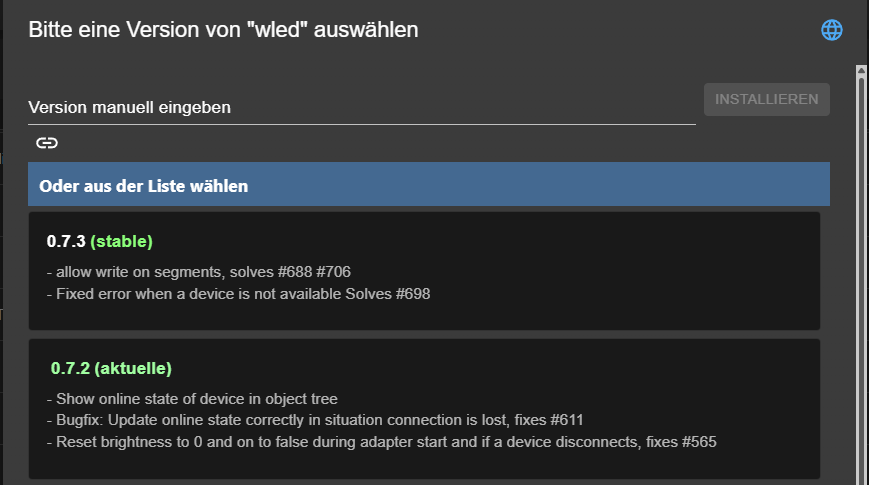
Ich habe per GUI downgegraded.
-
@Rushmed sagte in Update / Upgrade-einen Adapter nicht automatisch updaten:
Da ist mein Problem wieder.
Jetzt gibt es ein Problem mit dem WLED Adapter 0.7.3.
https://forum.iobroker.net/topic/83910/gel%C3%B6st-wled-warnungen-nach-update-auf-0.7.3/5?_=1771363092492
Trotzdem werde ich nach einem Downgrade auf 0.7.2 wieder automatisch hoch gezogen.Was meinst du damit?
WIE hast du downgegradet?
Hast du irgendeinen Updatebefehl selbst abgesetzt? Also in der UI auf "alle Updaten" geklickt? Oder irgendwelche Befehle auf der Commandline abgesetzt? Wenn ja welche?
An sich gibt es bei deiner Einstellung für diesen Adapetr KEIN automatisches Update außer du löst es im UI oder auf der Coammandline aus.
EDIT:
Da die Frage oben auftrat: Die ADAPTER-Einstellung gewinnt gegenüber der Repository Einstellung:
https://github.com/DrozmotiX/ioBroker.wled/issues/786#issuecomment-3910467451
Wenn also bei wled none steht sollte dieser Adapter nicht aktualisisert werden.Hast du eine Notification über das Update erhalten?
Wenn nicht deutet es darauf hin, dass da gar kein automatisches Update stattgefunden hat sondern du z.B.
'iob upgrade' eingetipselt hast. Das aktualisisert wie beschrieben ALLE Adapter. Analog gibts dazu einen Button im Admin UI - wenn du den akklickst werden auch ALLE Adapter aktualisisiert.Was WLED betrifft - da gibts ne neue Release im Beta Test / Latest Repo.
@mcm1957 sagte in Update / Upgrade-einen Adapter nicht automatisch updaten:
Hast du irgendeinen Updatebefehl selbst abgesetzt?
Vermutlich nicht. Ich gehe davon aus, das die globale Einstellung für das stable-Repo zuerst zieht.
-
@mcm1957 sagte in Update / Upgrade-einen Adapter nicht automatisch updaten:
Hast du irgendeinen Updatebefehl selbst abgesetzt?
Vermutlich nicht. Ich gehe davon aus, das die globale Einstellung für das stable-Repo zuerst zieht.
@Thomas-Braun sagte in Update / Upgrade-einen Adapter nicht automatisch updaten:
@mcm1957 sagte in Update / Upgrade-einen Adapter nicht automatisch updaten:
Hast du irgendeinen Updatebefehl selbst abgesetzt?
Vermutlich nicht. Ich gehe davon aus, das die globale Einstellung für das stable-Repo zuerst zieht.
Lt. Dokumentation NEIN.
Explizit getestet hab ichs jetzt nicht. Kann ggF ein Bug sein. -
@rushmed
Stell mal die automatischen Updates für das REPO auf aus.Irgendwas könnte da faul sein, weil lt. Doku gibts ein Fallback auf die Repoeinstellung wenn beim Adapter nichts eingestellt ist. Nur kann man beim Adapter nicht "nichts" einstellen. An sich sollte es da "kein Updaten" und "use Default" geben - oder so was. Muss ich mal checken (oder checken lassen).
-
Leg dir künftig einen user an, der nicht 'pi' heißt.
Was ist denn mit dem logrotate los?
*** FAILED SERVICES ***
UNIT LOAD ACTIVE SUB DESCRIPTION
- logrotate.service loaded failed failed Rotate log files
Und das wollte ich sehen:
ioBroker-Repositories
┌─────────┬────────────────────┬─────────────────────────────────────────────────────────┬──────────────┐
│ (index) │ name               │ url                                                     │ auto upgrade │
├─────────┼────────────────────┼─────────────────────────────────────────────────────────┼──────────────┤
│ 0       │ 'Stable (default)' │ 'http://download.iobroker.net/sources-dist.json'        │ true         │
Du hast da die Auto-Updates aktiv.
Würde ich grundsätzlich nicht machen. Du gibst die Kontrolle darüber, was da wann auf dem System aktualisiert wird aus der Hand.
Allerdings würde ich dann auch erwarten, das eigene Einstellungen dazu auf Ebene des Adapters auch zuerst ziehen. Oder das ist anders gedacht und bei global ausgestelltem Autoupdate kann man dann einzelne Adapter dennoch automatisch updaten lassen.Hau die 4 OS-Updates drauf.
@Thomas-Braun sagte in Update / Upgrade-einen Adapter nicht automatisch updaten:
Was ist denn mit dem logrotate los?
*** FAILED SERVICES ***

UNIT LOAD ACTIVE SUB DESCRIPTION

    logrotate.service loaded failed failed Rotate log files
Wie kann ich dem nachgehen?
Unter Hosts habe ich inzwischen dashier gefunden:
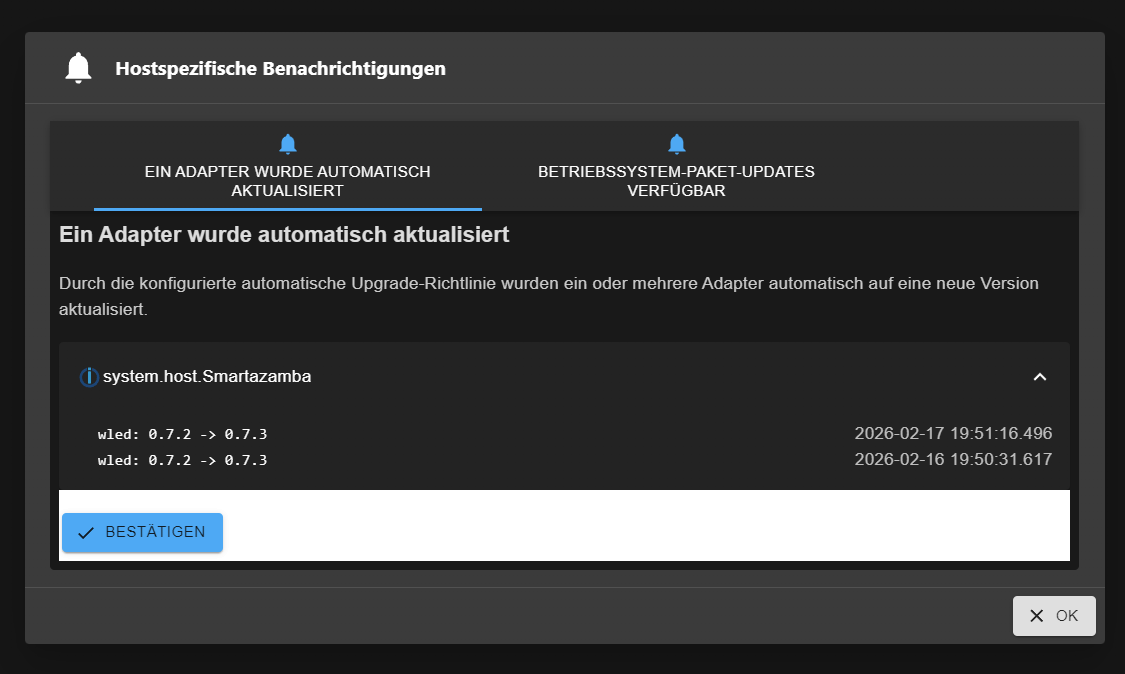
Mal sehen ob das Update heute wieder passiert.
-
@Thomas-Braun sagte in Update / Upgrade-einen Adapter nicht automatisch updaten:
Was ist denn mit dem logrotate los?
*** FAILED SERVICES ***

UNIT LOAD ACTIVE SUB DESCRIPTION

    logrotate.service loaded failed failed Rotate log files
Wie kann ich dem nachgehen?
Unter Hosts habe ich inzwischen dashier gefunden:
Mal sehen ob das Update heute wieder passiert.
@Rushmed sagte in Update / Upgrade-einen Adapter nicht automatisch updaten:
Wie kann ich dem nachgehen?
systemctl status logrotate.serviceanschauen.


Hey! Du scheinst an dieser Unterhaltung interessiert zu sein, hast aber noch kein Konto.
Hast du es satt, bei jedem Besuch durch die gleichen Beiträge zu scrollen? Wenn du dich für ein Konto anmeldest, kommst du immer genau dorthin zurück, wo du zuvor warst, und kannst dich über neue Antworten benachrichtigen lassen (entweder per E-Mail oder Push-Benachrichtigung). Du kannst auch Lesezeichen speichern und Beiträge positiv bewerten, um anderen Community-Mitgliedern deine Wertschätzung zu zeigen.
Mit deinem Input könnte dieser Beitrag noch besser werden 💗
Registrieren Anmelden465
Online33.0k
Benutzer83.6k
Themen1.3m
Beiträge