




Error in GUI
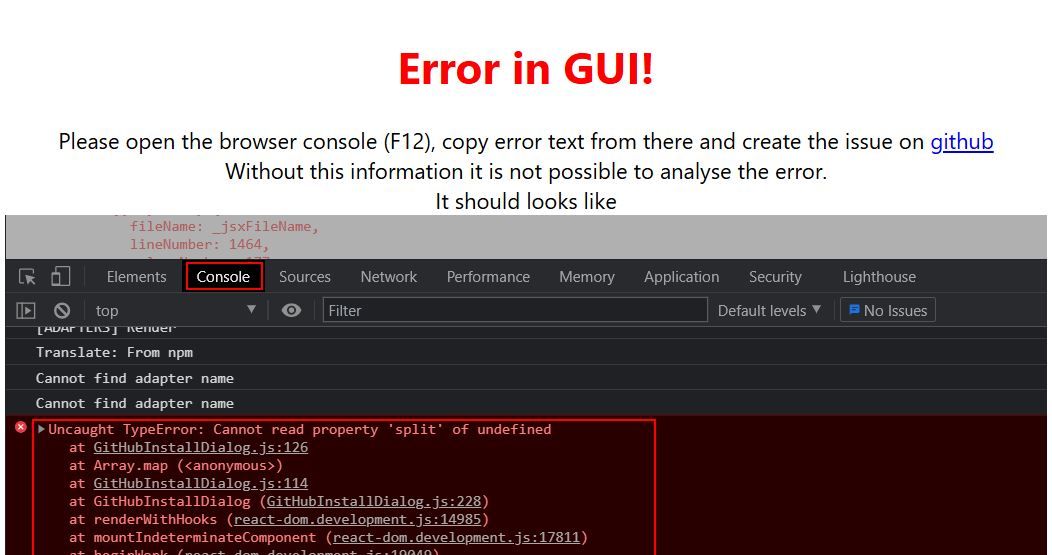
-
@mikep500 sagte in Error in GUI:
Muss ich nach dem neu Installieren die Solaranzeige neu einrichten oder funktioniert das noch?
Hängt da an dem Raspberry direkt ein Bildschirm?
-
@Thomas-Braun Danke schon mal. Hab jetzt viele Fragen. Muss ich nach dem neu Installieren die Solaranzeige neu einrichten oder funktioniert das noch?
Hättest du einen Link was ich Installieren soll?
Hab da echt keinen Plan von allem. Sorry
Kann ich die Visualisierung vom IObroker irgendwie speichern bevor ich neu Installiere?
Danke@mikep500 sagte in Error in GUI:
Muss ich nach dem neu Installieren die Solaranzeige neu einrichten oder funktioniert das noch?
was genau ist das?
@mikep500 sagte in Error in GUI:
Kann ich die Visualisierung vom IObroker irgendwie speichern bevor ich neu Installiere?
ist im Backup mit drin
@mikep500 sagte in Error in GUI:
bis WLan ging
warum WLAN für einen 24/7 Server?
Das ist nicht zu empfehlen!geht kein LAN?
kein Support per PN! - Fragen im Forum stellen - Benutzt das Voting rechts unten im Beitrag wenn er euch geholfen hat.
Das Forum freut sich über eine Spende. Benutzt dazu den Spendenbutton oben rechts. Danke!
der Installationsfixer: curl -fsL https://iobroker.net/fix.sh | bash - -
@mikep500 sagte in Error in GUI:
Muss ich nach dem neu Installieren die Solaranzeige neu einrichten oder funktioniert das noch?
was genau ist das?
@mikep500 sagte in Error in GUI:
Kann ich die Visualisierung vom IObroker irgendwie speichern bevor ich neu Installiere?
ist im Backup mit drin
@mikep500 sagte in Error in GUI:
bis WLan ging
warum WLAN für einen 24/7 Server?
Das ist nicht zu empfehlen!geht kein LAN?
@Homoran https://www.solaranzeige.de/
Das Backup ist dummerweise auf dem Raspi. wie bekomme ich das auf mein Notebook? -
@Homoran https://www.solaranzeige.de/
Das Backup ist dummerweise auf dem Raspi. wie bekomme ich das auf mein Notebook?@mikep500 sagte in Error in GUI:
wie bekomme ich das auf mein Notebook
z.b. mit WINSCP oder filezilla oder direkt über die backitup Oberfläche
-
@mikep500 sagte in Error in GUI:
Muss ich nach dem neu Installieren die Solaranzeige neu einrichten oder funktioniert das noch?
was genau ist das?
@mikep500 sagte in Error in GUI:
Kann ich die Visualisierung vom IObroker irgendwie speichern bevor ich neu Installiere?
ist im Backup mit drin
@mikep500 sagte in Error in GUI:
bis WLan ging
warum WLAN für einen 24/7 Server?
Das ist nicht zu empfehlen!geht kein LAN?
-
@Thomas-Braun nein über wlan
@mikep500
Dann würde ich folgendes tun:iob stop iob fix sudo apt update sudo apt full-upgrade sudo rebootDann im frisch gestarteten System versuchen auf nodejs@18 zu kommen (Neueres dürfte auf keinen Fall mehr auf dem ollen Buster laufen):
iob nodejs-update 18Dann versuchen, den ioBroker auf einen aktuellern Stand zu hieven.
iob update
iob stop
iob upgrade self
iob update
iob upgrade all
Dann davon ein Backup ziehen und mit dem in den Neubau umziehen.
Neubau:https://forum.iobroker.net/topic/51869/installation-auf-raspi-einfacher-geht-s-nicht
-
@Homoran https://www.solaranzeige.de/
Das Backup ist dummerweise auf dem Raspi. wie bekomme ich das auf mein Notebook?@mikep500 was ist das?
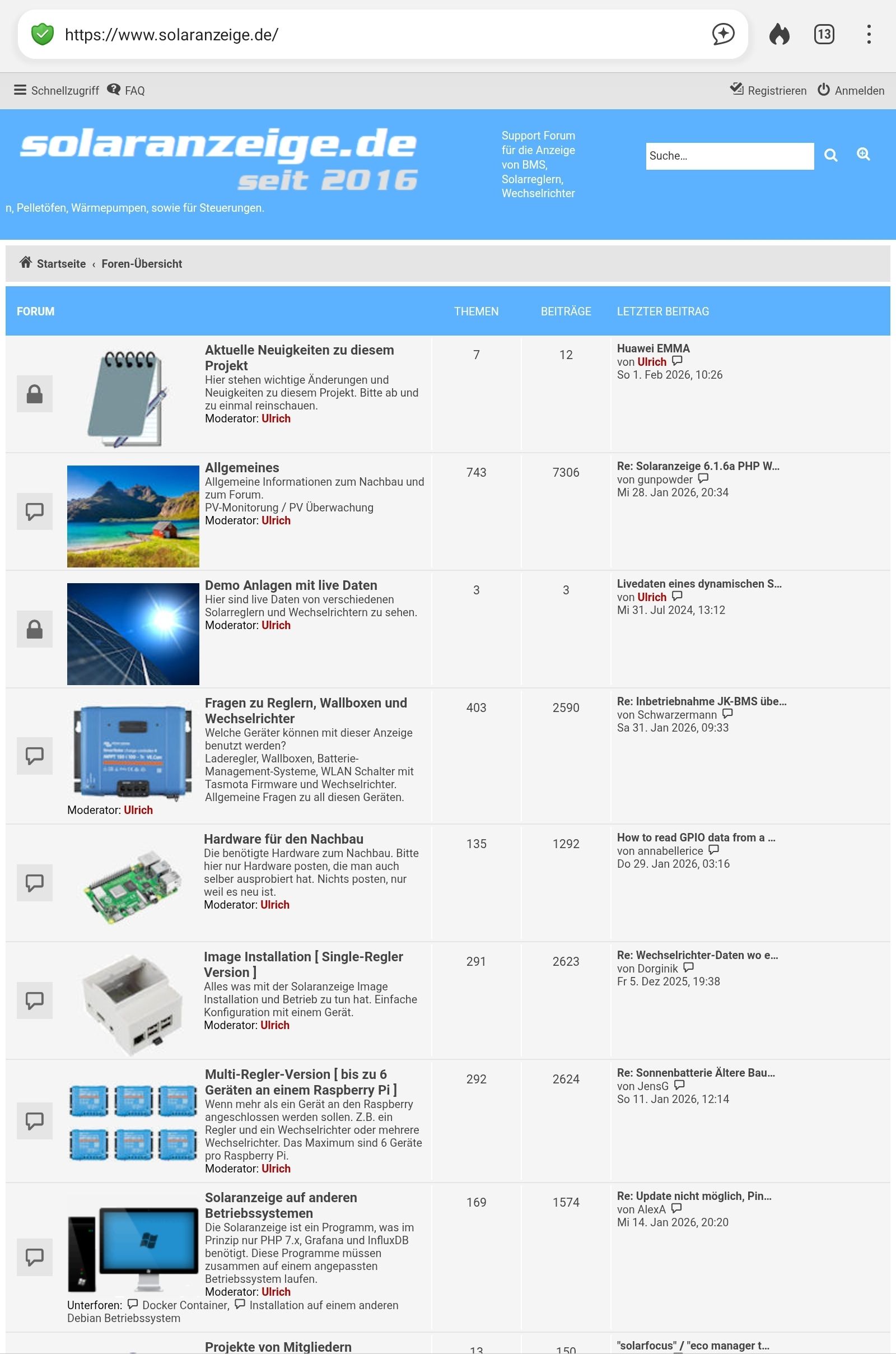
das ist eine website
-
@mikep500 sagte in Error in GUI:
Die bieten kostenlos Visualisierungen für bestimmte Wechselrichter, BMS usw.
du hast doch eine eigene Visualisierung erstellt.
warum dann zwei getrennt zu pflegendekein Support per PN! - Fragen im Forum stellen - Benutzt das Voting rechts unten im Beitrag wenn er euch geholfen hat.
Das Forum freut sich über eine Spende. Benutzt dazu den Spendenbutton oben rechts. Danke!
der Installationsfixer: curl -fsL https://iobroker.net/fix.sh | bash - -
@mikep500 sagte in Error in GUI:
Die bieten kostenlos Visualisierungen für bestimmte Wechselrichter, BMS usw.
du hast doch eine eigene Visualisierung erstellt.
warum dann zwei getrennt zu pflegende -
@Homoran Die Von der Solaranzeige ist für alles um PV.
Die Im IO Broker ist nur ein Bild mit Temperaturen von den Speichern@mikep500 sagte in Error in GUI:
Die Von der Solaranzeige ist für alles um PV.
Wenn du die Daten in iob hast kannst du das doch auch in der vis machen.
Davon gibt es gefühlt hunderte hier im Forum.Ansonsten musst du mal herausfinden wie du deine Solaranzeige sichern und wiederherstellen kannst
-
ich hab mir mal eine zweite SD Karte gemacht falls die eine sich schrottet, geht das auch als Backup?
@mikep500 sagte in Error in GUI:
geht das auch als Backup?
nicht wirklich!
@mikep500 sagte in Error in GUI:
ich hab mir mal eine zweite SD Karte gemacht
wie denn?
Das wäre für die Neuinstallation der richtige Weg.
Eine neue gute SD Card nehmen, darauf alles neu installieren, dann umstecken und Backup zurück.Wenn das nicht läuft kannst du einfach due alte (mit allen Problemen) vorübergehend wieder nutzen.
kein Support per PN! - Fragen im Forum stellen - Benutzt das Voting rechts unten im Beitrag wenn er euch geholfen hat.
Das Forum freut sich über eine Spende. Benutzt dazu den Spendenbutton oben rechts. Danke!
der Installationsfixer: curl -fsL https://iobroker.net/fix.sh | bash - -
@mikep500 sagte in Error in GUI:
geht das auch als Backup?
nicht wirklich!
@mikep500 sagte in Error in GUI:
ich hab mir mal eine zweite SD Karte gemacht
wie denn?
Das wäre für die Neuinstallation der richtige Weg.
Eine neue gute SD Card nehmen, darauf alles neu installieren, dann umstecken und Backup zurück.Wenn das nicht läuft kannst du einfach due alte (mit allen Problemen) vorübergehend wieder nutzen.
@Homoran mit dem win32 Disc Manager. Sehe ich das richtig, dass da das Betriebsystem, die Solaranzeige und IObroker drauf sind, nicht nur die Daten?
Da muss ich mal sehen wie ich die Daten von der Solaranzeige extra sichern kann.
Wie kann ich die Visualisierung vom IObroker sichern?
Sorry und Danke -
@mikep500 sagte in Error in GUI:
wie bekomme ich das auf mein Notebook
z.b. mit WINSCP oder filezilla oder direkt über die backitup Oberfläche
@Homoran sagte in Error in GUI:
z.b. mit WINSCP oder filezilla oder direkt über die backitup Oberfläche
Ich fände es gut die backitup Variante als die erste Variante zu empfehlen ( wenn iobroker noch läuft ):
Nach Punkt 13. Kommt ein Bild welches zeigt wie man ein Backup herunterladen kann:
So kann man ohne zusätzliche Software alles sichern.
Man kann sichern und hochladen:

Proxmox 9 HA-Cluster mit 3x HP prodesk 400 G6 i5
ioBroker Backup Analyzer -
@Homoran sagte in Error in GUI:
z.b. mit WINSCP oder filezilla oder direkt über die backitup Oberfläche
Ich fände es gut die backitup Variante als die erste Variante zu empfehlen ( wenn iobroker noch läuft ):
Nach Punkt 13. Kommt ein Bild welches zeigt wie man ein Backup herunterladen kann:
So kann man ohne zusätzliche Software alles sichern.
Man kann sichern und hochladen:
@Shadowhunter23 sagte in Error in GUI:
Ich fände es gut die backitup Variante als die erste Variante zu empfehlen
ich auch, aber
- ich hab zu spät dran gedacht, wei
- ich mir gar nicht sicher war, dass es sich um backitup backups handelt
-
Glaskugel sagt
Error in GUI bei Adapteranzeige dürfte von admin 6 kommen. Dazu gibts einie Issues in Admin. Solutionnist admin aufc7.x.x aktualisieren.
Nur mit jnode 16 u js-controller 4 bist da aussen vor
Ergo bleibt nur die empfohlene Neuinstallation. Bei einem Sprung von js-controller 4 auf 7 ist durchaus mit problemen beim Einspielen des Backups zu rechnen.
-
Hallo, Habe mir jetzt einen neuen Raspi 4b mit 8Gb statt zwei gekauft. Dann tagelang meine Solaranzeige Installiert. Dann IObroker.
Danach habe ich die Sicherung vom alten IObroker aufgespielt.
Keine Ahnung was das jetzt ist. Sorry ich habe echt null Ahnung von Linux. Hangele mich so durch und bin für jeden Tip dankbar.========== Start marking the full check here ===========
Script v.2026-01-31 *** BASE SYSTEM *** Operating System: Debian GNU/Linux 12 (bookworm) Static hostname: solaranzeige Icon name: computer Kernel: Linux 6.12.47+rpt-rpi-v8 Architecture: arm64 OS is similar to: Model : Raspberry Pi 4 Model B Rev 1.5 Docker : false Virtualization : none Kernel : aarch64 Userland : 64 bit Systemuptime and Load: 15:59:32 up 53 min, 4 users, load average: 0.21, 0.84, 0.96 CPU threads: 4 *** LIFE CYCLE STATUS *** Debian 'bookworm' is the current oldstable version. Please upgrade to the latest stable release 'trixie' in due time! *** RASPBERRY THROTTLING *** Current issues: No throttling issues detected. Previously detected issues: No throttling issues detected. *** TIME AND TIMEZONES *** Local time: Fri 2026-02-06 15:59:33 CET Universal time: Fri 2026-02-06 14:59:33 UTC RTC time: n/a Time zone: Europe/Berlin (CET, +0100) System clock synchronized: yes NTP service: active RTC in local TZ: no *** Users and Groups *** User that called 'iob diag': pi HOME=/home/pi GROUPS=pi adm dialout cdrom sudo audio video plugdev games users input render netdev gpio i2c spi iobroker User that is running 'js-controller': iobroker HOME=/home/iobroker GROUPS=iobroker tty dialout audio video plugdev bluetooth gpio i2c *** DISPLAY-SERVER SETUP *** Display-Server: true Display-Manager: * lightdm.service - Light Display Manager Desktop: Session: tty System is booting into 'graphical.target'. Usually a server is running in 'multi-user.target'. Please set BootTarget to 'multi-user.target' or run 'iobroker fix' *** MEMORY *** total used free shared buff/cache available Mem: 8.2G 1.3G 1.1G 121M 5.9G 6.9G Swap: 209M 0B 209M Total: 8.4G 1.3G 1.3G Active iob-Instances: 3 7820 M total memory 1284 M used memory 1607 M active memory 4582 M inactive memory 1041 M free memory 235 M buffer memory 5392 M swap cache 199 M total swap 0 M used swap 199 M free swap *** top - Table Of Processes *** top - 15:59:33 up 53 min, 4 users, load average: 0.27, 0.84, 0.96 Tasks: 259 total, 1 running, 258 sleeping, 0 stopped, 0 zombie %Cpu(s): 0.0 us, 28.6 sy, 0.0 ni, 71.4 id, 0.0 wa, 0.0 hi, 0.0 si, 0.0 st MiB Mem : 7820.8 total, 1040.5 free, 1285.1 used, 5627.5 buff/cache MiB Swap: 200.0 total, 200.0 free, 0.0 used. 6535.8 avail Mem *** FAILED SERVICES *** UNIT LOAD ACTIVE SUB DESCRIPTION 0 loaded units listed. *** DMESG CRITICAL ERRORS *** No critical errors detected *** FILESYSTEM *** Filesystem Type Size Used Avail Use% Mounted on udev devtmpfs 3.6G 0 3.6G 0% /dev tmpfs tmpfs 1.6G 3.0M 1.6G 1% /run /dev/mmcblk0p2 ext4 57G 12G 44G 21% / tmpfs tmpfs 3.9G 16K 3.9G 1% /dev/shm tmpfs tmpfs 5.0M 16K 5.0M 1% /run/lock /dev/mmcblk0p1 vfat 510M 86M 425M 17% /boot/firmware tmpfs tmpfs 783M 32K 783M 1% /run/user/1000 Messages concerning ext4 filesystem in dmesg: [Fri Feb 6 15:06:31 2026] EXT4-fs (mmcblk0p2): mounted filesystem 7909438b-2884-423e-aa05-577fdea75c97 ro with ordered data mode. Quota mode: none. [Fri Feb 6 15:06:33 2026] EXT4-fs (mmcblk0p2): re-mounted 7909438b-2884-423e-aa05-577fdea75c97 r/w. Show mounted filesystems: TARGET SOURCE FSTYPE OPTIONS / /dev/mmcblk0p2 ext4 rw,noatime |-/run/user/1000/doc portal fuse.portal rw,nosuid,nodev,relatime,user_id=1000,group_id=1000 `-/boot/firmware /dev/mmcblk0p1 vfat rw,relatime,fmask=0022,dmask=0022,codepage=437,iocharset=ascii,shortname=mixed,errors=remount-ro Files in neuralgic directories: /var: 3.5G /var/ 2.4G /var/cache/apt 2.4G /var/cache 2.3G /var/cache/apt/archives 542M /var/lib Archived and active journals take up 267.8M in the file system. /opt/iobroker/backups: 15M /opt/iobroker/backups/ /opt/iobroker/iobroker-data: 173M /opt/iobroker/iobroker-data/ 167M /opt/iobroker/iobroker-data/files 47M /opt/iobroker/iobroker-data/files/admin.admin 46M /opt/iobroker/iobroker-data/files/admin.admin/custom/assets 46M /opt/iobroker/iobroker-data/files/admin.admin/custom The five largest files in iobroker-data are: 12M /opt/iobroker/iobroker-data/files/javascript.admin/static/js/2.ea6ad656.chunk.js.map 8.1M /opt/iobroker/iobroker-data/files/backitup.admin/assets/index-Djx0nwYT.js 6.3M /opt/iobroker/iobroker-data/objects.jsonl 4.5M /opt/iobroker/iobroker-data/files/web.admin/static/js/2.b1d56998.chunk.js.map 4.4M /opt/iobroker/iobroker-data/files/javascript.admin/vs/language/typescript/tsWorker.js USB-Devices by-id: USB-Sticks - Avoid direct links to /dev/tty* in your adapter setups, please always prefer the links 'by-id': /dev/serial/by-id/usb-FTDI_FT232R_USB_UART_AQ02MT9K-if00-port0 /dev/serial/by-id/usb-FTDI_FT232R_USB_UART_A10NIY56-if00-port0 No nvbackup.json found. *** NodeJS-Installation *** /usr/bin/nodejs v22.22.0 /usr/bin/node v22.22.0 /usr/bin/npm 10.9.4 /usr/bin/npx 10.9.4 ✓ Node.js installation is correct nodejs: Installed: 22.22.0-1nodesource1 Candidate: 22.22.0-1nodesource1 Version table: *** 22.22.0-1nodesource1 1001 500 https://deb.nodesource.com/node_22.x nodistro/main arm64 Packages 100 /var/lib/dpkg/status 22.21.0-1nodesource1 1001 500 https://deb.nodesource.com/node_22.x nodistro/main arm64 Packages 22.20.0-1nodesource1 1001 500 https://deb.nodesource.com/node_22.x nodistro/main arm64 Packages 22.19.0-1nodesource1 1001 500 https://deb.nodesource.com/node_22.x nodistro/main arm64 Packages 22.18.0-1nodesource1 1001 500 https://deb.nodesource.com/node_22.x nodistro/main arm64 Packages 22.17.1-1nodesource1 1001 500 https://deb.nodesource.com/node_22.x nodistro/main arm64 Packages 22.17.0-1nodesource1 1001 500 https://deb.nodesource.com/node_22.x nodistro/main arm64 Packages 22.16.0-1nodesource1 1001 500 https://deb.nodesource.com/node_22.x nodistro/main arm64 Packages 22.15.1-1nodesource1 1001 500 https://deb.nodesource.com/node_22.x nodistro/main arm64 Packages 22.15.0-1nodesource1 1001 500 https://deb.nodesource.com/node_22.x nodistro/main arm64 Packages 22.14.0-1nodesource1 1001 500 https://deb.nodesource.com/node_22.x nodistro/main arm64 Packages 22.13.1-1nodesource1 1001 500 https://deb.nodesource.com/node_22.x nodistro/main arm64 Packages 22.13.0-1nodesource1 1001 500 https://deb.nodesource.com/node_22.x nodistro/main arm64 Packages 22.12.0-1nodesource1 1001 500 https://deb.nodesource.com/node_22.x nodistro/main arm64 Packages 22.11.0-1nodesource1 1001 500 https://deb.nodesource.com/node_22.x nodistro/main arm64 Packages 22.10.0-1nodesource1 1001 500 https://deb.nodesource.com/node_22.x nodistro/main arm64 Packages 22.9.0-1nodesource1 1001 500 https://deb.nodesource.com/node_22.x nodistro/main arm64 Packages 22.8.0-1nodesource1 1001 500 https://deb.nodesource.com/node_22.x nodistro/main arm64 Packages 22.7.0-1nodesource1 1001 500 https://deb.nodesource.com/node_22.x nodistro/main arm64 Packages 22.6.0-1nodesource1 1001 500 https://deb.nodesource.com/node_22.x nodistro/main arm64 Packages 22.5.1-1nodesource1 1001 500 https://deb.nodesource.com/node_22.x nodistro/main arm64 Packages 22.5.0-1nodesource1 1001 500 https://deb.nodesource.com/node_22.x nodistro/main arm64 Packages 22.4.1-1nodesource1 1001 500 https://deb.nodesource.com/node_22.x nodistro/main arm64 Packages 22.4.0-1nodesource1 1001 500 https://deb.nodesource.com/node_22.x nodistro/main arm64 Packages 22.3.0-1nodesource1 1001 500 https://deb.nodesource.com/node_22.x nodistro/main arm64 Packages 22.2.0-1nodesource1 1001 500 https://deb.nodesource.com/node_22.x nodistro/main arm64 Packages 22.1.0-1nodesource1 1001 500 https://deb.nodesource.com/node_22.x nodistro/main arm64 Packages 22.0.0-1nodesource1 1001 500 https://deb.nodesource.com/node_22.x nodistro/main arm64 Packages 18.20.4+dfsg-1~deb12u1 500 500 http://deb.debian.org/debian bookworm/main arm64 Packages 500 http://deb.debian.org/debian-security bookworm-security/main arm64 Packages Temp directories causing deletion problem: 0 No problems detected Errors in npm tree: 0 No problems detected Checking for nodejs vulnerability: █████ ██ ██ ██████ ██████ ██████ ██████ ██ ██ ██ ██ ██ ██ ██ ██ ██ ██ ██ ██ ██ ██ ███████ ██ ██ ██ ███ ██ ██ ██ ██ ██ ██ ██ ██ ██ ██ ██ ██ ██ ██ ██ ██ ██ ██ ██ ██ ██ ██ ██ ███████ ███████ ██████ ██████ ██████ ██████ ██ *** ioBroker-Installation *** ioBroker Status iobroker is running on this host. Objects type: jsonl States type: jsonl Hosts: solaranzeige solaranzeige (version: 7.0.7, hostname: solaranzeige , alive, uptime: 287) Core adapters versions js-controller: 7.0.7 admin: 6.2.20 javascript: 5.7.0 nodejs modules from github: 0 Adapter State system.adapter.admin.0 : admin : solaranzeige - enabled, port: 8081, bind: 0.0.0.0, run as: admin + system.adapter.backitup.0 : backitup : solaranzeige - enabled + system.adapter.backitup.2 : backitup : solaranzeige - enabled system.adapter.bestway.0 : bestway : solaranzeige - disabled system.adapter.broadlink2.0 : broadlink2 : solaranzeige - disabled system.adapter.discovery.0 : discovery : solaranzeige - disabled system.adapter.fritzdect.0 : fritzdect : solaranzeige - disabled system.adapter.fullybrowser.0 : fullybrowser : solaranzeige - disabled system.adapter.hass.0 : hass : solaranzeige - disabled, port: 8123 system.adapter.hass.1 : hass : solaranzeige - disabled, port: 8123 system.adapter.icons-fatcow-hosting.0 : icons-fatcow-hosting : solaranzeige - disabled system.adapter.icons-mfd-svg.0 : icons-mfd-svg : solaranzeige - disabled system.adapter.influxdb.0 : influxdb : solaranzeige - disabled, port: 8086 system.adapter.jarvis.0 : jarvis : solaranzeige - disabled system.adapter.javascript.0 : javascript : solaranzeige - disabled system.adapter.javascript.1 : javascript : solaranzeige - disabled system.adapter.mqtt.0 : mqtt : solaranzeige - disabled, port: 1883, bind: 0.0.0.0 system.adapter.mqtt.1 : mqtt : solaranzeige - disabled, port: 1883, bind: 0.0.0.0 system.adapter.ping.0 : ping : solaranzeige - disabled system.adapter.vis-bars.0 : vis-bars : solaranzeige - disabled system.adapter.vis-material-advanced.0 : vis-material-advanced : solaranzeige - disabled system.adapter.vis-metro.0 : vis-metro : solaranzeige - disabled system.adapter.vis-plumb.0 : vis-plumb : solaranzeige - disabled system.adapter.vis-timeandweather.0 : vis-timeandweather : solaranzeige - disabled system.adapter.vis.0 : vis : solaranzeige - disabled system.adapter.web.0 : web : solaranzeige - disabled, port: 8082, bind: 0.0.0.0, run as: admin + instance is alive Enabled adapters with bindings system.adapter.admin.0 : admin : solaranzeige - enabled, port: 8081, bind: 0.0.0.0, run as: admin ioBroker-Repositories ┌─────────┬──────────┬─────────────────────────────────────────────────────────┬──────────────┐ │ (index) │ name │ url │ auto upgrade │ ├─────────┼──────────┼─────────────────────────────────────────────────────────┼──────────────┤ │ 0 │ 'stable' │ 'http://download.iobroker.net/sources-dist.json' │ false │ │ 1 │ 'beta' │ 'http://download.iobroker.net/sources-dist-latest.json' │ false │ └─────────┴──────────┴─────────────────────────────────────────────────────────┴──────────────┘ Active repo(s): stable Upgrade policy: none Installed ioBroker-Adapters Used repository: stable Adapter "admin" : 7.7.22 , installed 6.2.20 [Updatable] Adapter "backitup" : 3.3.13 , installed 2.4.10 [Updatable] Adapter "bestway" : 0.0.4 , installed 0.0.3 [Updatable] Adapter "broadlink2" : 2.3.0 , installed 2.1.5 [Updatable] Adapter "discovery" : 5.0.0 , installed 3.0.3 [Updatable] Adapter "fritzdect" : 2.6.2 , installed 2.2.3 [Updatable] Adapter "fullybrowser" : 3.1.2 , installed 2.1.2 [Updatable] Adapter "hass" : 1.4.0 , installed 1.3.0 [Updatable] Adapter "icons-fatcow-hosting": 0.1.0, installed 0.1.0 Adapter "icons-mfd-svg": 1.2.0 , installed 1.1.0 [Updatable] Adapter "influxdb" : 4.0.2 , installed 3.1.7 [Updatable] Adapter "jarvis" : 3.1.8 , installed 3.0.11 [Updatable] Adapter "javascript" : 9.0.11 , installed 5.7.0 [Updatable] Controller "js-controller": 7.0.7 , installed 7.0.7 Adapter "mqtt" : 6.1.4 , installed 4.0.7 [Updatable] Adapter "ping" : 1.7.9 , installed 1.5.3 [Updatable] Adapter "simple-api" : 2.8.0 , installed 2.8.0 Adapter "socketio" : 6.7.1 , installed 4.2.0 [Updatable] Adapter "vis" : 1.5.6 , installed 1.4.15 [Updatable] Adapter "vis-bars" : 0.1.4 , installed 0.1.4 Adapter "vis-material-advanced": 1.7.4, installed 1.7.2 [Updatable] Adapter "vis-metro" : 1.2.0 , installed 1.2.0 Adapter "vis-plumb" : 1.0.2 , installed 1.0.2 Adapter "vis-timeandweather": 1.2.2, installed 1.1.7 [Updatable] Adapter "web" : 7.0.8 , installed 4.3.0 [Updatable] Adapter "ws" : 2.6.2 , installed 1.3.0 [Updatable] Objects and States Please stand by - This may take a while Objects: 691 States: 506 *** OS-Repositories and Updates *** Hit:1 http://deb.debian.org/debian bookworm InRelease Hit:2 http://deb.debian.org/debian-security bookworm-security InRelease Hit:3 http://deb.debian.org/debian bookworm-updates InRelease Hit:4 http://archive.raspberrypi.com/debian bookworm InRelease Hit:5 https://packages.sury.org/php bookworm InRelease Hit:6 https://apt.grafana.com stable InRelease Get:7 https://repos.influxdata.com/debian stable InRelease [6913 B] Hit:8 https://deb.nodesource.com/node_22.x nodistro InRelease Fetched 6913 B in 1s (4722 B/s) Reading package lists... Pending systemupdates: 0 *** Listening Ports *** Active Internet connections (only servers) Proto Recv-Q Send-Q Local Address Foreign Address State User Inode PID/Program name tcp 0 0 127.0.0.1:8088 0.0.0.0:* LISTEN 114 10400 1307/influxd tcp 0 0 0.0.0.0:1883 0.0.0.0:* LISTEN 116 5966 824/mosquitto tcp 0 0 0.0.0.0:139 0.0.0.0:* LISTEN 0 69247 32257/smbd tcp 0 0 0.0.0.0:22 0.0.0.0:* LISTEN 0 8205 837/sshd: /usr/sbin tcp 0 0 0.0.0.0:80 0.0.0.0:* LISTEN 0 9243 1010/lighttpd tcp 0 0 0.0.0.0:445 0.0.0.0:* LISTEN 0 69246 32257/smbd tcp 0 0 127.0.0.1:631 0.0.0.0:* LISTEN 0 6018 813/cupsd tcp 0 0 127.0.0.1:9000 0.0.0.0:* LISTEN 1001 106651 80436/iobroker.js-c tcp 0 0 127.0.0.1:9001 0.0.0.0:* LISTEN 1001 106646 80436/iobroker.js-c tcp 0 0 127.0.0.1:53 0.0.0.0:* LISTEN 0 5946 756/connmand tcp6 0 0 :::1883 :::* LISTEN 116 5967 824/mosquitto tcp6 0 0 :::9595 :::* LISTEN 0 9473 814/java tcp6 0 0 :::139 :::* LISTEN 0 69245 32257/smbd tcp6 0 0 :::80 :::* LISTEN 0 9242 1010/lighttpd tcp6 0 0 :::445 :::* LISTEN 0 69244 32257/smbd tcp6 0 0 :::8086 :::* LISTEN 114 11446 1307/influxd tcp6 0 0 :::8111 :::* LISTEN 0 5109 814/java tcp6 0 0 ::1:53 :::* LISTEN 0 5950 756/connmand tcp6 0 0 ::1:631 :::* LISTEN 0 6017 813/cupsd tcp6 0 0 :::3000 :::* LISTEN 115 58286 22775/grafana udp 0 0 127.0.0.1:53 0.0.0.0:* 0 5938 756/connmand udp 0 0 192.168.178.255:137 0.0.0.0:* 0 69188 32253/nmbd udp 0 0 192.168.178.71:137 0.0.0.0:* 0 69187 32253/nmbd udp 0 0 0.0.0.0:137 0.0.0.0:* 0 69172 32253/nmbd udp 0 0 192.168.178.255:138 0.0.0.0:* 0 69190 32253/nmbd udp 0 0 192.168.178.71:138 0.0.0.0:* 0 69189 32253/nmbd udp 0 0 0.0.0.0:138 0.0.0.0:* 0 69173 32253/nmbd udp 0 0 0.0.0.0:53403 0.0.0.0:* 0 9385 756/connmand udp 0 0 0.0.0.0:5353 0.0.0.0:* 104 7021 628/avahi-daemon: r udp 0 0 0.0.0.0:43772 0.0.0.0:* 104 7023 628/avahi-daemon: r udp6 0 0 ::1:53 :::* 0 5942 756/connmand udp6 0 0 :::546 :::* 0 4732 756/connmand udp6 90816 0 fe80::ec51:f680:1c3:546 :::* 0 4712 750/NetworkManager udp6 0 0 :::33833 :::* 104 7024 628/avahi-daemon: r udp6 0 0 :::5353 :::* 104 7022 628/avahi-daemon: r *** Log File - Last 25 Lines *** 2026-02-06 15:56:08.056 - info: host.solaranzeige iobroker npm-rebuild: Rebuilding native modules done 2026-02-06 15:56:09.071 - info: host.solaranzeige iobroker npm-rebuild: exit 0 2026-02-06 15:56:09.514 - info: host.solaranzeige instance system.adapter.admin.0 in version "6.2.20" started with pid 81247 2026-02-06 15:56:10.524 - error: host.solaranzeige Caught by controller[0]: node:internal/modules/cjs/loader:1386 2026-02-06 15:56:10.524 - error: host.solaranzeige Caught by controller[0]: throw err; 2026-02-06 15:56:10.524 - error: host.solaranzeige Caught by controller[0]: ^ 2026-02-06 15:56:10.525 - error: host.solaranzeige Caught by controller[0]: Error: Cannot find module '/opt/iobroker/node_modules/iobroker.js-controller/lib/tools.js' 2026-02-06 15:56:10.525 - error: host.solaranzeige Caught by controller[0]: Require stack: 2026-02-06 15:56:10.525 - error: host.solaranzeige Caught by controller[0]: - /opt/iobroker/node_modules/iobroker.admin/main.js 2026-02-06 15:56:10.525 - error: host.solaranzeige Caught by controller[0]: at Function._resolveFilename (node:internal/modules/cjs/loader:1383:15) 2026-02-06 15:56:10.525 - error: host.solaranzeige Caught by controller[0]: at defaultResolveImpl (node:internal/modules/cjs/loader:1025:19) 2026-02-06 15:56:10.525 - error: host.solaranzeige Caught by controller[0]: at resolveForCJSWithHooks (node:internal/modules/cjs/loader:1030:22) 2026-02-06 15:56:10.526 - error: host.solaranzeige Caught by controller[0]: at Function._load (node:internal/modules/cjs/loader:1192:37) 2026-02-06 15:56:10.526 - error: host.solaranzeige Caught by controller[0]: at TracingChannel.traceSync (node:diagnostics_channel:328:14) 2026-02-06 15:56:10.526 - error: host.solaranzeige Caught by controller[0]: at wrapModuleLoad (node:internal/modules/cjs/loader:237:24) 2026-02-06 15:56:10.526 - error: host.solaranzeige Caught by controller[0]: at Module.require (node:internal/modules/cjs/loader:1463:12) 2026-02-06 15:56:10.526 - error: host.solaranzeige Caught by controller[0]: at require (node:internal/modules/helpers:147:16) 2026-02-06 15:56:10.526 - error: host.solaranzeige Caught by controller[0]: at Object.<anonymous> (/opt/iobroker/node_modules/iobroker.admin/main.js:22:18) 2026-02-06 15:56:10.527 - error: host.solaranzeige Caught by controller[0]: at Module._compile (node:internal/modules/cjs/loader:1706:14) { 2026-02-06 15:56:10.527 - error: host.solaranzeige Caught by controller[0]: code: 'MODULE_NOT_FOUND', 2026-02-06 15:56:10.527 - error: host.solaranzeige Caught by controller[0]: requireStack: [ '/opt/iobroker/node_modules/iobroker.admin/main.js' ] 2026-02-06 15:56:10.527 - error: host.solaranzeige Caught by controller[0]: } 2026-02-06 15:56:10.527 - error: host.solaranzeige Caught by controller[0]: Node.js v22.22.0 2026-02-06 15:56:10.527 - error: host.solaranzeige instance system.adapter.admin.0 terminated with code 1 (JS_CONTROLLER_STOPPED) 2026-02-06 15:56:10.527 - info: host.solaranzeige Rebuild for adapter system.adapter.admin.0 not successful in 3 tries. Adapter will not be restarted again. Please execute "npm install --production" in adapter directory manually.============ Mark until here for C&P =============
iob diag has finished.
pi@solaranzeige:~ $
-
Hallo, Habe mir jetzt einen neuen Raspi 4b mit 8Gb statt zwei gekauft. Dann tagelang meine Solaranzeige Installiert. Dann IObroker.
Danach habe ich die Sicherung vom alten IObroker aufgespielt.
Keine Ahnung was das jetzt ist. Sorry ich habe echt null Ahnung von Linux. Hangele mich so durch und bin für jeden Tip dankbar.========== Start marking the full check here ===========
Script v.2026-01-31 *** BASE SYSTEM *** Operating System: Debian GNU/Linux 12 (bookworm) Static hostname: solaranzeige Icon name: computer Kernel: Linux 6.12.47+rpt-rpi-v8 Architecture: arm64 OS is similar to: Model : Raspberry Pi 4 Model B Rev 1.5 Docker : false Virtualization : none Kernel : aarch64 Userland : 64 bit Systemuptime and Load: 15:59:32 up 53 min, 4 users, load average: 0.21, 0.84, 0.96 CPU threads: 4 *** LIFE CYCLE STATUS *** Debian 'bookworm' is the current oldstable version. Please upgrade to the latest stable release 'trixie' in due time! *** RASPBERRY THROTTLING *** Current issues: No throttling issues detected. Previously detected issues: No throttling issues detected. *** TIME AND TIMEZONES *** Local time: Fri 2026-02-06 15:59:33 CET Universal time: Fri 2026-02-06 14:59:33 UTC RTC time: n/a Time zone: Europe/Berlin (CET, +0100) System clock synchronized: yes NTP service: active RTC in local TZ: no *** Users and Groups *** User that called 'iob diag': pi HOME=/home/pi GROUPS=pi adm dialout cdrom sudo audio video plugdev games users input render netdev gpio i2c spi iobroker User that is running 'js-controller': iobroker HOME=/home/iobroker GROUPS=iobroker tty dialout audio video plugdev bluetooth gpio i2c *** DISPLAY-SERVER SETUP *** Display-Server: true Display-Manager: * lightdm.service - Light Display Manager Desktop: Session: tty System is booting into 'graphical.target'. Usually a server is running in 'multi-user.target'. Please set BootTarget to 'multi-user.target' or run 'iobroker fix' *** MEMORY *** total used free shared buff/cache available Mem: 8.2G 1.3G 1.1G 121M 5.9G 6.9G Swap: 209M 0B 209M Total: 8.4G 1.3G 1.3G Active iob-Instances: 3 7820 M total memory 1284 M used memory 1607 M active memory 4582 M inactive memory 1041 M free memory 235 M buffer memory 5392 M swap cache 199 M total swap 0 M used swap 199 M free swap *** top - Table Of Processes *** top - 15:59:33 up 53 min, 4 users, load average: 0.27, 0.84, 0.96 Tasks: 259 total, 1 running, 258 sleeping, 0 stopped, 0 zombie %Cpu(s): 0.0 us, 28.6 sy, 0.0 ni, 71.4 id, 0.0 wa, 0.0 hi, 0.0 si, 0.0 st MiB Mem : 7820.8 total, 1040.5 free, 1285.1 used, 5627.5 buff/cache MiB Swap: 200.0 total, 200.0 free, 0.0 used. 6535.8 avail Mem *** FAILED SERVICES *** UNIT LOAD ACTIVE SUB DESCRIPTION 0 loaded units listed. *** DMESG CRITICAL ERRORS *** No critical errors detected *** FILESYSTEM *** Filesystem Type Size Used Avail Use% Mounted on udev devtmpfs 3.6G 0 3.6G 0% /dev tmpfs tmpfs 1.6G 3.0M 1.6G 1% /run /dev/mmcblk0p2 ext4 57G 12G 44G 21% / tmpfs tmpfs 3.9G 16K 3.9G 1% /dev/shm tmpfs tmpfs 5.0M 16K 5.0M 1% /run/lock /dev/mmcblk0p1 vfat 510M 86M 425M 17% /boot/firmware tmpfs tmpfs 783M 32K 783M 1% /run/user/1000 Messages concerning ext4 filesystem in dmesg: [Fri Feb 6 15:06:31 2026] EXT4-fs (mmcblk0p2): mounted filesystem 7909438b-2884-423e-aa05-577fdea75c97 ro with ordered data mode. Quota mode: none. [Fri Feb 6 15:06:33 2026] EXT4-fs (mmcblk0p2): re-mounted 7909438b-2884-423e-aa05-577fdea75c97 r/w. Show mounted filesystems: TARGET SOURCE FSTYPE OPTIONS / /dev/mmcblk0p2 ext4 rw,noatime |-/run/user/1000/doc portal fuse.portal rw,nosuid,nodev,relatime,user_id=1000,group_id=1000 `-/boot/firmware /dev/mmcblk0p1 vfat rw,relatime,fmask=0022,dmask=0022,codepage=437,iocharset=ascii,shortname=mixed,errors=remount-ro Files in neuralgic directories: /var: 3.5G /var/ 2.4G /var/cache/apt 2.4G /var/cache 2.3G /var/cache/apt/archives 542M /var/lib Archived and active journals take up 267.8M in the file system. /opt/iobroker/backups: 15M /opt/iobroker/backups/ /opt/iobroker/iobroker-data: 173M /opt/iobroker/iobroker-data/ 167M /opt/iobroker/iobroker-data/files 47M /opt/iobroker/iobroker-data/files/admin.admin 46M /opt/iobroker/iobroker-data/files/admin.admin/custom/assets 46M /opt/iobroker/iobroker-data/files/admin.admin/custom The five largest files in iobroker-data are: 12M /opt/iobroker/iobroker-data/files/javascript.admin/static/js/2.ea6ad656.chunk.js.map 8.1M /opt/iobroker/iobroker-data/files/backitup.admin/assets/index-Djx0nwYT.js 6.3M /opt/iobroker/iobroker-data/objects.jsonl 4.5M /opt/iobroker/iobroker-data/files/web.admin/static/js/2.b1d56998.chunk.js.map 4.4M /opt/iobroker/iobroker-data/files/javascript.admin/vs/language/typescript/tsWorker.js USB-Devices by-id: USB-Sticks - Avoid direct links to /dev/tty* in your adapter setups, please always prefer the links 'by-id': /dev/serial/by-id/usb-FTDI_FT232R_USB_UART_AQ02MT9K-if00-port0 /dev/serial/by-id/usb-FTDI_FT232R_USB_UART_A10NIY56-if00-port0 No nvbackup.json found. *** NodeJS-Installation *** /usr/bin/nodejs v22.22.0 /usr/bin/node v22.22.0 /usr/bin/npm 10.9.4 /usr/bin/npx 10.9.4 ✓ Node.js installation is correct nodejs: Installed: 22.22.0-1nodesource1 Candidate: 22.22.0-1nodesource1 Version table: *** 22.22.0-1nodesource1 1001 500 https://deb.nodesource.com/node_22.x nodistro/main arm64 Packages 100 /var/lib/dpkg/status 22.21.0-1nodesource1 1001 500 https://deb.nodesource.com/node_22.x nodistro/main arm64 Packages 22.20.0-1nodesource1 1001 500 https://deb.nodesource.com/node_22.x nodistro/main arm64 Packages 22.19.0-1nodesource1 1001 500 https://deb.nodesource.com/node_22.x nodistro/main arm64 Packages 22.18.0-1nodesource1 1001 500 https://deb.nodesource.com/node_22.x nodistro/main arm64 Packages 22.17.1-1nodesource1 1001 500 https://deb.nodesource.com/node_22.x nodistro/main arm64 Packages 22.17.0-1nodesource1 1001 500 https://deb.nodesource.com/node_22.x nodistro/main arm64 Packages 22.16.0-1nodesource1 1001 500 https://deb.nodesource.com/node_22.x nodistro/main arm64 Packages 22.15.1-1nodesource1 1001 500 https://deb.nodesource.com/node_22.x nodistro/main arm64 Packages 22.15.0-1nodesource1 1001 500 https://deb.nodesource.com/node_22.x nodistro/main arm64 Packages 22.14.0-1nodesource1 1001 500 https://deb.nodesource.com/node_22.x nodistro/main arm64 Packages 22.13.1-1nodesource1 1001 500 https://deb.nodesource.com/node_22.x nodistro/main arm64 Packages 22.13.0-1nodesource1 1001 500 https://deb.nodesource.com/node_22.x nodistro/main arm64 Packages 22.12.0-1nodesource1 1001 500 https://deb.nodesource.com/node_22.x nodistro/main arm64 Packages 22.11.0-1nodesource1 1001 500 https://deb.nodesource.com/node_22.x nodistro/main arm64 Packages 22.10.0-1nodesource1 1001 500 https://deb.nodesource.com/node_22.x nodistro/main arm64 Packages 22.9.0-1nodesource1 1001 500 https://deb.nodesource.com/node_22.x nodistro/main arm64 Packages 22.8.0-1nodesource1 1001 500 https://deb.nodesource.com/node_22.x nodistro/main arm64 Packages 22.7.0-1nodesource1 1001 500 https://deb.nodesource.com/node_22.x nodistro/main arm64 Packages 22.6.0-1nodesource1 1001 500 https://deb.nodesource.com/node_22.x nodistro/main arm64 Packages 22.5.1-1nodesource1 1001 500 https://deb.nodesource.com/node_22.x nodistro/main arm64 Packages 22.5.0-1nodesource1 1001 500 https://deb.nodesource.com/node_22.x nodistro/main arm64 Packages 22.4.1-1nodesource1 1001 500 https://deb.nodesource.com/node_22.x nodistro/main arm64 Packages 22.4.0-1nodesource1 1001 500 https://deb.nodesource.com/node_22.x nodistro/main arm64 Packages 22.3.0-1nodesource1 1001 500 https://deb.nodesource.com/node_22.x nodistro/main arm64 Packages 22.2.0-1nodesource1 1001 500 https://deb.nodesource.com/node_22.x nodistro/main arm64 Packages 22.1.0-1nodesource1 1001 500 https://deb.nodesource.com/node_22.x nodistro/main arm64 Packages 22.0.0-1nodesource1 1001 500 https://deb.nodesource.com/node_22.x nodistro/main arm64 Packages 18.20.4+dfsg-1~deb12u1 500 500 http://deb.debian.org/debian bookworm/main arm64 Packages 500 http://deb.debian.org/debian-security bookworm-security/main arm64 Packages Temp directories causing deletion problem: 0 No problems detected Errors in npm tree: 0 No problems detected Checking for nodejs vulnerability: █████ ██ ██ ██████ ██████ ██████ ██████ ██ ██ ██ ██ ██ ██ ██ ██ ██ ██ ██ ██ ██ ██ ███████ ██ ██ ██ ███ ██ ██ ██ ██ ██ ██ ██ ██ ██ ██ ██ ██ ██ ██ ██ ██ ██ ██ ██ ██ ██ ██ ██ ███████ ███████ ██████ ██████ ██████ ██████ ██ *** ioBroker-Installation *** ioBroker Status iobroker is running on this host. Objects type: jsonl States type: jsonl Hosts: solaranzeige solaranzeige (version: 7.0.7, hostname: solaranzeige , alive, uptime: 287) Core adapters versions js-controller: 7.0.7 admin: 6.2.20 javascript: 5.7.0 nodejs modules from github: 0 Adapter State system.adapter.admin.0 : admin : solaranzeige - enabled, port: 8081, bind: 0.0.0.0, run as: admin + system.adapter.backitup.0 : backitup : solaranzeige - enabled + system.adapter.backitup.2 : backitup : solaranzeige - enabled system.adapter.bestway.0 : bestway : solaranzeige - disabled system.adapter.broadlink2.0 : broadlink2 : solaranzeige - disabled system.adapter.discovery.0 : discovery : solaranzeige - disabled system.adapter.fritzdect.0 : fritzdect : solaranzeige - disabled system.adapter.fullybrowser.0 : fullybrowser : solaranzeige - disabled system.adapter.hass.0 : hass : solaranzeige - disabled, port: 8123 system.adapter.hass.1 : hass : solaranzeige - disabled, port: 8123 system.adapter.icons-fatcow-hosting.0 : icons-fatcow-hosting : solaranzeige - disabled system.adapter.icons-mfd-svg.0 : icons-mfd-svg : solaranzeige - disabled system.adapter.influxdb.0 : influxdb : solaranzeige - disabled, port: 8086 system.adapter.jarvis.0 : jarvis : solaranzeige - disabled system.adapter.javascript.0 : javascript : solaranzeige - disabled system.adapter.javascript.1 : javascript : solaranzeige - disabled system.adapter.mqtt.0 : mqtt : solaranzeige - disabled, port: 1883, bind: 0.0.0.0 system.adapter.mqtt.1 : mqtt : solaranzeige - disabled, port: 1883, bind: 0.0.0.0 system.adapter.ping.0 : ping : solaranzeige - disabled system.adapter.vis-bars.0 : vis-bars : solaranzeige - disabled system.adapter.vis-material-advanced.0 : vis-material-advanced : solaranzeige - disabled system.adapter.vis-metro.0 : vis-metro : solaranzeige - disabled system.adapter.vis-plumb.0 : vis-plumb : solaranzeige - disabled system.adapter.vis-timeandweather.0 : vis-timeandweather : solaranzeige - disabled system.adapter.vis.0 : vis : solaranzeige - disabled system.adapter.web.0 : web : solaranzeige - disabled, port: 8082, bind: 0.0.0.0, run as: admin + instance is alive Enabled adapters with bindings system.adapter.admin.0 : admin : solaranzeige - enabled, port: 8081, bind: 0.0.0.0, run as: admin ioBroker-Repositories ┌─────────┬──────────┬─────────────────────────────────────────────────────────┬──────────────┐ │ (index) │ name │ url │ auto upgrade │ ├─────────┼──────────┼─────────────────────────────────────────────────────────┼──────────────┤ │ 0 │ 'stable' │ 'http://download.iobroker.net/sources-dist.json' │ false │ │ 1 │ 'beta' │ 'http://download.iobroker.net/sources-dist-latest.json' │ false │ └─────────┴──────────┴─────────────────────────────────────────────────────────┴──────────────┘ Active repo(s): stable Upgrade policy: none Installed ioBroker-Adapters Used repository: stable Adapter "admin" : 7.7.22 , installed 6.2.20 [Updatable] Adapter "backitup" : 3.3.13 , installed 2.4.10 [Updatable] Adapter "bestway" : 0.0.4 , installed 0.0.3 [Updatable] Adapter "broadlink2" : 2.3.0 , installed 2.1.5 [Updatable] Adapter "discovery" : 5.0.0 , installed 3.0.3 [Updatable] Adapter "fritzdect" : 2.6.2 , installed 2.2.3 [Updatable] Adapter "fullybrowser" : 3.1.2 , installed 2.1.2 [Updatable] Adapter "hass" : 1.4.0 , installed 1.3.0 [Updatable] Adapter "icons-fatcow-hosting": 0.1.0, installed 0.1.0 Adapter "icons-mfd-svg": 1.2.0 , installed 1.1.0 [Updatable] Adapter "influxdb" : 4.0.2 , installed 3.1.7 [Updatable] Adapter "jarvis" : 3.1.8 , installed 3.0.11 [Updatable] Adapter "javascript" : 9.0.11 , installed 5.7.0 [Updatable] Controller "js-controller": 7.0.7 , installed 7.0.7 Adapter "mqtt" : 6.1.4 , installed 4.0.7 [Updatable] Adapter "ping" : 1.7.9 , installed 1.5.3 [Updatable] Adapter "simple-api" : 2.8.0 , installed 2.8.0 Adapter "socketio" : 6.7.1 , installed 4.2.0 [Updatable] Adapter "vis" : 1.5.6 , installed 1.4.15 [Updatable] Adapter "vis-bars" : 0.1.4 , installed 0.1.4 Adapter "vis-material-advanced": 1.7.4, installed 1.7.2 [Updatable] Adapter "vis-metro" : 1.2.0 , installed 1.2.0 Adapter "vis-plumb" : 1.0.2 , installed 1.0.2 Adapter "vis-timeandweather": 1.2.2, installed 1.1.7 [Updatable] Adapter "web" : 7.0.8 , installed 4.3.0 [Updatable] Adapter "ws" : 2.6.2 , installed 1.3.0 [Updatable] Objects and States Please stand by - This may take a while Objects: 691 States: 506 *** OS-Repositories and Updates *** Hit:1 http://deb.debian.org/debian bookworm InRelease Hit:2 http://deb.debian.org/debian-security bookworm-security InRelease Hit:3 http://deb.debian.org/debian bookworm-updates InRelease Hit:4 http://archive.raspberrypi.com/debian bookworm InRelease Hit:5 https://packages.sury.org/php bookworm InRelease Hit:6 https://apt.grafana.com stable InRelease Get:7 https://repos.influxdata.com/debian stable InRelease [6913 B] Hit:8 https://deb.nodesource.com/node_22.x nodistro InRelease Fetched 6913 B in 1s (4722 B/s) Reading package lists... Pending systemupdates: 0 *** Listening Ports *** Active Internet connections (only servers) Proto Recv-Q Send-Q Local Address Foreign Address State User Inode PID/Program name tcp 0 0 127.0.0.1:8088 0.0.0.0:* LISTEN 114 10400 1307/influxd tcp 0 0 0.0.0.0:1883 0.0.0.0:* LISTEN 116 5966 824/mosquitto tcp 0 0 0.0.0.0:139 0.0.0.0:* LISTEN 0 69247 32257/smbd tcp 0 0 0.0.0.0:22 0.0.0.0:* LISTEN 0 8205 837/sshd: /usr/sbin tcp 0 0 0.0.0.0:80 0.0.0.0:* LISTEN 0 9243 1010/lighttpd tcp 0 0 0.0.0.0:445 0.0.0.0:* LISTEN 0 69246 32257/smbd tcp 0 0 127.0.0.1:631 0.0.0.0:* LISTEN 0 6018 813/cupsd tcp 0 0 127.0.0.1:9000 0.0.0.0:* LISTEN 1001 106651 80436/iobroker.js-c tcp 0 0 127.0.0.1:9001 0.0.0.0:* LISTEN 1001 106646 80436/iobroker.js-c tcp 0 0 127.0.0.1:53 0.0.0.0:* LISTEN 0 5946 756/connmand tcp6 0 0 :::1883 :::* LISTEN 116 5967 824/mosquitto tcp6 0 0 :::9595 :::* LISTEN 0 9473 814/java tcp6 0 0 :::139 :::* LISTEN 0 69245 32257/smbd tcp6 0 0 :::80 :::* LISTEN 0 9242 1010/lighttpd tcp6 0 0 :::445 :::* LISTEN 0 69244 32257/smbd tcp6 0 0 :::8086 :::* LISTEN 114 11446 1307/influxd tcp6 0 0 :::8111 :::* LISTEN 0 5109 814/java tcp6 0 0 ::1:53 :::* LISTEN 0 5950 756/connmand tcp6 0 0 ::1:631 :::* LISTEN 0 6017 813/cupsd tcp6 0 0 :::3000 :::* LISTEN 115 58286 22775/grafana udp 0 0 127.0.0.1:53 0.0.0.0:* 0 5938 756/connmand udp 0 0 192.168.178.255:137 0.0.0.0:* 0 69188 32253/nmbd udp 0 0 192.168.178.71:137 0.0.0.0:* 0 69187 32253/nmbd udp 0 0 0.0.0.0:137 0.0.0.0:* 0 69172 32253/nmbd udp 0 0 192.168.178.255:138 0.0.0.0:* 0 69190 32253/nmbd udp 0 0 192.168.178.71:138 0.0.0.0:* 0 69189 32253/nmbd udp 0 0 0.0.0.0:138 0.0.0.0:* 0 69173 32253/nmbd udp 0 0 0.0.0.0:53403 0.0.0.0:* 0 9385 756/connmand udp 0 0 0.0.0.0:5353 0.0.0.0:* 104 7021 628/avahi-daemon: r udp 0 0 0.0.0.0:43772 0.0.0.0:* 104 7023 628/avahi-daemon: r udp6 0 0 ::1:53 :::* 0 5942 756/connmand udp6 0 0 :::546 :::* 0 4732 756/connmand udp6 90816 0 fe80::ec51:f680:1c3:546 :::* 0 4712 750/NetworkManager udp6 0 0 :::33833 :::* 104 7024 628/avahi-daemon: r udp6 0 0 :::5353 :::* 104 7022 628/avahi-daemon: r *** Log File - Last 25 Lines *** 2026-02-06 15:56:08.056 - info: host.solaranzeige iobroker npm-rebuild: Rebuilding native modules done 2026-02-06 15:56:09.071 - info: host.solaranzeige iobroker npm-rebuild: exit 0 2026-02-06 15:56:09.514 - info: host.solaranzeige instance system.adapter.admin.0 in version "6.2.20" started with pid 81247 2026-02-06 15:56:10.524 - error: host.solaranzeige Caught by controller[0]: node:internal/modules/cjs/loader:1386 2026-02-06 15:56:10.524 - error: host.solaranzeige Caught by controller[0]: throw err; 2026-02-06 15:56:10.524 - error: host.solaranzeige Caught by controller[0]: ^ 2026-02-06 15:56:10.525 - error: host.solaranzeige Caught by controller[0]: Error: Cannot find module '/opt/iobroker/node_modules/iobroker.js-controller/lib/tools.js' 2026-02-06 15:56:10.525 - error: host.solaranzeige Caught by controller[0]: Require stack: 2026-02-06 15:56:10.525 - error: host.solaranzeige Caught by controller[0]: - /opt/iobroker/node_modules/iobroker.admin/main.js 2026-02-06 15:56:10.525 - error: host.solaranzeige Caught by controller[0]: at Function._resolveFilename (node:internal/modules/cjs/loader:1383:15) 2026-02-06 15:56:10.525 - error: host.solaranzeige Caught by controller[0]: at defaultResolveImpl (node:internal/modules/cjs/loader:1025:19) 2026-02-06 15:56:10.525 - error: host.solaranzeige Caught by controller[0]: at resolveForCJSWithHooks (node:internal/modules/cjs/loader:1030:22) 2026-02-06 15:56:10.526 - error: host.solaranzeige Caught by controller[0]: at Function._load (node:internal/modules/cjs/loader:1192:37) 2026-02-06 15:56:10.526 - error: host.solaranzeige Caught by controller[0]: at TracingChannel.traceSync (node:diagnostics_channel:328:14) 2026-02-06 15:56:10.526 - error: host.solaranzeige Caught by controller[0]: at wrapModuleLoad (node:internal/modules/cjs/loader:237:24) 2026-02-06 15:56:10.526 - error: host.solaranzeige Caught by controller[0]: at Module.require (node:internal/modules/cjs/loader:1463:12) 2026-02-06 15:56:10.526 - error: host.solaranzeige Caught by controller[0]: at require (node:internal/modules/helpers:147:16) 2026-02-06 15:56:10.526 - error: host.solaranzeige Caught by controller[0]: at Object.<anonymous> (/opt/iobroker/node_modules/iobroker.admin/main.js:22:18) 2026-02-06 15:56:10.527 - error: host.solaranzeige Caught by controller[0]: at Module._compile (node:internal/modules/cjs/loader:1706:14) { 2026-02-06 15:56:10.527 - error: host.solaranzeige Caught by controller[0]: code: 'MODULE_NOT_FOUND', 2026-02-06 15:56:10.527 - error: host.solaranzeige Caught by controller[0]: requireStack: [ '/opt/iobroker/node_modules/iobroker.admin/main.js' ] 2026-02-06 15:56:10.527 - error: host.solaranzeige Caught by controller[0]: } 2026-02-06 15:56:10.527 - error: host.solaranzeige Caught by controller[0]: Node.js v22.22.0 2026-02-06 15:56:10.527 - error: host.solaranzeige instance system.adapter.admin.0 terminated with code 1 (JS_CONTROLLER_STOPPED) 2026-02-06 15:56:10.527 - info: host.solaranzeige Rebuild for adapter system.adapter.admin.0 not successful in 3 tries. Adapter will not be restarted again. Please execute "npm install --production" in adapter directory manually.============ Mark until here for C&P =============
iob diag has finished.
pi@solaranzeige:~ $
@mikep500 sagte in Error in GUI:
Habe mir jetzt einen neuen Raspi 4b mit 8Gb statt zwei gekauft.
Und warum hast du da nicht gleich das aktuelle Release
RaspberryOS 13 'Trixie' installiert?Und einen user 'pi' verwendet man auch nicht mehr, man sucht sich einen individuellen username aus.
Das ganze dann ohne Desktop in der Lite-Version.
Die ganzen ioBroker-Adapter auf den aktuellen Stand hieven. Ist da überhaupt irgendwas aktuell bei dir?


Hey! Du scheinst an dieser Unterhaltung interessiert zu sein, hast aber noch kein Konto.
Hast du es satt, bei jedem Besuch durch die gleichen Beiträge zu scrollen? Wenn du dich für ein Konto anmeldest, kommst du immer genau dorthin zurück, wo du zuvor warst, und kannst dich über neue Antworten benachrichtigen lassen (entweder per E-Mail oder Push-Benachrichtigung). Du kannst auch Lesezeichen speichern und Beiträge positiv bewerten, um anderen Community-Mitgliedern deine Wertschätzung zu zeigen.
Mit deinem Input könnte dieser Beitrag noch besser werden 💗
Registrieren Anmelden450
Online33.0k
Benutzer83.6k
Themen1.3m
Beiträge