




ioBroker nicht mehr erreichbar
-
@hru Ich habe mehrere Raspi laufen, dabei einer exklusiv für ioBroker.
Es hat sich gezeigt, dass es gut ist, Monitor und Tastatur bei Bedarf zur Hand zu haben.
Ich habe die Tage den Raspi nicht mehr erreicht, weil der durch einen (oder 2?) zusätzlich aktivierten Adapter auf einmal voll ausgelastet war und per SSH nicht mehr erreichbar.
Da konnte ich zum Glück direkt beim Start an der Konsole den Adapter deaktivieren und damit hat sich das Problem erst einmal gelöst.
Bei Gelegenheit muss ich jetzt einmal schauen, welcher von beiden da das Problem macht, roborock oder ring!@Andreios sagte in ioBroker nicht mehr erreichbar:
Es hat sich gezeigt, dass es gut ist, Monitor und Tastatur bei Bedarf zur Hand zu haben
Hallo,
ja da hast Du Recht.
Ich werde wohl den Monitor und die Tastatur am Raspi dran lassen, um schnell reagieren zu können.
Gruß HartmutPV-Anlage:
13,5 kWp, WR: Sungrow SH10RT, Speicher: Sungrow SBR128, Heizstab: MyPV AC ELWA2
Sonstige Geräte:
ShellyPlusSmoke Rauchwarnmelder, Shelly Gas Warnmelder, Shelly Flood,
IR-Leseköpfe für Stromzähler -
In deinen Paketquellen herrscht Chaos. Kommt wohl vom OMV. Keine Ahnung was der da treibt.
Würde ich auch mal sauber in Version 8 installieren.Dein OS musst du auf Debian 13 'Trixie' heben.
was das für Fehlermeldungen sind und wie ich die abstellen kann?
connman ist ein Netzwerkmanager. Schleppt vermutlich OMV an, auf einem Standard RaspberryOS wird der nicht verwendet.
@Thomas-Braun sagte in ioBroker nicht mehr erreichbar:
Dein OS musst du auf Debian 13 'Trixie' heben.
Hallo,
ok das sieht mir nach mehreren einzeln durchzuführenden Steps.
Wie genau mache ich denn das Update auf Debian 13?
Macht man das über die Konsole?
Läuft dann der ioBroker und das OMV auch noch?
Danke und Gruß
HartmutPV-Anlage:
13,5 kWp, WR: Sungrow SH10RT, Speicher: Sungrow SBR128, Heizstab: MyPV AC ELWA2
Sonstige Geräte:
ShellyPlusSmoke Rauchwarnmelder, Shelly Gas Warnmelder, Shelly Flood,
IR-Leseköpfe für Stromzähler -
@Thomas-Braun sagte in ioBroker nicht mehr erreichbar:
Dein OS musst du auf Debian 13 'Trixie' heben.
Hallo,
ok das sieht mir nach mehreren einzeln durchzuführenden Steps.
Wie genau mache ich denn das Update auf Debian 13?
Macht man das über die Konsole?
Läuft dann der ioBroker und das OMV auch noch?
Danke und Gruß
Hartmuthttps://forum.iobroker.net/topic/81187/upgrade-von-debian-12-bookworm-auf-debian-13-trixie
Inwieweit da OMV wie genau zu berücksichtigen ist kann ich dir aber nicht sagen, da ich das nicht verwende.
-
Hallo,
ich habe auf Debian 13 (Trixie) aktualisiert.
Jetzt habe ich die Folgenden Meldungen.hru@pinas:~ $ lsb_release -a No LSB modules are available. Distributor ID: Debian Description: Debian GNU/Linux 13 (trixie) Release: 13 Codename: trixie hru@pinas:~ $ journalctl -p err -b Dec 30 17:03:43 pinas systemd[1]: syslog.socket: Socket service syslog.service not loaded, refusing. Dec 30 17:03:43 pinas systemd[1]: Failed to listen on syslog.socket - Syslog Socket. Dec 30 17:03:43 pinas systemd-modules-load[312]: Failed to find module 'softdog' Dec 30 17:03:44 pinas systemd-udevd[378]: /usr/lib/udev/rules.d/90-alsa-restore.rules:18 GOTO="alsa_restore_std" has no matching label, ignoring. Dec 30 17:03:44 pinas systemd-udevd[378]: /usr/lib/udev/rules.d/90-alsa-restore.rules:22 GOTO="alsa_restore_std" has no matching label, ignoring. Dec 30 17:03:44 pinas connmand[871]: The name net.connman.vpn was not provided by any .service files Dec 30 17:04:29 pinas connmand[871]: Failed to find URL:http://ipv6.connman.net/online/status.html Dec 30 17:04:29 pinas connmand[871]: No valid proxy with proxy auto-configuration (PAC) URL http://wpad.fritz.box/wpad.dat for end0 [ ethernet ] online check URL http://ipv6.connman.net> Dec 30 17:04:30 pinas connmand[871]: Failed to find URL:http://ipv6.connman.net/online/status.html Dec 30 17:04:30 pinas connmand[871]: No valid proxy with proxy auto-configuration (PAC) URL http://wpad.fritz.box/wpad.dat for end0 [ ethernet ] online check URL http://ipv6.connman.net> Dec 30 17:04:30 pinas connmand[871]: Failed to find URL:http://ipv6.connman.net/online/status.html Dec 30 17:04:30 pinas connmand[871]: No valid proxy with proxy auto-configuration (PAC) URL http://wpad.fritz.box/wpad.dat for end0 [ ethernet ] online check URL http://ipv6.connman.net> Dec 30 17:04:31 pinas connmand[871]: Failed to find URL:http://ipv6.connman.net/online/status.html Dec 30 17:04:31 pinas connmand[871]: No valid proxy with proxy auto-configuration (PAC) URL http://wpad.fritz.box/wpad.dat for end0 [ ethernet ] online check URL http://ipv6.connman.net> Dec 30 17:04:34 pinas systemd[1]: Failed to start lighttpd.service - Lighttpd Daemon. Dec 30 17:04:35 pinas connmand[871]: Failed to find URL:http://ipv6.connman.net/online/status.html Dec 30 17:04:35 pinas connmand[871]: No valid proxy with proxy auto-configuration (PAC) URL http://wpad.fritz.box/wpad.dat for end0 [ ethernet ] online check URL http://ipv6.connman.net> Dec 30 17:04:36 pinas systemd[1]: Failed to start syncthing@syncthing.service - Syncthing - Open Source Continuous File Synchronization for syncthing. Dec 30 17:04:44 pinas connmand[871]: Failed to find URL:http://ipv6.connman.net/online/status.html Dec 30 17:04:44 pinas connmand[871]: No valid proxy with proxy auto-configuration (PAC) URL http://wpad.fritz.box/wpad.dat for end0 [ ethernet ] online check URL http://ipv6.connman.net> Dec 30 17:05:00 pinas connmand[871]: Failed to find URL:http://ipv6.connman.net/online/status.html Dec 30 17:05:00 pinas connmand[871]: No valid proxy with proxy auto-configuration (PAC) URL http://wpad.fritz.box/wpad.dat for end0 [ ethernet ] online check URL http://ipv6.connman.net> Dec 30 17:05:25 pinas connmand[871]: Failed to find URL:http://ipv6.connman.net/online/status.html Dec 30 17:05:25 pinas connmand[871]: No valid proxy with proxy auto-configuration (PAC) URL http://wpad.fritz.box/wpad.dat for end0 [ ethernet ] online check URL http://ipv6.connman.net> Dec 30 17:06:01 pinas connmand[871]: Failed to find URL:http://ipv6.connman.net/online/status.html Dec 30 17:06:01 pinas connmand[871]: No valid proxy with proxy auto-configuration (PAC) URL http://wpad.fritz.box/wpad.dat for end0 [ ethernet ] online check URL http://ipv6.connman.net> Dec 30 17:06:50 pinas connmand[871]: Failed to find URL:http://ipv6.connman.net/online/status.html Dec 30 17:06:50 pinas connmand[871]: No valid proxy with proxy auto-configuration (PAC) URL http://wpad.fritz.box/wpad.dat for end0 [ ethernet ] online check URL http://ipv6.connman.net> hru@pinas:~ $Welche davon sind "böse" und müssen beseitigt werden?
Danke vorab für Eure Unterstützung.
Gruß HartmutPV-Anlage:
13,5 kWp, WR: Sungrow SH10RT, Speicher: Sungrow SBR128, Heizstab: MyPV AC ELWA2
Sonstige Geräte:
ShellyPlusSmoke Rauchwarnmelder, Shelly Gas Warnmelder, Shelly Flood,
IR-Leseköpfe für Stromzähler -
Hallo,
ich habe auf Debian 13 (Trixie) aktualisiert.
Jetzt habe ich die Folgenden Meldungen.hru@pinas:~ $ lsb_release -a No LSB modules are available. Distributor ID: Debian Description: Debian GNU/Linux 13 (trixie) Release: 13 Codename: trixie hru@pinas:~ $ journalctl -p err -b Dec 30 17:03:43 pinas systemd[1]: syslog.socket: Socket service syslog.service not loaded, refusing. Dec 30 17:03:43 pinas systemd[1]: Failed to listen on syslog.socket - Syslog Socket. Dec 30 17:03:43 pinas systemd-modules-load[312]: Failed to find module 'softdog' Dec 30 17:03:44 pinas systemd-udevd[378]: /usr/lib/udev/rules.d/90-alsa-restore.rules:18 GOTO="alsa_restore_std" has no matching label, ignoring. Dec 30 17:03:44 pinas systemd-udevd[378]: /usr/lib/udev/rules.d/90-alsa-restore.rules:22 GOTO="alsa_restore_std" has no matching label, ignoring. Dec 30 17:03:44 pinas connmand[871]: The name net.connman.vpn was not provided by any .service files Dec 30 17:04:29 pinas connmand[871]: Failed to find URL:http://ipv6.connman.net/online/status.html Dec 30 17:04:29 pinas connmand[871]: No valid proxy with proxy auto-configuration (PAC) URL http://wpad.fritz.box/wpad.dat for end0 [ ethernet ] online check URL http://ipv6.connman.net> Dec 30 17:04:30 pinas connmand[871]: Failed to find URL:http://ipv6.connman.net/online/status.html Dec 30 17:04:30 pinas connmand[871]: No valid proxy with proxy auto-configuration (PAC) URL http://wpad.fritz.box/wpad.dat for end0 [ ethernet ] online check URL http://ipv6.connman.net> Dec 30 17:04:30 pinas connmand[871]: Failed to find URL:http://ipv6.connman.net/online/status.html Dec 30 17:04:30 pinas connmand[871]: No valid proxy with proxy auto-configuration (PAC) URL http://wpad.fritz.box/wpad.dat for end0 [ ethernet ] online check URL http://ipv6.connman.net> Dec 30 17:04:31 pinas connmand[871]: Failed to find URL:http://ipv6.connman.net/online/status.html Dec 30 17:04:31 pinas connmand[871]: No valid proxy with proxy auto-configuration (PAC) URL http://wpad.fritz.box/wpad.dat for end0 [ ethernet ] online check URL http://ipv6.connman.net> Dec 30 17:04:34 pinas systemd[1]: Failed to start lighttpd.service - Lighttpd Daemon. Dec 30 17:04:35 pinas connmand[871]: Failed to find URL:http://ipv6.connman.net/online/status.html Dec 30 17:04:35 pinas connmand[871]: No valid proxy with proxy auto-configuration (PAC) URL http://wpad.fritz.box/wpad.dat for end0 [ ethernet ] online check URL http://ipv6.connman.net> Dec 30 17:04:36 pinas systemd[1]: Failed to start syncthing@syncthing.service - Syncthing - Open Source Continuous File Synchronization for syncthing. Dec 30 17:04:44 pinas connmand[871]: Failed to find URL:http://ipv6.connman.net/online/status.html Dec 30 17:04:44 pinas connmand[871]: No valid proxy with proxy auto-configuration (PAC) URL http://wpad.fritz.box/wpad.dat for end0 [ ethernet ] online check URL http://ipv6.connman.net> Dec 30 17:05:00 pinas connmand[871]: Failed to find URL:http://ipv6.connman.net/online/status.html Dec 30 17:05:00 pinas connmand[871]: No valid proxy with proxy auto-configuration (PAC) URL http://wpad.fritz.box/wpad.dat for end0 [ ethernet ] online check URL http://ipv6.connman.net> Dec 30 17:05:25 pinas connmand[871]: Failed to find URL:http://ipv6.connman.net/online/status.html Dec 30 17:05:25 pinas connmand[871]: No valid proxy with proxy auto-configuration (PAC) URL http://wpad.fritz.box/wpad.dat for end0 [ ethernet ] online check URL http://ipv6.connman.net> Dec 30 17:06:01 pinas connmand[871]: Failed to find URL:http://ipv6.connman.net/online/status.html Dec 30 17:06:01 pinas connmand[871]: No valid proxy with proxy auto-configuration (PAC) URL http://wpad.fritz.box/wpad.dat for end0 [ ethernet ] online check URL http://ipv6.connman.net> Dec 30 17:06:50 pinas connmand[871]: Failed to find URL:http://ipv6.connman.net/online/status.html Dec 30 17:06:50 pinas connmand[871]: No valid proxy with proxy auto-configuration (PAC) URL http://wpad.fritz.box/wpad.dat for end0 [ ethernet ] online check URL http://ipv6.connman.net> hru@pinas:~ $Welche davon sind "böse" und müssen beseitigt werden?
Danke vorab für Eure Unterstützung.
Gruß Hartmut@hru sagte in ioBroker nicht mehr erreichbar:
Welche davon sind "böse" und müssen beseitigt werden?
Die kommen alle aus der OMV-Ecke. Frag da mal nach.
-
ok ich habe connman deinstalliert
sudo apt purge connman(weil OMV den gar nicht verwendet, war vermutlich noch aus Zeiten von solaranzeige an Bord).
Jetzt sind die connman-Fehler weg.
Allerdings komme ich jetzt nicht mehr per ssh auf den Raspi;-(
Hölzchen- Stöckchen...PV-Anlage:
13,5 kWp, WR: Sungrow SH10RT, Speicher: Sungrow SBR128, Heizstab: MyPV AC ELWA2
Sonstige Geräte:
ShellyPlusSmoke Rauchwarnmelder, Shelly Gas Warnmelder, Shelly Flood,
IR-Leseköpfe für Stromzähler -
ok ich habe connman deinstalliert
sudo apt purge connman(weil OMV den gar nicht verwendet, war vermutlich noch aus Zeiten von solaranzeige an Bord).
Jetzt sind die connman-Fehler weg.
Allerdings komme ich jetzt nicht mehr per ssh auf den Raspi;-(
Hölzchen- Stöckchen...@hru sagte in ioBroker nicht mehr erreichbar:
weil OMV den gar nicht verwendet, war vermutlich noch aus Zeiten von solaranzeige an Bord
noch ein Grund für einen clean install.
Dann verschwinden auch solche unnötigen Dateileichen.
@hru sagte in ioBroker nicht mehr erreichbar:
komme ich jetzt nicht mehr per ssh auf den Raspi
das äußert sich wie?
kein Support per PN! - Fragen im Forum stellen - Benutzt das Voting rechts unten im Beitrag wenn er euch geholfen hat.
Das Forum freut sich über eine Spende. Benutzt dazu den Spendenbutton oben rechts. Danke!
der Installationsfixer: curl -fsL https://iobroker.net/fix.sh | bash - -
@hru sagte in ioBroker nicht mehr erreichbar:
weil OMV den gar nicht verwendet, war vermutlich noch aus Zeiten von solaranzeige an Bord
noch ein Grund für einen clean install.
Dann verschwinden auch solche unnötigen Dateileichen.
@hru sagte in ioBroker nicht mehr erreichbar:
komme ich jetzt nicht mehr per ssh auf den Raspi
das äußert sich wie?
@Homoran sagte in ioBroker nicht mehr erreichbar:
das äußert sich wie?
Durch die Deinstallation von connman war die Netzwerkkonfiguration kaputt gegangen.
Eine manuell Reparatur auf der Konsole des Pi (sudo dhclient end0) und anschließende Neukonfiguration über die Weboberfläche von OMV und schon ist der Raspi wieder per ssh erreichbar;-) -
@hru sagte in ioBroker nicht mehr erreichbar:
weil OMV den gar nicht verwendet, war vermutlich noch aus Zeiten von solaranzeige an Bord
noch ein Grund für einen clean install.
Dann verschwinden auch solche unnötigen Dateileichen.
@hru sagte in ioBroker nicht mehr erreichbar:
komme ich jetzt nicht mehr per ssh auf den Raspi
das äußert sich wie?
@Homoran sagte in ioBroker nicht mehr erreichbar:
noch ein Grund für einen clean install.
Ja da hast Du Recht.
Wenn ich alles wieder am Laufen habe und auch die Sicherung der Konfiguration des ioBroker sauber funktioniert (und auch wohin sichert wo ich dran komme wenn der Raspi ausgefallen ist) dann sollte ich diesen Schritt gehen.
Gruß Hartmut -
Hallo zusammen,
diese Meldungen hätte ich gerne noch beseitigt:hru@pinas:~ $ journalctl -p err -b Dec 30 18:51:59 pinas systemd[1]: syslog.socket: Socket service syslog.service not loaded, refusing. Dec 30 18:51:59 pinas systemd[1]: Failed to listen on syslog.socket - Syslog Socket. Dec 30 18:51:59 pinas systemd-modules-load[313]: Failed to find module 'softdog' Dec 30 18:52:00 pinas systemd-udevd[371]: /usr/lib/udev/rules.d/90-alsa-restore.rules:18 GOTO="alsa_restore_std" has no matching label, ignoring. Dec 30 18:52:00 pinas systemd-udevd[371]: /usr/lib/udev/rules.d/90-alsa-restore.rules:22 GOTO="alsa_restore_std" has no matching label, ignoring. Dec 30 18:52:51 pinas systemd[1]: Failed to start lighttpd.service - Lighttpd Daemon. Dec 30 18:52:53 pinas systemd[1]: Failed to start syncthing@syncthing.service - Syncthing - Open Source Continuous File Synchronization for syncthing. hru@pinas:~ $Habt Ihr dazu Vorschläge?
Danke vorab für Eure Unterstützung!
Gruß Hartmut -
kurzes Update:
Die Meldung von syncthing habe ich beseitigt bekommen, da war in der Konfiguration noch die alte IP-Adresse vom Raspi drin.
Jetzt habe ich nur noch diese Meldungenhru@pinas:~ $ journalctl -p err -b Dec 30 20:01:38 pinas systemd[1]: syslog.socket: Socket service syslog.service not loaded, refusing. Dec 30 20:01:38 pinas systemd[1]: Failed to listen on syslog.socket - Syslog Socket. Dec 30 20:01:38 pinas systemd-modules-load[311]: Failed to find module 'softdog' Dec 30 20:01:38 pinas systemd-udevd[369]: /usr/lib/udev/rules.d/90-alsa-restore.rules:18 GOTO="alsa_restore_std" has no matching label, ignoring. Dec 30 20:01:38 pinas systemd-udevd[369]: /usr/lib/udev/rules.d/90-alsa-restore.rules:22 GOTO="alsa_restore_std" has no matching label, ignoring. Dec 30 20:02:30 pinas systemd[1]: Failed to start lighttpd.service - Lighttpd Daemon. hru@pinas:~ $PV-Anlage:
13,5 kWp, WR: Sungrow SH10RT, Speicher: Sungrow SBR128, Heizstab: MyPV AC ELWA2
Sonstige Geräte:
ShellyPlusSmoke Rauchwarnmelder, Shelly Gas Warnmelder, Shelly Flood,
IR-Leseköpfe für Stromzähler -
kurzes Update:
Die Meldung von syncthing habe ich beseitigt bekommen, da war in der Konfiguration noch die alte IP-Adresse vom Raspi drin.
Jetzt habe ich nur noch diese Meldungenhru@pinas:~ $ journalctl -p err -b Dec 30 20:01:38 pinas systemd[1]: syslog.socket: Socket service syslog.service not loaded, refusing. Dec 30 20:01:38 pinas systemd[1]: Failed to listen on syslog.socket - Syslog Socket. Dec 30 20:01:38 pinas systemd-modules-load[311]: Failed to find module 'softdog' Dec 30 20:01:38 pinas systemd-udevd[369]: /usr/lib/udev/rules.d/90-alsa-restore.rules:18 GOTO="alsa_restore_std" has no matching label, ignoring. Dec 30 20:01:38 pinas systemd-udevd[369]: /usr/lib/udev/rules.d/90-alsa-restore.rules:22 GOTO="alsa_restore_std" has no matching label, ignoring. Dec 30 20:02:30 pinas systemd[1]: Failed to start lighttpd.service - Lighttpd Daemon. hru@pinas:~ $Egal.
-
ja ich höre jetzt auch auf;-)
Ich habe noch lighttpd entfernt:sudo apt purge lighttpdAktueller Stand:
hru@pinas:~ $ journalctl -p err -b Dec 30 20:58:37 pinas systemd[1]: syslog.socket: Socket service syslog.service not loaded, refusing. Dec 30 20:58:37 pinas systemd[1]: Failed to listen on syslog.socket - Syslog Socket. Dec 30 20:58:37 pinas systemd-modules-load[313]: Failed to find module 'softdog' Dec 30 20:58:38 pinas systemd-udevd[374]: /usr/lib/udev/rules.d/90-alsa-restore.rules:18 GOTO="alsa_restore_std" has no matching label, ignoring. Dec 30 20:58:38 pinas systemd-udevd[374]: /usr/lib/udev/rules.d/90-alsa-restore.rules:22 GOTO="alsa_restore_std" has no matching label, ignoring. hru@pinas:~ $ -
Jetzt möchte ich gerne, dass der Backup-Adapter die Sicherung auf meine an der Fritzbox angeschlossene Festplatte sichert.
Dazu habe ich in der Fritzbox/Fritz.nas einen User iobroker angelegt und diesem die Berechtigung auf "seinen" Backup-Ordner gegeben.
In den Einstellungen der Instanz des Backup-Adapters habe ich das soweit ich konnte eingegeben, aber ich finde die Stelle nicht, an der ich den zu verwendenden Usernamen und das zugehörige Kennwort für den Zugriff auf das Fritz.nas eingeben kann:
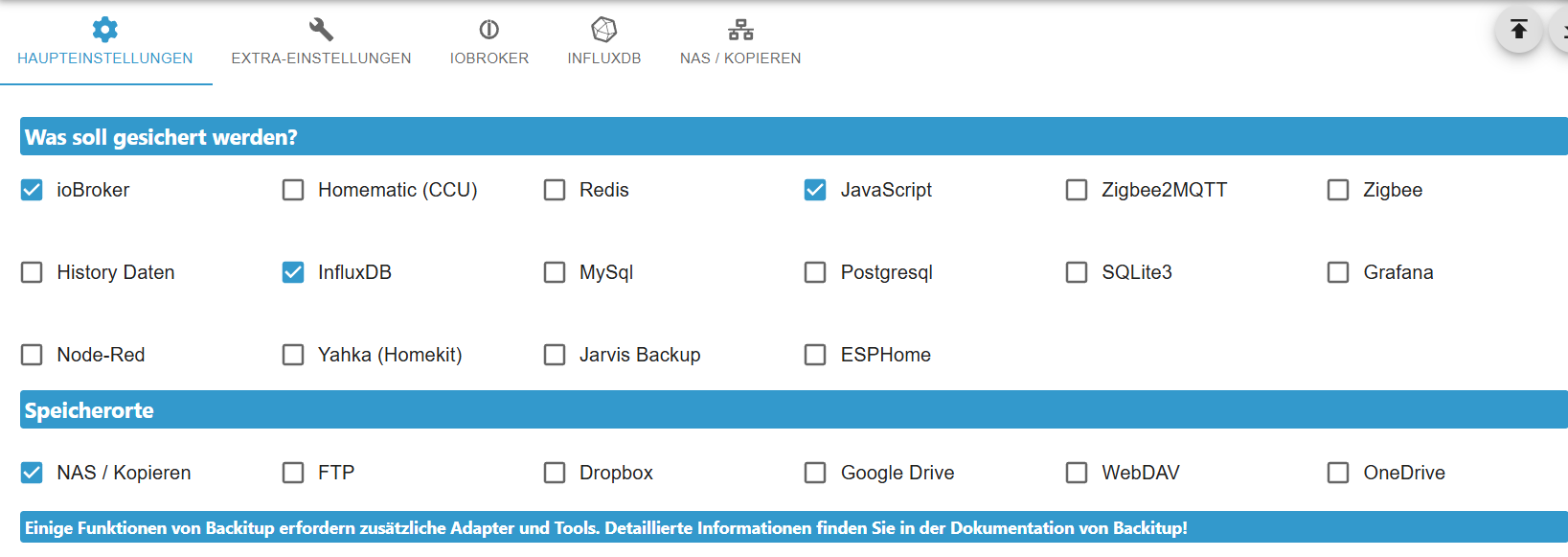
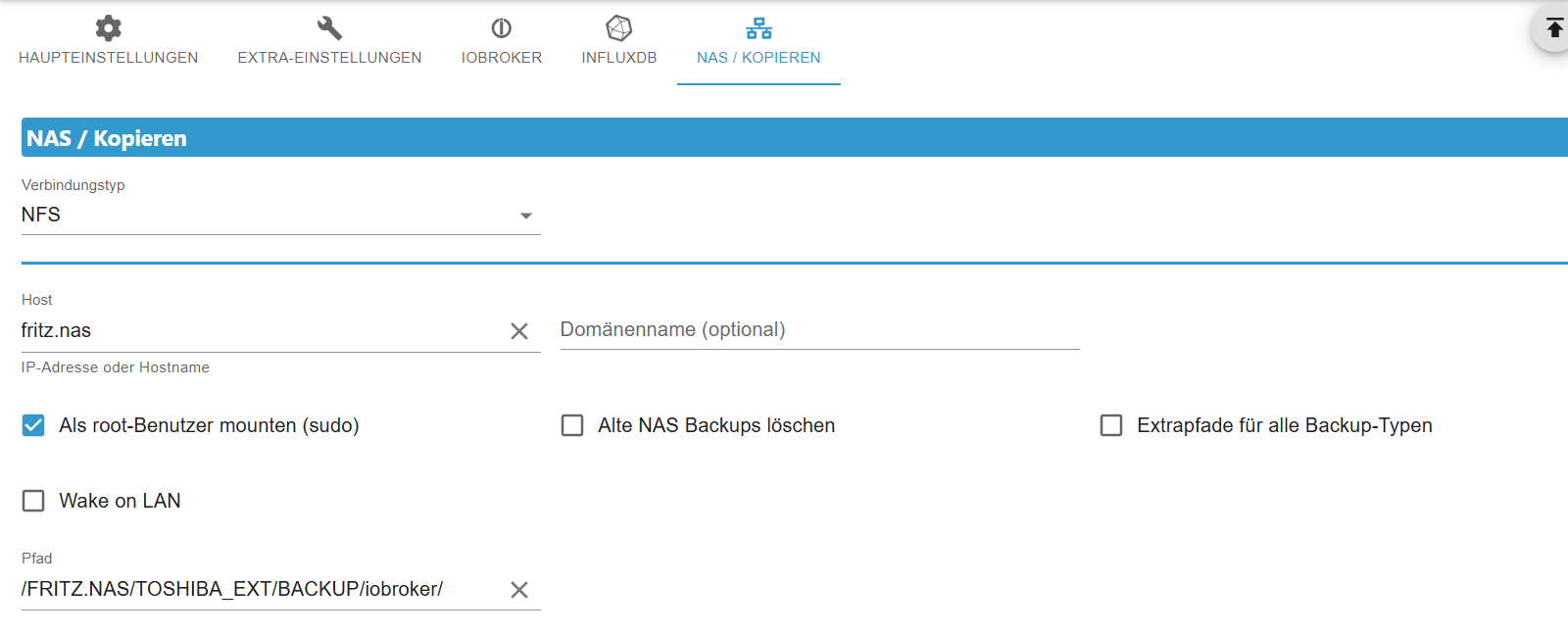
Im TotalCommander lautet der Windows-Pfad\\fritz.nas\FRITZ.NAS\TOSHIBA_EXT\BACKUP\iobroker\Wo gebe ich den Usernamen und das Kennwort für den Zugriff auf das Fritz.nas an?
Danke und Gruß
Hartmut -
ok habe das Thema mit der Verbindung zum Fritz.nas hinbekommen.
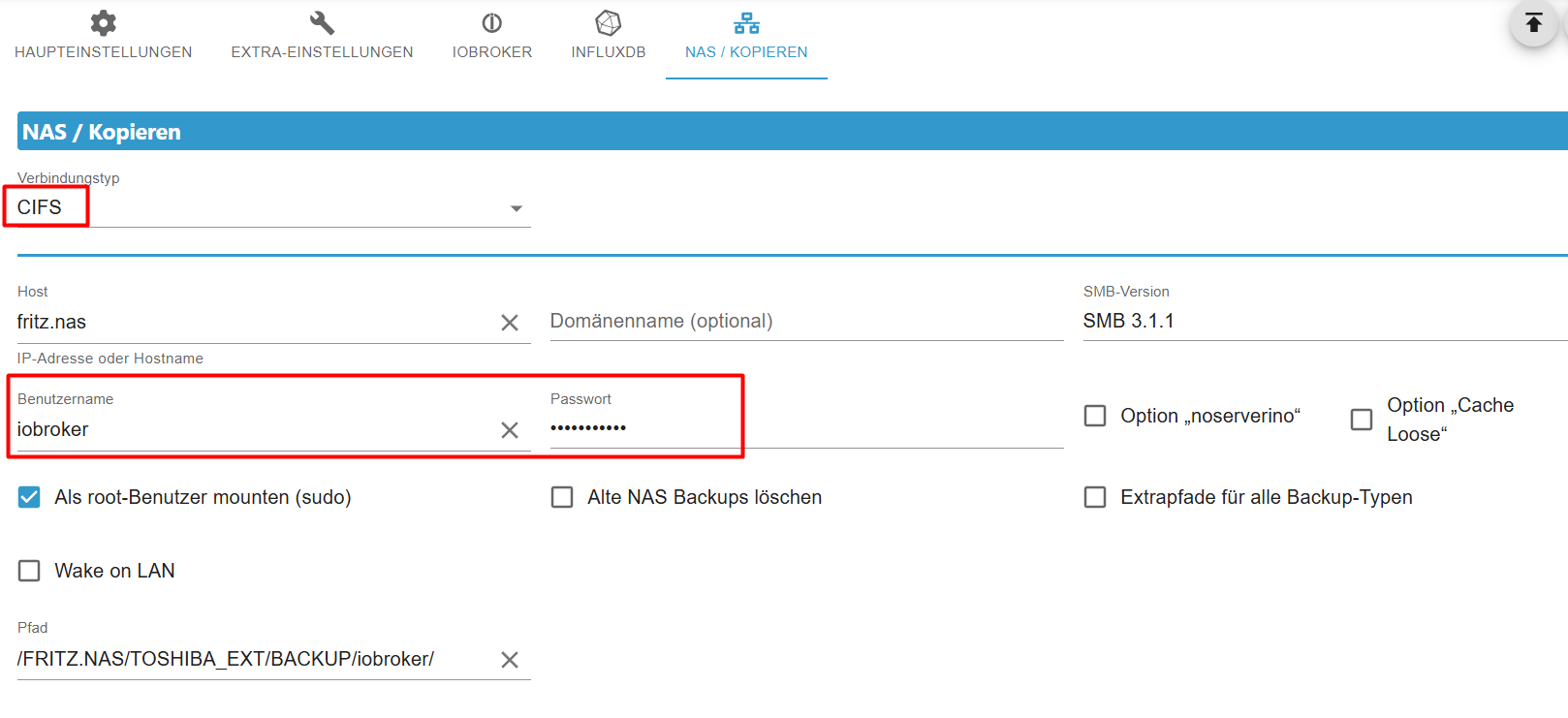
Jetzt klemmt es noch woanders:22:00:57.670INFOguiBackup gestartet ... 22:01:07.936DEBUGmountcifs-mount command: "sudo mount -t cifs -o username=iobroker,password=****,rw,forceuid,uid=iobroker,forcegid,gid=iobroker,file_mode=0777,dir_mode=0777,vers=3.1.1 //fritz.nas/FRITZ.NAS/TOSHIBA_EXT/BACKUP/iobroker/ /opt/iobroker/backups" 22:01:07.998DEBUGmountmount successfully completed 22:01:08.048DEBUGmountdone 22:01:11.818DEBUGiobrokerhost.pinas 1169 objects saved 22:01:11.928DEBUGiobrokerhost.pinas 826 states saved 22:01:11.938DEBUGiobrokerhost.pinas Validating backup ... host.pinas "config.json" is valid 22:01:11.950DEBUGiobrokerhost.pinas "objects.jsonl" exists host.pinas "states.jsonl" exists 22:01:12.228DEBUGiobrokerhost.pinas The backup is valid! 22:01:15.412DEBUGiobrokerThis backup can only be restored with js-controller version 7.0 or higher 22:01:16.437DEBUGiobrokerdone 22:01:16.586DEBUGinfluxDBInfluxDB-Backup started ... 22:01:16.591DEBUGinfluxDBStart InfluxDB Backup ... 22:01:16.652DEBUGinfluxDBInfluxDB Backup tmp directory created 22:01:17.062DEBUGinfluxDBTry deleting the InfluxDB tmp directory: "/opt/iobroker/backups/influxDB_2025_12_30-22_01_11_backupiobroker" 22:01:17.070DEBUGinfluxDBInfluxDB-Backup for is finish 22:01:17.105DEBUGinfluxDBdone 22:01:17.113DEBUGinfluxDBInfluxDB tmp directory "/opt/iobroker/backups/influxDB_2025_12_30-22_01_11_backupiobroker" successfully deleted 22:01:18.790DEBUGjavascriptsCreated javascript_tmp directory: "/opt/iobroker/backups/tmpScripts" 22:01:18.849DEBUGjavascriptsfound Script: AC-ELWA-2 22:01:19.030DEBUGjavascriptsfound Script: Stromzaehler_Tageswerte 22:01:19.199DEBUGjavascriptsfound Script: Test_HRU 22:01:19.350DEBUGjavascriptsfound Script: AlarmShellyPlusSmokeHZK 22:01:19.460DEBUGjavascriptsfound Script: AlarmShellyPlusSmokeHS 22:01:19.613DEBUGjavascriptsfound Script: AlarmShellyPlusSmokeG 22:01:19.814DEBUGjavascriptsfound Script: AlarmShellyPlusSmokeFK 22:01:19.919DEBUGjavascriptsfound Script: AlarmShellyPlusSmokeFEG 22:01:20.103DEBUGjavascriptsfound Script: AlarmShellyPlusSmokeFOG 22:01:20.222DEBUGjavascriptsfound Script: ShellyPlusSmoke_Batteriestand 22:01:20.374DEBUGjavascriptsfound Script: AlarmShellyGasHZK 22:01:20.566DEBUGjavascriptsfound Script: UptimeShellyGasHZK 22:01:20.678DEBUGjavascriptsfound Script: Weihnachtsbeleuchtung_schalten 22:01:20.830DEBUGjavascriptsfound Script: AlarmShellyFloodKuecheEG 22:01:21.147DEBUGjavascriptsJavascript tmp directory "/opt/iobroker/backups/tmpScripts" successfully deleted 22:01:21.164ERRORjavascriptsError: Unknown system error -116: Unknown system error -116, open '/opt/iobroker/backups/tmpScripts/script.json' 22:01:21.168DEBUGjavascriptsTry deleting the Javascript tmp directory: "/opt/iobroker/backups/tmpScripts" 22:01:21.173DEBUGjavascriptsJavascript tmp directory "/opt/iobroker/backups/tmpScripts" successfully deletedIrgendwelche Ideen?
Danke und Gruß
HartmutPV-Anlage:
13,5 kWp, WR: Sungrow SH10RT, Speicher: Sungrow SBR128, Heizstab: MyPV AC ELWA2
Sonstige Geräte:
ShellyPlusSmoke Rauchwarnmelder, Shelly Gas Warnmelder, Shelly Flood,
IR-Leseköpfe für Stromzähler -
ok habe das Thema mit der Verbindung zum Fritz.nas hinbekommen.
Jetzt klemmt es noch woanders:22:00:57.670INFOguiBackup gestartet ... 22:01:07.936DEBUGmountcifs-mount command: "sudo mount -t cifs -o username=iobroker,password=****,rw,forceuid,uid=iobroker,forcegid,gid=iobroker,file_mode=0777,dir_mode=0777,vers=3.1.1 //fritz.nas/FRITZ.NAS/TOSHIBA_EXT/BACKUP/iobroker/ /opt/iobroker/backups" 22:01:07.998DEBUGmountmount successfully completed 22:01:08.048DEBUGmountdone 22:01:11.818DEBUGiobrokerhost.pinas 1169 objects saved 22:01:11.928DEBUGiobrokerhost.pinas 826 states saved 22:01:11.938DEBUGiobrokerhost.pinas Validating backup ... host.pinas "config.json" is valid 22:01:11.950DEBUGiobrokerhost.pinas "objects.jsonl" exists host.pinas "states.jsonl" exists 22:01:12.228DEBUGiobrokerhost.pinas The backup is valid! 22:01:15.412DEBUGiobrokerThis backup can only be restored with js-controller version 7.0 or higher 22:01:16.437DEBUGiobrokerdone 22:01:16.586DEBUGinfluxDBInfluxDB-Backup started ... 22:01:16.591DEBUGinfluxDBStart InfluxDB Backup ... 22:01:16.652DEBUGinfluxDBInfluxDB Backup tmp directory created 22:01:17.062DEBUGinfluxDBTry deleting the InfluxDB tmp directory: "/opt/iobroker/backups/influxDB_2025_12_30-22_01_11_backupiobroker" 22:01:17.070DEBUGinfluxDBInfluxDB-Backup for is finish 22:01:17.105DEBUGinfluxDBdone 22:01:17.113DEBUGinfluxDBInfluxDB tmp directory "/opt/iobroker/backups/influxDB_2025_12_30-22_01_11_backupiobroker" successfully deleted 22:01:18.790DEBUGjavascriptsCreated javascript_tmp directory: "/opt/iobroker/backups/tmpScripts" 22:01:18.849DEBUGjavascriptsfound Script: AC-ELWA-2 22:01:19.030DEBUGjavascriptsfound Script: Stromzaehler_Tageswerte 22:01:19.199DEBUGjavascriptsfound Script: Test_HRU 22:01:19.350DEBUGjavascriptsfound Script: AlarmShellyPlusSmokeHZK 22:01:19.460DEBUGjavascriptsfound Script: AlarmShellyPlusSmokeHS 22:01:19.613DEBUGjavascriptsfound Script: AlarmShellyPlusSmokeG 22:01:19.814DEBUGjavascriptsfound Script: AlarmShellyPlusSmokeFK 22:01:19.919DEBUGjavascriptsfound Script: AlarmShellyPlusSmokeFEG 22:01:20.103DEBUGjavascriptsfound Script: AlarmShellyPlusSmokeFOG 22:01:20.222DEBUGjavascriptsfound Script: ShellyPlusSmoke_Batteriestand 22:01:20.374DEBUGjavascriptsfound Script: AlarmShellyGasHZK 22:01:20.566DEBUGjavascriptsfound Script: UptimeShellyGasHZK 22:01:20.678DEBUGjavascriptsfound Script: Weihnachtsbeleuchtung_schalten 22:01:20.830DEBUGjavascriptsfound Script: AlarmShellyFloodKuecheEG 22:01:21.147DEBUGjavascriptsJavascript tmp directory "/opt/iobroker/backups/tmpScripts" successfully deleted 22:01:21.164ERRORjavascriptsError: Unknown system error -116: Unknown system error -116, open '/opt/iobroker/backups/tmpScripts/script.json' 22:01:21.168DEBUGjavascriptsTry deleting the Javascript tmp directory: "/opt/iobroker/backups/tmpScripts" 22:01:21.173DEBUGjavascriptsJavascript tmp directory "/opt/iobroker/backups/tmpScripts" successfully deletedIrgendwelche Ideen?
Danke und Gruß
Hartmut@hru option noserverino Haken setzen
@hru sagte in ioBroker nicht mehr erreichbar:
bin ich mir nicht sicher ob das so stimmt
umgestiegen von Proxmox auf Unraid
-
@hru option noserverino Haken setzen
@hru sagte in ioBroker nicht mehr erreichbar:
bin ich mir nicht sicher ob das so stimmt
-
@hru option noserverino Haken setzen
@hru sagte in ioBroker nicht mehr erreichbar:
bin ich mir nicht sicher ob das so stimmt
@crunchip sagte in ioBroker nicht mehr erreichbar:
option noserverino Haken setzen
ok habe ich gesetzt
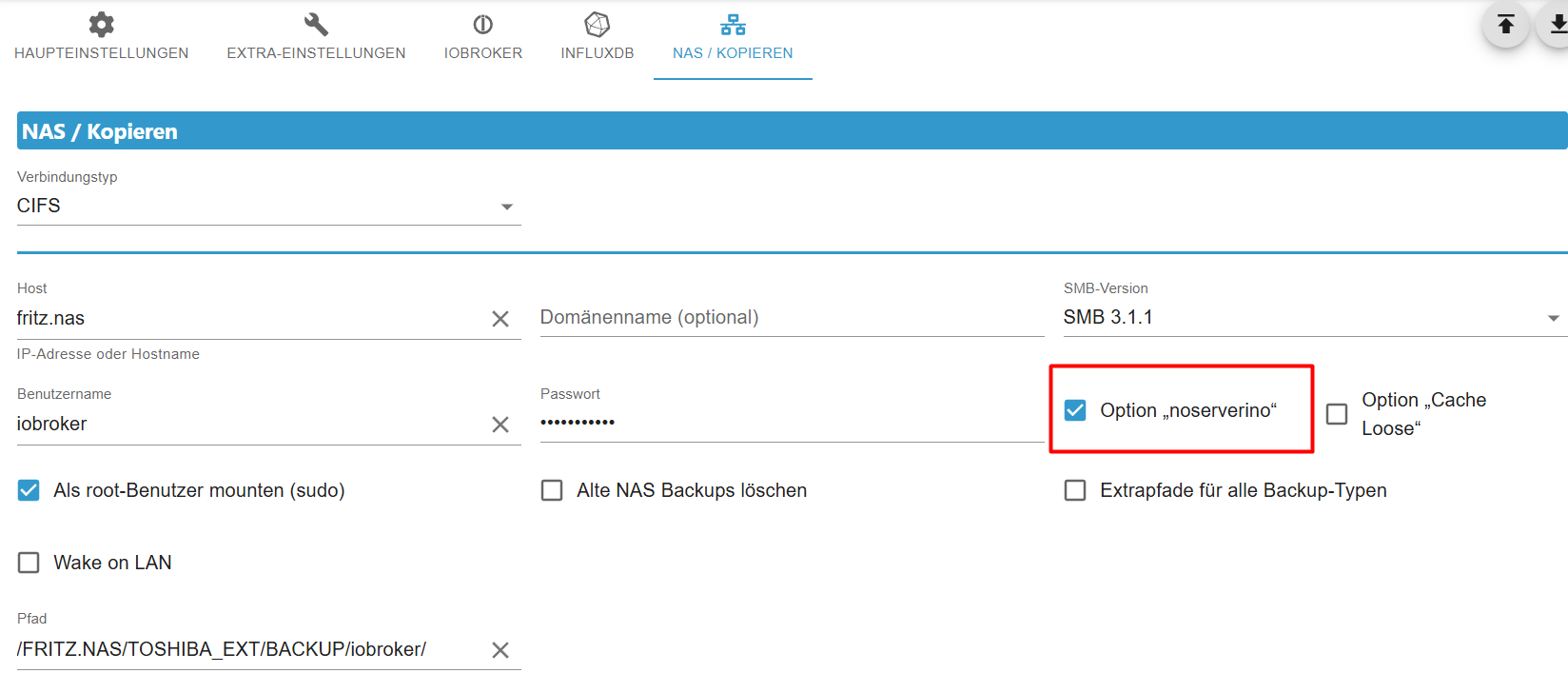
was bedeutet das?PV-Anlage:
13,5 kWp, WR: Sungrow SH10RT, Speicher: Sungrow SBR128, Heizstab: MyPV AC ELWA2
Sonstige Geräte:
ShellyPlusSmoke Rauchwarnmelder, Shelly Gas Warnmelder, Shelly Flood,
IR-Leseköpfe für Stromzähler -
auf jeden Fall sind die Error-Meldungen jetzt weg:
22:26:25.345INFOguiBackup gestartet ...
22:26:35.506DEBUGmountcifs-mount command: "sudo mount -t cifs -o username=iobroker,password=****,noserverino,rw,forceuid,uid=iobroker,forcegid,gid=iobroker,file_mode=0777,dir_mode=0777,vers=3.1.1 //fritz.nas/FRITZ.NAS/TOSHIBA_EXT/BACKUP/iobroker/ /opt/iobroker/backups"
22:26:35.568DEBUGmountmount successfully completed
22:26:35.614DEBUGmountdone
22:26:39.909DEBUGiobrokerhost.pinas 1169 objects saved
22:26:40.001DEBUGiobrokerhost.pinas 826 states saved
22:26:40.009DEBUGiobrokerhost.pinas Validating backup ...
22:26:40.015DEBUGiobrokerhost.pinas "config.json" is valid
host.pinas "objects.jsonl" exists
host.pinas "states.jsonl" exists
22:26:40.420DEBUGiobrokerhost.pinas JSONL lines are valid
22:26:40.423DEBUGiobrokerhost.pinas The backup is valid!
22:26:41.134DEBUGiobrokerThis backup can only be restored with js-controller version 7.0 or higher
22:26:42.264DEBUGiobrokerdone
22:26:42.321DEBUGinfluxDBInfluxDB-Backup started ...
22:26:42.387DEBUGinfluxDBInfluxDB Backup tmp directory created
22:26:43.075DEBUGinfluxDBTry deleting the InfluxDB tmp directory: "/opt/iobroker/backups/influxDB_2025_12_30-22_26_36_backupiobroker"
22:26:43.104DEBUGinfluxDBInfluxDB tmp directory "/opt/iobroker/backups/influxDB_2025_12_30-22_26_36_backupiobroker" successfully deleted
22:26:43.113DEBUGinfluxDBInfluxDB-Backup for is finish
22:26:43.147DEBUGinfluxDBdone
22:26:44.824DEBUGjavascriptsCreated javascript_tmp directory: "/opt/iobroker/backups/tmpScripts"
22:26:44.901DEBUGjavascriptsfound Script: AC-ELWA-2
22:26:45.047DEBUGjavascriptsfound Script: Stromzaehler_Tageswerte
22:26:45.236DEBUGjavascriptsfound Script: Test_HRU
22:26:45.354DEBUGjavascriptsfound Script: AlarmShellyPlusSmokeHZK
22:26:45.537DEBUGjavascriptsfound Script: AlarmShellyPlusSmokeHS
22:26:45.664DEBUGjavascriptsfound Script: AlarmShellyPlusSmokeG
22:26:45.813DEBUGjavascriptsfound Script: AlarmShellyPlusSmokeFK
22:26:45.976DEBUGjavascriptsfound Script: AlarmShellyPlusSmokeFEG
22:26:46.118DEBUGjavascriptsfound Script: AlarmShellyPlusSmokeFOG
22:26:46.268DEBUGjavascriptsfound Script: ShellyPlusSmoke_Batteriestand
22:26:46.426DEBUGjavascriptsfound Script: AlarmShellyGasHZK
22:26:46.570DEBUGjavascriptsfound Script: UptimeShellyGasHZK
22:26:46.721DEBUGjavascriptsfound Script: Weihnachtsbeleuchtung_schalten
22:26:46.879DEBUGjavascriptsfound Script: AlarmShellyFloodKuecheEG
22:26:47.180DEBUGjavascriptsTry deleting the Javascript tmp directory: "/opt/iobroker/backups/tmpScripts"
22:26:47.187DEBUGjavascriptsJavascript tmp directory "/opt/iobroker/backups/tmpScripts" successfully deleted
22:26:47.203DEBUGjavascriptsBackup created: /opt/iobroker/backups/javascripts_2025_12_30-22_26_39_backupiobroker.tar.gz
22:26:47.208DEBUGjavascriptsdone
22:26:48.103DEBUGcifsused copy path: /FRITZ.NAS/TOSHIBA_EXT/BACKUP/iobroker/
22:26:48.127DEBUGcifsdone
22:26:48.682WARNcleanNo older backup files are deleted, because this backup was started manually
22:26:48.711DEBUGcleandone
22:26:48.874DEBUGhistoryHTMLnew history html values created
22:26:48.951DEBUGhistoryHTMLdone
22:26:49.184DEBUGhistoryJSONnew history json values created
22:26:49.198DEBUGhistoryJSONdone
22:26:49.314DEBUGumountmount active, umount is started ...
22:26:54.402DEBUGumountumount successfully completed
22:26:54.408DEBUGumountdone
22:26:56.807DEBUGnotificationdone
22:26:56.953INFOguiDas Backup wurde erfolgreich erstellt!




Hey! Du scheinst an dieser Unterhaltung interessiert zu sein, hast aber noch kein Konto.
Hast du es satt, bei jedem Besuch durch die gleichen Beiträge zu scrollen? Wenn du dich für ein Konto anmeldest, kommst du immer genau dorthin zurück, wo du zuvor warst, und kannst dich über neue Antworten benachrichtigen lassen (entweder per E-Mail oder Push-Benachrichtigung). Du kannst auch Lesezeichen speichern und Beiträge positiv bewerten, um anderen Community-Mitgliedern deine Wertschätzung zu zeigen.
Mit deinem Input könnte dieser Beitrag noch besser werden 💗
Registrieren AnmeldenSupport us
480
Online33.0k
Benutzer83.6k
Themen1.3m
Beiträge