



Skip to content
  • Home
  • Aktuell
  • Tags
  • 0 Ungelesen 0
  • Kategorien
  • Unreplied
  • Beliebt
  • GitHub
  • Docu
  • Hilfe
Skins
  • Light
  • Brite
  • Cerulean
  • Cosmo
  • Flatly
  • Journal
  • Litera
  • Lumen
  • Lux
  • Materia
  • Minty
  • Morph
  • Pulse
  • Sandstone
  • Simplex
  • Sketchy
  • Spacelab
  • United
  • Yeti
  • Zephyr
  • Dark
  • Cyborg
  • Darkly
  • Quartz
  • Slate
  • Solar
  • Superhero
  • Vapor

  • Standard: (Kein Skin)
  • Kein Skin
Einklappen
ioBroker Logo

Community Forum

donate donate
  1. ioBroker Community Home
  2. Deutsch
  3. ioBroker Allgemein
  4. Umzug von Windows aus linux

NEWS

  • Jahresrückblick 2025 – unser neuer Blogbeitrag ist online! ✨
    BluefoxB
    Bluefox
    16
    1
    951

  • Neuer Blogbeitrag: Monatsrückblick - Dezember 2025 🎄
    BluefoxB
    Bluefox
    13
    1
    690

  • Weihnachtsangebot 2025! 🎄
    BluefoxB
    Bluefox
    25
    1
    2.0k

Umzug von Windows aus linux

Geplant Angeheftet Gesperrt Verschoben ioBroker Allgemein
48 Beiträge 4 Kommentatoren 413 Aufrufe 4 Watching
  • Älteste zuerst
  • Neuste zuerst
  • Meiste Stimmen
Antworten
  • In einem neuen Thema antworten
Anmelden zum Antworten
Dieses Thema wurde gelöscht. Nur Nutzer mit entsprechenden Rechten können es sehen.
  • W Wichtelmann

    @Thomas-Braun
    im log scheinen fehler zu stehen, hier ein Auszug

    2025-12-28 23:29:39.643  - error: hm-rpc.3 (3041) Init not possible, going to stop: response timeout
    2025-12-28 23:29:39.643  - warn: hm-rpc.3 (3041) setTimeout called, but adapter is shutting down
    2025-12-28 23:29:40.644  - info: hm-rpc.3 (3041) terminating
    2025-12-28 23:29:40.645  - info: hm-rpc.3 (3041) Terminated (NO_ERROR): Without reason
    2025-12-28 22:29:41.175  - info: host.ioBrokerDebian instance system.adapter.hm-rpc.3 terminated with code 0 (NO_ERROR)
    2025-12-28 22:29:41.175  - info: host.ioBrokerDebian Restart adapter system.adapter.hm-rpc.3 because enabled
    2025-12-28 22:29:41.953  - info: shelly.0 (2786) [Sys.timezone] 192.168.178.95 (shelly1pmminig3 / shelly1pmminig3-34b7da9115a0 / shelly1pmminig3#34b7da9115a0#1): Configured timezone "Europe/Berlin" and system timezone "UTC" do not match. Please check configuration
    
    Thomas BraunT Online
    Thomas BraunT Online
    Thomas Braun
    Most Active
    schrieb am zuletzt editiert von
    #26

    @Wichtelmann

    Alles zeigen.
    Aber offenbar ist deine Zeitzone schon falsch.

    Linux-Werkzeugkasten:
    https://forum.iobroker.net/topic/42952/der-kleine-iobroker-linux-werkzeugkasten
    NodeJS Fixer Skript:
    https://forum.iobroker.net/topic/68035/iob-node-fix-skript
    iob_diag: curl -sLf -o diag.sh https://iobroker.net/diag.sh && bash diag.sh

    W 1 Antwort Letzte Antwort
    0
    • Thomas BraunT Thomas Braun

      @Wichtelmann

      Alles zeigen.
      Aber offenbar ist deine Zeitzone schon falsch.

      W Offline
      W Offline
      Wichtelmann
      schrieb am zuletzt editiert von
      #27

      @Thomas-Braun
      hab die Zeitzone mittlerweile korrigiert. Kann ich den LXC einfach mal neu starten? Wird die Installation der Adapter dann fortgesetzt bzw neu gestartet?

      Thomas BraunT 1 Antwort Letzte Antwort
      0
      • W Wichtelmann

        @Thomas-Braun
        hab die Zeitzone mittlerweile korrigiert. Kann ich den LXC einfach mal neu starten? Wird die Installation der Adapter dann fortgesetzt bzw neu gestartet?

        Thomas BraunT Online
        Thomas BraunT Online
        Thomas Braun
        Most Active
        schrieb am zuletzt editiert von
        #28

        @Wichtelmann

        Das Backup dürfte durch sein. Sind die Instanzen alle geladen?

        Linux-Werkzeugkasten:
        https://forum.iobroker.net/topic/42952/der-kleine-iobroker-linux-werkzeugkasten
        NodeJS Fixer Skript:
        https://forum.iobroker.net/topic/68035/iob-node-fix-skript
        iob_diag: curl -sLf -o diag.sh https://iobroker.net/diag.sh && bash diag.sh

        W 1 Antwort Letzte Antwort
        0
        • Thomas BraunT Thomas Braun

          @Wichtelmann

          Das Backup dürfte durch sein. Sind die Instanzen alle geladen?

          W Offline
          W Offline
          Wichtelmann
          schrieb am zuletzt editiert von
          #29

          @Thomas-Braun
          es sieht so aus, ja. Lassen sch auch alle soweit starten, die VIS läuft, Scripte sind auch da.
          Dennoch zeigt das log ja noch Fehler mit der Zeitzone und Shelly Adaptern...

          Thomas BraunT 1 Antwort Letzte Antwort
          0
          • W Wichtelmann

            @Thomas-Braun
            es sieht so aus, ja. Lassen sch auch alle soweit starten, die VIS läuft, Scripte sind auch da.
            Dennoch zeigt das log ja noch Fehler mit der Zeitzone und Shelly Adaptern...

            Thomas BraunT Online
            Thomas BraunT Online
            Thomas Braun
            Most Active
            schrieb am zuletzt editiert von Thomas Braun
            #30

            @Wichtelmann

            iob diag
            

            in Gänze und unverändert posten.

            Linux-Werkzeugkasten:
            https://forum.iobroker.net/topic/42952/der-kleine-iobroker-linux-werkzeugkasten
            NodeJS Fixer Skript:
            https://forum.iobroker.net/topic/68035/iob-node-fix-skript
            iob_diag: curl -sLf -o diag.sh https://iobroker.net/diag.sh && bash diag.sh

            W 1 Antwort Letzte Antwort
            0
            • Thomas BraunT Thomas Braun

              @Wichtelmann

              iob diag
              

              in Gänze und unverändert posten.

              W Offline
              W Offline
              Wichtelmann
              schrieb am zuletzt editiert von
              #31

              @Thomas-Braun

              admin_user@ioBrokerDebian:~$ iob diag
              [sudo] password for admin_user: 
              /usr/bin/iob: line 21: /home/iobroker/iob_diag.log: Permission denied
              
              Thomas BraunT 1 Antwort Letzte Antwort
              0
              • W Wichtelmann

                @Thomas-Braun

                admin_user@ioBrokerDebian:~$ iob diag
                [sudo] password for admin_user: 
                /usr/bin/iob: line 21: /home/iobroker/iob_diag.log: Permission denied
                
                Thomas BraunT Online
                Thomas BraunT Online
                Thomas Braun
                Most Active
                schrieb am zuletzt editiert von
                #32

                @Wichtelmann

                Hast du nach der Installation des ioBrokers a) den user ausgeloggt und b) danach den 'iob fix' (Wie im Installer gefordert) ausgeführt?

                Linux-Werkzeugkasten:
                https://forum.iobroker.net/topic/42952/der-kleine-iobroker-linux-werkzeugkasten
                NodeJS Fixer Skript:
                https://forum.iobroker.net/topic/68035/iob-node-fix-skript
                iob_diag: curl -sLf -o diag.sh https://iobroker.net/diag.sh && bash diag.sh

                W 1 Antwort Letzte Antwort
                0
                • Thomas BraunT Thomas Braun

                  @Wichtelmann

                  Hast du nach der Installation des ioBrokers a) den user ausgeloggt und b) danach den 'iob fix' (Wie im Installer gefordert) ausgeführt?

                  W Offline
                  W Offline
                  Wichtelmann
                  schrieb am zuletzt editiert von
                  #33

                  @Thomas-Braun
                  ich weiß gar nicht mehr genau, was ich alles nach ANleitung versucht hab.
                  aber a in jedem Fall
                  b ging soweit ich weiss nicht, sowas wir hier:

                  admin_user@ioBrokerDebian:~$ iob fix
                  bash: /home/iobroker/.fix.sh: Permission denied
                  
                  Thomas BraunT 1 Antwort Letzte Antwort
                  0
                  • W Wichtelmann

                    @Thomas-Braun
                    ich weiß gar nicht mehr genau, was ich alles nach ANleitung versucht hab.
                    aber a in jedem Fall
                    b ging soweit ich weiss nicht, sowas wir hier:

                    admin_user@ioBrokerDebian:~$ iob fix
                    bash: /home/iobroker/.fix.sh: Permission denied
                    
                    Thomas BraunT Online
                    Thomas BraunT Online
                    Thomas Braun
                    Most Active
                    schrieb am zuletzt editiert von
                    #34

                    @Wichtelmann

                    id
                    

                    sagt?

                    Linux-Werkzeugkasten:
                    https://forum.iobroker.net/topic/42952/der-kleine-iobroker-linux-werkzeugkasten
                    NodeJS Fixer Skript:
                    https://forum.iobroker.net/topic/68035/iob-node-fix-skript
                    iob_diag: curl -sLf -o diag.sh https://iobroker.net/diag.sh && bash diag.sh

                    W 1 Antwort Letzte Antwort
                    0
                    • Thomas BraunT Thomas Braun

                      @Wichtelmann

                      id
                      

                      sagt?

                      W Offline
                      W Offline
                      Wichtelmann
                      schrieb am zuletzt editiert von
                      #35

                      @Thomas-Braun

                      admin_user@ioBrokerDebian:~$ id
                      uid=1000(admin_user) gid=1000(admin_user) groups=1000(admin_user),27(sudo),100(users)
                      
                      Thomas BraunT 1 Antwort Letzte Antwort
                      0
                      • W Wichtelmann

                        @Thomas-Braun

                        admin_user@ioBrokerDebian:~$ id
                        uid=1000(admin_user) gid=1000(admin_user) groups=1000(admin_user),27(sudo),100(users)
                        
                        Thomas BraunT Online
                        Thomas BraunT Online
                        Thomas Braun
                        Most Active
                        schrieb am zuletzt editiert von
                        #36

                        @Wichtelmann #

                        Der user ist schon mal nicht in der Gruppe 'iobroker' enthalten.
                        Der andere denn?

                        Linux-Werkzeugkasten:
                        https://forum.iobroker.net/topic/42952/der-kleine-iobroker-linux-werkzeugkasten
                        NodeJS Fixer Skript:
                        https://forum.iobroker.net/topic/68035/iob-node-fix-skript
                        iob_diag: curl -sLf -o diag.sh https://iobroker.net/diag.sh && bash diag.sh

                        W 1 Antwort Letzte Antwort
                        0
                        • Thomas BraunT Thomas Braun

                          @Wichtelmann #

                          Der user ist schon mal nicht in der Gruppe 'iobroker' enthalten.
                          Der andere denn?

                          W Offline
                          W Offline
                          Wichtelmann
                          schrieb am zuletzt editiert von
                          #37

                          @Thomas-Braun
                          irgendwie blick ich beu der Benutzer und Rechtevergabe von PX nicht durch.
                          Obwohl ich jetzt mit einem anderen Benutzer engemeldet bin, erscheine ich in der Konsole noch als admin_user

                          admin_user@ioBrokerDebian:~$ id
                          uid=1000(admin_user) gid=1000(admin_user) groups=1000(admin_user),27(sudo),100(users)
                          
                          Thomas BraunT 1 Antwort Letzte Antwort
                          0
                          • W Wichtelmann

                            @Thomas-Braun
                            irgendwie blick ich beu der Benutzer und Rechtevergabe von PX nicht durch.
                            Obwohl ich jetzt mit einem anderen Benutzer engemeldet bin, erscheine ich in der Konsole noch als admin_user

                            admin_user@ioBrokerDebian:~$ id
                            uid=1000(admin_user) gid=1000(admin_user) groups=1000(admin_user),27(sudo),100(users)
                            
                            Thomas BraunT Online
                            Thomas BraunT Online
                            Thomas Braun
                            Most Active
                            schrieb am zuletzt editiert von
                            #38

                            @Wichtelmann sagte in Umzug von Windows aus linux:

                            Obwohl ich jetzt mit einem anderen Benutzer engemeldet bin, erscheine ich in der Konsole noch als admin_user

                            Wie und wo meldest du dich denn mit dem anderen user an?

                            Und nach welcher Anleitung hast du das Ding überhaupt aufgesetzt?
                            Bestimmt nicht nach
                            https://www.iobroker.net/#de/documentation/install/proxmox.md
                            Dann hättest du nämlich einen user, der dafür aber funktioniert...

                            Linux-Werkzeugkasten:
                            https://forum.iobroker.net/topic/42952/der-kleine-iobroker-linux-werkzeugkasten
                            NodeJS Fixer Skript:
                            https://forum.iobroker.net/topic/68035/iob-node-fix-skript
                            iob_diag: curl -sLf -o diag.sh https://iobroker.net/diag.sh && bash diag.sh

                            W 1 Antwort Letzte Antwort
                            0
                            • Thomas BraunT Thomas Braun

                              @Wichtelmann sagte in Umzug von Windows aus linux:

                              Obwohl ich jetzt mit einem anderen Benutzer engemeldet bin, erscheine ich in der Konsole noch als admin_user

                              Wie und wo meldest du dich denn mit dem anderen user an?

                              Und nach welcher Anleitung hast du das Ding überhaupt aufgesetzt?
                              Bestimmt nicht nach
                              https://www.iobroker.net/#de/documentation/install/proxmox.md
                              Dann hättest du nämlich einen user, der dafür aber funktioniert...

                              W Offline
                              W Offline
                              Wichtelmann
                              schrieb am zuletzt editiert von
                              #39

                              @Thomas-Braun
                              tut mir leid, ich hatte in den letzten Tagen so viel probiert und neue LXC Container errichtet und mich mit ioBroker vesucht...
                              Ich melde mich im Proxmox mit denverschiedenen Benutern an und nutze dort dann die Konsole

                              Thomas BraunT 1 Antwort Letzte Antwort
                              0
                              • W Wichtelmann

                                @Thomas-Braun
                                tut mir leid, ich hatte in den letzten Tagen so viel probiert und neue LXC Container errichtet und mich mit ioBroker vesucht...
                                Ich melde mich im Proxmox mit denverschiedenen Benutern an und nutze dort dann die Konsole

                                Thomas BraunT Online
                                Thomas BraunT Online
                                Thomas Braun
                                Most Active
                                schrieb am zuletzt editiert von
                                #40

                                @Wichtelmann sagte in Umzug von Windows aus linux:

                                Ich melde mich im Proxmox mit denverschiedenen Benutern an und nutze dort dann die Konsole

                                Im LXC musst du dich anmelden.

                                Linux-Werkzeugkasten:
                                https://forum.iobroker.net/topic/42952/der-kleine-iobroker-linux-werkzeugkasten
                                NodeJS Fixer Skript:
                                https://forum.iobroker.net/topic/68035/iob-node-fix-skript
                                iob_diag: curl -sLf -o diag.sh https://iobroker.net/diag.sh && bash diag.sh

                                W 1 Antwort Letzte Antwort
                                0
                                • Thomas BraunT Thomas Braun

                                  @Wichtelmann sagte in Umzug von Windows aus linux:

                                  Ich melde mich im Proxmox mit denverschiedenen Benutern an und nutze dort dann die Konsole

                                  Im LXC musst du dich anmelden.

                                  W Offline
                                  W Offline
                                  Wichtelmann
                                  schrieb am zuletzt editiert von
                                  #41

                                  @Thomas-Braun
                                  ja das denke ich zu tun - es sei denn ich ich verstehe Dich falsch
                                  Entschuldige meine Naivität :(
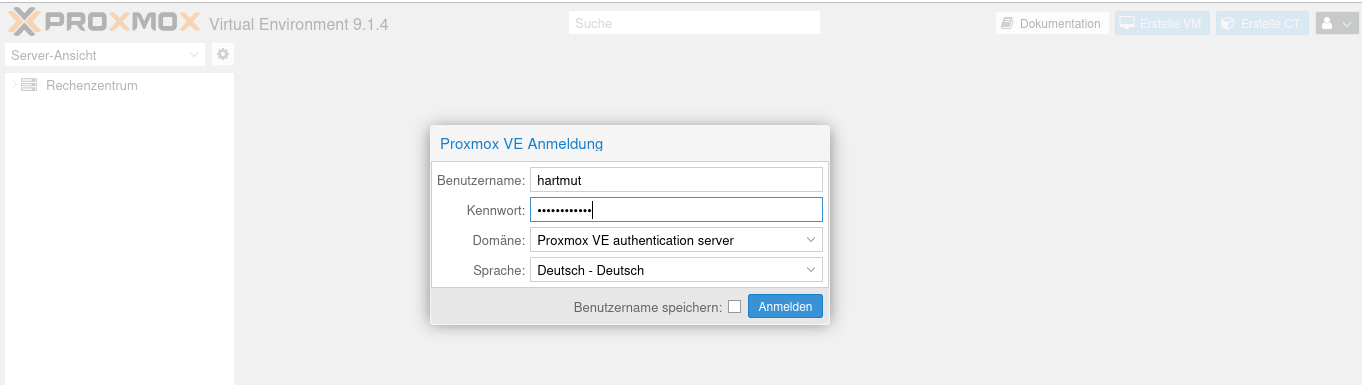
                                  Bildschirmfoto zu 2025-12-29 00-40-15.png

                                  Thomas BraunT 1 Antwort Letzte Antwort
                                  0
                                  • W Wichtelmann

                                    @Thomas-Braun
                                    ja das denke ich zu tun - es sei denn ich ich verstehe Dich falsch
                                    Entschuldige meine Naivität :(
                                    Bildschirmfoto zu 2025-12-29 00-40-15.png

                                    Thomas BraunT Online
                                    Thomas BraunT Online
                                    Thomas Braun
                                    Most Active
                                    schrieb am zuletzt editiert von
                                    #42

                                    @Wichtelmann

                                    Ich kenne Proxmox nicht. Aber offenbar ist das ein Login auf dem PVE, nicht im LXC.

                                    Linux-Werkzeugkasten:
                                    https://forum.iobroker.net/topic/42952/der-kleine-iobroker-linux-werkzeugkasten
                                    NodeJS Fixer Skript:
                                    https://forum.iobroker.net/topic/68035/iob-node-fix-skript
                                    iob_diag: curl -sLf -o diag.sh https://iobroker.net/diag.sh && bash diag.sh

                                    W 1 Antwort Letzte Antwort
                                    0
                                    • Thomas BraunT Thomas Braun

                                      @Wichtelmann

                                      Ich kenne Proxmox nicht. Aber offenbar ist das ein Login auf dem PVE, nicht im LXC.

                                      W Offline
                                      W Offline
                                      Wichtelmann
                                      schrieb am zuletzt editiert von
                                      #43

                                      @Thomas-Braun
                                      Ich habe Dich schon genug beansprucht, sorry
                                      Ich muss mal in die Heia und veruche morgen weiter
                                      Danke!!

                                      1 Antwort Letzte Antwort
                                      0
                                      • W Wichtelmann

                                        @crunchip sagte in Umzug von Windows aus linux:

                                        @Wichtelmann sagte in Umzug von Windows aus linux:

                                        Admin User sowie "normalen" User erstell

                                        nur so nebenbei, was ist der Unterschied?

                                        der eine hat Admin-Rechte ist aber halt kein root und der "normale" ist eingeschränkt, halt nur Benutzer

                                        Das Restore-Fenster wird schnell ausgegraut und reagiert nicht mehr. Ist das normal und der Restore-Vorgang läuft im Hintergrund weiter?

                                        crunchipC Abwesend
                                        crunchipC Abwesend
                                        crunchip
                                        Forum Testing Most Active
                                        schrieb am zuletzt editiert von
                                        #44

                                        @Wichtelmann hatte nicht umsonst nach dem Unterschied deiner User gefragt.
                                        Und dir extra weiter oben schon den link zur Installation gezeigt

                                        umgestiegen von Proxmox auf Unraid

                                        W 1 Antwort Letzte Antwort
                                        1
                                        • crunchipC crunchip

                                          @Wichtelmann hatte nicht umsonst nach dem Unterschied deiner User gefragt.
                                          Und dir extra weiter oben schon den link zur Installation gezeigt

                                          W Offline
                                          W Offline
                                          Wichtelmann
                                          schrieb am zuletzt editiert von
                                          #45

                                          @crunchip
                                          Bin froh dass es jetzt mal läuft und möchte nur ungern eine neue Installation beginnen.
                                          Konnte nun per SSH zugreifen und in iob diag aufrufen

                                          
                                          ========== Start marking the full check here ===========
                                          
                                          ```bash
                                          Script v.2025-08-09
                                          
                                          *** BASE SYSTEM ***
                                          Operating System: Debian GNU/Linux 13 (trixie)
                                           Static hostname: ioBrokerDebian
                                                 Icon name: computer-container
                                                   Chassis: container ☐
                                            Virtualization: lxc
                                                    Kernel: Linux 6.17.4-1-pve
                                              Architecture: x86-64
                                          OS is similar to:
                                          
                                          model name      : AMD Ryzen 3 4300U with Radeon Graphics
                                          Docker          : false
                                          Virtualization  : lxc
                                          Kernel          : x86_64
                                          Userland        : 64 bit
                                          
                                          Systemuptime and Load:
                                           12:35:07 up 14:13,  2 users,  load average: 0.05, 0.30, 0.39
                                          CPU threads: 2
                                          
                                          
                                          *** LIFE CYCLE STATUS ***
                                          Operating System is the current Debian stable version codenamed 'trixie'!
                                          
                                          *** TIME AND TIMEZONES ***
                                                         Local time: Mon 2025-12-29 12:35:07 CET
                                                     Universal time: Mon 2025-12-29 11:35:07 UTC
                                                           RTC time: n/a
                                                          Time zone: Europe/Berlin (CET, +0100)
                                          System clock synchronized: yes
                                                        NTP service: inactive
                                                    RTC in local TZ: no
                                          
                                          *** Users and Groups ***
                                          User that called 'iob diag':
                                          root
                                          SUDO_HOME=/home/admin_user
                                          HOME=/root
                                          GROUPS=root
                                          
                                          User that is running 'js-controller':
                                          js-controller is not running
                                          
                                          A default user should be created! This user will be enabled to temporarily switch to root via 'sudo'!
                                          A root login is not required in most Linux Distributions.
                                          Run 'iobroker fix' or use the system tools to create a user.
                                          *** DISPLAY-SERVER SETUP ***
                                          Display-Server:         false
                                          Unit display-manager.service could not be found.
                                          Display-Manager:
                                          Desktop:
                                          Session:
                                          
                                          *** MEMORY ***
                                                         total        used        free      shared  buff/cache   available
                                          Mem:            7.2G         61M        5.4G        6.0M        1.8G        7.1G
                                          Swap:           536M         12K        536M
                                          Total:          7.7G         61M        5.9G
                                          
                                          Active iob-Instances:   1
                                          
                                                   6874 M total memory
                                                     58 M used memory
                                                    149 M active memory
                                                   1418 M inactive memory
                                                   5130 M free memory
                                                      0 M buffer memory
                                                   1690 M swap cache
                                                    512 M total swap
                                                      0 M used swap
                                                    511 M free swap
                                          
                                          *** top - Table Of Processes  ***
                                          top - 12:35:08 up 14:13,  2 users,  load average: 0.05, 0.30, 0.39
                                          Tasks:  38 total,   1 running,  37 sleeping,   0 stopped,   0 zombie
                                          %Cpu(s):  0.0 us,  4.0 sy,  0.0 ni, 88.0 id,  8.0 wa,  0.0 hi,  0.0 si,  0.0 st
                                          MiB Mem :   6874.2 total,   5129.3 free,     59.9 used,   1690.5 buff/cache
                                          MiB Swap:    512.0 total,    512.0 free,      0.0 used.   6814.3 avail Mem
                                          
                                          *** FAILED SERVICES ***
                                          
                                            UNIT                 LOAD   ACTIVE SUB    DESCRIPTION
                                          * run-rpc_pipefs.mount loaded failed failed RPC Pipe File System
                                          * iobroker.service     loaded failed failed ioBroker Server
                                          
                                          Legend: LOAD   -> Reflects whether the unit definition was properly loaded.
                                                  ACTIVE -> The high-level unit activation state, i.e. generalization of SUB.
                                                  SUB    -> The low-level unit activation state, values depend on unit type.
                                          
                                          2 loaded units listed.
                                          
                                          
                                          *** DMESG CRITICAL ERRORS ***
                                          dmesg: read kernel buffer failed: Operation not permitted
                                          No critical errors detected
                                          
                                          *** FILESYSTEM ***
                                          Filesystem                       Type      Size  Used Avail Use% Mounted on
                                          /dev/mapper/pve-vm--117--disk--0 ext4       20G  3.7G   15G  20% /
                                          none                             tmpfs     492K  4.0K  488K   1% /dev
                                          udev                             devtmpfs  3.4G     0  3.4G   0% /dev/tty
                                          tmpfs                            tmpfs     3.4G     0  3.4G   0% /dev/shm
                                          tmpfs                            tmpfs     1.4G  140K  1.4G   1% /run
                                          tmpfs                            tmpfs     5.0M     0  5.0M   0% /run/lock
                                          tmpfs                            tmpfs     3.4G  5.6M  3.4G   1% /tmp
                                          tmpfs                            tmpfs     688M  4.0K  688M   1% /run/user/1003
                                          tmpfs                            tmpfs     688M  4.0K  688M   1% /run/user/1000
                                          
                                          Messages concerning ext4 filesystem in dmesg:
                                          dmesg: read kernel buffer failed: Operation not permitted
                                          
                                          Show mounted filesystems:
                                          TARGET SOURCE                           FSTYPE OPTIONS
                                          /      /dev/mapper/pve-vm--117--disk--0 ext4   rw,relatime,stripe=16
                                          
                                          Files in neuralgic directories:
                                          
                                          /var:
                                          473M    /var/
                                          279M    /var/cache
                                          275M    /var/cache/apt
                                          185M    /var/cache/apt/archives
                                          161M    /var/lib
                                          
                                          Archived and active journals take up 32M in the file system.
                                          
                                          /opt/iobroker/backups:
                                          63M     /opt/iobroker/backups/
                                          
                                          /opt/iobroker/iobroker-data:
                                          264M    /opt/iobroker/iobroker-data/
                                          220M    /opt/iobroker/iobroker-data/files
                                          47M     /opt/iobroker/iobroker-data/files/admin.admin
                                          46M     /opt/iobroker/iobroker-data/files/admin.admin/custom/assets
                                          46M     /opt/iobroker/iobroker-data/files/admin.admin/custom
                                          
                                          The five largest files in iobroker-data are:
                                          16M     /opt/iobroker/iobroker-data/objects.jsonl
                                          9.8M    /opt/iobroker/iobroker-data/files/vis-2/material-icons/knx-uf.json
                                          8.1M    /opt/iobroker/iobroker-data/files/backitup.admin/assets/index-C_W7K-9p.js
                                          5.6M    /opt/iobroker/iobroker-data/files/vis/widgets/vis-2-widgets-energy/static/js/vendors-node_modules_echarts-for-react_esm_index_js                                                                             .fe14c058.chunk.js.map
                                          5.6M    /opt/iobroker/iobroker-data/files/vis/widgets/vis-2-widgets-energy/static/js/vendors-node_modules_echarts-for-react_esm_index_js                                                                             -node_modules_react_jsx-runtime_js.b995bce7.chunk.js.map
                                          
                                          USB-Devices by-id:
                                          USB-Sticks -  Avoid direct links to /dev/tty* in your adapter setups, please always prefer the links 'by-id':
                                          
                                          No Devices found 'by-id'
                                          
                                          Zigbee Network Settings on your coordinator/in nvbackup are:
                                          
                                          zigbee.X
                                          Extended Pan ID:
                                          *** MASKED ***
                                          Pan ID:
                                          *** MASKED ***
                                          Channel:
                                          *** MASKED ***
                                          Network Key:
                                          *** MASKED ***
                                          
                                          To unmask the settings run 'iob diag --unmask'
                                          
                                          
                                          *** NodeJS-Installation ***
                                          
                                          /usr/bin/nodejs         v22.21.0
                                          /usr/bin/node           v22.21.0
                                          /usr/bin/npm            10.9.4
                                          /usr/bin/npx            10.9.4
                                          /usr/bin/corepack       0.34.0
                                          
                                          nodejs:
                                            Installed: 22.21.0-1nodesource1
                                            Candidate: 22.21.0-1nodesource1
                                            Version table:
                                           *** 22.21.0-1nodesource1 1001
                                                  500 https://deb.nodesource.com/node_22.x nodistro/main amd64 Packages
                                                  100 /var/lib/dpkg/status
                                               22.20.0-1nodesource1 1001
                                                  500 https://deb.nodesource.com/node_22.x nodistro/main amd64 Packages
                                               22.19.0-1nodesource1 1001
                                                  500 https://deb.nodesource.com/node_22.x nodistro/main amd64 Packages
                                               22.18.0-1nodesource1 1001
                                                  500 https://deb.nodesource.com/node_22.x nodistro/main amd64 Packages
                                               22.17.1-1nodesource1 1001
                                                  500 https://deb.nodesource.com/node_22.x nodistro/main amd64 Packages
                                               22.17.0-1nodesource1 1001
                                                  500 https://deb.nodesource.com/node_22.x nodistro/main amd64 Packages
                                               22.16.0-1nodesource1 1001
                                                  500 https://deb.nodesource.com/node_22.x nodistro/main amd64 Packages
                                               22.15.1-1nodesource1 1001
                                                  500 https://deb.nodesource.com/node_22.x nodistro/main amd64 Packages
                                               22.15.0-1nodesource1 1001
                                                  500 https://deb.nodesource.com/node_22.x nodistro/main amd64 Packages
                                               22.14.0-1nodesource1 1001
                                                  500 https://deb.nodesource.com/node_22.x nodistro/main amd64 Packages
                                               22.13.1-1nodesource1 1001
                                                  500 https://deb.nodesource.com/node_22.x nodistro/main amd64 Packages
                                               22.13.0-1nodesource1 1001
                                                  500 https://deb.nodesource.com/node_22.x nodistro/main amd64 Packages
                                               22.12.0-1nodesource1 1001
                                                  500 https://deb.nodesource.com/node_22.x nodistro/main amd64 Packages
                                               22.11.0-1nodesource1 1001
                                                  500 https://deb.nodesource.com/node_22.x nodistro/main amd64 Packages
                                               22.10.0-1nodesource1 1001
                                                  500 https://deb.nodesource.com/node_22.x nodistro/main amd64 Packages
                                               22.9.0-1nodesource1 1001
                                                  500 https://deb.nodesource.com/node_22.x nodistro/main amd64 Packages
                                               22.8.0-1nodesource1 1001
                                                  500 https://deb.nodesource.com/node_22.x nodistro/main amd64 Packages
                                               22.7.0-1nodesource1 1001
                                                  500 https://deb.nodesource.com/node_22.x nodistro/main amd64 Packages
                                               22.6.0-1nodesource1 1001
                                                  500 https://deb.nodesource.com/node_22.x nodistro/main amd64 Packages
                                               22.5.1-1nodesource1 1001
                                                  500 https://deb.nodesource.com/node_22.x nodistro/main amd64 Packages
                                               22.5.0-1nodesource1 1001
                                                  500 https://deb.nodesource.com/node_22.x nodistro/main amd64 Packages
                                               22.4.1-1nodesource1 1001
                                                  500 https://deb.nodesource.com/node_22.x nodistro/main amd64 Packages
                                               22.4.0-1nodesource1 1001
                                                  500 https://deb.nodesource.com/node_22.x nodistro/main amd64 Packages
                                               22.3.0-1nodesource1 1001
                                                  500 https://deb.nodesource.com/node_22.x nodistro/main amd64 Packages
                                               22.2.0-1nodesource1 1001
                                                  500 https://deb.nodesource.com/node_22.x nodistro/main amd64 Packages
                                               22.1.0-1nodesource1 1001
                                                  500 https://deb.nodesource.com/node_22.x nodistro/main amd64 Packages
                                               22.0.0-1nodesource1 1001
                                                  500 https://deb.nodesource.com/node_22.x nodistro/main amd64 Packages
                                               20.19.2+dfsg-1 500
                                                  500 http://deb.debian.org/debian trixie/main amd64 Packages
                                          
                                          Temp directories causing deletion problem: 0
                                          No problems detected
                                          
                                          Errors in npm tree: 0
                                          No problems detected
                                          
                                          Checking for nodejs vulnerability:
                                          
                                          
                                           █████  ██      ██           ██████   ██████   ██████  ██████         ██
                                          ██   ██ ██      ██          ██       ██    ██ ██    ██ ██   ██     ██  ██
                                          ███████ ██      ██          ██   ███ ██    ██ ██    ██ ██   ██         ██
                                          ██   ██ ██      ██          ██    ██ ██    ██ ██    ██ ██   ██     ██  ██
                                          ██   ██ ███████ ███████      ██████   ██████   ██████  ██████         ██


                                          *** ioBroker-Installation ***
                                          
                                          ioBroker Status
                                          iobroker is not running on this host.
                                          
                                          
                                          Objects type: jsonl
                                          States  type: jsonl
                                          
                                          Hosts:
                                          ioBrokerDebian      ioBrokerDebian (version: 7.0.7, hostname: ioBrokerDebian, alive, uptime: 50629)
                                          
                                          Core adapters versions
                                          js-controller:  7.0.7
                                          admin:          7.7.19
                                          javascript:     9.0.11
                                          
                                          nodejs modules from github:     2
                                          | +-- samsungtv@0.0.0 (git+https://git@github.com/luca-saggese/samsungtv.git#7fc20107455414e2afb94022682e0787e8635550)
                                          | +-- syno@3.0.0 (git+https://git@github.com/MeisterTR/syno.git#0104a973d33fe332aa6b1ab5be7fe8c57d3c68b0)
                                          
                                          Adapter State
                                            system.adapter.admin.0                  : admin                 : ioBrokerDebian                           -  enabled, port: 8081, bind: 0.0.0.0 (SSL), run as: admin
                                            system.adapter.alexa2.0                 : alexa2                : ioBrokerDebian                           - disabled
                                            system.adapter.backitup.0               : backitup              : ioBrokerDebian                           -  enabled
                                            system.adapter.device-watcher.0         : device-watcher        : ioBrokerDebian                           - disabled
                                            system.adapter.discovery.0              : discovery             : ioBrokerDebian                           - disabled
                                            system.adapter.flot.0                   : flot                  : ioBrokerDebian                           - disabled
                                            system.adapter.fritzdect.0              : fritzdect             : ioBrokerDebian                           - disabled
                                            system.adapter.heizoel.0                : heizoel               : ioBrokerDebian                           - disabled
                                            system.adapter.history.0                : history               : ioBrokerDebian                           - disabled
                                            system.adapter.hm-rega.0                : hm-rega               : ioBrokerDebian                           -  enabled
                                            system.adapter.hm-rpc.0                 : hm-rpc                : ioBrokerDebian                           -  enabled, port: 0
                                            system.adapter.hm-rpc.1                 : hm-rpc                : ioBrokerDebian                           -  enabled, port: 0
                                            system.adapter.hm-rpc.2                 : hm-rpc                : ioBrokerDebian                           -  enabled, port: 0
                                            system.adapter.hm-rpc.3                 : hm-rpc                : ioBrokerDebian                           - disabled, port: 12001
                                            system.adapter.hmip.0                   : hmip                  : ioBrokerDebian                           - disabled
                                            system.adapter.javascript.0             : javascript            : ioBrokerDebian                           -  enabled
                                            system.adapter.lovelace.0               : lovelace              : ioBrokerDebian                           - disabled, port: 8091, bind: 0.0.0.0, run as: admin
                                            system.adapter.meross.0                 : meross                : ioBrokerDebian                           - disabled
                                            system.adapter.ping.0                   : ping                  : ioBrokerDebian                           - disabled
                                            system.adapter.pushover.0               : pushover              : ioBrokerDebian                           -  enabled
                                            system.adapter.samsung.0                : samsung               : ioBrokerDebian                           - disabled
                                            system.adapter.shelly.0                 : shelly                : ioBrokerDebian                           -  enabled, port: 1886, bind: 0.0.0.0
                                            system.adapter.shelly.1                 : shelly                : ioBrokerDebian                           -  enabled, port: 1882, bind: 0.0.0.0
                                            system.adapter.simple-api.0             : simple-api            : ioBrokerDebian                           - disabled, port: 8087, bind: 0.0.0.0, run as: admin
                                            system.adapter.sonoff.0                 : sonoff                : ioBrokerDebian                           - disabled, port: 1883, bind: 0.0.0.0
                                            system.adapter.sourceanalytix.0         : sourceanalytix        : ioBrokerDebian                           - disabled
                                            system.adapter.synology.0               : synology              : ioBrokerDebian                           - disabled, port: 8000
                                            system.adapter.systeminfo.0             : systeminfo            : ioBrokerDebian                           - disabled
                                            system.adapter.terminal.0               : terminal              : ioBrokerDebian                           -  enabled, port: 8088, bind: 0.0.0.0, run as: admin
                                            system.adapter.tr-064.0                 : tr-064                : ioBrokerDebian                           - disabled
                                            system.adapter.vis-2-widgets-energy.0   : vis-2-widgets-energy  : ioBrokerDebian                           - disabled
                                            system.adapter.vis-2-widgets-gauges.0   : vis-2-widgets-gauges  : ioBrokerDebian                           - disabled
                                            system.adapter.vis-2.0                  : vis-2                 : ioBrokerDebian                           - disabled
                                            system.adapter.vis-fancyswitch.0        : vis-fancyswitch       : ioBrokerDebian                           - disabled
                                            system.adapter.vis-inventwo.0           : vis-inventwo          : ioBrokerDebian                           - disabled
                                            system.adapter.vis-justgage.0           : vis-justgage          : ioBrokerDebian                           - disabled
                                            system.adapter.vis-plumb.0              : vis-plumb             : ioBrokerDebian                           - disabled
                                            system.adapter.vis-rgraph.0             : vis-rgraph            : ioBrokerDebian                           - disabled
                                            system.adapter.vis-timeandweather.0     : vis-timeandweather    : ioBrokerDebian                           - disabled
                                            system.adapter.vis.0                    : vis                   : ioBrokerDebian                           -  enabled
                                            system.adapter.web.0                    : web                   : ioBrokerDebian                           -  enabled, port: 8082, bind: 0.0.0.0, run as: admin
                                          
                                          + instance is alive
                                          
                                          Enabled adapters with bindings
                                            system.adapter.admin.0                  : admin                 : ioBrokerDebian                           -  enabled, port: 8081, bind: 0.0.0.0 (SSL), run as: admin
                                            system.adapter.hm-rpc.0                 : hm-rpc                : ioBrokerDebian                           -  enabled, port: 0
                                            system.adapter.hm-rpc.1                 : hm-rpc                : ioBrokerDebian                           -  enabled, port: 0
                                            system.adapter.hm-rpc.2                 : hm-rpc                : ioBrokerDebian                           -  enabled, port: 0
                                            system.adapter.shelly.0                 : shelly                : ioBrokerDebian                           -  enabled, port: 1886, bind: 0.0.0.0
                                            system.adapter.shelly.1                 : shelly                : ioBrokerDebian                           -  enabled, port: 1882, bind: 0.0.0.0
                                            system.adapter.terminal.0               : terminal              : ioBrokerDebian                           -  enabled, port: 8088, bind: 0.0.0.0, run as: admin
                                            system.adapter.web.0                    : web                   : ioBrokerDebian                           -  enabled, port: 8082, bind: 0.0.0.0, run as: admin
                                          
                                          ioBroker-Repositories
                                          ┌─────────┬──────────┬─────────────────────────────────────────────────────────┬──────────────┐
                                          │ (index) │ name     │ url                                                     │ auto upgrade │
                                          ├─────────┼──────────┼─────────────────────────────────────────────────────────┼──────────────┤
                                          │ 0       │ 'stable' │ 'http://download.iobroker.net/sources-dist.json'        │ false        │
                                          │ 1       │ 'beta'   │ 'http://download.iobroker.net/sources-dist-latest.json' │ false        │
                                          └─────────┴──────────┴─────────────────────────────────────────────────────────┴──────────────┘
                                          
                                          Active repo(s): stable
                                          Upgrade policy: none
                                          
                                          Installed ioBroker-Adapters
                                          Used repository: stable
                                          Adapter    "admin"        : 7.7.19   , installed 7.7.19
                                          Adapter    "alexa2"       : 3.27.4   , installed 3.27.4
                                          Adapter    "backitup"     : 3.3.10   , installed 3.3.10
                                          Adapter    "device-watcher": 2.13.1  , installed 2.13.1
                                          Adapter    "discovery"    : 5.0.0    , installed 5.0.0
                                          Adapter    "flot"         : 1.12.0   , installed 1.12.0
                                          Adapter    "fritzdect"    : 2.6.2    , installed 2.6.2
                                          Adapter    "heizoel"      : 1.0.3    , installed 1.0.3
                                          Adapter    "history"      : 3.0.1    , installed 3.0.1
                                          Adapter    "hm-rega"      : 5.1.0    , installed 5.1.0
                                          Adapter    "hm-rpc"       : 2.0.2    , installed 2.0.2
                                          Adapter    "hmip"         : 1.27.0   , installed 1.27.0
                                          Adapter    "javascript"   : 9.0.11   , installed 9.0.11
                                          Controller "js-controller": 7.0.7    , installed 7.0.7
                                          Adapter    "lovelace"     : 5.0.1    , installed 5.0.1
                                          Adapter    "meross"       : 1.17.0   , installed 1.17.0
                                          Adapter    "ping"         : 1.7.9    , installed 1.7.9
                                          Adapter    "pushover"     : 4.1.0    , installed 4.1.0
                                          Adapter    "samsung"      : 0.6.1    , installed 0.6.1
                                          Adapter    "shelly"       : 10.4.1   , installed 10.4.1
                                          Adapter    "simple-api"   : 2.8.0    , installed 2.8.0
                                          Adapter    "socketio"     : 6.7.1    , installed 7.0.8
                                          Adapter    "sonoff"       : 3.2.1    , installed 3.2.1
                                          Adapter    "synology"     : 3.1.0    , installed 3.1.0
                                          Adapter    "systeminfo"   : 1.3.0    , installed 1.3.0
                                          Adapter    "terminal"     : 1.0.0    , installed 1.0.0
                                          Adapter    "tr-064"       : 4.3.0    , installed 4.3.0
                                          Adapter    "vis"          : 1.5.6    , installed 1.5.6
                                          Adapter    "vis-2"        : 2.13.4   , installed 2.13.4
                                          Adapter    "vis-2-widgets-energy": 1.0.2, installed 1.0.2
                                          Adapter    "vis-2-widgets-gauges": 2.0.1, installed 2.0.1
                                          Adapter    "vis-fancyswitch": 1.1.0  , installed 1.1.0
                                          Adapter    "vis-inventwo" : 3.3.5    , installed 3.3.5
                                          Adapter    "vis-justgage" : 2.1.7    , installed 2.1.7
                                          Adapter    "vis-plumb"    : 1.0.2    , installed 1.0.2
                                          Adapter    "vis-rgraph"   : 0.0.2    , installed 0.0.2
                                          Adapter    "vis-timeandweather": 1.2.2, installed 1.2.2
                                          Adapter    "web"          : 7.0.8    , installed 7.0.8
                                          Adapter    "ws"           : 2.6.2    , installed 3.0.19
                                          
                                          Objects and States
                                          Please stand by - This may take a while
                                          Objects:        6065
                                          States:         4829
                                          
                                          *** OS-Repositories and Updates ***
                                          W: https://deb.nodesource.com/node_22.x/dists/nodistro/InRelease: Policy will reject signature within a year, see --audit for details
                                          Hit:1 http://deb.debian.org/debian trixie InRelease
                                          Hit:2 http://deb.debian.org/debian trixie-updates InRelease
                                          Hit:3 http://security.debian.org trixie-security InRelease
                                          Hit:4 https://deb.nodesource.com/node_22.x nodistro InRelease
                                          Reading package lists...
                                          W: https://deb.nodesource.com/node_22.x/dists/nodistro/InRelease: Policy will reject signature within a year, see --audit for details
                                          Pending Updates: 0
                                          
                                          *** Listening Ports ***
                                          Active Internet connections (only servers)
                                          Proto Recv-Q Send-Q Local Address           Foreign Address         State       User       Inode      PID/Program name
                                          tcp        0      0 0.0.0.0:111             0.0.0.0:*               LISTEN      0          11415417   1/init
                                          tcp        0      0 127.0.0.1:25            0.0.0.0:*               LISTEN      0          11418036   268/master
                                          tcp6       0      0 :::22                   :::*                    LISTEN      0          11417774   1/init
                                          tcp6       0      0 :::111                  :::*                    LISTEN      0          11415419   1/init
                                          tcp6       0      0 ::1:25                  :::*                    LISTEN      0          11418037   268/master
                                          udp        0      0 0.0.0.0:111             0.0.0.0:*                           0          11415418   1/init
                                          udp6       0      0 :::111                  :::*                                0          11415420   1/init
                                          
                                          *** Log File - Last 25 Lines ***
                                          
                                          2025-12-29 11:32:24.931  - info: pushover.0 (2771) terminating
                                          2025-12-29 11:32:24.932  - info: pushover.0 (2771) Terminated (ADAPTER_REQUESTED_TERMINATION): Without reason
                                          2025-12-29 11:32:24.934  - info: shelly.1 (2801) terminating
                                          2025-12-29 12:32:24.939  - info: javascript.0 (11600) terminating
                                          2025-12-29 11:32:24.940  - info: shelly.0 (2786) terminating
                                          2025-12-29 12:32:24.943  - info: admin.0 (11826) terminating
                                          2025-12-29 12:32:24.944  - info: terminal.0 (11992) terminating
                                          2025-12-29 11:32:24.996  - info: host.ioBrokerDebian instance system.adapter.shelly.0 terminated with code 11 (ADAPTER_REQUESTED_TERMINATION)
                                          2025-12-29 11:32:24.996  - info: host.ioBrokerDebian instance system.adapter.shelly.1 terminated with code 11 (ADAPTER_REQUESTED_TERMINATION)
                                          2025-12-29 11:32:25.023  - info: host.ioBrokerDebian instance system.adapter.hm-rpc.0 terminated with code 11 (ADAPTER_REQUESTED_TERMINATION)
                                          2025-12-29 11:32:25.023  - info: host.ioBrokerDebian instance system.adapter.terminal.0 terminated with code 11 (ADAPTER_REQUESTED_TERMINATION)
                                          2025-12-29 11:32:25.051  - info: host.ioBrokerDebian instance system.adapter.hm-rpc.2 terminated with code 0 (NO_ERROR)
                                          2025-12-29 11:32:25.065  - info: host.ioBrokerDebian instance system.adapter.hm-rpc.1 terminated with code 0 (NO_ERROR)
                                          2025-12-29 11:32:25.089  - info: host.ioBrokerDebian instance system.adapter.backitup.0 terminated with code 0 (NO_ERROR)
                                          2025-12-29 11:32:25.092  - info: host.ioBrokerDebian instance system.adapter.hm-rega.0 terminated with code 0 (NO_ERROR)
                                          2025-12-29 11:32:25.107  - info: host.ioBrokerDebian instance system.adapter.admin.0 terminated with code 0 (NO_ERROR)
                                          2025-12-29 11:32:25.156  - info: host.ioBrokerDebian instance system.adapter.javascript.0 terminated with code 11 (ADAPTER_REQUESTED_TERMINATION)
                                          2025-12-29 11:32:25.434  - info: host.ioBrokerDebian stopInstance timeout system.adapter.pushover.0 killing pid 2771
                                          2025-12-29 11:32:25.437  - info: host.ioBrokerDebian stopInstance timeout system.adapter.web.0 killing pid 2681
                                          2025-12-29 11:32:25.451  - warn: host.ioBrokerDebian instance system.adapter.pushover.0 terminated due to SIGKILL
                                          2025-12-29 11:32:25.451  - info: host.ioBrokerDebian instance system.adapter.pushover.0 terminated with code null ()
                                          2025-12-29 11:32:25.451  - info: host.ioBrokerDebian All instances are stopped.
                                          2025-12-29 11:32:25.460  - info: host.ioBrokerDebian instance system.adapter.web.0 terminated with code 0 (NO_ERROR)
                                          2025-12-29 11:32:25.460  - info: host.ioBrokerDebian All instances are stopped.
                                          2025-12-29 11:32:25.641  - info: host.ioBrokerDebian terminated


                                          ============ Mark until here for C&P =============

                                          iob diag has finished.

                                          Thomas BraunT crunchipC 2 Antworten Letzte Antwort
                                          0
                                          Antworten
                                          • In einem neuen Thema antworten
                                          Anmelden zum Antworten
                                          • Älteste zuerst
                                          • Neuste zuerst
                                          • Meiste Stimmen


                                          Support us

                                          ioBroker
                                          Community Adapters
                                          Donate
                                          FAQ Cloud / IOT
                                          HowTo: Node.js-Update
                                          HowTo: Backup/Restore
                                          Downloads
                                          BLOG

                                          490

                                          Online

                                          32.6k

                                          Benutzer

                                          82.0k

                                          Themen

                                          1.3m

                                          Beiträge
                                          Community
                                          Impressum | Datenschutz-Bestimmungen | Nutzungsbedingungen | Einwilligungseinstellungen
                                          ioBroker Community 2014-2025
                                          logo
                                          • Anmelden

                                          • Du hast noch kein Konto? Registrieren

                                          • Anmelden oder registrieren, um zu suchen
                                          • Erster Beitrag
                                            Letzter Beitrag
                                          0
                                          • Home
                                          • Aktuell
                                          • Tags
                                          • Ungelesen 0
                                          • Kategorien
                                          • Unreplied
                                          • Beliebt
                                          • GitHub
                                          • Docu
                                          • Hilfe
