



Neuer Adapter für Roborock-Staubsauger
-
========== Start marking the full check here ===========
Script v.2025-08-09 *** BASE SYSTEM *** Hardware Vendor : Synology Inc. Kernel : x86_64 Userland : 64 bit Docker : v11.0.0 Virtualization : docker Kernel : x86_64 Userland : 64 bit Systemuptime and Load: 12:35:12 up 4 days, 15:49, 0 user, load average: 1.03, 0.68, 0.52 CPU threads: 4 *** LIFE CYCLE STATUS *** Debian 'bookworm' is the current oldstable version. Please upgrade to the latest stable release 'trixie' in due time! *** TIME AND TIMEZONES *** Wed Dec 17 11:35:12 UTC 2025 Wed Dec 17 12:35:12 CET 2025 CET +0100 Etc/UTC *** Users and Groups *** User that called 'iob diag': root HOME=/root GROUPS=root User that is running 'js-controller': iobroker HOME=/opt/iobroker GROUPS=iobroker tty dialout audio video plugdev *** DISPLAY-SERVER SETUP *** Display-Server: false System has not been booted with systemd as init system (PID 1). Can't operate. Failed to connect to bus: Host is down Display-Manager: Desktop: Session: *** MEMORY *** total used free shared buff/cache available Mem: 33G 17G 1.3G 10G 29G 16G Swap: 2.1G 382M 1.8G Total: 35G 17G 3.1G Active iob-Instances: 12 32072 M total memory 16656 M used memory 2328 M active memory 16246 M inactive memory 1257 M free memory 596 M buffer memory 27204 M swap cache 2047 M total swap 364 M used swap 1683 M free swap *** top - Table Of Processes *** top - 12:35:13 up 4 days, 15:49, 0 user, load average: 1.03, 0.68, 0.52 Tasks: 20 total, 1 running, 19 sleeping, 0 stopped, 0 zombie %Cpu(s): 0.0 us, 0.0 sy, 0.0 ni,100.0 id, 0.0 wa, 0.0 hi, 0.0 si, 0.0 st MiB Mem : 32072.3 total, 1256.0 free, 16658.6 used, 27801.6 buff/cache MiB Swap: 2047.9 total, 1683.6 free, 364.3 used. 15413.7 avail Mem *** DMESG CRITICAL ERRORS *** No critical errors detected *** FILESYSTEM *** Filesystem Type Size Used Avail Use% Mounted on /dev/mapper/cachedev_0 btrfs 885G 179G 706G 21% / tmpfs tmpfs 64M 0 64M 0% /dev tmpfs tmpfs 16G 0 16G 0% /sys/fs/cgroup shm tmpfs 64M 0 64M 0% /dev/shm /dev/mapper/cachedev_0 btrfs 885G 179G 706G 21% /opt/iobroker /dev/mapper/cachedev_0 btrfs 885G 179G 706G 21% /etc/hosts tmpfs tmpfs 16G 0 16G 0% /proc/acpi tmpfs tmpfs 16G 0 16G 0% /proc/scsi tmpfs tmpfs 16G 0 16G 0% /sys/firmware Messages concerning ext4 filesystem in dmesg: [Fri Dec 12 20:46:47 2025] EXT4-fs (md0): couldn't mount as ext3 due to feature incompatibilities [Fri Dec 12 20:46:47 2025] EXT4-fs (md0): mounted filesystem with ordered data mode. Opts: (null) [Fri Dec 12 20:46:47 2025] EXT4-fs (md0): couldn't mount as ext3 due to feature incompatibilities [Fri Dec 12 20:46:47 2025] EXT4-fs (md0): mounted filesystem with ordered data mode. Opts: prjquota,rootprjquota,barrier=1 [Fri Dec 12 20:46:47 2025] EXT4-fs (sata4p2): couldn't mount as ext3 due to feature incompatibilities [Fri Dec 12 20:46:47 2025] EXT4-fs (sata4p2): mounted filesystem with ordered data mode. Opts: (null) [Fri Dec 12 20:47:30 2025] EXT4-fs (md0): couldn't mount as ext3 due to feature incompatibilities [Fri Dec 12 20:47:30 2025] EXT4-fs (md0): mounted filesystem with ordered data mode. Opts: (null) [Fri Dec 12 20:47:31 2025] EXT4-fs (md0): couldn't mount as ext3 due to feature incompatibilities [Fri Dec 12 20:47:31 2025] EXT4-fs (md0): mounted filesystem with ordered data mode. Opts: prjquota,rootprjquota,barrier=1 [Fri Dec 12 20:47:47 2025] EXT4-fs (dm-7): mounted filesystem with ordered data mode. Opts: usrjquota=aquota.user,grpjquota=aquota.group,jqfmt=vfsv0,synoacl [Fri Dec 12 20:48:18 2025] EXT4-fs (loop0): mounted filesystem with ordered data mode. Opts: (null) [Fri Dec 12 20:48:19 2025] ext4: synoboot1 mounted, process=syno_bios_log_c [Fri Dec 12 20:49:05 2025] EXT4-fs (iscsi2): mounted filesystem with ordered data mode. Opts: (null) Show mounted filesystems: TARGET SOURCE FSTYPE OPTIONS / /dev/mapper/cachedev_0[/@syno/@docker/btrfs/subvolumes/82a6d3a2c890980107852312625dbf5eaef62247d8bdd021eebba4782f925861] btrfs rw,nodev,noatime,ssd,synoacl,space_cache=v2,auto_reclaim_space,metadata_ratio=50,block_group_cache_tree,syno_allocator,subvolid=1509,subvol=/@syno/@docker/btrfs/subvolumes/82a6d3a2c890980107852312625dbf5eaef62247d8bdd021eebba4782f925861 |-/opt/iobroker /dev/mapper/cachedev_0[/@syno/docker/iobroker] btrfs rw,nodev,noatime,ssd,synoacl,space_cache=v2,auto_reclaim_space,metadata_ratio=50,block_group_cache_tree,syno_allocator,subvolid=330,subvol=/@syno/docker |-/etc/resolv.conf /dev/mapper/cachedev_0[/@syno/@docker/containers/b4082afc1ac9497e5c970e6bd491e53c93ac49c1791a99f3e8d5925170e5ccb8/resolv.conf] btrfs rw,nodev,noatime,ssd,synoacl,space_cache=v2,auto_reclaim_space,metadata_ratio=50,block_group_cache_tree,syno_allocator,subvolid=256,subvol=/@syno |-/etc/hostname /dev/mapper/cachedev_0[/@syno/@docker/containers/b4082afc1ac9497e5c970e6bd491e53c93ac49c1791a99f3e8d5925170e5ccb8/hostname] btrfs rw,nodev,noatime,ssd,synoacl,space_cache=v2,auto_reclaim_space,metadata_ratio=50,block_group_cache_tree,syno_allocator,subvolid=256,subvol=/@syno `-/etc/hosts /dev/mapper/cachedev_0[/@syno/@docker/containers/b4082afc1ac9497e5c970e6bd491e53c93ac49c1791a99f3e8d5925170e5ccb8/hosts] btrfs rw,nodev,noatime,ssd,synoacl,space_cache=v2,auto_reclaim_space,metadata_ratio=50,block_group_cache_tree,syno_allocator,subvolid=256,subvol=/@syno Files in neuralgic directories: /var: 16M /var/ 14M /var/lib/dpkg 14M /var/lib 13M /var/lib/dpkg/info 1.9M /var/cache /opt/iobroker/backups: 316M /opt/iobroker/backups/ /opt/iobroker/iobroker-data: 243M /opt/iobroker/iobroker-data/ 129M /opt/iobroker/iobroker-data/backup-objects 93M /opt/iobroker/iobroker-data/files 47M /opt/iobroker/iobroker-data/files/admin.admin 46M /opt/iobroker/iobroker-data/files/admin.admin/custom/assets The five largest files in iobroker-data are: 16M /opt/iobroker/iobroker-data/objects.jsonl 15M /opt/iobroker/iobroker-data/backup-objects/2025-12-15_12-49_states.jsonl.gz 15M /opt/iobroker/iobroker-data/backup-objects/2025-12-15_10-49_states.jsonl.gz 8.1M /opt/iobroker/iobroker-data/files/backitup.admin/assets/index-C_W7K-9p.js 4.7M /opt/iobroker/iobroker-data/states.jsonl USB-Devices by-id: USB-Sticks - Avoid direct links to /dev/tty* in your adapter setups, please always prefer the links 'by-id': No Devices found 'by-id' Zigbee Network Settings on your coordinator/in nvbackup are: zigbee.X Extended Pan ID: *** MASKED *** Pan ID: *** MASKED *** Channel: *** MASKED *** Network Key: *** MASKED *** To unmask the settings run 'iob diag --unmask' *** NodeJS-Installation *** /usr/bin/nodejs v22.21.0 /usr/bin/node v22.21.0 /usr/bin/npm 10.9.4 /usr/bin/npx 10.9.4 /usr/bin/corepack 0.34.0 nodejs: Installed: 22.21.0-1nodesource1 Candidate: 22.21.0-1nodesource1 Version table: *** 22.21.0-1nodesource1 100 100 /var/lib/dpkg/status Temp directories causing deletion problem: 0 No problems detected Errors in npm tree: 0 No problems detected Checking for nodejs vulnerability: █████ ██ ██ ██████ ██████ ██████ ██████ ██ ██ ██ ██ ██ ██ ██ ██ ██ ██ ██ ██ ██ ██ ███████ ██ ██ ██ ███ ██ ██ ██ ██ ██ ██ ██ ██ ██ ██ ██ ██ ██ ██ ██ ██ ██ ██ ██ ██ ██ ██ ██ ███████ ███████ ██████ ██████ ██████ ██████ ██ *** ioBroker-Installation *** ioBroker Status iobroker is running on this host. Objects type: jsonl States type: jsonl Hosts: d7b9f08fe3af d7b9f08fe3af (version: 7.0.7, hostname: d7b9f08fe3af , alive, uptime: 43038) Core adapters versions js-controller: 7.0.7 admin: 7.7.19 javascript: 9.0.11 nodejs modules from github: 1 +-- iobroker.roborock@0.6.19 (git+ssh://git@github.com/copystring/ioBroker.roborock.git#521621b88729012446785ec3c8248501a560eb53) Adapter State + system.adapter.admin.0 : admin : d7b9f08fe3af - enabled, port: 8081, bind: 0.0.0.0, run as: admin + system.adapter.admin.1 : admin : d7b9f08fe3af - enabled, port: 8443, bind: 0.0.0.0 (SSL), run as: admin + system.adapter.backitup.0 : backitup : d7b9f08fe3af - enabled + system.adapter.daikin-cloud.0 : daikin-cloud : d7b9f08fe3af - enabled system.adapter.dwd.0 : dwd : d7b9f08fe3af - enabled + system.adapter.javascript.0 : javascript : d7b9f08fe3af - enabled system.adapter.linktap.0 : linktap : d7b9f08fe3af - disabled + system.adapter.mielecloudservice.0 : mielecloudservice : d7b9f08fe3af - enabled + system.adapter.mqtt.0 : mqtt : d7b9f08fe3af - enabled, port: 11111, bind: 0.0.0.0 + system.adapter.openweathermap.0 : openweathermap : d7b9f08fe3af - enabled + system.adapter.philips-tv.0 : philips-tv : d7b9f08fe3af - enabled + system.adapter.plenticore.0 : plenticore : d7b9f08fe3af - enabled, port: 80 system.adapter.roborock.0 : roborock : d7b9f08fe3af - enabled + system.adapter.simple-api.0 : simple-api : d7b9f08fe3af - enabled, port: 8087, bind: 0.0.0.0, run as: admin system.adapter.weatherunderground.0 : weatherunderground : d7b9f08fe3af - enabled + instance is alive Enabled adapters with bindings + system.adapter.admin.0 : admin : d7b9f08fe3af - enabled, port: 8081, bind: 0.0.0.0, run as: admin + system.adapter.admin.1 : admin : d7b9f08fe3af - enabled, port: 8443, bind: 0.0.0.0 (SSL), run as: admin + system.adapter.mqtt.0 : mqtt : d7b9f08fe3af - enabled, port: 11111, bind: 0.0.0.0 + system.adapter.plenticore.0 : plenticore : d7b9f08fe3af - enabled, port: 80 + system.adapter.simple-api.0 : simple-api : d7b9f08fe3af - enabled, port: 8087, bind: 0.0.0.0, run as: admin ioBroker-Repositories ┌─────────┬──────────┬─────────────────────────────────────────────────────────┬──────────────┐ │ (index) │ name │ url │ auto upgrade │ ├─────────┼──────────┼─────────────────────────────────────────────────────────┼──────────────┤ │ 0 │ 'stable' │ 'http://download.iobroker.net/sources-dist.json' │ true │ │ 1 │ 'beta' │ 'http://download.iobroker.net/sources-dist-latest.json' │ false │ │ 2 │ '__' │ '' │ false │ └─────────┴──────────┴─────────────────────────────────────────────────────────┴──────────────┘ Active repo(s): stable Upgrade policy: minor Installed ioBroker-Adapters Used repository: stable Adapter "admin" : 7.7.19 , installed 7.7.19 Adapter "backitup" : 3.3.10 , installed 3.3.10 Adapter "daikin-cloud" : 0.4.12 , installed 0.4.12 Adapter "dwd" : 2.8.5 , installed 2.8.5 Adapter "javascript" : 9.0.11 , installed 9.0.11 Controller "js-controller": 7.0.7 , installed 7.0.7 Adapter "linktap" : 1.0.3 , installed 1.0.3 Adapter "mielecloudservice": 6.5.10, installed 6.5.10 Adapter "mqtt" : 6.1.4 , installed 6.1.4 Adapter "openweathermap": 1.1.2 , installed 1.1.2 Adapter "philips-tv" : 0.5.4 , installed 0.5.4 Adapter "plenticore" : 2.2.0 , installed 2.3.1 Adapter "roborock" : 0.6.18 , installed 0.6.19 Adapter "simple-api" : 2.8.0 , installed 2.8.0 Adapter "weatherunderground": 3.7.0, installed 3.7.0 Objects and States Please stand by - This may take a while Objects: 3621 States: 3266 *** OS-Repositories and Updates *** Hit:1 http://deb.debian.org/debian bookworm InRelease Hit:2 http://deb.debian.org/debian bookworm-updates InRelease Hit:3 http://deb.debian.org/debian-security bookworm-security InRelease Hit:4 https://deb.nodesource.com/node_22.x nodistro InRelease Reading package lists... Pending Updates: 0 -
========== Start marking the full check here ===========
Script v.2025-08-09 *** BASE SYSTEM *** Hardware Vendor : Synology Inc. Kernel : x86_64 Userland : 64 bit Docker : v11.0.0 Virtualization : docker Kernel : x86_64 Userland : 64 bit Systemuptime and Load: 12:35:12 up 4 days, 15:49, 0 user, load average: 1.03, 0.68, 0.52 CPU threads: 4 *** LIFE CYCLE STATUS *** Debian 'bookworm' is the current oldstable version. Please upgrade to the latest stable release 'trixie' in due time! *** TIME AND TIMEZONES *** Wed Dec 17 11:35:12 UTC 2025 Wed Dec 17 12:35:12 CET 2025 CET +0100 Etc/UTC *** Users and Groups *** User that called 'iob diag': root HOME=/root GROUPS=root User that is running 'js-controller': iobroker HOME=/opt/iobroker GROUPS=iobroker tty dialout audio video plugdev *** DISPLAY-SERVER SETUP *** Display-Server: false System has not been booted with systemd as init system (PID 1). Can't operate. Failed to connect to bus: Host is down Display-Manager: Desktop: Session: *** MEMORY *** total used free shared buff/cache available Mem: 33G 17G 1.3G 10G 29G 16G Swap: 2.1G 382M 1.8G Total: 35G 17G 3.1G Active iob-Instances: 12 32072 M total memory 16656 M used memory 2328 M active memory 16246 M inactive memory 1257 M free memory 596 M buffer memory 27204 M swap cache 2047 M total swap 364 M used swap 1683 M free swap *** top - Table Of Processes *** top - 12:35:13 up 4 days, 15:49, 0 user, load average: 1.03, 0.68, 0.52 Tasks: 20 total, 1 running, 19 sleeping, 0 stopped, 0 zombie %Cpu(s): 0.0 us, 0.0 sy, 0.0 ni,100.0 id, 0.0 wa, 0.0 hi, 0.0 si, 0.0 st MiB Mem : 32072.3 total, 1256.0 free, 16658.6 used, 27801.6 buff/cache MiB Swap: 2047.9 total, 1683.6 free, 364.3 used. 15413.7 avail Mem *** DMESG CRITICAL ERRORS *** No critical errors detected *** FILESYSTEM *** Filesystem Type Size Used Avail Use% Mounted on /dev/mapper/cachedev_0 btrfs 885G 179G 706G 21% / tmpfs tmpfs 64M 0 64M 0% /dev tmpfs tmpfs 16G 0 16G 0% /sys/fs/cgroup shm tmpfs 64M 0 64M 0% /dev/shm /dev/mapper/cachedev_0 btrfs 885G 179G 706G 21% /opt/iobroker /dev/mapper/cachedev_0 btrfs 885G 179G 706G 21% /etc/hosts tmpfs tmpfs 16G 0 16G 0% /proc/acpi tmpfs tmpfs 16G 0 16G 0% /proc/scsi tmpfs tmpfs 16G 0 16G 0% /sys/firmware Messages concerning ext4 filesystem in dmesg: [Fri Dec 12 20:46:47 2025] EXT4-fs (md0): couldn't mount as ext3 due to feature incompatibilities [Fri Dec 12 20:46:47 2025] EXT4-fs (md0): mounted filesystem with ordered data mode. Opts: (null) [Fri Dec 12 20:46:47 2025] EXT4-fs (md0): couldn't mount as ext3 due to feature incompatibilities [Fri Dec 12 20:46:47 2025] EXT4-fs (md0): mounted filesystem with ordered data mode. Opts: prjquota,rootprjquota,barrier=1 [Fri Dec 12 20:46:47 2025] EXT4-fs (sata4p2): couldn't mount as ext3 due to feature incompatibilities [Fri Dec 12 20:46:47 2025] EXT4-fs (sata4p2): mounted filesystem with ordered data mode. Opts: (null) [Fri Dec 12 20:47:30 2025] EXT4-fs (md0): couldn't mount as ext3 due to feature incompatibilities [Fri Dec 12 20:47:30 2025] EXT4-fs (md0): mounted filesystem with ordered data mode. Opts: (null) [Fri Dec 12 20:47:31 2025] EXT4-fs (md0): couldn't mount as ext3 due to feature incompatibilities [Fri Dec 12 20:47:31 2025] EXT4-fs (md0): mounted filesystem with ordered data mode. Opts: prjquota,rootprjquota,barrier=1 [Fri Dec 12 20:47:47 2025] EXT4-fs (dm-7): mounted filesystem with ordered data mode. Opts: usrjquota=aquota.user,grpjquota=aquota.group,jqfmt=vfsv0,synoacl [Fri Dec 12 20:48:18 2025] EXT4-fs (loop0): mounted filesystem with ordered data mode. Opts: (null) [Fri Dec 12 20:48:19 2025] ext4: synoboot1 mounted, process=syno_bios_log_c [Fri Dec 12 20:49:05 2025] EXT4-fs (iscsi2): mounted filesystem with ordered data mode. Opts: (null) Show mounted filesystems: TARGET SOURCE FSTYPE OPTIONS / /dev/mapper/cachedev_0[/@syno/@docker/btrfs/subvolumes/82a6d3a2c890980107852312625dbf5eaef62247d8bdd021eebba4782f925861] btrfs rw,nodev,noatime,ssd,synoacl,space_cache=v2,auto_reclaim_space,metadata_ratio=50,block_group_cache_tree,syno_allocator,subvolid=1509,subvol=/@syno/@docker/btrfs/subvolumes/82a6d3a2c890980107852312625dbf5eaef62247d8bdd021eebba4782f925861 |-/opt/iobroker /dev/mapper/cachedev_0[/@syno/docker/iobroker] btrfs rw,nodev,noatime,ssd,synoacl,space_cache=v2,auto_reclaim_space,metadata_ratio=50,block_group_cache_tree,syno_allocator,subvolid=330,subvol=/@syno/docker |-/etc/resolv.conf /dev/mapper/cachedev_0[/@syno/@docker/containers/b4082afc1ac9497e5c970e6bd491e53c93ac49c1791a99f3e8d5925170e5ccb8/resolv.conf] btrfs rw,nodev,noatime,ssd,synoacl,space_cache=v2,auto_reclaim_space,metadata_ratio=50,block_group_cache_tree,syno_allocator,subvolid=256,subvol=/@syno |-/etc/hostname /dev/mapper/cachedev_0[/@syno/@docker/containers/b4082afc1ac9497e5c970e6bd491e53c93ac49c1791a99f3e8d5925170e5ccb8/hostname] btrfs rw,nodev,noatime,ssd,synoacl,space_cache=v2,auto_reclaim_space,metadata_ratio=50,block_group_cache_tree,syno_allocator,subvolid=256,subvol=/@syno `-/etc/hosts /dev/mapper/cachedev_0[/@syno/@docker/containers/b4082afc1ac9497e5c970e6bd491e53c93ac49c1791a99f3e8d5925170e5ccb8/hosts] btrfs rw,nodev,noatime,ssd,synoacl,space_cache=v2,auto_reclaim_space,metadata_ratio=50,block_group_cache_tree,syno_allocator,subvolid=256,subvol=/@syno Files in neuralgic directories: /var: 16M /var/ 14M /var/lib/dpkg 14M /var/lib 13M /var/lib/dpkg/info 1.9M /var/cache /opt/iobroker/backups: 316M /opt/iobroker/backups/ /opt/iobroker/iobroker-data: 243M /opt/iobroker/iobroker-data/ 129M /opt/iobroker/iobroker-data/backup-objects 93M /opt/iobroker/iobroker-data/files 47M /opt/iobroker/iobroker-data/files/admin.admin 46M /opt/iobroker/iobroker-data/files/admin.admin/custom/assets The five largest files in iobroker-data are: 16M /opt/iobroker/iobroker-data/objects.jsonl 15M /opt/iobroker/iobroker-data/backup-objects/2025-12-15_12-49_states.jsonl.gz 15M /opt/iobroker/iobroker-data/backup-objects/2025-12-15_10-49_states.jsonl.gz 8.1M /opt/iobroker/iobroker-data/files/backitup.admin/assets/index-C_W7K-9p.js 4.7M /opt/iobroker/iobroker-data/states.jsonl USB-Devices by-id: USB-Sticks - Avoid direct links to /dev/tty* in your adapter setups, please always prefer the links 'by-id': No Devices found 'by-id' Zigbee Network Settings on your coordinator/in nvbackup are: zigbee.X Extended Pan ID: *** MASKED *** Pan ID: *** MASKED *** Channel: *** MASKED *** Network Key: *** MASKED *** To unmask the settings run 'iob diag --unmask' *** NodeJS-Installation *** /usr/bin/nodejs v22.21.0 /usr/bin/node v22.21.0 /usr/bin/npm 10.9.4 /usr/bin/npx 10.9.4 /usr/bin/corepack 0.34.0 nodejs: Installed: 22.21.0-1nodesource1 Candidate: 22.21.0-1nodesource1 Version table: *** 22.21.0-1nodesource1 100 100 /var/lib/dpkg/status Temp directories causing deletion problem: 0 No problems detected Errors in npm tree: 0 No problems detected Checking for nodejs vulnerability: █████ ██ ██ ██████ ██████ ██████ ██████ ██ ██ ██ ██ ██ ██ ██ ██ ██ ██ ██ ██ ██ ██ ███████ ██ ██ ██ ███ ██ ██ ██ ██ ██ ██ ██ ██ ██ ██ ██ ██ ██ ██ ██ ██ ██ ██ ██ ██ ██ ██ ██ ███████ ███████ ██████ ██████ ██████ ██████ ██ *** ioBroker-Installation *** ioBroker Status iobroker is running on this host. Objects type: jsonl States type: jsonl Hosts: d7b9f08fe3af d7b9f08fe3af (version: 7.0.7, hostname: d7b9f08fe3af , alive, uptime: 43038) Core adapters versions js-controller: 7.0.7 admin: 7.7.19 javascript: 9.0.11 nodejs modules from github: 1 +-- iobroker.roborock@0.6.19 (git+ssh://git@github.com/copystring/ioBroker.roborock.git#521621b88729012446785ec3c8248501a560eb53) Adapter State + system.adapter.admin.0 : admin : d7b9f08fe3af - enabled, port: 8081, bind: 0.0.0.0, run as: admin + system.adapter.admin.1 : admin : d7b9f08fe3af - enabled, port: 8443, bind: 0.0.0.0 (SSL), run as: admin + system.adapter.backitup.0 : backitup : d7b9f08fe3af - enabled + system.adapter.daikin-cloud.0 : daikin-cloud : d7b9f08fe3af - enabled system.adapter.dwd.0 : dwd : d7b9f08fe3af - enabled + system.adapter.javascript.0 : javascript : d7b9f08fe3af - enabled system.adapter.linktap.0 : linktap : d7b9f08fe3af - disabled + system.adapter.mielecloudservice.0 : mielecloudservice : d7b9f08fe3af - enabled + system.adapter.mqtt.0 : mqtt : d7b9f08fe3af - enabled, port: 11111, bind: 0.0.0.0 + system.adapter.openweathermap.0 : openweathermap : d7b9f08fe3af - enabled + system.adapter.philips-tv.0 : philips-tv : d7b9f08fe3af - enabled + system.adapter.plenticore.0 : plenticore : d7b9f08fe3af - enabled, port: 80 system.adapter.roborock.0 : roborock : d7b9f08fe3af - enabled + system.adapter.simple-api.0 : simple-api : d7b9f08fe3af - enabled, port: 8087, bind: 0.0.0.0, run as: admin system.adapter.weatherunderground.0 : weatherunderground : d7b9f08fe3af - enabled + instance is alive Enabled adapters with bindings + system.adapter.admin.0 : admin : d7b9f08fe3af - enabled, port: 8081, bind: 0.0.0.0, run as: admin + system.adapter.admin.1 : admin : d7b9f08fe3af - enabled, port: 8443, bind: 0.0.0.0 (SSL), run as: admin + system.adapter.mqtt.0 : mqtt : d7b9f08fe3af - enabled, port: 11111, bind: 0.0.0.0 + system.adapter.plenticore.0 : plenticore : d7b9f08fe3af - enabled, port: 80 + system.adapter.simple-api.0 : simple-api : d7b9f08fe3af - enabled, port: 8087, bind: 0.0.0.0, run as: admin ioBroker-Repositories ┌─────────┬──────────┬─────────────────────────────────────────────────────────┬──────────────┐ │ (index) │ name │ url │ auto upgrade │ ├─────────┼──────────┼─────────────────────────────────────────────────────────┼──────────────┤ │ 0 │ 'stable' │ 'http://download.iobroker.net/sources-dist.json' │ true │ │ 1 │ 'beta' │ 'http://download.iobroker.net/sources-dist-latest.json' │ false │ │ 2 │ '__' │ '' │ false │ └─────────┴──────────┴─────────────────────────────────────────────────────────┴──────────────┘ Active repo(s): stable Upgrade policy: minor Installed ioBroker-Adapters Used repository: stable Adapter "admin" : 7.7.19 , installed 7.7.19 Adapter "backitup" : 3.3.10 , installed 3.3.10 Adapter "daikin-cloud" : 0.4.12 , installed 0.4.12 Adapter "dwd" : 2.8.5 , installed 2.8.5 Adapter "javascript" : 9.0.11 , installed 9.0.11 Controller "js-controller": 7.0.7 , installed 7.0.7 Adapter "linktap" : 1.0.3 , installed 1.0.3 Adapter "mielecloudservice": 6.5.10, installed 6.5.10 Adapter "mqtt" : 6.1.4 , installed 6.1.4 Adapter "openweathermap": 1.1.2 , installed 1.1.2 Adapter "philips-tv" : 0.5.4 , installed 0.5.4 Adapter "plenticore" : 2.2.0 , installed 2.3.1 Adapter "roborock" : 0.6.18 , installed 0.6.19 Adapter "simple-api" : 2.8.0 , installed 2.8.0 Adapter "weatherunderground": 3.7.0, installed 3.7.0 Objects and States Please stand by - This may take a while Objects: 3621 States: 3266 *** OS-Repositories and Updates *** Hit:1 http://deb.debian.org/debian bookworm InRelease Hit:2 http://deb.debian.org/debian bookworm-updates InRelease Hit:3 http://deb.debian.org/debian-security bookworm-security InRelease Hit:4 https://deb.nodesource.com/node_22.x nodistro InRelease Reading package lists... Pending Updates: 0Mit Docker kenn ich mich zwar nicht aus, da gibt es einige 'komische' Meldungen.
Der web-Adapter fehlt aber in der Tat.
Installier den halt nach. Geht wie bei jedem anderen Adapter auch. -
Mit Docker kenn ich mich zwar nicht aus, da gibt es einige 'komische' Meldungen.
Der web-Adapter fehlt aber in der Tat.
Installier den halt nach. Geht wie bei jedem anderen Adapter auch.@Thomas-Braun sagte in Neuer Adapter für Roborock-Staubsauger:
Mit Docker kenn ich mich zwar nicht aus, da gibt es einige 'komische' Meldungen.
Der web-Adapter fehlt aber in der Tat.
Installier den halt nach. Geht wie bei jedem anderen Adapter auch.das problem das wollte ich schon machen aber über suche im reposi gibt es keinen web adapter
-
@Thomas-Braun sagte in Neuer Adapter für Roborock-Staubsauger:
Mit Docker kenn ich mich zwar nicht aus, da gibt es einige 'komische' Meldungen.
Der web-Adapter fehlt aber in der Tat.
Installier den halt nach. Geht wie bei jedem anderen Adapter auch.das problem das wollte ich schon machen aber über suche im reposi gibt es keinen web adapter
iob add web --debug -
iob add web --debug@Thomas-Braun sagte in Neuer Adapter für Roborock-Staubsauger:
iob add web --debugThomas was soll ich sagen. DER GEHT !!! ich werd verrückt der geht !!! danke !!
-
@Thomas-Braun sagte in Neuer Adapter für Roborock-Staubsauger:
iob add web --debugThomas was soll ich sagen. DER GEHT !!! ich werd verrückt der geht !!! danke !!
sagte in Neuer Adapter für Roborock-Staubsauger:
@Thomas-Braun sagte in Neuer Adapter für Roborock-Staubsauger:
iob add web --debugThomas was soll ich sagen. DER GEHT !!! ich werd verrückt der geht !!! danke !!
S7 und QV35a sind wieder steuerbar :-) -
Hallo Gemeinde,
ich hatte den Roborock Qrevo Slim erfolgreich im Einsatz mit dem Adapter. Das Gerät musste zurück zur Inspektion, hat da ein neues Mainboard bekommen (Navigation war fehlerhaft). Jetzt wollte ich den "neuen" alten wieder in den Adapter bringen, aber der Adapterstatus bleibt bei "gelb".
Die login-Daten sind mehrfach geprüft, es sind die richtigen; in der App kann ich den Roboter problemlos steuern.
Den Adapter habe ich auch schon de- und neuinstalliert.
Das Protokoll wirft für mich unklare Meldungen aus; hat jemand eine Idee, wie ich ihn wieder "ans Netz" kriege?Dank euch

-
Hallo Gemeinde,
ich hatte den Roborock Qrevo Slim erfolgreich im Einsatz mit dem Adapter. Das Gerät musste zurück zur Inspektion, hat da ein neues Mainboard bekommen (Navigation war fehlerhaft). Jetzt wollte ich den "neuen" alten wieder in den Adapter bringen, aber der Adapterstatus bleibt bei "gelb".
Die login-Daten sind mehrfach geprüft, es sind die richtigen; in der App kann ich den Roboter problemlos steuern.
Den Adapter habe ich auch schon de- und neuinstalliert.
Das Protokoll wirft für mich unklare Meldungen aus; hat jemand eine Idee, wie ich ihn wieder "ans Netz" kriege?Dank euch
Losgelöst vom Problem:
nodeJS@22 ist angesagt. Updaten. -
-
Bei mir funktioniert leider auch nix... hab einen QRevo S5 Edge. Selbe Fehlermeldungen wie bei Nachtfuchs
-
-
-
Ich habe eben mal hochgescrollt - manchmal hilft das ;-)
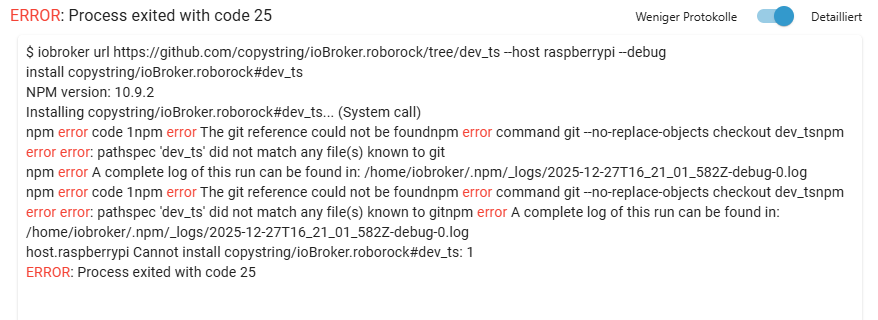
@copystring hat eine URL für die Katze hoch geladen; wirft bei mir aber Fehler aus .. https://forum.iobroker.net/post/1314593
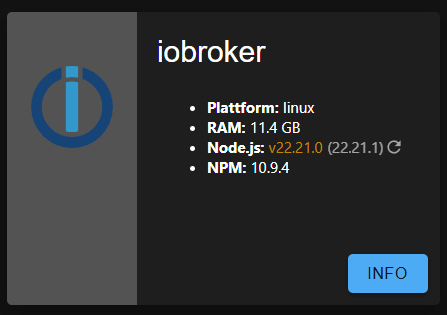
nodejs Version ist 22.15.0
-
Ich habe eben mal hochgescrollt - manchmal hilft das ;-)
@copystring hat eine URL für die Katze hoch geladen; wirft bei mir aber Fehler aus .. https://forum.iobroker.net/post/1314593
nodejs Version ist 22.15.0
Bitte keine Bildchen von Text.
Haste die Meldung auch gelesen?
Du hast einen falschen Link angegeben. -
Ich habe eben mal hochgescrollt - manchmal hilft das ;-)
@copystring hat eine URL für die Katze hoch geladen; wirft bei mir aber Fehler aus .. https://forum.iobroker.net/post/1314593
nodejs Version ist 22.15.0
@Nachtfuchs
Du hast es mit der altendevversucht. Die ist in der Zwischenzeit in diemainmit eingeflossen.
Wenn Du also über die Katze (immer auf eigene Gefahr) installieren willst solltest Du die https://github.com/copystring/ioBroker.roborock verwenden.
Bei mir läuft das jetzt mit einem Qrevo Slim wieder, sowohl im Test- als auch im Produktivsystem.
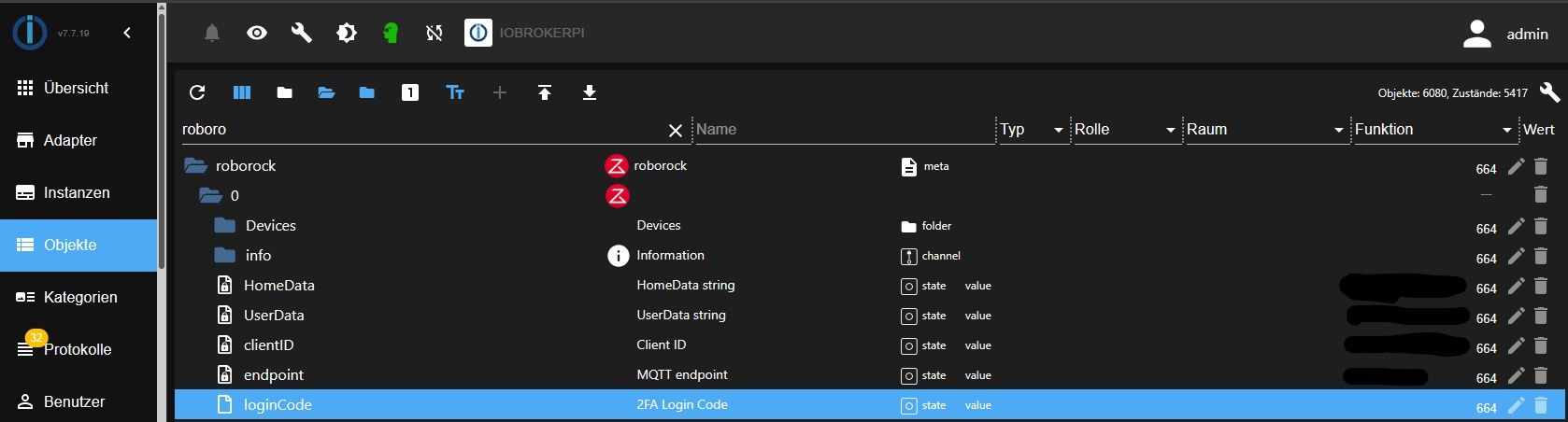
Musste bei mir auch den vorhandenen Objektbaum für roborock vorher einmal komplett löschen. Dann die neue Version starten und wie im Log beschrieben den per Mail zugesandten 2FA-Code in den entsprechenden Datenpunkt (unbestätigt) eintragen. Dann startet der Adapter automatisch einen neuen Versuch und hat sich wieder komplett verbunden. Nur ein paar Datenpunkte liegen jetzt etwas anders gegenüber der früheren Version. Der überwiegende Objektbaum ist aber unverändert. -
-
In welchen Datenpunkt muss der Verfizierungscode eingetragen werden?
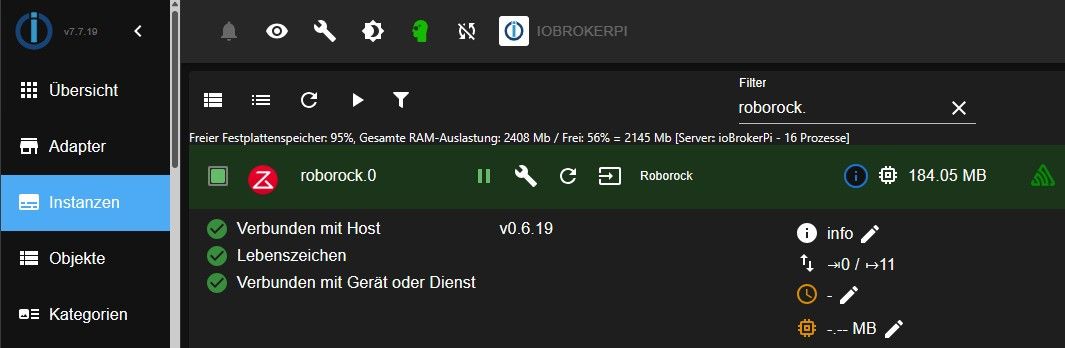
Bei mir wird der Adapter nicht grün. -
-
Klappt wunderbar - DANKE euch!
@thomas-braun ich hatte den link 1:1 aus dem posting kopiert
-





Hey! Du scheinst an dieser Unterhaltung interessiert zu sein, hast aber noch kein Konto.
Hast du es satt, bei jedem Besuch durch die gleichen Beiträge zu scrollen? Wenn du dich für ein Konto anmeldest, kommst du immer genau dorthin zurück, wo du zuvor warst, und kannst dich über neue Antworten benachrichtigen lassen (entweder per E-Mail oder Push-Benachrichtigung). Du kannst auch Lesezeichen speichern und Beiträge positiv bewerten, um anderen Community-Mitgliedern deine Wertschätzung zu zeigen.
Mit deinem Input könnte dieser Beitrag noch besser werden 💗
Registrieren Anmelden266
Online33.1k
Benutzer84.1k
Themen1.4m
Beiträge