




mihome-vacuum Karten werden nicht geladen
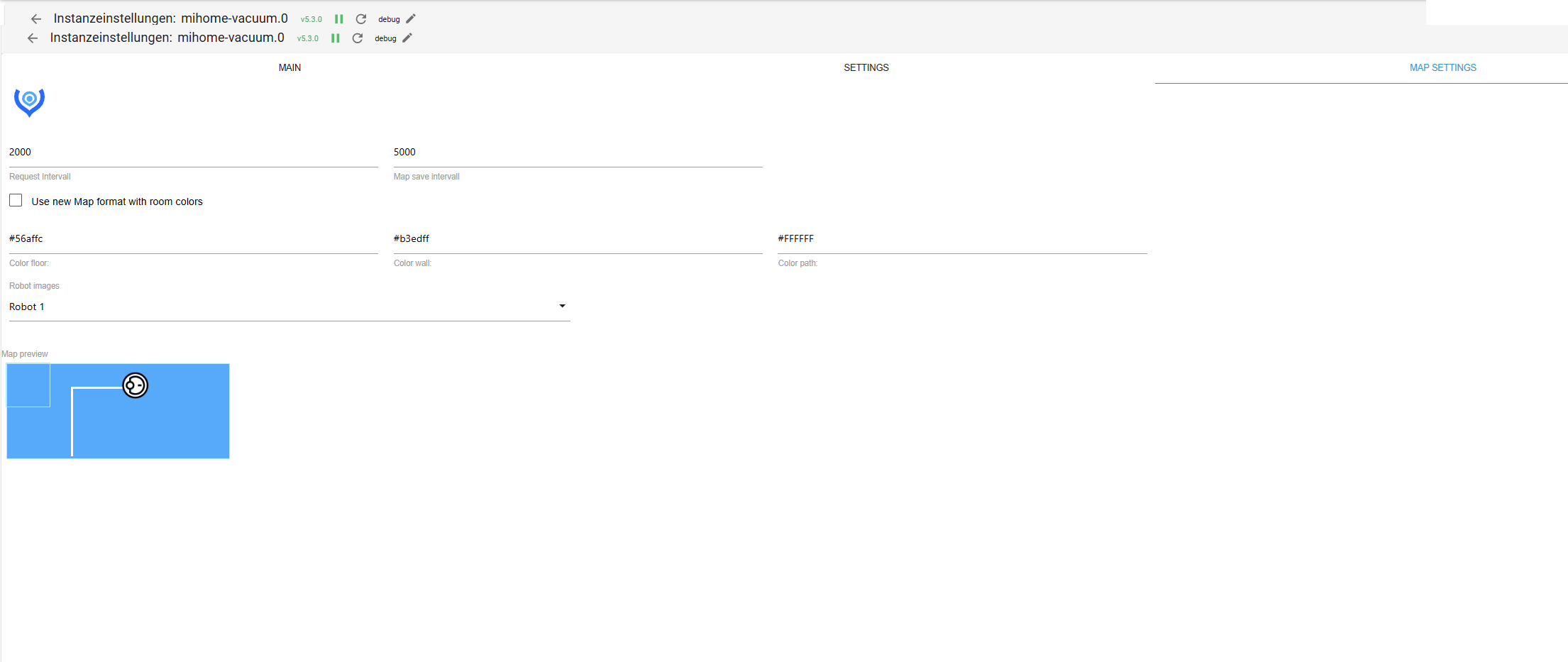
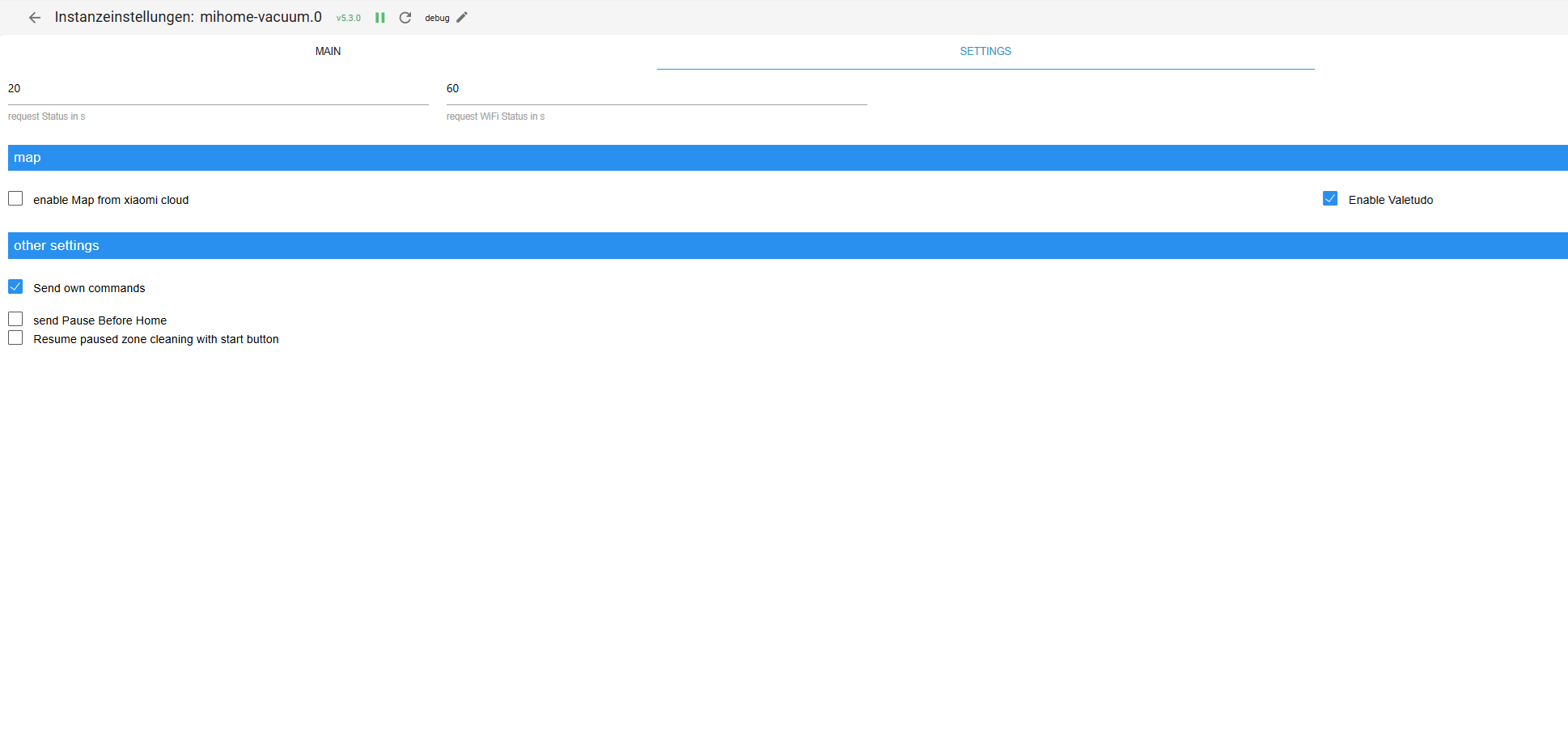
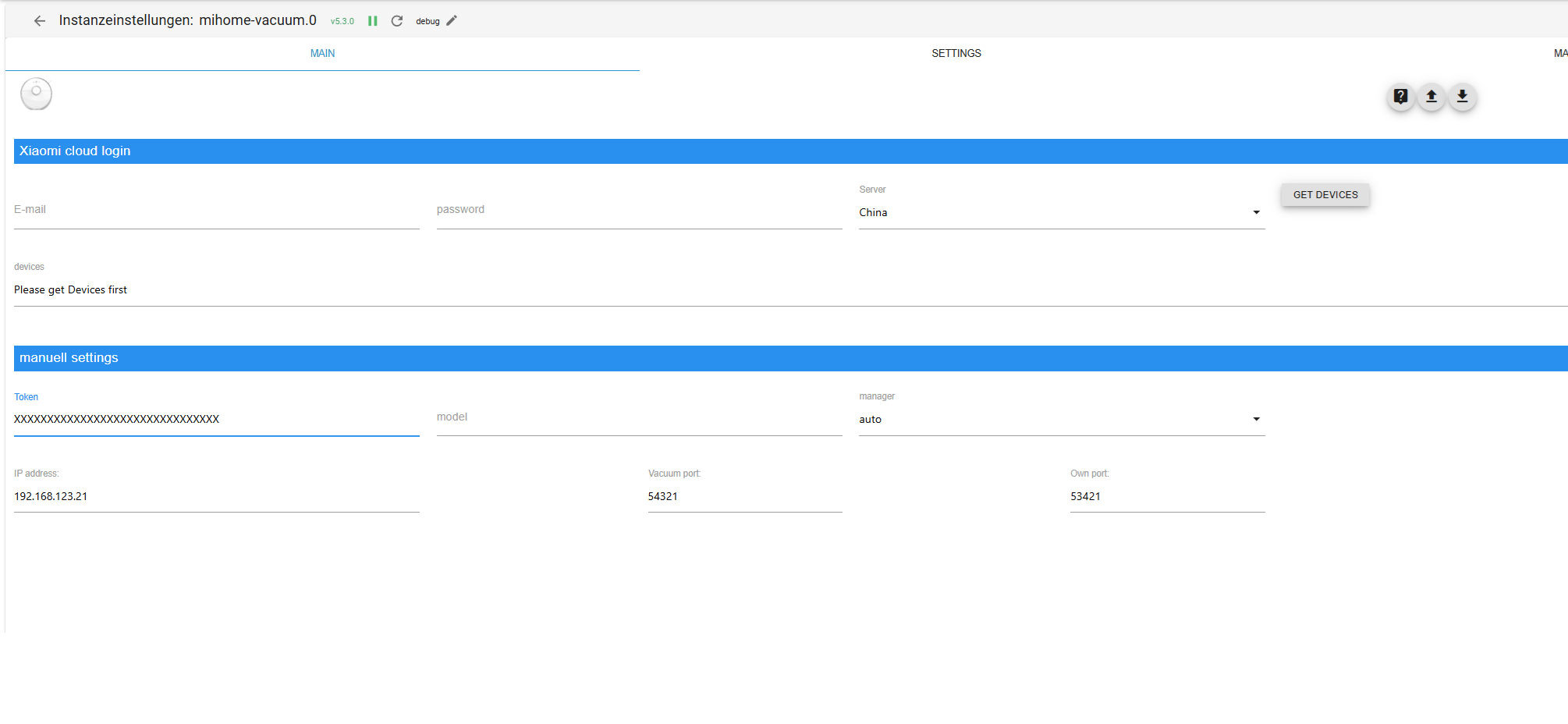
-
Also bei mir läuft es.
basic-HTML Widget
Und das ins HTML Feld eingeben.
(Ich habe 2 Instanzen, deswegen mihome-vacuum.1)<img src="{mihome-vacuum.1.cleanmap.map64}"/>
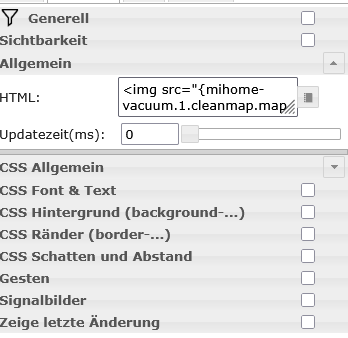
Die Karte kommt erst, wenn Du die Runtime ausführst.
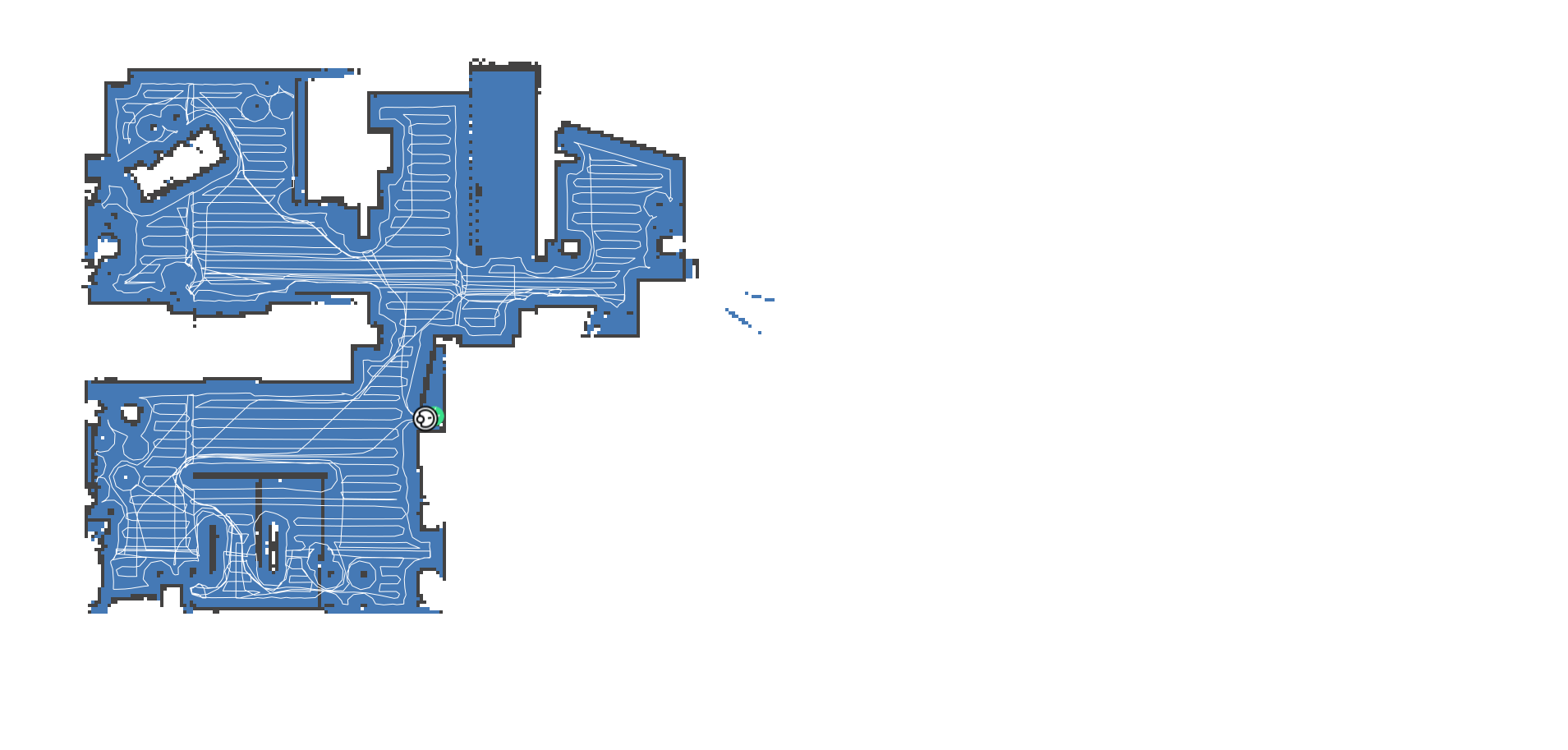
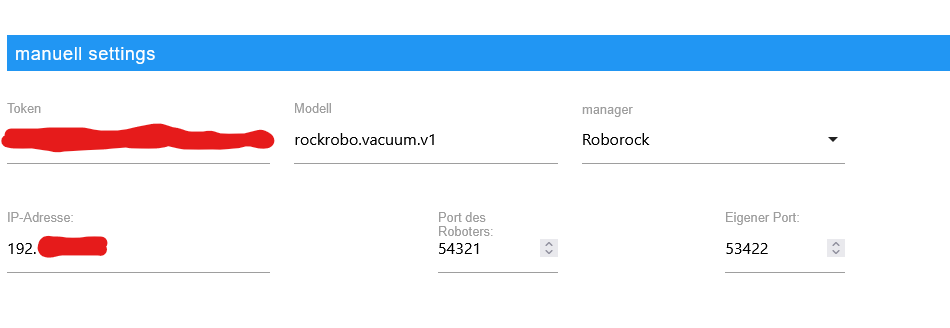
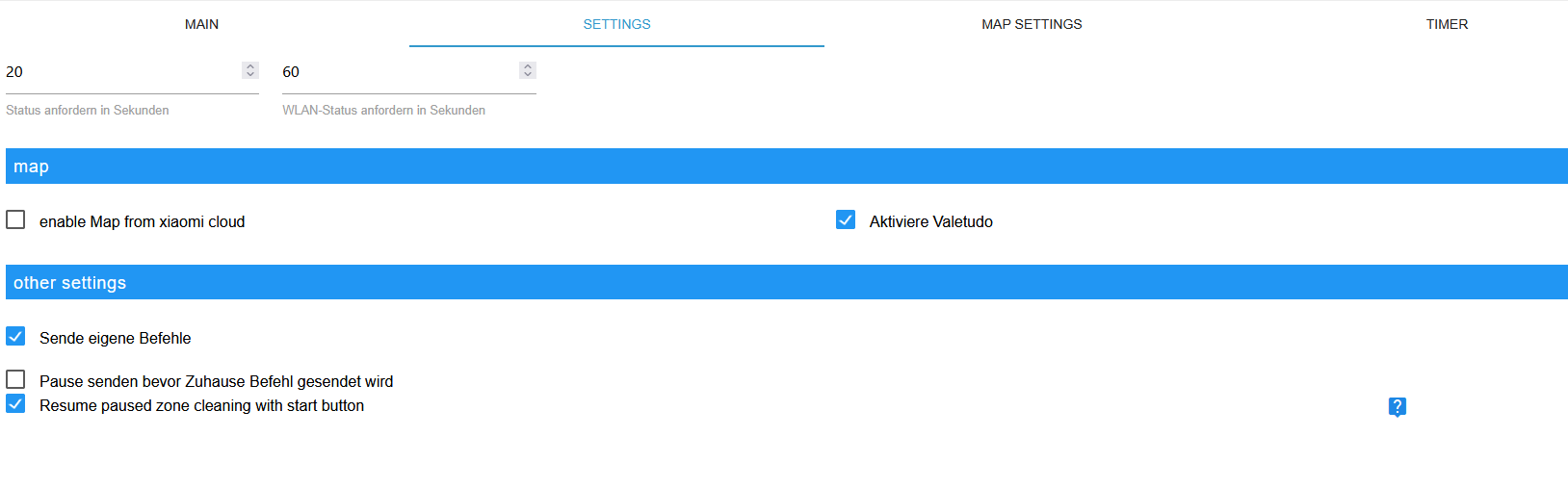
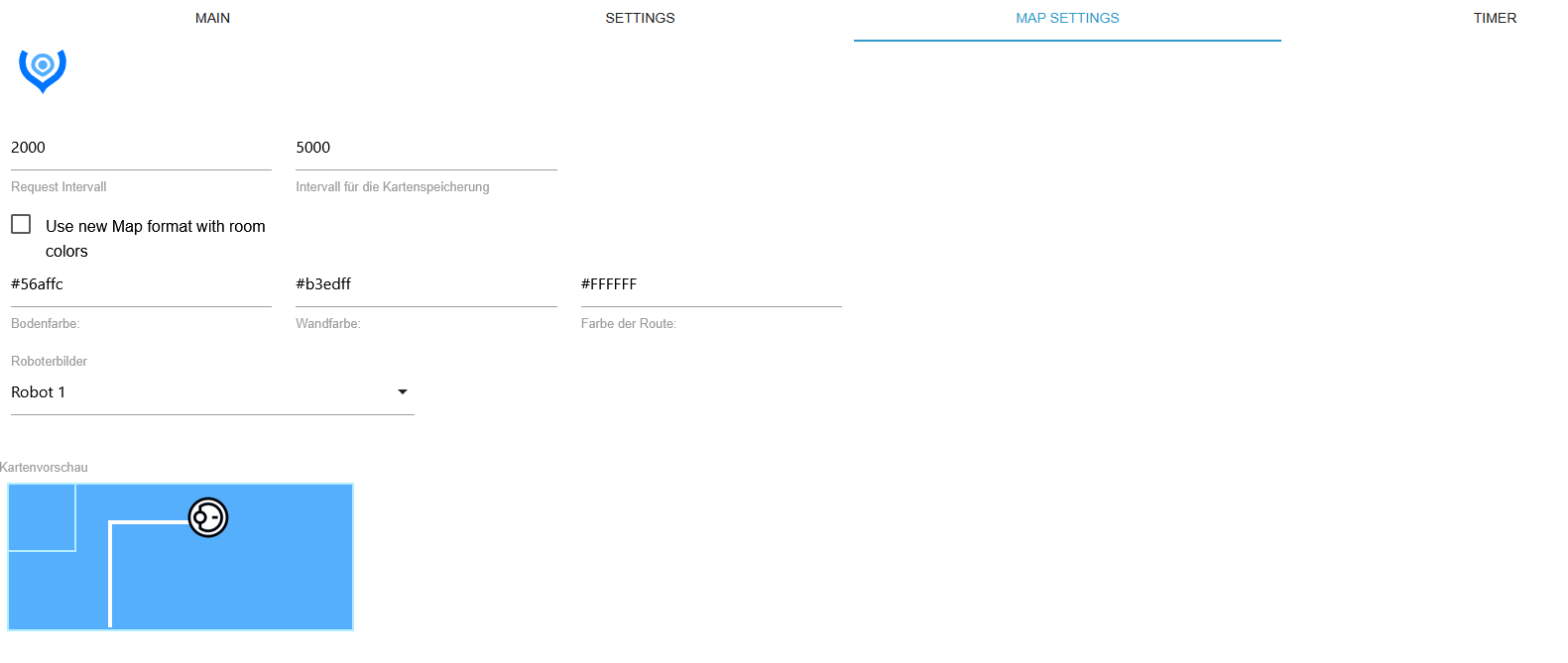
@haselchen Bei mir werden schon keine Daten in die Map-Objekte eingetragen

und wenn der Sauger läuft bekomme ich noch soche Axios Fehlermeldungen, mit denen ich nichts anfangen kann (404 - Seite nicht gefunden?)
2025-11-11 00:16:49.635 - debug: mihome-vacuum.0 (834) get params for stock Vacuum 2025-11-11 00:16:49.635 - debug: mihome-vacuum.0 (834) Message= {"id":369,"method":"get_status"} 2025-11-11 00:16:49.640 - debug: mihome-vacuum.0 (834) MIIO RECIVE: {"result":[{"msg_ver":8,"msg_seq":3532,"state":5,"battery":97,"clean_time":248,"clean_area":6372500,"error_code":0,"map_present":1,"in_cleaning":1,"fan_power":1,"dnd_enabled":1}],"id":369} 2025-11-11 00:16:49.640 - debug: mihome-vacuum.0 (834) setGetStatus {"msg_ver":8,"msg_seq":3532,"state":5,"battery":97,"clean_time":248,"clean_area":6372500,"error_code":0,"map_present":true,"in_cleaning":true,"fan_power":1,"dnd_enabled":true,"error_text":"No error"} 2025-11-11 00:16:49.640 - debug: mihome-vacuum.0 (834) Message= {"id":370,"method":"get_network_info"} 2025-11-11 00:16:49.644 - debug: mihome-vacuum.0 (834) MIIO RECIVE: {"result":"unknown_method","id":370} 2025-11-11 00:16:49.644 - debug: mihome-vacuum.0 (834) Message= {"id":371,"method":"get_sound_volume"} 2025-11-11 00:16:49.650 - debug: mihome-vacuum.0 (834) MIIO RECIVE: {"result":[90],"id":371} 2025-11-11 00:16:49.650 - debug: mihome-vacuum.0 (834) Message= {"id":372,"method":"get_carpet_mode"} 2025-11-11 00:16:49.658 - debug: mihome-vacuum.0 (834) MIIO RECIVE: {"result":[{"enable":0,"current_integral":450,"current_high":500,"current_low":400,"stall_time":10}],"id":372} 2025-11-11 00:16:49.758 - debug: mihome-vacuum.0 (834) AxiosError: Request failed with status code 404 2025-11-11 00:16:51.658 - debug: mihome-vacuum.0 (834) Receive <<< Helo <<< 2131002000000000034f190869127262ffffffffffffffffffffffffffffffff 2025-11-11 00:16:51.786 - debug: mihome-vacuum.0 (834) AxiosError: Request failed with status code 404 2025-11-11 00:16:53.829 - debug: mihome-vacuum.0 (834) AxiosError: Request failed with status code 404 2025-11-11 00:16:55.853 - debug: mihome-vacuum.0 (834) AxiosError: Request failed with status code 404 2025-11-11 00:16:57.882 - debug: mihome-vacuum.0 (834) AxiosError: Request failed with status code 404 2025-11-11 00:16:59.956 - debug: mihome-vacuum.0 (834) AxiosError: Request failed with status code 404 2025-11-11 00:17:01.663 - debug: mihome-vacuum.0 (834) Receive <<< Helo <<< 2131002000000000034f19086912726cffffffffffffffffffffffffffffffff 2025-11-11 00:17:02.010 - debug: mihome-vacuum.0 (834) AxiosError: Request failed with status code 404 -
@haselchen Bei mir werden schon keine Daten in die Map-Objekte eingetragen
und wenn der Sauger läuft bekomme ich noch soche Axios Fehlermeldungen, mit denen ich nichts anfangen kann (404 - Seite nicht gefunden?)
2025-11-11 00:16:49.635 - debug: mihome-vacuum.0 (834) get params for stock Vacuum 2025-11-11 00:16:49.635 - debug: mihome-vacuum.0 (834) Message= {"id":369,"method":"get_status"} 2025-11-11 00:16:49.640 - debug: mihome-vacuum.0 (834) MIIO RECIVE: {"result":[{"msg_ver":8,"msg_seq":3532,"state":5,"battery":97,"clean_time":248,"clean_area":6372500,"error_code":0,"map_present":1,"in_cleaning":1,"fan_power":1,"dnd_enabled":1}],"id":369} 2025-11-11 00:16:49.640 - debug: mihome-vacuum.0 (834) setGetStatus {"msg_ver":8,"msg_seq":3532,"state":5,"battery":97,"clean_time":248,"clean_area":6372500,"error_code":0,"map_present":true,"in_cleaning":true,"fan_power":1,"dnd_enabled":true,"error_text":"No error"} 2025-11-11 00:16:49.640 - debug: mihome-vacuum.0 (834) Message= {"id":370,"method":"get_network_info"} 2025-11-11 00:16:49.644 - debug: mihome-vacuum.0 (834) MIIO RECIVE: {"result":"unknown_method","id":370} 2025-11-11 00:16:49.644 - debug: mihome-vacuum.0 (834) Message= {"id":371,"method":"get_sound_volume"} 2025-11-11 00:16:49.650 - debug: mihome-vacuum.0 (834) MIIO RECIVE: {"result":[90],"id":371} 2025-11-11 00:16:49.650 - debug: mihome-vacuum.0 (834) Message= {"id":372,"method":"get_carpet_mode"} 2025-11-11 00:16:49.658 - debug: mihome-vacuum.0 (834) MIIO RECIVE: {"result":[{"enable":0,"current_integral":450,"current_high":500,"current_low":400,"stall_time":10}],"id":372} 2025-11-11 00:16:49.758 - debug: mihome-vacuum.0 (834) AxiosError: Request failed with status code 404 2025-11-11 00:16:51.658 - debug: mihome-vacuum.0 (834) Receive <<< Helo <<< 2131002000000000034f190869127262ffffffffffffffffffffffffffffffff 2025-11-11 00:16:51.786 - debug: mihome-vacuum.0 (834) AxiosError: Request failed with status code 404 2025-11-11 00:16:53.829 - debug: mihome-vacuum.0 (834) AxiosError: Request failed with status code 404 2025-11-11 00:16:55.853 - debug: mihome-vacuum.0 (834) AxiosError: Request failed with status code 404 2025-11-11 00:16:57.882 - debug: mihome-vacuum.0 (834) AxiosError: Request failed with status code 404 2025-11-11 00:16:59.956 - debug: mihome-vacuum.0 (834) AxiosError: Request failed with status code 404 2025-11-11 00:17:01.663 - debug: mihome-vacuum.0 (834) Receive <<< Helo <<< 2131002000000000034f19086912726cffffffffffffffffffffffffffffffff 2025-11-11 00:17:02.010 - debug: mihome-vacuum.0 (834) AxiosError: Request failed with status code 404canvas ist sauber drin?
cd /opt/iobroker/ && npm ls canvassagt?
Und bring das ganze Ding auf nodejs22. -
canvas ist sauber drin?
cd /opt/iobroker/ && npm ls canvassagt?
Und bring das ganze Ding auf nodejs22.@Thomas-Braun: Vielen Dank für die Tipps, dies ist die Ausgabe:
matte@iobroker:~$ cd /opt/iobroker/ && npm ls canvas
iobroker.inst@3.0.0 /opt/iobroker
`-- iobroker.mihome-vacuum@5.3.0 (git+ssh://git@github.com/iobroker-community-adapters/ioBroker.mihome-vacuum.git#140b7dec6648ad51692821690114fc87a343a3fb)
  `-- canvas@3.2.0
Ich hab nodejs mit iob nodejs-update upgedatet
matte@iobroker:~$ node -v
v22.21.0
matte@iobroker:~$
Und jetzt startet iobroker nicht mehr. Hmmm und beim Aufruf von iob bekomme ich :
matte@iobroker:/opt/iobroker/log$ iob
file:///opt/iobroker/node_modules/@iobroker/js-controller-cli/build/esm/lib/setup/setupBackup.js:5
import tar from 'tar';
       ^^^
SyntaxError: The requested module 'tar' does not provide an export named 'default'
    at ModuleJob._instantiate (node:internal/modules/esm/module_job:226:21)
    at async ModuleJob.run (node:internal/modules/esm/module_job:335:5)
    at async onImport.tracePromise.__proto__ (node:internal/modules/esm/loader:665:26)

Node.js v22.21.0
Vielleicht ist die Node.js Version zu neu?
-
@Thomas-Braun: Vielen Dank für die Tipps, dies ist die Ausgabe:
matte@iobroker:~$ cd /opt/iobroker/ && npm ls canvas
iobroker.inst@3.0.0 /opt/iobroker
`-- iobroker.mihome-vacuum@5.3.0 (git+ssh://git@github.com/iobroker-community-adapters/ioBroker.mihome-vacuum.git#140b7dec6648ad51692821690114fc87a343a3fb)
  `-- canvas@3.2.0
Ich hab nodejs mit iob nodejs-update upgedatet
matte@iobroker:~$ node -v
v22.21.0
matte@iobroker:~$
Und jetzt startet iobroker nicht mehr. Hmmm und beim Aufruf von iob bekomme ich :
matte@iobroker:/opt/iobroker/log$ iob
file:///opt/iobroker/node_modules/@iobroker/js-controller-cli/build/esm/lib/setup/setupBackup.js:5
import tar from 'tar';
       ^^^
SyntaxError: The requested module 'tar' does not provide an export named 'default'
    at ModuleJob._instantiate (node:internal/modules/esm/module_job:226:21)
    at async ModuleJob.run (node:internal/modules/esm/module_job:335:5)
    at async onImport.tracePromise.__proto__ (node:internal/modules/esm/loader:665:26)

Node.js v22.21.0
Vielleicht ist die Node.js Version zu neu?
@matte300 sagte in mihome-vacuum Karten werden nicht geladen:
Vielleicht ist die Node.js Version zu neu?
Nein, das ist die derzeitig vorgesehene Version. Vielleicht ist dein sonstiges Zeuch zu alt?
iob diagsagt?
-
@matte300 sagte in mihome-vacuum Karten werden nicht geladen:
Vielleicht ist die Node.js Version zu neu?
Nein, das ist die derzeitig vorgesehene Version. Vielleicht ist dein sonstiges Zeuch zu alt?
iob diagsagt?
Hier ist das komplette iob-diag:
========== Start marking the full check here ===========

```bash
Script v.2025-08-09

*** BASE SYSTEM ***
Operating System: Debian GNU/Linux 13 (trixie)
 Static hostname: iobroker
       Icon name: computer-container
         Chassis: container ☐
  Virtualization: lxc
          Kernel: Linux 6.14.11-4-pve
    Architecture: x86-64
OS is similar to:

model name      : Intel(R) Core(TM) i3-7100U CPU @ 2.40GHz
Docker          : false
Virtualization  : lxc
Kernel          : x86_64
Userland        : 64 bit

Systemuptime and Load:
 09:16:56 up 22 min,  1 user,  load average: 0.84, 0.50, 0.37
CPU threads: 1


*** LIFE CYCLE STATUS ***
Operating System is the current Debian stable version codenamed 'trixie'!

*** TIME AND TIMEZONES ***
               Local time: Tue 2025-11-11 09:16:56 CET
           Universal time: Tue 2025-11-11 08:16:56 UTC
                 RTC time: n/a
                Time zone: Europe/Berlin (CET, +0100)
System clock synchronized: yes
              NTP service: inactive
          RTC in local TZ: no

*** Users and Groups ***
User that called 'iob diag':
matte
HOME=/home/matte
GROUPS=matte sudo iobroker

User that is running 'js-controller':
js-controller is not running

*** DISPLAY-SERVER SETUP ***
Display-Server:         false
Unit display-manager.service could not be found.
Display-Manager:
Desktop:
Session:                tty

*** MEMORY ***
               total        used        free      shared  buff/cache   available
Mem:            4.3G        260M        3.1G        8.8M        980M        4.0G
Swap:           4.3G          0B        4.3G
Total:          8.6G        260M        7.4G

Active iob-Instances:   0

         4096 M total memory
          248 M used memory
          600 M active memory
          423 M inactive memory
         2920 M free memory
            0 M buffer memory
          935 M swap cache
         4096 M total swap
            0 M used swap
         4096 M free swap

*** top - Table Of Processes  ***
top - 09:16:56 up 22 min,  1 user,  load average: 0.84, 0.50, 0.37
Tasks:  32 total,   1 running,  31 sleeping,   0 stopped,   0 zombie
%Cpu(s):  0.0 us,  0.0 sy,  0.0 ni,100.0 id,  0.0 wa,  0.0 hi,  0.0 si,  0.0 st
MiB Mem :   4096.0 total,   2918.6 free,    250.2 used,    935.5 buff/cache
MiB Swap:   4096.0 total,   4096.0 free,      0.0 used.   3845.8 avail Mem

*** FAILED SERVICES ***

  UNIT                 LOAD   ACTIVE SUB    DESCRIPTION
* run-rpc_pipefs.mount loaded failed failed RPC Pipe File System

Legend: LOAD   -> Reflects whether the unit definition was properly loaded.
        ACTIVE -> The high-level unit activation state, i.e. generalization of SUB.
        SUB    -> The low-level unit activation state, values depend on unit type.

1 loaded units listed.


*** DMESG CRITICAL ERRORS ***
dmesg: read kernel buffer failed: Operation not permitted
No critical errors detected

*** FILESYSTEM ***
Filesystem                       Type      Size  Used Avail Use% Mounted on
/dev/mapper/pve-vm--100--disk--0 ext4       12G  9.8G  1.4G  88% /
none                             tmpfs     492K  8.0K  484K   2% /dev
/dev/mapper/pve-root             ext4       94G  4.8G   85G   6% /dev/ttyACM0
udev                             devtmpfs  7.8G     0  7.8G   0% /dev/tty
tmpfs                            tmpfs     7.8G     0  7.8G   0% /dev/shm
tmpfs                            tmpfs     3.2G  144K  3.2G   1% /run
tmpfs                            tmpfs     5.0M     0  5.0M   0% /run/lock
tmpfs                            tmpfs     7.8G  8.3M  7.8G   1% /tmp
tmpfs                            tmpfs     1.6G  8.0K  1.6G   1% /run/user/1001

Messages concerning ext4 filesystem in dmesg:
dmesg: read kernel buffer failed: Operation not permitted

Show mounted filesystems:
TARGET         SOURCE                                                 FSTYPE OPTIONS
/              /dev/mapper/pve-vm--100--disk--0                       ext4   rw,relatime,stripe=16
|-/dev/ttyACM0 /dev/mapper/pve-root[/var/lib/lxc/100/devices/ttyACM0] ext4   rw,relatime,errors=remount-ro
|-/dev/ttyUSB0 /dev/mapper/pve-root[/var/lib/lxc/100/devices/ttyUSB0] ext4   rw,relatime,errors=remount-ro
`-/dev/ttyUSB1 /dev/mapper/pve-root[/var/lib/lxc/100/devices/ttyUSB1] ext4   rw,relatime,errors=remount-ro

Files in neuralgic directories:

/var:
3.1G    /var/
2.3G    /var/cache/apt
2.3G    /var/cache
2.2G    /var/cache/apt/archives
409M    /var/log

Hint: You are currently not seeing messages from other users and the system.
      Users in groups 'adm', 'systemd-journal' can see all messages.
      Pass -q to turn off this notice.
Archived and active journals take up 56.8M in the file system.

/opt/iobroker/backups:
61M     /opt/iobroker/backups/

/opt/iobroker/iobroker-data:
377M    /opt/iobroker/iobroker-data/
285M    /opt/iobroker/iobroker-data/files
80M     /opt/iobroker/iobroker-data/files/vis-2
66M     /opt/iobroker/iobroker-data/backup-objects
47M     /opt/iobroker/iobroker-data/files/admin.admin

The five largest files in iobroker-data are:
27M     /opt/iobroker/iobroker-data/files/tankerkoenig.admin/build/index.js.map
24M     /opt/iobroker/iobroker-data/files/scenes.admin/static/js/main.c9369f6c.js.map
12M     /opt/iobroker/iobroker-data/objects.jsonl
9.8M    /opt/iobroker/iobroker-data/files/vis-2/material-icons/knx-uf.json
9.2M    /opt/iobroker/iobroker-data/files/tankerkoenig.admin/build/index.js

USB-Devices by-id:
USB-Sticks -  Avoid direct links to /dev/tty* in your adapter setups, please always prefer the links 'by-id':

/dev/serial/by-id/usb-ITead_Sonoff_Zigbee_3.0_USB_Dongle_Plus_9273e15ec119ec1194c57fe5f01c6278-if00-port0
/dev/serial/by-id/usb-FTDI_FT232R_USB_UART_AI04NT4L-if00-port0
/dev/serial/by-id/usb-0658_0200-if00

*** ZigBee Settings ***
Zigbee Network Settings on your coordinator/in nvbackup are:

zigbee.X
Extended Pan ID:
*** MASKED ***
Pan ID:
*** MASKED ***
Channel:
*** MASKED ***
Network Key:
*** MASKED ***

To unmask the settings run 'iob diag --unmask'


*** NodeJS-Installation ***

/usr/bin/nodejs         v22.21.0
/usr/bin/node           v22.21.0
/usr/bin/npm            10.9.4
/usr/bin/npx            10.9.4
/usr/bin/corepack       0.34.0

nodejs:
  Installed: 22.21.0-1nodesource1
  Candidate: 22.21.0-1nodesource1
  Version table:
 *** 22.21.0-1nodesource1 1001
        500 https://deb.nodesource.com/node_22.x nodistro/main amd64 Packages
        100 /var/lib/dpkg/status
     22.20.0-1nodesource1 1001
        500 https://deb.nodesource.com/node_22.x nodistro/main amd64 Packages
     22.19.0-1nodesource1 1001
        500 https://deb.nodesource.com/node_22.x nodistro/main amd64 Packages
     22.18.0-1nodesource1 1001
        500 https://deb.nodesource.com/node_22.x nodistro/main amd64 Packages
     22.17.1-1nodesource1 1001
        500 https://deb.nodesource.com/node_22.x nodistro/main amd64 Packages
     22.17.0-1nodesource1 1001
        500 https://deb.nodesource.com/node_22.x nodistro/main amd64 Packages
     22.16.0-1nodesource1 1001
        500 https://deb.nodesource.com/node_22.x nodistro/main amd64 Packages
     22.15.1-1nodesource1 1001
        500 https://deb.nodesource.com/node_22.x nodistro/main amd64 Packages
     22.15.0-1nodesource1 1001
        500 https://deb.nodesource.com/node_22.x nodistro/main amd64 Packages
     22.14.0-1nodesource1 1001
        500 https://deb.nodesource.com/node_22.x nodistro/main amd64 Packages
     22.13.1-1nodesource1 1001
        500 https://deb.nodesource.com/node_22.x nodistro/main amd64 Packages
     22.13.0-1nodesource1 1001
        500 https://deb.nodesource.com/node_22.x nodistro/main amd64 Packages
     22.12.0-1nodesource1 1001
        500 https://deb.nodesource.com/node_22.x nodistro/main amd64 Packages
     22.11.0-1nodesource1 1001
        500 https://deb.nodesource.com/node_22.x nodistro/main amd64 Packages
     22.10.0-1nodesource1 1001
        500 https://deb.nodesource.com/node_22.x nodistro/main amd64 Packages
     22.9.0-1nodesource1 1001
        500 https://deb.nodesource.com/node_22.x nodistro/main amd64 Packages
     22.8.0-1nodesource1 1001
        500 https://deb.nodesource.com/node_22.x nodistro/main amd64 Packages
     22.7.0-1nodesource1 1001
        500 https://deb.nodesource.com/node_22.x nodistro/main amd64 Packages
     22.6.0-1nodesource1 1001
        500 https://deb.nodesource.com/node_22.x nodistro/main amd64 Packages
     22.5.1-1nodesource1 1001
        500 https://deb.nodesource.com/node_22.x nodistro/main amd64 Packages
     22.5.0-1nodesource1 1001
        500 https://deb.nodesource.com/node_22.x nodistro/main amd64 Packages
     22.4.1-1nodesource1 1001
        500 https://deb.nodesource.com/node_22.x nodistro/main amd64 Packages
     22.4.0-1nodesource1 1001
        500 https://deb.nodesource.com/node_22.x nodistro/main amd64 Packages
     22.3.0-1nodesource1 1001
        500 https://deb.nodesource.com/node_22.x nodistro/main amd64 Packages
     22.2.0-1nodesource1 1001
        500 https://deb.nodesource.com/node_22.x nodistro/main amd64 Packages
     22.1.0-1nodesource1 1001
        500 https://deb.nodesource.com/node_22.x nodistro/main amd64 Packages
     22.0.0-1nodesource1 1001
        500 https://deb.nodesource.com/node_22.x nodistro/main amd64 Packages
     20.19.2+dfsg-1 500
        500 http://deb.debian.org/debian trixie/main amd64 Packages

Temp directories causing deletion problem: 0
No problems detected

Errors in npm tree: 0
No problems detected

Checking for nodejs vulnerability:


 █████  ██      ██           ██████   ██████   ██████  ██████         ██
██   ██ ██      ██          ██       ██    ██ ██    ██ ██   ██     ██  ██
███████ ██      ██          ██   ███ ██    ██ ██    ██ ██   ██         ██
██   ██ ██      ██          ██    ██ ██    ██ ██    ██ ██   ██     ██  ██
██   ██ ███████ ███████      ██████   ██████   ██████  ██████         ██


*** ioBroker-Installation ***

ioBroker Status
file:///opt/iobroker/node_modules/@iobroker/js-controller-cli/build/esm/lib/setup/setupBackup.js:5
import tar from 'tar';
       ^^^
SyntaxError: The requested module 'tar' does not provide an export named 'default'
    at ModuleJob._instantiate (node:internal/modules/esm/module_job:226:21)
    at async ModuleJob.run (node:internal/modules/esm/module_job:335:5)
    at async onImport.tracePromise.__proto__ (node:internal/modules/esm/loader:665:26)

Node.js v22.21.0

Hosts:
file:///opt/iobroker/node_modules/@iobroker/js-controller-cli/build/esm/lib/setup/setupBackup.js:5
import tar from 'tar';
       ^^^
SyntaxError: The requested module 'tar' does not provide an export named 'default'
    at ModuleJob._instantiate (node:internal/modules/esm/module_job:226:21)
    at async ModuleJob.run (node:internal/modules/esm/module_job:335:5)
    at async onImport.tracePromise.__proto__ (node:internal/modules/esm/loader:665:26)

Node.js v22.21.0

Core adapters versions
file:///opt/iobroker/node_modules/@iobroker/js-controller-cli/build/esm/lib/setup/setupBackup.js:5
import tar from 'tar';
       ^^^
SyntaxError: The requested module 'tar' does not provide an export named 'default'
    at ModuleJob._instantiate (node:internal/modules/esm/module_job:226:21)
    at async ModuleJob.run (node:internal/modules/esm/module_job:335:5)
    at async onImport.tracePromise.__proto__ (node:internal/modules/esm/loader:665:26)

Node.js v22.21.0
js-controller:
file:///opt/iobroker/node_modules/@iobroker/js-controller-cli/build/esm/lib/setup/setupBackup.js:5
import tar from 'tar';
       ^^^
SyntaxError: The requested module 'tar' does not provide an export named 'default'
    at ModuleJob._instantiate (node:internal/modules/esm/module_job:226:21)
    at async ModuleJob.run (node:internal/modules/esm/module_job:335:5)
    at async onImport.tracePromise.__proto__ (node:internal/modules/esm/loader:665:26)

Node.js v22.21.0
admin:
file:///opt/iobroker/node_modules/@iobroker/js-controller-cli/build/esm/lib/setup/setupBackup.js:5
import tar from 'tar';
       ^^^
SyntaxError: The requested module 'tar' does not provide an export named 'default'
    at ModuleJob._instantiate (node:internal/modules/esm/module_job:226:21)
    at async ModuleJob.run (node:internal/modules/esm/module_job:335:5)
    at async onImport.tracePromise.__proto__ (node:internal/modules/esm/loader:665:26)

Node.js v22.21.0
javascript:

nodejs modules from github:     2
+-- iobroker.mihome-vacuum@5.3.0 (git+ssh://git@github.com/iobroker-community-adapters/ioBroker.mihome-vacuum.git#140b7dec6648ad51692821690114fc87a343a3fb)
+-- iobroker.openwrt@0.0.4 (git+ssh://git@github.com/Schnup89/ioBroker.openwrt.git#607c57da251a30e3bed4adcf666d6e48354d0082)

Adapter State


Enabled adapters with bindings

ioBroker-Repositories
file:///opt/iobroker/node_modules/@iobroker/js-controller-cli/build/esm/lib/setup/setupBackup.js:5
import tar from 'tar';
       ^^^
SyntaxError: The requested module 'tar' does not provide an export named 'default'
    at ModuleJob._instantiate (node:internal/modules/esm/module_job:226:21)
    at async ModuleJob.run (node:internal/modules/esm/module_job:335:5)
    at async onImport.tracePromise.__proto__ (node:internal/modules/esm/loader:665:26)

Node.js v22.21.0

Installed ioBroker-Adapters
file:///opt/iobroker/node_modules/@iobroker/js-controller-cli/build/esm/lib/setup/setupBackup.js:5
import tar from 'tar';
       ^^^
SyntaxError: The requested module 'tar' does not provide an export named 'default'
    at ModuleJob._instantiate (node:internal/modules/esm/module_job:226:21)
    at async ModuleJob.run (node:internal/modules/esm/module_job:335:5)
    at async onImport.tracePromise.__proto__ (node:internal/modules/esm/loader:665:26)

Node.js v22.21.0

Objects and States
Please stand by - This may take a while
Objects:        0
States:         0

*** OS-Repositories and Updates ***
W: https://deb.nodesource.com/node_22.x/dists/nodistro/InRelease: Policy will reject signature within a year, see --audit for details
Hit:1 http://deb.debian.org/debian trixie InRelease
Hit:2 http://deb.debian.org/debian trixie-updates InRelease
Hit:3 http://phoscon.de/apt/deconz generic InRelease
Hit:4 https://download.docker.com/linux/debian trixie InRelease
Hit:5 http://security.debian.org trixie-security InRelease
Hit:6 https://apt.grafana.com stable InRelease
Hit:7 https://deb.nodesource.com/node_22.x nodistro InRelease
Reading package lists...
W: https://deb.nodesource.com/node_22.x/dists/nodistro/InRelease: Policy will reject signature within a year, see --audit for details
Pending Updates: 0

*** Listening Ports ***
Active Internet connections (only servers)
Proto Recv-Q Send-Q Local Address           Foreign Address         State       User       Inode      PID/Program name
tcp        0      0 127.0.0.1:25            0.0.0.0:*               LISTEN      0          863866     367/master
tcp        0      0 0.0.0.0:111             0.0.0.0:*               LISTEN      0          862210     1/init
tcp        0      0 0.0.0.0:3551            0.0.0.0:*               LISTEN      0          863572     256/apcupsd
tcp        0      0 127.0.0.1:3306          0.0.0.0:*               LISTEN      104        863802     231/mariadbd
tcp6       0      0 :::22                   :::*                    LISTEN      0          862877     1/init
tcp6       0      0 :::111                  :::*                    LISTEN      0          862212     1/init
tcp6       0      0 :::3000                 :::*                    LISTEN      103        864361     379/grafana
tcp6       0      0 ::1:25                  :::*                    LISTEN      0          863867     367/master
udp        0      0 0.0.0.0:111             0.0.0.0:*                           0          862211     1/init
udp6       0      0 :::111                  :::*                                0          862213     1/init

*** Log File - Last 25 Lines ***

2025-11-11 08:48:12.659  - info: host.iobroker instance system.adapter.backitup.0 terminated with code 0 (NO_ERROR)
2025-11-11 08:48:12.659  - info: host.iobroker instance system.adapter.shelly.0 terminated with code 0 (NO_ERROR)
2025-11-11 08:48:12.695  - info: host.iobroker instance system.adapter.jeelink.0 terminated with code 0 (NO_ERROR)
2025-11-11 08:48:12.695  - info: host.iobroker instance system.adapter.admin.0 terminated with code 0 (NO_ERROR)
2025-11-11 08:48:12.696  - info: host.iobroker instance system.adapter.admin.1 terminated with code 0 (NO_ERROR)
2025-11-11 08:48:12.696  - info: host.iobroker instance system.adapter.javascript.0 terminated with code 0 (NO_ERROR)
2025-11-11 08:48:12.897  - info: host.iobroker instance system.adapter.vis-2.0 terminated with code 0 (NO_ERROR)
2025-11-11 08:48:12.919  - warn: host.iobroker instance system.adapter.pushover.0 terminated due to SIGKILL
2025-11-11 08:48:12.920  - info: host.iobroker instance system.adapter.pushover.0 terminated with code null ()
2025-11-11 08:48:12.920  - warn: host.iobroker instance system.adapter.mielecloudservice.0 terminated due to SIGKILL
2025-11-11 08:48:12.920  - info: host.iobroker instance system.adapter.mielecloudservice.0 terminated with code null ()
2025-11-11 08:48:12.920  - warn: host.iobroker instance system.adapter.eusec.0 terminated due to SIGKILL
2025-11-11 08:48:12.920  - info: host.iobroker instance system.adapter.eusec.0 terminated with code null ()
2025-11-11 08:48:12.952  - warn: host.iobroker instance system.adapter.iot.0 terminated due to SIGKILL
2025-11-11 08:48:12.952  - info: host.iobroker instance system.adapter.iot.0 terminated with code null ()
2025-11-11 08:48:12.952  - warn: host.iobroker instance system.adapter.parser.0 terminated due to SIGKILL
2025-11-11 08:48:12.952  - info: host.iobroker instance system.adapter.parser.0 terminated with code null ()
2025-11-11 08:48:12.952  - warn: host.iobroker instance system.adapter.web.0 terminated due to SIGKILL
2025-11-11 08:48:12.952  - info: host.iobroker instance system.adapter.web.0 terminated with code null ()
2025-11-11 08:48:12.952  - warn: host.iobroker instance system.adapter.zwave2.0 terminated due to SIGKILL
2025-11-11 08:48:12.952  - info: host.iobroker instance system.adapter.zwave2.0 terminated with code null ()
2025-11-11 08:48:13.018  - info: host.iobroker instance system.adapter.zigbee2mqtt.0 terminated with code 0 (NO_ERROR)
2025-11-11 08:48:13.121  - info: host.iobroker instance system.adapter.sql.0 terminated with code 0 (NO_ERROR)
2025-11-11 08:48:13.122  - info: host.iobroker All instances are stopped.
2025-11-11 08:48:13.313  - info: host.iobroker terminated
============ Mark until here for C&P =============
-
Hier ist das komplette iob-diag:
========== Start marking the full check here ===========

```bash
Script v.2025-08-09

*** BASE SYSTEM ***
Operating System: Debian GNU/Linux 13 (trixie)
 Static hostname: iobroker
       Icon name: computer-container
         Chassis: container ☐
  Virtualization: lxc
          Kernel: Linux 6.14.11-4-pve
    Architecture: x86-64
OS is similar to:

model name      : Intel(R) Core(TM) i3-7100U CPU @ 2.40GHz
Docker          : false
Virtualization  : lxc
Kernel          : x86_64
Userland        : 64 bit

Systemuptime and Load:
 09:16:56 up 22 min,  1 user,  load average: 0.84, 0.50, 0.37
CPU threads: 1


*** LIFE CYCLE STATUS ***
Operating System is the current Debian stable version codenamed 'trixie'!

*** TIME AND TIMEZONES ***
               Local time: Tue 2025-11-11 09:16:56 CET
           Universal time: Tue 2025-11-11 08:16:56 UTC
                 RTC time: n/a
                Time zone: Europe/Berlin (CET, +0100)
System clock synchronized: yes
              NTP service: inactive
          RTC in local TZ: no

*** Users and Groups ***
User that called 'iob diag':
matte
HOME=/home/matte
GROUPS=matte sudo iobroker

User that is running 'js-controller':
js-controller is not running

*** DISPLAY-SERVER SETUP ***
Display-Server:         false
Unit display-manager.service could not be found.
Display-Manager:
Desktop:
Session:                tty

*** MEMORY ***
               total        used        free      shared  buff/cache   available
Mem:            4.3G        260M        3.1G        8.8M        980M        4.0G
Swap:           4.3G          0B        4.3G
Total:          8.6G        260M        7.4G

Active iob-Instances:   0

         4096 M total memory
          248 M used memory
          600 M active memory
          423 M inactive memory
         2920 M free memory
            0 M buffer memory
          935 M swap cache
         4096 M total swap
            0 M used swap
         4096 M free swap

*** top - Table Of Processes  ***
top - 09:16:56 up 22 min,  1 user,  load average: 0.84, 0.50, 0.37
Tasks:  32 total,   1 running,  31 sleeping,   0 stopped,   0 zombie
%Cpu(s):  0.0 us,  0.0 sy,  0.0 ni,100.0 id,  0.0 wa,  0.0 hi,  0.0 si,  0.0 st
MiB Mem :   4096.0 total,   2918.6 free,    250.2 used,    935.5 buff/cache
MiB Swap:   4096.0 total,   4096.0 free,      0.0 used.   3845.8 avail Mem

*** FAILED SERVICES ***

  UNIT                 LOAD   ACTIVE SUB    DESCRIPTION
* run-rpc_pipefs.mount loaded failed failed RPC Pipe File System

Legend: LOAD   -> Reflects whether the unit definition was properly loaded.
        ACTIVE -> The high-level unit activation state, i.e. generalization of SUB.
        SUB    -> The low-level unit activation state, values depend on unit type.

1 loaded units listed.


*** DMESG CRITICAL ERRORS ***
dmesg: read kernel buffer failed: Operation not permitted
No critical errors detected

*** FILESYSTEM ***
Filesystem                       Type      Size  Used Avail Use% Mounted on
/dev/mapper/pve-vm--100--disk--0 ext4       12G  9.8G  1.4G  88% /
none                             tmpfs     492K  8.0K  484K   2% /dev
/dev/mapper/pve-root             ext4       94G  4.8G   85G   6% /dev/ttyACM0
udev                             devtmpfs  7.8G     0  7.8G   0% /dev/tty
tmpfs                            tmpfs     7.8G     0  7.8G   0% /dev/shm
tmpfs                            tmpfs     3.2G  144K  3.2G   1% /run
tmpfs                            tmpfs     5.0M     0  5.0M   0% /run/lock
tmpfs                            tmpfs     7.8G  8.3M  7.8G   1% /tmp
tmpfs                            tmpfs     1.6G  8.0K  1.6G   1% /run/user/1001

Messages concerning ext4 filesystem in dmesg:
dmesg: read kernel buffer failed: Operation not permitted

Show mounted filesystems:
TARGET         SOURCE                                                 FSTYPE OPTIONS
/              /dev/mapper/pve-vm--100--disk--0                       ext4   rw,relatime,stripe=16
|-/dev/ttyACM0 /dev/mapper/pve-root[/var/lib/lxc/100/devices/ttyACM0] ext4   rw,relatime,errors=remount-ro
|-/dev/ttyUSB0 /dev/mapper/pve-root[/var/lib/lxc/100/devices/ttyUSB0] ext4   rw,relatime,errors=remount-ro
`-/dev/ttyUSB1 /dev/mapper/pve-root[/var/lib/lxc/100/devices/ttyUSB1] ext4   rw,relatime,errors=remount-ro

Files in neuralgic directories:

/var:
3.1G    /var/
2.3G    /var/cache/apt
2.3G    /var/cache
2.2G    /var/cache/apt/archives
409M    /var/log

Hint: You are currently not seeing messages from other users and the system.
      Users in groups 'adm', 'systemd-journal' can see all messages.
      Pass -q to turn off this notice.
Archived and active journals take up 56.8M in the file system.

/opt/iobroker/backups:
61M     /opt/iobroker/backups/

/opt/iobroker/iobroker-data:
377M    /opt/iobroker/iobroker-data/
285M    /opt/iobroker/iobroker-data/files
80M     /opt/iobroker/iobroker-data/files/vis-2
66M     /opt/iobroker/iobroker-data/backup-objects
47M     /opt/iobroker/iobroker-data/files/admin.admin

The five largest files in iobroker-data are:
27M     /opt/iobroker/iobroker-data/files/tankerkoenig.admin/build/index.js.map
24M     /opt/iobroker/iobroker-data/files/scenes.admin/static/js/main.c9369f6c.js.map
12M     /opt/iobroker/iobroker-data/objects.jsonl
9.8M    /opt/iobroker/iobroker-data/files/vis-2/material-icons/knx-uf.json
9.2M    /opt/iobroker/iobroker-data/files/tankerkoenig.admin/build/index.js

USB-Devices by-id:
USB-Sticks -  Avoid direct links to /dev/tty* in your adapter setups, please always prefer the links 'by-id':

/dev/serial/by-id/usb-ITead_Sonoff_Zigbee_3.0_USB_Dongle_Plus_9273e15ec119ec1194c57fe5f01c6278-if00-port0
/dev/serial/by-id/usb-FTDI_FT232R_USB_UART_AI04NT4L-if00-port0
/dev/serial/by-id/usb-0658_0200-if00

*** ZigBee Settings ***
Zigbee Network Settings on your coordinator/in nvbackup are:

zigbee.X
Extended Pan ID:
*** MASKED ***
Pan ID:
*** MASKED ***
Channel:
*** MASKED ***
Network Key:
*** MASKED ***

To unmask the settings run 'iob diag --unmask'


*** NodeJS-Installation ***

/usr/bin/nodejs         v22.21.0
/usr/bin/node           v22.21.0
/usr/bin/npm            10.9.4
/usr/bin/npx            10.9.4
/usr/bin/corepack       0.34.0

nodejs:
  Installed: 22.21.0-1nodesource1
  Candidate: 22.21.0-1nodesource1
  Version table:
 *** 22.21.0-1nodesource1 1001
        500 https://deb.nodesource.com/node_22.x nodistro/main amd64 Packages
        100 /var/lib/dpkg/status
     22.20.0-1nodesource1 1001
        500 https://deb.nodesource.com/node_22.x nodistro/main amd64 Packages
     22.19.0-1nodesource1 1001
        500 https://deb.nodesource.com/node_22.x nodistro/main amd64 Packages
     22.18.0-1nodesource1 1001
        500 https://deb.nodesource.com/node_22.x nodistro/main amd64 Packages
     22.17.1-1nodesource1 1001
        500 https://deb.nodesource.com/node_22.x nodistro/main amd64 Packages
     22.17.0-1nodesource1 1001
        500 https://deb.nodesource.com/node_22.x nodistro/main amd64 Packages
     22.16.0-1nodesource1 1001
        500 https://deb.nodesource.com/node_22.x nodistro/main amd64 Packages
     22.15.1-1nodesource1 1001
        500 https://deb.nodesource.com/node_22.x nodistro/main amd64 Packages
     22.15.0-1nodesource1 1001
        500 https://deb.nodesource.com/node_22.x nodistro/main amd64 Packages
     22.14.0-1nodesource1 1001
        500 https://deb.nodesource.com/node_22.x nodistro/main amd64 Packages
     22.13.1-1nodesource1 1001
        500 https://deb.nodesource.com/node_22.x nodistro/main amd64 Packages
     22.13.0-1nodesource1 1001
        500 https://deb.nodesource.com/node_22.x nodistro/main amd64 Packages
     22.12.0-1nodesource1 1001
        500 https://deb.nodesource.com/node_22.x nodistro/main amd64 Packages
     22.11.0-1nodesource1 1001
        500 https://deb.nodesource.com/node_22.x nodistro/main amd64 Packages
     22.10.0-1nodesource1 1001
        500 https://deb.nodesource.com/node_22.x nodistro/main amd64 Packages
     22.9.0-1nodesource1 1001
        500 https://deb.nodesource.com/node_22.x nodistro/main amd64 Packages
     22.8.0-1nodesource1 1001
        500 https://deb.nodesource.com/node_22.x nodistro/main amd64 Packages
     22.7.0-1nodesource1 1001
        500 https://deb.nodesource.com/node_22.x nodistro/main amd64 Packages
     22.6.0-1nodesource1 1001
        500 https://deb.nodesource.com/node_22.x nodistro/main amd64 Packages
     22.5.1-1nodesource1 1001
        500 https://deb.nodesource.com/node_22.x nodistro/main amd64 Packages
     22.5.0-1nodesource1 1001
        500 https://deb.nodesource.com/node_22.x nodistro/main amd64 Packages
     22.4.1-1nodesource1 1001
        500 https://deb.nodesource.com/node_22.x nodistro/main amd64 Packages
     22.4.0-1nodesource1 1001
        500 https://deb.nodesource.com/node_22.x nodistro/main amd64 Packages
     22.3.0-1nodesource1 1001
        500 https://deb.nodesource.com/node_22.x nodistro/main amd64 Packages
     22.2.0-1nodesource1 1001
        500 https://deb.nodesource.com/node_22.x nodistro/main amd64 Packages
     22.1.0-1nodesource1 1001
        500 https://deb.nodesource.com/node_22.x nodistro/main amd64 Packages
     22.0.0-1nodesource1 1001
        500 https://deb.nodesource.com/node_22.x nodistro/main amd64 Packages
     20.19.2+dfsg-1 500
        500 http://deb.debian.org/debian trixie/main amd64 Packages

Temp directories causing deletion problem: 0
No problems detected

Errors in npm tree: 0
No problems detected

Checking for nodejs vulnerability:


 █████  ██      ██           ██████   ██████   ██████  ██████         ██
██   ██ ██      ██          ██       ██    ██ ██    ██ ██   ██     ██  ██
███████ ██      ██          ██   ███ ██    ██ ██    ██ ██   ██         ██
██   ██ ██      ██          ██    ██ ██    ██ ██    ██ ██   ██     ██  ██
██   ██ ███████ ███████      ██████   ██████   ██████  ██████         ██


*** ioBroker-Installation ***

ioBroker Status
file:///opt/iobroker/node_modules/@iobroker/js-controller-cli/build/esm/lib/setup/setupBackup.js:5
import tar from 'tar';
       ^^^
SyntaxError: The requested module 'tar' does not provide an export named 'default'
    at ModuleJob._instantiate (node:internal/modules/esm/module_job:226:21)
    at async ModuleJob.run (node:internal/modules/esm/module_job:335:5)
    at async onImport.tracePromise.__proto__ (node:internal/modules/esm/loader:665:26)

Node.js v22.21.0

Hosts:
file:///opt/iobroker/node_modules/@iobroker/js-controller-cli/build/esm/lib/setup/setupBackup.js:5
import tar from 'tar';
       ^^^
SyntaxError: The requested module 'tar' does not provide an export named 'default'
    at ModuleJob._instantiate (node:internal/modules/esm/module_job:226:21)
    at async ModuleJob.run (node:internal/modules/esm/module_job:335:5)
    at async onImport.tracePromise.__proto__ (node:internal/modules/esm/loader:665:26)

Node.js v22.21.0

Core adapters versions
file:///opt/iobroker/node_modules/@iobroker/js-controller-cli/build/esm/lib/setup/setupBackup.js:5
import tar from 'tar';
       ^^^
SyntaxError: The requested module 'tar' does not provide an export named 'default'
    at ModuleJob._instantiate (node:internal/modules/esm/module_job:226:21)
    at async ModuleJob.run (node:internal/modules/esm/module_job:335:5)
    at async onImport.tracePromise.__proto__ (node:internal/modules/esm/loader:665:26)

Node.js v22.21.0
js-controller:
file:///opt/iobroker/node_modules/@iobroker/js-controller-cli/build/esm/lib/setup/setupBackup.js:5
import tar from 'tar';
       ^^^
SyntaxError: The requested module 'tar' does not provide an export named 'default'
    at ModuleJob._instantiate (node:internal/modules/esm/module_job:226:21)
    at async ModuleJob.run (node:internal/modules/esm/module_job:335:5)
    at async onImport.tracePromise.__proto__ (node:internal/modules/esm/loader:665:26)

Node.js v22.21.0
admin:
file:///opt/iobroker/node_modules/@iobroker/js-controller-cli/build/esm/lib/setup/setupBackup.js:5
import tar from 'tar';
       ^^^
SyntaxError: The requested module 'tar' does not provide an export named 'default'
    at ModuleJob._instantiate (node:internal/modules/esm/module_job:226:21)
    at async ModuleJob.run (node:internal/modules/esm/module_job:335:5)
    at async onImport.tracePromise.__proto__ (node:internal/modules/esm/loader:665:26)

Node.js v22.21.0
javascript:

nodejs modules from github:     2
+-- iobroker.mihome-vacuum@5.3.0 (git+ssh://git@github.com/iobroker-community-adapters/ioBroker.mihome-vacuum.git#140b7dec6648ad51692821690114fc87a343a3fb)
+-- iobroker.openwrt@0.0.4 (git+ssh://git@github.com/Schnup89/ioBroker.openwrt.git#607c57da251a30e3bed4adcf666d6e48354d0082)

Adapter State


Enabled adapters with bindings

ioBroker-Repositories
file:///opt/iobroker/node_modules/@iobroker/js-controller-cli/build/esm/lib/setup/setupBackup.js:5
import tar from 'tar';
       ^^^
SyntaxError: The requested module 'tar' does not provide an export named 'default'
    at ModuleJob._instantiate (node:internal/modules/esm/module_job:226:21)
    at async ModuleJob.run (node:internal/modules/esm/module_job:335:5)
    at async onImport.tracePromise.__proto__ (node:internal/modules/esm/loader:665:26)

Node.js v22.21.0

Installed ioBroker-Adapters
file:///opt/iobroker/node_modules/@iobroker/js-controller-cli/build/esm/lib/setup/setupBackup.js:5
import tar from 'tar';
       ^^^
SyntaxError: The requested module 'tar' does not provide an export named 'default'
    at ModuleJob._instantiate (node:internal/modules/esm/module_job:226:21)
    at async ModuleJob.run (node:internal/modules/esm/module_job:335:5)
    at async onImport.tracePromise.__proto__ (node:internal/modules/esm/loader:665:26)

Node.js v22.21.0

Objects and States
Please stand by - This may take a while
Objects:        0
States:         0

*** OS-Repositories and Updates ***
W: https://deb.nodesource.com/node_22.x/dists/nodistro/InRelease: Policy will reject signature within a year, see --audit for details
Hit:1 http://deb.debian.org/debian trixie InRelease
Hit:2 http://deb.debian.org/debian trixie-updates InRelease
Hit:3 http://phoscon.de/apt/deconz generic InRelease
Hit:4 https://download.docker.com/linux/debian trixie InRelease
Hit:5 http://security.debian.org trixie-security InRelease
Hit:6 https://apt.grafana.com stable InRelease
Hit:7 https://deb.nodesource.com/node_22.x nodistro InRelease
Reading package lists...
W: https://deb.nodesource.com/node_22.x/dists/nodistro/InRelease: Policy will reject signature within a year, see --audit for details
Pending Updates: 0

*** Listening Ports ***
Active Internet connections (only servers)
Proto Recv-Q Send-Q Local Address           Foreign Address         State       User       Inode      PID/Program name
tcp        0      0 127.0.0.1:25            0.0.0.0:*               LISTEN      0          863866     367/master
tcp        0      0 0.0.0.0:111             0.0.0.0:*               LISTEN      0          862210     1/init
tcp        0      0 0.0.0.0:3551            0.0.0.0:*               LISTEN      0          863572     256/apcupsd
tcp        0      0 127.0.0.1:3306          0.0.0.0:*               LISTEN      104        863802     231/mariadbd
tcp6       0      0 :::22                   :::*                    LISTEN      0          862877     1/init
tcp6       0      0 :::111                  :::*                    LISTEN      0          862212     1/init
tcp6       0      0 :::3000                 :::*                    LISTEN      103        864361     379/grafana
tcp6       0      0 ::1:25                  :::*                    LISTEN      0          863867     367/master
udp        0      0 0.0.0.0:111             0.0.0.0:*                           0          862211     1/init
udp6       0      0 :::111                  :::*                                0          862213     1/init

*** Log File - Last 25 Lines ***

2025-11-11 08:48:12.659  - info: host.iobroker instance system.adapter.backitup.0 terminated with code 0 (NO_ERROR)
2025-11-11 08:48:12.659  - info: host.iobroker instance system.adapter.shelly.0 terminated with code 0 (NO_ERROR)
2025-11-11 08:48:12.695  - info: host.iobroker instance system.adapter.jeelink.0 terminated with code 0 (NO_ERROR)
2025-11-11 08:48:12.695  - info: host.iobroker instance system.adapter.admin.0 terminated with code 0 (NO_ERROR)
2025-11-11 08:48:12.696  - info: host.iobroker instance system.adapter.admin.1 terminated with code 0 (NO_ERROR)
2025-11-11 08:48:12.696  - info: host.iobroker instance system.adapter.javascript.0 terminated with code 0 (NO_ERROR)
2025-11-11 08:48:12.897  - info: host.iobroker instance system.adapter.vis-2.0 terminated with code 0 (NO_ERROR)
2025-11-11 08:48:12.919  - warn: host.iobroker instance system.adapter.pushover.0 terminated due to SIGKILL
2025-11-11 08:48:12.920  - info: host.iobroker instance system.adapter.pushover.0 terminated with code null ()
2025-11-11 08:48:12.920  - warn: host.iobroker instance system.adapter.mielecloudservice.0 terminated due to SIGKILL
2025-11-11 08:48:12.920  - info: host.iobroker instance system.adapter.mielecloudservice.0 terminated with code null ()
2025-11-11 08:48:12.920  - warn: host.iobroker instance system.adapter.eusec.0 terminated due to SIGKILL
2025-11-11 08:48:12.920  - info: host.iobroker instance system.adapter.eusec.0 terminated with code null ()
2025-11-11 08:48:12.952  - warn: host.iobroker instance system.adapter.iot.0 terminated due to SIGKILL
2025-11-11 08:48:12.952  - info: host.iobroker instance system.adapter.iot.0 terminated with code null ()
2025-11-11 08:48:12.952  - warn: host.iobroker instance system.adapter.parser.0 terminated due to SIGKILL
2025-11-11 08:48:12.952  - info: host.iobroker instance system.adapter.parser.0 terminated with code null ()
2025-11-11 08:48:12.952  - warn: host.iobroker instance system.adapter.web.0 terminated due to SIGKILL
2025-11-11 08:48:12.952  - info: host.iobroker instance system.adapter.web.0 terminated with code null ()
2025-11-11 08:48:12.952  - warn: host.iobroker instance system.adapter.zwave2.0 terminated due to SIGKILL
2025-11-11 08:48:12.952  - info: host.iobroker instance system.adapter.zwave2.0 terminated with code null ()
2025-11-11 08:48:13.018  - info: host.iobroker instance system.adapter.zigbee2mqtt.0 terminated with code 0 (NO_ERROR)
2025-11-11 08:48:13.121  - info: host.iobroker instance system.adapter.sql.0 terminated with code 0 (NO_ERROR)
2025-11-11 08:48:13.122  - info: host.iobroker All instances are stopped.
2025-11-11 08:48:13.313  - info: host.iobroker terminated
============ Mark until here for C&P =============
cd /opt/iobroker npm install iobroker.js-controller@7.0.7 --omit=dev iob restart -
cd /opt/iobroker npm install iobroker.js-controller@7.0.7 --omit=dev iob restart@thomas-braun said in mihome-vacuum Karten werden nicht geladen:
npm install iobroker.js-controller@7.0.7 --omit=dev
matte@iobroker:/opt/iobroker$ npm install iobroker.js-controller@7.0.7 --omit=dev

up to date in 4s

260 packages are looking for funding
  run `npm fund` for details
matte@iobroker:/opt/iobroker$ iob restart
Aber startet leider trotzdem nicht.
User that is running 'js-controller': js-controller is not running -
@thomas-braun said in mihome-vacuum Karten werden nicht geladen:
npm install iobroker.js-controller@7.0.7 --omit=dev
matte@iobroker:/opt/iobroker$ npm install iobroker.js-controller@7.0.7 --omit=dev

up to date in 4s

260 packages are looking for funding
  run `npm fund` for details
matte@iobroker:/opt/iobroker$ iob restart
Aber startet leider trotzdem nicht.
User that is running 'js-controller': js-controller is not running@matte300
Das Problem mit den Karten ist dem Entwikler von Adapter @dirkhe bekannt und hängt mit Xiaomi neuen Loging Authentifizierung zusammen.https://forum.iobroker.net/topic/81620/mihome-vacuum-login-failed
-
@matte300
Das Problem mit den Karten ist dem Entwikler von Adapter @dirkhe bekannt und hängt mit Xiaomi neuen Loging Authentifizierung zusammen.https://forum.iobroker.net/topic/81620/mihome-vacuum-login-failed
Synology DS218+ & 2 x Fujitsu Esprimo (VM/Container) + FritzBox7590 + 2 AVM 3000 Repeater & Homematic & HUE & Osram & Xiaomi, NPM 10.9.8, Nodejs 22.23.2 ,JS Controller 7.2.2 ,Admin 8.0.4
-
@matte300
Das Problem mit den Karten ist dem Entwikler von Adapter @dirkhe bekannt und hängt mit Xiaomi neuen Loging Authentifizierung zusammen.https://forum.iobroker.net/topic/81620/mihome-vacuum-login-failed
-
@haselchen
Da hast du noch Glück gehabt und dich bei Xiaomi nicht neu einlogen musstes. -
@eduard77 Aber in Deinem zitierten Post geht es doch um die Cloud, oder? Ich nutze Valetudo und bekomme hier keine Login Fehler (trotzdem bekomme ich keine Daten ;-) ).
-
@haselchen
Da hast du noch Glück gehabt und dich bei Xiaomi nicht neu einlogen musstes.Technik ist kein Glück ;)
In meinem Account habe ich mich natürlich schon x mal ausgeloggt und wieder eingeloggt.
Ich hab schon nen paar Mal hier andere Setups mit meinem verglichen.
So grosse Unterschiede habe ich nicht gesehen.
Ich update auch brav den Adapter, so dass es da auch keine Unterschiede zu anderen Usern gibt.
Meine Einstellungen oben haste ja gesehen.Synology DS218+ & 2 x Fujitsu Esprimo (VM/Container) + FritzBox7590 + 2 AVM 3000 Repeater & Homematic & HUE & Osram & Xiaomi, NPM 10.9.8, Nodejs 22.23.2 ,JS Controller 7.2.2 ,Admin 8.0.4
-
@eduard77 Danke auch für Deine Tipps!
Deinen Befehl hab ich ausgeführt, aber es hat nichts gebracht.
Mich wundert, dass in den Logs nach dem LoadMap Befehl keine sinnvolle Antwort kommt, nach allen anderen Befehlen kommen die Ergebnisse vom Sauger.

-
@eduard77 Danke auch für Deine Tipps!
Deinen Befehl hab ich ausgeführt, aber es hat nichts gebracht.
Mich wundert, dass in den Logs nach dem LoadMap Befehl keine sinnvolle Antwort kommt, nach allen anderen Befehlen kommen die Ergebnisse vom Sauger.
-
@haselchen Leider nichts (null):

Und wenn du den "loadmap" Button mal "drückst?
Hast du im Adapter auch den richtiger Sauger eingetragen?
Ich meine, da stand was von Auto.
Model und Manager sind bei dir nicht , in meinen Augen, richtig ausgefüllt. -
Und wenn du den "loadmap" Button mal "drückst?
Hast du im Adapter auch den richtiger Sauger eingetragen?
Ich meine, da stand was von Auto.
Model und Manager sind bei dir nicht , in meinen Augen, richtig ausgefüllt. -
@haselchen
Ja, da hab ich "auto" drin. In den Logs fragt er ja das Modell ab und bekommt eine Antwort.
Was soll ich unter Modell eintragen? "S5" und unter Manager "Roborock"?
-
@haselchen Ich habe das eingetragen und zur Sicherheit meinen zweiten Sauger auch noch in eine Instanz gesetzt und dort auch das Modell (roborock.vacuum.s5) mit dem Own Port 53422 manuell eingetragen, aber auch dort werden leider keine Werte vom Sauger empfangen und in das Mapobjekt eingetragen.



Hey! Du scheinst an dieser Unterhaltung interessiert zu sein, hast aber noch kein Konto.
Hast du es satt, bei jedem Besuch durch die gleichen Beiträge zu scrollen? Wenn du dich für ein Konto anmeldest, kommst du immer genau dorthin zurück, wo du zuvor warst, und kannst dich über neue Antworten benachrichtigen lassen (entweder per E-Mail oder Push-Benachrichtigung). Du kannst auch Lesezeichen speichern und Beiträge positiv bewerten, um anderen Community-Mitgliedern deine Wertschätzung zu zeigen.
Mit deinem Input könnte dieser Beitrag noch besser werden 💗
Registrieren AnmeldenSupport us
409
Online33.0k
Benutzer83.6k
Themen1.3m
Beiträge