




Test ViessmannAPI v2.0.0
-
Hallo,
weiß jemand, ob man die Einstellungen Update device status in minutes und Update gateway events in minutes über Datenpunkte ändern kann? Ich würde die Aktualisierung gerne zu bestimmten Zeiten abschalten bzw. auf hohe Intervalle setzen.
Außerdem die Frage:
Was genau ist Update "gateway events in minutes" eigentlich? Was ist der Unterschied zu "Update device in minutes"?Danke.
-
Ich habe heute die folgende Mail von Viessmann bekommen:
Domain Change for the Viessmann API Dear Developer Portal user, As part of the continuous optimization and modernization of our services, we are currently in the process of switching our applications and websites to the new domain viessmann-climatesolutions.com. This change will also affect the domains for resources such as the Developer Portal and the API Documentation. For your integrations, this requires the following technical updates: 1. API Endpoints: The base URI for all API calls is changing. You need to update your code to use the new domain. Old: https://api.viessmann.com/... New: https://api.viessmann-climatesolutions.com/... 2. Identity and Access Management (IAM): The domain for our identity services will also be updated. This needs to be updated in your application to ensure authorization continues to function correctly. Old: https://iam.viessmann.com New: https://iam.viessmann-climatesolutions.com 3. API Response Body: The uri value within the JSON response from the Features API (/iot/v2/features/...) will reflect the new viessmann-climatesolutions.com domain in the future. The API endpoints under the new domain are already available, and we ask you to please use the new addresses with immediate effect. The old viessmann.com domain will be deactivated during Q4/2025, by the end of the year at the latest. We understand that these changes may require adjustments to your existing code. To assist you in this process, we recommend referring to the API documentation. Support Channels: If you have any questions or require further assistance regarding these updates, please don't hesitate to reach out to our developer community forum or send an email to developer@viessmann-climatesolutions.com. We appreciate your understanding and cooperation as we continue to improve the Viessmann API. A Note on This Service Communication: You are receiving this email because you have an account with the Viessmann Developer Portal. This is a mandatory service communication regarding critical platform changes. If you no longer wish to receive these essential service updates, please send an email to revoke+api@viessmann-climatesolutions.com. Please be aware that by doing so, you may miss critical information about future platform changes that could affect the functionality of your applications. This action will not affect your Viessmann account or access to other applications like ViCare. All the best, The Viessmann Developer Portal TeamMuss hier der Entwickler aktiv werden?
-
Ich habe heute die folgende Mail von Viessmann bekommen:
Domain Change for the Viessmann API Dear Developer Portal user, As part of the continuous optimization and modernization of our services, we are currently in the process of switching our applications and websites to the new domain viessmann-climatesolutions.com. This change will also affect the domains for resources such as the Developer Portal and the API Documentation. For your integrations, this requires the following technical updates: 1. API Endpoints: The base URI for all API calls is changing. You need to update your code to use the new domain. Old: https://api.viessmann.com/... New: https://api.viessmann-climatesolutions.com/... 2. Identity and Access Management (IAM): The domain for our identity services will also be updated. This needs to be updated in your application to ensure authorization continues to function correctly. Old: https://iam.viessmann.com New: https://iam.viessmann-climatesolutions.com 3. API Response Body: The uri value within the JSON response from the Features API (/iot/v2/features/...) will reflect the new viessmann-climatesolutions.com domain in the future. The API endpoints under the new domain are already available, and we ask you to please use the new addresses with immediate effect. The old viessmann.com domain will be deactivated during Q4/2025, by the end of the year at the latest. We understand that these changes may require adjustments to your existing code. To assist you in this process, we recommend referring to the API documentation. Support Channels: If you have any questions or require further assistance regarding these updates, please don't hesitate to reach out to our developer community forum or send an email to developer@viessmann-climatesolutions.com. We appreciate your understanding and cooperation as we continue to improve the Viessmann API. A Note on This Service Communication: You are receiving this email because you have an account with the Viessmann Developer Portal. This is a mandatory service communication regarding critical platform changes. If you no longer wish to receive these essential service updates, please send an email to revoke+api@viessmann-climatesolutions.com. Please be aware that by doing so, you may miss critical information about future platform changes that could affect the functionality of your applications. This action will not affect your Viessmann account or access to other applications like ViCare. All the best, The Viessmann Developer Portal TeamMuss hier der Entwickler aktiv werden?
@martybr Ja, die habe ich auch bekommen und ich denke, das muss in dem Adapter angepasst werden (auch wenn ich nicht in den Source Code geschaut habe).
-
Ich habe das Problem, das sich die Datenpunkte in meinem Viessmann Adapter ( zumindest die, die ich nutze ) seit dem 24. August nicht mehr aktualiesiren.
Ich denke, das es mit den Änderungen, die in dieser Mail beschrieben werden zu tun hat. Leider weis ich nicht, was nun zu tun ist. Dieses "neu mappen" klinkt interessannt, aber wie macht man das ?
Gibt es irgendwo Infos zu diesem Thema, oder tritt dieses Problem vielleicht nur bei mir auf ?
-
Ich habe das Problem, das sich die Datenpunkte in meinem Viessmann Adapter ( zumindest die, die ich nutze ) seit dem 24. August nicht mehr aktualiesiren.
Ich denke, das es mit den Änderungen, die in dieser Mail beschrieben werden zu tun hat. Leider weis ich nicht, was nun zu tun ist. Dieses "neu mappen" klinkt interessannt, aber wie macht man das ?
Gibt es irgendwo Infos zu diesem Thema, oder tritt dieses Problem vielleicht nur bei mir auf ?
@sagitarius
Welche Version hast du denn vom Adapter?
Bei war es nach einem Update auch so, ich habe dann die Version von NPM installiert. Dann ging es wieder. -
Auch Ich habe das Problem, das sich die Datenpunkte in meinem Viessmann Adapter ab dem 18.8 nicht mehr aktualisieren. Da meine Heizung in Sommerbetrieb ist, ist mir dieses nicht aufgefallen.
Eigentlich müssten doch alle Anwender dieses Problem haben.
Meine Version 2.4.0 -
Auch Ich habe das Problem, das sich die Datenpunkte in meinem Viessmann Adapter ab dem 18.8 nicht mehr aktualisieren. Da meine Heizung in Sommerbetrieb ist, ist mir dieses nicht aufgefallen.
Eigentlich müssten doch alle Anwender dieses Problem haben.
Meine Version 2.4.0@ronniboy
Ich denke, dass viele nicht nachschauen, es nicht bemerkten. Ich habe es auch nur gemerkt, weil ich den Temperatursensor bei mir in der VIS / Ulanzi Clock benutze und verwundert war, dass es in der Nacht noch 29°C waren.Ich habe mir wie gesagt den aktellen Adapter aus NPM gezogen, dass ist die Version 2.4.3
Damit kamen und kommen die Werte ohne weitere Änderungen wieder zuversichtlich rein. Ich habe es gerade noch mal verifiziert. -
@ronniboy
Ich denke, dass viele nicht nachschauen, es nicht bemerkten. Ich habe es auch nur gemerkt, weil ich den Temperatursensor bei mir in der VIS / Ulanzi Clock benutze und verwundert war, dass es in der Nacht noch 29°C waren.Ich habe mir wie gesagt den aktellen Adapter aus NPM gezogen, dass ist die Version 2.4.3
Damit kamen und kommen die Werte ohne weitere Änderungen wieder zuversichtlich rein. Ich habe es gerade noch mal verifiziert.@bigchris
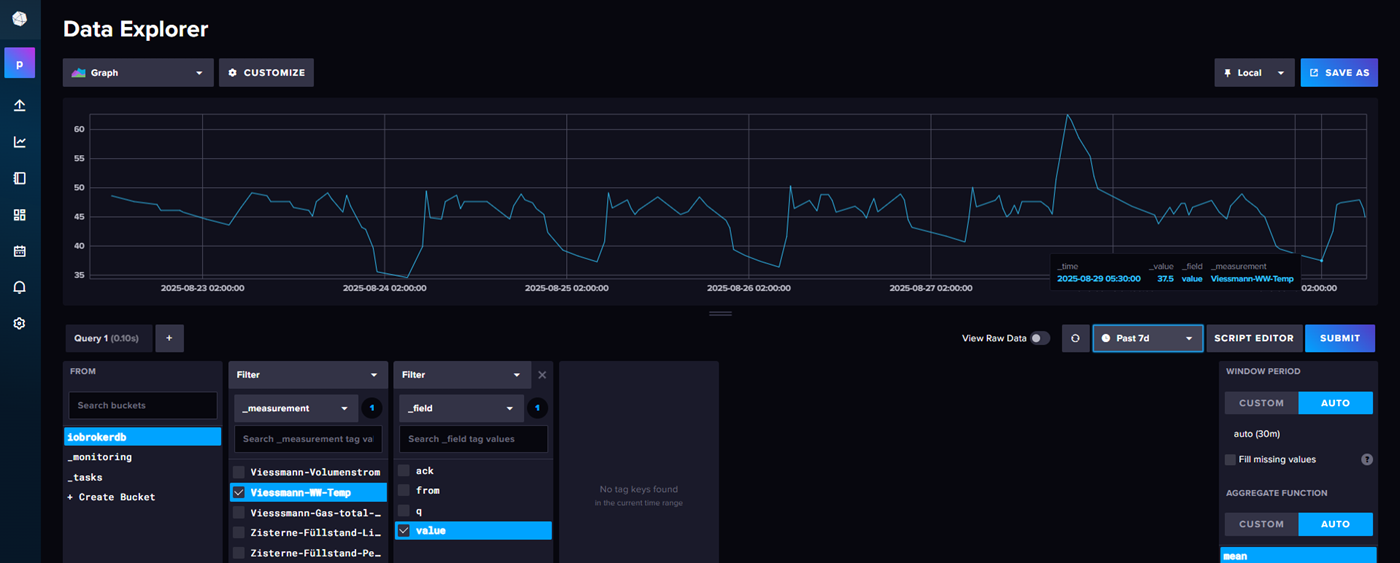
Moin,
kann ich nicht sagen, bei mir kommen noch Daten über die API.
-
Auch Ich habe das Problem, das sich die Datenpunkte in meinem Viessmann Adapter ab dem 18.8 nicht mehr aktualisieren. Da meine Heizung in Sommerbetrieb ist, ist mir dieses nicht aufgefallen.
Eigentlich müssten doch alle Anwender dieses Problem haben.
Meine Version 2.4.0@ronniboy
Danke für den Tip, ich hatte noch die Version 2.3.
Ich wusste nicht, das es schon eine neuere Version gibt, mit der 2.4.3, die über NVP angeboten wird scheint wieder alles zu funktionieren, vielen Dank für den Tip. -
Hallo Leute,
ich nutze den Adapter schon seit Jahren.
Seit dem 02.04.2025 13:01 Uhr kommt leider die Vorlauftemperatur nicht mehr rein von meiner Wärepumpe Vitocal 200.Ich meine folgenden Punkt: viessmannapi.0.XXXX.0.features.heating.circuits.0.sensors.temperature.supply.properties.value.value,
Die Brauchwassertemperatur und Außentemperatur läuft wie gewohnt. Der Adapter ist auf Version 2.3.0.
Was könnte der Fehler sein?
Vielen Dank!EDIT: ich habe nun gelesen, das die 2.4.3 wohl viele Probleme löst, das werde ich nun mal probieren.
-
Hi ich habe ein neuen Adapter für Viessman erstellt
Man benötigt eine ClientID von der Viessmann API
https://app.developer.viessmann-climatesolutions.com besuchen und eine Client ID mit diesen Optionen erstellen:
Name: iobroker
Google reCAPTCHA deaktivieren
Redirect URI: http://localhost:4200/Die Client ID in die Einstellungen kopieren
Außentemperatur findet sich z.B. hier:
viessmannapi.0.XXXXX.0.features.heating.sensors.temperature.outside.properties.value.value
Weitere Beispiele siehe UntenRemote Befehle sind möglich unter
viessmannapi.0.XXXXX.0.features.heating.dhw.temperature.main.commands.setTargetTemperature.setValueZum Installieren:
Via AdaptersucheIn den Instanzoptionen die jeweiligen Optionen einstellen.
Github
https://github.com/TA2k/ioBroker.viessmannapiKompatibilitätsliste:
https://documentation.viessmann.com/static/compatibility
Regelungen für Wand- oder Kompaktgeräte
Vitotronic 200, Typ HO1, HO1A, HO1B, HO1D, HO2B, HO2C
Vitotronic 200 RF, Typ HO1C, HO1E
Regelungen für bodenstehende Heizkessel
Vitotronic 200, Typ KO1B, KO2B, KW6, KW6A, KW6B, KW1, KW2, KW4, KW5
Vitotronic 300, Typ KW3
Regelungen für Wärmepumpen und Hybridgeräte
Vitotronic 200, Typ WO1A, WO1B, WO1C
Regelungen für Festbrennstoffkessel
Vitoligno 200-S mit Ecotronic (ab Softwarestand 2.03)
Vitoligno 250-S mit Ecotronic (ab Softwarestand 2.00)
Vitoligno 300-C mit Ecotronic (ab Softwarestand 2.12)
Vitoligno 300-P mit Vitotronic 200 FO1
Vitoligno 300-S mit Ecotronic (ab Softwarestand 2.04)Liste aller Datenpunkte:
https://documentation.viessmann.com/static/iot/data-pointsFrage zu fehlende Datenpunkte bitte direkt an Viessmann
https://www.viessmann-community.com/t5/The-Viessmann-API/bd-p/dev-viessmann-apiBeispiele:
Vorlauftemperatur:
viessmannapi.0.XXXX.features.heating.circuits.0.sensors.temperature.supply.properties.value.value,

Brennerstatus:
viessmannapi.0.XXXX.0.features.heating.burners.0.properties.active.value

Anzahl Zündungen:
viessmannapi.0.XXXXX.features.heating.burners.0.statistics.properties.starts.value

Betriebsstunden
viessmannapi.0.XXXXX.features.heating.burners.0.statistics.properties.hours.value

Kesseltemperatur
viessmannapi.0.XXXXX.features.heating.boiler.sensors.temperature.main.properties.unit.value

Kompressor aktiv:		viessmannapi.0.xxx.0.features.heating.compressors.0.properties.active.value
Heizkreispumpe aktiv:		viessmannapi.0.xxx.0.features.heating.circuits.1.circulation.pump.properties.status.value
Warmwasserbereitung:		viessmannapi.0.xxx.0.features.heating.dhw.charging.properties.active.value
Heizungsmodus:			viessmannapi.0.xxx.0.features.heating.circuits.1.operating.modes.active.properties.value.value
Heizprogramm:			viessmannapi.0.xxx.0.features.heating.circuits.1.operating.programs.active.properties.value.value
Temperatur Heizprogramm normal:	viessmannapi.0.xxx.0.features.heating.circuits.1.operating.programs.normal.properties.temperature.value
Temperatur Heizprogramm reduz.:	viessmannapi.0.xxx.0.features.heating.circuits.1.operating.programs.reduced.properties.temperature.value
Warmwasser Soll Temperatur:	viessmannapi.0.xxx.0.features.heating.dhw.temperature.properties.value.value
Warmwasser Ist Temperatur:	viessmannapi.0.xxx.0.features.heating.dhw.sensors.temperature.hotWaterStorage.properties.value.value
Temperatur Außensensor:		viessmannapi.0.xxx.0.features.heating.sensors.temperature.outside.properties.value.value
Statistik Kompressor Starts:	viessmannapi.0.xxx.0.features.heating.compressors.0.statistics.properties.starts.value
Statistik Kompressor Stunden:	viessmannapi.0.xxx.0.features.heating.compressors.0.statistics.properties.hours.value
Temperatursensoren der Heizkreise:   viessmannapi.0.xxxxxxx.0.features.heating.circuits.0.sensors.temperature.supply.properties.value.value

Primärkreis Vorlauftemperatur:		viessmann.0.xxx.0.features.heating.primaryCircuit.sensors.temperature.supply.properties.value.value
Sekundärkreis Vorlauftemperatur:	viessmann.0.xxx.0.features.heating.secondaryCircuit.sensors.temperature.supply.properties.value.value
Sekundärkreis Rücklauftemperatur:	viessmann.0.xxx.0.features.heating.secondaryCircuit.sensors.temperature.return.properties.value.value
?					viessmann.0.xxx.0.features.heating.sensors.temperature.return.properties.value.value


Heizung an (Kompressor): viessmannapi.0.x.0.features.heating.compressors.0.properties.active.value

WW Temp viessmannapi.0.x.0.features.heating.dhw.sensors.temperature.hotWaterStorage.properties.value.value

HW Temp  viessmannapi.0.x.0.features.heating.buffer.sensors.temperature.main.properties.value.value

ZP features.heating.circuits.1.circulation.pump.properties.status.value

WP_Aussentemperatur 0.features.heating.sensors.temperature.outside.properties.value.value
WP_gemeinsame Vorlauftemperatur 0.features.heating.boiler.sensors.temperature.commonSupply.properties.value.value
WP_Temperatur Pufferspeicher 0.features.heating.buffer.sensors.temperature.main.properties.value.value
WP_Heizkörper_Umwälzpumpe ON/OFF 0.features.heating.circuits.0.circulation.pump.properties.status.value
WP_Heizkörper_Umwälzpumpe_Frostschutz 0.features.heating.circuits.0.frostprotection.properties.status.value
WP_Heizkörper_Niveau 0.features.heating.circuits.0.heating.curve.properties.shift.value
WP_Heizkörper_Neigung 0.features.heating.circuits.0.heating.curve.properties.slope.value
WP_Heizkörper_Zeitplan 0.features.heating.circuits.0.heating.schedule.properties.entries.value
WP_Heizkörper_Komfort_Solltemperatur 0.features.heating.circuits.0.operating.programs.comfortHeating.properties.temperature.value
WP_Heizkörper_Normal_Solltemperatur 0.features.heating.circuits.0.operating.programs.normalHeating.properties.temperature.value
WP_Heizkörper_Reduziert_Solltemperatur 0.features.heating.circuits.0.operating.programs.reducedHeating.properties.temperature.value
WP_Vorlauftemperatur Heizkörper 0.features.heating.circuits.0.sensors.temperature.supply.properties.value.value
???? 0.features.heating.circuits.0.operating.programs.comfortEnergySaving.properties.reason.value
???? 0.features.heating.circuits.0.operating.programs.normalEnergySaving.properties.reason.value
WP_Heizkörper_FBH ON/OFF 0.features.heating.circuits.1.circulation.pump.properties.status.value
WP_FBH_Umwälzpumpe_Frostschutz 0.features.heating.circuits.1.frostprotection.properties.status.value
WP_FBH_Niveau 0.features.heating.circuits.1.heating.curve.properties.shift.value
WP_FBH_Neigung 0.features.heating.circuits.1.heating.curve.properties.slope.value
WP_FBH_Zeitplan 0.features.heating.circuits.1.heating.schedule.properties.entries.value

WP_FBH_Komfort_Solltemperatur 0.features.heating.circuits.1.operating.programs.comfortHeating.properties.temperature.value
WP_FBH_Normal_Solltemperatur 0.features.heating.circuits.1.operating.programs.normalHeating.properties.temperature.value
WP_FBH_Reduziert_Solltemperatur 0.features.heating.circuits.1.operating.programs.reducedHeating.properties.temperature.value

WP_FBH_Vorlauftemperatur 0.features.heating.circuits.1.sensors.temperature.supply.properties.value.value

WP_Stromverbrauch_HEUTE 0.features.heating.power.consumption.summary.heating.properties.currentDay.value
WP_Stromverbrauch_MONAT 0.features.heating.power.consumption.summary.heating.properties.currentMonth.value
WP_Stromverbrauch_JAHR 0.features.heating.power.consumption.summary.heating.properties.currentYear.value
WP_Stromverbrauch_LETZTER_MONAT 0.features.heating.power.consumption.summary.heating.properties.lastMonth.value
WP_Stromverbrauch_LETZTEN_7_TAGE 0.features.heating.power.consumption.summary.heating.properties.lastSevenDays.value
WP_Stromverbrauch_LETZTES_JAHR 0.features.heating.power.consumption.summary.heating.properties.lastYear.value
WP_Primärkreis_Temperatur 0.features.heating.primaryCircuit.sensors.temperature.supply.properties.value.value
WP_Sekundärkreis_Temperatur 0.features.heating.secondaryCircuit.sensors.temperature.supply.properties.value.value
WP_Rücklauftemperatur 0.features.heating.sensors.temperature.return.properties.value.value
WP_Volumenstrom 0.features.heating.sensors.volumetricFlow.allengra.properties.value.value
Betriebsstunden Verdichter 0.features.heating.compressors.0.statistics.properties.hours.value
Beispiel zum setzen eines Schedule:
var standard = '{"mon":[{"start":"00:00","end":"24:00","mode":"standard","position":0}],"tue":[{"start":"00:00","end":"24:00","mode":"standard","position":0}],\
              "wed":[{"start":"00:00","end":"24:00","mode":"standard","position":0}],"thu":[{"start":"00:00","end":"24:00","mode":"standard","position":0}],\
              "fri":[{"start":"00:00","end":"24:00","mode":"standard","position":0}],"sat":[{"start":"00:00","end":"24:00","mode":"standard","position":0}],\
              "sun":[{"start":"00:00","end":"24:00","mode":"standard","position":0}]}'

setState("viessmannapi.0.xxxxxxx.0.features.ventilation.schedule.commands.setSchedule.setValue", JSON.parse(standard));
Beispiel zirkulationspumpe
// schedule zum einschalten, allerdings nur zwischen 6 und 21 uhr
var pump_on = '{"mon":[{"start":"06:00","end":"21:00","mode":"on","position":0}],"tue":[{"start":"06:00","end":"21:00","mode":"on","position":0}],"wed":[{"start":"06:00","end":"21:00","mode":"on","position":0}],"thu":[{"start":"06:00","end":"21:00","mode":"on","position":0}],"fri":[{"start":"06:00","end":"21:00","mode":"on","position":0}],"sat":[{"start":"06:00","end":"21:00","mode":"on","position":0}],"sun":[{"start":"06:00","end":"21:00","mode":"on","position":0}]}'
// schedule leeren - pumpe ausschalten
var pump_off = '{"mon":[], "tue":[],"wed":[],"thu":[],"fri":[],"sat":[],"sun":[]}'

setState("viessmannapi.0.xxx.features.heating.dhw.pumps.circulation.schedule.commands.setSchedule.setValue", JSON.parse(pump_on)); // oder pump_off
Die Max. Heizleistung gibt es nicht als API Datenpunkt, kann nur am Gerät geändert werden.
Kostenlose Paket enthält:
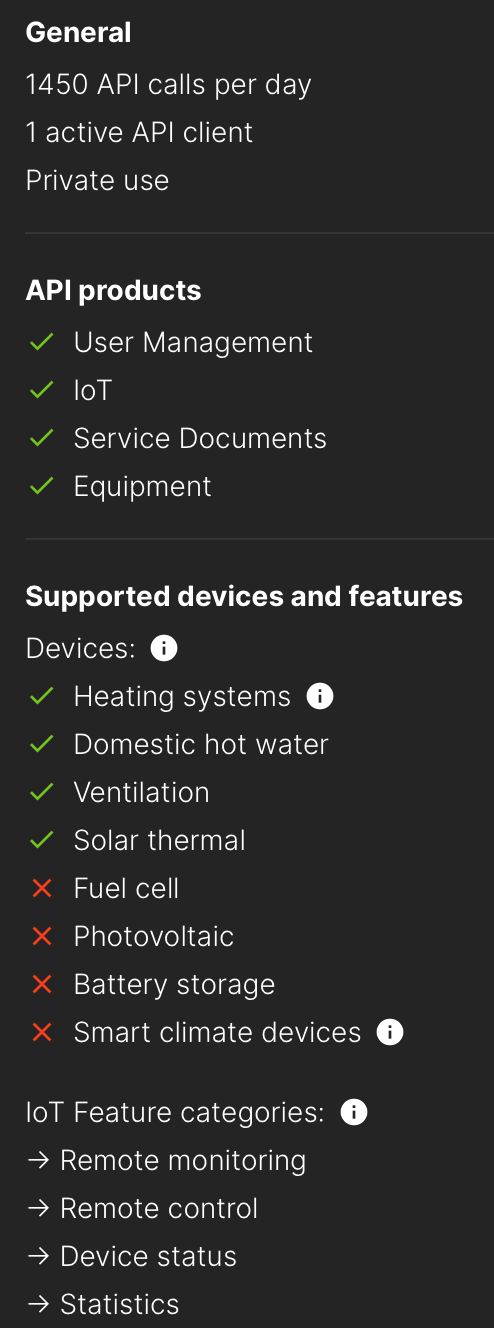
Zum Installieren:
https://github.com/TA2k/ioBroker.viessmannapiFür die aktuelle Version
 bitte das latest Repo auswählen: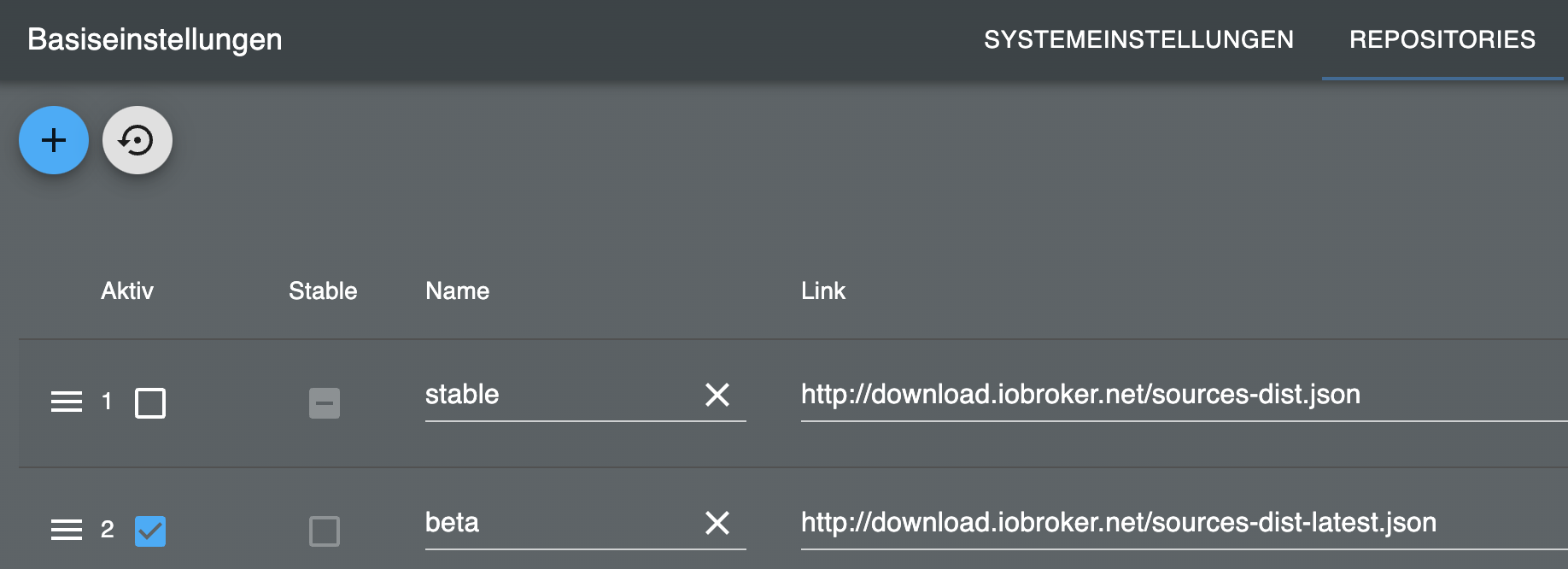
@tombox sagte in Test ViessmannAPI v2.0.0:
Man benötigt eine ClientID von der Viessmann API
https://app.developer.viessmann.com besuchen und eine Client ID mit diesen Optionen erstellen:
Hi,
vielleicht kann man den Link mal aktualisieren, der ist veraltet. Im Adapter wird auch noch auf die alte Seite verwiesen. Danke!
https://app.developer.viessmann-climatesolutions.com/
Gruss
Stefan -
Ist was für GitHub.
Leg ein Issue an.https://github.com/TA2k/ioBroker.viessmannapi/issues
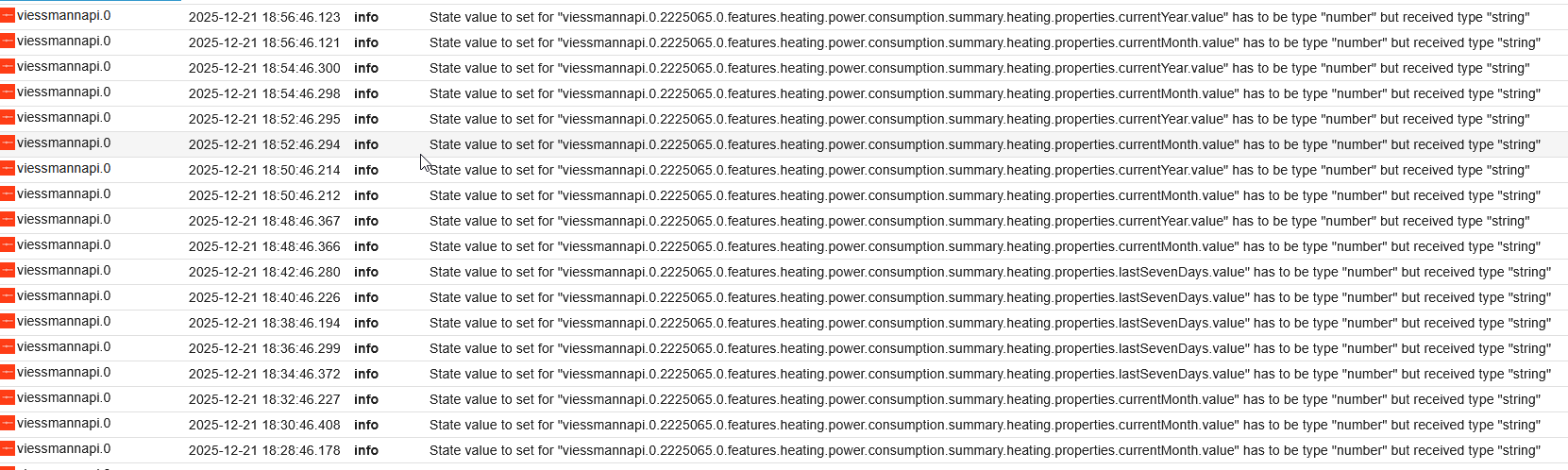
Und bitte keine Bildchen vom Log. Das 'richtige' Log findet sich unter
iob logs -
Hallo,
seit heute Morgen 1:00 Uhr liefert die API mir etliche Daten nicht mehr, z.B. features.heating.compressors.0.heat, features.heating.compressors.0.power, features.heating.heat.production.current, features.heating.heat.production.dhw, features.heating.heat.production.heating, aber features.heating.heat.production.cooling und features.heating.heat.production.summary. Bin ich da allein?
-
Hallo zusammen,
die Daten fehlen bei mir noch immer. Ich habe mit log-level debug nachgeschaut, welche Daten von Viessmann noch geliefert werden. Das sind fast alle bis auf diese Liste, jeweils mit Timestamp des letzten Eintrags in iobroker:
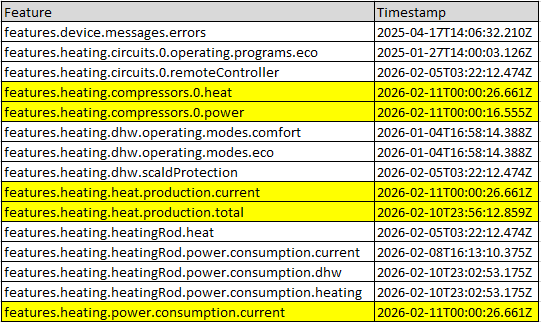
Verglichen habe ich mit den Features, für die Daten in iobroker vorhanden. Ein paar davon scheinen schon länger obsolet zu sein, aber vor allem die gelb hinterlegten sind sehr ärgerlich. Bin das nur ich oder fehlen die Daten bei Euch auch?
-
@tombox Habe die neueste Version von github gezogen und mit der featurelist gespielt.
Featurelist = "heating.compressors.0.power." ergibt
2026-02-13 14:09:38.574 - debug: viessmannapi.0 (4819) Feature filter: 327 -> 0 features
Featurelist = "heating.compressors.0." ergibt
2026-02-13 14:10:20.029 - debug: viessmannapi.0 (4834) Feature filter: 327 -> 9 features
und die Daten unter compressors.0 erscheinen, aber heat.* und power.* nicht.Any ideas?
-
@tombox Habe die neueste Version von github gezogen und mit der featurelist gespielt.
Featurelist = "heating.compressors.0.power." ergibt
2026-02-13 14:09:38.574 - debug: viessmannapi.0 (4819) Feature filter: 327 -> 0 features
Featurelist = "heating.compressors.0." ergibt
2026-02-13 14:10:20.029 - debug: viessmannapi.0 (4834) Feature filter: 327 -> 9 features
und die Daten unter compressors.0 erscheinen, aber heat.* und power.* nicht.Any ideas?
@Derda-0 mit der aktuellen GitHub version sollte das gehen
heating.compressors.,heating.boiler.
Pattern Matcht heating.* heating, heating.boiler, heating.boiler.xxx, ... heating.compressors.* heating.compressors, heating.compressors.0, heating.compressors.0.power, ... heating.compressors.0.power.* heating.compressors.0.power, heating.compressors.0.power.consumption, ... heating.compressors.0.power Nur exakt heating.compressors.0.power



Hey! Du scheinst an dieser Unterhaltung interessiert zu sein, hast aber noch kein Konto.
Hast du es satt, bei jedem Besuch durch die gleichen Beiträge zu scrollen? Wenn du dich für ein Konto anmeldest, kommst du immer genau dorthin zurück, wo du zuvor warst, und kannst dich über neue Antworten benachrichtigen lassen (entweder per E-Mail oder Push-Benachrichtigung). Du kannst auch Lesezeichen speichern und Beiträge positiv bewerten, um anderen Community-Mitgliedern deine Wertschätzung zu zeigen.
Mit deinem Input könnte dieser Beitrag noch besser werden 💗
Registrieren AnmeldenSupport us
426
Online33.0k
Benutzer83.6k
Themen1.3m
Beiträge