
NEWS




[gelöst] NodeRed LXC verbinden mit ioBroker
-
Ich habe einen eigenen Proxmox LXC mit Node-Red aufgesetzt und
node-red-contrib-iobroker-Palette installiert.
Nun versuche ich eine Verbindung zum bestehenden ioBroker aufzubauen.
Aber egal was ich probiere es kommt keine Verbindung zustande.Socketio Einstellungen
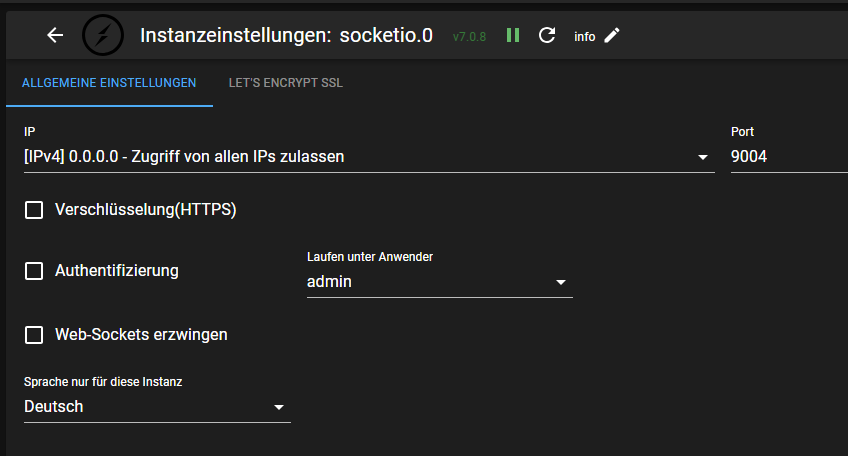
 ss -lntp | grep :9004
LISTEN 0      511                *:9004            *:*
iob diag Listening Ports
*** Listening Ports ***
Active Internet connections (only servers)
Proto Recv-Q Send-Q Local Address           Foreign Address         State       User       Inode      PID/Program name
tcp        0      0 0.0.0.0:111             0.0.0.0:*               LISTEN      0          546748481  1/init
tcp        0      0 0.0.0.0:1883            0.0.0.0:*               LISTEN      1001       546757967  1012/io.sonoff.0
tcp        0      0 0.0.0.0:1882            0.0.0.0:*               LISTEN      1001       546760041  1114/io.shelly.0
tcp        0      0 0.0.0.0:1885            0.0.0.0:*               LISTEN      1001       546750444  789/io.mqtt.0
tcp        0      0 127.0.0.1:8200          0.0.0.0:*               LISTEN      1001       546758513  1342/io.cameras.0
tcp        0      0 127.0.0.1:9001          0.0.0.0:*               LISTEN      1001       546748640  167/iobroker.js-con
tcp        0      0 127.0.0.1:9000          0.0.0.0:*               LISTEN      1001       546746207  167/iobroker.js-con
tcp        0      0 127.0.0.1:25            0.0.0.0:*               LISTEN      0          546749659  307/master
tcp6       0      0 :::9004                 :::*                    LISTEN      1001       554921716  386665/io.socketio.
tcp6       0      0 :::8401                 :::*                    LISTEN      1001       546770091  1628/io.jarvis.1
tcp6       0      0 :::8400                 :::*                    LISTEN      1001       546767124  1613/io.jarvis.0
tcp6       0      0 :::8402                 :::*                    LISTEN      1001       546776113  1948/io.jarvis.2
tcp6       0      0 ::1:25                  :::*                    LISTEN      0          546749660  307/master
tcp6       0      0 :::8093                 :::*                    LISTEN      1001       546764481  1643/io.rest-api.0
tcp6       0      0 :::8081                 :::*                    LISTEN      1001       546747125  336/io.admin.0
tcp6       0      0 :::8083                 :::*                    LISTEN      1001       554877114  384893/io.web.1
tcp6       0      0 :::8082                 :::*                    LISTEN      1001       554866598  384709/io.web.0
tcp6       0      0 :::111                  :::*                    LISTEN      0          546748483  1/init
tcp6       0      0 :::22                   :::*                    LISTEN      0          546745227  1/init
tcp6       0      0 :::3020                 :::*                    LISTEN      1001       553879427  346188/io.fullybrow
udp        0      0 0.0.0.0:111             0.0.0.0:*                           0          546748482  1/init
udp        0      0 0.0.0.0:5353            0.0.0.0:*                           1001       546769896  1933/io.wled.0
udp        0      0 0.0.0.0:5353            0.0.0.0:*                           1001       546755614  708/io.chromecast.0
udp        0      0 0.0.0.0:41977           0.0.0.0:*                           1001       546754057  997/io.snmp.0
udp        0      0 0.0.0.0:45996           0.0.0.0:*                           1001       546754636  682/io.broadlink2.0
udp        0      0 0.0.0.0:15001           0.0.0.0:*                           1001       546753758  682/io.broadlink2.0
udp        0      0 0.0.0.0:48401           0.0.0.0:*                           1001       554766760  682/io.broadlink2.0
udp6       0      0 :::111                  :::*                                0          546748484  1/init
Server-Config Einstellung
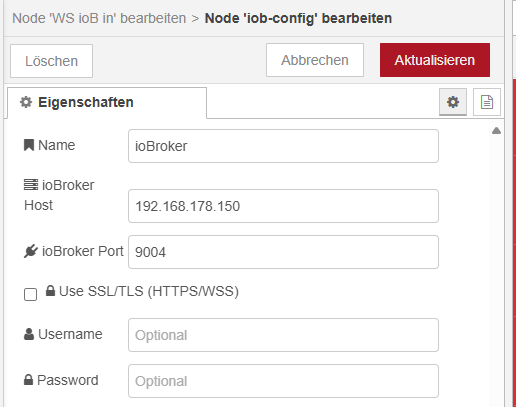
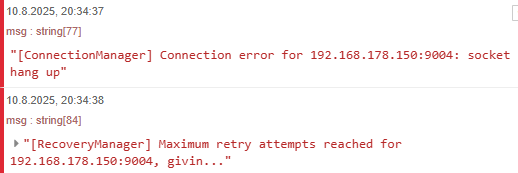
@mickym Hast du eine Idee dazu?
NUC i7 64GB mit Proxmox ---- Jarvis Infos Aktualisierungen der Doku auf Instagram verfolgen -> mcuiobroker Instagram
Wenn Euch mein Vorschlag geholfen hat, bitte rechts "^" klicken. -
Ich habe einen eigenen Proxmox LXC mit Node-Red aufgesetzt und
node-red-contrib-iobroker-Palette installiert.
Nun versuche ich eine Verbindung zum bestehenden ioBroker aufzubauen.
Aber egal was ich probiere es kommt keine Verbindung zustande.Socketio Einstellungen
 ss -lntp | grep :9004
LISTEN 0      511                *:9004            *:*
iob diag Listening Ports
*** Listening Ports ***
Active Internet connections (only servers)
Proto Recv-Q Send-Q Local Address           Foreign Address         State       User       Inode      PID/Program name
tcp        0      0 0.0.0.0:111             0.0.0.0:*               LISTEN      0          546748481  1/init
tcp        0      0 0.0.0.0:1883            0.0.0.0:*               LISTEN      1001       546757967  1012/io.sonoff.0
tcp        0      0 0.0.0.0:1882            0.0.0.0:*               LISTEN      1001       546760041  1114/io.shelly.0
tcp        0      0 0.0.0.0:1885            0.0.0.0:*               LISTEN      1001       546750444  789/io.mqtt.0
tcp        0      0 127.0.0.1:8200          0.0.0.0:*               LISTEN      1001       546758513  1342/io.cameras.0
tcp        0      0 127.0.0.1:9001          0.0.0.0:*               LISTEN      1001       546748640  167/iobroker.js-con
tcp        0      0 127.0.0.1:9000          0.0.0.0:*               LISTEN      1001       546746207  167/iobroker.js-con
tcp        0      0 127.0.0.1:25            0.0.0.0:*               LISTEN      0          546749659  307/master
tcp6       0      0 :::9004                 :::*                    LISTEN      1001       554921716  386665/io.socketio.
tcp6       0      0 :::8401                 :::*                    LISTEN      1001       546770091  1628/io.jarvis.1
tcp6       0      0 :::8400                 :::*                    LISTEN      1001       546767124  1613/io.jarvis.0
tcp6       0      0 :::8402                 :::*                    LISTEN      1001       546776113  1948/io.jarvis.2
tcp6       0      0 ::1:25                  :::*                    LISTEN      0          546749660  307/master
tcp6       0      0 :::8093                 :::*                    LISTEN      1001       546764481  1643/io.rest-api.0
tcp6       0      0 :::8081                 :::*                    LISTEN      1001       546747125  336/io.admin.0
tcp6       0      0 :::8083                 :::*                    LISTEN      1001       554877114  384893/io.web.1
tcp6       0      0 :::8082                 :::*                    LISTEN      1001       554866598  384709/io.web.0
tcp6       0      0 :::111                  :::*                    LISTEN      0          546748483  1/init
tcp6       0      0 :::22                   :::*                    LISTEN      0          546745227  1/init
tcp6       0      0 :::3020                 :::*                    LISTEN      1001       553879427  346188/io.fullybrow
udp        0      0 0.0.0.0:111             0.0.0.0:*                           0          546748482  1/init
udp        0      0 0.0.0.0:5353            0.0.0.0:*                           1001       546769896  1933/io.wled.0
udp        0      0 0.0.0.0:5353            0.0.0.0:*                           1001       546755614  708/io.chromecast.0
udp        0      0 0.0.0.0:41977           0.0.0.0:*                           1001       546754057  997/io.snmp.0
udp        0      0 0.0.0.0:45996           0.0.0.0:*                           1001       546754636  682/io.broadlink2.0
udp        0      0 0.0.0.0:15001           0.0.0.0:*                           1001       546753758  682/io.broadlink2.0
udp        0      0 0.0.0.0:48401           0.0.0.0:*                           1001       554766760  682/io.broadlink2.0
udp6       0      0 :::111                  :::*                                0          546748484  1/init
Server-Config Einstellung
@mickym Hast du eine Idee dazu?
-
@mcu Erledigt, man musste eine eigen Admin-Instanz installieren und dann zuordnen
siehe https://flows.nodered.org/node/node-red-contrib-iobroker

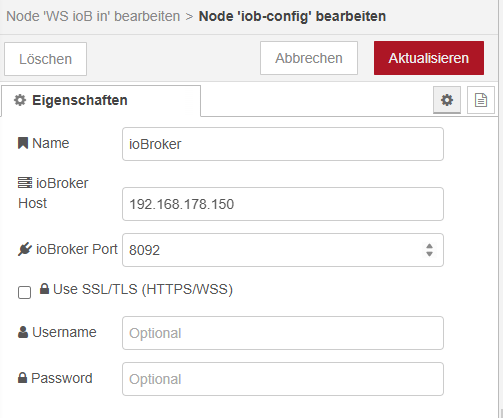
@mcu Wenn man allerdings die
TreeViewstartet kommt nach kurzer Zeit10.8.2025, 21:50:56 msg : string[67] "[WebSocketClient:1754855332868-01y8vw2vl] Max payload size exceeded" 10.8.2025, 21:50:56 msg : string[88] "[ConnectionManager] Connection error for 192.168.178.150:8092: Max payload size ..." 10.8.2025, 21:50:56 msg : string[95] "[RecoveryManager] Handling connection error for 192.168.178.150:8092: Max payloa..." 10.8.2025, 21:51:08 msg : string[80] "[OperationManager] getStates failed for 192.168.178.150:8092: Get states timeout"Nachdem Fehler kommt auch
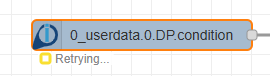
Man muss danach den Flow neu starten
-
Ich habe einen eigenen Proxmox LXC mit Node-Red aufgesetzt und
node-red-contrib-iobroker-Palette installiert.
Nun versuche ich eine Verbindung zum bestehenden ioBroker aufzubauen.
Aber egal was ich probiere es kommt keine Verbindung zustande.Socketio Einstellungen
 ss -lntp | grep :9004
LISTEN 0      511                *:9004            *:*
iob diag Listening Ports
*** Listening Ports ***
Active Internet connections (only servers)
Proto Recv-Q Send-Q Local Address           Foreign Address         State       User       Inode      PID/Program name
tcp        0      0 0.0.0.0:111             0.0.0.0:*               LISTEN      0          546748481  1/init
tcp        0      0 0.0.0.0:1883            0.0.0.0:*               LISTEN      1001       546757967  1012/io.sonoff.0
tcp        0      0 0.0.0.0:1882            0.0.0.0:*               LISTEN      1001       546760041  1114/io.shelly.0
tcp        0      0 0.0.0.0:1885            0.0.0.0:*               LISTEN      1001       546750444  789/io.mqtt.0
tcp        0      0 127.0.0.1:8200          0.0.0.0:*               LISTEN      1001       546758513  1342/io.cameras.0
tcp        0      0 127.0.0.1:9001          0.0.0.0:*               LISTEN      1001       546748640  167/iobroker.js-con
tcp        0      0 127.0.0.1:9000          0.0.0.0:*               LISTEN      1001       546746207  167/iobroker.js-con
tcp        0      0 127.0.0.1:25            0.0.0.0:*               LISTEN      0          546749659  307/master
tcp6       0      0 :::9004                 :::*                    LISTEN      1001       554921716  386665/io.socketio.
tcp6       0      0 :::8401                 :::*                    LISTEN      1001       546770091  1628/io.jarvis.1
tcp6       0      0 :::8400                 :::*                    LISTEN      1001       546767124  1613/io.jarvis.0
tcp6       0      0 :::8402                 :::*                    LISTEN      1001       546776113  1948/io.jarvis.2
tcp6       0      0 ::1:25                  :::*                    LISTEN      0          546749660  307/master
tcp6       0      0 :::8093                 :::*                    LISTEN      1001       546764481  1643/io.rest-api.0
tcp6       0      0 :::8081                 :::*                    LISTEN      1001       546747125  336/io.admin.0
tcp6       0      0 :::8083                 :::*                    LISTEN      1001       554877114  384893/io.web.1
tcp6       0      0 :::8082                 :::*                    LISTEN      1001       554866598  384709/io.web.0
tcp6       0      0 :::111                  :::*                    LISTEN      0          546748483  1/init
tcp6       0      0 :::22                   :::*                    LISTEN      0          546745227  1/init
tcp6       0      0 :::3020                 :::*                    LISTEN      1001       553879427  346188/io.fullybrow
udp        0      0 0.0.0.0:111             0.0.0.0:*                           0          546748482  1/init
udp        0      0 0.0.0.0:5353            0.0.0.0:*                           1001       546769896  1933/io.wled.0
udp        0      0 0.0.0.0:5353            0.0.0.0:*                           1001       546755614  708/io.chromecast.0
udp        0      0 0.0.0.0:41977           0.0.0.0:*                           1001       546754057  997/io.snmp.0
udp        0      0 0.0.0.0:45996           0.0.0.0:*                           1001       546754636  682/io.broadlink2.0
udp        0      0 0.0.0.0:15001           0.0.0.0:*                           1001       546753758  682/io.broadlink2.0
udp        0      0 0.0.0.0:48401           0.0.0.0:*                           1001       554766760  682/io.broadlink2.0
udp6       0      0 :::111                  :::*                                0          546748484  1/init
Server-Config Einstellung
@mickym Hast du eine Idee dazu?
-
@mickym In der Beschreibung zur Palette steht, dass man für nodered-Contrib einen eigenen Admin Adapter nutzen soll.
Habe ich gemacht und funktioniert auch, habe jetzt nur das Problem mit demTreeview. Der bricht ab.NUC i7 64GB mit Proxmox ---- Jarvis Infos Aktualisierungen der Doku auf Instagram verfolgen -> mcuiobroker Instagram
Wenn Euch mein Vorschlag geholfen hat, bitte rechts "^" klicken. -
@mickym In der Beschreibung zur Palette steht, dass man für nodered-Contrib einen eigenen Admin Adapter nutzen soll.
Habe ich gemacht und funktioniert auch, habe jetzt nur das Problem mit demTreeview. Der bricht ab.@mcu Ja OK - ich hab die Nodes nur mal angetestet - da müssen wir wohl warten bis @Marc-Berg wieder aus dem Urlaub ist.
Ich hab nur mal mein Prodsystem mit dem gleichen Adminadapter verwendet und hab vielleicht nicht soviele States, aber vielleicht habe ich nicht soviele States.
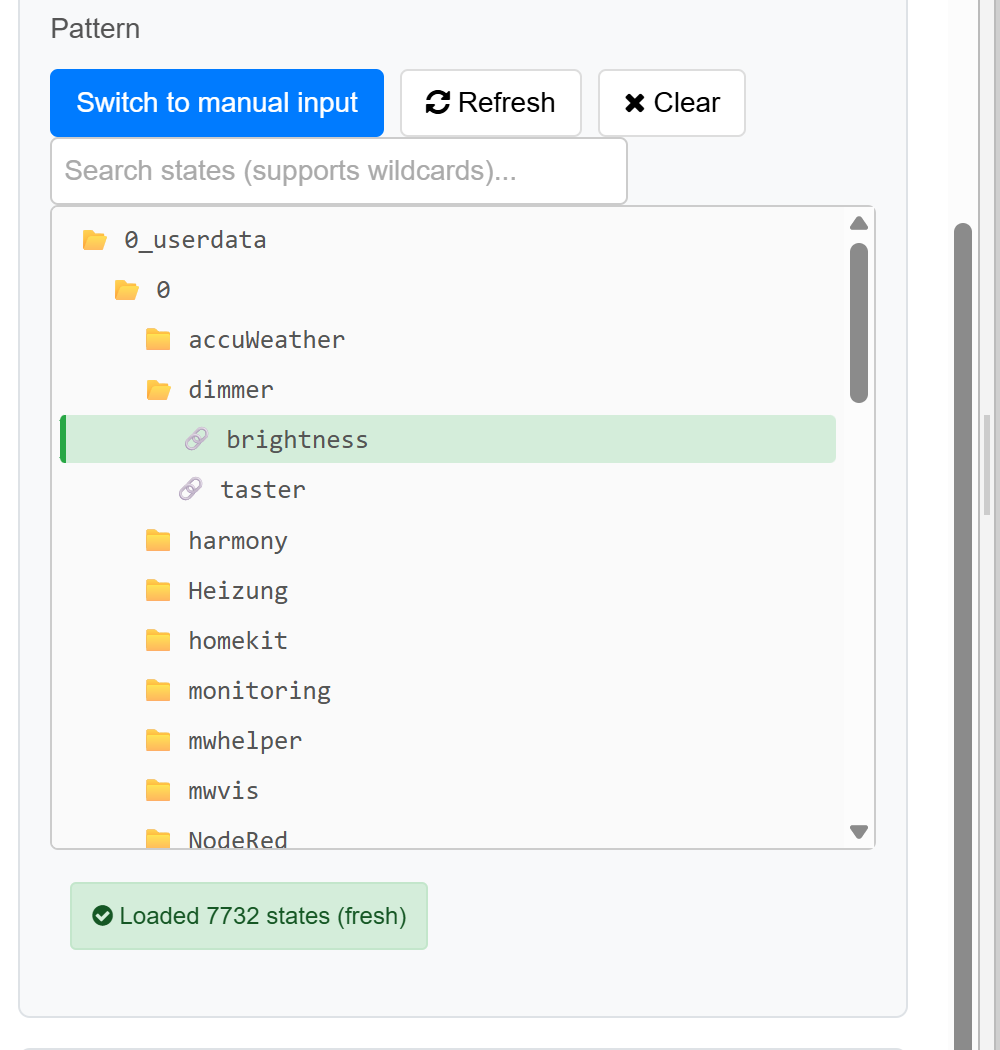
-
@mcu Ja OK - ich hab die Nodes nur mal angetestet - da müssen wir wohl warten bis @Marc-Berg wieder aus dem Urlaub ist.
Ich hab nur mal mein Prodsystem mit dem gleichen Adminadapter verwendet und hab vielleicht nicht soviele States, aber vielleicht habe ich nicht soviele States.
-
Bin (noch) nicht im Urlaub :-)
@MCU Bislang konnte ich noch keine so umfänglichen Objektlisten testen, habe noch optimiert, kannst gerne mal die v1.1.0-beta11 testen:
https://github.com/Marc-Berg/node-red-contrib-iobroker/releases
.tgz runterladen und in der Palette hochladen.
-
Bin (noch) nicht im Urlaub :-)
@MCU Bislang konnte ich noch keine so umfänglichen Objektlisten testen, habe noch optimiert, kannst gerne mal die v1.1.0-beta11 testen:
https://github.com/Marc-Berg/node-red-contrib-iobroker/releases
.tgz runterladen und in der Palette hochladen.
@marc-berg Spitze!
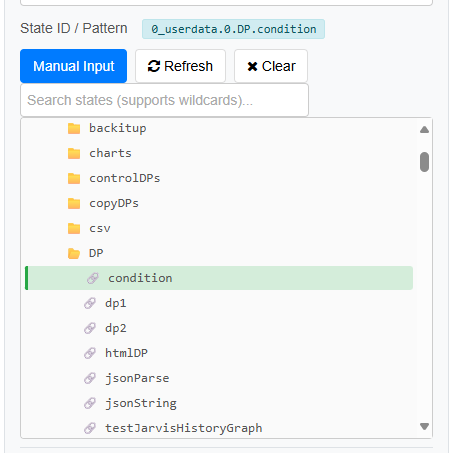
NUC i7 64GB mit Proxmox ---- Jarvis Infos Aktualisierungen der Doku auf Instagram verfolgen -> mcuiobroker Instagram
Wenn Euch mein Vorschlag geholfen hat, bitte rechts "^" klicken. -
@marc-berg Spitze!
-
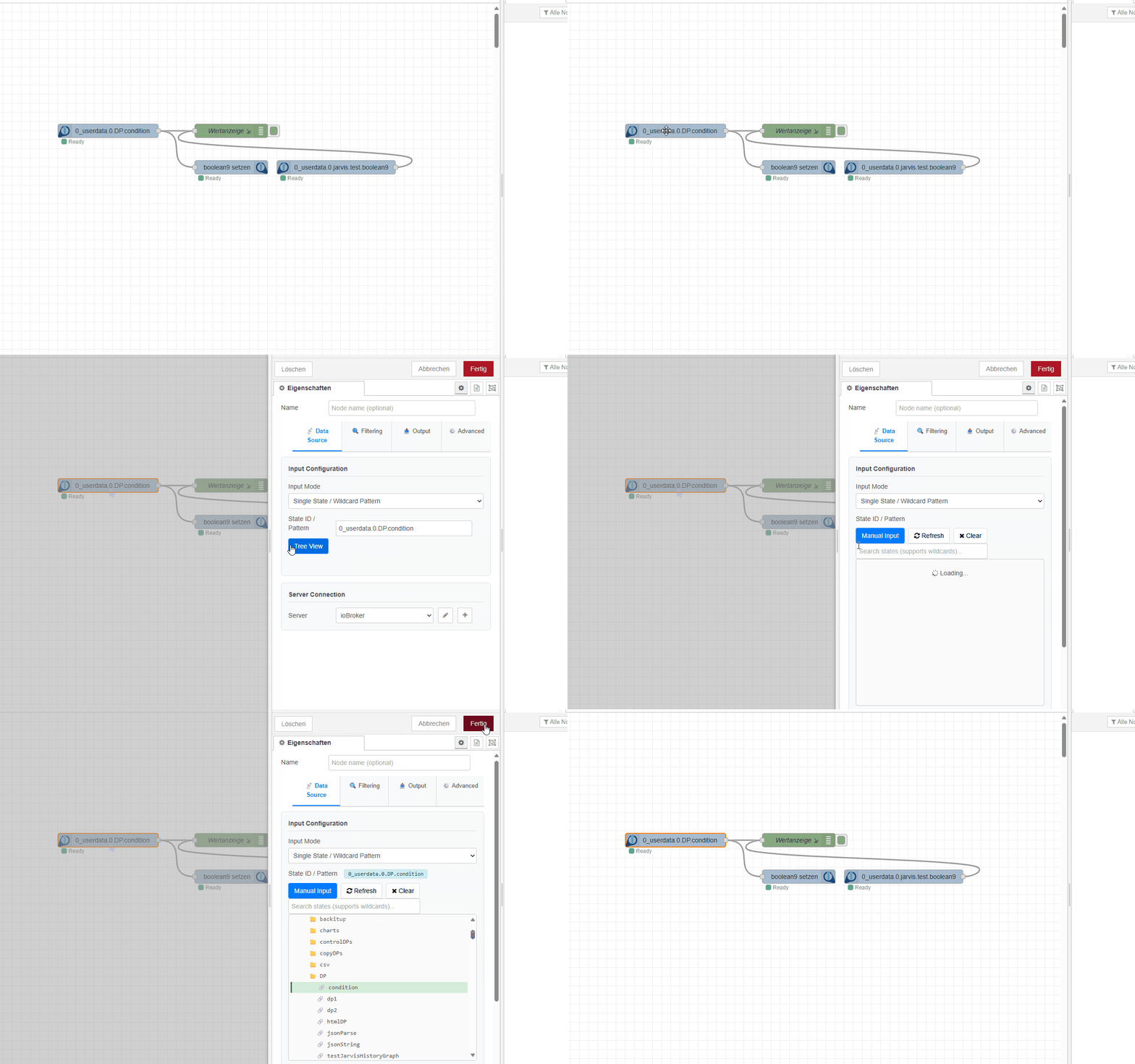
@marc-berg Gefühlt 1-2 Sekunden
NUC i7 64GB mit Proxmox ---- Jarvis Infos Aktualisierungen der Doku auf Instagram verfolgen -> mcuiobroker Instagram
Wenn Euch mein Vorschlag geholfen hat, bitte rechts "^" klicken. -
@marc-berg Gefühlt 1-2 Sekunden
@mcu sagte in NodeRed LXC verbinden mit ioBroker:
Gefühlt 1-2 Sekunden
Okay, dann brauche ich an der Stelle wohl nicht weiter optimieren, weitergehende Optimierungen wären jetzt anstrengend geworden.
-
@mcu sagte in NodeRed LXC verbinden mit ioBroker:
Gefühlt 1-2 Sekunden
Okay, dann brauche ich an der Stelle wohl nicht weiter optimieren, weitergehende Optimierungen wären jetzt anstrengend geworden.
@marc-berg
GIF


Hey! Du scheinst an dieser Unterhaltung interessiert zu sein, hast aber noch kein Konto.
Hast du es satt, bei jedem Besuch durch die gleichen Beiträge zu scrollen? Wenn du dich für ein Konto anmeldest, kommst du immer genau dorthin zurück, wo du zuvor warst, und kannst dich über neue Antworten benachrichtigen lassen (entweder per E-Mail oder Push-Benachrichtigung). Du kannst auch Lesezeichen speichern und Beiträge positiv bewerten, um anderen Community-Mitgliedern deine Wertschätzung zu zeigen.
Mit deinem Input könnte dieser Beitrag noch besser werden 💗
Registrieren AnmeldenSupport us
256
Online33.1k
Benutzende83.7k
Themen1.3m
Beiträge