




Test Adapter Controme v0.5.x
-
Aktuelle Test Version 0.5.6 Veröffentlichungsdatum 21.02.2025 Github Link https://github.com/MadErstam/ioBroker.controme/ Endlich hat ich es geschafft, den Controme-Adapter mal grundlegend zu überarbeiten und ins Latest zu bringen.
Controme ist ein Heizungssteuerungs- und Energiemanagementsystem, das Fußbodenheizung, Zentralheizung, Heizkörper oder andere Formen der Klimasteuerung intelligent steuern kann. Das Herzstück eines Controme Smart-Heat-Systems ist der Controme Mini-Server, ein lokales Raspberry Pi-basiertes System.
Der Adapter liest periodisch die Raumtemperaturen sowie die Werte aller angeschlossener Sensoren vom Miniserver aus. Die Solltemperaturen auf dem Server können damit dauerhaft oder temporär von ioBroker aus eingestellt werden. Ebenfalls können virtuelle Sensoren angelegt werden, mit denen Sensoren von Fremdanbietern (z.B. beliebige Raumtemperatursensoren) integriert werden können.
Der Adapter ist nicht dazu gedacht, die Controme UI zu ersetzen, sondern soll über grundlegende Daten und Funktionen die Integration von Controme mit anderen Smart Home Geräten und Diensten ermöglichen.
Der Adapter arbeitet komplett lokal über die Controme-API ohne irgendwelche Clouddienste. Controme bietet an, die API kostenpflichtig zu aktivieren. Ob dies wirklich nötig ist, habe ich nicht getestet.
Die verschiedenen Datenpunkte des Adapters sind in der Readme dokumentiert.
Installation:
Der Adapter kann über das Latest Repository installiert werden.
Ich freue mich auf eure Tests!
-
Aktuelle Test Version 0.5.6 Veröffentlichungsdatum 21.02.2025 Github Link https://github.com/MadErstam/ioBroker.controme/ Endlich hat ich es geschafft, den Controme-Adapter mal grundlegend zu überarbeiten und ins Latest zu bringen.
Controme ist ein Heizungssteuerungs- und Energiemanagementsystem, das Fußbodenheizung, Zentralheizung, Heizkörper oder andere Formen der Klimasteuerung intelligent steuern kann. Das Herzstück eines Controme Smart-Heat-Systems ist der Controme Mini-Server, ein lokales Raspberry Pi-basiertes System.
Der Adapter liest periodisch die Raumtemperaturen sowie die Werte aller angeschlossener Sensoren vom Miniserver aus. Die Solltemperaturen auf dem Server können damit dauerhaft oder temporär von ioBroker aus eingestellt werden. Ebenfalls können virtuelle Sensoren angelegt werden, mit denen Sensoren von Fremdanbietern (z.B. beliebige Raumtemperatursensoren) integriert werden können.
Der Adapter ist nicht dazu gedacht, die Controme UI zu ersetzen, sondern soll über grundlegende Daten und Funktionen die Integration von Controme mit anderen Smart Home Geräten und Diensten ermöglichen.
Der Adapter arbeitet komplett lokal über die Controme-API ohne irgendwelche Clouddienste. Controme bietet an, die API kostenpflichtig zu aktivieren. Ob dies wirklich nötig ist, habe ich nicht getestet.
Die verschiedenen Datenpunkte des Adapters sind in der Readme dokumentiert.
Installation:
Der Adapter kann über das Latest Repository installiert werden.
Ich freue mich auf eure Tests!
@erstam
Den Adapter 0.5.3. hatte ich wegen eines Problems deinstalliert und finde ihn nicht mehr unter den stable-Respositories. Die ersatzweise Installation über github ist möglich, jedoch verbindet sich die Instanz nicht stabil mit dem Host, im 30s-Takt wird die Verbindung unterbrochen.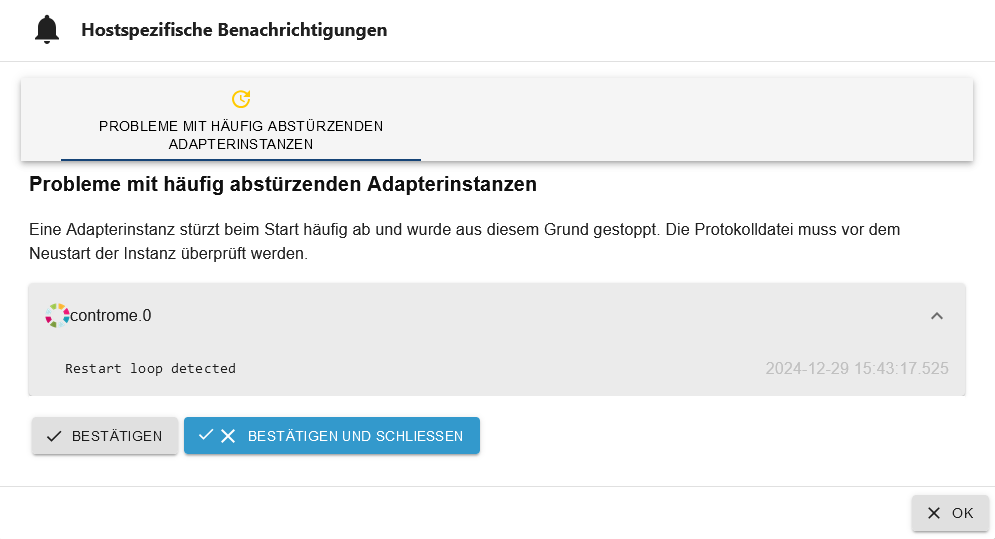
Versionen:
Adapter version: 0.5.3
JS-Controller version: 7.0.6
Node version: 22.12.0
Operating system: linuxKann jemand helfen?
Ich hatte daneben ein Github-Issue eingestellt, kann ich den auch ganz löschen?
-
@erstam
Den Adapter 0.5.3. hatte ich wegen eines Problems deinstalliert und finde ihn nicht mehr unter den stable-Respositories. Die ersatzweise Installation über github ist möglich, jedoch verbindet sich die Instanz nicht stabil mit dem Host, im 30s-Takt wird die Verbindung unterbrochen.Versionen:
Adapter version: 0.5.3
JS-Controller version: 7.0.6
Node version: 22.12.0
Operating system: linuxKann jemand helfen?
Ich hatte daneben ein Github-Issue eingestellt, kann ich den auch ganz löschen?
-
@thomas-braun Danke für den Tipp, leider startet mein iobroker nun gar nicht mehr, weder mit der alten, noch der neuen Node-Version. Zugriff auf den RasPi per SSH habe ich aber noch.
Weiß im Moment auch nach RasPi-Neustart nicht weiter!Nach
dpkg --get-selectionssehe ich keinen installierten ioBroker
 ! Ich krieg die Krise
 -
@erstam
Den Adapter 0.5.3. hatte ich wegen eines Problems deinstalliert und finde ihn nicht mehr unter den stable-Respositories. Die ersatzweise Installation über github ist möglich, jedoch verbindet sich die Instanz nicht stabil mit dem Host, im 30s-Takt wird die Verbindung unterbrochen.Versionen:
Adapter version: 0.5.3
JS-Controller version: 7.0.6
Node version: 22.12.0
Operating system: linuxKann jemand helfen?
Ich hatte daneben ein Github-Issue eingestellt, kann ich den auch ganz löschen?
@nobbiman said in Test Adapter Controme v0.5.x:
@erstam
Den Adapter 0.5.3. hatte ich wegen eines Problems deinstalliert und finde ihn nicht mehr unter den stable-Respositories.Der Adapter ist auch noch nicht im STABLE Repository. Du kannst ihne auch noch nie von dort installiert haben. Der Adapter ist nur via LATEST / BETA Repository verfügbar.
Die ersatzweise Installation über github ist möglich, jedoch verbindet sich die Instanz nicht stabil mit dem Host, im 30s-Takt wird die Verbindung unterbrochen.
Vor direkten GitHub Installation wird explizit abgeraten - ausgenommen auf Anraten des Maintainers z.B. im Zuge einer Fehlersuche. Bei direkter Installation von Github ist es außerdem schwer festzustellen weclhen Softwarestand du jetzt gerade mal erwischt hast. Vesionsnummern sagen hier 0 aus.
Ich hatte daneben ein Github-Issue eingestellt, kann ich den auch ganz löschen?
Ich seh kein Issue von dir? Wo hast du das hingestellt?
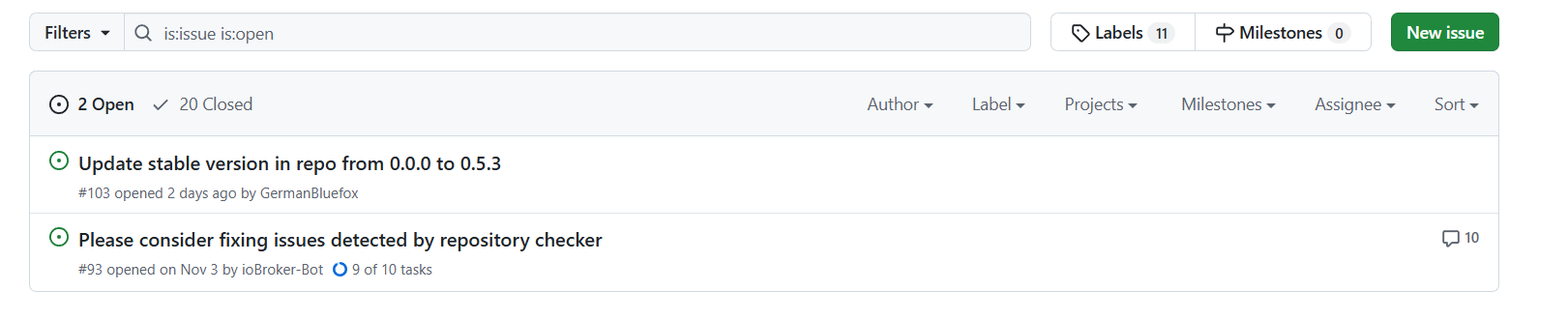
Bezüglich deines Problems an sich ist nicht der Scrennshot relavand sonder die Meldungen im ioBroker log. Diese solltes du hier (unter codetags, nicht als Screenshot) posten - dann kann man weitersehen.
Was dein Node Problem betrifft:
WIE hast du node 22 auf 20 downgegradet?
Zeig mal den Output von 'iob diag' ind er LANGfassung und unetr code Tags gestellt. -
@nobbiman said in Test Adapter Controme v0.5.x:
@erstam
Den Adapter 0.5.3. hatte ich wegen eines Problems deinstalliert und finde ihn nicht mehr unter den stable-Respositories.Der Adapter ist auch noch nicht im STABLE Repository. Du kannst ihne auch noch nie von dort installiert haben. Der Adapter ist nur via LATEST / BETA Repository verfügbar.
Die ersatzweise Installation über github ist möglich, jedoch verbindet sich die Instanz nicht stabil mit dem Host, im 30s-Takt wird die Verbindung unterbrochen.
Vor direkten GitHub Installation wird explizit abgeraten - ausgenommen auf Anraten des Maintainers z.B. im Zuge einer Fehlersuche. Bei direkter Installation von Github ist es außerdem schwer festzustellen weclhen Softwarestand du jetzt gerade mal erwischt hast. Vesionsnummern sagen hier 0 aus.
Ich hatte daneben ein Github-Issue eingestellt, kann ich den auch ganz löschen?
Ich seh kein Issue von dir? Wo hast du das hingestellt?
Bezüglich deines Problems an sich ist nicht der Scrennshot relavand sonder die Meldungen im ioBroker log. Diese solltes du hier (unter codetags, nicht als Screenshot) posten - dann kann man weitersehen.
Was dein Node Problem betrifft:
WIE hast du node 22 auf 20 downgegradet?
Zeig mal den Output von 'iob diag' ind er LANGfassung und unetr code Tags gestellt.@mcm1957 sagte in Test Adapter Controme v0.5.x:
@nobbiman said in Test Adapter Controme v0.5.x:
Ich seh kein Issue von dir? Wo hast du das hingestellt?
Ganz oben unter den geschlossenen!
-
@mcm1957 sagte in Test Adapter Controme v0.5.x:
@nobbiman said in Test Adapter Controme v0.5.x:
Ich seh kein Issue von dir? Wo hast du das hingestellt?
Ganz oben unter den geschlossenen!
-
@nobbiman said in Test Adapter Controme v0.5.x:
@erstam
Den Adapter 0.5.3. hatte ich wegen eines Problems deinstalliert und finde ihn nicht mehr unter den stable-Respositories.Der Adapter ist auch noch nicht im STABLE Repository. Du kannst ihne auch noch nie von dort installiert haben. Der Adapter ist nur via LATEST / BETA Repository verfügbar.
Die ersatzweise Installation über github ist möglich, jedoch verbindet sich die Instanz nicht stabil mit dem Host, im 30s-Takt wird die Verbindung unterbrochen.
Vor direkten GitHub Installation wird explizit abgeraten - ausgenommen auf Anraten des Maintainers z.B. im Zuge einer Fehlersuche. Bei direkter Installation von Github ist es außerdem schwer festzustellen weclhen Softwarestand du jetzt gerade mal erwischt hast. Vesionsnummern sagen hier 0 aus.
Ich hatte daneben ein Github-Issue eingestellt, kann ich den auch ganz löschen?
Ich seh kein Issue von dir? Wo hast du das hingestellt?
Bezüglich deines Problems an sich ist nicht der Scrennshot relavand sonder die Meldungen im ioBroker log. Diese solltes du hier (unter codetags, nicht als Screenshot) posten - dann kann man weitersehen.
Was dein Node Problem betrifft:
WIE hast du node 22 auf 20 downgegradet?
Zeig mal den Output von 'iob diag' ind er LANGfassung und unetr code Tags gestellt.@mcm1957 sagte in Test Adapter Controme v0.5.x:
@nobbiman said in Test Adapter Controme v0.5.x:
@erstam
)Bezüglich deines Problems an sich ist nicht der Scrennshot relavand sonder die Meldungen im ioBroker log. Diese solltes du hier (unter codetags, nicht als Screenshot) posten - dann kann man weitersehen.
Was dein Node Problem betrifft:
WIE hast du node 22 auf 20 downgegradet?
Zeig mal den Output von 'iob diag' ind er LANGfassung und unetr code Tags gestellt.Mittlerweile habe ich eine iOB-Neuinstallation gestartet, der Zugriff auf den ioBroker klappt aber dennoch nicht
Hier das Ergebnis von iob diag:
```bash Script v.2024-10-19 *** BASE SYSTEM *** Static hostname: RasPi-ioBroker Icon name: computer Operating System: Debian GNU/Linux 11 (bullseye) Kernel: Linux 6.6.67-v8+ Architecture: arm64 OS is similar to: Model : Raspberry Pi 4 Model B Rev 1.5 Docker : false Virtualization : none Kernel : aarch64 Userland : 64 bit Systemuptime and Load: 09:45:53 up 7 min, 2 users, load average: 0.34, 0.60, 0.41 CPU threads: 4 *** LIFE CYCLE STATUS *** Debian 'bullseye' is the current oldstable version. Please upgrade to the latest stable release 'bookworm' in due time! *** RASPBERRY THROTTLING *** Current issues: No throttling issues detected. Previously detected issues: No throttling issues detected. *** TIME AND TIMEZONES *** Local time: Mon 2024-12-30 09:45:54 CET Universal time: Mon 2024-12-30 08:45:54 UTC RTC time: n/a Time zone: Europe/Berlin (CET, +0100) System clock synchronized: yes NTP service: active RTC in local TZ: no *** Users and Groups *** User that called 'iob diag': pi JAVA_HOME=/usr/lib/jvm/java-17-openjdk-arm64 HOME=/home/pi GROUPS=pi adm dialout cdrom sudo audio video plugdev games users input render netdev lpadmin gpio i2c spi iobroker User that is running 'js-controller': js-controller is not running *** DISPLAY-SERVER SETUP *** Display-Server: false Desktop: Terminal: tty *** MEMORY *** total used free shared buff/cache available Mem: 3.8G 998M 1.9G 1.0M 924M 2.7G Swap: 2.1G 0B 2.1G Total: 5.9G 998M 4.0G Active iob-Instances: 0 3790 M total memory 998 M used memory 1409 M active memory 411 M inactive memory 1867 M free memory 56 M buffer memory 868 M swap cache 2147 M total swap 0 M used swap 2147 M free swap *** top - Table Of Processes *** top - 09:45:54 up 7 min, 2 users, load average: 0.34, 0.60, 0.41 Tasks: 183 total, 1 running, 182 sleeping, 0 stopped, 0 zombie %Cpu(s): 0.0 us, 1.5 sy, 0.0 ni, 97.0 id, 1.5 wa, 0.0 hi, 0.0 si, 0.0 st MiB Mem : 3791.0 total, 1867.4 free, 998.3 used, 925.3 buff/cache MiB Swap: 2148.0 total, 2148.0 free, 0.0 used. 2721.4 avail Mem *** FAILED SERVICES *** UNIT LOAD ACTIVE SUB DESCRIPTION 0 loaded units listed. *** DMESG CRITICAL ERRORS *** No critical errors detected *** FILESYSTEM *** Filesystem Type Size Used Avail Use% Mounted on /dev/root ext4 459G 15G 426G 4% / devtmpfs devtmpfs 1.6G 0 1.6G 0% /dev tmpfs tmpfs 1.9G 0 1.9G 0% /dev/shm tmpfs tmpfs 759M 1.2M 758M 1% /run tmpfs tmpfs 5.0M 4.0K 5.0M 1% /run/lock /dev/sda1 vfat 255M 33M 223M 13% /boot tmpfs tmpfs 380M 16K 380M 1% /run/user/1000 Messages concerning ext4 filesystem in dmesg: [Mon Dec 30 09:38:31 2024] Kernel command line: coherent_pool=1M 8250.nr_uarts=0 snd_bcm2835.enable_headphones=0 cgroup_disable=memory numa_policy=interleave snd_bcm2835.enable_headphones=1 snd_bcm2835.enable_hdmi=1 snd_bcm2835.enable_hdmi=0 smsc95xx.macaddr=E4:5F:01:A4:AD:F2 vc_mem.mem_base=0x3eb00000 vc_mem.mem_size=0x3ff00000 console=ttyS0,115200 console=tty1 root=PARTUUID=94303a9e-02 rootfstype=ext4 fsck.repair=yes rootwait quiet splash plymouth.ignore-serial-consoles cfg80211.ieee80211_regdom=DE [Mon Dec 30 09:38:33 2024] EXT4-fs (sda2): INFO: recovery required on readonly filesystem [Mon Dec 30 09:38:33 2024] EXT4-fs (sda2): write access will be enabled during recovery [Mon Dec 30 09:38:33 2024] EXT4-fs (sda2): recovery complete [Mon Dec 30 09:38:33 2024] EXT4-fs (sda2): mounted filesystem d98b1a68-4ff7-4331-86d3-77c5d911b429 ro with ordered data mode. Quota mode: none. [Mon Dec 30 09:38:33 2024] VFS: Mounted root (ext4 filesystem) readonly on device 8:2. [Mon Dec 30 09:38:35 2024] EXT4-fs (sda2): re-mounted d98b1a68-4ff7-4331-86d3-77c5d911b429 r/w. Quota mode: none. Show mounted filesystems: TARGET SOURCE FSTYPE OPTIONS / /dev/sda2 ext4 rw,noatime `-/boot /dev/sda1 vfat rw,relatime,fmask=0022,dmask=0022,codepage=437,iocharset=ascii,shortname=mixed,errors=remount-ro Files in neuralgic directories: /var: 3.0G /var/ 1.6G /var/log 1.3G /var/log/journal/2d06defc2eb445c9afef1cfd904ac913 1.3G /var/log/journal 1.2G /var/lib Archived and active journals take up 1.2G in the file system. /opt/iobroker/backups: 940M /opt/iobroker/backups/ /opt/iobroker/iobroker-data: 930M /opt/iobroker/iobroker-data/ 781M /opt/iobroker/iobroker-data/files 617M /opt/iobroker/iobroker-data/files/javascript.admin 560M /opt/iobroker/iobroker-data/files/javascript.admin/static 558M /opt/iobroker/iobroker-data/files/javascript.admin/static/js The five largest files in iobroker-data are: 29M /opt/iobroker/iobroker-data/objects.jsonl 24M /opt/iobroker/iobroker-data/files/modbus.admin/static/js/main.6a71b34c.js.map 19M /opt/iobroker/iobroker-data/files/web.admin/static/js/main.1d90720e.js.map 12M /opt/iobroker/iobroker-data/files/backitup.admin/static/js/main.bd24114f.js 9.9M /opt/iobroker/iobroker-data/states.jsonl USB-Devices by-id: USB-Sticks - Avoid direct links to /dev/tty* in your adapter setups, please always prefer the links 'by-id': No Devices found 'by-id' *** NodeJS-Installation *** nodejs: N/A /home/pi/.nvm/versions/node/v20.18.1/bin/node v20.18.1 /home/pi/.nvm/versions/node/v20.18.1/bin/npm 10.8.2 /home/pi/.nvm/versions/node/v20.18.1/bin/npx 10.8.2 /home/pi/.nvm/versions/node/v20.18.1/bin/corepack 0.29.4 *** nodejs is NOT correctly installed *** nodejs: Installed: (none) Candidate: 22.12.0-1nodesource1 Version table: 22.12.0-1nodesource1 600 500 https://deb.nodesource.com/node_22.x nodistro/main arm64 Packages 22.11.0-1nodesource1 600 500 https://deb.nodesource.com/node_22.x nodistro/main arm64 Packages 22.10.0-1nodesource1 600 500 https://deb.nodesource.com/node_22.x nodistro/main arm64 Packages 22.9.0-1nodesource1 600 500 https://deb.nodesource.com/node_22.x nodistro/main arm64 Packages 22.8.0-1nodesource1 600 500 https://deb.nodesource.com/node_22.x nodistro/main arm64 Packages 22.7.0-1nodesource1 600 500 https://deb.nodesource.com/node_22.x nodistro/main arm64 Packages 22.6.0-1nodesource1 600 500 https://deb.nodesource.com/node_22.x nodistro/main arm64 Packages 22.5.1-1nodesource1 600 500 https://deb.nodesource.com/node_22.x nodistro/main arm64 Packages 22.5.0-1nodesource1 600 500 https://deb.nodesource.com/node_22.x nodistro/main arm64 Packages 22.4.1-1nodesource1 600 500 https://deb.nodesource.com/node_22.x nodistro/main arm64 Packages 22.4.0-1nodesource1 600 500 https://deb.nodesource.com/node_22.x nodistro/main arm64 Packages 22.3.0-1nodesource1 600 500 https://deb.nodesource.com/node_22.x nodistro/main arm64 Packages 22.2.0-1nodesource1 600 500 https://deb.nodesource.com/node_22.x nodistro/main arm64 Packages 22.1.0-1nodesource1 600 500 https://deb.nodesource.com/node_22.x nodistro/main arm64 Packages 22.0.0-1nodesource1 600 500 https://deb.nodesource.com/node_22.x nodistro/main arm64 Packages 12.22.12~dfsg-1~deb11u5 500 500 http://security.debian.org/debian-security bullseye-security/main arm64 Packages 12.22.12~dfsg-1~deb11u4 500 500 http://deb.debian.org/debian bullseye/main arm64 Packages Temp directories causing deletion problem: 0 No problems detected Errors in npm tree: 0 No problems detected *** ioBroker-Installation *** ioBroker Status sudo: node: command not found Hosts: sudo: node: command not found Core adapters versions sudo: node: command not found js-controller: sudo: node: command not found admin: sudo: node: command not found javascript: nodejs modules from github: 0 Adapter State Enabled adapters with bindings ioBroker-Repositories sudo: node: command not found Installed ioBroker-Instances sudo: node: command not found Objects and States Please stand by - This may take a while Objects: 0 States: 0 *** OS-Repositories and Updates *** Hit:1 http://security.debian.org/debian-security bullseye-security InRelease Hit:2 http://deb.debian.org/debian bullseye InRelease Hit:3 http://deb.debian.org/debian bullseye-updates InRelease Hit:4 http://ppa.launchpad.net/webupd8team/java/ubuntu trusty InRelease Hit:5 http://archive.raspberrypi.org/debian bullseye InRelease Hit:6 https://repos.influxdata.com/debian stable InRelease Hit:7 https://apt.grafana.com stable InRelease Hit:8 https://deb.nodesource.com/node_22.x nodistro InRelease Hit:9 https://apt.glennr.nl/repo bullseye InRelease Hit:10 https://repo.mongodb.org/apt/ubuntu focal/mongodb-org/7.0 InRelease Hit:11 https://packages.adoptium.net/artifactory/deb bullseye InRelease Reading package lists... Pending Updates: 0 *** Listening Ports *** Active Internet connections (only servers) Proto Recv-Q Send-Q Local Address Foreign Address State User Inode PID/Program name tcp 0 0 127.0.0.1:27117 0.0.0.0:* LISTEN 117 6468 1169/bin/mongod tcp 0 0 127.0.0.1:631 0.0.0.0:* LISTEN 0 5527 534/cupsd tcp 0 0 0.0.0.0:22 0.0.0.0:* LISTEN 0 2496 603/sshd: /usr/sbin tcp6 0 0 :::8086 :::* LISTEN 999 7445 541/influxd tcp6 0 0 :::8080 :::* LISTEN 117 6029 599/java tcp6 0 0 :::3000 :::* LISTEN 116 7528 1063/grafana tcp6 0 0 :::6789 :::* LISTEN 117 7630 599/java tcp6 0 0 :::8843 :::* LISTEN 117 6032 599/java tcp6 0 0 :::8880 :::* LISTEN 117 6030 599/java tcp6 0 0 ::1:631 :::* LISTEN 0 5526 534/cupsd tcp6 0 0 :::22 :::* LISTEN 0 2498 603/sshd: /usr/sbin tcp6 0 0 :::8443 :::* LISTEN 117 6031 599/java udp 0 0 0.0.0.0:5353 0.0.0.0:* 108 2427 384/avahi-daemon: r udp 0 0 0.0.0.0:40839 0.0.0.0:* 108 2429 384/avahi-daemon: r udp 0 0 0.0.0.0:68 0.0.0.0:* 0 2530 483/dhcpcd: [master udp6 0 0 :::5353 :::* 108 2428 384/avahi-daemon: r udp6 0 0 :::5514 :::* 117 7635 599/java udp6 0 0 :::3478 :::* 117 7626 599/java udp6 0 0 :::44558 :::* 108 2430 384/avahi-daemon: r udp6 0 0 192.168.2.40:42712 :::* 117 7638 599/java udp6 0 0 :::10001 :::* 117 7639 599/java udp6 0 0 :::546 :::* 0 2546 483/dhcpcd: [master *** Log File - Last 25 Lines *** 2024-12-30 06:32:52.760 - info: web.0 (1310) terminating 2024-12-30 06:32:52.763 - info: web.0 (1310) Terminated (ADAPTER_REQUESTED_TERMINATION): Without reason 2024-12-30 06:32:52.799 - info: pvforecast.1 (1348) terminating 2024-12-30 06:32:53.662 - info: javascript.0 (1106) terminating with timeout 2024-12-30 06:32:53.685 - info: modbus.0 (1206) terminating with timeout 2024-12-30 06:32:53.687 - info: fhem.0 (35425) terminating with timeout 2024-12-30 06:32:53.718 - info: shelly.0 (1199) terminating with timeout 2024-12-30 06:32:53.744 - info: growatt.0 (1255) terminating with timeout 2024-12-30 06:32:53.750 - info: rpi2.0 (1233) terminating with timeout 2024-12-30 06:32:53.764 - info: web.0 (1310) terminating with timeout 2024-12-30 06:32:53.802 - info: pvforecast.1 (1348) terminating with timeout 2024-12-30 06:32:57.536 - error: rpi2.0 (1233) Objects database error: connect ECONNREFUSED 127.0.0.1:9001 2024-12-30 06:32:57.538 - error: pvforecast.1 (1348) Objects database error: connect ECONNREFUSED 127.0.0.1:9001 2024-12-30 06:32:57.561 - error: web.0 (1310) Objects database error: connect ECONNREFUSED 127.0.0.1:9001 2024-12-30 06:32:57.565 - error: history.0 (1146) Objects database error: connect ECONNREFUSED 127.0.0.1:9001 2024-12-30 06:32:57.597 - error: fhem.0 (35425) Objects database error: connect ECONNREFUSED 127.0.0.1:9001 2024-12-30 06:32:57.598 - warn: history.0 (1146) get state error: Connection is closed. 2024-12-30 06:32:57.616 - error: influxdb.1 (1118) Objects database error: connect ECONNREFUSED 127.0.0.1:9001 2024-12-30 06:32:57.619 - error: influxdb.0 (1075) Objects database error: connect ECONNREFUSED 127.0.0.1:9001 2024-12-30 06:32:57.640 - error: javascript.0 (1106) Objects database error: connect ECONNREFUSED 127.0.0.1:9001 2024-12-30 06:32:57.627 - warn: influxdb.0 (1075) get state error: DB closed 2024-12-30 06:32:57.632 - info: influxdb.0 (1075) terminating 2024-12-30 06:33:02.572 - warn: influxdb.0 (1075) get state error: Connection is closed. 2024-12-30 06:33:02.573 - info: influxdb.0 (1075) terminating 2024-12-30 06:33:02.637 - warn: influxdb.0 (1075) Cannot get view: DB closed -
@mcm1957 sagte in Test Adapter Controme v0.5.x:
@nobbiman said in Test Adapter Controme v0.5.x:
@erstam
)Bezüglich deines Problems an sich ist nicht der Scrennshot relavand sonder die Meldungen im ioBroker log. Diese solltes du hier (unter codetags, nicht als Screenshot) posten - dann kann man weitersehen.
Was dein Node Problem betrifft:
WIE hast du node 22 auf 20 downgegradet?
Zeig mal den Output von 'iob diag' ind er LANGfassung und unetr code Tags gestellt.Mittlerweile habe ich eine iOB-Neuinstallation gestartet, der Zugriff auf den ioBroker klappt aber dennoch nicht
Hier das Ergebnis von iob diag:
```bash Script v.2024-10-19 *** BASE SYSTEM *** Static hostname: RasPi-ioBroker Icon name: computer Operating System: Debian GNU/Linux 11 (bullseye) Kernel: Linux 6.6.67-v8+ Architecture: arm64 OS is similar to: Model : Raspberry Pi 4 Model B Rev 1.5 Docker : false Virtualization : none Kernel : aarch64 Userland : 64 bit Systemuptime and Load: 09:45:53 up 7 min, 2 users, load average: 0.34, 0.60, 0.41 CPU threads: 4 *** LIFE CYCLE STATUS *** Debian 'bullseye' is the current oldstable version. Please upgrade to the latest stable release 'bookworm' in due time! *** RASPBERRY THROTTLING *** Current issues: No throttling issues detected. Previously detected issues: No throttling issues detected. *** TIME AND TIMEZONES *** Local time: Mon 2024-12-30 09:45:54 CET Universal time: Mon 2024-12-30 08:45:54 UTC RTC time: n/a Time zone: Europe/Berlin (CET, +0100) System clock synchronized: yes NTP service: active RTC in local TZ: no *** Users and Groups *** User that called 'iob diag': pi JAVA_HOME=/usr/lib/jvm/java-17-openjdk-arm64 HOME=/home/pi GROUPS=pi adm dialout cdrom sudo audio video plugdev games users input render netdev lpadmin gpio i2c spi iobroker User that is running 'js-controller': js-controller is not running *** DISPLAY-SERVER SETUP *** Display-Server: false Desktop: Terminal: tty *** MEMORY *** total used free shared buff/cache available Mem: 3.8G 998M 1.9G 1.0M 924M 2.7G Swap: 2.1G 0B 2.1G Total: 5.9G 998M 4.0G Active iob-Instances: 0 3790 M total memory 998 M used memory 1409 M active memory 411 M inactive memory 1867 M free memory 56 M buffer memory 868 M swap cache 2147 M total swap 0 M used swap 2147 M free swap *** top - Table Of Processes *** top - 09:45:54 up 7 min, 2 users, load average: 0.34, 0.60, 0.41 Tasks: 183 total, 1 running, 182 sleeping, 0 stopped, 0 zombie %Cpu(s): 0.0 us, 1.5 sy, 0.0 ni, 97.0 id, 1.5 wa, 0.0 hi, 0.0 si, 0.0 st MiB Mem : 3791.0 total, 1867.4 free, 998.3 used, 925.3 buff/cache MiB Swap: 2148.0 total, 2148.0 free, 0.0 used. 2721.4 avail Mem *** FAILED SERVICES *** UNIT LOAD ACTIVE SUB DESCRIPTION 0 loaded units listed. *** DMESG CRITICAL ERRORS *** No critical errors detected *** FILESYSTEM *** Filesystem Type Size Used Avail Use% Mounted on /dev/root ext4 459G 15G 426G 4% / devtmpfs devtmpfs 1.6G 0 1.6G 0% /dev tmpfs tmpfs 1.9G 0 1.9G 0% /dev/shm tmpfs tmpfs 759M 1.2M 758M 1% /run tmpfs tmpfs 5.0M 4.0K 5.0M 1% /run/lock /dev/sda1 vfat 255M 33M 223M 13% /boot tmpfs tmpfs 380M 16K 380M 1% /run/user/1000 Messages concerning ext4 filesystem in dmesg: [Mon Dec 30 09:38:31 2024] Kernel command line: coherent_pool=1M 8250.nr_uarts=0 snd_bcm2835.enable_headphones=0 cgroup_disable=memory numa_policy=interleave snd_bcm2835.enable_headphones=1 snd_bcm2835.enable_hdmi=1 snd_bcm2835.enable_hdmi=0 smsc95xx.macaddr=E4:5F:01:A4:AD:F2 vc_mem.mem_base=0x3eb00000 vc_mem.mem_size=0x3ff00000 console=ttyS0,115200 console=tty1 root=PARTUUID=94303a9e-02 rootfstype=ext4 fsck.repair=yes rootwait quiet splash plymouth.ignore-serial-consoles cfg80211.ieee80211_regdom=DE [Mon Dec 30 09:38:33 2024] EXT4-fs (sda2): INFO: recovery required on readonly filesystem [Mon Dec 30 09:38:33 2024] EXT4-fs (sda2): write access will be enabled during recovery [Mon Dec 30 09:38:33 2024] EXT4-fs (sda2): recovery complete [Mon Dec 30 09:38:33 2024] EXT4-fs (sda2): mounted filesystem d98b1a68-4ff7-4331-86d3-77c5d911b429 ro with ordered data mode. Quota mode: none. [Mon Dec 30 09:38:33 2024] VFS: Mounted root (ext4 filesystem) readonly on device 8:2. [Mon Dec 30 09:38:35 2024] EXT4-fs (sda2): re-mounted d98b1a68-4ff7-4331-86d3-77c5d911b429 r/w. Quota mode: none. Show mounted filesystems: TARGET SOURCE FSTYPE OPTIONS / /dev/sda2 ext4 rw,noatime `-/boot /dev/sda1 vfat rw,relatime,fmask=0022,dmask=0022,codepage=437,iocharset=ascii,shortname=mixed,errors=remount-ro Files in neuralgic directories: /var: 3.0G /var/ 1.6G /var/log 1.3G /var/log/journal/2d06defc2eb445c9afef1cfd904ac913 1.3G /var/log/journal 1.2G /var/lib Archived and active journals take up 1.2G in the file system. /opt/iobroker/backups: 940M /opt/iobroker/backups/ /opt/iobroker/iobroker-data: 930M /opt/iobroker/iobroker-data/ 781M /opt/iobroker/iobroker-data/files 617M /opt/iobroker/iobroker-data/files/javascript.admin 560M /opt/iobroker/iobroker-data/files/javascript.admin/static 558M /opt/iobroker/iobroker-data/files/javascript.admin/static/js The five largest files in iobroker-data are: 29M /opt/iobroker/iobroker-data/objects.jsonl 24M /opt/iobroker/iobroker-data/files/modbus.admin/static/js/main.6a71b34c.js.map 19M /opt/iobroker/iobroker-data/files/web.admin/static/js/main.1d90720e.js.map 12M /opt/iobroker/iobroker-data/files/backitup.admin/static/js/main.bd24114f.js 9.9M /opt/iobroker/iobroker-data/states.jsonl USB-Devices by-id: USB-Sticks - Avoid direct links to /dev/tty* in your adapter setups, please always prefer the links 'by-id': No Devices found 'by-id' *** NodeJS-Installation *** nodejs: N/A /home/pi/.nvm/versions/node/v20.18.1/bin/node v20.18.1 /home/pi/.nvm/versions/node/v20.18.1/bin/npm 10.8.2 /home/pi/.nvm/versions/node/v20.18.1/bin/npx 10.8.2 /home/pi/.nvm/versions/node/v20.18.1/bin/corepack 0.29.4 *** nodejs is NOT correctly installed *** nodejs: Installed: (none) Candidate: 22.12.0-1nodesource1 Version table: 22.12.0-1nodesource1 600 500 https://deb.nodesource.com/node_22.x nodistro/main arm64 Packages 22.11.0-1nodesource1 600 500 https://deb.nodesource.com/node_22.x nodistro/main arm64 Packages 22.10.0-1nodesource1 600 500 https://deb.nodesource.com/node_22.x nodistro/main arm64 Packages 22.9.0-1nodesource1 600 500 https://deb.nodesource.com/node_22.x nodistro/main arm64 Packages 22.8.0-1nodesource1 600 500 https://deb.nodesource.com/node_22.x nodistro/main arm64 Packages 22.7.0-1nodesource1 600 500 https://deb.nodesource.com/node_22.x nodistro/main arm64 Packages 22.6.0-1nodesource1 600 500 https://deb.nodesource.com/node_22.x nodistro/main arm64 Packages 22.5.1-1nodesource1 600 500 https://deb.nodesource.com/node_22.x nodistro/main arm64 Packages 22.5.0-1nodesource1 600 500 https://deb.nodesource.com/node_22.x nodistro/main arm64 Packages 22.4.1-1nodesource1 600 500 https://deb.nodesource.com/node_22.x nodistro/main arm64 Packages 22.4.0-1nodesource1 600 500 https://deb.nodesource.com/node_22.x nodistro/main arm64 Packages 22.3.0-1nodesource1 600 500 https://deb.nodesource.com/node_22.x nodistro/main arm64 Packages 22.2.0-1nodesource1 600 500 https://deb.nodesource.com/node_22.x nodistro/main arm64 Packages 22.1.0-1nodesource1 600 500 https://deb.nodesource.com/node_22.x nodistro/main arm64 Packages 22.0.0-1nodesource1 600 500 https://deb.nodesource.com/node_22.x nodistro/main arm64 Packages 12.22.12~dfsg-1~deb11u5 500 500 http://security.debian.org/debian-security bullseye-security/main arm64 Packages 12.22.12~dfsg-1~deb11u4 500 500 http://deb.debian.org/debian bullseye/main arm64 Packages Temp directories causing deletion problem: 0 No problems detected Errors in npm tree: 0 No problems detected *** ioBroker-Installation *** ioBroker Status sudo: node: command not found Hosts: sudo: node: command not found Core adapters versions sudo: node: command not found js-controller: sudo: node: command not found admin: sudo: node: command not found javascript: nodejs modules from github: 0 Adapter State Enabled adapters with bindings ioBroker-Repositories sudo: node: command not found Installed ioBroker-Instances sudo: node: command not found Objects and States Please stand by - This may take a while Objects: 0 States: 0 *** OS-Repositories and Updates *** Hit:1 http://security.debian.org/debian-security bullseye-security InRelease Hit:2 http://deb.debian.org/debian bullseye InRelease Hit:3 http://deb.debian.org/debian bullseye-updates InRelease Hit:4 http://ppa.launchpad.net/webupd8team/java/ubuntu trusty InRelease Hit:5 http://archive.raspberrypi.org/debian bullseye InRelease Hit:6 https://repos.influxdata.com/debian stable InRelease Hit:7 https://apt.grafana.com stable InRelease Hit:8 https://deb.nodesource.com/node_22.x nodistro InRelease Hit:9 https://apt.glennr.nl/repo bullseye InRelease Hit:10 https://repo.mongodb.org/apt/ubuntu focal/mongodb-org/7.0 InRelease Hit:11 https://packages.adoptium.net/artifactory/deb bullseye InRelease Reading package lists... Pending Updates: 0 *** Listening Ports *** Active Internet connections (only servers) Proto Recv-Q Send-Q Local Address Foreign Address State User Inode PID/Program name tcp 0 0 127.0.0.1:27117 0.0.0.0:* LISTEN 117 6468 1169/bin/mongod tcp 0 0 127.0.0.1:631 0.0.0.0:* LISTEN 0 5527 534/cupsd tcp 0 0 0.0.0.0:22 0.0.0.0:* LISTEN 0 2496 603/sshd: /usr/sbin tcp6 0 0 :::8086 :::* LISTEN 999 7445 541/influxd tcp6 0 0 :::8080 :::* LISTEN 117 6029 599/java tcp6 0 0 :::3000 :::* LISTEN 116 7528 1063/grafana tcp6 0 0 :::6789 :::* LISTEN 117 7630 599/java tcp6 0 0 :::8843 :::* LISTEN 117 6032 599/java tcp6 0 0 :::8880 :::* LISTEN 117 6030 599/java tcp6 0 0 ::1:631 :::* LISTEN 0 5526 534/cupsd tcp6 0 0 :::22 :::* LISTEN 0 2498 603/sshd: /usr/sbin tcp6 0 0 :::8443 :::* LISTEN 117 6031 599/java udp 0 0 0.0.0.0:5353 0.0.0.0:* 108 2427 384/avahi-daemon: r udp 0 0 0.0.0.0:40839 0.0.0.0:* 108 2429 384/avahi-daemon: r udp 0 0 0.0.0.0:68 0.0.0.0:* 0 2530 483/dhcpcd: [master udp6 0 0 :::5353 :::* 108 2428 384/avahi-daemon: r udp6 0 0 :::5514 :::* 117 7635 599/java udp6 0 0 :::3478 :::* 117 7626 599/java udp6 0 0 :::44558 :::* 108 2430 384/avahi-daemon: r udp6 0 0 192.168.2.40:42712 :::* 117 7638 599/java udp6 0 0 :::10001 :::* 117 7639 599/java udp6 0 0 :::546 :::* 0 2546 483/dhcpcd: [master *** Log File - Last 25 Lines *** 2024-12-30 06:32:52.760 - info: web.0 (1310) terminating 2024-12-30 06:32:52.763 - info: web.0 (1310) Terminated (ADAPTER_REQUESTED_TERMINATION): Without reason 2024-12-30 06:32:52.799 - info: pvforecast.1 (1348) terminating 2024-12-30 06:32:53.662 - info: javascript.0 (1106) terminating with timeout 2024-12-30 06:32:53.685 - info: modbus.0 (1206) terminating with timeout 2024-12-30 06:32:53.687 - info: fhem.0 (35425) terminating with timeout 2024-12-30 06:32:53.718 - info: shelly.0 (1199) terminating with timeout 2024-12-30 06:32:53.744 - info: growatt.0 (1255) terminating with timeout 2024-12-30 06:32:53.750 - info: rpi2.0 (1233) terminating with timeout 2024-12-30 06:32:53.764 - info: web.0 (1310) terminating with timeout 2024-12-30 06:32:53.802 - info: pvforecast.1 (1348) terminating with timeout 2024-12-30 06:32:57.536 - error: rpi2.0 (1233) Objects database error: connect ECONNREFUSED 127.0.0.1:9001 2024-12-30 06:32:57.538 - error: pvforecast.1 (1348) Objects database error: connect ECONNREFUSED 127.0.0.1:9001 2024-12-30 06:32:57.561 - error: web.0 (1310) Objects database error: connect ECONNREFUSED 127.0.0.1:9001 2024-12-30 06:32:57.565 - error: history.0 (1146) Objects database error: connect ECONNREFUSED 127.0.0.1:9001 2024-12-30 06:32:57.597 - error: fhem.0 (35425) Objects database error: connect ECONNREFUSED 127.0.0.1:9001 2024-12-30 06:32:57.598 - warn: history.0 (1146) get state error: Connection is closed. 2024-12-30 06:32:57.616 - error: influxdb.1 (1118) Objects database error: connect ECONNREFUSED 127.0.0.1:9001 2024-12-30 06:32:57.619 - error: influxdb.0 (1075) Objects database error: connect ECONNREFUSED 127.0.0.1:9001 2024-12-30 06:32:57.640 - error: javascript.0 (1106) Objects database error: connect ECONNREFUSED 127.0.0.1:9001 2024-12-30 06:32:57.627 - warn: influxdb.0 (1075) get state error: DB closed 2024-12-30 06:32:57.632 - info: influxdb.0 (1075) terminating 2024-12-30 06:33:02.572 - warn: influxdb.0 (1075) get state error: Connection is closed. 2024-12-30 06:33:02.573 - info: influxdb.0 (1075) terminating 2024-12-30 06:33:02.637 - warn: influxdb.0 (1075) Cannot get view: DB closed*** nodejs is NOT correctly installed ***
Solange node da nicht richtig installiert ist wird der ioBroker nicht laufen. nvm solltes du nach meinem Kenntnisstand nicht verwenden. @Thomas-braun kann dir da mehr sagen wie das ggF zu richten wäre.
ABER wenn du eh neu installierst, dann bring zuerst mal den Betriebssystem auf Vordermann. Bullseye (Debian 11) ist tot. Und Bookworm (12) erfordert jedenfalls eine komplette Neuinstallation. Wär also jetzt ein gute Zeitpunkt gleich richtig zu aktualisieren.
-
*** nodejs is NOT correctly installed ***
Solange node da nicht richtig installiert ist wird der ioBroker nicht laufen. nvm solltes du nach meinem Kenntnisstand nicht verwenden. @Thomas-braun kann dir da mehr sagen wie das ggF zu richten wäre.
ABER wenn du eh neu installierst, dann bring zuerst mal den Betriebssystem auf Vordermann. Bullseye (Debian 11) ist tot. Und Bookworm (12) erfordert jedenfalls eine komplette Neuinstallation. Wär also jetzt ein gute Zeitpunkt gleich richtig zu aktualisieren.
@mcm1957 An die Bookworm-Installation hatte ich kürzlich auch gedacht, scheue aber die komplette Neuinstallation mit ioBroker, Grafana und Influx, da ich noch nicht erkundet habe, wie ich meine Daten der Programme sichern muss; für ioBroker habe ich Backups.
Ich will erst unter Bullseye alles wieder ans Laufen bringen, dann die Datensicherung, dann Bookworm.Bleibt nun die Frage an @Thomas-Braun nach der korrekten node-Installation!
So, nachdem ich nun meinen ioBroker wieder zum Laufen bekommen habe, hier das Fehlerprotokoll des nicht funktionierenden Controme-Adapters:
controme.0
	2024-12-30 10:53:25.341	error	undefined is not a valid state value
controme.0
	2024-12-30 10:53:25.341	error	Error: undefined is not a valid state value at Object.maybeCallbackWithError (/opt/iobroker/node_modules/@iobroker/js-controller-common-db/build/cjs/lib/common/maybeCallback.js:36:13) at Controme._setStateChanged (/opt/iobroker/node_modules/@iobroker/js-controller-adapter/build/cjs/lib/adapter/adapter.js:5446:48) at Controme.setStateChanged (/opt/iobroker/node_modules/@iobroker/js-controller-adapter/build/cjs/lib/adapter/adapter.js:5420:17) at /opt/iobroker/node_modules/@iobroker/js-controller-common-db/build/cjs/lib/common/tools.js:1581:18 at new Promise (<anonymous>) at Controme.setStateChangedAsync (/opt/iobroker/node_modules/@iobroker/js-controller-common-db/build/cjs/lib/common/tools.js:1579:12) at Controme._updateRoom (/opt/iobroker/node_modules/iobroker.controme/main.js:1018:28) at Controme._processTempsAPIforUpdate (/opt/iobroker/node_modules/iobroker.controme/main.js:853:30) at Controme._pollRoomTemps (/opt/iobroker/node_modules/iobroker.controme/main.js:877:18) at process.processTicksAndRejections (node:internal/process/task_queues:95:5)
controme.0
	2024-12-30 10:53:25.340	error	unhandled promise rejection: undefined is not a valid state value
controme.0
	2024-12-30 10:53:25.340	error	Unhandled promise rejection. This error originated either by throwing inside of an async function without a catch block, or by rejecting a promise which was not handled with .catch().
Kann das Problem jemand für mich herauslesen?
-
@mcm1957 sagte in Test Adapter Controme v0.5.x:
@nobbiman said in Test Adapter Controme v0.5.x:
@erstam
)Bezüglich deines Problems an sich ist nicht der Scrennshot relavand sonder die Meldungen im ioBroker log. Diese solltes du hier (unter codetags, nicht als Screenshot) posten - dann kann man weitersehen.
Was dein Node Problem betrifft:
WIE hast du node 22 auf 20 downgegradet?
Zeig mal den Output von 'iob diag' ind er LANGfassung und unetr code Tags gestellt.Mittlerweile habe ich eine iOB-Neuinstallation gestartet, der Zugriff auf den ioBroker klappt aber dennoch nicht
Hier das Ergebnis von iob diag:
```bash Script v.2024-10-19 *** BASE SYSTEM *** Static hostname: RasPi-ioBroker Icon name: computer Operating System: Debian GNU/Linux 11 (bullseye) Kernel: Linux 6.6.67-v8+ Architecture: arm64 OS is similar to: Model : Raspberry Pi 4 Model B Rev 1.5 Docker : false Virtualization : none Kernel : aarch64 Userland : 64 bit Systemuptime and Load: 09:45:53 up 7 min, 2 users, load average: 0.34, 0.60, 0.41 CPU threads: 4 *** LIFE CYCLE STATUS *** Debian 'bullseye' is the current oldstable version. Please upgrade to the latest stable release 'bookworm' in due time! *** RASPBERRY THROTTLING *** Current issues: No throttling issues detected. Previously detected issues: No throttling issues detected. *** TIME AND TIMEZONES *** Local time: Mon 2024-12-30 09:45:54 CET Universal time: Mon 2024-12-30 08:45:54 UTC RTC time: n/a Time zone: Europe/Berlin (CET, +0100) System clock synchronized: yes NTP service: active RTC in local TZ: no *** Users and Groups *** User that called 'iob diag': pi JAVA_HOME=/usr/lib/jvm/java-17-openjdk-arm64 HOME=/home/pi GROUPS=pi adm dialout cdrom sudo audio video plugdev games users input render netdev lpadmin gpio i2c spi iobroker User that is running 'js-controller': js-controller is not running *** DISPLAY-SERVER SETUP *** Display-Server: false Desktop: Terminal: tty *** MEMORY *** total used free shared buff/cache available Mem: 3.8G 998M 1.9G 1.0M 924M 2.7G Swap: 2.1G 0B 2.1G Total: 5.9G 998M 4.0G Active iob-Instances: 0 3790 M total memory 998 M used memory 1409 M active memory 411 M inactive memory 1867 M free memory 56 M buffer memory 868 M swap cache 2147 M total swap 0 M used swap 2147 M free swap *** top - Table Of Processes *** top - 09:45:54 up 7 min, 2 users, load average: 0.34, 0.60, 0.41 Tasks: 183 total, 1 running, 182 sleeping, 0 stopped, 0 zombie %Cpu(s): 0.0 us, 1.5 sy, 0.0 ni, 97.0 id, 1.5 wa, 0.0 hi, 0.0 si, 0.0 st MiB Mem : 3791.0 total, 1867.4 free, 998.3 used, 925.3 buff/cache MiB Swap: 2148.0 total, 2148.0 free, 0.0 used. 2721.4 avail Mem *** FAILED SERVICES *** UNIT LOAD ACTIVE SUB DESCRIPTION 0 loaded units listed. *** DMESG CRITICAL ERRORS *** No critical errors detected *** FILESYSTEM *** Filesystem Type Size Used Avail Use% Mounted on /dev/root ext4 459G 15G 426G 4% / devtmpfs devtmpfs 1.6G 0 1.6G 0% /dev tmpfs tmpfs 1.9G 0 1.9G 0% /dev/shm tmpfs tmpfs 759M 1.2M 758M 1% /run tmpfs tmpfs 5.0M 4.0K 5.0M 1% /run/lock /dev/sda1 vfat 255M 33M 223M 13% /boot tmpfs tmpfs 380M 16K 380M 1% /run/user/1000 Messages concerning ext4 filesystem in dmesg: [Mon Dec 30 09:38:31 2024] Kernel command line: coherent_pool=1M 8250.nr_uarts=0 snd_bcm2835.enable_headphones=0 cgroup_disable=memory numa_policy=interleave snd_bcm2835.enable_headphones=1 snd_bcm2835.enable_hdmi=1 snd_bcm2835.enable_hdmi=0 smsc95xx.macaddr=E4:5F:01:A4:AD:F2 vc_mem.mem_base=0x3eb00000 vc_mem.mem_size=0x3ff00000 console=ttyS0,115200 console=tty1 root=PARTUUID=94303a9e-02 rootfstype=ext4 fsck.repair=yes rootwait quiet splash plymouth.ignore-serial-consoles cfg80211.ieee80211_regdom=DE [Mon Dec 30 09:38:33 2024] EXT4-fs (sda2): INFO: recovery required on readonly filesystem [Mon Dec 30 09:38:33 2024] EXT4-fs (sda2): write access will be enabled during recovery [Mon Dec 30 09:38:33 2024] EXT4-fs (sda2): recovery complete [Mon Dec 30 09:38:33 2024] EXT4-fs (sda2): mounted filesystem d98b1a68-4ff7-4331-86d3-77c5d911b429 ro with ordered data mode. Quota mode: none. [Mon Dec 30 09:38:33 2024] VFS: Mounted root (ext4 filesystem) readonly on device 8:2. [Mon Dec 30 09:38:35 2024] EXT4-fs (sda2): re-mounted d98b1a68-4ff7-4331-86d3-77c5d911b429 r/w. Quota mode: none. Show mounted filesystems: TARGET SOURCE FSTYPE OPTIONS / /dev/sda2 ext4 rw,noatime `-/boot /dev/sda1 vfat rw,relatime,fmask=0022,dmask=0022,codepage=437,iocharset=ascii,shortname=mixed,errors=remount-ro Files in neuralgic directories: /var: 3.0G /var/ 1.6G /var/log 1.3G /var/log/journal/2d06defc2eb445c9afef1cfd904ac913 1.3G /var/log/journal 1.2G /var/lib Archived and active journals take up 1.2G in the file system. /opt/iobroker/backups: 940M /opt/iobroker/backups/ /opt/iobroker/iobroker-data: 930M /opt/iobroker/iobroker-data/ 781M /opt/iobroker/iobroker-data/files 617M /opt/iobroker/iobroker-data/files/javascript.admin 560M /opt/iobroker/iobroker-data/files/javascript.admin/static 558M /opt/iobroker/iobroker-data/files/javascript.admin/static/js The five largest files in iobroker-data are: 29M /opt/iobroker/iobroker-data/objects.jsonl 24M /opt/iobroker/iobroker-data/files/modbus.admin/static/js/main.6a71b34c.js.map 19M /opt/iobroker/iobroker-data/files/web.admin/static/js/main.1d90720e.js.map 12M /opt/iobroker/iobroker-data/files/backitup.admin/static/js/main.bd24114f.js 9.9M /opt/iobroker/iobroker-data/states.jsonl USB-Devices by-id: USB-Sticks - Avoid direct links to /dev/tty* in your adapter setups, please always prefer the links 'by-id': No Devices found 'by-id' *** NodeJS-Installation *** nodejs: N/A /home/pi/.nvm/versions/node/v20.18.1/bin/node v20.18.1 /home/pi/.nvm/versions/node/v20.18.1/bin/npm 10.8.2 /home/pi/.nvm/versions/node/v20.18.1/bin/npx 10.8.2 /home/pi/.nvm/versions/node/v20.18.1/bin/corepack 0.29.4 *** nodejs is NOT correctly installed *** nodejs: Installed: (none) Candidate: 22.12.0-1nodesource1 Version table: 22.12.0-1nodesource1 600 500 https://deb.nodesource.com/node_22.x nodistro/main arm64 Packages 22.11.0-1nodesource1 600 500 https://deb.nodesource.com/node_22.x nodistro/main arm64 Packages 22.10.0-1nodesource1 600 500 https://deb.nodesource.com/node_22.x nodistro/main arm64 Packages 22.9.0-1nodesource1 600 500 https://deb.nodesource.com/node_22.x nodistro/main arm64 Packages 22.8.0-1nodesource1 600 500 https://deb.nodesource.com/node_22.x nodistro/main arm64 Packages 22.7.0-1nodesource1 600 500 https://deb.nodesource.com/node_22.x nodistro/main arm64 Packages 22.6.0-1nodesource1 600 500 https://deb.nodesource.com/node_22.x nodistro/main arm64 Packages 22.5.1-1nodesource1 600 500 https://deb.nodesource.com/node_22.x nodistro/main arm64 Packages 22.5.0-1nodesource1 600 500 https://deb.nodesource.com/node_22.x nodistro/main arm64 Packages 22.4.1-1nodesource1 600 500 https://deb.nodesource.com/node_22.x nodistro/main arm64 Packages 22.4.0-1nodesource1 600 500 https://deb.nodesource.com/node_22.x nodistro/main arm64 Packages 22.3.0-1nodesource1 600 500 https://deb.nodesource.com/node_22.x nodistro/main arm64 Packages 22.2.0-1nodesource1 600 500 https://deb.nodesource.com/node_22.x nodistro/main arm64 Packages 22.1.0-1nodesource1 600 500 https://deb.nodesource.com/node_22.x nodistro/main arm64 Packages 22.0.0-1nodesource1 600 500 https://deb.nodesource.com/node_22.x nodistro/main arm64 Packages 12.22.12~dfsg-1~deb11u5 500 500 http://security.debian.org/debian-security bullseye-security/main arm64 Packages 12.22.12~dfsg-1~deb11u4 500 500 http://deb.debian.org/debian bullseye/main arm64 Packages Temp directories causing deletion problem: 0 No problems detected Errors in npm tree: 0 No problems detected *** ioBroker-Installation *** ioBroker Status sudo: node: command not found Hosts: sudo: node: command not found Core adapters versions sudo: node: command not found js-controller: sudo: node: command not found admin: sudo: node: command not found javascript: nodejs modules from github: 0 Adapter State Enabled adapters with bindings ioBroker-Repositories sudo: node: command not found Installed ioBroker-Instances sudo: node: command not found Objects and States Please stand by - This may take a while Objects: 0 States: 0 *** OS-Repositories and Updates *** Hit:1 http://security.debian.org/debian-security bullseye-security InRelease Hit:2 http://deb.debian.org/debian bullseye InRelease Hit:3 http://deb.debian.org/debian bullseye-updates InRelease Hit:4 http://ppa.launchpad.net/webupd8team/java/ubuntu trusty InRelease Hit:5 http://archive.raspberrypi.org/debian bullseye InRelease Hit:6 https://repos.influxdata.com/debian stable InRelease Hit:7 https://apt.grafana.com stable InRelease Hit:8 https://deb.nodesource.com/node_22.x nodistro InRelease Hit:9 https://apt.glennr.nl/repo bullseye InRelease Hit:10 https://repo.mongodb.org/apt/ubuntu focal/mongodb-org/7.0 InRelease Hit:11 https://packages.adoptium.net/artifactory/deb bullseye InRelease Reading package lists... Pending Updates: 0 *** Listening Ports *** Active Internet connections (only servers) Proto Recv-Q Send-Q Local Address Foreign Address State User Inode PID/Program name tcp 0 0 127.0.0.1:27117 0.0.0.0:* LISTEN 117 6468 1169/bin/mongod tcp 0 0 127.0.0.1:631 0.0.0.0:* LISTEN 0 5527 534/cupsd tcp 0 0 0.0.0.0:22 0.0.0.0:* LISTEN 0 2496 603/sshd: /usr/sbin tcp6 0 0 :::8086 :::* LISTEN 999 7445 541/influxd tcp6 0 0 :::8080 :::* LISTEN 117 6029 599/java tcp6 0 0 :::3000 :::* LISTEN 116 7528 1063/grafana tcp6 0 0 :::6789 :::* LISTEN 117 7630 599/java tcp6 0 0 :::8843 :::* LISTEN 117 6032 599/java tcp6 0 0 :::8880 :::* LISTEN 117 6030 599/java tcp6 0 0 ::1:631 :::* LISTEN 0 5526 534/cupsd tcp6 0 0 :::22 :::* LISTEN 0 2498 603/sshd: /usr/sbin tcp6 0 0 :::8443 :::* LISTEN 117 6031 599/java udp 0 0 0.0.0.0:5353 0.0.0.0:* 108 2427 384/avahi-daemon: r udp 0 0 0.0.0.0:40839 0.0.0.0:* 108 2429 384/avahi-daemon: r udp 0 0 0.0.0.0:68 0.0.0.0:* 0 2530 483/dhcpcd: [master udp6 0 0 :::5353 :::* 108 2428 384/avahi-daemon: r udp6 0 0 :::5514 :::* 117 7635 599/java udp6 0 0 :::3478 :::* 117 7626 599/java udp6 0 0 :::44558 :::* 108 2430 384/avahi-daemon: r udp6 0 0 192.168.2.40:42712 :::* 117 7638 599/java udp6 0 0 :::10001 :::* 117 7639 599/java udp6 0 0 :::546 :::* 0 2546 483/dhcpcd: [master *** Log File - Last 25 Lines *** 2024-12-30 06:32:52.760 - info: web.0 (1310) terminating 2024-12-30 06:32:52.763 - info: web.0 (1310) Terminated (ADAPTER_REQUESTED_TERMINATION): Without reason 2024-12-30 06:32:52.799 - info: pvforecast.1 (1348) terminating 2024-12-30 06:32:53.662 - info: javascript.0 (1106) terminating with timeout 2024-12-30 06:32:53.685 - info: modbus.0 (1206) terminating with timeout 2024-12-30 06:32:53.687 - info: fhem.0 (35425) terminating with timeout 2024-12-30 06:32:53.718 - info: shelly.0 (1199) terminating with timeout 2024-12-30 06:32:53.744 - info: growatt.0 (1255) terminating with timeout 2024-12-30 06:32:53.750 - info: rpi2.0 (1233) terminating with timeout 2024-12-30 06:32:53.764 - info: web.0 (1310) terminating with timeout 2024-12-30 06:32:53.802 - info: pvforecast.1 (1348) terminating with timeout 2024-12-30 06:32:57.536 - error: rpi2.0 (1233) Objects database error: connect ECONNREFUSED 127.0.0.1:9001 2024-12-30 06:32:57.538 - error: pvforecast.1 (1348) Objects database error: connect ECONNREFUSED 127.0.0.1:9001 2024-12-30 06:32:57.561 - error: web.0 (1310) Objects database error: connect ECONNREFUSED 127.0.0.1:9001 2024-12-30 06:32:57.565 - error: history.0 (1146) Objects database error: connect ECONNREFUSED 127.0.0.1:9001 2024-12-30 06:32:57.597 - error: fhem.0 (35425) Objects database error: connect ECONNREFUSED 127.0.0.1:9001 2024-12-30 06:32:57.598 - warn: history.0 (1146) get state error: Connection is closed. 2024-12-30 06:32:57.616 - error: influxdb.1 (1118) Objects database error: connect ECONNREFUSED 127.0.0.1:9001 2024-12-30 06:32:57.619 - error: influxdb.0 (1075) Objects database error: connect ECONNREFUSED 127.0.0.1:9001 2024-12-30 06:32:57.640 - error: javascript.0 (1106) Objects database error: connect ECONNREFUSED 127.0.0.1:9001 2024-12-30 06:32:57.627 - warn: influxdb.0 (1075) get state error: DB closed 2024-12-30 06:32:57.632 - info: influxdb.0 (1075) terminating 2024-12-30 06:33:02.572 - warn: influxdb.0 (1075) get state error: Connection is closed. 2024-12-30 06:33:02.573 - info: influxdb.0 (1075) terminating 2024-12-30 06:33:02.637 - warn: influxdb.0 (1075) Cannot get view: DB closed@nobbiman sagte in Test Adapter Controme v0.5.x:
Mittlerweile habe ich eine iOB-Neuinstallation gestartet,
Dann nhätte ich auch das Betriebssystem auf die aktuelle Version gesetzt..
-
@nobbiman sagte in Test Adapter Controme v0.5.x:
Mittlerweile habe ich eine iOB-Neuinstallation gestartet,
Dann nhätte ich auch das Betriebssystem auf die aktuelle Version gesetzt..
@thomas-braun Aber wie ich schon oben sagte
... scheue aber die komplette Neuinstallation mit ioBroker, Grafana und Influx, da ich noch nicht erkundet habe, wie ich meine Daten der Programme sichern muss; für ioBroker habe ich Backups ...Ich werde das recherchieren oder hast du einen Tipp zur Hand?
-
@mcm1957 An die Bookworm-Installation hatte ich kürzlich auch gedacht, scheue aber die komplette Neuinstallation mit ioBroker, Grafana und Influx, da ich noch nicht erkundet habe, wie ich meine Daten der Programme sichern muss; für ioBroker habe ich Backups.
Ich will erst unter Bullseye alles wieder ans Laufen bringen, dann die Datensicherung, dann Bookworm.Bleibt nun die Frage an @Thomas-Braun nach der korrekten node-Installation!
So, nachdem ich nun meinen ioBroker wieder zum Laufen bekommen habe, hier das Fehlerprotokoll des nicht funktionierenden Controme-Adapters:
controme.0
	2024-12-30 10:53:25.341	error	undefined is not a valid state value
controme.0
	2024-12-30 10:53:25.341	error	Error: undefined is not a valid state value at Object.maybeCallbackWithError (/opt/iobroker/node_modules/@iobroker/js-controller-common-db/build/cjs/lib/common/maybeCallback.js:36:13) at Controme._setStateChanged (/opt/iobroker/node_modules/@iobroker/js-controller-adapter/build/cjs/lib/adapter/adapter.js:5446:48) at Controme.setStateChanged (/opt/iobroker/node_modules/@iobroker/js-controller-adapter/build/cjs/lib/adapter/adapter.js:5420:17) at /opt/iobroker/node_modules/@iobroker/js-controller-common-db/build/cjs/lib/common/tools.js:1581:18 at new Promise (<anonymous>) at Controme.setStateChangedAsync (/opt/iobroker/node_modules/@iobroker/js-controller-common-db/build/cjs/lib/common/tools.js:1579:12) at Controme._updateRoom (/opt/iobroker/node_modules/iobroker.controme/main.js:1018:28) at Controme._processTempsAPIforUpdate (/opt/iobroker/node_modules/iobroker.controme/main.js:853:30) at Controme._pollRoomTemps (/opt/iobroker/node_modules/iobroker.controme/main.js:877:18) at process.processTicksAndRejections (node:internal/process/task_queues:95:5)
controme.0
	2024-12-30 10:53:25.340	error	unhandled promise rejection: undefined is not a valid state value
controme.0
	2024-12-30 10:53:25.340	error	Unhandled promise rejection. This error originated either by throwing inside of an async function without a catch block, or by rejecting a promise which was not handled with .catch().
Kann das Problem jemand für mich herauslesen?
@nobbiman said in Test Adapter Controme v0.5.x:
So, nachdem ich nun meinen ioBroker wieder zum Laufen bekommen habe, hier das Fehlerprotokoll des nicht funktionierenden Controme-Adapters:
controme.0
	2024-12-30 10:53:25.341	error	undefined is not a valid state value
controme.0
	2024-12-30 10:53:25.341	error	Error: undefined is not a valid state value at Object.maybeCallbackWithError (/opt/iobroker/node_modules/@iobroker/js-controller-common-db/build/cjs/lib/common/maybeCallback.js:36:13) at Controme._setStateChanged (/opt/iobroker/node_modules/@iobroker/js-controller-adapter/build/cjs/lib/adapter/adapter.js:5446:48) at Controme.setStateChanged (/opt/iobroker/node_modules/@iobroker/js-controller-adapter/build/cjs/lib/adapter/adapter.js:5420:17) at /opt/iobroker/node_modules/@iobroker/js-controller-common-db/build/cjs/lib/common/tools.js:1581:18 at new Promise (<anonymous>) at Controme.setStateChangedAsync (/opt/iobroker/node_modules/@iobroker/js-controller-common-db/build/cjs/lib/common/tools.js:1579:12) at Controme._updateRoom (/opt/iobroker/node_modules/iobroker.controme/main.js:1018:28) at Controme._processTempsAPIforUpdate (/opt/iobroker/node_modules/iobroker.controme/main.js:853:30) at Controme._pollRoomTemps (/opt/iobroker/node_modules/iobroker.controme/main.js:877:18) at process.processTicksAndRejections (node:internal/process/task_queues:95:5)
controme.0
	2024-12-30 10:53:25.340	error	unhandled promise rejection: undefined is not a valid state value
controme.0
	2024-12-30 10:53:25.340	error	Unhandled promise rejection. This error originated either by throwing inside of an async function without a catch block, or by rejecting a promise which was not handled with .catch().
Kann das Problem jemand für mich herauslesen?
Das ist ein Fall für den Maintainer des Adapters. Da stimmt was im Code nicht. Mach ev. ein Issue beim Adapter auf.
-
@thomas-braun Aber wie ich schon oben sagte
... scheue aber die komplette Neuinstallation mit ioBroker, Grafana und Influx, da ich noch nicht erkundet habe, wie ich meine Daten der Programme sichern muss; für ioBroker habe ich Backups ...Ich werde das recherchieren oder hast du einen Tipp zur Hand?
Aber wie ich schon oben sagte
Soweit hatte ich schon gar nicht mehr gelesen.
Bring das auf eine stabile Basis.
Und nodejs wird NICHT per nvm installiert. Wo hast du den Blödsinn her?Versuch es per
iob nodejs-update 20hinzubiegen.
-
@thomas-braun Aber wie ich schon oben sagte
... scheue aber die komplette Neuinstallation mit ioBroker, Grafana und Influx, da ich noch nicht erkundet habe, wie ich meine Daten der Programme sichern muss; für ioBroker habe ich Backups ...Ich werde das recherchieren oder hast du einen Tipp zur Hand?
@nobbiman sagte in Test Adapter Controme v0.5.x:
wie ich meine Daten der Programme sichern muss;
Per Backitup-Adapter.
-
Aber wie ich schon oben sagte
Soweit hatte ich schon gar nicht mehr gelesen.
Bring das auf eine stabile Basis.
Und nodejs wird NICHT per nvm installiert. Wo hast du den Blödsinn her?Versuch es per
iob nodejs-update 20hinzubiegen.
@thomas-braun sagte in Test Adapter Controme v0.5.x:
Aber wie ich schon oben sagte
Soweit hatte ich schon gar nicht mehr gelesen.
Bring das auf eine stabile Basis.
Und nodejs wird NICHT per nvm installiert. Wo hast du den Blödsinn her?Versuch es per
iob nodejs-update 20hinzubiegen.
Hab ich gemacht, Problem mit dem Controme-Adapter ist aber nicht beseitigt.
-
@thomas-braun sagte in Test Adapter Controme v0.5.x:
Aber wie ich schon oben sagte
Soweit hatte ich schon gar nicht mehr gelesen.
Bring das auf eine stabile Basis.
Und nodejs wird NICHT per nvm installiert. Wo hast du den Blödsinn her?Versuch es per
iob nodejs-update 20hinzubiegen.
Hab ich gemacht, Problem mit dem Controme-Adapter ist aber nicht beseitigt.
@nobbiman sagte in Test Adapter Controme v0.5.x:
Hab ich gemacht,
Mit welchem Resultat?
iob diagnochmal posten.
-
@nobbiman sagte in Test Adapter Controme v0.5.x:
Hab ich gemacht,
Mit welchem Resultat?
iob diagnochmal posten.
@thomas-braun reicht das summary?
```bash ======================= SUMMARY ======================= v.2024-10-19 Static hostname: RasPi-ioBroker Icon name: computer Operating System: Debian GNU/Linux 11 (bullseye) Kernel: Linux 6.6.67-v8+ Architecture: arm64 Installation: native Kernel: aarch64 Userland: 64 bit Timezone: Europe/Berlin (CET, +0100) User-ID: 1000 Display-Server: false Boot Target: multi-user.target Pending OS-Updates: 0 Pending iob updates: 0 Nodejs-Installation: /usr/bin/nodejs v20.18.1 /usr/bin/node v20.18.1 /usr/bin/npm 10.8.2 /usr/bin/npx 10.8.2 /usr/bin/corepack 0.29.4 Recommended versions are nodejs 20.18.1 and npm 10.8.2 nodeJS installation is correct MEMORY: total used free shared buff/cache available Mem: 3.8G 2.0G 488M 0.0K 1.3G 1.7G Swap: 2.1G 246M 1.9G Total: 5.9G 2.3G 2.4G Active iob-Instances: 20 Upgrade policy: none ioBroker Core: js-controller 7.0.6 admin 7.1.5 ioBroker Status: iobroker is running on this host. Objects type: jsonl States type: jsonl Status admin and web instance: + system.adapter.admin.0 : admin : RasPi-ioBroker - enabled, port: 8081, bind: 0.0.0.0, run as: admin + system.adapter.web.0 : web : RasPi-ioBroker - enabled, port: 8082, bind: 0.0.0.0, run as: admin Objects: 23107 States: 19835 Size of iob-Database: 43M /opt/iobroker/iobroker-data/objects.jsonl 26M /opt/iobroker/iobroker-data/states.jsonl Debian 'bullseye' is the current oldstable version. Please upgrade to the latest stable release 'bookworm' in due time! =================== END OF SUMMARY ==================== -
@thomas-braun reicht das summary?
```bash ======================= SUMMARY ======================= v.2024-10-19 Static hostname: RasPi-ioBroker Icon name: computer Operating System: Debian GNU/Linux 11 (bullseye) Kernel: Linux 6.6.67-v8+ Architecture: arm64 Installation: native Kernel: aarch64 Userland: 64 bit Timezone: Europe/Berlin (CET, +0100) User-ID: 1000 Display-Server: false Boot Target: multi-user.target Pending OS-Updates: 0 Pending iob updates: 0 Nodejs-Installation: /usr/bin/nodejs v20.18.1 /usr/bin/node v20.18.1 /usr/bin/npm 10.8.2 /usr/bin/npx 10.8.2 /usr/bin/corepack 0.29.4 Recommended versions are nodejs 20.18.1 and npm 10.8.2 nodeJS installation is correct MEMORY: total used free shared buff/cache available Mem: 3.8G 2.0G 488M 0.0K 1.3G 1.7G Swap: 2.1G 246M 1.9G Total: 5.9G 2.3G 2.4G Active iob-Instances: 20 Upgrade policy: none ioBroker Core: js-controller 7.0.6 admin 7.1.5 ioBroker Status: iobroker is running on this host. Objects type: jsonl States type: jsonl Status admin and web instance: + system.adapter.admin.0 : admin : RasPi-ioBroker - enabled, port: 8081, bind: 0.0.0.0, run as: admin + system.adapter.web.0 : web : RasPi-ioBroker - enabled, port: 8082, bind: 0.0.0.0, run as: admin Objects: 23107 States: 19835 Size of iob-Database: 43M /opt/iobroker/iobroker-data/objects.jsonl 26M /opt/iobroker/iobroker-data/states.jsonl Debian 'bullseye' is the current oldstable version. Please upgrade to the latest stable release 'bookworm' in due time! =================== END OF SUMMARY ====================Nein, die Langfassung. Du hastt da auch noch einen ganzen Zoo an Paketquellen drin, die nicht zum bullseye passen.
-
@thomas-braun reicht das summary?
```bash
======================= SUMMARY =======================
                        v.2024-10-19


   Static hostname: RasPi-ioBroker
         Icon name: computer
  Operating System: Debian GNU/Linux 11 (bullseye)
            Kernel: Linux 6.6.67-v8+
      Architecture: arm64

Installation:           native
Kernel:                 aarch64
Userland:               64 bit
Timezone:               Europe/Berlin (CET, +0100)
User-ID:                1000
Display-Server:         false
Boot Target:            multi-user.target

Pending OS-Updates:     0
Pending iob updates:    0

Nodejs-Installation:
/usr/bin/nodejs         v20.18.1
/usr/bin/node           v20.18.1
/usr/bin/npm            10.8.2
/usr/bin/npx            10.8.2
/usr/bin/corepack       0.29.4

Recommended versions are nodejs 20.18.1 and npm 10.8.2
nodeJS installation is correct

MEMORY:
               total        used        free      shared  buff/cache   available
Mem:            3.8G        2.0G        488M        0.0K        1.3G        1.7G
Swap:           2.1G        246M        1.9G
Total:          5.9G        2.3G        2.4G

Active iob-Instances:   20
Upgrade policy: none

ioBroker Core:          js-controller           7.0.6
                        admin                   7.1.5

ioBroker Status:        iobroker is running on this host.


Objects type: jsonl
States  type: jsonl

Status admin and web instance:
+ system.adapter.admin.0                  : admin                 : RasPi-ioBroker                           -  enabled, port: 8081, bind: 0.0.0.0, run as: admin
+ system.adapter.web.0                    : web                   : RasPi-ioBroker                           -  enabled, port: 8082, bind: 0.0.0.0, run as: admin

Objects:                23107
States:                 19835

Size of iob-Database:

43M     /opt/iobroker/iobroker-data/objects.jsonl
26M     /opt/iobroker/iobroker-data/states.jsonl


Debian 'bullseye' is the current oldstable version. Please upgrade to the latest stable release 'bookworm' in due time!

=================== END OF SUMMARY ====================


Hey! Du scheinst an dieser Unterhaltung interessiert zu sein, hast aber noch kein Konto.
Hast du es satt, bei jedem Besuch durch die gleichen Beiträge zu scrollen? Wenn du dich für ein Konto anmeldest, kommst du immer genau dorthin zurück, wo du zuvor warst, und kannst dich über neue Antworten benachrichtigen lassen (entweder per E-Mail oder Push-Benachrichtigung). Du kannst auch Lesezeichen speichern und Beiträge positiv bewerten, um anderen Community-Mitgliedern deine Wertschätzung zu zeigen.
Mit deinem Input könnte dieser Beitrag noch besser werden 💗
Registrieren AnmeldenSupport us
314
Online33.0k
Benutzer83.7k
Themen1.3m
Beiträge