




JS-Controller aktualisieren?
-
Hallo habe einen Raspberry Pi 4 mit Iobroker der seit ca 2 Jahren nicht aktualisiert wurde.
Leider bekomme ich den JS-Controller nicht aktualisiert.
Wie gehe ich hier vor?
Regelmäßiger aktualisieren...
iob stop
iob fix
iob start
iob diag
sagt?
Edit: Wenn sich iob diag dauerhaft mit einem Update-Wunsch meldet, versuche die Raspbian-Test-Version von hier:
https://forum.iobroker.net/topic/59549/iob-diag-skript -
Regelmäßiger aktualisieren...
iob stop
iob fix
iob start
iob diag
sagt?
Edit: Wenn sich iob diag dauerhaft mit einem Update-Wunsch meldet, versuche die Raspbian-Test-Version von hier:
https://forum.iobroker.net/topic/59549/iob-diag-skript@thomas-braun also deine Befehle in der Reihenfolge ergeben keinen Unterschied.
Soll ich es mit diesem Befehl versuchen?
curl https://raw.githubusercontent.com/Grothesk242/ioBroker/refs/heads/Raspbian/diag.sh > iob_diag.sh chmod 744 iob_diag.sh ./iob_diag.sh -
@thomas-braun also deine Befehle in der Reihenfolge ergeben keinen Unterschied.
Soll ich es mit diesem Befehl versuchen?
curl https://raw.githubusercontent.com/Grothesk242/ioBroker/refs/heads/Raspbian/diag.sh > iob_diag.sh chmod 744 iob_diag.sh ./iob_diag.sh@timowald sagte in JS-Controller aktualisieren?:
ergeben keinen Unterschied.
Was für einen Unterschied? Unterschied wozu?
-
@timowald sagte in JS-Controller aktualisieren?:
ergeben keinen Unterschied.
Was für einen Unterschied? Unterschied wozu?
-
@thomas-braun Es tut sich nichts am IObroker Aktualisieren. JS-Controller bleibt auf dem alten Stand. Auch der Admin kann ich nicht vom Iobroker aktualisieren.
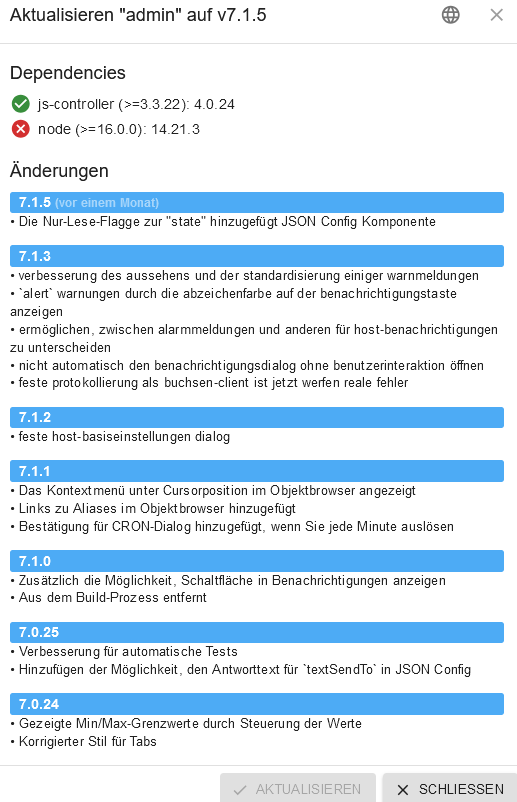
Die Befehle aktualisieren ja auch nichts, du sollst lediglich die Ausgabe von
iob diagposten, damit man sieht wo du da überhaupt stehst und was da unternommen werden muss, damit ein Update auch funktionieren kann. -
Die Befehle aktualisieren ja auch nichts, du sollst lediglich die Ausgabe von
iob diagposten, damit man sieht wo du da überhaupt stehst und was da unternommen werden muss, damit ein Update auch funktionieren kann. -
@thomas-braun Ach so. Die meldung von iob diag ist folgende:
*** iob diag is starting up, please wait *** iob diag needs to be updated. Please execute 'iobroker fix' first. pi@raspberrypi:~ $Edit: Wenn sich iob diag dauerhaft mit einem Update-Wunsch meldet, versuche die Raspbian-Test-Version von hier:
https://forum.iobroker.net/topic/59549/iob-diag-skript -
Edit: Wenn sich iob diag dauerhaft mit einem Update-Wunsch meldet, versuche die Raspbian-Test-Version von hier:
https://forum.iobroker.net/topic/59549/iob-diag-skript@thomas-braun Das ist jetzt die Ausgabe von iob diag
========== Start marking the full check here ===========

```bash
Script v.2024-10-26 Raspbian

*** BASE SYSTEM ***
   Static hostname: raspberrypi
         Icon name: computer
  Operating System: Raspbian GNU/Linux 11 (bullseye)
            Kernel: Linux 6.1.21-v8+
      Architecture: arm64
OS is similar to: debian

Model           : Raspberry Pi 4 Model B Rev 1.5
Docker          : false
Virtualization  : none
Kernel          : aarch64
Userland        : 32 bit

Systemuptime and Load:
 16:59:47 up  2:18,  1 user,  load average: 0.50, 0.33, 0.23
CPU threads: 4


*** LIFE CYCLE STATUS ***
Debian 'bullseye' is the current oldstable version. Please upgrade to the latest stable release 'bookworm' in due time!

*** RASPBERRY THROTTLING ***
Current issues:
No throttling issues detected.

Previously detected issues:
No throttling issues detected.

*** TIME AND TIMEZONES ***
               Local time: Fri 2024-11-01 16:59:47 CET
           Universal time: Fri 2024-11-01 15:59:47 UTC
                 RTC time: n/a
                Time zone: Europe/Berlin (CET, +0100)
System clock synchronized: yes
              NTP service: active
          RTC in local TZ: no

*** Users and Groups ***
User that called 'iob diag':
pi
HOME=/home/pi
GROUPS=pi adm dialout cdrom sudo audio video plugdev games users input render netdev gpio i2c spi iobroker

User that is running 'js-controller':
js-controller is not running

*** DISPLAY-SERVER SETUP ***
Display-Server: false
Desktop:
Terminal:       tty

*** MEMORY ***
               total        used        free      shared  buff/cache   available
Mem:            1.8G         83M        1.2G        1.0M        554M        1.7G
Swap:            99M          0B         99M
Total:          1.9G         83M        1.3G

Active iob-Instances:   1

         1849 M total memory
           83 M used memory
          136 M active memory
          320 M inactive memory
         1210 M free memory
           95 M buffer memory
          459 M swap cache
           99 M total swap
            0 M used swap
           99 M free swap

*** top - Table Of Processes  ***
top - 16:59:47 up  2:18,  1 user,  load average: 0.50, 0.33, 0.23
Tasks: 149 total,   1 running, 148 sleeping,   0 stopped,   0 zombie
%Cpu(s):  1.5 us,  1.5 sy,  0.0 ni, 97.1 id,  0.0 wa,  0.0 hi,  0.0 si,  0.0 st
MiB Mem :   1849.2 total,   1211.1 free,     83.7 used,    554.5 buff/cache
MiB Swap:    100.0 total,    100.0 free,      0.0 used.   1696.6 avail Mem

*** FAILED SERVICES ***

  UNIT             LOAD   ACTIVE SUB    DESCRIPTION
* iobroker.service loaded failed failed ioBroker Server

LOAD   = Reflects whether the unit definition was properly loaded.
ACTIVE = The high-level unit activation state, i.e. generalization of SUB.
SUB    = The low-level unit activation state, values depend on unit type.
1 loaded units listed.


*** DMESG CRITICAL ERRORS ***
No critical errors detected

*** FILESYSTEM ***
Filesystem     Type      Size  Used Avail Use% Mounted on
/dev/root      ext4       29G  4.5G   23G  17% /
devtmpfs       devtmpfs  667M     0  667M   0% /dev
tmpfs          tmpfs     925M     0  925M   0% /dev/shm
tmpfs          tmpfs     370M  1.1M  369M   1% /run
tmpfs          tmpfs     5.0M  4.0K  5.0M   1% /run/lock
/dev/mmcblk0p1 vfat      255M   51M  205M  20% /boot
tmpfs          tmpfs     185M     0  185M   0% /run/user/1000

Messages concerning ext4 filesystem in dmesg:
[Fri Nov  1 14:40:54 2024] Kernel command line: coherent_pool=1M 8250.nr_uarts=0 snd_bcm2835.enable_headphones=0 snd_bcm2835.enable_headphones=1 snd_bcm2835.enable_hdmi=1 snd_bcm2835.enable_hdmi=0  smsc95xx.macaddr=E4:5F:01:D8:F4:17 vc_mem.mem_base=0x3ec00000 vc_mem.mem_size=0x40000000  console=ttyS0,115200 console=tty1 root=PARTUUID=c5032b13-02 rootfstype=ext4 fsck.repair=yes rootwait
[Fri Nov  1 14:40:55 2024] EXT4-fs (mmcblk0p2): INFO: recovery required on readonly filesystem
[Fri Nov  1 14:40:55 2024] EXT4-fs (mmcblk0p2): write access will be enabled during recovery
[Fri Nov  1 14:40:55 2024] EXT4-fs (mmcblk0p2): orphan cleanup on readonly fs
[Fri Nov  1 14:40:55 2024] EXT4-fs (mmcblk0p2): 42 orphan inodes deleted
[Fri Nov  1 14:40:55 2024] EXT4-fs (mmcblk0p2): recovery complete
[Fri Nov  1 14:40:56 2024] EXT4-fs (mmcblk0p2): mounted filesystem with ordered data mode. Quota mode: none.
[Fri Nov  1 14:40:56 2024] VFS: Mounted root (ext4 filesystem) readonly on device 179:2.
[Fri Nov  1 14:40:58 2024] EXT4-fs (mmcblk0p2): re-mounted. Quota mode: none.

Show mounted filesystems:
TARGET  SOURCE         FSTYPE OPTIONS
/       /dev/mmcblk0p2 ext4   rw,noatime
`-/boot /dev/mmcblk0p1 vfat   rw,relatime,fmask=0022,dmask=0022,codepage=437,iocharset=ascii,shortname=mixed,errors=remount-ro

Files in neuralgic directories:

/var:
1.8G    /var/
1.1G    /var/log/journal/7e11448d03804aac8290e2f4ca2369fd
1.1G    /var/log/journal
1.1G    /var/log
527M    /var/cache

Archived and active journals take up 1.0G in the file system.

/opt/iobroker/backups:
18M     /opt/iobroker/backups/
4.0K    /opt/iobroker/backups/redistmp

/opt/iobroker/iobroker-data:
217M    /opt/iobroker/iobroker-data/
145M    /opt/iobroker/iobroker-data/files
52M     /opt/iobroker/iobroker-data/files/javascript.admin
48M     /opt/iobroker/iobroker-data/files/telegram.admin
42M     /opt/iobroker/iobroker-data/backup-objects

The five largest files in iobroker-data are:
15M     /opt/iobroker/iobroker-data/files/telegram.admin/rules/static/js/vendors-node_modules_iobroker_adapter-react-v5_assets_devices_parseNames_d_ts-node_modules_io-1d9f06.44fe4a3f.chunk.js.map
7.2M    /opt/iobroker/iobroker-data/objects.jsonl
7.2M    /opt/iobroker/iobroker-data/files/telegram.admin/rules/static/js/vendors-node_modules_iobroker_adapter-react-v5_assets_devices_parseNames_d_ts-node_modules_io-1d9f06.44fe4a3f.chunk.js
6.9M    /opt/iobroker/iobroker-data/files/telegram.admin/custom/static/js/vendors-node_modules_mui_icons-material_esm_index_js.8fdf8cb7.chunk.js.map
6.9M    /opt/iobroker/iobroker-data/files/javascript.admin/static/js/610.312d98a8.chunk.js.map

USB-Devices by-id:
USB-Sticks -  Avoid direct links to /dev/tty* in your adapter setups, please always prefer the links 'by-id':

No Devices found 'by-id'

*** NodeJS-Installation ***

nodejs:                 N/A
/usr/bin/node           v14.21.3
/usr/bin/npm            6.14.18
/usr/bin/npx            6.14.18
/usr/bin/corepack       0.15.1
*** nodejs is NOT correctly installed ***

nodejs:
  Installed: 14.21.3-deb-1nodesource1
  Candidate: 14.21.3-deb-1nodesource1
  Version table:
 *** 14.21.3-deb-1nodesource1 500
        500 https://deb.nodesource.com/node_14.x bullseye/main armhf Packages
        100 /var/lib/dpkg/status
     12.22.12~dfsg-1~deb11u5 500
        500 http://raspbian.raspberrypi.org/raspbian bullseye/main armhf Packages

Temp directories causing deletion problem: 0
No problems detected

Errors in npm tree: 0
No problems detected

*** ioBroker-Installation ***

ioBroker Status
iobroker is not running on this host.


Objects type: jsonl
States  type: jsonl

Hosts:
raspberrypi         raspberrypi (version: 4.0.24, hostname: raspberrypi   ,  dead, uptime: 1142)

Core adapters versions
js-controller:  4.0.24
admin:          6.3.5
javascript:     7.0.3

nodejs modules from github:     0

Adapter State
  system.adapter.admin.0                  : admin                 : raspberrypi                              -  enabled, port: 8081, bind: 0.0.0.0, run as: admin
  system.adapter.backitup.0               : backitup              : raspberrypi                              -  enabled
  system.adapter.bosesoundtouch.0         : bosesoundtouch        : raspberrypi                              - disabled
  system.adapter.discovery.0              : discovery             : raspberrypi                              -  enabled
  system.adapter.fronius.0                : fronius               : raspberrypi                              - disabled
  system.adapter.gira-iot.0               : gira-iot              : raspberrypi                              - disabled
  system.adapter.gruenbeck.0              : gruenbeck             : raspberrypi                              - disabled
  system.adapter.hmip.0                   : hmip                  : raspberrypi                              -  enabled
  system.adapter.javascript.0             : javascript            : raspberrypi                              -  enabled
  system.adapter.knx.0                    : knx                   : raspberrypi                              - disabled, bind: 192.168.1.136
  system.adapter.luxtronik2.0             : luxtronik2            : raspberrypi                              - disabled, port: 8214
  system.adapter.node-red.0               : node-red              : raspberrypi                              -  enabled, port: 1880, bind: 0.0.0.0
  system.adapter.openknx.0                : openknx               : raspberrypi                              -  enabled
  system.adapter.telegram.0               : telegram              : raspberrypi                              - disabled, port: 8443, bind: 0.0.0.0
  system.adapter.web.0                    : web                   : raspberrypi                              -  enabled, port: 8082, bind: 0.0.0.0 (SSL), run as: admin
  system.adapter.whatsapp-cmb.0           : whatsapp-cmb          : raspberrypi                              -  enabled
  system.adapter.whatsapp-cmb.1           : whatsapp-cmb          : raspberrypi                              -  enabled
  system.adapter.whatsapp-cmb.10          : whatsapp-cmb          : raspberrypi                              -  enabled

+ instance is alive

Enabled adapters with bindings
  system.adapter.admin.0                  : admin                 : raspberrypi                              -  enabled, port: 8081, bind: 0.0.0.0, run as: admin
  system.adapter.node-red.0               : node-red              : raspberrypi                              -  enabled, port: 1880, bind: 0.0.0.0
  system.adapter.web.0                    : web                   : raspberrypi                              -  enabled, port: 8082, bind: 0.0.0.0 (SSL), run as: admin

ioBroker-Repositories
stable        : http://download.iobroker.net/sources-dist.json
beta          : http://download.iobroker.net/sources-dist-latest.json

Active repo(s): stable

Installed ioBroker-Instances
Used repository: stable
Adapter    "admin"        : 7.1.5    , installed 6.3.5  [Updatable]
Adapter    "backitup"     : 3.0.25   , installed 2.6.23 [Updatable]
Adapter    "bosesoundtouch": 0.11.1  , installed 0.10.3 [Updatable]
Adapter    "discovery"    : 5.0.0    , installed 3.1.0  [Updatable]
Adapter    "fronius"      : 2.1.1    , installed 1.1.3  [Updatable]
Adapter    "gira-iot"     : 0.5.0    , installed 0.1.3  [Updatable]
Adapter    "gruenbeck"    : 0.0.43   , installed 0.0.42 [Updatable]
Adapter    "hmip"         : 1.24.3   , installed 1.20.0 [Updatable]
Adapter    "javascript"   : 8.8.3    , installed 7.0.3  [Updatable]
Controller "js-controller": 6.0.11   , installed 4.0.24 [Updatable]
Adapter    "knx"          : 2.0.28   , installed 2.0.17 [Updatable]
Adapter    "node-red"     : 5.2.1    , installed 4.0.3  [Updatable]
Adapter    "openknx"      : 0.9.0    , installed 0.5.3  [Updatable]
Adapter    "simple-api"   : 2.8.0    , installed 2.7.2  [Updatable]
Adapter    "socketio"     : 6.7.1    , installed 6.5.2  [Updatable]
Adapter    "telegram"     : 3.9.0    , installed 1.16.0 [Updatable]
Adapter    "web"          : 6.2.5    , installed 4.3.0  [Updatable]
Adapter    "whatsapp-cmb" : 0.3.0    , installed 0.2.3  [Updatable]
Adapter    "ws"           : 2.6.2    , installed 1.3.0  [Updatable]

Objects and States
Please stand by - This may take a while
Objects:        2403
States:         1719

*** OS-Repositories and Updates ***
Hit:1 http://raspbian.raspberrypi.org/raspbian bullseye InRelease
Hit:2 http://archive.raspberrypi.org/debian bullseye InRelease
Hit:3 https://deb.nodesource.com/node_14.x bullseye InRelease
Reading package lists... Done
Pending Updates: 1

*** Listening Ports ***
Active Internet connections (only servers)
Proto Recv-Q Send-Q Local Address           Foreign Address         State       User       Inode      PID/Program name
tcp        0      0 0.0.0.0:22              0.0.0.0:*               LISTEN      0          13209      509/sshd: /usr/sbin
tcp6       0      0 :::22                   :::*                    LISTEN      0          13211      509/sshd: /usr/sbin
udp        0      0 0.0.0.0:68              0.0.0.0:*                           0          13271      738/dhcpcd
udp        0      0 0.0.0.0:5353            0.0.0.0:*                           108        1837       378/avahi-daemon: r
udp        0      0 0.0.0.0:60887           0.0.0.0:*                           108        1839       378/avahi-daemon: r
udp6       0      0 :::36806                :::*                                108        1840       378/avahi-daemon: r
udp6       0      0 :::5353                 :::*                                108        1838       378/avahi-daemon: r
udp6       0      0 :::546                  :::*                                0          16421      738/dhcpcd

*** Log File - Last 25 Lines ***

2024-11-01 16:48:39.670  - info: host.raspberrypi stopInstance system.adapter.openknx.0 send kill signal
2024-11-01 16:48:39.670  - info: host.raspberrypi stopInstance system.adapter.hmip.0 send kill signal
2024-11-01 16:48:39.671  - info: host.raspberrypi stopInstance system.adapter.discovery.0 send kill signal
2024-11-01 16:48:39.671  - info: host.raspberrypi stopInstance system.adapter.backitup.0 send kill signal
2024-11-01 16:48:39.671  - info: host.raspberrypi stopInstance system.adapter.web.0 send kill signal
2024-11-01 16:48:39.708  - info: hmip.0 (3685) Terminated (START_IMMEDIATELY_AFTER_STOP): Without reason
2024-11-01 16:48:39.707  - info: web.0 (3744) terminated https server on port 8082
2024-11-01 16:48:39.756  - info: web.0 (3744) Terminated (START_IMMEDIATELY_AFTER_STOP): Without reason
2024-11-01 16:48:40.022  - info: whatsapp-cmb.0 (3584) Terminated (START_IMMEDIATELY_AFTER_STOP): Without reason
2024-11-01 16:48:40.022  - info: whatsapp-cmb.10 (3655) Terminated (START_IMMEDIATELY_AFTER_STOP): Without reason
2024-11-01 16:48:40.030  - info: whatsapp-cmb.1 (3621) Terminated (START_IMMEDIATELY_AFTER_STOP): Without reason
2024-11-01 16:48:40.051  - info: node-red.0 (3595) Terminated (START_IMMEDIATELY_AFTER_STOP): Without reason
2024-11-01 16:48:40.306  - info: host.raspberrypi instance system.adapter.discovery.0 terminated with code 156 (START_IMMEDIATELY_AFTER_STOP)
2024-11-01 16:48:40.351  - info: host.raspberrypi instance system.adapter.admin.0 terminated with code 156 (START_IMMEDIATELY_AFTER_STOP)
2024-11-01 16:48:40.353  - info: host.raspberrypi instance system.adapter.openknx.0 terminated with code 156 (START_IMMEDIATELY_AFTER_STOP)
2024-11-01 16:48:40.402  - info: host.raspberrypi instance system.adapter.javascript.0 terminated with code 156 (START_IMMEDIATELY_AFTER_STOP)
2024-11-01 16:48:40.403  - info: host.raspberrypi instance system.adapter.backitup.0 terminated with code 156 (START_IMMEDIATELY_AFTER_STOP)
2024-11-01 16:48:40.433  - info: host.raspberrypi instance system.adapter.hmip.0 terminated with code 156 (START_IMMEDIATELY_AFTER_STOP)
2024-11-01 16:48:40.465  - info: host.raspberrypi instance system.adapter.web.0 terminated with code 156 (START_IMMEDIATELY_AFTER_STOP)
2024-11-01 16:48:40.633  - info: host.raspberrypi instance system.adapter.whatsapp-cmb.0 terminated with code 156 (START_IMMEDIATELY_AFTER_STOP)
2024-11-01 16:48:40.633  - info: host.raspberrypi instance system.adapter.whatsapp-cmb.10 terminated with code 156 (START_IMMEDIATELY_AFTER_STOP)
2024-11-01 16:48:40.678  - info: host.raspberrypi instance system.adapter.whatsapp-cmb.1 terminated with code 156 (START_IMMEDIATELY_AFTER_STOP)
2024-11-01 16:48:40.695  - info: host.raspberrypi instance system.adapter.node-red.0 terminated with code 156 (START_IMMEDIATELY_AFTER_STOP)
2024-11-01 16:48:40.696  - info: host.raspberrypi All instances are stopped.
2024-11-01 16:48:40.826  - info: host.raspberrypi terminated
============ Mark until here for C&P =============
iob diag has finished.
Press any key for a summary
Copy text starting here:
======================= SUMMARY =======================
                        v.2024-10-26 Raspbian


   Static hostname: raspberrypi
         Icon name: computer
  Operating System: Raspbian GNU/Linux 11 (bullseye)
            Kernel: Linux 6.1.21-v8+
      Architecture: arm64

Installation:           native
Kernel:                 aarch64
Userland:               32 bit
Timezone:               Europe/Berlin (CET, +0100)
User-ID:                1000
Display-Server:         false
Boot Target:            multi-user.target

Pending OS-Updates:     1
Pending iob updates:    19

Nodejs-Installation:
nodejs:                 N/A
/usr/bin/node           v14.21.3
/usr/bin/npm            6.14.18
/usr/bin/npx            6.14.18
/usr/bin/corepack       0.15.1

Recommended versions are nodejs 16.20.2 and npm 8.19.4
*** nodejs is NOT correctly installed ***
Wrong installation path detected. This needs to be fixed.

Please execute
iob nodejs-update
to fix these errors.

MEMORY:
               total        used        free      shared  buff/cache   available
Mem:            1.8G         86M        1.2G        1.0M        554M        1.7G
Swap:            99M          0B         99M
Total:          1.9G         86M        1.3G

Active iob-Instances:   1
Active repo(s): stable

ioBroker Core:          js-controller           4.0.24
                        admin                   6.3.5

ioBroker Status:        iobroker is not running on this host.


Objects type: jsonl
States  type: jsonl

Status admin and web instance:
  system.adapter.admin.0                  : admin                 : raspberrypi                              -  enabled, port: 8081, bind: 0.0.0.0, run as: admin
  system.adapter.web.0                    : web                   : raspberrypi                              -  enabled, port: 8082, bind: 0.0.0.0 (SSL), run as: admin

Objects:                2403
States:                 1719

Size of iob-Database:

7.2M    /opt/iobroker/iobroker-data/objects.jsonl
1.1M    /opt/iobroker/iobroker-data/states.jsonl


Debian 'bullseye' is the current oldstable version. Please upgrade to the latest stable release 'bookworm' in due time!

=================== END OF SUMMARY ====================
=== Mark text until here for copying ===
pi@raspberrypi:~ $ -
@thomas-braun Das ist jetzt die Ausgabe von iob diag
========== Start marking the full check here ===========

```bash
Script v.2024-10-26 Raspbian

*** BASE SYSTEM ***
   Static hostname: raspberrypi
         Icon name: computer
  Operating System: Raspbian GNU/Linux 11 (bullseye)
            Kernel: Linux 6.1.21-v8+
      Architecture: arm64
OS is similar to: debian

Model           : Raspberry Pi 4 Model B Rev 1.5
Docker          : false
Virtualization  : none
Kernel          : aarch64
Userland        : 32 bit

Systemuptime and Load:
 16:59:47 up  2:18,  1 user,  load average: 0.50, 0.33, 0.23
CPU threads: 4


*** LIFE CYCLE STATUS ***
Debian 'bullseye' is the current oldstable version. Please upgrade to the latest stable release 'bookworm' in due time!

*** RASPBERRY THROTTLING ***
Current issues:
No throttling issues detected.

Previously detected issues:
No throttling issues detected.

*** TIME AND TIMEZONES ***
               Local time: Fri 2024-11-01 16:59:47 CET
           Universal time: Fri 2024-11-01 15:59:47 UTC
                 RTC time: n/a
                Time zone: Europe/Berlin (CET, +0100)
System clock synchronized: yes
              NTP service: active
          RTC in local TZ: no

*** Users and Groups ***
User that called 'iob diag':
pi
HOME=/home/pi
GROUPS=pi adm dialout cdrom sudo audio video plugdev games users input render netdev gpio i2c spi iobroker

User that is running 'js-controller':
js-controller is not running

*** DISPLAY-SERVER SETUP ***
Display-Server: false
Desktop:
Terminal:       tty

*** MEMORY ***
               total        used        free      shared  buff/cache   available
Mem:            1.8G         83M        1.2G        1.0M        554M        1.7G
Swap:            99M          0B         99M
Total:          1.9G         83M        1.3G

Active iob-Instances:   1

         1849 M total memory
           83 M used memory
          136 M active memory
          320 M inactive memory
         1210 M free memory
           95 M buffer memory
          459 M swap cache
           99 M total swap
            0 M used swap
           99 M free swap

*** top - Table Of Processes  ***
top - 16:59:47 up  2:18,  1 user,  load average: 0.50, 0.33, 0.23
Tasks: 149 total,   1 running, 148 sleeping,   0 stopped,   0 zombie
%Cpu(s):  1.5 us,  1.5 sy,  0.0 ni, 97.1 id,  0.0 wa,  0.0 hi,  0.0 si,  0.0 st
MiB Mem :   1849.2 total,   1211.1 free,     83.7 used,    554.5 buff/cache
MiB Swap:    100.0 total,    100.0 free,      0.0 used.   1696.6 avail Mem

*** FAILED SERVICES ***

  UNIT             LOAD   ACTIVE SUB    DESCRIPTION
* iobroker.service loaded failed failed ioBroker Server

LOAD   = Reflects whether the unit definition was properly loaded.
ACTIVE = The high-level unit activation state, i.e. generalization of SUB.
SUB    = The low-level unit activation state, values depend on unit type.
1 loaded units listed.


*** DMESG CRITICAL ERRORS ***
No critical errors detected

*** FILESYSTEM ***
Filesystem     Type      Size  Used Avail Use% Mounted on
/dev/root      ext4       29G  4.5G   23G  17% /
devtmpfs       devtmpfs  667M     0  667M   0% /dev
tmpfs          tmpfs     925M     0  925M   0% /dev/shm
tmpfs          tmpfs     370M  1.1M  369M   1% /run
tmpfs          tmpfs     5.0M  4.0K  5.0M   1% /run/lock
/dev/mmcblk0p1 vfat      255M   51M  205M  20% /boot
tmpfs          tmpfs     185M     0  185M   0% /run/user/1000

Messages concerning ext4 filesystem in dmesg:
[Fri Nov  1 14:40:54 2024] Kernel command line: coherent_pool=1M 8250.nr_uarts=0 snd_bcm2835.enable_headphones=0 snd_bcm2835.enable_headphones=1 snd_bcm2835.enable_hdmi=1 snd_bcm2835.enable_hdmi=0  smsc95xx.macaddr=E4:5F:01:D8:F4:17 vc_mem.mem_base=0x3ec00000 vc_mem.mem_size=0x40000000  console=ttyS0,115200 console=tty1 root=PARTUUID=c5032b13-02 rootfstype=ext4 fsck.repair=yes rootwait
[Fri Nov  1 14:40:55 2024] EXT4-fs (mmcblk0p2): INFO: recovery required on readonly filesystem
[Fri Nov  1 14:40:55 2024] EXT4-fs (mmcblk0p2): write access will be enabled during recovery
[Fri Nov  1 14:40:55 2024] EXT4-fs (mmcblk0p2): orphan cleanup on readonly fs
[Fri Nov  1 14:40:55 2024] EXT4-fs (mmcblk0p2): 42 orphan inodes deleted
[Fri Nov  1 14:40:55 2024] EXT4-fs (mmcblk0p2): recovery complete
[Fri Nov  1 14:40:56 2024] EXT4-fs (mmcblk0p2): mounted filesystem with ordered data mode. Quota mode: none.
[Fri Nov  1 14:40:56 2024] VFS: Mounted root (ext4 filesystem) readonly on device 179:2.
[Fri Nov  1 14:40:58 2024] EXT4-fs (mmcblk0p2): re-mounted. Quota mode: none.

Show mounted filesystems:
TARGET  SOURCE         FSTYPE OPTIONS
/       /dev/mmcblk0p2 ext4   rw,noatime
`-/boot /dev/mmcblk0p1 vfat   rw,relatime,fmask=0022,dmask=0022,codepage=437,iocharset=ascii,shortname=mixed,errors=remount-ro

Files in neuralgic directories:

/var:
1.8G    /var/
1.1G    /var/log/journal/7e11448d03804aac8290e2f4ca2369fd
1.1G    /var/log/journal
1.1G    /var/log
527M    /var/cache

Archived and active journals take up 1.0G in the file system.

/opt/iobroker/backups:
18M     /opt/iobroker/backups/
4.0K    /opt/iobroker/backups/redistmp

/opt/iobroker/iobroker-data:
217M    /opt/iobroker/iobroker-data/
145M    /opt/iobroker/iobroker-data/files
52M     /opt/iobroker/iobroker-data/files/javascript.admin
48M     /opt/iobroker/iobroker-data/files/telegram.admin
42M     /opt/iobroker/iobroker-data/backup-objects

The five largest files in iobroker-data are:
15M     /opt/iobroker/iobroker-data/files/telegram.admin/rules/static/js/vendors-node_modules_iobroker_adapter-react-v5_assets_devices_parseNames_d_ts-node_modules_io-1d9f06.44fe4a3f.chunk.js.map
7.2M    /opt/iobroker/iobroker-data/objects.jsonl
7.2M    /opt/iobroker/iobroker-data/files/telegram.admin/rules/static/js/vendors-node_modules_iobroker_adapter-react-v5_assets_devices_parseNames_d_ts-node_modules_io-1d9f06.44fe4a3f.chunk.js
6.9M    /opt/iobroker/iobroker-data/files/telegram.admin/custom/static/js/vendors-node_modules_mui_icons-material_esm_index_js.8fdf8cb7.chunk.js.map
6.9M    /opt/iobroker/iobroker-data/files/javascript.admin/static/js/610.312d98a8.chunk.js.map

USB-Devices by-id:
USB-Sticks -  Avoid direct links to /dev/tty* in your adapter setups, please always prefer the links 'by-id':

No Devices found 'by-id'

*** NodeJS-Installation ***

nodejs:                 N/A
/usr/bin/node           v14.21.3
/usr/bin/npm            6.14.18
/usr/bin/npx            6.14.18
/usr/bin/corepack       0.15.1
*** nodejs is NOT correctly installed ***

nodejs:
  Installed: 14.21.3-deb-1nodesource1
  Candidate: 14.21.3-deb-1nodesource1
  Version table:
 *** 14.21.3-deb-1nodesource1 500
        500 https://deb.nodesource.com/node_14.x bullseye/main armhf Packages
        100 /var/lib/dpkg/status
     12.22.12~dfsg-1~deb11u5 500
        500 http://raspbian.raspberrypi.org/raspbian bullseye/main armhf Packages

Temp directories causing deletion problem: 0
No problems detected

Errors in npm tree: 0
No problems detected

*** ioBroker-Installation ***

ioBroker Status
iobroker is not running on this host.


Objects type: jsonl
States  type: jsonl

Hosts:
raspberrypi         raspberrypi (version: 4.0.24, hostname: raspberrypi   ,  dead, uptime: 1142)

Core adapters versions
js-controller:  4.0.24
admin:          6.3.5
javascript:     7.0.3

nodejs modules from github:     0

Adapter State
  system.adapter.admin.0                  : admin                 : raspberrypi                              -  enabled, port: 8081, bind: 0.0.0.0, run as: admin
  system.adapter.backitup.0               : backitup              : raspberrypi                              -  enabled
  system.adapter.bosesoundtouch.0         : bosesoundtouch        : raspberrypi                              - disabled
  system.adapter.discovery.0              : discovery             : raspberrypi                              -  enabled
  system.adapter.fronius.0                : fronius               : raspberrypi                              - disabled
  system.adapter.gira-iot.0               : gira-iot              : raspberrypi                              - disabled
  system.adapter.gruenbeck.0              : gruenbeck             : raspberrypi                              - disabled
  system.adapter.hmip.0                   : hmip                  : raspberrypi                              -  enabled
  system.adapter.javascript.0             : javascript            : raspberrypi                              -  enabled
  system.adapter.knx.0                    : knx                   : raspberrypi                              - disabled, bind: 192.168.1.136
  system.adapter.luxtronik2.0             : luxtronik2            : raspberrypi                              - disabled, port: 8214
  system.adapter.node-red.0               : node-red              : raspberrypi                              -  enabled, port: 1880, bind: 0.0.0.0
  system.adapter.openknx.0                : openknx               : raspberrypi                              -  enabled
  system.adapter.telegram.0               : telegram              : raspberrypi                              - disabled, port: 8443, bind: 0.0.0.0
  system.adapter.web.0                    : web                   : raspberrypi                              -  enabled, port: 8082, bind: 0.0.0.0 (SSL), run as: admin
  system.adapter.whatsapp-cmb.0           : whatsapp-cmb          : raspberrypi                              -  enabled
  system.adapter.whatsapp-cmb.1           : whatsapp-cmb          : raspberrypi                              -  enabled
  system.adapter.whatsapp-cmb.10          : whatsapp-cmb          : raspberrypi                              -  enabled

+ instance is alive

Enabled adapters with bindings
  system.adapter.admin.0                  : admin                 : raspberrypi                              -  enabled, port: 8081, bind: 0.0.0.0, run as: admin
  system.adapter.node-red.0               : node-red              : raspberrypi                              -  enabled, port: 1880, bind: 0.0.0.0
  system.adapter.web.0                    : web                   : raspberrypi                              -  enabled, port: 8082, bind: 0.0.0.0 (SSL), run as: admin

ioBroker-Repositories
stable        : http://download.iobroker.net/sources-dist.json
beta          : http://download.iobroker.net/sources-dist-latest.json

Active repo(s): stable

Installed ioBroker-Instances
Used repository: stable
Adapter    "admin"        : 7.1.5    , installed 6.3.5  [Updatable]
Adapter    "backitup"     : 3.0.25   , installed 2.6.23 [Updatable]
Adapter    "bosesoundtouch": 0.11.1  , installed 0.10.3 [Updatable]
Adapter    "discovery"    : 5.0.0    , installed 3.1.0  [Updatable]
Adapter    "fronius"      : 2.1.1    , installed 1.1.3  [Updatable]
Adapter    "gira-iot"     : 0.5.0    , installed 0.1.3  [Updatable]
Adapter    "gruenbeck"    : 0.0.43   , installed 0.0.42 [Updatable]
Adapter    "hmip"         : 1.24.3   , installed 1.20.0 [Updatable]
Adapter    "javascript"   : 8.8.3    , installed 7.0.3  [Updatable]
Controller "js-controller": 6.0.11   , installed 4.0.24 [Updatable]
Adapter    "knx"          : 2.0.28   , installed 2.0.17 [Updatable]
Adapter    "node-red"     : 5.2.1    , installed 4.0.3  [Updatable]
Adapter    "openknx"      : 0.9.0    , installed 0.5.3  [Updatable]
Adapter    "simple-api"   : 2.8.0    , installed 2.7.2  [Updatable]
Adapter    "socketio"     : 6.7.1    , installed 6.5.2  [Updatable]
Adapter    "telegram"     : 3.9.0    , installed 1.16.0 [Updatable]
Adapter    "web"          : 6.2.5    , installed 4.3.0  [Updatable]
Adapter    "whatsapp-cmb" : 0.3.0    , installed 0.2.3  [Updatable]
Adapter    "ws"           : 2.6.2    , installed 1.3.0  [Updatable]

Objects and States
Please stand by - This may take a while
Objects:        2403
States:         1719

*** OS-Repositories and Updates ***
Hit:1 http://raspbian.raspberrypi.org/raspbian bullseye InRelease
Hit:2 http://archive.raspberrypi.org/debian bullseye InRelease
Hit:3 https://deb.nodesource.com/node_14.x bullseye InRelease
Reading package lists... Done
Pending Updates: 1

*** Listening Ports ***
Active Internet connections (only servers)
Proto Recv-Q Send-Q Local Address           Foreign Address         State       User       Inode      PID/Program name
tcp        0      0 0.0.0.0:22              0.0.0.0:*               LISTEN      0          13209      509/sshd: /usr/sbin
tcp6       0      0 :::22                   :::*                    LISTEN      0          13211      509/sshd: /usr/sbin
udp        0      0 0.0.0.0:68              0.0.0.0:*                           0          13271      738/dhcpcd
udp        0      0 0.0.0.0:5353            0.0.0.0:*                           108        1837       378/avahi-daemon: r
udp        0      0 0.0.0.0:60887           0.0.0.0:*                           108        1839       378/avahi-daemon: r
udp6       0      0 :::36806                :::*                                108        1840       378/avahi-daemon: r
udp6       0      0 :::5353                 :::*                                108        1838       378/avahi-daemon: r
udp6       0      0 :::546                  :::*                                0          16421      738/dhcpcd

*** Log File - Last 25 Lines ***

2024-11-01 16:48:39.670  - info: host.raspberrypi stopInstance system.adapter.openknx.0 send kill signal
2024-11-01 16:48:39.670  - info: host.raspberrypi stopInstance system.adapter.hmip.0 send kill signal
2024-11-01 16:48:39.671  - info: host.raspberrypi stopInstance system.adapter.discovery.0 send kill signal
2024-11-01 16:48:39.671  - info: host.raspberrypi stopInstance system.adapter.backitup.0 send kill signal
2024-11-01 16:48:39.671  - info: host.raspberrypi stopInstance system.adapter.web.0 send kill signal
2024-11-01 16:48:39.708  - info: hmip.0 (3685) Terminated (START_IMMEDIATELY_AFTER_STOP): Without reason
2024-11-01 16:48:39.707  - info: web.0 (3744) terminated https server on port 8082
2024-11-01 16:48:39.756  - info: web.0 (3744) Terminated (START_IMMEDIATELY_AFTER_STOP): Without reason
2024-11-01 16:48:40.022  - info: whatsapp-cmb.0 (3584) Terminated (START_IMMEDIATELY_AFTER_STOP): Without reason
2024-11-01 16:48:40.022  - info: whatsapp-cmb.10 (3655) Terminated (START_IMMEDIATELY_AFTER_STOP): Without reason
2024-11-01 16:48:40.030  - info: whatsapp-cmb.1 (3621) Terminated (START_IMMEDIATELY_AFTER_STOP): Without reason
2024-11-01 16:48:40.051  - info: node-red.0 (3595) Terminated (START_IMMEDIATELY_AFTER_STOP): Without reason
2024-11-01 16:48:40.306  - info: host.raspberrypi instance system.adapter.discovery.0 terminated with code 156 (START_IMMEDIATELY_AFTER_STOP)
2024-11-01 16:48:40.351  - info: host.raspberrypi instance system.adapter.admin.0 terminated with code 156 (START_IMMEDIATELY_AFTER_STOP)
2024-11-01 16:48:40.353  - info: host.raspberrypi instance system.adapter.openknx.0 terminated with code 156 (START_IMMEDIATELY_AFTER_STOP)
2024-11-01 16:48:40.402  - info: host.raspberrypi instance system.adapter.javascript.0 terminated with code 156 (START_IMMEDIATELY_AFTER_STOP)
2024-11-01 16:48:40.403  - info: host.raspberrypi instance system.adapter.backitup.0 terminated with code 156 (START_IMMEDIATELY_AFTER_STOP)
2024-11-01 16:48:40.433  - info: host.raspberrypi instance system.adapter.hmip.0 terminated with code 156 (START_IMMEDIATELY_AFTER_STOP)
2024-11-01 16:48:40.465  - info: host.raspberrypi instance system.adapter.web.0 terminated with code 156 (START_IMMEDIATELY_AFTER_STOP)
2024-11-01 16:48:40.633  - info: host.raspberrypi instance system.adapter.whatsapp-cmb.0 terminated with code 156 (START_IMMEDIATELY_AFTER_STOP)
2024-11-01 16:48:40.633  - info: host.raspberrypi instance system.adapter.whatsapp-cmb.10 terminated with code 156 (START_IMMEDIATELY_AFTER_STOP)
2024-11-01 16:48:40.678  - info: host.raspberrypi instance system.adapter.whatsapp-cmb.1 terminated with code 156 (START_IMMEDIATELY_AFTER_STOP)
2024-11-01 16:48:40.695  - info: host.raspberrypi instance system.adapter.node-red.0 terminated with code 156 (START_IMMEDIATELY_AFTER_STOP)
2024-11-01 16:48:40.696  - info: host.raspberrypi All instances are stopped.
2024-11-01 16:48:40.826  - info: host.raspberrypi terminated
============ Mark until here for C&P =============
iob diag has finished.
Press any key for a summary
Copy text starting here:
======================= SUMMARY =======================
                        v.2024-10-26 Raspbian


   Static hostname: raspberrypi
         Icon name: computer
  Operating System: Raspbian GNU/Linux 11 (bullseye)
            Kernel: Linux 6.1.21-v8+
      Architecture: arm64

Installation:           native
Kernel:                 aarch64
Userland:               32 bit
Timezone:               Europe/Berlin (CET, +0100)
User-ID:                1000
Display-Server:         false
Boot Target:            multi-user.target

Pending OS-Updates:     1
Pending iob updates:    19

Nodejs-Installation:
nodejs:                 N/A
/usr/bin/node           v14.21.3
/usr/bin/npm            6.14.18
/usr/bin/npx            6.14.18
/usr/bin/corepack       0.15.1

Recommended versions are nodejs 16.20.2 and npm 8.19.4
*** nodejs is NOT correctly installed ***
Wrong installation path detected. This needs to be fixed.

Please execute
iob nodejs-update
to fix these errors.

MEMORY:
               total        used        free      shared  buff/cache   available
Mem:            1.8G         86M        1.2G        1.0M        554M        1.7G
Swap:            99M          0B         99M
Total:          1.9G         86M        1.3G

Active iob-Instances:   1
Active repo(s): stable

ioBroker Core:          js-controller           4.0.24
                        admin                   6.3.5

ioBroker Status:        iobroker is not running on this host.


Objects type: jsonl
States  type: jsonl

Status admin and web instance:
  system.adapter.admin.0                  : admin                 : raspberrypi                              -  enabled, port: 8081, bind: 0.0.0.0, run as: admin
  system.adapter.web.0                    : web                   : raspberrypi                              -  enabled, port: 8082, bind: 0.0.0.0 (SSL), run as: admin

Objects:                2403
States:                 1719

Size of iob-Database:

7.2M    /opt/iobroker/iobroker-data/objects.jsonl
1.1M    /opt/iobroker/iobroker-data/states.jsonl


Debian 'bullseye' is the current oldstable version. Please upgrade to the latest stable release 'bookworm' in due time!

=================== END OF SUMMARY ====================
=== Mark text until here for copying ===
pi@raspberrypi:~ $@timowald sagte in JS-Controller aktualisieren?:
Kernel : aarch64
Userland : 32 bitMix aus 64Bit-Kernel und 32Bit-Userland. Installier das System nach dem ioBroker-Upgrade NEU.
[Fri Nov 1 14:40:55 2024] EXT4-fs (mmcblk0p2): 42 orphan inodes deleted
Haste die Kiste hart vom Strom getrennt?
Lass das bleiben, das killt dir dein Dateisystem. Die 42 inodes sind jetzt gelöscht.Zum Update:
Versuchiob nodejs-update iob stop iob update iob upgrade all -y iob upgrade self iob startWenn der ioBroker danach wieder laufen sollte, Backup ziehen, RaspberryOS 12 (64Bit Lite) auf einem frischen Datenträger installieren, ioBroker installieren, Backup einspielen.
-
@thomas-braun Prima hat alles geklappt. IOB und alle Adapter auf aktuellem Stand.
Ein Lob, vielen Dank.
Dann zieh jetzt mit einem Backup auf ein frisch installiertes Betriebssystem um.
-
Dann zieh jetzt mit einem Backup auf ein frisch installiertes Betriebssystem um.
-
@thomas-braun Auf eine neue SD Karte?
@timowald sagte in JS-Controller aktualisieren?:
Auf eine neue SD Karte?
Bevorzugt.
Wie ist es denn zu dem schweren Einschlag heute um 14:40 gekommen? -
@timowald sagte in JS-Controller aktualisieren?:
Auf eine neue SD Karte?
Bevorzugt.
Wie ist es denn zu dem schweren Einschlag heute um 14:40 gekommen? -
@thomas-braun Das kann ich leider nicht sagen.
Im Moment läuft alles super. Ich lasse es erstmal so laufen. Backup ist gemacht.@timowald sagte in JS-Controller aktualisieren?:
Ich lasse es erstmal so laufen.
Aber nicht allzulang...
Ein aktueller Lauf voniob diagschaut nun wie aus?

Hey! Du scheinst an dieser Unterhaltung interessiert zu sein, hast aber noch kein Konto.
Hast du es satt, bei jedem Besuch durch die gleichen Beiträge zu scrollen? Wenn du dich für ein Konto anmeldest, kommst du immer genau dorthin zurück, wo du zuvor warst, und kannst dich über neue Antworten benachrichtigen lassen (entweder per E-Mail oder Push-Benachrichtigung). Du kannst auch Lesezeichen speichern und Beiträge positiv bewerten, um anderen Community-Mitgliedern deine Wertschätzung zu zeigen.
Mit deinem Input könnte dieser Beitrag noch besser werden 💗
Registrieren Anmelden219
Online33.0k
Benutzende83.7k
Themen1.3m
Beiträge