




MQTT-Client Nach Update Problen mit Authentifizierung
-
@schorschi sagte in MQTT-Client Nach Update Problen mit Authentifizierung:
Display-Server: true
Kann nicht nach meiner Anleitung gemacht worden sein, denn dann würde kein Display-Server laufen.
-
Hi.
Welchen Unterschied macht das und wie kann ich den Server loswerden?
Und das ist der Grund das IoB nicht im Brauser sichtbr ist ?
schorschi
@schorschi sagte in MQTT-Client Nach Update Problen mit Authentifizierung:
Welchen Unterschied macht das und wie kann ich den Server loswerden?
Das macht den Unterschied, das dann unnötiger Code gar nicht erst läuft.
Das Zeug kann dann nicht abstürzen, kann keine Sicherheitslücken aufreißen, muss nicht aktualisert werden, erleichtert dist-upgrades, blockiert keine Ressourcen usw.
Deswegen installiert man Server immer OHNE Desktop.Abschalten:
sudo systemctl set-default multi-user.target
sudo reboot
Und das ist der Grund das IoB nicht im Brauser sichtbr ist ?
Das spielt keine Rolle, ob das der Grund ist. Server halt grundsätzlich ohne GUI.
Nach dem Reboot:
cd /opt/iobroker sudo -H -u iobroker npm install iobroker.js-controller@6.0.11 --omit=dev -
@schorschi sagte in MQTT-Client Nach Update Problen mit Authentifizierung:
Welchen Unterschied macht das und wie kann ich den Server loswerden?
Das macht den Unterschied, das dann unnötiger Code gar nicht erst läuft.
Das Zeug kann dann nicht abstürzen, kann keine Sicherheitslücken aufreißen, muss nicht aktualisert werden, erleichtert dist-upgrades, blockiert keine Ressourcen usw.
Deswegen installiert man Server immer OHNE Desktop.Abschalten:
sudo systemctl set-default multi-user.target
sudo reboot
Und das ist der Grund das IoB nicht im Brauser sichtbr ist ?
Das spielt keine Rolle, ob das der Grund ist. Server halt grundsätzlich ohne GUI.
Nach dem Reboot:
cd /opt/iobroker sudo -H -u iobroker npm install iobroker.js-controller@6.0.11 --omit=dev@thomas-braun
Nun hab ich Zeit das gemachte zu beschreiben.Ich hab also deine beiden Befehle ausführen lassen und mosquitto neu aufgesetzt. Die Sicherungen zurück gespielt.
Leider noch immer das gleiche Bild.MQTT-Client V2.0.0 läuft nur kurz mit 3 grünen Punkten.
Mosquitto funktioniert wie gewünscht: Kontolleingaben an die WP werden übermittelt aus der externen APP. Aus IoBroker kommt nichts an.
Gibt es eine Möglichkeit eines Adapterdosengrades?
*** ioBroker Diagnosis ***

======== Start marking the full check here =========
```bash
Skript v.2024-08-12

*** BASE SYSTEM ***
 Static hostname: IoBroker
       Icon name: computer
Operating System: Debian GNU/Linux 12 (bookworm)
          Kernel: Linux 6.6.47+rpt-rpi-v8
    Architecture: arm64
OS is similar to:

Model           : Raspberry Pi 4 Model B Rev 1.5
Docker          : false
Virtualization  : none
Kernel          : aarch64
Userland        : 64 bit

Systemuptime and Load:
 18:02:35 up 1 day, 22:15,  4 users,  load average: 0.15, 0.11, 0.09
CPU threads: 4


*** RASPBERRY THROTTLING ***
Current issues:
No throttling issues detected.

Previously detected issues:
No throttling issues detected.

*** Time and Time Zones ***
               Local time: Sun 2024-09-29 18:02:35 CEST
           Universal time: Sun 2024-09-29 16:02:35 UTC
                 RTC time: n/a
                Time zone: Europe/Berlin (CEST, +0200)
System clock synchronized: yes
              NTP service: active
          RTC in local TZ: no

*** Users and Groups ***
User that called 'iob diag':
piiobr
HOME=/home/piiobr
GROUPS=piiobr adm dialout cdrom sudo audio video plugdev games users input render netdev lpadmin gpio i2c spi iobroker

User that is running 'js-controller':
iobroker
HOME=/home/iobroker
GROUPS=iobroker tty dialout audio video plugdev bluetooth gpio i2c

*** Display-Server-Setup ***
Display-Server: false
Desktop:
Terminal:       tty
Boot Target:    multi-user.target

*** MEMORY ***
               total        used        free      shared  buff/cache   available
Mem:            4.0G        1.2G        450M        1.5M        2.4G        2.8G
Swap:           209M          0B        209M
Total:          4.2G        1.2G        660M

Active iob-Instances:   10

         3791 M total memory
         1132 M used memory
         1503 M active memory
         1652 M inactive memory
          429 M free memory
           86 M buffer memory
         2220 M swap cache
          199 M total swap
            0 M used swap
          199 M free swap

*** top - Table Of Processes  ***
top - 18:02:36 up 1 day, 22:15,  4 users,  load average: 0.15, 0.11, 0.09
Tasks: 190 total,   1 running, 189 sleeping,   0 stopped,   0 zombie
%Cpu(s):  0.0 us,  0.0 sy,  0.0 ni,100.0 id,  0.0 wa,  0.0 hi,  0.0 si,  0.0 st
MiB Mem :   3792.0 total,    429.4 free,   1132.3 used,   2307.3 buff/cache
MiB Swap:    200.0 total,    200.0 free,      0.0 used.   2659.7 avail Mem

*** FAILED SERVICES ***

  UNIT                               LOAD   ACTIVE SUB    DESCRIPTION
* NetworkManager-wait-online.service loaded failed failed Network Manager Wait Online

LOAD   = Reflects whether the unit definition was properly loaded.
ACTIVE = The high-level unit activation state, i.e. generalization of SUB.
SUB    = The low-level unit activation state, values depend on unit type.
1 loaded units listed.

*** FILESYSTEM ***
Filesystem     Type      Size  Used Avail Use% Mounted on
udev           devtmpfs  1.6G     0  1.6G   0% /dev
tmpfs          tmpfs     380M  1.3M  378M   1% /run
/dev/mmcblk0p2 ext4      117G   15G   97G  14% /
tmpfs          tmpfs     1.9G  8.0K  1.9G   1% /dev/shm
tmpfs          tmpfs     5.0M   16K  5.0M   1% /run/lock
/dev/mmcblk0p1 vfat      510M   76M  435M  15% /boot/firmware
tmpfs          tmpfs     380M   40K  380M   1% /run/user/1000

Messages concerning ext4 filesystem in dmesg:
[Fri Sep 27 19:46:46 2024] Kernel command line: coherent_pool=1M 8250.nr_uarts=0 snd_bcm2835.enable_headphones=0 snd_bcm2835.enable_headphones=1 snd_bcm2835.enable_hdmi=1 snd_bcm2835.enable_hdmi=0  smsc95xx.macaddr=E4:5F:01:B8:A7:91 vc_mem.mem_base=0x3ec00000 vc_mem.mem_size=0x40000000  console=ttyS0,115200 console=tty1 root=PARTUUID=424e706b-02 rootfstype=ext4 fsck.repair=yes rootwait quiet splash plymouth.ignore-serial-consoles
[Fri Sep 27 19:46:51 2024] EXT4-fs (mmcblk0p2): mounted filesystem f6bb7216-cc28-4ec3-86d6-b391f5f31405 ro with ordered data mode. Quota mode: none.
[Fri Sep 27 19:46:52 2024] EXT4-fs (mmcblk0p2): re-mounted f6bb7216-cc28-4ec3-86d6-b391f5f31405 r/w. Quota mode: none.

Show mounted filesystems:
TARGET           SOURCE         FSTYPE OPTIONS
/                /dev/mmcblk0p2 ext4   rw,noatime,commit=600
`-/boot/firmware /dev/mmcblk0p1 vfat   rw,relatime,fmask=0022,dmask=0022,codepage=437,iocharset=ascii,shortname=mixed,errors=remount-ro

Files in neuralgic directories:

/var:
1.1G    /var/
423M    /var/log
422M    /var/log/journal/cbe45b0b7de54c63852227e9fea82b62
422M    /var/log/journal
230M    /var/lib

Archived and active journals take up 421.2M in the file system.

/opt/iobroker/backups:
11M     /opt/iobroker/backups/

/opt/iobroker/iobroker-data:
588M    /opt/iobroker/iobroker-data/
539M    /opt/iobroker/iobroker-data/files
441M    /opt/iobroker/iobroker-data/files/javascript.admin
409M    /opt/iobroker/iobroker-data/files/javascript.admin/static
408M    /opt/iobroker/iobroker-data/files/javascript.admin/static/js

The five largest files in iobroker-data are:
22M     /opt/iobroker/iobroker-data/files/modbus.admin/static/js/main.18496c94.js.map
14M     /opt/iobroker/iobroker-data/files/backitup.admin/static/js/main.2cca4954.js
9.0M    /opt/iobroker/iobroker-data/files/modbus.admin/static/js/main.18496c94.js
8.7M    /opt/iobroker/iobroker-data/files/javascript.admin/static/js/838.0aa41cb0.chunk.js.map
8.6M    /opt/iobroker/iobroker-data/files/javascript.admin/static/js/310.89a60ae1.chunk.js.map

USB-Devices by-id:
USB-Sticks -  Avoid direct links to /dev/tty* in your adapter setups, please always prefer the links 'by-id':

No Devices found 'by-id'


*** NodeJS-Installation ***

/usr/bin/nodejs         v20.17.0
/usr/bin/node           v20.17.0
/usr/bin/npm            10.8.2
/usr/bin/npx            10.8.2
/usr/bin/corepack       0.29.3


nodejs:
  Installed: 20.17.0-1nodesource1
  Candidate: 20.17.0-1nodesource1
  Version table:
 *** 20.17.0-1nodesource1 1001
        500 https://deb.nodesource.com/node_20.x nodistro/main arm64 Packages
        100 /var/lib/dpkg/status
     20.16.0-1nodesource1 1001
        500 https://deb.nodesource.com/node_20.x nodistro/main arm64 Packages
     20.15.1-1nodesource1 1001
        500 https://deb.nodesource.com/node_20.x nodistro/main arm64 Packages
     20.15.0-1nodesource1 1001
        500 https://deb.nodesource.com/node_20.x nodistro/main arm64 Packages
     20.14.0-1nodesource1 1001
        500 https://deb.nodesource.com/node_20.x nodistro/main arm64 Packages
     20.13.1-1nodesource1 1001
        500 https://deb.nodesource.com/node_20.x nodistro/main arm64 Packages
     20.13.0-1nodesource1 1001
        500 https://deb.nodesource.com/node_20.x nodistro/main arm64 Packages
     20.12.2-1nodesource1 1001
        500 https://deb.nodesource.com/node_20.x nodistro/main arm64 Packages
     20.12.1-1nodesource1 1001
        500 https://deb.nodesource.com/node_20.x nodistro/main arm64 Packages
     20.12.0-1nodesource1 1001
        500 https://deb.nodesource.com/node_20.x nodistro/main arm64 Packages
     20.11.1-1nodesource1 1001
        500 https://deb.nodesource.com/node_20.x nodistro/main arm64 Packages
     20.11.0-1nodesource1 1001
        500 https://deb.nodesource.com/node_20.x nodistro/main arm64 Packages
     20.10.0-1nodesource1 1001
        500 https://deb.nodesource.com/node_20.x nodistro/main arm64 Packages
     20.9.0-1nodesource1 1001
        500 https://deb.nodesource.com/node_20.x nodistro/main arm64 Packages
     20.8.1-1nodesource1 1001
        500 https://deb.nodesource.com/node_20.x nodistro/main arm64 Packages
     20.8.0-1nodesource1 1001
        500 https://deb.nodesource.com/node_20.x nodistro/main arm64 Packages
     20.7.0-1nodesource1 1001
        500 https://deb.nodesource.com/node_20.x nodistro/main arm64 Packages
     20.6.1-1nodesource1 1001
        500 https://deb.nodesource.com/node_20.x nodistro/main arm64 Packages
     20.6.0-1nodesource1 1001
        500 https://deb.nodesource.com/node_20.x nodistro/main arm64 Packages
     20.5.1-1nodesource1 1001
        500 https://deb.nodesource.com/node_20.x nodistro/main arm64 Packages
     20.5.0-1nodesource1 1001
        500 https://deb.nodesource.com/node_20.x nodistro/main arm64 Packages
     20.4.0-1nodesource1 1001
        500 https://deb.nodesource.com/node_20.x nodistro/main arm64 Packages
     20.3.1-1nodesource1 1001
        500 https://deb.nodesource.com/node_20.x nodistro/main arm64 Packages
     20.3.0-1nodesource1 1001
        500 https://deb.nodesource.com/node_20.x nodistro/main arm64 Packages
     20.2.0-1nodesource1 1001
        500 https://deb.nodesource.com/node_20.x nodistro/main arm64 Packages
     20.1.0-1nodesource1 1001
        500 https://deb.nodesource.com/node_20.x nodistro/main arm64 Packages
     20.0.0-1nodesource1 1001
        500 https://deb.nodesource.com/node_20.x nodistro/main arm64 Packages
     18.19.0+dfsg-6~deb12u2 500
        500 http://deb.debian.org/debian bookworm/main arm64 Packages
     18.19.0+dfsg-6~deb12u1 500
        500 http://deb.debian.org/debian-security bookworm-security/main arm64 Packages

Temp directories causing npm8 problem: 0
No problems detected

Errors in npm tree:

*** ioBroker-Installation ***

ioBroker Status
iobroker is running on this host.


Objects type: jsonl
States  type: jsonl

Core adapters versions
js-controller:  6.0.11
admin:          7.1.5
javascript:     8.7.6

nodejs modules from github:     0

Adapter State
+ system.adapter.admin.0                  : admin                 : IoBroker                                 -  enabled, port: 8081, bind: 0.0.0.0, run as: admin
+ system.adapter.backitup.0               : backitup              : IoBroker                                 -  enabled
+ system.adapter.discovery.0              : discovery             : IoBroker                                 -  enabled
+ system.adapter.javascript.0             : javascript            : IoBroker                                 -  enabled
+ system.adapter.melcloud.0               : melcloud              : IoBroker                                 -  enabled
+ system.adapter.modbus.0                 : modbus                : IoBroker                                 -  enabled
+ system.adapter.mqtt-client.0            : mqtt-client           : IoBroker                                 -  enabled, port: 1883
+ system.adapter.rpi2.0                   : rpi2                  : IoBroker                                 -  enabled
+ system.adapter.shelly.0                 : shelly                : IoBroker                                 -  enabled, port: 1882, bind: 0.0.0.0

+ instance is alive

Enabled adapters with bindings
+ system.adapter.admin.0                  : admin                 : IoBroker                                 -  enabled, port: 8081, bind: 0.0.0.0, run as: admin
+ system.adapter.mqtt-client.0            : mqtt-client           : IoBroker                                 -  enabled, port: 1883
+ system.adapter.shelly.0                 : shelly                : IoBroker                                 -  enabled, port: 1882, bind: 0.0.0.0

ioBroker-Repositories
┌─────────┬──────────┬─────────────────────────────────────────────────────────┬──────────────┐
│ (index) │ name     │ url                                                     │ auto upgrade │
├─────────┼──────────┼─────────────────────────────────────────────────────────┼──────────────┤
│ 0       │ 'stable' │ 'http://download.iobroker.net/sources-dist.json'        │ false        │
│ 1       │ 'beta'   │ 'http://download.iobroker.net/sources-dist-latest.json' │ false        │
└─────────┴──────────┴─────────────────────────────────────────────────────────┴──────────────┘

Active repo(s): stable
Upgrade policy: none

Installed ioBroker-Instances
Used repository: stable
Adapter    "admin"        : 7.1.5    , installed 7.1.5
Adapter    "backitup"     : 3.0.22   , installed 3.0.22
Adapter    "discovery"    : 5.0.0    , installed 5.0.0
Adapter    "javascript"   : 8.7.6    , installed 8.7.6
Controller "js-controller": 6.0.11   , installed 6.0.11
Adapter    "melcloud"     : 2.0.2    , installed 2.0.2
Adapter    "modbus"       : 6.2.3    , installed 6.2.3
Adapter    "mqtt-client"  : 2.0.0    , installed 2.0.0
Adapter    "rpi2"         : 1.3.2    , installed 1.3.2
Adapter    "shelly"       : 7.0.0    , installed 7.0.0

Objects and States
Please stand by - This may take a while
Objects:        792
States:         618

*** OS-Repositories and Updates ***
Hit:1 http://deb.debian.org/debian bookworm InRelease
Hit:2 http://deb.debian.org/debian-security bookworm-security InRelease
Hit:3 http://archive.raspberrypi.com/debian bookworm InRelease
Hit:4 http://deb.debian.org/debian bookworm-updates InRelease
Hit:5 https://deb.nodesource.com/node_20.x nodistro InRelease
Hit:6 https://repo.mosquitto.org/debian bookworm InRelease
Reading package lists...
Pending Updates: 21

*** Listening Ports ***
Active Internet connections (only servers)
Proto Recv-Q Send-Q Local Address           Foreign Address         State       User       Inode      PID/Program name
tcp        0      0 0.0.0.0:1882            0.0.0.0:*               LISTEN      1001       308096     22522/io.shelly.0
tcp        0      0 0.0.0.0:1883            0.0.0.0:*               LISTEN      113        595554     54812/mosquitto
tcp        0      0 0.0.0.0:22              0.0.0.0:*               LISTEN      0          7435       802/sshd: /usr/sbin
tcp        0      0 127.0.0.1:631           0.0.0.0:*               LISTEN      0          788894     76959/cupsd
tcp        0      0 0.0.0.0:502             0.0.0.0:*               LISTEN      0          12091      1285/./diagslave
tcp        0      0 127.0.0.1:9001          0.0.0.0:*               LISTEN      1001       306245     21310/iobroker.js-c
tcp        0      0 127.0.0.1:9000          0.0.0.0:*               LISTEN      1001       306250     21310/iobroker.js-c
tcp6       0      0 :::8081                 :::*                    LISTEN      1001       723686     69792/io.admin.0
tcp6       0      0 :::1883                 :::*                    LISTEN      113        595555     54812/mosquitto
tcp6       0      0 :::22                   :::*                    LISTEN      0          7437       802/sshd: /usr/sbin
tcp6       0      0 ::1:631                 :::*                    LISTEN      0          788893     76959/cupsd
udp        0      0 0.0.0.0:631             0.0.0.0:*                           0          786233     76964/cups-browsed
udp        0      0 0.0.0.0:46159           0.0.0.0:*                           104        4032       557/avahi-daemon: r
udp        0      0 0.0.0.0:5353            0.0.0.0:*                           104        4030       557/avahi-daemon: r
udp6       0      0 :::48965                :::*                                104        4033       557/avahi-daemon: r
udp6       0      0 fe80::ff9:5487:4c2c:546 :::*                                0          17371      652/NetworkManager
udp6       0      0 :::5353                 :::*                                104        4031       557/avahi-daemon: r

*** Log File - Last 25 Lines ***

2024-09-29 18:00:00.018  - warn: javascript.0 (22433)     at Timeout._onTimeout (/opt/iobroker/node_modules/node-schedule/lib/Invocation.js:228:7)
2024-09-29 18:00:00.019  - warn: javascript.0 (22433)     at listOnTimeout (node:internal/timers:581:17)
2024-09-29 18:00:00.019  - warn: javascript.0 (22433)     at processTimers (node:internal/timers:519:7)
2024-09-29 18:00:00.019  - info: javascript.0 (22433) script.js.ioBroker.Leistung_WP1: getState(id=mqtt-client.0.panasonic_heat_pump.main.Outside_Temp, timerId=undefined) => {"val":28,"ack":true,"ts":1718798366442,"q":0,"from":"system.adapter.mqtt-client.0","user":"system.user.admin","lc":1718798226386}
2024-09-29 18:00:00.019  - info: javascript.0 (22433) script.js.ioBroker.Leistung_WP1: setForeignState(id=mqtt-client.0.panasonic_heat_pump.commands.SetDemandControl, state={"val":73,"ack":false,"ts":1727625600019,"q":0,"from":"system.adapter.javascript.0","lc":1717578000013,"c":"script.js.ioBroker.Leistung_WP1"})
2024-09-29 18:00:00.020  - info: javascript.0 (22433) script.js.ioBroker.Leistung_WP1: setForeignState(id=mqtt-client.0.panasonic_heat_pump.commands.SetQuietMode, state={"val":3,"ack":false,"ts":1727625600020,"q":0,"from":"system.adapter.javascript.0","lc":1717578000014,"c":"script.js.ioBroker.Leistung_WP1"})
2024-09-29 18:00:00.020  - info: javascript.0 (22433) script.js.ioBroker.Leistung_WP1: getState(id=mqtt-client.0.panasonic_heat_pump.main.Outside_Temp, timerId=undefined) => {"val":28,"ack":true,"ts":1718798366442,"q":0,"from":"system.adapter.mqtt-client.0","user":"system.user.admin","lc":1718798226386}
2024-09-29 18:00:00.021  - info: javascript.0 (22433) script.js.ioBroker.Leistung_WP1: Draussen hats jetzt 28°C
2024-09-29 18:00:00.021  - info: javascript.0 (22433) script.js.ioBroker.Leistung_WP1: Demandcontrol steht auf 20%
2024-09-29 18:00:00.021  - info: javascript.0 (22433) script.js.ioBroker.Leistung_WP1: QM-Stufe 3
2024-09-29 18:00:00.039  - debug: mqtt-client.0 (127189) publishing mqtt-client.0.panasonic_heat_pump.commands.SetDemandControl
2024-09-29 18:00:04.461  - debug: mqtt-client.0 (127189) trying to reconnect to broker
2024-09-29 18:00:04.469  - warn: mqtt-client.0 (127189) client offline
2024-09-29 18:00:34.471  - debug: mqtt-client.0 (127189) trying to reconnect to broker
2024-09-29 18:00:34.480  - warn: mqtt-client.0 (127189) client offline
2024-09-29 18:01:04.481  - debug: mqtt-client.0 (127189) trying to reconnect to broker
2024-09-29 18:01:04.490  - warn: mqtt-client.0 (127189) client offline
2024-09-29 18:01:34.490  - debug: mqtt-client.0 (127189) trying to reconnect to broker
2024-09-29 18:01:34.499  - warn: mqtt-client.0 (127189) client offline
2024-09-29 18:02:04.500  - debug: mqtt-client.0 (127189) trying to reconnect to broker
2024-09-29 18:02:04.508  - warn: mqtt-client.0 (127189) client offline
2024-09-29 18:02:34.512  - debug: mqtt-client.0 (127189) trying to reconnect to broker
2024-09-29 18:02:34.522  - warn: mqtt-client.0 (127189) client offline
2024-09-29 18:03:04.523  - debug: mqtt-client.0 (127189) trying to reconnect to broker
2024-09-29 18:03:04.530  - warn: mqtt-client.0 (127189) client offline
Copy text starting here:

```bash
======================= SUMMARY =======================
                        v.2024-08-12


 Static hostname: IoBroker
       Icon name: computer
Operating System: Debian GNU/Linux 12 (bookworm)
          Kernel: Linux 6.6.47+rpt-rpi-v8
    Architecture: arm64

Installation:           native
Kernel:                 aarch64
Userland:               64 bit
Timezone:               Europe/Berlin (CEST, +0200)
User-ID:                1000
Display-Server:         false
Boot Target:            multi-user.target

Pending OS-Updates:     21
Pending iob updates:    0

Nodejs-Installation:
/usr/bin/nodejs         v20.17.0
/usr/bin/node           v20.17.0
/usr/bin/npm            10.8.2
/usr/bin/npx            10.8.2
/usr/bin/corepack       0.29.3

Recommended versions are nodejs 20.17.0 and npm 10.8.2
Your nodejs installation is correct

MEMORY:
               total        used        free      shared  buff/cache   available
Mem:            4.0G        1.2G        579M        1.5M        2.3G        2.8G
Swap:           209M          0B        209M
Total:          4.2G        1.2G        789M

Active iob-Instances:   10
Upgrade policy: none

ioBroker Core:          js-controller                                                       6.0.11
                        admin                                                               7.1.5

ioBroker Status:        iobroker is running on this host.


Objects type: jsonl
States  type: jsonl

Status admin and web instance:
+ system.adapter.admin.0                  : admin                 : IoBroker                                 -  enabled, port: 8081, bind: 0.0.0.0, run as: admin

Objects:                792
States:                 618

Size of iob-Database:

11M     /opt/iobroker/iobroker-data/objects.jsonl
1.3M    /opt/iobroker/iobroker-data/states.jsonl


=================== END OF SUMMARY ====================
=== Mark text until here for copying ===
piiobr@IoBroker:~ $ -
@thomas-braun
Nun hab ich Zeit das gemachte zu beschreiben.Ich hab also deine beiden Befehle ausführen lassen und mosquitto neu aufgesetzt. Die Sicherungen zurück gespielt.
Leider noch immer das gleiche Bild.MQTT-Client V2.0.0 läuft nur kurz mit 3 grünen Punkten.
Mosquitto funktioniert wie gewünscht: Kontolleingaben an die WP werden übermittelt aus der externen APP. Aus IoBroker kommt nichts an.
Gibt es eine Möglichkeit eines Adapterdosengrades?
*** ioBroker Diagnosis ***

======== Start marking the full check here =========
```bash
Skript v.2024-08-12

*** BASE SYSTEM ***
 Static hostname: IoBroker
       Icon name: computer
Operating System: Debian GNU/Linux 12 (bookworm)
          Kernel: Linux 6.6.47+rpt-rpi-v8
    Architecture: arm64
OS is similar to:

Model           : Raspberry Pi 4 Model B Rev 1.5
Docker          : false
Virtualization  : none
Kernel          : aarch64
Userland        : 64 bit

Systemuptime and Load:
 18:02:35 up 1 day, 22:15,  4 users,  load average: 0.15, 0.11, 0.09
CPU threads: 4


*** RASPBERRY THROTTLING ***
Current issues:
No throttling issues detected.

Previously detected issues:
No throttling issues detected.

*** Time and Time Zones ***
               Local time: Sun 2024-09-29 18:02:35 CEST
           Universal time: Sun 2024-09-29 16:02:35 UTC
                 RTC time: n/a
                Time zone: Europe/Berlin (CEST, +0200)
System clock synchronized: yes
              NTP service: active
          RTC in local TZ: no

*** Users and Groups ***
User that called 'iob diag':
piiobr
HOME=/home/piiobr
GROUPS=piiobr adm dialout cdrom sudo audio video plugdev games users input render netdev lpadmin gpio i2c spi iobroker

User that is running 'js-controller':
iobroker
HOME=/home/iobroker
GROUPS=iobroker tty dialout audio video plugdev bluetooth gpio i2c

*** Display-Server-Setup ***
Display-Server: false
Desktop:
Terminal:       tty
Boot Target:    multi-user.target

*** MEMORY ***
               total        used        free      shared  buff/cache   available
Mem:            4.0G        1.2G        450M        1.5M        2.4G        2.8G
Swap:           209M          0B        209M
Total:          4.2G        1.2G        660M

Active iob-Instances:   10

         3791 M total memory
         1132 M used memory
         1503 M active memory
         1652 M inactive memory
          429 M free memory
           86 M buffer memory
         2220 M swap cache
          199 M total swap
            0 M used swap
          199 M free swap

*** top - Table Of Processes  ***
top - 18:02:36 up 1 day, 22:15,  4 users,  load average: 0.15, 0.11, 0.09
Tasks: 190 total,   1 running, 189 sleeping,   0 stopped,   0 zombie
%Cpu(s):  0.0 us,  0.0 sy,  0.0 ni,100.0 id,  0.0 wa,  0.0 hi,  0.0 si,  0.0 st
MiB Mem :   3792.0 total,    429.4 free,   1132.3 used,   2307.3 buff/cache
MiB Swap:    200.0 total,    200.0 free,      0.0 used.   2659.7 avail Mem

*** FAILED SERVICES ***

  UNIT                               LOAD   ACTIVE SUB    DESCRIPTION
* NetworkManager-wait-online.service loaded failed failed Network Manager Wait Online

LOAD   = Reflects whether the unit definition was properly loaded.
ACTIVE = The high-level unit activation state, i.e. generalization of SUB.
SUB    = The low-level unit activation state, values depend on unit type.
1 loaded units listed.

*** FILESYSTEM ***
Filesystem     Type      Size  Used Avail Use% Mounted on
udev           devtmpfs  1.6G     0  1.6G   0% /dev
tmpfs          tmpfs     380M  1.3M  378M   1% /run
/dev/mmcblk0p2 ext4      117G   15G   97G  14% /
tmpfs          tmpfs     1.9G  8.0K  1.9G   1% /dev/shm
tmpfs          tmpfs     5.0M   16K  5.0M   1% /run/lock
/dev/mmcblk0p1 vfat      510M   76M  435M  15% /boot/firmware
tmpfs          tmpfs     380M   40K  380M   1% /run/user/1000

Messages concerning ext4 filesystem in dmesg:
[Fri Sep 27 19:46:46 2024] Kernel command line: coherent_pool=1M 8250.nr_uarts=0 snd_bcm2835.enable_headphones=0 snd_bcm2835.enable_headphones=1 snd_bcm2835.enable_hdmi=1 snd_bcm2835.enable_hdmi=0  smsc95xx.macaddr=E4:5F:01:B8:A7:91 vc_mem.mem_base=0x3ec00000 vc_mem.mem_size=0x40000000  console=ttyS0,115200 console=tty1 root=PARTUUID=424e706b-02 rootfstype=ext4 fsck.repair=yes rootwait quiet splash plymouth.ignore-serial-consoles
[Fri Sep 27 19:46:51 2024] EXT4-fs (mmcblk0p2): mounted filesystem f6bb7216-cc28-4ec3-86d6-b391f5f31405 ro with ordered data mode. Quota mode: none.
[Fri Sep 27 19:46:52 2024] EXT4-fs (mmcblk0p2): re-mounted f6bb7216-cc28-4ec3-86d6-b391f5f31405 r/w. Quota mode: none.

Show mounted filesystems:
TARGET           SOURCE         FSTYPE OPTIONS
/                /dev/mmcblk0p2 ext4   rw,noatime,commit=600
`-/boot/firmware /dev/mmcblk0p1 vfat   rw,relatime,fmask=0022,dmask=0022,codepage=437,iocharset=ascii,shortname=mixed,errors=remount-ro

Files in neuralgic directories:

/var:
1.1G    /var/
423M    /var/log
422M    /var/log/journal/cbe45b0b7de54c63852227e9fea82b62
422M    /var/log/journal
230M    /var/lib

Archived and active journals take up 421.2M in the file system.

/opt/iobroker/backups:
11M     /opt/iobroker/backups/

/opt/iobroker/iobroker-data:
588M    /opt/iobroker/iobroker-data/
539M    /opt/iobroker/iobroker-data/files
441M    /opt/iobroker/iobroker-data/files/javascript.admin
409M    /opt/iobroker/iobroker-data/files/javascript.admin/static
408M    /opt/iobroker/iobroker-data/files/javascript.admin/static/js

The five largest files in iobroker-data are:
22M     /opt/iobroker/iobroker-data/files/modbus.admin/static/js/main.18496c94.js.map
14M     /opt/iobroker/iobroker-data/files/backitup.admin/static/js/main.2cca4954.js
9.0M    /opt/iobroker/iobroker-data/files/modbus.admin/static/js/main.18496c94.js
8.7M    /opt/iobroker/iobroker-data/files/javascript.admin/static/js/838.0aa41cb0.chunk.js.map
8.6M    /opt/iobroker/iobroker-data/files/javascript.admin/static/js/310.89a60ae1.chunk.js.map

USB-Devices by-id:
USB-Sticks -  Avoid direct links to /dev/tty* in your adapter setups, please always prefer the links 'by-id':

No Devices found 'by-id'


*** NodeJS-Installation ***

/usr/bin/nodejs         v20.17.0
/usr/bin/node           v20.17.0
/usr/bin/npm            10.8.2
/usr/bin/npx            10.8.2
/usr/bin/corepack       0.29.3


nodejs:
  Installed: 20.17.0-1nodesource1
  Candidate: 20.17.0-1nodesource1
  Version table:
 *** 20.17.0-1nodesource1 1001
        500 https://deb.nodesource.com/node_20.x nodistro/main arm64 Packages
        100 /var/lib/dpkg/status
     20.16.0-1nodesource1 1001
        500 https://deb.nodesource.com/node_20.x nodistro/main arm64 Packages
     20.15.1-1nodesource1 1001
        500 https://deb.nodesource.com/node_20.x nodistro/main arm64 Packages
     20.15.0-1nodesource1 1001
        500 https://deb.nodesource.com/node_20.x nodistro/main arm64 Packages
     20.14.0-1nodesource1 1001
        500 https://deb.nodesource.com/node_20.x nodistro/main arm64 Packages
     20.13.1-1nodesource1 1001
        500 https://deb.nodesource.com/node_20.x nodistro/main arm64 Packages
     20.13.0-1nodesource1 1001
        500 https://deb.nodesource.com/node_20.x nodistro/main arm64 Packages
     20.12.2-1nodesource1 1001
        500 https://deb.nodesource.com/node_20.x nodistro/main arm64 Packages
     20.12.1-1nodesource1 1001
        500 https://deb.nodesource.com/node_20.x nodistro/main arm64 Packages
     20.12.0-1nodesource1 1001
        500 https://deb.nodesource.com/node_20.x nodistro/main arm64 Packages
     20.11.1-1nodesource1 1001
        500 https://deb.nodesource.com/node_20.x nodistro/main arm64 Packages
     20.11.0-1nodesource1 1001
        500 https://deb.nodesource.com/node_20.x nodistro/main arm64 Packages
     20.10.0-1nodesource1 1001
        500 https://deb.nodesource.com/node_20.x nodistro/main arm64 Packages
     20.9.0-1nodesource1 1001
        500 https://deb.nodesource.com/node_20.x nodistro/main arm64 Packages
     20.8.1-1nodesource1 1001
        500 https://deb.nodesource.com/node_20.x nodistro/main arm64 Packages
     20.8.0-1nodesource1 1001
        500 https://deb.nodesource.com/node_20.x nodistro/main arm64 Packages
     20.7.0-1nodesource1 1001
        500 https://deb.nodesource.com/node_20.x nodistro/main arm64 Packages
     20.6.1-1nodesource1 1001
        500 https://deb.nodesource.com/node_20.x nodistro/main arm64 Packages
     20.6.0-1nodesource1 1001
        500 https://deb.nodesource.com/node_20.x nodistro/main arm64 Packages
     20.5.1-1nodesource1 1001
        500 https://deb.nodesource.com/node_20.x nodistro/main arm64 Packages
     20.5.0-1nodesource1 1001
        500 https://deb.nodesource.com/node_20.x nodistro/main arm64 Packages
     20.4.0-1nodesource1 1001
        500 https://deb.nodesource.com/node_20.x nodistro/main arm64 Packages
     20.3.1-1nodesource1 1001
        500 https://deb.nodesource.com/node_20.x nodistro/main arm64 Packages
     20.3.0-1nodesource1 1001
        500 https://deb.nodesource.com/node_20.x nodistro/main arm64 Packages
     20.2.0-1nodesource1 1001
        500 https://deb.nodesource.com/node_20.x nodistro/main arm64 Packages
     20.1.0-1nodesource1 1001
        500 https://deb.nodesource.com/node_20.x nodistro/main arm64 Packages
     20.0.0-1nodesource1 1001
        500 https://deb.nodesource.com/node_20.x nodistro/main arm64 Packages
     18.19.0+dfsg-6~deb12u2 500
        500 http://deb.debian.org/debian bookworm/main arm64 Packages
     18.19.0+dfsg-6~deb12u1 500
        500 http://deb.debian.org/debian-security bookworm-security/main arm64 Packages

Temp directories causing npm8 problem: 0
No problems detected

Errors in npm tree:

*** ioBroker-Installation ***

ioBroker Status
iobroker is running on this host.


Objects type: jsonl
States  type: jsonl

Core adapters versions
js-controller:  6.0.11
admin:          7.1.5
javascript:     8.7.6

nodejs modules from github:     0

Adapter State
+ system.adapter.admin.0                  : admin                 : IoBroker                                 -  enabled, port: 8081, bind: 0.0.0.0, run as: admin
+ system.adapter.backitup.0               : backitup              : IoBroker                                 -  enabled
+ system.adapter.discovery.0              : discovery             : IoBroker                                 -  enabled
+ system.adapter.javascript.0             : javascript            : IoBroker                                 -  enabled
+ system.adapter.melcloud.0               : melcloud              : IoBroker                                 -  enabled
+ system.adapter.modbus.0                 : modbus                : IoBroker                                 -  enabled
+ system.adapter.mqtt-client.0            : mqtt-client           : IoBroker                                 -  enabled, port: 1883
+ system.adapter.rpi2.0                   : rpi2                  : IoBroker                                 -  enabled
+ system.adapter.shelly.0                 : shelly                : IoBroker                                 -  enabled, port: 1882, bind: 0.0.0.0

+ instance is alive

Enabled adapters with bindings
+ system.adapter.admin.0                  : admin                 : IoBroker                                 -  enabled, port: 8081, bind: 0.0.0.0, run as: admin
+ system.adapter.mqtt-client.0            : mqtt-client           : IoBroker                                 -  enabled, port: 1883
+ system.adapter.shelly.0                 : shelly                : IoBroker                                 -  enabled, port: 1882, bind: 0.0.0.0

ioBroker-Repositories
┌─────────┬──────────┬─────────────────────────────────────────────────────────┬──────────────┐
│ (index) │ name     │ url                                                     │ auto upgrade │
├─────────┼──────────┼─────────────────────────────────────────────────────────┼──────────────┤
│ 0       │ 'stable' │ 'http://download.iobroker.net/sources-dist.json'        │ false        │
│ 1       │ 'beta'   │ 'http://download.iobroker.net/sources-dist-latest.json' │ false        │
└─────────┴──────────┴─────────────────────────────────────────────────────────┴──────────────┘

Active repo(s): stable
Upgrade policy: none

Installed ioBroker-Instances
Used repository: stable
Adapter    "admin"        : 7.1.5    , installed 7.1.5
Adapter    "backitup"     : 3.0.22   , installed 3.0.22
Adapter    "discovery"    : 5.0.0    , installed 5.0.0
Adapter    "javascript"   : 8.7.6    , installed 8.7.6
Controller "js-controller": 6.0.11   , installed 6.0.11
Adapter    "melcloud"     : 2.0.2    , installed 2.0.2
Adapter    "modbus"       : 6.2.3    , installed 6.2.3
Adapter    "mqtt-client"  : 2.0.0    , installed 2.0.0
Adapter    "rpi2"         : 1.3.2    , installed 1.3.2
Adapter    "shelly"       : 7.0.0    , installed 7.0.0

Objects and States
Please stand by - This may take a while
Objects:        792
States:         618

*** OS-Repositories and Updates ***
Hit:1 http://deb.debian.org/debian bookworm InRelease
Hit:2 http://deb.debian.org/debian-security bookworm-security InRelease
Hit:3 http://archive.raspberrypi.com/debian bookworm InRelease
Hit:4 http://deb.debian.org/debian bookworm-updates InRelease
Hit:5 https://deb.nodesource.com/node_20.x nodistro InRelease
Hit:6 https://repo.mosquitto.org/debian bookworm InRelease
Reading package lists...
Pending Updates: 21

*** Listening Ports ***
Active Internet connections (only servers)
Proto Recv-Q Send-Q Local Address           Foreign Address         State       User       Inode      PID/Program name
tcp        0      0 0.0.0.0:1882            0.0.0.0:*               LISTEN      1001       308096     22522/io.shelly.0
tcp        0      0 0.0.0.0:1883            0.0.0.0:*               LISTEN      113        595554     54812/mosquitto
tcp        0      0 0.0.0.0:22              0.0.0.0:*               LISTEN      0          7435       802/sshd: /usr/sbin
tcp        0      0 127.0.0.1:631           0.0.0.0:*               LISTEN      0          788894     76959/cupsd
tcp        0      0 0.0.0.0:502             0.0.0.0:*               LISTEN      0          12091      1285/./diagslave
tcp        0      0 127.0.0.1:9001          0.0.0.0:*               LISTEN      1001       306245     21310/iobroker.js-c
tcp        0      0 127.0.0.1:9000          0.0.0.0:*               LISTEN      1001       306250     21310/iobroker.js-c
tcp6       0      0 :::8081                 :::*                    LISTEN      1001       723686     69792/io.admin.0
tcp6       0      0 :::1883                 :::*                    LISTEN      113        595555     54812/mosquitto
tcp6       0      0 :::22                   :::*                    LISTEN      0          7437       802/sshd: /usr/sbin
tcp6       0      0 ::1:631                 :::*                    LISTEN      0          788893     76959/cupsd
udp        0      0 0.0.0.0:631             0.0.0.0:*                           0          786233     76964/cups-browsed
udp        0      0 0.0.0.0:46159           0.0.0.0:*                           104        4032       557/avahi-daemon: r
udp        0      0 0.0.0.0:5353            0.0.0.0:*                           104        4030       557/avahi-daemon: r
udp6       0      0 :::48965                :::*                                104        4033       557/avahi-daemon: r
udp6       0      0 fe80::ff9:5487:4c2c:546 :::*                                0          17371      652/NetworkManager
udp6       0      0 :::5353                 :::*                                104        4031       557/avahi-daemon: r

*** Log File - Last 25 Lines ***

2024-09-29 18:00:00.018  - warn: javascript.0 (22433)     at Timeout._onTimeout (/opt/iobroker/node_modules/node-schedule/lib/Invocation.js:228:7)
2024-09-29 18:00:00.019  - warn: javascript.0 (22433)     at listOnTimeout (node:internal/timers:581:17)
2024-09-29 18:00:00.019  - warn: javascript.0 (22433)     at processTimers (node:internal/timers:519:7)
2024-09-29 18:00:00.019  - info: javascript.0 (22433) script.js.ioBroker.Leistung_WP1: getState(id=mqtt-client.0.panasonic_heat_pump.main.Outside_Temp, timerId=undefined) => {"val":28,"ack":true,"ts":1718798366442,"q":0,"from":"system.adapter.mqtt-client.0","user":"system.user.admin","lc":1718798226386}
2024-09-29 18:00:00.019  - info: javascript.0 (22433) script.js.ioBroker.Leistung_WP1: setForeignState(id=mqtt-client.0.panasonic_heat_pump.commands.SetDemandControl, state={"val":73,"ack":false,"ts":1727625600019,"q":0,"from":"system.adapter.javascript.0","lc":1717578000013,"c":"script.js.ioBroker.Leistung_WP1"})
2024-09-29 18:00:00.020  - info: javascript.0 (22433) script.js.ioBroker.Leistung_WP1: setForeignState(id=mqtt-client.0.panasonic_heat_pump.commands.SetQuietMode, state={"val":3,"ack":false,"ts":1727625600020,"q":0,"from":"system.adapter.javascript.0","lc":1717578000014,"c":"script.js.ioBroker.Leistung_WP1"})
2024-09-29 18:00:00.020  - info: javascript.0 (22433) script.js.ioBroker.Leistung_WP1: getState(id=mqtt-client.0.panasonic_heat_pump.main.Outside_Temp, timerId=undefined) => {"val":28,"ack":true,"ts":1718798366442,"q":0,"from":"system.adapter.mqtt-client.0","user":"system.user.admin","lc":1718798226386}
2024-09-29 18:00:00.021  - info: javascript.0 (22433) script.js.ioBroker.Leistung_WP1: Draussen hats jetzt 28°C
2024-09-29 18:00:00.021  - info: javascript.0 (22433) script.js.ioBroker.Leistung_WP1: Demandcontrol steht auf 20%
2024-09-29 18:00:00.021  - info: javascript.0 (22433) script.js.ioBroker.Leistung_WP1: QM-Stufe 3
2024-09-29 18:00:00.039  - debug: mqtt-client.0 (127189) publishing mqtt-client.0.panasonic_heat_pump.commands.SetDemandControl
2024-09-29 18:00:04.461  - debug: mqtt-client.0 (127189) trying to reconnect to broker
2024-09-29 18:00:04.469  - warn: mqtt-client.0 (127189) client offline
2024-09-29 18:00:34.471  - debug: mqtt-client.0 (127189) trying to reconnect to broker
2024-09-29 18:00:34.480  - warn: mqtt-client.0 (127189) client offline
2024-09-29 18:01:04.481  - debug: mqtt-client.0 (127189) trying to reconnect to broker
2024-09-29 18:01:04.490  - warn: mqtt-client.0 (127189) client offline
2024-09-29 18:01:34.490  - debug: mqtt-client.0 (127189) trying to reconnect to broker
2024-09-29 18:01:34.499  - warn: mqtt-client.0 (127189) client offline
2024-09-29 18:02:04.500  - debug: mqtt-client.0 (127189) trying to reconnect to broker
2024-09-29 18:02:04.508  - warn: mqtt-client.0 (127189) client offline
2024-09-29 18:02:34.512  - debug: mqtt-client.0 (127189) trying to reconnect to broker
2024-09-29 18:02:34.522  - warn: mqtt-client.0 (127189) client offline
2024-09-29 18:03:04.523  - debug: mqtt-client.0 (127189) trying to reconnect to broker
2024-09-29 18:03:04.530  - warn: mqtt-client.0 (127189) client offline
Copy text starting here:

```bash
======================= SUMMARY =======================
                        v.2024-08-12


 Static hostname: IoBroker
       Icon name: computer
Operating System: Debian GNU/Linux 12 (bookworm)
          Kernel: Linux 6.6.47+rpt-rpi-v8
    Architecture: arm64

Installation:           native
Kernel:                 aarch64
Userland:               64 bit
Timezone:               Europe/Berlin (CEST, +0200)
User-ID:                1000
Display-Server:         false
Boot Target:            multi-user.target

Pending OS-Updates:     21
Pending iob updates:    0

Nodejs-Installation:
/usr/bin/nodejs         v20.17.0
/usr/bin/node           v20.17.0
/usr/bin/npm            10.8.2
/usr/bin/npx            10.8.2
/usr/bin/corepack       0.29.3

Recommended versions are nodejs 20.17.0 and npm 10.8.2
Your nodejs installation is correct

MEMORY:
               total        used        free      shared  buff/cache   available
Mem:            4.0G        1.2G        579M        1.5M        2.3G        2.8G
Swap:           209M          0B        209M
Total:          4.2G        1.2G        789M

Active iob-Instances:   10
Upgrade policy: none

ioBroker Core:          js-controller                                                       6.0.11
                        admin                                                               7.1.5

ioBroker Status:        iobroker is running on this host.


Objects type: jsonl
States  type: jsonl

Status admin and web instance:
+ system.adapter.admin.0                  : admin                 : IoBroker                                 -  enabled, port: 8081, bind: 0.0.0.0, run as: admin

Objects:                792
States:                 618

Size of iob-Database:

11M     /opt/iobroker/iobroker-data/objects.jsonl
1.3M    /opt/iobroker/iobroker-data/states.jsonl


=================== END OF SUMMARY ====================
=== Mark text until here for copying ===
piiobr@IoBroker:~ $@schorschi
Irgendwas stimmt mit dem Netzwerk nicht.systemctl status NetworkManager-wait-online.servicesagt?
Pending Updates: 21
Updates einspielen...
-
@thomas-braun
Nun hab ich Zeit das gemachte zu beschreiben.Ich hab also deine beiden Befehle ausführen lassen und mosquitto neu aufgesetzt. Die Sicherungen zurück gespielt.
Leider noch immer das gleiche Bild.MQTT-Client V2.0.0 läuft nur kurz mit 3 grünen Punkten.
Mosquitto funktioniert wie gewünscht: Kontolleingaben an die WP werden übermittelt aus der externen APP. Aus IoBroker kommt nichts an.
Gibt es eine Möglichkeit eines Adapterdosengrades?
*** ioBroker Diagnosis ***

======== Start marking the full check here =========
```bash
Skript v.2024-08-12

*** BASE SYSTEM ***
 Static hostname: IoBroker
       Icon name: computer
Operating System: Debian GNU/Linux 12 (bookworm)
          Kernel: Linux 6.6.47+rpt-rpi-v8
    Architecture: arm64
OS is similar to:

Model           : Raspberry Pi 4 Model B Rev 1.5
Docker          : false
Virtualization  : none
Kernel          : aarch64
Userland        : 64 bit

Systemuptime and Load:
 18:02:35 up 1 day, 22:15,  4 users,  load average: 0.15, 0.11, 0.09
CPU threads: 4


*** RASPBERRY THROTTLING ***
Current issues:
No throttling issues detected.

Previously detected issues:
No throttling issues detected.

*** Time and Time Zones ***
               Local time: Sun 2024-09-29 18:02:35 CEST
           Universal time: Sun 2024-09-29 16:02:35 UTC
                 RTC time: n/a
                Time zone: Europe/Berlin (CEST, +0200)
System clock synchronized: yes
              NTP service: active
          RTC in local TZ: no

*** Users and Groups ***
User that called 'iob diag':
piiobr
HOME=/home/piiobr
GROUPS=piiobr adm dialout cdrom sudo audio video plugdev games users input render netdev lpadmin gpio i2c spi iobroker

User that is running 'js-controller':
iobroker
HOME=/home/iobroker
GROUPS=iobroker tty dialout audio video plugdev bluetooth gpio i2c

*** Display-Server-Setup ***
Display-Server: false
Desktop:
Terminal:       tty
Boot Target:    multi-user.target

*** MEMORY ***
               total        used        free      shared  buff/cache   available
Mem:            4.0G        1.2G        450M        1.5M        2.4G        2.8G
Swap:           209M          0B        209M
Total:          4.2G        1.2G        660M

Active iob-Instances:   10

         3791 M total memory
         1132 M used memory
         1503 M active memory
         1652 M inactive memory
          429 M free memory
           86 M buffer memory
         2220 M swap cache
          199 M total swap
            0 M used swap
          199 M free swap

*** top - Table Of Processes  ***
top - 18:02:36 up 1 day, 22:15,  4 users,  load average: 0.15, 0.11, 0.09
Tasks: 190 total,   1 running, 189 sleeping,   0 stopped,   0 zombie
%Cpu(s):  0.0 us,  0.0 sy,  0.0 ni,100.0 id,  0.0 wa,  0.0 hi,  0.0 si,  0.0 st
MiB Mem :   3792.0 total,    429.4 free,   1132.3 used,   2307.3 buff/cache
MiB Swap:    200.0 total,    200.0 free,      0.0 used.   2659.7 avail Mem

*** FAILED SERVICES ***

  UNIT                               LOAD   ACTIVE SUB    DESCRIPTION
* NetworkManager-wait-online.service loaded failed failed Network Manager Wait Online

LOAD   = Reflects whether the unit definition was properly loaded.
ACTIVE = The high-level unit activation state, i.e. generalization of SUB.
SUB    = The low-level unit activation state, values depend on unit type.
1 loaded units listed.

*** FILESYSTEM ***
Filesystem     Type      Size  Used Avail Use% Mounted on
udev           devtmpfs  1.6G     0  1.6G   0% /dev
tmpfs          tmpfs     380M  1.3M  378M   1% /run
/dev/mmcblk0p2 ext4      117G   15G   97G  14% /
tmpfs          tmpfs     1.9G  8.0K  1.9G   1% /dev/shm
tmpfs          tmpfs     5.0M   16K  5.0M   1% /run/lock
/dev/mmcblk0p1 vfat      510M   76M  435M  15% /boot/firmware
tmpfs          tmpfs     380M   40K  380M   1% /run/user/1000

Messages concerning ext4 filesystem in dmesg:
[Fri Sep 27 19:46:46 2024] Kernel command line: coherent_pool=1M 8250.nr_uarts=0 snd_bcm2835.enable_headphones=0 snd_bcm2835.enable_headphones=1 snd_bcm2835.enable_hdmi=1 snd_bcm2835.enable_hdmi=0  smsc95xx.macaddr=E4:5F:01:B8:A7:91 vc_mem.mem_base=0x3ec00000 vc_mem.mem_size=0x40000000  console=ttyS0,115200 console=tty1 root=PARTUUID=424e706b-02 rootfstype=ext4 fsck.repair=yes rootwait quiet splash plymouth.ignore-serial-consoles
[Fri Sep 27 19:46:51 2024] EXT4-fs (mmcblk0p2): mounted filesystem f6bb7216-cc28-4ec3-86d6-b391f5f31405 ro with ordered data mode. Quota mode: none.
[Fri Sep 27 19:46:52 2024] EXT4-fs (mmcblk0p2): re-mounted f6bb7216-cc28-4ec3-86d6-b391f5f31405 r/w. Quota mode: none.

Show mounted filesystems:
TARGET           SOURCE         FSTYPE OPTIONS
/                /dev/mmcblk0p2 ext4   rw,noatime,commit=600
`-/boot/firmware /dev/mmcblk0p1 vfat   rw,relatime,fmask=0022,dmask=0022,codepage=437,iocharset=ascii,shortname=mixed,errors=remount-ro

Files in neuralgic directories:

/var:
1.1G    /var/
423M    /var/log
422M    /var/log/journal/cbe45b0b7de54c63852227e9fea82b62
422M    /var/log/journal
230M    /var/lib

Archived and active journals take up 421.2M in the file system.

/opt/iobroker/backups:
11M     /opt/iobroker/backups/

/opt/iobroker/iobroker-data:
588M    /opt/iobroker/iobroker-data/
539M    /opt/iobroker/iobroker-data/files
441M    /opt/iobroker/iobroker-data/files/javascript.admin
409M    /opt/iobroker/iobroker-data/files/javascript.admin/static
408M    /opt/iobroker/iobroker-data/files/javascript.admin/static/js

The five largest files in iobroker-data are:
22M     /opt/iobroker/iobroker-data/files/modbus.admin/static/js/main.18496c94.js.map
14M     /opt/iobroker/iobroker-data/files/backitup.admin/static/js/main.2cca4954.js
9.0M    /opt/iobroker/iobroker-data/files/modbus.admin/static/js/main.18496c94.js
8.7M    /opt/iobroker/iobroker-data/files/javascript.admin/static/js/838.0aa41cb0.chunk.js.map
8.6M    /opt/iobroker/iobroker-data/files/javascript.admin/static/js/310.89a60ae1.chunk.js.map

USB-Devices by-id:
USB-Sticks -  Avoid direct links to /dev/tty* in your adapter setups, please always prefer the links 'by-id':

No Devices found 'by-id'


*** NodeJS-Installation ***

/usr/bin/nodejs         v20.17.0
/usr/bin/node           v20.17.0
/usr/bin/npm            10.8.2
/usr/bin/npx            10.8.2
/usr/bin/corepack       0.29.3


nodejs:
  Installed: 20.17.0-1nodesource1
  Candidate: 20.17.0-1nodesource1
  Version table:
 *** 20.17.0-1nodesource1 1001
        500 https://deb.nodesource.com/node_20.x nodistro/main arm64 Packages
        100 /var/lib/dpkg/status
     20.16.0-1nodesource1 1001
        500 https://deb.nodesource.com/node_20.x nodistro/main arm64 Packages
     20.15.1-1nodesource1 1001
        500 https://deb.nodesource.com/node_20.x nodistro/main arm64 Packages
     20.15.0-1nodesource1 1001
        500 https://deb.nodesource.com/node_20.x nodistro/main arm64 Packages
     20.14.0-1nodesource1 1001
        500 https://deb.nodesource.com/node_20.x nodistro/main arm64 Packages
     20.13.1-1nodesource1 1001
        500 https://deb.nodesource.com/node_20.x nodistro/main arm64 Packages
     20.13.0-1nodesource1 1001
        500 https://deb.nodesource.com/node_20.x nodistro/main arm64 Packages
     20.12.2-1nodesource1 1001
        500 https://deb.nodesource.com/node_20.x nodistro/main arm64 Packages
     20.12.1-1nodesource1 1001
        500 https://deb.nodesource.com/node_20.x nodistro/main arm64 Packages
     20.12.0-1nodesource1 1001
        500 https://deb.nodesource.com/node_20.x nodistro/main arm64 Packages
     20.11.1-1nodesource1 1001
        500 https://deb.nodesource.com/node_20.x nodistro/main arm64 Packages
     20.11.0-1nodesource1 1001
        500 https://deb.nodesource.com/node_20.x nodistro/main arm64 Packages
     20.10.0-1nodesource1 1001
        500 https://deb.nodesource.com/node_20.x nodistro/main arm64 Packages
     20.9.0-1nodesource1 1001
        500 https://deb.nodesource.com/node_20.x nodistro/main arm64 Packages
     20.8.1-1nodesource1 1001
        500 https://deb.nodesource.com/node_20.x nodistro/main arm64 Packages
     20.8.0-1nodesource1 1001
        500 https://deb.nodesource.com/node_20.x nodistro/main arm64 Packages
     20.7.0-1nodesource1 1001
        500 https://deb.nodesource.com/node_20.x nodistro/main arm64 Packages
     20.6.1-1nodesource1 1001
        500 https://deb.nodesource.com/node_20.x nodistro/main arm64 Packages
     20.6.0-1nodesource1 1001
        500 https://deb.nodesource.com/node_20.x nodistro/main arm64 Packages
     20.5.1-1nodesource1 1001
        500 https://deb.nodesource.com/node_20.x nodistro/main arm64 Packages
     20.5.0-1nodesource1 1001
        500 https://deb.nodesource.com/node_20.x nodistro/main arm64 Packages
     20.4.0-1nodesource1 1001
        500 https://deb.nodesource.com/node_20.x nodistro/main arm64 Packages
     20.3.1-1nodesource1 1001
        500 https://deb.nodesource.com/node_20.x nodistro/main arm64 Packages
     20.3.0-1nodesource1 1001
        500 https://deb.nodesource.com/node_20.x nodistro/main arm64 Packages
     20.2.0-1nodesource1 1001
        500 https://deb.nodesource.com/node_20.x nodistro/main arm64 Packages
     20.1.0-1nodesource1 1001
        500 https://deb.nodesource.com/node_20.x nodistro/main arm64 Packages
     20.0.0-1nodesource1 1001
        500 https://deb.nodesource.com/node_20.x nodistro/main arm64 Packages
     18.19.0+dfsg-6~deb12u2 500
        500 http://deb.debian.org/debian bookworm/main arm64 Packages
     18.19.0+dfsg-6~deb12u1 500
        500 http://deb.debian.org/debian-security bookworm-security/main arm64 Packages

Temp directories causing npm8 problem: 0
No problems detected

Errors in npm tree:

*** ioBroker-Installation ***

ioBroker Status
iobroker is running on this host.


Objects type: jsonl
States  type: jsonl

Core adapters versions
js-controller:  6.0.11
admin:          7.1.5
javascript:     8.7.6

nodejs modules from github:     0

Adapter State
+ system.adapter.admin.0                  : admin                 : IoBroker                                 -  enabled, port: 8081, bind: 0.0.0.0, run as: admin
+ system.adapter.backitup.0               : backitup              : IoBroker                                 -  enabled
+ system.adapter.discovery.0              : discovery             : IoBroker                                 -  enabled
+ system.adapter.javascript.0             : javascript            : IoBroker                                 -  enabled
+ system.adapter.melcloud.0               : melcloud              : IoBroker                                 -  enabled
+ system.adapter.modbus.0                 : modbus                : IoBroker                                 -  enabled
+ system.adapter.mqtt-client.0            : mqtt-client           : IoBroker                                 -  enabled, port: 1883
+ system.adapter.rpi2.0                   : rpi2                  : IoBroker                                 -  enabled
+ system.adapter.shelly.0                 : shelly                : IoBroker                                 -  enabled, port: 1882, bind: 0.0.0.0

+ instance is alive

Enabled adapters with bindings
+ system.adapter.admin.0                  : admin                 : IoBroker                                 -  enabled, port: 8081, bind: 0.0.0.0, run as: admin
+ system.adapter.mqtt-client.0            : mqtt-client           : IoBroker                                 -  enabled, port: 1883
+ system.adapter.shelly.0                 : shelly                : IoBroker                                 -  enabled, port: 1882, bind: 0.0.0.0

ioBroker-Repositories
┌─────────┬──────────┬─────────────────────────────────────────────────────────┬──────────────┐
│ (index) │ name     │ url                                                     │ auto upgrade │
├─────────┼──────────┼─────────────────────────────────────────────────────────┼──────────────┤
│ 0       │ 'stable' │ 'http://download.iobroker.net/sources-dist.json'        │ false        │
│ 1       │ 'beta'   │ 'http://download.iobroker.net/sources-dist-latest.json' │ false        │
└─────────┴──────────┴─────────────────────────────────────────────────────────┴──────────────┘

Active repo(s): stable
Upgrade policy: none

Installed ioBroker-Instances
Used repository: stable
Adapter    "admin"        : 7.1.5    , installed 7.1.5
Adapter    "backitup"     : 3.0.22   , installed 3.0.22
Adapter    "discovery"    : 5.0.0    , installed 5.0.0
Adapter    "javascript"   : 8.7.6    , installed 8.7.6
Controller "js-controller": 6.0.11   , installed 6.0.11
Adapter    "melcloud"     : 2.0.2    , installed 2.0.2
Adapter    "modbus"       : 6.2.3    , installed 6.2.3
Adapter    "mqtt-client"  : 2.0.0    , installed 2.0.0
Adapter    "rpi2"         : 1.3.2    , installed 1.3.2
Adapter    "shelly"       : 7.0.0    , installed 7.0.0

Objects and States
Please stand by - This may take a while
Objects:        792
States:         618

*** OS-Repositories and Updates ***
Hit:1 http://deb.debian.org/debian bookworm InRelease
Hit:2 http://deb.debian.org/debian-security bookworm-security InRelease
Hit:3 http://archive.raspberrypi.com/debian bookworm InRelease
Hit:4 http://deb.debian.org/debian bookworm-updates InRelease
Hit:5 https://deb.nodesource.com/node_20.x nodistro InRelease
Hit:6 https://repo.mosquitto.org/debian bookworm InRelease
Reading package lists...
Pending Updates: 21

*** Listening Ports ***
Active Internet connections (only servers)
Proto Recv-Q Send-Q Local Address           Foreign Address         State       User       Inode      PID/Program name
tcp        0      0 0.0.0.0:1882            0.0.0.0:*               LISTEN      1001       308096     22522/io.shelly.0
tcp        0      0 0.0.0.0:1883            0.0.0.0:*               LISTEN      113        595554     54812/mosquitto
tcp        0      0 0.0.0.0:22              0.0.0.0:*               LISTEN      0          7435       802/sshd: /usr/sbin
tcp        0      0 127.0.0.1:631           0.0.0.0:*               LISTEN      0          788894     76959/cupsd
tcp        0      0 0.0.0.0:502             0.0.0.0:*               LISTEN      0          12091      1285/./diagslave
tcp        0      0 127.0.0.1:9001          0.0.0.0:*               LISTEN      1001       306245     21310/iobroker.js-c
tcp        0      0 127.0.0.1:9000          0.0.0.0:*               LISTEN      1001       306250     21310/iobroker.js-c
tcp6       0      0 :::8081                 :::*                    LISTEN      1001       723686     69792/io.admin.0
tcp6       0      0 :::1883                 :::*                    LISTEN      113        595555     54812/mosquitto
tcp6       0      0 :::22                   :::*                    LISTEN      0          7437       802/sshd: /usr/sbin
tcp6       0      0 ::1:631                 :::*                    LISTEN      0          788893     76959/cupsd
udp        0      0 0.0.0.0:631             0.0.0.0:*                           0          786233     76964/cups-browsed
udp        0      0 0.0.0.0:46159           0.0.0.0:*                           104        4032       557/avahi-daemon: r
udp        0      0 0.0.0.0:5353            0.0.0.0:*                           104        4030       557/avahi-daemon: r
udp6       0      0 :::48965                :::*                                104        4033       557/avahi-daemon: r
udp6       0      0 fe80::ff9:5487:4c2c:546 :::*                                0          17371      652/NetworkManager
udp6       0      0 :::5353                 :::*                                104        4031       557/avahi-daemon: r

*** Log File - Last 25 Lines ***

2024-09-29 18:00:00.018  - warn: javascript.0 (22433)     at Timeout._onTimeout (/opt/iobroker/node_modules/node-schedule/lib/Invocation.js:228:7)
2024-09-29 18:00:00.019  - warn: javascript.0 (22433)     at listOnTimeout (node:internal/timers:581:17)
2024-09-29 18:00:00.019  - warn: javascript.0 (22433)     at processTimers (node:internal/timers:519:7)
2024-09-29 18:00:00.019  - info: javascript.0 (22433) script.js.ioBroker.Leistung_WP1: getState(id=mqtt-client.0.panasonic_heat_pump.main.Outside_Temp, timerId=undefined) => {"val":28,"ack":true,"ts":1718798366442,"q":0,"from":"system.adapter.mqtt-client.0","user":"system.user.admin","lc":1718798226386}
2024-09-29 18:00:00.019  - info: javascript.0 (22433) script.js.ioBroker.Leistung_WP1: setForeignState(id=mqtt-client.0.panasonic_heat_pump.commands.SetDemandControl, state={"val":73,"ack":false,"ts":1727625600019,"q":0,"from":"system.adapter.javascript.0","lc":1717578000013,"c":"script.js.ioBroker.Leistung_WP1"})
2024-09-29 18:00:00.020  - info: javascript.0 (22433) script.js.ioBroker.Leistung_WP1: setForeignState(id=mqtt-client.0.panasonic_heat_pump.commands.SetQuietMode, state={"val":3,"ack":false,"ts":1727625600020,"q":0,"from":"system.adapter.javascript.0","lc":1717578000014,"c":"script.js.ioBroker.Leistung_WP1"})
2024-09-29 18:00:00.020  - info: javascript.0 (22433) script.js.ioBroker.Leistung_WP1: getState(id=mqtt-client.0.panasonic_heat_pump.main.Outside_Temp, timerId=undefined) => {"val":28,"ack":true,"ts":1718798366442,"q":0,"from":"system.adapter.mqtt-client.0","user":"system.user.admin","lc":1718798226386}
2024-09-29 18:00:00.021  - info: javascript.0 (22433) script.js.ioBroker.Leistung_WP1: Draussen hats jetzt 28°C
2024-09-29 18:00:00.021  - info: javascript.0 (22433) script.js.ioBroker.Leistung_WP1: Demandcontrol steht auf 20%
2024-09-29 18:00:00.021  - info: javascript.0 (22433) script.js.ioBroker.Leistung_WP1: QM-Stufe 3
2024-09-29 18:00:00.039  - debug: mqtt-client.0 (127189) publishing mqtt-client.0.panasonic_heat_pump.commands.SetDemandControl
2024-09-29 18:00:04.461  - debug: mqtt-client.0 (127189) trying to reconnect to broker
2024-09-29 18:00:04.469  - warn: mqtt-client.0 (127189) client offline
2024-09-29 18:00:34.471  - debug: mqtt-client.0 (127189) trying to reconnect to broker
2024-09-29 18:00:34.480  - warn: mqtt-client.0 (127189) client offline
2024-09-29 18:01:04.481  - debug: mqtt-client.0 (127189) trying to reconnect to broker
2024-09-29 18:01:04.490  - warn: mqtt-client.0 (127189) client offline
2024-09-29 18:01:34.490  - debug: mqtt-client.0 (127189) trying to reconnect to broker
2024-09-29 18:01:34.499  - warn: mqtt-client.0 (127189) client offline
2024-09-29 18:02:04.500  - debug: mqtt-client.0 (127189) trying to reconnect to broker
2024-09-29 18:02:04.508  - warn: mqtt-client.0 (127189) client offline
2024-09-29 18:02:34.512  - debug: mqtt-client.0 (127189) trying to reconnect to broker
2024-09-29 18:02:34.522  - warn: mqtt-client.0 (127189) client offline
2024-09-29 18:03:04.523  - debug: mqtt-client.0 (127189) trying to reconnect to broker
2024-09-29 18:03:04.530  - warn: mqtt-client.0 (127189) client offline
Copy text starting here:

```bash
======================= SUMMARY =======================
                        v.2024-08-12


 Static hostname: IoBroker
       Icon name: computer
Operating System: Debian GNU/Linux 12 (bookworm)
          Kernel: Linux 6.6.47+rpt-rpi-v8
    Architecture: arm64

Installation:           native
Kernel:                 aarch64
Userland:               64 bit
Timezone:               Europe/Berlin (CEST, +0200)
User-ID:                1000
Display-Server:         false
Boot Target:            multi-user.target

Pending OS-Updates:     21
Pending iob updates:    0

Nodejs-Installation:
/usr/bin/nodejs         v20.17.0
/usr/bin/node           v20.17.0
/usr/bin/npm            10.8.2
/usr/bin/npx            10.8.2
/usr/bin/corepack       0.29.3

Recommended versions are nodejs 20.17.0 and npm 10.8.2
Your nodejs installation is correct

MEMORY:
               total        used        free      shared  buff/cache   available
Mem:            4.0G        1.2G        579M        1.5M        2.3G        2.8G
Swap:           209M          0B        209M
Total:          4.2G        1.2G        789M

Active iob-Instances:   10
Upgrade policy: none

ioBroker Core:          js-controller                                                       6.0.11
                        admin                                                               7.1.5

ioBroker Status:        iobroker is running on this host.


Objects type: jsonl
States  type: jsonl

Status admin and web instance:
+ system.adapter.admin.0                  : admin                 : IoBroker                                 -  enabled, port: 8081, bind: 0.0.0.0, run as: admin

Objects:                792
States:                 618

Size of iob-Database:

11M     /opt/iobroker/iobroker-data/objects.jsonl
1.3M    /opt/iobroker/iobroker-data/states.jsonl


=================== END OF SUMMARY ====================
=== Mark text until here for copying ===
piiobr@IoBroker:~ $@schorschi sagte in MQTT-Client Nach Update Problen mit Authentifizierung:
MQTT-Client V2.0.0 läuft nur kurz mit 3 grünen Punkten.
Nur eine Idee: Seit Version 2.0.0 des mqtt-client Adapters wird das Passwort verschlüsselt gepeichert. Es könnte sein, dass Sonderzeichen JETZT ein Problem sind.
-
@schorschi
Irgendwas stimmt mit dem Netzwerk nicht.systemctl status NetworkManager-wait-online.servicesagt?
Pending Updates: 21
Updates einspielen...
@thomas-braun sagte in MQTT-Client Nach Update Problen mit Authentifizierung:
@schorschi
Irgendwas stimmt mit dem Netzwerk nicht.systemctl status NetworkManager-wait-online.servicesagt?
NetworkManager-wait-online.service - Networ> Loaded: loaded (/lib/systemd/system/Netw> Active: active (exited) since Mon 2024-0> Docs: man:nm-online(1) Process: 767 ExecStart=/usr/bin/nm-online> Main PID: 767 (code=exited, status=0/SUCCE> CPU: 82ms Sep 30 06:00:30 IoBroker systemd[1]: Starting>Sep 30 06:00:36 IoBroker systemd[1]: FinishedWenn damit was nicht stimmt hat es auf den übrigen MQTT-Verkehr und den MQTT-Broker der auf dem selben Raspi läuft keine spürbaren Auswirkungen. Ebenso auf den Modbus- Slave-Server auf diesem Raspi.
Ich hab zwischenzeitlich selbst raus gefunden wie man Adapter downgradet. Verschiedene Versionen ausprobiert. Keine Verbindung.
Ich muß das wieder zum Laufen bringen!
Was kann ich weiter versuchen?LG
schorschi -
@schorschi sagte in MQTT-Client Nach Update Problen mit Authentifizierung:
MQTT-Client V2.0.0 läuft nur kurz mit 3 grünen Punkten.
Nur eine Idee: Seit Version 2.0.0 des mqtt-client Adapters wird das Passwort verschlüsselt gepeichert. Es könnte sein, dass Sonderzeichen JETZT ein Problem sind.
@marc-berg sagte in MQTT-Client Nach Update Problen mit Authentifizierung:
@schorschi sagte in MQTT-Client Nach Update Problen mit Authentifizierung:
MQTT-Client V2.0.0 läuft nur kurz mit 3 grünen Punkten.
Nur eine Idee: Seit Version 2.0.0 des mqtt-client Adapters wird das Passwort verschlüsselt gepeichert. Es könnte sein, dass Sonderzeichen JETZT ein Problem sind.
Zahlen und Buchstaben sollten doch gehen? Auch keine Leerzeichen im PWD.
schorschi
-
@marc-berg sagte in MQTT-Client Nach Update Problen mit Authentifizierung:
@schorschi sagte in MQTT-Client Nach Update Problen mit Authentifizierung:
MQTT-Client V2.0.0 läuft nur kurz mit 3 grünen Punkten.
Nur eine Idee: Seit Version 2.0.0 des mqtt-client Adapters wird das Passwort verschlüsselt gepeichert. Es könnte sein, dass Sonderzeichen JETZT ein Problem sind.
Zahlen und Buchstaben sollten doch gehen? Auch keine Leerzeichen im PWD.
schorschi
Mein Problem besteht weiterhin.
Der Mqtt-client published nicht auf Dauer und hat keinen Kontakt zum Mosquitto MQTT-Broker.
Der läuft aber problemlos und ich kann auch die entsprechenden Adressen ansprechen wenn ich ein externes Programm dazu nutze.Schorschi,
der froh wäre wenn er ein unbeaufsichtigtes System hätte. -
@schorschi
Was für Werte werden nicht permanent gesendet?
Wie sind die Einstellungen im Adapter und vom Datenpunkt? -
@schorschi
Was für Werte werden nicht permanent gesendet?
Wie sind die Einstellungen im Adapter und vom Datenpunkt?Hallo Tom.
Ich sende( bzw Versuche ich es mittlerweile mit keinem Erfolg mehr) aus einem blockly die benötigte Vorlauftemperatur.
Da hatte bis zum Beginn der Sommerpause geklappt.Wie du im Eingangs Post lesen kannst ist das seit einem Update nicht mehr so.
Auch der Ansatz das es mir einem verkorksten Update-Verlauf des OS zu tun hat war eine Sackgasse.
Das System ist auf aktuellem Stand
aufgesetzt.Noch immer steigt nach ein paar Minuten der MQTT-CLIENT Adapter mit dem Unterbruch zum Broker aus.
schorschi
-
Hallo Tom.
Ich sende( bzw Versuche ich es mittlerweile mit keinem Erfolg mehr) aus einem blockly die benötigte Vorlauftemperatur.
Da hatte bis zum Beginn der Sommerpause geklappt.Wie du im Eingangs Post lesen kannst ist das seit einem Update nicht mehr so.
Auch der Ansatz das es mir einem verkorksten Update-Verlauf des OS zu tun hat war eine Sackgasse.
Das System ist auf aktuellem Stand
aufgesetzt.Noch immer steigt nach ein paar Minuten der MQTT-CLIENT Adapter mit dem Unterbruch zum Broker aus.
schorschi
Versuche doch mal den normalen MQTT Adapter als Client.
Den nutze ich auch mit Mosquitto zusammen. Damit Schaufel ich Daten vom Produktivsystem zum Testsystem und zurück. Mosquitto bekommt von diversen Tasmota Geräten auch noch Daten, die ich mit beiden Iobroker Systemen abhole. -
Hallo Tom.
Ich sende( bzw Versuche ich es mittlerweile mit keinem Erfolg mehr) aus einem blockly die benötigte Vorlauftemperatur.
Da hatte bis zum Beginn der Sommerpause geklappt.Wie du im Eingangs Post lesen kannst ist das seit einem Update nicht mehr so.
Auch der Ansatz das es mir einem verkorksten Update-Verlauf des OS zu tun hat war eine Sackgasse.
Das System ist auf aktuellem Stand
aufgesetzt.Noch immer steigt nach ein paar Minuten der MQTT-CLIENT Adapter mit dem Unterbruch zum Broker aus.
schorschi
Vermutlich würden auch die Einstellungen im MQTT Server und Client weiterhelfen.
Mit einem : „das geht jetzt auf mal nicht mehr“ kann man nicht helfen. -
Vermutlich würden auch die Einstellungen im MQTT Server und Client weiterhelfen.
Mit einem : „das geht jetzt auf mal nicht mehr“ kann man nicht helfen.Mosquitto läuft mit der Default-Konfiguration 1883 und nur mit PSWD.
etwas anderes hab ich nicht eingestellt.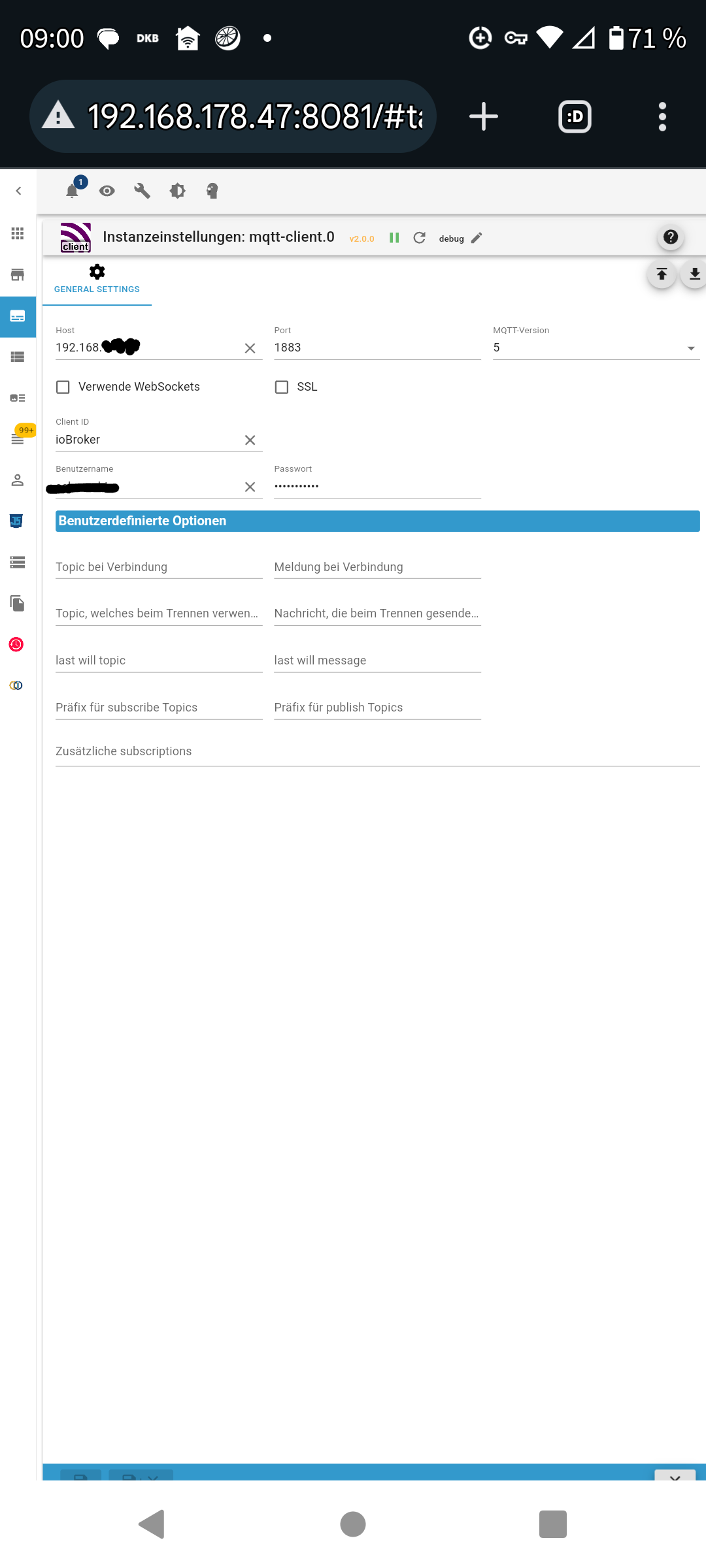
Das ist im MQTT-Client als Grundeinstellung.
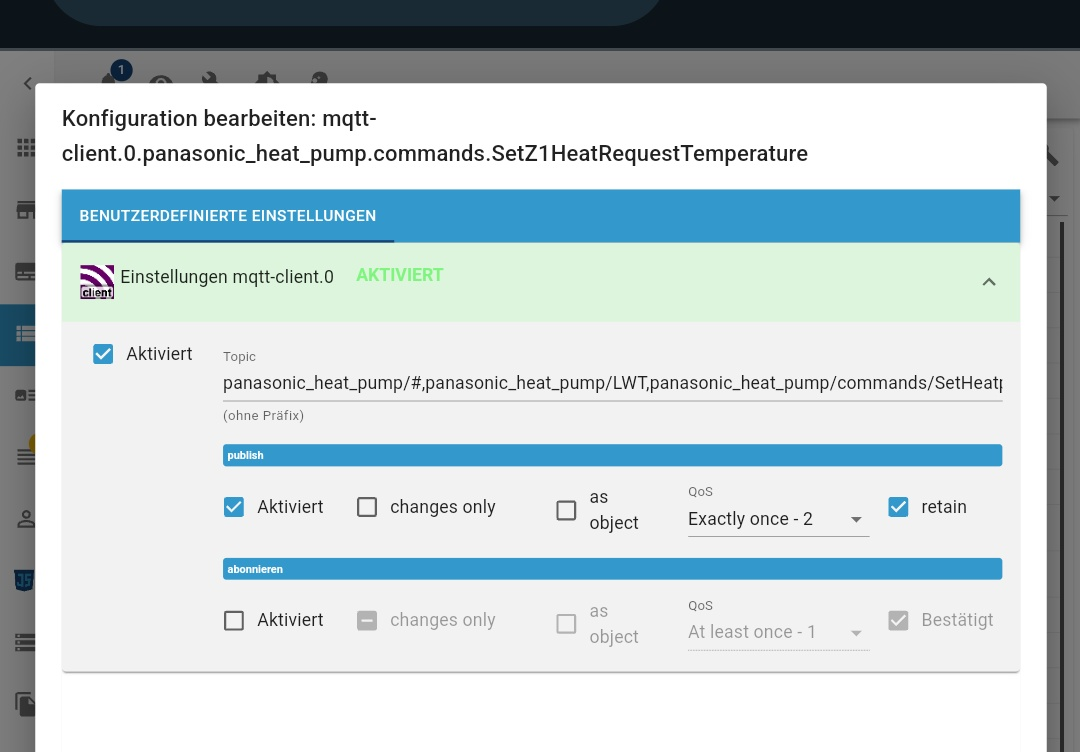
Der Datenpunkt wird mit Einstellung 1000020648.png
Published. Unterschiedliche QoS hatte ich auch schon probiert.
Aber eigentlich sehe ich das Problem hier
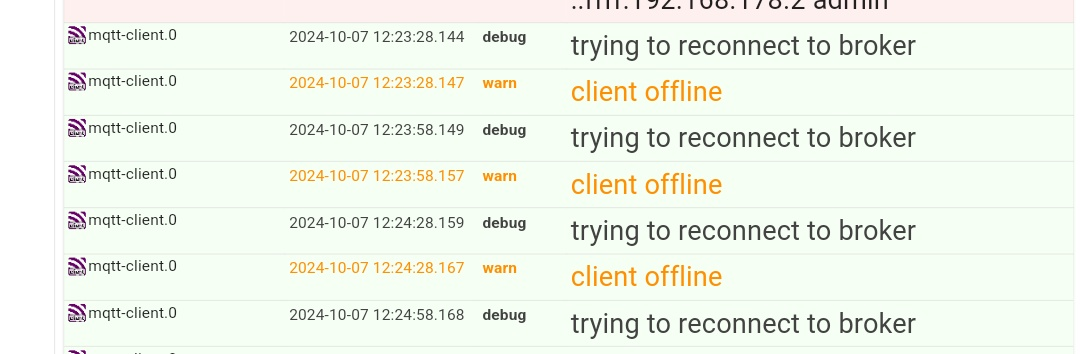
Wie schon mehrfach I'm tread geschrieben ist der Adapter nur kurz mit allen 3 Punkten grün.
schorschi
-
Mosquitto läuft mit der Default-Konfiguration 1883 und nur mit PSWD.
etwas anderes hab ich nicht eingestellt.Das ist im MQTT-Client als Grundeinstellung.
Der Datenpunkt wird mit Einstellung 1000020648.png
Published. Unterschiedliche QoS hatte ich auch schon probiert.
Aber eigentlich sehe ich das Problem hier
Wie schon mehrfach I'm tread geschrieben ist der Adapter nur kurz mit allen 3 Punkten grün.
schorschi
@schorschi sagte in MQTT-Client Nach Update Problen mit Authentifizierung:
Der Datenpunkt wird mit Einstellung 1000020648.png

Die Angabe mehrerer Topics an dieser Stelle ist weder erlaubt noch sinnvoll und wird vom mqtt-client in der Regel mit Fehlermeldungen quittiert, da Kommata im Topic nicht zulässig sind.
Btw: Wenn du schon IP-Adressen schwärzen willst (was für private Adressen Unsinn ist), dann wenigstens konsequent. Dafür wissen wir jetzt, bei welcher Bank du bist.
:man-shrugging: -
Mosquitto läuft mit der Default-Konfiguration 1883 und nur mit PSWD.
etwas anderes hab ich nicht eingestellt.Das ist im MQTT-Client als Grundeinstellung.
Der Datenpunkt wird mit Einstellung 1000020648.png
Published. Unterschiedliche QoS hatte ich auch schon probiert.
Aber eigentlich sehe ich das Problem hier
Wie schon mehrfach I'm tread geschrieben ist der Adapter nur kurz mit allen 3 Punkten grün.
schorschi
@schorschi
Wie @Marc-Berg schon schreibt liegt da dein Fehler. du musst für jeden Datenpunkt, den du zum Broker senden willst separat einstellen. -
@schorschi
Wie @Marc-Berg schon schreibt liegt da dein Fehler. du musst für jeden Datenpunkt, den du zum Broker senden willst separat einstellen.Hallo.
Ich habe gestern Abend alle Datenpunkte durchgegeben. In allen stand eine immergleichen Vielzahl von eigentlich einzelnen topics drin. Viel c&p später alles bereinigt.
Das hatte ich gar nicht gesehen, dass dies automatisch so angelegt wurde.
Jetzt ist das Problem keines mehr. Danke euch!
Dürfte ein Bug sein. Nur aus welchem Grund bzw welchen Verursacher? Ich schätze ja der Versionssprung des MQTT-Clients.
schorschi



Hey! Du scheinst an dieser Unterhaltung interessiert zu sein, hast aber noch kein Konto.
Hast du es satt, bei jedem Besuch durch die gleichen Beiträge zu scrollen? Wenn du dich für ein Konto anmeldest, kommst du immer genau dorthin zurück, wo du zuvor warst, und kannst dich über neue Antworten benachrichtigen lassen (entweder per E-Mail oder Push-Benachrichtigung). Du kannst auch Lesezeichen speichern und Beiträge positiv bewerten, um anderen Community-Mitgliedern deine Wertschätzung zu zeigen.
Mit deinem Input könnte dieser Beitrag noch besser werden 💗
Registrieren Anmelden346
Online33.0k
Benutzende83.7k
Themen1.3m
Beiträge