




Node.js Update funktioniert nicht
-
ja, so ist es leider.
Jetzt ist das Terminalfenster ausgestiegen und ich habe keinen Zugriff mehr. Gibt es noch eine Rettung oder war es das dann?@smartuser_1 sagte in Node.js Update funktioniert nicht:
Jetzt ist das Terminalfenster ausgestiegen und ich habe keinen Zugriff mehr.
Bau die Verbindung neu auf.
-
@smartuser_1 sagte in Node.js Update funktioniert nicht:
Jetzt ist das Terminalfenster ausgestiegen und ich habe keinen Zugriff mehr.
Bau die Verbindung neu auf.
das habe ich schon mehrfach probiert ...
-
das habe ich schon mehrfach probiert ...
Und was genau bekommst du auf welche Kommandos als Antwort?
-
Und was genau bekommst du auf welche Kommandos als Antwort?
im Prinzip sagt das PuTTY Fenster mit der gespeicherten Verbindung inactive und zeigt gar nix an
-
im Prinzip sagt das PuTTY Fenster mit der gespeicherten Verbindung inactive und zeigt gar nix an
Dann starte puTTY neu. Oder verwende gleich die powershell. Ist eh imho besser als puTTY.
Linux-Werkzeugkasten:
https://forum.iobroker.net/topic/42952/der-kleine-iobroker-linux-werkzeugkasten
NodeJS Fixer Skript:
https://forum.iobroker.net/topic/68035/iob-node-fix-skript
iob_diag: curl -sLf -o diag.sh https://iobroker.net/diag.sh && bash diag.sh -
Dann starte puTTY neu. Oder verwende gleich die powershell. Ist eh imho besser als puTTY.
@thomas-braun sagte in Node.js Update funktioniert nicht:
Dann starte puTTY neu. Oder verwende gleich die powershell. Ist eh imho besser als puTTY.
Geht auch mit der normalen Eingabeaufforderung:
ssh pi@192..... -
Ja, aber ich habe mittlerweile realisiert, dass der Normaluser nicht so stramm am Update ist, wie wir es sind, und wie es natürlich auch erforderlich ist.
Viele kommen von Windows und vertrauen fälschlicherweise darauf, dass das Betriebssystem automatisch die Sicherheitsupdates implementiert. Es stimmt aber nicht, auch dort muss man selbst Hand anlegen.
Ich denke, dass es unser aller Aufgabe ist, exakt darauf hinzuweisen, um unseren Followern eine möglichst sichere Teilnahme zu ermöglichen.
@meister-mopper gebe Dir prinzipiell Recht. Allerdings wenn man mit einem Smarthome schon alles mögliche überwacht, dann sollte man vielleicht auch das System selbst überwachen. Im neuen Admin gibts ja einen entsprechenden Datenpunkt bzw. man kann ja auch den Linuxadapter nutzen, um diese Updates über seine Visualisierung anzustossen.
Bei mir leuchtet dann eine gelbe Alarmglocke. ;)
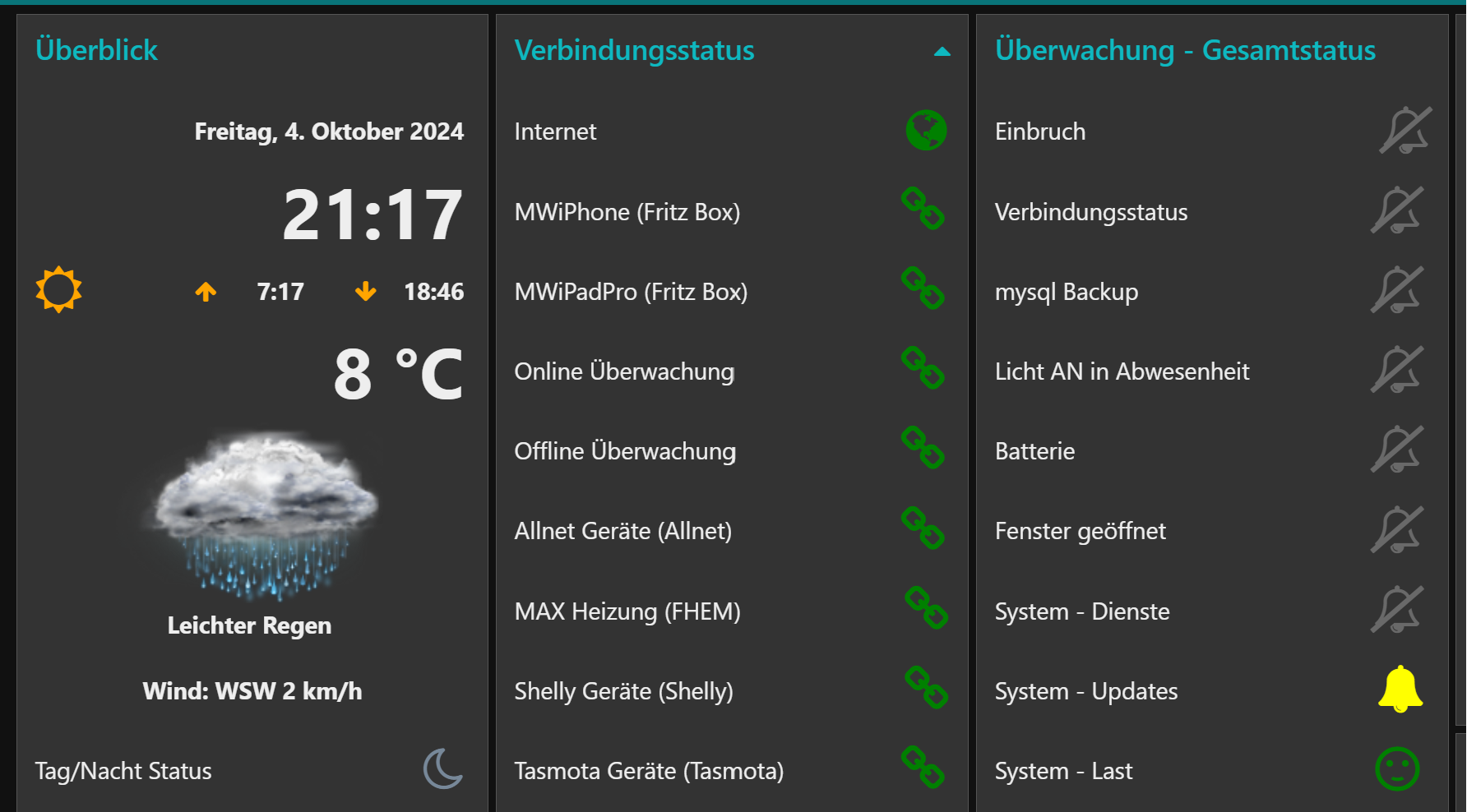
Bei Hardware gebe ich Dir allerdings Recht, da würde ich keine Firmware Updates machen, wenn nicht unbedingt nötig. Da kann man schon mal was richtig kaputt machen.
-
@meister-mopper gebe Dir prinzipiell Recht. Allerdings wenn man mit einem Smarthome schon alles mögliche überwacht, dann sollte man vielleicht auch das System selbst überwachen. Im neuen Admin gibts ja einen entsprechenden Datenpunkt bzw. man kann ja auch den Linuxadapter nutzen, um diese Updates über seine Visualisierung anzustossen.
Bei mir leuchtet dann eine gelbe Alarmglocke. ;)
Bei Hardware gebe ich Dir allerdings Recht, da würde ich keine Firmware Updates machen, wenn nicht unbedingt nötig. Da kann man schon mal was richtig kaputt machen.
@mickym
... so nach einen harten Aus-/Ein ;-( habe ich wieder Zugriff. In der Iobroker Info steht auch Node.js: v20.18.0.
Was sollte ich jetzt tun und wie wäre das optimale Vorgehen zum Nachlesen?Danke für Eure Hilfe! Vg
-
@mickym
... so nach einen harten Aus-/Ein ;-( habe ich wieder Zugriff. In der Iobroker Info steht auch Node.js: v20.18.0.
Was sollte ich jetzt tun und wie wäre das optimale Vorgehen zum Nachlesen?Danke für Eure Hilfe! Vg
@smartuser_1 sagte in Node.js Update funktioniert nicht:
Was sollte ich jetzt tun und wie wäre das optimale Vorgehen zum Nachlesen?
Gib mal die Ausgabe von
iob diag(Langfassung) bekannt.
-
@mickym
... so nach einen harten Aus-/Ein ;-( habe ich wieder Zugriff. In der Iobroker Info steht auch Node.js: v20.18.0.
Was sollte ich jetzt tun und wie wäre das optimale Vorgehen zum Nachlesen?Danke für Eure Hilfe! Vg
@smartuser_1 Na dann ist ja nochmal alles gut gegangen. :) - Irgendwann wirst Du wohl mal dein ganzes System updaten müssen, da inzwischen bookworm die aktuelle Linuxversion ist. Aber da nimmt Dich sicher @Thomas-Braun an die Hand, da er der Hauptansprechpartner bei Linuxfragen ist.
-
im Prinzip macht er da nix, muss ich vorher was installieren?
-
im Prinzip macht er da nix, muss ich vorher was installieren?
@smartuser_1 sagte in Node.js Update funktioniert nicht:
im Prinzip macht er da nix, muss ich vorher was installieren?
Nein. Aber mir scheinen die Rechte bei dir verbogen zu sein.
Funktioniert
curl -sLf -o diag.sh https://iobroker.net/diag.sh && bash diag.shdenn?
-
sorry, war der falsche User, kommt gleich
-
@smartuser_1 sagte in Node.js Update funktioniert nicht:
im Prinzip macht er da nix, muss ich vorher was installieren?
Nein. Aber mir scheinen die Rechte bei dir verbogen zu sein.
Funktioniert
curl -sLf -o diag.sh https://iobroker.net/diag.sh && bash diag.shdenn?
======== Start marking the full check here =========
Skript v.2024-08-12

*** BASE SYSTEM ***
   Static hostname: raspberrypi
         Icon name: computer
  Operating System: Raspbian GNU/Linux 11 (bullseye)
            Kernel: Linux 6.1.21-v8+
      Architecture: arm64
OS is similar to: debian

Model           : Raspberry Pi 4 Model B Rev 1.2
Docker          : false
Virtualization  : none
Kernel          : aarch64
Userland        : 32 bit

Systemuptime and Load:
 21:32:28 up 23 min,  4 users,  load average: 0.13, 0.17, 0.25
CPU threads: 4


*** RASPBERRY THROTTLING ***
Current issues:
No throttling issues detected.

Previously detected issues:
No throttling issues detected.

*** Time and Time Zones ***
               Local time: Fri 2024-10-04 21:32:28 CEST
           Universal time: Fri 2024-10-04 19:32:28 UTC
                 RTC time: n/a
                Time zone: Europe/Berlin (CEST, +0200)
System clock synchronized: yes
              NTP service: active
          RTC in local TZ: no

*** Users and Groups ***
User that called 'iob diag':
pi
HOME=/home/pi
GROUPS=pi adm dialout cdrom sudo audio video plugdev games users input netdev lpadmin grafana gpio i2c spi iobroker smarthome

User that is running 'js-controller':
iobroker
HOME=/home/iobroker
GROUPS=iobroker tty dialout audio video bluetooth gpio i2c smarthome

*** Display-Server-Setup ***
Display-Server: true
Desktop:
Terminal:       tty
Boot Target:    graphical.target

*** MEMORY ***
               total        used        free      shared  buff/cache   available
Mem:            3.8G        806M        2.2G         26M        818M        2.9G
Swap:            99M          0B         99M
Total:          3.9G        806M        2.3G

Active iob-Instances:   15

         3794 M total memory
          806 M used memory
         1115 M active memory
          338 M inactive memory
         2169 M free memory
           70 M buffer memory
          747 M swap cache
           99 M total swap
            0 M used swap
           99 M free swap

*** top - Table Of Processes  ***
top - 21:32:28 up 23 min,  4 users,  load average: 0.13, 0.17, 0.25
Tasks: 224 total,   1 running, 223 sleeping,   0 stopped,   0 zombie
%Cpu(s):  1.4 us,  2.8 sy,  0.0 ni, 95.8 id,  0.0 wa,  0.0 hi,  0.0 si,  0.0 st
MiB Mem :   3794.3 total,   2169.5 free,    806.0 used,    818.9 buff/cache
MiB Swap:    100.0 total,    100.0 free,      0.0 used.   2901.4 avail Mem

*** FAILED SERVICES ***

  UNIT                      LOAD   ACTIVE SUB    DESCRIPTION
* home-pi-Drive-share.mount loaded failed failed /home/pi/Drive/share

LOAD   = Reflects whether the unit definition was properly loaded.
ACTIVE = The high-level unit activation state, i.e. generalization of SUB.
SUB    = The low-level unit activation state, values depend on unit type.
1 loaded units listed.

*** FILESYSTEM ***
Filesystem     Type      Size  Used Avail Use% Mounted on
/dev/root      ext4       29G  9.6G   19G  35% /
devtmpfs       devtmpfs  1.7G     0  1.7G   0% /dev
tmpfs          tmpfs     1.9G     0  1.9G   0% /dev/shm
tmpfs          tmpfs     759M  2.0M  757M   1% /run
tmpfs          tmpfs     5.0M  4.0K  5.0M   1% /run/lock
/dev/mmcblk0p1 vfat      253M   51M  202M  20% /boot
tmpfs          tmpfs     380M   24K  380M   1% /run/user/1000
/dev/sda       vfat      497M  2.4M  495M   1% /media/pi/EE37-25251
tmpfs          tmpfs     380M   20K  380M   1% /run/user/1002

Messages concerning ext4 filesystem in dmesg:
[Fri Oct  4 21:08:38 2024] Kernel command line: coherent_pool=1M 8250.nr_uarts=0 snd_bcm2835.enable_headphones=0 snd_bcm2835.enable_headphones=1 snd_bcm2835.enable_hdmi=1 snd_bcm2835.enable_hdmi=0  smsc95xx.macaddr=DC:A6:32:A1:B9:99 vc_mem.mem_base=0x3ec00000 vc_mem.mem_size=0x40000000  console=ttyS0,115200 console=tty1 root=PARTUUID=7e480b2a-02 rootfstype=ext4 fsck.repair=yes rootwait quiet splash plymouth.ignore-serial-consoles
[Fri Oct  4 21:08:39 2024] EXT4-fs (mmcblk0p2): INFO: recovery required on readonly filesystem
[Fri Oct  4 21:08:39 2024] EXT4-fs (mmcblk0p2): write access will be enabled during recovery
[Fri Oct  4 21:08:40 2024] EXT4-fs (mmcblk0p2): orphan cleanup on readonly fs
[Fri Oct  4 21:08:40 2024] EXT4-fs (mmcblk0p2): 296 orphan inodes deleted
[Fri Oct  4 21:08:40 2024] EXT4-fs (mmcblk0p2): recovery complete
[Fri Oct  4 21:08:40 2024] EXT4-fs (mmcblk0p2): mounted filesystem with ordered data mode. Quota mode: none.
[Fri Oct  4 21:08:40 2024] VFS: Mounted root (ext4 filesystem) readonly on device 179:2.
[Fri Oct  4 21:08:44 2024] EXT4-fs (mmcblk0p2): re-mounted. Quota mode: none.

Show mounted filesystems:
TARGET                 SOURCE         FSTYPE OPTIONS
/                      /dev/mmcblk0p2 ext4   rw,noatime
|-/boot                /dev/mmcblk0p1 vfat   rw,relatime,fmask=0022,dmask=0022,codepage=437,iocharset=ascii,shortname=mixed,flush,errors=remount-ro
`-/media/pi/EE37-25251 /dev/sda       vfat   rw,nosuid,nodev,relatime,sync,fmask=0022,dmask=0022,codepage=437,iocharset=ascii,shortname=mixed,errors=remount-ro

Files in neuralgic directories:

/var:
4.7G    /var/
3.1G    /var/log
2.9G    /var/log/journal/6863a4a704a449d0b3397f55bec3e7ce
2.9G    /var/log/journal
1.3G    /var/cache/apt/archives

Archived and active journals take up 2.8G in the file system.

/opt/iobroker/backups:
25M     /opt/iobroker/backups/

/opt/iobroker/iobroker-data:
282M    /opt/iobroker/iobroker-data/
167M    /opt/iobroker/iobroker-data/files
82M     /opt/iobroker/iobroker-data/backup-objects
67M     /opt/iobroker/iobroker-data/files/javascript.admin
48M     /opt/iobroker/iobroker-data/files/javascript.admin/static

The five largest files in iobroker-data are:
21M     /opt/iobroker/iobroker-data/files/web.admin/static/js/main.aaea95f8.js.map
14M     /opt/iobroker/iobroker-data/objects.jsonl
8.3M    /opt/iobroker/iobroker-data/files/web.admin/static/js/main.aaea95f8.js
7.5M    /opt/iobroker/iobroker-data/files/javascript.admin/static/js/691.26ff76ce.chunk.js.map
7.1M    /opt/iobroker/iobroker-data/files/javascript.admin/static/js/610.d3cce782.chunk.js.map

USB-Devices by-id:
USB-Sticks -  Avoid direct links to /dev/tty* in your adapter setups, please always prefer the links 'by-id':

No Devices found 'by-id'


*** NodeJS-Installation ***

/usr/bin/nodejs         v20.18.0
/usr/bin/node           v20.18.0
/usr/bin/npm            10.8.2
/usr/bin/npx            10.8.2
/usr/bin/corepack       0.29.3


nodejs:
  Installed: 20.18.0-1nodesource1
  Candidate: 20.18.0-1nodesource1
  Version table:
 *** 20.18.0-1nodesource1 600
        500 https://deb.nodesource.com/node_20.x nodistro/main armhf Packages
        100 /var/lib/dpkg/status
     20.17.0-1nodesource1 600
        500 https://deb.nodesource.com/node_20.x nodistro/main armhf Packages
     20.16.0-1nodesource1 600
        500 https://deb.nodesource.com/node_20.x nodistro/main armhf Packages
     20.15.1-1nodesource1 600
        500 https://deb.nodesource.com/node_20.x nodistro/main armhf Packages
     20.15.0-1nodesource1 600
        500 https://deb.nodesource.com/node_20.x nodistro/main armhf Packages
     20.14.0-1nodesource1 600
        500 https://deb.nodesource.com/node_20.x nodistro/main armhf Packages
     20.13.1-1nodesource1 600
        500 https://deb.nodesource.com/node_20.x nodistro/main armhf Packages
     20.13.0-1nodesource1 600
        500 https://deb.nodesource.com/node_20.x nodistro/main armhf Packages
     20.12.2-1nodesource1 600
        500 https://deb.nodesource.com/node_20.x nodistro/main armhf Packages
     20.12.1-1nodesource1 600
        500 https://deb.nodesource.com/node_20.x nodistro/main armhf Packages
     20.12.0-1nodesource1 600
        500 https://deb.nodesource.com/node_20.x nodistro/main armhf Packages
     20.11.1-1nodesource1 600
        500 https://deb.nodesource.com/node_20.x nodistro/main armhf Packages
     20.11.0-1nodesource1 600
        500 https://deb.nodesource.com/node_20.x nodistro/main armhf Packages
     20.10.0-1nodesource1 600
        500 https://deb.nodesource.com/node_20.x nodistro/main armhf Packages
     20.9.0-1nodesource1 600
        500 https://deb.nodesource.com/node_20.x nodistro/main armhf Packages
     20.8.1-1nodesource1 600
        500 https://deb.nodesource.com/node_20.x nodistro/main armhf Packages
     20.8.0-1nodesource1 600
        500 https://deb.nodesource.com/node_20.x nodistro/main armhf Packages
     20.7.0-1nodesource1 600
        500 https://deb.nodesource.com/node_20.x nodistro/main armhf Packages
     20.6.1-1nodesource1 600
        500 https://deb.nodesource.com/node_20.x nodistro/main armhf Packages
     20.6.0-1nodesource1 600
        500 https://deb.nodesource.com/node_20.x nodistro/main armhf Packages
     20.5.1-1nodesource1 600
        500 https://deb.nodesource.com/node_20.x nodistro/main armhf Packages
     20.5.0-1nodesource1 600
        500 https://deb.nodesource.com/node_20.x nodistro/main armhf Packages
     20.4.0-1nodesource1 600
        500 https://deb.nodesource.com/node_20.x nodistro/main armhf Packages
     20.3.1-1nodesource1 600
        500 https://deb.nodesource.com/node_20.x nodistro/main armhf Packages
     20.3.0-1nodesource1 600
        500 https://deb.nodesource.com/node_20.x nodistro/main armhf Packages
     20.2.0-1nodesource1 600
        500 https://deb.nodesource.com/node_20.x nodistro/main armhf Packages
     20.1.0-1nodesource1 600
        500 https://deb.nodesource.com/node_20.x nodistro/main armhf Packages
     20.0.0-1nodesource1 600
        500 https://deb.nodesource.com/node_20.x nodistro/main armhf Packages
     12.22.12~dfsg-1~deb11u5 500
        500 http://raspbian.raspberrypi.org/raspbian bullseye/main armhf Packages

Temp directories causing npm8 problem: 0
No problems detected

Errors in npm tree:

*** ioBroker-Installation ***

ioBroker Status
iobroker is running on this host.


Objects type: jsonl
States  type: jsonl

Core adapters versions
js-controller:  4.0.24
admin:          7.1.5
javascript:     7.1.6

nodejs modules from github:     0

Adapter State
+ system.adapter.admin.0                  : admin                 : raspberrypi                              -  enabled, port: 8081, bind: 0.0.0.0, run as: admin
+ system.adapter.backitup.0               : backitup              : raspberrypi                              -  enabled
+ system.adapter.bshb.0                   : bshb                  : raspberrypi                              -  enabled
+ system.adapter.discovery.0              : discovery             : raspberrypi                              -  enabled
+ system.adapter.followthesun.0           : followthesun          : raspberrypi                              -  enabled
+ system.adapter.fritzdect.0              : fritzdect             : raspberrypi                              -  enabled
+ system.adapter.influxdb.0               : influxdb              : raspberrypi                              -  enabled, port: 8086
+ system.adapter.javascript.0             : javascript            : raspberrypi                              -  enabled
+ system.adapter.kecontact.0              : kecontact             : raspberrypi                              -  enabled
+ system.adapter.modbus.0                 : modbus                : raspberrypi                              -  enabled
+ system.adapter.modbus.1                 : modbus                : raspberrypi                              -  enabled
  system.adapter.modbus.2                 : modbus                : raspberrypi                              - disabled
+ system.adapter.smartthings.0            : smartthings           : raspberrypi                              -  enabled
  system.adapter.vis.0                    : vis                   : raspberrypi                              -  enabled
+ system.adapter.web.0                    : web                   : raspberrypi                              -  enabled, port: 8082, bind: 0.0.0.0, run as: admin
+ system.adapter.yamaha.0                 : yamaha                : raspberrypi                              -  enabled

+ instance is alive

Enabled adapters with bindings
+ system.adapter.admin.0                  : admin                 : raspberrypi                              -  enabled, port: 8081, bind: 0.0.0.0, run as: admin
+ system.adapter.influxdb.0               : influxdb              : raspberrypi                              -  enabled, port: 8086
+ system.adapter.web.0                    : web                   : raspberrypi                              -  enabled, port: 8082, bind: 0.0.0.0, run as: admin

ioBroker-Repositories
stable        : http://download.iobroker.net/sources-dist.json
beta          : http://download.iobroker.net/sources-dist-latest.json

Active repo(s): stable

Installed ioBroker-Instances
Used repository: stable
Adapter    "admin"        : 7.1.5    , installed 7.1.5
Adapter    "backitup"     : 3.0.22   , installed 2.8.7  [Updatable]
Adapter    "bshb"         : 0.3.0    , installed 0.2.4  [Updatable]
Adapter    "discovery"    : 5.0.0    , installed 4.2.0  [Updatable]
Adapter    "followthesun" : 0.5.1    , installed 0.4.2  [Updatable]
Adapter    "fritzdect"    : 2.5.11   , installed 2.3.1  [Updatable]
Adapter    "influxdb"     : 4.0.2    , installed 4.0.2
Adapter    "javascript"   : 8.8.3    , installed 7.1.6  [Updatable]
Controller "js-controller": 6.0.11   , installed 4.0.24 [Updatable]
Adapter    "kecontact"    : 2.2.0    , installed 2.0.2  [Updatable]
Adapter    "modbus"       : 6.2.3    , installed 5.0.11 [Updatable]
Adapter    "simple-api"   : 2.8.0    , installed 2.7.2  [Updatable]
Adapter    "socketio"     : 6.7.1    , installed 6.6.0  [Updatable]
Adapter    "vis"          : 1.5.6    , installed 1.4.16 [Updatable]
Adapter    "web"          : 6.2.5    , installed 6.1.10 [Updatable]
Adapter    "ws"           : 2.6.2    , installed 2.5.8  [Updatable]
Adapter    "yamaha"       : 0.5.4    , installed 0.5.3  [Updatable]

Objects and States
Please stand by - This may take a while
Objects:        2508
States:         2075

*** OS-Repositories and Updates ***
W: An error occurred during the signature verification. The repository is not updated and the previous index files will be used. GPG error: https://repos.influxdata.com/debian bullseye InRelease: The following signatures couldn't be verified because the public key is not available: NO_PUBKEY D8FF8E1F7DF8B07E
W: An error occurred during the signature verification. The repository is not updated and the previous index files will be used. GPG error: https://packages.grafana.com/oss/deb stable InRelease: The following signatures couldn't be verified because the public key is not available: NO_PUBKEY 963FA27710458545
W: Failed to fetch https://packages.grafana.com/oss/deb/dists/stable/InRelease  The following signatures couldn't be verified because the public key is not available: NO_PUBKEY 963FA27710458545
W: Failed to fetch https://repos.influxdata.com/debian/dists/bullseye/InRelease  The following signatures couldn't be verified because the public key is not available: NO_PUBKEY D8FF8E1F7DF8B07E
W: Some index files failed to download. They have been ignored, or old ones used instead.
Hit:1 http://archive.raspberrypi.org/debian bullseye InRelease
Hit:2 http://raspbian.raspberrypi.org/raspbian bullseye InRelease
Get:3 https://repos.influxdata.com/debian bullseye InRelease [12.9 kB]
Get:4 https://packages.grafana.com/oss/deb stable InRelease [7660 B]
Hit:5 https://deb.nodesource.com/node_20.x nodistro InRelease
Err:3 https://repos.influxdata.com/debian bullseye InRelease
  The following signatures couldn't be verified because the public key is not available: NO_PUBKEY D8FF8E1F7DF8B07E
Err:4 https://packages.grafana.com/oss/deb stable InRelease
  The following signatures couldn't be verified because the public key is not available: NO_PUBKEY 963FA27710458545
Fetched 12.9 kB in 1s (9433 B/s)
Reading package lists...
W: An error occurred during the signature verification. The repository is not updated and the previous index files will be used. GPG error: https://repos.influxdata.com/debian bullseye InRelease: The following signatures couldn't be verified because the public key is not available: NO_PUBKEY D8FF8E1F7DF8B07E
W: An error occurred during the signature verification. The repository is not updated and the previous index files will be used. GPG error: https://packages.grafana.com/oss/deb stable InRelease: The following signatures couldn't be verified because the public key is not available: NO_PUBKEY 963FA27710458545
W: Failed to fetch https://packages.grafana.com/oss/deb/dists/stable/InRelease  The following signatures couldn't be verified because the public key is not available: NO_PUBKEY 963FA27710458545
W: Failed to fetch https://repos.influxdata.com/debian/dists/bullseye/InRelease  The following signatures couldn't be verified because the public key is not available: NO_PUBKEY D8FF8E1F7DF8B07E
W: Some index files failed to download. They have been ignored, or old ones used instead.
Pending Updates: 0

*** Listening Ports ***
Active Internet connections (only servers)
Proto Recv-Q Send-Q Local Address           Foreign Address         State       User       Inode      PID/Program name
tcp        0      0 127.0.0.1:8088          0.0.0.0:*               LISTEN      999        16432      608/influxd
tcp        0      0 0.0.0.0:22              0.0.0.0:*               LISTEN      0          16176      650/sshd: /usr/sbin
tcp        0      0 127.0.0.1:631           0.0.0.0:*               LISTEN      0          11216      592/cupsd
tcp        0      0 0.0.0.0:139             0.0.0.0:*               LISTEN      0          18770      1294/smbd
tcp        0      0 127.0.0.1:9000          0.0.0.0:*               LISTEN      1001       19318      1224/iobroker.js-co
tcp        0      0 127.0.0.1:9001          0.0.0.0:*               LISTEN      1001       19282      1224/iobroker.js-co
tcp        0      0 0.0.0.0:445             0.0.0.0:*               LISTEN      0          18769      1294/smbd
tcp6       0      0 ::1:631                 :::*                    LISTEN      0          11215      592/cupsd
tcp6       0      0 :::8086                 :::*                    LISTEN      999        15320      608/influxd
tcp6       0      0 :::8081                 :::*                    LISTEN      1001       26796      1805/io.admin.0
tcp6       0      0 :::8082                 :::*                    LISTEN      1001       29678      4118/io.web.0
tcp6       0      0 :::22                   :::*                    LISTEN      0          16178      650/sshd: /usr/sbin
tcp6       0      0 :::139                  :::*                    LISTEN      0          18768      1294/smbd
tcp6       0      0 :::445                  :::*                    LISTEN      0          18767      1294/smbd
tcp6       0      0 :::3000                 :::*                    LISTEN      115        18001      600/grafana-server
udp        0      0 0.0.0.0:631             0.0.0.0:*                           0          16448      738/cups-browsed
udp        0      0 0.0.0.0:7090            0.0.0.0:*                           1001       31248      4064/io.kecontact.0
udp        0      0 0.0.0.0:7092            0.0.0.0:*                           1001       31249      4064/io.kecontact.0
udp        0      0 0.0.0.0:5353            0.0.0.0:*                           108        15996      483/avahi-daemon: r
udp        0      0 0.0.0.0:38139           0.0.0.0:*                           1001       28617      4064/io.kecontact.0
udp        0      0 0.0.0.0:40821           0.0.0.0:*                           108        15998      483/avahi-daemon: r
udp        0      0 0.0.0.0:68              0.0.0.0:*                           0          18440      537/dhcpcd
udp        0      0 192.168.178.255:137     0.0.0.0:*                           0          17857      603/nmbd
udp        0      0 192.168.178.41:137      0.0.0.0:*                           0          17856      603/nmbd
udp        0      0 0.0.0.0:137             0.0.0.0:*                           0          17443      603/nmbd
udp        0      0 192.168.178.255:138     0.0.0.0:*                           0          17859      603/nmbd
udp        0      0 192.168.178.41:138      0.0.0.0:*                           0          17858      603/nmbd
udp        0      0 0.0.0.0:138             0.0.0.0:*                           0          17444      603/nmbd
udp6       0      0 :::5353                 :::*                                108        15997      483/avahi-daemon: r
udp6       0      0 :::42293                :::*                                108        15999      483/avahi-daemon: r
udp6       0      0 :::546                  :::*                                0          16546      537/dhcpcd

*** Log File - Last 25 Lines ***

2024-10-04 21:10:05.435  - info: kecontact.0 (4064) config minTime: 300
2024-10-04 21:10:05.435  - info: kecontact.0 (4064) config regardTime: 0
2024-10-04 21:10:05.436  - info: kecontact.0 (4064) config maxPower: 0
2024-10-04 21:10:05.436  - info: kecontact.0 (4064) config stateEnergyMeter1:
2024-10-04 21:10:05.436  - info: kecontact.0 (4064) config stateEnergyMeter2:
2024-10-04 21:10:05.436  - info: kecontact.0 (4064) config stateEnergyMeter3:
2024-10-04 21:10:05.437  - info: kecontact.0 (4064) config wallboxNotIncluded: false
2024-10-04 21:10:05.850  - info: vis.0 (4097) starting. Version 1.4.16 in /opt/iobroker/node_modules/iobroker.vis, node: v20.18.0, js-controller: 4.0.24
2024-10-04 21:10:06.258  - info: vis.0 (4097) vis license is OK.
2024-10-04 21:10:06.336  - warn: kecontact.0 (4064) Firmware page could not be loaded (404)
2024-10-04 21:10:06.619  - info: host.raspberrypi instance system.adapter.web.0 started with pid 4118
2024-10-04 21:10:07.041  - info: vis.0 (4097) Terminated (NO_ERROR): Without reason
2024-10-04 21:10:07.656  - info: host.raspberrypi instance system.adapter.vis.0 terminated while should be started once
2024-10-04 21:10:09.505  - info: web.0 (4118) starting. Version 6.1.10 in /opt/iobroker/node_modules/iobroker.web, node: v20.18.0, js-controller: 4.0.24
2024-10-04 21:10:10.659  - info: host.raspberrypi instance system.adapter.smartthings.0 started with pid 4133
2024-10-04 21:10:15.455  - info: web.0 (4118) socket.io server listening on port 8082
2024-10-04 21:10:15.470  - info: web.0 (4118) http server listening on port 8082
2024-10-04 21:10:17.167  - info: smartthings.0 (4133) starting. Version 0.0.4 in /opt/iobroker/node_modules/iobroker.smartthings, node: v20.18.0, js-controller: 4.0.24
2024-10-04 21:10:17.635  - info: smartthings.0 (4133) 0 devices detected
2024-10-04 21:25:00.027  - info: javascript.0 (2853) script.js.53_WP_Monat_CSV: exec: sed -i s/2024.10/#2024.10/g /etc/grafana/WP_Daten.csv
2024-10-04 21:25:05.040  - info: javascript.0 (2853) script.js.53_WP_Monat_CSV: exec: sed -i '/^#/d' /etc/grafana/WP_Daten.csv
2024-10-04 21:25:10.049  - info: javascript.0 (2853) script.js.53_WP_Monat_CSV: exec: echo "2024.10,309 ,40.2, 10.49" >> /etc/grafana/WP_Daten.csv
2024-10-04 21:29:59.997  - info: javascript.0 (2853) script.js.53_WP_Monat_CSV: exec: sed -i s/2024.10/#2024.10/g /etc/grafana/WP_Daten.csv
2024-10-04 21:30:05.009  - info: javascript.0 (2853) script.js.53_WP_Monat_CSV: exec: sed -i '/^#/d' /etc/grafana/WP_Daten.csv
2024-10-04 21:30:10.016  - info: javascript.0 (2853) script.js.53_WP_Monat_CSV: exec: echo "2024.10,309 ,40.2, 10.49" >> /etc/grafana/WP_Daten.csv
============ Mark until here for C&P =============
-
======== Start marking the full check here =========
Skript v.2024-08-12

*** BASE SYSTEM ***
   Static hostname: raspberrypi
         Icon name: computer
  Operating System: Raspbian GNU/Linux 11 (bullseye)
            Kernel: Linux 6.1.21-v8+
      Architecture: arm64
OS is similar to: debian

Model           : Raspberry Pi 4 Model B Rev 1.2
Docker          : false
Virtualization  : none
Kernel          : aarch64
Userland        : 32 bit

Systemuptime and Load:
 21:32:28 up 23 min,  4 users,  load average: 0.13, 0.17, 0.25
CPU threads: 4


*** RASPBERRY THROTTLING ***
Current issues:
No throttling issues detected.

Previously detected issues:
No throttling issues detected.

*** Time and Time Zones ***
               Local time: Fri 2024-10-04 21:32:28 CEST
           Universal time: Fri 2024-10-04 19:32:28 UTC
                 RTC time: n/a
                Time zone: Europe/Berlin (CEST, +0200)
System clock synchronized: yes
              NTP service: active
          RTC in local TZ: no

*** Users and Groups ***
User that called 'iob diag':
pi
HOME=/home/pi
GROUPS=pi adm dialout cdrom sudo audio video plugdev games users input netdev lpadmin grafana gpio i2c spi iobroker smarthome

User that is running 'js-controller':
iobroker
HOME=/home/iobroker
GROUPS=iobroker tty dialout audio video bluetooth gpio i2c smarthome

*** Display-Server-Setup ***
Display-Server: true
Desktop:
Terminal:       tty
Boot Target:    graphical.target

*** MEMORY ***
               total        used        free      shared  buff/cache   available
Mem:            3.8G        806M        2.2G         26M        818M        2.9G
Swap:            99M          0B         99M
Total:          3.9G        806M        2.3G

Active iob-Instances:   15

         3794 M total memory
          806 M used memory
         1115 M active memory
          338 M inactive memory
         2169 M free memory
           70 M buffer memory
          747 M swap cache
           99 M total swap
            0 M used swap
           99 M free swap

*** top - Table Of Processes  ***
top - 21:32:28 up 23 min,  4 users,  load average: 0.13, 0.17, 0.25
Tasks: 224 total,   1 running, 223 sleeping,   0 stopped,   0 zombie
%Cpu(s):  1.4 us,  2.8 sy,  0.0 ni, 95.8 id,  0.0 wa,  0.0 hi,  0.0 si,  0.0 st
MiB Mem :   3794.3 total,   2169.5 free,    806.0 used,    818.9 buff/cache
MiB Swap:    100.0 total,    100.0 free,      0.0 used.   2901.4 avail Mem

*** FAILED SERVICES ***

  UNIT                      LOAD   ACTIVE SUB    DESCRIPTION
* home-pi-Drive-share.mount loaded failed failed /home/pi/Drive/share

LOAD   = Reflects whether the unit definition was properly loaded.
ACTIVE = The high-level unit activation state, i.e. generalization of SUB.
SUB    = The low-level unit activation state, values depend on unit type.
1 loaded units listed.

*** FILESYSTEM ***
Filesystem     Type      Size  Used Avail Use% Mounted on
/dev/root      ext4       29G  9.6G   19G  35% /
devtmpfs       devtmpfs  1.7G     0  1.7G   0% /dev
tmpfs          tmpfs     1.9G     0  1.9G   0% /dev/shm
tmpfs          tmpfs     759M  2.0M  757M   1% /run
tmpfs          tmpfs     5.0M  4.0K  5.0M   1% /run/lock
/dev/mmcblk0p1 vfat      253M   51M  202M  20% /boot
tmpfs          tmpfs     380M   24K  380M   1% /run/user/1000
/dev/sda       vfat      497M  2.4M  495M   1% /media/pi/EE37-25251
tmpfs          tmpfs     380M   20K  380M   1% /run/user/1002

Messages concerning ext4 filesystem in dmesg:
[Fri Oct  4 21:08:38 2024] Kernel command line: coherent_pool=1M 8250.nr_uarts=0 snd_bcm2835.enable_headphones=0 snd_bcm2835.enable_headphones=1 snd_bcm2835.enable_hdmi=1 snd_bcm2835.enable_hdmi=0  smsc95xx.macaddr=DC:A6:32:A1:B9:99 vc_mem.mem_base=0x3ec00000 vc_mem.mem_size=0x40000000  console=ttyS0,115200 console=tty1 root=PARTUUID=7e480b2a-02 rootfstype=ext4 fsck.repair=yes rootwait quiet splash plymouth.ignore-serial-consoles
[Fri Oct  4 21:08:39 2024] EXT4-fs (mmcblk0p2): INFO: recovery required on readonly filesystem
[Fri Oct  4 21:08:39 2024] EXT4-fs (mmcblk0p2): write access will be enabled during recovery
[Fri Oct  4 21:08:40 2024] EXT4-fs (mmcblk0p2): orphan cleanup on readonly fs
[Fri Oct  4 21:08:40 2024] EXT4-fs (mmcblk0p2): 296 orphan inodes deleted
[Fri Oct  4 21:08:40 2024] EXT4-fs (mmcblk0p2): recovery complete
[Fri Oct  4 21:08:40 2024] EXT4-fs (mmcblk0p2): mounted filesystem with ordered data mode. Quota mode: none.
[Fri Oct  4 21:08:40 2024] VFS: Mounted root (ext4 filesystem) readonly on device 179:2.
[Fri Oct  4 21:08:44 2024] EXT4-fs (mmcblk0p2): re-mounted. Quota mode: none.

Show mounted filesystems:
TARGET                 SOURCE         FSTYPE OPTIONS
/                      /dev/mmcblk0p2 ext4   rw,noatime
|-/boot                /dev/mmcblk0p1 vfat   rw,relatime,fmask=0022,dmask=0022,codepage=437,iocharset=ascii,shortname=mixed,flush,errors=remount-ro
`-/media/pi/EE37-25251 /dev/sda       vfat   rw,nosuid,nodev,relatime,sync,fmask=0022,dmask=0022,codepage=437,iocharset=ascii,shortname=mixed,errors=remount-ro

Files in neuralgic directories:

/var:
4.7G    /var/
3.1G    /var/log
2.9G    /var/log/journal/6863a4a704a449d0b3397f55bec3e7ce
2.9G    /var/log/journal
1.3G    /var/cache/apt/archives

Archived and active journals take up 2.8G in the file system.

/opt/iobroker/backups:
25M     /opt/iobroker/backups/

/opt/iobroker/iobroker-data:
282M    /opt/iobroker/iobroker-data/
167M    /opt/iobroker/iobroker-data/files
82M     /opt/iobroker/iobroker-data/backup-objects
67M     /opt/iobroker/iobroker-data/files/javascript.admin
48M     /opt/iobroker/iobroker-data/files/javascript.admin/static

The five largest files in iobroker-data are:
21M     /opt/iobroker/iobroker-data/files/web.admin/static/js/main.aaea95f8.js.map
14M     /opt/iobroker/iobroker-data/objects.jsonl
8.3M    /opt/iobroker/iobroker-data/files/web.admin/static/js/main.aaea95f8.js
7.5M    /opt/iobroker/iobroker-data/files/javascript.admin/static/js/691.26ff76ce.chunk.js.map
7.1M    /opt/iobroker/iobroker-data/files/javascript.admin/static/js/610.d3cce782.chunk.js.map

USB-Devices by-id:
USB-Sticks -  Avoid direct links to /dev/tty* in your adapter setups, please always prefer the links 'by-id':

No Devices found 'by-id'


*** NodeJS-Installation ***

/usr/bin/nodejs         v20.18.0
/usr/bin/node           v20.18.0
/usr/bin/npm            10.8.2
/usr/bin/npx            10.8.2
/usr/bin/corepack       0.29.3


nodejs:
  Installed: 20.18.0-1nodesource1
  Candidate: 20.18.0-1nodesource1
  Version table:
 *** 20.18.0-1nodesource1 600
        500 https://deb.nodesource.com/node_20.x nodistro/main armhf Packages
        100 /var/lib/dpkg/status
     20.17.0-1nodesource1 600
        500 https://deb.nodesource.com/node_20.x nodistro/main armhf Packages
     20.16.0-1nodesource1 600
        500 https://deb.nodesource.com/node_20.x nodistro/main armhf Packages
     20.15.1-1nodesource1 600
        500 https://deb.nodesource.com/node_20.x nodistro/main armhf Packages
     20.15.0-1nodesource1 600
        500 https://deb.nodesource.com/node_20.x nodistro/main armhf Packages
     20.14.0-1nodesource1 600
        500 https://deb.nodesource.com/node_20.x nodistro/main armhf Packages
     20.13.1-1nodesource1 600
        500 https://deb.nodesource.com/node_20.x nodistro/main armhf Packages
     20.13.0-1nodesource1 600
        500 https://deb.nodesource.com/node_20.x nodistro/main armhf Packages
     20.12.2-1nodesource1 600
        500 https://deb.nodesource.com/node_20.x nodistro/main armhf Packages
     20.12.1-1nodesource1 600
        500 https://deb.nodesource.com/node_20.x nodistro/main armhf Packages
     20.12.0-1nodesource1 600
        500 https://deb.nodesource.com/node_20.x nodistro/main armhf Packages
     20.11.1-1nodesource1 600
        500 https://deb.nodesource.com/node_20.x nodistro/main armhf Packages
     20.11.0-1nodesource1 600
        500 https://deb.nodesource.com/node_20.x nodistro/main armhf Packages
     20.10.0-1nodesource1 600
        500 https://deb.nodesource.com/node_20.x nodistro/main armhf Packages
     20.9.0-1nodesource1 600
        500 https://deb.nodesource.com/node_20.x nodistro/main armhf Packages
     20.8.1-1nodesource1 600
        500 https://deb.nodesource.com/node_20.x nodistro/main armhf Packages
     20.8.0-1nodesource1 600
        500 https://deb.nodesource.com/node_20.x nodistro/main armhf Packages
     20.7.0-1nodesource1 600
        500 https://deb.nodesource.com/node_20.x nodistro/main armhf Packages
     20.6.1-1nodesource1 600
        500 https://deb.nodesource.com/node_20.x nodistro/main armhf Packages
     20.6.0-1nodesource1 600
        500 https://deb.nodesource.com/node_20.x nodistro/main armhf Packages
     20.5.1-1nodesource1 600
        500 https://deb.nodesource.com/node_20.x nodistro/main armhf Packages
     20.5.0-1nodesource1 600
        500 https://deb.nodesource.com/node_20.x nodistro/main armhf Packages
     20.4.0-1nodesource1 600
        500 https://deb.nodesource.com/node_20.x nodistro/main armhf Packages
     20.3.1-1nodesource1 600
        500 https://deb.nodesource.com/node_20.x nodistro/main armhf Packages
     20.3.0-1nodesource1 600
        500 https://deb.nodesource.com/node_20.x nodistro/main armhf Packages
     20.2.0-1nodesource1 600
        500 https://deb.nodesource.com/node_20.x nodistro/main armhf Packages
     20.1.0-1nodesource1 600
        500 https://deb.nodesource.com/node_20.x nodistro/main armhf Packages
     20.0.0-1nodesource1 600
        500 https://deb.nodesource.com/node_20.x nodistro/main armhf Packages
     12.22.12~dfsg-1~deb11u5 500
        500 http://raspbian.raspberrypi.org/raspbian bullseye/main armhf Packages

Temp directories causing npm8 problem: 0
No problems detected

Errors in npm tree:

*** ioBroker-Installation ***

ioBroker Status
iobroker is running on this host.


Objects type: jsonl
States  type: jsonl

Core adapters versions
js-controller:  4.0.24
admin:          7.1.5
javascript:     7.1.6

nodejs modules from github:     0

Adapter State
+ system.adapter.admin.0                  : admin                 : raspberrypi                              -  enabled, port: 8081, bind: 0.0.0.0, run as: admin
+ system.adapter.backitup.0               : backitup              : raspberrypi                              -  enabled
+ system.adapter.bshb.0                   : bshb                  : raspberrypi                              -  enabled
+ system.adapter.discovery.0              : discovery             : raspberrypi                              -  enabled
+ system.adapter.followthesun.0           : followthesun          : raspberrypi                              -  enabled
+ system.adapter.fritzdect.0              : fritzdect             : raspberrypi                              -  enabled
+ system.adapter.influxdb.0               : influxdb              : raspberrypi                              -  enabled, port: 8086
+ system.adapter.javascript.0             : javascript            : raspberrypi                              -  enabled
+ system.adapter.kecontact.0              : kecontact             : raspberrypi                              -  enabled
+ system.adapter.modbus.0                 : modbus                : raspberrypi                              -  enabled
+ system.adapter.modbus.1                 : modbus                : raspberrypi                              -  enabled
  system.adapter.modbus.2                 : modbus                : raspberrypi                              - disabled
+ system.adapter.smartthings.0            : smartthings           : raspberrypi                              -  enabled
  system.adapter.vis.0                    : vis                   : raspberrypi                              -  enabled
+ system.adapter.web.0                    : web                   : raspberrypi                              -  enabled, port: 8082, bind: 0.0.0.0, run as: admin
+ system.adapter.yamaha.0                 : yamaha                : raspberrypi                              -  enabled

+ instance is alive

Enabled adapters with bindings
+ system.adapter.admin.0                  : admin                 : raspberrypi                              -  enabled, port: 8081, bind: 0.0.0.0, run as: admin
+ system.adapter.influxdb.0               : influxdb              : raspberrypi                              -  enabled, port: 8086
+ system.adapter.web.0                    : web                   : raspberrypi                              -  enabled, port: 8082, bind: 0.0.0.0, run as: admin

ioBroker-Repositories
stable        : http://download.iobroker.net/sources-dist.json
beta          : http://download.iobroker.net/sources-dist-latest.json

Active repo(s): stable

Installed ioBroker-Instances
Used repository: stable
Adapter    "admin"        : 7.1.5    , installed 7.1.5
Adapter    "backitup"     : 3.0.22   , installed 2.8.7  [Updatable]
Adapter    "bshb"         : 0.3.0    , installed 0.2.4  [Updatable]
Adapter    "discovery"    : 5.0.0    , installed 4.2.0  [Updatable]
Adapter    "followthesun" : 0.5.1    , installed 0.4.2  [Updatable]
Adapter    "fritzdect"    : 2.5.11   , installed 2.3.1  [Updatable]
Adapter    "influxdb"     : 4.0.2    , installed 4.0.2
Adapter    "javascript"   : 8.8.3    , installed 7.1.6  [Updatable]
Controller "js-controller": 6.0.11   , installed 4.0.24 [Updatable]
Adapter    "kecontact"    : 2.2.0    , installed 2.0.2  [Updatable]
Adapter    "modbus"       : 6.2.3    , installed 5.0.11 [Updatable]
Adapter    "simple-api"   : 2.8.0    , installed 2.7.2  [Updatable]
Adapter    "socketio"     : 6.7.1    , installed 6.6.0  [Updatable]
Adapter    "vis"          : 1.5.6    , installed 1.4.16 [Updatable]
Adapter    "web"          : 6.2.5    , installed 6.1.10 [Updatable]
Adapter    "ws"           : 2.6.2    , installed 2.5.8  [Updatable]
Adapter    "yamaha"       : 0.5.4    , installed 0.5.3  [Updatable]

Objects and States
Please stand by - This may take a while
Objects:        2508
States:         2075

*** OS-Repositories and Updates ***
W: An error occurred during the signature verification. The repository is not updated and the previous index files will be used. GPG error: https://repos.influxdata.com/debian bullseye InRelease: The following signatures couldn't be verified because the public key is not available: NO_PUBKEY D8FF8E1F7DF8B07E
W: An error occurred during the signature verification. The repository is not updated and the previous index files will be used. GPG error: https://packages.grafana.com/oss/deb stable InRelease: The following signatures couldn't be verified because the public key is not available: NO_PUBKEY 963FA27710458545
W: Failed to fetch https://packages.grafana.com/oss/deb/dists/stable/InRelease  The following signatures couldn't be verified because the public key is not available: NO_PUBKEY 963FA27710458545
W: Failed to fetch https://repos.influxdata.com/debian/dists/bullseye/InRelease  The following signatures couldn't be verified because the public key is not available: NO_PUBKEY D8FF8E1F7DF8B07E
W: Some index files failed to download. They have been ignored, or old ones used instead.
Hit:1 http://archive.raspberrypi.org/debian bullseye InRelease
Hit:2 http://raspbian.raspberrypi.org/raspbian bullseye InRelease
Get:3 https://repos.influxdata.com/debian bullseye InRelease [12.9 kB]
Get:4 https://packages.grafana.com/oss/deb stable InRelease [7660 B]
Hit:5 https://deb.nodesource.com/node_20.x nodistro InRelease
Err:3 https://repos.influxdata.com/debian bullseye InRelease
  The following signatures couldn't be verified because the public key is not available: NO_PUBKEY D8FF8E1F7DF8B07E
Err:4 https://packages.grafana.com/oss/deb stable InRelease
  The following signatures couldn't be verified because the public key is not available: NO_PUBKEY 963FA27710458545
Fetched 12.9 kB in 1s (9433 B/s)
Reading package lists...
W: An error occurred during the signature verification. The repository is not updated and the previous index files will be used. GPG error: https://repos.influxdata.com/debian bullseye InRelease: The following signatures couldn't be verified because the public key is not available: NO_PUBKEY D8FF8E1F7DF8B07E
W: An error occurred during the signature verification. The repository is not updated and the previous index files will be used. GPG error: https://packages.grafana.com/oss/deb stable InRelease: The following signatures couldn't be verified because the public key is not available: NO_PUBKEY 963FA27710458545
W: Failed to fetch https://packages.grafana.com/oss/deb/dists/stable/InRelease  The following signatures couldn't be verified because the public key is not available: NO_PUBKEY 963FA27710458545
W: Failed to fetch https://repos.influxdata.com/debian/dists/bullseye/InRelease  The following signatures couldn't be verified because the public key is not available: NO_PUBKEY D8FF8E1F7DF8B07E
W: Some index files failed to download. They have been ignored, or old ones used instead.
Pending Updates: 0

*** Listening Ports ***
Active Internet connections (only servers)
Proto Recv-Q Send-Q Local Address           Foreign Address         State       User       Inode      PID/Program name
tcp        0      0 127.0.0.1:8088          0.0.0.0:*               LISTEN      999        16432      608/influxd
tcp        0      0 0.0.0.0:22              0.0.0.0:*               LISTEN      0          16176      650/sshd: /usr/sbin
tcp        0      0 127.0.0.1:631           0.0.0.0:*               LISTEN      0          11216      592/cupsd
tcp        0      0 0.0.0.0:139             0.0.0.0:*               LISTEN      0          18770      1294/smbd
tcp        0      0 127.0.0.1:9000          0.0.0.0:*               LISTEN      1001       19318      1224/iobroker.js-co
tcp        0      0 127.0.0.1:9001          0.0.0.0:*               LISTEN      1001       19282      1224/iobroker.js-co
tcp        0      0 0.0.0.0:445             0.0.0.0:*               LISTEN      0          18769      1294/smbd
tcp6       0      0 ::1:631                 :::*                    LISTEN      0          11215      592/cupsd
tcp6       0      0 :::8086                 :::*                    LISTEN      999        15320      608/influxd
tcp6       0      0 :::8081                 :::*                    LISTEN      1001       26796      1805/io.admin.0
tcp6       0      0 :::8082                 :::*                    LISTEN      1001       29678      4118/io.web.0
tcp6       0      0 :::22                   :::*                    LISTEN      0          16178      650/sshd: /usr/sbin
tcp6       0      0 :::139                  :::*                    LISTEN      0          18768      1294/smbd
tcp6       0      0 :::445                  :::*                    LISTEN      0          18767      1294/smbd
tcp6       0      0 :::3000                 :::*                    LISTEN      115        18001      600/grafana-server
udp        0      0 0.0.0.0:631             0.0.0.0:*                           0          16448      738/cups-browsed
udp        0      0 0.0.0.0:7090            0.0.0.0:*                           1001       31248      4064/io.kecontact.0
udp        0      0 0.0.0.0:7092            0.0.0.0:*                           1001       31249      4064/io.kecontact.0
udp        0      0 0.0.0.0:5353            0.0.0.0:*                           108        15996      483/avahi-daemon: r
udp        0      0 0.0.0.0:38139           0.0.0.0:*                           1001       28617      4064/io.kecontact.0
udp        0      0 0.0.0.0:40821           0.0.0.0:*                           108        15998      483/avahi-daemon: r
udp        0      0 0.0.0.0:68              0.0.0.0:*                           0          18440      537/dhcpcd
udp        0      0 192.168.178.255:137     0.0.0.0:*                           0          17857      603/nmbd
udp        0      0 192.168.178.41:137      0.0.0.0:*                           0          17856      603/nmbd
udp        0      0 0.0.0.0:137             0.0.0.0:*                           0          17443      603/nmbd
udp        0      0 192.168.178.255:138     0.0.0.0:*                           0          17859      603/nmbd
udp        0      0 192.168.178.41:138      0.0.0.0:*                           0          17858      603/nmbd
udp        0      0 0.0.0.0:138             0.0.0.0:*                           0          17444      603/nmbd
udp6       0      0 :::5353                 :::*                                108        15997      483/avahi-daemon: r
udp6       0      0 :::42293                :::*                                108        15999      483/avahi-daemon: r
udp6       0      0 :::546                  :::*                                0          16546      537/dhcpcd

*** Log File - Last 25 Lines ***

2024-10-04 21:10:05.435  - info: kecontact.0 (4064) config minTime: 300
2024-10-04 21:10:05.435  - info: kecontact.0 (4064) config regardTime: 0
2024-10-04 21:10:05.436  - info: kecontact.0 (4064) config maxPower: 0
2024-10-04 21:10:05.436  - info: kecontact.0 (4064) config stateEnergyMeter1:
2024-10-04 21:10:05.436  - info: kecontact.0 (4064) config stateEnergyMeter2:
2024-10-04 21:10:05.436  - info: kecontact.0 (4064) config stateEnergyMeter3:
2024-10-04 21:10:05.437  - info: kecontact.0 (4064) config wallboxNotIncluded: false
2024-10-04 21:10:05.850  - info: vis.0 (4097) starting. Version 1.4.16 in /opt/iobroker/node_modules/iobroker.vis, node: v20.18.0, js-controller: 4.0.24
2024-10-04 21:10:06.258  - info: vis.0 (4097) vis license is OK.
2024-10-04 21:10:06.336  - warn: kecontact.0 (4064) Firmware page could not be loaded (404)
2024-10-04 21:10:06.619  - info: host.raspberrypi instance system.adapter.web.0 started with pid 4118
2024-10-04 21:10:07.041  - info: vis.0 (4097) Terminated (NO_ERROR): Without reason
2024-10-04 21:10:07.656  - info: host.raspberrypi instance system.adapter.vis.0 terminated while should be started once
2024-10-04 21:10:09.505  - info: web.0 (4118) starting. Version 6.1.10 in /opt/iobroker/node_modules/iobroker.web, node: v20.18.0, js-controller: 4.0.24
2024-10-04 21:10:10.659  - info: host.raspberrypi instance system.adapter.smartthings.0 started with pid 4133
2024-10-04 21:10:15.455  - info: web.0 (4118) socket.io server listening on port 8082
2024-10-04 21:10:15.470  - info: web.0 (4118) http server listening on port 8082
2024-10-04 21:10:17.167  - info: smartthings.0 (4133) starting. Version 0.0.4 in /opt/iobroker/node_modules/iobroker.smartthings, node: v20.18.0, js-controller: 4.0.24
2024-10-04 21:10:17.635  - info: smartthings.0 (4133) 0 devices detected
2024-10-04 21:25:00.027  - info: javascript.0 (2853) script.js.53_WP_Monat_CSV: exec: sed -i s/2024.10/#2024.10/g /etc/grafana/WP_Daten.csv
2024-10-04 21:25:05.040  - info: javascript.0 (2853) script.js.53_WP_Monat_CSV: exec: sed -i '/^#/d' /etc/grafana/WP_Daten.csv
2024-10-04 21:25:10.049  - info: javascript.0 (2853) script.js.53_WP_Monat_CSV: exec: echo "2024.10,309 ,40.2, 10.49" >> /etc/grafana/WP_Daten.csv
2024-10-04 21:29:59.997  - info: javascript.0 (2853) script.js.53_WP_Monat_CSV: exec: sed -i s/2024.10/#2024.10/g /etc/grafana/WP_Daten.csv
2024-10-04 21:30:05.009  - info: javascript.0 (2853) script.js.53_WP_Monat_CSV: exec: sed -i '/^#/d' /etc/grafana/WP_Daten.csv
2024-10-04 21:30:10.016  - info: javascript.0 (2853) script.js.53_WP_Monat_CSV: exec: echo "2024.10,309 ,40.2, 10.49" >> /etc/grafana/WP_Daten.csv
============ Mark until here for C&P =============
@smartuser_1 sagte in Node.js Update funktioniert nicht:
Kernel : aarch64
Userland : 32 bitInstallier da in nächster Zeit RaspberryOS 12 'Bookworm' NEU.
Dann OHNE
Display-Server: true
Also OHNE Desktop-Umgebung. Es sei denn da hängt unmittelbar ein Bildschirm am Raspberry.
296 orphan inodes deleted
Aber verwende ein neues Speichermedium, das jetztige ist morsch. Das hat auch eben den langen Systemstart verursacht.
js-controller: 4.0.24
Updaten. Genauso wie alle anderen iob-Adapter.
Die Repos (grafana + influx) musst du dann auch neu anlegen, da ist altes Zeug drin.
-
Ich danke Euch allen, ist nochmal gut gegangen ;-). Top.
Gibt es zum Update von NodeJS und Raspberry OS noch eine Anleitung zum Nachlesen?Viele Grüße ...
-
Ich danke Euch allen, ist nochmal gut gegangen ;-). Top.
Gibt es zum Update von NodeJS und Raspberry OS noch eine Anleitung zum Nachlesen?Viele Grüße ...
@smartuser_1 sagte in Node.js Update funktioniert nicht:
Gibt es zum Update von NodeJS und Raspberry OS noch eine Anleitung zum Nachlesen?
nodejs am besten per
iob nodejs-update(bei Wechsel der Major-Version). Updates innerhalb des Major-Releases laufen über das übliche Systemupdate mit. Muss man nur regelmäßig machen.Auf RaspberryOS 12 kannst du nicht updaten, das muss auf einem Raspberry IMMER neuinstalliert werden. Insbesondere wenn sich da die Prozessor-Architektur ändert.
-
Besten Dank!



Hey! Du scheinst an dieser Unterhaltung interessiert zu sein, hast aber noch kein Konto.
Hast du es satt, bei jedem Besuch durch die gleichen Beiträge zu scrollen? Wenn du dich für ein Konto anmeldest, kommst du immer genau dorthin zurück, wo du zuvor warst, und kannst dich über neue Antworten benachrichtigen lassen (entweder per E-Mail oder Push-Benachrichtigung). Du kannst auch Lesezeichen speichern und Beiträge positiv bewerten, um anderen Community-Mitgliedern deine Wertschätzung zu zeigen.
Mit deinem Input könnte dieser Beitrag noch besser werden 💗
Registrieren Anmelden338
Online33.0k
Benutzende83.7k
Themen1.3m
Beiträge