




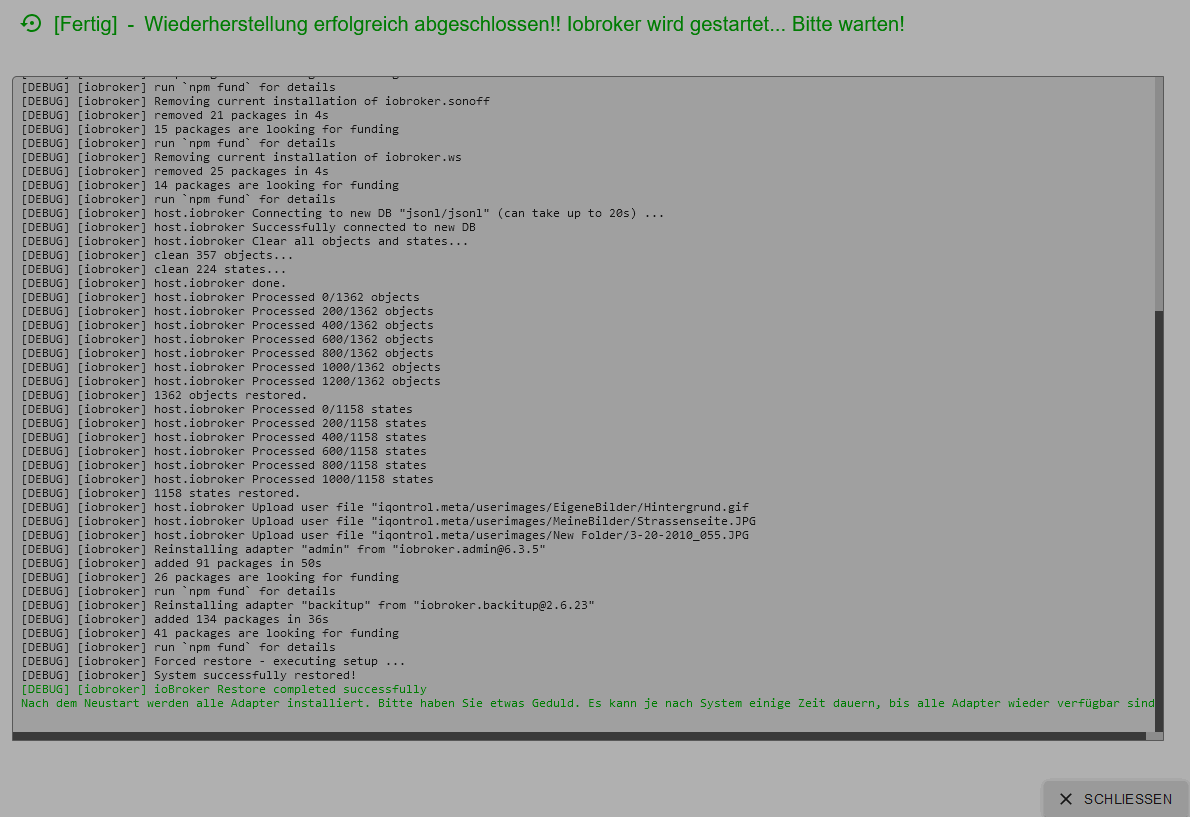
IOB Backup in neu aufgesetztes System einspielen
-
Ich hoffe, ich habe das richtig gemacht, hier das Summary:
======================= SUMMARY =======================
                        v.2024-05-22


 Static hostname: iobroker
       Icon name: computer
Operating System: Debian GNU/Linux 12 (bookworm)
          Kernel: Linux 6.6.31+rpt-rpi-v8
    Architecture: arm64

Installation:           native
Kernel:                 aarch64
Userland:               64 bit
Timezone:               Europe/Berlin (CEST, +0200)
User-ID:                1000
Display-Server:         true
Boot Target:            graphical.target

Pending OS-Updates:     135
Pending iob updates:    7

Nodejs-Installation:
/usr/bin/nodejs         v20.17.0
/usr/bin/node           v20.17.0
/usr/bin/npm            10.8.2
/usr/bin/npx            10.8.2
/usr/bin/corepack       0.29.3

Recommended versions are nodejs  and npm
Your nodejs installation is correct

MEMORY:
               total        used        free      shared  buff/cache   available
Mem:            951M        467M        177M         16K        369M        483M
Swap:           209M        172M         37M
Total:          1.2G        640M        214M

Active iob-Instances:   2
Upgrade policy: none

ioBroker Core:          js-controller           6.0.11
                        admin                   6.3.5

ioBroker Status:        iobroker is running on this host.


Objects type: jsonl
States  type: jsonl

Status admin and web instance:
  system.adapter.admin.0                  : admin                 : iobroker                                 - disabled, port: 8081, bind: 0.0.0.0, run as: admin
  system.adapter.admin.1                  : admin                 : iobroker                                 -  enabled, port: 8081, bind: 0.0.0.0, run as: admin
  system.adapter.web.0                    : web                   : iobroker                                 - disabled, port: 8082, bind: 0.0.0.0, run as: admin

Objects:                1356
States:                 1136

Size of iob-Database:

17M     /opt/iobroker/iobroker-data/objects.jsonl
2.1M    /opt/iobroker/iobroker-data/states.jsonl


=================== END OF SUMMARY ====================
=== Mark text until here for copying ===
@frihu sagte in IOB Backup in neu aufgesetztes System einspielen:
Die Langfassung.
Das ist allerdings schon falsch:
Display-Server: true
Boot Target: graphical.target
Pending OS-Updates: 135
Pending iob updates: 7
Linux-Werkzeugkasten:
https://forum.iobroker.net/topic/42952/der-kleine-iobroker-linux-werkzeugkasten
NodeJS Fixer Skript:
https://forum.iobroker.net/topic/68035/iob-node-fix-skript
iob_diag: curl -sLf -o diag.sh https://iobroker.net/diag.sh && bash diag.sh -
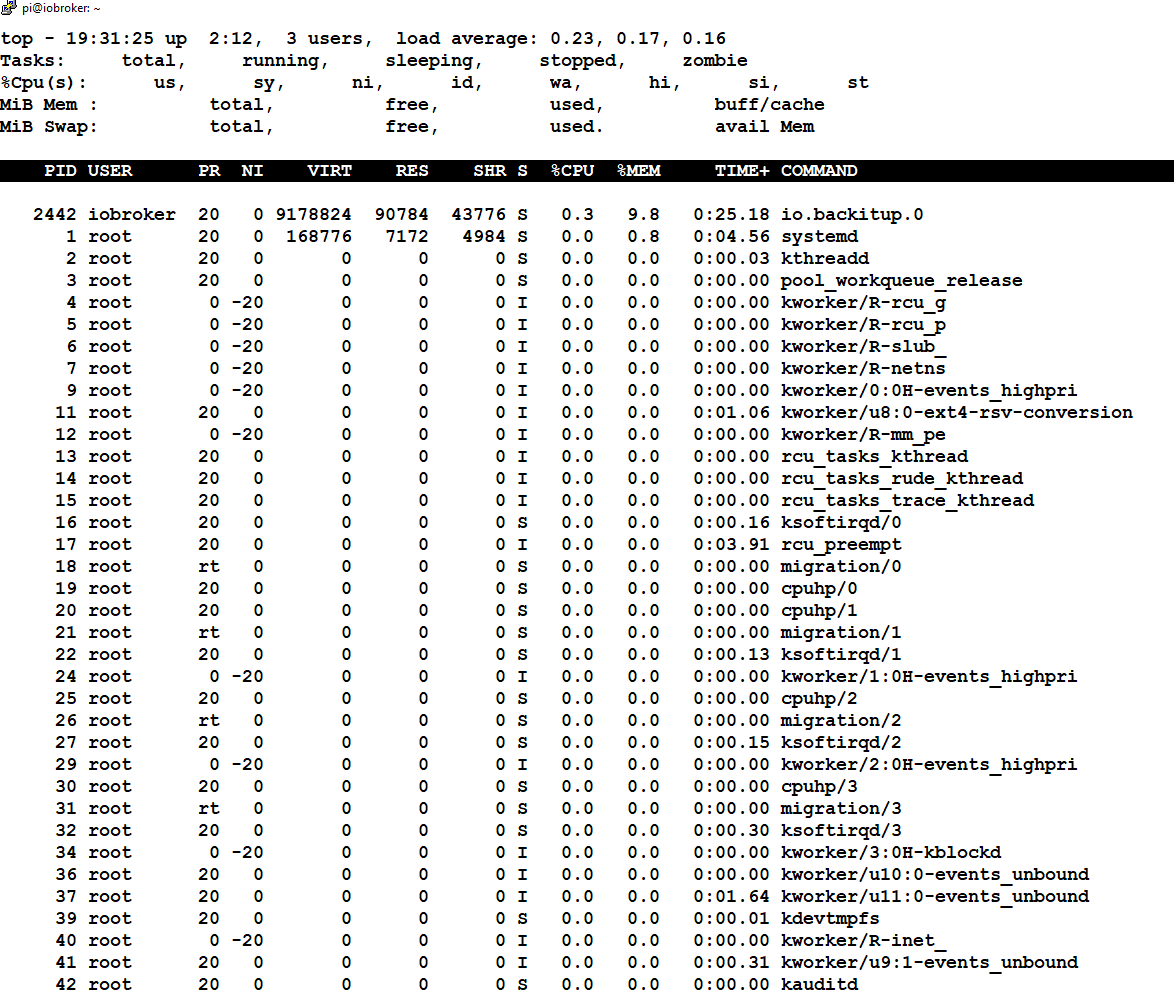
@frihu sagte: lohnt es sich weiter zu warten
Schau mal mit "top", ob npm noch Adapter installiert.
-
@frihu sagte in IOB Backup in neu aufgesetztes System einspielen:
Die Langfassung.
Das ist allerdings schon falsch:
Display-Server: true
Boot Target: graphical.target
Pending OS-Updates: 135
Pending iob updates: 7
@thomas-braun
Hier ist die Langfassung:======== Start marking the full check here =========
Skript v.2024-05-22

*** BASE SYSTEM ***
 Static hostname: iobroker
       Icon name: computer
Operating System: Debian GNU/Linux 12 (bookworm)
          Kernel: Linux 6.6.31+rpt-rpi-v8
    Architecture: arm64

Model           : Raspberry Pi 3 Model B Rev 1.2
Docker          : false
Virtualization  : none
Kernel          : aarch64
Userland        : 64 bit

Systemuptime and Load:
 19:40:11 up  2:21,  4 users,  load average: 0.31, 0.38, 0.27
CPU threads: 4


*** RASPBERRY THROTTLING ***
Current issues:
No throttling issues detected.

Previously detected issues:
No throttling issues detected.

*** Time and Time Zones ***
               Local time: Tue 2024-09-17 19:40:12 CEST
           Universal time: Tue 2024-09-17 17:40:12 UTC
                 RTC time: n/a
                Time zone: Europe/Berlin (CEST, +0200)
System clock synchronized: yes
              NTP service: active
          RTC in local TZ: no

*** Users and Groups ***
User that called 'iob diag':
pi
HOME=/home/pi
GROUPS=pi adm dialout cdrom sudo audio video plugdev games users input render netdev lpadmin gpio i2c spi iobroker

User that is running 'js-controller':
iobroker
HOME=/home/iobroker
GROUPS=iobroker tty dialout audio video plugdev bluetooth gpio i2c

*** Display-Server-Setup ***
Display-Server: true
Desktop:
Terminal:       tty
Boot Target:    graphical.target

*** MEMORY ***
               total        used        free      shared  buff/cache   available
Mem:            951M        462M        103M         32K        449M        488M
Swap:           209M        172M         37M
Total:          1.2G        634M        140M

Active iob-Instances:   2

          907 M total memory
          441 M used memory
          361 M active memory
          336 M inactive memory
           98 M free memory
           15 M buffer memory
          413 M swap cache
          199 M total swap
          164 M used swap
           35 M free swap

*** top - Table Of Processes  ***
top - 19:40:12 up  2:21,  4 users,  load average: 0.31, 0.38, 0.27
Tasks: 198 total,   1 running, 197 sleeping,   0 stopped,   0 zombie
%Cpu(s):  7.1 us, 14.3 sy,  0.0 ni, 71.4 id,  7.1 wa,  0.0 hi,  0.0 si,  0.0 st
MiB Mem :    907.3 total,     96.2 free,    443.5 used,    429.2 buff/cache
MiB Swap:    200.0 total,     36.0 free,    164.0 used.    463.8 avail Mem

*** FAILED SERVICES ***

  UNIT LOAD ACTIVE SUB DESCRIPTION
0 loaded units listed.

*** FILESYSTEM ***
Filesystem     Type      Size  Used Avail Use% Mounted on
udev           devtmpfs  315M     0  315M   0% /dev
tmpfs          tmpfs      91M  1.2M   90M   2% /run
/dev/mmcblk0p2 ext4       29G  6.4G   21G  24% /
tmpfs          tmpfs     454M  8.0K  454M   1% /dev/shm
tmpfs          tmpfs     5.0M   12K  5.0M   1% /run/lock
/dev/mmcblk0p1 vfat      510M   75M  436M  15% /boot/firmware
tmpfs          tmpfs      91M   40K   91M   1% /run/user/1000

Messages concerning ext4 filesystem in dmesg:
[Tue Sep 17 17:18:36 2024] Kernel command line: coherent_pool=1M 8250.nr_uarts=0 snd_bcm2835.enable_headphones=0 snd_bcm2835.enable_headphones=1 snd_bcm2835.enable_hdmi=1 snd_bcm2835.enable_hdmi=0  vc_mem.mem_base=0x3ec00000 vc_mem.mem_size=0x40000000  console=ttyS0,115200 console=tty1 root=PARTUUID=8780e29f-02 rootfstype=ext4 fsck.repair=yes rootwait quiet splash plymouth.ignore-serial-consoles cfg80211.ieee80211_regdom=DE
[Tue Sep 17 17:18:41 2024] EXT4-fs (mmcblk0p2): mounted filesystem 12974fe2-889e-4060-b497-1d6ac3fbbb4b ro with ordered data mode. Quota mode: none.
[Tue Sep 17 17:18:44 2024] EXT4-fs (mmcblk0p2): re-mounted 12974fe2-889e-4060-b497-1d6ac3fbbb4b r/w. Quota mode: none.

Show mounted filesystems:
TARGET                                                  SOURCE         FSTYPE          OPTIONS
/                                                       /dev/mmcblk0p2 ext4            rw,noatime
|-/sys                                                  sysfs          sysfs           rw,nosuid,nodev,noexec,relatime
| |-/sys/kernel/security                                securityfs     securityfs      rw,nosuid,nodev,noexec,relatime
| |-/sys/fs/cgroup                                      cgroup2        cgroup2         rw,nosuid,nodev,noexec,relatime,nsdelegate,memory_recursiveprot
| |-/sys/fs/pstore                                      pstore         pstore          rw,nosuid,nodev,noexec,relatime
| |-/sys/fs/bpf                                         bpf            bpf             rw,nosuid,nodev,noexec,relatime,mode=700
| |-/sys/kernel/debug                                   debugfs        debugfs         rw,nosuid,nodev,noexec,relatime
| |-/sys/kernel/tracing                                 tracefs        tracefs         rw,nosuid,nodev,noexec,relatime
| |-/sys/fs/fuse/connections                            fusectl        fusectl         rw,nosuid,nodev,noexec,relatime
| `-/sys/kernel/config                                  configfs       configfs        rw,nosuid,nodev,noexec,relatime
|-/proc                                                 proc           proc            rw,relatime
| `-/proc/sys/fs/binfmt_misc                            systemd-1      autofs          rw,relatime,fd=29,pgrp=1,timeout=0,minproto=5,maxproto=5,direct,pipe_ino=1255
|   `-/proc/sys/fs/binfmt_misc                          binfmt_misc    binfmt_misc     rw,nosuid,nodev,noexec,relatime
|-/dev                                                  udev           devtmpfs        rw,nosuid,relatime,size=322452k,nr_inodes=80613,mode=755
| |-/dev/pts                                            devpts         devpts          rw,nosuid,noexec,relatime,gid=5,mode=620,ptmxmode=000
| |-/dev/shm                                            tmpfs          tmpfs           rw,nosuid,nodev
| `-/dev/mqueue                                         mqueue         mqueue          rw,nosuid,nodev,noexec,relatime
|-/run                                                  tmpfs          tmpfs           rw,nosuid,nodev,noexec,relatime,size=92912k,mode=755
| |-/run/lock                                           tmpfs          tmpfs           rw,nosuid,nodev,noexec,relatime,size=5120k
| |-/run/credentials/systemd-sysusers.service           ramfs          ramfs           ro,nosuid,nodev,noexec,relatime,mode=700
| |-/run/credentials/systemd-sysctl.service             ramfs          ramfs           ro,nosuid,nodev,noexec,relatime,mode=700
| |-/run/credentials/systemd-tmpfiles-setup-dev.service ramfs          ramfs           ro,nosuid,nodev,noexec,relatime,mode=700
| |-/run/rpc_pipefs                                     sunrpc         rpc_pipefs      rw,relatime
| |-/run/credentials/systemd-tmpfiles-setup.service     ramfs          ramfs           ro,nosuid,nodev,noexec,relatime,mode=700
| `-/run/user/1000                                      tmpfs          tmpfs           rw,nosuid,nodev,relatime,size=92908k,nr_inodes=23227,mode=700,uid=1000,gid=1000
|   `-/run/user/1000/gvfs                               gvfsd-fuse     fuse.gvfsd-fuse rw,nosuid,nodev,relatime,user_id=1000,group_id=1000
`-/boot/firmware                                        /dev/mmcblk0p1 vfat            rw,relatime,fmask=0022,dmask=0022,codepage=437,iocharset=ascii,shortname=mixed,errors=remount-ro

Files in neuralgic directories:

/var:
688M    /var/
193M    /var/lib
190M    /var/cache
183M    /var/cache/apt
133M    /var/lib/apt/lists

Archived and active journals take up 103.8M in the file system.

/opt/iobroker/backups:
9.0M    /opt/iobroker/backups/

/opt/iobroker/iobroker-data:
212M    /opt/iobroker/iobroker-data/
191M    /opt/iobroker/iobroker-data/files
52M     /opt/iobroker/iobroker-data/files/javascript.admin
34M     /opt/iobroker/iobroker-data/files/javascript.admin/static
33M     /opt/iobroker/iobroker-data/files/web.admin/static

The five largest files in iobroker-data are:
24M     /opt/iobroker/iobroker-data/files/web.admin/static/js/main.135279a0.js.map
22M     /opt/iobroker/iobroker-data/files/modbus.admin/static/js/main.18496c94.js.map
17M     /opt/iobroker/iobroker-data/objects.jsonl
14M     /opt/iobroker/iobroker-data/files/backitup.admin/static/js/main.2cca4954.js
9.0M    /opt/iobroker/iobroker-data/files/modbus.admin/static/js/main.18496c94.js

USB-Devices by-id:
USB-Sticks -  Avoid direct links to /dev/tty* in your adapter setups, please always prefer the links 'by-id':

No Devices found 'by-id'


*** NodeJS-Installation ***

/usr/bin/nodejs         v20.17.0
/usr/bin/node           v20.17.0
/usr/bin/npm            10.8.2
/usr/bin/npx            10.8.2
/usr/bin/corepack       0.29.3


nodejs:
  Installed: 20.17.0-1nodesource1
  Candidate: 20.17.0-1nodesource1
  Version table:
 *** 20.17.0-1nodesource1 1001
        500 https://deb.nodesource.com/node_20.x nodistro/main arm64 Packages
        100 /var/lib/dpkg/status
     20.16.0-1nodesource1 1001
        500 https://deb.nodesource.com/node_20.x nodistro/main arm64 Packages
     20.15.1-1nodesource1 1001
        500 https://deb.nodesource.com/node_20.x nodistro/main arm64 Packages
     20.15.0-1nodesource1 1001
        500 https://deb.nodesource.com/node_20.x nodistro/main arm64 Packages
     20.14.0-1nodesource1 1001
        500 https://deb.nodesource.com/node_20.x nodistro/main arm64 Packages
     20.13.1-1nodesource1 1001
        500 https://deb.nodesource.com/node_20.x nodistro/main arm64 Packages
     20.13.0-1nodesource1 1001
        500 https://deb.nodesource.com/node_20.x nodistro/main arm64 Packages
     20.12.2-1nodesource1 1001
        500 https://deb.nodesource.com/node_20.x nodistro/main arm64 Packages
     20.12.1-1nodesource1 1001
        500 https://deb.nodesource.com/node_20.x nodistro/main arm64 Packages
     20.12.0-1nodesource1 1001
        500 https://deb.nodesource.com/node_20.x nodistro/main arm64 Packages
     20.11.1-1nodesource1 1001
        500 https://deb.nodesource.com/node_20.x nodistro/main arm64 Packages
     20.11.0-1nodesource1 1001
        500 https://deb.nodesource.com/node_20.x nodistro/main arm64 Packages
     20.10.0-1nodesource1 1001
        500 https://deb.nodesource.com/node_20.x nodistro/main arm64 Packages
     20.9.0-1nodesource1 1001
        500 https://deb.nodesource.com/node_20.x nodistro/main arm64 Packages
     20.8.1-1nodesource1 1001
        500 https://deb.nodesource.com/node_20.x nodistro/main arm64 Packages
     20.8.0-1nodesource1 1001
        500 https://deb.nodesource.com/node_20.x nodistro/main arm64 Packages
     20.7.0-1nodesource1 1001
        500 https://deb.nodesource.com/node_20.x nodistro/main arm64 Packages
     20.6.1-1nodesource1 1001
        500 https://deb.nodesource.com/node_20.x nodistro/main arm64 Packages
     20.6.0-1nodesource1 1001
        500 https://deb.nodesource.com/node_20.x nodistro/main arm64 Packages
     20.5.1-1nodesource1 1001
        500 https://deb.nodesource.com/node_20.x nodistro/main arm64 Packages
     20.5.0-1nodesource1 1001
        500 https://deb.nodesource.com/node_20.x nodistro/main arm64 Packages
     20.4.0-1nodesource1 1001
        500 https://deb.nodesource.com/node_20.x nodistro/main arm64 Packages
     20.3.1-1nodesource1 1001
        500 https://deb.nodesource.com/node_20.x nodistro/main arm64 Packages
     20.3.0-1nodesource1 1001
        500 https://deb.nodesource.com/node_20.x nodistro/main arm64 Packages
     20.2.0-1nodesource1 1001
        500 https://deb.nodesource.com/node_20.x nodistro/main arm64 Packages
     20.1.0-1nodesource1 1001
        500 https://deb.nodesource.com/node_20.x nodistro/main arm64 Packages
     20.0.0-1nodesource1 1001
        500 https://deb.nodesource.com/node_20.x nodistro/main arm64 Packages
     18.19.0+dfsg-6~deb12u2 500
        500 http://deb.debian.org/debian bookworm/main arm64 Packages
     18.19.0+dfsg-6~deb12u1 500
        500 http://deb.debian.org/debian-security bookworm-security/main arm64 Packages

Temp directories causing npm8 problem: 0
No problems detected

Errors in npm tree:

*** ioBroker-Installation ***

ioBroker Status
iobroker is running on this host.


Objects type: jsonl
States  type: jsonl

Core adapters versions
js-controller:  6.0.11
admin:          6.3.5
javascript:     7.0.3

nodejs modules from github:     0

Adapter State
  system.adapter.admin.0                  : admin                 : iobroker                                 - disabled, port: 8081, bind: 0.0.0.0, run as: admin
  system.adapter.admin.1                  : admin                 : iobroker                                 -  enabled, port: 8081, bind: 0.0.0.0, run as: admin
+ system.adapter.backitup.0               : backitup              : iobroker                                 -  enabled
  system.adapter.discovery.0              : discovery             : iobroker                                 - disabled
  system.adapter.flot.0                   : flot                  : iobroker                                 - disabled
  system.adapter.history.0                : history               : iobroker                                 - disabled
  system.adapter.javascript.0             : javascript            : iobroker                                 - disabled
  system.adapter.meross.0                 : meross                : iobroker                                 - disabled
  system.adapter.modbus.0                 : modbus                : iobroker                                 - disabled
  system.adapter.mqtt.0                   : mqtt                  : iobroker                                 - disabled, port: 1884, bind: 0.0.0.0
  system.adapter.shelly.0                 : shelly                : iobroker                                 - disabled, port: 1882, bind: 0.0.0.0
  system.adapter.sonoff.0                 : sonoff                : iobroker                                 - disabled, port: 1883, bind: 192.168.178.49
  system.adapter.web.0                    : web                   : iobroker                                 - disabled, port: 8082, bind: 0.0.0.0, run as: admin

+ instance is alive

Enabled adapters with bindings
  system.adapter.admin.1                  : admin                 : iobroker                                 -  enabled, port: 8081, bind: 0.0.0.0, run as: admin

ioBroker-Repositories
┌─────────┬──────────┬─────────────────────────────────────────────────────────┬──────────────┐
│ (index) │ name     │ url                                                     │ auto upgrade │
├─────────┼──────────┼─────────────────────────────────────────────────────────┼──────────────┤
│ 0       │ 'stable' │ 'http://download.iobroker.net/sources-dist.json'        │ false        │
│ 1       │ 'beta'   │ 'http://download.iobroker.net/sources-dist-latest.json' │ false        │
│ 2       │ 'live'   │ 'http://download.iobroker.net/sources-dist-latest.json' │ false        │
└─────────┴──────────┴─────────────────────────────────────────────────────────┴──────────────┘

Active repo(s): stable
Upgrade policy: none

Installed ioBroker-Instances
Used repository: stable
Adapter    "admin"        : 7.0.23   , installed 6.3.5  [Updatable]
Adapter    "backitup"     : 3.0.22   , installed 2.6.23 [Updatable]
Adapter    "discovery"    : 4.5.0    , installed 4.5.0
Adapter    "flot"         : 1.12.0   , installed 1.12.0
Adapter    "history"      : 3.0.1    , installed 3.0.1
Adapter    "javascript"   : 8.7.6    , installed 7.0.3  [Updatable]
Controller "js-controller": 6.0.11   , installed 6.0.11
Adapter    "meross"       : 1.17.0   , installed 1.17.0
Adapter    "modbus"       : 6.2.3    , installed 6.2.3
Adapter    "mqtt"         : 5.2.0    , installed 5.2.0
Adapter    "shelly"       : 7.0.0    , installed 6.4.1  [Updatable]
Adapter    "simple-api"   : 2.8.0    , installed 2.8.0
Adapter    "socketio"     : 6.7.1    , installed 6.6.1  [Updatable]
Adapter    "sonoff"       : 3.1.0    , installed 2.5.3  [Updatable]
Adapter    "web"          : 6.2.5    , installed 6.2.5
Adapter    "ws"           : 2.6.2    , installed 2.5.11 [Updatable]

Objects and States
Please stand by - This may take a while
Objects:        1356
States:         1136

*** OS-Repositories and Updates ***
Hit:1 http://deb.debian.org/debian bookworm InRelease
Hit:2 http://deb.debian.org/debian-security bookworm-security InRelease
Hit:3 http://deb.debian.org/debian bookworm-updates InRelease
Hit:4 http://archive.raspberrypi.com/debian bookworm InRelease
Hit:5 https://deb.nodesource.com/node_20.x nodistro InRelease
Reading package lists...
Pending Updates: 135

*** Listening Ports ***
Active Internet connections (only servers)
Proto Recv-Q Send-Q Local Address           Foreign Address         State       User       Inode      PID/Program name
tcp        0      0 0.0.0.0:22              0.0.0.0:*               LISTEN      0          7205       695/sshd: /usr/sbin
tcp        0      0 127.0.0.1:631           0.0.0.0:*               LISTEN      0          7258       679/cupsd
tcp        0      0 127.0.0.1:9101          0.0.0.0:*               LISTEN      1001       15972      2399/iobroker.js-co
tcp        0      0 127.0.0.1:9100          0.0.0.0:*               LISTEN      1001       15977      2399/iobroker.js-co
tcp6       0      0 :::22                   :::*                    LISTEN      0          7207       695/sshd: /usr/sbin
tcp6       0      0 ::1:631                 :::*                    LISTEN      0          7257       679/cupsd
udp        0      0 0.0.0.0:631             0.0.0.0:*                           0          6827       843/cups-browsed
udp        0      0 0.0.0.0:5353            0.0.0.0:*                           104        6594       506/avahi-daemon: r
udp        0      0 0.0.0.0:48713           0.0.0.0:*                           104        6596       506/avahi-daemon: r
udp6       0      0 :::5353                 :::*                                104        6595       506/avahi-daemon: r
udp6       0      0 :::54058                :::*                                104        6597       506/avahi-daemon: r
udp6       0      0 fe80::d666:6949:c3b:546 :::*                                0          8241       604/NetworkManager

*** Log File - Last 25 Lines ***

2024-09-17 17:42:45.587  - info: host.iobroker iobroker npm-install: upload [40] web /opt/iobroker/node_modules/iobroker.web/www/lib/css/themes/jquery-ui/vader/images/ui-bg_inset-soft_15_121212_1x100.png lib/css/themes/jquery-ui/vader/images/ui-bg_inset-soft_15_121212_1x100.png image/png
2024-09-17 17:42:45.727  - info: host.iobroker iobroker npm-install: upload [30] web /opt/iobroker/node_modules/iobroker.web/www/lib/css/themes/jquery-ui/vader/theme.css lib/css/themes/jquery-ui/vader/theme.css text/css
2024-09-17 17:42:45.872  - info: host.iobroker iobroker npm-install: upload [20] web /opt/iobroker/node_modules/iobroker.web/www/lib/js/jquery-1.11.2.min.js lib/js/jquery-1.11.2.min.js application/javascript
2024-09-17 17:42:45.886  - info: host.iobroker iobroker npm-install: upload [19] web /opt/iobroker/node_modules/iobroker.web/www/lib/js/jquery-1.11.2.min.map lib/js/jquery-1.11.2.min.map application/json
2024-09-17 17:42:45.903  - info: host.iobroker iobroker npm-install: upload [18] web /opt/iobroker/node_modules/iobroker.web/www/lib/js/jquery-3.2.1.min.js lib/js/jquery-3.2.1.min.js application/javascript
2024-09-17 17:42:45.918  - info: host.iobroker iobroker npm-install: upload [17] web /opt/iobroker/node_modules/iobroker.web/www/lib/js/jquery-3.2.1.min.map lib/js/jquery-3.2.1.min.map application/json
2024-09-17 17:42:45.933  - info: host.iobroker iobroker npm-install: upload [16] web /opt/iobroker/node_modules/iobroker.web/www/lib/js/jquery-ui-1.10.3.full.min.js lib/js/jquery-ui-1.10.3.full.min.js application/javascript
2024-09-17 17:42:45.950  - info: host.iobroker iobroker npm-install: upload [15] web /opt/iobroker/node_modules/iobroker.web/www/lib/js/jquery-ui-1.11.3.full.min.js lib/js/jquery-ui-1.11.3.full.min.js application/javascript
2024-09-17 17:42:45.967  - info: host.iobroker iobroker npm-install: upload [14] web /opt/iobroker/node_modules/iobroker.web/www/lib/js/jquery-ui-1.11.4.full.min.js lib/js/jquery-ui-1.11.4.full.min.js application/javascript
2024-09-17 17:42:45.984  - info: host.iobroker iobroker npm-install: upload [13] web /opt/iobroker/node_modules/iobroker.web/www/lib/js/jquery-ui.1.11.2.slider.min.js lib/js/jquery-ui.1.11.2.slider.min.js application/javascript
2024-09-17 17:42:45.999  - info: host.iobroker iobroker npm-install: upload [12] web /opt/iobroker/node_modules/iobroker.web/www/lib/js/jquery-ui.min.js lib/js/jquery-ui.min.js application/javascript
2024-09-17 17:42:46.026  - info: host.iobroker iobroker npm-install: upload [11] web /opt/iobroker/node_modules/iobroker.web/www/lib/js/jquery.fancytree-all.min.js lib/js/jquery.fancytree-all.min.js application/javascript
2024-09-17 17:42:46.040  - info: host.iobroker iobroker npm-install: upload [10] web /opt/iobroker/node_modules/iobroker.web/www/lib/js/jquery.fancytree-all.min.js.map lib/js/jquery.fancytree-all.min.js.map application/json
2024-09-17 17:42:46.064  - info: host.iobroker iobroker npm-install: upload [9] web /opt/iobroker/node_modules/iobroker.web/www/lib/js/jquery.jqGrid-4.5.4.min.js lib/js/jquery.jqGrid-4.5.4.min.js application/javascript
2024-09-17 17:42:46.515  - info: host.iobroker iobroker npm-install: upload [8] web /opt/iobroker/node_modules/iobroker.web/www/lib/js/loStorage.js lib/js/loStorage.js application/javascript
2024-09-17 17:42:46.730  - info: host.iobroker iobroker npm-install: upload [7] web /opt/iobroker/node_modules/iobroker.web/www/lib/js/materialize.js lib/js/materialize.js application/javascript
2024-09-17 17:42:46.748  - info: host.iobroker iobroker npm-install: upload [6] web /opt/iobroker/node_modules/iobroker.web/www/lib/js/materialize.js.map lib/js/materialize.js.map application/json
2024-09-17 17:42:46.781  - info: host.iobroker iobroker npm-install: upload [5] web /opt/iobroker/node_modules/iobroker.web/www/lib/js/selectID.js lib/js/selectID.js application/javascript
2024-09-17 17:42:46.811  - info: host.iobroker iobroker npm-install: upload [4] web /opt/iobroker/node_modules/iobroker.web/www/lib/js/showdown.min.js lib/js/showdown.min.js application/javascript
2024-09-17 17:42:46.845  - info: host.iobroker iobroker npm-install: upload [3] web /opt/iobroker/node_modules/iobroker.web/www/lib/js/socket.io.js lib/js/socket.io.js application/javascript
2024-09-17 17:42:46.888  - info: host.iobroker iobroker npm-install: upload [2] web /opt/iobroker/node_modules/iobroker.web/www/lib/js/translate.js lib/js/translate.js application/javascript
2024-09-17 17:42:46.906  - info: host.iobroker iobroker npm-install: upload [1] web /opt/iobroker/node_modules/iobroker.web/www/login/favicon.ico login/favicon.ico image/vnd.microsoft.icon
2024-09-17 17:42:46.921  - info: host.iobroker iobroker npm-install: upload [0] web /opt/iobroker/node_modules/iobroker.web/www/login/index.html login/index.html text/html
2024-09-17 17:42:47.100  - info: host.iobroker iobroker npm-install: host.iobroker object system.adapter.web created/updated
2024-09-17 17:42:48.245  - info: host.iobroker iobroker npm-install: exit 0
============ Mark until here for C&P =============
-
@thomas-braun
Hier ist die Langfassung:======== Start marking the full check here =========
Skript v.2024-05-22

*** BASE SYSTEM ***
 Static hostname: iobroker
       Icon name: computer
Operating System: Debian GNU/Linux 12 (bookworm)
          Kernel: Linux 6.6.31+rpt-rpi-v8
    Architecture: arm64

Model           : Raspberry Pi 3 Model B Rev 1.2
Docker          : false
Virtualization  : none
Kernel          : aarch64
Userland        : 64 bit

Systemuptime and Load:
 19:40:11 up  2:21,  4 users,  load average: 0.31, 0.38, 0.27
CPU threads: 4


*** RASPBERRY THROTTLING ***
Current issues:
No throttling issues detected.

Previously detected issues:
No throttling issues detected.

*** Time and Time Zones ***
               Local time: Tue 2024-09-17 19:40:12 CEST
           Universal time: Tue 2024-09-17 17:40:12 UTC
                 RTC time: n/a
                Time zone: Europe/Berlin (CEST, +0200)
System clock synchronized: yes
              NTP service: active
          RTC in local TZ: no

*** Users and Groups ***
User that called 'iob diag':
pi
HOME=/home/pi
GROUPS=pi adm dialout cdrom sudo audio video plugdev games users input render netdev lpadmin gpio i2c spi iobroker

User that is running 'js-controller':
iobroker
HOME=/home/iobroker
GROUPS=iobroker tty dialout audio video plugdev bluetooth gpio i2c

*** Display-Server-Setup ***
Display-Server: true
Desktop:
Terminal:       tty
Boot Target:    graphical.target

*** MEMORY ***
               total        used        free      shared  buff/cache   available
Mem:            951M        462M        103M         32K        449M        488M
Swap:           209M        172M         37M
Total:          1.2G        634M        140M

Active iob-Instances:   2

          907 M total memory
          441 M used memory
          361 M active memory
          336 M inactive memory
           98 M free memory
           15 M buffer memory
          413 M swap cache
          199 M total swap
          164 M used swap
           35 M free swap

*** top - Table Of Processes  ***
top - 19:40:12 up  2:21,  4 users,  load average: 0.31, 0.38, 0.27
Tasks: 198 total,   1 running, 197 sleeping,   0 stopped,   0 zombie
%Cpu(s):  7.1 us, 14.3 sy,  0.0 ni, 71.4 id,  7.1 wa,  0.0 hi,  0.0 si,  0.0 st
MiB Mem :    907.3 total,     96.2 free,    443.5 used,    429.2 buff/cache
MiB Swap:    200.0 total,     36.0 free,    164.0 used.    463.8 avail Mem

*** FAILED SERVICES ***

  UNIT LOAD ACTIVE SUB DESCRIPTION
0 loaded units listed.

*** FILESYSTEM ***
Filesystem     Type      Size  Used Avail Use% Mounted on
udev           devtmpfs  315M     0  315M   0% /dev
tmpfs          tmpfs      91M  1.2M   90M   2% /run
/dev/mmcblk0p2 ext4       29G  6.4G   21G  24% /
tmpfs          tmpfs     454M  8.0K  454M   1% /dev/shm
tmpfs          tmpfs     5.0M   12K  5.0M   1% /run/lock
/dev/mmcblk0p1 vfat      510M   75M  436M  15% /boot/firmware
tmpfs          tmpfs      91M   40K   91M   1% /run/user/1000

Messages concerning ext4 filesystem in dmesg:
[Tue Sep 17 17:18:36 2024] Kernel command line: coherent_pool=1M 8250.nr_uarts=0 snd_bcm2835.enable_headphones=0 snd_bcm2835.enable_headphones=1 snd_bcm2835.enable_hdmi=1 snd_bcm2835.enable_hdmi=0  vc_mem.mem_base=0x3ec00000 vc_mem.mem_size=0x40000000  console=ttyS0,115200 console=tty1 root=PARTUUID=8780e29f-02 rootfstype=ext4 fsck.repair=yes rootwait quiet splash plymouth.ignore-serial-consoles cfg80211.ieee80211_regdom=DE
[Tue Sep 17 17:18:41 2024] EXT4-fs (mmcblk0p2): mounted filesystem 12974fe2-889e-4060-b497-1d6ac3fbbb4b ro with ordered data mode. Quota mode: none.
[Tue Sep 17 17:18:44 2024] EXT4-fs (mmcblk0p2): re-mounted 12974fe2-889e-4060-b497-1d6ac3fbbb4b r/w. Quota mode: none.

Show mounted filesystems:
TARGET                                                  SOURCE         FSTYPE          OPTIONS
/                                                       /dev/mmcblk0p2 ext4            rw,noatime
|-/sys                                                  sysfs          sysfs           rw,nosuid,nodev,noexec,relatime
| |-/sys/kernel/security                                securityfs     securityfs      rw,nosuid,nodev,noexec,relatime
| |-/sys/fs/cgroup                                      cgroup2        cgroup2         rw,nosuid,nodev,noexec,relatime,nsdelegate,memory_recursiveprot
| |-/sys/fs/pstore                                      pstore         pstore          rw,nosuid,nodev,noexec,relatime
| |-/sys/fs/bpf                                         bpf            bpf             rw,nosuid,nodev,noexec,relatime,mode=700
| |-/sys/kernel/debug                                   debugfs        debugfs         rw,nosuid,nodev,noexec,relatime
| |-/sys/kernel/tracing                                 tracefs        tracefs         rw,nosuid,nodev,noexec,relatime
| |-/sys/fs/fuse/connections                            fusectl        fusectl         rw,nosuid,nodev,noexec,relatime
| `-/sys/kernel/config                                  configfs       configfs        rw,nosuid,nodev,noexec,relatime
|-/proc                                                 proc           proc            rw,relatime
| `-/proc/sys/fs/binfmt_misc                            systemd-1      autofs          rw,relatime,fd=29,pgrp=1,timeout=0,minproto=5,maxproto=5,direct,pipe_ino=1255
|   `-/proc/sys/fs/binfmt_misc                          binfmt_misc    binfmt_misc     rw,nosuid,nodev,noexec,relatime
|-/dev                                                  udev           devtmpfs        rw,nosuid,relatime,size=322452k,nr_inodes=80613,mode=755
| |-/dev/pts                                            devpts         devpts          rw,nosuid,noexec,relatime,gid=5,mode=620,ptmxmode=000
| |-/dev/shm                                            tmpfs          tmpfs           rw,nosuid,nodev
| `-/dev/mqueue                                         mqueue         mqueue          rw,nosuid,nodev,noexec,relatime
|-/run                                                  tmpfs          tmpfs           rw,nosuid,nodev,noexec,relatime,size=92912k,mode=755
| |-/run/lock                                           tmpfs          tmpfs           rw,nosuid,nodev,noexec,relatime,size=5120k
| |-/run/credentials/systemd-sysusers.service           ramfs          ramfs           ro,nosuid,nodev,noexec,relatime,mode=700
| |-/run/credentials/systemd-sysctl.service             ramfs          ramfs           ro,nosuid,nodev,noexec,relatime,mode=700
| |-/run/credentials/systemd-tmpfiles-setup-dev.service ramfs          ramfs           ro,nosuid,nodev,noexec,relatime,mode=700
| |-/run/rpc_pipefs                                     sunrpc         rpc_pipefs      rw,relatime
| |-/run/credentials/systemd-tmpfiles-setup.service     ramfs          ramfs           ro,nosuid,nodev,noexec,relatime,mode=700
| `-/run/user/1000                                      tmpfs          tmpfs           rw,nosuid,nodev,relatime,size=92908k,nr_inodes=23227,mode=700,uid=1000,gid=1000
|   `-/run/user/1000/gvfs                               gvfsd-fuse     fuse.gvfsd-fuse rw,nosuid,nodev,relatime,user_id=1000,group_id=1000
`-/boot/firmware                                        /dev/mmcblk0p1 vfat            rw,relatime,fmask=0022,dmask=0022,codepage=437,iocharset=ascii,shortname=mixed,errors=remount-ro

Files in neuralgic directories:

/var:
688M    /var/
193M    /var/lib
190M    /var/cache
183M    /var/cache/apt
133M    /var/lib/apt/lists

Archived and active journals take up 103.8M in the file system.

/opt/iobroker/backups:
9.0M    /opt/iobroker/backups/

/opt/iobroker/iobroker-data:
212M    /opt/iobroker/iobroker-data/
191M    /opt/iobroker/iobroker-data/files
52M     /opt/iobroker/iobroker-data/files/javascript.admin
34M     /opt/iobroker/iobroker-data/files/javascript.admin/static
33M     /opt/iobroker/iobroker-data/files/web.admin/static

The five largest files in iobroker-data are:
24M     /opt/iobroker/iobroker-data/files/web.admin/static/js/main.135279a0.js.map
22M     /opt/iobroker/iobroker-data/files/modbus.admin/static/js/main.18496c94.js.map
17M     /opt/iobroker/iobroker-data/objects.jsonl
14M     /opt/iobroker/iobroker-data/files/backitup.admin/static/js/main.2cca4954.js
9.0M    /opt/iobroker/iobroker-data/files/modbus.admin/static/js/main.18496c94.js

USB-Devices by-id:
USB-Sticks -  Avoid direct links to /dev/tty* in your adapter setups, please always prefer the links 'by-id':

No Devices found 'by-id'


*** NodeJS-Installation ***

/usr/bin/nodejs         v20.17.0
/usr/bin/node           v20.17.0
/usr/bin/npm            10.8.2
/usr/bin/npx            10.8.2
/usr/bin/corepack       0.29.3


nodejs:
  Installed: 20.17.0-1nodesource1
  Candidate: 20.17.0-1nodesource1
  Version table:
 *** 20.17.0-1nodesource1 1001
        500 https://deb.nodesource.com/node_20.x nodistro/main arm64 Packages
        100 /var/lib/dpkg/status
     20.16.0-1nodesource1 1001
        500 https://deb.nodesource.com/node_20.x nodistro/main arm64 Packages
     20.15.1-1nodesource1 1001
        500 https://deb.nodesource.com/node_20.x nodistro/main arm64 Packages
     20.15.0-1nodesource1 1001
        500 https://deb.nodesource.com/node_20.x nodistro/main arm64 Packages
     20.14.0-1nodesource1 1001
        500 https://deb.nodesource.com/node_20.x nodistro/main arm64 Packages
     20.13.1-1nodesource1 1001
        500 https://deb.nodesource.com/node_20.x nodistro/main arm64 Packages
     20.13.0-1nodesource1 1001
        500 https://deb.nodesource.com/node_20.x nodistro/main arm64 Packages
     20.12.2-1nodesource1 1001
        500 https://deb.nodesource.com/node_20.x nodistro/main arm64 Packages
     20.12.1-1nodesource1 1001
        500 https://deb.nodesource.com/node_20.x nodistro/main arm64 Packages
     20.12.0-1nodesource1 1001
        500 https://deb.nodesource.com/node_20.x nodistro/main arm64 Packages
     20.11.1-1nodesource1 1001
        500 https://deb.nodesource.com/node_20.x nodistro/main arm64 Packages
     20.11.0-1nodesource1 1001
        500 https://deb.nodesource.com/node_20.x nodistro/main arm64 Packages
     20.10.0-1nodesource1 1001
        500 https://deb.nodesource.com/node_20.x nodistro/main arm64 Packages
     20.9.0-1nodesource1 1001
        500 https://deb.nodesource.com/node_20.x nodistro/main arm64 Packages
     20.8.1-1nodesource1 1001
        500 https://deb.nodesource.com/node_20.x nodistro/main arm64 Packages
     20.8.0-1nodesource1 1001
        500 https://deb.nodesource.com/node_20.x nodistro/main arm64 Packages
     20.7.0-1nodesource1 1001
        500 https://deb.nodesource.com/node_20.x nodistro/main arm64 Packages
     20.6.1-1nodesource1 1001
        500 https://deb.nodesource.com/node_20.x nodistro/main arm64 Packages
     20.6.0-1nodesource1 1001
        500 https://deb.nodesource.com/node_20.x nodistro/main arm64 Packages
     20.5.1-1nodesource1 1001
        500 https://deb.nodesource.com/node_20.x nodistro/main arm64 Packages
     20.5.0-1nodesource1 1001
        500 https://deb.nodesource.com/node_20.x nodistro/main arm64 Packages
     20.4.0-1nodesource1 1001
        500 https://deb.nodesource.com/node_20.x nodistro/main arm64 Packages
     20.3.1-1nodesource1 1001
        500 https://deb.nodesource.com/node_20.x nodistro/main arm64 Packages
     20.3.0-1nodesource1 1001
        500 https://deb.nodesource.com/node_20.x nodistro/main arm64 Packages
     20.2.0-1nodesource1 1001
        500 https://deb.nodesource.com/node_20.x nodistro/main arm64 Packages
     20.1.0-1nodesource1 1001
        500 https://deb.nodesource.com/node_20.x nodistro/main arm64 Packages
     20.0.0-1nodesource1 1001
        500 https://deb.nodesource.com/node_20.x nodistro/main arm64 Packages
     18.19.0+dfsg-6~deb12u2 500
        500 http://deb.debian.org/debian bookworm/main arm64 Packages
     18.19.0+dfsg-6~deb12u1 500
        500 http://deb.debian.org/debian-security bookworm-security/main arm64 Packages

Temp directories causing npm8 problem: 0
No problems detected

Errors in npm tree:

*** ioBroker-Installation ***

ioBroker Status
iobroker is running on this host.


Objects type: jsonl
States  type: jsonl

Core adapters versions
js-controller:  6.0.11
admin:          6.3.5
javascript:     7.0.3

nodejs modules from github:     0

Adapter State
  system.adapter.admin.0                  : admin                 : iobroker                                 - disabled, port: 8081, bind: 0.0.0.0, run as: admin
  system.adapter.admin.1                  : admin                 : iobroker                                 -  enabled, port: 8081, bind: 0.0.0.0, run as: admin
+ system.adapter.backitup.0               : backitup              : iobroker                                 -  enabled
  system.adapter.discovery.0              : discovery             : iobroker                                 - disabled
  system.adapter.flot.0                   : flot                  : iobroker                                 - disabled
  system.adapter.history.0                : history               : iobroker                                 - disabled
  system.adapter.javascript.0             : javascript            : iobroker                                 - disabled
  system.adapter.meross.0                 : meross                : iobroker                                 - disabled
  system.adapter.modbus.0                 : modbus                : iobroker                                 - disabled
  system.adapter.mqtt.0                   : mqtt                  : iobroker                                 - disabled, port: 1884, bind: 0.0.0.0
  system.adapter.shelly.0                 : shelly                : iobroker                                 - disabled, port: 1882, bind: 0.0.0.0
  system.adapter.sonoff.0                 : sonoff                : iobroker                                 - disabled, port: 1883, bind: 192.168.178.49
  system.adapter.web.0                    : web                   : iobroker                                 - disabled, port: 8082, bind: 0.0.0.0, run as: admin

+ instance is alive

Enabled adapters with bindings
  system.adapter.admin.1                  : admin                 : iobroker                                 -  enabled, port: 8081, bind: 0.0.0.0, run as: admin

ioBroker-Repositories
┌─────────┬──────────┬─────────────────────────────────────────────────────────┬──────────────┐
│ (index) │ name     │ url                                                     │ auto upgrade │
├─────────┼──────────┼─────────────────────────────────────────────────────────┼──────────────┤
│ 0       │ 'stable' │ 'http://download.iobroker.net/sources-dist.json'        │ false        │
│ 1       │ 'beta'   │ 'http://download.iobroker.net/sources-dist-latest.json' │ false        │
│ 2       │ 'live'   │ 'http://download.iobroker.net/sources-dist-latest.json' │ false        │
└─────────┴──────────┴─────────────────────────────────────────────────────────┴──────────────┘

Active repo(s): stable
Upgrade policy: none

Installed ioBroker-Instances
Used repository: stable
Adapter    "admin"        : 7.0.23   , installed 6.3.5  [Updatable]
Adapter    "backitup"     : 3.0.22   , installed 2.6.23 [Updatable]
Adapter    "discovery"    : 4.5.0    , installed 4.5.0
Adapter    "flot"         : 1.12.0   , installed 1.12.0
Adapter    "history"      : 3.0.1    , installed 3.0.1
Adapter    "javascript"   : 8.7.6    , installed 7.0.3  [Updatable]
Controller "js-controller": 6.0.11   , installed 6.0.11
Adapter    "meross"       : 1.17.0   , installed 1.17.0
Adapter    "modbus"       : 6.2.3    , installed 6.2.3
Adapter    "mqtt"         : 5.2.0    , installed 5.2.0
Adapter    "shelly"       : 7.0.0    , installed 6.4.1  [Updatable]
Adapter    "simple-api"   : 2.8.0    , installed 2.8.0
Adapter    "socketio"     : 6.7.1    , installed 6.6.1  [Updatable]
Adapter    "sonoff"       : 3.1.0    , installed 2.5.3  [Updatable]
Adapter    "web"          : 6.2.5    , installed 6.2.5
Adapter    "ws"           : 2.6.2    , installed 2.5.11 [Updatable]

Objects and States
Please stand by - This may take a while
Objects:        1356
States:         1136

*** OS-Repositories and Updates ***
Hit:1 http://deb.debian.org/debian bookworm InRelease
Hit:2 http://deb.debian.org/debian-security bookworm-security InRelease
Hit:3 http://deb.debian.org/debian bookworm-updates InRelease
Hit:4 http://archive.raspberrypi.com/debian bookworm InRelease
Hit:5 https://deb.nodesource.com/node_20.x nodistro InRelease
Reading package lists...
Pending Updates: 135

*** Listening Ports ***
Active Internet connections (only servers)
Proto Recv-Q Send-Q Local Address           Foreign Address         State       User       Inode      PID/Program name
tcp        0      0 0.0.0.0:22              0.0.0.0:*               LISTEN      0          7205       695/sshd: /usr/sbin
tcp        0      0 127.0.0.1:631           0.0.0.0:*               LISTEN      0          7258       679/cupsd
tcp        0      0 127.0.0.1:9101          0.0.0.0:*               LISTEN      1001       15972      2399/iobroker.js-co
tcp        0      0 127.0.0.1:9100          0.0.0.0:*               LISTEN      1001       15977      2399/iobroker.js-co
tcp6       0      0 :::22                   :::*                    LISTEN      0          7207       695/sshd: /usr/sbin
tcp6       0      0 ::1:631                 :::*                    LISTEN      0          7257       679/cupsd
udp        0      0 0.0.0.0:631             0.0.0.0:*                           0          6827       843/cups-browsed
udp        0      0 0.0.0.0:5353            0.0.0.0:*                           104        6594       506/avahi-daemon: r
udp        0      0 0.0.0.0:48713           0.0.0.0:*                           104        6596       506/avahi-daemon: r
udp6       0      0 :::5353                 :::*                                104        6595       506/avahi-daemon: r
udp6       0      0 :::54058                :::*                                104        6597       506/avahi-daemon: r
udp6       0      0 fe80::d666:6949:c3b:546 :::*                                0          8241       604/NetworkManager

*** Log File - Last 25 Lines ***

2024-09-17 17:42:45.587  - info: host.iobroker iobroker npm-install: upload [40] web /opt/iobroker/node_modules/iobroker.web/www/lib/css/themes/jquery-ui/vader/images/ui-bg_inset-soft_15_121212_1x100.png lib/css/themes/jquery-ui/vader/images/ui-bg_inset-soft_15_121212_1x100.png image/png
2024-09-17 17:42:45.727  - info: host.iobroker iobroker npm-install: upload [30] web /opt/iobroker/node_modules/iobroker.web/www/lib/css/themes/jquery-ui/vader/theme.css lib/css/themes/jquery-ui/vader/theme.css text/css
2024-09-17 17:42:45.872  - info: host.iobroker iobroker npm-install: upload [20] web /opt/iobroker/node_modules/iobroker.web/www/lib/js/jquery-1.11.2.min.js lib/js/jquery-1.11.2.min.js application/javascript
2024-09-17 17:42:45.886  - info: host.iobroker iobroker npm-install: upload [19] web /opt/iobroker/node_modules/iobroker.web/www/lib/js/jquery-1.11.2.min.map lib/js/jquery-1.11.2.min.map application/json
2024-09-17 17:42:45.903  - info: host.iobroker iobroker npm-install: upload [18] web /opt/iobroker/node_modules/iobroker.web/www/lib/js/jquery-3.2.1.min.js lib/js/jquery-3.2.1.min.js application/javascript
2024-09-17 17:42:45.918  - info: host.iobroker iobroker npm-install: upload [17] web /opt/iobroker/node_modules/iobroker.web/www/lib/js/jquery-3.2.1.min.map lib/js/jquery-3.2.1.min.map application/json
2024-09-17 17:42:45.933  - info: host.iobroker iobroker npm-install: upload [16] web /opt/iobroker/node_modules/iobroker.web/www/lib/js/jquery-ui-1.10.3.full.min.js lib/js/jquery-ui-1.10.3.full.min.js application/javascript
2024-09-17 17:42:45.950  - info: host.iobroker iobroker npm-install: upload [15] web /opt/iobroker/node_modules/iobroker.web/www/lib/js/jquery-ui-1.11.3.full.min.js lib/js/jquery-ui-1.11.3.full.min.js application/javascript
2024-09-17 17:42:45.967  - info: host.iobroker iobroker npm-install: upload [14] web /opt/iobroker/node_modules/iobroker.web/www/lib/js/jquery-ui-1.11.4.full.min.js lib/js/jquery-ui-1.11.4.full.min.js application/javascript
2024-09-17 17:42:45.984  - info: host.iobroker iobroker npm-install: upload [13] web /opt/iobroker/node_modules/iobroker.web/www/lib/js/jquery-ui.1.11.2.slider.min.js lib/js/jquery-ui.1.11.2.slider.min.js application/javascript
2024-09-17 17:42:45.999  - info: host.iobroker iobroker npm-install: upload [12] web /opt/iobroker/node_modules/iobroker.web/www/lib/js/jquery-ui.min.js lib/js/jquery-ui.min.js application/javascript
2024-09-17 17:42:46.026  - info: host.iobroker iobroker npm-install: upload [11] web /opt/iobroker/node_modules/iobroker.web/www/lib/js/jquery.fancytree-all.min.js lib/js/jquery.fancytree-all.min.js application/javascript
2024-09-17 17:42:46.040  - info: host.iobroker iobroker npm-install: upload [10] web /opt/iobroker/node_modules/iobroker.web/www/lib/js/jquery.fancytree-all.min.js.map lib/js/jquery.fancytree-all.min.js.map application/json
2024-09-17 17:42:46.064  - info: host.iobroker iobroker npm-install: upload [9] web /opt/iobroker/node_modules/iobroker.web/www/lib/js/jquery.jqGrid-4.5.4.min.js lib/js/jquery.jqGrid-4.5.4.min.js application/javascript
2024-09-17 17:42:46.515  - info: host.iobroker iobroker npm-install: upload [8] web /opt/iobroker/node_modules/iobroker.web/www/lib/js/loStorage.js lib/js/loStorage.js application/javascript
2024-09-17 17:42:46.730  - info: host.iobroker iobroker npm-install: upload [7] web /opt/iobroker/node_modules/iobroker.web/www/lib/js/materialize.js lib/js/materialize.js application/javascript
2024-09-17 17:42:46.748  - info: host.iobroker iobroker npm-install: upload [6] web /opt/iobroker/node_modules/iobroker.web/www/lib/js/materialize.js.map lib/js/materialize.js.map application/json
2024-09-17 17:42:46.781  - info: host.iobroker iobroker npm-install: upload [5] web /opt/iobroker/node_modules/iobroker.web/www/lib/js/selectID.js lib/js/selectID.js application/javascript
2024-09-17 17:42:46.811  - info: host.iobroker iobroker npm-install: upload [4] web /opt/iobroker/node_modules/iobroker.web/www/lib/js/showdown.min.js lib/js/showdown.min.js application/javascript
2024-09-17 17:42:46.845  - info: host.iobroker iobroker npm-install: upload [3] web /opt/iobroker/node_modules/iobroker.web/www/lib/js/socket.io.js lib/js/socket.io.js application/javascript
2024-09-17 17:42:46.888  - info: host.iobroker iobroker npm-install: upload [2] web /opt/iobroker/node_modules/iobroker.web/www/lib/js/translate.js lib/js/translate.js application/javascript
2024-09-17 17:42:46.906  - info: host.iobroker iobroker npm-install: upload [1] web /opt/iobroker/node_modules/iobroker.web/www/login/favicon.ico login/favicon.ico image/vnd.microsoft.icon
2024-09-17 17:42:46.921  - info: host.iobroker iobroker npm-install: upload [0] web /opt/iobroker/node_modules/iobroker.web/www/login/index.html login/index.html text/html
2024-09-17 17:42:47.100  - info: host.iobroker iobroker npm-install: host.iobroker object system.adapter.web created/updated
2024-09-17 17:42:48.245  - info: host.iobroker iobroker npm-install: exit 0
============ Mark until here for C&P =============
@frihu sagte in IOB Backup in neu aufgesetztes System einspielen:
MEMORY
mit deinem Arbeitsspeicher kannst aber keine großen Sprünge machen, 1Gb ist etwas dürftig
-
1GB und laufender Display-Server ist zu viel für die Kiste.
sudo systemctl set-default multi-user.target
sudo reboot
Und dann die 135 OS-Updates einspielen.
sudo apt update
sudo apt full-upgrade
iob stop
sudo reboot
Danach den ioBroker aktualisieren:
iob update
iob upgrade all -y
iob start admin.1
Linux-Werkzeugkasten:
https://forum.iobroker.net/topic/42952/der-kleine-iobroker-linux-werkzeugkasten
NodeJS Fixer Skript:
https://forum.iobroker.net/topic/68035/iob-node-fix-skript
iob_diag: curl -sLf -o diag.sh https://iobroker.net/diag.sh && bash diag.sh -
1GB und laufender Display-Server ist zu viel für die Kiste.
sudo systemctl set-default multi-user.target
sudo reboot
Und dann die 135 OS-Updates einspielen.
sudo apt update
sudo apt full-upgrade
iob stop
sudo reboot
Danach den ioBroker aktualisieren:
iob update iob upgrade all -y iob start admin.1die ersten beiden Blöcke haben geklappt, danach habe ich dummerweise in meiner Begeisterung den IOB gestartet bevor ich den dritten Block realisiert habe. IOB gestoppt, und den dritten Block abgearbeitet. Leider nach Start keine Verbindung.
Das mit dem knappen Arbeitsspeicher sehe ich ein und werde mir einen PI 5 mit 4 GB besorgen. Dann versuchen wir das ganze nochmal.
Vielen Dank für die Hilfe, bis dahin... -
die ersten beiden Blöcke haben geklappt, danach habe ich dummerweise in meiner Begeisterung den IOB gestartet bevor ich den dritten Block realisiert habe. IOB gestoppt, und den dritten Block abgearbeitet. Leider nach Start keine Verbindung.
Das mit dem knappen Arbeitsspeicher sehe ich ein und werde mir einen PI 5 mit 4 GB besorgen. Dann versuchen wir das ganze nochmal.
Vielen Dank für die Hilfe, bis dahin...@frihu sagte in IOB Backup in neu aufgesetztes System einspielen:
Dann versuchen wir das ganze nochmal.
Aber auch dann OHNE Desktop und Druckerserver usw.
Linux-Werkzeugkasten:
https://forum.iobroker.net/topic/42952/der-kleine-iobroker-linux-werkzeugkasten
NodeJS Fixer Skript:
https://forum.iobroker.net/topic/68035/iob-node-fix-skript
iob_diag: curl -sLf -o diag.sh https://iobroker.net/diag.sh && bash diag.sh -
die ersten beiden Blöcke haben geklappt, danach habe ich dummerweise in meiner Begeisterung den IOB gestartet bevor ich den dritten Block realisiert habe. IOB gestoppt, und den dritten Block abgearbeitet. Leider nach Start keine Verbindung.
Das mit dem knappen Arbeitsspeicher sehe ich ein und werde mir einen PI 5 mit 4 GB besorgen. Dann versuchen wir das ganze nochmal.
Vielen Dank für die Hilfe, bis dahin...@frihu sagte in IOB Backup in neu aufgesetztes System einspielen:
werde mir einen PI 5 mit 4 GB besorgen
Die paar Euronen mehr für 8 GB würde ich auf jeden Fall inverstieren.
Früher oder später (erfahrungsgemäß früher) ärgert man sich sonst. -
@frihu sagte in IOB Backup in neu aufgesetztes System einspielen:
Dann versuchen wir das ganze nochmal.
Aber auch dann OHNE Desktop und Druckerserver usw.
@thomas-braun
Habe es heute nochmal "streng nach Vorlage" erstellt und siehe da, es hat prima geklappt. Lediglich der History hatte etwas gehakt aber das habe ich per Handeingriff retten können.Nochmal vielen Dank.
PS: Kann ich den ungenutzten Admin 0 einfach löschen oder handele ich mir damit neues Ungemach ein? -
@thomas-braun
Habe es heute nochmal "streng nach Vorlage" erstellt und siehe da, es hat prima geklappt. Lediglich der History hatte etwas gehakt aber das habe ich per Handeingriff retten können.Nochmal vielen Dank.
PS: Kann ich den ungenutzten Admin 0 einfach löschen oder handele ich mir damit neues Ungemach ein?@frihu sagte in IOB Backup in neu aufgesetztes System einspielen:
PS: Kann ich den ungenutzten Admin 0 einfach löschen oder handele ich mir damit neues Ungemach ein?
Mein innerer Monk würde eher admin.1 löschen und admin.0 starten.





Hey! Du scheinst an dieser Unterhaltung interessiert zu sein, hast aber noch kein Konto.
Hast du es satt, bei jedem Besuch durch die gleichen Beiträge zu scrollen? Wenn du dich für ein Konto anmeldest, kommst du immer genau dorthin zurück, wo du zuvor warst, und kannst dich über neue Antworten benachrichtigen lassen (entweder per E-Mail oder Push-Benachrichtigung). Du kannst auch Lesezeichen speichern und Beiträge positiv bewerten, um anderen Community-Mitgliedern deine Wertschätzung zu zeigen.
Mit deinem Input könnte dieser Beitrag noch besser werden 💗
Registrieren Anmelden196
Online33.0k
Benutzende83.7k
Themen1.3m
Beiträge