
NEWS




[gelöst] "node-gyp rebuild" wird ausgeführt - Warum?
-
@gaspode sagte in [gelöst] "node-gyp rebuild" wird ausgeführt - Warum?:
@sigi234 said in [gelöst] "node-gyp rebuild" wird ausgeführt - Warum?:
Alles gemacht wie du geschrieben hast. Fehler kommt noch.
Hast du auch Diskusage manuell installiert?
Im ioBroker Root Verzeichnis:npm i diskusageGing das fehlerfrei?
**********************************************************
***               Welcome to ioBroker.                 ***
***                                                    ***
***     Type 'iob help' for list of instructions.      ***
***                For more help see                   ***
***     https://github.com/ioBroker/ioBroker.docs      ***
**********************************************************

Your environment has been set up for using Node.js 20.16.0 (x64) and npm.

C:\SmartHome>npm i diskusage
npm error code 1
npm error path C:\SmartHome\node_modules\diskusage
npm error command failed
npm error command C:\WINDOWS\system32\cmd.exe /d /s /c node-gyp rebuild
npm error gyp info it worked if it ends with ok
npm error gyp info using node-gyp@10.1.0
npm error gyp info using node@20.16.0 | win32 | x64
npm error gyp info find Python using Python version 3.12.4 found at "C:\Users\Sigi\AppData\Local\Programs\Python\Python312\python.exe"
npm error gyp ERR! find VS
npm error gyp ERR! find VS msvs_version not set from command line or npm config
npm error gyp ERR! find VS VCINSTALLDIR not set, not running in VS Command Prompt
npm error gyp ERR! find VS could not use PowerShell to find Visual Studio 2017 or newer, try re-running with '--loglevel silly' for more details.
npm error gyp ERR! find VS
npm error gyp ERR! find VS Failure details: undefined
npm error gyp ERR! find VS checking VS2022 (17.11.35208.52) found at:
npm error gyp ERR! find VS "C:\Program Files (x86)\Microsoft Visual Studio\2022\BuildTools"
npm error gyp ERR! find VS - found "Visual Studio C++ core features"
npm error gyp ERR! find VS - missing any VC++ toolset
npm error gyp ERR! find VS could not find a version of Visual Studio 2017 or newer to use
npm error gyp ERR! find VS could not use PowerShell to find Visual Studio 2017 or newer, try re-running with '--loglevel silly' for more details.
npm error gyp ERR! find VS
npm error gyp ERR! find VS Failure details: undefined
npm error gyp ERR! find VS unsupported version "17.11.35208.52" found at "C:\Program Files (x86)\Microsoft Visual Studio\2022\BuildTools"
npm error gyp ERR! find VS could not find a version of Visual Studio 2017 or newer to use
npm error gyp ERR! find VS not looking for VS2015 as it is only supported up to Node.js 18
npm error gyp ERR! find VS not looking for VS2013 as it is only supported up to Node.js 8
npm error gyp ERR! find VS
npm error gyp ERR! find VS **************************************************************
npm error gyp ERR! find VS You need to install the latest version of Visual Studio
npm error gyp ERR! find VS including the "Desktop development with C++" workload.
npm error gyp ERR! find VS For more information consult the documentation at:
npm error gyp ERR! find VS https://github.com/nodejs/node-gyp#on-windows
npm error gyp ERR! find VS **************************************************************
npm error gyp ERR! find VS
npm error gyp ERR! configure error
npm error gyp ERR! stack Error: Could not find any Visual Studio installation to use
npm error gyp ERR! stack at VisualStudioFinder.fail (C:\Program Files\nodejs\node_modules\npm\node_modules\node-gyp\lib\find-visualstudio.js:116:11)
npm error gyp ERR! stack at VisualStudioFinder.findVisualStudio (C:\Program Files\nodejs\node_modules\npm\node_modules\node-gyp\lib\find-visualstudio.js:72:17)
npm error gyp ERR! stack at process.processTicksAndRejections (node:internal/process/task_queues:95:5)
npm error gyp ERR! stack at async createBuildDir (C:\Program Files\nodejs\node_modules\npm\node_modules\node-gyp\lib\configure.js:95:26)
npm error gyp ERR! stack at async run (C:\Program Files\nodejs\node_modules\npm\node_modules\node-gyp\bin\node-gyp.js:81:18)
npm error gyp ERR! System Windows_NT 10.0.19045
npm error gyp ERR! command "C:\\Program Files\\nodejs\\node.exe" "C:\\Program Files\\nodejs\\node_modules\\npm\\node_modules\\node-gyp\\bin\\node-gyp.js" "rebuild"
npm error gyp ERR! cwd C:\SmartHome\node_modules\diskusage
npm error gyp ERR! node -v v20.16.0
npm error gyp ERR! node-gyp -v v10.1.0
npm error gyp ERR! not ok
npm error A complete log of this run can be found in: C:\Users\Sigi\AppData\Local\npm-cache\_logs\2024-08-20T06_57_48_846Z-debug-0.log

C:\SmartHome>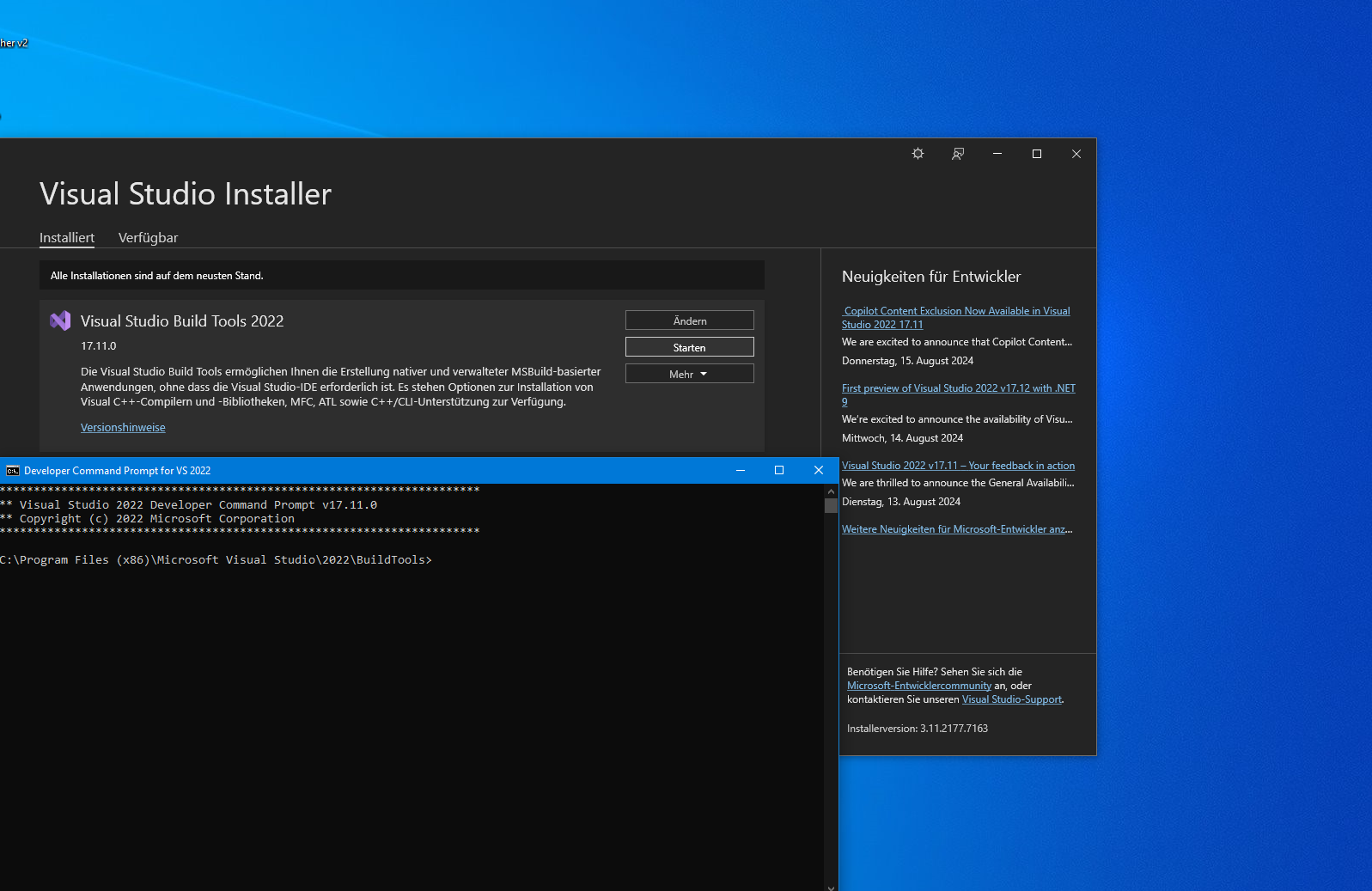
@sigi234 said in [gelöst] "node-gyp rebuild" wird ausgeführt - Warum?:
npm error gyp ERR! find VS unsupported version "17.11.35208.52" found at "C:\Program Files (x86)\Microsoft Visual Studio\2022\BuildTools"
Ich schätze mal, das liegt daran:
npm error gyp ERR! find VS unsupported version "17.11.35208.52" found at "C:\Program Files (x86)\Microsoft Visual Studio\2022\BuildTools"Sorry, da hab ich dich weiter oben wohl auf die falsche Fährte geschickt. Bei mir laufen die Build Tools 2019 auf dem Testrechner und 2017 auf dem Produktivrechner, also evtl. mal damit versuchen (ich hab es im Beitrag oben mal auf 2019 angepasst).
-
@sigi234 said in [gelöst] "node-gyp rebuild" wird ausgeführt - Warum?:
npm error gyp ERR! find VS unsupported version "17.11.35208.52" found at "C:\Program Files (x86)\Microsoft Visual Studio\2022\BuildTools"
Ich schätze mal, das liegt daran:
npm error gyp ERR! find VS unsupported version "17.11.35208.52" found at "C:\Program Files (x86)\Microsoft Visual Studio\2022\BuildTools"Sorry, da hab ich dich weiter oben wohl auf die falsche Fährte geschickt. Bei mir laufen die Build Tools 2019 auf dem Testrechner und 2017 auf dem Produktivrechner, also evtl. mal damit versuchen (ich hab es im Beitrag oben mal auf 2019 angepasst).
**********************************************************
***               Welcome to ioBroker.                 ***
***                                                    ***
***     Type 'iob help' for list of instructions.      ***
***                For more help see                   ***
***     https://github.com/ioBroker/ioBroker.docs      ***
**********************************************************

Your environment has been set up for using Node.js 20.16.0 (x64) and npm.

C:\SmartHome>npm i diskusage
npm error code 1
npm error path C:\SmartHome\node_modules\diskusage
npm error command failed
npm error command C:\WINDOWS\system32\cmd.exe /d /s /c node-gyp rebuild
npm error gyp info it worked if it ends with ok
npm error gyp info using node-gyp@10.1.0
npm error gyp info using node@20.16.0 | win32 | x64
npm error gyp ERR! find Python
npm error gyp ERR! find Python Python is not set from command line or npm configuration
npm error gyp ERR! find Python Python is not set from environment variable PYTHON
npm error gyp ERR! find Python checking if the py launcher can be used to find Python 3
npm error gyp ERR! find Python - executable path is ""
npm error gyp ERR! find Python - "" could not be run
npm error gyp ERR! find Python checking if "python3" can be used
npm error gyp ERR! find Python - executable path is ""
npm error gyp ERR! find Python - "" could not be run
npm error gyp ERR! find Python checking if "python" can be used
npm error gyp ERR! find Python - executable path is ""
npm error gyp ERR! find Python - "" could not be run
npm error gyp ERR! find Python checking if Python is C:\Users\Sigi\AppData\Local\Programs\Python\Python311\python.exe
npm error gyp ERR! find Python - version is ""
npm error gyp ERR! find Python - version is  - should be >=3.6.0
npm error gyp ERR! find Python - THIS VERSION OF PYTHON IS NOT SUPPORTED
npm error gyp ERR! find Python - "C:\Users\Sigi\AppData\Local\Programs\Python\Python311\python.exe" could not be run
npm error gyp ERR! find Python checking if Python is C:\Program Files\Python311\python.exe
npm error gyp ERR! find Python - version is ""
npm error gyp ERR! find Python - version is  - should be >=3.6.0
npm error gyp ERR! find Python - THIS VERSION OF PYTHON IS NOT SUPPORTED
npm error gyp ERR! find Python - "C:\Program Files\Python311\python.exe" could not be run
npm error gyp ERR! find Python checking if Python is C:\Users\Sigi\AppData\Local\Programs\Python\Python311-32\python.exe
npm error gyp ERR! find Python - version is ""
npm error gyp ERR! find Python - version is  - should be >=3.6.0
npm error gyp ERR! find Python - THIS VERSION OF PYTHON IS NOT SUPPORTED
npm error gyp ERR! find Python - "C:\Users\Sigi\AppData\Local\Programs\Python\Python311-32\python.exe" could not be run
npm error gyp ERR! find Python checking if Python is C:\Program Files\Python311-32\python.exe
npm error gyp ERR! find Python - version is ""
npm error gyp ERR! find Python - version is  - should be >=3.6.0
npm error gyp ERR! find Python - THIS VERSION OF PYTHON IS NOT SUPPORTED
npm error gyp ERR! find Python - "C:\Program Files\Python311-32\python.exe" could not be run
npm error gyp ERR! find Python checking if Python is C:\Program Files (x86)\Python311-32\python.exe
npm error gyp ERR! find Python - version is ""
npm error gyp ERR! find Python - version is  - should be >=3.6.0
npm error gyp ERR! find Python - THIS VERSION OF PYTHON IS NOT SUPPORTED
npm error gyp ERR! find Python - "C:\Program Files (x86)\Python311-32\python.exe" could not be run
npm error gyp ERR! find Python checking if Python is C:\Users\Sigi\AppData\Local\Programs\Python\Python310\python.exe
npm error gyp ERR! find Python - version is ""
npm error gyp ERR! find Python - version is  - should be >=3.6.0
npm error gyp ERR! find Python - THIS VERSION OF PYTHON IS NOT SUPPORTED
npm error gyp ERR! find Python - "C:\Users\Sigi\AppData\Local\Programs\Python\Python310\python.exe" could not be run
npm error gyp ERR! find Python checking if Python is C:\Program Files\Python310\python.exe
npm error gyp ERR! find Python - version is ""
npm error gyp ERR! find Python - version is  - should be >=3.6.0
npm error gyp ERR! find Python - THIS VERSION OF PYTHON IS NOT SUPPORTED
npm error gyp ERR! find Python - "C:\Program Files\Python310\python.exe" could not be run
npm error gyp ERR! find Python checking if Python is C:\Users\Sigi\AppData\Local\Programs\Python\Python310-32\python.exe
npm error gyp ERR! find Python - version is ""
npm error gyp ERR! find Python - version is  - should be >=3.6.0
npm error gyp ERR! find Python - THIS VERSION OF PYTHON IS NOT SUPPORTED
npm error gyp ERR! find Python - "C:\Users\Sigi\AppData\Local\Programs\Python\Python310-32\python.exe" could not be run
npm error gyp ERR! find Python checking if Python is C:\Program Files\Python310-32\python.exe
npm error gyp ERR! find Python - version is ""
npm error gyp ERR! find Python - version is  - should be >=3.6.0
npm error gyp ERR! find Python - THIS VERSION OF PYTHON IS NOT SUPPORTED
npm error gyp ERR! find Python - "C:\Program Files\Python310-32\python.exe" could not be run
npm error gyp ERR! find Python checking if Python is C:\Program Files (x86)\Python310-32\python.exe
npm error gyp ERR! find Python - version is ""
npm error gyp ERR! find Python - version is  - should be >=3.6.0
npm error gyp ERR! find Python - THIS VERSION OF PYTHON IS NOT SUPPORTED
npm error gyp ERR! find Python - "C:\Program Files (x86)\Python310-32\python.exe" could not be run
npm error gyp ERR! find Python checking if Python is C:\Users\Sigi\AppData\Local\Programs\Python\Python39\python.exe
npm error gyp ERR! find Python - version is ""
npm error gyp ERR! find Python - version is  - should be >=3.6.0
npm error gyp ERR! find Python - THIS VERSION OF PYTHON IS NOT SUPPORTED
npm error gyp ERR! find Python - "C:\Users\Sigi\AppData\Local\Programs\Python\Python39\python.exe" could not be run
npm error gyp ERR! find Python checking if Python is C:\Program Files\Python39\python.exe
npm error gyp ERR! find Python - version is ""
npm error gyp ERR! find Python - version is  - should be >=3.6.0
npm error gyp ERR! find Python - THIS VERSION OF PYTHON IS NOT SUPPORTED
npm error gyp ERR! find Python - "C:\Program Files\Python39\python.exe" could not be run
npm error gyp ERR! find Python checking if Python is C:\Users\Sigi\AppData\Local\Programs\Python\Python39-32\python.exe
npm error gyp ERR! find Python - version is ""
npm error gyp ERR! find Python - version is  - should be >=3.6.0
npm error gyp ERR! find Python - THIS VERSION OF PYTHON IS NOT SUPPORTED
npm error gyp ERR! find Python - "C:\Users\Sigi\AppData\Local\Programs\Python\Python39-32\python.exe" could not be run
npm error gyp ERR! find Python checking if Python is C:\Program Files\Python39-32\python.exe
npm error gyp ERR! find Python - version is ""
npm error gyp ERR! find Python - version is  - should be >=3.6.0
npm error gyp ERR! find Python - THIS VERSION OF PYTHON IS NOT SUPPORTED
npm error gyp ERR! find Python - "C:\Program Files\Python39-32\python.exe" could not be run
npm error gyp ERR! find Python checking if Python is C:\Program Files (x86)\Python39-32\python.exe
npm error gyp ERR! find Python - version is ""
npm error gyp ERR! find Python - version is  - should be >=3.6.0
npm error gyp ERR! find Python - THIS VERSION OF PYTHON IS NOT SUPPORTED
npm error gyp ERR! find Python - "C:\Program Files (x86)\Python39-32\python.exe" could not be run
npm error gyp ERR! find Python checking if Python is C:\Users\Sigi\AppData\Local\Programs\Python\Python38\python.exe
npm error gyp ERR! find Python - version is ""
npm error gyp ERR! find Python - version is  - should be >=3.6.0
npm error gyp ERR! find Python - THIS VERSION OF PYTHON IS NOT SUPPORTED
npm error gyp ERR! find Python - "C:\Users\Sigi\AppData\Local\Programs\Python\Python38\python.exe" could not be run
npm error gyp ERR! find Python checking if Python is C:\Program Files\Python38\python.exe
npm error gyp ERR! find Python - version is ""
npm error gyp ERR! find Python - version is  - should be >=3.6.0
npm error gyp ERR! find Python - THIS VERSION OF PYTHON IS NOT SUPPORTED
npm error gyp ERR! find Python - "C:\Program Files\Python38\python.exe" could not be run
npm error gyp ERR! find Python checking if Python is C:\Users\Sigi\AppData\Local\Programs\Python\Python38-32\python.exe
npm error gyp ERR! find Python - version is ""
npm error gyp ERR! find Python - version is  - should be >=3.6.0
npm error gyp ERR! find Python - THIS VERSION OF PYTHON IS NOT SUPPORTED
npm error gyp ERR! find Python - "C:\Users\Sigi\AppData\Local\Programs\Python\Python38-32\python.exe" could not be run
npm error gyp ERR! find Python checking if Python is C:\Program Files\Python38-32\python.exe
npm error gyp ERR! find Python - version is ""
npm error gyp ERR! find Python - version is  - should be >=3.6.0
npm error gyp ERR! find Python - THIS VERSION OF PYTHON IS NOT SUPPORTED
npm error gyp ERR! find Python - "C:\Program Files\Python38-32\python.exe" could not be run
npm error gyp ERR! find Python checking if Python is C:\Program Files (x86)\Python38-32\python.exe
npm error gyp ERR! find Python - version is ""
npm error gyp ERR! find Python - version is  - should be >=3.6.0
npm error gyp ERR! find Python - THIS VERSION OF PYTHON IS NOT SUPPORTED
npm error gyp ERR! find Python - "C:\Program Files (x86)\Python38-32\python.exe" could not be run
npm error gyp ERR! find Python
npm error gyp ERR! find Python **********************************************************
npm error gyp ERR! find Python You need to install the latest version of Python.
npm error gyp ERR! find Python Node-gyp should be able to find and use Python. If not,
npm error gyp ERR! find Python you can try one of the following options:
npm error gyp ERR! find Python - Use the switch --python="C:\Path\To\python.exe"
npm error gyp ERR! find Python (accepted by both node-gyp and npm)
npm error gyp ERR! find Python - Set the environment variable PYTHON
npm error gyp ERR! find Python - Set the npm configuration variable python:
npm error gyp ERR! find Python npm config set python "C:\Path\To\python.exe"
npm error gyp ERR! find Python For more information consult the documentation at:
npm error gyp ERR! find Python https://github.com/nodejs/node-gyp#installation
npm error gyp ERR! find Python **********************************************************
npm error gyp ERR! find Python
npm error gyp ERR! configure error
npm error gyp ERR! stack Error: Could not find any Python installation to use
npm error gyp ERR! stack at PythonFinder.fail (C:\Program Files\nodejs\node_modules\npm\node_modules\node-gyp\lib\find-python.js:306:11)
npm error gyp ERR! stack at PythonFinder.findPython (C:\Program Files\nodejs\node_modules\npm\node_modules\node-gyp\lib\find-python.js:164:17)
npm error gyp ERR! stack at process.processTicksAndRejections (node:internal/process/task_queues:95:5)
npm error gyp ERR! stack at async configure (C:\Program Files\nodejs\node_modules\npm\node_modules\node-gyp\lib\configure.js:27:18)
npm error gyp ERR! stack at async run (C:\Program Files\nodejs\node_modules\npm\node_modules\node-gyp\bin\node-gyp.js:81:18)
npm error gyp ERR! System Windows_NT 10.0.19045
npm error gyp ERR! command "C:\\Program Files\\nodejs\\node.exe" "C:\\Program Files\\nodejs\\node_modules\\npm\\node_modules\\node-gyp\\bin\\node-gyp.js" "rebuild"
npm error gyp ERR! cwd C:\SmartHome\node_modules\diskusage
npm error gyp ERR! node -v v20.16.0
npm error gyp ERR! node-gyp -v v10.1.0
npm error gyp ERR! not ok
npm error A complete log of this run can be found in: C:\Users\Sigi\AppData\Local\npm-cache\_logs\2024-08-20T07_42_55_666Z-debug-0.log

C:\SmartHome>
python3 ???
Bitte benutzt das Voting rechts unten im Beitrag wenn er euch geholfen hat.
Immer Daten sichern! -
Hi,
Achtung: Windows-System. Ich denke aber nicht, dass das Problem Windows spezifisch ist.
Plötzlich wird bei jedem Adapter Update "node-gyp rebuild" ausgeführt. So genau weiß ich nicht seit wann.
Das rebuild geht schief, weil ich node-gyp gar nicht eingerichtet habe (hab gar kein Python auf dem Server) und es eigentlich auch nicht brauche.$ iobroker upgrade backitup@3.0.16 --debug Update backitup from @3.0.15 to @3.0.16 NPM version: 10.8.1 Installing iobroker.backitup@3.0.16... (System call) > node-gyp rebuild gyp info it worked if it ends with ok gyp info using node-gyp@8.4.1 gyp info using node@20.16.0 | win32 | x64 gyp ERR! find Python gyp ERR! find Python Python is not set from command line or npm configuration gyp ERR! find Python Python is not set from environment variable PYTHON gyp ERR! find Python checking if "python3" can be used gyp ERR! find Python - "python3" is not in PATH or produced an error gyp ERR! find Python checking if "python" can be used gyp ERR! find Python - "python" is not in PATH or produced an error gyp ERR! find Python checking if Python is C:\WINDOWS\system32\config\systemprofile\AppData\Local\Programs\Python\Python39\python.exe gyp ERR! find Python - "C:\WINDOWS\system32\config\systemprofile\AppData\Local\Programs\Python\Python39\python.exe" could not be run gyp ERR! find Python checking if Python is C:\Program Files\Python39\python.exe gyp ERR! find Python - "C:\Program Files\Python39\python.exe" could not be run gyp ERR! find Python checking if Python is C:\WINDOWS\system32\config\systemprofile\AppData\Local\Programs\Python\Python39-32\python.exe gyp ERR! find Python - "C:\WINDOWS\system32\config\systemprofile\AppData\Local\Programs\Python\Python39-32\python.exe" could not be run gyp ERR! find Python checking if Python is C:\Program Files\Python39-32\python.exe gyp ERR! find Python - "C:\Program Files\Python39-32\python.exe" could not be run gyp ERR! find Python - Set the environment variable PYTHON gyp ERR! find Python - Set the npm configuration variable python: gyp ERR! find Python npm config set python "C:\Path\To\python.exe" gyp ERR! find Python For more information consult the documentation at: gyp ERR! stack Error: Could not find any Python installation to use gyp ERR! stack at PythonFinder.fail (C:\ioBroker\XXXXXXX\node_modules\node-gyp\lib\find-python.js:330:47) gyp ERR! stack at PythonFinder.runChecks (C:\ioBroker\XXXXXXX\node_modules\node-gyp\lib\find-python.js:159:21) gyp ERR! stack at PythonFinder.<anonymous> (C:\ioBroker\XXXXXXX\node_modules\node-gyp\lib\find-python.js:228:18) gyp ERR! stack at PythonFinder.execFileCallback (C:\ioBroker\XXXXXXX\node_modules\node-gyp\lib\find-python.js:294:16) gyp ERR! stack at exithandler (node:child_process:430:5) gyp ERR! stack at ChildProcess.errorhandler (node:child_process:442:5) gyp ERR! System Windows_NT 10.0.19045 gyp ERR! command "C:\\Program Files\\nodejs\\node.exe" "C:\\ioBroker\\XXXXXXX\\node_modules\\node-gyp\\bin\\node-gyp.js" "rebuild" gyp ERR! cwd C:\ioBroker\XXXXXXX\node_modules\diskusage gyp ERR! node -v v20.16.0 gyp ERR! node-gyp -v v8.4.1 gyp ERR! not ok > unix-dgram@2.0.6 install > node-gyp rebuild gyp info using node-gyp@8.4.1 gyp info using node@20.16.0 | win32 | x64 gyp ERR! find Python checking if "python" can be used gyp ERR! find Python - "python" is not in PATH or produced an error gyp ERR! find Python checking if Python is C:\WINDOWS\system32\config\systemprofile\AppData\Local\Programs\Python\Python39\python.exe gyp ERR! find Python - "C:\Program Files\Python39\python.exe" could not be run gyp ERR! find Python checking if Python is C:\WINDOWS\system32\config\systemprofile\AppData\Local\Programs\Python\Python39-32\python.exe gyp ERR! find Python - "C:\WINDOWS\system32\config\systemprofile\AppData\Local\Programs\Python\Python39-32\python.exe" could not be run gyp ERR! find Python - "C:\Program Files\Python39-32\python.exe" could not be run gyp ERR! find Python checking if Python is C:\Program Files (x86)\Python39-32\python.exe gyp ERR! find Python - "C:\WINDOWS\system32\config\systemprofile\AppData\Local\Programs\Python\Python38\python.exe" could not be run gyp ERR! find Python checking if Python is C:\Program Files\Python38\python.exe gyp ERR! find Python - "C:\Program Files\Python38\python.exe" could not be run gyp ERR! find Python checking if Python is C:\WINDOWS\system32\config\systemprofile\AppData\Local\Programs\Python\Python38-32\python.exe gyp ERR! find Python - "C:\WINDOWS\system32\config\systemprofile\AppData\Local\Programs\Python\Python38-32\python.exe" could not be run gyp ERR! find Python checking if Python is C:\Program Files\Python38-32\python.exe gyp ERR! find Python - "C:\Program Files\Python38-32\python.exe" could not be run gyp ERR! find Python checking if Python is C:\Program Files (x86)\Python38-32\python.exe gyp ERR! find Python - "C:\Program Files (x86)\Python38-32\python.exe" could not be run gyp ERR! find Python checking if Python is C:\WINDOWS\system32\config\systemprofile\AppData\Local\Programs\Python\Python37\python.exe gyp ERR! find Python - "C:\Program Files\Python36\python.exe" could not be run gyp ERR! find Python checking if Python is C:\WINDOWS\system32\config\systemprofile\AppData\Local\Programs\Python\Python36-32\python.exe gyp ERR! find Python - "C:\WINDOWS\system32\config\systemprofile\AppData\Local\Programs\Python\Python36-32\python.exe" could not be run gyp ERR! find Python checking if Python is C:\Program Files\Python36-32\python.exe gyp ERR! find Python - "C:\Program Files\Python36-32\python.exe" could not be run gyp ERR! find Python gyp ERR! find Python ********************************************************** gyp ERR! find Python you can try one of the following options: gyp ERR! find Python - Use the switch --python="C:\Path\To\python.exe" gyp ERR! find Python (accepted by both node-gyp and npm) gyp ERR! stack at exithandler (node:child_process:430:5) gyp ERR! stack at ChildProcess.errorhandler (node:child_process:442:5) gyp ERR! stack at ChildProcess.emit (node:events:519:28) gyp ERR! stack at ChildProcess._handle.onexit (node:internal/child_process:292:12) gyp ERR! stack at onErrorNT (node:internal/child_process:484:16) gyp ERR! stack at process.processTicksAndRejections (node:internal/process/task_queues:82:21) gyp ERR! node -v v20.16.0 gyp ERR! not ok added 1 package, changed 4 packages, and audited 1261 packages in 25s 147 packages are looking for funding run `npm fund` for details 66 vulnerabilities (6 low, 37 moderate, 22 high, 1 critical) To address issues that do not require attention, run: npm audit fix To address all issues possible (including breaking changes), run: npm audit fix --force Some issues need review, and may require choosing a different dependency. Run `npm audit` for details. Update "system.adapter.backitup.0" upload [95] backitup.admin C:/ioBroker/XXXXXXX/node_modules/iobroker.backitup/admin/adapter-settings.js adapter-settings.js application/javascript upload [90] backitup.admin C:/ioBroker/XXXXXXX/node_modules/iobroker.backitup/admin/cifs.jsonConfig.json5 cifs.jsonConfig.json5 application/json5 upload [80] backitup.admin C:/ioBroker/XXXXXXX/node_modules/iobroker.backitup/admin/custom/i18n/pt.json custom/i18n/pt.json application/json upload [70] backitup.admin C:/ioBroker/XXXXXXX/node_modules/iobroker.backitup/admin/custom/static/js/src_AdapterExist_jsx-src_BackupNow_jsx-src_CheckConfigInvisible_jsx-src_DetectConfig_jsx-src_-1b9e72.11bed00e.chunk.js custom/static/js/src_AdapterExist_jsx-src_BackupNow_jsx-src_CheckConfigInvisible_jsx-src_DetectConfig_jsx-src_-1b9e72.11bed00e.chunk.js application/javascript upload [60] backitup.admin C:/ioBroker/XXXXXXX/node_modules/iobroker.backitup/admin/custom/static/js/vendors-node_modules_mui_material_Button_Button_js-node_modules_mui_material_Chip_Chip_js-nod-6ae257.a0771a5e.chunk.js custom/static/js/vendors-node_modules_mui_material_Button_Button_js-node_modules_mui_material_Chip_Chip_js-nod-6ae257.a0771a5e.chunk.js application/javascript upload [50] backitup.admin C:/ioBroker/XXXXXXX/node_modules/iobroker.backitup/admin/custom/static/js/vendors-node_modules_react-dropzone_dist_es_index_js.8635b033.chunk.js custom/static/js/vendors-node_modules_react-dropzone_dist_es_index_js.8635b033.chunk.js application/javascript upload [40] backitup.admin C:/ioBroker/XXXXXXX/node_modules/iobroker.backitup/admin/grafana.jsonConfig.json5 grafana.jsonConfig.json5 application/json5 upload [30] backitup.admin C:/ioBroker/XXXXXXX/node_modules/iobroker.backitup/admin/i18n/ru/translations.json i18n/ru/translations.json application/json upload [20] backitup.admin C:/ioBroker/XXXXXXX/node_modules/iobroker.backitup/admin/manifest.json manifest.json application/json upload [19] backitup.admin C:/ioBroker/XXXXXXX/node_modules/iobroker.backitup/admin/mysql.jsonConfig.json5 mysql.jsonConfig.json5 application/json5 upload [18] backitup.admin C:/ioBroker/XXXXXXX/node_modules/iobroker.backitup/admin/notifications.jsonConfig.json5 notifications.jsonConfig.json5 application/json5 upload [17] backitup.admin C:/ioBroker/XXXXXXX/node_modules/iobroker.backitup/admin/onedrive.jsonConfig.json5 onedrive.jsonConfig.json5 application/json5 upload [16] backitup.admin C:/ioBroker/XXXXXXX/node_modules/iobroker.backitup/admin/pgsql.jsonConfig.json5 pgsql.jsonConfig.json5 application/json5 upload [15] backitup.admin C:/ioBroker/XXXXXXX/node_modules/iobroker.backitup/admin/redis.jsonConfig.json5 redis.jsonConfig.json5 application/json5 upload [14] backitup.admin C:/ioBroker/XXXXXXX/node_modules/iobroker.backitup/admin/restore.jsonConfig.json5 restore.jsonConfig.json5 application/json5 upload [13] backitup.admin C:/ioBroker/XXXXXXX/node_modules/iobroker.backitup/admin/sqlite.jsonConfig.json5 sqlite.jsonConfig.json5 application/json5 upload [12] backitup.admin C:/ioBroker/XXXXXXX/node_modules/iobroker.backitup/admin/static/css/main.bd1167d4.css static/css/main.bd1167d4.css text/css upload [11] backitup.admin C:/ioBroker/XXXXXXX/node_modules/iobroker.backitup/admin/static/css/main.bd1167d4.css.map static/css/main.bd1167d4.css.map application/json upload [10] backitup.admin C:/ioBroker/XXXXXXX/node_modules/iobroker.backitup/admin/static/js/main.ce422ec2.js static/js/main.ce422ec2.js application/javascript upload [9] backitup.admin C:/ioBroker/XXXXXXX/node_modules/iobroker.backitup/admin/static/js/main.ce422ec2.js.LICENSE.txt static/js/main.ce422ec2.js.LICENSE.txt text/plain upload [8] backitup.admin C:/ioBroker/XXXXXXX/node_modules/iobroker.backitup/admin/static/js/main.ce422ec2.js.map static/js/main.ce422ec2.js.map application/json upload [7] backitup.admin C:/ioBroker/XXXXXXX/node_modules/iobroker.backitup/admin/static/media/history.d21dcfa508bd8a624c85.png static/media/history.d21dcfa508bd8a624c85.png image/png upload [6] backitup.admin C:/ioBroker/XXXXXXX/node_modules/iobroker.backitup/admin/style.css style.css text/css upload [5] backitup.admin C:/ioBroker/XXXXXXX/node_modules/iobroker.backitup/admin/tab_m.css tab_m.css text/css upload [4] backitup.admin C:/ioBroker/XXXXXXX/node_modules/iobroker.backitup/admin/tab_m.html tab_m.html text/html upload [3] backitup.admin C:/ioBroker/XXXXXXX/node_modules/iobroker.backitup/admin/tab_m.js tab_m.js application/javascript upload [2] backitup.admin C:/ioBroker/XXXXXXX/node_modules/iobroker.backitup/admin/webdav.jsonConfig.json5 webdav.jsonConfig.json5 application/json5 upload [1] backitup.admin C:/ioBroker/XXXXXXX/node_modules/iobroker.backitup/admin/words.js words.js application/javascript upload [0] backitup.admin C:/ioBroker/XXXXXXX/node_modules/iobroker.backitup/admin/zigbee2mqtt.jsonConfig.json5 zigbee2mqtt.jsonConfig.json5 application/json5 Process exited with code 0$ iobroker upgrade backitup@3.0.16 --debugWie werde ich das wieder los? Hat jemand eine Idee?
Edit:
Ach ja, das passiert nur bei Adapter Update über den Admin. Per npm über CLI passiert das nicht.Nochmal Edit:
Soweit ich herausfinden konnte, liegt es an der optionalen dependency diskusage in JS-Controller, dafür wird node-gyp gebraucht. Das Modul ist (zumindest unter Windows) wohl nicht zwingend erforderlich, daher können die nervigen Meldungen ignoriert werden, falls sie auftauchen.
Eine andere Option ist es, node-gyp zu instrallieren. auf einem frischen Windows 11 System war ich auf diese Weise erfolgreich:
winget install --id=Python.Python.3.12
winget install Microsoft.VisualStudio.2019.BuildTools
Jetzt muss ein neues iob Cmd Fenster geöffnet werden (wegen Path-Änderungen), dann
npm i node-gyp -g
npm i diskusage
Und nochmal Edit:
Wie sich herausgestellt hat, verhält es sich auf anderen Rechnern anders.
Dort hat @sigi234 es schließlich hinbekommen, indem er vorgagangen ist, wie weiter hinten in diesem Thread von ihm beschrieben.@gaspode
Da frage ich mich welcher Adapter braucht das Ganze eigentlich?Bitte benutzt das Voting rechts unten im Beitrag wenn er euch geholfen hat.
Immer Daten sichern! -
@sigi234 said in [gelöst] "node-gyp rebuild" wird ausgeführt - Warum?:
Da frage ich mich welcher Adapter braucht das Ganze eigentlich?
Gute Frage, ich finde nur eine optionale Dependency in node_modules@iobroker\js-controller-common-db\package.json
@foxriver76 , eine Idee?
-
**********************************************************
***               Welcome to ioBroker.                 ***
***                                                    ***
***     Type 'iob help' for list of instructions.      ***
***                For more help see                   ***
***     https://github.com/ioBroker/ioBroker.docs      ***
**********************************************************

Your environment has been set up for using Node.js 20.16.0 (x64) and npm.

C:\SmartHome>npm i diskusage
npm error code 1
npm error path C:\SmartHome\node_modules\diskusage
npm error command failed
npm error command C:\WINDOWS\system32\cmd.exe /d /s /c node-gyp rebuild
npm error gyp info it worked if it ends with ok
npm error gyp info using node-gyp@10.1.0
npm error gyp info using node@20.16.0 | win32 | x64
npm error gyp ERR! find Python
npm error gyp ERR! find Python Python is not set from command line or npm configuration
npm error gyp ERR! find Python Python is not set from environment variable PYTHON
npm error gyp ERR! find Python checking if the py launcher can be used to find Python 3
npm error gyp ERR! find Python - executable path is ""
npm error gyp ERR! find Python - "" could not be run
npm error gyp ERR! find Python checking if "python3" can be used
npm error gyp ERR! find Python - executable path is ""
npm error gyp ERR! find Python - "" could not be run
npm error gyp ERR! find Python checking if "python" can be used
npm error gyp ERR! find Python - executable path is ""
npm error gyp ERR! find Python - "" could not be run
npm error gyp ERR! find Python checking if Python is C:\Users\Sigi\AppData\Local\Programs\Python\Python311\python.exe
npm error gyp ERR! find Python - version is ""
npm error gyp ERR! find Python - version is  - should be >=3.6.0
npm error gyp ERR! find Python - THIS VERSION OF PYTHON IS NOT SUPPORTED
npm error gyp ERR! find Python - "C:\Users\Sigi\AppData\Local\Programs\Python\Python311\python.exe" could not be run
npm error gyp ERR! find Python checking if Python is C:\Program Files\Python311\python.exe
npm error gyp ERR! find Python - version is ""
npm error gyp ERR! find Python - version is  - should be >=3.6.0
npm error gyp ERR! find Python - THIS VERSION OF PYTHON IS NOT SUPPORTED
npm error gyp ERR! find Python - "C:\Program Files\Python311\python.exe" could not be run
npm error gyp ERR! find Python checking if Python is C:\Users\Sigi\AppData\Local\Programs\Python\Python311-32\python.exe
npm error gyp ERR! find Python - version is ""
npm error gyp ERR! find Python - version is  - should be >=3.6.0
npm error gyp ERR! find Python - THIS VERSION OF PYTHON IS NOT SUPPORTED
npm error gyp ERR! find Python - "C:\Users\Sigi\AppData\Local\Programs\Python\Python311-32\python.exe" could not be run
npm error gyp ERR! find Python checking if Python is C:\Program Files\Python311-32\python.exe
npm error gyp ERR! find Python - version is ""
npm error gyp ERR! find Python - version is  - should be >=3.6.0
npm error gyp ERR! find Python - THIS VERSION OF PYTHON IS NOT SUPPORTED
npm error gyp ERR! find Python - "C:\Program Files\Python311-32\python.exe" could not be run
npm error gyp ERR! find Python checking if Python is C:\Program Files (x86)\Python311-32\python.exe
npm error gyp ERR! find Python - version is ""
npm error gyp ERR! find Python - version is  - should be >=3.6.0
npm error gyp ERR! find Python - THIS VERSION OF PYTHON IS NOT SUPPORTED
npm error gyp ERR! find Python - "C:\Program Files (x86)\Python311-32\python.exe" could not be run
npm error gyp ERR! find Python checking if Python is C:\Users\Sigi\AppData\Local\Programs\Python\Python310\python.exe
npm error gyp ERR! find Python - version is ""
npm error gyp ERR! find Python - version is  - should be >=3.6.0
npm error gyp ERR! find Python - THIS VERSION OF PYTHON IS NOT SUPPORTED
npm error gyp ERR! find Python - "C:\Users\Sigi\AppData\Local\Programs\Python\Python310\python.exe" could not be run
npm error gyp ERR! find Python checking if Python is C:\Program Files\Python310\python.exe
npm error gyp ERR! find Python - version is ""
npm error gyp ERR! find Python - version is  - should be >=3.6.0
npm error gyp ERR! find Python - THIS VERSION OF PYTHON IS NOT SUPPORTED
npm error gyp ERR! find Python - "C:\Program Files\Python310\python.exe" could not be run
npm error gyp ERR! find Python checking if Python is C:\Users\Sigi\AppData\Local\Programs\Python\Python310-32\python.exe
npm error gyp ERR! find Python - version is ""
npm error gyp ERR! find Python - version is  - should be >=3.6.0
npm error gyp ERR! find Python - THIS VERSION OF PYTHON IS NOT SUPPORTED
npm error gyp ERR! find Python - "C:\Users\Sigi\AppData\Local\Programs\Python\Python310-32\python.exe" could not be run
npm error gyp ERR! find Python checking if Python is C:\Program Files\Python310-32\python.exe
npm error gyp ERR! find Python - version is ""
npm error gyp ERR! find Python - version is  - should be >=3.6.0
npm error gyp ERR! find Python - THIS VERSION OF PYTHON IS NOT SUPPORTED
npm error gyp ERR! find Python - "C:\Program Files\Python310-32\python.exe" could not be run
npm error gyp ERR! find Python checking if Python is C:\Program Files (x86)\Python310-32\python.exe
npm error gyp ERR! find Python - version is ""
npm error gyp ERR! find Python - version is  - should be >=3.6.0
npm error gyp ERR! find Python - THIS VERSION OF PYTHON IS NOT SUPPORTED
npm error gyp ERR! find Python - "C:\Program Files (x86)\Python310-32\python.exe" could not be run
npm error gyp ERR! find Python checking if Python is C:\Users\Sigi\AppData\Local\Programs\Python\Python39\python.exe
npm error gyp ERR! find Python - version is ""
npm error gyp ERR! find Python - version is  - should be >=3.6.0
npm error gyp ERR! find Python - THIS VERSION OF PYTHON IS NOT SUPPORTED
npm error gyp ERR! find Python - "C:\Users\Sigi\AppData\Local\Programs\Python\Python39\python.exe" could not be run
npm error gyp ERR! find Python checking if Python is C:\Program Files\Python39\python.exe
npm error gyp ERR! find Python - version is ""
npm error gyp ERR! find Python - version is  - should be >=3.6.0
npm error gyp ERR! find Python - THIS VERSION OF PYTHON IS NOT SUPPORTED
npm error gyp ERR! find Python - "C:\Program Files\Python39\python.exe" could not be run
npm error gyp ERR! find Python checking if Python is C:\Users\Sigi\AppData\Local\Programs\Python\Python39-32\python.exe
npm error gyp ERR! find Python - version is ""
npm error gyp ERR! find Python - version is  - should be >=3.6.0
npm error gyp ERR! find Python - THIS VERSION OF PYTHON IS NOT SUPPORTED
npm error gyp ERR! find Python - "C:\Users\Sigi\AppData\Local\Programs\Python\Python39-32\python.exe" could not be run
npm error gyp ERR! find Python checking if Python is C:\Program Files\Python39-32\python.exe
npm error gyp ERR! find Python - version is ""
npm error gyp ERR! find Python - version is  - should be >=3.6.0
npm error gyp ERR! find Python - THIS VERSION OF PYTHON IS NOT SUPPORTED
npm error gyp ERR! find Python - "C:\Program Files\Python39-32\python.exe" could not be run
npm error gyp ERR! find Python checking if Python is C:\Program Files (x86)\Python39-32\python.exe
npm error gyp ERR! find Python - version is ""
npm error gyp ERR! find Python - version is  - should be >=3.6.0
npm error gyp ERR! find Python - THIS VERSION OF PYTHON IS NOT SUPPORTED
npm error gyp ERR! find Python - "C:\Program Files (x86)\Python39-32\python.exe" could not be run
npm error gyp ERR! find Python checking if Python is C:\Users\Sigi\AppData\Local\Programs\Python\Python38\python.exe
npm error gyp ERR! find Python - version is ""
npm error gyp ERR! find Python - version is  - should be >=3.6.0
npm error gyp ERR! find Python - THIS VERSION OF PYTHON IS NOT SUPPORTED
npm error gyp ERR! find Python - "C:\Users\Sigi\AppData\Local\Programs\Python\Python38\python.exe" could not be run
npm error gyp ERR! find Python checking if Python is C:\Program Files\Python38\python.exe
npm error gyp ERR! find Python - version is ""
npm error gyp ERR! find Python - version is  - should be >=3.6.0
npm error gyp ERR! find Python - THIS VERSION OF PYTHON IS NOT SUPPORTED
npm error gyp ERR! find Python - "C:\Program Files\Python38\python.exe" could not be run
npm error gyp ERR! find Python checking if Python is C:\Users\Sigi\AppData\Local\Programs\Python\Python38-32\python.exe
npm error gyp ERR! find Python - version is ""
npm error gyp ERR! find Python - version is  - should be >=3.6.0
npm error gyp ERR! find Python - THIS VERSION OF PYTHON IS NOT SUPPORTED
npm error gyp ERR! find Python - "C:\Users\Sigi\AppData\Local\Programs\Python\Python38-32\python.exe" could not be run
npm error gyp ERR! find Python checking if Python is C:\Program Files\Python38-32\python.exe
npm error gyp ERR! find Python - version is ""
npm error gyp ERR! find Python - version is  - should be >=3.6.0
npm error gyp ERR! find Python - THIS VERSION OF PYTHON IS NOT SUPPORTED
npm error gyp ERR! find Python - "C:\Program Files\Python38-32\python.exe" could not be run
npm error gyp ERR! find Python checking if Python is C:\Program Files (x86)\Python38-32\python.exe
npm error gyp ERR! find Python - version is ""
npm error gyp ERR! find Python - version is  - should be >=3.6.0
npm error gyp ERR! find Python - THIS VERSION OF PYTHON IS NOT SUPPORTED
npm error gyp ERR! find Python - "C:\Program Files (x86)\Python38-32\python.exe" could not be run
npm error gyp ERR! find Python
npm error gyp ERR! find Python **********************************************************
npm error gyp ERR! find Python You need to install the latest version of Python.
npm error gyp ERR! find Python Node-gyp should be able to find and use Python. If not,
npm error gyp ERR! find Python you can try one of the following options:
npm error gyp ERR! find Python - Use the switch --python="C:\Path\To\python.exe"
npm error gyp ERR! find Python (accepted by both node-gyp and npm)
npm error gyp ERR! find Python - Set the environment variable PYTHON
npm error gyp ERR! find Python - Set the npm configuration variable python:
npm error gyp ERR! find Python npm config set python "C:\Path\To\python.exe"
npm error gyp ERR! find Python For more information consult the documentation at:
npm error gyp ERR! find Python https://github.com/nodejs/node-gyp#installation
npm error gyp ERR! find Python **********************************************************
npm error gyp ERR! find Python
npm error gyp ERR! configure error
npm error gyp ERR! stack Error: Could not find any Python installation to use
npm error gyp ERR! stack at PythonFinder.fail (C:\Program Files\nodejs\node_modules\npm\node_modules\node-gyp\lib\find-python.js:306:11)
npm error gyp ERR! stack at PythonFinder.findPython (C:\Program Files\nodejs\node_modules\npm\node_modules\node-gyp\lib\find-python.js:164:17)
npm error gyp ERR! stack at process.processTicksAndRejections (node:internal/process/task_queues:95:5)
npm error gyp ERR! stack at async configure (C:\Program Files\nodejs\node_modules\npm\node_modules\node-gyp\lib\configure.js:27:18)
npm error gyp ERR! stack at async run (C:\Program Files\nodejs\node_modules\npm\node_modules\node-gyp\bin\node-gyp.js:81:18)
npm error gyp ERR! System Windows_NT 10.0.19045
npm error gyp ERR! command "C:\\Program Files\\nodejs\\node.exe" "C:\\Program Files\\nodejs\\node_modules\\npm\\node_modules\\node-gyp\\bin\\node-gyp.js" "rebuild"
npm error gyp ERR! cwd C:\SmartHome\node_modules\diskusage
npm error gyp ERR! node -v v20.16.0
npm error gyp ERR! node-gyp -v v10.1.0
npm error gyp ERR! not ok
npm error A complete log of this run can be found in: C:\Users\Sigi\AppData\Local\npm-cache\_logs\2024-08-20T07_42_55_666Z-debug-0.log

C:\SmartHome>
python3 ???
@sigi234 said in [gelöst] "node-gyp rebuild" wird ausgeführt - Warum?:
python3 ???
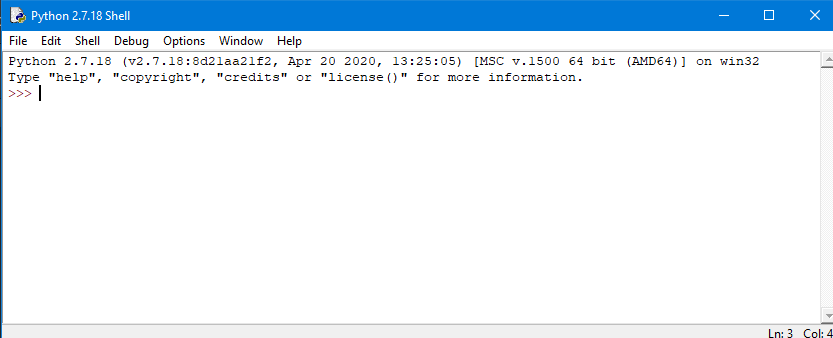
Steht Python 2.7. auch im Pfad? Was passiert denn, wenn du in der iob Shell
pythoneingibst?
-
@sigi234 said in [gelöst] "node-gyp rebuild" wird ausgeführt - Warum?:
Da frage ich mich welcher Adapter braucht das Ganze eigentlich?
Gute Frage, ich finde nur eine optionale Dependency in node_modules@iobroker\js-controller-common-db\package.json
@foxriver76 , eine Idee?
@gaspode ja das ist genau die Stelle, ist auch nur optional https://github.com/jduncanator/node-diskusage/issues/48
Damit schauen wir wie viel Speicher noch frei ist auf den Systemen um das im Admin etc anzuzeigen
Hier könnt ihr mich unterstützen.
-
@gaspode ja das ist genau die Stelle, ist auch nur optional https://github.com/jduncanator/node-diskusage/issues/48
Damit schauen wir wie viel Speicher noch frei ist auf den Systemen um das im Admin etc anzuzeigen
@foxriver76 said in [gelöst] "node-gyp rebuild" wird ausgeführt - Warum?:
Damit schauen wir wie viel Speicher noch frei ist auf den Systemen um das im Admin etc anzuzeigen
Ja, dass die Dependency optional ist, hatte ich ja geschrieben. Anscheinend verursacht sie dennoch das komische verhalten mit node-gyp.
Wenn ich diskusage aus meinem npm tree deinstalliere und lösche, wird zumindest unter Windows immer noch der korrekte Festplattenplatz angezeigt. Ist die Dependency also wirklich notwendig? Wie gesagt, es kommt halt auf einigen Systemen zu diesen Meldungen, das könnte evtl. bei einigen Usern zu Verwirrungen führen. Linux konnte ich jetzt noch nicht testen.
-
@foxriver76 said in [gelöst] "node-gyp rebuild" wird ausgeführt - Warum?:
Damit schauen wir wie viel Speicher noch frei ist auf den Systemen um das im Admin etc anzuzeigen
Ja, dass die Dependency optional ist, hatte ich ja geschrieben. Anscheinend verursacht sie dennoch das komische verhalten mit node-gyp.
Wenn ich diskusage aus meinem npm tree deinstalliere und lösche, wird zumindest unter Windows immer noch der korrekte Festplattenplatz angezeigt. Ist die Dependency also wirklich notwendig? Wie gesagt, es kommt halt auf einigen Systemen zu diesen Meldungen, das könnte evtl. bei einigen Usern zu Verwirrungen führen. Linux konnte ich jetzt noch nicht testen.
-
@foxriver76 said in [gelöst] "node-gyp rebuild" wird ausgeführt - Warum?:
Damit schauen wir wie viel Speicher noch frei ist auf den Systemen um das im Admin etc anzuzeigen
Ja, dass die Dependency optional ist, hatte ich ja geschrieben. Anscheinend verursacht sie dennoch das komische verhalten mit node-gyp.
Wenn ich diskusage aus meinem npm tree deinstalliere und lösche, wird zumindest unter Windows immer noch der korrekte Festplattenplatz angezeigt. Ist die Dependency also wirklich notwendig? Wie gesagt, es kommt halt auf einigen Systemen zu diesen Meldungen, das könnte evtl. bei einigen Usern zu Verwirrungen führen. Linux konnte ich jetzt noch nicht testen.
@gaspode said in [gelöst] "node-gyp rebuild" wird ausgeführt - Warum?:
@foxriver76 said in [gelöst] "node-gyp rebuild" wird ausgeführt - Warum?:
Damit schauen wir wie viel Speicher noch frei ist auf den Systemen um das im Admin etc anzuzeigen
Ja, dass die Dependency optional ist, hatte ich ja geschrieben. Anscheinend verursacht sie dennoch das komische verhalten mit node-gyp.
Wenn ich diskusage aus meinem npm tree deinstalliere und lösche, wird zumindest unter Windows immer noch der korrekte Festplattenplatz angezeigt. Ist die Dependency also wirklich notwendig? Wie gesagt, es kommt halt auf einigen Systemen zu diesen Meldungen, das könnte evtl. bei einigen Usern zu Verwirrungen führen. Linux konnte ich jetzt noch nicht testen.
Edit:
Mit sauber konfiguriertem node-gyp ist das kein Problem, diese Voraussetzung dürfte auf den meisten Windos Systemen aber nicht erfüllt sein. -
@gaspode puh war noch vor meiner Zeit als die Funktion implementiert wurde kann man mal checken ob alles ohne gehen würde mach gerne mal Controller issue bin die Woche im Urlaub
@foxriver76 said in [gelöst] "node-gyp rebuild" wird ausgeführt - Warum?:
puh war noch vor meiner Zeit als die Funktion implementiert wurde kann man mal checken ob alles ohne gehen würde mach gerne mal Controller issue bin die Woche im Urlaub
Kann ich demnächst mal unter Linux testen und ggfs. ein Issue schreiben.
Ich wünsche dir einen schönen Urlaub, Danke, dass du trotzdem geantwortet hast. :)
-
@foxriver76 said in [gelöst] "node-gyp rebuild" wird ausgeführt - Warum?:
puh war noch vor meiner Zeit als die Funktion implementiert wurde kann man mal checken ob alles ohne gehen würde mach gerne mal Controller issue bin die Woche im Urlaub
Kann ich demnächst mal unter Linux testen und ggfs. ein Issue schreiben.
Ich wünsche dir einen schönen Urlaub, Danke, dass du trotzdem geantwortet hast. :)
@gaspode aber im Endeffekt muss man sagen ist es vollkommen ok, die optional dep kann nicht installiert werden Controller handelt das richtig, wenn sie da ist wird sie genutzt. Es ist halt blöd dass der User das sieht. Aber führt Admin denn das immer mit debug Flag aus? Ich denke das sollte nicht der Standard sein
Hier könnt ihr mich unterstützen.
-
@sigi234 said in [gelöst] "node-gyp rebuild" wird ausgeführt - Warum?:
python3 ???
Steht Python 2.7. auch im Pfad? Was passiert denn, wenn du in der iob Shell
pythoneingibst?
@gaspode sagte in [gelöst] "node-gyp rebuild" wird ausgeführt - Warum?:
@sigi234 said in [gelöst] "node-gyp rebuild" wird ausgeführt - Warum?:
python3 ???
Steht Python 2.7. auch im Pfad? Was passiert denn, wenn du in der iob Shell
pythoneingibst?
Da komme ich da hin:
Bitte benutzt das Voting rechts unten im Beitrag wenn er euch geholfen hat.
Immer Daten sichern! -
@gaspode sagte in [gelöst] "node-gyp rebuild" wird ausgeführt - Warum?:
@sigi234 said in [gelöst] "node-gyp rebuild" wird ausgeführt - Warum?:
python3 ???
Steht Python 2.7. auch im Pfad? Was passiert denn, wenn du in der iob Shell
pythoneingibst?
Da komme ich da hin:
@sigi234
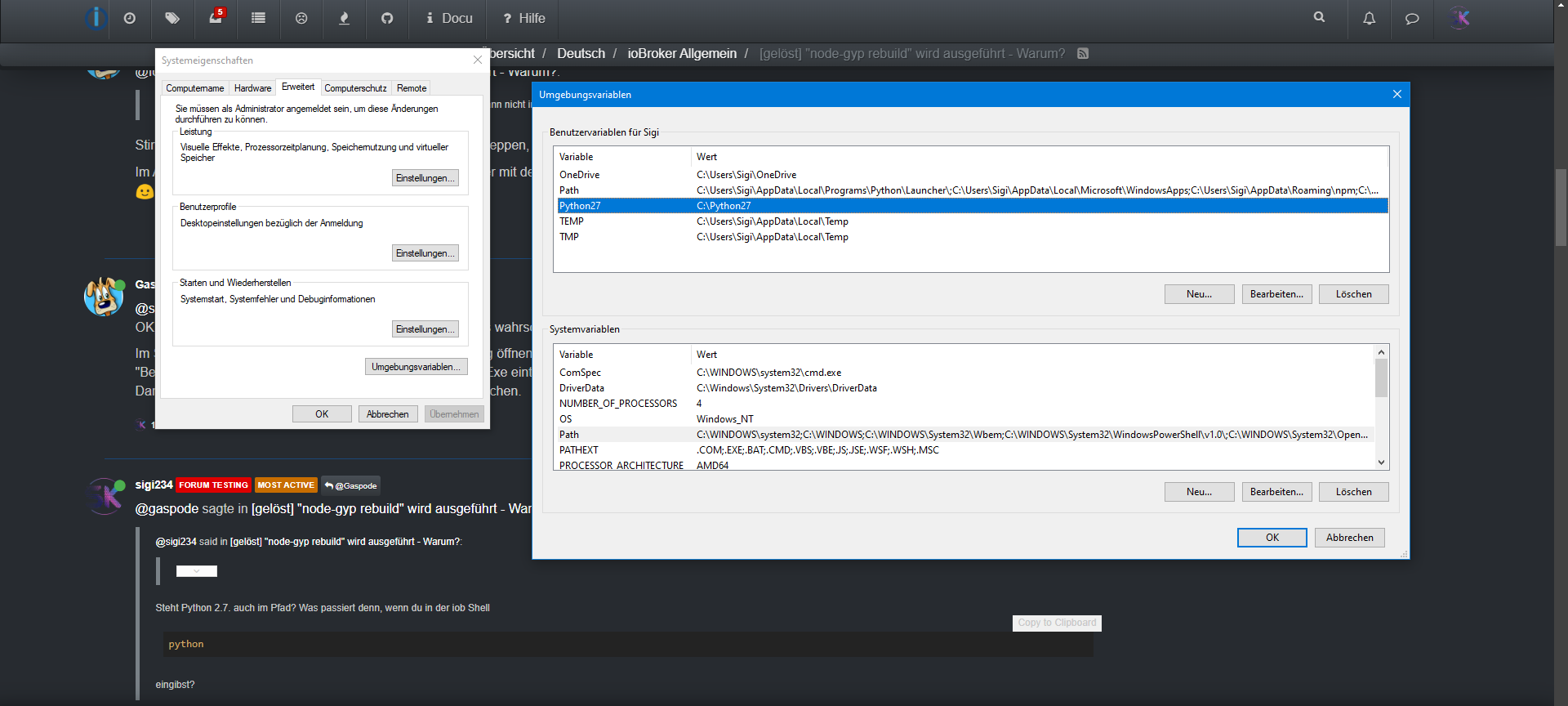
OK, dann steht es wohl nicht im Pfad. Am schnellsten geht es wahrscheinlich, wenn du das manuell machst.Im Startmenü "Systemumgebungsvariablen" eingeben, Dialog öffnen, Karte "Erweitert" wählen, Umgebungsvariablen wählen, im oberen Bereich "Path" wählen, dann "Bearbeiten". "Neu" drücken und den Pfad zu deiner Python Exe eintragen, meist "C:\Python27" oder so.
Dann die iob Shell schließen und neu starten. Nochmal versuchen. -
@gaspode aber im Endeffekt muss man sagen ist es vollkommen ok, die optional dep kann nicht installiert werden Controller handelt das richtig, wenn sie da ist wird sie genutzt. Es ist halt blöd dass der User das sieht. Aber führt Admin denn das immer mit debug Flag aus? Ich denke das sollte nicht der Standard sein
@foxriver76 said in [gelöst] "node-gyp rebuild" wird ausgeführt - Warum?:
aber im Endeffekt muss man sagen ist es vollkommen ok, die optional dep kann nicht installiert werden Controller handelt das richtig, wenn sie da ist wird sie genutzt.
Stimmt schon, auf der anderen Seite muss man ja nix mitschleppen, was nicht gebraucht wird, oder?
Im Admin wird ein Adapter Update ja anscheinend nicht immer mit debug Flag ausgeführt, ich muss mal ein wenig forschen. Wird aber dauern. Genieße deinen Urlaub. :)
-
@sigi234
OK, dann steht es wohl nicht im Pfad. Am schnellsten geht es wahrscheinlich, wenn du das manuell machst.Im Startmenü "Systemumgebungsvariablen" eingeben, Dialog öffnen, Karte "Erweitert" wählen, Umgebungsvariablen wählen, im oberen Bereich "Path" wählen, dann "Bearbeiten". "Neu" drücken und den Pfad zu deiner Python Exe eintragen, meist "C:\Python27" oder so.
Dann die iob Shell schließen und neu starten. Nochmal versuchen.@gaspode sagte in [gelöst] "node-gyp rebuild" wird ausgeführt - Warum?:
@sigi234
OK, dann steht es wohl nicht im Pfad. Am schnellsten geht es wahrscheinlich, wenn du das manuell machst.Im Startmenü "Systemumgebungsvariablen" eingeben, Dialog öffnen, Karte "Erweitert" wählen, Umgebungsvariablen wählen, im oberen Bereich "Path" wählen, dann "Bearbeiten". "Neu" drücken und den Pfad zu deiner Python Exe eintragen, meist "C:\Python27" oder so.
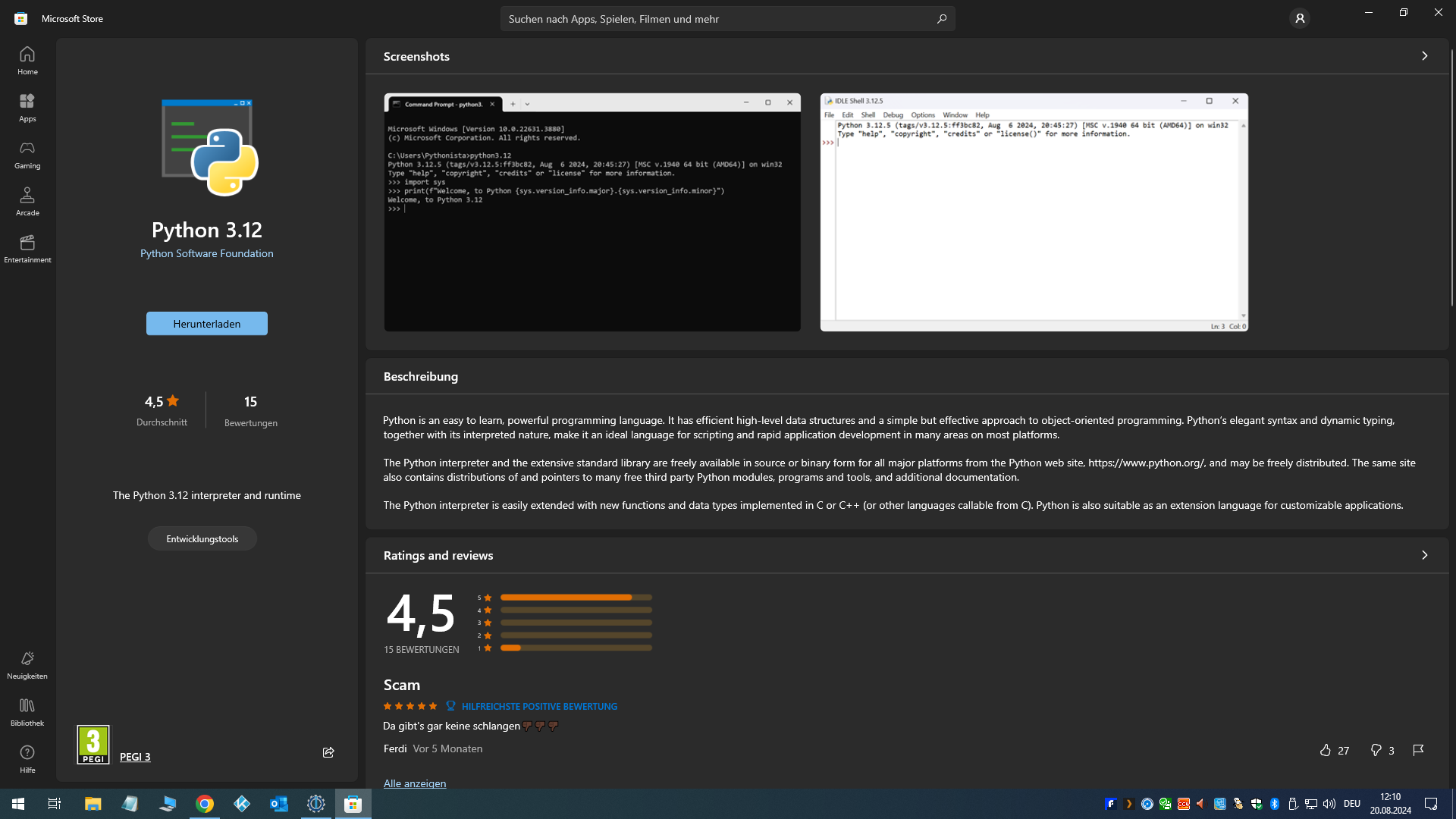
Dann die iob Shell schließen und neu starten. Nochmal versuchen.Soll ich jetzt die 3 er installieren oder bei der 2.7 bleiben? Installieren wenn 3 in der cmd oder mit dem Downloadlink.
Bitte benutzt das Voting rechts unten im Beitrag wenn er euch geholfen hat.
Immer Daten sichern! -
@gaspode sagte in [gelöst] "node-gyp rebuild" wird ausgeführt - Warum?:
@sigi234
OK, dann steht es wohl nicht im Pfad. Am schnellsten geht es wahrscheinlich, wenn du das manuell machst.Im Startmenü "Systemumgebungsvariablen" eingeben, Dialog öffnen, Karte "Erweitert" wählen, Umgebungsvariablen wählen, im oberen Bereich "Path" wählen, dann "Bearbeiten". "Neu" drücken und den Pfad zu deiner Python Exe eintragen, meist "C:\Python27" oder so.
Dann die iob Shell schließen und neu starten. Nochmal versuchen.Soll ich jetzt die 3 er installieren oder bei der 2.7 bleiben? Installieren wenn 3 in der cmd oder mit dem Downloadlink.
@sigi234 said in [gelöst] "node-gyp rebuild" wird ausgeführt - Warum?:
Soll ich jetzt die 3 er installieren oder bei der 2.7 bleiben? Installieren wenn 3 in der cmd oder mit dem Downloadlink.
Sollte egal sein, die 2.7 hat den Vorteil, dass das wohl die offiziell von node-gyp empfohlene Version ist. Daher würde ich erst mal die ausprobieren, zumal die ja bereits installiert ist und wohl nur im Pfad fehlt.
-
@sigi234 said in [gelöst] "node-gyp rebuild" wird ausgeführt - Warum?:
Soll ich jetzt die 3 er installieren oder bei der 2.7 bleiben? Installieren wenn 3 in der cmd oder mit dem Downloadlink.
Sollte egal sein, die 2.7 hat den Vorteil, dass das wohl die offiziell von node-gyp empfohlene Version ist. Daher würde ich erst mal die ausprobieren, zumal die ja bereits installiert ist und wohl nur im Pfad fehlt.
@gaspode sagte in [gelöst] "node-gyp rebuild" wird ausgeführt - Warum?:
@sigi234 said in [gelöst] "node-gyp rebuild" wird ausgeführt - Warum?:
Soll ich jetzt die 3 er installieren oder bei der 2.7 bleiben? Installieren wenn 3 in der cmd oder mit dem Downloadlink.
Sollte egal sein, die 2.7 hat den Vorteil, dass das wohl die offiziell von node-gyp empfohlene Version ist. Daher würde ich erst mal die ausprobieren, zumal die ja bereits installiert ist und wohl nur im Pfad fehlt.
npm error gyp ERR! find Python - "C:\Users\Sigi\AppData\Local\Programs\Python\Python310\python.exe" could not be run
npm error gyp ERR! find Python checking if Python is C:\Program Files\Python310\python.exe
Selbe Meldung , es such noch immer im Falschen Verzeichnis?
Edit:
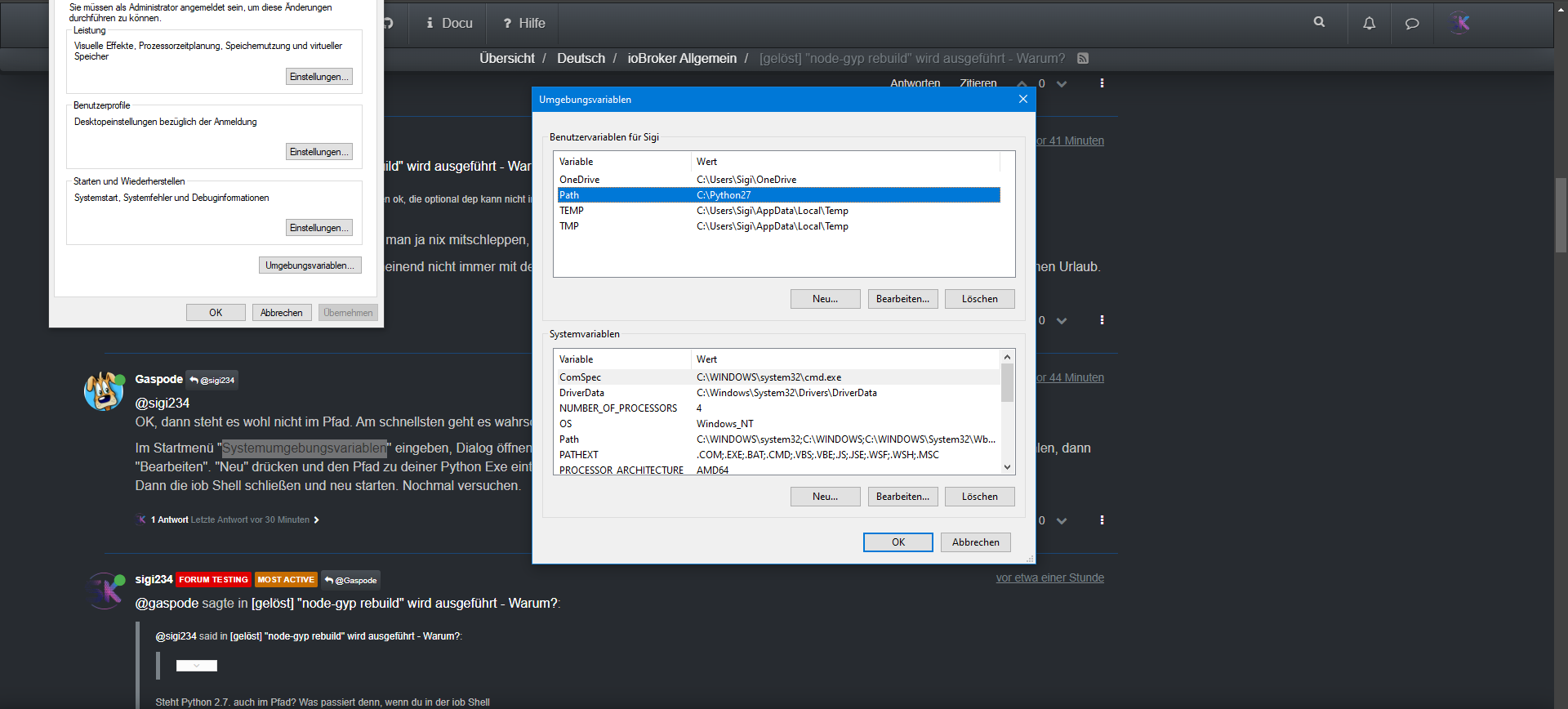
Bitte benutzt das Voting rechts unten im Beitrag wenn er euch geholfen hat.
Immer Daten sichern! -
@gaspode sagte in [gelöst] "node-gyp rebuild" wird ausgeführt - Warum?:
@sigi234 said in [gelöst] "node-gyp rebuild" wird ausgeführt - Warum?:
Soll ich jetzt die 3 er installieren oder bei der 2.7 bleiben? Installieren wenn 3 in der cmd oder mit dem Downloadlink.
Sollte egal sein, die 2.7 hat den Vorteil, dass das wohl die offiziell von node-gyp empfohlene Version ist. Daher würde ich erst mal die ausprobieren, zumal die ja bereits installiert ist und wohl nur im Pfad fehlt.
npm error gyp ERR! find Python - "C:\Users\Sigi\AppData\Local\Programs\Python\Python310\python.exe" could not be run
npm error gyp ERR! find Python checking if Python is C:\Program Files\Python310\python.exe
Selbe Meldung , es such noch immer im Falschen Verzeichnis?
Edit:
-
@gaspode sagte in [gelöst] "node-gyp rebuild" wird ausgeführt - Warum?:
@sigi234
Was passiert denn jetzt beipythonin der iob Shell?
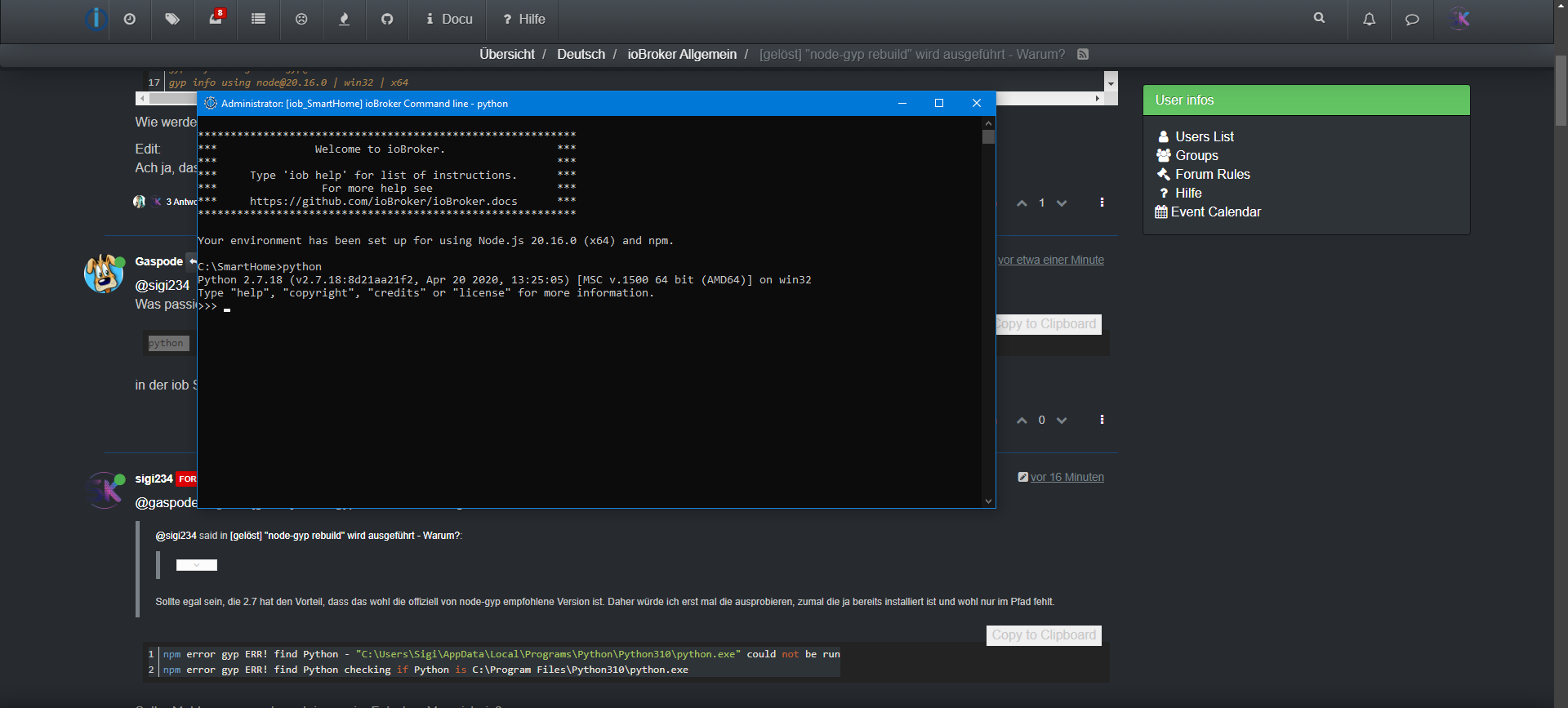
**********************************************************
***               Welcome to ioBroker.                 ***
***                                                    ***
***     Type 'iob help' for list of instructions.      ***
***                For more help see                   ***
***     https://github.com/ioBroker/ioBroker.docs      ***
**********************************************************

Your environment has been set up for using Node.js 20.16.0 (x64) and npm.

C:\SmartHome>npm i diskusage
npm error code 1
npm error path C:\SmartHome\node_modules\diskusage
npm error command failed
npm error command C:\WINDOWS\system32\cmd.exe /d /s /c node-gyp rebuild
npm error gyp info it worked if it ends with ok
npm error gyp info using node-gyp@10.1.0
npm error gyp info using node@20.16.0 | win32 | x64
npm error gyp ERR! find Python
npm error gyp ERR! find Python Python is not set from command line or npm configuration
npm error gyp ERR! find Python Python is not set from environment variable PYTHON
npm error gyp ERR! find Python checking if the py launcher can be used to find Python 3
npm error gyp ERR! find Python - executable path is ""
npm error gyp ERR! find Python - "" could not be run
npm error gyp ERR! find Python checking if "python3" can be used
npm error gyp ERR! find Python - executable path is ""
npm error gyp ERR! find Python - "" could not be run
npm error gyp ERR! find Python checking if "python" can be used
npm error gyp ERR! find Python - executable path is ""
npm error gyp ERR! find Python - "" could not be run
npm error gyp ERR! find Python checking if Python is C:\Users\Sigi\AppData\Local\Programs\Python\Python311\python.exe
npm error gyp ERR! find Python - version is ""
npm error gyp ERR! find Python - version is  - should be >=3.6.0
npm error gyp ERR! find Python - THIS VERSION OF PYTHON IS NOT SUPPORTED
npm error gyp ERR! find Python - "C:\Users\Sigi\AppData\Local\Programs\Python\Python311\python.exe" could not be run
npm error gyp ERR! find Python checking if Python is C:\Program Files\Python311\python.exe
npm error gyp ERR! find Python - version is ""
npm error gyp ERR! find Python - version is  - should be >=3.6.0
npm error gyp ERR! find Python - THIS VERSION OF PYTHON IS NOT SUPPORTED
npm error gyp ERR! find Python - "C:\Program Files\Python311\python.exe" could not be run
npm error gyp ERR! find Python checking if Python is C:\Users\Sigi\AppData\Local\Programs\Python\Python311-32\python.exe
npm error gyp ERR! find Python - version is ""
npm error gyp ERR! find Python - version is  - should be >=3.6.0
npm error gyp ERR! find Python - THIS VERSION OF PYTHON IS NOT SUPPORTED
npm error gyp ERR! find Python - "C:\Users\Sigi\AppData\Local\Programs\Python\Python311-32\python.exe" could not be run
npm error gyp ERR! find Python checking if Python is C:\Program Files\Python311-32\python.exe
npm error gyp ERR! find Python - version is ""
npm error gyp ERR! find Python - version is  - should be >=3.6.0
npm error gyp ERR! find Python - THIS VERSION OF PYTHON IS NOT SUPPORTED
npm error gyp ERR! find Python - "C:\Program Files\Python311-32\python.exe" could not be run
npm error gyp ERR! find Python checking if Python is C:\Program Files (x86)\Python311-32\python.exe
npm error gyp ERR! find Python - version is ""
npm error gyp ERR! find Python - version is  - should be >=3.6.0
npm error gyp ERR! find Python - THIS VERSION OF PYTHON IS NOT SUPPORTED
npm error gyp ERR! find Python - "C:\Program Files (x86)\Python311-32\python.exe" could not be run
npm error gyp ERR! find Python checking if Python is C:\Users\Sigi\AppData\Local\Programs\Python\Python310\python.exe
npm error gyp ERR! find Python - version is ""
npm error gyp ERR! find Python - version is  - should be >=3.6.0
npm error gyp ERR! find Python - THIS VERSION OF PYTHON IS NOT SUPPORTED
npm error gyp ERR! find Python - "C:\Users\Sigi\AppData\Local\Programs\Python\Python310\python.exe" could not be run
npm error gyp ERR! find Python checking if Python is C:\Program Files\Python310\python.exe
npm error gyp ERR! find Python - version is ""
npm error gyp ERR! find Python - version is  - should be >=3.6.0
npm error gyp ERR! find Python - THIS VERSION OF PYTHON IS NOT SUPPORTED
npm error gyp ERR! find Python - "C:\Program Files\Python310\python.exe" could not be run
npm error gyp ERR! find Python checking if Python is C:\Users\Sigi\AppData\Local\Programs\Python\Python310-32\python.exe
npm error gyp ERR! find Python - version is ""
npm error gyp ERR! find Python - version is  - should be >=3.6.0
npm error gyp ERR! find Python - THIS VERSION OF PYTHON IS NOT SUPPORTED
npm error gyp ERR! find Python - "C:\Users\Sigi\AppData\Local\Programs\Python\Python310-32\python.exe" could not be run
npm error gyp ERR! find Python checking if Python is C:\Program Files\Python310-32\python.exe
npm error gyp ERR! find Python - version is ""
npm error gyp ERR! find Python - version is  - should be >=3.6.0
npm error gyp ERR! find Python - THIS VERSION OF PYTHON IS NOT SUPPORTED
npm error gyp ERR! find Python - "C:\Program Files\Python310-32\python.exe" could not be run
npm error gyp ERR! find Python checking if Python is C:\Program Files (x86)\Python310-32\python.exe
npm error gyp ERR! find Python - version is ""
npm error gyp ERR! find Python - version is  - should be >=3.6.0
npm error gyp ERR! find Python - THIS VERSION OF PYTHON IS NOT SUPPORTED
npm error gyp ERR! find Python - "C:\Program Files (x86)\Python310-32\python.exe" could not be run
npm error gyp ERR! find Python checking if Python is C:\Users\Sigi\AppData\Local\Programs\Python\Python39\python.exe
npm error gyp ERR! find Python - version is ""
npm error gyp ERR! find Python - version is  - should be >=3.6.0
npm error gyp ERR! find Python - THIS VERSION OF PYTHON IS NOT SUPPORTED
npm error gyp ERR! find Python - "C:\Users\Sigi\AppData\Local\Programs\Python\Python39\python.exe" could not be run
npm error gyp ERR! find Python checking if Python is C:\Program Files\Python39\python.exe
npm error gyp ERR! find Python - version is ""
npm error gyp ERR! find Python - version is  - should be >=3.6.0
npm error gyp ERR! find Python - THIS VERSION OF PYTHON IS NOT SUPPORTED
npm error gyp ERR! find Python - "C:\Program Files\Python39\python.exe" could not be run
npm error gyp ERR! find Python checking if Python is C:\Users\Sigi\AppData\Local\Programs\Python\Python39-32\python.exe
npm error gyp ERR! find Python - version is ""
npm error gyp ERR! find Python - version is  - should be >=3.6.0
npm error gyp ERR! find Python - THIS VERSION OF PYTHON IS NOT SUPPORTED
npm error gyp ERR! find Python - "C:\Users\Sigi\AppData\Local\Programs\Python\Python39-32\python.exe" could not be run
npm error gyp ERR! find Python checking if Python is C:\Program Files\Python39-32\python.exe
npm error gyp ERR! find Python - version is ""
npm error gyp ERR! find Python - version is  - should be >=3.6.0
npm error gyp ERR! find Python - THIS VERSION OF PYTHON IS NOT SUPPORTED
npm error gyp ERR! find Python - "C:\Program Files\Python39-32\python.exe" could not be run
npm error gyp ERR! find Python checking if Python is C:\Program Files (x86)\Python39-32\python.exe
npm error gyp ERR! find Python - version is ""
npm error gyp ERR! find Python - version is  - should be >=3.6.0
npm error gyp ERR! find Python - THIS VERSION OF PYTHON IS NOT SUPPORTED
npm error gyp ERR! find Python - "C:\Program Files (x86)\Python39-32\python.exe" could not be run
npm error gyp ERR! find Python checking if Python is C:\Users\Sigi\AppData\Local\Programs\Python\Python38\python.exe
npm error gyp ERR! find Python - version is ""
npm error gyp ERR! find Python - version is  - should be >=3.6.0
npm error gyp ERR! find Python - THIS VERSION OF PYTHON IS NOT SUPPORTED
npm error gyp ERR! find Python - "C:\Users\Sigi\AppData\Local\Programs\Python\Python38\python.exe" could not be run
npm error gyp ERR! find Python checking if Python is C:\Program Files\Python38\python.exe
npm error gyp ERR! find Python - version is ""
npm error gyp ERR! find Python - version is  - should be >=3.6.0
npm error gyp ERR! find Python - THIS VERSION OF PYTHON IS NOT SUPPORTED
npm error gyp ERR! find Python - "C:\Program Files\Python38\python.exe" could not be run
npm error gyp ERR! find Python checking if Python is C:\Users\Sigi\AppData\Local\Programs\Python\Python38-32\python.exe
npm error gyp ERR! find Python - version is ""
npm error gyp ERR! find Python - version is  - should be >=3.6.0
npm error gyp ERR! find Python - THIS VERSION OF PYTHON IS NOT SUPPORTED
npm error gyp ERR! find Python - "C:\Users\Sigi\AppData\Local\Programs\Python\Python38-32\python.exe" could not be run
npm error gyp ERR! find Python checking if Python is C:\Program Files\Python38-32\python.exe
npm error gyp ERR! find Python - version is ""
npm error gyp ERR! find Python - version is  - should be >=3.6.0
npm error gyp ERR! find Python - THIS VERSION OF PYTHON IS NOT SUPPORTED
npm error gyp ERR! find Python - "C:\Program Files\Python38-32\python.exe" could not be run
npm error gyp ERR! find Python checking if Python is C:\Program Files (x86)\Python38-32\python.exe
npm error gyp ERR! find Python - version is ""
npm error gyp ERR! find Python - version is  - should be >=3.6.0
npm error gyp ERR! find Python - THIS VERSION OF PYTHON IS NOT SUPPORTED
npm error gyp ERR! find Python - "C:\Program Files (x86)\Python38-32\python.exe" could not be run
npm error gyp ERR! find Python
npm error gyp ERR! find Python **********************************************************
npm error gyp ERR! find Python You need to install the latest version of Python.
npm error gyp ERR! find Python Node-gyp should be able to find and use Python. If not,
npm error gyp ERR! find Python you can try one of the following options:
npm error gyp ERR! find Python - Use the switch --python="C:\Path\To\python.exe"
npm error gyp ERR! find Python (accepted by both node-gyp and npm)
npm error gyp ERR! find Python - Set the environment variable PYTHON
npm error gyp ERR! find Python - Set the npm configuration variable python:
npm error gyp ERR! find Python npm config set python "C:\Path\To\python.exe"
npm error gyp ERR! find Python For more information consult the documentation at:
npm error gyp ERR! find Python https://github.com/nodejs/node-gyp#installation
npm error gyp ERR! find Python **********************************************************
npm error gyp ERR! find Python
npm error gyp ERR! configure error
npm error gyp ERR! stack Error: Could not find any Python installation to use
npm error gyp ERR! stack at PythonFinder.fail (C:\Program Files\nodejs\node_modules\npm\node_modules\node-gyp\lib\find-python.js:306:11)
npm error gyp ERR! stack at PythonFinder.findPython (C:\Program Files\nodejs\node_modules\npm\node_modules\node-gyp\lib\find-python.js:164:17)
npm error gyp ERR! stack at process.processTicksAndRejections (node:internal/process/task_queues:95:5)
npm error gyp ERR! stack at async configure (C:\Program Files\nodejs\node_modules\npm\node_modules\node-gyp\lib\configure.js:27:18)
npm error gyp ERR! stack at async run (C:\Program Files\nodejs\node_modules\npm\node_modules\node-gyp\bin\node-gyp.js:81:18)
npm error gyp ERR! System Windows_NT 10.0.19045
npm error gyp ERR! command "C:\\Program Files\\nodejs\\node.exe" "C:\\Program Files\\nodejs\\node_modules\\npm\\node_modules\\node-gyp\\bin\\node-gyp.js" "rebuild"
npm error gyp ERR! cwd C:\SmartHome\node_modules\diskusage
npm error gyp ERR! node -v v20.16.0
npm error gyp ERR! node-gyp -v v10.1.0
npm error gyp ERR! not ok
npm error A complete log of this run can be found in: C:\Users\Sigi\AppData\Local\npm-cache\_logs\2024-08-20T11_21_58_639Z-debug-0.log

C:\SmartHome>
Bitte benutzt das Voting rechts unten im Beitrag wenn er euch geholfen hat.
Immer Daten sichern! -
@gaspode sagte in [gelöst] "node-gyp rebuild" wird ausgeführt - Warum?:
@sigi234
Was passiert denn jetzt beipythonin der iob Shell?
********************************************************** *** Welcome to ioBroker. *** *** *** *** Type 'iob help' for list of instructions. *** *** For more help see *** *** https://github.com/ioBroker/ioBroker.docs *** ********************************************************** Your environment has been set up for using Node.js 20.16.0 (x64) and npm. C:\SmartHome>npm i diskusage npm error code 1 npm error path C:\SmartHome\node_modules\diskusage npm error command failed npm error command C:\WINDOWS\system32\cmd.exe /d /s /c node-gyp rebuild npm error gyp info it worked if it ends with ok npm error gyp info using node-gyp@10.1.0 npm error gyp info using node@20.16.0 | win32 | x64 npm error gyp ERR! find Python npm error gyp ERR! find Python Python is not set from command line or npm configuration npm error gyp ERR! find Python Python is not set from environment variable PYTHON npm error gyp ERR! find Python checking if the py launcher can be used to find Python 3 npm error gyp ERR! find Python - executable path is "" npm error gyp ERR! find Python - "" could not be run npm error gyp ERR! find Python checking if "python3" can be used npm error gyp ERR! find Python - executable path is "" npm error gyp ERR! find Python - "" could not be run npm error gyp ERR! find Python checking if "python" can be used npm error gyp ERR! find Python - executable path is "" npm error gyp ERR! find Python - "" could not be run npm error gyp ERR! find Python checking if Python is C:\Users\Sigi\AppData\Local\Programs\Python\Python311\python.exe npm error gyp ERR! find Python - version is "" npm error gyp ERR! find Python - version is - should be >=3.6.0 npm error gyp ERR! find Python - THIS VERSION OF PYTHON IS NOT SUPPORTED npm error gyp ERR! find Python - "C:\Users\Sigi\AppData\Local\Programs\Python\Python311\python.exe" could not be run npm error gyp ERR! find Python checking if Python is C:\Program Files\Python311\python.exe npm error gyp ERR! find Python - version is "" npm error gyp ERR! find Python - version is - should be >=3.6.0 npm error gyp ERR! find Python - THIS VERSION OF PYTHON IS NOT SUPPORTED npm error gyp ERR! find Python - "C:\Program Files\Python311\python.exe" could not be run npm error gyp ERR! find Python checking if Python is C:\Users\Sigi\AppData\Local\Programs\Python\Python311-32\python.exe npm error gyp ERR! find Python - version is "" npm error gyp ERR! find Python - version is - should be >=3.6.0 npm error gyp ERR! find Python - THIS VERSION OF PYTHON IS NOT SUPPORTED npm error gyp ERR! find Python - "C:\Users\Sigi\AppData\Local\Programs\Python\Python311-32\python.exe" could not be run npm error gyp ERR! find Python checking if Python is C:\Program Files\Python311-32\python.exe npm error gyp ERR! find Python - version is "" npm error gyp ERR! find Python - version is - should be >=3.6.0 npm error gyp ERR! find Python - THIS VERSION OF PYTHON IS NOT SUPPORTED npm error gyp ERR! find Python - "C:\Program Files\Python311-32\python.exe" could not be run npm error gyp ERR! find Python checking if Python is C:\Program Files (x86)\Python311-32\python.exe npm error gyp ERR! find Python - version is "" npm error gyp ERR! find Python - version is - should be >=3.6.0 npm error gyp ERR! find Python - THIS VERSION OF PYTHON IS NOT SUPPORTED npm error gyp ERR! find Python - "C:\Program Files (x86)\Python311-32\python.exe" could not be run npm error gyp ERR! find Python checking if Python is C:\Users\Sigi\AppData\Local\Programs\Python\Python310\python.exe npm error gyp ERR! find Python - version is "" npm error gyp ERR! find Python - version is - should be >=3.6.0 npm error gyp ERR! find Python - THIS VERSION OF PYTHON IS NOT SUPPORTED npm error gyp ERR! find Python - "C:\Users\Sigi\AppData\Local\Programs\Python\Python310\python.exe" could not be run npm error gyp ERR! find Python checking if Python is C:\Program Files\Python310\python.exe npm error gyp ERR! find Python - version is "" npm error gyp ERR! find Python - version is - should be >=3.6.0 npm error gyp ERR! find Python - THIS VERSION OF PYTHON IS NOT SUPPORTED npm error gyp ERR! find Python - "C:\Program Files\Python310\python.exe" could not be run npm error gyp ERR! find Python checking if Python is C:\Users\Sigi\AppData\Local\Programs\Python\Python310-32\python.exe npm error gyp ERR! find Python - version is "" npm error gyp ERR! find Python - version is - should be >=3.6.0 npm error gyp ERR! find Python - THIS VERSION OF PYTHON IS NOT SUPPORTED npm error gyp ERR! find Python - "C:\Users\Sigi\AppData\Local\Programs\Python\Python310-32\python.exe" could not be run npm error gyp ERR! find Python checking if Python is C:\Program Files\Python310-32\python.exe npm error gyp ERR! find Python - version is "" npm error gyp ERR! find Python - version is - should be >=3.6.0 npm error gyp ERR! find Python - THIS VERSION OF PYTHON IS NOT SUPPORTED npm error gyp ERR! find Python - "C:\Program Files\Python310-32\python.exe" could not be run npm error gyp ERR! find Python checking if Python is C:\Program Files (x86)\Python310-32\python.exe npm error gyp ERR! find Python - version is "" npm error gyp ERR! find Python - version is - should be >=3.6.0 npm error gyp ERR! find Python - THIS VERSION OF PYTHON IS NOT SUPPORTED npm error gyp ERR! find Python - "C:\Program Files (x86)\Python310-32\python.exe" could not be run npm error gyp ERR! find Python checking if Python is C:\Users\Sigi\AppData\Local\Programs\Python\Python39\python.exe npm error gyp ERR! find Python - version is "" npm error gyp ERR! find Python - version is - should be >=3.6.0 npm error gyp ERR! find Python - THIS VERSION OF PYTHON IS NOT SUPPORTED npm error gyp ERR! find Python - "C:\Users\Sigi\AppData\Local\Programs\Python\Python39\python.exe" could not be run npm error gyp ERR! find Python checking if Python is C:\Program Files\Python39\python.exe npm error gyp ERR! find Python - version is "" npm error gyp ERR! find Python - version is - should be >=3.6.0 npm error gyp ERR! find Python - THIS VERSION OF PYTHON IS NOT SUPPORTED npm error gyp ERR! find Python - "C:\Program Files\Python39\python.exe" could not be run npm error gyp ERR! find Python checking if Python is C:\Users\Sigi\AppData\Local\Programs\Python\Python39-32\python.exe npm error gyp ERR! find Python - version is "" npm error gyp ERR! find Python - version is - should be >=3.6.0 npm error gyp ERR! find Python - THIS VERSION OF PYTHON IS NOT SUPPORTED npm error gyp ERR! find Python - "C:\Users\Sigi\AppData\Local\Programs\Python\Python39-32\python.exe" could not be run npm error gyp ERR! find Python checking if Python is C:\Program Files\Python39-32\python.exe npm error gyp ERR! find Python - version is "" npm error gyp ERR! find Python - version is - should be >=3.6.0 npm error gyp ERR! find Python - THIS VERSION OF PYTHON IS NOT SUPPORTED npm error gyp ERR! find Python - "C:\Program Files\Python39-32\python.exe" could not be run npm error gyp ERR! find Python checking if Python is C:\Program Files (x86)\Python39-32\python.exe npm error gyp ERR! find Python - version is "" npm error gyp ERR! find Python - version is - should be >=3.6.0 npm error gyp ERR! find Python - THIS VERSION OF PYTHON IS NOT SUPPORTED npm error gyp ERR! find Python - "C:\Program Files (x86)\Python39-32\python.exe" could not be run npm error gyp ERR! find Python checking if Python is C:\Users\Sigi\AppData\Local\Programs\Python\Python38\python.exe npm error gyp ERR! find Python - version is "" npm error gyp ERR! find Python - version is - should be >=3.6.0 npm error gyp ERR! find Python - THIS VERSION OF PYTHON IS NOT SUPPORTED npm error gyp ERR! find Python - "C:\Users\Sigi\AppData\Local\Programs\Python\Python38\python.exe" could not be run npm error gyp ERR! find Python checking if Python is C:\Program Files\Python38\python.exe npm error gyp ERR! find Python - version is "" npm error gyp ERR! find Python - version is - should be >=3.6.0 npm error gyp ERR! find Python - THIS VERSION OF PYTHON IS NOT SUPPORTED npm error gyp ERR! find Python - "C:\Program Files\Python38\python.exe" could not be run npm error gyp ERR! find Python checking if Python is C:\Users\Sigi\AppData\Local\Programs\Python\Python38-32\python.exe npm error gyp ERR! find Python - version is "" npm error gyp ERR! find Python - version is - should be >=3.6.0 npm error gyp ERR! find Python - THIS VERSION OF PYTHON IS NOT SUPPORTED npm error gyp ERR! find Python - "C:\Users\Sigi\AppData\Local\Programs\Python\Python38-32\python.exe" could not be run npm error gyp ERR! find Python checking if Python is C:\Program Files\Python38-32\python.exe npm error gyp ERR! find Python - version is "" npm error gyp ERR! find Python - version is - should be >=3.6.0 npm error gyp ERR! find Python - THIS VERSION OF PYTHON IS NOT SUPPORTED npm error gyp ERR! find Python - "C:\Program Files\Python38-32\python.exe" could not be run npm error gyp ERR! find Python checking if Python is C:\Program Files (x86)\Python38-32\python.exe npm error gyp ERR! find Python - version is "" npm error gyp ERR! find Python - version is - should be >=3.6.0 npm error gyp ERR! find Python - THIS VERSION OF PYTHON IS NOT SUPPORTED npm error gyp ERR! find Python - "C:\Program Files (x86)\Python38-32\python.exe" could not be run npm error gyp ERR! find Python npm error gyp ERR! find Python ********************************************************** npm error gyp ERR! find Python You need to install the latest version of Python. npm error gyp ERR! find Python Node-gyp should be able to find and use Python. If not, npm error gyp ERR! find Python you can try one of the following options: npm error gyp ERR! find Python - Use the switch --python="C:\Path\To\python.exe" npm error gyp ERR! find Python (accepted by both node-gyp and npm) npm error gyp ERR! find Python - Set the environment variable PYTHON npm error gyp ERR! find Python - Set the npm configuration variable python: npm error gyp ERR! find Python npm config set python "C:\Path\To\python.exe" npm error gyp ERR! find Python For more information consult the documentation at: npm error gyp ERR! find Python https://github.com/nodejs/node-gyp#installation npm error gyp ERR! find Python ********************************************************** npm error gyp ERR! find Python npm error gyp ERR! configure error npm error gyp ERR! stack Error: Could not find any Python installation to use npm error gyp ERR! stack at PythonFinder.fail (C:\Program Files\nodejs\node_modules\npm\node_modules\node-gyp\lib\find-python.js:306:11) npm error gyp ERR! stack at PythonFinder.findPython (C:\Program Files\nodejs\node_modules\npm\node_modules\node-gyp\lib\find-python.js:164:17) npm error gyp ERR! stack at process.processTicksAndRejections (node:internal/process/task_queues:95:5) npm error gyp ERR! stack at async configure (C:\Program Files\nodejs\node_modules\npm\node_modules\node-gyp\lib\configure.js:27:18) npm error gyp ERR! stack at async run (C:\Program Files\nodejs\node_modules\npm\node_modules\node-gyp\bin\node-gyp.js:81:18) npm error gyp ERR! System Windows_NT 10.0.19045 npm error gyp ERR! command "C:\\Program Files\\nodejs\\node.exe" "C:\\Program Files\\nodejs\\node_modules\\npm\\node_modules\\node-gyp\\bin\\node-gyp.js" "rebuild" npm error gyp ERR! cwd C:\SmartHome\node_modules\diskusage npm error gyp ERR! node -v v20.16.0 npm error gyp ERR! node-gyp -v v10.1.0 npm error gyp ERR! not ok npm error A complete log of this run can be found in: C:\Users\Sigi\AppData\Local\npm-cache\_logs\2024-08-20T11_21_58_639Z-debug-0.log C:\SmartHome>@sigi234
https://github.com/nodejs/node-gyp#configuring-python-dependencyAlso gucken, was alles verfügbar ist mit
py --list-pathsUnd testweise setzen mit
set npm_config_python=C:\python27
npm i diskusage
Sollte das klappen (sonst bin ich mit meinem Latein erst mal am Ende), die Variable npm_config_python im System setzen, analog zur Erweiterung von Path, nur halt als neue Variable anlegen.
Edit: Bei mir war das nicht notwendig, ich hatte Glück und er hat sich die korrekte Version automatisch rausgesucht.



Hey! Du scheinst an dieser Unterhaltung interessiert zu sein, hast aber noch kein Konto.
Hast du es satt, bei jedem Besuch durch die gleichen Beiträge zu scrollen? Wenn du dich für ein Konto anmeldest, kommst du immer genau dorthin zurück, wo du zuvor warst, und kannst dich über neue Antworten benachrichtigen lassen (entweder per E-Mail oder Push-Benachrichtigung). Du kannst auch Lesezeichen speichern und Beiträge positiv bewerten, um anderen Community-Mitgliedern deine Wertschätzung zu zeigen.
Mit deinem Input könnte dieser Beitrag noch besser werden 💗
Registrieren Anmelden240
Online33.1k
Benutzende83.7k
Themen1.3m
Beiträge