




IoBroker Web nicht mehr unter :8081 verfügbar
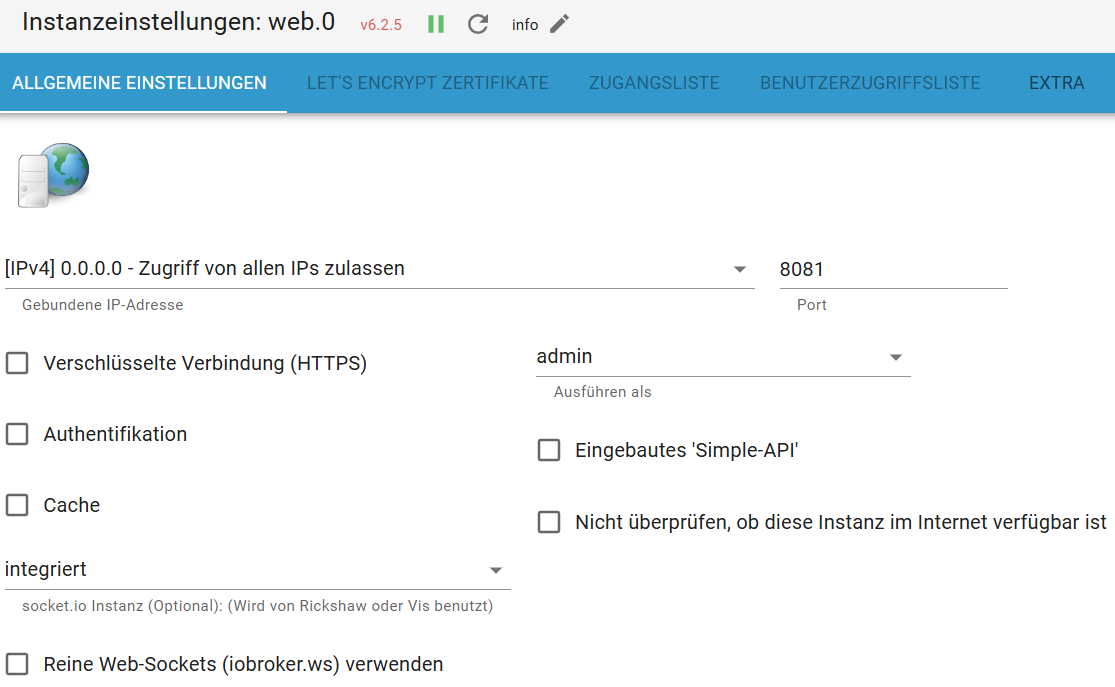
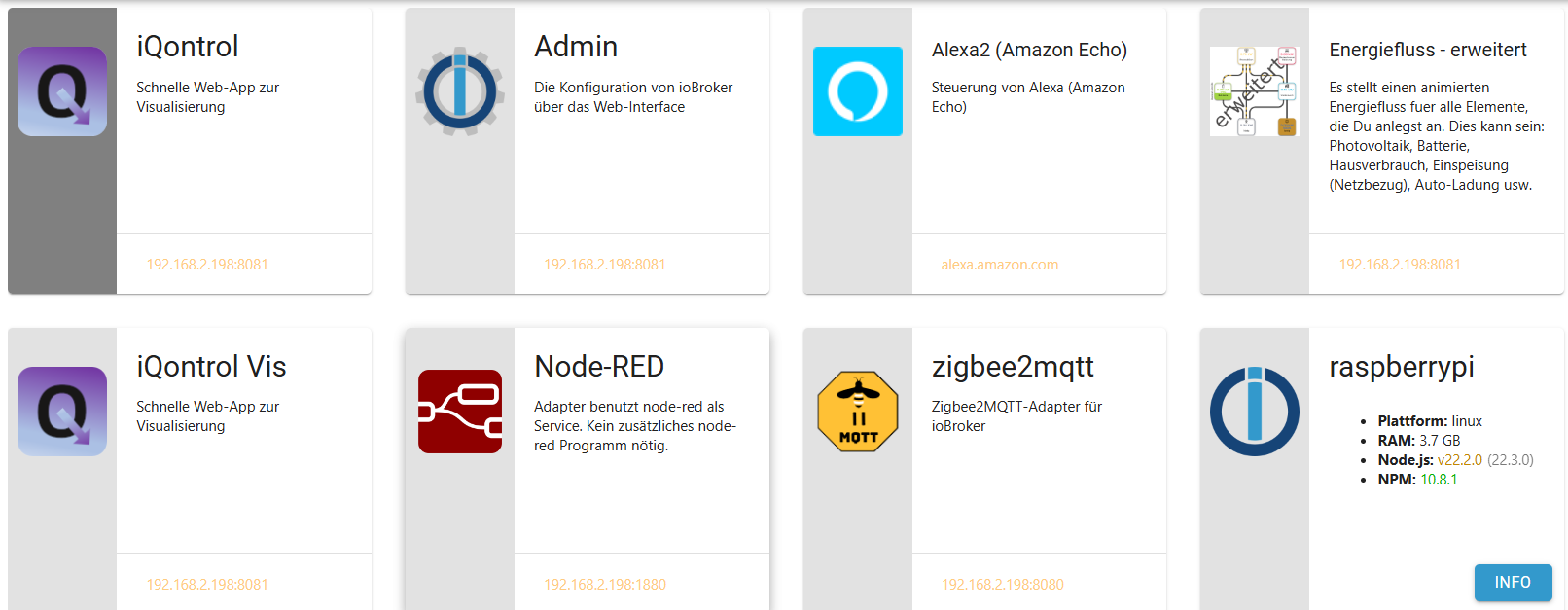
-
Du hast da auch noch andere Böcke drin...
*** nodejs is NOT correctly installed ***
Bring das erstmal das Untergeschoß in Ordnung, dann kannst du dich um die oberen Etagen kümmern.
iob nodejs-update 20Pending Updates: 127
Nach dem nodejs-update einmal sauber neustarten.
@thomas-braun danke mache ich
-
@marcelinho zusätzlich ist nodejs vollkommen schief installiert und dein Betriebssystem braucht dringend Pflege
@homoran danke bin gerade dabei mache einen neustart und lade eine neue iob diag hoch
-
@homoran danke bin gerade dabei mache einen neustart und lade eine neue iob diag hoch
@Homoran und @Thomas-Braun so hat etwas länger gedauert, habe nun: iob nodejs-update 20 und einen restart gemacht, nun die neue:
*** BASE SYSTEM *** Static hostname: raspberrypi Icon name: computer Operating System: Debian GNU/Linux 12 (bookworm) Kernel: Linux 6.6.28+rpt-rpi-v8 Architecture: arm64 Model : Raspberry Pi 4 Model B Rev 1.5 Docker : false Virtualization : none Kernel : aarch64 Userland : 64 bit Systemuptime and Load: 16:31:41 up 1:46, 3 users, load average: 6.76, 4.50, 3.06 CPU threads: 4 *** RASPBERRY THROTTLING *** Current issues: No throttling issues detected. Previously detected issues: No throttling issues detected. *** Time and Time Zones *** Local time: Mon 2024-07-01 16:31:41 CEST Universal time: Mon 2024-07-01 14:31:41 UTC RTC time: n/a Time zone: Europe/Berlin (CEST, +0200) System clock synchronized: yes NTP service: active RTC in local TZ: no *** Users and Groups *** User that called 'iob diag': pi HOME=/home/pi GROUPS=pi adm dialout cdrom sudo audio video plugdev games users input render ne tdev lpadmin gpio i2c spi iobroker User that is running 'js-controller': iobroker HOME=/home/iobroker GROUPS=iobroker tty dialout audio video bluetooth gpio i2c *** Display-Server-Setup *** Display-Server: false Desktop: Terminal: tty Boot Target: multi-user.target *** MEMORY *** total used free shared buff/cache available Mem: 4.0G 2.6G 49M 823K 1.4G 1.4G Swap: 209M 3.9M 205M Total: 4.2G 2.6G 254M Active iob-Instances: 16 3792 M total memory 2490 M used memory 2659 M active memory 806 M inactive memory 46 M free memory 220 M buffer memory 1111 M swap cache 199 M total swap 3 M used swap 196 M free swap *** top - Table Of Processes *** top - 16:31:41 up 1:46, 3 users, load average: 6.76, 4.50, 3.06 Tasks: 217 total, 2 running, 215 sleeping, 0 stopped, 0 zombie %Cpu(s): 14.3 us, 28.6 sy, 0.0 ni, 42.9 id, 0.0 wa, 0.0 hi, 14.3 si, 0.0 st MiB Mem : 3792.1 total, 43.1 free, 2493.4 used, 1332.3 buff/cache MiB Swap: 200.0 total, 196.2 free, 3.8 used. 1298.7 avail Mem *** FAILED SERVICES *** UNIT LOAD ACTIVE SUB DESCRIPTION 0 loaded units listed. *** FILESYSTEM *** Filesystem Type Size Used Avail Use% Mounted on udev devtmpfs 1.6G 0 1.6G 0% /dev tmpfs tmpfs 380M 1.3M 378M 1% /run /dev/mmcblk0p2 ext4 29G 24G 3.7G 87% / tmpfs tmpfs 1.9G 8.0K 1.9G 1% /dev/shm tmpfs tmpfs 5.0M 16K 5.0M 1% /run/lock /dev/mmcblk0p1 vfat 510M 75M 436M 15% /boot/firmware tmpfs tmpfs 380M 36K 380M 1% /run/user/1000 Messages concerning ext4 filesystem in dmesg: [Mon Jul 1 14:45:00 2024] Kernel command line: coherent_pool=1M 8250.nr_uarts=0 snd_bcm2835.enable_headphones=0 snd_bcm2835.enable_headphones=1 snd_bcm2835.ena ble_hdmi=1 snd_bcm2835.enable_hdmi=0 smsc95xx.macaddr=D8:3A:DD:1A:71:9B vc_mem. mem_base=0x3ec00000 vc_mem.mem_size=0x40000000 console=ttyS0,115200 console=tty 1 root=PARTUUID=1e048ecb-02 rootfstype=ext4 fsck.repair=yes rootwait quiet splas h plymouth.ignore-serial-consoles [Mon Jul 1 14:45:11 2024] EXT4-fs (mmcblk0p2): mounted filesystem cb6f0e18-5add -4177-ab98-e9f0235e06b3 ro with ordered data mode. Quota mode: none. [Mon Jul 1 14:45:12 2024] EXT4-fs (mmcblk0p2): re-mounted cb6f0e18-5add-4177-ab 98-e9f0235e06b3 r/w. Quota mode: none. Show mounted filesystems: TARGET SOURCE FSTYPE OPTIONS / /dev/mmcblk0p2 ext4 rw,noatime |-/sys sysfs sysfs rw,nosuid,nodev,noexec,relatime | |-/sys/kernel/security securityfs securityf s rw,nosuid,nodev,noexec,relatime | |-/sys/fs/cgroup cgroup2 cgroup2 rw,nosuid,nodev,noexec,relatime,nsdelegate,memory_recursiveprot | |-/sys/fs/pstore pstore pstore rw,nosuid,nodev,noexec,relatime | |-/sys/fs/bpf bpf bpf rw,nosuid,nodev,noexec,relatime,mode=700 | |-/sys/kernel/debug debugfs debugfs rw,nosuid,nodev,noexec,relatime | |-/sys/kernel/tracing tracefs tracefs rw,nosuid,nodev,noexec,relatime | |-/sys/kernel/config configfs configfs rw,nosuid,nodev,noexec,relatime | `-/sys/fs/fuse/connections fusectl fusectl rw,nosuid,nodev,noexec,relatime |-/proc proc proc rw,relatime | `-/proc/sys/fs/binfmt_misc systemd-1 autofs rw,relatime,fd=29,pgrp=1,timeout=0,minproto=5,maxproto=5,direct,pipe_ino=5370 | `-/proc/sys/fs/binfmt_misc binfmt_misc binfmt_mi sc rw,nosuid,nodev,noexec,relatime |-/dev udev devtmpfs rw,nosuid,relatime,size=1668360k,nr_inodes=417090,mode=755 | |-/dev/pts devpts devpts rw,nosuid,noexec,relatime,gid=5,mode=620,ptmxmode=000 | |-/dev/shm tmpfs tmpfs rw,nosuid,nodev | `-/dev/mqueue mqueue mqueue rw,nosuid,nodev,noexec,relatime |-/run tmpfs tmpfs rw,nosuid,nodev,noexec,relatime,size=388308k,mode=755 | |-/run/lock tmpfs tmpfs rw,nosuid,nodev,noexec,relatime,size=5120k | |-/run/credentials/systemd-tmpfiles-setup-dev.service ramfs ramfs ro,nosuid,nodev,noexec,relatime,mode=700 | |-/run/credentials/systemd-sysctl.service ramfs ramfs ro,nosuid,nodev,noexec,relatime,mode=700 | |-/run/credentials/systemd-sysusers.service ramfs ramfs ro,nosuid,nodev,noexec,relatime,mode=700 | |-/run/rpc_pipefs sunrpc rpc_pipef s rw,relatime | |-/run/credentials/systemd-tmpfiles-setup.service ramfs ramfs ro,nosuid,nodev,noexec,relatime,mode=700 | `-/run/user/1000 tmpfs tmpfs rw,nosuid,nodev,relatime,size=388304k,nr_inodes=97076,mode=700,uid=1000,gid=1 000 `-/boot/firmware /dev/mmcblk0p1 vfat rw,relatime,fmask=0022,dmask=0022,codepage=437,iocharset=ascii,shortname=mixe d,errors=remount-ro Files in neuralgic directories: /var: 12G /var/ 8.8G /var/lib 8.4G /var/lib/influxdb/engine/data/86690b2dbdd230c8/autogen 8.4G /var/lib/influxdb/engine/data/86690b2dbdd230c8 8.4G /var/lib/influxdb/engine/data Archived and active journals take up 869.0M in the file system. /opt/iobroker/backups: 2.7G /opt/iobroker/backups/ 1.3G /opt/iobroker/backups/influxDB_2024_06_11-09_25_30_backupiobroker 434M /opt/iobroker/backups/influxDB_2024_06_11-09_35_27_backupiobroker /opt/iobroker/iobroker-data: 403M /opt/iobroker/iobroker-data/ 273M /opt/iobroker/iobroker-data/files 138M /opt/iobroker/iobroker-data/files/javascript.admin 118M /opt/iobroker/iobroker-data/files/javascript.admin/static 117M /opt/iobroker/iobroker-data/files/javascript.admin/static/js The five largest files in iobroker-data are: 31M /opt/iobroker/iobroker-data/objects.jsonl 24M /opt/iobroker/iobroker-data/files/web.admin/static/js/main.135279a0.js.map 22M /opt/iobroker/iobroker-data/files/modbus.admin/static/js/main.578d79d9.js.map 9.8M /opt/iobroker/iobroker-data/states.jsonl 8.8M /opt/iobroker/iobroker-data/files/modbus.admin/static/js/main.578d79d9.js USB-Devices by-id: USB-Sticks - Avoid direct links to /dev/tty* in your adapter setups, please always prefer the links 'by-id': /dev/serial/by-id/usb-ITead_Sonoff_Zigbee_3.0_USB_Dongle_Plus_c4452914ae9ded11bf33d1a5a7669f5d-if00-port0 *** NodeJS-Installation *** /usr/bin/nodejs v20.15.0 /usr/bin/node v20.15.0 /usr/bin/npm 10.7.0 /usr/bin/npx 10.7.0 /usr/bin/corepack 0.28.1 nodejs: Installed: 20.15.0-1nodesource1 Candidate: 20.15.0-1nodesource1 Version table: *** 20.15.0-1nodesource1 600 500 https://deb.nodesource.com/node_20.x nodistro/main arm64 Packages 100 /var/lib/dpkg/status 20.14.0-1nodesource1 600 500 https://deb.nodesource.com/node_20.x nodistro/main arm64 Packages 20.13.1-1nodesource1 600 500 https://deb.nodesource.com/node_20.x nodistro/main arm64 Packages 20.13.0-1nodesource1 600 500 https://deb.nodesource.com/node_20.x nodistro/main arm64 Packages 20.12.2-1nodesource1 600 500 https://deb.nodesource.com/node_20.x nodistro/main arm64 Packages 20.12.1-1nodesource1 600 500 https://deb.nodesource.com/node_20.x nodistro/main arm64 Packages 20.12.0-1nodesource1 600 500 https://deb.nodesource.com/node_20.x nodistro/main arm64 Packages 20.11.1-1nodesource1 600 500 https://deb.nodesource.com/node_20.x nodistro/main arm64 Packages 20.11.0-1nodesource1 600 500 https://deb.nodesource.com/node_20.x nodistro/main arm64 Packages 20.10.0-1nodesource1 600 500 https://deb.nodesource.com/node_20.x nodistro/main arm64 Packages 20.9.0-1nodesource1 600 500 https://deb.nodesource.com/node_20.x nodistro/main arm64 Packages 20.8.1-1nodesource1 600 500 https://deb.nodesource.com/node_20.x nodistro/main arm64 Packages 20.8.0-1nodesource1 600 500 https://deb.nodesource.com/node_20.x nodistro/main arm64 Packages 20.7.0-1nodesource1 600 500 https://deb.nodesource.com/node_20.x nodistro/main arm64 Packages 20.6.1-1nodesource1 600 500 https://deb.nodesource.com/node_20.x nodistro/main arm64 Packages 20.6.0-1nodesource1 600 500 https://deb.nodesource.com/node_20.x nodistro/main arm64 Packages 20.5.1-1nodesource1 600 500 https://deb.nodesource.com/node_20.x nodistro/main arm64 Packages 20.5.0-1nodesource1 600 500 https://deb.nodesource.com/node_20.x nodistro/main arm64 Packages 20.4.0-1nodesource1 600 500 https://deb.nodesource.com/node_20.x nodistro/main arm64 Packages 20.3.1-1nodesource1 600 500 https://deb.nodesource.com/node_20.x nodistro/main arm64 Packages 20.3.0-1nodesource1 600 500 https://deb.nodesource.com/node_20.x nodistro/main arm64 Packages 20.2.0-1nodesource1 600 500 https://deb.nodesource.com/node_20.x nodistro/main arm64 Packages 20.1.0-1nodesource1 600 500 https://deb.nodesource.com/node_20.x nodistro/main arm64 Packages 20.0.0-1nodesource1 600 500 https://deb.nodesource.com/node_20.x nodistro/main arm64 Packages 18.19.0+dfsg-6~deb12u2 500 500 http://deb.debian.org/debian bookworm/main arm64 Packages 18.19.0+dfsg-6~deb12u1 500 500 http://deb.debian.org/debian-security bookworm-security/main arm64 Packages Temp directories causing npm8 problem: 0 No problems detected Errors in npm tree: *** ioBroker-Installation *** ioBroker Status iobroker is running on this host. Objects type: jsonl States type: jsonl Core adapters versions js-controller: 5.0.19 admin: 6.17.14 javascript: 8.3.1 nodejs modules from github: 3 +-- homebridge-tapo@1.4.17 (git+ssh://git@github.com/apatsufas/homebridge-tapo-p100.git#8d25f8ab9ffc1d7cca1118cd0081d1ba28fd3cd1) +-- iobroker.fusionsolar@1.2.4 (git+ssh://git@github.com/KornSW/ioBroker.fusionsolar.git#50f776fd8f991d0832be3d660de7a38a4763093d) +-- iobroker.smart-eq@0.0.6 (git+ssh://git@github.com/TA2k/ioBroker.smart-eq.git#9030604bbf5c6ad568873f80bb24c614600d3c51) Adapter State + system.adapter.admin.0 : admin : raspberrypi - enabled, port: 8081, bind: 0.0.0.0, run as: admin + system.adapter.alexa2.0 : alexa2 : raspberrypi - enabled system.adapter.awtrix-light.0 : awtrix-light : raspberrypi - enabled + system.adapter.backitup.0 : backitup : raspberrypi - enabled + system.adapter.cloud.0 : cloud : raspberrypi - enabled + system.adapter.daikin-cloud.0 : daikin-cloud : raspberrypi - enabled + system.adapter.daikin.0 : daikin : raspberrypi - enabled + system.adapter.daikin.1 : daikin : raspberrypi - enabled system.adapter.discovery.0 : discovery : raspberrypi - enabled system.adapter.ecovacs-deebot.0 : ecovacs-deebot : raspberrypi - enabled + system.adapter.influxdb.0 : influxdb : raspberrypi - enabled, port: 8086 system.adapter.iqontrol.0 : iqontrol : raspberrypi - enabled + system.adapter.javascript.0 : javascript : raspberrypi - enabled + system.adapter.lg-thinq.0 : lg-thinq : raspberrypi - enabled + system.adapter.meross.0 : meross : raspberrypi - enabled system.adapter.mqtt.0 : mqtt : raspberrypi - enabled, port: 1885, bind: 0.0.0.0 system.adapter.myenergi.0 : myenergi : raspberrypi - enabled + system.adapter.node-red.0 : node-red : raspberrypi - enabled, port: 1880, bind: 0.0.0.0 + system.adapter.shelly.0 : shelly : raspberrypi - enabled, port: 1882, bind: 0.0.0.0 system.adapter.shelly.1 : shelly : raspberrypi - enabled, port: 1882, bind: 0.0.0.0 system.adapter.smart-eq.0 : smart-eq : raspberrypi - disabled system.adapter.tesla-motors.0 : tesla-motors : raspberrypi - enabled + system.adapter.tuya.0 : tuya : raspberrypi - enabled system.adapter.web.0 : web : raspberrypi - enabled, port: 8082, bind: 0.0.0.0, run as: admin + system.adapter.zigbee2mqtt.0 : zigbee2mqtt : raspberrypi - enabled + instance is alive Enabled adapters with bindings + system.adapter.admin.0 : admin : raspberrypi - enabled, port: 8081, bind: 0.0.0.0, run as: admin + system.adapter.influxdb.0 : influxdb : raspberrypi - enabled, port: 8086 system.adapter.mqtt.0 : mqtt : raspberrypi - enabled, port: 1885, bind: 0.0.0.0 + system.adapter.node-red.0 : node-red : raspberrypi - enabled, port: 1880, bind: 0.0.0.0 + system.adapter.shelly.0 : shelly : raspberrypi - enabled, port: 1882, bind: 0.0.0.0 system.adapter.shelly.1 : shelly : raspberrypi - enabled, port: 1882, bind: 0.0.0.0 system.adapter.web.0 : web : raspberrypi - enabled, port: 8082, bind: 0.0.0.0, run as: admin ioBroker-Repositories stable : http://download.iobroker.net/sources-dist.json beta : http://download.iobroker.net/sources-dist-latest.json Active repo(s): stable Installed ioBroker-Instances Used repository: stable Adapter "admin" : 6.17.14 , installed 6.17.14 Adapter "alexa2" : 3.26.5 , installed 3.26.5 Adapter "awtrix-light" : 1.2.0 , installed 1.2.0 Adapter "backitup" : 2.11.0 , installed 2.11.0 Adapter "cloud" : 5.0.1 , installed 5.0.1 Adapter "daikin" : 1.4.2 , installed 1.4.2 Adapter "daikin-cloud" : 0.3.0 , installed 0.3.0 Adapter "discovery" : 4.5.0 , installed 4.5.0 Adapter "ecovacs-deebot": 1.4.15 , installed 1.4.15 Adapter "homekit-controller": 0.5.10, installed 0.5.10 Adapter "influxdb" : 4.0.2 , installed 4.0.2 Adapter "iqontrol" : 2.3.0 , installed 2.3.0 Adapter "javascript" : 8.3.1 , installed 8.3.1 Controller "js-controller": 5.0.19 , installed 5.0.19 Adapter "lg-thinq" : 1.0.1 , installed 1.0.1 Adapter "meross" : 1.17.0 , installed 1.17.0 Adapter "modbus" : 6.1.0 , installed 6.1.0 Adapter "mqtt" : 5.2.0 , installed 5.2.0 Adapter "mqtt-client" : 1.8.0 , installed 1.8.0 Adapter "myenergi" : 0.0.3 , installed 0.0.3 Adapter "node-red" : 5.2.1 , installed 5.2.1 Adapter "openhab" : 1.2.0 , installed 1.2.0 Adapter "shelly" : 7.0.0 , installed 7.0.0 Adapter "simple-api" : 2.8.0 , installed 2.8.0 Adapter "smart-eq" : 0.0.4 , installed 0.0.6 Adapter "socketio" : 6.7.0 , installed 6.7.0 Adapter "tesla-motors" : 1.3.2 , installed 1.3.2 Adapter "tuya" : 3.15.0 , installed 3.15.0 Adapter "web" : 6.2.5 , installed 6.2.5 Adapter "ws" : 2.6.1 , installed 2.6.1 Adapter "zigbee" : 1.10.3 , installed 1.10.3 Adapter "zigbee2mqtt" : 2.13.6 , installed 2.13.6 Objects and States Please stand by - This may take a while Objects: 16130 States: 14429 *** OS-Repositories and Updates *** Hit:1 http://deb.debian.org/debian bookworm InRelease Hit:2 http://deb.debian.org/debian-security bookworm-security InRelease Hit:3 http://deb.debian.org/debian bookworm-updates InRelease Hit:4 http://archive.raspberrypi.com/debian bookworm InRelease Hit:5 https://repos.influxdata.com/debian stable InRelease Hit:6 https://apt.grafana.com stable InRelease Hit:7 https://deb.nodesource.com/node_20.x nodistro InRelease Hit:8 https://repo.homebridge.io stable InRelease Reading package lists... Pending Updates: 0 *** Listening Ports *** Active Internet connections (only servers) Proto Recv-Q Send-Q Local Address Foreign Address State User Inode PID/Program name tcp 0 0 127.0.0.1:34457 0.0.0.0:* LISTEN 112 98074 15199/homebridge: h tcp 0 0 127.0.0.1:40099 0.0.0.0:* LISTEN 112 97094 15160/homebridge: h tcp 0 0 127.0.0.1:46159 0.0.0.0:* LISTEN 112 98066 15192/homebridge: h tcp 0 0 127.0.0.1:46189 0.0.0.0:* LISTEN 112 99401 15179/homebridge: h tcp 0 0 127.0.0.1:40347 0.0.0.0:* LISTEN 112 99390 15173/homebridge: @ tcp 0 0 0.0.0.0:22 0.0.0.0:* LISTEN 0 97314 14853/sshd: /usr/sb tcp 0 0 0.0.0.0:8080 0.0.0.0:* LISTEN 1000 12820 2178/node tcp 0 0 0.0.0.0:1885 0.0.0.0:* LISTEN 1001 111759 31894/io.mqtt.0 tcp 0 0 0.0.0.0:1883 0.0.0.0:* LISTEN 114 8443 778/mosquitto tcp 0 0 0.0.0.0:1882 0.0.0.0:* LISTEN 1001 111751 31853/io.shelly.0 tcp 0 0 0.0.0.0:1880 0.0.0.0:* LISTEN 1001 109182 31623/node-red tcp 0 0 127.0.0.1:631 0.0.0.0:* LISTEN 0 7319 769/cupsd tcp 0 0 127.0.0.1:33705 0.0.0.0:* LISTEN 112 98044 15166/homebridge: h tcp 0 0 127.0.0.1:9000 0.0.0.0:* LISTEN 1001 107271 31547/iobroker.js-c tcp 0 0 127.0.0.1:9001 0.0.0.0:* LISTEN 1001 107266 31547/iobroker.js-c tcp 0 0 127.0.0.1:33645 0.0.0.0:* LISTEN 112 98537 15185/homebridge: @ tcp 0 0 127.0.0.1:45557 0.0.0.0:* LISTEN 112 97072 15159/homebridge: h tcp 0 0 127.0.0.1:41221 0.0.0.0:* LISTEN 112 97126 15168/homebridge: h tcp6 0 0 :::52120 :::* LISTEN 112 97079 15199/homebridge: h tcp6 0 0 :::3000 :::* LISTEN 113 94967 14664/grafana tcp6 0 0 :::47961 :::* LISTEN 112 98025 15159/homebridge: h tcp6 0 0 :::39667 :::* LISTEN 112 98481 15166/homebridge: h tcp6 0 0 :::51798 :::* LISTEN 112 98419 15079/homebridge tcp6 0 0 :::8581 :::* LISTEN 112 96103 15037/hb-service tcp6 0 0 :::45391 :::* LISTEN 112 97115 15173/homebridge: @ tcp6 0 0 :::37166 :::* LISTEN 112 98476 15160/homebridge: h tcp6 0 0 :::22 :::* LISTEN 0 97316 14853/sshd: /usr/sb tcp6 0 0 :::53299 :::* LISTEN 112 98548 15179/homebridge: h tcp6 0 0 :::8086 :::* LISTEN 999 8632 884/influxd tcp6 0 0 :::8082 :::* LISTEN 1001 109851 31571/io.admin.0 tcp6 0 0 :::8081 :::* LISTEN 112 98498 15185/homebridge: @ tcp6 0 0 :::1883 :::* LISTEN 114 8444 778/mosquitto tcp6 0 0 :::36476 :::* LISTEN 112 97092 15185/homebridge: @ tcp6 0 0 :::44253 :::* LISTEN 112 98037 15192/homebridge: h tcp6 0 0 ::1:631 :::* LISTEN 0 7318 769/cupsd tcp6 0 0 :::52403 :::* LISTEN 112 97065 15168/homebridge: h udp 0 0 0.0.0.0:6666 0.0.0.0:* 1001 111705 31735/io.tuya.0 udp 0 0 0.0.0.0:6667 0.0.0.0:* 1001 111706 31735/io.tuya.0 udp 0 0 0.0.0.0:631 0.0.0.0:* 0 7444 875/cups-browsed udp 0 0 0.0.0.0:5353 0.0.0.0:* 112 98083 15166/homebridge: h udp 0 0 0.0.0.0:5353 0.0.0.0:* 112 96100 15037/hb-service udp 0 0 0.0.0.0:5353 0.0.0.0:* 104 7187 564/avahi-daemon: r udp 0 0 0.0.0.0:36310 0.0.0.0:* 104 7189 564/avahi-daemon: r udp 0 0 0.0.0.0:5683 0.0.0.0:* 1001 111790 31915/io.shelly.1 udp 0 0 0.0.0.0:5683 0.0.0.0:* 112 97083 15185/homebridge: @ udp6 0 0 fe80::81a3:20c2:583:546 :::* 0 5908 696/NetworkManager udp6 0 0 :::33612 :::* 104 7190 564/avahi-daemon: r udp6 0 0 :::5353 :::* 104 7188 564/avahi-daemon: r *** Log File - Last 25 Lines *** was compiled against a different Node.js version using NODE_MODULE_VERSION 120. This version of Node.js requires NODE_MODULE_VERSION 115. Please try re-compiling or re-installing the module (for instance, using `npm rebuild` or `npm install`). 2024-07-01 16:31:47.421 - warn: ecovacs-deebot.0 (32008) The module '/opt/iobroker/node_modules/canvas/build/Release/canvas.node' was compiled against a different Node.js version using NODE_MODULE_VERSION 120. This version of Node.js requires NODE_MODULE_VERSION 115. Please try re-compiling or re-installing the module (for instance, using `npm rebuild` or `npm install`). 2024-07-01 16:31:47.643 - warn: ecovacs-deebot.0 (32008) The module '/opt/iobroker/node_modules/canvas/build/Release/canvas.node' was compiled against a different Node.js version using NODE_MODULE_VERSION 120. This version of Node.js requires NODE_MODULE_VERSION 115. Please try re-compiling or re-installing the module (for instance, using `npm rebuild` or `npm install`). 2024-07-01 16:31:50.194 - info: shelly.0 (31853) [MQTT] Device with client id "shellyplus1-fcb467bf172c" connected! 2024-07-01 16:31:54.649 - info: shelly.0 (31853) [MQTT] Device with client id "shellyplus2pm-d4d4dae918f0" connected! 2024-07-01 16:31:58.510 - info: shelly.0 (31853) [MQTT] Device with client id "shellyplus2pm-fcb467a697e8" connected! 2024-07-01 16:31:59.599 - error: zigbee2mqtt.0 (31821) Publish 'set' 'state' to 'Nachtlicht Schlafzimmer' failed: 'Error: Command 0xa4c1388d509aac33/1 genOnOff.off({}, {"sendWhen":"immediate","timeout":10000,"disableResponse":false,"disableRecovery":false,"disableDefaultResponse":false,"direction":0,"srcEndpoint":null,"reservedBits":0,"manufacturerCode":null,"transactionSequenceNumber":null,"writeUndiv":false}) failed (Data request failed with error: 'No network route' (205))' 2024-07-01 16:31:59.602 - error: zigbee2mqtt.0 (31821) Publish 'set' 'system_mode' to 'Thermostat Badezimmer OG' failed: 'Error: Command 0xa4c1380ceefe7b79/1 manuSpecificTuya.dataRequest({"seq":1,"dpValues":[{"dp":2,"datatype":4,"data":[2]}]}, {"sendWhen":"immediate","timeout":10000,"disableResponse":false,"disableRecovery":false,"disableDefaultResponse":true,"direction":0,"srcEndpoint":null,"reservedBits":0,"manufacturerCode":null,"transactionSequenceNumber":null,"writeUndiv":false}) failed (Data request failed with error: 'No network route' (205))' 2024-07-01 16:32:00.442 - info: cloud.0 (31736) Trying to connect as system.user.admin to cloud 2024-07-01 16:32:00.551 - info: cloud.0 (31736) Connection changed: connect 2024-07-01 16:32:04.600 - info: shelly.0 (31853) [MQTT] Device with client id "shellyplus2pm-fcb467a5f910" connected! 2024-07-01 16:32:22.028 - error: zigbee2mqtt.0 (31821) Publish 'get' 'state' to 'Nachtlicht Schlafzimmer' failed: 'Error: Read 0xa4c1388d509aac33/1 genOnOff(["onOff"], {"sendWhen":"immediate","timeout":10000,"disableResponse":false,"disableRecovery":false,"disableDefaultResponse":true,"direction":0,"srcEndpoint":null,"reservedBits":0,"manufacturerCode":null,"transactionSequenceNumber":null,"writeUndiv":false}) failed (Data request failed with error: 'No network route' (205))' 2024-07-01 16:32:22.033 - error: zigbee2mqtt.0 (31821) Publish 'get' 'color_temp' to 'Nachtlicht Schlafzimmer' failed: 'Error: Cluster 'lightingColorCtrl' has no attribute 'currentLevel'' 2024-07-01 16:32:22.038 - error: zigbee2mqtt.0 (31821) Publish 'get' 'color' to 'Nachtlicht Schlafzimmer' failed: 'Error: Cluster 'lightingColorCtrl' has no attribute 'currentLevel'' -
@Homoran und @Thomas-Braun so hat etwas länger gedauert, habe nun: iob nodejs-update 20 und einen restart gemacht, nun die neue:
*** BASE SYSTEM *** Static hostname: raspberrypi Icon name: computer Operating System: Debian GNU/Linux 12 (bookworm) Kernel: Linux 6.6.28+rpt-rpi-v8 Architecture: arm64 Model : Raspberry Pi 4 Model B Rev 1.5 Docker : false Virtualization : none Kernel : aarch64 Userland : 64 bit Systemuptime and Load: 16:31:41 up 1:46, 3 users, load average: 6.76, 4.50, 3.06 CPU threads: 4 *** RASPBERRY THROTTLING *** Current issues: No throttling issues detected. Previously detected issues: No throttling issues detected. *** Time and Time Zones *** Local time: Mon 2024-07-01 16:31:41 CEST Universal time: Mon 2024-07-01 14:31:41 UTC RTC time: n/a Time zone: Europe/Berlin (CEST, +0200) System clock synchronized: yes NTP service: active RTC in local TZ: no *** Users and Groups *** User that called 'iob diag': pi HOME=/home/pi GROUPS=pi adm dialout cdrom sudo audio video plugdev games users input render ne tdev lpadmin gpio i2c spi iobroker User that is running 'js-controller': iobroker HOME=/home/iobroker GROUPS=iobroker tty dialout audio video bluetooth gpio i2c *** Display-Server-Setup *** Display-Server: false Desktop: Terminal: tty Boot Target: multi-user.target *** MEMORY *** total used free shared buff/cache available Mem: 4.0G 2.6G 49M 823K 1.4G 1.4G Swap: 209M 3.9M 205M Total: 4.2G 2.6G 254M Active iob-Instances: 16 3792 M total memory 2490 M used memory 2659 M active memory 806 M inactive memory 46 M free memory 220 M buffer memory 1111 M swap cache 199 M total swap 3 M used swap 196 M free swap *** top - Table Of Processes *** top - 16:31:41 up 1:46, 3 users, load average: 6.76, 4.50, 3.06 Tasks: 217 total, 2 running, 215 sleeping, 0 stopped, 0 zombie %Cpu(s): 14.3 us, 28.6 sy, 0.0 ni, 42.9 id, 0.0 wa, 0.0 hi, 14.3 si, 0.0 st MiB Mem : 3792.1 total, 43.1 free, 2493.4 used, 1332.3 buff/cache MiB Swap: 200.0 total, 196.2 free, 3.8 used. 1298.7 avail Mem *** FAILED SERVICES *** UNIT LOAD ACTIVE SUB DESCRIPTION 0 loaded units listed. *** FILESYSTEM *** Filesystem Type Size Used Avail Use% Mounted on udev devtmpfs 1.6G 0 1.6G 0% /dev tmpfs tmpfs 380M 1.3M 378M 1% /run /dev/mmcblk0p2 ext4 29G 24G 3.7G 87% / tmpfs tmpfs 1.9G 8.0K 1.9G 1% /dev/shm tmpfs tmpfs 5.0M 16K 5.0M 1% /run/lock /dev/mmcblk0p1 vfat 510M 75M 436M 15% /boot/firmware tmpfs tmpfs 380M 36K 380M 1% /run/user/1000 Messages concerning ext4 filesystem in dmesg: [Mon Jul 1 14:45:00 2024] Kernel command line: coherent_pool=1M 8250.nr_uarts=0 snd_bcm2835.enable_headphones=0 snd_bcm2835.enable_headphones=1 snd_bcm2835.ena ble_hdmi=1 snd_bcm2835.enable_hdmi=0 smsc95xx.macaddr=D8:3A:DD:1A:71:9B vc_mem. mem_base=0x3ec00000 vc_mem.mem_size=0x40000000 console=ttyS0,115200 console=tty 1 root=PARTUUID=1e048ecb-02 rootfstype=ext4 fsck.repair=yes rootwait quiet splas h plymouth.ignore-serial-consoles [Mon Jul 1 14:45:11 2024] EXT4-fs (mmcblk0p2): mounted filesystem cb6f0e18-5add -4177-ab98-e9f0235e06b3 ro with ordered data mode. Quota mode: none. [Mon Jul 1 14:45:12 2024] EXT4-fs (mmcblk0p2): re-mounted cb6f0e18-5add-4177-ab 98-e9f0235e06b3 r/w. Quota mode: none. Show mounted filesystems: TARGET SOURCE FSTYPE OPTIONS / /dev/mmcblk0p2 ext4 rw,noatime |-/sys sysfs sysfs rw,nosuid,nodev,noexec,relatime | |-/sys/kernel/security securityfs securityf s rw,nosuid,nodev,noexec,relatime | |-/sys/fs/cgroup cgroup2 cgroup2 rw,nosuid,nodev,noexec,relatime,nsdelegate,memory_recursiveprot | |-/sys/fs/pstore pstore pstore rw,nosuid,nodev,noexec,relatime | |-/sys/fs/bpf bpf bpf rw,nosuid,nodev,noexec,relatime,mode=700 | |-/sys/kernel/debug debugfs debugfs rw,nosuid,nodev,noexec,relatime | |-/sys/kernel/tracing tracefs tracefs rw,nosuid,nodev,noexec,relatime | |-/sys/kernel/config configfs configfs rw,nosuid,nodev,noexec,relatime | `-/sys/fs/fuse/connections fusectl fusectl rw,nosuid,nodev,noexec,relatime |-/proc proc proc rw,relatime | `-/proc/sys/fs/binfmt_misc systemd-1 autofs rw,relatime,fd=29,pgrp=1,timeout=0,minproto=5,maxproto=5,direct,pipe_ino=5370 | `-/proc/sys/fs/binfmt_misc binfmt_misc binfmt_mi sc rw,nosuid,nodev,noexec,relatime |-/dev udev devtmpfs rw,nosuid,relatime,size=1668360k,nr_inodes=417090,mode=755 | |-/dev/pts devpts devpts rw,nosuid,noexec,relatime,gid=5,mode=620,ptmxmode=000 | |-/dev/shm tmpfs tmpfs rw,nosuid,nodev | `-/dev/mqueue mqueue mqueue rw,nosuid,nodev,noexec,relatime |-/run tmpfs tmpfs rw,nosuid,nodev,noexec,relatime,size=388308k,mode=755 | |-/run/lock tmpfs tmpfs rw,nosuid,nodev,noexec,relatime,size=5120k | |-/run/credentials/systemd-tmpfiles-setup-dev.service ramfs ramfs ro,nosuid,nodev,noexec,relatime,mode=700 | |-/run/credentials/systemd-sysctl.service ramfs ramfs ro,nosuid,nodev,noexec,relatime,mode=700 | |-/run/credentials/systemd-sysusers.service ramfs ramfs ro,nosuid,nodev,noexec,relatime,mode=700 | |-/run/rpc_pipefs sunrpc rpc_pipef s rw,relatime | |-/run/credentials/systemd-tmpfiles-setup.service ramfs ramfs ro,nosuid,nodev,noexec,relatime,mode=700 | `-/run/user/1000 tmpfs tmpfs rw,nosuid,nodev,relatime,size=388304k,nr_inodes=97076,mode=700,uid=1000,gid=1 000 `-/boot/firmware /dev/mmcblk0p1 vfat rw,relatime,fmask=0022,dmask=0022,codepage=437,iocharset=ascii,shortname=mixe d,errors=remount-ro Files in neuralgic directories: /var: 12G /var/ 8.8G /var/lib 8.4G /var/lib/influxdb/engine/data/86690b2dbdd230c8/autogen 8.4G /var/lib/influxdb/engine/data/86690b2dbdd230c8 8.4G /var/lib/influxdb/engine/data Archived and active journals take up 869.0M in the file system. /opt/iobroker/backups: 2.7G /opt/iobroker/backups/ 1.3G /opt/iobroker/backups/influxDB_2024_06_11-09_25_30_backupiobroker 434M /opt/iobroker/backups/influxDB_2024_06_11-09_35_27_backupiobroker /opt/iobroker/iobroker-data: 403M /opt/iobroker/iobroker-data/ 273M /opt/iobroker/iobroker-data/files 138M /opt/iobroker/iobroker-data/files/javascript.admin 118M /opt/iobroker/iobroker-data/files/javascript.admin/static 117M /opt/iobroker/iobroker-data/files/javascript.admin/static/js The five largest files in iobroker-data are: 31M /opt/iobroker/iobroker-data/objects.jsonl 24M /opt/iobroker/iobroker-data/files/web.admin/static/js/main.135279a0.js.map 22M /opt/iobroker/iobroker-data/files/modbus.admin/static/js/main.578d79d9.js.map 9.8M /opt/iobroker/iobroker-data/states.jsonl 8.8M /opt/iobroker/iobroker-data/files/modbus.admin/static/js/main.578d79d9.js USB-Devices by-id: USB-Sticks - Avoid direct links to /dev/tty* in your adapter setups, please always prefer the links 'by-id': /dev/serial/by-id/usb-ITead_Sonoff_Zigbee_3.0_USB_Dongle_Plus_c4452914ae9ded11bf33d1a5a7669f5d-if00-port0 *** NodeJS-Installation *** /usr/bin/nodejs v20.15.0 /usr/bin/node v20.15.0 /usr/bin/npm 10.7.0 /usr/bin/npx 10.7.0 /usr/bin/corepack 0.28.1 nodejs: Installed: 20.15.0-1nodesource1 Candidate: 20.15.0-1nodesource1 Version table: *** 20.15.0-1nodesource1 600 500 https://deb.nodesource.com/node_20.x nodistro/main arm64 Packages 100 /var/lib/dpkg/status 20.14.0-1nodesource1 600 500 https://deb.nodesource.com/node_20.x nodistro/main arm64 Packages 20.13.1-1nodesource1 600 500 https://deb.nodesource.com/node_20.x nodistro/main arm64 Packages 20.13.0-1nodesource1 600 500 https://deb.nodesource.com/node_20.x nodistro/main arm64 Packages 20.12.2-1nodesource1 600 500 https://deb.nodesource.com/node_20.x nodistro/main arm64 Packages 20.12.1-1nodesource1 600 500 https://deb.nodesource.com/node_20.x nodistro/main arm64 Packages 20.12.0-1nodesource1 600 500 https://deb.nodesource.com/node_20.x nodistro/main arm64 Packages 20.11.1-1nodesource1 600 500 https://deb.nodesource.com/node_20.x nodistro/main arm64 Packages 20.11.0-1nodesource1 600 500 https://deb.nodesource.com/node_20.x nodistro/main arm64 Packages 20.10.0-1nodesource1 600 500 https://deb.nodesource.com/node_20.x nodistro/main arm64 Packages 20.9.0-1nodesource1 600 500 https://deb.nodesource.com/node_20.x nodistro/main arm64 Packages 20.8.1-1nodesource1 600 500 https://deb.nodesource.com/node_20.x nodistro/main arm64 Packages 20.8.0-1nodesource1 600 500 https://deb.nodesource.com/node_20.x nodistro/main arm64 Packages 20.7.0-1nodesource1 600 500 https://deb.nodesource.com/node_20.x nodistro/main arm64 Packages 20.6.1-1nodesource1 600 500 https://deb.nodesource.com/node_20.x nodistro/main arm64 Packages 20.6.0-1nodesource1 600 500 https://deb.nodesource.com/node_20.x nodistro/main arm64 Packages 20.5.1-1nodesource1 600 500 https://deb.nodesource.com/node_20.x nodistro/main arm64 Packages 20.5.0-1nodesource1 600 500 https://deb.nodesource.com/node_20.x nodistro/main arm64 Packages 20.4.0-1nodesource1 600 500 https://deb.nodesource.com/node_20.x nodistro/main arm64 Packages 20.3.1-1nodesource1 600 500 https://deb.nodesource.com/node_20.x nodistro/main arm64 Packages 20.3.0-1nodesource1 600 500 https://deb.nodesource.com/node_20.x nodistro/main arm64 Packages 20.2.0-1nodesource1 600 500 https://deb.nodesource.com/node_20.x nodistro/main arm64 Packages 20.1.0-1nodesource1 600 500 https://deb.nodesource.com/node_20.x nodistro/main arm64 Packages 20.0.0-1nodesource1 600 500 https://deb.nodesource.com/node_20.x nodistro/main arm64 Packages 18.19.0+dfsg-6~deb12u2 500 500 http://deb.debian.org/debian bookworm/main arm64 Packages 18.19.0+dfsg-6~deb12u1 500 500 http://deb.debian.org/debian-security bookworm-security/main arm64 Packages Temp directories causing npm8 problem: 0 No problems detected Errors in npm tree: *** ioBroker-Installation *** ioBroker Status iobroker is running on this host. Objects type: jsonl States type: jsonl Core adapters versions js-controller: 5.0.19 admin: 6.17.14 javascript: 8.3.1 nodejs modules from github: 3 +-- homebridge-tapo@1.4.17 (git+ssh://git@github.com/apatsufas/homebridge-tapo-p100.git#8d25f8ab9ffc1d7cca1118cd0081d1ba28fd3cd1) +-- iobroker.fusionsolar@1.2.4 (git+ssh://git@github.com/KornSW/ioBroker.fusionsolar.git#50f776fd8f991d0832be3d660de7a38a4763093d) +-- iobroker.smart-eq@0.0.6 (git+ssh://git@github.com/TA2k/ioBroker.smart-eq.git#9030604bbf5c6ad568873f80bb24c614600d3c51) Adapter State + system.adapter.admin.0 : admin : raspberrypi - enabled, port: 8081, bind: 0.0.0.0, run as: admin + system.adapter.alexa2.0 : alexa2 : raspberrypi - enabled system.adapter.awtrix-light.0 : awtrix-light : raspberrypi - enabled + system.adapter.backitup.0 : backitup : raspberrypi - enabled + system.adapter.cloud.0 : cloud : raspberrypi - enabled + system.adapter.daikin-cloud.0 : daikin-cloud : raspberrypi - enabled + system.adapter.daikin.0 : daikin : raspberrypi - enabled + system.adapter.daikin.1 : daikin : raspberrypi - enabled system.adapter.discovery.0 : discovery : raspberrypi - enabled system.adapter.ecovacs-deebot.0 : ecovacs-deebot : raspberrypi - enabled + system.adapter.influxdb.0 : influxdb : raspberrypi - enabled, port: 8086 system.adapter.iqontrol.0 : iqontrol : raspberrypi - enabled + system.adapter.javascript.0 : javascript : raspberrypi - enabled + system.adapter.lg-thinq.0 : lg-thinq : raspberrypi - enabled + system.adapter.meross.0 : meross : raspberrypi - enabled system.adapter.mqtt.0 : mqtt : raspberrypi - enabled, port: 1885, bind: 0.0.0.0 system.adapter.myenergi.0 : myenergi : raspberrypi - enabled + system.adapter.node-red.0 : node-red : raspberrypi - enabled, port: 1880, bind: 0.0.0.0 + system.adapter.shelly.0 : shelly : raspberrypi - enabled, port: 1882, bind: 0.0.0.0 system.adapter.shelly.1 : shelly : raspberrypi - enabled, port: 1882, bind: 0.0.0.0 system.adapter.smart-eq.0 : smart-eq : raspberrypi - disabled system.adapter.tesla-motors.0 : tesla-motors : raspberrypi - enabled + system.adapter.tuya.0 : tuya : raspberrypi - enabled system.adapter.web.0 : web : raspberrypi - enabled, port: 8082, bind: 0.0.0.0, run as: admin + system.adapter.zigbee2mqtt.0 : zigbee2mqtt : raspberrypi - enabled + instance is alive Enabled adapters with bindings + system.adapter.admin.0 : admin : raspberrypi - enabled, port: 8081, bind: 0.0.0.0, run as: admin + system.adapter.influxdb.0 : influxdb : raspberrypi - enabled, port: 8086 system.adapter.mqtt.0 : mqtt : raspberrypi - enabled, port: 1885, bind: 0.0.0.0 + system.adapter.node-red.0 : node-red : raspberrypi - enabled, port: 1880, bind: 0.0.0.0 + system.adapter.shelly.0 : shelly : raspberrypi - enabled, port: 1882, bind: 0.0.0.0 system.adapter.shelly.1 : shelly : raspberrypi - enabled, port: 1882, bind: 0.0.0.0 system.adapter.web.0 : web : raspberrypi - enabled, port: 8082, bind: 0.0.0.0, run as: admin ioBroker-Repositories stable : http://download.iobroker.net/sources-dist.json beta : http://download.iobroker.net/sources-dist-latest.json Active repo(s): stable Installed ioBroker-Instances Used repository: stable Adapter "admin" : 6.17.14 , installed 6.17.14 Adapter "alexa2" : 3.26.5 , installed 3.26.5 Adapter "awtrix-light" : 1.2.0 , installed 1.2.0 Adapter "backitup" : 2.11.0 , installed 2.11.0 Adapter "cloud" : 5.0.1 , installed 5.0.1 Adapter "daikin" : 1.4.2 , installed 1.4.2 Adapter "daikin-cloud" : 0.3.0 , installed 0.3.0 Adapter "discovery" : 4.5.0 , installed 4.5.0 Adapter "ecovacs-deebot": 1.4.15 , installed 1.4.15 Adapter "homekit-controller": 0.5.10, installed 0.5.10 Adapter "influxdb" : 4.0.2 , installed 4.0.2 Adapter "iqontrol" : 2.3.0 , installed 2.3.0 Adapter "javascript" : 8.3.1 , installed 8.3.1 Controller "js-controller": 5.0.19 , installed 5.0.19 Adapter "lg-thinq" : 1.0.1 , installed 1.0.1 Adapter "meross" : 1.17.0 , installed 1.17.0 Adapter "modbus" : 6.1.0 , installed 6.1.0 Adapter "mqtt" : 5.2.0 , installed 5.2.0 Adapter "mqtt-client" : 1.8.0 , installed 1.8.0 Adapter "myenergi" : 0.0.3 , installed 0.0.3 Adapter "node-red" : 5.2.1 , installed 5.2.1 Adapter "openhab" : 1.2.0 , installed 1.2.0 Adapter "shelly" : 7.0.0 , installed 7.0.0 Adapter "simple-api" : 2.8.0 , installed 2.8.0 Adapter "smart-eq" : 0.0.4 , installed 0.0.6 Adapter "socketio" : 6.7.0 , installed 6.7.0 Adapter "tesla-motors" : 1.3.2 , installed 1.3.2 Adapter "tuya" : 3.15.0 , installed 3.15.0 Adapter "web" : 6.2.5 , installed 6.2.5 Adapter "ws" : 2.6.1 , installed 2.6.1 Adapter "zigbee" : 1.10.3 , installed 1.10.3 Adapter "zigbee2mqtt" : 2.13.6 , installed 2.13.6 Objects and States Please stand by - This may take a while Objects: 16130 States: 14429 *** OS-Repositories and Updates *** Hit:1 http://deb.debian.org/debian bookworm InRelease Hit:2 http://deb.debian.org/debian-security bookworm-security InRelease Hit:3 http://deb.debian.org/debian bookworm-updates InRelease Hit:4 http://archive.raspberrypi.com/debian bookworm InRelease Hit:5 https://repos.influxdata.com/debian stable InRelease Hit:6 https://apt.grafana.com stable InRelease Hit:7 https://deb.nodesource.com/node_20.x nodistro InRelease Hit:8 https://repo.homebridge.io stable InRelease Reading package lists... Pending Updates: 0 *** Listening Ports *** Active Internet connections (only servers) Proto Recv-Q Send-Q Local Address Foreign Address State User Inode PID/Program name tcp 0 0 127.0.0.1:34457 0.0.0.0:* LISTEN 112 98074 15199/homebridge: h tcp 0 0 127.0.0.1:40099 0.0.0.0:* LISTEN 112 97094 15160/homebridge: h tcp 0 0 127.0.0.1:46159 0.0.0.0:* LISTEN 112 98066 15192/homebridge: h tcp 0 0 127.0.0.1:46189 0.0.0.0:* LISTEN 112 99401 15179/homebridge: h tcp 0 0 127.0.0.1:40347 0.0.0.0:* LISTEN 112 99390 15173/homebridge: @ tcp 0 0 0.0.0.0:22 0.0.0.0:* LISTEN 0 97314 14853/sshd: /usr/sb tcp 0 0 0.0.0.0:8080 0.0.0.0:* LISTEN 1000 12820 2178/node tcp 0 0 0.0.0.0:1885 0.0.0.0:* LISTEN 1001 111759 31894/io.mqtt.0 tcp 0 0 0.0.0.0:1883 0.0.0.0:* LISTEN 114 8443 778/mosquitto tcp 0 0 0.0.0.0:1882 0.0.0.0:* LISTEN 1001 111751 31853/io.shelly.0 tcp 0 0 0.0.0.0:1880 0.0.0.0:* LISTEN 1001 109182 31623/node-red tcp 0 0 127.0.0.1:631 0.0.0.0:* LISTEN 0 7319 769/cupsd tcp 0 0 127.0.0.1:33705 0.0.0.0:* LISTEN 112 98044 15166/homebridge: h tcp 0 0 127.0.0.1:9000 0.0.0.0:* LISTEN 1001 107271 31547/iobroker.js-c tcp 0 0 127.0.0.1:9001 0.0.0.0:* LISTEN 1001 107266 31547/iobroker.js-c tcp 0 0 127.0.0.1:33645 0.0.0.0:* LISTEN 112 98537 15185/homebridge: @ tcp 0 0 127.0.0.1:45557 0.0.0.0:* LISTEN 112 97072 15159/homebridge: h tcp 0 0 127.0.0.1:41221 0.0.0.0:* LISTEN 112 97126 15168/homebridge: h tcp6 0 0 :::52120 :::* LISTEN 112 97079 15199/homebridge: h tcp6 0 0 :::3000 :::* LISTEN 113 94967 14664/grafana tcp6 0 0 :::47961 :::* LISTEN 112 98025 15159/homebridge: h tcp6 0 0 :::39667 :::* LISTEN 112 98481 15166/homebridge: h tcp6 0 0 :::51798 :::* LISTEN 112 98419 15079/homebridge tcp6 0 0 :::8581 :::* LISTEN 112 96103 15037/hb-service tcp6 0 0 :::45391 :::* LISTEN 112 97115 15173/homebridge: @ tcp6 0 0 :::37166 :::* LISTEN 112 98476 15160/homebridge: h tcp6 0 0 :::22 :::* LISTEN 0 97316 14853/sshd: /usr/sb tcp6 0 0 :::53299 :::* LISTEN 112 98548 15179/homebridge: h tcp6 0 0 :::8086 :::* LISTEN 999 8632 884/influxd tcp6 0 0 :::8082 :::* LISTEN 1001 109851 31571/io.admin.0 tcp6 0 0 :::8081 :::* LISTEN 112 98498 15185/homebridge: @ tcp6 0 0 :::1883 :::* LISTEN 114 8444 778/mosquitto tcp6 0 0 :::36476 :::* LISTEN 112 97092 15185/homebridge: @ tcp6 0 0 :::44253 :::* LISTEN 112 98037 15192/homebridge: h tcp6 0 0 ::1:631 :::* LISTEN 0 7318 769/cupsd tcp6 0 0 :::52403 :::* LISTEN 112 97065 15168/homebridge: h udp 0 0 0.0.0.0:6666 0.0.0.0:* 1001 111705 31735/io.tuya.0 udp 0 0 0.0.0.0:6667 0.0.0.0:* 1001 111706 31735/io.tuya.0 udp 0 0 0.0.0.0:631 0.0.0.0:* 0 7444 875/cups-browsed udp 0 0 0.0.0.0:5353 0.0.0.0:* 112 98083 15166/homebridge: h udp 0 0 0.0.0.0:5353 0.0.0.0:* 112 96100 15037/hb-service udp 0 0 0.0.0.0:5353 0.0.0.0:* 104 7187 564/avahi-daemon: r udp 0 0 0.0.0.0:36310 0.0.0.0:* 104 7189 564/avahi-daemon: r udp 0 0 0.0.0.0:5683 0.0.0.0:* 1001 111790 31915/io.shelly.1 udp 0 0 0.0.0.0:5683 0.0.0.0:* 112 97083 15185/homebridge: @ udp6 0 0 fe80::81a3:20c2:583:546 :::* 0 5908 696/NetworkManager udp6 0 0 :::33612 :::* 104 7190 564/avahi-daemon: r udp6 0 0 :::5353 :::* 104 7188 564/avahi-daemon: r *** Log File - Last 25 Lines *** was compiled against a different Node.js version using NODE_MODULE_VERSION 120. This version of Node.js requires NODE_MODULE_VERSION 115. Please try re-compiling or re-installing the module (for instance, using `npm rebuild` or `npm install`). 2024-07-01 16:31:47.421 - warn: ecovacs-deebot.0 (32008) The module '/opt/iobroker/node_modules/canvas/build/Release/canvas.node' was compiled against a different Node.js version using NODE_MODULE_VERSION 120. This version of Node.js requires NODE_MODULE_VERSION 115. Please try re-compiling or re-installing the module (for instance, using `npm rebuild` or `npm install`). 2024-07-01 16:31:47.643 - warn: ecovacs-deebot.0 (32008) The module '/opt/iobroker/node_modules/canvas/build/Release/canvas.node' was compiled against a different Node.js version using NODE_MODULE_VERSION 120. This version of Node.js requires NODE_MODULE_VERSION 115. Please try re-compiling or re-installing the module (for instance, using `npm rebuild` or `npm install`). 2024-07-01 16:31:50.194 - info: shelly.0 (31853) [MQTT] Device with client id "shellyplus1-fcb467bf172c" connected! 2024-07-01 16:31:54.649 - info: shelly.0 (31853) [MQTT] Device with client id "shellyplus2pm-d4d4dae918f0" connected! 2024-07-01 16:31:58.510 - info: shelly.0 (31853) [MQTT] Device with client id "shellyplus2pm-fcb467a697e8" connected! 2024-07-01 16:31:59.599 - error: zigbee2mqtt.0 (31821) Publish 'set' 'state' to 'Nachtlicht Schlafzimmer' failed: 'Error: Command 0xa4c1388d509aac33/1 genOnOff.off({}, {"sendWhen":"immediate","timeout":10000,"disableResponse":false,"disableRecovery":false,"disableDefaultResponse":false,"direction":0,"srcEndpoint":null,"reservedBits":0,"manufacturerCode":null,"transactionSequenceNumber":null,"writeUndiv":false}) failed (Data request failed with error: 'No network route' (205))' 2024-07-01 16:31:59.602 - error: zigbee2mqtt.0 (31821) Publish 'set' 'system_mode' to 'Thermostat Badezimmer OG' failed: 'Error: Command 0xa4c1380ceefe7b79/1 manuSpecificTuya.dataRequest({"seq":1,"dpValues":[{"dp":2,"datatype":4,"data":[2]}]}, {"sendWhen":"immediate","timeout":10000,"disableResponse":false,"disableRecovery":false,"disableDefaultResponse":true,"direction":0,"srcEndpoint":null,"reservedBits":0,"manufacturerCode":null,"transactionSequenceNumber":null,"writeUndiv":false}) failed (Data request failed with error: 'No network route' (205))' 2024-07-01 16:32:00.442 - info: cloud.0 (31736) Trying to connect as system.user.admin to cloud 2024-07-01 16:32:00.551 - info: cloud.0 (31736) Connection changed: connect 2024-07-01 16:32:04.600 - info: shelly.0 (31853) [MQTT] Device with client id "shellyplus2pm-fcb467a5f910" connected! 2024-07-01 16:32:22.028 - error: zigbee2mqtt.0 (31821) Publish 'get' 'state' to 'Nachtlicht Schlafzimmer' failed: 'Error: Read 0xa4c1388d509aac33/1 genOnOff(["onOff"], {"sendWhen":"immediate","timeout":10000,"disableResponse":false,"disableRecovery":false,"disableDefaultResponse":true,"direction":0,"srcEndpoint":null,"reservedBits":0,"manufacturerCode":null,"transactionSequenceNumber":null,"writeUndiv":false}) failed (Data request failed with error: 'No network route' (205))' 2024-07-01 16:32:22.033 - error: zigbee2mqtt.0 (31821) Publish 'get' 'color_temp' to 'Nachtlicht Schlafzimmer' failed: 'Error: Cluster 'lightingColorCtrl' has no attribute 'currentLevel'' 2024-07-01 16:32:22.038 - error: zigbee2mqtt.0 (31821) Publish 'get' 'color' to 'Nachtlicht Schlafzimmer' failed: 'Error: Cluster 'lightingColorCtrl' has no attribute 'currentLevel''@marcelinho sagte in IoBroker Web nicht mehr unter :8081 verfügbar:
tcp6 0 0 :::8081 :::* LISTEN 112 98498 15185/homebridge: @
tc8081 für den admin wird hier bereits genutzt
der web Adapter läuft nicht weil 8082 hier
@marcelinho sagte in IoBroker Web nicht mehr unter :8081 verfügbar:
tcp6 0 0 :::8082 :::* LISTEN 1001 109851 31571/io.admin.0
für den Admin verwendet wird, obwohl er hier
@marcelinho sagte in IoBroker Web nicht mehr unter :8081 verfügbar:
+ system.adapter.admin.0 : admin : raspberrypi - enabled, port: 8081, bind: 0.0.0.0, run as: admin
+mit Port 8081 konfiguriert ist
-
@marcelinho sagte in IoBroker Web nicht mehr unter :8081 verfügbar:
tcp6 0 0 :::8081 :::* LISTEN 112 98498 15185/homebridge: @
tc8081 für den admin wird hier bereits genutzt
der web Adapter läuft nicht weil 8082 hier
@marcelinho sagte in IoBroker Web nicht mehr unter :8081 verfügbar:
tcp6 0 0 :::8082 :::* LISTEN 1001 109851 31571/io.admin.0
für den Admin verwendet wird, obwohl er hier
@marcelinho sagte in IoBroker Web nicht mehr unter :8081 verfügbar:
+ system.adapter.admin.0 : admin : raspberrypi - enabled, port: 8081, bind: 0.0.0.0, run as: admin
+mit Port 8081 konfiguriert ist
-
@homoran habe nun auf :8083 geändert jetzt läuft es anscheinend
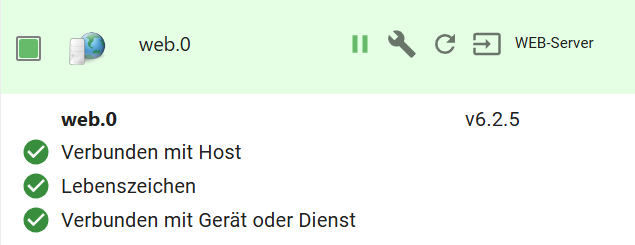
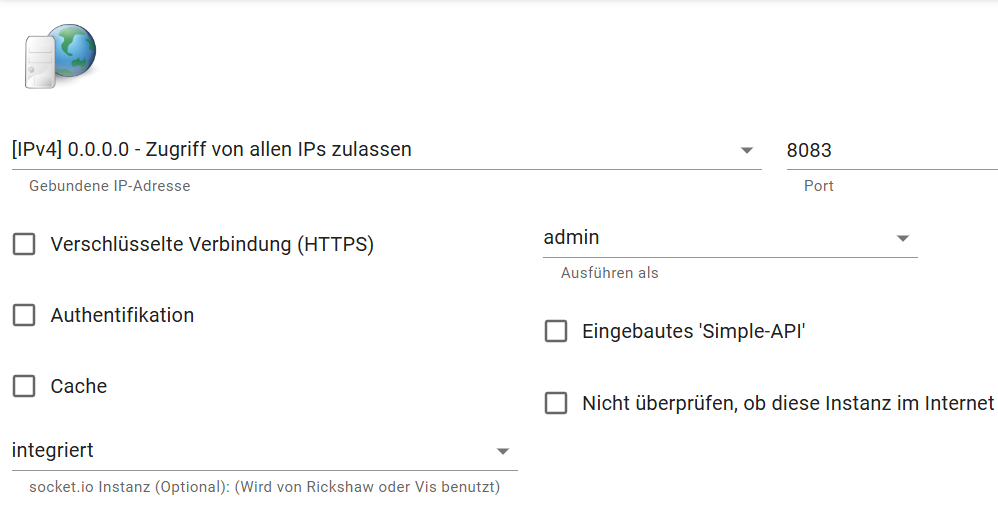
@marcelinho sagte in IoBroker Web nicht mehr unter :8081 verfügbar:
jetzt läuft es anscheinend
und der admin?
-
@marcelinho sagte in IoBroker Web nicht mehr unter :8081 verfügbar:
jetzt läuft es anscheinend
und der admin?
======================= SUMMARY ======================= v.2024-05-22 Static hostname: raspberrypi Icon name: computer Operating System: Debian GNU/Linux 12 (bookworm) Kernel: Linux 6.6.28+rpt-rpi-v8 Architecture: arm64 Installation: native Kernel: aarch64 Userland: 64 bit Timezone: Europe/Berlin (CEST, +0200) User-ID: 1000 Display-Server: false Boot Target: multi-user.target Pending OS-Updates: 0 Pending iob updates: 0 Nodejs-Installation: /usr/bin/nodejs v20.15.0 /usr/bin/node v20.15.0 /usr/bin/npm 10.7.0 /usr/bin/npx 10.7.0 /usr/bin/corepack 0.28.1 Recommended versions are nodejs 18.20.3 and npm 10.7.0 Your nodejs installation is correct MEMORY: total used free shared buff/cache available Mem: 4.0G 2.4G 208M 147K 1.5G 1.6G Swap: 209M 4.7M 204M Total: 4.2G 2.4G 413M Active iob-Instances: 16 Active repo(s): stable ioBroker Core: js-controller 5.0.19 admin 6.17.14 ioBroker Status: iobroker is running on this host. Objects type: jsonl States type: jsonl Status admin and web instance: + system.adapter.admin.0 : admin : raspberrypi - enabled, port: 8081, bind: 0.0.0.0, run as: admin system.adapter.web.0 : web : raspberrypi - enabled, port: 8082, bind: 0.0.0.0, run as: admin Objects: 16130 States: 14429 Size of iob-Database: 32M /opt/iobroker/iobroker-data/objects.jsonl 11M /opt/iobroker/iobroker-data/states.jsonl =================== END OF SUMMARY ==================== -
======================= SUMMARY ======================= v.2024-05-22 Static hostname: raspberrypi Icon name: computer Operating System: Debian GNU/Linux 12 (bookworm) Kernel: Linux 6.6.28+rpt-rpi-v8 Architecture: arm64 Installation: native Kernel: aarch64 Userland: 64 bit Timezone: Europe/Berlin (CEST, +0200) User-ID: 1000 Display-Server: false Boot Target: multi-user.target Pending OS-Updates: 0 Pending iob updates: 0 Nodejs-Installation: /usr/bin/nodejs v20.15.0 /usr/bin/node v20.15.0 /usr/bin/npm 10.7.0 /usr/bin/npx 10.7.0 /usr/bin/corepack 0.28.1 Recommended versions are nodejs 18.20.3 and npm 10.7.0 Your nodejs installation is correct MEMORY: total used free shared buff/cache available Mem: 4.0G 2.4G 208M 147K 1.5G 1.6G Swap: 209M 4.7M 204M Total: 4.2G 2.4G 413M Active iob-Instances: 16 Active repo(s): stable ioBroker Core: js-controller 5.0.19 admin 6.17.14 ioBroker Status: iobroker is running on this host. Objects type: jsonl States type: jsonl Status admin and web instance: + system.adapter.admin.0 : admin : raspberrypi - enabled, port: 8081, bind: 0.0.0.0, run as: admin system.adapter.web.0 : web : raspberrypi - enabled, port: 8082, bind: 0.0.0.0, run as: admin Objects: 16130 States: 14429 Size of iob-Database: 32M /opt/iobroker/iobroker-data/objects.jsonl 11M /opt/iobroker/iobroker-data/states.jsonl =================== END OF SUMMARY ====================@marcelinho sagte in IoBroker Web nicht mehr unter :8081 verfügbar:
Status admin and web instance:
web noch auf 8082 und läuft nicht
admin auf 8081umd läuft.Hast du 2 Installationen parallel laufen?
-
@marcelinho sagte in IoBroker Web nicht mehr unter :8081 verfügbar:
Status admin and web instance:
web noch auf 8082 und läuft nicht
admin auf 8081umd läuft.Hast du 2 Installationen parallel laufen?
-
@homoran eigentlich nicht - zumindest nicht das ich wüsste
@marcelinho sagte in IoBroker Web nicht mehr unter :8081 verfügbar:
@homoran eigentlich nicht - zumindest nicht das ich wüsste
die Daten in iob diag passen nicht zu deinen Aussagen und Screenshots
-
@marcelinho sagte in IoBroker Web nicht mehr unter :8081 verfügbar:
@homoran eigentlich nicht - zumindest nicht das ich wüsste
die Daten in iob diag passen nicht zu deinen Aussagen und Screenshots
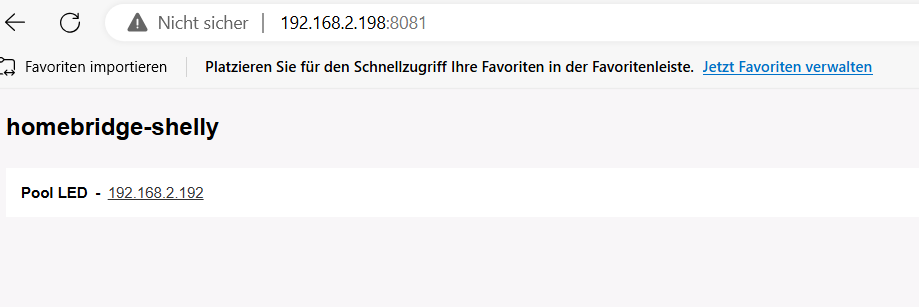
@homoran auf die Weboberfläche bin ich immer mit :8081 gekommen jetzt komme ich mit :8082 drauf seit ich den oben erwähnten Adapter installiert habe auf der :8082 bin ich in IoBroker Oberfläche und auf der :8082 kommt das:
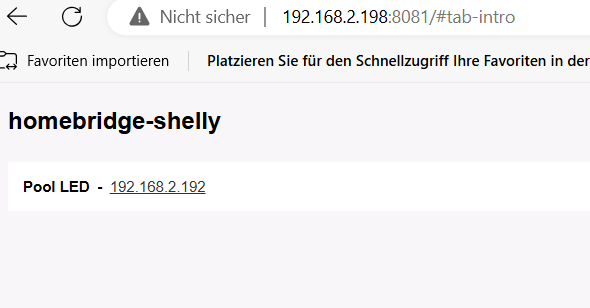 was eigentlich vorher die Weboberfläche von IoBroker war deswegen bin ich verwirrt.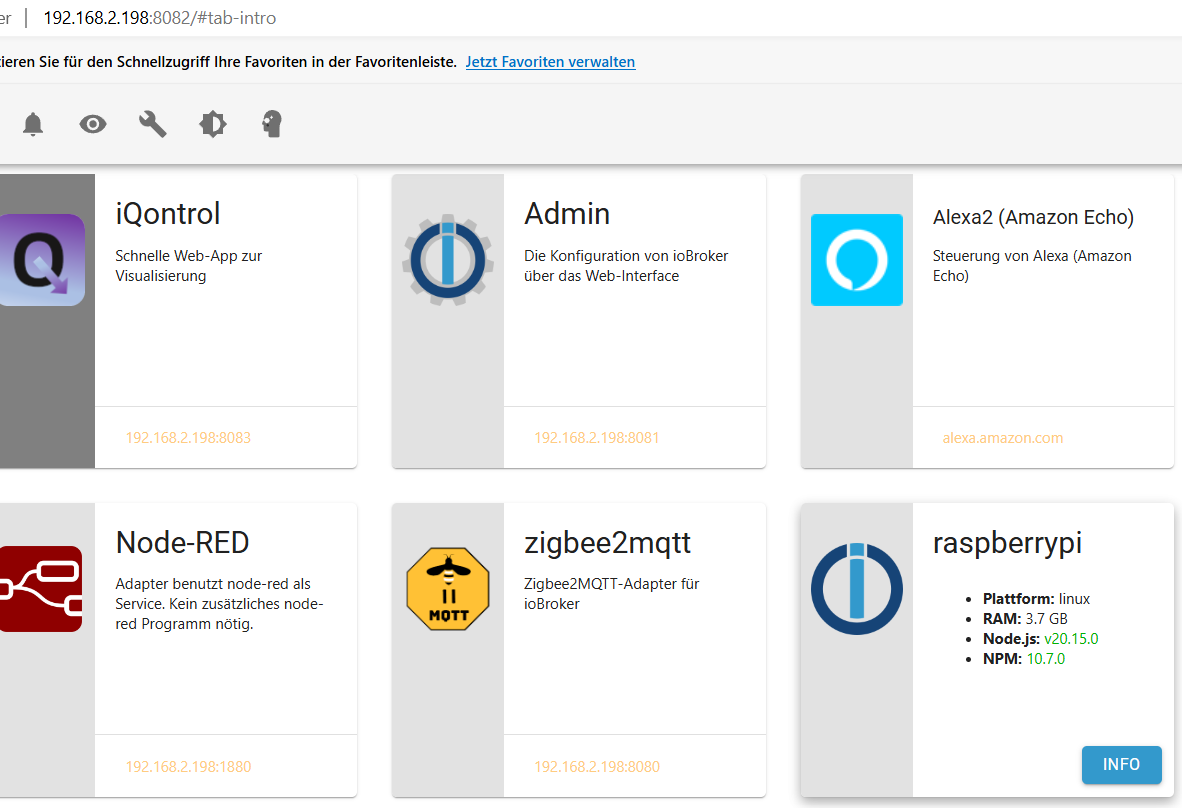
-
@homoran auf die Weboberfläche bin ich immer mit :8081 gekommen jetzt komme ich mit :8082 drauf seit ich den oben erwähnten Adapter installiert habe auf der :8082 bin ich in IoBroker Oberfläche und auf der :8082 kommt das:
was eigentlich vorher die Weboberfläche von IoBroker war deswegen bin ich verwirrt. @marcelinho sagte in IoBroker Web nicht mehr unter :8081 verfügbar:
was eigentlich vorher die Weboberfläche von IoBroker war deswegen bin ich verwirrt.
das passt ja zu
@homoran sagte in IoBroker Web nicht mehr unter :8081 verfügbar:
@marcelinho sagte in IoBroker Web nicht mehr unter :8081 verfügbar:
tcp6 0 0 :::8081 :::* LISTEN 112 98498 15185/homebridge: @
tc8081 für den admin wird hier bereits genutzt
der web Adapter läuft nicht weil 8082 hier
@marcelinho sagte in IoBroker Web nicht mehr unter :8081 verfügbar:
tcp6 0 0 :::8082 :::* LISTEN 1001 109851 31571/io.admin.0
für den Admin verwendet wird, obwohl er hier
@marcelinho sagte in IoBroker Web nicht mehr unter :8081 verfügbar:
+ system.adapter.admin.0 : admin : raspberrypi - enabled, port: 8081, bind: 0.0.0.0, run as: admin
+mit Port 8081 konfiguriert ist
-
@marcelinho sagte in IoBroker Web nicht mehr unter :8081 verfügbar:
was eigentlich vorher die Weboberfläche von IoBroker war deswegen bin ich verwirrt.
das passt ja zu
@homoran sagte in IoBroker Web nicht mehr unter :8081 verfügbar:
@marcelinho sagte in IoBroker Web nicht mehr unter :8081 verfügbar:
tcp6 0 0 :::8081 :::* LISTEN 112 98498 15185/homebridge: @
tc8081 für den admin wird hier bereits genutzt
der web Adapter läuft nicht weil 8082 hier
@marcelinho sagte in IoBroker Web nicht mehr unter :8081 verfügbar:
tcp6 0 0 :::8082 :::* LISTEN 1001 109851 31571/io.admin.0
für den Admin verwendet wird, obwohl er hier
@marcelinho sagte in IoBroker Web nicht mehr unter :8081 verfügbar:
+ system.adapter.admin.0 : admin : raspberrypi - enabled, port: 8081, bind: 0.0.0.0, run as: admin
+mit Port 8081 konfiguriert ist
@homoran und wie kann ich es wieder ändern? ich bin verwirrt sorry für die Umstände.
-
@homoran auf die Weboberfläche bin ich immer mit :8081 gekommen jetzt komme ich mit :8082 drauf seit ich den oben erwähnten Adapter installiert habe auf der :8082 bin ich in IoBroker Oberfläche und auf der :8082 kommt das:
was eigentlich vorher die Weboberfläche von IoBroker war deswegen bin ich verwirrt. @marcelinho sagte in IoBroker Web nicht mehr unter :8081 verfügbar:
jetzt komme ich mit :8082 drauf seit ich den oben erwähnten Adapter installiert habe
das sollte eigentlich nicht der Auslöser sein, aber vielleicht sieht sich das @skb mal an.
Das Durcheinander mit den Ports hängt eher an IPv4 vs IPv6 und der Installation weiterer Software die die selben Ports nutzt.
kein Support per PN! - Fragen im Forum stellen - Benutzt das Voting rechts unten im Beitrag wenn er euch geholfen hat.
Das Forum freut sich über eine Spende. Benutzt dazu den Spendenbutton oben rechts. Danke!
der Installationsfixer: curl -fsL https://iobroker.net/fix.sh | bash - -
@marcelinho sagte in IoBroker Web nicht mehr unter :8081 verfügbar:
jetzt komme ich mit :8082 drauf seit ich den oben erwähnten Adapter installiert habe
das sollte eigentlich nicht der Auslöser sein, aber vielleicht sieht sich das @skb mal an.
Das Durcheinander mit den Ports hängt eher an IPv4 vs IPv6 und der Installation weiterer Software die die selben Ports nutzt.
@homoran danke für deine bisherige Hilfe und Mühe
-
@homoran und wie kann ich es wieder ändern? ich bin verwirrt sorry für die Umstände.
@marcelinho sagte in IoBroker Web nicht mehr unter :8081 verfügbar:
wie kann ich es wieder ändern?
keine Ahnung.
Ich weiss zwar schon einiges aber immer noch viel zu wenig.Ich kann hier nur die Fakten zusammentragen um zu zeigen wo es klemmen wird.
-
@marcelinho sagte in IoBroker Web nicht mehr unter :8081 verfügbar:
wie kann ich es wieder ändern?
keine Ahnung.
Ich weiss zwar schon einiges aber immer noch viel zu wenig.Ich kann hier nur die Fakten zusammentragen um zu zeigen wo es klemmen wird.
@homoran aber anscheinend geht es wieder bis auf dass ich jetzt auf :8082 aufrufen muss... Vorher war zb iqontrol nicht erreichbar aber jetzt geht es wieder...web adapter ist grün... komisch irgendwie
-
@homoran aber anscheinend geht es wieder bis auf dass ich jetzt auf :8082 aufrufen muss... Vorher war zb iqontrol nicht erreichbar aber jetzt geht es wieder...web adapter ist grün... komisch irgendwie
@marcelinho sagte in IoBroker Web nicht mehr unter :8081 verfügbar:
aber anscheinend geht es wieder
eher geht es nur scheinbar !!!
Ich hab keine Ahnung warum es so aussieht, als ob es geht.
Laut iob diag sind die Standardports konfiguriert, aber von anderen Anwendungen genutzt. -
@homoran aber anscheinend geht es wieder bis auf dass ich jetzt auf :8082 aufrufen muss... Vorher war zb iqontrol nicht erreichbar aber jetzt geht es wieder...web adapter ist grün... komisch irgendwie
Da balgt sich der ioBroker mit dem hier um die Ports:
tcp6 0 0 :::8081 :::* LISTEN 112 98498 15185/homebridge: @ -
@marcelinho sagte in IoBroker Web nicht mehr unter :8081 verfügbar:
aber anscheinend geht es wieder
eher geht es nur scheinbar !!!
Ich hab keine Ahnung warum es so aussieht, als ob es geht.
Laut iob diag sind die Standardports konfiguriert, aber von anderen Anwendungen genutzt.@homoran das ist auch komisch
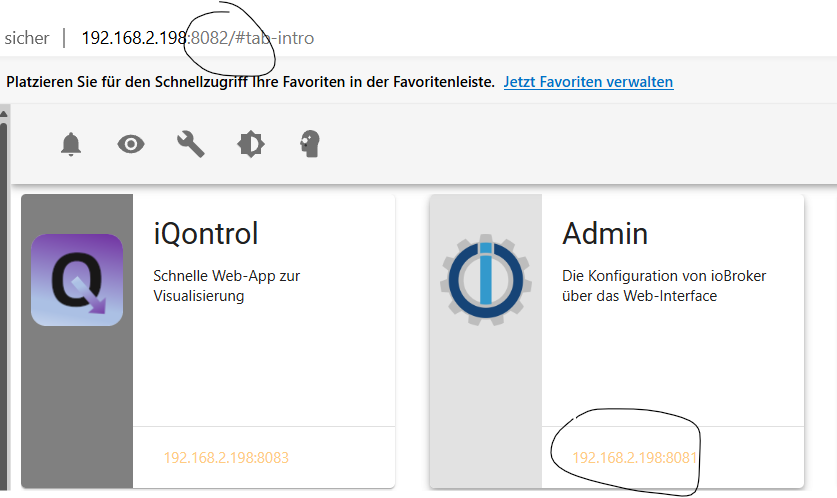


Hey! Du scheinst an dieser Unterhaltung interessiert zu sein, hast aber noch kein Konto.
Hast du es satt, bei jedem Besuch durch die gleichen Beiträge zu scrollen? Wenn du dich für ein Konto anmeldest, kommst du immer genau dorthin zurück, wo du zuvor warst, und kannst dich über neue Antworten benachrichtigen lassen (entweder per E-Mail oder Push-Benachrichtigung). Du kannst auch Lesezeichen speichern und Beiträge positiv bewerten, um anderen Community-Mitgliedern deine Wertschätzung zu zeigen.
Mit deinem Input könnte dieser Beitrag noch besser werden 💗
Registrieren Anmelden250
Online33.0k
Benutzende83.7k
Themen1.3m
Beiträge