




Sonos Adapter probleme
-
Hallo,
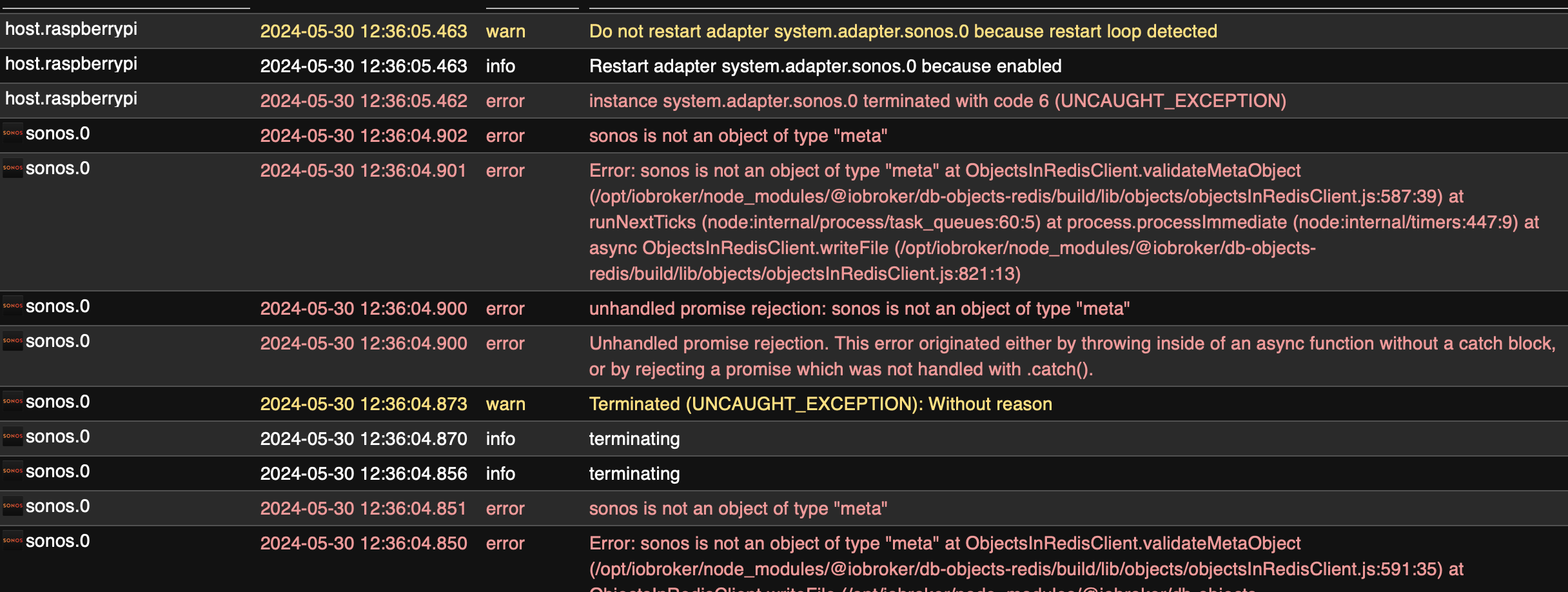
ich habe seit ein paar Tagen Probleme mit meinem Sonos Adapter und weis nicht wie ich das Problem lösen soll. viellecht hat hier jemand eine Idee was hinter dem Fehler steckt.
@dominik_neu Hänge mich hier mal ran. Habe den Sonos Adapter neu installiert da ich immer viele Warnungen/Abstürze von dem Adapter erhalten habe. Jetzt geht aber leider gar nichts mehr und die Instanz geht auf rot.
Habe auch die Meldung "Restart loop detected". Ein iob stop und iob fix haben nichts gebracht.2024-06-02 11:45:05.138 - warn: admin.0 (1193178) sonos has an invalid jsonConfig: [{"instancePath":"/items/devicesTab/items/_sendto","schemaPath":"#/definitions/sendToProps/additionalProperties","keyword":"additionalProperties","params":{"additionalProperty":"timeout"},"message":"must NOT have additional properties"},{"instancePath":"/items/devicesTab","schemaPath":"#/properties/items/patternProperties/%5E.%2B/allOf/8/if","keyword":"if","params":{"failingKeyword":"then"},"message":"must match \"then\" schema"},{"instancePath":"","schemaPath":"#/if","keyword":"if","params":{"failingKeyword":"then"},"message":"must match \"then\" schema"}] 2024-06-02 11:48:06.599 - info: host.ioBroker2 instance system.adapter.sonos.0 started with pid 1196483 2024-06-02 11:48:09.964 - info: sonos.0 (1196483) starting. Version 3.0.0 in /opt/iobroker/node_modules/iobroker.sonos, node: v18.20.2, js-controller: 5.0.19 2024-06-02 11:48:11.252 - error: sonos.0 (1196483) Unhandled promise rejection. This error originated either by throwing inside of an async function without a catch block, or by rejecting a promise which was not handled with .catch(). 2024-06-02 11:48:11.255 - error: sonos.0 (1196483) unhandled promise rejection: Cannot read properties of undefined (reading 'id') 2024-06-02 11:48:11.259 - error: sonos.0 (1196483) TypeError: Cannot read properties of undefined (reading 'id') at syncConfig (/opt/iobroker/node_modules/iobroker.sonos/main.js:2029:71) 2024-06-02 11:48:11.261 - error: sonos.0 (1196483) Cannot read properties of undefined (reading 'id') 2024-06-02 11:48:11.276 - info: sonos.0 (1196483) terminating 2024-06-02 11:48:11.279 - info: sonos.0 (1196483) terminating 2024-06-02 11:48:11.281 - warn: sonos.0 (1196483) Terminated (UNCAUGHT_EXCEPTION): Without reason 2024-06-02 11:48:11.787 - info: sonos.0 (1196483) terminating 2024-06-02 11:48:12.037 - error: host.ioBroker2 instance system.adapter.sonos.0 terminated with code 6 (UNCAUGHT_EXCEPTION) 2024-06-02 11:48:12.038 - info: host.ioBroker2 Restart adapter system.adapter.sonos.0 because enabled 2024-06-02 11:48:34.343 - info: connector-local-control.0 (1194295) receive server message from 192.168.178.56: 32100: {"msgType":"Heartbeat","mac":"f008d179f228","deviceType":"02000001","token":"37412C478E0FBEAB","data":{"currentState":1,"numberOfDevices":1,"RSSI":-43}} 2024-06-02 11:48:34.345 - info: connector-local-control.0 (1194295) Heartbeat 2024-06-02 11:48:42.260 - info: host.ioBroker2 instance system.adapter.sonos.0 started with pid 1196660 2024-06-02 11:48:45.467 - info: sonos.0 (1196660) starting. Version 3.0.0 in /opt/iobroker/node_modules/iobroker.sonos, node: v18.20.2, js-controller: 5.0.19 2024-06-02 11:48:46.671 - error: sonos.0 (1196660) Unhandled promise rejection. This error originated either by throwing inside of an async function without a catch block, or by rejecting a promise which was not handled with .catch(). 2024-06-02 11:48:46.672 - error: sonos.0 (1196660) unhandled promise rejection: Cannot read properties of undefined (reading 'id') 2024-06-02 11:48:46.675 - error: sonos.0 (1196660) TypeError: Cannot read properties of undefined (reading 'id') at syncConfig (/opt/iobroker/node_modules/iobroker.sonos/main.js:2029:71) 2024-06-02 11:48:46.677 - error: sonos.0 (1196660) Cannot read properties of undefined (reading 'id') 2024-06-02 11:48:46.692 - info: sonos.0 (1196660) terminating 2024-06-02 11:48:46.693 - info: sonos.0 (1196660) terminating 2024-06-02 11:48:46.695 - warn: sonos.0 (1196660) Terminated (UNCAUGHT_EXCEPTION): Without reason 2024-06-02 11:48:47.199 - info: sonos.0 (1196660) terminating 2024-06-02 11:48:47.402 - error: host.ioBroker2 instance system.adapter.sonos.0 terminated with code 6 (UNCAUGHT_EXCEPTION) 2024-06-02 11:48:47.402 - info: host.ioBroker2 Restart adapter system.adapter.sonos.0 because enabled 2024-06-02 11:49:17.682 - info: host.ioBroker2 instance system.adapter.sonos.0 started with pid 1196804 2024-06-02 11:49:20.994 - info: sonos.0 (1196804) starting. Version 3.0.0 in /opt/iobroker/node_modules/iobroker.sonos, node: v18.20.2, js-controller: 5.0.19 2024-06-02 11:49:22.232 - error: sonos.0 (1196804) Unhandled promise rejection. This error originated either by throwing inside of an async function without a catch block, or by rejecting a promise which was not handled with .catch(). 2024-06-02 11:49:22.234 - error: sonos.0 (1196804) unhandled promise rejection: Cannot read properties of undefined (reading 'id') 2024-06-02 11:49:22.238 - error: sonos.0 (1196804) TypeError: Cannot read properties of undefined (reading 'id') at syncConfig (/opt/iobroker/node_modules/iobroker.sonos/main.js:2029:71) 2024-06-02 11:49:22.240 - error: sonos.0 (1196804) Cannot read properties of undefined (reading 'id') 2024-06-02 11:49:22.254 - info: sonos.0 (1196804) terminating 2024-06-02 11:49:22.256 - info: sonos.0 (1196804) terminating 2024-06-02 11:49:22.259 - warn: sonos.0 (1196804) Terminated (UNCAUGHT_EXCEPTION): Without reason 2024-06-02 11:49:22.764 - info: sonos.0 (1196804) terminating 2024-06-02 11:49:23.034 - error: host.ioBroker2 instance system.adapter.sonos.0 terminated with code 6 (UNCAUGHT_EXCEPTION) 2024-06-02 11:49:23.035 - info: host.ioBroker2 Restart adapter system.adapter.sonos.0 because enabled 2024-06-02 11:49:23.035 - warn: host.ioBroker2 Do not restart adapter system.adapter.sonos.0 because restart loop detected``` -
@dominik_neu Hänge mich hier mal ran. Habe den Sonos Adapter neu installiert da ich immer viele Warnungen/Abstürze von dem Adapter erhalten habe. Jetzt geht aber leider gar nichts mehr und die Instanz geht auf rot.
Habe auch die Meldung "Restart loop detected". Ein iob stop und iob fix haben nichts gebracht.2024-06-02 11:45:05.138 - warn: admin.0 (1193178) sonos has an invalid jsonConfig: [{"instancePath":"/items/devicesTab/items/_sendto","schemaPath":"#/definitions/sendToProps/additionalProperties","keyword":"additionalProperties","params":{"additionalProperty":"timeout"},"message":"must NOT have additional properties"},{"instancePath":"/items/devicesTab","schemaPath":"#/properties/items/patternProperties/%5E.%2B/allOf/8/if","keyword":"if","params":{"failingKeyword":"then"},"message":"must match \"then\" schema"},{"instancePath":"","schemaPath":"#/if","keyword":"if","params":{"failingKeyword":"then"},"message":"must match \"then\" schema"}] 2024-06-02 11:48:06.599 - info: host.ioBroker2 instance system.adapter.sonos.0 started with pid 1196483 2024-06-02 11:48:09.964 - info: sonos.0 (1196483) starting. Version 3.0.0 in /opt/iobroker/node_modules/iobroker.sonos, node: v18.20.2, js-controller: 5.0.19 2024-06-02 11:48:11.252 - error: sonos.0 (1196483) Unhandled promise rejection. This error originated either by throwing inside of an async function without a catch block, or by rejecting a promise which was not handled with .catch(). 2024-06-02 11:48:11.255 - error: sonos.0 (1196483) unhandled promise rejection: Cannot read properties of undefined (reading 'id') 2024-06-02 11:48:11.259 - error: sonos.0 (1196483) TypeError: Cannot read properties of undefined (reading 'id') at syncConfig (/opt/iobroker/node_modules/iobroker.sonos/main.js:2029:71) 2024-06-02 11:48:11.261 - error: sonos.0 (1196483) Cannot read properties of undefined (reading 'id') 2024-06-02 11:48:11.276 - info: sonos.0 (1196483) terminating 2024-06-02 11:48:11.279 - info: sonos.0 (1196483) terminating 2024-06-02 11:48:11.281 - warn: sonos.0 (1196483) Terminated (UNCAUGHT_EXCEPTION): Without reason 2024-06-02 11:48:11.787 - info: sonos.0 (1196483) terminating 2024-06-02 11:48:12.037 - error: host.ioBroker2 instance system.adapter.sonos.0 terminated with code 6 (UNCAUGHT_EXCEPTION) 2024-06-02 11:48:12.038 - info: host.ioBroker2 Restart adapter system.adapter.sonos.0 because enabled 2024-06-02 11:48:34.343 - info: connector-local-control.0 (1194295) receive server message from 192.168.178.56: 32100: {"msgType":"Heartbeat","mac":"f008d179f228","deviceType":"02000001","token":"37412C478E0FBEAB","data":{"currentState":1,"numberOfDevices":1,"RSSI":-43}} 2024-06-02 11:48:34.345 - info: connector-local-control.0 (1194295) Heartbeat 2024-06-02 11:48:42.260 - info: host.ioBroker2 instance system.adapter.sonos.0 started with pid 1196660 2024-06-02 11:48:45.467 - info: sonos.0 (1196660) starting. Version 3.0.0 in /opt/iobroker/node_modules/iobroker.sonos, node: v18.20.2, js-controller: 5.0.19 2024-06-02 11:48:46.671 - error: sonos.0 (1196660) Unhandled promise rejection. This error originated either by throwing inside of an async function without a catch block, or by rejecting a promise which was not handled with .catch(). 2024-06-02 11:48:46.672 - error: sonos.0 (1196660) unhandled promise rejection: Cannot read properties of undefined (reading 'id') 2024-06-02 11:48:46.675 - error: sonos.0 (1196660) TypeError: Cannot read properties of undefined (reading 'id') at syncConfig (/opt/iobroker/node_modules/iobroker.sonos/main.js:2029:71) 2024-06-02 11:48:46.677 - error: sonos.0 (1196660) Cannot read properties of undefined (reading 'id') 2024-06-02 11:48:46.692 - info: sonos.0 (1196660) terminating 2024-06-02 11:48:46.693 - info: sonos.0 (1196660) terminating 2024-06-02 11:48:46.695 - warn: sonos.0 (1196660) Terminated (UNCAUGHT_EXCEPTION): Without reason 2024-06-02 11:48:47.199 - info: sonos.0 (1196660) terminating 2024-06-02 11:48:47.402 - error: host.ioBroker2 instance system.adapter.sonos.0 terminated with code 6 (UNCAUGHT_EXCEPTION) 2024-06-02 11:48:47.402 - info: host.ioBroker2 Restart adapter system.adapter.sonos.0 because enabled 2024-06-02 11:49:17.682 - info: host.ioBroker2 instance system.adapter.sonos.0 started with pid 1196804 2024-06-02 11:49:20.994 - info: sonos.0 (1196804) starting. Version 3.0.0 in /opt/iobroker/node_modules/iobroker.sonos, node: v18.20.2, js-controller: 5.0.19 2024-06-02 11:49:22.232 - error: sonos.0 (1196804) Unhandled promise rejection. This error originated either by throwing inside of an async function without a catch block, or by rejecting a promise which was not handled with .catch(). 2024-06-02 11:49:22.234 - error: sonos.0 (1196804) unhandled promise rejection: Cannot read properties of undefined (reading 'id') 2024-06-02 11:49:22.238 - error: sonos.0 (1196804) TypeError: Cannot read properties of undefined (reading 'id') at syncConfig (/opt/iobroker/node_modules/iobroker.sonos/main.js:2029:71) 2024-06-02 11:49:22.240 - error: sonos.0 (1196804) Cannot read properties of undefined (reading 'id') 2024-06-02 11:49:22.254 - info: sonos.0 (1196804) terminating 2024-06-02 11:49:22.256 - info: sonos.0 (1196804) terminating 2024-06-02 11:49:22.259 - warn: sonos.0 (1196804) Terminated (UNCAUGHT_EXCEPTION): Without reason 2024-06-02 11:49:22.764 - info: sonos.0 (1196804) terminating 2024-06-02 11:49:23.034 - error: host.ioBroker2 instance system.adapter.sonos.0 terminated with code 6 (UNCAUGHT_EXCEPTION) 2024-06-02 11:49:23.035 - info: host.ioBroker2 Restart adapter system.adapter.sonos.0 because enabled 2024-06-02 11:49:23.035 - warn: host.ioBroker2 Do not restart adapter system.adapter.sonos.0 because restart loop detected```Hier startet der Adapter zwar, meckert aber einiges an:
2024-06-02 12:05:36.075  - warn: admin.0 (817993) sonos has an invalid jsonConfig: [{"instancePath":"/items/devicesTab/items/_sendto","schemaPath":"#/definitions/sendToProps/additionalProperties","keyword":"additionalProperties","params":{"additionalProperty":"timeout"},"message":"must NOT have additional properties"},{"instancePath":"/items/devicesTab","schemaPath":"#/properties/items/patternProperties/%5E.%2B/allOf/8/if","keyword":"if","params":{"failingKeyword":"then"},"message":"must match \"then\" schema"},{"instancePath":"","schemaPath":"#/if","keyword":"if","params":{"failingKeyword":"then"},"message":"must match \"then\" schema"}]
2024-06-02 12:05:36.587  - info: sonos.0 (829438) starting. Version 3.0.0 in /opt/iobroker/node_modules/iobroker.sonos, node: v20.14.0, js-controller: 6.0.1-alpha.0-20240529-9dbeeb628
2024-06-02 12:05:36.691  - info: sonos.0 (829438) Method "createDevice" is deprecated and will be removed in js-controller 7, use "extendObject/setObjectNotExists" instead
2024-06-02 12:05:36.793  - info: sonos.0 (829438) Method "createChannel" is deprecated and will be removed in js-controller 7, use "extendObject/setObjectNotExists" instead
2024-06-02 12:05:36.803  - info: sonos.0 (829438) Method "createState" is deprecated and will be removed in js-controller 7, use "extendObject/setObjectNotExists" instead
2024-06-02 12:05:36.827  - info: sonos.0 (829438) Method "createState" is deprecated and will be removed in js-controller 7, use "extendObject/setObjectNotExists" instead
2024-06-02 12:05:36.847  - info: sonos.0 (829438) Method "createState" is deprecated and will be removed in js-controller 7, use "extendObject/setObjectNotExists" instead
2024-06-02 12:05:36.865  - info: sonos.0 (829438) Method "createState" is deprecated and will be removed in js-controller 7, use "extendObject/setObjectNotExists" instead
2024-06-02 12:05:36.884  - info: sonos.0 (829438) Method "createState" is deprecated and will be removed in js-controller 7, use "extendObject/setObjectNotExists" instead
2024-06-02 12:05:36.906  - info: sonos.0 (829438) Method "createState" is deprecated and will be removed in js-controller 7, use "extendObject/setObjectNotExists" instead
Das ganze mit nodejs@20.
Linux-Werkzeugkasten:
https://forum.iobroker.net/topic/42952/der-kleine-iobroker-linux-werkzeugkasten
NodeJS Fixer Skript:
https://forum.iobroker.net/topic/68035/iob-node-fix-skript
iob_diag: curl -sLf -o diag.sh https://iobroker.net/diag.sh && bash diag.sh -
Hallo,
ich habe seit ein paar Tagen Probleme mit meinem Sonos Adapter und weis nicht wie ich das Problem lösen soll. viellecht hat hier jemand eine Idee was hinter dem Fehler steckt.@dominik_neu und, Problem gelöst? Keine Ahnung ob der Entwickler des Sonos Adapters das hier im Forum mitliest.
-
@dominik_neu und, Problem gelöst? Keine Ahnung ob der Entwickler des Sonos Adapters das hier im Forum mitliest.
Ich hatte die selben Meldungen ..
Lösung: Instanz UND Adapter löschen und neu einrichten. Nur die Instanz löschen und wieder anlegen hat es nicht gebracht.
Grüße,
Martin
-
Ich hatte die selben Meldungen ..
Lösung: Instanz UND Adapter löschen und neu einrichten. Nur die Instanz löschen und wieder anlegen hat es nicht gebracht.
@mameier1234 Dann gibt es wohl eine neue Version einer Abhängigkeit, welche das Problem behebt.
Wäre sinnvoll wenn der Entwickler eine neue Version freigibt damit das Update automatisch passiert
-
Hier startet der Adapter zwar, meckert aber einiges an:
2024-06-02 12:05:36.075  - warn: admin.0 (817993) sonos has an invalid jsonConfig: [{"instancePath":"/items/devicesTab/items/_sendto","schemaPath":"#/definitions/sendToProps/additionalProperties","keyword":"additionalProperties","params":{"additionalProperty":"timeout"},"message":"must NOT have additional properties"},{"instancePath":"/items/devicesTab","schemaPath":"#/properties/items/patternProperties/%5E.%2B/allOf/8/if","keyword":"if","params":{"failingKeyword":"then"},"message":"must match \"then\" schema"},{"instancePath":"","schemaPath":"#/if","keyword":"if","params":{"failingKeyword":"then"},"message":"must match \"then\" schema"}]
2024-06-02 12:05:36.587  - info: sonos.0 (829438) starting. Version 3.0.0 in /opt/iobroker/node_modules/iobroker.sonos, node: v20.14.0, js-controller: 6.0.1-alpha.0-20240529-9dbeeb628
2024-06-02 12:05:36.691  - info: sonos.0 (829438) Method "createDevice" is deprecated and will be removed in js-controller 7, use "extendObject/setObjectNotExists" instead
2024-06-02 12:05:36.793  - info: sonos.0 (829438) Method "createChannel" is deprecated and will be removed in js-controller 7, use "extendObject/setObjectNotExists" instead
2024-06-02 12:05:36.803  - info: sonos.0 (829438) Method "createState" is deprecated and will be removed in js-controller 7, use "extendObject/setObjectNotExists" instead
2024-06-02 12:05:36.827  - info: sonos.0 (829438) Method "createState" is deprecated and will be removed in js-controller 7, use "extendObject/setObjectNotExists" instead
2024-06-02 12:05:36.847  - info: sonos.0 (829438) Method "createState" is deprecated and will be removed in js-controller 7, use "extendObject/setObjectNotExists" instead
2024-06-02 12:05:36.865  - info: sonos.0 (829438) Method "createState" is deprecated and will be removed in js-controller 7, use "extendObject/setObjectNotExists" instead
2024-06-02 12:05:36.884  - info: sonos.0 (829438) Method "createState" is deprecated and will be removed in js-controller 7, use "extendObject/setObjectNotExists" instead
2024-06-02 12:05:36.906  - info: sonos.0 (829438) Method "createState" is deprecated and will be removed in js-controller 7, use "extendObject/setObjectNotExists" instead
Das ganze mit nodejs@20.
@thomas-braun said in Sonos Adapter probleme:
Hier startet der Adapter zwar, meckert aber einiges an:
2024-06-02 12:05:36.075  - warn: admin.0 (817993) sonos has an invalid jsonConfig: [{"instancePath":"/items/devicesTab/items/_sendto","schemaPath":"#/definitions/sendToProps/additionalProperties","keyword":"additionalProperties","params":{"additionalProperty":"timeout"},"message":"must NOT have additional properties"},{"instancePath":"/items/devicesTab","schemaPath":"#/properties/items/patternProperties/%5E.%2B/allOf/8/if","keyword":"if","params":{"failingKeyword":"then"},"message":"must match \"then\" schema"},{"instancePath":"","schemaPath":"#/if","keyword":"if","params":{"failingKeyword":"then"},"message":"must match \"then\" schema"}]
2024-06-02 12:05:36.587  - info: sonos.0 (829438) starting. Version 3.0.0 in /opt/iobroker/node_modules/iobroker.sonos, node: v20.14.0, js-controller: 6.0.1-alpha.0-20240529-9dbeeb628
2024-06-02 12:05:36.691  - info: sonos.0 (829438) Method "createDevice" is deprecated and will be removed in js-controller 7, use "extendObject/setObjectNotExists" instead
2024-06-02 12:05:36.793  - info: sonos.0 (829438) Method "createChannel" is deprecated and will be removed in js-controller 7, use "extendObject/setObjectNotExists" instead
2024-06-02 12:05:36.803  - info: sonos.0 (829438) Method "createState" is deprecated and will be removed in js-controller 7, use "extendObject/setObjectNotExists" instead
2024-06-02 12:05:36.827  - info: sonos.0 (829438) Method "createState" is deprecated and will be removed in js-controller 7, use "extendObject/setObjectNotExists" instead
2024-06-02 12:05:36.847  - info: sonos.0 (829438) Method "createState" is deprecated and will be removed in js-controller 7, use "extendObject/setObjectNotExists" instead
2024-06-02 12:05:36.865  - info: sonos.0 (829438) Method "createState" is deprecated and will be removed in js-controller 7, use "extendObject/setObjectNotExists" instead
2024-06-02 12:05:36.884  - info: sonos.0 (829438) Method "createState" is deprecated and will be removed in js-controller 7, use "extendObject/setObjectNotExists" instead
2024-06-02 12:05:36.906  - info: sonos.0 (829438) Method "createState" is deprecated and will be removed in js-controller 7, use "extendObject/setObjectNotExists" instead
Das ganze mit nodejs@20.
Du hast wahrscheinlich js-controller 6 installiert. Mit js-controller 6 werden diese Methoden deprecated funktionieren aber weiter. Ergo bitte nur ein Issue im Aapzter Repo eröffnen wenn es noch nicht existiert.
Entwicklung u Betreuung: envertech-pv, hoymiles-ms, ns-client, pid, snmp Adapter;
Support Repositoryverwaltung.Wer 'nen Kaffee spendieren will: https://paypal.me
-
@thomas-braun said in Sonos Adapter probleme:
Hier startet der Adapter zwar, meckert aber einiges an:
2024-06-02 12:05:36.075  - warn: admin.0 (817993) sonos has an invalid jsonConfig: [{"instancePath":"/items/devicesTab/items/_sendto","schemaPath":"#/definitions/sendToProps/additionalProperties","keyword":"additionalProperties","params":{"additionalProperty":"timeout"},"message":"must NOT have additional properties"},{"instancePath":"/items/devicesTab","schemaPath":"#/properties/items/patternProperties/%5E.%2B/allOf/8/if","keyword":"if","params":{"failingKeyword":"then"},"message":"must match \"then\" schema"},{"instancePath":"","schemaPath":"#/if","keyword":"if","params":{"failingKeyword":"then"},"message":"must match \"then\" schema"}]
2024-06-02 12:05:36.587  - info: sonos.0 (829438) starting. Version 3.0.0 in /opt/iobroker/node_modules/iobroker.sonos, node: v20.14.0, js-controller: 6.0.1-alpha.0-20240529-9dbeeb628
2024-06-02 12:05:36.691  - info: sonos.0 (829438) Method "createDevice" is deprecated and will be removed in js-controller 7, use "extendObject/setObjectNotExists" instead
2024-06-02 12:05:36.793  - info: sonos.0 (829438) Method "createChannel" is deprecated and will be removed in js-controller 7, use "extendObject/setObjectNotExists" instead
2024-06-02 12:05:36.803  - info: sonos.0 (829438) Method "createState" is deprecated and will be removed in js-controller 7, use "extendObject/setObjectNotExists" instead
2024-06-02 12:05:36.827  - info: sonos.0 (829438) Method "createState" is deprecated and will be removed in js-controller 7, use "extendObject/setObjectNotExists" instead
2024-06-02 12:05:36.847  - info: sonos.0 (829438) Method "createState" is deprecated and will be removed in js-controller 7, use "extendObject/setObjectNotExists" instead
2024-06-02 12:05:36.865  - info: sonos.0 (829438) Method "createState" is deprecated and will be removed in js-controller 7, use "extendObject/setObjectNotExists" instead
2024-06-02 12:05:36.884  - info: sonos.0 (829438) Method "createState" is deprecated and will be removed in js-controller 7, use "extendObject/setObjectNotExists" instead
2024-06-02 12:05:36.906  - info: sonos.0 (829438) Method "createState" is deprecated and will be removed in js-controller 7, use "extendObject/setObjectNotExists" instead
Das ganze mit nodejs@20.
Du hast wahrscheinlich js-controller 6 installiert. Mit js-controller 6 werden diese Methoden deprecated funktionieren aber weiter. Ergo bitte nur ein Issue im Aapzter Repo eröffnen wenn es noch nicht existiert.
-
Ich hatte die selben Meldungen ..
Lösung: Instanz UND Adapter löschen und neu einrichten. Nur die Instanz löschen und wieder anlegen hat es nicht gebracht.
@mameier1234 DANKKEEE. Das hat bei mir jetzt auch funktioniert.

-
Hat jemand eine Idee für Docker ? Da hat Instanz & Adapter löschen bisher leider nichts gebracht :-(
docker official image - v9.1.2
admin: v6.17.14
js-controller: 5.0.19
Node.js: v18.20.3
NPM: 10.8.1Habe ich vielleicht ein Problem mit den Ports ??
sonos.0 2024-06-30 12:10:16.455 debug Process channel: sonos.0.root.192_168_178_88 sonos.0 2024-06-30 12:10:16.408 debug Process channel: sonos.0.root.192_168_178_87 sonos.0 2024-06-30 12:10:16.358 debug Process channel: sonos.0.root.192_168_178_86 sonos.0 2024-06-30 12:10:16.307 debug Process channel: sonos.0.root.192_168_178_89 sonos.0 2024-06-30 12:10:16.307 debug Channels of root: [{"type":"channel","common":{"role":"media.music","name":"Sonos Play:1 Terrasse"},"native":{"ip":"192.168.178.89"},"from":"system.adapter.sonos.0","user":"system.user.admin","ts":1719742183531,"_id":"sonos.0.root.192_168_178_89","acl":{"object":1636,"owner":"system.user.admin","ownerGroup":"system.group.administrator"}},{"type":"channel","common":{"role":"media.music","name":"Sonos AMP Badezimmer"},"native":{"ip":"192.168.178.86"},"from":"system.adapter.sonos.0","user":"system.user.admin","ts":1719742183595,"_id":"sonos.0.root.192_168_178_86","acl":{"object":1636,"owner":"system.user.admin","ownerGroup":"system.group.administrator"}},{"type":"channel","common":{"role":"media.music","name":"Sonos AMP Hobbyraum"},"native":{"ip":"192.168.178.87"},"from":"system.adapter.sonos.0","user":"system.user.admin","ts":1719742183855,"_id":"sonos.0.root.192_168_178_87","acl":{"object":1636,"owner":"system.user.admin","ownerGroup":"system.group.administrator"}},{"type":"channel","common":{"role":"media.music","name":"Sonos AMP Hobbyraum"},"native":{"ip":"192.168.178.88"},"from":"system.adapter.sonos.0","user":"system.user.admin","ts":1719742184125,"_id":"sonos.0.root.192_168_178_88","acl":{"object":1636,"owner":"system.user.admin","ownerGroup":"system.group.administrator"}}] sonos.0 2024-06-30 12:10:16.257 debug Initialize known devices: [{"type":"device","common":{"name":"root"},"native":{},"from":"system.adapter.sonos.0","user":"system.user.admin","ts":1719739575452,"_id":"sonos.0.root","acl":{"object":1636,"owner":"system.user.admin","ownerGroup":"system.group.administrator"}}] sonos.0 2024-06-30 12:10:16.164 debug Search can't be optimized because wildcard not at the end, fallback to keys!: function(doc) { if (doc.type === 'state') emit(doc._id, doc) } sonos.0 2024-06-30 12:10:16.140 info starting. Version 3.0.0 in /opt/iobroker/node_modules/iobroker.sonos, node: v18.20.3, js-controller: 5.0.19 sonos.0 2024-06-30 12:10:16.021 debug States connected to redis: 127.0.0.1:9000 sonos.0 2024-06-30 12:10:15.918 debug States create User PubSub Client sonos.0 2024-06-30 12:10:15.917 debug States create System PubSub Client sonos.0 2024-06-30 12:10:15.884 debug Redis States: Use Redis connection: 127.0.0.1:9000 sonos.0 2024-06-30 12:10:15.826 debug Objects connected to redis: 127.0.0.1:9001 sonos.0 2024-06-30 12:10:15.822 debug Objects client initialize lua scripts sonos.0 2024-06-30 12:10:15.722 debug Objects create User PubSub Client sonos.0 2024-06-30 12:10:15.722 debug Objects create System PubSub Client sonos.0 2024-06-30 12:10:15.720 debug Objects client ready ... initialize now sonos.0 2024-06-30 12:10:15.671 debug Redis Objects: Use Redis connection: 127.0.0.1:9001 -
Hat jemand eine Idee für Docker ? Da hat Instanz & Adapter löschen bisher leider nichts gebracht :-(
docker official image - v9.1.2
admin: v6.17.14
js-controller: 5.0.19
Node.js: v18.20.3
NPM: 10.8.1Habe ich vielleicht ein Problem mit den Ports ??
sonos.0 2024-06-30 12:10:16.455 debug Process channel: sonos.0.root.192_168_178_88 sonos.0 2024-06-30 12:10:16.408 debug Process channel: sonos.0.root.192_168_178_87 sonos.0 2024-06-30 12:10:16.358 debug Process channel: sonos.0.root.192_168_178_86 sonos.0 2024-06-30 12:10:16.307 debug Process channel: sonos.0.root.192_168_178_89 sonos.0 2024-06-30 12:10:16.307 debug Channels of root: [{"type":"channel","common":{"role":"media.music","name":"Sonos Play:1 Terrasse"},"native":{"ip":"192.168.178.89"},"from":"system.adapter.sonos.0","user":"system.user.admin","ts":1719742183531,"_id":"sonos.0.root.192_168_178_89","acl":{"object":1636,"owner":"system.user.admin","ownerGroup":"system.group.administrator"}},{"type":"channel","common":{"role":"media.music","name":"Sonos AMP Badezimmer"},"native":{"ip":"192.168.178.86"},"from":"system.adapter.sonos.0","user":"system.user.admin","ts":1719742183595,"_id":"sonos.0.root.192_168_178_86","acl":{"object":1636,"owner":"system.user.admin","ownerGroup":"system.group.administrator"}},{"type":"channel","common":{"role":"media.music","name":"Sonos AMP Hobbyraum"},"native":{"ip":"192.168.178.87"},"from":"system.adapter.sonos.0","user":"system.user.admin","ts":1719742183855,"_id":"sonos.0.root.192_168_178_87","acl":{"object":1636,"owner":"system.user.admin","ownerGroup":"system.group.administrator"}},{"type":"channel","common":{"role":"media.music","name":"Sonos AMP Hobbyraum"},"native":{"ip":"192.168.178.88"},"from":"system.adapter.sonos.0","user":"system.user.admin","ts":1719742184125,"_id":"sonos.0.root.192_168_178_88","acl":{"object":1636,"owner":"system.user.admin","ownerGroup":"system.group.administrator"}}] sonos.0 2024-06-30 12:10:16.257 debug Initialize known devices: [{"type":"device","common":{"name":"root"},"native":{},"from":"system.adapter.sonos.0","user":"system.user.admin","ts":1719739575452,"_id":"sonos.0.root","acl":{"object":1636,"owner":"system.user.admin","ownerGroup":"system.group.administrator"}}] sonos.0 2024-06-30 12:10:16.164 debug Search can't be optimized because wildcard not at the end, fallback to keys!: function(doc) { if (doc.type === 'state') emit(doc._id, doc) } sonos.0 2024-06-30 12:10:16.140 info starting. Version 3.0.0 in /opt/iobroker/node_modules/iobroker.sonos, node: v18.20.3, js-controller: 5.0.19 sonos.0 2024-06-30 12:10:16.021 debug States connected to redis: 127.0.0.1:9000 sonos.0 2024-06-30 12:10:15.918 debug States create User PubSub Client sonos.0 2024-06-30 12:10:15.917 debug States create System PubSub Client sonos.0 2024-06-30 12:10:15.884 debug Redis States: Use Redis connection: 127.0.0.1:9000 sonos.0 2024-06-30 12:10:15.826 debug Objects connected to redis: 127.0.0.1:9001 sonos.0 2024-06-30 12:10:15.822 debug Objects client initialize lua scripts sonos.0 2024-06-30 12:10:15.722 debug Objects create User PubSub Client sonos.0 2024-06-30 12:10:15.722 debug Objects create System PubSub Client sonos.0 2024-06-30 12:10:15.720 debug Objects client ready ... initialize now sonos.0 2024-06-30 12:10:15.671 debug Redis Objects: Use Redis connection: 127.0.0.1:9001tatsächlich .... ein Problem mit den Ports ..... :-)
-
tatsächlich .... ein Problem mit den Ports ..... :-)
@steffensammet Welche Ports werden denn benötigt? Muss ich die explizit freigeben?
Danke für eine kurze Info.. :) -
@steffensammet Welche Ports werden denn benötigt? Muss ich die explizit freigeben?
Danke für eine kurze Info.. :)laut meinem Log war es 9000 und 9001;
in der Realität habe ich den Container aber von Host zu einer Bridge umgezogen und hatte somit alle Ports verfügbar.Ich hoffe dies hilft dir weiter.
Es halt komisch ist, bei Home Assistant funktioniert es "out-of-the-box" ... :-( -
laut meinem Log war es 9000 und 9001;
in der Realität habe ich den Container aber von Host zu einer Bridge umgezogen und hatte somit alle Ports verfügbar.Ich hoffe dies hilft dir weiter.
Es halt komisch ist, bei Home Assistant funktioniert es "out-of-the-box" ... :-(Moin,
irgendwie habe ich Ladehemmung
Ich wollte den IObroker als Sonos-API-Server nutzen.
(wollte per HUE-Taster und Webhook einen Sonos-One steuern)
Ich dachte das geht mit dem Sonos-Adapter?
Habe die Adapter Web und Sonos installiert und upgedatet.
Dann zwei Speaker eingetragen - wird auch alles ausgelesen - keine errors im Log.
Nun wollte ich per http einen Befehl senden z.B. volume 20 - also 20% Lautstärke."http://192.168.115.29:5005/Wohnzimmer/volume/20"
Schmeiß ich das einfach so in irgendeinen Browser - irgendwie steh ich auf dem Schlauch.
Danke für einen Denkanstoß
-
Moin,
irgendwie habe ich Ladehemmung
Ich wollte den IObroker als Sonos-API-Server nutzen.
(wollte per HUE-Taster und Webhook einen Sonos-One steuern)
Ich dachte das geht mit dem Sonos-Adapter?
Habe die Adapter Web und Sonos installiert und upgedatet.
Dann zwei Speaker eingetragen - wird auch alles ausgelesen - keine errors im Log.
Nun wollte ich per http einen Befehl senden z.B. volume 20 - also 20% Lautstärke."http://192.168.115.29:5005/Wohnzimmer/volume/20"
Schmeiß ich das einfach so in irgendeinen Browser - irgendwie steh ich auf dem Schlauch.
Danke für einen Denkanstoß
Moin,
Habe den Api-Server testweise erstmal auf einem Raspi-Z installiert.
Soweit läuft das, alle Speaker werden erkannt (auch mit neuer Firmware).
Wie installiere ich den Api-Server nun richtig auf dem iob ?
Ich werde den wohl hauptsächlich extern nutzen und im homey webooks versenden. Aber eine Integration/kontrolle im iob wäre schön.
Grüsse -
Ich hatte die selben Meldungen ..
Lösung: Instanz UND Adapter löschen und neu einrichten. Nur die Instanz löschen und wieder anlegen hat es nicht gebracht.
@mameier1234 hab das selbe Problem und steh gerade auf dem Schlauch. Instanz neu installieren ist mir klar. Aber was meinst du mit Adapter neu installieren?
-
@mameier1234 hab das selbe Problem und steh gerade auf dem Schlauch. Instanz neu installieren ist mir klar. Aber was meinst du mit Adapter neu installieren?
@mpa9 Nunja..
Wie gesagt, unter Instanz.. die Instanz löschen, dann unter Adapter den Adapter deinstallieren / löschen... Dann wieder neu installieren..
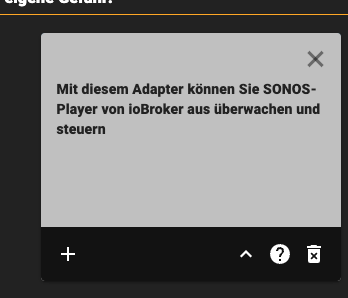
Hier auf den Mülleimer klicken...
-
@mpa9 Nunja..
Wie gesagt, unter Instanz.. die Instanz löschen, dann unter Adapter den Adapter deinstallieren / löschen... Dann wieder neu installieren..
Hier auf den Mülleimer klicken...
@mameier1234 Nunja.. Problem besteht weiterhin, Lösungsansatz scheint nicht mehr zu funktionieren.




Hey! Du scheinst an dieser Unterhaltung interessiert zu sein, hast aber noch kein Konto.
Hast du es satt, bei jedem Besuch durch die gleichen Beiträge zu scrollen? Wenn du dich für ein Konto anmeldest, kommst du immer genau dorthin zurück, wo du zuvor warst, und kannst dich über neue Antworten benachrichtigen lassen (entweder per E-Mail oder Push-Benachrichtigung). Du kannst auch Lesezeichen speichern und Beiträge positiv bewerten, um anderen Community-Mitgliedern deine Wertschätzung zu zeigen.
Mit deinem Input könnte dieser Beitrag noch besser werden 💗
Registrieren Anmelden396
Online33.1k
Benutzende84.0k
Themen1.4m
Beiträge