Skip to content
  • Home
  • Aktuell
  • Tags
  • 0 Ungelesen 0
  • Kategorien
  • Unreplied
  • Beliebt
  • GitHub
  • Docu
  • Hilfe
Skins
  • Light
  • Brite
  • Cerulean
  • Cosmo
  • Flatly
  • Journal
  • Litera
  • Lumen
  • Lux
  • Materia
  • Minty
  • Morph
  • Pulse
  • Sandstone
  • Simplex
  • Sketchy
  • Spacelab
  • United
  • Yeti
  • Zephyr
  • Dark
  • Cyborg
  • Darkly
  • Quartz
  • Slate
  • Solar
  • Superhero
  • Vapor

  • Standard: (Kein Skin)
  • Kein Skin
Einklappen
ioBroker Logo

Community Forum

donate donate
  1. ioBroker Community Home
  2. Deutsch
  3. Einsteigerfragen
  4. Installation
  5. Nach Restore - kein Zugriff auf die Admin-Oberfläche

NEWS

  • Jahresrückblick 2025 – unser neuer Blogbeitrag ist online! ✨
    BluefoxB
    Bluefox
    16
    1
    911

  • Neuer Blogbeitrag: Monatsrückblick - Dezember 2025 🎄
    BluefoxB
    Bluefox
    13
    1
    687

  • Weihnachtsangebot 2025! 🎄
    BluefoxB
    Bluefox
    25
    1
    1.9k

Nach Restore - kein Zugriff auf die Admin-Oberfläche

Geplant Angeheftet Gesperrt Verschoben Installation
backituprestore
45 Beiträge 7 Kommentatoren 4.9k Aufrufe 6 Watching
  • Älteste zuerst
  • Neuste zuerst
  • Meiste Stimmen
Antworten
  • In einem neuen Thema antworten
Anmelden zum Antworten
Dieses Thema wurde gelöscht. Nur Nutzer mit entsprechenden Rechten können es sehen.
  • H hmanfred

    so, jetzt:

    Copy text starting here:Copy text starting here:

    ======================= SUMMARY =======================
                            v.2024-05-22
    
    
       Static hostname: iobroker-pi
             Icon name: computer
      Operating System: Raspbian GNU/Linux 11 (bullseye)
                Kernel: Linux 6.1.19-v7+
          Architecture: arm
    
    Installation:           native
    Kernel:                 armv7l
    Userland:               32 bit
    Timezone:               Europe/London (BST, +0100)
    User-ID:                1000
    Display-Server:         false
    Boot Target:            multi-user.target
    
    Pending OS-Updates:     140
    Pending iob updates:    1
    
    Nodejs-Installation:
    nodejs:                 N/A
    /usr/bin/node           v16.19.1
    /usr/bin/npm            8.19.3
    /usr/bin/npx            8.19.3
    /usr/bin/corepack       0.15.1
    
    Recommended versions are nodejs  and npm
    *** nodejs is NOT correctly installed ***
    Wrong installation path detected. This needs to be fixed.
    
    Please execute
    iobroker nodejs-update
    to fix these errors.
    
    MEMORY:
                   total        used        free      shared  buff/cache   available
    Mem:            971M        117M        524M        0.0K        329M        796M
    Swap:            99M          0B         99M
    Total:          1.1G        117M        624M
    
    Active iob-Instances:   1
    Active repo(s): stable
    
    ioBroker Core:          js-controller           4.0.24
                            admin                   6.13.16
    
    ioBroker Status:        iobroker is running on this host.
    
    
    Objects type: jsonl
    States  type: jsonl
    
    Status admin and web instance:
    
    Objects:                42
    States:                 26
    
    Size of iob-Database:
    
    4.5M    /opt/iobroker/iobroker-data/objects.jsonl
    28K     /opt/iobroker/iobroker-data/states.jsonl


    =================== END OF SUMMARY ====================
    

    === Mark text until here for copying ===


    MOD-EDIT: code-tags gefixt

    HomoranH Nicht stören
    HomoranH Nicht stören
    Homoran
    Global Moderator Administrators
    schrieb am zuletzt editiert von
    #9

    @hmanfred sagte in Nach Restore - kein Zugriff auf die Admin-Oberfläche:

    so, jetzt:

    nochmal nöö!

    @hmanfred sagte in Nach Restore - kein Zugriff auf die Admin-Oberfläche:

    SUMMARY

    ist nicht die Langfassung!
    die kam davor

    kein Support per PN! - Fragen im Forum stellen - es gibt fast nichts, was nicht auch für andere interessant ist.

    Benutzt das Voting rechts unten im Beitrag wenn er euch geholfen hat.

    der Installationsfixer: curl -fsL https://iobroker.net/fix.sh | bash -

    H 1 Antwort Letzte Antwort
    0
    • HomoranH Homoran

      @hmanfred sagte in Nach Restore - kein Zugriff auf die Admin-Oberfläche:

      so, jetzt:

      nochmal nöö!

      @hmanfred sagte in Nach Restore - kein Zugriff auf die Admin-Oberfläche:

      SUMMARY

      ist nicht die Langfassung!
      die kam davor

      H Offline
      H Offline
      hmanfred
      schrieb am zuletzt editiert von
      #10

      @homoran
      Da bin ich wieder :grinning:

      Hier also die Langfassung:

      ======== Start marking the full check here =========


      Skript v.2024-05-22

      *** BASE SYSTEM ***
      Static hostname: iobroker-pi
      Icon name: computer
      Operating System: Raspbian GNU/Linux 11 (bullseye)
      Kernel: Linux 6.1.19-v7+
      Architecture: arm

      Model : Raspberry Pi 3 Model B Rev 1.2
      Docker : false
      Virtualization : none
      Kernel : armv7l
      Userland : 32 bit

      Systemuptime and Load:
      07:29:46 up 22:31, 1 user, load average: 0.23, 0.08, 0.02
      CPU threads: 4

      *** RASPBERRY THROTTLING ***
      Current issues:
      No throttling issues detected.

      Previously detected issues:
      No throttling issues detected.

      *** Time and Time Zones ***
      Local time: Thu 2024-06-20 07:29:46 BST
      Universal time: Thu 2024-06-20 06:29:46 UTC
      RTC time: n/a
      Time zone: Europe/London (BST, +0100)
      System clock synchronized: yes
      NTP service: active
      RTC in local TZ: no

      *** Users and Groups ***
      User that called 'iob diag':
      user
      HOME=/home/user
      GROUPS=user adm dialout cdrom sudo audio video plugdev games users input render netdev gpio i2c spi iobroker

      User that is running 'js-controller':
      iobroker
      HOME=/home/iobroker
      GROUPS=iobroker tty dialout audio video plugdev bluetooth gpio i2c

      *** Display-Server-Setup ***
      Display-Server: false
      Desktop:
      Terminal: tty
      Boot Target: multi-user.target

      *** MEMORY ***
      total used free shared buff/cache available
      Mem: 971M 108M 442M 0.0K 421M 803M
      Swap: 99M 0B 99M
      Total: 1.1G 108M 542M

      Active iob-Instances: 1

            971 M total memory
            108 M used memory
            161 M active memory
            286 M inactive memory
            442 M free memory
             95 M buffer memory
            325 M swap cache
             99 M total swap
              0 M used swap
             99 M free swap
      

      *** top - Table Of Processes ***
      top - 07:29:47 up 22:31, 1 user, load average: 0.23, 0.08, 0.02
      Tasks: 120 total, 1 running, 119 sleeping, 0 stopped, 0 zombie
      %Cpu(s): 2.8 us, 2.8 sy, 0.0 ni, 94.4 id, 0.0 wa, 0.0 hi, 0.0 si, 0.0 st
      MiB Mem : 971.5 total, 441.8 free, 108.2 used, 421.5 buff/cache
      MiB Swap: 100.0 total, 100.0 free, 0.0 used. 803.3 avail Mem

      *** FAILED SERVICES ***

      UNIT LOAD ACTIVE SUB DESCRIPTION
      0 loaded units listed.

      *** FILESYSTEM ***
      Filesystem Type Size Used Avail Use% Mounted on
      /dev/root ext4 29G 2.3G 26G 9% /
      devtmpfs devtmpfs 358M 0 358M 0% /dev
      tmpfs tmpfs 486M 0 486M 0% /dev/shm
      tmpfs tmpfs 195M 908K 194M 1% /run
      tmpfs tmpfs 5.0M 4.0K 5.0M 1% /run/lock
      /dev/mmcblk0p1 vfat 255M 51M 205M 20% /boot
      tmpfs tmpfs 98M 0 98M 0% /run/user/1000

      Messages concerning ext4 filesystem in dmesg:
      [Wed Jun 19 08:58:03 2024] Kernel command line: coherent_pool=1M 8250.nr_uarts=0 snd_bcm2835.enable_headphones=0 snd_bcm2835.enable_headphones=1 snd_bcm2835.enable_hdmi=1 snd_bcm2835.enable_hdmi=0 video=HDMI-A-1:1920x1080M@60 vc_mem.mem_base=0x3f000000 vc_mem.mem_size=0x3f600000 console=ttyS0,115200 console=tty1 root=PARTUUID=277a7d7b-02 rootfstype=ext4 fsck.repair=yes rootwait
      [Wed Jun 19 08:58:06 2024] EXT4-fs (mmcblk0p2): mounted filesystem with ordered data mode. Quota mode: none.
      [Wed Jun 19 08:58:06 2024] VFS: Mounted root (ext4 filesystem) readonly on device 179:2.
      [Wed Jun 19 08:58:09 2024] EXT4-fs (mmcblk0p2): re-mounted. Quota mode: none.

      Show mounted filesystems:
      TARGET SOURCE FSTYPE OPTIONS
      / /dev/mmcblk0p2 ext4 rw,noatime
      |-/dev devtmpfs devtmpfs rw,relatime,size=365828k,nr_inodes=91457,mode=755
      | |-/dev/shm tmpfs tmpfs rw,nosuid,nodev
      | |-/dev/pts devpts devpts rw,nosuid,noexec,relatime,gid=5,mode=620,ptmxmode=000
      | -/dev/mqueue mqueue mqueue rw,nosuid,nodev,noexec,relatime |-/proc proc proc rw,relatime | -/proc/sys/fs/binfmt_misc systemd-1 autofs rw,relatime,fd=30,pgrp=1,timeout=0,minproto=5,maxproto=5,direct
      |-/sys sysfs sysfs rw,nosuid,nodev,noexec,relatime
      | |-/sys/kernel/security securityfs securityfs rw,nosuid,nodev,noexec,relatime
      | |-/sys/fs/cgroup cgroup2 cgroup2 rw,nosuid,nodev,noexec,relatime,nsdelegate,memory_recursiveprot
      | |-/sys/fs/pstore pstore pstore rw,nosuid,nodev,noexec,relatime
      | |-/sys/fs/bpf bpf bpf rw,nosuid,nodev,noexec,relatime,mode=700
      | |-/sys/kernel/debug debugfs debugfs rw,nosuid,nodev,noexec,relatime
      | |-/sys/kernel/tracing tracefs tracefs rw,nosuid,nodev,noexec,relatime
      | |-/sys/fs/fuse/connections fusectl fusectl rw,nosuid,nodev,noexec,relatime
      | -/sys/kernel/config configfs configfs rw,nosuid,nodev,noexec,relatime |-/run tmpfs tmpfs rw,nosuid,nodev,size=198968k,nr_inodes=819200,mode=755 | |-/run/lock tmpfs tmpfs rw,nosuid,nodev,noexec,relatime,size=5120k | |-/run/rpc_pipefs sunrpc rpc_pipefs rw,relatime | -/run/user/1000 tmpfs tmpfs rw,nosuid,nodev,relatime,size=99480k,nr_inodes=24870,mode=700,uid=1000,gid=1000
      `-/boot /dev/mmcblk0p1 vfat rw,relatime,fmask=0022,dmask=0022,codepage=437,iocharset=ascii,shortname=mixed,errors=remount-ro

      Files in neuralgic directories:

      /var:
      400M /var/
      137M /var/log
      129M /var/log/journal/3fc65e18856b448da8d4fa43ae6099bb
      129M /var/log/journal
      93M /var/lib

      Archived and active journals take up 128.0M in the file system.

      /opt/iobroker/backups:
      16M /opt/iobroker/backups/

      /opt/iobroker/iobroker-data:
      39M /opt/iobroker/iobroker-data/
      17M /opt/iobroker/iobroker-data/backup-objects
      15M /opt/iobroker/iobroker-data/files
      13M /opt/iobroker/iobroker-data/files/admin.admin/custom/static/js
      13M /opt/iobroker/iobroker-data/files/admin.admin/custom/static

      The five largest files in iobroker-data are:
      6.3M /opt/iobroker/iobroker-data/files/admin.admin/custom/static/js/vendors-node_modules_iobroker_adapter-react-v5_assets_devices_parseNames_js-node_modules_iobr-99c23e.847b8ad9.chunk.js.map
      4.5M /opt/iobroker/iobroker-data/objects.jsonl
      3.3M /opt/iobroker/iobroker-data/states.jsonl
      2.8M /opt/iobroker/iobroker-data/files/admin.admin/custom/static/js/vendors-node_modules_iobroker_adapter-react-v5_assets_devices_parseNames_js-node_modules_iobr-99c23e.847b8ad9.chunk.js
      1.6M /opt/iobroker/iobroker-data/files/admin.admin/custom/static/js/vendors-node_modules_mui_material_Accordion_index_js-node_modules_mui_material_AccordionDetai-57e02d.0886b730.chunk.js.map

      USB-Devices by-id:
      USB-Sticks - Avoid direct links to /dev/tty* in your adapter setups, please always prefer the links 'by-id':

      No Devices found 'by-id'

      *** NodeJS-Installation ***

      nodejs: N/A
      /usr/bin/node v16.19.1
      /usr/bin/npm 8.19.3
      /usr/bin/npx 8.19.3
      /usr/bin/corepack 0.15.1
      *** nodejs is NOT correctly installed ***

      nodejs:
      Installed: 16.19.1-deb-1nodesource1
      Candidate: 16.20.2-deb-1nodesource1
      Version table:
      16.20.2-deb-1nodesource1 500
      500 https://deb.nodesource.com/node_16.x bullseye/main armhf Packages
      *** 16.19.1-deb-1nodesource1 100
      100 /var/lib/dpkg/status
      12.22.12~dfsg-1~deb11u4 500
      500 http://raspbian.raspberrypi.org/raspbian bullseye/main armhf Packages

      Temp directories causing npm8 problem: 0
      No problems detected

      Errors in npm tree:

      *** ioBroker-Installation ***

      ioBroker Status
      iobroker is running on this host.

      Objects type: jsonl
      States type: jsonl

      Core adapters versions
      js-controller: 4.0.24
      admin: 6.13.16
      javascript: "javascript" not found

      nodejs modules from github: 0

      Adapter State

      • instance is alive

      Enabled adapters with bindings

      ioBroker-Repositories
      stable : http://download.iobroker.net/sources-dist.json
      beta : http://download.iobroker.net/sources-dist-latest.json

      Active repo(s): stable

      Installed ioBroker-Instances
      Used repository: stable
      Adapter "admin" : 6.13.16 , installed 6.13.16
      Adapter "backitup" : 2.11.0 , installed 2.11.0
      Adapter "discovery" : 4.5.0 , installed 4.5.0
      Controller "js-controller": 5.0.19 , installed 4.0.24 [Updatable]

      Objects and States
      Please stand by - This may take a while
      Objects: 42
      States: 26

      *** OS-Repositories and Updates ***
      Hit:1 http://raspbian.raspberrypi.org/raspbian bullseye InRelease
      Hit:2 http://archive.raspberrypi.org/debian bullseye InRelease
      Hit:3 https://deb.nodesource.com/node_16.x bullseye InRelease
      Reading package lists...
      Pending Updates: 140

      *** Listening Ports ***
      Active Internet connections (only servers)
      Proto Recv-Q Send-Q Local Address Foreign Address State User Inode PID/Program name
      tcp 0 0 0.0.0.0:22 0.0.0.0:* LISTEN 0 11028 509/sshd: /usr/sbin
      tcp 0 0 127.0.0.1:9000 0.0.0.0:* LISTEN 1001 19952 1702/iobroker.js-co
      tcp 0 0 127.0.0.1:9001 0.0.0.0:* LISTEN 1001 19945 1702/iobroker.js-co
      tcp6 0 0 :::22 :::* LISTEN 0 11030 509/sshd: /usr/sbin
      udp 0 0 0.0.0.0:5353 0.0.0.0:* 108 10950 379/avahi-daemon: r
      udp 0 0 0.0.0.0:68 0.0.0.0:* 0 11033 764/dhcpcd
      udp 0 0 0.0.0.0:38980 0.0.0.0:* 108 10952 379/avahi-daemon: r
      udp6 0 0 :::5353 :::* 108 10951 379/avahi-daemon: r
      udp6 0 0 :::33519 :::* 108 10953 379/avahi-daemon: r

      *** Log File - Last 25 Lines ***

      2024-06-19 09:10:38.675 - info: host.iobroker-pi ip addresses: 192.168.10.177 fe80::aa85:5432:f57b:8f42
      2024-06-19 09:10:39.968 - info: host.iobroker-pi connected to Objects and States
      2024-06-19 09:10:40.010 - info: host.iobroker-pi added notifications configuration of host
      2024-06-19 09:10:40.614 - info: host.iobroker-pi no instances found
      2024-06-19 09:10:40.615 - info: host.iobroker-pi no instances found
      2024-06-19 09:16:36.943 - info: host.iobroker-pi received SIGTERM
      2024-06-19 09:16:37.001 - info: host.iobroker-pi terminated
      2024-06-19 09:17:06.340 - info: host.iobroker-pi iobroker.js-controller version 4.0.24 js-controller starting
      2024-06-19 09:17:06.350 - info: host.iobroker-pi Copyright (c) 2014-2022 bluefox, 2014 hobbyquaker
      2024-06-19 09:17:06.352 - info: host.iobroker-pi hostname: iobroker-pi, node: v16.19.1
      2024-06-19 09:17:06.354 - info: host.iobroker-pi ip addresses: 192.168.10.177 fe80::aa85:5432:f57b:8f42
      2024-06-19 09:17:07.566 - info: host.iobroker-pi connected to Objects and States
      2024-06-19 09:17:07.609 - info: host.iobroker-pi added notifications configuration of host
      2024-06-19 09:17:08.223 - info: host.iobroker-pi no instances found
      2024-06-19 09:17:08.224 - info: host.iobroker-pi no instances found
      2024-06-19 09:23:48.877 - info: host.iobroker-pi received SIGTERM
      2024-06-19 09:23:48.947 - info: host.iobroker-pi terminated
      2024-06-19 09:24:39.018 - info: host.iobroker-pi iobroker.js-controller version 4.0.24 js-controller starting
      2024-06-19 09:24:39.028 - info: host.iobroker-pi Copyright (c) 2014-2022 bluefox, 2014 hobbyquaker
      2024-06-19 09:24:39.030 - info: host.iobroker-pi hostname: iobroker-pi, node: v16.19.1
      2024-06-19 09:24:39.032 - info: host.iobroker-pi ip addresses: 192.168.10.177 fe80::aa85:5432:f57b:8f42
      2024-06-19 09:24:40.267 - info: host.iobroker-pi connected to Objects and States
      2024-06-19 09:24:40.309 - info: host.iobroker-pi added notifications configuration of host
      2024-06-19 09:24:40.933 - info: host.iobroker-pi no instances found
      2024-06-19 09:24:40.934 - info: host.iobroker-pi no instances found

      
      ============ Mark until here for C&P =============
      

      Thomas BraunT 1 Antwort Letzte Antwort
      0
      • H hmanfred

        @homoran
        Da bin ich wieder :grinning:

        Hier also die Langfassung:

        ======== Start marking the full check here =========


        Skript v.2024-05-22

        *** BASE SYSTEM ***
        Static hostname: iobroker-pi
        Icon name: computer
        Operating System: Raspbian GNU/Linux 11 (bullseye)
        Kernel: Linux 6.1.19-v7+
        Architecture: arm

        Model : Raspberry Pi 3 Model B Rev 1.2
        Docker : false
        Virtualization : none
        Kernel : armv7l
        Userland : 32 bit

        Systemuptime and Load:
        07:29:46 up 22:31, 1 user, load average: 0.23, 0.08, 0.02
        CPU threads: 4

        *** RASPBERRY THROTTLING ***
        Current issues:
        No throttling issues detected.

        Previously detected issues:
        No throttling issues detected.

        *** Time and Time Zones ***
        Local time: Thu 2024-06-20 07:29:46 BST
        Universal time: Thu 2024-06-20 06:29:46 UTC
        RTC time: n/a
        Time zone: Europe/London (BST, +0100)
        System clock synchronized: yes
        NTP service: active
        RTC in local TZ: no

        *** Users and Groups ***
        User that called 'iob diag':
        user
        HOME=/home/user
        GROUPS=user adm dialout cdrom sudo audio video plugdev games users input render netdev gpio i2c spi iobroker

        User that is running 'js-controller':
        iobroker
        HOME=/home/iobroker
        GROUPS=iobroker tty dialout audio video plugdev bluetooth gpio i2c

        *** Display-Server-Setup ***
        Display-Server: false
        Desktop:
        Terminal: tty
        Boot Target: multi-user.target

        *** MEMORY ***
        total used free shared buff/cache available
        Mem: 971M 108M 442M 0.0K 421M 803M
        Swap: 99M 0B 99M
        Total: 1.1G 108M 542M

        Active iob-Instances: 1

              971 M total memory
              108 M used memory
              161 M active memory
              286 M inactive memory
              442 M free memory
               95 M buffer memory
              325 M swap cache
               99 M total swap
                0 M used swap
               99 M free swap
        

        *** top - Table Of Processes ***
        top - 07:29:47 up 22:31, 1 user, load average: 0.23, 0.08, 0.02
        Tasks: 120 total, 1 running, 119 sleeping, 0 stopped, 0 zombie
        %Cpu(s): 2.8 us, 2.8 sy, 0.0 ni, 94.4 id, 0.0 wa, 0.0 hi, 0.0 si, 0.0 st
        MiB Mem : 971.5 total, 441.8 free, 108.2 used, 421.5 buff/cache
        MiB Swap: 100.0 total, 100.0 free, 0.0 used. 803.3 avail Mem

        *** FAILED SERVICES ***

        UNIT LOAD ACTIVE SUB DESCRIPTION
        0 loaded units listed.

        *** FILESYSTEM ***
        Filesystem Type Size Used Avail Use% Mounted on
        /dev/root ext4 29G 2.3G 26G 9% /
        devtmpfs devtmpfs 358M 0 358M 0% /dev
        tmpfs tmpfs 486M 0 486M 0% /dev/shm
        tmpfs tmpfs 195M 908K 194M 1% /run
        tmpfs tmpfs 5.0M 4.0K 5.0M 1% /run/lock
        /dev/mmcblk0p1 vfat 255M 51M 205M 20% /boot
        tmpfs tmpfs 98M 0 98M 0% /run/user/1000

        Messages concerning ext4 filesystem in dmesg:
        [Wed Jun 19 08:58:03 2024] Kernel command line: coherent_pool=1M 8250.nr_uarts=0 snd_bcm2835.enable_headphones=0 snd_bcm2835.enable_headphones=1 snd_bcm2835.enable_hdmi=1 snd_bcm2835.enable_hdmi=0 video=HDMI-A-1:1920x1080M@60 vc_mem.mem_base=0x3f000000 vc_mem.mem_size=0x3f600000 console=ttyS0,115200 console=tty1 root=PARTUUID=277a7d7b-02 rootfstype=ext4 fsck.repair=yes rootwait
        [Wed Jun 19 08:58:06 2024] EXT4-fs (mmcblk0p2): mounted filesystem with ordered data mode. Quota mode: none.
        [Wed Jun 19 08:58:06 2024] VFS: Mounted root (ext4 filesystem) readonly on device 179:2.
        [Wed Jun 19 08:58:09 2024] EXT4-fs (mmcblk0p2): re-mounted. Quota mode: none.

        Show mounted filesystems:
        TARGET SOURCE FSTYPE OPTIONS
        / /dev/mmcblk0p2 ext4 rw,noatime
        |-/dev devtmpfs devtmpfs rw,relatime,size=365828k,nr_inodes=91457,mode=755
        | |-/dev/shm tmpfs tmpfs rw,nosuid,nodev
        | |-/dev/pts devpts devpts rw,nosuid,noexec,relatime,gid=5,mode=620,ptmxmode=000
        | -/dev/mqueue mqueue mqueue rw,nosuid,nodev,noexec,relatime |-/proc proc proc rw,relatime | -/proc/sys/fs/binfmt_misc systemd-1 autofs rw,relatime,fd=30,pgrp=1,timeout=0,minproto=5,maxproto=5,direct
        |-/sys sysfs sysfs rw,nosuid,nodev,noexec,relatime
        | |-/sys/kernel/security securityfs securityfs rw,nosuid,nodev,noexec,relatime
        | |-/sys/fs/cgroup cgroup2 cgroup2 rw,nosuid,nodev,noexec,relatime,nsdelegate,memory_recursiveprot
        | |-/sys/fs/pstore pstore pstore rw,nosuid,nodev,noexec,relatime
        | |-/sys/fs/bpf bpf bpf rw,nosuid,nodev,noexec,relatime,mode=700
        | |-/sys/kernel/debug debugfs debugfs rw,nosuid,nodev,noexec,relatime
        | |-/sys/kernel/tracing tracefs tracefs rw,nosuid,nodev,noexec,relatime
        | |-/sys/fs/fuse/connections fusectl fusectl rw,nosuid,nodev,noexec,relatime
        | -/sys/kernel/config configfs configfs rw,nosuid,nodev,noexec,relatime |-/run tmpfs tmpfs rw,nosuid,nodev,size=198968k,nr_inodes=819200,mode=755 | |-/run/lock tmpfs tmpfs rw,nosuid,nodev,noexec,relatime,size=5120k | |-/run/rpc_pipefs sunrpc rpc_pipefs rw,relatime | -/run/user/1000 tmpfs tmpfs rw,nosuid,nodev,relatime,size=99480k,nr_inodes=24870,mode=700,uid=1000,gid=1000
        `-/boot /dev/mmcblk0p1 vfat rw,relatime,fmask=0022,dmask=0022,codepage=437,iocharset=ascii,shortname=mixed,errors=remount-ro

        Files in neuralgic directories:

        /var:
        400M /var/
        137M /var/log
        129M /var/log/journal/3fc65e18856b448da8d4fa43ae6099bb
        129M /var/log/journal
        93M /var/lib

        Archived and active journals take up 128.0M in the file system.

        /opt/iobroker/backups:
        16M /opt/iobroker/backups/

        /opt/iobroker/iobroker-data:
        39M /opt/iobroker/iobroker-data/
        17M /opt/iobroker/iobroker-data/backup-objects
        15M /opt/iobroker/iobroker-data/files
        13M /opt/iobroker/iobroker-data/files/admin.admin/custom/static/js
        13M /opt/iobroker/iobroker-data/files/admin.admin/custom/static

        The five largest files in iobroker-data are:
        6.3M /opt/iobroker/iobroker-data/files/admin.admin/custom/static/js/vendors-node_modules_iobroker_adapter-react-v5_assets_devices_parseNames_js-node_modules_iobr-99c23e.847b8ad9.chunk.js.map
        4.5M /opt/iobroker/iobroker-data/objects.jsonl
        3.3M /opt/iobroker/iobroker-data/states.jsonl
        2.8M /opt/iobroker/iobroker-data/files/admin.admin/custom/static/js/vendors-node_modules_iobroker_adapter-react-v5_assets_devices_parseNames_js-node_modules_iobr-99c23e.847b8ad9.chunk.js
        1.6M /opt/iobroker/iobroker-data/files/admin.admin/custom/static/js/vendors-node_modules_mui_material_Accordion_index_js-node_modules_mui_material_AccordionDetai-57e02d.0886b730.chunk.js.map

        USB-Devices by-id:
        USB-Sticks - Avoid direct links to /dev/tty* in your adapter setups, please always prefer the links 'by-id':

        No Devices found 'by-id'

        *** NodeJS-Installation ***

        nodejs: N/A
        /usr/bin/node v16.19.1
        /usr/bin/npm 8.19.3
        /usr/bin/npx 8.19.3
        /usr/bin/corepack 0.15.1
        *** nodejs is NOT correctly installed ***

        nodejs:
        Installed: 16.19.1-deb-1nodesource1
        Candidate: 16.20.2-deb-1nodesource1
        Version table:
        16.20.2-deb-1nodesource1 500
        500 https://deb.nodesource.com/node_16.x bullseye/main armhf Packages
        *** 16.19.1-deb-1nodesource1 100
        100 /var/lib/dpkg/status
        12.22.12~dfsg-1~deb11u4 500
        500 http://raspbian.raspberrypi.org/raspbian bullseye/main armhf Packages

        Temp directories causing npm8 problem: 0
        No problems detected

        Errors in npm tree:

        *** ioBroker-Installation ***

        ioBroker Status
        iobroker is running on this host.

        Objects type: jsonl
        States type: jsonl

        Core adapters versions
        js-controller: 4.0.24
        admin: 6.13.16
        javascript: "javascript" not found

        nodejs modules from github: 0

        Adapter State

        • instance is alive

        Enabled adapters with bindings

        ioBroker-Repositories
        stable : http://download.iobroker.net/sources-dist.json
        beta : http://download.iobroker.net/sources-dist-latest.json

        Active repo(s): stable

        Installed ioBroker-Instances
        Used repository: stable
        Adapter "admin" : 6.13.16 , installed 6.13.16
        Adapter "backitup" : 2.11.0 , installed 2.11.0
        Adapter "discovery" : 4.5.0 , installed 4.5.0
        Controller "js-controller": 5.0.19 , installed 4.0.24 [Updatable]

        Objects and States
        Please stand by - This may take a while
        Objects: 42
        States: 26

        *** OS-Repositories and Updates ***
        Hit:1 http://raspbian.raspberrypi.org/raspbian bullseye InRelease
        Hit:2 http://archive.raspberrypi.org/debian bullseye InRelease
        Hit:3 https://deb.nodesource.com/node_16.x bullseye InRelease
        Reading package lists...
        Pending Updates: 140

        *** Listening Ports ***
        Active Internet connections (only servers)
        Proto Recv-Q Send-Q Local Address Foreign Address State User Inode PID/Program name
        tcp 0 0 0.0.0.0:22 0.0.0.0:* LISTEN 0 11028 509/sshd: /usr/sbin
        tcp 0 0 127.0.0.1:9000 0.0.0.0:* LISTEN 1001 19952 1702/iobroker.js-co
        tcp 0 0 127.0.0.1:9001 0.0.0.0:* LISTEN 1001 19945 1702/iobroker.js-co
        tcp6 0 0 :::22 :::* LISTEN 0 11030 509/sshd: /usr/sbin
        udp 0 0 0.0.0.0:5353 0.0.0.0:* 108 10950 379/avahi-daemon: r
        udp 0 0 0.0.0.0:68 0.0.0.0:* 0 11033 764/dhcpcd
        udp 0 0 0.0.0.0:38980 0.0.0.0:* 108 10952 379/avahi-daemon: r
        udp6 0 0 :::5353 :::* 108 10951 379/avahi-daemon: r
        udp6 0 0 :::33519 :::* 108 10953 379/avahi-daemon: r

        *** Log File - Last 25 Lines ***

        2024-06-19 09:10:38.675 - info: host.iobroker-pi ip addresses: 192.168.10.177 fe80::aa85:5432:f57b:8f42
        2024-06-19 09:10:39.968 - info: host.iobroker-pi connected to Objects and States
        2024-06-19 09:10:40.010 - info: host.iobroker-pi added notifications configuration of host
        2024-06-19 09:10:40.614 - info: host.iobroker-pi no instances found
        2024-06-19 09:10:40.615 - info: host.iobroker-pi no instances found
        2024-06-19 09:16:36.943 - info: host.iobroker-pi received SIGTERM
        2024-06-19 09:16:37.001 - info: host.iobroker-pi terminated
        2024-06-19 09:17:06.340 - info: host.iobroker-pi iobroker.js-controller version 4.0.24 js-controller starting
        2024-06-19 09:17:06.350 - info: host.iobroker-pi Copyright (c) 2014-2022 bluefox, 2014 hobbyquaker
        2024-06-19 09:17:06.352 - info: host.iobroker-pi hostname: iobroker-pi, node: v16.19.1
        2024-06-19 09:17:06.354 - info: host.iobroker-pi ip addresses: 192.168.10.177 fe80::aa85:5432:f57b:8f42
        2024-06-19 09:17:07.566 - info: host.iobroker-pi connected to Objects and States
        2024-06-19 09:17:07.609 - info: host.iobroker-pi added notifications configuration of host
        2024-06-19 09:17:08.223 - info: host.iobroker-pi no instances found
        2024-06-19 09:17:08.224 - info: host.iobroker-pi no instances found
        2024-06-19 09:23:48.877 - info: host.iobroker-pi received SIGTERM
        2024-06-19 09:23:48.947 - info: host.iobroker-pi terminated
        2024-06-19 09:24:39.018 - info: host.iobroker-pi iobroker.js-controller version 4.0.24 js-controller starting
        2024-06-19 09:24:39.028 - info: host.iobroker-pi Copyright (c) 2014-2022 bluefox, 2014 hobbyquaker
        2024-06-19 09:24:39.030 - info: host.iobroker-pi hostname: iobroker-pi, node: v16.19.1
        2024-06-19 09:24:39.032 - info: host.iobroker-pi ip addresses: 192.168.10.177 fe80::aa85:5432:f57b:8f42
        2024-06-19 09:24:40.267 - info: host.iobroker-pi connected to Objects and States
        2024-06-19 09:24:40.309 - info: host.iobroker-pi added notifications configuration of host
        2024-06-19 09:24:40.933 - info: host.iobroker-pi no instances found
        2024-06-19 09:24:40.934 - info: host.iobroker-pi no instances found

        
        ============ Mark until here for C&P =============
        

        Thomas BraunT Online
        Thomas BraunT Online
        Thomas Braun
        Most Active
        schrieb am zuletzt editiert von
        #11

        @hmanfred sagte in Nach Restore - kein Zugriff auf die Admin-Oberfläche:

        Kernel : armv7l
        Userland : 32 bit

        Setz die Kiste NEU als 64Bit-System auf. Mit Debian 12 'Bookworm' als Basis.
        Dann kommt da auch ein aktuelles nodejs mit.

        Zeitzone wohl falsch:

        Time zone: Europe/London (BST, +0100)

        ioBroker aktuell halten.

        Controller "js-controller": 5.0.19 , installed 4.0.24 [Updatable]

        System auch aktuell halten

        Pending Updates: 140

        Linux-Werkzeugkasten:
        https://forum.iobroker.net/topic/42952/der-kleine-iobroker-linux-werkzeugkasten
        NodeJS Fixer Skript:
        https://forum.iobroker.net/topic/68035/iob-node-fix-skript
        iob_diag: curl -sLf -o diag.sh https://iobroker.net/diag.sh && bash diag.sh

        H 1 Antwort Letzte Antwort
        0
        • Thomas BraunT Thomas Braun

          @hmanfred sagte in Nach Restore - kein Zugriff auf die Admin-Oberfläche:

          Kernel : armv7l
          Userland : 32 bit

          Setz die Kiste NEU als 64Bit-System auf. Mit Debian 12 'Bookworm' als Basis.
          Dann kommt da auch ein aktuelles nodejs mit.

          Zeitzone wohl falsch:

          Time zone: Europe/London (BST, +0100)

          ioBroker aktuell halten.

          Controller "js-controller": 5.0.19 , installed 4.0.24 [Updatable]

          System auch aktuell halten

          Pending Updates: 140

          H Offline
          H Offline
          hmanfred
          schrieb am zuletzt editiert von
          #12

          @thomas-braun
          Danke für deine Antwort.

          Wie oben geschrieben, soll das System lediglich kurz laufen, um aus einem Backup eine VIS-Konfiguration zu exportieren.

          Mit (Seiten)Blick auf meine Lernkurve möchte ich gerne das Problem mit eurer Hilfe analysieren und fixen. Da ist eine Neuinstallation nicht zielführend.

          Thomas BraunT HomoranH 2 Antworten Letzte Antwort
          0
          • H hmanfred

            @thomas-braun
            Danke für deine Antwort.

            Wie oben geschrieben, soll das System lediglich kurz laufen, um aus einem Backup eine VIS-Konfiguration zu exportieren.

            Mit (Seiten)Blick auf meine Lernkurve möchte ich gerne das Problem mit eurer Hilfe analysieren und fixen. Da ist eine Neuinstallation nicht zielführend.

            Thomas BraunT Online
            Thomas BraunT Online
            Thomas Braun
            Most Active
            schrieb am zuletzt editiert von
            #13

            @hmanfred

            Das beißt sich aber mit deiner Aussage von hier:

            Die Installation (das Backup) war vom Mai dieses Jahres. IoBroker war ziemlich aktuell.

            Das System aus dem iob diag ist nämlich ziemlich angegammelt.

            Da ist eine Neuinstallation nicht zielführend.

            Ein stabiles, richtig aufgesetztes System ist immer zielführend, weil es die Grundlage für eine richtig funktionierende Kiste ist.

            Linux-Werkzeugkasten:
            https://forum.iobroker.net/topic/42952/der-kleine-iobroker-linux-werkzeugkasten
            NodeJS Fixer Skript:
            https://forum.iobroker.net/topic/68035/iob-node-fix-skript
            iob_diag: curl -sLf -o diag.sh https://iobroker.net/diag.sh && bash diag.sh

            H 1 Antwort Letzte Antwort
            0
            • H hmanfred

              @thomas-braun
              Danke für deine Antwort.

              Wie oben geschrieben, soll das System lediglich kurz laufen, um aus einem Backup eine VIS-Konfiguration zu exportieren.

              Mit (Seiten)Blick auf meine Lernkurve möchte ich gerne das Problem mit eurer Hilfe analysieren und fixen. Da ist eine Neuinstallation nicht zielführend.

              HomoranH Nicht stören
              HomoranH Nicht stören
              Homoran
              Global Moderator Administrators
              schrieb am zuletzt editiert von
              #14

              @hmanfred sagte in Nach Restore - kein Zugriff auf die Admin-Oberfläche:

              möchte ich gerne das Problem mit eurer Hilfe analysieren und fixen. Da ist eine Neuinstallation nicht zielführend.

              kommt auf den Blickwinkel an.
              je nachdem um welche Adapterversionen es geht, muss die Installation ganz aktuell sein.

              kein Support per PN! - Fragen im Forum stellen - es gibt fast nichts, was nicht auch für andere interessant ist.

              Benutzt das Voting rechts unten im Beitrag wenn er euch geholfen hat.

              der Installationsfixer: curl -fsL https://iobroker.net/fix.sh | bash -

              1 Antwort Letzte Antwort
              0
              • Thomas BraunT Thomas Braun

                @hmanfred

                Das beißt sich aber mit deiner Aussage von hier:

                Die Installation (das Backup) war vom Mai dieses Jahres. IoBroker war ziemlich aktuell.

                Das System aus dem iob diag ist nämlich ziemlich angegammelt.

                Da ist eine Neuinstallation nicht zielführend.

                Ein stabiles, richtig aufgesetztes System ist immer zielführend, weil es die Grundlage für eine richtig funktionierende Kiste ist.

                H Offline
                H Offline
                hmanfred
                schrieb am zuletzt editiert von hmanfred
                #15

                @thomas-braun

                Chronologie:

                • System "Alt" nach dem Mai dieses Jahres platt gemacht
                • Umzug in neue Wohnung
                • System "Neu" auf einem NUC neu installiert
                • Fehlende customized VIS Widgets
                • System "hier aktueller Thread" mit Image von https://www.iobroker.net/?lang=de#de/download neu aufgesetzt mit Ziel "Restore von Backup aus System "Alt"

                Ergo, um deinen Sprachgebrauch zu verwenden: das offizielle Image ist "angegammelt":grin:

                HomoranH Thomas BraunT 2 Antworten Letzte Antwort
                0
                • H hmanfred

                  @thomas-braun

                  Chronologie:

                  • System "Alt" nach dem Mai dieses Jahres platt gemacht
                  • Umzug in neue Wohnung
                  • System "Neu" auf einem NUC neu installiert
                  • Fehlende customized VIS Widgets
                  • System "hier aktueller Thread" mit Image von https://www.iobroker.net/?lang=de#de/download neu aufgesetzt mit Ziel "Restore von Backup aus System "Alt"

                  Ergo, um deinen Sprachgebrauch zu verwenden: das offizielle Image ist "angegammelt":grin:

                  HomoranH Nicht stören
                  HomoranH Nicht stören
                  Homoran
                  Global Moderator Administrators
                  schrieb am zuletzt editiert von Homoran
                  #16

                  @hmanfred sagte in Nach Restore - kein Zugriff auf die Admin-Oberfläche:

                  das offizielle Image

                  was soll das sein?
                  man installiert das Raspberry OS und darauf den ioBroker mit dem Einzeiler

                  kein Support per PN! - Fragen im Forum stellen - es gibt fast nichts, was nicht auch für andere interessant ist.

                  Benutzt das Voting rechts unten im Beitrag wenn er euch geholfen hat.

                  der Installationsfixer: curl -fsL https://iobroker.net/fix.sh | bash -

                  H 1 Antwort Letzte Antwort
                  0
                  • H hmanfred

                    @thomas-braun

                    Chronologie:

                    • System "Alt" nach dem Mai dieses Jahres platt gemacht
                    • Umzug in neue Wohnung
                    • System "Neu" auf einem NUC neu installiert
                    • Fehlende customized VIS Widgets
                    • System "hier aktueller Thread" mit Image von https://www.iobroker.net/?lang=de#de/download neu aufgesetzt mit Ziel "Restore von Backup aus System "Alt"

                    Ergo, um deinen Sprachgebrauch zu verwenden: das offizielle Image ist "angegammelt":grin:

                    Thomas BraunT Online
                    Thomas BraunT Online
                    Thomas Braun
                    Most Active
                    schrieb am zuletzt editiert von
                    #17

                    @hmanfred

                    Ich weiß ja nicht, wo du da irgendein Image hergezaubert hast, aber eine aktuelle Installation führt zu anderen Versionen.

                    Soweit ich weiß wurden die Images auch wieder ad adcta gelegt.

                    Linux-Werkzeugkasten:
                    https://forum.iobroker.net/topic/42952/der-kleine-iobroker-linux-werkzeugkasten
                    NodeJS Fixer Skript:
                    https://forum.iobroker.net/topic/68035/iob-node-fix-skript
                    iob_diag: curl -sLf -o diag.sh https://iobroker.net/diag.sh && bash diag.sh

                    1 Antwort Letzte Antwort
                    0
                    • HomoranH Homoran

                      @hmanfred sagte in Nach Restore - kein Zugriff auf die Admin-Oberfläche:

                      das offizielle Image

                      was soll das sein?
                      man installiert das Raspberry OS und darauf den ioBroker mit dem Einzeiler

                      H Offline
                      H Offline
                      hmanfred
                      schrieb am zuletzt editiert von
                      #18

                      @homoran
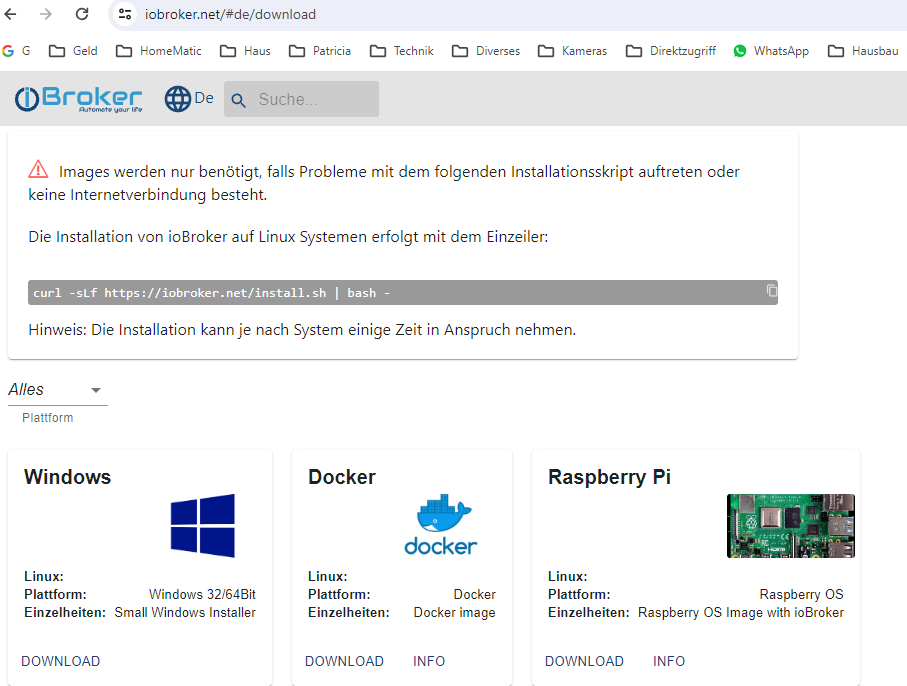
                      1885a21e-5867-4f66-8053-ca24e186d800-image.png

                      Thomas BraunT H HomoranH crunchipC 4 Antworten Letzte Antwort
                      0
                      • H hmanfred

                        @homoran
                        1885a21e-5867-4f66-8053-ca24e186d800-image.png

                        Thomas BraunT Online
                        Thomas BraunT Online
                        Thomas Braun
                        Most Active
                        schrieb am zuletzt editiert von
                        #19

                        @hmanfred

                        Das Image KANN aber nicht zu einer 32Bit-Version führen, ganz einfach weil:

                        The ioBroker Raspberry OS Image is back! This new beta version moves the OS to a Debian Bookworm slim base and is build in 64-bit only. So make sure you use at least a Raspberry Pi 3!

                        Also ist unklar was du da genau auf die Kiste geklatscht hast. Jedenfalls nix aktuelles.

                        Linux-Werkzeugkasten:
                        https://forum.iobroker.net/topic/42952/der-kleine-iobroker-linux-werkzeugkasten
                        NodeJS Fixer Skript:
                        https://forum.iobroker.net/topic/68035/iob-node-fix-skript
                        iob_diag: curl -sLf -o diag.sh https://iobroker.net/diag.sh && bash diag.sh

                        1 Antwort Letzte Antwort
                        0
                        • H hmanfred

                          @homoran
                          1885a21e-5867-4f66-8053-ca24e186d800-image.png

                          H Offline
                          H Offline
                          hmanfred
                          schrieb am zuletzt editiert von
                          #20

                          Und nachdem ich mit dem Restore Probleme hatte (vielleicht nicht lange genug gewartet?) habe ich per Konsole den ioBroker neu installiert. Mit Kommandozeile aus den obigen Screenshot:

                          curl -sLf https://iobroker.net/install.sh | bash -
                          

                          Wie geschildert ohne dass sich an der Situation (kein Zugriff über WebUi) geändert hat.

                          1 Antwort Letzte Antwort
                          0
                          • H hmanfred

                            @homoran
                            1885a21e-5867-4f66-8053-ca24e186d800-image.png

                            HomoranH Nicht stören
                            HomoranH Nicht stören
                            Homoran
                            Global Moderator Administrators
                            schrieb am zuletzt editiert von
                            #21

                            @hmanfred dann sieh was da oben steht

                            curl -sLf https://iobroker.net/install.sh | bash -

                            und wenn du auf Info klickst landest du auf einer Seite auf der in rot veraltet steht

                            kein Support per PN! - Fragen im Forum stellen - es gibt fast nichts, was nicht auch für andere interessant ist.

                            Benutzt das Voting rechts unten im Beitrag wenn er euch geholfen hat.

                            der Installationsfixer: curl -fsL https://iobroker.net/fix.sh | bash -

                            H crunchipC 2 Antworten Letzte Antwort
                            0
                            • H hmanfred

                              @homoran
                              1885a21e-5867-4f66-8053-ca24e186d800-image.png

                              crunchipC Abwesend
                              crunchipC Abwesend
                              crunchip
                              Forum Testing Most Active
                              schrieb am zuletzt editiert von
                              #22

                              @hmanfred die Info führt zu https://forum.iobroker.net/topic/70852/iobroker-raspberry-os-image-v2

                              umgestiegen von Proxmox auf Unraid

                              1 Antwort Letzte Antwort
                              0
                              • HomoranH Homoran

                                @hmanfred dann sieh was da oben steht

                                curl -sLf https://iobroker.net/install.sh | bash -

                                und wenn du auf Info klickst landest du auf einer Seite auf der in rot veraltet steht

                                H Offline
                                H Offline
                                hmanfred
                                schrieb am zuletzt editiert von
                                #23

                                @homoran sagte in Nach Restore - kein Zugriff auf die Admin-Oberfläche:

                                @hmanfred dann sieh was da oben steht

                                curl -sLf https://iobroker.net/install.sh | bash -

                                Habe ich doch letztendlich gemacht.

                                und wenn du auf Info klickst landest du auf einer Seite auf der in rot veraltet steht

                                Ohne zu bestreiten, dass ich den Fehler gemacht habe: kann dieser Hinweis nicht gleich auf dieser Seite stehen?

                                HomoranH 1 Antwort Letzte Antwort
                                0
                                • H hmanfred

                                  @homoran sagte in Nach Restore - kein Zugriff auf die Admin-Oberfläche:

                                  @hmanfred dann sieh was da oben steht

                                  curl -sLf https://iobroker.net/install.sh | bash -

                                  Habe ich doch letztendlich gemacht.

                                  und wenn du auf Info klickst landest du auf einer Seite auf der in rot veraltet steht

                                  Ohne zu bestreiten, dass ich den Fehler gemacht habe: kann dieser Hinweis nicht gleich auf dieser Seite stehen?

                                  HomoranH Nicht stören
                                  HomoranH Nicht stören
                                  Homoran
                                  Global Moderator Administrators
                                  schrieb am zuletzt editiert von
                                  #24

                                  @hmanfred sagte in Nach Restore - kein Zugriff auf die Admin-Oberfläche:

                                  Habe ich doch letztendlich gemacht.

                                  dann kann da nicht dieses iob diag bei rauskommen

                                  kein Support per PN! - Fragen im Forum stellen - es gibt fast nichts, was nicht auch für andere interessant ist.

                                  Benutzt das Voting rechts unten im Beitrag wenn er euch geholfen hat.

                                  der Installationsfixer: curl -fsL https://iobroker.net/fix.sh | bash -

                                  H 1 Antwort Letzte Antwort
                                  0
                                  • HomoranH Homoran

                                    @hmanfred dann sieh was da oben steht

                                    curl -sLf https://iobroker.net/install.sh | bash -

                                    und wenn du auf Info klickst landest du auf einer Seite auf der in rot veraltet steht

                                    crunchipC Abwesend
                                    crunchipC Abwesend
                                    crunchip
                                    Forum Testing Most Active
                                    schrieb am zuletzt editiert von
                                    #25

                                    @homoran sagte in Nach Restore - kein Zugriff auf die Admin-Oberfläche:

                                    wenn du auf Info klickst landest du auf einer Seite auf der in rot veraltet steht

                                    es steht aber auch daneben

                                     Hier geht es mit v2 weiter: https://forum.iobroker.net/topic/70852/iobroker-raspberry-os-image-v2
                                    

                                    umgestiegen von Proxmox auf Unraid

                                    1 Antwort Letzte Antwort
                                    0
                                    • HomoranH Homoran

                                      @hmanfred sagte in Nach Restore - kein Zugriff auf die Admin-Oberfläche:

                                      Habe ich doch letztendlich gemacht.

                                      dann kann da nicht dieses iob diag bei rauskommen

                                      H Offline
                                      H Offline
                                      hmanfred
                                      schrieb am zuletzt editiert von
                                      #26

                                      @homoran
                                      Ich habe jetzt nochmal alles nachvollzogen, der Download des Images liegt ja noch hier im Download Folder. Der Link "Download" aus obigem Screenshot führt übrigens auf die Seite

                                      https://github.com/buanet/ioBroker.raspberry-os/releases
                                      
                                      • Von dort habe ich 2023-03-21_RaspberryOS_ioBroker_Image_v1.3.0.zip heruntergeladen und auf eine SD geschrieben
                                      • System gebootet. Musste dann auf die Konsole um Benutzernamen anzugeben
                                      • ioBroker lief dann
                                      • Restore mittels Backitup (mit mglw. von mir verursachtem Fehler, weil ich zu ungeduldig war?)
                                      • Kein Zugriff mehr per WebUi
                                      • Per Konsole (SSH) Neuinstallation mit
                                      curl -sLf https://iobroker.net/install.sh | bash -
                                      
                                      • dann diesen Thread eröffnet.

                                      Seis drum, ich schreibe jetzt ein neues Image , mache erst alle möglichen Updates, dann den Restore und melde mich wieder.

                                      Thomas BraunT HomoranH 2 Antworten Letzte Antwort
                                      0
                                      • H hmanfred

                                        @homoran
                                        Ich habe jetzt nochmal alles nachvollzogen, der Download des Images liegt ja noch hier im Download Folder. Der Link "Download" aus obigem Screenshot führt übrigens auf die Seite

                                        https://github.com/buanet/ioBroker.raspberry-os/releases
                                        
                                        • Von dort habe ich 2023-03-21_RaspberryOS_ioBroker_Image_v1.3.0.zip heruntergeladen und auf eine SD geschrieben
                                        • System gebootet. Musste dann auf die Konsole um Benutzernamen anzugeben
                                        • ioBroker lief dann
                                        • Restore mittels Backitup (mit mglw. von mir verursachtem Fehler, weil ich zu ungeduldig war?)
                                        • Kein Zugriff mehr per WebUi
                                        • Per Konsole (SSH) Neuinstallation mit
                                        curl -sLf https://iobroker.net/install.sh | bash -
                                        
                                        • dann diesen Thread eröffnet.

                                        Seis drum, ich schreibe jetzt ein neues Image , mache erst alle möglichen Updates, dann den Restore und melde mich wieder.

                                        Thomas BraunT Online
                                        Thomas BraunT Online
                                        Thomas Braun
                                        Most Active
                                        schrieb am zuletzt editiert von
                                        #27

                                        @hmanfred sagte in Nach Restore - kein Zugriff auf die Admin-Oberfläche:

                                        ich schreibe jetzt ein neues Image

                                        Dann verwende ein aktuelles Installationsmedium. Und kein mehr als ein Jahr altes 2023-03-21_RaspberryOS_ioBroker_Image_v1.3.0

                                        Linux-Werkzeugkasten:
                                        https://forum.iobroker.net/topic/42952/der-kleine-iobroker-linux-werkzeugkasten
                                        NodeJS Fixer Skript:
                                        https://forum.iobroker.net/topic/68035/iob-node-fix-skript
                                        iob_diag: curl -sLf -o diag.sh https://iobroker.net/diag.sh && bash diag.sh

                                        1 Antwort Letzte Antwort
                                        0
                                        • H hmanfred

                                          @homoran
                                          Ich habe jetzt nochmal alles nachvollzogen, der Download des Images liegt ja noch hier im Download Folder. Der Link "Download" aus obigem Screenshot führt übrigens auf die Seite

                                          https://github.com/buanet/ioBroker.raspberry-os/releases
                                          
                                          • Von dort habe ich 2023-03-21_RaspberryOS_ioBroker_Image_v1.3.0.zip heruntergeladen und auf eine SD geschrieben
                                          • System gebootet. Musste dann auf die Konsole um Benutzernamen anzugeben
                                          • ioBroker lief dann
                                          • Restore mittels Backitup (mit mglw. von mir verursachtem Fehler, weil ich zu ungeduldig war?)
                                          • Kein Zugriff mehr per WebUi
                                          • Per Konsole (SSH) Neuinstallation mit
                                          curl -sLf https://iobroker.net/install.sh | bash -
                                          
                                          • dann diesen Thread eröffnet.

                                          Seis drum, ich schreibe jetzt ein neues Image , mache erst alle möglichen Updates, dann den Restore und melde mich wieder.

                                          HomoranH Nicht stören
                                          HomoranH Nicht stören
                                          Homoran
                                          Global Moderator Administrators
                                          schrieb am zuletzt editiert von Homoran
                                          #28

                                          @hmanfred sagte in Nach Restore - kein Zugriff auf die Admin-Oberfläche:

                                          Von dort habe ich 2023-03-21_RaspberryOS_ioBroker_Image_v1.3.0.zip

                                          15 Monate alt

                                          kein Support per PN! - Fragen im Forum stellen - es gibt fast nichts, was nicht auch für andere interessant ist.

                                          Benutzt das Voting rechts unten im Beitrag wenn er euch geholfen hat.

                                          der Installationsfixer: curl -fsL https://iobroker.net/fix.sh | bash -

                                          H 1 Antwort Letzte Antwort
                                          0
                                          Antworten
                                          • In einem neuen Thema antworten
                                          Anmelden zum Antworten
                                          • Älteste zuerst
                                          • Neuste zuerst
                                          • Meiste Stimmen


                                          Support us

                                          ioBroker
                                          Community Adapters
                                          Donate

                                          883

                                          Online

                                          32.6k

                                          Benutzer

                                          82.0k

                                          Themen

                                          1.3m

                                          Beiträge
                                          Community
                                          Impressum | Datenschutz-Bestimmungen | Nutzungsbedingungen | Einwilligungseinstellungen
                                          ioBroker Community 2014-2025
                                          logo
                                          • Anmelden

                                          • Du hast noch kein Konto? Registrieren

                                          • Anmelden oder registrieren, um zu suchen
                                          • Erster Beitrag
                                            Letzter Beitrag
                                          0
                                          • Home
                                          • Aktuell
                                          • Tags
                                          • Ungelesen 0
                                          • Kategorien
                                          • Unreplied
                                          • Beliebt
                                          • GitHub
                                          • Docu
                                          • Hilfe