




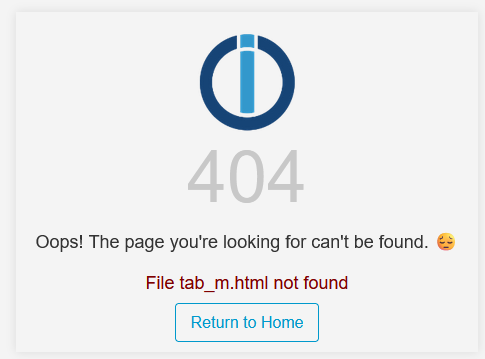
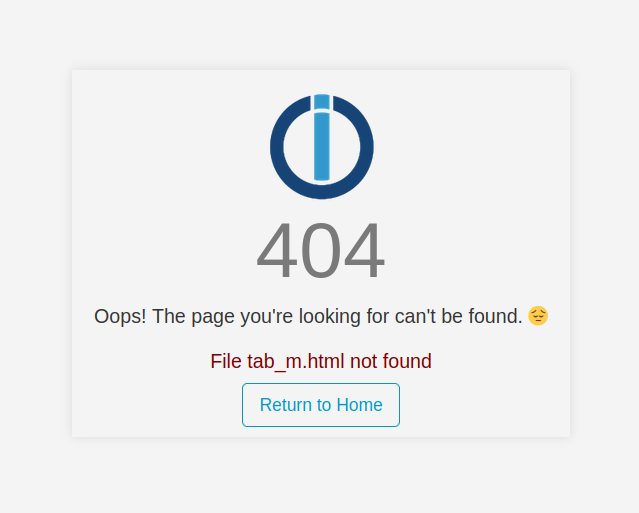
File tab_m.html not found
-
@peterle sagte in File tab_m.html not found:
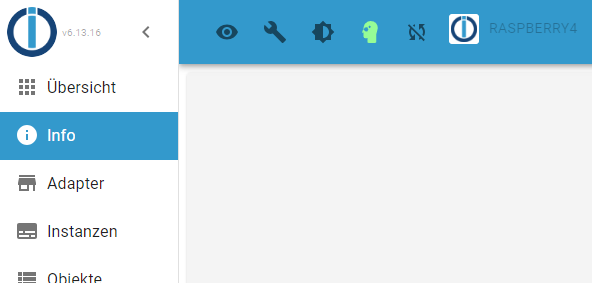
Beim Klicken auf den Punkt "Info" im Menü kommt die Meldung "File tab_m.html not found".
Wo meinst du genau?
Zeig mal die Langfassung von
iob diag@thomas-braun
du meinst nicht die Summary sondern in lang...
(btw. wohl auch ein Fehler im "hm-rpc" Adapter - muss ich auch schauen)Danke für's "schauen" ...
======== Start marking the full check here =========
Skript v.2024-05-22

*** BASE SYSTEM ***
 Static hostname: Raspberry4
       Icon name: computer
Operating System: Debian GNU/Linux 12 (bookworm)
          Kernel: Linux 6.6.31+rpt-rpi-v8
    Architecture: arm64

Model           : Raspberry Pi 4 Model B Rev 1.2
Docker          : false
Virtualization  : none
Kernel          : aarch64
Userland        : 64 bit

Systemuptime and Load:
 07:21:13 up 1 day, 21:38,  2 users,  load average: 1.15, 0.92, 0.57
CPU threads: 4


*** RASPBERRY THROTTLING ***
Current issues:
No throttling issues detected.

Previously detected issues:
No throttling issues detected.

*** Time and Time Zones ***
               Local time: Mon 2024-06-17 07:21:14 CEST
           Universal time: Mon 2024-06-17 05:21:14 UTC
                 RTC time: n/a
                Time zone: Europe/Berlin (CEST, +0200)
System clock synchronized: yes
              NTP service: active
          RTC in local TZ: no

*** Users and Groups ***
User that called 'iob diag':
<hidden>
HOME=/home/<hidden>
GROUPS=<hidden> adm dialout cdrom sudo audio video plugdev games users input render netdev gpio i2c spi iobroker

User that is running 'js-controller':
iobroker
HOME=/home/iobroker
GROUPS=iobroker tty dialout audio video plugdev bluetooth gpio i2c

*** Display-Server-Setup ***
Display-Server: false
Desktop:
Terminal:       tty
Boot Target:    multi-user.target

*** MEMORY ***
               total        used        free      shared  buff/cache   available
Mem:            4.0G        1.5G        1.0G        1.2M        1.5G        2.4G
Swap:           209M          0B        209M
Total:          4.2G        1.5G        1.2G

Active iob-Instances:   17

         3792 M total memory
         1470 M used memory
         1461 M active memory
         1207 M inactive memory
          961 M free memory
          114 M buffer memory
         1321 M swap cache
          199 M total swap
            0 M used swap
          199 M free swap

*** top - Table Of Processes  ***
top - 07:21:14 up 1 day, 21:38,  2 users,  load average: 1.22, 0.94, 0.58
Tasks: 181 total,   1 running, 180 sleeping,   0 stopped,   0 zombie
%Cpu(s):  0.0 us, 25.0 sy,  0.0 ni, 75.0 id,  0.0 wa,  0.0 hi,  0.0 si,  0.0 st
MiB Mem :   3792.1 total,    960.3 free,   1472.4 used,   1436.2 buff/cache
MiB Swap:    200.0 total,    200.0 free,      0.0 used.   2319.7 avail Mem

*** FAILED SERVICES ***

  UNIT LOAD ACTIVE SUB DESCRIPTION
0 loaded units listed.

*** FILESYSTEM ***
Filesystem     Type      Size  Used Avail Use% Mounted on
udev           devtmpfs  1.6G     0  1.6G   0% /dev
tmpfs          tmpfs     380M  1.2M  379M   1% /run
/dev/mmcblk0p2 ext4      117G  4.3G  107G   4% /
tmpfs          tmpfs     1.9G     0  1.9G   0% /dev/shm
tmpfs          tmpfs     5.0M   16K  5.0M   1% /run/lock
/dev/mmcblk0p1 vfat      510M   64M  447M  13% /boot/firmware
tmpfs          tmpfs     380M     0  380M   0% /run/user/1000

Messages concerning ext4 filesystem in dmesg:
[Sat Jun 15 09:42:22 2024] Kernel command line: coherent_pool=1M 8250.nr_uarts=0 snd_bcm2835.enable_headphones=0 snd_bcm2835.enable_headphones=1 snd_bcm2835.enable_hdmi=1 snd_bcm2835.enable_hdmi=0  smsc95xx.macaddr=DC:A6:32:61:22:A6 vc_mem.mem_base=0x3ec00000 vc_mem.mem_size=0x40000000  console=ttyS0,115200 console=tty1 root=PARTUUID=c9bf5144-02 rootfstype=ext4 fsck.repair=yes rootwait cfg80211.ieee80211_regdom=DE
[Sat Jun 15 09:42:24 2024] EXT4-fs (mmcblk0p2): mounted filesystem 93c89e92-8f2e-4522-ad32-68faed883d2f ro with ordered data mode. Quota mode: none.
[Sat Jun 15 09:42:26 2024] EXT4-fs (mmcblk0p2): re-mounted 93c89e92-8f2e-4522-ad32-68faed883d2f r/w. Quota mode: none.

Show mounted filesystems:
TARGET                                                  SOURCE         FSTYPE      OPTIONS
/                                                       /dev/mmcblk0p2 ext4        rw,noatime
|-/sys                                                  sysfs          sysfs       rw,nosuid,nodev,noexec,relatime
| |-/sys/kernel/security                                securityfs     securityfs  rw,nosuid,nodev,noexec,relatime
| |-/sys/fs/cgroup                                      cgroup2        cgroup2     rw,nosuid,nodev,noexec,relatime,nsdelegate,memory_recursiveprot
| |-/sys/fs/pstore                                      pstore         pstore      rw,nosuid,nodev,noexec,relatime
| |-/sys/fs/bpf                                         bpf            bpf         rw,nosuid,nodev,noexec,relatime,mode=700
| |-/sys/kernel/debug                                   debugfs        debugfs     rw,nosuid,nodev,noexec,relatime
| |-/sys/kernel/tracing                                 tracefs        tracefs     rw,nosuid,nodev,noexec,relatime
| |-/sys/fs/fuse/connections                            fusectl        fusectl     rw,nosuid,nodev,noexec,relatime
| `-/sys/kernel/config                                  configfs       configfs    rw,nosuid,nodev,noexec,relatime
|-/proc                                                 proc           proc        rw,relatime
| `-/proc/sys/fs/binfmt_misc                            systemd-1      autofs      rw,relatime,fd=30,pgrp=1,timeout=0,minproto=5,maxproto=5,direct,pipe_ino=1988
|   `-/proc/sys/fs/binfmt_misc                          binfmt_misc    binfmt_misc rw,nosuid,nodev,noexec,relatime
|-/dev                                                  udev           devtmpfs    rw,nosuid,relatime,size=1671308k,nr_inodes=417827,mode=755
| |-/dev/pts                                            devpts         devpts      rw,nosuid,noexec,relatime,gid=5,mode=620,ptmxmode=000
| |-/dev/shm                                            tmpfs          tmpfs       rw,nosuid,nodev
| `-/dev/mqueue                                         mqueue         mqueue      rw,nosuid,nodev,noexec,relatime
|-/run                                                  tmpfs          tmpfs       rw,nosuid,nodev,noexec,relatime,size=388308k,mode=755
| |-/run/lock                                           tmpfs          tmpfs       rw,nosuid,nodev,noexec,relatime,size=5120k
| |-/run/credentials/systemd-sysctl.service             ramfs          ramfs       ro,nosuid,nodev,noexec,relatime,mode=700
| |-/run/credentials/systemd-sysusers.service           ramfs          ramfs       ro,nosuid,nodev,noexec,relatime,mode=700
| |-/run/credentials/systemd-tmpfiles-setup-dev.service ramfs          ramfs       ro,nosuid,nodev,noexec,relatime,mode=700
| |-/run/rpc_pipefs                                     sunrpc         rpc_pipefs  rw,relatime
| |-/run/credentials/systemd-tmpfiles-setup.service     ramfs          ramfs       ro,nosuid,nodev,noexec,relatime,mode=700
| `-/run/user/1000                                      tmpfs          tmpfs       rw,nosuid,nodev,relatime,size=388304k,nr_inodes=97076,mode=700,uid=1000,gid=1000
`-/boot/firmware                                        /dev/mmcblk0p1 vfat        rw,relatime,fmask=0022,dmask=0022,codepage=437,iocharset=ascii,shortname=mixed,errors=remount-ro

Files in neuralgic directories:

/var:
632M    /var/
206M    /var/cache
200M    /var/cache/apt
165M    /var/lib
133M    /var/lib/apt/lists

Archived and active journals take up 60.0M in the file system.

/opt/iobroker/backups:
3.9M    /opt/iobroker/backups/

/opt/iobroker/iobroker-data:
419M    /opt/iobroker/iobroker-data/
299M    /opt/iobroker/iobroker-data/files
138M    /opt/iobroker/iobroker-data/files/javascript.admin
118M    /opt/iobroker/iobroker-data/files/javascript.admin/static
117M    /opt/iobroker/iobroker-data/files/javascript.admin/static/js

The five largest files in iobroker-data are:
41M     /opt/iobroker/iobroker-data/files/material/static/js/main.c5478f66.js.map
26M     /opt/iobroker/iobroker-data/objects.jsonl
24M     /opt/iobroker/iobroker-data/files/web.admin/static/js/main.135279a0.js.map
22M     /opt/iobroker/iobroker-data/files/modbus.admin/static/js/main.18496c94.js.map
9.9M    /opt/iobroker/iobroker-data/files/material/static/js/main.c5478f66.js

USB-Devices by-id:
USB-Sticks -  Avoid direct links to /dev/tty* in your adapter setups, please always prefer the links 'by-id':

No Devices found 'by-id'


*** NodeJS-Installation ***

/usr/bin/nodejs         v20.14.0
/usr/bin/node           v20.14.0
/usr/bin/npm            10.7.0
/usr/bin/npx            10.7.0
/usr/bin/corepack       0.28.1


nodejs:
  Installed: 20.14.0-1nodesource1
  Candidate: 20.14.0-1nodesource1
  Version table:
 *** 20.14.0-1nodesource1 1001
        500 https://deb.nodesource.com/node_20.x nodistro/main arm64 Packages
        100 /var/lib/dpkg/status
     20.13.1-1nodesource1 1001
        500 https://deb.nodesource.com/node_20.x nodistro/main arm64 Packages
     20.13.0-1nodesource1 1001
        500 https://deb.nodesource.com/node_20.x nodistro/main arm64 Packages
     20.12.2-1nodesource1 1001
        500 https://deb.nodesource.com/node_20.x nodistro/main arm64 Packages
     20.12.1-1nodesource1 1001
        500 https://deb.nodesource.com/node_20.x nodistro/main arm64 Packages
     20.12.0-1nodesource1 1001
        500 https://deb.nodesource.com/node_20.x nodistro/main arm64 Packages
     20.11.1-1nodesource1 1001
        500 https://deb.nodesource.com/node_20.x nodistro/main arm64 Packages
     20.11.0-1nodesource1 1001
        500 https://deb.nodesource.com/node_20.x nodistro/main arm64 Packages
     20.10.0-1nodesource1 1001
        500 https://deb.nodesource.com/node_20.x nodistro/main arm64 Packages
     20.9.0-1nodesource1 1001
        500 https://deb.nodesource.com/node_20.x nodistro/main arm64 Packages
     20.8.1-1nodesource1 1001
        500 https://deb.nodesource.com/node_20.x nodistro/main arm64 Packages
     20.8.0-1nodesource1 1001
        500 https://deb.nodesource.com/node_20.x nodistro/main arm64 Packages
     20.7.0-1nodesource1 1001
        500 https://deb.nodesource.com/node_20.x nodistro/main arm64 Packages
     20.6.1-1nodesource1 1001
        500 https://deb.nodesource.com/node_20.x nodistro/main arm64 Packages
     20.6.0-1nodesource1 1001
        500 https://deb.nodesource.com/node_20.x nodistro/main arm64 Packages
     20.5.1-1nodesource1 1001
        500 https://deb.nodesource.com/node_20.x nodistro/main arm64 Packages
     20.5.0-1nodesource1 1001
        500 https://deb.nodesource.com/node_20.x nodistro/main arm64 Packages
     20.4.0-1nodesource1 1001
        500 https://deb.nodesource.com/node_20.x nodistro/main arm64 Packages
     20.3.1-1nodesource1 1001
        500 https://deb.nodesource.com/node_20.x nodistro/main arm64 Packages
     20.3.0-1nodesource1 1001
        500 https://deb.nodesource.com/node_20.x nodistro/main arm64 Packages
     20.2.0-1nodesource1 1001
        500 https://deb.nodesource.com/node_20.x nodistro/main arm64 Packages
     20.1.0-1nodesource1 1001
        500 https://deb.nodesource.com/node_20.x nodistro/main arm64 Packages
     20.0.0-1nodesource1 1001
        500 https://deb.nodesource.com/node_20.x nodistro/main arm64 Packages
     18.19.0+dfsg-6~deb12u1 500
        500 http://deb.debian.org/debian-security bookworm-security/main arm64 Packages
     18.13.0+dfsg1-1 500
        500 http://deb.debian.org/debian bookworm/main arm64 Packages

Temp directories causing npm8 problem: 0
No problems detected

Errors in npm tree:

*** ioBroker-Installation ***

ioBroker Status
iobroker is running on this host.


Objects type: jsonl
States  type: jsonl

Core adapters versions
js-controller:  5.0.19
admin:          6.13.16
javascript:     8.3.1

nodejs modules from github:     0

Adapter State
+ system.adapter.admin.0                  : admin                 : Raspberry4                               -  enabled, port: 8081, bind: 0.0.0.0 (SSL), run as: admin
+ system.adapter.backitup.0               : backitup              : Raspberry4                               -  enabled
+ system.adapter.discovery.0              : discovery             : Raspberry4                               -  enabled
  system.adapter.ds18b20.0                : ds18b20               : Raspberry4                               - disabled
+ system.adapter.email.0                  : email                 : Raspberry4                               -  enabled
  system.adapter.flot.0                   : flot                  : Raspberry4                               - disabled
+ system.adapter.hekr.0                   : hekr                  : Raspberry4                               -  enabled
+ system.adapter.history.0                : history               : Raspberry4                               -  enabled
+ system.adapter.hm-rega.0                : hm-rega               : Raspberry4                               -  enabled
+ system.adapter.hm-rpc.0                 : hm-rpc                : Raspberry4                               -  enabled, port: 0
  system.adapter.hm-rpc.1                 : hm-rpc                : Raspberry4                               -  enabled, port: 0
  system.adapter.info.0                   : info                  : Raspberry4                               - disabled
+ system.adapter.javascript.0             : javascript            : Raspberry4                               -  enabled
  system.adapter.material.0               : material              : Raspberry4                               - disabled
  system.adapter.modbus.0                 : modbus                : Raspberry4                               - disabled
+ system.adapter.mqtt.0                   : mqtt                  : Raspberry4                               -  enabled, port: 1883, bind: 0.0.0.0
+ system.adapter.mqtt.1                   : mqtt                  : Raspberry4                               -  enabled, port: 1883, bind: 0.0.0.0
  system.adapter.musiccast.0              : musiccast             : Raspberry4                               - disabled
  system.adapter.pvforecast.0             : pvforecast            : Raspberry4                               - disabled
+ system.adapter.rpi2.0                   : rpi2                  : Raspberry4                               -  enabled
+ system.adapter.senec.0                  : senec                 : Raspberry4                               -  enabled
+ system.adapter.shelly.0                 : shelly                : Raspberry4                               -  enabled, port: 1882, bind: 0.0.0.0
+ system.adapter.socketio.0               : socketio              : Raspberry4                               -  enabled, port: 8084, bind: 0.0.0.0, run as: admin
  system.adapter.vis-history.0            : vis-history           : Raspberry4                               - disabled
  system.adapter.vis-hqwidgets.0          : vis-hqwidgets         : Raspberry4                               - disabled
  system.adapter.vis-jqui-mfd.0           : vis-jqui-mfd          : Raspberry4                               - disabled
  system.adapter.vis-justgage.0           : vis-justgage          : Raspberry4                               - disabled
  system.adapter.vis.0                    : vis                   : Raspberry4                               - disabled
+ system.adapter.web.0                    : web                   : Raspberry4                               -  enabled, port: 8082, bind: 0.0.0.0 (SSL), run as: admin

+ instance is alive

Enabled adapters with bindings
+ system.adapter.admin.0                  : admin                 : Raspberry4                               -  enabled, port: 8081, bind: 0.0.0.0 (SSL), run as: admin
+ system.adapter.hm-rpc.0                 : hm-rpc                : Raspberry4                               -  enabled, port: 0
  system.adapter.hm-rpc.1                 : hm-rpc                : Raspberry4                               -  enabled, port: 0
+ system.adapter.mqtt.0                   : mqtt                  : Raspberry4                               -  enabled, port: 1883, bind: 0.0.0.0
+ system.adapter.mqtt.1                   : mqtt                  : Raspberry4                               -  enabled, port: 1883, bind: 0.0.0.0
+ system.adapter.shelly.0                 : shelly                : Raspberry4                               -  enabled, port: 1882, bind: 0.0.0.0
+ system.adapter.socketio.0               : socketio              : Raspberry4                               -  enabled, port: 8084, bind: 0.0.0.0, run as: admin
+ system.adapter.web.0                    : web                   : Raspberry4                               -  enabled, port: 8082, bind: 0.0.0.0 (SSL), run as: admin

ioBroker-Repositories
stable        : http://download.iobroker.net/sources-dist.json
beta          : http://download.iobroker.net/sources-dist-latest.json

Active repo(s): stable

Installed ioBroker-Instances
Used repository: stable
Adapter    "admin"        : 6.13.16  , installed 6.13.16
Adapter    "backitup"     : 2.11.0   , installed 2.11.0
Adapter    "discovery"    : 4.5.0    , installed 4.5.0
Adapter    "ds18b20"      : 2.0.5    , installed 2.0.5
Adapter    "email"        : 1.3.0    , installed 1.3.0
Adapter    "flot"         : 1.12.0   , installed 1.12.0
Adapter    "hekr"         : 0.0.6    , installed 0.0.6
Adapter    "history"      : 3.0.1    , installed 3.0.1
Adapter    "hm-rega"      : 4.0.0    , installed 4.0.0
Adapter    "hm-rpc"       : 1.17.0   , installed 1.17.0
Adapter    "javascript"   : 8.3.1    , installed 8.3.1
Controller "js-controller": 5.0.19   , installed 5.0.19
Adapter    "material"     : 1.3.1    , installed 1.3.1
Adapter    "modbus"       : 6.1.0    , installed 6.2.3
Adapter    "mqtt"         : 5.2.0    , installed 5.2.0
Adapter    "musiccast"    : 1.1.3    , installed 1.1.3
Adapter    "pvforecast"   : 2.9.1    , installed 2.9.1
Adapter    "rpi2"         : 1.3.2    , installed 1.3.2
Adapter    "senec"        : 1.6.12   , installed 1.6.12
Adapter    "shelly"       : 7.0.0    , installed 7.0.0
Adapter    "simple-api"   : 2.8.0    , installed 2.8.0
Adapter    "socketio"     : 6.7.0    , installed 6.7.0
Adapter    "vis"          : 1.5.6    , installed 1.5.6
Adapter    "vis-history"  : 1.0.0    , installed 1.0.0
Adapter    "vis-hqwidgets": 1.5.1    , installed 1.5.1
Adapter    "vis-jqui-mfd" : 1.1.1    , installed 1.1.1
Adapter    "vis-justgage" : 2.1.7    , installed 2.1.7
Adapter    "web"          : 6.2.5    , installed 6.2.5
Adapter    "ws"           : 2.6.1    , installed 2.6.1

Objects and States
Please stand by - This may take a while
Objects:        5926
States:         5335

*** OS-Repositories and Updates ***
Hit:1 http://deb.debian.org/debian bookworm InRelease
Hit:2 http://deb.debian.org/debian-security bookworm-security InRelease
Hit:3 http://deb.debian.org/debian bookworm-updates InRelease
Hit:4 http://archive.raspberrypi.com/debian bookworm InRelease
Hit:5 https://deb.nodesource.com/node_20.x nodistro InRelease
Reading package lists...
Pending Updates: 1

*** Listening Ports ***
Active Internet connections (only servers)
Proto Recv-Q Send-Q Local Address           Foreign Address         State       User       Inode      PID/Program name
<hidden>

*** Log File - Last 25 Lines ***

2024-06-17 07:17:20.180  - info: host.Raspberry4 Restart adapter system.adapter.hm-rpc.1 because enabled
2024-06-17 07:17:50.293  - info: host.Raspberry4 instance system.adapter.hm-rpc.1 started with pid 69806
2024-06-17 07:17:52.518  - error: hm-rpc.1 (69806) Init not possible, going to stop: Unknown XML-RPC tag 'TITLE'
2024-06-17 07:18:22.514  - error: hm-rpc.1 (69806) Init not possible, going to stop: Unknown XML-RPC tag 'TITLE'
2024-06-17 07:18:22.534  - error: hm-rpc.1 (69806) Cannot call init: [http://192.168.<hidden>:<hidden>, ""] Unknown XML-RPC tag 'TITLE'
2024-06-17 07:18:23.250  - info: host.Raspberry4 instance system.adapter.hm-rpc.1 terminated with code 0 (NO_ERROR)

2024-06-17 07:21:33.617  - info: host.Raspberry4 Restart adapter system.adapter.hm-rpc.1 because enabled
============ Mark until here for C&P =============
-
@thomas-braun
du meinst nicht die Summary sondern in lang...
(btw. wohl auch ein Fehler im "hm-rpc" Adapter - muss ich auch schauen)Danke für's "schauen" ...
======== Start marking the full check here =========
Skript v.2024-05-22

*** BASE SYSTEM ***
 Static hostname: Raspberry4
       Icon name: computer
Operating System: Debian GNU/Linux 12 (bookworm)
          Kernel: Linux 6.6.31+rpt-rpi-v8
    Architecture: arm64

Model           : Raspberry Pi 4 Model B Rev 1.2
Docker          : false
Virtualization  : none
Kernel          : aarch64
Userland        : 64 bit

Systemuptime and Load:
 07:21:13 up 1 day, 21:38,  2 users,  load average: 1.15, 0.92, 0.57
CPU threads: 4


*** RASPBERRY THROTTLING ***
Current issues:
No throttling issues detected.

Previously detected issues:
No throttling issues detected.

*** Time and Time Zones ***
               Local time: Mon 2024-06-17 07:21:14 CEST
           Universal time: Mon 2024-06-17 05:21:14 UTC
                 RTC time: n/a
                Time zone: Europe/Berlin (CEST, +0200)
System clock synchronized: yes
              NTP service: active
          RTC in local TZ: no

*** Users and Groups ***
User that called 'iob diag':
<hidden>
HOME=/home/<hidden>
GROUPS=<hidden> adm dialout cdrom sudo audio video plugdev games users input render netdev gpio i2c spi iobroker

User that is running 'js-controller':
iobroker
HOME=/home/iobroker
GROUPS=iobroker tty dialout audio video plugdev bluetooth gpio i2c

*** Display-Server-Setup ***
Display-Server: false
Desktop:
Terminal:       tty
Boot Target:    multi-user.target

*** MEMORY ***
               total        used        free      shared  buff/cache   available
Mem:            4.0G        1.5G        1.0G        1.2M        1.5G        2.4G
Swap:           209M          0B        209M
Total:          4.2G        1.5G        1.2G

Active iob-Instances:   17

         3792 M total memory
         1470 M used memory
         1461 M active memory
         1207 M inactive memory
          961 M free memory
          114 M buffer memory
         1321 M swap cache
          199 M total swap
            0 M used swap
          199 M free swap

*** top - Table Of Processes  ***
top - 07:21:14 up 1 day, 21:38,  2 users,  load average: 1.22, 0.94, 0.58
Tasks: 181 total,   1 running, 180 sleeping,   0 stopped,   0 zombie
%Cpu(s):  0.0 us, 25.0 sy,  0.0 ni, 75.0 id,  0.0 wa,  0.0 hi,  0.0 si,  0.0 st
MiB Mem :   3792.1 total,    960.3 free,   1472.4 used,   1436.2 buff/cache
MiB Swap:    200.0 total,    200.0 free,      0.0 used.   2319.7 avail Mem

*** FAILED SERVICES ***

  UNIT LOAD ACTIVE SUB DESCRIPTION
0 loaded units listed.

*** FILESYSTEM ***
Filesystem     Type      Size  Used Avail Use% Mounted on
udev           devtmpfs  1.6G     0  1.6G   0% /dev
tmpfs          tmpfs     380M  1.2M  379M   1% /run
/dev/mmcblk0p2 ext4      117G  4.3G  107G   4% /
tmpfs          tmpfs     1.9G     0  1.9G   0% /dev/shm
tmpfs          tmpfs     5.0M   16K  5.0M   1% /run/lock
/dev/mmcblk0p1 vfat      510M   64M  447M  13% /boot/firmware
tmpfs          tmpfs     380M     0  380M   0% /run/user/1000

Messages concerning ext4 filesystem in dmesg:
[Sat Jun 15 09:42:22 2024] Kernel command line: coherent_pool=1M 8250.nr_uarts=0 snd_bcm2835.enable_headphones=0 snd_bcm2835.enable_headphones=1 snd_bcm2835.enable_hdmi=1 snd_bcm2835.enable_hdmi=0  smsc95xx.macaddr=DC:A6:32:61:22:A6 vc_mem.mem_base=0x3ec00000 vc_mem.mem_size=0x40000000  console=ttyS0,115200 console=tty1 root=PARTUUID=c9bf5144-02 rootfstype=ext4 fsck.repair=yes rootwait cfg80211.ieee80211_regdom=DE
[Sat Jun 15 09:42:24 2024] EXT4-fs (mmcblk0p2): mounted filesystem 93c89e92-8f2e-4522-ad32-68faed883d2f ro with ordered data mode. Quota mode: none.
[Sat Jun 15 09:42:26 2024] EXT4-fs (mmcblk0p2): re-mounted 93c89e92-8f2e-4522-ad32-68faed883d2f r/w. Quota mode: none.

Show mounted filesystems:
TARGET                                                  SOURCE         FSTYPE      OPTIONS
/                                                       /dev/mmcblk0p2 ext4        rw,noatime
|-/sys                                                  sysfs          sysfs       rw,nosuid,nodev,noexec,relatime
| |-/sys/kernel/security                                securityfs     securityfs  rw,nosuid,nodev,noexec,relatime
| |-/sys/fs/cgroup                                      cgroup2        cgroup2     rw,nosuid,nodev,noexec,relatime,nsdelegate,memory_recursiveprot
| |-/sys/fs/pstore                                      pstore         pstore      rw,nosuid,nodev,noexec,relatime
| |-/sys/fs/bpf                                         bpf            bpf         rw,nosuid,nodev,noexec,relatime,mode=700
| |-/sys/kernel/debug                                   debugfs        debugfs     rw,nosuid,nodev,noexec,relatime
| |-/sys/kernel/tracing                                 tracefs        tracefs     rw,nosuid,nodev,noexec,relatime
| |-/sys/fs/fuse/connections                            fusectl        fusectl     rw,nosuid,nodev,noexec,relatime
| `-/sys/kernel/config                                  configfs       configfs    rw,nosuid,nodev,noexec,relatime
|-/proc                                                 proc           proc        rw,relatime
| `-/proc/sys/fs/binfmt_misc                            systemd-1      autofs      rw,relatime,fd=30,pgrp=1,timeout=0,minproto=5,maxproto=5,direct,pipe_ino=1988
|   `-/proc/sys/fs/binfmt_misc                          binfmt_misc    binfmt_misc rw,nosuid,nodev,noexec,relatime
|-/dev                                                  udev           devtmpfs    rw,nosuid,relatime,size=1671308k,nr_inodes=417827,mode=755
| |-/dev/pts                                            devpts         devpts      rw,nosuid,noexec,relatime,gid=5,mode=620,ptmxmode=000
| |-/dev/shm                                            tmpfs          tmpfs       rw,nosuid,nodev
| `-/dev/mqueue                                         mqueue         mqueue      rw,nosuid,nodev,noexec,relatime
|-/run                                                  tmpfs          tmpfs       rw,nosuid,nodev,noexec,relatime,size=388308k,mode=755
| |-/run/lock                                           tmpfs          tmpfs       rw,nosuid,nodev,noexec,relatime,size=5120k
| |-/run/credentials/systemd-sysctl.service             ramfs          ramfs       ro,nosuid,nodev,noexec,relatime,mode=700
| |-/run/credentials/systemd-sysusers.service           ramfs          ramfs       ro,nosuid,nodev,noexec,relatime,mode=700
| |-/run/credentials/systemd-tmpfiles-setup-dev.service ramfs          ramfs       ro,nosuid,nodev,noexec,relatime,mode=700
| |-/run/rpc_pipefs                                     sunrpc         rpc_pipefs  rw,relatime
| |-/run/credentials/systemd-tmpfiles-setup.service     ramfs          ramfs       ro,nosuid,nodev,noexec,relatime,mode=700
| `-/run/user/1000                                      tmpfs          tmpfs       rw,nosuid,nodev,relatime,size=388304k,nr_inodes=97076,mode=700,uid=1000,gid=1000
`-/boot/firmware                                        /dev/mmcblk0p1 vfat        rw,relatime,fmask=0022,dmask=0022,codepage=437,iocharset=ascii,shortname=mixed,errors=remount-ro

Files in neuralgic directories:

/var:
632M    /var/
206M    /var/cache
200M    /var/cache/apt
165M    /var/lib
133M    /var/lib/apt/lists

Archived and active journals take up 60.0M in the file system.

/opt/iobroker/backups:
3.9M    /opt/iobroker/backups/

/opt/iobroker/iobroker-data:
419M    /opt/iobroker/iobroker-data/
299M    /opt/iobroker/iobroker-data/files
138M    /opt/iobroker/iobroker-data/files/javascript.admin
118M    /opt/iobroker/iobroker-data/files/javascript.admin/static
117M    /opt/iobroker/iobroker-data/files/javascript.admin/static/js

The five largest files in iobroker-data are:
41M     /opt/iobroker/iobroker-data/files/material/static/js/main.c5478f66.js.map
26M     /opt/iobroker/iobroker-data/objects.jsonl
24M     /opt/iobroker/iobroker-data/files/web.admin/static/js/main.135279a0.js.map
22M     /opt/iobroker/iobroker-data/files/modbus.admin/static/js/main.18496c94.js.map
9.9M    /opt/iobroker/iobroker-data/files/material/static/js/main.c5478f66.js

USB-Devices by-id:
USB-Sticks -  Avoid direct links to /dev/tty* in your adapter setups, please always prefer the links 'by-id':

No Devices found 'by-id'


*** NodeJS-Installation ***

/usr/bin/nodejs         v20.14.0
/usr/bin/node           v20.14.0
/usr/bin/npm            10.7.0
/usr/bin/npx            10.7.0
/usr/bin/corepack       0.28.1


nodejs:
  Installed: 20.14.0-1nodesource1
  Candidate: 20.14.0-1nodesource1
  Version table:
 *** 20.14.0-1nodesource1 1001
        500 https://deb.nodesource.com/node_20.x nodistro/main arm64 Packages
        100 /var/lib/dpkg/status
     20.13.1-1nodesource1 1001
        500 https://deb.nodesource.com/node_20.x nodistro/main arm64 Packages
     20.13.0-1nodesource1 1001
        500 https://deb.nodesource.com/node_20.x nodistro/main arm64 Packages
     20.12.2-1nodesource1 1001
        500 https://deb.nodesource.com/node_20.x nodistro/main arm64 Packages
     20.12.1-1nodesource1 1001
        500 https://deb.nodesource.com/node_20.x nodistro/main arm64 Packages
     20.12.0-1nodesource1 1001
        500 https://deb.nodesource.com/node_20.x nodistro/main arm64 Packages
     20.11.1-1nodesource1 1001
        500 https://deb.nodesource.com/node_20.x nodistro/main arm64 Packages
     20.11.0-1nodesource1 1001
        500 https://deb.nodesource.com/node_20.x nodistro/main arm64 Packages
     20.10.0-1nodesource1 1001
        500 https://deb.nodesource.com/node_20.x nodistro/main arm64 Packages
     20.9.0-1nodesource1 1001
        500 https://deb.nodesource.com/node_20.x nodistro/main arm64 Packages
     20.8.1-1nodesource1 1001
        500 https://deb.nodesource.com/node_20.x nodistro/main arm64 Packages
     20.8.0-1nodesource1 1001
        500 https://deb.nodesource.com/node_20.x nodistro/main arm64 Packages
     20.7.0-1nodesource1 1001
        500 https://deb.nodesource.com/node_20.x nodistro/main arm64 Packages
     20.6.1-1nodesource1 1001
        500 https://deb.nodesource.com/node_20.x nodistro/main arm64 Packages
     20.6.0-1nodesource1 1001
        500 https://deb.nodesource.com/node_20.x nodistro/main arm64 Packages
     20.5.1-1nodesource1 1001
        500 https://deb.nodesource.com/node_20.x nodistro/main arm64 Packages
     20.5.0-1nodesource1 1001
        500 https://deb.nodesource.com/node_20.x nodistro/main arm64 Packages
     20.4.0-1nodesource1 1001
        500 https://deb.nodesource.com/node_20.x nodistro/main arm64 Packages
     20.3.1-1nodesource1 1001
        500 https://deb.nodesource.com/node_20.x nodistro/main arm64 Packages
     20.3.0-1nodesource1 1001
        500 https://deb.nodesource.com/node_20.x nodistro/main arm64 Packages
     20.2.0-1nodesource1 1001
        500 https://deb.nodesource.com/node_20.x nodistro/main arm64 Packages
     20.1.0-1nodesource1 1001
        500 https://deb.nodesource.com/node_20.x nodistro/main arm64 Packages
     20.0.0-1nodesource1 1001
        500 https://deb.nodesource.com/node_20.x nodistro/main arm64 Packages
     18.19.0+dfsg-6~deb12u1 500
        500 http://deb.debian.org/debian-security bookworm-security/main arm64 Packages
     18.13.0+dfsg1-1 500
        500 http://deb.debian.org/debian bookworm/main arm64 Packages

Temp directories causing npm8 problem: 0
No problems detected

Errors in npm tree:

*** ioBroker-Installation ***

ioBroker Status
iobroker is running on this host.


Objects type: jsonl
States  type: jsonl

Core adapters versions
js-controller:  5.0.19
admin:          6.13.16
javascript:     8.3.1

nodejs modules from github:     0

Adapter State
+ system.adapter.admin.0                  : admin                 : Raspberry4                               -  enabled, port: 8081, bind: 0.0.0.0 (SSL), run as: admin
+ system.adapter.backitup.0               : backitup              : Raspberry4                               -  enabled
+ system.adapter.discovery.0              : discovery             : Raspberry4                               -  enabled
  system.adapter.ds18b20.0                : ds18b20               : Raspberry4                               - disabled
+ system.adapter.email.0                  : email                 : Raspberry4                               -  enabled
  system.adapter.flot.0                   : flot                  : Raspberry4                               - disabled
+ system.adapter.hekr.0                   : hekr                  : Raspberry4                               -  enabled
+ system.adapter.history.0                : history               : Raspberry4                               -  enabled
+ system.adapter.hm-rega.0                : hm-rega               : Raspberry4                               -  enabled
+ system.adapter.hm-rpc.0                 : hm-rpc                : Raspberry4                               -  enabled, port: 0
  system.adapter.hm-rpc.1                 : hm-rpc                : Raspberry4                               -  enabled, port: 0
  system.adapter.info.0                   : info                  : Raspberry4                               - disabled
+ system.adapter.javascript.0             : javascript            : Raspberry4                               -  enabled
  system.adapter.material.0               : material              : Raspberry4                               - disabled
  system.adapter.modbus.0                 : modbus                : Raspberry4                               - disabled
+ system.adapter.mqtt.0                   : mqtt                  : Raspberry4                               -  enabled, port: 1883, bind: 0.0.0.0
+ system.adapter.mqtt.1                   : mqtt                  : Raspberry4                               -  enabled, port: 1883, bind: 0.0.0.0
  system.adapter.musiccast.0              : musiccast             : Raspberry4                               - disabled
  system.adapter.pvforecast.0             : pvforecast            : Raspberry4                               - disabled
+ system.adapter.rpi2.0                   : rpi2                  : Raspberry4                               -  enabled
+ system.adapter.senec.0                  : senec                 : Raspberry4                               -  enabled
+ system.adapter.shelly.0                 : shelly                : Raspberry4                               -  enabled, port: 1882, bind: 0.0.0.0
+ system.adapter.socketio.0               : socketio              : Raspberry4                               -  enabled, port: 8084, bind: 0.0.0.0, run as: admin
  system.adapter.vis-history.0            : vis-history           : Raspberry4                               - disabled
  system.adapter.vis-hqwidgets.0          : vis-hqwidgets         : Raspberry4                               - disabled
  system.adapter.vis-jqui-mfd.0           : vis-jqui-mfd          : Raspberry4                               - disabled
  system.adapter.vis-justgage.0           : vis-justgage          : Raspberry4                               - disabled
  system.adapter.vis.0                    : vis                   : Raspberry4                               - disabled
+ system.adapter.web.0                    : web                   : Raspberry4                               -  enabled, port: 8082, bind: 0.0.0.0 (SSL), run as: admin

+ instance is alive

Enabled adapters with bindings
+ system.adapter.admin.0                  : admin                 : Raspberry4                               -  enabled, port: 8081, bind: 0.0.0.0 (SSL), run as: admin
+ system.adapter.hm-rpc.0                 : hm-rpc                : Raspberry4                               -  enabled, port: 0
  system.adapter.hm-rpc.1                 : hm-rpc                : Raspberry4                               -  enabled, port: 0
+ system.adapter.mqtt.0                   : mqtt                  : Raspberry4                               -  enabled, port: 1883, bind: 0.0.0.0
+ system.adapter.mqtt.1                   : mqtt                  : Raspberry4                               -  enabled, port: 1883, bind: 0.0.0.0
+ system.adapter.shelly.0                 : shelly                : Raspberry4                               -  enabled, port: 1882, bind: 0.0.0.0
+ system.adapter.socketio.0               : socketio              : Raspberry4                               -  enabled, port: 8084, bind: 0.0.0.0, run as: admin
+ system.adapter.web.0                    : web                   : Raspberry4                               -  enabled, port: 8082, bind: 0.0.0.0 (SSL), run as: admin

ioBroker-Repositories
stable        : http://download.iobroker.net/sources-dist.json
beta          : http://download.iobroker.net/sources-dist-latest.json

Active repo(s): stable

Installed ioBroker-Instances
Used repository: stable
Adapter    "admin"        : 6.13.16  , installed 6.13.16
Adapter    "backitup"     : 2.11.0   , installed 2.11.0
Adapter    "discovery"    : 4.5.0    , installed 4.5.0
Adapter    "ds18b20"      : 2.0.5    , installed 2.0.5
Adapter    "email"        : 1.3.0    , installed 1.3.0
Adapter    "flot"         : 1.12.0   , installed 1.12.0
Adapter    "hekr"         : 0.0.6    , installed 0.0.6
Adapter    "history"      : 3.0.1    , installed 3.0.1
Adapter    "hm-rega"      : 4.0.0    , installed 4.0.0
Adapter    "hm-rpc"       : 1.17.0   , installed 1.17.0
Adapter    "javascript"   : 8.3.1    , installed 8.3.1
Controller "js-controller": 5.0.19   , installed 5.0.19
Adapter    "material"     : 1.3.1    , installed 1.3.1
Adapter    "modbus"       : 6.1.0    , installed 6.2.3
Adapter    "mqtt"         : 5.2.0    , installed 5.2.0
Adapter    "musiccast"    : 1.1.3    , installed 1.1.3
Adapter    "pvforecast"   : 2.9.1    , installed 2.9.1
Adapter    "rpi2"         : 1.3.2    , installed 1.3.2
Adapter    "senec"        : 1.6.12   , installed 1.6.12
Adapter    "shelly"       : 7.0.0    , installed 7.0.0
Adapter    "simple-api"   : 2.8.0    , installed 2.8.0
Adapter    "socketio"     : 6.7.0    , installed 6.7.0
Adapter    "vis"          : 1.5.6    , installed 1.5.6
Adapter    "vis-history"  : 1.0.0    , installed 1.0.0
Adapter    "vis-hqwidgets": 1.5.1    , installed 1.5.1
Adapter    "vis-jqui-mfd" : 1.1.1    , installed 1.1.1
Adapter    "vis-justgage" : 2.1.7    , installed 2.1.7
Adapter    "web"          : 6.2.5    , installed 6.2.5
Adapter    "ws"           : 2.6.1    , installed 2.6.1

Objects and States
Please stand by - This may take a while
Objects:        5926
States:         5335

*** OS-Repositories and Updates ***
Hit:1 http://deb.debian.org/debian bookworm InRelease
Hit:2 http://deb.debian.org/debian-security bookworm-security InRelease
Hit:3 http://deb.debian.org/debian bookworm-updates InRelease
Hit:4 http://archive.raspberrypi.com/debian bookworm InRelease
Hit:5 https://deb.nodesource.com/node_20.x nodistro InRelease
Reading package lists...
Pending Updates: 1

*** Listening Ports ***
Active Internet connections (only servers)
Proto Recv-Q Send-Q Local Address           Foreign Address         State       User       Inode      PID/Program name
<hidden>

*** Log File - Last 25 Lines ***

2024-06-17 07:17:20.180  - info: host.Raspberry4 Restart adapter system.adapter.hm-rpc.1 because enabled
2024-06-17 07:17:50.293  - info: host.Raspberry4 instance system.adapter.hm-rpc.1 started with pid 69806
2024-06-17 07:17:52.518  - error: hm-rpc.1 (69806) Init not possible, going to stop: Unknown XML-RPC tag 'TITLE'
2024-06-17 07:18:22.514  - error: hm-rpc.1 (69806) Init not possible, going to stop: Unknown XML-RPC tag 'TITLE'
2024-06-17 07:18:22.534  - error: hm-rpc.1 (69806) Cannot call init: [http://192.168.<hidden>:<hidden>, ""] Unknown XML-RPC tag 'TITLE'
2024-06-17 07:18:23.250  - info: host.Raspberry4 instance system.adapter.hm-rpc.1 terminated with code 0 (NO_ERROR)

2024-06-17 07:21:33.617  - info: host.Raspberry4 Restart adapter system.adapter.hm-rpc.1 because enabled
============ Mark until here for C&P =============
Kürz da nix raus.
-
@homoran said in File tab_m.html not found:
@peterle sagte in File tab_m.html not found:
Einen eigenen Adapter "Info" hab' ich nicht gefunden - durch welchen Adapter wird der Menüpunkt "Info" denn installiert?
info ist in diesem Fall ein Sonderfall, weil es den nicht mehr im offiziellen Repo gibt, und er somit nicht wieder installiert werden konnte.
dann ist die Meldung auch "normal"
Info kommt vom infoadapter. Wenn das Restore den teilweisecreinstalliert hat lösch bitte den Adapter info. Dieser wurde beerdigt.
@mcm1957
ein dedizierter Adapter "info" ist nicht installiert und kann ich von der Admin-Oberfläche nicht deinstallieren (bzw. wüsste nicht wie das gehen sollte).
Oder wie meinst du das ich den löschen sollte?Active repo(s): stable
Installed ioBroker-Instances
Used repository: stable
Adapter "admin" : 6.13.16 , installed 6.13.16
Adapter "backitup" : 2.11.0 , installed 2.11.0
Adapter "discovery" : 4.5.0 , installed 4.5.0
Adapter "ds18b20" : 2.0.5 , installed 2.0.5
Adapter "email" : 1.3.0 , installed 1.3.0
Adapter "flot" : 1.12.0 , installed 1.12.0
Adapter "hekr" : 0.0.6 , installed 0.0.6
Adapter "history" : 3.0.1 , installed 3.0.1
Adapter "hm-rega" : 4.0.0 , installed 4.0.0
Adapter "hm-rpc" : 1.17.0 , installed 1.17.0
Adapter "javascript" : 8.3.1 , installed 8.3.1
Controller "js-controller": 5.0.19 , installed 5.0.19
Adapter "material" : 1.3.1 , installed 1.3.1
Adapter "modbus" : 6.1.0 , installed 6.2.3
Adapter "mqtt" : 5.2.0 , installed 5.2.0
Adapter "musiccast" : 1.1.3 , installed 1.1.3
Adapter "pvforecast" : 2.9.1 , installed 2.9.1
Adapter "rpi2" : 1.3.2 , installed 1.3.2
Adapter "senec" : 1.6.12 , installed 1.6.12
Adapter "shelly" : 7.0.0 , installed 7.0.0
Adapter "simple-api" : 2.8.0 , installed 2.8.0
Adapter "socketio" : 6.7.0 , installed 6.7.0
Adapter "vis" : 1.5.6 , installed 1.5.6
Adapter "vis-history" : 1.0.0 , installed 1.0.0
Adapter "vis-hqwidgets": 1.5.1 , installed 1.5.1
Adapter "vis-jqui-mfd" : 1.1.1 , installed 1.1.1
Adapter "vis-justgage" : 2.1.7 , installed 2.1.7
Adapter "web" : 6.2.5 , installed 6.2.5
Adapter "ws" : 2.6.1 , installed 2.6.1 -
@mcm1957
ein dedizierter Adapter "info" ist nicht installiert und kann ich von der Admin-Oberfläche nicht deinstallieren (bzw. wüsste nicht wie das gehen sollte).
Oder wie meinst du das ich den löschen sollte?Active repo(s): stable
Installed ioBroker-Instances
Used repository: stable
Adapter "admin" : 6.13.16 , installed 6.13.16
Adapter "backitup" : 2.11.0 , installed 2.11.0
Adapter "discovery" : 4.5.0 , installed 4.5.0
Adapter "ds18b20" : 2.0.5 , installed 2.0.5
Adapter "email" : 1.3.0 , installed 1.3.0
Adapter "flot" : 1.12.0 , installed 1.12.0
Adapter "hekr" : 0.0.6 , installed 0.0.6
Adapter "history" : 3.0.1 , installed 3.0.1
Adapter "hm-rega" : 4.0.0 , installed 4.0.0
Adapter "hm-rpc" : 1.17.0 , installed 1.17.0
Adapter "javascript" : 8.3.1 , installed 8.3.1
Controller "js-controller": 5.0.19 , installed 5.0.19
Adapter "material" : 1.3.1 , installed 1.3.1
Adapter "modbus" : 6.1.0 , installed 6.2.3
Adapter "mqtt" : 5.2.0 , installed 5.2.0
Adapter "musiccast" : 1.1.3 , installed 1.1.3
Adapter "pvforecast" : 2.9.1 , installed 2.9.1
Adapter "rpi2" : 1.3.2 , installed 1.3.2
Adapter "senec" : 1.6.12 , installed 1.6.12
Adapter "shelly" : 7.0.0 , installed 7.0.0
Adapter "simple-api" : 2.8.0 , installed 2.8.0
Adapter "socketio" : 6.7.0 , installed 6.7.0
Adapter "vis" : 1.5.6 , installed 1.5.6
Adapter "vis-history" : 1.0.0 , installed 1.0.0
Adapter "vis-hqwidgets": 1.5.1 , installed 1.5.1
Adapter "vis-jqui-mfd" : 1.1.1 , installed 1.1.1
Adapter "vis-justgage" : 2.1.7 , installed 2.1.7
Adapter "web" : 6.2.5 , installed 6.2.5
Adapter "ws" : 2.6.1 , installed 2.6.1 -
@thomas-braun said in File tab_m.html not found:
cd /opt/iobroker && npm lsanschauen.
Wenn das Info Symbol links nach Restore existiert könnte es sein dass beim Backup Restore was nicht 100% ok läuft. Sprich es könnte sein dass beim Restore ein nicht mehr existierender Adapter nicht mehr installiert wird (was ok ist) aber das czstom Tab doch rgendwo angelegt bleibt.
Kann das aber im Urlaub am Handy nicht nachstellen.
Entwicklung u Betreuung: envertech-pv, hoymiles-ms, ns-client, pid, snmp Adapter;
Support Repositoryverwaltung.Wer 'nen Kaffee spendieren will: https://paypal.me
-
@thomas-braun said in File tab_m.html not found:
cd /opt/iobroker && npm lsanschauen.
Wenn das Info Symbol links nach Restore existiert könnte es sein dass beim Backup Restore was nicht 100% ok läuft. Sprich es könnte sein dass beim Restore ein nicht mehr existierender Adapter nicht mehr installiert wird (was ok ist) aber das czstom Tab doch rgendwo angelegt bleibt.
Kann das aber im Urlaub am Handy nicht nachstellen.
Richtig.
-
Richtig.
@thomas-braun
Wenns mehr indizen gibt als meine Hypothese dann bitte ein issue erstellen. Sollte wahrscheinlich hs-controller betreffen ausser backitup macht daxwas extra ... -
@thomas-braun
unten das Ergebnis von "cd /opt/iobroker && npm ls":
iobroker.inst@3.0.0 /opt/iobroker
├── iobroker.admin@6.13.16
├── iobroker.backitup@2.11.0
├── iobroker.discovery@4.5.0
├── iobroker.ds18b20@2.0.5
├── iobroker.email@1.3.0
├── iobroker.flot@1.12.0
├── iobroker.hekr@0.0.6
├── iobroker.history@3.0.1
├── iobroker.hm-rega@4.0.0
├── iobroker.hm-rpc@1.17.0
├── iobroker.javascript@8.3.1
├── iobroker.js-controller@5.0.19
├── iobroker.material@1.3.1
├── iobroker.modbus@6.2.3
├── iobroker.mqtt@5.2.0
├── iobroker.musiccast@1.1.3
├── iobroker.pvforecast@2.9.1
├── iobroker.rpi2@1.3.2
├── iobroker.senec@1.6.12
├── iobroker.shelly@7.0.0
├── iobroker.socketio@6.7.0
├── iobroker.vis-history@1.0.0
├── iobroker.vis-hqwidgets@1.5.1
├── iobroker.vis-jqui-mfd@1.1.1
├── iobroker.vis-justgage@2.1.7
├── iobroker.vis@1.5.6
├── iobroker.web@6.2.5
└── iobroker.ws@2.6.1 -
@thomas-braun said in File tab_m.html not found:
cd /opt/iobroker && npm lsanschauen.
Wenn das Info Symbol links nach Restore existiert könnte es sein dass beim Backup Restore was nicht 100% ok läuft. Sprich es könnte sein dass beim Restore ein nicht mehr existierender Adapter nicht mehr installiert wird (was ok ist) aber das czstom Tab doch rgendwo angelegt bleibt.
Kann das aber im Urlaub am Handy nicht nachstellen.
-
Ja, das sind Überbleibsel des abgekündigten info-Adapters. Ich weiß jetzt aber nicht, wie man den da rausbekommt.
Entweder mal einiob upload alloder
iob setup firstoder den Adapter nochmal von Hand installieren und dann direkt wieder deinstallieren.
Wenn das alles nicht funktioniert von Hand in den Configs herrumrühren. Ich weiß aber nicht wo der überall geführt wird. -
@peterle said in File tab_m.html not found:
@mcm1957
so sieht das aktuell (nach dem Restore) bei mir aus:
schönen Urlaub@foxriver76
Da gibts offenbar ein konsustenzpeoblem nach dem restore. Ist das js-controller od admin oder ... ?P.S. hab nur Handy. Könnt das bitte wer in ein issue Gießen sobald klar wos hingehört? DANKE
Entwicklung u Betreuung: envertech-pv, hoymiles-ms, ns-client, pid, snmp Adapter;
Support Repositoryverwaltung.Wer 'nen Kaffee spendieren will: https://paypal.me
-
@peterle said in File tab_m.html not found:
@mcm1957
so sieht das aktuell (nach dem Restore) bei mir aus:
schönen Urlaub@foxriver76
Da gibts offenbar ein konsustenzpeoblem nach dem restore. Ist das js-controller od admin oder ... ?P.S. hab nur Handy. Könnt das bitte wer in ein issue Gießen sobald klar wos hingehört? DANKE
@mcm1957 welche Admin Version ist das denn? Und war der Info Adapter mal installiert? Ansonsten mal schauen ob da noch ein System.adapter.info Objekt ist und das ggf löschen.
Hier könnt ihr mich unterstützen.
-
@mcm1957 welche Admin Version ist das denn? Und war der Info Adapter mal installiert? Ansonsten mal schauen ob da noch ein System.adapter.info Objekt ist und das ggf löschen.
@foxriver76 sagte in File tab_m.html not found:
war der Info Adapter mal installiert?
ja, liegt im Backup vor, wird aber nicht restored.
@foxriver76 sagte in File tab_m.html not found:
welche Admin Version ist das denn?
6.13.16
-
@mcm1957 welche Admin Version ist das denn? Und war der Info Adapter mal installiert? Ansonsten mal schauen ob da noch ein System.adapter.info Objekt ist und das ggf löschen.
@foxriver76 said in File tab_m.html not found:
@mcm1957 welche Admin Version ist das denn? Und war der Info Adapter mal installiert? Ansonsten mal schauen ob da noch ein System.adapter.info Objekt ist und das ggf löschen.
Problem dürfte sein dass ein Backup restore zwar dennoch mehr existenten Adapter nicht installiert aber trotzdem Teile restauriert. Das ist m.E. verbesserungswürdig. Kanns nur am Strand u mit Habdy nicht genauer testen bzw Eingrenzen.
Würd sagen esbetrifft Backup restore. Nur ist das rrstore admin od js-controller?
Entwicklung u Betreuung: envertech-pv, hoymiles-ms, ns-client, pid, snmp Adapter;
Support Repositoryverwaltung.Wer 'nen Kaffee spendieren will: https://paypal.me
-
@foxriver76 said in File tab_m.html not found:
@mcm1957 welche Admin Version ist das denn? Und war der Info Adapter mal installiert? Ansonsten mal schauen ob da noch ein System.adapter.info Objekt ist und das ggf löschen.
Problem dürfte sein dass ein Backup restore zwar dennoch mehr existenten Adapter nicht installiert aber trotzdem Teile restauriert. Das ist m.E. verbesserungswürdig. Kanns nur am Strand u mit Habdy nicht genauer testen bzw Eingrenzen.
Würd sagen esbetrifft Backup restore. Nur ist das rrstore admin od js-controller?
@mcm1957 restore ist Controller kannst gerne rein issue machen aber ist in erster Linie korrektes Verhalten - die Installation wurde auf db Ebene wieder hergestellt vermutlich hat er auch probiert den Adapter du installieren der aus dem repo entfernt wurde?
-
Na korrekt ev ja ABER nur am Papier.
Es gibt jetzt ein icon das nur nen Fehler wirft da files v Adapter fehlen. Und man kanns nur vie Eingriff in Objekte bereinigen ...Das ist definitiv nicht das was man ein Standardiser erwarten würde.
Wenn ein Adapter nicht (mehr) installiert werden kann dann sollte entweder alles was zum Adapter gehört auch entfernt werden oder ein Dummyeintrag angelegt werden sodass der User eindeinstall machen kann.
Aber ja... kann im Issue diskutiert werden. Wenn sonst niemand eins anlegt mach icgs nach meinem Urlaub wenn ich nicht vergess ...
Entwicklung u Betreuung: envertech-pv, hoymiles-ms, ns-client, pid, snmp Adapter;
Support Repositoryverwaltung.Wer 'nen Kaffee spendieren will: https://paypal.me
-
Na korrekt ev ja ABER nur am Papier.
Es gibt jetzt ein icon das nur nen Fehler wirft da files v Adapter fehlen. Und man kanns nur vie Eingriff in Objekte bereinigen ...Das ist definitiv nicht das was man ein Standardiser erwarten würde.
Wenn ein Adapter nicht (mehr) installiert werden kann dann sollte entweder alles was zum Adapter gehört auch entfernt werden oder ein Dummyeintrag angelegt werden sodass der User eindeinstall machen kann.
Aber ja... kann im Issue diskutiert werden. Wenn sonst niemand eins anlegt mach icgs nach meinem Urlaub wenn ich nicht vergess ...
@mcm1957 ja dummy Eintrag wäre admin, da das system.adapter Objekt ja zu existieren scheint. Automatisch löschen weiß weiß ich nicht, potentiell schmeißt man files vom adapter weg etc und wenns nur nen temporäres Problem ist auch doof. Alternative wäre beim restore interaktiv zu fragen was passieren soll. Müsste man mal erörtern und vor allem wäre Log von einem Restore run interessant von so einem Fall.
Hier könnt ihr mich unterstützen.
-
@mcm1957 ja dummy Eintrag wäre admin, da das system.adapter Objekt ja zu existieren scheint. Automatisch löschen weiß weiß ich nicht, potentiell schmeißt man files vom adapter weg etc und wenns nur nen temporäres Problem ist auch doof. Alternative wäre beim restore interaktiv zu fragen was passieren soll. Müsste man mal erörtern und vor allem wäre Log von einem Restore run interessant von so einem Fall.
Ja restore log wär gut.
Inzwischen frag ich mich auch warum Info nicht restored wurde. Im REPO ist er ja rausgeflogen. Aber sollte der restore nicht genau jene Version installieren die installiert war? Und die sollte ja auf npm verfügbar sein. Dort wurde sicher nicht aktiv gelöscht...
Aber führt wieder zur Logfilefrage ...
Also derzeitmal pause ...
-
Hänge mich mal hier an.
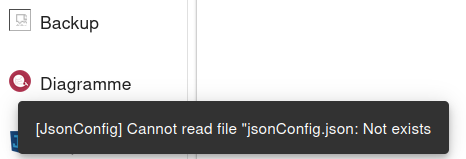
Wenn ich die backitup Einstellungen öffnen will, bleibt er bei diesem Bild: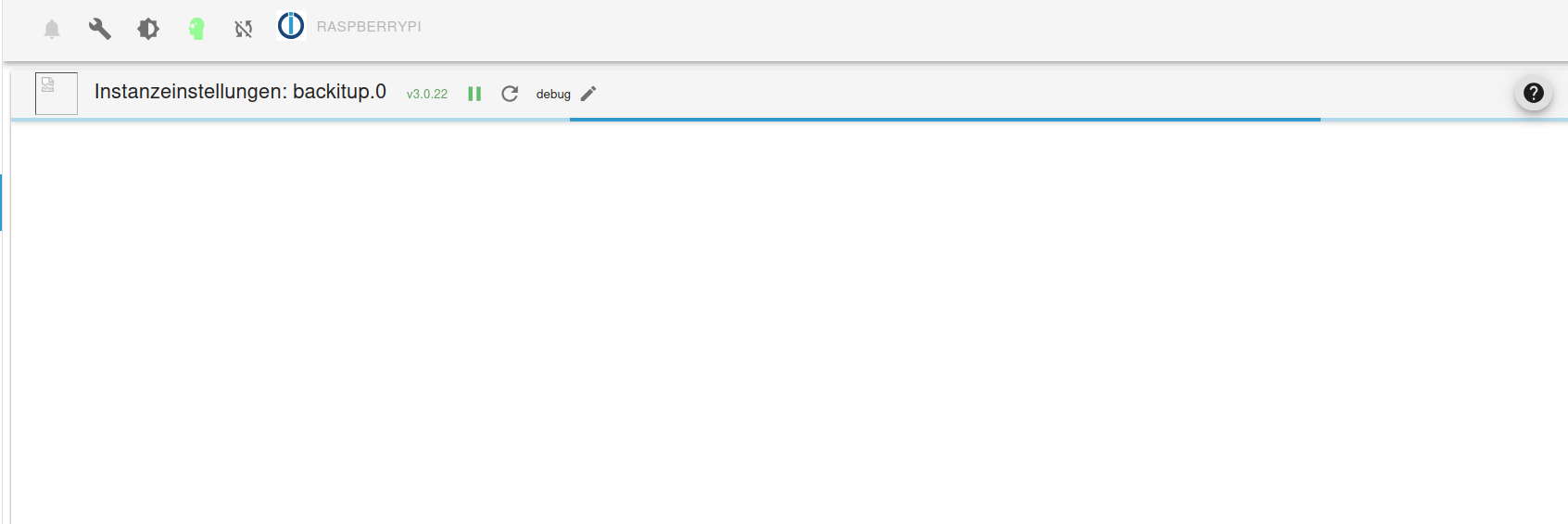
Unten links erscheint kurz:
iob diag:
======================= SUMMARY =======================
			v.2024-08-12


   Static hostname: raspberrypi
         Icon name: computer
  Operating System: Raspbian GNU/Linux 11 (bullseye)
            Kernel: Linux 6.1.21-v7+
      Architecture: arm

Installation: 		native
Kernel: 		armv7l
Userland: 		32 bit
Timezone: 		Europe/Zurich (CEST, +0200)
User-ID: 		1000
Display-Server: 	true
Boot Target: 		graphical.target

Pending OS-Updates: 	5
Pending iob updates: 	0

Nodejs-Installation:
/usr/bin/nodejs 	v20.18.0
/usr/bin/node 		v20.18.0
/usr/bin/npm 		10.8.2
/usr/bin/npx 		10.8.2
/usr/bin/corepack 	0.29.3

Recommended versions are nodejs 20.18.0 and npm 10.8.2
Your nodejs installation is correct

MEMORY:
               total        used        free      shared  buff/cache   available
Mem:            921M        425M        142M        1.0M        353M        425M
Swap:           2.0G        450M        1.6G
Total:          3.0G        876M        1.7G

Active iob-Instances: 	12
Upgrade policy: none

ioBroker Core: 		js-controller 		6.0.11
			admin 			7.1.5

ioBroker Status: 	iobroker is running on this host.


Objects type: jsonl
States  type: jsonl

Status admin and web instance:
+ system.adapter.admin.0                  : admin                 : raspberrypi                              -  enabled, port: 8081, bind: 0.0.0.0, run as: admin
+ system.adapter.web.0                    : web                   : raspberrypi                              -  enabled, port: 8082, bind: 0.0.0.0, run as: admin

Objects: 		2905
States: 		2371

Size of iob-Database:

36M	/opt/iobroker/iobroker-data/objects.jsonl
6.0M	/opt/iobroker/iobroker-data/states.jsonl


=================== END OF SUMMARY ====================
backitup Version: 3.0.22
Zudem wenn ich in den Backup Tab (welcher kein Icon mehr hat) wechsle, erscheint:
Info:
Hatte heute Mittag einen Totalausfall. Nach einem Adapter und System Update blieb das RPI3 plötzlich stehn und konnte auch nicht mehr booten.
Iwie hat es in der config.txt den Eintrag program_usb_boot_mode=1 gelöscht.
Nach langem hin und her brachte ich es wieder zum laufen.
Weiss nicht, ob das etwas mit dem backitup-Problem zutun hat. Aber Infos sind ja immer gut ;)Wenn es mehrere Möglichkeiten gibt, eine Aufgabe zu erledigen, und eine davon in einer Katastrophe endet oder sonstwie unerwünschte Konsequenzen nach sich zieht, dann wird es jemand genau so machen. Alles, was schiefgehen kann, wird auch schiefgehen.
(Murphys Gesetz) -
Hänge mich mal hier an.
Wenn ich die backitup Einstellungen öffnen will, bleibt er bei diesem Bild:Unten links erscheint kurz:
iob diag:
======================= SUMMARY =======================
			v.2024-08-12


   Static hostname: raspberrypi
         Icon name: computer
  Operating System: Raspbian GNU/Linux 11 (bullseye)
            Kernel: Linux 6.1.21-v7+
      Architecture: arm

Installation: 		native
Kernel: 		armv7l
Userland: 		32 bit
Timezone: 		Europe/Zurich (CEST, +0200)
User-ID: 		1000
Display-Server: 	true
Boot Target: 		graphical.target

Pending OS-Updates: 	5
Pending iob updates: 	0

Nodejs-Installation:
/usr/bin/nodejs 	v20.18.0
/usr/bin/node 		v20.18.0
/usr/bin/npm 		10.8.2
/usr/bin/npx 		10.8.2
/usr/bin/corepack 	0.29.3

Recommended versions are nodejs 20.18.0 and npm 10.8.2
Your nodejs installation is correct

MEMORY:
               total        used        free      shared  buff/cache   available
Mem:            921M        425M        142M        1.0M        353M        425M
Swap:           2.0G        450M        1.6G
Total:          3.0G        876M        1.7G

Active iob-Instances: 	12
Upgrade policy: none

ioBroker Core: 		js-controller 		6.0.11
			admin 			7.1.5

ioBroker Status: 	iobroker is running on this host.


Objects type: jsonl
States  type: jsonl

Status admin and web instance:
+ system.adapter.admin.0                  : admin                 : raspberrypi                              -  enabled, port: 8081, bind: 0.0.0.0, run as: admin
+ system.adapter.web.0                    : web                   : raspberrypi                              -  enabled, port: 8082, bind: 0.0.0.0, run as: admin

Objects: 		2905
States: 		2371

Size of iob-Database:

36M	/opt/iobroker/iobroker-data/objects.jsonl
6.0M	/opt/iobroker/iobroker-data/states.jsonl


=================== END OF SUMMARY ====================
backitup Version: 3.0.22
Zudem wenn ich in den Backup Tab (welcher kein Icon mehr hat) wechsle, erscheint:
Info:
Hatte heute Mittag einen Totalausfall. Nach einem Adapter und System Update blieb das RPI3 plötzlich stehn und konnte auch nicht mehr booten.
Iwie hat es in der config.txt den Eintrag program_usb_boot_mode=1 gelöscht.
Nach langem hin und her brachte ich es wieder zum laufen.
Weiss nicht, ob das etwas mit dem backitup-Problem zutun hat. Aber Infos sind ja immer gut ;)iob upload allUnd hiev das ganze Ding mal auf ein 64Bit-Sysrem (ohne Desktop). Mehr RAM wäre auch keine doofe Idee.



Hey! Du scheinst an dieser Unterhaltung interessiert zu sein, hast aber noch kein Konto.
Hast du es satt, bei jedem Besuch durch die gleichen Beiträge zu scrollen? Wenn du dich für ein Konto anmeldest, kommst du immer genau dorthin zurück, wo du zuvor warst, und kannst dich über neue Antworten benachrichtigen lassen (entweder per E-Mail oder Push-Benachrichtigung). Du kannst auch Lesezeichen speichern und Beiträge positiv bewerten, um anderen Community-Mitgliedern deine Wertschätzung zu zeigen.
Mit deinem Input könnte dieser Beitrag noch besser werden 💗
Registrieren Anmelden469
Online33.0k
Benutzer83.6k
Themen1.3m
Beiträge