




Keine Updates / Fehlende Adapter Ansicht
-
Hallo
ich wundere mich, das mir schon einige Zeit keine möglichen Adapter Updates mehr angezeigt werden...?
Auch sehe ich keine möglichen Adapter die ich Installieren könnte - Ansicht steht auf alle Adapter zeigen.
Und grade noch aufgefallen ist, das ich 2 Adapter ohne Instanz habe... ich meine ich hätte die gehabt .....Könnte mir einer was dazu sagen?
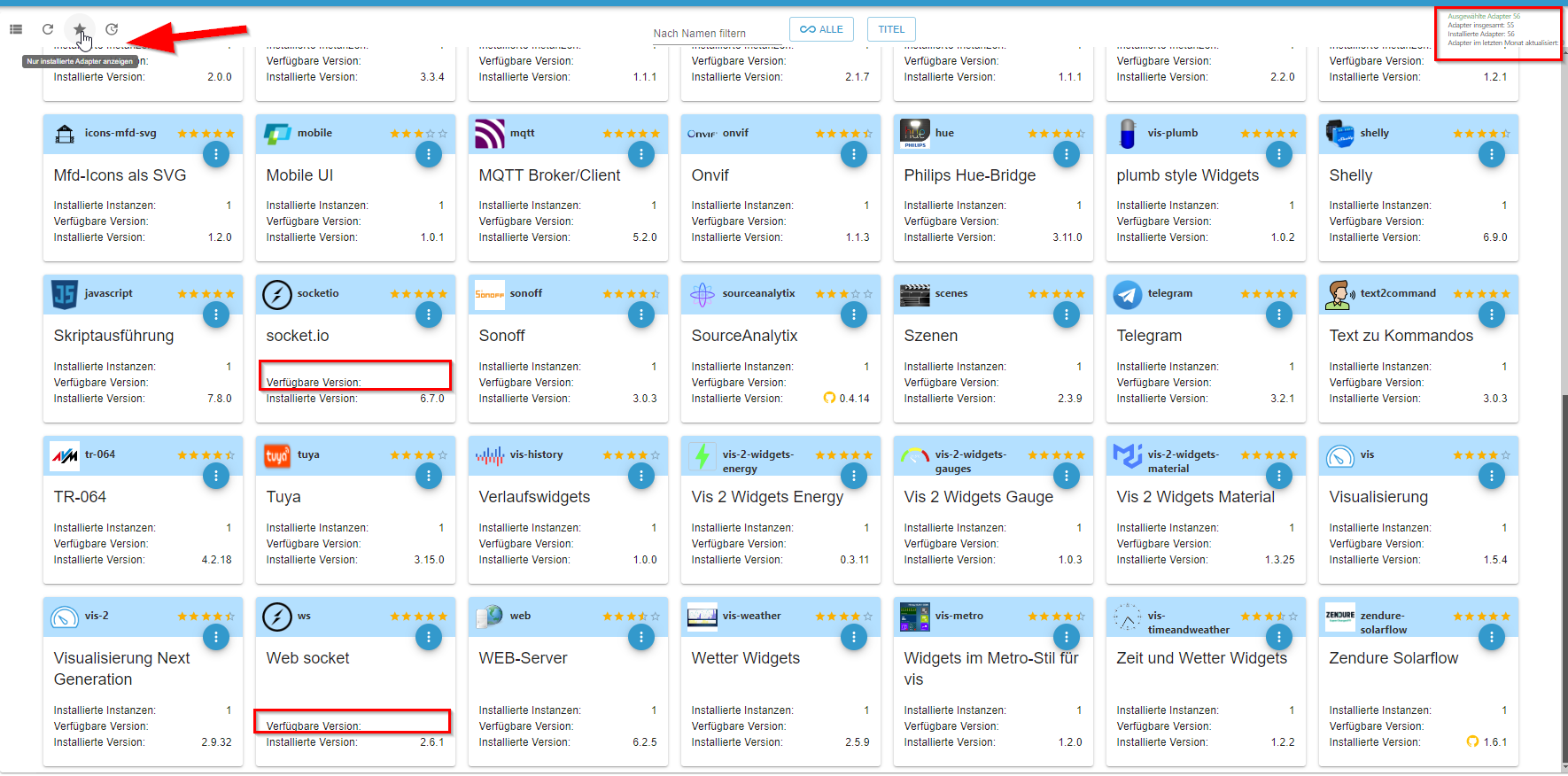
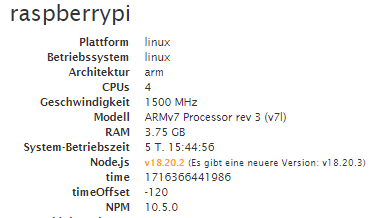
@yoda du hast aber irgenwo einen Filter gesetzt.
oben rechts steht "ausgewählte Adapter"kein Support per PN! - Fragen im Forum stellen - Benutzt das Voting rechts unten im Beitrag wenn er euch geholfen hat.
Das Forum freut sich über eine Spende. Benutzt dazu den Spendenbutton oben rechts. Danke!
der Installationsfixer: curl -fsL https://iobroker.net/fix.sh | bash - -
Gruß Yoda
Stand 05.2025
Raspberry5,linux,arm64,CPUs:4,Geschwindigkeit:2400 MHz,Modell:Cortex-A76,RAM:15.8 GB,Node.js:v20.19.2 -
@Yoda
Repos geprüft bzw. die Einträge dafür kontrolliert?Läuft bei Dir evtl. Pihole und blockt hier ggf. Anfragen?
-
@yoda sagte in Keine Updates / Fehlende Adapter Ansicht:
mehr kommt da nicht....
Text aus dem Terminal nicht fotografieren sondern als Text hier rein.
Linux-Werkzeugkasten:
https://forum.iobroker.net/topic/42952/der-kleine-iobroker-linux-werkzeugkasten
NodeJS Fixer Skript:
https://forum.iobroker.net/topic/68035/iob-node-fix-skript
iob_diag: curl -sLf -o diag.sh https://iobroker.net/diag.sh && bash diag.sh -
@yoda sagte in Keine Updates / Fehlende Adapter Ansicht:
mehr kommt da nicht....
Text aus dem Terminal nicht fotografieren sondern als Text hier rein.
@thomas-braun sagte in Keine Updates / Fehlende Adapter Ansicht:
@yoda sagte in Keine Updates / Fehlende Adapter Ansicht:
mehr kommt da nicht....
Text aus dem Terminal nicht fotografieren sondern als Text hier rein.
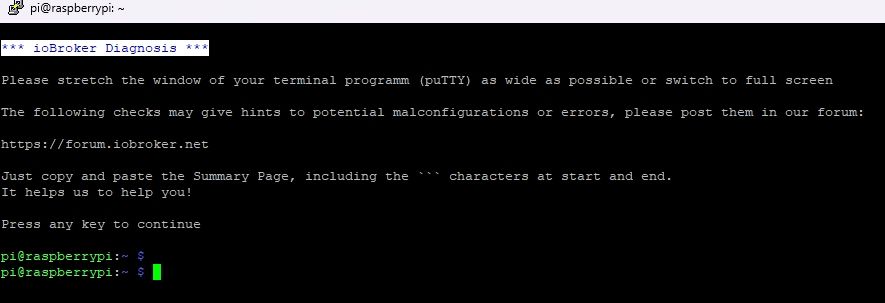
*** ioBroker Diagnosis ***

Please stretch the window of your terminal programm (puTTY) as wide as possible or switch to full screen

The following checks may give hints to potential malconfigurations or errors, please post them in our forum:

https://forum.iobroker.net

Just copy and paste the Summary Page, including the ``` characters at start and end.
It helps us to help you!

Press any key to continue

pi@raspberrypi:~ $
Gruß Yoda
Stand 05.2025
Raspberry5,linux,arm64,CPUs:4,Geschwindigkeit:2400 MHz,Modell:Cortex-A76,RAM:15.8 GB,Node.js:v20.19.2 -
@thomas-braun sagte in Keine Updates / Fehlende Adapter Ansicht:
@yoda sagte in Keine Updates / Fehlende Adapter Ansicht:
mehr kommt da nicht....
Text aus dem Terminal nicht fotografieren sondern als Text hier rein.
*** ioBroker Diagnosis *** Please stretch the window of your terminal programm (puTTY) as wide as possible or switch to full screen The following checks may give hints to potential malconfigurations or errors, please post them in our forum: https://forum.iobroker.net Just copy and paste the Summary Page, including the ``` characters at start and end. It helps us to help you! Press any key to continue pi@raspberrypi:~ $Hmmm? Merkwürdig. An der Stelle sollte die Kiste nicht so aussteigen.
iob stop
iob fix
iob start
dann nochmal
iob diagLinux-Werkzeugkasten:
https://forum.iobroker.net/topic/42952/der-kleine-iobroker-linux-werkzeugkasten
NodeJS Fixer Skript:
https://forum.iobroker.net/topic/68035/iob-node-fix-skript
iob_diag: curl -sLf -o diag.sh https://iobroker.net/diag.sh && bash diag.sh -
Hmmm? Merkwürdig. An der Stelle sollte die Kiste nicht so aussteigen.
iob stop
iob fix
iob start
dann nochmal
iob diag@thomas-braun hatte es nochmal gemacht nun ;
======== Start marking the full check here =========
Skript v.2024-04-21 *** BASE SYSTEM *** Static hostname: raspberrypi Icon name: computer Operating System: Raspbian GNU/Linux 10 (buster) Kernel: Linux 5.10.103-v7l+ Architecture: arm Model : Raspberry Pi 4 Model B Rev 1.2 Docker : false Virtualization : none Kernel : armv7l Userland : 32 bit Systemuptime and Load: 11:10:06 up 5 days, 16:27, 2 users, load average: 1.49, 1.14, 1.19 CPU threads: 4 *** RASPBERRY THROTTLING *** Current issues: No throttling issues detected. Previously detected issues: No throttling issues detected. *** Time and Time Zones *** Local time: Wed 2024-05-22 11:10:06 CEST Universal time: Wed 2024-05-22 09:10:06 UTC RTC time: n/a Time zone: Europe/Berlin (CEST, +0200) System clock synchronized: yes NTP service: active RTC in local TZ: no *** Users and Groups *** User that called 'iob diag': pi HOME=/home/pi GROUPS=pi adm dialout cdrom sudo audio video plugdev games users input netdev lpadmin gpio i2c spi iobroker User that is running 'js-controller': iobroker HOME=/home/iobroker GROUPS=iobroker tty dialout audio video plugdev bluetooth gpio i2c *** Display-Server-Setup *** Display-Server: false Desktop: Terminal: tty Boot Target: graphical.target *** MEMORY *** total used free shared buff/cache available Mem: 3.8G 2.1G 804M 100M 907M 1.4G Swap: 99M 16M 83M Total: 3.9G 2.1G 887M Active iob-Instances: 31 3838 M total memory 2127 M used memory 429 M active memory 2418 M inactive memory 804 M free memory 266 M buffer memory 641 M swap cache 99 M total swap 16 M used swap 83 M free swap *** top - Table Of Processes *** top - 11:10:06 up 5 days, 16:27, 2 users, load average: 1.49, 1.14, 1.19 Tasks: 170 total, 2 running, 168 sleeping, 0 stopped, 0 zombie %Cpu(s): 7.1 us, 4.3 sy, 0.0 ni, 88.6 id, 0.0 wa, 0.0 hi, 0.0 si, 0.0 st MiB Mem : 3838.7 total, 804.0 free, 2126.7 used, 908.1 buff/cache MiB Swap: 100.0 total, 83.2 free, 16.8 used. 1447.2 avail Mem *** FAILED SERVICES *** UNIT LOAD ACTIVE SUB DESCRIPTION * lightdm.service loaded failed failed Light Display Manager LOAD = Reflects whether the unit definition was properly loaded. ACTIVE = The high-level unit activation state, i.e. generalization of SUB. SUB = The low-level unit activation state, values depend on unit type. 1 loaded units listed. Pass --all to see loaded but inactive units, too. To show all installed unit files use 'systemctl list-unit-files'. *** FILESYSTEM *** Filesystem Type Size Used Avail Use% Mounted on /dev/root ext4 59G 22G 35G 40% / devtmpfs devtmpfs 1.8G 0 1.8G 0% /dev tmpfs tmpfs 1.9G 16K 1.9G 1% /dev/shm tmpfs tmpfs 1.9G 113M 1.8G 6% /run tmpfs tmpfs 5.0M 8.0K 5.0M 1% /run/lock tmpfs tmpfs 1.9G 0 1.9G 0% /sys/fs/cgroup /dev/mmcblk0p1 vfat 253M 49M 204M 20% /boot tmpfs tmpfs 384M 0 384M 0% /run/user/1000 Messages concerning ext4 filesystem in dmesg: [Thu May 16 18:42:37 2024] Kernel command line: coherent_pool=1M 8250.nr_uarts=1 snd_bcm2835.enable_compat_alsa=0 snd_bcm2835.enable_hdmi=1 smsc95xx.macaddr=DC:A6:32:B2:75:50 vc_mem.mem_base=0x3ec00000 vc_mem.mem_size=0x40000000 console=tty1 root=PARTUUID=98ea7740-02 rootfstype=ext4 elevator=deadline fsck.repair=yes rootwait quiet splash plymouth.ignore-serial-consoles [Thu May 16 18:42:38 2024] EXT4-fs (mmcblk0p2): INFO: recovery required on readonly filesystem [Thu May 16 18:42:38 2024] EXT4-fs (mmcblk0p2): write access will be enabled during recovery [Thu May 16 18:42:39 2024] EXT4-fs (mmcblk0p2): orphan cleanup on readonly fs [Thu May 16 18:42:39 2024] EXT4-fs (mmcblk0p2): 4 orphan inodes deleted [Thu May 16 18:42:39 2024] EXT4-fs (mmcblk0p2): recovery complete [Thu May 16 18:42:39 2024] EXT4-fs (mmcblk0p2): mounted filesystem with ordered data mode. Opts: (null) [Thu May 16 18:42:39 2024] VFS: Mounted root (ext4 filesystem) readonly on device 179:2. [Thu May 16 18:42:41 2024] EXT4-fs (mmcblk0p2): re-mounted. Opts: (null) Show mounted filesystems: TARGET SOURCE FSTYPE OPTIONS / /dev/mmcblk0p2 ext4 rw,noatime |-/dev devtmpfs devtmpfs rw,relatime,size=1800568k,nr_inodes=84157,mode=755 | |-/dev/shm tmpfs tmpfs rw,nosuid,nodev | |-/dev/pts devpts devpts rw,nosuid,noexec,relatime,gid=5,mode=620,ptmxmode=000 | `-/dev/mqueue mqueue mqueue rw,relatime |-/sys sysfs sysfs rw,nosuid,nodev,noexec,relatime | |-/sys/kernel/security securityfs securityfs rw,nosuid,nodev,noexec,relatime | |-/sys/fs/cgroup tmpfs tmpfs ro,nosuid,nodev,noexec,mode=755 | | |-/sys/fs/cgroup/unified cgroup2 cgroup2 rw,nosuid,nodev,noexec,relatime,nsdelegate | | |-/sys/fs/cgroup/systemd cgroup cgroup rw,nosuid,nodev,noexec,relatime,xattr,name=systemd | | |-/sys/fs/cgroup/pids cgroup cgroup rw,nosuid,nodev,noexec,relatime,pids | | |-/sys/fs/cgroup/net_cls,net_prio cgroup cgroup rw,nosuid,nodev,noexec,relatime,net_cls,net_prio | | |-/sys/fs/cgroup/cpu,cpuacct cgroup cgroup rw,nosuid,nodev,noexec,relatime,cpu,cpuacct | | |-/sys/fs/cgroup/perf_event cgroup cgroup rw,nosuid,nodev,noexec,relatime,perf_event | | |-/sys/fs/cgroup/blkio cgroup cgroup rw,nosuid,nodev,noexec,relatime,blkio | | |-/sys/fs/cgroup/freezer cgroup cgroup rw,nosuid,nodev,noexec,relatime,freezer | | |-/sys/fs/cgroup/cpuset cgroup cgroup rw,nosuid,nodev,noexec,relatime,cpuset | | `-/sys/fs/cgroup/devices cgroup cgroup rw,nosuid,nodev,noexec,relatime,devices | |-/sys/fs/bpf none bpf rw,nosuid,nodev,noexec,relatime,mode=700 | |-/sys/kernel/debug debugfs debugfs rw,relatime | `-/sys/kernel/config configfs configfs rw,relatime |-/proc proc proc rw,relatime | `-/proc/sys/fs/binfmt_misc systemd-1 autofs rw,relatime,fd=40,pgrp=1,timeout=0,minproto=5,maxproto=5,direct | `-/proc/sys/fs/binfmt_misc binfmt_misc binfmt_misc rw,relatime |-/run tmpfs tmpfs rw,nosuid,nodev,mode=755 | |-/run/lock tmpfs tmpfs rw,nosuid,nodev,noexec,relatime,size=5120k | |-/run/rpc_pipefs sunrpc rpc_pipefs rw,relatime | `-/run/user/1000 tmpfs tmpfs rw,nosuid,nodev,relatime,size=393084k,mode=700,uid=1000,gid=1000 `-/boot /dev/mmcblk0p1 vfat rw,relatime,fmask=0022,dmask=0022,codepage=437,iocharset=ascii,shortname=mixed,errors=remount-ro Files in neuralgic directories: /var: 2.5G /var/ 2.2G /var/cache 2.1G /var/cache/apt/archives 2.1G /var/cache/apt 144M /var/lib Archived and active journals take up 112.0M in the file system. /opt/iobroker/backups: 365M /opt/iobroker/backups/ /opt/iobroker/iobroker-data: 823M /opt/iobroker/iobroker-data/ 607M /opt/iobroker/iobroker-data/files 179M /opt/iobroker/iobroker-data/files/vis-2 119M /opt/iobroker/iobroker-data/backup-objects 81M /opt/iobroker/iobroker-data/files/vis-2/static The five largest files in iobroker-data are: 44M /opt/iobroker/iobroker-data/states.jsonl 35M /opt/iobroker/iobroker-data/files/devices.admin/static/js/main.24f2bb56.js.map 33M /opt/iobroker/iobroker-data/objects.jsonl 33M /opt/iobroker/iobroker-data/files/iot.admin/static/js/main.1797d034.js.map 24M /opt/iobroker/iobroker-data/files/web.admin/static/js/main.135279a0.js.map USB-Devices by-id: USB-Sticks - Avoid direct links to /dev/tty* in your adapter setups, please always prefer the links 'by-id': /dev/serial/by-id/usb-dresden_elektronik_ingenieurtechnik_GmbH_ConBee_II_DE2153973-if00 *** NodeJS-Installation *** /usr/bin/nodejs v18.20.2 /usr/bin/node v18.20.2 /usr/bin/npm 10.5.0 /usr/bin/npx 10.5.0 /usr/bin/corepack 0.25.2 nodejs: Installed: 18.20.2-1nodesource1 Candidate: 18.20.2-1nodesource1 Version table: *** 18.20.2-1nodesource1 1001 500 https://deb.nodesource.com/node_18.x nodistro/main armhf Packages 100 /var/lib/dpkg/status 18.20.1-1nodesource1 1001 500 https://deb.nodesource.com/node_18.x nodistro/main armhf Packages 18.20.0-1nodesource1 1001 500 https://deb.nodesource.com/node_18.x nodistro/main armhf Packages 18.19.1-1nodesource1 1001 500 https://deb.nodesource.com/node_18.x nodistro/main armhf Packages 18.19.0-1nodesource1 1001 500 https://deb.nodesource.com/node_18.x nodistro/main armhf Packages 18.18.2-1nodesource1 1001 500 https://deb.nodesource.com/node_18.x nodistro/main armhf Packages 18.18.1-1nodesource1 1001 500 https://deb.nodesource.com/node_18.x nodistro/main armhf Packages 18.18.0-1nodesource1 1001 500 https://deb.nodesource.com/node_18.x nodistro/main armhf Packages 18.17.1-1nodesource1 1001 500 https://deb.nodesource.com/node_18.x nodistro/main armhf Packages 18.17.0-1nodesource1 1001 500 https://deb.nodesource.com/node_18.x nodistro/main armhf Packages 18.16.1-1nodesource1 1001 500 https://deb.nodesource.com/node_18.x nodistro/main armhf Packages 18.16.0-1nodesource1 1001 500 https://deb.nodesource.com/node_18.x nodistro/main armhf Packages 18.15.0-1nodesource1 1001 500 https://deb.nodesource.com/node_18.x nodistro/main armhf Packages 18.14.2-1nodesource1 1001 500 https://deb.nodesource.com/node_18.x nodistro/main armhf Packages 18.14.1-1nodesource1 1001 500 https://deb.nodesource.com/node_18.x nodistro/main armhf Packages 18.14.0-1nodesource1 1001 500 https://deb.nodesource.com/node_18.x nodistro/main armhf Packages 18.13.0-1nodesource1 1001 500 https://deb.nodesource.com/node_18.x nodistro/main armhf Packages 18.12.0-1nodesource1 1001 500 https://deb.nodesource.com/node_18.x nodistro/main armhf Packages 18.11.0-1nodesource1 1001 500 https://deb.nodesource.com/node_18.x nodistro/main armhf Packages 18.10.0-1nodesource1 1001 500 https://deb.nodesource.com/node_18.x nodistro/main armhf Packages 18.9.1-1nodesource1 1001 500 https://deb.nodesource.com/node_18.x nodistro/main armhf Packages 18.9.0-1nodesource1 1001 500 https://deb.nodesource.com/node_18.x nodistro/main armhf Packages 18.8.0-1nodesource1 1001 500 https://deb.nodesource.com/node_18.x nodistro/main armhf Packages 18.7.0-1nodesource1 1001 500 https://deb.nodesource.com/node_18.x nodistro/main armhf Packages 18.6.0-1nodesource1 1001 500 https://deb.nodesource.com/node_18.x nodistro/main armhf Packages 18.5.0-1nodesource1 1001 500 https://deb.nodesource.com/node_18.x nodistro/main armhf Packages 18.4.0-1nodesource1 1001 500 https://deb.nodesource.com/node_18.x nodistro/main armhf Packages 18.3.0-1nodesource1 1001 500 https://deb.nodesource.com/node_18.x nodistro/main armhf Packages 18.2.0-1nodesource1 1001 500 https://deb.nodesource.com/node_18.x nodistro/main armhf Packages 18.1.0-1nodesource1 1001 500 https://deb.nodesource.com/node_18.x nodistro/main armhf Packages 18.0.0-1nodesource1 1001 500 https://deb.nodesource.com/node_18.x nodistro/main armhf Packages 10.24.0~dfsg-1~deb10u3 500 500 http://raspbian.raspberrypi.org/raspbian buster/main armhf Packages Temp directories causing npm8 problem: 0 No problems detected Errors in npm tree: *** ioBroker-Installation *** ioBroker Status iobroker is running on this host. Objects type: jsonl States type: jsonl Core adapters versions js-controller: 5.0.12 admin: 6.13.16 javascript: 7.8.0 nodejs modules from github: 3 | +-- onvif@0.7.0 (git+ssh://git@github.com/agsh/onvif.git#74c21e63f4f8c3db19c5e529842af361050138cf) +-- iobroker.sourceanalytix@0.4.14 (git+ssh://git@github.com/iobroker-community-adapters/ioBroker.sourceanalytix.git#9c4635239c7b9321601dcf0fcdd8677a55a8b13f) `-- iobroker.zendure-solarflow@1.6.1 (git+ssh://git@github.com/nograx/ioBroker.zendure-solarflow.git#b56b690481e55f1b06d4a8d6e76895221748ffd6) Adapter State + system.adapter.admin.0 : admin : raspberrypi - enabled, port: 8081, bind: 0.0.0.0, run as: admin + system.adapter.alexa2.0 : alexa2 : raspberrypi - enabled + system.adapter.backitup.0 : backitup : raspberrypi - enabled + system.adapter.broadlink2.0 : broadlink2 : raspberrypi - enabled + system.adapter.cloud.3 : cloud : raspberrypi - enabled + system.adapter.deconz.0 : deconz : raspberrypi - enabled, port: 80 system.adapter.devices.0 : devices : raspberrypi - enabled system.adapter.deyeidc.0 : deyeidc : raspberrypi - disabled, port: 8899 + system.adapter.discovery.0 : discovery : raspberrypi - enabled + system.adapter.email.1 : email : raspberrypi - enabled system.adapter.flot.0 : flot : raspberrypi - enabled + system.adapter.fritzdect.0 : fritzdect : raspberrypi - enabled + system.adapter.history.0 : history : raspberrypi - enabled + system.adapter.hmip.0 : hmip : raspberrypi - enabled + system.adapter.hue.0 : hue : raspberrypi - enabled, port: 443 system.adapter.icons-mfd-png.0 : icons-mfd-png : raspberrypi - enabled system.adapter.icons-mfd-svg.0 : icons-mfd-svg : raspberrypi - enabled + system.adapter.info.0 : info : raspberrypi - enabled + system.adapter.iot.0 : iot : raspberrypi - enabled + system.adapter.javascript.0 : javascript : raspberrypi - enabled + system.adapter.lgtv.0 : lgtv : raspberrypi - enabled system.adapter.mobile.0 : mobile : raspberrypi - enabled + system.adapter.mqtt.0 : mqtt : raspberrypi - enabled, port: 1886, bind: 0.0.0.0 + system.adapter.onvif.0 : onvif : raspberrypi - enabled, port: 80, 7575, 8000, 8080, 8081, 8899 + system.adapter.scenes.0 : scenes : raspberrypi - enabled + system.adapter.shelly.0 : shelly : raspberrypi - enabled, port: 1882, bind: 0.0.0.0 + system.adapter.simple-api.0 : simple-api : raspberrypi - enabled, port: 8087, bind: 0.0.0.0, run as: admin system.adapter.sonoff.0 : sonoff : raspberrypi - disabled, port: 1883, bind: 0.0.0.0 + system.adapter.sourceanalytix.0 : sourceanalytix : raspberrypi - enabled + system.adapter.telegram.0 : telegram : raspberrypi - enabled, port: 8443, bind: 0.0.0.0 + system.adapter.text2command.0 : text2command : raspberrypi - enabled + system.adapter.tr-064.0 : tr-064 : raspberrypi - enabled + system.adapter.tuya.0 : tuya : raspberrypi - enabled system.adapter.vis-2-widgets-energy.0 : vis-2-widgets-energy : raspberrypi - enabled system.adapter.vis-2-widgets-gauges.0 : vis-2-widgets-gauges : raspberrypi - enabled system.adapter.vis-2-widgets-material.0 : vis-2-widgets-material: raspberrypi - enabled + system.adapter.vis-2.0 : vis-2 : raspberrypi - enabled system.adapter.vis-bars.0 : vis-bars : raspberrypi - enabled system.adapter.vis-canvas-gauges.0 : vis-canvas-gauges : raspberrypi - enabled system.adapter.vis-colorpicker.0 : vis-colorpicker : raspberrypi - enabled system.adapter.vis-fancyswitch.0 : vis-fancyswitch : raspberrypi - enabled system.adapter.vis-history.0 : vis-history : raspberrypi - enabled system.adapter.vis-hqwidgets.0 : vis-hqwidgets : raspberrypi - enabled + system.adapter.vis-inventwo.0 : vis-inventwo : raspberrypi - enabled system.adapter.vis-jqui-mfd.0 : vis-jqui-mfd : raspberrypi - enabled system.adapter.vis-justgage.0 : vis-justgage : raspberrypi - enabled system.adapter.vis-lcars.0 : vis-lcars : raspberrypi - enabled system.adapter.vis-metro.0 : vis-metro : raspberrypi - enabled system.adapter.vis-plumb.0 : vis-plumb : raspberrypi - enabled system.adapter.vis-timeandweather.0 : vis-timeandweather : raspberrypi - enabled system.adapter.vis-weather.0 : vis-weather : raspberrypi - enabled system.adapter.vis.0 : vis : raspberrypi - enabled + system.adapter.web.0 : web : raspberrypi - enabled, port: 8082, bind: 0.0.0.0, run as: admin + system.adapter.zendure-solarflow.0 : zendure-solarflow : raspberrypi - enabled + instance is alive Enabled adapters with bindings + system.adapter.admin.0 : admin : raspberrypi - enabled, port: 8081, bind: 0.0.0.0, run as: admin + system.adapter.deconz.0 : deconz : raspberrypi - enabled, port: 80 + system.adapter.hue.0 : hue : raspberrypi - enabled, port: 443 + system.adapter.mqtt.0 : mqtt : raspberrypi - enabled, port: 1886, bind: 0.0.0.0 + system.adapter.onvif.0 : onvif : raspberrypi - enabled, port: 80, 7575, 8000, 8080, 8081, 8899 + system.adapter.shelly.0 : shelly : raspberrypi - enabled, port: 1882, bind: 0.0.0.0 + system.adapter.simple-api.0 : simple-api : raspberrypi - enabled, port: 8087, bind: 0.0.0.0, run as: admin + system.adapter.telegram.0 : telegram : raspberrypi - enabled, port: 8443, bind: 0.0.0.0 + system.adapter.web.0 : web : raspberrypi - enabled, port: 8082, bind: 0.0.0.0, run as: admin ioBroker-Repositories List is empty Installed ioBroker-Instances Error: Object "system.repositories" not found Objects and States Please stand by - This may take a while Objects: 42450 States: 39349 *** OS-Repositories and Updates *** Hit:1 http://raspbian.raspberrypi.org/raspbian buster InRelease Hit:2 http://archive.raspberrypi.org/debian buster InRelease Hit:3 https://deb.nodesource.com/node_18.x nodistro InRelease Reading package lists... Pending Updates: 17 *** Listening Ports *** Active Internet connections (only servers) Proto Recv-Q Send-Q Local Address Foreign Address State User Inode PID/Program name tcp 0 0 0.0.0.0:80 0.0.0.0:* LISTEN 1000 18402 446/deCONZ tcp 0 0 0.0.0.0:22 0.0.0.0:* LISTEN 0 19469 573/sshd tcp 0 0 127.0.0.1:631 0.0.0.0:* LISTEN 0 58848278 29012/cupsd tcp 0 0 0.0.0.0:1882 0.0.0.0:* LISTEN 1001 37829 3693/io.shelly.0 tcp 0 0 0.0.0.0:443 0.0.0.0:* LISTEN 1000 21145 446/deCONZ tcp 0 0 0.0.0.0:8765 0.0.0.0:* LISTEN 0 21688 361/python tcp 0 0 0.0.0.0:1886 0.0.0.0:* LISTEN 1001 45449775 7774/io.mqtt.0 tcp 0 0 0.0.0.0:1887 0.0.0.0:* LISTEN 1001 45449776 7774/io.mqtt.0 tcp 0 0 0.0.0.0:7999 0.0.0.0:* LISTEN 0 21569 680/motion tcp 0 0 127.0.0.1:9000 0.0.0.0:* LISTEN 1001 22131 542/iobroker.js-con tcp 0 0 127.0.0.1:9001 0.0.0.0:* LISTEN 1001 19829 542/iobroker.js-con tcp 0 0 0.0.0.0:5900 0.0.0.0:* LISTEN 0 20936 569/vncserver-x11-c tcp 0 0 0.0.0.0:8079 0.0.0.0:* LISTEN 0 21568 680/motion tcp6 0 0 :::8081 :::* LISTEN 1001 31101 2401/io.admin.0 tcp6 0 0 :::8082 :::* LISTEN 1001 37617 4792/io.web.0 tcp6 0 0 :::22 :::* LISTEN 0 19471 573/sshd tcp6 0 0 ::1:631 :::* LISTEN 0 58848277 29012/cupsd tcp6 0 0 :::8087 :::* LISTEN 1001 37632 5152/io.simple-api. tcp6 0 0 :::8095 :::* LISTEN 1001 45275461 18028/io.onvif.0 tcp6 0 0 :::5900 :::* LISTEN 0 20935 569/vncserver-x11-c udp 0 0 0.0.0.0:6666 0.0.0.0:* 1001 37849 4131/io.tuya.0 udp 0 0 0.0.0.0:6667 0.0.0.0:* 1001 37850 4131/io.tuya.0 udp 0 0 0.0.0.0:34848 0.0.0.0:* 108 16976 357/avahi-daemon: r udp 0 0 0.0.0.0:68 0.0.0.0:* 0 19657 476/dhcpcd udp 0 0 0.0.0.0:49759 0.0.0.0:* 1001 1193620 10941/io.broadlink2 udp 0 0 0.0.0.0:631 0.0.0.0:* 0 58847555 29014/cups-browsed udp 0 0 0.0.0.0:15001 0.0.0.0:* 1001 1193591 10941/io.broadlink2 udp 0 0 0.0.0.0:53918 0.0.0.0:* 1001 1195574 10941/io.broadlink2 udp 0 0 192.168.178.119:5353 0.0.0.0:* 1001 35325 3191/io.tr-064.0 udp 0 0 192.168.178.118:5353 0.0.0.0:* 1001 35324 3191/io.tr-064.0 udp 0 0 0.0.0.0:5353 0.0.0.0:* 108 16974 357/avahi-daemon: r udp 0 0 0.0.0.0:48885 0.0.0.0:* 1001 57894443 10941/io.broadlink2 udp 0 0 0.0.0.0:1900 0.0.0.0:* 1001 38776 5844/io.deconz.0 udp 0 0 0.0.0.0:1900 0.0.0.0:* 1001 38773 5844/io.deconz.0 udp 0 0 0.0.0.0:1900 0.0.0.0:* 1000 21352 446/deCONZ udp6 0 0 :::52730 :::* 108 16977 357/avahi-daemon: r udp6 0 0 :::546 :::* 0 27481 476/dhcpcd udp6 0 0 :::5353 :::* 108 16975 357/avahi-daemon: r udp6 0 0 :::1900 :::* 1001 38778 5844/io.deconz.0 udp6 0 0 :::1900 :::* 1001 38777 5844/io.deconz.0 udp6 0 0 :::1900 :::* 1001 38775 5844/io.deconz.0 udp6 0 0 :::1900 :::* 1001 38774 5844/io.deconz.0 *** Log File - Last 25 Lines *** 2024-05-22 11:10:54.599 - info: javascript.0 (2453) script.js.Manni_Schalter.Aussen.Teichfilter-Sommer: 32.821undefined 2024-05-22 11:10:55.876 - info: javascript.0 (2453) script.js.Manni_Schalter.Aussen.Teichfilter-Sommer: 39.769undefined 2024-05-22 11:10:59.062 - info: javascript.0 (2453) script.js.Manni_Schalter.Aussen.Teichfilter-Sommer: 31.324undefined 2024-05-22 11:11:02.596 - warn: tuya.0 (4131) bf06b08cba98cae305vmq9.1: A set command is already in progress. Can not issue a second one that also should return a response.. Try to use cloud. 2024-05-22 11:11:02.609 - warn: tuya.0 (4131) bf06b08cba98cae305vmq9.1: A set command is already in progress. Can not issue a second one that also should return a response.. Try to use cloud. 2024-05-22 11:11:02.619 - warn: tuya.0 (4131) bf06b08cba98cae305vmq9.1: A set command is already in progress. Can not issue a second one that also should return a response.. Try to use cloud. 2024-05-22 11:11:02.757 - info: javascript.0 (2453) script.js.Manni_Schalter.Aussen.Teichfilter-Sommer: 27.724undefined 2024-05-22 11:11:03.006 - info: javascript.0 (2453) script.js.Manni_Schalter.Aussen.Teichfilter-Sommer: 24.258undefined 2024-05-22 11:11:03.062 - info: javascript.0 (2453) script.js.Manni_Schalter.Aussen.Teichfilter-Sommer: 210.72undefined 2024-05-22 11:11:03.877 - info: javascript.0 (2453) script.js.Manni_Schalter.Aussen.Teichfilter-Sommer: 21.415undefined 2024-05-22 11:11:05.843 - info: javascript.0 (2453) script.js.Manni_Schalter.Aussen.Teichfilter-Sommer: 24.157undefined 2024-05-22 11:11:06.892 - info: javascript.0 (2453) script.js.Manni_Schalter.Aussen.Teichfilter-Sommer: 22.828undefined 2024-05-22 11:11:08.339 - info: web.0 (4792) <== Disconnect system.user.admin from ::ffff:192.168.178.133 flot 2024-05-22 11:11:08.381 - info: web.0 (4792) <== Disconnect system.user.admin from ::ffff:192.168.178.133 flot 2024-05-22 11:11:08.647 - info: web.0 (4792) ==> Connected system.user.admin from ::ffff:192.168.178.133 2024-05-22 11:11:08.773 - info: web.0 (4792) ==> Connected system.user.admin from ::ffff:192.168.178.133 2024-05-22 11:11:10.840 - info: javascript.0 (2453) script.js.Manni_Schalter.Aussen.Teichfilter-Sommer: 21.651undefined 2024-05-22 11:11:11.839 - info: javascript.0 (2453) script.js.Manni_Schalter.Aussen.Teichfilter-Sommer: 53.025undefined 2024-05-22 11:11:12.840 - info: javascript.0 (2453) script.js.Manni_Schalter.Aussen.Teichfilter-Sommer: 21.112undefined 2024-05-22 11:11:14.910 - info: javascript.0 (2453) script.js.Manni_Schalter.Aussen.Teichfilter-Sommer: 29.103undefined 2024-05-22 11:11:17.855 - info: javascript.0 (2453) script.js.Manni_Schalter.Aussen.Teichfilter-Sommer: 25.84undefined 2024-05-22 11:11:19.844 - info: javascript.0 (2453) script.js.Manni_Schalter.Aussen.Teichfilter-Sommer: 50.518undefined 2024-05-22 11:11:20.876 - info: javascript.0 (2453) script.js.Manni_Schalter.Aussen.Teichfilter-Sommer: 32.283undefined 2024-05-22 11:11:23.857 - info: javascript.0 (2453) script.js.Manni_Schalter.Aussen.Teichfilter-Sommer: 56.524undefined 2024-05-22 11:11:24.845 - info: javascript.0 (2453) script.js.Manni_Schalter.Aussen.Teichfilter-Sommer: 27.959undefined============ Mark until here for C&P =============
iob diag has finished.
Press any key for a summary
Gruß Yoda
Stand 05.2025
Raspberry5,linux,arm64,CPUs:4,Geschwindigkeit:2400 MHz,Modell:Cortex-A76,RAM:15.8 GB,Node.js:v20.19.2 -
@thomas-braun hatte es nochmal gemacht nun ;
======== Start marking the full check here =========
Skript v.2024-04-21 *** BASE SYSTEM *** Static hostname: raspberrypi Icon name: computer Operating System: Raspbian GNU/Linux 10 (buster) Kernel: Linux 5.10.103-v7l+ Architecture: arm Model : Raspberry Pi 4 Model B Rev 1.2 Docker : false Virtualization : none Kernel : armv7l Userland : 32 bit Systemuptime and Load: 11:10:06 up 5 days, 16:27, 2 users, load average: 1.49, 1.14, 1.19 CPU threads: 4 *** RASPBERRY THROTTLING *** Current issues: No throttling issues detected. Previously detected issues: No throttling issues detected. *** Time and Time Zones *** Local time: Wed 2024-05-22 11:10:06 CEST Universal time: Wed 2024-05-22 09:10:06 UTC RTC time: n/a Time zone: Europe/Berlin (CEST, +0200) System clock synchronized: yes NTP service: active RTC in local TZ: no *** Users and Groups *** User that called 'iob diag': pi HOME=/home/pi GROUPS=pi adm dialout cdrom sudo audio video plugdev games users input netdev lpadmin gpio i2c spi iobroker User that is running 'js-controller': iobroker HOME=/home/iobroker GROUPS=iobroker tty dialout audio video plugdev bluetooth gpio i2c *** Display-Server-Setup *** Display-Server: false Desktop: Terminal: tty Boot Target: graphical.target *** MEMORY *** total used free shared buff/cache available Mem: 3.8G 2.1G 804M 100M 907M 1.4G Swap: 99M 16M 83M Total: 3.9G 2.1G 887M Active iob-Instances: 31 3838 M total memory 2127 M used memory 429 M active memory 2418 M inactive memory 804 M free memory 266 M buffer memory 641 M swap cache 99 M total swap 16 M used swap 83 M free swap *** top - Table Of Processes *** top - 11:10:06 up 5 days, 16:27, 2 users, load average: 1.49, 1.14, 1.19 Tasks: 170 total, 2 running, 168 sleeping, 0 stopped, 0 zombie %Cpu(s): 7.1 us, 4.3 sy, 0.0 ni, 88.6 id, 0.0 wa, 0.0 hi, 0.0 si, 0.0 st MiB Mem : 3838.7 total, 804.0 free, 2126.7 used, 908.1 buff/cache MiB Swap: 100.0 total, 83.2 free, 16.8 used. 1447.2 avail Mem *** FAILED SERVICES *** UNIT LOAD ACTIVE SUB DESCRIPTION * lightdm.service loaded failed failed Light Display Manager LOAD = Reflects whether the unit definition was properly loaded. ACTIVE = The high-level unit activation state, i.e. generalization of SUB. SUB = The low-level unit activation state, values depend on unit type. 1 loaded units listed. Pass --all to see loaded but inactive units, too. To show all installed unit files use 'systemctl list-unit-files'. *** FILESYSTEM *** Filesystem Type Size Used Avail Use% Mounted on /dev/root ext4 59G 22G 35G 40% / devtmpfs devtmpfs 1.8G 0 1.8G 0% /dev tmpfs tmpfs 1.9G 16K 1.9G 1% /dev/shm tmpfs tmpfs 1.9G 113M 1.8G 6% /run tmpfs tmpfs 5.0M 8.0K 5.0M 1% /run/lock tmpfs tmpfs 1.9G 0 1.9G 0% /sys/fs/cgroup /dev/mmcblk0p1 vfat 253M 49M 204M 20% /boot tmpfs tmpfs 384M 0 384M 0% /run/user/1000 Messages concerning ext4 filesystem in dmesg: [Thu May 16 18:42:37 2024] Kernel command line: coherent_pool=1M 8250.nr_uarts=1 snd_bcm2835.enable_compat_alsa=0 snd_bcm2835.enable_hdmi=1 smsc95xx.macaddr=DC:A6:32:B2:75:50 vc_mem.mem_base=0x3ec00000 vc_mem.mem_size=0x40000000 console=tty1 root=PARTUUID=98ea7740-02 rootfstype=ext4 elevator=deadline fsck.repair=yes rootwait quiet splash plymouth.ignore-serial-consoles [Thu May 16 18:42:38 2024] EXT4-fs (mmcblk0p2): INFO: recovery required on readonly filesystem [Thu May 16 18:42:38 2024] EXT4-fs (mmcblk0p2): write access will be enabled during recovery [Thu May 16 18:42:39 2024] EXT4-fs (mmcblk0p2): orphan cleanup on readonly fs [Thu May 16 18:42:39 2024] EXT4-fs (mmcblk0p2): 4 orphan inodes deleted [Thu May 16 18:42:39 2024] EXT4-fs (mmcblk0p2): recovery complete [Thu May 16 18:42:39 2024] EXT4-fs (mmcblk0p2): mounted filesystem with ordered data mode. Opts: (null) [Thu May 16 18:42:39 2024] VFS: Mounted root (ext4 filesystem) readonly on device 179:2. [Thu May 16 18:42:41 2024] EXT4-fs (mmcblk0p2): re-mounted. Opts: (null) Show mounted filesystems: TARGET SOURCE FSTYPE OPTIONS / /dev/mmcblk0p2 ext4 rw,noatime |-/dev devtmpfs devtmpfs rw,relatime,size=1800568k,nr_inodes=84157,mode=755 | |-/dev/shm tmpfs tmpfs rw,nosuid,nodev | |-/dev/pts devpts devpts rw,nosuid,noexec,relatime,gid=5,mode=620,ptmxmode=000 | `-/dev/mqueue mqueue mqueue rw,relatime |-/sys sysfs sysfs rw,nosuid,nodev,noexec,relatime | |-/sys/kernel/security securityfs securityfs rw,nosuid,nodev,noexec,relatime | |-/sys/fs/cgroup tmpfs tmpfs ro,nosuid,nodev,noexec,mode=755 | | |-/sys/fs/cgroup/unified cgroup2 cgroup2 rw,nosuid,nodev,noexec,relatime,nsdelegate | | |-/sys/fs/cgroup/systemd cgroup cgroup rw,nosuid,nodev,noexec,relatime,xattr,name=systemd | | |-/sys/fs/cgroup/pids cgroup cgroup rw,nosuid,nodev,noexec,relatime,pids | | |-/sys/fs/cgroup/net_cls,net_prio cgroup cgroup rw,nosuid,nodev,noexec,relatime,net_cls,net_prio | | |-/sys/fs/cgroup/cpu,cpuacct cgroup cgroup rw,nosuid,nodev,noexec,relatime,cpu,cpuacct | | |-/sys/fs/cgroup/perf_event cgroup cgroup rw,nosuid,nodev,noexec,relatime,perf_event | | |-/sys/fs/cgroup/blkio cgroup cgroup rw,nosuid,nodev,noexec,relatime,blkio | | |-/sys/fs/cgroup/freezer cgroup cgroup rw,nosuid,nodev,noexec,relatime,freezer | | |-/sys/fs/cgroup/cpuset cgroup cgroup rw,nosuid,nodev,noexec,relatime,cpuset | | `-/sys/fs/cgroup/devices cgroup cgroup rw,nosuid,nodev,noexec,relatime,devices | |-/sys/fs/bpf none bpf rw,nosuid,nodev,noexec,relatime,mode=700 | |-/sys/kernel/debug debugfs debugfs rw,relatime | `-/sys/kernel/config configfs configfs rw,relatime |-/proc proc proc rw,relatime | `-/proc/sys/fs/binfmt_misc systemd-1 autofs rw,relatime,fd=40,pgrp=1,timeout=0,minproto=5,maxproto=5,direct | `-/proc/sys/fs/binfmt_misc binfmt_misc binfmt_misc rw,relatime |-/run tmpfs tmpfs rw,nosuid,nodev,mode=755 | |-/run/lock tmpfs tmpfs rw,nosuid,nodev,noexec,relatime,size=5120k | |-/run/rpc_pipefs sunrpc rpc_pipefs rw,relatime | `-/run/user/1000 tmpfs tmpfs rw,nosuid,nodev,relatime,size=393084k,mode=700,uid=1000,gid=1000 `-/boot /dev/mmcblk0p1 vfat rw,relatime,fmask=0022,dmask=0022,codepage=437,iocharset=ascii,shortname=mixed,errors=remount-ro Files in neuralgic directories: /var: 2.5G /var/ 2.2G /var/cache 2.1G /var/cache/apt/archives 2.1G /var/cache/apt 144M /var/lib Archived and active journals take up 112.0M in the file system. /opt/iobroker/backups: 365M /opt/iobroker/backups/ /opt/iobroker/iobroker-data: 823M /opt/iobroker/iobroker-data/ 607M /opt/iobroker/iobroker-data/files 179M /opt/iobroker/iobroker-data/files/vis-2 119M /opt/iobroker/iobroker-data/backup-objects 81M /opt/iobroker/iobroker-data/files/vis-2/static The five largest files in iobroker-data are: 44M /opt/iobroker/iobroker-data/states.jsonl 35M /opt/iobroker/iobroker-data/files/devices.admin/static/js/main.24f2bb56.js.map 33M /opt/iobroker/iobroker-data/objects.jsonl 33M /opt/iobroker/iobroker-data/files/iot.admin/static/js/main.1797d034.js.map 24M /opt/iobroker/iobroker-data/files/web.admin/static/js/main.135279a0.js.map USB-Devices by-id: USB-Sticks - Avoid direct links to /dev/tty* in your adapter setups, please always prefer the links 'by-id': /dev/serial/by-id/usb-dresden_elektronik_ingenieurtechnik_GmbH_ConBee_II_DE2153973-if00 *** NodeJS-Installation *** /usr/bin/nodejs v18.20.2 /usr/bin/node v18.20.2 /usr/bin/npm 10.5.0 /usr/bin/npx 10.5.0 /usr/bin/corepack 0.25.2 nodejs: Installed: 18.20.2-1nodesource1 Candidate: 18.20.2-1nodesource1 Version table: *** 18.20.2-1nodesource1 1001 500 https://deb.nodesource.com/node_18.x nodistro/main armhf Packages 100 /var/lib/dpkg/status 18.20.1-1nodesource1 1001 500 https://deb.nodesource.com/node_18.x nodistro/main armhf Packages 18.20.0-1nodesource1 1001 500 https://deb.nodesource.com/node_18.x nodistro/main armhf Packages 18.19.1-1nodesource1 1001 500 https://deb.nodesource.com/node_18.x nodistro/main armhf Packages 18.19.0-1nodesource1 1001 500 https://deb.nodesource.com/node_18.x nodistro/main armhf Packages 18.18.2-1nodesource1 1001 500 https://deb.nodesource.com/node_18.x nodistro/main armhf Packages 18.18.1-1nodesource1 1001 500 https://deb.nodesource.com/node_18.x nodistro/main armhf Packages 18.18.0-1nodesource1 1001 500 https://deb.nodesource.com/node_18.x nodistro/main armhf Packages 18.17.1-1nodesource1 1001 500 https://deb.nodesource.com/node_18.x nodistro/main armhf Packages 18.17.0-1nodesource1 1001 500 https://deb.nodesource.com/node_18.x nodistro/main armhf Packages 18.16.1-1nodesource1 1001 500 https://deb.nodesource.com/node_18.x nodistro/main armhf Packages 18.16.0-1nodesource1 1001 500 https://deb.nodesource.com/node_18.x nodistro/main armhf Packages 18.15.0-1nodesource1 1001 500 https://deb.nodesource.com/node_18.x nodistro/main armhf Packages 18.14.2-1nodesource1 1001 500 https://deb.nodesource.com/node_18.x nodistro/main armhf Packages 18.14.1-1nodesource1 1001 500 https://deb.nodesource.com/node_18.x nodistro/main armhf Packages 18.14.0-1nodesource1 1001 500 https://deb.nodesource.com/node_18.x nodistro/main armhf Packages 18.13.0-1nodesource1 1001 500 https://deb.nodesource.com/node_18.x nodistro/main armhf Packages 18.12.0-1nodesource1 1001 500 https://deb.nodesource.com/node_18.x nodistro/main armhf Packages 18.11.0-1nodesource1 1001 500 https://deb.nodesource.com/node_18.x nodistro/main armhf Packages 18.10.0-1nodesource1 1001 500 https://deb.nodesource.com/node_18.x nodistro/main armhf Packages 18.9.1-1nodesource1 1001 500 https://deb.nodesource.com/node_18.x nodistro/main armhf Packages 18.9.0-1nodesource1 1001 500 https://deb.nodesource.com/node_18.x nodistro/main armhf Packages 18.8.0-1nodesource1 1001 500 https://deb.nodesource.com/node_18.x nodistro/main armhf Packages 18.7.0-1nodesource1 1001 500 https://deb.nodesource.com/node_18.x nodistro/main armhf Packages 18.6.0-1nodesource1 1001 500 https://deb.nodesource.com/node_18.x nodistro/main armhf Packages 18.5.0-1nodesource1 1001 500 https://deb.nodesource.com/node_18.x nodistro/main armhf Packages 18.4.0-1nodesource1 1001 500 https://deb.nodesource.com/node_18.x nodistro/main armhf Packages 18.3.0-1nodesource1 1001 500 https://deb.nodesource.com/node_18.x nodistro/main armhf Packages 18.2.0-1nodesource1 1001 500 https://deb.nodesource.com/node_18.x nodistro/main armhf Packages 18.1.0-1nodesource1 1001 500 https://deb.nodesource.com/node_18.x nodistro/main armhf Packages 18.0.0-1nodesource1 1001 500 https://deb.nodesource.com/node_18.x nodistro/main armhf Packages 10.24.0~dfsg-1~deb10u3 500 500 http://raspbian.raspberrypi.org/raspbian buster/main armhf Packages Temp directories causing npm8 problem: 0 No problems detected Errors in npm tree: *** ioBroker-Installation *** ioBroker Status iobroker is running on this host. Objects type: jsonl States type: jsonl Core adapters versions js-controller: 5.0.12 admin: 6.13.16 javascript: 7.8.0 nodejs modules from github: 3 | +-- onvif@0.7.0 (git+ssh://git@github.com/agsh/onvif.git#74c21e63f4f8c3db19c5e529842af361050138cf) +-- iobroker.sourceanalytix@0.4.14 (git+ssh://git@github.com/iobroker-community-adapters/ioBroker.sourceanalytix.git#9c4635239c7b9321601dcf0fcdd8677a55a8b13f) `-- iobroker.zendure-solarflow@1.6.1 (git+ssh://git@github.com/nograx/ioBroker.zendure-solarflow.git#b56b690481e55f1b06d4a8d6e76895221748ffd6) Adapter State + system.adapter.admin.0 : admin : raspberrypi - enabled, port: 8081, bind: 0.0.0.0, run as: admin + system.adapter.alexa2.0 : alexa2 : raspberrypi - enabled + system.adapter.backitup.0 : backitup : raspberrypi - enabled + system.adapter.broadlink2.0 : broadlink2 : raspberrypi - enabled + system.adapter.cloud.3 : cloud : raspberrypi - enabled + system.adapter.deconz.0 : deconz : raspberrypi - enabled, port: 80 system.adapter.devices.0 : devices : raspberrypi - enabled system.adapter.deyeidc.0 : deyeidc : raspberrypi - disabled, port: 8899 + system.adapter.discovery.0 : discovery : raspberrypi - enabled + system.adapter.email.1 : email : raspberrypi - enabled system.adapter.flot.0 : flot : raspberrypi - enabled + system.adapter.fritzdect.0 : fritzdect : raspberrypi - enabled + system.adapter.history.0 : history : raspberrypi - enabled + system.adapter.hmip.0 : hmip : raspberrypi - enabled + system.adapter.hue.0 : hue : raspberrypi - enabled, port: 443 system.adapter.icons-mfd-png.0 : icons-mfd-png : raspberrypi - enabled system.adapter.icons-mfd-svg.0 : icons-mfd-svg : raspberrypi - enabled + system.adapter.info.0 : info : raspberrypi - enabled + system.adapter.iot.0 : iot : raspberrypi - enabled + system.adapter.javascript.0 : javascript : raspberrypi - enabled + system.adapter.lgtv.0 : lgtv : raspberrypi - enabled system.adapter.mobile.0 : mobile : raspberrypi - enabled + system.adapter.mqtt.0 : mqtt : raspberrypi - enabled, port: 1886, bind: 0.0.0.0 + system.adapter.onvif.0 : onvif : raspberrypi - enabled, port: 80, 7575, 8000, 8080, 8081, 8899 + system.adapter.scenes.0 : scenes : raspberrypi - enabled + system.adapter.shelly.0 : shelly : raspberrypi - enabled, port: 1882, bind: 0.0.0.0 + system.adapter.simple-api.0 : simple-api : raspberrypi - enabled, port: 8087, bind: 0.0.0.0, run as: admin system.adapter.sonoff.0 : sonoff : raspberrypi - disabled, port: 1883, bind: 0.0.0.0 + system.adapter.sourceanalytix.0 : sourceanalytix : raspberrypi - enabled + system.adapter.telegram.0 : telegram : raspberrypi - enabled, port: 8443, bind: 0.0.0.0 + system.adapter.text2command.0 : text2command : raspberrypi - enabled + system.adapter.tr-064.0 : tr-064 : raspberrypi - enabled + system.adapter.tuya.0 : tuya : raspberrypi - enabled system.adapter.vis-2-widgets-energy.0 : vis-2-widgets-energy : raspberrypi - enabled system.adapter.vis-2-widgets-gauges.0 : vis-2-widgets-gauges : raspberrypi - enabled system.adapter.vis-2-widgets-material.0 : vis-2-widgets-material: raspberrypi - enabled + system.adapter.vis-2.0 : vis-2 : raspberrypi - enabled system.adapter.vis-bars.0 : vis-bars : raspberrypi - enabled system.adapter.vis-canvas-gauges.0 : vis-canvas-gauges : raspberrypi - enabled system.adapter.vis-colorpicker.0 : vis-colorpicker : raspberrypi - enabled system.adapter.vis-fancyswitch.0 : vis-fancyswitch : raspberrypi - enabled system.adapter.vis-history.0 : vis-history : raspberrypi - enabled system.adapter.vis-hqwidgets.0 : vis-hqwidgets : raspberrypi - enabled + system.adapter.vis-inventwo.0 : vis-inventwo : raspberrypi - enabled system.adapter.vis-jqui-mfd.0 : vis-jqui-mfd : raspberrypi - enabled system.adapter.vis-justgage.0 : vis-justgage : raspberrypi - enabled system.adapter.vis-lcars.0 : vis-lcars : raspberrypi - enabled system.adapter.vis-metro.0 : vis-metro : raspberrypi - enabled system.adapter.vis-plumb.0 : vis-plumb : raspberrypi - enabled system.adapter.vis-timeandweather.0 : vis-timeandweather : raspberrypi - enabled system.adapter.vis-weather.0 : vis-weather : raspberrypi - enabled system.adapter.vis.0 : vis : raspberrypi - enabled + system.adapter.web.0 : web : raspberrypi - enabled, port: 8082, bind: 0.0.0.0, run as: admin + system.adapter.zendure-solarflow.0 : zendure-solarflow : raspberrypi - enabled + instance is alive Enabled adapters with bindings + system.adapter.admin.0 : admin : raspberrypi - enabled, port: 8081, bind: 0.0.0.0, run as: admin + system.adapter.deconz.0 : deconz : raspberrypi - enabled, port: 80 + system.adapter.hue.0 : hue : raspberrypi - enabled, port: 443 + system.adapter.mqtt.0 : mqtt : raspberrypi - enabled, port: 1886, bind: 0.0.0.0 + system.adapter.onvif.0 : onvif : raspberrypi - enabled, port: 80, 7575, 8000, 8080, 8081, 8899 + system.adapter.shelly.0 : shelly : raspberrypi - enabled, port: 1882, bind: 0.0.0.0 + system.adapter.simple-api.0 : simple-api : raspberrypi - enabled, port: 8087, bind: 0.0.0.0, run as: admin + system.adapter.telegram.0 : telegram : raspberrypi - enabled, port: 8443, bind: 0.0.0.0 + system.adapter.web.0 : web : raspberrypi - enabled, port: 8082, bind: 0.0.0.0, run as: admin ioBroker-Repositories List is empty Installed ioBroker-Instances Error: Object "system.repositories" not found Objects and States Please stand by - This may take a while Objects: 42450 States: 39349 *** OS-Repositories and Updates *** Hit:1 http://raspbian.raspberrypi.org/raspbian buster InRelease Hit:2 http://archive.raspberrypi.org/debian buster InRelease Hit:3 https://deb.nodesource.com/node_18.x nodistro InRelease Reading package lists... Pending Updates: 17 *** Listening Ports *** Active Internet connections (only servers) Proto Recv-Q Send-Q Local Address Foreign Address State User Inode PID/Program name tcp 0 0 0.0.0.0:80 0.0.0.0:* LISTEN 1000 18402 446/deCONZ tcp 0 0 0.0.0.0:22 0.0.0.0:* LISTEN 0 19469 573/sshd tcp 0 0 127.0.0.1:631 0.0.0.0:* LISTEN 0 58848278 29012/cupsd tcp 0 0 0.0.0.0:1882 0.0.0.0:* LISTEN 1001 37829 3693/io.shelly.0 tcp 0 0 0.0.0.0:443 0.0.0.0:* LISTEN 1000 21145 446/deCONZ tcp 0 0 0.0.0.0:8765 0.0.0.0:* LISTEN 0 21688 361/python tcp 0 0 0.0.0.0:1886 0.0.0.0:* LISTEN 1001 45449775 7774/io.mqtt.0 tcp 0 0 0.0.0.0:1887 0.0.0.0:* LISTEN 1001 45449776 7774/io.mqtt.0 tcp 0 0 0.0.0.0:7999 0.0.0.0:* LISTEN 0 21569 680/motion tcp 0 0 127.0.0.1:9000 0.0.0.0:* LISTEN 1001 22131 542/iobroker.js-con tcp 0 0 127.0.0.1:9001 0.0.0.0:* LISTEN 1001 19829 542/iobroker.js-con tcp 0 0 0.0.0.0:5900 0.0.0.0:* LISTEN 0 20936 569/vncserver-x11-c tcp 0 0 0.0.0.0:8079 0.0.0.0:* LISTEN 0 21568 680/motion tcp6 0 0 :::8081 :::* LISTEN 1001 31101 2401/io.admin.0 tcp6 0 0 :::8082 :::* LISTEN 1001 37617 4792/io.web.0 tcp6 0 0 :::22 :::* LISTEN 0 19471 573/sshd tcp6 0 0 ::1:631 :::* LISTEN 0 58848277 29012/cupsd tcp6 0 0 :::8087 :::* LISTEN 1001 37632 5152/io.simple-api. tcp6 0 0 :::8095 :::* LISTEN 1001 45275461 18028/io.onvif.0 tcp6 0 0 :::5900 :::* LISTEN 0 20935 569/vncserver-x11-c udp 0 0 0.0.0.0:6666 0.0.0.0:* 1001 37849 4131/io.tuya.0 udp 0 0 0.0.0.0:6667 0.0.0.0:* 1001 37850 4131/io.tuya.0 udp 0 0 0.0.0.0:34848 0.0.0.0:* 108 16976 357/avahi-daemon: r udp 0 0 0.0.0.0:68 0.0.0.0:* 0 19657 476/dhcpcd udp 0 0 0.0.0.0:49759 0.0.0.0:* 1001 1193620 10941/io.broadlink2 udp 0 0 0.0.0.0:631 0.0.0.0:* 0 58847555 29014/cups-browsed udp 0 0 0.0.0.0:15001 0.0.0.0:* 1001 1193591 10941/io.broadlink2 udp 0 0 0.0.0.0:53918 0.0.0.0:* 1001 1195574 10941/io.broadlink2 udp 0 0 192.168.178.119:5353 0.0.0.0:* 1001 35325 3191/io.tr-064.0 udp 0 0 192.168.178.118:5353 0.0.0.0:* 1001 35324 3191/io.tr-064.0 udp 0 0 0.0.0.0:5353 0.0.0.0:* 108 16974 357/avahi-daemon: r udp 0 0 0.0.0.0:48885 0.0.0.0:* 1001 57894443 10941/io.broadlink2 udp 0 0 0.0.0.0:1900 0.0.0.0:* 1001 38776 5844/io.deconz.0 udp 0 0 0.0.0.0:1900 0.0.0.0:* 1001 38773 5844/io.deconz.0 udp 0 0 0.0.0.0:1900 0.0.0.0:* 1000 21352 446/deCONZ udp6 0 0 :::52730 :::* 108 16977 357/avahi-daemon: r udp6 0 0 :::546 :::* 0 27481 476/dhcpcd udp6 0 0 :::5353 :::* 108 16975 357/avahi-daemon: r udp6 0 0 :::1900 :::* 1001 38778 5844/io.deconz.0 udp6 0 0 :::1900 :::* 1001 38777 5844/io.deconz.0 udp6 0 0 :::1900 :::* 1001 38775 5844/io.deconz.0 udp6 0 0 :::1900 :::* 1001 38774 5844/io.deconz.0 *** Log File - Last 25 Lines *** 2024-05-22 11:10:54.599 - info: javascript.0 (2453) script.js.Manni_Schalter.Aussen.Teichfilter-Sommer: 32.821undefined 2024-05-22 11:10:55.876 - info: javascript.0 (2453) script.js.Manni_Schalter.Aussen.Teichfilter-Sommer: 39.769undefined 2024-05-22 11:10:59.062 - info: javascript.0 (2453) script.js.Manni_Schalter.Aussen.Teichfilter-Sommer: 31.324undefined 2024-05-22 11:11:02.596 - warn: tuya.0 (4131) bf06b08cba98cae305vmq9.1: A set command is already in progress. Can not issue a second one that also should return a response.. Try to use cloud. 2024-05-22 11:11:02.609 - warn: tuya.0 (4131) bf06b08cba98cae305vmq9.1: A set command is already in progress. Can not issue a second one that also should return a response.. Try to use cloud. 2024-05-22 11:11:02.619 - warn: tuya.0 (4131) bf06b08cba98cae305vmq9.1: A set command is already in progress. Can not issue a second one that also should return a response.. Try to use cloud. 2024-05-22 11:11:02.757 - info: javascript.0 (2453) script.js.Manni_Schalter.Aussen.Teichfilter-Sommer: 27.724undefined 2024-05-22 11:11:03.006 - info: javascript.0 (2453) script.js.Manni_Schalter.Aussen.Teichfilter-Sommer: 24.258undefined 2024-05-22 11:11:03.062 - info: javascript.0 (2453) script.js.Manni_Schalter.Aussen.Teichfilter-Sommer: 210.72undefined 2024-05-22 11:11:03.877 - info: javascript.0 (2453) script.js.Manni_Schalter.Aussen.Teichfilter-Sommer: 21.415undefined 2024-05-22 11:11:05.843 - info: javascript.0 (2453) script.js.Manni_Schalter.Aussen.Teichfilter-Sommer: 24.157undefined 2024-05-22 11:11:06.892 - info: javascript.0 (2453) script.js.Manni_Schalter.Aussen.Teichfilter-Sommer: 22.828undefined 2024-05-22 11:11:08.339 - info: web.0 (4792) <== Disconnect system.user.admin from ::ffff:192.168.178.133 flot 2024-05-22 11:11:08.381 - info: web.0 (4792) <== Disconnect system.user.admin from ::ffff:192.168.178.133 flot 2024-05-22 11:11:08.647 - info: web.0 (4792) ==> Connected system.user.admin from ::ffff:192.168.178.133 2024-05-22 11:11:08.773 - info: web.0 (4792) ==> Connected system.user.admin from ::ffff:192.168.178.133 2024-05-22 11:11:10.840 - info: javascript.0 (2453) script.js.Manni_Schalter.Aussen.Teichfilter-Sommer: 21.651undefined 2024-05-22 11:11:11.839 - info: javascript.0 (2453) script.js.Manni_Schalter.Aussen.Teichfilter-Sommer: 53.025undefined 2024-05-22 11:11:12.840 - info: javascript.0 (2453) script.js.Manni_Schalter.Aussen.Teichfilter-Sommer: 21.112undefined 2024-05-22 11:11:14.910 - info: javascript.0 (2453) script.js.Manni_Schalter.Aussen.Teichfilter-Sommer: 29.103undefined 2024-05-22 11:11:17.855 - info: javascript.0 (2453) script.js.Manni_Schalter.Aussen.Teichfilter-Sommer: 25.84undefined 2024-05-22 11:11:19.844 - info: javascript.0 (2453) script.js.Manni_Schalter.Aussen.Teichfilter-Sommer: 50.518undefined 2024-05-22 11:11:20.876 - info: javascript.0 (2453) script.js.Manni_Schalter.Aussen.Teichfilter-Sommer: 32.283undefined 2024-05-22 11:11:23.857 - info: javascript.0 (2453) script.js.Manni_Schalter.Aussen.Teichfilter-Sommer: 56.524undefined 2024-05-22 11:11:24.845 - info: javascript.0 (2453) script.js.Manni_Schalter.Aussen.Teichfilter-Sommer: 27.959undefined============ Mark until here for C&P =============
iob diag has finished.
Press any key for a summary
@yoda sagte in Keine Updates / Fehlende Adapter Ansicht:
buster
Brauch ich gar nicht weiterlesen.
Bring das ganze Spiel auf ein aktuelles 64Bit-Release von 'Bookworm'.
Geht nur per NEUINSTALLATION.Linux-Werkzeugkasten:
https://forum.iobroker.net/topic/42952/der-kleine-iobroker-linux-werkzeugkasten
NodeJS Fixer Skript:
https://forum.iobroker.net/topic/68035/iob-node-fix-skript
iob_diag: curl -sLf -o diag.sh https://iobroker.net/diag.sh && bash diag.sh -
@yoda sagte in Keine Updates / Fehlende Adapter Ansicht:
buster
Brauch ich gar nicht weiterlesen.
Bring das ganze Spiel auf ein aktuelles 64Bit-Release von 'Bookworm'.
Geht nur per NEUINSTALLATION.@thomas-braun sagte in Keine Updates / Fehlende Adapter Ansicht:
@yoda sagte in Keine Updates / Fehlende Adapter Ansicht:
buster
Brauch ich gar nicht weiterlesen.
Bring das ganze Spiel auf ein aktuelles 64Bit-Release von 'Bookworm'.
Geht nur per NEUINSTALLATION.arh neh ......

Gruß Yoda
Stand 05.2025
Raspberry5,linux,arm64,CPUs:4,Geschwindigkeit:2400 MHz,Modell:Cortex-A76,RAM:15.8 GB,Node.js:v20.19.2 -
@thomas-braun sagte in Keine Updates / Fehlende Adapter Ansicht:
@yoda sagte in Keine Updates / Fehlende Adapter Ansicht:
buster
Brauch ich gar nicht weiterlesen.
Bring das ganze Spiel auf ein aktuelles 64Bit-Release von 'Bookworm'.
Geht nur per NEUINSTALLATION.arh neh ......
iobBroker in Gänze auf einen aktuellen Stand bringen, Backup ziehen und damit auf das frische System umziehen.
Und geh mit dem System dann besser um:
[Thu May 16 18:42:39 2024] EXT4-fs (mmcblk0p2): 4 orphan inodes deletedDa gibt es Einschläge im Dateisystem. NIE einfach im laufenden Betrieb den Stecker ziehen.
Dann auch gleich OHNE Desktop installieren.Linux-Werkzeugkasten:
https://forum.iobroker.net/topic/42952/der-kleine-iobroker-linux-werkzeugkasten
NodeJS Fixer Skript:
https://forum.iobroker.net/topic/68035/iob-node-fix-skript
iob_diag: curl -sLf -o diag.sh https://iobroker.net/diag.sh && bash diag.sh -
iobBroker in Gänze auf einen aktuellen Stand bringen, Backup ziehen und damit auf das frische System umziehen.
Und geh mit dem System dann besser um:
[Thu May 16 18:42:39 2024] EXT4-fs (mmcblk0p2): 4 orphan inodes deletedDa gibt es Einschläge im Dateisystem. NIE einfach im laufenden Betrieb den Stecker ziehen.
Dann auch gleich OHNE Desktop installieren.@thomas-braun sagte in Keine Updates / Fehlende Adapter Ansicht:
iobBroker in Gänze auf einen aktuellen Stand bringen, Backup ziehen und damit auf das frische System umziehen.
Und geh mit dem System dann besser um:
[Thu May 16 18:42:39 2024] EXT4-fs (mmcblk0p2): 4 orphan inodes deletedDa gibt es Einschläge im Dateisystem. NIE einfach im laufenden Betrieb den Stecker ziehen.
Dann auch gleich OHNE Desktop installieren.Danke für deine Hilfe @Thomas-Braun .
Da war dann sicher die Sicherung mal raus
Werde deinen Rat aber beherzigen
Habe hier noch ein gleichen Raspi 4 zur VIS Darstellung. Muss mal schauen wie ich den am besten neu aufsetzten kann...Gruß Yoda
Stand 05.2025
Raspberry5,linux,arm64,CPUs:4,Geschwindigkeit:2400 MHz,Modell:Cortex-A76,RAM:15.8 GB,Node.js:v20.19.2 -
@thomas-braun sagte in Keine Updates / Fehlende Adapter Ansicht:
iobBroker in Gänze auf einen aktuellen Stand bringen, Backup ziehen und damit auf das frische System umziehen.
Und geh mit dem System dann besser um:
[Thu May 16 18:42:39 2024] EXT4-fs (mmcblk0p2): 4 orphan inodes deletedDa gibt es Einschläge im Dateisystem. NIE einfach im laufenden Betrieb den Stecker ziehen.
Dann auch gleich OHNE Desktop installieren.Danke für deine Hilfe @Thomas-Braun .
Da war dann sicher die Sicherung mal raus
Werde deinen Rat aber beherzigen
Habe hier noch ein gleichen Raspi 4 zur VIS Darstellung. Muss mal schauen wie ich den am besten neu aufsetzten kann...@yoda
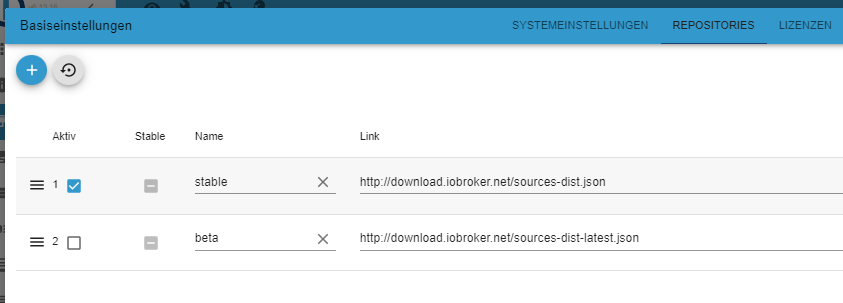
Ohne repositories geht mal sicher kein UpdateInstalled ioBroker-Instances Error: Object "system.repositories" not foundVerscuch mal die Repos zu resetten (Button mit Pfeil gegen Uhrzeigersinn):
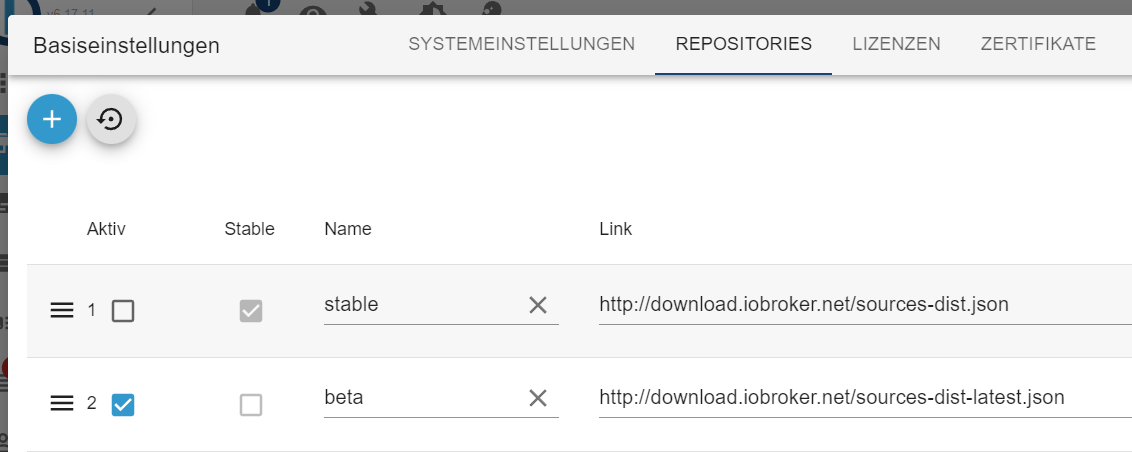
Und dem Updatebedarf stimme ich zu - nicht dass da ein falscher Eindruck entsteht!
Entwicklung u Betreuung: envertech-pv, hoymiles-ms, ns-client, pid, snmp Adapter;
Support Repositoryverwaltung.Wer 'nen Kaffee spendieren will: https://paypal.me
-
@yoda
Ohne repositories geht mal sicher kein UpdateInstalled ioBroker-Instances Error: Object "system.repositories" not foundVerscuch mal die Repos zu resetten (Button mit Pfeil gegen Uhrzeigersinn):
Und dem Updatebedarf stimme ich zu - nicht dass da ein falscher Eindruck entsteht!
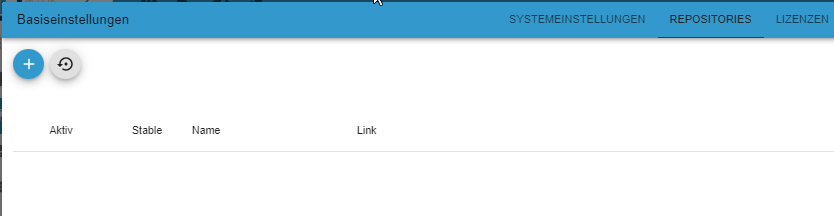
@mcm1957 Danke - ich habs dort mal auf Beta und dann auch wieder auf stable eingetragen.
Leider keine Veränderung- Danke für den Lösungsansatz.
Komisch ... wen ich nun wieder reingehe sehe ich keinen Eintrag vom Link - alles leer...
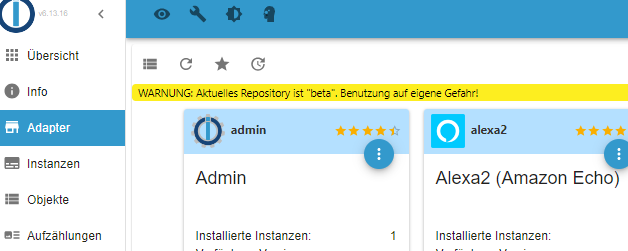
Gruß Yoda
Stand 05.2025
Raspberry5,linux,arm64,CPUs:4,Geschwindigkeit:2400 MHz,Modell:Cortex-A76,RAM:15.8 GB,Node.js:v20.19.2 -
@mcm1957 Danke - ich habs dort mal auf Beta und dann auch wieder auf stable eingetragen.
Leider keine Veränderung- Danke für den Lösungsansatz.
Komisch ... wen ich nun wieder reingehe sehe ich keinen Eintrag vom Link - alles leer...
Kein Wunder. Denn:
ioBroker-Repositories

List is empty

Installed ioBroker-Instances
Error: Object "system.repositories" not found
Vielleicht waren die in den
4 orphan inodes deleted
drin. -
@mcm1957 Danke - ich habs dort mal auf Beta und dann auch wieder auf stable eingetragen.
Leider keine Veränderung- Danke für den Lösungsansatz.
Komisch ... wen ich nun wieder reingehe sehe ich keinen Eintrag vom Link - alles leer...
@yoda
Ev schau mal in dem Topic:
https://forum.iobroker.net/topic/58458/nur-installierte-adapter-werden-angezeigt-bei-adapter/17?_=1716388632796Kern
iob setup firstIn jedem Fall stell vor irgendwelchen weiteren Versuchen sicher, dass du ein funktionierende BACKUP hast.
Entwicklung u Betreuung: envertech-pv, hoymiles-ms, ns-client, pid, snmp Adapter;
Support Repositoryverwaltung.Wer 'nen Kaffee spendieren will: https://paypal.me
-
@yoda
Ev schau mal in dem Topic:
https://forum.iobroker.net/topic/58458/nur-installierte-adapter-werden-angezeigt-bei-adapter/17?_=1716388632796Kern
iob setup firstIn jedem Fall stell vor irgendwelchen weiteren Versuchen sicher, dass du ein funktionierende BACKUP hast.
@mcm1957 denke leider ich muss das System wirklich neu machen.
Plane meinen 2 Raspi mal dafür ein - wenn ich den dann am laufen habe.
Setzte ich den Raspi 1 ( Aktuell Iobroker) auch neu auf. Der ist dann mit Browser, rein für für die Vis Darstellung.Wie mache ich das am Besten?
Raspi Nr.2 neu aufsetzten ohne Browser - Backup einspielen.
Nun würde ich gern zum Abgleich den jetzigen Raspi Nr.1 Deaktivieren, aber noch die Möglichkeit haben mögliche Adapter Einstellungen abzugleichen. Wenn ich ich nun den Admin stoppe, sehe ich vermutlich auch nichts mehr oder?Gruß Yoda
Stand 05.2025
Raspberry5,linux,arm64,CPUs:4,Geschwindigkeit:2400 MHz,Modell:Cortex-A76,RAM:15.8 GB,Node.js:v20.19.2 -
@mcm1957 denke leider ich muss das System wirklich neu machen.
Plane meinen 2 Raspi mal dafür ein - wenn ich den dann am laufen habe.
Setzte ich den Raspi 1 ( Aktuell Iobroker) auch neu auf. Der ist dann mit Browser, rein für für die Vis Darstellung.Wie mache ich das am Besten?
Raspi Nr.2 neu aufsetzten ohne Browser - Backup einspielen.
Nun würde ich gern zum Abgleich den jetzigen Raspi Nr.1 Deaktivieren, aber noch die Möglichkeit haben mögliche Adapter Einstellungen abzugleichen. Wenn ich ich nun den Admin stoppe, sehe ich vermutlich auch nichts mehr oder?@yoda sagte in Keine Updates / Fehlende Adapter Ansicht:
denke leider ich muss das System wirklich neu machen.
Das sowieso. Ein 32Bit-Buster ist halt eh schon geraume Zeit verstorben.
Neu aufsetzen, iobroker 'leer' installieren, vorhandenes Backup wieder einspielen, fertig. Dauert 'ne Stunde, je nach Umfang der Installation.
Linux-Werkzeugkasten:
https://forum.iobroker.net/topic/42952/der-kleine-iobroker-linux-werkzeugkasten
NodeJS Fixer Skript:
https://forum.iobroker.net/topic/68035/iob-node-fix-skript
iob_diag: curl -sLf -o diag.sh https://iobroker.net/diag.sh && bash diag.sh -
@yoda sagte in Keine Updates / Fehlende Adapter Ansicht:
denke leider ich muss das System wirklich neu machen.
Das sowieso. Ein 32Bit-Buster ist halt eh schon geraume Zeit verstorben.
Neu aufsetzen, iobroker 'leer' installieren, vorhandenes Backup wieder einspielen, fertig. Dauert 'ne Stunde, je nach Umfang der Installation.
@thomas-braun habe nun einen neuen Raspi mit Iobroker.
Ich suche grade verzweifelt nach der Möglichkeit ein Backup einzuspielen.
Eines erstellen klappt - aber ich finde den Button zur Wiederherstellung nicht :-(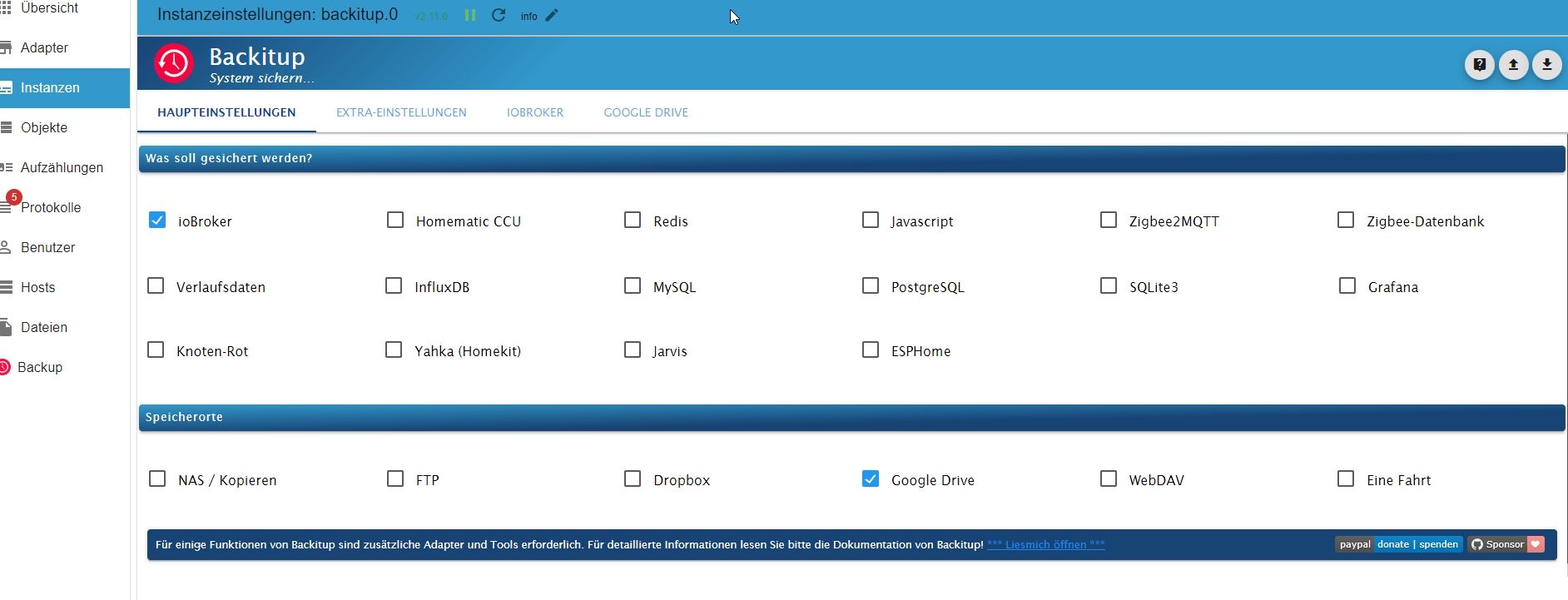
Gruß Yoda
Stand 05.2025
Raspberry5,linux,arm64,CPUs:4,Geschwindigkeit:2400 MHz,Modell:Cortex-A76,RAM:15.8 GB,Node.js:v20.19.2 -
@thomas-braun habe nun einen neuen Raspi mit Iobroker.
Ich suche grade verzweifelt nach der Möglichkeit ein Backup einzuspielen.
Eines erstellen klappt - aber ich finde den Button zur Wiederherstellung nicht :-(@yoda sagte in Keine Updates / Fehlende Adapter Ansicht:
aber ich finde den Button zur Wiederherstellung nicht
sieh mal in die Sidebar ;-)
kein Support per PN! - Fragen im Forum stellen - Benutzt das Voting rechts unten im Beitrag wenn er euch geholfen hat.
Das Forum freut sich über eine Spende. Benutzt dazu den Spendenbutton oben rechts. Danke!
der Installationsfixer: curl -fsL https://iobroker.net/fix.sh | bash -




Hey! Du scheinst an dieser Unterhaltung interessiert zu sein, hast aber noch kein Konto.
Hast du es satt, bei jedem Besuch durch die gleichen Beiträge zu scrollen? Wenn du dich für ein Konto anmeldest, kommst du immer genau dorthin zurück, wo du zuvor warst, und kannst dich über neue Antworten benachrichtigen lassen (entweder per E-Mail oder Push-Benachrichtigung). Du kannst auch Lesezeichen speichern und Beiträge positiv bewerten, um anderen Community-Mitgliedern deine Wertschätzung zu zeigen.
Mit deinem Input könnte dieser Beitrag noch besser werden 💗
Registrieren Anmelden412
Online33.0k
Benutzende83.7k
Themen1.3m
Beiträge