




Adapter Paketverfolgung DHL, Briefe, Amazon, DPD,GLS,UPS,17T


-
@tombox Gibt es noch Hoffnung, dass GLS zukünftig mal funktioniert und die unvollständigen Amazon Lieferungen nicht in parcel.0.notDelivered landen?
Ist hier irgendwie verdammt ruhig geworden. Wenn du dich also gerade anderen Dingen widmest, ok. Aber vllt kannst eine Prognose abgeben ob am Adapter noch weiter gearbeitet werden wird. -
@tombox Gibt es noch Hoffnung, dass GLS zukünftig mal funktioniert und die unvollständigen Amazon Lieferungen nicht in parcel.0.notDelivered landen?
Ist hier irgendwie verdammt ruhig geworden. Wenn du dich also gerade anderen Dingen widmest, ok. Aber vllt kannst eine Prognose abgeben ob am Adapter noch weiter gearbeitet werden wird. -
@diginix neue GLS account is zu kompliziert
"Von Amazon versandt" sollte doch in notDelivered landen ?@tombox Also wird GLS gar nicht mehr unterstützt?
Ok, dann schmeiß ich das mal aus der Instanz.
Bzgl Amazon geht es um uralte Lieferungen die mir leeren Details kommen:{ "sendungen": [ { "id": "", "name": "Artikel", "status": "Von Amazon versandt", "detailedState": {} } ] }Ohne "detailedState" ist es aber keine Sendung mehr, die tatsächlich noch zugestellt wird. Dazu hattest du in der 0.2.7 auf github eigentlich was gepatcht. Siehe hier.
Aber das funktioniert nicht. -
@tombox Also wird GLS gar nicht mehr unterstützt?
Ok, dann schmeiß ich das mal aus der Instanz.
Bzgl Amazon geht es um uralte Lieferungen die mir leeren Details kommen:{ "sendungen": [ { "id": "", "name": "Artikel", "status": "Von Amazon versandt", "detailedState": {} } ] }Ohne "detailedState" ist es aber keine Sendung mehr, die tatsächlich noch zugestellt wird. Dazu hattest du in der 0.2.7 auf github eigentlich was gepatcht. Siehe hier.
Aber das funktioniert nicht. -
@diginix Kann man so leider nicht sagen gibt auch Sendungen die noch kein detailedState haben kannst du den Artikel manuell archvieren?
@tombox Das möchte ich ungern, weil ich alles historische bei Amazon gern in der normalen Ansicht wiederfinden möchte. Dachte du nutzt für parcel.0.notDelivered extra die Details des jeweiligen Dienstes und nur in parcel.0.allProviderJson landet einfach alles.
Klar ist das JSON von Amazon schon falsch. Die Sendung ist lange durch. K.a. warum Amazon so ein Quatsch über die API liefert.Komischerweise kam die alte Amazon Sendung immer dann wieder im Adapter an wenn ich das gesamte System neu gestartet habe. Irgendwann fliegt sie dann auch wieder raus. Aber würde ich jetzt das System neu starten, käme sie wieder inkl Telegram usw.
Bzw. Telegram habe ich immer nur nach Reboot.
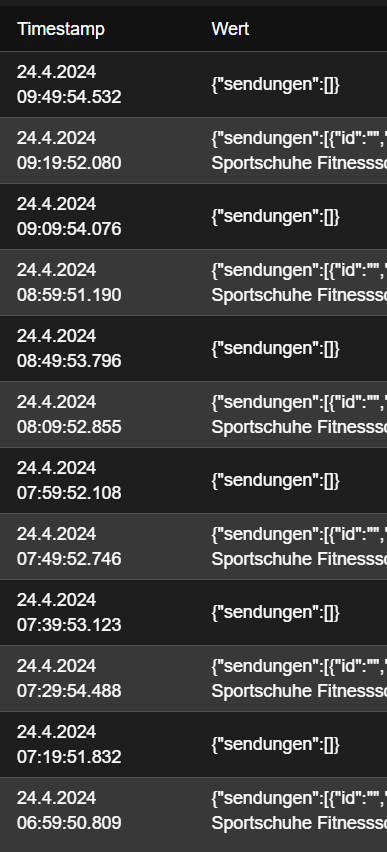
Die Sendung selbst kommt alternierend:
-
@einfachjannik Hm, sieht auf den ersten Blick richtig aus. Komisch dass die Instanz beim Start nicht mal DEBUG Zeilen schreibt. Oder fehlen die nur in deinem Screenshot?
Am Ende müsste @tombox mal schauen und vllt Hinweise geben. -
@diginix sagte in Adapter Paketverfolgung DHL, Briefe, Amazon, DPD,GLS,UPS,17T:
Komischerweise kam die alte Amazon Sendung immer dann wieder im Adapter an wenn ich das gesamte System neu gestartet habe
Wenn du "Geistersendungen" hast (hatte ich auch), dann "archiviere" diese Sendungen über die Website oder die App. Dann ist ruhe.
Ro75.
SERVER = Beelink U59 16GB DDR4 RAM 512GB SSD, FB 7490, FritzDect 200+301+440, ConBee II, Zigbee Aqara Sensoren + NOUS A1Z, NOUS A1T, Philips Hue ** ioBroker, REDIS, influxdb2, Grafana, PiHole, Plex-Mediaserver, paperless-ngx (Docker), MariaDB + phpmyadmin *** VIS-Runtime = Intel NUC 8GB RAM 128GB SSD + 24" Touchscreen
-
@diginix sagte in Adapter Paketverfolgung DHL, Briefe, Amazon, DPD,GLS,UPS,17T:
Komischerweise kam die alte Amazon Sendung immer dann wieder im Adapter an wenn ich das gesamte System neu gestartet habe
Wenn du "Geistersendungen" hast (hatte ich auch), dann "archiviere" diese Sendungen über die Website oder die App. Dann ist ruhe.
Ro75.
@ro75 Meiner Meinung nach kann man diese Geistersendungen sehr genau identifizieren ohne etwas bei Amazon archivieren zu müssen. Im JSON ist sowohl die "id" als auch "detailedState" leer. Keine reguläre Sendung hat diese Kriterien.
@tombox meinte zwar, dass das nicht eindeutig wäre, aber ich habe noch keine Sendung ohne id und das auch noch mit leerem detailedState gesehen außer sie ist 100% eine Geistersendung.
Hier nochmal ein Bsp JSON wie es aktuell bei mir wieder existiert:
{
  "sendungen": [
    {
      "id": "",
      "name": "Artikelname usw...",
      "status": "Von Amazon versandt",
      "detailedState": {}
    }
  ]
}
Ich werde ChatGPT mal bitten die main.js dahingehend zu patchen. Vielleicht kommt ja was brauchbares raus. Dann gibt es ein Adapter Fork von mir.
-
@ro75 Meiner Meinung nach kann man diese Geistersendungen sehr genau identifizieren ohne etwas bei Amazon archivieren zu müssen. Im JSON ist sowohl die "id" als auch "detailedState" leer. Keine reguläre Sendung hat diese Kriterien.
@tombox meinte zwar, dass das nicht eindeutig wäre, aber ich habe noch keine Sendung ohne id und das auch noch mit leerem detailedState gesehen außer sie ist 100% eine Geistersendung.
Hier nochmal ein Bsp JSON wie es aktuell bei mir wieder existiert:
{
  "sendungen": [
    {
      "id": "",
      "name": "Artikelname usw...",
      "status": "Von Amazon versandt",
      "detailedState": {}
    }
  ]
}
Ich werde ChatGPT mal bitten die main.js dahingehend zu patchen. Vielleicht kommt ja was brauchbares raus. Dann gibt es ein Adapter Fork von mir.
-
Guten Morgen,
Adapter Version 0.2.7, Node.js 20.14.0 und NPM 10.7.0
Heute Nacht wollte Amazon mal wieder ein Token und die Instanz wurde nach ein paar Versuchen deaktiviert. Ich habe dann einen neuen OTP eingetragen und bekomme jetzt nur Fehlermeldungen. DHL und Hermes funktionieren, Amazon und UPS können sich nicht anmelden. UPS keine weiteren Meldungen, nur "Login to UPS failed". Daten sind aber korrekt, habe es in der UPS App getestet.
Bei Amazon kommt jetzt eine sehr lange Meldung, die ist zu lang um sie hier zu posten. Daher wollte ich das Logfile herunterladen und hier bereitstellen. Wenn ich das Log herunterladen will, kommt das:
2024-06-21 06:10:09.699 - info: host.vm-iobroker instance system.adapter.parcel.0 terminated with code 11 (ADAPTER_REQUESTED_TERMINATION)
2024-06-21 06:10:12.482 - info: host.vm-iobroker instance system.adapter.parcel.0 started with pid 913101
2024-06-21 06:10:13.880 - info: parcel.0 (913101) starting. Version 0.2.7 in /opt/iobroker/node_modules/iobroker.parcel, node: v20.14.0, js-controller: 5.0.19
2024-06-21 06:10:13.901 - info: parcel.0 (913101) Login to DHL
2024-06-21 06:10:15.951 - info: parcel.0 (913101) Login to DHL successful
2024-06-21 06:10:15.999 - info: parcel.0 (913101) Login to Amazon
2024-06-21 06:10:16.528 - error: parcel.0 (913101) Failed to post with password to https://www.amazon.de/ap/signin
2024-06-21 06:10:16.529 - error: parcel.0 (913101) "\n \n\n\n\n\n\n\n\n \n\n\n\n\n \n\n\n\n\n\n\n\n\n \n\n\n\n\n\n\n\n\n \n \n \n \n \n \n \n \n \n\n\n\n \n\n\n\n\n\n\n\n
\n
\n\n\n\n\n\n\n\n\n
\n \n
\n\n\n \n \n \n
\n \n \n \n \n \n \n \n
\n \n	\n
\n
Suchst du etwas?
\n
\n
\n Tut uns leid: Die Web-Adresse, die du eingegeben hast, gibt es auf unserer Website nicht.\n
\n \n \n Zur Amazon.de Homepage \n\n \n
\n
\n\n \n\n
\n
\n \n\n\n
\n
\n\n
\n\n\n\n\n\n"
2024-06-21 06:10:16.530 - error: parcel.0 (913101) AxiosError: Request failed with status code 404
2024-06-21 06:10:16.530 - info: parcel.0 (913101) Login to UPS
2024-06-21 06:10:16.889 - warn: parcel.0 (913101) Login to UPS failed
2024-06-21 06:10:16.889 - info: parcel.0 (913101) {"Fault":{"faultcode":"Client","faultstring":"An exception has been raised as a result of client data.","detail":{"Errors":{"ErrorDetail":{"Severity":"Authentication","PrimaryErrorCode":{"Code":"250003","Description":"Invalid Access License number"},"Location":{"LocationElementName":"p2:AccessLicenseNumber"}}}}}}
2024-06-21 06:10:16.889 - info: parcel.0 (913101) Login to Hermes
2024-06-21 06:10:17.211 - info: parcel.0 (913101) Login to Hermes successful
So siehts als Screenshot aus:
Und mir ist aufgefallen, das die Daten nicht mehr aktualisiert werden. Ich habe in der Instanz 5 Minuten eingestellt, habe eben gesehen, das selbst nach etwa 21 Minuten kein neuer Abruf stattgefunden hat.
Gestern hat alles noch funktioniert. Okay, bei UPS weiß ich es nicht, aber bei Amazon bin ich sicher, hab gestern noch ein Paket bekommen.
Gruß, Johannes
EDIT:
Die Daten von DHL werden doch regelmäßig aktualisiert, es taucht nur nicht im Log auf, nur Amazon war die letzte Aktualisierung um 00:36:16. -
Guten Morgen,
Adapter Version 0.2.7, Node.js 20.14.0 und NPM 10.7.0
Heute Nacht wollte Amazon mal wieder ein Token und die Instanz wurde nach ein paar Versuchen deaktiviert. Ich habe dann einen neuen OTP eingetragen und bekomme jetzt nur Fehlermeldungen. DHL und Hermes funktionieren, Amazon und UPS können sich nicht anmelden. UPS keine weiteren Meldungen, nur "Login to UPS failed". Daten sind aber korrekt, habe es in der UPS App getestet.
Bei Amazon kommt jetzt eine sehr lange Meldung, die ist zu lang um sie hier zu posten. Daher wollte ich das Logfile herunterladen und hier bereitstellen. Wenn ich das Log herunterladen will, kommt das:
2024-06-21 06:10:09.699 - info: host.vm-iobroker instance system.adapter.parcel.0 terminated with code 11 (ADAPTER_REQUESTED_TERMINATION)
2024-06-21 06:10:12.482 - info: host.vm-iobroker instance system.adapter.parcel.0 started with pid 913101
2024-06-21 06:10:13.880 - info: parcel.0 (913101) starting. Version 0.2.7 in /opt/iobroker/node_modules/iobroker.parcel, node: v20.14.0, js-controller: 5.0.19
2024-06-21 06:10:13.901 - info: parcel.0 (913101) Login to DHL
2024-06-21 06:10:15.951 - info: parcel.0 (913101) Login to DHL successful
2024-06-21 06:10:15.999 - info: parcel.0 (913101) Login to Amazon
2024-06-21 06:10:16.528 - error: parcel.0 (913101) Failed to post with password to https://www.amazon.de/ap/signin
2024-06-21 06:10:16.529 - error: parcel.0 (913101) "\n \n\n\n\n\n\n\n\n \n\n\n\n\n \n\n\n\n\n\n\n\n\n \n\n\n\n\n\n\n\n\n \n \n \n \n \n \n \n \n \n\n\n\n \n\n\n\n\n\n\n\n
\n
\n\n\n\n\n\n\n\n\n
\n \n
\n\n\n \n \n \n
\n \n \n \n \n \n \n \n
\n \n	\n
\n
Suchst du etwas?
\n
\n
\n Tut uns leid: Die Web-Adresse, die du eingegeben hast, gibt es auf unserer Website nicht.\n
\n \n \n Zur Amazon.de Homepage \n\n \n
\n
\n\n \n\n
\n
\n \n\n\n
\n
\n\n
\n\n\n\n\n\n"
2024-06-21 06:10:16.530 - error: parcel.0 (913101) AxiosError: Request failed with status code 404
2024-06-21 06:10:16.530 - info: parcel.0 (913101) Login to UPS
2024-06-21 06:10:16.889 - warn: parcel.0 (913101) Login to UPS failed
2024-06-21 06:10:16.889 - info: parcel.0 (913101) {"Fault":{"faultcode":"Client","faultstring":"An exception has been raised as a result of client data.","detail":{"Errors":{"ErrorDetail":{"Severity":"Authentication","PrimaryErrorCode":{"Code":"250003","Description":"Invalid Access License number"},"Location":{"LocationElementName":"p2:AccessLicenseNumber"}}}}}}
2024-06-21 06:10:16.889 - info: parcel.0 (913101) Login to Hermes
2024-06-21 06:10:17.211 - info: parcel.0 (913101) Login to Hermes successful
So siehts als Screenshot aus:
Und mir ist aufgefallen, das die Daten nicht mehr aktualisiert werden. Ich habe in der Instanz 5 Minuten eingestellt, habe eben gesehen, das selbst nach etwa 21 Minuten kein neuer Abruf stattgefunden hat.
Gestern hat alles noch funktioniert. Okay, bei UPS weiß ich es nicht, aber bei Amazon bin ich sicher, hab gestern noch ein Paket bekommen.
Gruß, Johannes
EDIT:
Die Daten von DHL werden doch regelmäßig aktualisiert, es taucht nur nicht im Log auf, nur Amazon war die letzte Aktualisierung um 00:36:16. -
Ich habe jetzt die aktuelle nodejs 20.15.0 Version installiert und die IoBroker neu gestartet. Dann unter Objekte den Ordner Parcel.0 gelöscht. Danach die Instanz wieder gestartet. Jetzt kommt die Abfrage nach einem Token, den bekomme ich per SMS und nach dem eintragen und speichern kommen jetzt folgende Meldungen:
parcel.0
	2024-06-21 15:49:43.007	info	Login to Hermes successful
parcel.0
	2024-06-21 15:49:42.685	info	Login to Hermes
parcel.0
	2024-06-21 15:49:42.684	info	{"Fault":{"faultcode":"Client","faultstring":"An exception has been raised as a result of client data.","detail":{"Errors":{"ErrorDetail":{"Severity":"Authentication","PrimaryErrorCode":{"Code":"250003","Description":"Invalid Access License number"},"Location":{"LocationElementName":"p2:AccessLicenseNumber"}}}}}}
parcel.0
	2024-06-21 15:49:42.684	warn	Login to UPS failed
parcel.0
	2024-06-21 15:49:42.023	info	Login to UPS
parcel.0
	2024-06-21 15:49:42.022	error	MFA: Login to Amazon failed, please login manually to Amazon
parcel.0
	2024-06-21 15:49:41.060	info	Found MFA token login
parcel.0
	2024-06-21 15:49:39.488	info	Login to Amazon
parcel.0
	2024-06-21 15:49:39.443	info	Login to DHL successful
parcel.0
	2024-06-21 15:49:37.333	info	Login to DHL
parcel.0
	2024-06-21 15:49:37.273	info	starting. Version 0.2.7 in /opt/iobroker/node_modules/iobroker.parcel, node: v20.15.0, js-controller: 5.0.19
Wie kann ich mich den manuell einloggen? Ich habe es 3 mal versucht, jedesmal den neuen Token eingetragen und und jedesmal die gleiche Meldungen. Kann ich da überhaupt was tun?
-
Ich habe jetzt die aktuelle nodejs 20.15.0 Version installiert und die IoBroker neu gestartet. Dann unter Objekte den Ordner Parcel.0 gelöscht. Danach die Instanz wieder gestartet. Jetzt kommt die Abfrage nach einem Token, den bekomme ich per SMS und nach dem eintragen und speichern kommen jetzt folgende Meldungen:
parcel.0
	2024-06-21 15:49:43.007	info	Login to Hermes successful
parcel.0
	2024-06-21 15:49:42.685	info	Login to Hermes
parcel.0
	2024-06-21 15:49:42.684	info	{"Fault":{"faultcode":"Client","faultstring":"An exception has been raised as a result of client data.","detail":{"Errors":{"ErrorDetail":{"Severity":"Authentication","PrimaryErrorCode":{"Code":"250003","Description":"Invalid Access License number"},"Location":{"LocationElementName":"p2:AccessLicenseNumber"}}}}}}
parcel.0
	2024-06-21 15:49:42.684	warn	Login to UPS failed
parcel.0
	2024-06-21 15:49:42.023	info	Login to UPS
parcel.0
	2024-06-21 15:49:42.022	error	MFA: Login to Amazon failed, please login manually to Amazon
parcel.0
	2024-06-21 15:49:41.060	info	Found MFA token login
parcel.0
	2024-06-21 15:49:39.488	info	Login to Amazon
parcel.0
	2024-06-21 15:49:39.443	info	Login to DHL successful
parcel.0
	2024-06-21 15:49:37.333	info	Login to DHL
parcel.0
	2024-06-21 15:49:37.273	info	starting. Version 0.2.7 in /opt/iobroker/node_modules/iobroker.parcel, node: v20.15.0, js-controller: 5.0.19
Wie kann ich mich den manuell einloggen? Ich habe es 3 mal versucht, jedesmal den neuen Token eingetragen und und jedesmal die gleiche Meldungen. Kann ich da überhaupt was tun?
Ich kann das bestätigen. Die An-/Eingabe eines neuen Tokens löst das Problem nicht.
-
Ich habe jetzt die aktuelle nodejs 20.15.0 Version installiert und die IoBroker neu gestartet. Dann unter Objekte den Ordner Parcel.0 gelöscht. Danach die Instanz wieder gestartet. Jetzt kommt die Abfrage nach einem Token, den bekomme ich per SMS und nach dem eintragen und speichern kommen jetzt folgende Meldungen:
parcel.0
	2024-06-21 15:49:43.007	info	Login to Hermes successful
parcel.0
	2024-06-21 15:49:42.685	info	Login to Hermes
parcel.0
	2024-06-21 15:49:42.684	info	{"Fault":{"faultcode":"Client","faultstring":"An exception has been raised as a result of client data.","detail":{"Errors":{"ErrorDetail":{"Severity":"Authentication","PrimaryErrorCode":{"Code":"250003","Description":"Invalid Access License number"},"Location":{"LocationElementName":"p2:AccessLicenseNumber"}}}}}}
parcel.0
	2024-06-21 15:49:42.684	warn	Login to UPS failed
parcel.0
	2024-06-21 15:49:42.023	info	Login to UPS
parcel.0
	2024-06-21 15:49:42.022	error	MFA: Login to Amazon failed, please login manually to Amazon
parcel.0
	2024-06-21 15:49:41.060	info	Found MFA token login
parcel.0
	2024-06-21 15:49:39.488	info	Login to Amazon
parcel.0
	2024-06-21 15:49:39.443	info	Login to DHL successful
parcel.0
	2024-06-21 15:49:37.333	info	Login to DHL
parcel.0
	2024-06-21 15:49:37.273	info	starting. Version 0.2.7 in /opt/iobroker/node_modules/iobroker.parcel, node: v20.15.0, js-controller: 5.0.19
Wie kann ich mich den manuell einloggen? Ich habe es 3 mal versucht, jedesmal den neuen Token eingetragen und und jedesmal die gleiche Meldungen. Kann ich da überhaupt was tun?
-
@tombox
Habe jetzt bei Amazon die 2FA komplett deaktiviert und die bestehenden Einträge gelöscht. Das gleiche Fehlerbild:2024-06-23 06:51:05.389 - info: host.vm-iobroker "system.adapter.parcel.0" enabled 2024-06-23 06:51:05.783 - info: host.vm-iobroker instance system.adapter.parcel.0 started with pid 810176 2024-06-23 06:51:07.372 - info: parcel.0 (810176) starting. Version 0.2.7 in /opt/iobroker/node_modules/iobroker.parcel, node: v20.15.0, js-controller: 5.0.19 2024-06-23 06:51:07.400 - info: parcel.0 (810176) Login to DHL 2024-06-23 06:51:09.212 - info: parcel.0 (810176) Login to DHL successful 2024-06-23 06:51:09.260 - info: parcel.0 (810176) Login to Amazon 2024-06-23 06:51:09.829 - error: parcel.0 (810176) Failed to post with password to https://www.amazon.de/ap/signin 2024-06-23 06:51:09.830 - error: parcel.0 (810176) "\n \n\n\n\n\n\n\n\n \n\n\n\n\n \n\n\n\n\n\n\n\n\n \n\n\n\n\n\n\n\n\n \n \n \n \n \n \n \n \n \n\n\n\n \n\n\n\n\n\n\n\n \n \n\n\n\n\n\n\n\n\n \n \n \n\n\n \n \n \n \n \n \n \n \n \n \n \n \n \n \n \n Suchst du etwas? \n \n \n Tut uns leid: Die Web-Adresse, die du eingegeben hast, gibt es auf unserer Website nicht.\n \n \n \n Zur Amazon.de Homepage \n\n \n \n \n\n \n\n \n \n \n\n\n \n \n\n \n\n\n\n\n\n" 2024-06-23 06:51:09.831 - error: parcel.0 (810176) AxiosError: Request failed with status code 404 2024-06-23 06:51:09.831 - info: parcel.0 (810176) Login to UPS 2024-06-23 06:51:10.227 - warn: parcel.0 (810176) Login to UPS failed 2024-06-23 06:51:10.227 - info: parcel.0 (810176) {"Fault":{"faultcode":"Client","faultstring":"An exception has been raised as a result of client data.","detail":{"Errors":{"ErrorDetail":{"Severity":"Authentication","PrimaryErrorCode":{"Code":"250003","Description":"Invalid Access License number"},"Location":{"LocationElementName":"p2:AccessLicenseNumber"}}}}}} 2024-06-23 06:51:10.227 - info: parcel.0 (810176) Login to Hermes 2024-06-23 06:51:10.611 - info: parcel.0 (810176) Login to Hermes successfulHier ist mal dieses lange Protokoll als Textdatei:
Parcel.0 Protokoll.txtEDIT:
Bin jetzt bis ca. 15 Uhr nicht zu erreichen. -
@tombox
Habe jetzt bei Amazon die 2FA komplett deaktiviert und die bestehenden Einträge gelöscht. Das gleiche Fehlerbild:2024-06-23 06:51:05.389 - info: host.vm-iobroker "system.adapter.parcel.0" enabled 2024-06-23 06:51:05.783 - info: host.vm-iobroker instance system.adapter.parcel.0 started with pid 810176 2024-06-23 06:51:07.372 - info: parcel.0 (810176) starting. Version 0.2.7 in /opt/iobroker/node_modules/iobroker.parcel, node: v20.15.0, js-controller: 5.0.19 2024-06-23 06:51:07.400 - info: parcel.0 (810176) Login to DHL 2024-06-23 06:51:09.212 - info: parcel.0 (810176) Login to DHL successful 2024-06-23 06:51:09.260 - info: parcel.0 (810176) Login to Amazon 2024-06-23 06:51:09.829 - error: parcel.0 (810176) Failed to post with password to https://www.amazon.de/ap/signin 2024-06-23 06:51:09.830 - error: parcel.0 (810176) "\n \n\n\n\n\n\n\n\n \n\n\n\n\n \n\n\n\n\n\n\n\n\n \n\n\n\n\n\n\n\n\n \n \n \n \n \n \n \n \n \n\n\n\n \n\n\n\n\n\n\n\n \n \n\n\n\n\n\n\n\n\n \n \n \n\n\n \n \n \n \n \n \n \n \n \n \n \n \n \n \n \n Suchst du etwas? \n \n \n Tut uns leid: Die Web-Adresse, die du eingegeben hast, gibt es auf unserer Website nicht.\n \n \n \n Zur Amazon.de Homepage \n\n \n \n \n\n \n\n \n \n \n\n\n \n \n\n \n\n\n\n\n\n" 2024-06-23 06:51:09.831 - error: parcel.0 (810176) AxiosError: Request failed with status code 404 2024-06-23 06:51:09.831 - info: parcel.0 (810176) Login to UPS 2024-06-23 06:51:10.227 - warn: parcel.0 (810176) Login to UPS failed 2024-06-23 06:51:10.227 - info: parcel.0 (810176) {"Fault":{"faultcode":"Client","faultstring":"An exception has been raised as a result of client data.","detail":{"Errors":{"ErrorDetail":{"Severity":"Authentication","PrimaryErrorCode":{"Code":"250003","Description":"Invalid Access License number"},"Location":{"LocationElementName":"p2:AccessLicenseNumber"}}}}}} 2024-06-23 06:51:10.227 - info: parcel.0 (810176) Login to Hermes 2024-06-23 06:51:10.611 - info: parcel.0 (810176) Login to Hermes successfulHier ist mal dieses lange Protokoll als Textdatei:
Parcel.0 Protokoll.txtEDIT:
Bin jetzt bis ca. 15 Uhr nicht zu erreichen. -
funktioniert leider nicht. Kamen einige Meldungen das ich die Instanz nochmal neu starten soll, dann das ich den Ordner nochmal löschen soll. Hier die Meldungen:
parcel.0
	2024-06-23 14:51:47.616	info	Login to Hermes successful
parcel.0
	2024-06-23 14:51:47.269	info	Login to Hermes
parcel.0
	2024-06-23 14:51:47.268	info	{"Fault":{"faultcode":"Client","faultstring":"An exception has been raised as a result of client data.","detail":{"Errors":{"ErrorDetail":{"Severity":"Authentication","PrimaryErrorCode":{"Code":"250003","Description":"Invalid Access License number"},"Location":{"LocationElementName":"p2:AccessLicenseNumber"}}}}}}
parcel.0
	2024-06-23 14:51:47.268	warn	Login to UPS failed
parcel.0
	2024-06-23 14:51:46.866	info	Login to UPS
parcel.0
	2024-06-23 14:51:46.866	error	Unknown Error: Login to Amazon failed, please login to Amazon and check your credentials
parcel.0
	2024-06-23 14:51:45.544	info	Login to Amazon
parcel.0
	2024-06-23 14:51:45.464	info	Login to DHL successful
parcel.0
	2024-06-23 14:51:43.224	info	Login to DHL
parcel.0
	2024-06-23 14:51:43.201	info	starting. Version 0.2.7 in /opt/iobroker/node_modules/iobroker.parcel, node: v20.15.0, js-controller: 5.0.19
parcel.0
	2024-06-23 14:51:37.079	info	Terminated (ADAPTER_REQUESTED_TERMINATION): Without reason
parcel.0
	2024-06-23 14:51:37.078	info	terminating
parcel.0
	2024-06-23 14:51:37.077	info	Got terminate signal TERMINATE_YOURSELF
parcel.0
	2024-06-23 14:50:17.021	info	Login to Hermes successful
parcel.0
	2024-06-23 14:50:16.638	info	Login to Hermes
parcel.0
	2024-06-23 14:50:16.638	info	{"Fault":{"faultcode":"Client","faultstring":"An exception has been raised as a result of client data.","detail":{"Errors":{"ErrorDetail":{"Severity":"Authentication","PrimaryErrorCode":{"Code":"250003","Description":"Invalid Access License number"},"Location":{"LocationElementName":"p2:AccessLicenseNumber"}}}}}}
parcel.0
	2024-06-23 14:50:16.638	warn	Login to UPS failed
parcel.0
	2024-06-23 14:50:15.976	info	Login to UPS
parcel.0
	2024-06-23 14:50:15.976	error	Unknown Error: Login to Amazon failed, please login to Amazon and check your credentials
parcel.0
	2024-06-23 14:50:14.604	info	Login to Amazon
parcel.0
	2024-06-23 14:50:14.556	info	Login to DHL successful
parcel.0
	2024-06-23 14:50:12.386	info	Login to DHL
parcel.0
	2024-06-23 14:50:12.365	info	starting. Version 0.2.7 in /opt/iobroker/node_modules/iobroker.parcel, node: v20.15.0, js-controller: 5.0.19
parcel.0
	2024-06-23 14:50:07.052	info	terminating
parcel.0
	2024-06-23 14:50:06.550	info	Terminated (ADAPTER_REQUESTED_TERMINATION): Without reason
parcel.0
	2024-06-23 14:50:06.550	info	terminating
parcel.0
	2024-06-23 14:50:06.549	info	Got terminate signal TERMINATE_YOURSELF
parcel.0
	2024-06-23 14:50:05.973	info	Start relogin
parcel.0
	2024-06-23 14:50:05.973	info	Amazon cookie are removed. Please restart the adapter to trigger a relogin. If this is not working please manually delete parcel.0.auth.cookie
parcel.0
	2024-06-23 14:50:05.972	error	Login to Amazon failed, please login to Amazon manually and check the login
parcel.0
	2024-06-23 14:50:04.019	info	Start relogin
parcel.0
	2024-06-23 14:50:04.019	info	Amazon cookie are removed. Please restart the adapter to trigger a relogin. If this is not working please manually delete parcel.0.auth.cookie
parcel.0
	2024-06-23 14:50:04.018	error	Login to Amazon failed, please login to Amazon manually and check the login
parcel.0
	2024-06-23 14:50:01.247	info	Start relogin
parcel.0
	2024-06-23 14:50:01.247	info	Amazon cookie are removed. Please restart the adapter to trigger a relogin. If this is not working please manually delete parcel.0.auth.cookie
parcel.0
	2024-06-23 14:50:01.246	error	Login to Amazon failed, please login to Amazon manually and check the login
parcel.0
	2024-06-23 14:49:59.312	info	Start relogin
parcel.0
	2024-06-23 14:49:59.312	info	Amazon cookie are removed. Please restart the adapter to trigger a relogin. If this is not working please manually delete parcel.0.auth.cookie
parcel.0
	2024-06-23 14:49:59.312	error	Login to Amazon failed, please login to Amazon manually and check the login
parcel.0
	2024-06-23 14:49:57.339	info	Start relogin
parcel.0
	2024-06-23 14:49:57.339	info	Amazon cookie are removed. Please restart the adapter to trigger a relogin. If this is not working please manually delete parcel.0.auth.cookie
parcel.0
	2024-06-23 14:49:57.338	error	Login to Amazon failed, please login to Amazon manually and check the login
parcel.0
	2024-06-23 14:49:55.440	info	Start relogin
parcel.0
	2024-06-23 14:49:55.440	info	Amazon cookie are removed. Please restart the adapter to trigger a relogin. If this is not working please manually delete parcel.0.auth.cookie
parcel.0
	2024-06-23 14:49:55.439	error	Login to Amazon failed, please login to Amazon manually and check the login
parcel.0
	2024-06-23 14:49:53.474	info	Start relogin
parcel.0
	2024-06-23 14:49:53.473	info	Amazon cookie are removed. Please restart the adapter to trigger a relogin. If this is not working please manually delete parcel.0.auth.cookie
parcel.0
	2024-06-23 14:49:53.473	error	Login to Amazon failed, please login to Amazon manually and check the login
parcel.0
	2024-06-23 14:49:51.035	info	Start relogin
parcel.0
	2024-06-23 14:49:51.035	info	Amazon cookie are removed. Please restart the adapter to trigger a relogin. If this is not working please manually delete parcel.0.auth.cookie
parcel.0
	2024-06-23 14:49:51.035	error	Login to Amazon failed, please login to Amazon manually and check the login
parcel.0
	2024-06-23 14:49:49.132	info	Login to Amazon
parcel.0
	2024-06-23 14:49:49.018	info	Login to DHL successful
parcel.0
	2024-06-23 14:49:47.058	info	Login to DHL
parcel.0
	2024-06-23 14:49:47.040	info	starting. Version 0.2.7 in /opt/iobroker/node_modules/iobroker.parcel, node: v20.15.0, js-controller: 5.0.19
parcel.0
	2024-06-23 14:49:04.069	info	Terminated (ADAPTER_REQUESTED_TERMINATION): Without reason
parcel.0
	2024-06-23 14:49:04.069	info	terminating
parcel.0
	2024-06-23 14:49:04.068	info	Got terminate signal TERMINATE_YOURSELF
parcel.0
	2024-06-23 14:49:03.426	info	Start relogin
parcel.0
	2024-06-23 14:49:03.426	info	Amazon cookie are removed. Please restart the adapter to trigger a relogin. If this is not working please manually delete parcel.0.auth.cookie
parcel.0
	2024-06-23 14:49:03.426	error	Login to Amazon failed, please login to Amazon manually and check the login
parcel.0
	2024-06-23 14:49:01.016	info	Start relogin
parcel.0
	2024-06-23 14:49:01.016	info	Amazon cookie are removed. Please restart the adapter to trigger a relogin. If this is not working please manually delete parcel.0.auth.cookie
parcel.0
	2024-06-23 14:49:01.016	error	Login to Amazon failed, please login to Amazon manually and check the login
parcel.0
	2024-06-23 14:48:59.033	info	Start relogin
parcel.0
	2024-06-23 14:48:59.033	info	Amazon cookie are removed. Please restart the adapter to trigger a relogin. If this is not working please manually delete parcel.0.auth.cookie
parcel.0
	2024-06-23 14:48:59.033	error	Login to Amazon failed, please login to Amazon manually and check the login
parcel.0
	2024-06-23 14:48:57.160	info	Start relogin
parcel.0
	2024-06-23 14:48:57.160	info	Amazon cookie are removed. Please restart the adapter to trigger a relogin. If this is not working please manually delete parcel.0.auth.cookie
parcel.0
	2024-06-23 14:48:57.160	error	Login to Amazon failed, please login to Amazon manually and check the login
parcel.0
	2024-06-23 14:48:55.185	info	Start relogin
parcel.0
	2024-06-23 14:48:55.185	info	Amazon cookie are removed. Please restart the adapter to trigger a relogin. If this is not working please manually delete parcel.0.auth.cookie
parcel.0
	2024-06-23 14:48:55.185	error	Login to Amazon failed, please login to Amazon manually and check the login
parcel.0
	2024-06-23 14:48:53.332	info	Start relogin
parcel.0
	2024-06-23 14:48:53.332	info	Amazon cookie are removed. Please restart the adapter to trigger a relogin. If this is not working please manually delete parcel.0.auth.cookie
parcel.0
	2024-06-23 14:48:53.331	error	Login to Amazon failed, please login to Amazon manually and check the login
parcel.0
	2024-06-23 14:48:50.933	info	Start relogin
parcel.0
	2024-06-23 14:48:50.933	info	Amazon cookie are removed. Please restart the adapter to trigger a relogin. If this is not working please manually delete parcel.0.auth.cookie
parcel.0
	2024-06-23 14:48:50.932	error	Login to Amazon failed, please login to Amazon manually and check the login
parcel.0
	2024-06-23 14:48:48.941	info	Start relogin
parcel.0
	2024-06-23 14:48:48.941	info	Amazon cookie are removed. Please restart the adapter to trigger a relogin. If this is not working please manually delete parcel.0.auth.cookie
parcel.0
	2024-06-23 14:48:48.941	error	Login to Amazon failed, please login to Amazon manually and check the login
parcel.0
	2024-06-23 14:48:47.072	info	Start relogin
parcel.0
	2024-06-23 14:48:47.072	info	Amazon cookie are removed. Please restart the adapter to trigger a relogin. If this is not working please manually delete parcel.0.auth.cookie
parcel.0
	2024-06-23 14:48:47.072	error	Login to Amazon failed, please login to Amazon manually and check the login
parcel.0
	2024-06-23 14:48:45.140	info	Login to Amazon
parcel.0
	2024-06-23 14:48:45.094	info	Login to DHL successful
parcel.0
	2024-06-23 14:48:42.866	info	Login to DHL
parcel.0
	2024-06-23 14:48:42.843	info	starting. Version 0.2.7 in /opt/iobroker/node_modules/iobroker.parcel, node: v20.15.0, js-controller: 5.0.19
parcel.0
	2024-06-23 14:48:37.106	info	Terminated (ADAPTER_REQUESTED_TERMINATION): Without reason
parcel.0
	2024-06-23 14:48:37.106	info	terminating
parcel.0
	2024-06-23 14:48:37.105	info	Got terminate signal TERMINATE_YOURSELF
parcel.0
	2024-06-23 14:48:36.769	info	Start relogin
parcel.0
	2024-06-23 14:48:36.769	info	Amazon cookie are removed. Please restart the adapter to trigger a relogin. If this is not working please manually delete parcel.0.auth.cookie
parcel.0
	2024-06-23 14:48:36.769	error	Login to Amazon failed, please login to Amazon manually and check the login
parcel.0
	2024-06-23 14:48:34.533	info	Start relogin
parcel.0
	2024-06-23 14:48:34.533	info	Amazon cookie are removed. Please restart the adapter to trigger a relogin. If this is not working please manually delete parcel.0.auth.cookie
parcel.0
	2024-06-23 14:48:34.533	error	Login to Amazon failed, please login to Amazon manually and check the login
parcel.0
	2024-06-23 14:48:32.588	info	Start relogin
parcel.0
	2024-06-23 14:48:32.588	info	Amazon cookie are removed. Please restart the adapter to trigger a relogin. If this is not working please manually delete parcel.0.auth.cookie
parcel.0
	2024-06-23 14:48:32.587	error	Login to Amazon failed, please login to Amazon manually and check the login
parcel.0
	2024-06-23 14:48:30.311	info	Start relogin
parcel.0
	2024-06-23 14:48:30.311	info	Amazon cookie are removed. Please restart the adapter to trigger a relogin. If this is not working please manually delete parcel.0.auth.cookie
parcel.0
	2024-06-23 14:48:30.311	error	Login to Amazon failed, please login to Amazon manually and check the login
parcel.0
	2024-06-23 14:48:28.402	info	Start relogin
parcel.0
	2024-06-23 14:48:28.402	info	Amazon cookie are removed. Please restart the adapter to trigger a relogin. If this is not working please manually delete parcel.0.auth.cookie
parcel.0
	2024-06-23 14:48:28.402	error	Login to Amazon failed, please login to Amazon manually and check the login
parcel.0
	2024-06-23 14:48:26.434	info	Start relogin
parcel.0
	2024-06-23 14:48:26.434	info	Amazon cookie are removed. Please restart the adapter to trigger a relogin. If this is not working please manually delete parcel.0.auth.cookie
parcel.0
	2024-06-23 14:48:26.433	error	Login to Amazon failed, please login to Amazon manually and check the login
parcel.0
	2024-06-23 14:48:24.470	info	Start relogin
parcel.0
	2024-06-23 14:48:24.470	info	Amazon cookie are removed. Please restart the adapter to trigger a relogin. If this is not working please manually delete parcel.0.auth.cookie
parcel.0
	2024-06-23 14:48:24.469	error	Login to Amazon failed, please login to Amazon manually and check the login
parcel.0
	2024-06-23 14:48:22.606	info	Start relogin
parcel.0
	2024-06-23 14:48:22.606	info	Amazon cookie are removed. Please restart the adapter to trigger a relogin. If this is not working please manually delete parcel.0.auth.cookie
parcel.0
	2024-06-23 14:48:22.606	error	Login to Amazon failed, please login to Amazon manually and check the login
parcel.0
	2024-06-23 14:48:20.094	info	Start relogin
parcel.0
	2024-06-23 14:48:20.093	info	Amazon cookie are removed. Please restart the adapter to trigger a relogin. If this is not working please manually delete parcel.0.auth.cookie
parcel.0
	2024-06-23 14:48:20.093	error	Login to Amazon failed, please login to Amazon manually and check the login
parcel.0
	2024-06-23 14:48:18.164	info	Start relogin
parcel.0
	2024-06-23 14:48:18.164	info	Amazon cookie are removed. Please restart the adapter to trigger a relogin. If this is not working please manually delete parcel.0.auth.cookie
parcel.0
	2024-06-23 14:48:18.163	error	Login to Amazon failed, please login to Amazon manually and check the login
parcel.0
	2024-06-23 14:48:16.165	info	Login to Amazon
parcel.0
	2024-06-23 14:48:16.116	info	Login to DHL successful
parcel.0
	2024-06-23 14:48:14.153	info	Login to DHL
parcel.0
	2024-06-23 14:48:14.133	info	starting. Version 0.2.7 in /opt/iobroker/node_modules/iobroker.parcel, node: v20.15.0, js-controller: 5.0.19
parcel.0
	2024-06-23 14:47:45.643	info	terminating
parcel.0
	2024-06-23 14:47:45.142	info	Terminated (ADAPTER_REQUESTED_TERMINATION): Without reason
parcel.0
	2024-06-23 14:47:45.142	info	terminating
parcel.0
	2024-06-23 14:47:45.141	info	Got terminate signal TERMINATE_YOURSELF
Habe mich dann über Firefox bei Amazon angemeldet, das klappte. Wenn ich auf meine "Anmeldung & Sicherheit" gehe, wurde mir einmalig eine SMS zugeschickt, danach hätte ich die Einstellungen anpassen können. Konto ist also aktiv und nicht gesperrt.
Intel NUC i7 64GB 1TB SSD - Proxmox - Raspi 4 8GB 500 GB SSD - Raspi 4 4GB 500GB SSD - Qnap 16TB - CCU3 - Fritz 6591 Cable - Green Cell USV 1500VA
Sonoff CC2652P - HUE Bridge - Broadlink RM4 pro u. RM3 mini - 5 x Echo - 1 x Samsung STab 8 - 54 x HM und HMIP - 32 x Zigbee - 2 x Shelly 3EM.
Einfach ein tolles Hobby :-) -
funktioniert leider nicht. Kamen einige Meldungen das ich die Instanz nochmal neu starten soll, dann das ich den Ordner nochmal löschen soll. Hier die Meldungen:
parcel.0
	2024-06-23 14:51:47.616	info	Login to Hermes successful
parcel.0
	2024-06-23 14:51:47.269	info	Login to Hermes
parcel.0
	2024-06-23 14:51:47.268	info	{"Fault":{"faultcode":"Client","faultstring":"An exception has been raised as a result of client data.","detail":{"Errors":{"ErrorDetail":{"Severity":"Authentication","PrimaryErrorCode":{"Code":"250003","Description":"Invalid Access License number"},"Location":{"LocationElementName":"p2:AccessLicenseNumber"}}}}}}
parcel.0
	2024-06-23 14:51:47.268	warn	Login to UPS failed
parcel.0
	2024-06-23 14:51:46.866	info	Login to UPS
parcel.0
	2024-06-23 14:51:46.866	error	Unknown Error: Login to Amazon failed, please login to Amazon and check your credentials
parcel.0
	2024-06-23 14:51:45.544	info	Login to Amazon
parcel.0
	2024-06-23 14:51:45.464	info	Login to DHL successful
parcel.0
	2024-06-23 14:51:43.224	info	Login to DHL
parcel.0
	2024-06-23 14:51:43.201	info	starting. Version 0.2.7 in /opt/iobroker/node_modules/iobroker.parcel, node: v20.15.0, js-controller: 5.0.19
parcel.0
	2024-06-23 14:51:37.079	info	Terminated (ADAPTER_REQUESTED_TERMINATION): Without reason
parcel.0
	2024-06-23 14:51:37.078	info	terminating
parcel.0
	2024-06-23 14:51:37.077	info	Got terminate signal TERMINATE_YOURSELF
parcel.0
	2024-06-23 14:50:17.021	info	Login to Hermes successful
parcel.0
	2024-06-23 14:50:16.638	info	Login to Hermes
parcel.0
	2024-06-23 14:50:16.638	info	{"Fault":{"faultcode":"Client","faultstring":"An exception has been raised as a result of client data.","detail":{"Errors":{"ErrorDetail":{"Severity":"Authentication","PrimaryErrorCode":{"Code":"250003","Description":"Invalid Access License number"},"Location":{"LocationElementName":"p2:AccessLicenseNumber"}}}}}}
parcel.0
	2024-06-23 14:50:16.638	warn	Login to UPS failed
parcel.0
	2024-06-23 14:50:15.976	info	Login to UPS
parcel.0
	2024-06-23 14:50:15.976	error	Unknown Error: Login to Amazon failed, please login to Amazon and check your credentials
parcel.0
	2024-06-23 14:50:14.604	info	Login to Amazon
parcel.0
	2024-06-23 14:50:14.556	info	Login to DHL successful
parcel.0
	2024-06-23 14:50:12.386	info	Login to DHL
parcel.0
	2024-06-23 14:50:12.365	info	starting. Version 0.2.7 in /opt/iobroker/node_modules/iobroker.parcel, node: v20.15.0, js-controller: 5.0.19
parcel.0
	2024-06-23 14:50:07.052	info	terminating
parcel.0
	2024-06-23 14:50:06.550	info	Terminated (ADAPTER_REQUESTED_TERMINATION): Without reason
parcel.0
	2024-06-23 14:50:06.550	info	terminating
parcel.0
	2024-06-23 14:50:06.549	info	Got terminate signal TERMINATE_YOURSELF
parcel.0
	2024-06-23 14:50:05.973	info	Start relogin
parcel.0
	2024-06-23 14:50:05.973	info	Amazon cookie are removed. Please restart the adapter to trigger a relogin. If this is not working please manually delete parcel.0.auth.cookie
parcel.0
	2024-06-23 14:50:05.972	error	Login to Amazon failed, please login to Amazon manually and check the login
parcel.0
	2024-06-23 14:50:04.019	info	Start relogin
parcel.0
	2024-06-23 14:50:04.019	info	Amazon cookie are removed. Please restart the adapter to trigger a relogin. If this is not working please manually delete parcel.0.auth.cookie
parcel.0
	2024-06-23 14:50:04.018	error	Login to Amazon failed, please login to Amazon manually and check the login
parcel.0
	2024-06-23 14:50:01.247	info	Start relogin
parcel.0
	2024-06-23 14:50:01.247	info	Amazon cookie are removed. Please restart the adapter to trigger a relogin. If this is not working please manually delete parcel.0.auth.cookie
parcel.0
	2024-06-23 14:50:01.246	error	Login to Amazon failed, please login to Amazon manually and check the login
parcel.0
	2024-06-23 14:49:59.312	info	Start relogin
parcel.0
	2024-06-23 14:49:59.312	info	Amazon cookie are removed. Please restart the adapter to trigger a relogin. If this is not working please manually delete parcel.0.auth.cookie
parcel.0
	2024-06-23 14:49:59.312	error	Login to Amazon failed, please login to Amazon manually and check the login
parcel.0
	2024-06-23 14:49:57.339	info	Start relogin
parcel.0
	2024-06-23 14:49:57.339	info	Amazon cookie are removed. Please restart the adapter to trigger a relogin. If this is not working please manually delete parcel.0.auth.cookie
parcel.0
	2024-06-23 14:49:57.338	error	Login to Amazon failed, please login to Amazon manually and check the login
parcel.0
	2024-06-23 14:49:55.440	info	Start relogin
parcel.0
	2024-06-23 14:49:55.440	info	Amazon cookie are removed. Please restart the adapter to trigger a relogin. If this is not working please manually delete parcel.0.auth.cookie
parcel.0
	2024-06-23 14:49:55.439	error	Login to Amazon failed, please login to Amazon manually and check the login
parcel.0
	2024-06-23 14:49:53.474	info	Start relogin
parcel.0
	2024-06-23 14:49:53.473	info	Amazon cookie are removed. Please restart the adapter to trigger a relogin. If this is not working please manually delete parcel.0.auth.cookie
parcel.0
	2024-06-23 14:49:53.473	error	Login to Amazon failed, please login to Amazon manually and check the login
parcel.0
	2024-06-23 14:49:51.035	info	Start relogin
parcel.0
	2024-06-23 14:49:51.035	info	Amazon cookie are removed. Please restart the adapter to trigger a relogin. If this is not working please manually delete parcel.0.auth.cookie
parcel.0
	2024-06-23 14:49:51.035	error	Login to Amazon failed, please login to Amazon manually and check the login
parcel.0
	2024-06-23 14:49:49.132	info	Login to Amazon
parcel.0
	2024-06-23 14:49:49.018	info	Login to DHL successful
parcel.0
	2024-06-23 14:49:47.058	info	Login to DHL
parcel.0
	2024-06-23 14:49:47.040	info	starting. Version 0.2.7 in /opt/iobroker/node_modules/iobroker.parcel, node: v20.15.0, js-controller: 5.0.19
parcel.0
	2024-06-23 14:49:04.069	info	Terminated (ADAPTER_REQUESTED_TERMINATION): Without reason
parcel.0
	2024-06-23 14:49:04.069	info	terminating
parcel.0
	2024-06-23 14:49:04.068	info	Got terminate signal TERMINATE_YOURSELF
parcel.0
	2024-06-23 14:49:03.426	info	Start relogin
parcel.0
	2024-06-23 14:49:03.426	info	Amazon cookie are removed. Please restart the adapter to trigger a relogin. If this is not working please manually delete parcel.0.auth.cookie
parcel.0
	2024-06-23 14:49:03.426	error	Login to Amazon failed, please login to Amazon manually and check the login
parcel.0
	2024-06-23 14:49:01.016	info	Start relogin
parcel.0
	2024-06-23 14:49:01.016	info	Amazon cookie are removed. Please restart the adapter to trigger a relogin. If this is not working please manually delete parcel.0.auth.cookie
parcel.0
	2024-06-23 14:49:01.016	error	Login to Amazon failed, please login to Amazon manually and check the login
parcel.0
	2024-06-23 14:48:59.033	info	Start relogin
parcel.0
	2024-06-23 14:48:59.033	info	Amazon cookie are removed. Please restart the adapter to trigger a relogin. If this is not working please manually delete parcel.0.auth.cookie
parcel.0
	2024-06-23 14:48:59.033	error	Login to Amazon failed, please login to Amazon manually and check the login
parcel.0
	2024-06-23 14:48:57.160	info	Start relogin
parcel.0
	2024-06-23 14:48:57.160	info	Amazon cookie are removed. Please restart the adapter to trigger a relogin. If this is not working please manually delete parcel.0.auth.cookie
parcel.0
	2024-06-23 14:48:57.160	error	Login to Amazon failed, please login to Amazon manually and check the login
parcel.0
	2024-06-23 14:48:55.185	info	Start relogin
parcel.0
	2024-06-23 14:48:55.185	info	Amazon cookie are removed. Please restart the adapter to trigger a relogin. If this is not working please manually delete parcel.0.auth.cookie
parcel.0
	2024-06-23 14:48:55.185	error	Login to Amazon failed, please login to Amazon manually and check the login
parcel.0
	2024-06-23 14:48:53.332	info	Start relogin
parcel.0
	2024-06-23 14:48:53.332	info	Amazon cookie are removed. Please restart the adapter to trigger a relogin. If this is not working please manually delete parcel.0.auth.cookie
parcel.0
	2024-06-23 14:48:53.331	error	Login to Amazon failed, please login to Amazon manually and check the login
parcel.0
	2024-06-23 14:48:50.933	info	Start relogin
parcel.0
	2024-06-23 14:48:50.933	info	Amazon cookie are removed. Please restart the adapter to trigger a relogin. If this is not working please manually delete parcel.0.auth.cookie
parcel.0
	2024-06-23 14:48:50.932	error	Login to Amazon failed, please login to Amazon manually and check the login
parcel.0
	2024-06-23 14:48:48.941	info	Start relogin
parcel.0
	2024-06-23 14:48:48.941	info	Amazon cookie are removed. Please restart the adapter to trigger a relogin. If this is not working please manually delete parcel.0.auth.cookie
parcel.0
	2024-06-23 14:48:48.941	error	Login to Amazon failed, please login to Amazon manually and check the login
parcel.0
	2024-06-23 14:48:47.072	info	Start relogin
parcel.0
	2024-06-23 14:48:47.072	info	Amazon cookie are removed. Please restart the adapter to trigger a relogin. If this is not working please manually delete parcel.0.auth.cookie
parcel.0
	2024-06-23 14:48:47.072	error	Login to Amazon failed, please login to Amazon manually and check the login
parcel.0
	2024-06-23 14:48:45.140	info	Login to Amazon
parcel.0
	2024-06-23 14:48:45.094	info	Login to DHL successful
parcel.0
	2024-06-23 14:48:42.866	info	Login to DHL
parcel.0
	2024-06-23 14:48:42.843	info	starting. Version 0.2.7 in /opt/iobroker/node_modules/iobroker.parcel, node: v20.15.0, js-controller: 5.0.19
parcel.0
	2024-06-23 14:48:37.106	info	Terminated (ADAPTER_REQUESTED_TERMINATION): Without reason
parcel.0
	2024-06-23 14:48:37.106	info	terminating
parcel.0
	2024-06-23 14:48:37.105	info	Got terminate signal TERMINATE_YOURSELF
parcel.0
	2024-06-23 14:48:36.769	info	Start relogin
parcel.0
	2024-06-23 14:48:36.769	info	Amazon cookie are removed. Please restart the adapter to trigger a relogin. If this is not working please manually delete parcel.0.auth.cookie
parcel.0
	2024-06-23 14:48:36.769	error	Login to Amazon failed, please login to Amazon manually and check the login
parcel.0
	2024-06-23 14:48:34.533	info	Start relogin
parcel.0
	2024-06-23 14:48:34.533	info	Amazon cookie are removed. Please restart the adapter to trigger a relogin. If this is not working please manually delete parcel.0.auth.cookie
parcel.0
	2024-06-23 14:48:34.533	error	Login to Amazon failed, please login to Amazon manually and check the login
parcel.0
	2024-06-23 14:48:32.588	info	Start relogin
parcel.0
	2024-06-23 14:48:32.588	info	Amazon cookie are removed. Please restart the adapter to trigger a relogin. If this is not working please manually delete parcel.0.auth.cookie
parcel.0
	2024-06-23 14:48:32.587	error	Login to Amazon failed, please login to Amazon manually and check the login
parcel.0
	2024-06-23 14:48:30.311	info	Start relogin
parcel.0
	2024-06-23 14:48:30.311	info	Amazon cookie are removed. Please restart the adapter to trigger a relogin. If this is not working please manually delete parcel.0.auth.cookie
parcel.0
	2024-06-23 14:48:30.311	error	Login to Amazon failed, please login to Amazon manually and check the login
parcel.0
	2024-06-23 14:48:28.402	info	Start relogin
parcel.0
	2024-06-23 14:48:28.402	info	Amazon cookie are removed. Please restart the adapter to trigger a relogin. If this is not working please manually delete parcel.0.auth.cookie
parcel.0
	2024-06-23 14:48:28.402	error	Login to Amazon failed, please login to Amazon manually and check the login
parcel.0
	2024-06-23 14:48:26.434	info	Start relogin
parcel.0
	2024-06-23 14:48:26.434	info	Amazon cookie are removed. Please restart the adapter to trigger a relogin. If this is not working please manually delete parcel.0.auth.cookie
parcel.0
	2024-06-23 14:48:26.433	error	Login to Amazon failed, please login to Amazon manually and check the login
parcel.0
	2024-06-23 14:48:24.470	info	Start relogin
parcel.0
	2024-06-23 14:48:24.470	info	Amazon cookie are removed. Please restart the adapter to trigger a relogin. If this is not working please manually delete parcel.0.auth.cookie
parcel.0
	2024-06-23 14:48:24.469	error	Login to Amazon failed, please login to Amazon manually and check the login
parcel.0
	2024-06-23 14:48:22.606	info	Start relogin
parcel.0
	2024-06-23 14:48:22.606	info	Amazon cookie are removed. Please restart the adapter to trigger a relogin. If this is not working please manually delete parcel.0.auth.cookie
parcel.0
	2024-06-23 14:48:22.606	error	Login to Amazon failed, please login to Amazon manually and check the login
parcel.0
	2024-06-23 14:48:20.094	info	Start relogin
parcel.0
	2024-06-23 14:48:20.093	info	Amazon cookie are removed. Please restart the adapter to trigger a relogin. If this is not working please manually delete parcel.0.auth.cookie
parcel.0
	2024-06-23 14:48:20.093	error	Login to Amazon failed, please login to Amazon manually and check the login
parcel.0
	2024-06-23 14:48:18.164	info	Start relogin
parcel.0
	2024-06-23 14:48:18.164	info	Amazon cookie are removed. Please restart the adapter to trigger a relogin. If this is not working please manually delete parcel.0.auth.cookie
parcel.0
	2024-06-23 14:48:18.163	error	Login to Amazon failed, please login to Amazon manually and check the login
parcel.0
	2024-06-23 14:48:16.165	info	Login to Amazon
parcel.0
	2024-06-23 14:48:16.116	info	Login to DHL successful
parcel.0
	2024-06-23 14:48:14.153	info	Login to DHL
parcel.0
	2024-06-23 14:48:14.133	info	starting. Version 0.2.7 in /opt/iobroker/node_modules/iobroker.parcel, node: v20.15.0, js-controller: 5.0.19
parcel.0
	2024-06-23 14:47:45.643	info	terminating
parcel.0
	2024-06-23 14:47:45.142	info	Terminated (ADAPTER_REQUESTED_TERMINATION): Without reason
parcel.0
	2024-06-23 14:47:45.142	info	terminating
parcel.0
	2024-06-23 14:47:45.141	info	Got terminate signal TERMINATE_YOURSELF
Habe mich dann über Firefox bei Amazon angemeldet, das klappte. Wenn ich auf meine "Anmeldung & Sicherheit" gehe, wurde mir einmalig eine SMS zugeschickt, danach hätte ich die Einstellungen anpassen können. Konto ist also aktiv und nicht gesperrt.
@jojo58 du brauchst einen gültigen (in dem Moment) 2FA Code und der muss in den Adapter rein. Bei mir läuft das über eine APP. Da sind alle meine 2FA drin. Aller 30 Sekunden gibt es neue für den jeweiligen Anmeldevorgang.
Ro75.
SERVER = Beelink U59 16GB DDR4 RAM 512GB SSD, FB 7490, FritzDect 200+301+440, ConBee II, Zigbee Aqara Sensoren + NOUS A1Z, NOUS A1T, Philips Hue ** ioBroker, REDIS, influxdb2, Grafana, PiHole, Plex-Mediaserver, paperless-ngx (Docker), MariaDB + phpmyadmin *** VIS-Runtime = Intel NUC 8GB RAM 128GB SSD + 24" Touchscreen



 Repro war noch nicht geladen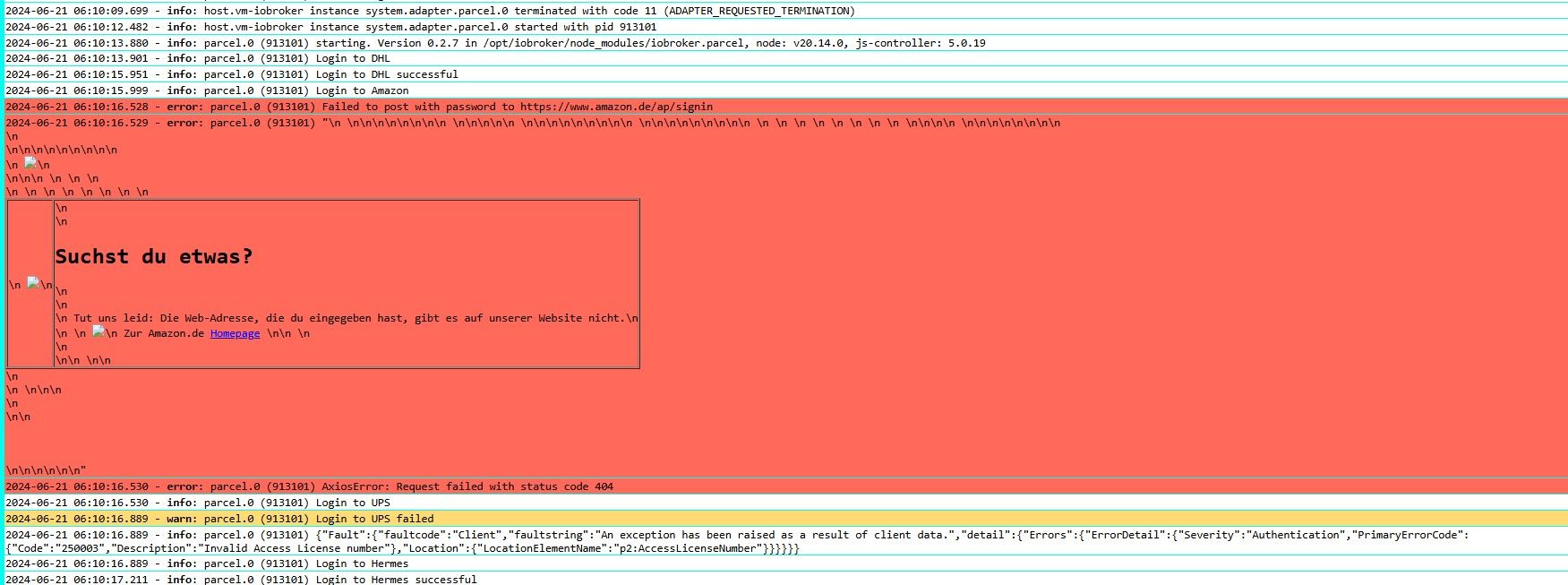
Hey! Du scheinst an dieser Unterhaltung interessiert zu sein, hast aber noch kein Konto.
Hast du es satt, bei jedem Besuch durch die gleichen Beiträge zu scrollen? Wenn du dich für ein Konto anmeldest, kommst du immer genau dorthin zurück, wo du zuvor warst, und kannst dich über neue Antworten benachrichtigen lassen (entweder per E-Mail oder Push-Benachrichtigung). Du kannst auch Lesezeichen speichern und Beiträge positiv bewerten, um anderen Community-Mitgliedern deine Wertschätzung zu zeigen.
Mit deinem Input könnte dieser Beitrag noch besser werden 💗
Registrieren AnmeldenSupport us
222
Online33.0k
Benutzer83.5k
Themen1.3m
Beiträge