




javascript startet nicht mehr
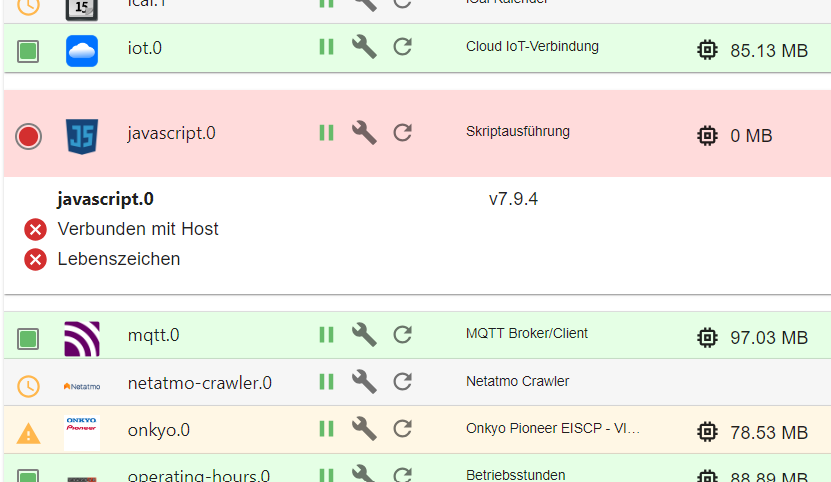
-
@rtwl sagte in javascript startet nicht mehr:
der iobroker (Raspberry/SD Karte) war zwar per Ping ansprechbar. aber weder der iobroker konnte geöffnet werden auch per ssh hatte ich keinen Zugriff mehr.
3 Tage später mit dem frisch installiertem iobroker wieder das gleiche Problem...
Ping erfolgreich - per ssh aber keinen Zugriff mehr - es kommt keine Passwortanforderung nach der ssh Eingabe.
Kann ich außer innerlich durchdrehen noch irgendwas tun?
Warum passiert das immer so unvorhergesehen?@rtwl sagte in javascript startet nicht mehr:
Kann ich außer innerlich durchdrehen noch irgendwas tun?
iob diaganschauen.
Linux-Werkzeugkasten:
https://forum.iobroker.net/topic/42952/der-kleine-iobroker-linux-werkzeugkasten
NodeJS Fixer Skript:
https://forum.iobroker.net/topic/68035/iob-node-fix-skript
iob_diag: curl -sLf -o diag.sh https://iobroker.net/diag.sh && bash diag.sh -
@rtwl sagte in javascript startet nicht mehr:
Kann ich außer innerlich durchdrehen noch irgendwas tun?
iob diaganschauen.
@thomas-braun soweit komm ich ja gar nicht. Hab keinen Zugriff per ssh. Der iobroker ist ja "abgestürzt"
-
@rtwl sagte in javascript startet nicht mehr:
Kann ich außer innerlich durchdrehen noch irgendwas tun?
iob diaganschauen.
-
@thomas-braun
es gibt nicht zufällig einen http request den ich an die ip-adresse des Raspberry schicken kann um iobroker neu zu starten oder sowas in der Art?Du kommst ja wohl nicht drauf.
Mit lokal angeklemmter Tastatur:
https://wiki.ubuntuusers.de/Magic_SysRQ/Linux-Werkzeugkasten:
https://forum.iobroker.net/topic/42952/der-kleine-iobroker-linux-werkzeugkasten
NodeJS Fixer Skript:
https://forum.iobroker.net/topic/68035/iob-node-fix-skript
iob_diag: curl -sLf -o diag.sh https://iobroker.net/diag.sh && bash diag.sh -
Du kommst ja wohl nicht drauf.
Mit lokal angeklemmter Tastatur:
https://wiki.ubuntuusers.de/Magic_SysRQ/@thomas-braun
leider hab ich keinen mini-hdmi adapter für den Raspi.
aber meinst du es würde funktionieren eine Tastatur anzuschließen und dannZitat der Website: "hierfür wird die ganze Zeit Alt + Druck gedrückt gehalten und nacheinander die Tasten R + E + I + S + U + B betätigt."?
-Peter
-
@thomas-braun
leider hab ich keinen mini-hdmi adapter für den Raspi.
aber meinst du es würde funktionieren eine Tastatur anzuschließen und dannZitat der Website: "hierfür wird die ganze Zeit Alt + Druck gedrückt gehalten und nacheinander die Tasten R + E + I + S + U + B betätigt."?
Das hängt von der Tastatur ab. Viele moderne Spar-Tastaturen haben die Taste nicht (mehr direkt), manche auch gar nicht.
Ich weiß auch ehrlich gesagt gar nicht, ob Raspberry OS die Funktion nicht auch abgestellt hat. Ich musste die bei mir noch nie verwenden. Das Ding läuft einfach.
Auf meinem Arch Linux geht es nämlich nicht:
[Do, 11. Apr 2024, 00:02:24] sysrq: This sysrq operation is disabled.
[Do, 11. Apr 2024, 00:02:25] sysrq: This sysrq operation is disabled.
[Do, 11. Apr 2024, 00:02:26] sysrq: This sysrq operation is disabled.
[Do, 11. Apr 2024, 00:02:27] sysrq: Emergency Sync
[Do, 11. Apr 2024, 00:02:27] Emergency Sync complete
[Do, 11. Apr 2024, 00:02:28] sysrq: This sysrq operation is disabled.
[Do, 11. Apr 2024, 00:02:29] sysrq: This sysrq operation is disabled.
Linux-Werkzeugkasten:
https://forum.iobroker.net/topic/42952/der-kleine-iobroker-linux-werkzeugkasten
NodeJS Fixer Skript:
https://forum.iobroker.net/topic/68035/iob-node-fix-skript
iob_diag: curl -sLf -o diag.sh https://iobroker.net/diag.sh && bash diag.sh -
Das hängt von der Tastatur ab. Viele moderne Spar-Tastaturen haben die Taste nicht (mehr direkt), manche auch gar nicht.
Ich weiß auch ehrlich gesagt gar nicht, ob Raspberry OS die Funktion nicht auch abgestellt hat. Ich musste die bei mir noch nie verwenden. Das Ding läuft einfach.
Auf meinem Arch Linux geht es nämlich nicht:
[Do, 11. Apr 2024, 00:02:24] sysrq: This sysrq operation is disabled. [Do, 11. Apr 2024, 00:02:25] sysrq: This sysrq operation is disabled. [Do, 11. Apr 2024, 00:02:26] sysrq: This sysrq operation is disabled. [Do, 11. Apr 2024, 00:02:27] sysrq: Emergency Sync [Do, 11. Apr 2024, 00:02:27] Emergency Sync complete [Do, 11. Apr 2024, 00:02:28] sysrq: This sysrq operation is disabled. [Do, 11. Apr 2024, 00:02:29] sysrq: This sysrq operation is disabled.@thomas-braun wow, das hat tatsächlich funktioniert 👍
iob diag für dich zur Kontrolle. Bitte Danke.
Skript v.2023-10-10 *** BASE SYSTEM *** Static hostname: smarthome Icon name: computer Operating System: Debian GNU/Linux 12 (bookworm) Kernel: Linux 6.6.20+rpt-rpi-v8 Architecture: arm64 Model : Raspberry Pi 4 Model B Rev 1.4 Docker : false Virtualization : none Kernel : aarch64 Userland : arm64 Systemuptime and Load: 23:58:26 up 1 min, 2 users, load average: 3.98, 1.25, 0.44 CPU threads: 4 *** RASPBERRY THROTTLING *** Current issues: No throttling issues detected. Previously detected issues: ~ Under-voltage has occurred *** Time and Time Zones *** Local time: Wed 2024-04-10 23:58:26 CEST Universal time: Wed 2024-04-10 21:58:26 UTC RTC time: n/a Time zone: Europe/Berlin (CEST, +0200) System clock synchronized: yes NTP service: active RTC in local TZ: no *** User and Groups *** rtwl /home/rtwl rtwl adm dialout cdrom sudo audio video plugdev games users input render netdev gpio i2c spi iobroker *** X-Server-Setup *** X-Server: false Desktop: Terminal: tty Boot Target: multi-user.target *** MEMORY *** total used free shared buff/cache available Mem: 4.0G 1.6G 2.2G 1.2M 329M 2.4G Swap: 104M 0B 104M Total: 4.1G 1.6G 2.3G 3792 M total memory 1478 M used memory 1477 M active memory 156 M inactive memory 2066 M free memory 31 M buffer memory 283 M swap cache 99 M total swap 0 M used swap 99 M free swap Raspberry only: oom events: 0 lifetime oom required: 0 Mbytes total time in oom handler: 0 ms max time spent in oom handler: 0 ms *** FAILED SERVICES *** UNIT LOAD ACTIVE SUB DESCRIPTION 0 loaded units listed. *** FILESYSTEM *** Filesystem Type Size Used Avail Use% Mounted on udev devtmpfs 1.6G 0 1.6G 0% /dev tmpfs tmpfs 380M 1.2M 379M 1% /run /dev/mmcblk0p2 ext4 15G 5.7G 7.8G 43% / tmpfs tmpfs 1.9G 0 1.9G 0% /dev/shm tmpfs tmpfs 5.0M 16K 5.0M 1% /run/lock /dev/mmcblk0p1 vfat 510M 63M 448M 13% /boot/firmware tmpfs tmpfs 380M 0 380M 0% /run/user/1000 Messages concerning ext4 filesystem in dmesg: [Wed Apr 10 23:56:37 2024] Kernel command line: coherent_pool=1M 8250.nr_uarts=0 snd_bcm2835.enable_headphones=0 snd_bcm2835.enable_headphones=1 snd_bcm2835.enable_hdmi=1 snd_bcm2835.enable_hdmi=0 smsc95xx.macaddr=E4:5F:01:75:F7:C5 vc_mem.mem_base=0x3ec00000 vc_mem.mem_size=0x40000000 console=ttyS0,115200 console=tty1 root=PARTUUID=c17d14e5-02 rootfstype=ext4 fsck.repair=yes rootwait [Wed Apr 10 23:56:41 2024] EXT4-fs (mmcblk0p2): mounted filesystem 93c89e92-8f2e-4522-ad32-68faed883d2f ro with ordered data mode. Quota mode: none. [Wed Apr 10 23:56:44 2024] EXT4-fs (mmcblk0p2): re-mounted 93c89e92-8f2e-4522-ad32-68faed883d2f r/w. Quota mode: none. Show mounted filesystems \(real ones only\): TARGET SOURCE FSTYPE OPTIONS / /dev/mmcblk0p2 ext4 rw,noatime,commit=600 `-/boot/firmware /dev/mmcblk0p1 vfat rw,relatime,fmask=0022,dmask=0022,codepage=437,iocharset=ascii,shortname=mixed,errors=remount-ro Files in neuralgic directories: /var: 513M /var/ 203M /var/cache 197M /var/cache/apt 161M /var/lib 133M /var/lib/apt/lists Archived and active journals take up 48.0M in the file system. /opt/iobroker/backups: 191M /opt/iobroker/backups/ /opt/iobroker/iobroker-data: 1.4G /opt/iobroker/iobroker-data/ 974M /opt/iobroker/iobroker-data/history 249M /opt/iobroker/iobroker-data/files 98M /opt/iobroker/iobroker-data/backup-objects 75M /opt/iobroker/iobroker-data/files/javascript.admin The five largest files in iobroker-data are: 33M /opt/iobroker/iobroker-data/files/iot.admin/static/js/main.1797d034.js.map 30M /opt/iobroker/iobroker-data/objects.jsonl 23M /opt/iobroker/iobroker-data/states.jsonl 22M /opt/iobroker/iobroker-data/files/web.admin/static/js/main.c05ba1d3.js.map 8.5M /opt/iobroker/iobroker-data/files/iot.admin/static/js/main.1797d034.js USB-Devices by-id: USB-Sticks - Avoid direct links to /dev/* in your adapter setups, please always prefer the links 'by-id': /dev/serial/by-id/usb-ITEAD_SONOFF_Zigbee_3.0_USB_Dongle_Plus_V2_20230804163324-if00 *** NodeJS-Installation *** /usr/bin/nodejs v18.20.1 /usr/bin/node v18.20.1 /usr/bin/npm 10.5.0 /usr/bin/npx 10.5.0 /usr/bin/corepack 0.25.2 nodejs: Installed: 18.20.1-1nodesource1 Candidate: 18.20.1-1nodesource1 Version table: *** 18.20.1-1nodesource1 1001 500 https://deb.nodesource.com/node_18.x nodistro/main arm64 Packages 100 /var/lib/dpkg/status 18.20.0-1nodesource1 1001 500 https://deb.nodesource.com/node_18.x nodistro/main arm64 Packages 18.19.1-1nodesource1 1001 500 https://deb.nodesource.com/node_18.x nodistro/main arm64 Packages 18.19.0+dfsg-6~deb12u1 500 500 http://deb.debian.org/debian-security bookworm-security/main arm64 Packages 18.19.0-1nodesource1 1001 500 https://deb.nodesource.com/node_18.x nodistro/main arm64 Packages 18.18.2-1nodesource1 1001 500 https://deb.nodesource.com/node_18.x nodistro/main arm64 Packages 18.18.1-1nodesource1 1001 500 https://deb.nodesource.com/node_18.x nodistro/main arm64 Packages 18.18.0-1nodesource1 1001 500 https://deb.nodesource.com/node_18.x nodistro/main arm64 Packages 18.17.1-1nodesource1 1001 500 https://deb.nodesource.com/node_18.x nodistro/main arm64 Packages 18.17.0-1nodesource1 1001 500 https://deb.nodesource.com/node_18.x nodistro/main arm64 Packages 18.16.1-1nodesource1 1001 500 https://deb.nodesource.com/node_18.x nodistro/main arm64 Packages 18.16.0-1nodesource1 1001 500 https://deb.nodesource.com/node_18.x nodistro/main arm64 Packages 18.15.0-1nodesource1 1001 500 https://deb.nodesource.com/node_18.x nodistro/main arm64 Packages 18.14.2-1nodesource1 1001 500 https://deb.nodesource.com/node_18.x nodistro/main arm64 Packages 18.14.1-1nodesource1 1001 500 https://deb.nodesource.com/node_18.x nodistro/main arm64 Packages 18.14.0-1nodesource1 1001 500 https://deb.nodesource.com/node_18.x nodistro/main arm64 Packages 18.13.0+dfsg1-1 500 500 http://deb.debian.org/debian bookworm/main arm64 Packages 18.13.0-1nodesource1 1001 500 https://deb.nodesource.com/node_18.x nodistro/main arm64 Packages 18.12.0-1nodesource1 1001 500 https://deb.nodesource.com/node_18.x nodistro/main arm64 Packages 18.11.0-1nodesource1 1001 500 https://deb.nodesource.com/node_18.x nodistro/main arm64 Packages 18.10.0-1nodesource1 1001 500 https://deb.nodesource.com/node_18.x nodistro/main arm64 Packages 18.9.1-1nodesource1 1001 500 https://deb.nodesource.com/node_18.x nodistro/main arm64 Packages 18.9.0-1nodesource1 1001 500 https://deb.nodesource.com/node_18.x nodistro/main arm64 Packages 18.8.0-1nodesource1 1001 500 https://deb.nodesource.com/node_18.x nodistro/main arm64 Packages 18.7.0-1nodesource1 1001 500 https://deb.nodesource.com/node_18.x nodistro/main arm64 Packages 18.6.0-1nodesource1 1001 500 https://deb.nodesource.com/node_18.x nodistro/main arm64 Packages 18.5.0-1nodesource1 1001 500 https://deb.nodesource.com/node_18.x nodistro/main arm64 Packages 18.4.0-1nodesource1 1001 500 https://deb.nodesource.com/node_18.x nodistro/main arm64 Packages 18.3.0-1nodesource1 1001 500 https://deb.nodesource.com/node_18.x nodistro/main arm64 Packages 18.2.0-1nodesource1 1001 500 https://deb.nodesource.com/node_18.x nodistro/main arm64 Packages 18.1.0-1nodesource1 1001 500 https://deb.nodesource.com/node_18.x nodistro/main arm64 Packages 18.0.0-1nodesource1 1001 500 https://deb.nodesource.com/node_18.x nodistro/main arm64 Packages Temp directories causing npm8 problem: 0 No problems detected Errors in npm tree: *** ioBroker-Installation *** ioBroker Status iobroker is running on this host. Objects type: jsonl States type: jsonl Core adapters versions js-controller: 5.0.19 admin: 6.13.16 javascript: 8.0.2 Adapters from github: 3 Adapter State + system.adapter.admin.0 : admin : smarthome - enabled, port: 8081, bind: 0.0.0.0, run as: admin + system.adapter.alexa-timer-vis.0 : alexa-timer-vis : smarthome - enabled + system.adapter.alexa2.0 : alexa2 : smarthome - enabled system.adapter.alias-manager.0 : alias-manager : smarthome - disabled + system.adapter.backitup.0 : backitup : smarthome - enabled + system.adapter.bring.0 : bring : smarthome - enabled + system.adapter.cloud.0 : cloud : smarthome - enabled + system.adapter.daswetter.0 : daswetter : smarthome - enabled system.adapter.discovery.0 : discovery : smarthome - disabled system.adapter.feiertage.0 : feiertage : smarthome - enabled system.adapter.flot.0 : flot : smarthome - disabled + system.adapter.fronius.0 : fronius : smarthome - enabled + system.adapter.harmony.0 : harmony : smarthome - enabled + system.adapter.history.0 : history : smarthome - enabled system.adapter.ical.0 : ical : smarthome - enabled system.adapter.ical.1 : ical : smarthome - enabled + system.adapter.iot.0 : iot : smarthome - enabled + system.adapter.javascript.0 : javascript : smarthome - enabled + system.adapter.mqtt.0 : mqtt : smarthome - enabled, port: 1883, bind: 0.0.0.0 system.adapter.netatmo-crawler.0 : netatmo-crawler : smarthome - enabled + system.adapter.onkyo.0 : onkyo : smarthome - enabled + system.adapter.operating-hours.0 : operating-hours : smarthome - enabled system.adapter.pi-hole.0 : pi-hole : smarthome - disabled + system.adapter.pushover.0 : pushover : smarthome - enabled + system.adapter.pvforecast.0 : pvforecast : smarthome - enabled + system.adapter.radar2.0 : radar2 : smarthome - enabled + system.adapter.shelly.0 : shelly : smarthome - enabled, port: 1882, bind: 0.0.0.0 + system.adapter.shuttercontrol.0 : shuttercontrol : smarthome - enabled + system.adapter.sourceanalytix.0 : sourceanalytix : smarthome - enabled system.adapter.trashschedule.0 : trashschedule : smarthome - enabled system.adapter.uv-protect.0 : uv-protect : smarthome - disabled system.adapter.vis-icontwo.0 : vis-icontwo : smarthome - disabled system.adapter.vis-inventwo.0 : vis-inventwo : smarthome - enabled system.adapter.vis-materialdesign.0 : vis-materialdesign : smarthome - disabled system.adapter.vis-timeandweather.0 : vis-timeandweather : smarthome - disabled system.adapter.vis.0 : vis : smarthome - enabled system.adapter.weather-warnings.0 : weather-warnings : smarthome - enabled system.adapter.web.0 : web : smarthome - enabled, port: 8082, bind: 0.0.0.0, run as: admin + system.adapter.zigbee.0 : zigbee : smarthome - enabled, port: /dev/serial/by-id/usb-ITEAD_SONOFF_Zigbee_3.0_USB_Dongle_Plus_V2_20230804163324-if00 + instance is alive Enabled adapters with bindings + system.adapter.admin.0 : admin : smarthome - enabled, port: 8081, bind: 0.0.0.0, run as: admin + system.adapter.mqtt.0 : mqtt : smarthome - enabled, port: 1883, bind: 0.0.0.0 + system.adapter.shelly.0 : shelly : smarthome - enabled, port: 1882, bind: 0.0.0.0 system.adapter.web.0 : web : smarthome - enabled, port: 8082, bind: 0.0.0.0, run as: admin + system.adapter.zigbee.0 : zigbee : smarthome - enabled, port: /dev/serial/by-id/usb-ITEAD_SONOFF_Zigbee_3.0_USB_Dongle_Plus_V2_20230804163324-if00 ioBroker-Repositories stable : http://download.iobroker.net/sources-dist.json beta : http://download.iobroker.net/sources-dist-latest.json Active repo(s): stable Installed ioBroker-Instances Used repository: stable Adapter "admin" : 6.13.16 , installed 6.13.16 Adapter "alexa-timer-vis": 0.3.0 , installed 0.3.0 Adapter "alexa2" : 3.26.4 , installed 3.26.4 Adapter "alias-manager": 1.2.6 , installed 1.2.6 Adapter "backitup" : 2.10.11 , installed 2.10.11 Adapter "bring" : 1.8.4 , installed 1.8.4 Adapter "cloud" : 5.0.1 , installed 5.0.1 Adapter "daswetter" : 3.1.13 , installed 3.1.13 Adapter "discovery" : 4.4.0 , installed 4.4.0 Adapter "feiertage" : 1.1.4 , installed 1.1.4 Adapter "flot" : 1.12.0 , installed 1.12.0 Adapter "fronius" : 2.0.2 , installed 2.0.2 Adapter "harmony" : 1.3.0 , installed 1.3.0 Adapter "history" : 3.0.1 , installed 3.0.1 Adapter "ical" : 1.14.3 , installed 1.14.3 Adapter "iot" : 2.0.11 , installed 2.0.11 Adapter "javascript" : 7.8.0 , installed 8.0.2 Controller "js-controller": 5.0.19 , installed 5.0.19 Adapter "mqtt" : 5.2.0 , installed 5.2.0 Adapter "netatmo-crawler": 0.8.1 , installed 0.8.1 Adapter "onkyo" : 2.1.2 , installed 2.1.2 Adapter "operating-hours": 1.0.6 , installed 1.0.6 Adapter "pi-hole" : 1.3.6 , installed 1.3.6 Adapter "pushover" : 3.0.6 , installed 3.0.6 Adapter "pvforecast" : 2.9.1 , installed 2.9.1 Adapter "radar2" : 2.1.0 , installed 2.1.0 Adapter "shelly" : 6.8.0 , installed 6.8.0 Adapter "shuttercontrol": 1.7.0 , installed 1.7.0 Adapter "simple-api" : 2.7.2 , installed 2.7.2 Adapter "socketio" : 6.6.1 , installed 6.6.1 Adapter "trashschedule": 3.2.0 , installed 3.2.0 Adapter "uv-protect" : 0.6.0 , installed 0.6.0 Adapter "vis" : 1.5.4 , installed 1.5.4 Adapter "vis-icontwo" : 1.5.0 , installed 1.5.0 Adapter "vis-inventwo" : 3.3.3 , installed 3.3.3 Adapter "vis-materialdesign": 0.5.9, installed 0.5.9 Adapter "vis-timeandweather": 1.2.2, installed 1.2.2 Adapter "weather-warnings": 0.6.7 , installed 0.6.7 Adapter "web" : 6.2.3 , installed 6.2.3 Adapter "ws" : 2.5.11 , installed 2.5.11 Adapter "zigbee" : 1.10.1 , installed 1.10.1 Objects and States Please stand by - This may take a while Objects: 12474 States: 10977 *** OS-Repositories and Updates *** Hit:1 http://deb.debian.org/debian bookworm InRelease Hit:2 http://deb.debian.org/debian-security bookworm-security InRelease Hit:3 http://deb.debian.org/debian bookworm-updates InRelease Hit:4 http://archive.raspberrypi.com/debian bookworm InRelease Hit:5 https://deb.nodesource.com/node_18.x nodistro InRelease Reading package lists... Pending Updates: 2 *** Listening Ports *** Active Internet connections (only servers) Proto Recv-Q Send-Q Local Address Foreign Address State User Inode PID/Program name tcp 0 0 0.0.0.0:1883 0.0.0.0:* LISTEN 1001 7443 1215/io.mqtt.0 tcp 0 0 0.0.0.0:22 0.0.0.0:* LISTEN 0 6394 717/sshd: /usr/sbin tcp 0 0 127.0.0.1:9000 0.0.0.0:* LISTEN 1001 5898 710/iobroker.js-con tcp 0 0 127.0.0.1:9001 0.0.0.0:* LISTEN 1001 5891 710/iobroker.js-con tcp6 0 0 :::8081 :::* LISTEN 1001 5037 943/io.admin.0 tcp6 0 0 :::8082 :::* LISTEN 1001 11032 1916/io.web.0 tcp6 0 0 :::61991 :::* LISTEN 1001 11375 1693/io.harmony.0 tcp6 0 0 :::22 :::* LISTEN 0 6396 717/sshd: /usr/sbin udp 0 0 0.0.0.0:61991 0.0.0.0:* 1001 11376 1693/io.harmony.0 udp 0 0 0.0.0.0:5353 0.0.0.0:* 104 729 559/avahi-daemon: r udp 0 0 0.0.0.0:5683 0.0.0.0:* 1001 10659 1485/io.shelly.0 udp 0 0 0.0.0.0:67 0.0.0.0:* 1001 6973 1366/io.radar2.0 udp 0 0 0.0.0.0:41284 0.0.0.0:* 104 731 559/avahi-daemon: r udp6 0 0 :::5353 :::* 104 730 559/avahi-daemon: r udp6 0 0 :::42826 :::* 104 732 559/avahi-daemon: r *** Log File - Last 25 Lines *** 2024-04-11 00:00:16.802 - info: weather-warnings.0 (1887) Refresh Interval: 10 minutes 2024-04-11 00:00:16.940 - info: weather-warnings.0 (1887) [pushover] Create notification service pushover adapter: pushover.0. 2024-04-11 00:00:16.941 - info: weather-warnings.0 (1887) ZAMG activated. Retrieve data. 2024-04-11 00:00:20.464 - error: daswetter.0 (1193) force terminate 2024-04-11 00:00:20.512 - warn: daswetter.0 (1193) Terminated (UNKNOWN_ERROR): Without reason 2024-04-11 00:00:21.112 - error: daswetter.0 (1193) exception in await insertIntoList [Error: DB closed] 2024-04-11 00:00:21.125 - error: daswetter.0 (1193) Cannot check object existence of "daswetter.0.NextHours.Location_1.Day_3.Hour_23.rain_value": Connection is closed. 2024-04-11 00:00:21.309 - error: host.smarthome instance system.adapter.daswetter.0 terminated with code 15 (UNKNOWN_ERROR) 2024-04-11 00:00:23.262 - info: pvforecast.0 (1827) Starting internal update cron (every 15 Minutes) for timezone: Europe/Berlin 2024-04-11 00:00:33.382 - warn: javascript.0 (1031) You are assigning a number to the state "0_userdata.0.VIS.Wetter.Wetterwarnungen_Popup.Nummer" which expects a string. Please fix your code to use a string or change the state type to number. This warning might become an error in future versions. 2024-04-11 00:00:33.820 - warn: javascript.0 (1031) at setState (/opt/iobroker/node_modules/iobroker.javascript/lib/sandbox.js:1929:20) 2024-04-11 00:00:33.824 - warn: javascript.0 (1031) at Object.<anonymous> (script.js.VIS.Wetter.Wetterwarnung_Popup:7:3) 2024-04-11 00:00:33.825 - warn: javascript.0 (1031) at Object.callback (/opt/iobroker/node_modules/iobroker.javascript/lib/sandbox.js:1350:38) 2024-04-11 00:00:33.826 - warn: javascript.0 (1031) at Object.stateChange (/opt/iobroker/node_modules/iobroker.javascript/main.js:640:29) 2024-04-11 00:00:33.826 - warn: javascript.0 (1031) at Immediate._onImmediate (/opt/iobroker/node_modules/@iobroker/js-controller-adapter/src/lib/adapter/adapter.ts:11200:62) 2024-04-11 00:00:33.827 - warn: javascript.0 (1031) at processImmediate (node:internal/timers:476:21) 2024-04-11 00:00:34.123 - info: javascript.0 (1031) State value to set for "0_userdata.0.VIS.Wetter.Wetterwarnungen_Popup.Nummer" has to be type "string" but received type "number" 2024-04-11 00:00:34.178 - warn: javascript.0 (1031) You are assigning a number to the state "0_userdata.0.VIS.Wetter.Wetterwarnungen_Popup.Nummer" which expects a string. Please fix your code to use a string or change the state type to number. This warning might become an error in future versions. 2024-04-11 00:00:34.181 - warn: javascript.0 (1031) at setState (/opt/iobroker/node_modules/iobroker.javascript/lib/sandbox.js:1929:20) 2024-04-11 00:00:34.181 - warn: javascript.0 (1031) at Object.<anonymous> (script.js.VIS.Wetter.Wetterwarnung_Popup:7:3) 2024-04-11 00:00:34.182 - warn: javascript.0 (1031) at Object.callback (/opt/iobroker/node_modules/iobroker.javascript/lib/sandbox.js:1350:38) 2024-04-11 00:00:34.182 - warn: javascript.0 (1031) at Object.stateChange (/opt/iobroker/node_modules/iobroker.javascript/main.js:640:29) 2024-04-11 00:00:34.183 - warn: javascript.0 (1031) at Immediate._onImmediate (/opt/iobroker/node_modules/@iobroker/js-controller-adapter/src/lib/adapter/adapter.ts:11200:62) 2024-04-11 00:00:34.183 - warn: javascript.0 (1031) at processImmediate (node:internal/timers:476:21) 2024-04-11 00:00:34.590 - info: javascript.0 (1031) State value to set for "0_userdata.0.VIS.Wetter.Wetterwarnungen_Popup.Nummer" has to be type "string" but received type "number"-Peter
-
@thomas-braun wow, das hat tatsächlich funktioniert 👍
iob diag für dich zur Kontrolle. Bitte Danke.
Skript v.2023-10-10 *** BASE SYSTEM *** Static hostname: smarthome Icon name: computer Operating System: Debian GNU/Linux 12 (bookworm) Kernel: Linux 6.6.20+rpt-rpi-v8 Architecture: arm64 Model : Raspberry Pi 4 Model B Rev 1.4 Docker : false Virtualization : none Kernel : aarch64 Userland : arm64 Systemuptime and Load: 23:58:26 up 1 min, 2 users, load average: 3.98, 1.25, 0.44 CPU threads: 4 *** RASPBERRY THROTTLING *** Current issues: No throttling issues detected. Previously detected issues: ~ Under-voltage has occurred *** Time and Time Zones *** Local time: Wed 2024-04-10 23:58:26 CEST Universal time: Wed 2024-04-10 21:58:26 UTC RTC time: n/a Time zone: Europe/Berlin (CEST, +0200) System clock synchronized: yes NTP service: active RTC in local TZ: no *** User and Groups *** rtwl /home/rtwl rtwl adm dialout cdrom sudo audio video plugdev games users input render netdev gpio i2c spi iobroker *** X-Server-Setup *** X-Server: false Desktop: Terminal: tty Boot Target: multi-user.target *** MEMORY *** total used free shared buff/cache available Mem: 4.0G 1.6G 2.2G 1.2M 329M 2.4G Swap: 104M 0B 104M Total: 4.1G 1.6G 2.3G 3792 M total memory 1478 M used memory 1477 M active memory 156 M inactive memory 2066 M free memory 31 M buffer memory 283 M swap cache 99 M total swap 0 M used swap 99 M free swap Raspberry only: oom events: 0 lifetime oom required: 0 Mbytes total time in oom handler: 0 ms max time spent in oom handler: 0 ms *** FAILED SERVICES *** UNIT LOAD ACTIVE SUB DESCRIPTION 0 loaded units listed. *** FILESYSTEM *** Filesystem Type Size Used Avail Use% Mounted on udev devtmpfs 1.6G 0 1.6G 0% /dev tmpfs tmpfs 380M 1.2M 379M 1% /run /dev/mmcblk0p2 ext4 15G 5.7G 7.8G 43% / tmpfs tmpfs 1.9G 0 1.9G 0% /dev/shm tmpfs tmpfs 5.0M 16K 5.0M 1% /run/lock /dev/mmcblk0p1 vfat 510M 63M 448M 13% /boot/firmware tmpfs tmpfs 380M 0 380M 0% /run/user/1000 Messages concerning ext4 filesystem in dmesg: [Wed Apr 10 23:56:37 2024] Kernel command line: coherent_pool=1M 8250.nr_uarts=0 snd_bcm2835.enable_headphones=0 snd_bcm2835.enable_headphones=1 snd_bcm2835.enable_hdmi=1 snd_bcm2835.enable_hdmi=0 smsc95xx.macaddr=E4:5F:01:75:F7:C5 vc_mem.mem_base=0x3ec00000 vc_mem.mem_size=0x40000000 console=ttyS0,115200 console=tty1 root=PARTUUID=c17d14e5-02 rootfstype=ext4 fsck.repair=yes rootwait [Wed Apr 10 23:56:41 2024] EXT4-fs (mmcblk0p2): mounted filesystem 93c89e92-8f2e-4522-ad32-68faed883d2f ro with ordered data mode. Quota mode: none. [Wed Apr 10 23:56:44 2024] EXT4-fs (mmcblk0p2): re-mounted 93c89e92-8f2e-4522-ad32-68faed883d2f r/w. Quota mode: none. Show mounted filesystems \(real ones only\): TARGET SOURCE FSTYPE OPTIONS / /dev/mmcblk0p2 ext4 rw,noatime,commit=600 `-/boot/firmware /dev/mmcblk0p1 vfat rw,relatime,fmask=0022,dmask=0022,codepage=437,iocharset=ascii,shortname=mixed,errors=remount-ro Files in neuralgic directories: /var: 513M /var/ 203M /var/cache 197M /var/cache/apt 161M /var/lib 133M /var/lib/apt/lists Archived and active journals take up 48.0M in the file system. /opt/iobroker/backups: 191M /opt/iobroker/backups/ /opt/iobroker/iobroker-data: 1.4G /opt/iobroker/iobroker-data/ 974M /opt/iobroker/iobroker-data/history 249M /opt/iobroker/iobroker-data/files 98M /opt/iobroker/iobroker-data/backup-objects 75M /opt/iobroker/iobroker-data/files/javascript.admin The five largest files in iobroker-data are: 33M /opt/iobroker/iobroker-data/files/iot.admin/static/js/main.1797d034.js.map 30M /opt/iobroker/iobroker-data/objects.jsonl 23M /opt/iobroker/iobroker-data/states.jsonl 22M /opt/iobroker/iobroker-data/files/web.admin/static/js/main.c05ba1d3.js.map 8.5M /opt/iobroker/iobroker-data/files/iot.admin/static/js/main.1797d034.js USB-Devices by-id: USB-Sticks - Avoid direct links to /dev/* in your adapter setups, please always prefer the links 'by-id': /dev/serial/by-id/usb-ITEAD_SONOFF_Zigbee_3.0_USB_Dongle_Plus_V2_20230804163324-if00 *** NodeJS-Installation *** /usr/bin/nodejs v18.20.1 /usr/bin/node v18.20.1 /usr/bin/npm 10.5.0 /usr/bin/npx 10.5.0 /usr/bin/corepack 0.25.2 nodejs: Installed: 18.20.1-1nodesource1 Candidate: 18.20.1-1nodesource1 Version table: *** 18.20.1-1nodesource1 1001 500 https://deb.nodesource.com/node_18.x nodistro/main arm64 Packages 100 /var/lib/dpkg/status 18.20.0-1nodesource1 1001 500 https://deb.nodesource.com/node_18.x nodistro/main arm64 Packages 18.19.1-1nodesource1 1001 500 https://deb.nodesource.com/node_18.x nodistro/main arm64 Packages 18.19.0+dfsg-6~deb12u1 500 500 http://deb.debian.org/debian-security bookworm-security/main arm64 Packages 18.19.0-1nodesource1 1001 500 https://deb.nodesource.com/node_18.x nodistro/main arm64 Packages 18.18.2-1nodesource1 1001 500 https://deb.nodesource.com/node_18.x nodistro/main arm64 Packages 18.18.1-1nodesource1 1001 500 https://deb.nodesource.com/node_18.x nodistro/main arm64 Packages 18.18.0-1nodesource1 1001 500 https://deb.nodesource.com/node_18.x nodistro/main arm64 Packages 18.17.1-1nodesource1 1001 500 https://deb.nodesource.com/node_18.x nodistro/main arm64 Packages 18.17.0-1nodesource1 1001 500 https://deb.nodesource.com/node_18.x nodistro/main arm64 Packages 18.16.1-1nodesource1 1001 500 https://deb.nodesource.com/node_18.x nodistro/main arm64 Packages 18.16.0-1nodesource1 1001 500 https://deb.nodesource.com/node_18.x nodistro/main arm64 Packages 18.15.0-1nodesource1 1001 500 https://deb.nodesource.com/node_18.x nodistro/main arm64 Packages 18.14.2-1nodesource1 1001 500 https://deb.nodesource.com/node_18.x nodistro/main arm64 Packages 18.14.1-1nodesource1 1001 500 https://deb.nodesource.com/node_18.x nodistro/main arm64 Packages 18.14.0-1nodesource1 1001 500 https://deb.nodesource.com/node_18.x nodistro/main arm64 Packages 18.13.0+dfsg1-1 500 500 http://deb.debian.org/debian bookworm/main arm64 Packages 18.13.0-1nodesource1 1001 500 https://deb.nodesource.com/node_18.x nodistro/main arm64 Packages 18.12.0-1nodesource1 1001 500 https://deb.nodesource.com/node_18.x nodistro/main arm64 Packages 18.11.0-1nodesource1 1001 500 https://deb.nodesource.com/node_18.x nodistro/main arm64 Packages 18.10.0-1nodesource1 1001 500 https://deb.nodesource.com/node_18.x nodistro/main arm64 Packages 18.9.1-1nodesource1 1001 500 https://deb.nodesource.com/node_18.x nodistro/main arm64 Packages 18.9.0-1nodesource1 1001 500 https://deb.nodesource.com/node_18.x nodistro/main arm64 Packages 18.8.0-1nodesource1 1001 500 https://deb.nodesource.com/node_18.x nodistro/main arm64 Packages 18.7.0-1nodesource1 1001 500 https://deb.nodesource.com/node_18.x nodistro/main arm64 Packages 18.6.0-1nodesource1 1001 500 https://deb.nodesource.com/node_18.x nodistro/main arm64 Packages 18.5.0-1nodesource1 1001 500 https://deb.nodesource.com/node_18.x nodistro/main arm64 Packages 18.4.0-1nodesource1 1001 500 https://deb.nodesource.com/node_18.x nodistro/main arm64 Packages 18.3.0-1nodesource1 1001 500 https://deb.nodesource.com/node_18.x nodistro/main arm64 Packages 18.2.0-1nodesource1 1001 500 https://deb.nodesource.com/node_18.x nodistro/main arm64 Packages 18.1.0-1nodesource1 1001 500 https://deb.nodesource.com/node_18.x nodistro/main arm64 Packages 18.0.0-1nodesource1 1001 500 https://deb.nodesource.com/node_18.x nodistro/main arm64 Packages Temp directories causing npm8 problem: 0 No problems detected Errors in npm tree: *** ioBroker-Installation *** ioBroker Status iobroker is running on this host. Objects type: jsonl States type: jsonl Core adapters versions js-controller: 5.0.19 admin: 6.13.16 javascript: 8.0.2 Adapters from github: 3 Adapter State + system.adapter.admin.0 : admin : smarthome - enabled, port: 8081, bind: 0.0.0.0, run as: admin + system.adapter.alexa-timer-vis.0 : alexa-timer-vis : smarthome - enabled + system.adapter.alexa2.0 : alexa2 : smarthome - enabled system.adapter.alias-manager.0 : alias-manager : smarthome - disabled + system.adapter.backitup.0 : backitup : smarthome - enabled + system.adapter.bring.0 : bring : smarthome - enabled + system.adapter.cloud.0 : cloud : smarthome - enabled + system.adapter.daswetter.0 : daswetter : smarthome - enabled system.adapter.discovery.0 : discovery : smarthome - disabled system.adapter.feiertage.0 : feiertage : smarthome - enabled system.adapter.flot.0 : flot : smarthome - disabled + system.adapter.fronius.0 : fronius : smarthome - enabled + system.adapter.harmony.0 : harmony : smarthome - enabled + system.adapter.history.0 : history : smarthome - enabled system.adapter.ical.0 : ical : smarthome - enabled system.adapter.ical.1 : ical : smarthome - enabled + system.adapter.iot.0 : iot : smarthome - enabled + system.adapter.javascript.0 : javascript : smarthome - enabled + system.adapter.mqtt.0 : mqtt : smarthome - enabled, port: 1883, bind: 0.0.0.0 system.adapter.netatmo-crawler.0 : netatmo-crawler : smarthome - enabled + system.adapter.onkyo.0 : onkyo : smarthome - enabled + system.adapter.operating-hours.0 : operating-hours : smarthome - enabled system.adapter.pi-hole.0 : pi-hole : smarthome - disabled + system.adapter.pushover.0 : pushover : smarthome - enabled + system.adapter.pvforecast.0 : pvforecast : smarthome - enabled + system.adapter.radar2.0 : radar2 : smarthome - enabled + system.adapter.shelly.0 : shelly : smarthome - enabled, port: 1882, bind: 0.0.0.0 + system.adapter.shuttercontrol.0 : shuttercontrol : smarthome - enabled + system.adapter.sourceanalytix.0 : sourceanalytix : smarthome - enabled system.adapter.trashschedule.0 : trashschedule : smarthome - enabled system.adapter.uv-protect.0 : uv-protect : smarthome - disabled system.adapter.vis-icontwo.0 : vis-icontwo : smarthome - disabled system.adapter.vis-inventwo.0 : vis-inventwo : smarthome - enabled system.adapter.vis-materialdesign.0 : vis-materialdesign : smarthome - disabled system.adapter.vis-timeandweather.0 : vis-timeandweather : smarthome - disabled system.adapter.vis.0 : vis : smarthome - enabled system.adapter.weather-warnings.0 : weather-warnings : smarthome - enabled system.adapter.web.0 : web : smarthome - enabled, port: 8082, bind: 0.0.0.0, run as: admin + system.adapter.zigbee.0 : zigbee : smarthome - enabled, port: /dev/serial/by-id/usb-ITEAD_SONOFF_Zigbee_3.0_USB_Dongle_Plus_V2_20230804163324-if00 + instance is alive Enabled adapters with bindings + system.adapter.admin.0 : admin : smarthome - enabled, port: 8081, bind: 0.0.0.0, run as: admin + system.adapter.mqtt.0 : mqtt : smarthome - enabled, port: 1883, bind: 0.0.0.0 + system.adapter.shelly.0 : shelly : smarthome - enabled, port: 1882, bind: 0.0.0.0 system.adapter.web.0 : web : smarthome - enabled, port: 8082, bind: 0.0.0.0, run as: admin + system.adapter.zigbee.0 : zigbee : smarthome - enabled, port: /dev/serial/by-id/usb-ITEAD_SONOFF_Zigbee_3.0_USB_Dongle_Plus_V2_20230804163324-if00 ioBroker-Repositories stable : http://download.iobroker.net/sources-dist.json beta : http://download.iobroker.net/sources-dist-latest.json Active repo(s): stable Installed ioBroker-Instances Used repository: stable Adapter "admin" : 6.13.16 , installed 6.13.16 Adapter "alexa-timer-vis": 0.3.0 , installed 0.3.0 Adapter "alexa2" : 3.26.4 , installed 3.26.4 Adapter "alias-manager": 1.2.6 , installed 1.2.6 Adapter "backitup" : 2.10.11 , installed 2.10.11 Adapter "bring" : 1.8.4 , installed 1.8.4 Adapter "cloud" : 5.0.1 , installed 5.0.1 Adapter "daswetter" : 3.1.13 , installed 3.1.13 Adapter "discovery" : 4.4.0 , installed 4.4.0 Adapter "feiertage" : 1.1.4 , installed 1.1.4 Adapter "flot" : 1.12.0 , installed 1.12.0 Adapter "fronius" : 2.0.2 , installed 2.0.2 Adapter "harmony" : 1.3.0 , installed 1.3.0 Adapter "history" : 3.0.1 , installed 3.0.1 Adapter "ical" : 1.14.3 , installed 1.14.3 Adapter "iot" : 2.0.11 , installed 2.0.11 Adapter "javascript" : 7.8.0 , installed 8.0.2 Controller "js-controller": 5.0.19 , installed 5.0.19 Adapter "mqtt" : 5.2.0 , installed 5.2.0 Adapter "netatmo-crawler": 0.8.1 , installed 0.8.1 Adapter "onkyo" : 2.1.2 , installed 2.1.2 Adapter "operating-hours": 1.0.6 , installed 1.0.6 Adapter "pi-hole" : 1.3.6 , installed 1.3.6 Adapter "pushover" : 3.0.6 , installed 3.0.6 Adapter "pvforecast" : 2.9.1 , installed 2.9.1 Adapter "radar2" : 2.1.0 , installed 2.1.0 Adapter "shelly" : 6.8.0 , installed 6.8.0 Adapter "shuttercontrol": 1.7.0 , installed 1.7.0 Adapter "simple-api" : 2.7.2 , installed 2.7.2 Adapter "socketio" : 6.6.1 , installed 6.6.1 Adapter "trashschedule": 3.2.0 , installed 3.2.0 Adapter "uv-protect" : 0.6.0 , installed 0.6.0 Adapter "vis" : 1.5.4 , installed 1.5.4 Adapter "vis-icontwo" : 1.5.0 , installed 1.5.0 Adapter "vis-inventwo" : 3.3.3 , installed 3.3.3 Adapter "vis-materialdesign": 0.5.9, installed 0.5.9 Adapter "vis-timeandweather": 1.2.2, installed 1.2.2 Adapter "weather-warnings": 0.6.7 , installed 0.6.7 Adapter "web" : 6.2.3 , installed 6.2.3 Adapter "ws" : 2.5.11 , installed 2.5.11 Adapter "zigbee" : 1.10.1 , installed 1.10.1 Objects and States Please stand by - This may take a while Objects: 12474 States: 10977 *** OS-Repositories and Updates *** Hit:1 http://deb.debian.org/debian bookworm InRelease Hit:2 http://deb.debian.org/debian-security bookworm-security InRelease Hit:3 http://deb.debian.org/debian bookworm-updates InRelease Hit:4 http://archive.raspberrypi.com/debian bookworm InRelease Hit:5 https://deb.nodesource.com/node_18.x nodistro InRelease Reading package lists... Pending Updates: 2 *** Listening Ports *** Active Internet connections (only servers) Proto Recv-Q Send-Q Local Address Foreign Address State User Inode PID/Program name tcp 0 0 0.0.0.0:1883 0.0.0.0:* LISTEN 1001 7443 1215/io.mqtt.0 tcp 0 0 0.0.0.0:22 0.0.0.0:* LISTEN 0 6394 717/sshd: /usr/sbin tcp 0 0 127.0.0.1:9000 0.0.0.0:* LISTEN 1001 5898 710/iobroker.js-con tcp 0 0 127.0.0.1:9001 0.0.0.0:* LISTEN 1001 5891 710/iobroker.js-con tcp6 0 0 :::8081 :::* LISTEN 1001 5037 943/io.admin.0 tcp6 0 0 :::8082 :::* LISTEN 1001 11032 1916/io.web.0 tcp6 0 0 :::61991 :::* LISTEN 1001 11375 1693/io.harmony.0 tcp6 0 0 :::22 :::* LISTEN 0 6396 717/sshd: /usr/sbin udp 0 0 0.0.0.0:61991 0.0.0.0:* 1001 11376 1693/io.harmony.0 udp 0 0 0.0.0.0:5353 0.0.0.0:* 104 729 559/avahi-daemon: r udp 0 0 0.0.0.0:5683 0.0.0.0:* 1001 10659 1485/io.shelly.0 udp 0 0 0.0.0.0:67 0.0.0.0:* 1001 6973 1366/io.radar2.0 udp 0 0 0.0.0.0:41284 0.0.0.0:* 104 731 559/avahi-daemon: r udp6 0 0 :::5353 :::* 104 730 559/avahi-daemon: r udp6 0 0 :::42826 :::* 104 732 559/avahi-daemon: r *** Log File - Last 25 Lines *** 2024-04-11 00:00:16.802 - info: weather-warnings.0 (1887) Refresh Interval: 10 minutes 2024-04-11 00:00:16.940 - info: weather-warnings.0 (1887) [pushover] Create notification service pushover adapter: pushover.0. 2024-04-11 00:00:16.941 - info: weather-warnings.0 (1887) ZAMG activated. Retrieve data. 2024-04-11 00:00:20.464 - error: daswetter.0 (1193) force terminate 2024-04-11 00:00:20.512 - warn: daswetter.0 (1193) Terminated (UNKNOWN_ERROR): Without reason 2024-04-11 00:00:21.112 - error: daswetter.0 (1193) exception in await insertIntoList [Error: DB closed] 2024-04-11 00:00:21.125 - error: daswetter.0 (1193) Cannot check object existence of "daswetter.0.NextHours.Location_1.Day_3.Hour_23.rain_value": Connection is closed. 2024-04-11 00:00:21.309 - error: host.smarthome instance system.adapter.daswetter.0 terminated with code 15 (UNKNOWN_ERROR) 2024-04-11 00:00:23.262 - info: pvforecast.0 (1827) Starting internal update cron (every 15 Minutes) for timezone: Europe/Berlin 2024-04-11 00:00:33.382 - warn: javascript.0 (1031) You are assigning a number to the state "0_userdata.0.VIS.Wetter.Wetterwarnungen_Popup.Nummer" which expects a string. Please fix your code to use a string or change the state type to number. This warning might become an error in future versions. 2024-04-11 00:00:33.820 - warn: javascript.0 (1031) at setState (/opt/iobroker/node_modules/iobroker.javascript/lib/sandbox.js:1929:20) 2024-04-11 00:00:33.824 - warn: javascript.0 (1031) at Object.<anonymous> (script.js.VIS.Wetter.Wetterwarnung_Popup:7:3) 2024-04-11 00:00:33.825 - warn: javascript.0 (1031) at Object.callback (/opt/iobroker/node_modules/iobroker.javascript/lib/sandbox.js:1350:38) 2024-04-11 00:00:33.826 - warn: javascript.0 (1031) at Object.stateChange (/opt/iobroker/node_modules/iobroker.javascript/main.js:640:29) 2024-04-11 00:00:33.826 - warn: javascript.0 (1031) at Immediate._onImmediate (/opt/iobroker/node_modules/@iobroker/js-controller-adapter/src/lib/adapter/adapter.ts:11200:62) 2024-04-11 00:00:33.827 - warn: javascript.0 (1031) at processImmediate (node:internal/timers:476:21) 2024-04-11 00:00:34.123 - info: javascript.0 (1031) State value to set for "0_userdata.0.VIS.Wetter.Wetterwarnungen_Popup.Nummer" has to be type "string" but received type "number" 2024-04-11 00:00:34.178 - warn: javascript.0 (1031) You are assigning a number to the state "0_userdata.0.VIS.Wetter.Wetterwarnungen_Popup.Nummer" which expects a string. Please fix your code to use a string or change the state type to number. This warning might become an error in future versions. 2024-04-11 00:00:34.181 - warn: javascript.0 (1031) at setState (/opt/iobroker/node_modules/iobroker.javascript/lib/sandbox.js:1929:20) 2024-04-11 00:00:34.181 - warn: javascript.0 (1031) at Object.<anonymous> (script.js.VIS.Wetter.Wetterwarnung_Popup:7:3) 2024-04-11 00:00:34.182 - warn: javascript.0 (1031) at Object.callback (/opt/iobroker/node_modules/iobroker.javascript/lib/sandbox.js:1350:38) 2024-04-11 00:00:34.182 - warn: javascript.0 (1031) at Object.stateChange (/opt/iobroker/node_modules/iobroker.javascript/main.js:640:29) 2024-04-11 00:00:34.183 - warn: javascript.0 (1031) at Immediate._onImmediate (/opt/iobroker/node_modules/@iobroker/js-controller-adapter/src/lib/adapter/adapter.ts:11200:62) 2024-04-11 00:00:34.183 - warn: javascript.0 (1031) at processImmediate (node:internal/timers:476:21) 2024-04-11 00:00:34.590 - info: javascript.0 (1031) State value to set for "0_userdata.0.VIS.Wetter.Wetterwarnungen_Popup.Nummer" has to be type "string" but received type "number"@rtwl sagte in javascript startet nicht mehr:
Previously detected issues:
~ Under-voltage has occurredDas würde ich mir anschauen. Besseres NETZteil besorgen. Kein Handy-Ladegerät oder sowas.
Linux-Werkzeugkasten:
https://forum.iobroker.net/topic/42952/der-kleine-iobroker-linux-werkzeugkasten
NodeJS Fixer Skript:
https://forum.iobroker.net/topic/68035/iob-node-fix-skript
iob_diag: curl -sLf -o diag.sh https://iobroker.net/diag.sh && bash diag.sh -
@rtwl sagte in javascript startet nicht mehr:
Previously detected issues:
~ Under-voltage has occurredDas würde ich mir anschauen. Besseres NETZteil besorgen. Kein Handy-Ladegerät oder sowas.
-
@thomas-braun Vielen Dank, das werde ich probieren 👍
Ist zwar nicht dein Problem, aber das würde ich auch angehen:
2024-04-11 00:00:34.178 - warn: javascript.0 (1031) You are assigning a number to the state "0_userdata.0.VIS.Wetter.Wetterwarnungen_Popup.Nummer" which expects a string. Please fix your code to use a string or change the state type to number. This warning might become an error in future versions.Irgendwann fliegt dir das als Fehler um die Ohren. Wie angekündigt.
Linux-Werkzeugkasten:
https://forum.iobroker.net/topic/42952/der-kleine-iobroker-linux-werkzeugkasten
NodeJS Fixer Skript:
https://forum.iobroker.net/topic/68035/iob-node-fix-skript
iob_diag: curl -sLf -o diag.sh https://iobroker.net/diag.sh && bash diag.sh -
Ist zwar nicht dein Problem, aber das würde ich auch angehen:
2024-04-11 00:00:34.178 - warn: javascript.0 (1031) You are assigning a number to the state "0_userdata.0.VIS.Wetter.Wetterwarnungen_Popup.Nummer" which expects a string. Please fix your code to use a string or change the state type to number. This warning might become an error in future versions.Irgendwann fliegt dir das als Fehler um die Ohren. Wie angekündigt.
@thomas-braun sagte in javascript startet nicht mehr:
This warning might become an error in future versions
Danke, hab ich angepasst.
@thomas-braun sagte in javascript startet nicht mehr:
Previously detected issues:
~ Under-voltage has occurredKann ich irgendwo prüfen wieviel Volt das Ladegerät zum Raspi liefert? hab jetzt eines Handy-Schnellladegerät mit 2A zuhause gefunden. Anscheinend sollte das schon reichen, oder? - aktuell hab ich nur ein billiges NoName stecken. und würde gerne ein davor und danach sehen.
-Peter
-
@thomas-braun sagte in javascript startet nicht mehr:
This warning might become an error in future versions
Danke, hab ich angepasst.
@thomas-braun sagte in javascript startet nicht mehr:
Previously detected issues:
~ Under-voltage has occurredKann ich irgendwo prüfen wieviel Volt das Ladegerät zum Raspi liefert? hab jetzt eines Handy-Schnellladegerät mit 2A zuhause gefunden. Anscheinend sollte das schon reichen, oder? - aktuell hab ich nur ein billiges NoName stecken. und würde gerne ein davor und danach sehen.
Zum beliebten Thema 'echtes Netzteil' vs. Handyladegerät:
https://www.elektronik-kompendium.de/sites/raspberry-pi/1912111.htm
Nur weil aus einem schwarzen Plastikteil mit langem Schwanz und Micro-USB-Stecker 5 Volt rauskommen, bedeutet das nicht, dass damit ein Raspberry Pi zuverlässig betrieben werden kann.


Hey! Du scheinst an dieser Unterhaltung interessiert zu sein, hast aber noch kein Konto.
Hast du es satt, bei jedem Besuch durch die gleichen Beiträge zu scrollen? Wenn du dich für ein Konto anmeldest, kommst du immer genau dorthin zurück, wo du zuvor warst, und kannst dich über neue Antworten benachrichtigen lassen (entweder per E-Mail oder Push-Benachrichtigung). Du kannst auch Lesezeichen speichern und Beiträge positiv bewerten, um anderen Community-Mitgliedern deine Wertschätzung zu zeigen.
Mit deinem Input könnte dieser Beitrag noch besser werden 💗
Registrieren Anmelden321
Online33.0k
Benutzende83.7k
Themen1.3m
Beiträge