Skip to content
  • Home
  • Aktuell
  • Tags
  • 0 Ungelesen 0
  • Kategorien
  • Unreplied
  • Beliebt
  • GitHub
  • Docu
  • Hilfe
Skins
  • Light
  • Brite
  • Cerulean
  • Cosmo
  • Flatly
  • Journal
  • Litera
  • Lumen
  • Lux
  • Materia
  • Minty
  • Morph
  • Pulse
  • Sandstone
  • Simplex
  • Sketchy
  • Spacelab
  • United
  • Yeti
  • Zephyr
  • Dark
  • Cyborg
  • Darkly
  • Quartz
  • Slate
  • Solar
  • Superhero
  • Vapor

  • Standard: (Kein Skin)
  • Kein Skin
Einklappen
ioBroker Logo

Community Forum

donate donate
  1. ioBroker Community Home
  2. Deutsch
  3. Off Topic
  4. Proxmox
  5. Proxmox: Fehlermeldung bei backup - vzdump ?
NEWS

  • UPDATE 31.10.: Amazon Alexa - ioBroker Skill läuft aus ?
    apollon77A
    apollon77
    48
    3
    8.8k

  • Monatsrückblick – September 2025
    BluefoxB
    Bluefox
    13
    1
    2.2k

  • Neues Video "KI im Smart Home" - ioBroker plus n8n
    BluefoxB
    Bluefox
    16
    1
    3.3k

Proxmox: Fehlermeldung bei backup - vzdump ?
Geplant Angeheftet Gesperrt Verschoben Proxmox
228 Beiträge 8 Kommentatoren 36.7k Aufrufe 6 Watching
  • Älteste zuerst
  • Neuste zuerst
  • Meiste Stimmen
Antworten
  • In einem neuen Thema antworten
Anmelden zum Antworten
Dieses Thema wurde gelöscht. Nur Nutzer mit entsprechenden Rechten können es sehen.
  • crunchipC crunchip

    @goetschhofer dann geh mal auf die Netzwerkeinstellung bei deinem iobroker

    G Offline
    G Offline
    GOETSCHHOFER
    schrieb am zuletzt editiert von GOETSCHHOFER
    #178

    @crunchip said in Proxmox: Fehlermeldung bei backup - vzdump ?:

    @goetschhofer dann geh mal auf die Netzwerkeinstellung bei deinem iobroker

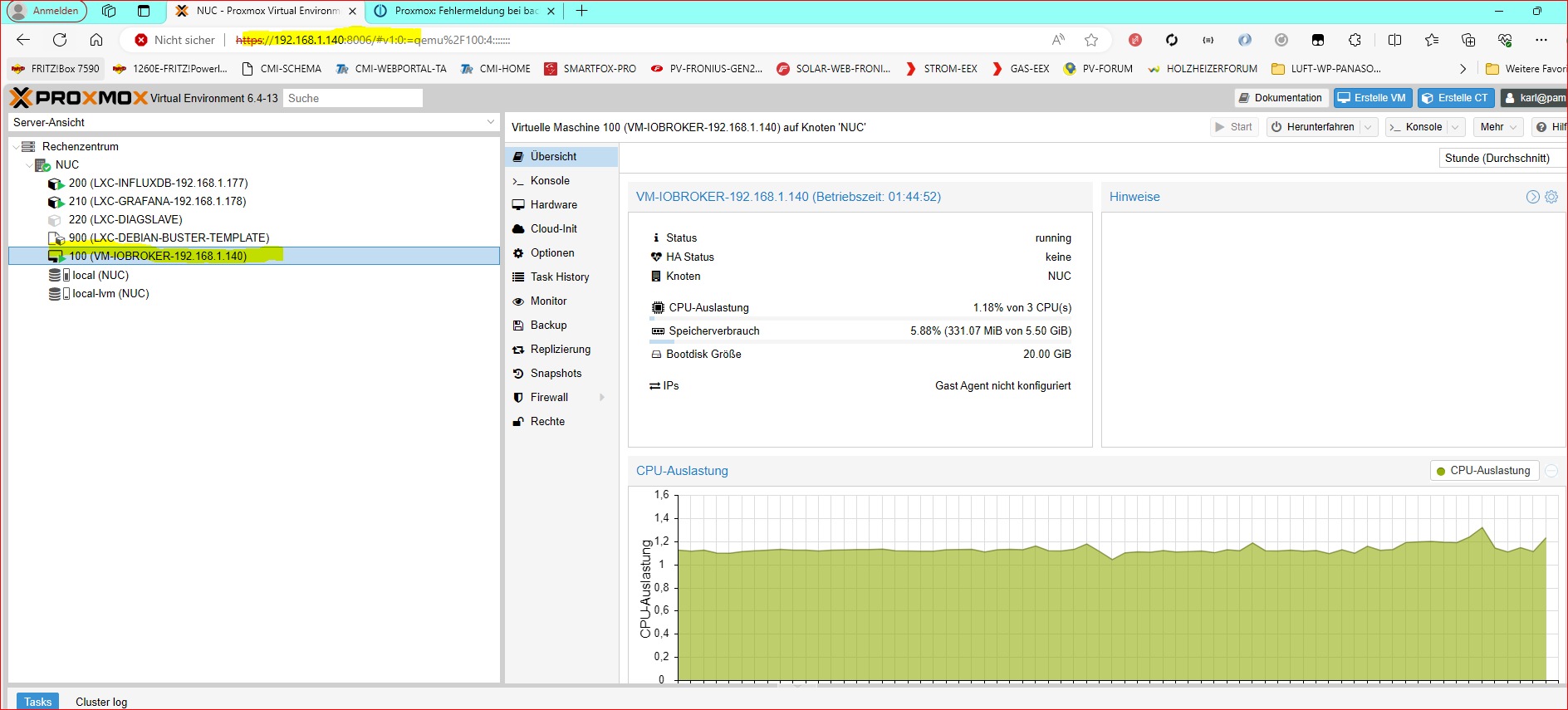
    Sorry, ich stehe jetzt auf dem Schlauch. ?


    2d354318-e744-4694-a383-cb286a6fd1a2-image.png

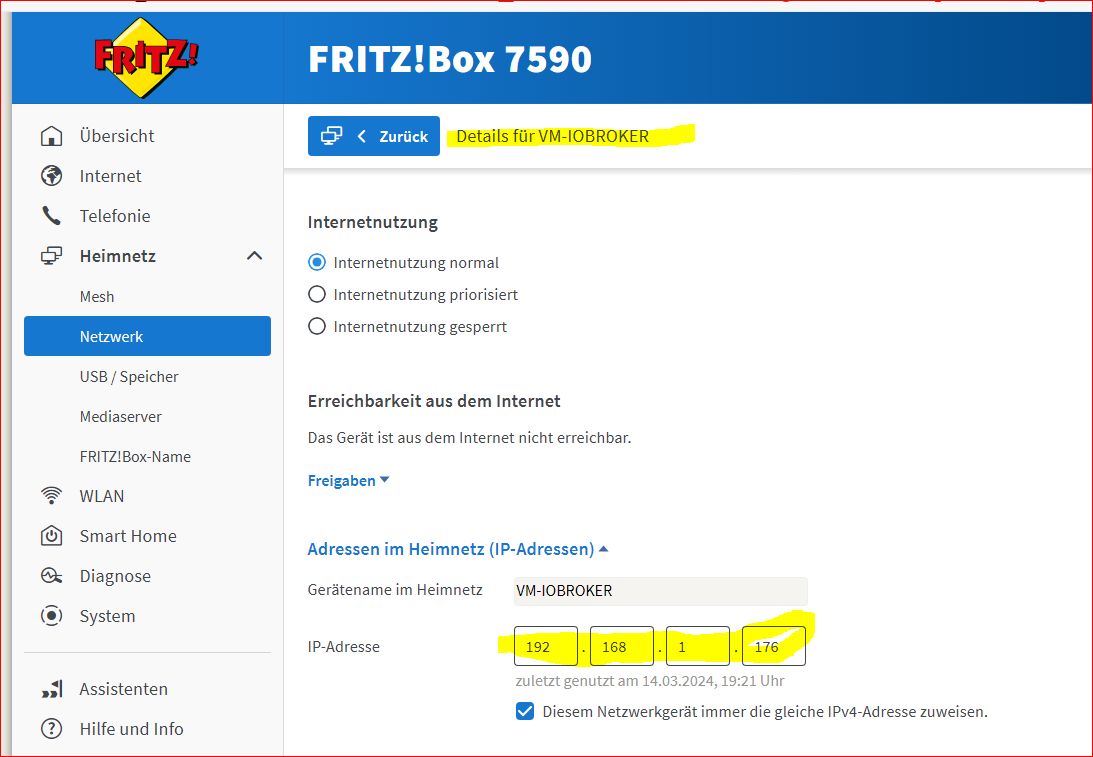
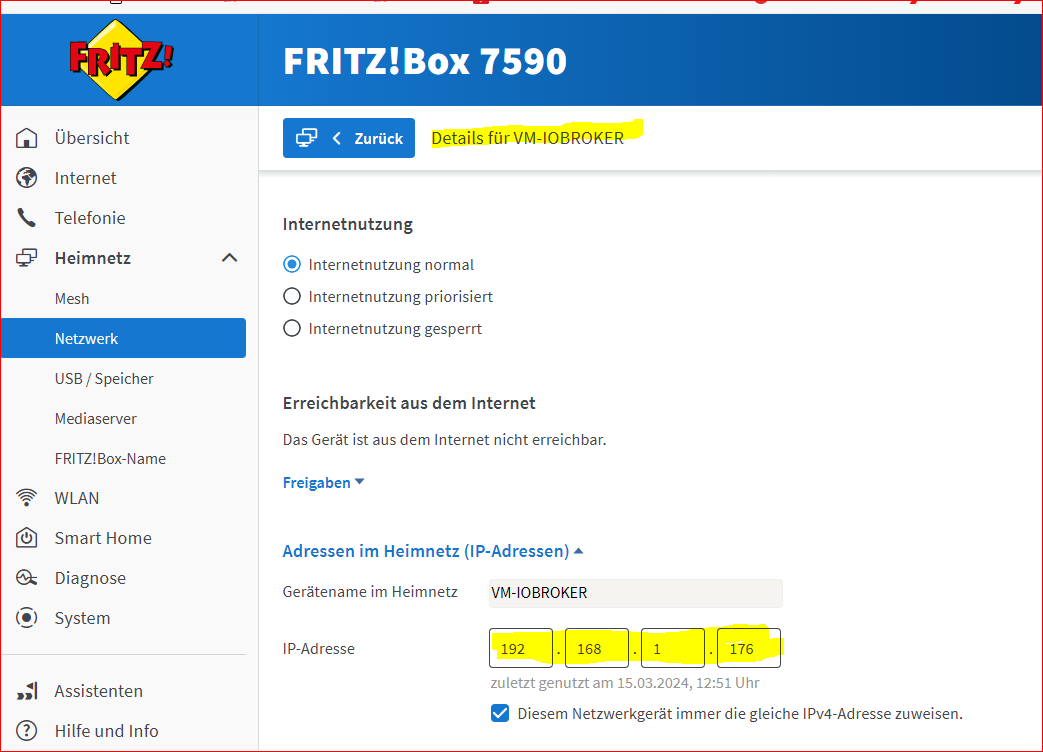
    In der Fritzbox hat er ja noch die 192.168.1.176 ?


    3331a146-f5fb-4b74-bb9b-e1b1bb0fc210-image.png

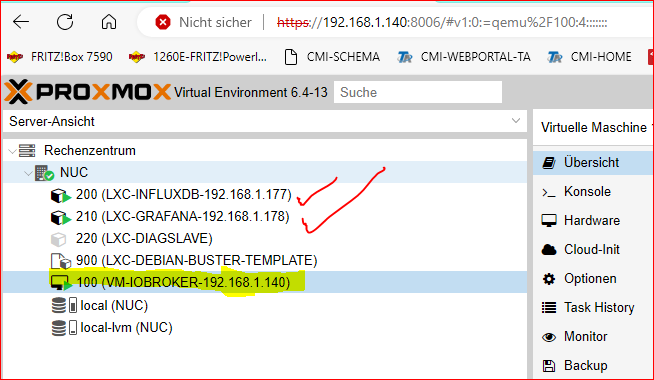
    72cfc717-6582-4d83-a8ef-a9645c7a9757-image.png

    Die 192.1168.1.177 LXC InfluxDB hat sich während der Abwesenheit des INTELNUC die Platine der Luft-WP gekrallt, diese habe ich jetzt gleich mal abgesteckt.

    Danke

    crunchipC 1 Antwort Letzte Antwort
    0
    • G GOETSCHHOFER

      @crunchip said in Proxmox: Fehlermeldung bei backup - vzdump ?:

      @goetschhofer dann geh mal auf die Netzwerkeinstellung bei deinem iobroker

      Sorry, ich stehe jetzt auf dem Schlauch. ?


      2d354318-e744-4694-a383-cb286a6fd1a2-image.png

      In der Fritzbox hat er ja noch die 192.168.1.176 ?


      3331a146-f5fb-4b74-bb9b-e1b1bb0fc210-image.png

      72cfc717-6582-4d83-a8ef-a9645c7a9757-image.png

      Die 192.1168.1.177 LXC InfluxDB hat sich während der Abwesenheit des INTELNUC die Platine der Luft-WP gekrallt, diese habe ich jetzt gleich mal abgesteckt.

      Danke

      crunchipC Abwesend
      crunchipC Abwesend
      crunchip
      Forum Testing Most Active
      schrieb am zuletzt editiert von
      #179

      @goetschhofer sagte in Proxmox: Fehlermeldung bei backup - vzdump ?:

      Sorry, ich stehe jetzt auf dem Schlauch

      cat /etc/network/interfaces
      

      In deiner VM

      umgestiegen von Proxmox auf Unraid

      G 1 Antwort Letzte Antwort
      1
      • crunchipC crunchip

        @goetschhofer sagte in Proxmox: Fehlermeldung bei backup - vzdump ?:

        Sorry, ich stehe jetzt auf dem Schlauch

        cat /etc/network/interfaces
        

        In deiner VM

        G Offline
        G Offline
        GOETSCHHOFER
        schrieb am zuletzt editiert von GOETSCHHOFER
        #180

        @crunchip said in Proxmox: Fehlermeldung bei backup - vzdump ?:

        cat /etc/network/interfaces

        Muss ich das Interface wieder hereinladen ? Siehe Spoiler.

        login as: karl
        karl@192.168.1.176's password:
        Linux IOBROKER 4.19.0-25-amd64 #1 SMP Debian 4.19.289-2 (2023-08-08) x86_64
        
        The programs included with the Debian GNU/Linux system are free software;
        the exact distribution terms for each program are described in the
        individual files in /usr/share/doc/*/copyright.
        
        Debian GNU/Linux comes with ABSOLUTELY NO WARRANTY, to the extent
        permitted by applicable law.
        Last login: Thu Mar 14 21:54:14 2024
        karl@IOBROKER:~$ cat /etc/network/interfaces
        # This file describes the network interfaces available on your system
        # and how to activate them. For more information, see interfaces(5).
        
        source /etc/network/interfaces.d/*
        
        # The loopback network interface
        auto lo
        iface lo inet loopback
        
        # The primary network interface
        allow-hotplug ens18
        iface ens18 inet dhcp
        karl@IOBROKER:~$


        https://www.bing.com/search?pglt=163&q=cat+%2Fetc%2Fnetwork%2Finterfaces&cvid=84af6836d631401c81c3d96137dd4c8e&gs_lcrp=EgZjaHJvbWUyBggAEEUYOTIGCAEQABhA0gEIMTczMmowajGoAgCwAgA&FORM=ANNTA1&PC=LCTS


        To apply the changes in the /etc/network/interfaces file, you can use the ifup and ifdown commands to bring up or down an interface, or the ifreload command to reload the configuration without affecting the current state
        2
        . For example:

        sudo ifdown eth0
        sudo ifup eth0
        sudo ifreload -a

        crunchipC 1 Antwort Letzte Antwort
        0
        • G GOETSCHHOFER

          @crunchip said in Proxmox: Fehlermeldung bei backup - vzdump ?:

          cat /etc/network/interfaces

          Muss ich das Interface wieder hereinladen ? Siehe Spoiler.

          login as: karl
          karl@192.168.1.176's password:
          Linux IOBROKER 4.19.0-25-amd64 #1 SMP Debian 4.19.289-2 (2023-08-08) x86_64
          
          The programs included with the Debian GNU/Linux system are free software;
          the exact distribution terms for each program are described in the
          individual files in /usr/share/doc/*/copyright.
          
          Debian GNU/Linux comes with ABSOLUTELY NO WARRANTY, to the extent
          permitted by applicable law.
          Last login: Thu Mar 14 21:54:14 2024
          karl@IOBROKER:~$ cat /etc/network/interfaces
          # This file describes the network interfaces available on your system
          # and how to activate them. For more information, see interfaces(5).
          
          source /etc/network/interfaces.d/*
          
          # The loopback network interface
          auto lo
          iface lo inet loopback
          
          # The primary network interface
          allow-hotplug ens18
          iface ens18 inet dhcp
          karl@IOBROKER:~$


          https://www.bing.com/search?pglt=163&q=cat+%2Fetc%2Fnetwork%2Finterfaces&cvid=84af6836d631401c81c3d96137dd4c8e&gs_lcrp=EgZjaHJvbWUyBggAEEUYOTIGCAEQABhA0gEIMTczMmowajGoAgCwAgA&FORM=ANNTA1&PC=LCTS


          To apply the changes in the /etc/network/interfaces file, you can use the ifup and ifdown commands to bring up or down an interface, or the ifreload command to reload the configuration without affecting the current state
          2
          . For example:

          sudo ifdown eth0
          sudo ifup eth0
          sudo ifreload -a

          crunchipC Abwesend
          crunchipC Abwesend
          crunchip
          Forum Testing Most Active
          schrieb am zuletzt editiert von
          #181

          @goetschhofer sagte in Proxmox: Fehlermeldung bei backup - vzdump ?:

          iface ens18 inet dhcp

          deine VM steht auf dhcp, ist wohl deine lease time in der Fritzbox in der Zwischenzeit der Reparatur abgelaufen und somit die IP neu vergeben

          warum allerdings die VM die selbe IP wie Proxmox selbst haben soll/kann, ist irgendwie merkwürdig
          du kannst die Fritzbox mal neu starten, dann werden die IP`s bei Bedarf neu vergeben/angepasst

          alternativ wäre es zu überlegen, der VM eine statische IP zu geben

          umgestiegen von Proxmox auf Unraid

          G 1 Antwort Letzte Antwort
          2
          • crunchipC crunchip

            @goetschhofer sagte in Proxmox: Fehlermeldung bei backup - vzdump ?:

            iface ens18 inet dhcp

            deine VM steht auf dhcp, ist wohl deine lease time in der Fritzbox in der Zwischenzeit der Reparatur abgelaufen und somit die IP neu vergeben

            warum allerdings die VM die selbe IP wie Proxmox selbst haben soll/kann, ist irgendwie merkwürdig
            du kannst die Fritzbox mal neu starten, dann werden die IP`s bei Bedarf neu vergeben/angepasst

            alternativ wäre es zu überlegen, der VM eine statische IP zu geben

            G Offline
            G Offline
            GOETSCHHOFER
            schrieb am zuletzt editiert von
            #182

            @crunchip said in Proxmox: Fehlermeldung bei backup - vzdump ?:

            @goetschhofer sagte in Proxmox: Fehlermeldung bei backup - vzdump ?:

            iface ens18 inet dhcp

            deine VM steht auf dhcp, ist wohl deine lease time in der Fritzbox in der Zwischenzeit der Reparatur abgelaufen und somit die IP neu vergeben

            warum allerdings die VM die selbe IP wie Proxmox selbst haben soll/kann, ist irgendwie merkwürdig
            du kannst die Fritzbox mal neu starten, dann werden die IP`s bei Bedarf neu vergeben/angepasst

            alternativ wäre es zu überlegen, der VM eine statische IP zu geben

            Ich habe jetzt die Fritzbox nochmals neu gestartet, aber die IP-Adresse ist beim iobroker auf 1.140 verharrt und hat sich nicht neu geholt.
            Interessant ist, dass in der Fritzbox aber die 1.176 angezeigt wird.


            8e62aacc-75df-42dd-a01f-3d95433fa9a2-image.png
            a7b6489d-5237-4095-8ece-7013eb2d6929-image.png

            Danke

            crunchipC 1 Antwort Letzte Antwort
            0
            • G GOETSCHHOFER

              @crunchip said in Proxmox: Fehlermeldung bei backup - vzdump ?:

              @goetschhofer sagte in Proxmox: Fehlermeldung bei backup - vzdump ?:

              iface ens18 inet dhcp

              deine VM steht auf dhcp, ist wohl deine lease time in der Fritzbox in der Zwischenzeit der Reparatur abgelaufen und somit die IP neu vergeben

              warum allerdings die VM die selbe IP wie Proxmox selbst haben soll/kann, ist irgendwie merkwürdig
              du kannst die Fritzbox mal neu starten, dann werden die IP`s bei Bedarf neu vergeben/angepasst

              alternativ wäre es zu überlegen, der VM eine statische IP zu geben

              Ich habe jetzt die Fritzbox nochmals neu gestartet, aber die IP-Adresse ist beim iobroker auf 1.140 verharrt und hat sich nicht neu geholt.
              Interessant ist, dass in der Fritzbox aber die 1.176 angezeigt wird.


              8e62aacc-75df-42dd-a01f-3d95433fa9a2-image.png
              a7b6489d-5237-4095-8ece-7013eb2d6929-image.png

              Danke

              crunchipC Abwesend
              crunchipC Abwesend
              crunchip
              Forum Testing Most Active
              schrieb am zuletzt editiert von crunchip
              #183

              @goetschhofer dann geh doch mal auf die Konsole der iobroker VM in der Proxmox Gui
              Und ruf folgendes ab

              ip addr
              

              umgestiegen von Proxmox auf Unraid

              G 1 Antwort Letzte Antwort
              1
              • crunchipC crunchip

                @goetschhofer dann geh doch mal auf die Konsole der iobroker VM in der Proxmox Gui
                Und ruf folgendes ab

                ip addr
                
                G Offline
                G Offline
                GOETSCHHOFER
                schrieb am zuletzt editiert von GOETSCHHOFER
                #184

                @crunchip said in Proxmox: Fehlermeldung bei backup - vzdump ?:

                ip addr

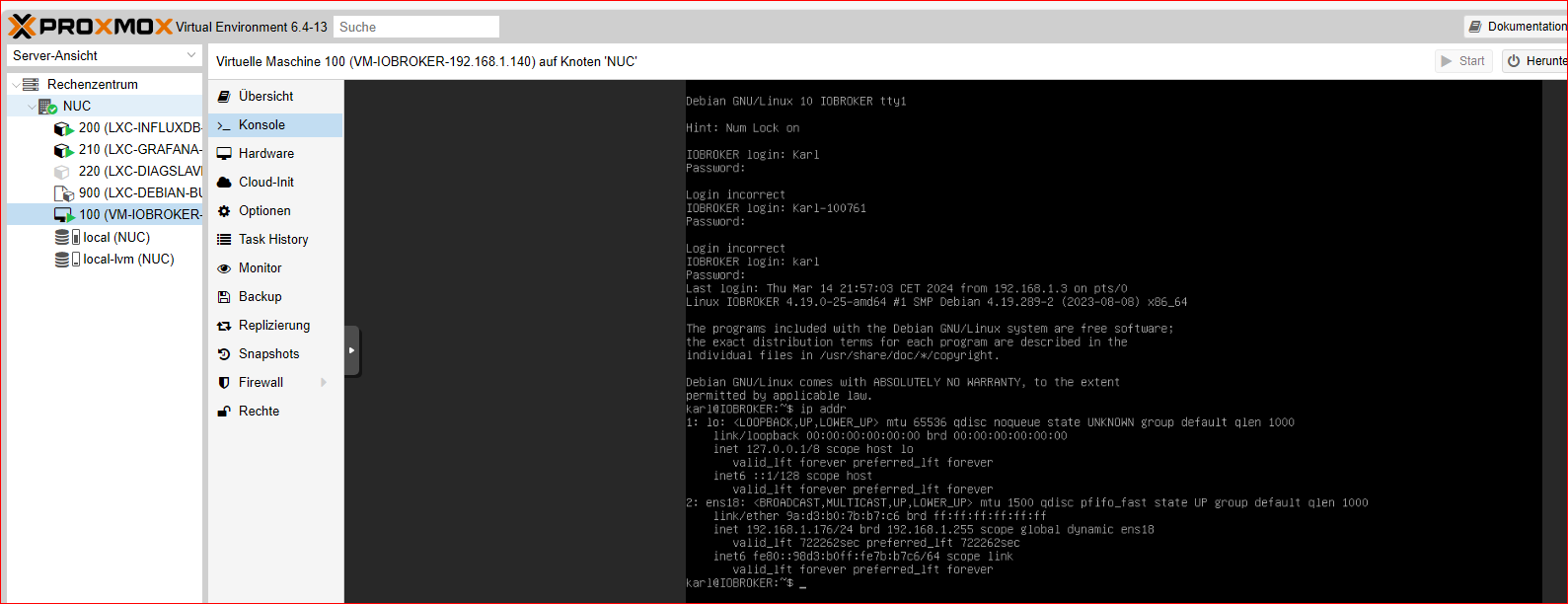
                Sorry, habe es jetzt nicht aus der Konsole genommen, da ich hier Probleme mit dem herauskopieren habe, sondern aus der Shell.
                Hier wäre aber die 1.176 korrekt eingetragen ?

                KONSOLE:


                88d69e87-e5cb-4cab-84b9-a6961f60c0b3-image.png

                login as: karl
                karl@192.168.1.176's password:
                Linux IOBROKER 4.19.0-25-amd64 #1 SMP Debian 4.19.289-2 (2023-08-08) x86_64
                
                The programs included with the Debian GNU/Linux system are free software;
                the exact distribution terms for each program are described in the
                individual files in /usr/share/doc/*/copyright.
                
                Debian GNU/Linux comes with ABSOLUTELY NO WARRANTY, to the extent
                permitted by applicable law.
                Last login: Sat Mar 16 08:01:30 2024
                karl@IOBROKER:~$ ip addr
                1: lo: <LOOPBACK,UP,LOWER_UP> mtu 65536 qdisc noqueue state UNKNOWN group defaul                                                                                                                                                             t qlen 1000
                    link/loopback 00:00:00:00:00:00 brd 00:00:00:00:00:00
                    inet 127.0.0.1/8 scope host lo
                       valid_lft forever preferred_lft forever
                    inet6 ::1/128 scope host
                       valid_lft forever preferred_lft forever
                2: ens18: <BROADCAST,MULTICAST,UP,LOWER_UP> mtu 1500 qdisc pfifo_fast state UP g                                                                                                                                                             roup default qlen 1000
                    link/ether 9a:d3:b0:7b:b7:c6 brd ff:ff:ff:ff:ff:ff
                    inet 192.168.1.176/24 brd 192.168.1.255 scope global dynamic ens18
                       valid_lft 722212sec preferred_lft 722212sec
                    inet6 fe80::98d3:b0ff:fe7b:b7c6/64 scope link
                       valid_lft forever preferred_lft forever
                karl@IOBROKER:~$
                
                [/s]


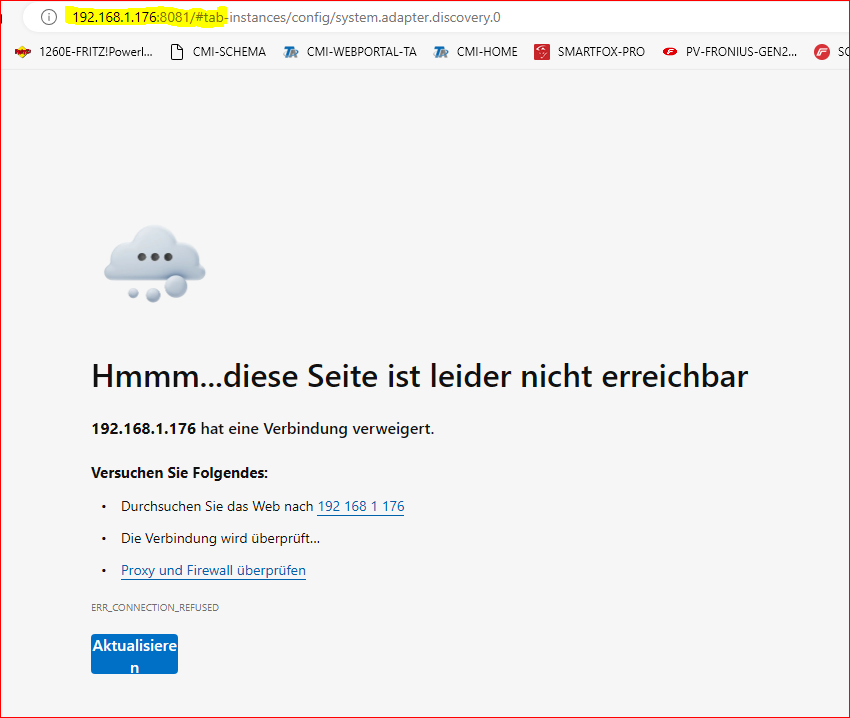
                Spannend ist für mich folgendes, dass ich unter 1.176 den iobroker auch anpingen kann, aber aufrufen kann ich diesen nicht.

                Auszug aus IP-SCAN und PING darauf:


                3e621ccc-78a3-4e83-b50f-1a5db6b30f5d-image.png

                bd24155b-0d8a-4d02-b23c-e9c4800954b6-image.png
                b75b5d58-07fd-4ecc-9996-d70ede44bf12-image.png

                Vielen Dank

                crunchipC 1 Antwort Letzte Antwort
                0
                • G GOETSCHHOFER

                  @crunchip said in Proxmox: Fehlermeldung bei backup - vzdump ?:

                  ip addr

                  Sorry, habe es jetzt nicht aus der Konsole genommen, da ich hier Probleme mit dem herauskopieren habe, sondern aus der Shell.
                  Hier wäre aber die 1.176 korrekt eingetragen ?

                  KONSOLE:


                  88d69e87-e5cb-4cab-84b9-a6961f60c0b3-image.png

                  login as: karl
                  karl@192.168.1.176's password:
                  Linux IOBROKER 4.19.0-25-amd64 #1 SMP Debian 4.19.289-2 (2023-08-08) x86_64
                  
                  The programs included with the Debian GNU/Linux system are free software;
                  the exact distribution terms for each program are described in the
                  individual files in /usr/share/doc/*/copyright.
                  
                  Debian GNU/Linux comes with ABSOLUTELY NO WARRANTY, to the extent
                  permitted by applicable law.
                  Last login: Sat Mar 16 08:01:30 2024
                  karl@IOBROKER:~$ ip addr
                  1: lo: <LOOPBACK,UP,LOWER_UP> mtu 65536 qdisc noqueue state UNKNOWN group defaul                                                                                                                                                             t qlen 1000
                      link/loopback 00:00:00:00:00:00 brd 00:00:00:00:00:00
                      inet 127.0.0.1/8 scope host lo
                         valid_lft forever preferred_lft forever
                      inet6 ::1/128 scope host
                         valid_lft forever preferred_lft forever
                  2: ens18: <BROADCAST,MULTICAST,UP,LOWER_UP> mtu 1500 qdisc pfifo_fast state UP g                                                                                                                                                             roup default qlen 1000
                      link/ether 9a:d3:b0:7b:b7:c6 brd ff:ff:ff:ff:ff:ff
                      inet 192.168.1.176/24 brd 192.168.1.255 scope global dynamic ens18
                         valid_lft 722212sec preferred_lft 722212sec
                      inet6 fe80::98d3:b0ff:fe7b:b7c6/64 scope link
                         valid_lft forever preferred_lft forever
                  karl@IOBROKER:~$
                  
                  [/s]


                  Spannend ist für mich folgendes, dass ich unter 1.176 den iobroker auch anpingen kann, aber aufrufen kann ich diesen nicht.

                  Auszug aus IP-SCAN und PING darauf:


                  3e621ccc-78a3-4e83-b50f-1a5db6b30f5d-image.png

                  bd24155b-0d8a-4d02-b23c-e9c4800954b6-image.png
                  b75b5d58-07fd-4ecc-9996-d70ede44bf12-image.png

                  Vielen Dank

                  crunchipC Abwesend
                  crunchipC Abwesend
                  crunchip
                  Forum Testing Most Active
                  schrieb am zuletzt editiert von crunchip
                  #185

                  @goetschhofer also passt doch die IP und nicht wie ursprünglich gedacht.

                  Ich vermute eher der iobroker läuft nicht

                  iob diag kennst du ja

                  umgestiegen von Proxmox auf Unraid

                  G 1 Antwort Letzte Antwort
                  1
                  • crunchipC crunchip

                    @goetschhofer also passt doch die IP und nicht wie ursprünglich gedacht.

                    Ich vermute eher der iobroker läuft nicht

                    iob diag kennst du ja

                    G Offline
                    G Offline
                    GOETSCHHOFER
                    schrieb am zuletzt editiert von GOETSCHHOFER
                    #186

                    @crunchip said in Proxmox: Fehlermeldung bei backup - vzdump ?:

                    @goetschhofer also passt doch die IP und nicht wie ursprünglich gedacht.

                    Ich vermute eher der iobroker läuft nicht

                    iob diag kennst du ja

                    Sorry, ich habe dies in </> reinkopiert, aber dies dürfte zu lang sein ? Hat offenbar jetzt doch funktioniert.

                    ======== Start marking the full check here =========

                    Skript v.2023-10-10
                    
                    *** BASE SYSTEM ***
                       Static hostname: IOBROKER
                             Icon name: computer-vm
                               Chassis: vm
                        Virtualization: kvm
                      Operating System: Debian GNU/Linux 10 (buster)
                                Kernel: Linux 4.19.0-25-amd64
                          Architecture: x86-64
                    
                    model name      : Common KVM processor
                    Docker          : false
                    Virtualization  : kvm
                    Kernel          : x86_64
                    Userland        : amd64
                    
                    Systemuptime and Load:
                     09:40:38 up 1 day, 17:01,  2 users,  load average: 0.00, 0.01, 0.00
                    CPU threads: 6
                    
                    
                    *** Time and Time Zones ***
                                   Local time: Sat 2024-03-16 09:40:38 CET
                               Universal time: Sat 2024-03-16 08:40:38 UTC
                                     RTC time: Sat 2024-03-16 08:40:39
                                    Time zone: Europe/Vienna (CET, +0100)
                    System clock synchronized: yes
                                  NTP service: active
                              RTC in local TZ: no
                    
                    *** User and Groups ***
                    karl
                    /home/karl
                    karl cdrom floppy sudo audio dip video plugdev netdev iobroker
                    
                    *** X-Server-Setup ***
                    X-Server:       false
                    Desktop:
                    Terminal:       tty
                    Boot Target:    graphical.target
                    
                    *** MEMORY ***
                                  total        used        free      shared  buff/cache   available
                    Mem:           5.5G        231M        4.8G        7.0M        453M        5.1G
                    Swap:          974M          0B        974M
                    Total:         6.4G        231M        5.7G
                    
                             5458 M total memory
                              231 M used memory
                              411 M active memory
                              140 M inactive memory
                             4774 M free memory
                              173 M buffer memory
                              279 M swap cache
                              974 M total swap
                                0 M used swap
                              974 M free swap
                    
                    *** FAILED SERVICES ***
                    
                    0 loaded units listed. Pass --all to see loaded but inactive units, too.
                    To show all installed unit files use 'systemctl list-unit-files'.
                    
                    *** FILESYSTEM ***
                    Filesystem     Type      Size  Used Avail Use% Mounted on
                    udev           devtmpfs  2.7G     0  2.7G   0% /dev
                    tmpfs          tmpfs     546M  7.3M  539M   2% /run
                    /dev/sda1      ext4       19G  4.3G   14G  25% /
                    tmpfs          tmpfs     2.7G     0  2.7G   0% /dev/shm
                    tmpfs          tmpfs     5.0M     0  5.0M   0% /run/lock
                    tmpfs          tmpfs     2.7G     0  2.7G   0% /sys/fs/cgroup
                    tmpfs          tmpfs     546M     0  546M   0% /run/user/1000
                    
                    Messages concerning ext4 filesystem in dmesg:
                    [Thu Mar 14 16:39:26 2024] EXT4-fs (sda1): mounted filesystem with ordered data mode. O                                                                                                                                                      pts: (null)
                    [Thu Mar 14 16:39:27 2024] EXT4-fs (sda1): re-mounted. Opts: errors=remount-ro
                    
                    Show mounted filesystems \(real ones only\):
                    TARGET        SOURCE    FSTYPE OPTIONS
                    /             /dev/sda1 ext4   rw,relatime,errors=remount-ro
                    `-/sys/fs/bpf bpf       bpf    rw,nosuid,nodev,noexec,relatime,mode=700
                    
                    Files in neuralgic directories:
                    
                    /var:
                    648M    /var/
                    457M    /var/cache
                    451M    /var/cache/apt
                    388M    /var/cache/apt/archives
                    173M    /var/lib
                    
                    Hint: You are currently not seeing messages from other users and the system.
                          Users in the 'systemd-journal' group can see all messages. Pass -q to
                          turn off this notice.
                    No journal files were opened due to insufficient permissions.
                    
                    /opt/iobroker/backups:
                    4.0K    /opt/iobroker/backups/
                    
                    /opt/iobroker/iobroker-data:
                    306M    /opt/iobroker/iobroker-data/
                    230M    /opt/iobroker/iobroker-data/files
                    75M     /opt/iobroker/iobroker-data/backup-objects
                    42M     /opt/iobroker/iobroker-data/files/modbus.admin/static/js
                    42M     /opt/iobroker/iobroker-data/files/modbus.admin/static
                    
                    The five largest files in iobroker-data are:
                    11M     /opt/iobroker/iobroker-data/files/echarts/static/js/2.0a6dd638.chunk.js.map
                    11M     /opt/iobroker/iobroker-data/files/echarts.admin/chart/static/js/2.0a6dd638.chun                                                                                                                                                      k.js.map
                    9.3M    /opt/iobroker/iobroker-data/files/javascript.admin/static/js/2.b6edad9e.chunk.j                                                                                                                                                      s.map
                    6.8M    /opt/iobroker/iobroker-data/files/echarts.admin/static/js/2.0aad1268.chunk.js.m                                                                                                                                                      ap
                    6.2M    /opt/iobroker/iobroker-data/files/modbus.admin/static/js/2.261c158c.chunk.js.ma                                                                                                                                                      p
                    
                    USB-Devices by-id:
                    USB-Sticks -  Avoid direct links to /dev/* in your adapter setups, please always prefer                                                                                                                                                       the links 'by-id':
                    
                    find: '/dev/serial/by-id/': No such file or directory
                    
                    *** NodeJS-Installation ***
                    
                    /usr/bin/nodejs         v18.19.0
                    /usr/bin/node           v18.19.0
                    /usr/bin/npm            10.2.3
                    /usr/bin/npx            10.2.3
                    /usr/bin/corepack       0.22.0
                    
                    
                    nodejs:
                      Installed: 18.19.0-1nodesource1
                      Candidate: 18.19.0-1nodesource1
                      Version table:
                     *** 18.19.0-1nodesource1 1001
                            500 https://deb.nodesource.com/node_18.x nodistro/main amd64 Packages
                            100 /var/lib/dpkg/status
                         18.18.2-1nodesource1 1001
                            500 https://deb.nodesource.com/node_18.x nodistro/main amd64 Packages
                         18.18.1-1nodesource1 1001
                            500 https://deb.nodesource.com/node_18.x nodistro/main amd64 Packages
                         18.18.0-1nodesource1 1001
                            500 https://deb.nodesource.com/node_18.x nodistro/main amd64 Packages
                         18.17.1-1nodesource1 1001
                            500 https://deb.nodesource.com/node_18.x nodistro/main amd64 Packages
                         18.17.0-1nodesource1 1001
                            500 https://deb.nodesource.com/node_18.x nodistro/main amd64 Packages
                         18.16.1-1nodesource1 1001
                            500 https://deb.nodesource.com/node_18.x nodistro/main amd64 Packages
                         18.16.0-1nodesource1 1001
                            500 https://deb.nodesource.com/node_18.x nodistro/main amd64 Packages
                         18.15.0-1nodesource1 1001
                            500 https://deb.nodesource.com/node_18.x nodistro/main amd64 Packages
                         18.14.2-1nodesource1 1001
                            500 https://deb.nodesource.com/node_18.x nodistro/main amd64 Packages
                         18.14.1-1nodesource1 1001
                            500 https://deb.nodesource.com/node_18.x nodistro/main amd64 Packages
                         18.14.0-1nodesource1 1001
                            500 https://deb.nodesource.com/node_18.x nodistro/main amd64 Packages
                         18.13.0-1nodesource1 1001
                            500 https://deb.nodesource.com/node_18.x nodistro/main amd64 Packages
                         18.12.0-1nodesource1 1001
                            500 https://deb.nodesource.com/node_18.x nodistro/main amd64 Packages
                         18.11.0-1nodesource1 1001
                            500 https://deb.nodesource.com/node_18.x nodistro/main amd64 Packages
                         18.10.0-1nodesource1 1001
                            500 https://deb.nodesource.com/node_18.x nodistro/main amd64 Packages
                         18.9.1-1nodesource1 1001
                            500 https://deb.nodesource.com/node_18.x nodistro/main amd64 Packages
                         18.9.0-1nodesource1 1001
                            500 https://deb.nodesource.com/node_18.x nodistro/main amd64 Packages
                         18.8.0-1nodesource1 1001
                            500 https://deb.nodesource.com/node_18.x nodistro/main amd64 Packages
                         18.7.0-1nodesource1 1001
                            500 https://deb.nodesource.com/node_18.x nodistro/main amd64 Packages
                         18.6.0-1nodesource1 1001
                            500 https://deb.nodesource.com/node_18.x nodistro/main amd64 Packages
                         18.5.0-1nodesource1 1001
                            500 https://deb.nodesource.com/node_18.x nodistro/main amd64 Packages
                         18.4.0-1nodesource1 1001
                            500 https://deb.nodesource.com/node_18.x nodistro/main amd64 Packages
                         18.3.0-1nodesource1 1001
                            500 https://deb.nodesource.com/node_18.x nodistro/main amd64 Packages
                         18.2.0-1nodesource1 1001
                            500 https://deb.nodesource.com/node_18.x nodistro/main amd64 Packages
                         18.1.0-1nodesource1 1001
                            500 https://deb.nodesource.com/node_18.x nodistro/main amd64 Packages
                         18.0.0-1nodesource1 1001
                            500 https://deb.nodesource.com/node_18.x nodistro/main amd64 Packages
                         10.24.0~dfsg-1~deb10u3 500
                            500 http://security.debian.org/debian-security buster/updates/main amd64 Packag                                                                                                                                                      es
                         10.24.0~dfsg-1~deb10u1 500
                            500 http://deb.debian.org/debian buster/main amd64 Packages
                    
                    Temp directories causing npm8 problem: 0
                    No problems detected
                    
                    Errors in npm tree:
                    npm ERR! code ELSPROBLEMS
                    npm ERR! invalid: tough-cookie@2.5.0 /opt/iobroker/node_modules/tough-cookie
                    
                    npm ERR! A complete log of this run can be found in: /home/karl/.npm/_logs/2024-03-16T08_40_40_403Z-debug-0.log
                    
                    *** ioBroker-Installation ***
                    
                    ioBroker Status
                     Cannot read system.config: null (OK when migrating or restoring)
                     Cannot find view "system" for search "host"
                    iobroker is running on this host.
                    
                    
                    Objects type: file
                    States  type: file
                    
                    Core adapters versions
                    js-controller:  3.2.16
                    admin:          5.1.23
                    javascript:     5.1.3
                    
                    Adapters from github:   14
                    
                    Adapter State
                     Cannot read system.config: null (OK when migrating or restoring)
                     Cannot find view "system" for search "host"
                    
                    
                    + instance is alive
                    
                    Enabled adapters with bindings
                    
                    ioBroker-Repositories
                     Cannot read system.config: null (OK when migrating or restoring)
                     Cannot find view "system" for search "host"
                    Cannot get list: undefined
                    
                    Installed ioBroker-Instances
                     Cannot read system.config: null (OK when migrating or restoring)
                     Cannot find view "system" for search "host"
                    Error: Object "system.config" not found
                    
                    Thomas BraunT 1 Antwort Letzte Antwort
                    0
                    • G GOETSCHHOFER

                      @crunchip said in Proxmox: Fehlermeldung bei backup - vzdump ?:

                      @goetschhofer also passt doch die IP und nicht wie ursprünglich gedacht.

                      Ich vermute eher der iobroker läuft nicht

                      iob diag kennst du ja

                      Sorry, ich habe dies in </> reinkopiert, aber dies dürfte zu lang sein ? Hat offenbar jetzt doch funktioniert.

                      ======== Start marking the full check here =========

                      Skript v.2023-10-10
                      
                      *** BASE SYSTEM ***
                         Static hostname: IOBROKER
                               Icon name: computer-vm
                                 Chassis: vm
                          Virtualization: kvm
                        Operating System: Debian GNU/Linux 10 (buster)
                                  Kernel: Linux 4.19.0-25-amd64
                            Architecture: x86-64
                      
                      model name      : Common KVM processor
                      Docker          : false
                      Virtualization  : kvm
                      Kernel          : x86_64
                      Userland        : amd64
                      
                      Systemuptime and Load:
                       09:40:38 up 1 day, 17:01,  2 users,  load average: 0.00, 0.01, 0.00
                      CPU threads: 6
                      
                      
                      *** Time and Time Zones ***
                                     Local time: Sat 2024-03-16 09:40:38 CET
                                 Universal time: Sat 2024-03-16 08:40:38 UTC
                                       RTC time: Sat 2024-03-16 08:40:39
                                      Time zone: Europe/Vienna (CET, +0100)
                      System clock synchronized: yes
                                    NTP service: active
                                RTC in local TZ: no
                      
                      *** User and Groups ***
                      karl
                      /home/karl
                      karl cdrom floppy sudo audio dip video plugdev netdev iobroker
                      
                      *** X-Server-Setup ***
                      X-Server:       false
                      Desktop:
                      Terminal:       tty
                      Boot Target:    graphical.target
                      
                      *** MEMORY ***
                                    total        used        free      shared  buff/cache   available
                      Mem:           5.5G        231M        4.8G        7.0M        453M        5.1G
                      Swap:          974M          0B        974M
                      Total:         6.4G        231M        5.7G
                      
                               5458 M total memory
                                231 M used memory
                                411 M active memory
                                140 M inactive memory
                               4774 M free memory
                                173 M buffer memory
                                279 M swap cache
                                974 M total swap
                                  0 M used swap
                                974 M free swap
                      
                      *** FAILED SERVICES ***
                      
                      0 loaded units listed. Pass --all to see loaded but inactive units, too.
                      To show all installed unit files use 'systemctl list-unit-files'.
                      
                      *** FILESYSTEM ***
                      Filesystem     Type      Size  Used Avail Use% Mounted on
                      udev           devtmpfs  2.7G     0  2.7G   0% /dev
                      tmpfs          tmpfs     546M  7.3M  539M   2% /run
                      /dev/sda1      ext4       19G  4.3G   14G  25% /
                      tmpfs          tmpfs     2.7G     0  2.7G   0% /dev/shm
                      tmpfs          tmpfs     5.0M     0  5.0M   0% /run/lock
                      tmpfs          tmpfs     2.7G     0  2.7G   0% /sys/fs/cgroup
                      tmpfs          tmpfs     546M     0  546M   0% /run/user/1000
                      
                      Messages concerning ext4 filesystem in dmesg:
                      [Thu Mar 14 16:39:26 2024] EXT4-fs (sda1): mounted filesystem with ordered data mode. O                                                                                                                                                      pts: (null)
                      [Thu Mar 14 16:39:27 2024] EXT4-fs (sda1): re-mounted. Opts: errors=remount-ro
                      
                      Show mounted filesystems \(real ones only\):
                      TARGET        SOURCE    FSTYPE OPTIONS
                      /             /dev/sda1 ext4   rw,relatime,errors=remount-ro
                      `-/sys/fs/bpf bpf       bpf    rw,nosuid,nodev,noexec,relatime,mode=700
                      
                      Files in neuralgic directories:
                      
                      /var:
                      648M    /var/
                      457M    /var/cache
                      451M    /var/cache/apt
                      388M    /var/cache/apt/archives
                      173M    /var/lib
                      
                      Hint: You are currently not seeing messages from other users and the system.
                            Users in the 'systemd-journal' group can see all messages. Pass -q to
                            turn off this notice.
                      No journal files were opened due to insufficient permissions.
                      
                      /opt/iobroker/backups:
                      4.0K    /opt/iobroker/backups/
                      
                      /opt/iobroker/iobroker-data:
                      306M    /opt/iobroker/iobroker-data/
                      230M    /opt/iobroker/iobroker-data/files
                      75M     /opt/iobroker/iobroker-data/backup-objects
                      42M     /opt/iobroker/iobroker-data/files/modbus.admin/static/js
                      42M     /opt/iobroker/iobroker-data/files/modbus.admin/static
                      
                      The five largest files in iobroker-data are:
                      11M     /opt/iobroker/iobroker-data/files/echarts/static/js/2.0a6dd638.chunk.js.map
                      11M     /opt/iobroker/iobroker-data/files/echarts.admin/chart/static/js/2.0a6dd638.chun                                                                                                                                                      k.js.map
                      9.3M    /opt/iobroker/iobroker-data/files/javascript.admin/static/js/2.b6edad9e.chunk.j                                                                                                                                                      s.map
                      6.8M    /opt/iobroker/iobroker-data/files/echarts.admin/static/js/2.0aad1268.chunk.js.m                                                                                                                                                      ap
                      6.2M    /opt/iobroker/iobroker-data/files/modbus.admin/static/js/2.261c158c.chunk.js.ma                                                                                                                                                      p
                      
                      USB-Devices by-id:
                      USB-Sticks -  Avoid direct links to /dev/* in your adapter setups, please always prefer                                                                                                                                                       the links 'by-id':
                      
                      find: '/dev/serial/by-id/': No such file or directory
                      
                      *** NodeJS-Installation ***
                      
                      /usr/bin/nodejs         v18.19.0
                      /usr/bin/node           v18.19.0
                      /usr/bin/npm            10.2.3
                      /usr/bin/npx            10.2.3
                      /usr/bin/corepack       0.22.0
                      
                      
                      nodejs:
                        Installed: 18.19.0-1nodesource1
                        Candidate: 18.19.0-1nodesource1
                        Version table:
                       *** 18.19.0-1nodesource1 1001
                              500 https://deb.nodesource.com/node_18.x nodistro/main amd64 Packages
                              100 /var/lib/dpkg/status
                           18.18.2-1nodesource1 1001
                              500 https://deb.nodesource.com/node_18.x nodistro/main amd64 Packages
                           18.18.1-1nodesource1 1001
                              500 https://deb.nodesource.com/node_18.x nodistro/main amd64 Packages
                           18.18.0-1nodesource1 1001
                              500 https://deb.nodesource.com/node_18.x nodistro/main amd64 Packages
                           18.17.1-1nodesource1 1001
                              500 https://deb.nodesource.com/node_18.x nodistro/main amd64 Packages
                           18.17.0-1nodesource1 1001
                              500 https://deb.nodesource.com/node_18.x nodistro/main amd64 Packages
                           18.16.1-1nodesource1 1001
                              500 https://deb.nodesource.com/node_18.x nodistro/main amd64 Packages
                           18.16.0-1nodesource1 1001
                              500 https://deb.nodesource.com/node_18.x nodistro/main amd64 Packages
                           18.15.0-1nodesource1 1001
                              500 https://deb.nodesource.com/node_18.x nodistro/main amd64 Packages
                           18.14.2-1nodesource1 1001
                              500 https://deb.nodesource.com/node_18.x nodistro/main amd64 Packages
                           18.14.1-1nodesource1 1001
                              500 https://deb.nodesource.com/node_18.x nodistro/main amd64 Packages
                           18.14.0-1nodesource1 1001
                              500 https://deb.nodesource.com/node_18.x nodistro/main amd64 Packages
                           18.13.0-1nodesource1 1001
                              500 https://deb.nodesource.com/node_18.x nodistro/main amd64 Packages
                           18.12.0-1nodesource1 1001
                              500 https://deb.nodesource.com/node_18.x nodistro/main amd64 Packages
                           18.11.0-1nodesource1 1001
                              500 https://deb.nodesource.com/node_18.x nodistro/main amd64 Packages
                           18.10.0-1nodesource1 1001
                              500 https://deb.nodesource.com/node_18.x nodistro/main amd64 Packages
                           18.9.1-1nodesource1 1001
                              500 https://deb.nodesource.com/node_18.x nodistro/main amd64 Packages
                           18.9.0-1nodesource1 1001
                              500 https://deb.nodesource.com/node_18.x nodistro/main amd64 Packages
                           18.8.0-1nodesource1 1001
                              500 https://deb.nodesource.com/node_18.x nodistro/main amd64 Packages
                           18.7.0-1nodesource1 1001
                              500 https://deb.nodesource.com/node_18.x nodistro/main amd64 Packages
                           18.6.0-1nodesource1 1001
                              500 https://deb.nodesource.com/node_18.x nodistro/main amd64 Packages
                           18.5.0-1nodesource1 1001
                              500 https://deb.nodesource.com/node_18.x nodistro/main amd64 Packages
                           18.4.0-1nodesource1 1001
                              500 https://deb.nodesource.com/node_18.x nodistro/main amd64 Packages
                           18.3.0-1nodesource1 1001
                              500 https://deb.nodesource.com/node_18.x nodistro/main amd64 Packages
                           18.2.0-1nodesource1 1001
                              500 https://deb.nodesource.com/node_18.x nodistro/main amd64 Packages
                           18.1.0-1nodesource1 1001
                              500 https://deb.nodesource.com/node_18.x nodistro/main amd64 Packages
                           18.0.0-1nodesource1 1001
                              500 https://deb.nodesource.com/node_18.x nodistro/main amd64 Packages
                           10.24.0~dfsg-1~deb10u3 500
                              500 http://security.debian.org/debian-security buster/updates/main amd64 Packag                                                                                                                                                      es
                           10.24.0~dfsg-1~deb10u1 500
                              500 http://deb.debian.org/debian buster/main amd64 Packages
                      
                      Temp directories causing npm8 problem: 0
                      No problems detected
                      
                      Errors in npm tree:
                      npm ERR! code ELSPROBLEMS
                      npm ERR! invalid: tough-cookie@2.5.0 /opt/iobroker/node_modules/tough-cookie
                      
                      npm ERR! A complete log of this run can be found in: /home/karl/.npm/_logs/2024-03-16T08_40_40_403Z-debug-0.log
                      
                      *** ioBroker-Installation ***
                      
                      ioBroker Status
                       Cannot read system.config: null (OK when migrating or restoring)
                       Cannot find view "system" for search "host"
                      iobroker is running on this host.
                      
                      
                      Objects type: file
                      States  type: file
                      
                      Core adapters versions
                      js-controller:  3.2.16
                      admin:          5.1.23
                      javascript:     5.1.3
                      
                      Adapters from github:   14
                      
                      Adapter State
                       Cannot read system.config: null (OK when migrating or restoring)
                       Cannot find view "system" for search "host"
                      
                      
                      + instance is alive
                      
                      Enabled adapters with bindings
                      
                      ioBroker-Repositories
                       Cannot read system.config: null (OK when migrating or restoring)
                       Cannot find view "system" for search "host"
                      Cannot get list: undefined
                      
                      Installed ioBroker-Instances
                       Cannot read system.config: null (OK when migrating or restoring)
                       Cannot find view "system" for search "host"
                      Error: Object "system.config" not found
                      
                      Thomas BraunT Online
                      Thomas BraunT Online
                      Thomas Braun
                      Most Active
                      schrieb am zuletzt editiert von Thomas Braun
                      #187

                      @goetschhofer sagte in Proxmox: Fehlermeldung bei backup - vzdump ?:

                      Debian GNU/Linux 10 (buster)

                      Zu alt. Installier da was lebendes, Debian 12 ist das derzeitig.

                      Boot Target: graphical.target

                      Stell das auf multi-user.target

                      No journal files were opened due to insufficient permissions.

                      Setz den user in die Gruppe 'adm'.

                      js-controller: 3.2.16

                      VIEL zu alt.

                      Adapters from github: 14

                      VIEL zu viel Zeuch aus github geangelt...

                      Linux-Werkzeugkasten:
                      https://forum.iobroker.net/topic/42952/der-kleine-iobroker-linux-werkzeugkasten
                      NodeJS Fixer Skript:
                      https://forum.iobroker.net/topic/68035/iob-node-fix-skript
                      iob_diag: curl -sLf -o diag.sh https://iobroker.net/diag.sh && bash diag.sh

                      G crunchipC 2 Antworten Letzte Antwort
                      0
                      • Thomas BraunT Thomas Braun

                        @goetschhofer sagte in Proxmox: Fehlermeldung bei backup - vzdump ?:

                        Debian GNU/Linux 10 (buster)

                        Zu alt. Installier da was lebendes, Debian 12 ist das derzeitig.

                        Boot Target: graphical.target

                        Stell das auf multi-user.target

                        No journal files were opened due to insufficient permissions.

                        Setz den user in die Gruppe 'adm'.

                        js-controller: 3.2.16

                        VIEL zu alt.

                        Adapters from github: 14

                        VIEL zu viel Zeuch aus github geangelt...

                        G Offline
                        G Offline
                        GOETSCHHOFER
                        schrieb am zuletzt editiert von
                        #188

                        @thomas-braun said in Proxmox: Fehlermeldung bei backup - vzdump ?:

                        @goetschhofer sagte in Proxmox: Fehlermeldung bei backup - vzdump ?:

                        Debian GNU/Linux 10 (buster)

                        Zu alt. Installier da was lebendes, Debian 12 ist das derzeitig.

                        Boot Target: graphical.target

                        Stell das auf multi-user.targett

                        No journal files were opened due to insufficient permissions.

                        Setz den user in die Gruppe 'adm'.

                        js-controller: 3.2.16

                        VIEL zu alt.

                        Adapters from github: 14

                        VIEL zu viel Zeuch aus github geangelt...

                        Hallo Thomas,

                        ich habe seit 2 Tagen meinen INTELNUC nach Austausch (wegen defekten Ventilator) wieder retour und muss jetzt irgendwie wieder auf die Zubringerstraße zur Autobahn.:grin:

                        Der neue INTELNUC ist extrem leise, ich hoffe es bleibt so.

                        crunchipC 1 Antwort Letzte Antwort
                        0
                        • Thomas BraunT Thomas Braun

                          @goetschhofer sagte in Proxmox: Fehlermeldung bei backup - vzdump ?:

                          Debian GNU/Linux 10 (buster)

                          Zu alt. Installier da was lebendes, Debian 12 ist das derzeitig.

                          Boot Target: graphical.target

                          Stell das auf multi-user.target

                          No journal files were opened due to insufficient permissions.

                          Setz den user in die Gruppe 'adm'.

                          js-controller: 3.2.16

                          VIEL zu alt.

                          Adapters from github: 14

                          VIEL zu viel Zeuch aus github geangelt...

                          crunchipC Abwesend
                          crunchipC Abwesend
                          crunchip
                          Forum Testing Most Active
                          schrieb am zuletzt editiert von
                          #189

                          @thomas-braun das Thema steht schon seit geraumer Zeit bei ihm an und würde ihm nahe gelegt

                          umgestiegen von Proxmox auf Unraid

                          G Thomas BraunT 2 Antworten Letzte Antwort
                          1
                          • crunchipC crunchip

                            @thomas-braun das Thema steht schon seit geraumer Zeit bei ihm an und würde ihm nahe gelegt

                            G Offline
                            G Offline
                            GOETSCHHOFER
                            schrieb am zuletzt editiert von GOETSCHHOFER
                            #190

                            @crunchip said in Proxmox: Fehlermeldung bei backup - vzdump ?:

                            @thomas-braun das Thema steht schon seit geraumer Zeit bei ihm an und würde ihm nahe gelegt

                            Ich war ja bis 3.1.2024 schon in der Umstellung, aber dann hatte ich durch den defekten Ventilator permanente Hardwareabstürze und nach dem endgültigen Austausch des INTELNUC-i3 auf einen neuen möchte ich jetzt wieder dort anschließen, weiß aber nicht wie. :face_with_head_bandage:

                            1 Antwort Letzte Antwort
                            0
                            • crunchipC crunchip

                              @thomas-braun das Thema steht schon seit geraumer Zeit bei ihm an und würde ihm nahe gelegt

                              Thomas BraunT Online
                              Thomas BraunT Online
                              Thomas Braun
                              Most Active
                              schrieb am zuletzt editiert von
                              #191

                              @crunchip sagte in Proxmox: Fehlermeldung bei backup - vzdump ?:

                              seit geraumer Zeit bei ihm an

                              Dann muss man es halt auch mal angehen. Das wird ja nicht weniger komplex, je länger das alles da vor sich hinversumpft.

                              Linux-Werkzeugkasten:
                              https://forum.iobroker.net/topic/42952/der-kleine-iobroker-linux-werkzeugkasten
                              NodeJS Fixer Skript:
                              https://forum.iobroker.net/topic/68035/iob-node-fix-skript
                              iob_diag: curl -sLf -o diag.sh https://iobroker.net/diag.sh && bash diag.sh

                              HomoranH 1 Antwort Letzte Antwort
                              1
                              • Thomas BraunT Thomas Braun

                                @crunchip sagte in Proxmox: Fehlermeldung bei backup - vzdump ?:

                                seit geraumer Zeit bei ihm an

                                Dann muss man es halt auch mal angehen. Das wird ja nicht weniger komplex, je länger das alles da vor sich hinversumpft.

                                HomoranH Nicht stören
                                HomoranH Nicht stören
                                Homoran
                                Global Moderator Administrators
                                schrieb am zuletzt editiert von
                                #192

                                @thomas-braun sagte in Proxmox: Fehlermeldung bei backup - vzdump ?:

                                auch mal angehen.

                                der Rechner ist doch gerade erst zurück! geht jetzt mit Volldampf los.

                                kein Support per PN! - Fragen im Forum stellen - es gibt fast nichts, was nicht auch für andere interessant ist.

                                Benutzt das Voting rechts unten im Beitrag wenn er euch geholfen hat.

                                der Installationsfixer: curl -fsL https://iobroker.net/fix.sh | bash -

                                G 1 Antwort Letzte Antwort
                                1
                                • G GOETSCHHOFER

                                  @thomas-braun said in Proxmox: Fehlermeldung bei backup - vzdump ?:

                                  @goetschhofer sagte in Proxmox: Fehlermeldung bei backup - vzdump ?:

                                  Debian GNU/Linux 10 (buster)

                                  Zu alt. Installier da was lebendes, Debian 12 ist das derzeitig.

                                  Boot Target: graphical.target

                                  Stell das auf multi-user.targett

                                  No journal files were opened due to insufficient permissions.

                                  Setz den user in die Gruppe 'adm'.

                                  js-controller: 3.2.16

                                  VIEL zu alt.

                                  Adapters from github: 14

                                  VIEL zu viel Zeuch aus github geangelt...

                                  Hallo Thomas,

                                  ich habe seit 2 Tagen meinen INTELNUC nach Austausch (wegen defekten Ventilator) wieder retour und muss jetzt irgendwie wieder auf die Zubringerstraße zur Autobahn.:grin:

                                  Der neue INTELNUC ist extrem leise, ich hoffe es bleibt so.

                                  crunchipC Abwesend
                                  crunchipC Abwesend
                                  crunchip
                                  Forum Testing Most Active
                                  schrieb am zuletzt editiert von
                                  #193

                                  @goetschhofer der leise Betrieb nützt dir aber nix, da dein iobroker nicht läuft.
                                  Wäre dann Vllt mal jetzt an der Zeit die aufgeschoben Dinge anzugehen oder neue VM mit frischem iobroker erstellen und ein Backup via backitup einzuspielen

                                  umgestiegen von Proxmox auf Unraid

                                  1 Antwort Letzte Antwort
                                  1
                                  • HomoranH Homoran

                                    @thomas-braun sagte in Proxmox: Fehlermeldung bei backup - vzdump ?:

                                    auch mal angehen.

                                    der Rechner ist doch gerade erst zurück! geht jetzt mit Volldampf los.

                                    G Offline
                                    G Offline
                                    GOETSCHHOFER
                                    schrieb am zuletzt editiert von
                                    #194

                                    @homoran said in Proxmox: Fehlermeldung bei backup - vzdump ?:

                                    @thomas-braun sagte in Proxmox: Fehlermeldung bei backup - vzdump ?:

                                    auch mal angehen.

                                    der Rechner ist doch gerade erst zurück! geht jetzt mit Volldampf los.

                                    Ja, seit 2 Tagen. Danke für die Motivation, aber Volldampf wäre bei mir fahrlässig, ich muss dies in kleinen Schritten angehen.

                                    Danke

                                    HomoranH 1 Antwort Letzte Antwort
                                    0
                                    • G GOETSCHHOFER

                                      @homoran said in Proxmox: Fehlermeldung bei backup - vzdump ?:

                                      @thomas-braun sagte in Proxmox: Fehlermeldung bei backup - vzdump ?:

                                      auch mal angehen.

                                      der Rechner ist doch gerade erst zurück! geht jetzt mit Volldampf los.

                                      Ja, seit 2 Tagen. Danke für die Motivation, aber Volldampf wäre bei mir fahrlässig, ich muss dies in kleinen Schritten angehen.

                                      Danke

                                      HomoranH Nicht stören
                                      HomoranH Nicht stören
                                      Homoran
                                      Global Moderator Administrators
                                      schrieb am zuletzt editiert von
                                      #195

                                      @goetschhofer sagte in Proxmox: Fehlermeldung bei backup - vzdump ?:

                                      ich muss dies in kleinen Schritten angehen.

                                      nicht wirklich!

                                      Der beste Weg wäre jetzt

                                      @crunchip sagte in Proxmox: Fehlermeldung bei backup - vzdump ?:

                                      neue VM mit frischem iobroker erstellen und ein Backup via backitup einzuspielen

                                      oder gar Proxmox neu zu installieren wenn da auch noch ne alte Version drauf ist

                                      kein Support per PN! - Fragen im Forum stellen - es gibt fast nichts, was nicht auch für andere interessant ist.

                                      Benutzt das Voting rechts unten im Beitrag wenn er euch geholfen hat.

                                      der Installationsfixer: curl -fsL https://iobroker.net/fix.sh | bash -

                                      crunchipC 1 Antwort Letzte Antwort
                                      1
                                      • HomoranH Homoran

                                        @goetschhofer sagte in Proxmox: Fehlermeldung bei backup - vzdump ?:

                                        ich muss dies in kleinen Schritten angehen.

                                        nicht wirklich!

                                        Der beste Weg wäre jetzt

                                        @crunchip sagte in Proxmox: Fehlermeldung bei backup - vzdump ?:

                                        neue VM mit frischem iobroker erstellen und ein Backup via backitup einzuspielen

                                        oder gar Proxmox neu zu installieren wenn da auch noch ne alte Version drauf ist

                                        crunchipC Abwesend
                                        crunchipC Abwesend
                                        crunchip
                                        Forum Testing Most Active
                                        schrieb am zuletzt editiert von
                                        #196

                                        @homoran sagte in Proxmox: Fehlermeldung bei backup - vzdump ?:

                                        gar Proxmox neu zu installieren wenn da auch noch ne alte Version drauf ist

                                        6.4

                                        Würde Sinn machen, Upgrade würde aber auch gehen.
                                        Frische Installation geht aber genauso schnell und ist die bessere Wahl

                                        umgestiegen von Proxmox auf Unraid

                                        G 1 Antwort Letzte Antwort
                                        1
                                        • crunchipC crunchip

                                          @homoran sagte in Proxmox: Fehlermeldung bei backup - vzdump ?:

                                          gar Proxmox neu zu installieren wenn da auch noch ne alte Version drauf ist

                                          6.4

                                          Würde Sinn machen, Upgrade würde aber auch gehen.
                                          Frische Installation geht aber genauso schnell und ist die bessere Wahl

                                          G Offline
                                          G Offline
                                          GOETSCHHOFER
                                          schrieb am zuletzt editiert von
                                          #197

                                          @crunchip said in Proxmox: Fehlermeldung bei backup - vzdump ?:

                                          @homoran sagte in Proxmox: Fehlermeldung bei backup - vzdump ?:

                                          gar Proxmox neu zu installieren wenn da auch noch ne alte Version drauf ist

                                          6.4

                                          Würde Sinn machen, Upgrade würde aber auch gehen.
                                          Frische Installation geht aber genauso schnell und ist die bessere Wahl

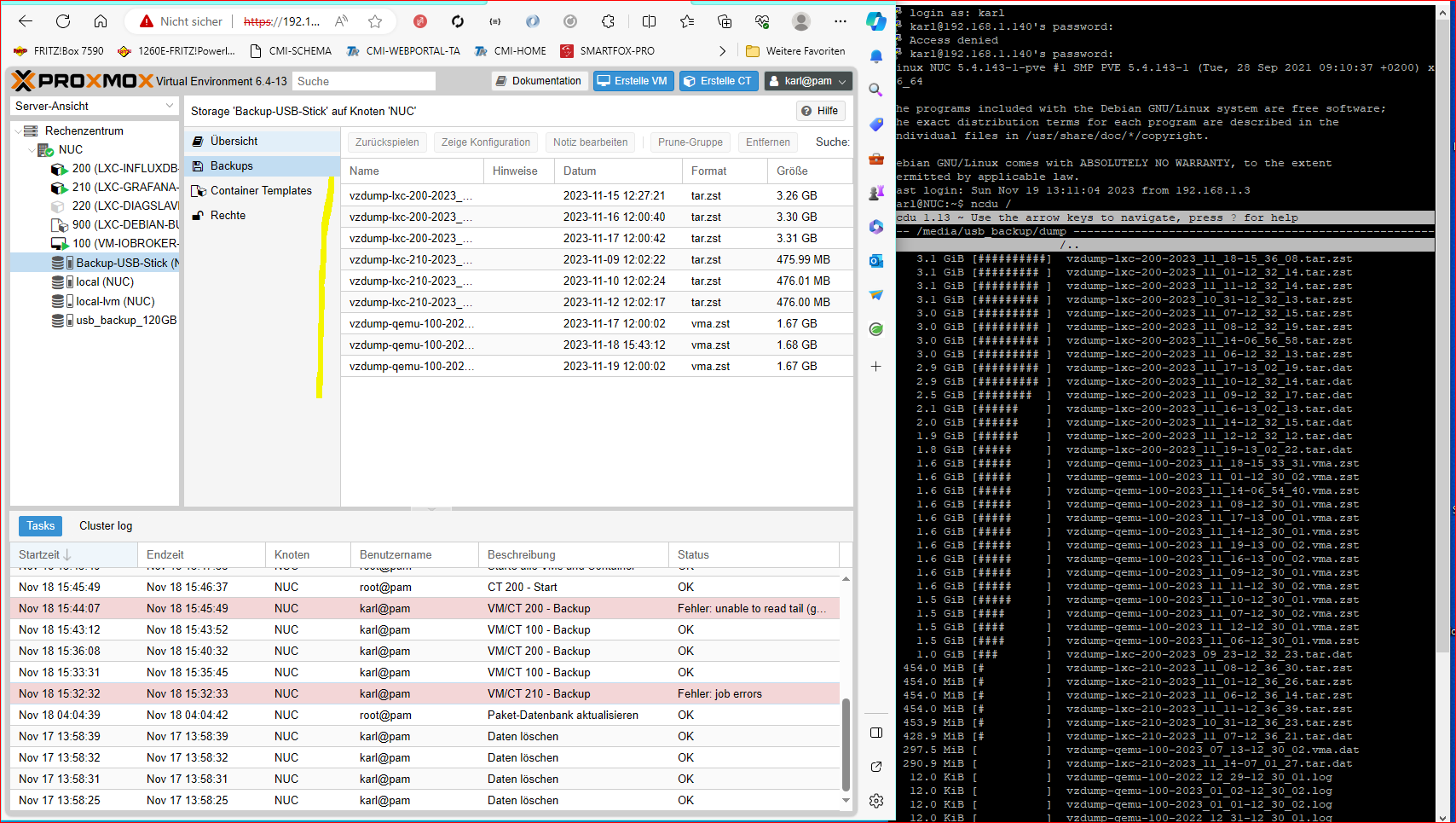
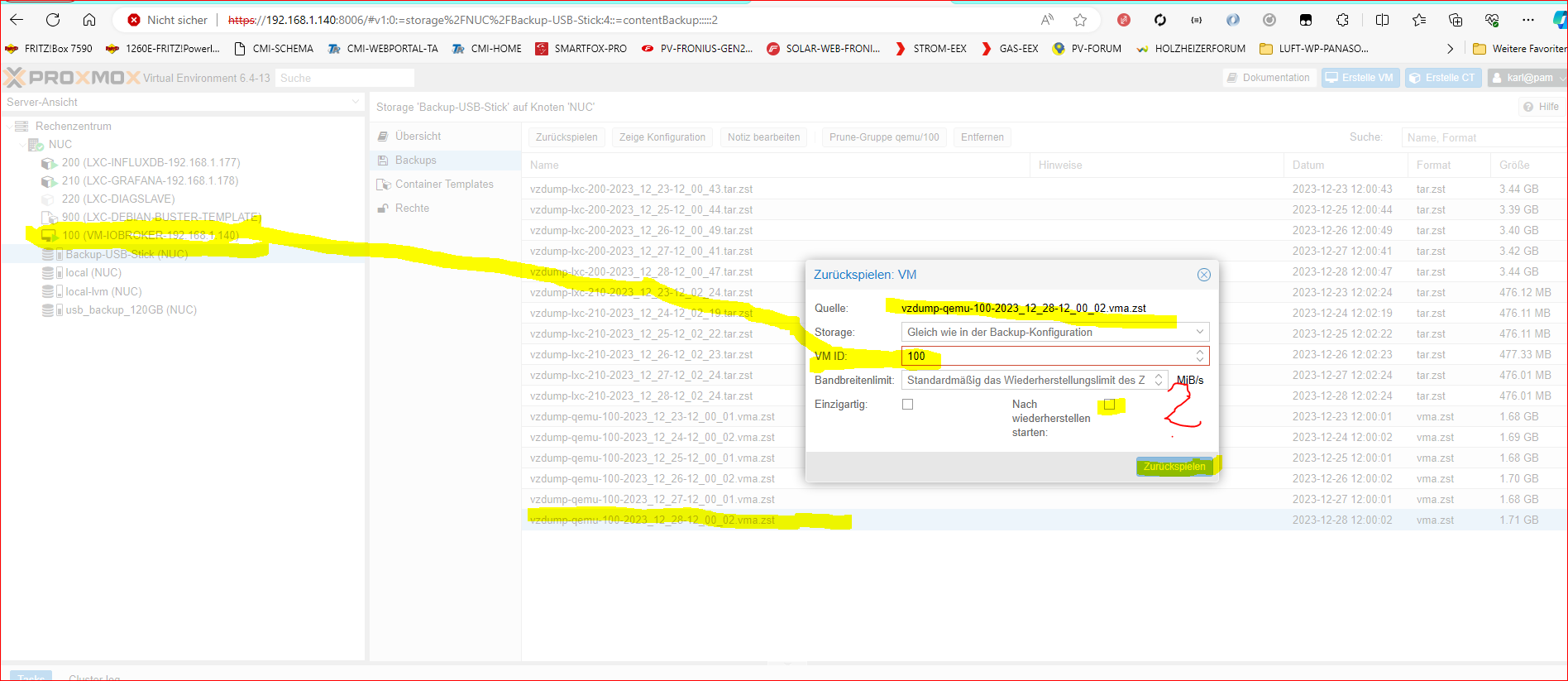
                                          Ich habe mir jetzt mal meine Datensicherungen auf einen meinem 1. USB-Stick angesehen, die letzte ist vom 28.12.2023. Am 3.1.24 habe ich diesen zur Reparatur gebracht.
                                          Beim 2. USB-Stick zeigt er mir nicht die Details.

                                          Könnte ich dies so zurückspielen ?

                                          Danke


                                          d907c8bb-7f4a-4bbe-8003-f7ff07afae93-image.png

                                          HomoranH crunchipC 2 Antworten Letzte Antwort
                                          0
                                          Antworten
                                          • In einem neuen Thema antworten
                                          Anmelden zum Antworten
                                          • Älteste zuerst
                                          • Neuste zuerst
                                          • Meiste Stimmen


                                          Support us

                                          ioBroker
                                          Community Adapters
                                          Donate

                                          460

                                          Online

                                          32.4k

                                          Benutzer

                                          81.5k

                                          Themen

                                          1.3m

                                          Beiträge
                                          Community
                                          Impressum | Datenschutz-Bestimmungen | Nutzungsbedingungen | Einwilligungseinstellungen
                                          ioBroker Community 2014-2025
                                          logo
                                          • Anmelden

                                          • Du hast noch kein Konto? Registrieren

                                          • Anmelden oder registrieren, um zu suchen
                                          • Erster Beitrag
                                            Letzter Beitrag
                                          0
                                          • Home
                                          • Aktuell
                                          • Tags
                                          • Ungelesen 0
                                          • Kategorien
                                          • Unreplied
                                          • Beliebt
                                          • GitHub
                                          • Docu
                                          • Hilfe