




Problem mit Shelly Adapter - Shelly 2.5 Position rot
-
Hallo zusammen,
Ich habe seit zwei Tagen ein seltsames Problem - zwei Shelly 2.5 lassen sich nicht mehr steuern.
Die Shellys werden als Jalousiesteuerung verwendet, so wie noch weitere (welche alle funktionieren). In der Shelly-App kann ich die Geräte steuern, aber in ioB nicht (mehr).
Die Bezeichnung ist grün dargestellt (offensichtlich also richtig verbunden), aber unter Shutter.Position ist der Wert rot und egal was ich dort eintrage, die Jalousie zuckt sich nicht.
Hab den ioB und das System schon mehrmals neu gestartet, die Shellys zurückgesetzt, es hat nichts gebracht. Ich könnte den Router noch mal neu starten, aber da sich beide per Shelly-App steuern lassen, wird das auch nichts bringen.Hat jemand eine Idee?
-
Hallo zusammen,
Ich habe seit zwei Tagen ein seltsames Problem - zwei Shelly 2.5 lassen sich nicht mehr steuern.
Die Shellys werden als Jalousiesteuerung verwendet, so wie noch weitere (welche alle funktionieren). In der Shelly-App kann ich die Geräte steuern, aber in ioB nicht (mehr).
Die Bezeichnung ist grün dargestellt (offensichtlich also richtig verbunden), aber unter Shutter.Position ist der Wert rot und egal was ich dort eintrage, die Jalousie zuckt sich nicht.
Hab den ioB und das System schon mehrmals neu gestartet, die Shellys zurückgesetzt, es hat nichts gebracht. Ich könnte den Router noch mal neu starten, aber da sich beide per Shelly-App steuern lassen, wird das auch nichts bringen.Hat jemand eine Idee?
Und wie immer , mehr Infos bitte.
iob diag
z..B.
und dann noch, womit steuerst du den DP?
Blockly?
Javascript? -
Und wie immer , mehr Infos bitte.
iob diag
z..B.
und dann noch, womit steuerst du den DP?
Blockly?
Javascript?Skript v.2023-10-10 *** BASE SYSTEM *** Static hostname: iobroker Icon name: computer-container Chassis: container ☐ Virtualization: lxc Operating System: Debian GNU/Linux 12 (bookworm) Kernel: Linux 6.5.11-8-pve Architecture: x86-64 model name : Intel(R) Core(TM) i5-10210U CPU @ 1.60GHz Docker : false Virtualization : lxc Kernel : x86_64 Userland : amd64 Systemuptime and Load: 20:31:18 up 1:17, 4 users, load average: 0.29, 0.23, 0.29 CPU threads: 2 *** Time and Time Zones *** Local time: Mon 2024-02-05 20:31:18 CET Universal time: Mon 2024-02-05 19:31:18 UTC RTC time: n/a Time zone: Europe/Berlin (CET, +0100) System clock synchronized: yes NTP service: inactive RTC in local TZ: no *** User and Groups *** mn /home/mn mn adm dialout sudo users iobroker *** X-Server-Setup *** X-Server: false Desktop: Terminal: tty Boot Target: graphical.target *** MEMORY *** total used free shared buff/cache available Mem: 4.3G 2.1G 1.6G 139K 637M 2.2G Swap: 536M 0B 536M Total: 4.8G 2.1G 2.1G 4096 M total memory 1965 M used memory 1921 M active memory 485 M inactive memory 1522 M free memory 0 M buffer memory 608 M swap cache 512 M total swap 0 M used swap 512 M free swap *** FAILED SERVICES *** UNIT LOAD ACTIVE SUB DESCRIPTION * run-rpc_pipefs.mount loaded failed failed RPC Pipe File System * sys-kernel-config.mount loaded failed failed Kernel Configuration File System LOAD = Reflects whether the unit definition was properly loaded. ACTIVE = The high-level unit activation state, i.e. generalization of SUB. SUB = The low-level unit activation state, values depend on unit type. 2 loaded units listed. *** FILESYSTEM *** Filesystem Type Size Used Avail Use% Mounted on /dev/mapper/pve-vm--101--disk--0 ext4 7.8G 3.7G 3.8G 50% / none tmpfs 492K 4.0K 488K 1% /dev /dev/mapper/pve-root ext4 94G 6.2G 83G 7% /dev/ttyACM0 udev devtmpfs 32G 0 32G 0% /dev/tty tmpfs tmpfs 32G 0 32G 0% /dev/shm tmpfs tmpfs 13G 128K 13G 1% /run tmpfs tmpfs 5.0M 0 5.0M 0% /run/lock tmpfs tmpfs 6.3G 0 6.3G 0% /run/user/1001 Messages concerning ext4 filesystem in dmesg: dmesg: read kernel buffer failed: Operation not permitted Show mounted filesystems \(real ones only\): TARGET SOURCE FSTYPE OPTIONS / /dev/mapper/pve-vm--101--disk--0 ext4 rw,relatime,stripe=16 `-/dev/ttyACM0 /dev/mapper/pve-root[/var/lib/lxc/101/devices/ttyACM0] ext4 rw,relatime,errors=remount-ro Files in neuralgic directories: /var: 700M /var/ 306M /var/cache 302M /var/cache/apt 248M /var/log 247M /var/log/journal/105f04df101b4fd9aa5af34dea5da7f8 Archived and active journals take up 246.9M in the file system. /opt/iobroker/backups: 48M /opt/iobroker/backups/ /opt/iobroker/iobroker-data: 325M /opt/iobroker/iobroker-data/ 193M /opt/iobroker/iobroker-data/files 105M /opt/iobroker/iobroker-data/backup-objects 67M /opt/iobroker/iobroker-data/files/javascript.admin 48M /opt/iobroker/iobroker-data/files/javascript.admin/static The five largest files in iobroker-data are: 22M /opt/iobroker/iobroker-data/files/web.admin/static/js/main.c05ba1d3.js.map 22M /opt/iobroker/iobroker-data/files/modbus.admin/static/js/main.578d79d9.js.map 21M /opt/iobroker/iobroker-data/objects.jsonl 8.8M /opt/iobroker/iobroker-data/files/modbus.admin/static/js/main.578d79d9.js 8.3M /opt/iobroker/iobroker-data/files/web.admin/static/js/main.c05ba1d3.js USB-Devices by-id: USB-Sticks - Avoid direct links to /dev/* in your adapter setups, please always prefer the links 'by-id': /dev/serial/by-id/usb-dresden_elektronik_ingenieurtechnik_GmbH_ConBee_II_DE2285504-if00 *** NodeJS-Installation *** /usr/bin/nodejs v18.19.0 /usr/bin/node v18.19.0 /usr/bin/npm 10.2.3 /usr/bin/npx 10.2.3 /usr/bin/corepack 0.22.0 nodejs: Installed: 18.19.0-1nodesource1 Candidate: 18.19.0-1nodesource1 Version table: 18.19.0+dfsg-6~deb12u1 500 500 http://security.debian.org bookworm-security/main amd64 Packages *** 18.19.0-1nodesource1 1001 500 https://deb.nodesource.com/node_18.x nodistro/main amd64 Packages 100 /var/lib/dpkg/status 18.18.2-1nodesource1 1001 500 https://deb.nodesource.com/node_18.x nodistro/main amd64 Packages 18.18.1-1nodesource1 1001 500 https://deb.nodesource.com/node_18.x nodistro/main amd64 Packages 18.18.0-1nodesource1 1001 500 https://deb.nodesource.com/node_18.x nodistro/main amd64 Packages 18.17.1-1nodesource1 1001 500 https://deb.nodesource.com/node_18.x nodistro/main amd64 Packages 18.17.0-1nodesource1 1001 500 https://deb.nodesource.com/node_18.x nodistro/main amd64 Packages 18.16.1-1nodesource1 1001 500 https://deb.nodesource.com/node_18.x nodistro/main amd64 Packages 18.16.0-1nodesource1 1001 500 https://deb.nodesource.com/node_18.x nodistro/main amd64 Packages 18.15.0-1nodesource1 1001 500 https://deb.nodesource.com/node_18.x nodistro/main amd64 Packages 18.14.2-1nodesource1 1001 500 https://deb.nodesource.com/node_18.x nodistro/main amd64 Packages 18.14.1-1nodesource1 1001 500 https://deb.nodesource.com/node_18.x nodistro/main amd64 Packages 18.14.0-1nodesource1 1001 500 https://deb.nodesource.com/node_18.x nodistro/main amd64 Packages 18.13.0+dfsg1-1 500 500 http://deb.debian.org/debian bookworm/main amd64 Packages 18.13.0-1nodesource1 1001 500 https://deb.nodesource.com/node_18.x nodistro/main amd64 Packages 18.12.0-1nodesource1 1001 500 https://deb.nodesource.com/node_18.x nodistro/main amd64 Packages 18.11.0-1nodesource1 1001 500 https://deb.nodesource.com/node_18.x nodistro/main amd64 Packages 18.10.0-1nodesource1 1001 500 https://deb.nodesource.com/node_18.x nodistro/main amd64 Packages 18.9.1-1nodesource1 1001 500 https://deb.nodesource.com/node_18.x nodistro/main amd64 Packages 18.9.0-1nodesource1 1001 500 https://deb.nodesource.com/node_18.x nodistro/main amd64 Packages 18.8.0-1nodesource1 1001 500 https://deb.nodesource.com/node_18.x nodistro/main amd64 Packages 18.7.0-1nodesource1 1001 500 https://deb.nodesource.com/node_18.x nodistro/main amd64 Packages 18.6.0-1nodesource1 1001 500 https://deb.nodesource.com/node_18.x nodistro/main amd64 Packages 18.5.0-1nodesource1 1001 500 https://deb.nodesource.com/node_18.x nodistro/main amd64 Packages 18.4.0-1nodesource1 1001 500 https://deb.nodesource.com/node_18.x nodistro/main amd64 Packages 18.3.0-1nodesource1 1001 500 https://deb.nodesource.com/node_18.x nodistro/main amd64 Packages 18.2.0-1nodesource1 1001 500 https://deb.nodesource.com/node_18.x nodistro/main amd64 Packages 18.1.0-1nodesource1 1001 500 https://deb.nodesource.com/node_18.x nodistro/main amd64 Packages 18.0.0-1nodesource1 1001 500 https://deb.nodesource.com/node_18.x nodistro/main amd64 Packages Temp directories causing npm8 problem: 0 No problems detected Errors in npm tree: *** ioBroker-Installation *** ioBroker Status iobroker is running on this host. Objects type: jsonl States type: jsonl Core adapters versions js-controller: 5.0.17 admin: 6.13.16 javascript: 7.1.6 Adapters from github: 2 Adapter State + system.adapter.admin.0 : admin : iobroker - enabled, port: 8081, bind: 0.0.0.0, run as: admin system.adapter.alarm.0 : alarm : iobroker - disabled + system.adapter.backitup.0 : backitup : iobroker - enabled + system.adapter.cloud.0 : cloud : iobroker - enabled + system.adapter.discovery.0 : discovery : iobroker - enabled + system.adapter.eusec.0 : eusec : iobroker - enabled system.adapter.feiertage.0 : feiertage : iobroker - enabled system.adapter.flot.0 : flot : iobroker - disabled + system.adapter.followthesun.0 : followthesun : iobroker - enabled + system.adapter.javascript.0 : javascript : iobroker - enabled + system.adapter.logparser.0 : logparser : iobroker - enabled + system.adapter.modbus.0 : modbus : iobroker - enabled + system.adapter.mqtt.0 : mqtt : iobroker - enabled, port: 1886, bind: 0.0.0.0 + system.adapter.shelly.0 : shelly : iobroker - enabled, port: 1882, bind: 0.0.0.0 + system.adapter.shelly.1 : shelly : iobroker - enabled, port: 1883, bind: 0.0.0.0 + system.adapter.shuttercontrol.0 : shuttercontrol : iobroker - enabled + system.adapter.shuttercontrol.1 : shuttercontrol : iobroker - enabled + system.adapter.simple-api.0 : simple-api : iobroker - enabled, port: 8087, bind: 0.0.0.0, run as: admin + system.adapter.telegram.0 : telegram : iobroker - enabled, port: 8443, bind: 0.0.0.0 + system.adapter.tuya.0 : tuya : iobroker - enabled system.adapter.viessmannapi.0 : viessmannapi : iobroker - disabled system.adapter.vis-map.0 : vis-map : iobroker - disabled system.adapter.vis-materialdesign.0 : vis-materialdesign : iobroker - disabled system.adapter.vis.0 : vis : iobroker - enabled + system.adapter.vw-connect.0 : vw-connect : iobroker - enabled system.adapter.weatherunderground.0 : weatherunderground : iobroker - enabled + system.adapter.web.0 : web : iobroker - enabled, port: 8082, bind: 0.0.0.0, run as: admin + system.adapter.yahka.0 : yahka : iobroker - enabled + system.adapter.zigbee.0 : zigbee : iobroker - enabled, port: /dev/ttyACM0 + instance is alive Enabled adapters with bindings + system.adapter.admin.0 : admin : iobroker - enabled, port: 8081, bind: 0.0.0.0, run as: admin + system.adapter.mqtt.0 : mqtt : iobroker - enabled, port: 1886, bind: 0.0.0.0 + system.adapter.shelly.0 : shelly : iobroker - enabled, port: 1882, bind: 0.0.0.0 + system.adapter.shelly.1 : shelly : iobroker - enabled, port: 1883, bind: 0.0.0.0 + system.adapter.simple-api.0 : simple-api : iobroker - enabled, port: 8087, bind: 0.0.0.0, run as: admin + system.adapter.telegram.0 : telegram : iobroker - enabled, port: 8443, bind: 0.0.0.0 + system.adapter.web.0 : web : iobroker - enabled, port: 8082, bind: 0.0.0.0, run as: admin + system.adapter.zigbee.0 : zigbee : iobroker - enabled, port: /dev/ttyACM0 ioBroker-Repositories stable : https://download.iobroker.net/sources-dist.json beta : https://download.iobroker.net/sources-dist-latest.json live-stable : http://iobroker.live/repo/sources-dist.json live-beta : http://iobroker.live/repo/sources-dist-latest.json Active repo(s): stable Installed ioBroker-Instances Used repository: stable Adapter "admin" : 6.13.16 , installed 6.13.16 Adapter "alarm" : 3.6.0 , installed 3.6.0 Adapter "backitup" : 2.9.8 , installed 2.9.8 Adapter "cloud" : 4.4.1 , installed 4.4.1 Adapter "discovery" : 4.2.0 , installed 4.2.0 Adapter "eusec" : 1.2.1 , installed 1.2.1 Adapter "feiertage" : 1.1.4 , installed 1.1.4 Adapter "flot" : 1.12.0 , installed 1.12.0 Adapter "followthesun" : 0.5.0 , installed 0.5.0 Adapter "javascript" : 7.1.6 , installed 7.1.6 Controller "js-controller": 5.0.17 , installed 5.0.17 Adapter "logparser" : 2.2.1 , installed 2.2.1 Adapter "modbus" : 6.1.0 , installed 6.1.0 Adapter "mqtt" : 5.1.0 , installed 5.1.0 Adapter "shelly" : 6.6.1 , installed 6.6.1 Adapter "shuttercontrol": 1.6.3 , installed 1.6.3 Adapter "simple-api" : 2.7.2 , installed 2.7.2 Adapter "socketio" : 6.6.0 , installed 6.6.0 Adapter "telegram" : 3.0.1 , installed 3.0.1 Adapter "tuya" : 3.15.0 , installed 3.15.0 Adapter "viessmannapi" : 2.3.0 , installed 2.3.0 Adapter "vis" : 1.5.4 , installed 1.5.4 Adapter "vis-map" : 1.0.4 , installed 1.0.4 Adapter "vis-materialdesign": 0.5.9, installed 0.5.9 Adapter "vw-connect" : 0.0.67 , installed 0.1.3 Adapter "weatherunderground": 3.6.0, installed 3.6.0 Adapter "web" : 6.2.3 , installed 6.2.3 Adapter "ws" : 2.5.10 , installed 2.5.10 Adapter "yahka" : 1.0.3 , installed 1.0.3 Adapter "zigbee" : 1.10.1 , installed 1.10.1 Objects and States Please stand by - This may take a while Objects: 11953 States: 9388 *** OS-Repositories and Updates *** Hit:1 http://deb.debian.org/debian bookworm InRelease Hit:2 http://security.debian.org bookworm-security InRelease Hit:3 http://deb.debian.org/debian bookworm-updates InRelease Hit:4 https://deb.nodesource.com/node_18.x nodistro InRelease Reading package lists... Pending Updates: 0 *** Listening Ports *** Active Internet connections (only servers) Proto Recv-Q Send-Q Local Address Foreign Address State User Inode PID/Program name tcp 0 0 0.0.0.0:8555 0.0.0.0:* LISTEN 1000 1690163 2200/go2rtc tcp 0 0 127.0.0.1:9001 0.0.0.0:* LISTEN 1000 1687127 1913/iobroker.js-co tcp 0 0 127.0.0.1:9000 0.0.0.0:* LISTEN 1000 1688015 1913/iobroker.js-co tcp 0 0 0.0.0.0:111 0.0.0.0:* LISTEN 0 1598978 1/init tcp 0 0 0.0.0.0:1883 0.0.0.0:* LISTEN 1000 1688301 2034/io.shelly.1 tcp 0 0 0.0.0.0:1887 0.0.0.0:* LISTEN 1000 1688213 2004/io.mqtt.0 tcp 0 0 0.0.0.0:1886 0.0.0.0:* LISTEN 1000 1688212 2004/io.mqtt.0 tcp 0 0 127.0.0.1:38951 0.0.0.0:* LISTEN 1000 1693153 2298/io.yahka.0 tcp 0 0 127.0.0.1:25 0.0.0.0:* LISTEN 0 1602640 302/master tcp6 0 0 :::8554 :::* LISTEN 1000 1690158 2200/go2rtc tcp6 0 0 :::43617 :::* LISTEN 1000 1693938 2298/io.yahka.0 tcp6 0 0 :::111 :::* LISTEN 0 1598980 1/init tcp6 0 0 :::22 :::* LISTEN 0 1596297 1/init tcp6 0 0 :::1984 :::* LISTEN 1000 1690157 2200/go2rtc tcp6 0 0 ::1:25 :::* LISTEN 0 1602641 302/master tcp6 0 0 :::8082 :::* LISTEN 1000 1690746 2125/io.web.0 tcp6 0 0 :::8081 :::* LISTEN 1000 1688092 1932/io.admin.0 tcp6 0 0 :::8087 :::* LISTEN 1000 1692839 2268/io.simple-api. udp 0 0 0.0.0.0:111 0.0.0.0:* 0 1598979 1/init udp 0 0 0.0.0.0:5353 0.0.0.0:* 1000 1693939 2298/io.yahka.0 udp 0 0 0.0.0.0:5683 0.0.0.0:* 1000 1688254 2019/io.shelly.0 udp 0 0 0.0.0.0:6666 0.0.0.0:* 1000 1687505 2049/io.tuya.0 udp 0 0 0.0.0.0:6667 0.0.0.0:* 1000 1687506 2049/io.tuya.0 udp 0 0 0.0.0.0:40295 0.0.0.0:* 1000 1690104 2170/io.eusec.0 udp 0 0 0.0.0.0:8555 0.0.0.0:* 1000 1690159 2200/go2rtc udp 0 0 0.0.0.0:44352 0.0.0.0:* 1000 1691187 2170/io.eusec.0 udp6 0 0 :::111 :::* 0 1598981 1/init *** Log File - Last 25 Lines *** 2024-02-05 19:50:44.994 - error: eusec.0 (2170) Station: T8010P2320100018 command CMD_SDINFO_EX failed with error: undefined (-148) 2024-02-05 19:50:45.028 - error: eusec.0 (2170) Station: T8010N2320201304 command CMD_SDINFO_EX failed with error: undefined (-148) 2024-02-05 19:52:49.298 - warn: zigbee.0 (2079) DeviceAvailability:Stopping to ping 0xa4c1382ad59e8217 TS011F after 4 ping attempts 2024-02-05 19:53:52.712 - error: vw-connect.0 (2283) restart adapter in 10min 2024-02-05 19:53:52.712 - warn: vw-connect.0 (2283) Restart initiated 2024-02-05 19:53:52.712 - info: vw-connect.0 (2283) cleaned everything up... 2024-02-05 19:53:52.715 - info: vw-connect.0 (2283) terminating 2024-02-05 19:53:52.715 - info: vw-connect.0 (2283) Terminated (NO_ERROR): Without reason 2024-02-05 19:53:53.214 - info: vw-connect.0 (2283) terminating 2024-02-05 19:54:23.906 - info: vw-connect.0 (2689) starting. Version 0.1.3 (non-npm: TA2k/ioBroker.vw-connect#d6af9940664239b28c563db9ca1eadf10d6b5ce5) in /opt/iobroker/node_modules/iobroker.vw-connect, node: v18.19.0, js-controller: 5.0.17 2024-02-05 19:54:23.914 - info: vw-connect.0 (2689) Login in with id 2024-02-05 19:54:26.306 - info: vw-connect.0 (2689) ID login successfull 2024-02-05 19:54:26.306 - info: vw-connect.0 (2689) History limit: -1, set to -1 to disable wallcharging login 2024-02-05 19:54:26.306 - info: vw-connect.0 (2689) History limit is set to -1, no wall charging login 2024-02-05 19:54:26.306 - info: vw-connect.0 (2689) Login successful 2024-02-05 19:54:27.179 - info: vw-connect.0 (2689) Found 1 vehicles 2024-02-05 19:54:27.179 - info: vw-connect.0 (2689) Create vehicle WVGZZZCR7RD005807 2024-02-05 20:00:46.041 - error: eusec.0 (2170) Station: T8010P2320100018 command CMD_SDINFO_EX failed with error: undefined (-148) 2024-02-05 20:00:46.060 - error: eusec.0 (2170) Station: T8010N2320201304 command CMD_SDINFO_EX failed with error: undefined (-148) 2024-02-05 20:10:47.174 - error: eusec.0 (2170) Station: T8010N2320201304 command CMD_SDINFO_EX failed with error: undefined (-148) 2024-02-05 20:10:47.194 - error: eusec.0 (2170) Station: T8010P2320100018 command CMD_SDINFO_EX failed with error: undefined (-148) 2024-02-05 20:20:48.320 - error: eusec.0 (2170) Station: T8010P2320100018 command CMD_SDINFO_EX failed with error: undefined (-148) 2024-02-05 20:20:48.323 - error: eusec.0 (2170) Station: T8010N2320201304 command CMD_SDINFO_EX failed with error: undefined (-148) 2024-02-05 20:30:49.318 - error: eusec.0 (2170) Station: T8010P2320100018 command CMD_SDINFO_EX failed with error: undefined (-148) 2024-02-05 20:30:49.338 - error: eusec.0 (2170) Station: T8010N2320201304 command CMD_SDINFO_EX failed with error: undefined (-148)Steuerung eigentlich mit Shuttercontrol, zum Test im Moment allerdings per Hand.
-
Skript v.2023-10-10 *** BASE SYSTEM *** Static hostname: iobroker Icon name: computer-container Chassis: container ☐ Virtualization: lxc Operating System: Debian GNU/Linux 12 (bookworm) Kernel: Linux 6.5.11-8-pve Architecture: x86-64 model name : Intel(R) Core(TM) i5-10210U CPU @ 1.60GHz Docker : false Virtualization : lxc Kernel : x86_64 Userland : amd64 Systemuptime and Load: 20:31:18 up 1:17, 4 users, load average: 0.29, 0.23, 0.29 CPU threads: 2 *** Time and Time Zones *** Local time: Mon 2024-02-05 20:31:18 CET Universal time: Mon 2024-02-05 19:31:18 UTC RTC time: n/a Time zone: Europe/Berlin (CET, +0100) System clock synchronized: yes NTP service: inactive RTC in local TZ: no *** User and Groups *** mn /home/mn mn adm dialout sudo users iobroker *** X-Server-Setup *** X-Server: false Desktop: Terminal: tty Boot Target: graphical.target *** MEMORY *** total used free shared buff/cache available Mem: 4.3G 2.1G 1.6G 139K 637M 2.2G Swap: 536M 0B 536M Total: 4.8G 2.1G 2.1G 4096 M total memory 1965 M used memory 1921 M active memory 485 M inactive memory 1522 M free memory 0 M buffer memory 608 M swap cache 512 M total swap 0 M used swap 512 M free swap *** FAILED SERVICES *** UNIT LOAD ACTIVE SUB DESCRIPTION * run-rpc_pipefs.mount loaded failed failed RPC Pipe File System * sys-kernel-config.mount loaded failed failed Kernel Configuration File System LOAD = Reflects whether the unit definition was properly loaded. ACTIVE = The high-level unit activation state, i.e. generalization of SUB. SUB = The low-level unit activation state, values depend on unit type. 2 loaded units listed. *** FILESYSTEM *** Filesystem Type Size Used Avail Use% Mounted on /dev/mapper/pve-vm--101--disk--0 ext4 7.8G 3.7G 3.8G 50% / none tmpfs 492K 4.0K 488K 1% /dev /dev/mapper/pve-root ext4 94G 6.2G 83G 7% /dev/ttyACM0 udev devtmpfs 32G 0 32G 0% /dev/tty tmpfs tmpfs 32G 0 32G 0% /dev/shm tmpfs tmpfs 13G 128K 13G 1% /run tmpfs tmpfs 5.0M 0 5.0M 0% /run/lock tmpfs tmpfs 6.3G 0 6.3G 0% /run/user/1001 Messages concerning ext4 filesystem in dmesg: dmesg: read kernel buffer failed: Operation not permitted Show mounted filesystems \(real ones only\): TARGET SOURCE FSTYPE OPTIONS / /dev/mapper/pve-vm--101--disk--0 ext4 rw,relatime,stripe=16 `-/dev/ttyACM0 /dev/mapper/pve-root[/var/lib/lxc/101/devices/ttyACM0] ext4 rw,relatime,errors=remount-ro Files in neuralgic directories: /var: 700M /var/ 306M /var/cache 302M /var/cache/apt 248M /var/log 247M /var/log/journal/105f04df101b4fd9aa5af34dea5da7f8 Archived and active journals take up 246.9M in the file system. /opt/iobroker/backups: 48M /opt/iobroker/backups/ /opt/iobroker/iobroker-data: 325M /opt/iobroker/iobroker-data/ 193M /opt/iobroker/iobroker-data/files 105M /opt/iobroker/iobroker-data/backup-objects 67M /opt/iobroker/iobroker-data/files/javascript.admin 48M /opt/iobroker/iobroker-data/files/javascript.admin/static The five largest files in iobroker-data are: 22M /opt/iobroker/iobroker-data/files/web.admin/static/js/main.c05ba1d3.js.map 22M /opt/iobroker/iobroker-data/files/modbus.admin/static/js/main.578d79d9.js.map 21M /opt/iobroker/iobroker-data/objects.jsonl 8.8M /opt/iobroker/iobroker-data/files/modbus.admin/static/js/main.578d79d9.js 8.3M /opt/iobroker/iobroker-data/files/web.admin/static/js/main.c05ba1d3.js USB-Devices by-id: USB-Sticks - Avoid direct links to /dev/* in your adapter setups, please always prefer the links 'by-id': /dev/serial/by-id/usb-dresden_elektronik_ingenieurtechnik_GmbH_ConBee_II_DE2285504-if00 *** NodeJS-Installation *** /usr/bin/nodejs v18.19.0 /usr/bin/node v18.19.0 /usr/bin/npm 10.2.3 /usr/bin/npx 10.2.3 /usr/bin/corepack 0.22.0 nodejs: Installed: 18.19.0-1nodesource1 Candidate: 18.19.0-1nodesource1 Version table: 18.19.0+dfsg-6~deb12u1 500 500 http://security.debian.org bookworm-security/main amd64 Packages *** 18.19.0-1nodesource1 1001 500 https://deb.nodesource.com/node_18.x nodistro/main amd64 Packages 100 /var/lib/dpkg/status 18.18.2-1nodesource1 1001 500 https://deb.nodesource.com/node_18.x nodistro/main amd64 Packages 18.18.1-1nodesource1 1001 500 https://deb.nodesource.com/node_18.x nodistro/main amd64 Packages 18.18.0-1nodesource1 1001 500 https://deb.nodesource.com/node_18.x nodistro/main amd64 Packages 18.17.1-1nodesource1 1001 500 https://deb.nodesource.com/node_18.x nodistro/main amd64 Packages 18.17.0-1nodesource1 1001 500 https://deb.nodesource.com/node_18.x nodistro/main amd64 Packages 18.16.1-1nodesource1 1001 500 https://deb.nodesource.com/node_18.x nodistro/main amd64 Packages 18.16.0-1nodesource1 1001 500 https://deb.nodesource.com/node_18.x nodistro/main amd64 Packages 18.15.0-1nodesource1 1001 500 https://deb.nodesource.com/node_18.x nodistro/main amd64 Packages 18.14.2-1nodesource1 1001 500 https://deb.nodesource.com/node_18.x nodistro/main amd64 Packages 18.14.1-1nodesource1 1001 500 https://deb.nodesource.com/node_18.x nodistro/main amd64 Packages 18.14.0-1nodesource1 1001 500 https://deb.nodesource.com/node_18.x nodistro/main amd64 Packages 18.13.0+dfsg1-1 500 500 http://deb.debian.org/debian bookworm/main amd64 Packages 18.13.0-1nodesource1 1001 500 https://deb.nodesource.com/node_18.x nodistro/main amd64 Packages 18.12.0-1nodesource1 1001 500 https://deb.nodesource.com/node_18.x nodistro/main amd64 Packages 18.11.0-1nodesource1 1001 500 https://deb.nodesource.com/node_18.x nodistro/main amd64 Packages 18.10.0-1nodesource1 1001 500 https://deb.nodesource.com/node_18.x nodistro/main amd64 Packages 18.9.1-1nodesource1 1001 500 https://deb.nodesource.com/node_18.x nodistro/main amd64 Packages 18.9.0-1nodesource1 1001 500 https://deb.nodesource.com/node_18.x nodistro/main amd64 Packages 18.8.0-1nodesource1 1001 500 https://deb.nodesource.com/node_18.x nodistro/main amd64 Packages 18.7.0-1nodesource1 1001 500 https://deb.nodesource.com/node_18.x nodistro/main amd64 Packages 18.6.0-1nodesource1 1001 500 https://deb.nodesource.com/node_18.x nodistro/main amd64 Packages 18.5.0-1nodesource1 1001 500 https://deb.nodesource.com/node_18.x nodistro/main amd64 Packages 18.4.0-1nodesource1 1001 500 https://deb.nodesource.com/node_18.x nodistro/main amd64 Packages 18.3.0-1nodesource1 1001 500 https://deb.nodesource.com/node_18.x nodistro/main amd64 Packages 18.2.0-1nodesource1 1001 500 https://deb.nodesource.com/node_18.x nodistro/main amd64 Packages 18.1.0-1nodesource1 1001 500 https://deb.nodesource.com/node_18.x nodistro/main amd64 Packages 18.0.0-1nodesource1 1001 500 https://deb.nodesource.com/node_18.x nodistro/main amd64 Packages Temp directories causing npm8 problem: 0 No problems detected Errors in npm tree: *** ioBroker-Installation *** ioBroker Status iobroker is running on this host. Objects type: jsonl States type: jsonl Core adapters versions js-controller: 5.0.17 admin: 6.13.16 javascript: 7.1.6 Adapters from github: 2 Adapter State + system.adapter.admin.0 : admin : iobroker - enabled, port: 8081, bind: 0.0.0.0, run as: admin system.adapter.alarm.0 : alarm : iobroker - disabled + system.adapter.backitup.0 : backitup : iobroker - enabled + system.adapter.cloud.0 : cloud : iobroker - enabled + system.adapter.discovery.0 : discovery : iobroker - enabled + system.adapter.eusec.0 : eusec : iobroker - enabled system.adapter.feiertage.0 : feiertage : iobroker - enabled system.adapter.flot.0 : flot : iobroker - disabled + system.adapter.followthesun.0 : followthesun : iobroker - enabled + system.adapter.javascript.0 : javascript : iobroker - enabled + system.adapter.logparser.0 : logparser : iobroker - enabled + system.adapter.modbus.0 : modbus : iobroker - enabled + system.adapter.mqtt.0 : mqtt : iobroker - enabled, port: 1886, bind: 0.0.0.0 + system.adapter.shelly.0 : shelly : iobroker - enabled, port: 1882, bind: 0.0.0.0 + system.adapter.shelly.1 : shelly : iobroker - enabled, port: 1883, bind: 0.0.0.0 + system.adapter.shuttercontrol.0 : shuttercontrol : iobroker - enabled + system.adapter.shuttercontrol.1 : shuttercontrol : iobroker - enabled + system.adapter.simple-api.0 : simple-api : iobroker - enabled, port: 8087, bind: 0.0.0.0, run as: admin + system.adapter.telegram.0 : telegram : iobroker - enabled, port: 8443, bind: 0.0.0.0 + system.adapter.tuya.0 : tuya : iobroker - enabled system.adapter.viessmannapi.0 : viessmannapi : iobroker - disabled system.adapter.vis-map.0 : vis-map : iobroker - disabled system.adapter.vis-materialdesign.0 : vis-materialdesign : iobroker - disabled system.adapter.vis.0 : vis : iobroker - enabled + system.adapter.vw-connect.0 : vw-connect : iobroker - enabled system.adapter.weatherunderground.0 : weatherunderground : iobroker - enabled + system.adapter.web.0 : web : iobroker - enabled, port: 8082, bind: 0.0.0.0, run as: admin + system.adapter.yahka.0 : yahka : iobroker - enabled + system.adapter.zigbee.0 : zigbee : iobroker - enabled, port: /dev/ttyACM0 + instance is alive Enabled adapters with bindings + system.adapter.admin.0 : admin : iobroker - enabled, port: 8081, bind: 0.0.0.0, run as: admin + system.adapter.mqtt.0 : mqtt : iobroker - enabled, port: 1886, bind: 0.0.0.0 + system.adapter.shelly.0 : shelly : iobroker - enabled, port: 1882, bind: 0.0.0.0 + system.adapter.shelly.1 : shelly : iobroker - enabled, port: 1883, bind: 0.0.0.0 + system.adapter.simple-api.0 : simple-api : iobroker - enabled, port: 8087, bind: 0.0.0.0, run as: admin + system.adapter.telegram.0 : telegram : iobroker - enabled, port: 8443, bind: 0.0.0.0 + system.adapter.web.0 : web : iobroker - enabled, port: 8082, bind: 0.0.0.0, run as: admin + system.adapter.zigbee.0 : zigbee : iobroker - enabled, port: /dev/ttyACM0 ioBroker-Repositories stable : https://download.iobroker.net/sources-dist.json beta : https://download.iobroker.net/sources-dist-latest.json live-stable : http://iobroker.live/repo/sources-dist.json live-beta : http://iobroker.live/repo/sources-dist-latest.json Active repo(s): stable Installed ioBroker-Instances Used repository: stable Adapter "admin" : 6.13.16 , installed 6.13.16 Adapter "alarm" : 3.6.0 , installed 3.6.0 Adapter "backitup" : 2.9.8 , installed 2.9.8 Adapter "cloud" : 4.4.1 , installed 4.4.1 Adapter "discovery" : 4.2.0 , installed 4.2.0 Adapter "eusec" : 1.2.1 , installed 1.2.1 Adapter "feiertage" : 1.1.4 , installed 1.1.4 Adapter "flot" : 1.12.0 , installed 1.12.0 Adapter "followthesun" : 0.5.0 , installed 0.5.0 Adapter "javascript" : 7.1.6 , installed 7.1.6 Controller "js-controller": 5.0.17 , installed 5.0.17 Adapter "logparser" : 2.2.1 , installed 2.2.1 Adapter "modbus" : 6.1.0 , installed 6.1.0 Adapter "mqtt" : 5.1.0 , installed 5.1.0 Adapter "shelly" : 6.6.1 , installed 6.6.1 Adapter "shuttercontrol": 1.6.3 , installed 1.6.3 Adapter "simple-api" : 2.7.2 , installed 2.7.2 Adapter "socketio" : 6.6.0 , installed 6.6.0 Adapter "telegram" : 3.0.1 , installed 3.0.1 Adapter "tuya" : 3.15.0 , installed 3.15.0 Adapter "viessmannapi" : 2.3.0 , installed 2.3.0 Adapter "vis" : 1.5.4 , installed 1.5.4 Adapter "vis-map" : 1.0.4 , installed 1.0.4 Adapter "vis-materialdesign": 0.5.9, installed 0.5.9 Adapter "vw-connect" : 0.0.67 , installed 0.1.3 Adapter "weatherunderground": 3.6.0, installed 3.6.0 Adapter "web" : 6.2.3 , installed 6.2.3 Adapter "ws" : 2.5.10 , installed 2.5.10 Adapter "yahka" : 1.0.3 , installed 1.0.3 Adapter "zigbee" : 1.10.1 , installed 1.10.1 Objects and States Please stand by - This may take a while Objects: 11953 States: 9388 *** OS-Repositories and Updates *** Hit:1 http://deb.debian.org/debian bookworm InRelease Hit:2 http://security.debian.org bookworm-security InRelease Hit:3 http://deb.debian.org/debian bookworm-updates InRelease Hit:4 https://deb.nodesource.com/node_18.x nodistro InRelease Reading package lists... Pending Updates: 0 *** Listening Ports *** Active Internet connections (only servers) Proto Recv-Q Send-Q Local Address Foreign Address State User Inode PID/Program name tcp 0 0 0.0.0.0:8555 0.0.0.0:* LISTEN 1000 1690163 2200/go2rtc tcp 0 0 127.0.0.1:9001 0.0.0.0:* LISTEN 1000 1687127 1913/iobroker.js-co tcp 0 0 127.0.0.1:9000 0.0.0.0:* LISTEN 1000 1688015 1913/iobroker.js-co tcp 0 0 0.0.0.0:111 0.0.0.0:* LISTEN 0 1598978 1/init tcp 0 0 0.0.0.0:1883 0.0.0.0:* LISTEN 1000 1688301 2034/io.shelly.1 tcp 0 0 0.0.0.0:1887 0.0.0.0:* LISTEN 1000 1688213 2004/io.mqtt.0 tcp 0 0 0.0.0.0:1886 0.0.0.0:* LISTEN 1000 1688212 2004/io.mqtt.0 tcp 0 0 127.0.0.1:38951 0.0.0.0:* LISTEN 1000 1693153 2298/io.yahka.0 tcp 0 0 127.0.0.1:25 0.0.0.0:* LISTEN 0 1602640 302/master tcp6 0 0 :::8554 :::* LISTEN 1000 1690158 2200/go2rtc tcp6 0 0 :::43617 :::* LISTEN 1000 1693938 2298/io.yahka.0 tcp6 0 0 :::111 :::* LISTEN 0 1598980 1/init tcp6 0 0 :::22 :::* LISTEN 0 1596297 1/init tcp6 0 0 :::1984 :::* LISTEN 1000 1690157 2200/go2rtc tcp6 0 0 ::1:25 :::* LISTEN 0 1602641 302/master tcp6 0 0 :::8082 :::* LISTEN 1000 1690746 2125/io.web.0 tcp6 0 0 :::8081 :::* LISTEN 1000 1688092 1932/io.admin.0 tcp6 0 0 :::8087 :::* LISTEN 1000 1692839 2268/io.simple-api. udp 0 0 0.0.0.0:111 0.0.0.0:* 0 1598979 1/init udp 0 0 0.0.0.0:5353 0.0.0.0:* 1000 1693939 2298/io.yahka.0 udp 0 0 0.0.0.0:5683 0.0.0.0:* 1000 1688254 2019/io.shelly.0 udp 0 0 0.0.0.0:6666 0.0.0.0:* 1000 1687505 2049/io.tuya.0 udp 0 0 0.0.0.0:6667 0.0.0.0:* 1000 1687506 2049/io.tuya.0 udp 0 0 0.0.0.0:40295 0.0.0.0:* 1000 1690104 2170/io.eusec.0 udp 0 0 0.0.0.0:8555 0.0.0.0:* 1000 1690159 2200/go2rtc udp 0 0 0.0.0.0:44352 0.0.0.0:* 1000 1691187 2170/io.eusec.0 udp6 0 0 :::111 :::* 0 1598981 1/init *** Log File - Last 25 Lines *** 2024-02-05 19:50:44.994 - error: eusec.0 (2170) Station: T8010P2320100018 command CMD_SDINFO_EX failed with error: undefined (-148) 2024-02-05 19:50:45.028 - error: eusec.0 (2170) Station: T8010N2320201304 command CMD_SDINFO_EX failed with error: undefined (-148) 2024-02-05 19:52:49.298 - warn: zigbee.0 (2079) DeviceAvailability:Stopping to ping 0xa4c1382ad59e8217 TS011F after 4 ping attempts 2024-02-05 19:53:52.712 - error: vw-connect.0 (2283) restart adapter in 10min 2024-02-05 19:53:52.712 - warn: vw-connect.0 (2283) Restart initiated 2024-02-05 19:53:52.712 - info: vw-connect.0 (2283) cleaned everything up... 2024-02-05 19:53:52.715 - info: vw-connect.0 (2283) terminating 2024-02-05 19:53:52.715 - info: vw-connect.0 (2283) Terminated (NO_ERROR): Without reason 2024-02-05 19:53:53.214 - info: vw-connect.0 (2283) terminating 2024-02-05 19:54:23.906 - info: vw-connect.0 (2689) starting. Version 0.1.3 (non-npm: TA2k/ioBroker.vw-connect#d6af9940664239b28c563db9ca1eadf10d6b5ce5) in /opt/iobroker/node_modules/iobroker.vw-connect, node: v18.19.0, js-controller: 5.0.17 2024-02-05 19:54:23.914 - info: vw-connect.0 (2689) Login in with id 2024-02-05 19:54:26.306 - info: vw-connect.0 (2689) ID login successfull 2024-02-05 19:54:26.306 - info: vw-connect.0 (2689) History limit: -1, set to -1 to disable wallcharging login 2024-02-05 19:54:26.306 - info: vw-connect.0 (2689) History limit is set to -1, no wall charging login 2024-02-05 19:54:26.306 - info: vw-connect.0 (2689) Login successful 2024-02-05 19:54:27.179 - info: vw-connect.0 (2689) Found 1 vehicles 2024-02-05 19:54:27.179 - info: vw-connect.0 (2689) Create vehicle WVGZZZCR7RD005807 2024-02-05 20:00:46.041 - error: eusec.0 (2170) Station: T8010P2320100018 command CMD_SDINFO_EX failed with error: undefined (-148) 2024-02-05 20:00:46.060 - error: eusec.0 (2170) Station: T8010N2320201304 command CMD_SDINFO_EX failed with error: undefined (-148) 2024-02-05 20:10:47.174 - error: eusec.0 (2170) Station: T8010N2320201304 command CMD_SDINFO_EX failed with error: undefined (-148) 2024-02-05 20:10:47.194 - error: eusec.0 (2170) Station: T8010P2320100018 command CMD_SDINFO_EX failed with error: undefined (-148) 2024-02-05 20:20:48.320 - error: eusec.0 (2170) Station: T8010P2320100018 command CMD_SDINFO_EX failed with error: undefined (-148) 2024-02-05 20:20:48.323 - error: eusec.0 (2170) Station: T8010N2320201304 command CMD_SDINFO_EX failed with error: undefined (-148) 2024-02-05 20:30:49.318 - error: eusec.0 (2170) Station: T8010P2320100018 command CMD_SDINFO_EX failed with error: undefined (-148) 2024-02-05 20:30:49.338 - error: eusec.0 (2170) Station: T8010N2320201304 command CMD_SDINFO_EX failed with error: undefined (-148)Steuerung eigentlich mit Shuttercontrol, zum Test im Moment allerdings per Hand.
@guitardoc Beim Test von Hand wichtig, dass Du dann unten den Haken bei „Bestätigt“ NICHT setzen darfst. Sonst wird auch nix ausgeführt!
Kommen irgendwelche Meldungen im Log, wenn Du von Hand schaltest?Gruss, Jürgen
EDIT: Mach mal einen Reboot, da scheinen ein paar Services sich aufgehängt zu haben.
EDIT2: Du hast zwei Shelly-Adapter laufen. Einmal auf Port 1882 und einmal auf 1883. Absicht? Sind die Shelly mit dem richtigen Adapter verbunden (Port im Shelly richtig)? -
@guitardoc Beim Test von Hand wichtig, dass Du dann unten den Haken bei „Bestätigt“ NICHT setzen darfst. Sonst wird auch nix ausgeführt!
Kommen irgendwelche Meldungen im Log, wenn Du von Hand schaltest?Gruss, Jürgen
EDIT: Mach mal einen Reboot, da scheinen ein paar Services sich aufgehängt zu haben.
EDIT2: Du hast zwei Shelly-Adapter laufen. Einmal auf Port 1882 und einmal auf 1883. Absicht? Sind die Shelly mit dem richtigen Adapter verbunden (Port im Shelly richtig)?Die Fehlermeldungen kommen immer nach dem Reboot des Systems, schon seit langer Zeit. Sind teils auch schon bekannte Probleme wo dran gearbeitet wird.
Die beiden Shelly Instanzen sind Absicht - einmal für Coap-Geräte und einmal für MQTT-Geräte. -
Die Fehlermeldungen kommen immer nach dem Reboot des Systems, schon seit langer Zeit. Sind teils auch schon bekannte Probleme wo dran gearbeitet wird.
Die beiden Shelly Instanzen sind Absicht - einmal für Coap-Geräte und einmal für MQTT-Geräte.@guitardoc seit wann braucht CoAP einen port?
-
@guitardoc seit wann braucht CoAP einen port?
-
@da_woody das weiß ich nicht, es müssen aber die alten Geräte von den neueren durch zwei Instanzen getrennt werden.
Das ist aber alles nicht das Problem, denn es lief ja monatelang.@guitardoc du hast mich falsch verstanden. Ich hab auch 2 Instanzen. .0 für CoAP (gen1), .1 für MQTT (gen2).
Aber bei gen1 (CoAP) gibt's keinen Port!gruß vom Woody
HAPPINESS is not a DESTINATION, it's a WAY of LIFE! -
@da_woody das weiß ich nicht, es müssen aber die alten Geräte von den neueren durch zwei Instanzen getrennt werden.
Das ist aber alles nicht das Problem, denn es lief ja monatelang.@guitardoc sagte in Problem mit Shelly Adapter - Shelly 2.5 Position rot:
Das ist aber alles nicht das Problem, denn es lief ja monatelang.
Ich hab da so einen Verdacht nach der Aussage. Zeig mal deine Einstellungen der Instanzen und von einem gen1 und gen2 Gerät...
Imho biste noch auf mcast unterwegs... -
@guitardoc sagte in Problem mit Shelly Adapter - Shelly 2.5 Position rot:
Das ist aber alles nicht das Problem, denn es lief ja monatelang.
Ich hab da so einen Verdacht nach der Aussage. Zeig mal deine Einstellungen der Instanzen und von einem gen1 und gen2 Gerät...
Imho biste noch auf mcast unterwegs...Haha! Ich denke, ich habe das Problem gefunden. ioBroker und Homebridge für Homekit laufen bei mir auf einem Proxmox in jeweiligen CTs. Der Neustart der CTs reicht offensichtlich nicht immer aus - man muss den gesamten Proxmox neu starten. Dann läuft es wieder. So ein Theater…
Hier aber trotzdem mal noch die Einstellungen:
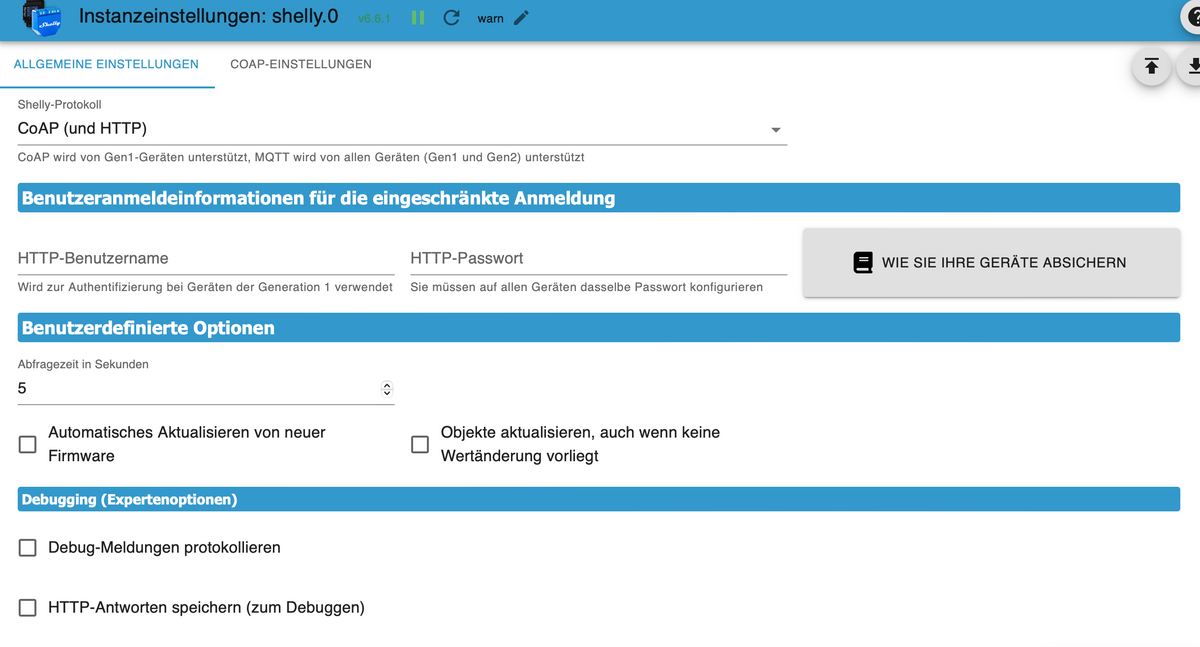
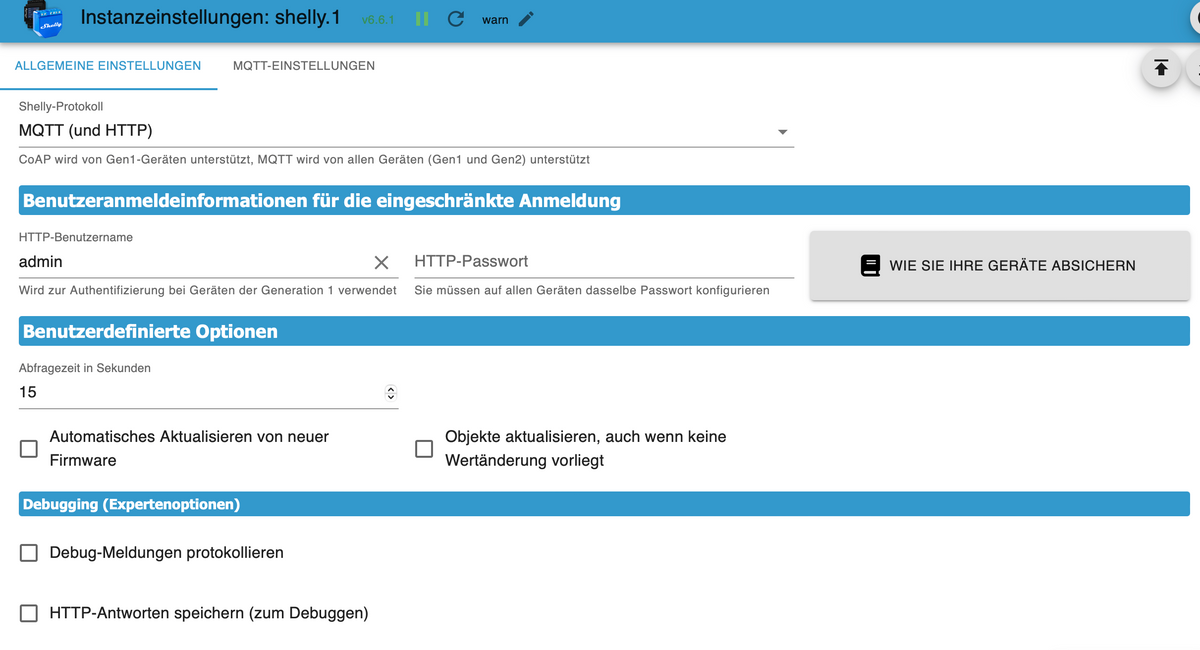
-
@guitardoc du hast mich falsch verstanden. Ich hab auch 2 Instanzen. .0 für CoAP (gen1), .1 für MQTT (gen2).
Aber bei gen1 (CoAP) gibt's keinen Port!@da_woody sagte in Problem mit Shelly Adapter - Shelly 2.5 Position rot:
Aber bei gen1 (CoAP) gibt's keinen Port!
Natürlich gibt es den. Unicast richtig konfigurieren. Wie sollen Geräte sonst kommunizieren? Port 5683.
5683 tcp coap Constrained Application Protocol (CoAP) [RFC8323] , registered 2017-12-22
Siehe
https://github.com/iobroker-community-adapters/ioBroker.shelly/blob/master/docs/de/protocol-coap.md
🧑🎓 Autor des beliebten ioBroker-Master-Kurses
🎥 Tutorials rund um das Thema DIY-Smart-Home: https://haus-automatisierung.com/
📚 Meine Dokumentation -
Haha! Ich denke, ich habe das Problem gefunden. ioBroker und Homebridge für Homekit laufen bei mir auf einem Proxmox in jeweiligen CTs. Der Neustart der CTs reicht offensichtlich nicht immer aus - man muss den gesamten Proxmox neu starten. Dann läuft es wieder. So ein Theater…
Hier aber trotzdem mal noch die Einstellungen:
@guitardoc schön und gut. die 2. seiten wären etwas aussagekräftiger, was du da eingestellt hast..
was mich aber noch mehr interessiert:
coap
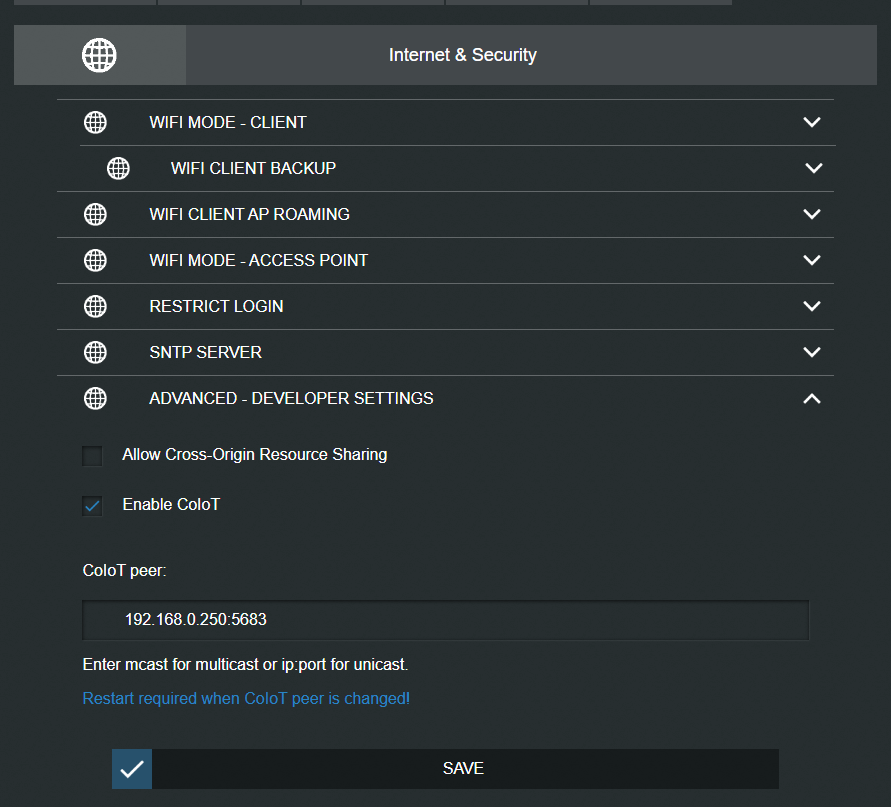
wenn da mcast steht, könnte das auch probleme machen.
mqtt
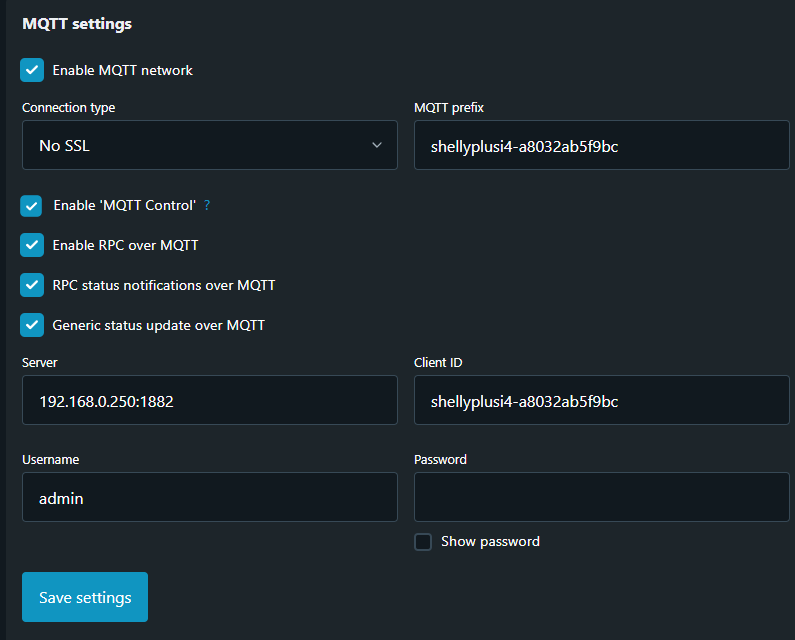
nebenbei wäre schon im ersten posting nicht schlecht gewesen wie dein system läuft. sonst is das stochern im trüben und
-
@da_woody sagte in Problem mit Shelly Adapter - Shelly 2.5 Position rot:
Aber bei gen1 (CoAP) gibt's keinen Port!
Natürlich gibt es den. Unicast richtig konfigurieren. Wie sollen Geräte sonst kommunizieren? Port 5683.
5683 tcp coap Constrained Application Protocol (CoAP) [RFC8323] , registered 2017-12-22
Siehe
https://github.com/iobroker-community-adapters/ioBroker.shelly/blob/master/docs/de/protocol-coap.md
@haus-automatisierung menno, schreib ich heute wieder chinesisch?

warum ich wohl gefragt habe?Imho biste noch auf mcast unterwegs...
ja, da gibts den port, aber nicht im adapter zum einstellen!

-
@guitardoc schön und gut. die 2. seiten wären etwas aussagekräftiger, was du da eingestellt hast..
was mich aber noch mehr interessiert:
coap
wenn da mcast steht, könnte das auch probleme machen.
mqtt
nebenbei wäre schon im ersten posting nicht schlecht gewesen wie dein system läuft. sonst is das stochern im trüben und@da_woody MQTT hab ich die gleich Einstellungen.
Bei Coap steht bei mir vermutlich in allen Shellys das hier drin (über die App lässt sich da ja nichts einstellen und in der Oberfläche der Shellys per IP hab ich nur gelegentlich was eingestellt):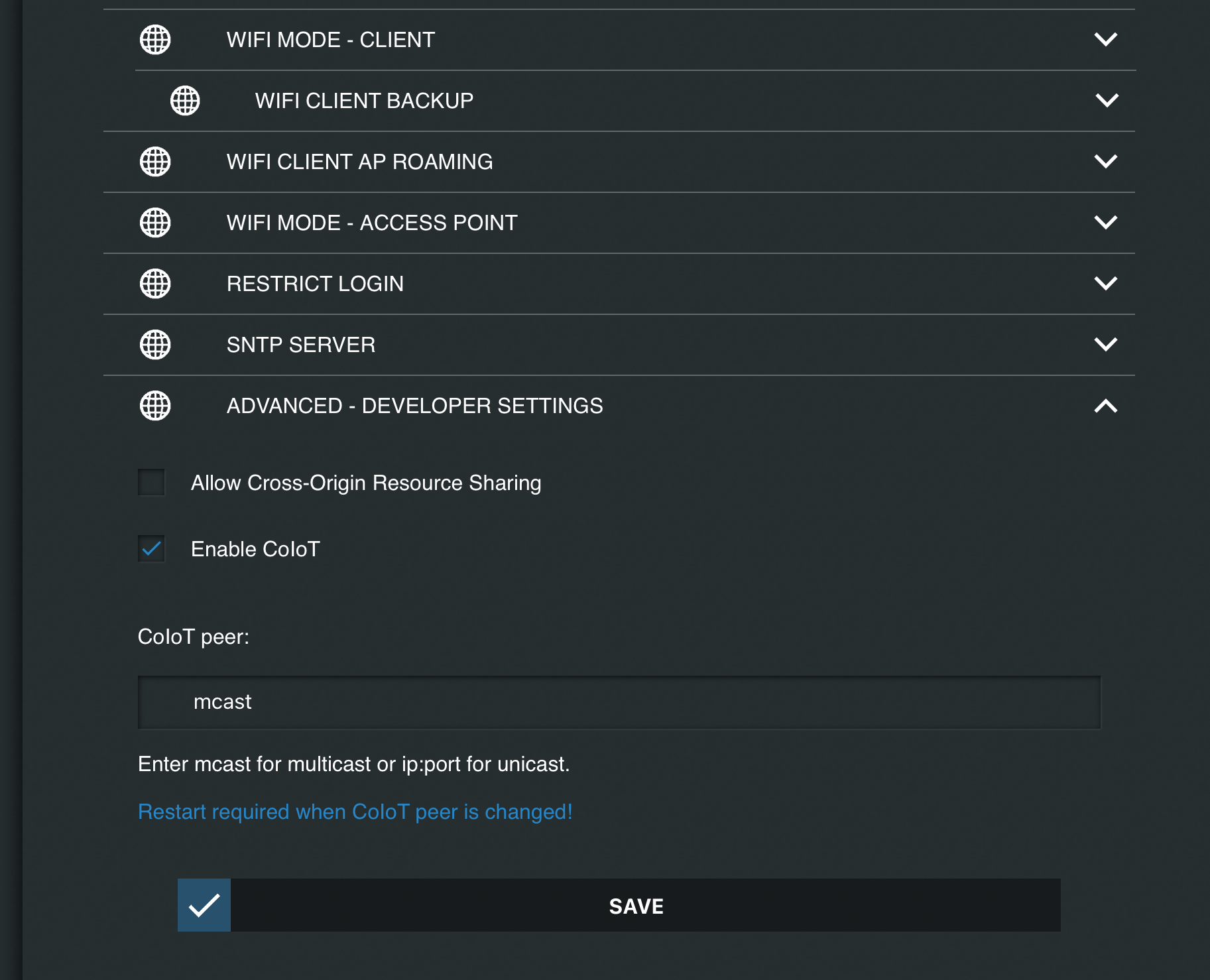
Wenn ich aber die IP dezidiert hier eintrage, dann befürchte ich, dass dann keine Übertragung mehr zu Homekit über die Homebridge stattfindet sondern eben nur noch zu ioB. Das ist es doch was Multicast macht, oder?
-
@da_woody MQTT hab ich die gleich Einstellungen.
Bei Coap steht bei mir vermutlich in allen Shellys das hier drin (über die App lässt sich da ja nichts einstellen und in der Oberfläche der Shellys per IP hab ich nur gelegentlich was eingestellt):Wenn ich aber die IP dezidiert hier eintrage, dann befürchte ich, dass dann keine Übertragung mehr zu Homekit über die Homebridge stattfindet sondern eben nur noch zu ioB. Das ist es doch was Multicast macht, oder?
@guitardoc und somit hat sich meine Vermutung bestätigt!
mcast wurde schon vor längerer Zeit auf unicast umgestellt. Funktioniert bei einigen noch, irgendwann kommen die probs.
Dort gehört auch nur die IP vom iobroker rein, save, der Port wird automatisch zugefügt. Hab ich auch schon in gefühlten Postings geschrieben.
Ja, jeh mehr shelly, um so mehr Arbeit. Bei mir waren es mehr als 60. Bei neuen mach ich das automatisch gleich beim Einrichten (gen1) wie auch im Router die IP an die MAC binden.Edith: sorry mit deinem homekit Gedöns kenn ich mich nicht aus.
-
@da_woody Hab’s gerade getestet, mit dezidierter IP geht die Steuerung über Homekit nicht mehr. Mit mcast funktioniert alles so wie es soll.
@guitardoc ok. mir stellt sich nur gerade die frage, warum ioB und Homekit. ist m.W. was ähnliches.
warum beides? was bietet dir homekit mehr als ioB?
nachdem dein problem ja abgehakt ist, wäre das eventuell auch für andere interessant.
ansonsten wäre der tread als gelöst zu markieren... -
@da_woody über HomeKit lassen sich alle Geräte per Tastendruck steuern ohne dass man erst eine Visualisierung bauen muss. Auch diverse Automationen (nicht alle, dafür brauche ich ja eben den ioB) gehen mit HomeKit super einfach zu erstellen und zu nutzen. Und über Kurzbefehle lassen sich auch mehrere Geräte komplex auswerten und ausführen. Über das integrierte Geofencing wird die Haustür automatisch verriegelt wenn ich das Haus verlasse. Und ich kann die Geräte von Ferne aus steuern ohne irgend etwas programmieren zu müssen. Alles schon fertig vorhanden…
Möglicherweise geht vieles davon auch in ioBroker, aber in HomeKit ist das meiste (bis auf komplexe Steuerungen) mit zwei drei Klicks zusammen geklickt und schon fertig da. Einschließlich Übersichten von Überwachungskameras, Visualisierung der Standorte von Fahrzeugen, etc…
-
@da_woody über HomeKit lassen sich alle Geräte per Tastendruck steuern ohne dass man erst eine Visualisierung bauen muss. Auch diverse Automationen (nicht alle, dafür brauche ich ja eben den ioB) gehen mit HomeKit super einfach zu erstellen und zu nutzen. Und über Kurzbefehle lassen sich auch mehrere Geräte komplex auswerten und ausführen. Über das integrierte Geofencing wird die Haustür automatisch verriegelt wenn ich das Haus verlasse. Und ich kann die Geräte von Ferne aus steuern ohne irgend etwas programmieren zu müssen. Alles schon fertig vorhanden…
Möglicherweise geht vieles davon auch in ioBroker, aber in HomeKit ist das meiste (bis auf komplexe Steuerungen) mit zwei drei Klicks zusammen geklickt und schon fertig da. Einschließlich Übersichten von Überwachungskameras, Visualisierung der Standorte von Fahrzeugen, etc…
@guitardoc also im prinzip so wie ich ioB und die shelly cloud verwende... ok, ich hab da noch iQontrol als visu. ja, die alexa tusse treibt sich auch in diversen ecken hier rum...
klappert aber auch in timbuktu, wenns dort inet zugang gibt.
aber gut, ich bin apfel verweigerer, hab nur ein kleines macbook als spielerei und für kleinigkeiten unterwegs.



Hey! Du scheinst an dieser Unterhaltung interessiert zu sein, hast aber noch kein Konto.
Hast du es satt, bei jedem Besuch durch die gleichen Beiträge zu scrollen? Wenn du dich für ein Konto anmeldest, kommst du immer genau dorthin zurück, wo du zuvor warst, und kannst dich über neue Antworten benachrichtigen lassen (entweder per E-Mail oder Push-Benachrichtigung). Du kannst auch Lesezeichen speichern und Beiträge positiv bewerten, um anderen Community-Mitgliedern deine Wertschätzung zu zeigen.
Mit deinem Input könnte dieser Beitrag noch besser werden 💗
Registrieren Anmelden410
Online33.0k
Benutzende83.7k
Themen1.3m
Beiträge