




vis 1 läuft nicht mehr

-
Habe gerade mit dem Iobroker angefangen zu arbeiten.
Nun wollte ich die Vis 1 instalieren aber ich kann nicht mal eine Lizen eingeben, und auf die Editor Oberfläche komme ich auch nicht.
Aber wenn ich die Ip Ardesse in die App eingebe komme ich zu der Beispiels Visualisierung
@max-0 vis läuft laut Screenshot!
bitte
iob diagin der Langfassungkein Support per PN! - Fragen im Forum stellen - Benutzt das Voting rechts unten im Beitrag wenn er euch geholfen hat.
Das Forum freut sich über eine Spende. Benutzt dazu den Spendenbutton oben rechts. Danke!
der Installationsfixer: curl -fsL https://iobroker.net/fix.sh | bash - -
@homoran ja aber ich kann die Einstellungen nicht öffnen und ich komme auch nicht auf den Editor weil dann eine Fehlermeldung kommt wo drinsteht main view nicht gefunden.
Was meinst du mit iob diag?
Bin neu hier@max-0 sagte in vis 1 läuft nicht mehr:
Was meinst du mit iob diag?
bitte diesen Befehl in der Konsole ausführen, und die Ausgabe posten
@max-0 sagte in vis 1 läuft nicht mehr:
Bin neu hier
Na, dann hab ich hier was für dich zu lesen
https://forum.iobroker.net/topic/51555/hinweise-für-gute-forenbeiträge/1kein Support per PN! - Fragen im Forum stellen - Benutzt das Voting rechts unten im Beitrag wenn er euch geholfen hat.
Das Forum freut sich über eine Spende. Benutzt dazu den Spendenbutton oben rechts. Danke!
der Installationsfixer: curl -fsL https://iobroker.net/fix.sh | bash - -
@max-0 sagte in vis 1 läuft nicht mehr:
Was meinst du mit iob diag?
bitte diesen Befehl in der Konsole ausführen, und die Ausgabe posten
@max-0 sagte in vis 1 läuft nicht mehr:
Bin neu hier
Na, dann hab ich hier was für dich zu lesen
https://forum.iobroker.net/topic/51555/hinweise-für-gute-forenbeiträge/1@homoran Skript v.2023-10-10
*** BASE SYSTEM ***
 Static hostname: raspberrypi5
       Icon name: computer
Operating System: Debian GNU/Linux 12 (bookworm)
          Kernel: Linux 6.1.0-rpi7-rpi-2712
    Architecture: arm64

Model           : Raspberry Pi 5 Model B Rev 1.0
Docker          : false
Virtualization  : none
Kernel          : aarch64
Userland        : arm64

Systemuptime and Load:
 20:46:18 up  1:07,  2 users,  load average: 0.72, 0.33, 0.17
CPU threads: 4


*** RASPBERRY THROTTLING ***
Current issues:
No throttling issues detected.

Previously detected issues:
No throttling issues detected.

*** Time and Time Zones ***
               Local time: Fri 2023-12-29 20:46:18 CET
           Universal time: Fri 2023-12-29 19:46:18 UTC
                 RTC time: Fri 2023-12-29 19:46:18
                Time zone: Europe/Berlin (CET, +0100)
System clock synchronized: yes
              NTP service: active
          RTC in local TZ: no

*** User and Groups ***
pi
/home/pi
pi adm dialout cdrom sudo audio video plugdev games users input render netdev gpio i2c spi

*** X-Server-Setup ***
X-Server:       false
Desktop:
Terminal:       tty
Boot Target:    multi-user.target

*** MEMORY ***
               total        used        free      shared  buff/cache   available
Mem:            8.4G        730M        5.3G        5.3M        2.5G        7.7G
Swap:           104M          0B        104M
Total:          8.5G        730M        5.4G

         8053 M total memory
          697 M used memory
          655 M active memory
         2052 M inactive memory
         5037 M free memory
          149 M buffer memory
         2270 M swap cache
           99 M total swap
            0 M used swap
           99 M free swap

Raspberry only:
vc_gencmd_read_response returned -1
error=1 error_msg="Command not registered"

*** FAILED SERVICES ***

  UNIT LOAD ACTIVE SUB DESCRIPTION
0 loaded units listed.

*** FILESYSTEM ***
Filesystem     Type      Size  Used Avail Use% Mounted on
udev           devtmpfs  3.8G     0  3.8G   0% /dev
tmpfs          tmpfs     806M  5.0M  801M   1% /run
/dev/mmcblk0p2 ext4       15G  2.8G   11G  21% /
tmpfs          tmpfs     4.0G     0  4.0G   0% /dev/shm
tmpfs          tmpfs     5.0M   48K  5.0M   1% /run/lock
/dev/mmcblk0p1 vfat      510M   61M  450M  12% /boot/firmware
tmpfs          tmpfs     806M     0  806M   0% /run/user/1000

Messages concerning ext4 filesystem in dmesg:
[Fri Dec 29 19:38:43 2023] Kernel command line: coherent_pool=1M 8250.nr_uarts=1 pci=pcie_bus_safe snd_bcm2835.enable_compat_alsa=0 snd_bcm2835.enable_hdmi=1  smsc95xx.macaddr=D8:3A:DD:BB:FC:13 vc_mem.mem_base=0x3fc00000 vc_mem.mem_size=0x40000000  console=ttyAMA10,115200 console=tty1 root=PARTUUID=0fd8a7d6-02 rootfstype=ext4 fsck.repair=yes rootwait
[Fri Dec 29 19:38:46 2023] EXT4-fs (mmcblk0p2): mounted filesystem with ordered data mode. Quota mode: none.
[Fri Dec 29 19:38:49 2023] EXT4-fs (mmcblk0p2): re-mounted. Quota mode: none.
[Fri Dec 29 19:38:53 2023] EXT4-fs (mmcblk0p2): resizing filesystem from 536576 to 3768320 blocks
[Fri Dec 29 19:38:56 2023] EXT4-fs (mmcblk0p2): resized filesystem to 3768320

Show mounted filesystems \(real ones only\):
TARGET           SOURCE         FSTYPE OPTIONS
/                /dev/mmcblk0p2 ext4   rw,noatime
`-/boot/firmware /dev/mmcblk0p1 vfat   rw,relatime,fmask=0022,dmask=0022,codepage=437,iocharset=ascii,shortname=mixed,errors=remount-ro

Files in neuralgic directories:

/var:
496M    /var/
206M    /var/cache
200M    /var/cache/apt
166M    /var/lib
132M    /var/lib/apt/lists

Archived and active journals take up 24.0M in the file system.

/opt/iobroker/backups:
4.0K    /opt/iobroker/backups/

/opt/iobroker/iobroker-data:
67M     /opt/iobroker/iobroker-data/
59M     /opt/iobroker/iobroker-data/files
30M     /opt/iobroker/iobroker-data/files/web.admin/static
30M     /opt/iobroker/iobroker-data/files/web.admin
29M     /opt/iobroker/iobroker-data/files/web.admin/static/js

The five largest files in iobroker-data are:
21M     /opt/iobroker/iobroker-data/files/web.admin/static/js/main.aaea95f8.js.map
8.3M    /opt/iobroker/iobroker-data/files/web.admin/static/js/main.aaea95f8.js
7.9M    /opt/iobroker/iobroker-data/objects.jsonl
6.3M    /opt/iobroker/iobroker-data/files/admin.admin/custom/static/js/vendors-node_modules_iobroker_adapter-react-v5_assets_devices_parseNames_js-node_modules_iobr-99c23e.847b8ad9.chunk.js.map
2.8M    /opt/iobroker/iobroker-data/files/admin.admin/custom/static/js/vendors-node_modules_iobroker_adapter-react-v5_assets_devices_parseNames_js-node_modules_iobr-99c23e.847b8ad9.chunk.js

USB-Devices by-id:
USB-Sticks -  Avoid direct links to /dev/* in your adapter setups, please always prefer the links 'by-id':

find: '/dev/serial/by-id/': No such file or directory

*** NodeJS-Installation ***

/usr/bin/nodejs         v18.19.0
/usr/bin/node           v18.19.0
/usr/bin/npm            9.2.0
/usr/bin/npx            9.2.0
/home/iobroker/.diag.sh: line 281: corepack: command not found

*** nodejs is NOT correctly installed ***

nodejs:
  Installed: 18.19.0+dfsg-6~deb12u1
  Candidate: 18.19.0+dfsg-6~deb12u1
  Version table:
 *** 18.19.0+dfsg-6~deb12u1 500
        500 http://deb.debian.org/debian-security bookworm-security/main arm64 Packages
        100 /var/lib/dpkg/status
     18.19.0-1nodesource1 500
        500 https://deb.nodesource.com/node_18.x nodistro/main arm64 Packages
     18.18.2-1nodesource1 500
        500 https://deb.nodesource.com/node_18.x nodistro/main arm64 Packages
     18.18.1-1nodesource1 500
        500 https://deb.nodesource.com/node_18.x nodistro/main arm64 Packages
     18.18.0-1nodesource1 500
        500 https://deb.nodesource.com/node_18.x nodistro/main arm64 Packages
     18.17.1-1nodesource1 500
        500 https://deb.nodesource.com/node_18.x nodistro/main arm64 Packages
     18.17.0-1nodesource1 500
        500 https://deb.nodesource.com/node_18.x nodistro/main arm64 Packages
     18.16.1-1nodesource1 500
        500 https://deb.nodesource.com/node_18.x nodistro/main arm64 Packages
     18.16.0-1nodesource1 500
        500 https://deb.nodesource.com/node_18.x nodistro/main arm64 Packages
     18.15.0-1nodesource1 500
        500 https://deb.nodesource.com/node_18.x nodistro/main arm64 Packages
     18.14.2-1nodesource1 500
        500 https://deb.nodesource.com/node_18.x nodistro/main arm64 Packages
     18.14.1-1nodesource1 500
        500 https://deb.nodesource.com/node_18.x nodistro/main arm64 Packages
     18.14.0-1nodesource1 500
        500 https://deb.nodesource.com/node_18.x nodistro/main arm64 Packages
     18.13.0+dfsg1-1 500
        500 http://deb.debian.org/debian bookworm/main arm64 Packages
     18.13.0-1nodesource1 500
        500 https://deb.nodesource.com/node_18.x nodistro/main arm64 Packages
     18.12.0-1nodesource1 500
        500 https://deb.nodesource.com/node_18.x nodistro/main arm64 Packages
     18.11.0-1nodesource1 500
        500 https://deb.nodesource.com/node_18.x nodistro/main arm64 Packages
     18.10.0-1nodesource1 500
        500 https://deb.nodesource.com/node_18.x nodistro/main arm64 Packages
     18.9.1-1nodesource1 500
        500 https://deb.nodesource.com/node_18.x nodistro/main arm64 Packages
     18.9.0-1nodesource1 500
        500 https://deb.nodesource.com/node_18.x nodistro/main arm64 Packages
     18.8.0-1nodesource1 500
        500 https://deb.nodesource.com/node_18.x nodistro/main arm64 Packages
     18.7.0-1nodesource1 500
        500 https://deb.nodesource.com/node_18.x nodistro/main arm64 Packages
     18.6.0-1nodesource1 500
        500 https://deb.nodesource.com/node_18.x nodistro/main arm64 Packages
     18.5.0-1nodesource1 500
        500 https://deb.nodesource.com/node_18.x nodistro/main arm64 Packages
     18.4.0-1nodesource1 500
        500 https://deb.nodesource.com/node_18.x nodistro/main arm64 Packages
     18.3.0-1nodesource1 500
        500 https://deb.nodesource.com/node_18.x nodistro/main arm64 Packages
     18.2.0-1nodesource1 500
        500 https://deb.nodesource.com/node_18.x nodistro/main arm64 Packages
     18.1.0-1nodesource1 500
        500 https://deb.nodesource.com/node_18.x nodistro/main arm64 Packages
     18.0.0-1nodesource1 500
        500 https://deb.nodesource.com/node_18.x nodistro/main arm64 Packages

Temp directories causing npm8 problem: 0
No problems detected

Errors in npm tree:

*** ioBroker-Installation ***

ioBroker Status
iobroker is running on this host.


Objects type: jsonl
States  type: jsonl

Core adapters versions
js-controller:  5.0.17
admin:          6.12.0
javascript:     "javascript" not found

Adapters from github:   0

Adapter State
+ system.adapter.admin.0                  : admin                 : raspberrypi5                             -  enabled, port: 8081, bind: 0.0.0.0, run as: admin
+ system.adapter.backitup.0               : backitup              : raspberrypi5                             -  enabled
+ system.adapter.discovery.0              : discovery             : raspberrypi5                             -  enabled
  system.adapter.vis.0                    : vis                   : raspberrypi5                             -  enabled
+ system.adapter.web.0                    : web                   : raspberrypi5                             -  enabled, port: 8082, bind: 0.0.0.0, run as: admin

+ instance is alive

Enabled adapters with bindings
+ system.adapter.admin.0                  : admin                 : raspberrypi5                             -  enabled, port: 8081, bind: 0.0.0.0, run as: admin
+ system.adapter.web.0                    : web                   : raspberrypi5                             -  enabled, port: 8082, bind: 0.0.0.0, run as: admin

ioBroker-Repositories
stable        : http://download.iobroker.net/sources-dist.json
beta          : http://download.iobroker.net/sources-dist-latest.json

Active repo(s): stable

Installed ioBroker-Instances
Used repository: stable
Adapter    "admin"        : 6.12.0   , installed 6.12.0
Adapter    "backitup"     : 2.9.8    , installed 2.9.8
Adapter    "discovery"    : 4.2.0    , installed 4.2.0
Controller "js-controller": 5.0.17   , installed 5.0.17
Adapter    "simple-api"   : 2.7.2    , installed 2.7.2
Adapter    "socketio"     : 6.6.0    , installed 6.6.0
Adapter    "vis"          : 1.5.4    , installed 1.5.4
Adapter    "web"          : 6.1.10   , installed 6.1.10
Adapter    "ws"           : 2.5.8    , installed 2.5.8

Objects and States
Please stand by - This may take a while
Objects:        173
States:         131

*** OS-Repositories and Updates ***
Hit:1 http://deb.debian.org/debian bookworm InRelease
Hit:2 http://deb.debian.org/debian-security bookworm-security InRelease
Hit:3 http://deb.debian.org/debian bookworm-updates InRelease
Hit:4 http://archive.raspberrypi.com/debian bookworm InRelease
Hit:5 https://deb.nodesource.com/node_18.x nodistro InRelease
Reading package lists...
Pending Updates: 0

*** Listening Ports ***
Active Internet connections (only servers)
Proto Recv-Q Send-Q Local Address           Foreign Address         State       User       Inode      PID/Program name
tcp        0      0 127.0.0.1:9001          0.0.0.0:*               LISTEN      1001       50870      14564/iobroker.js-c
tcp        0      0 127.0.0.1:9000          0.0.0.0:*               LISTEN      1001       50877      14564/iobroker.js-c
tcp        0      0 0.0.0.0:22              0.0.0.0:*               LISTEN      0          17375      1863/sshd: /usr/sbi
tcp6       0      0 :::22                   :::*                    LISTEN      0          17377      1863/sshd: /usr/sbi
tcp6       0      0 :::8081                 :::*                    LISTEN      1001       50986      14607/io.admin.0
tcp6       0      0 :::8082                 :::*                    LISTEN      1001       52618      14824/io.web.0
udp        0      0 0.0.0.0:5353            0.0.0.0:*                           104        758        655/avahi-daemon: r
udp        0      0 0.0.0.0:33709           0.0.0.0:*                           104        760        655/avahi-daemon: r
udp6       0      0 :::5353                 :::*                                104        759        655/avahi-daemon: r
udp6       0      0 fe80::aaec:1ab3:54b:546 :::*                                0          16660      775/NetworkManager
udp6       0      0 :::54271                :::*                                104        761        655/avahi-daemon: r

*** Log File - Last 25 Lines ***

2023-12-29 20:25:11.316  - info: web.0 (14824) <== Disconnect system.user.admin from ::ffff:192.168.178.109 vis.0
2023-12-29 20:25:11.368  - info: web.0 (14824) ==> Connected system.user.admin from ::ffff:192.168.178.109
2023-12-29 20:25:19.295  - info: vis.0 (14869) starting. Version 1.5.4 in /opt/iobroker/node_modules/iobroker.vis, node: v18.19.0, js-controller: 5.0.17
2023-12-29 20:25:19.897  - info: vis.0 (14869) Terminated (NO_ERROR): Without reason
2023-12-29 20:25:20.416  - info: host.raspberrypi5 instance system.adapter.vis.0 terminated while should be started once
2023-12-29 20:25:22.291  - info: vis.0 (14884) starting. Version 1.5.4 in /opt/iobroker/node_modules/iobroker.vis, node: v18.19.0, js-controller: 5.0.17
2023-12-29 20:25:22.889  - info: vis.0 (14884) Terminated (NO_ERROR): Without reason
2023-12-29 20:25:23.407  - info: host.raspberrypi5 instance system.adapter.vis.0 terminated while should be started once
2023-12-29 20:28:33.981  - info: web.0 (14824) <== Disconnect system.user.admin from ::ffff:192.168.178.109 vis.0
2023-12-29 20:28:59.713  - info: web.0 (14824) ==> Connected system.user.admin from ::ffff:192.168.178.109
2023-12-29 20:29:12.782  - info: web.0 (14824) ==> Connected system.user.admin from ::ffff:192.168.178.196
2023-12-29 20:35:24.724  - warn: web.0 (14824) State "dev3" has no existing object, this might lead to an error in future versions
2023-12-29 20:35:25.626  - warn: web.0 (14824) State "dev3" has no existing object, this might lead to an error in future versions
2023-12-29 20:35:26.397  - warn: web.0 (14824) State "dev1" has no existing object, this might lead to an error in future versions
2023-12-29 20:35:27.843  - warn: web.0 (14824) State "dev2" has no existing object, this might lead to an error in future versions
2023-12-29 20:35:28.846  - warn: web.0 (14824) State "dev2" has no existing object, this might lead to an error in future versions
2023-12-29 20:35:30.206  - warn: web.0 (14824) State "dev2" has no existing object, this might lead to an error in future versions
2023-12-29 20:35:37.405  - info: web.0 (14824) <== Disconnect system.user.admin from ::ffff:192.168.178.196 vis.0
2023-12-29 20:35:45.761  - info: web.0 (14824) ==> Connected system.user.admin from ::ffff:192.168.178.196
2023-12-29 20:36:03.952  - info: web.0 (14824) <== Disconnect system.user.admin from ::ffff:192.168.178.196 vis.0
2023-12-29 20:36:05.291  - info: web.0 (14824) ==> Connected system.user.admin from ::ffff:192.168.178.196
2023-12-29 20:38:36.455  - info: web.0 (14824) <== Disconnect system.user.admin from ::ffff:192.168.178.196 vis.0
2023-12-29 20:40:00.042  - info: web.0 (14824) <== Disconnect system.user.admin from ::ffff:192.168.178.109 vis.0
2023-12-29 20:40:03.827  - info: web.0 (14824) ==> Connected system.user.admin from ::ffff:192.168.178.109
2023-12-29 20:40:06.584  - info: web.0 (14824) <== Disconnect system.user.admin from ::ffff:192.168.178.109 vis.0
============ Mark until here for C&P =============
iob diag has finished.
Press any key for a summary
-
@homoran Skript v.2023-10-10
*** BASE SYSTEM ***
 Static hostname: raspberrypi5
       Icon name: computer
Operating System: Debian GNU/Linux 12 (bookworm)
          Kernel: Linux 6.1.0-rpi7-rpi-2712
    Architecture: arm64

Model           : Raspberry Pi 5 Model B Rev 1.0
Docker          : false
Virtualization  : none
Kernel          : aarch64
Userland        : arm64

Systemuptime and Load:
 20:46:18 up  1:07,  2 users,  load average: 0.72, 0.33, 0.17
CPU threads: 4


*** RASPBERRY THROTTLING ***
Current issues:
No throttling issues detected.

Previously detected issues:
No throttling issues detected.

*** Time and Time Zones ***
               Local time: Fri 2023-12-29 20:46:18 CET
           Universal time: Fri 2023-12-29 19:46:18 UTC
                 RTC time: Fri 2023-12-29 19:46:18
                Time zone: Europe/Berlin (CET, +0100)
System clock synchronized: yes
              NTP service: active
          RTC in local TZ: no

*** User and Groups ***
pi
/home/pi
pi adm dialout cdrom sudo audio video plugdev games users input render netdev gpio i2c spi

*** X-Server-Setup ***
X-Server:       false
Desktop:
Terminal:       tty
Boot Target:    multi-user.target

*** MEMORY ***
               total        used        free      shared  buff/cache   available
Mem:            8.4G        730M        5.3G        5.3M        2.5G        7.7G
Swap:           104M          0B        104M
Total:          8.5G        730M        5.4G

         8053 M total memory
          697 M used memory
          655 M active memory
         2052 M inactive memory
         5037 M free memory
          149 M buffer memory
         2270 M swap cache
           99 M total swap
            0 M used swap
           99 M free swap

Raspberry only:
vc_gencmd_read_response returned -1
error=1 error_msg="Command not registered"

*** FAILED SERVICES ***

  UNIT LOAD ACTIVE SUB DESCRIPTION
0 loaded units listed.

*** FILESYSTEM ***
Filesystem     Type      Size  Used Avail Use% Mounted on
udev           devtmpfs  3.8G     0  3.8G   0% /dev
tmpfs          tmpfs     806M  5.0M  801M   1% /run
/dev/mmcblk0p2 ext4       15G  2.8G   11G  21% /
tmpfs          tmpfs     4.0G     0  4.0G   0% /dev/shm
tmpfs          tmpfs     5.0M   48K  5.0M   1% /run/lock
/dev/mmcblk0p1 vfat      510M   61M  450M  12% /boot/firmware
tmpfs          tmpfs     806M     0  806M   0% /run/user/1000

Messages concerning ext4 filesystem in dmesg:
[Fri Dec 29 19:38:43 2023] Kernel command line: coherent_pool=1M 8250.nr_uarts=1 pci=pcie_bus_safe snd_bcm2835.enable_compat_alsa=0 snd_bcm2835.enable_hdmi=1  smsc95xx.macaddr=D8:3A:DD:BB:FC:13 vc_mem.mem_base=0x3fc00000 vc_mem.mem_size=0x40000000  console=ttyAMA10,115200 console=tty1 root=PARTUUID=0fd8a7d6-02 rootfstype=ext4 fsck.repair=yes rootwait
[Fri Dec 29 19:38:46 2023] EXT4-fs (mmcblk0p2): mounted filesystem with ordered data mode. Quota mode: none.
[Fri Dec 29 19:38:49 2023] EXT4-fs (mmcblk0p2): re-mounted. Quota mode: none.
[Fri Dec 29 19:38:53 2023] EXT4-fs (mmcblk0p2): resizing filesystem from 536576 to 3768320 blocks
[Fri Dec 29 19:38:56 2023] EXT4-fs (mmcblk0p2): resized filesystem to 3768320

Show mounted filesystems \(real ones only\):
TARGET           SOURCE         FSTYPE OPTIONS
/                /dev/mmcblk0p2 ext4   rw,noatime
`-/boot/firmware /dev/mmcblk0p1 vfat   rw,relatime,fmask=0022,dmask=0022,codepage=437,iocharset=ascii,shortname=mixed,errors=remount-ro

Files in neuralgic directories:

/var:
496M    /var/
206M    /var/cache
200M    /var/cache/apt
166M    /var/lib
132M    /var/lib/apt/lists

Archived and active journals take up 24.0M in the file system.

/opt/iobroker/backups:
4.0K    /opt/iobroker/backups/

/opt/iobroker/iobroker-data:
67M     /opt/iobroker/iobroker-data/
59M     /opt/iobroker/iobroker-data/files
30M     /opt/iobroker/iobroker-data/files/web.admin/static
30M     /opt/iobroker/iobroker-data/files/web.admin
29M     /opt/iobroker/iobroker-data/files/web.admin/static/js

The five largest files in iobroker-data are:
21M     /opt/iobroker/iobroker-data/files/web.admin/static/js/main.aaea95f8.js.map
8.3M    /opt/iobroker/iobroker-data/files/web.admin/static/js/main.aaea95f8.js
7.9M    /opt/iobroker/iobroker-data/objects.jsonl
6.3M    /opt/iobroker/iobroker-data/files/admin.admin/custom/static/js/vendors-node_modules_iobroker_adapter-react-v5_assets_devices_parseNames_js-node_modules_iobr-99c23e.847b8ad9.chunk.js.map
2.8M    /opt/iobroker/iobroker-data/files/admin.admin/custom/static/js/vendors-node_modules_iobroker_adapter-react-v5_assets_devices_parseNames_js-node_modules_iobr-99c23e.847b8ad9.chunk.js

USB-Devices by-id:
USB-Sticks -  Avoid direct links to /dev/* in your adapter setups, please always prefer the links 'by-id':

find: '/dev/serial/by-id/': No such file or directory

*** NodeJS-Installation ***

/usr/bin/nodejs         v18.19.0
/usr/bin/node           v18.19.0
/usr/bin/npm            9.2.0
/usr/bin/npx            9.2.0
/home/iobroker/.diag.sh: line 281: corepack: command not found

*** nodejs is NOT correctly installed ***

nodejs:
  Installed: 18.19.0+dfsg-6~deb12u1
  Candidate: 18.19.0+dfsg-6~deb12u1
  Version table:
 *** 18.19.0+dfsg-6~deb12u1 500
        500 http://deb.debian.org/debian-security bookworm-security/main arm64 Packages
        100 /var/lib/dpkg/status
     18.19.0-1nodesource1 500
        500 https://deb.nodesource.com/node_18.x nodistro/main arm64 Packages
     18.18.2-1nodesource1 500
        500 https://deb.nodesource.com/node_18.x nodistro/main arm64 Packages
     18.18.1-1nodesource1 500
        500 https://deb.nodesource.com/node_18.x nodistro/main arm64 Packages
     18.18.0-1nodesource1 500
        500 https://deb.nodesource.com/node_18.x nodistro/main arm64 Packages
     18.17.1-1nodesource1 500
        500 https://deb.nodesource.com/node_18.x nodistro/main arm64 Packages
     18.17.0-1nodesource1 500
        500 https://deb.nodesource.com/node_18.x nodistro/main arm64 Packages
     18.16.1-1nodesource1 500
        500 https://deb.nodesource.com/node_18.x nodistro/main arm64 Packages
     18.16.0-1nodesource1 500
        500 https://deb.nodesource.com/node_18.x nodistro/main arm64 Packages
     18.15.0-1nodesource1 500
        500 https://deb.nodesource.com/node_18.x nodistro/main arm64 Packages
     18.14.2-1nodesource1 500
        500 https://deb.nodesource.com/node_18.x nodistro/main arm64 Packages
     18.14.1-1nodesource1 500
        500 https://deb.nodesource.com/node_18.x nodistro/main arm64 Packages
     18.14.0-1nodesource1 500
        500 https://deb.nodesource.com/node_18.x nodistro/main arm64 Packages
     18.13.0+dfsg1-1 500
        500 http://deb.debian.org/debian bookworm/main arm64 Packages
     18.13.0-1nodesource1 500
        500 https://deb.nodesource.com/node_18.x nodistro/main arm64 Packages
     18.12.0-1nodesource1 500
        500 https://deb.nodesource.com/node_18.x nodistro/main arm64 Packages
     18.11.0-1nodesource1 500
        500 https://deb.nodesource.com/node_18.x nodistro/main arm64 Packages
     18.10.0-1nodesource1 500
        500 https://deb.nodesource.com/node_18.x nodistro/main arm64 Packages
     18.9.1-1nodesource1 500
        500 https://deb.nodesource.com/node_18.x nodistro/main arm64 Packages
     18.9.0-1nodesource1 500
        500 https://deb.nodesource.com/node_18.x nodistro/main arm64 Packages
     18.8.0-1nodesource1 500
        500 https://deb.nodesource.com/node_18.x nodistro/main arm64 Packages
     18.7.0-1nodesource1 500
        500 https://deb.nodesource.com/node_18.x nodistro/main arm64 Packages
     18.6.0-1nodesource1 500
        500 https://deb.nodesource.com/node_18.x nodistro/main arm64 Packages
     18.5.0-1nodesource1 500
        500 https://deb.nodesource.com/node_18.x nodistro/main arm64 Packages
     18.4.0-1nodesource1 500
        500 https://deb.nodesource.com/node_18.x nodistro/main arm64 Packages
     18.3.0-1nodesource1 500
        500 https://deb.nodesource.com/node_18.x nodistro/main arm64 Packages
     18.2.0-1nodesource1 500
        500 https://deb.nodesource.com/node_18.x nodistro/main arm64 Packages
     18.1.0-1nodesource1 500
        500 https://deb.nodesource.com/node_18.x nodistro/main arm64 Packages
     18.0.0-1nodesource1 500
        500 https://deb.nodesource.com/node_18.x nodistro/main arm64 Packages

Temp directories causing npm8 problem: 0
No problems detected

Errors in npm tree:

*** ioBroker-Installation ***

ioBroker Status
iobroker is running on this host.


Objects type: jsonl
States  type: jsonl

Core adapters versions
js-controller:  5.0.17
admin:          6.12.0
javascript:     "javascript" not found

Adapters from github:   0

Adapter State
+ system.adapter.admin.0                  : admin                 : raspberrypi5                             -  enabled, port: 8081, bind: 0.0.0.0, run as: admin
+ system.adapter.backitup.0               : backitup              : raspberrypi5                             -  enabled
+ system.adapter.discovery.0              : discovery             : raspberrypi5                             -  enabled
  system.adapter.vis.0                    : vis                   : raspberrypi5                             -  enabled
+ system.adapter.web.0                    : web                   : raspberrypi5                             -  enabled, port: 8082, bind: 0.0.0.0, run as: admin

+ instance is alive

Enabled adapters with bindings
+ system.adapter.admin.0                  : admin                 : raspberrypi5                             -  enabled, port: 8081, bind: 0.0.0.0, run as: admin
+ system.adapter.web.0                    : web                   : raspberrypi5                             -  enabled, port: 8082, bind: 0.0.0.0, run as: admin

ioBroker-Repositories
stable        : http://download.iobroker.net/sources-dist.json
beta          : http://download.iobroker.net/sources-dist-latest.json

Active repo(s): stable

Installed ioBroker-Instances
Used repository: stable
Adapter    "admin"        : 6.12.0   , installed 6.12.0
Adapter    "backitup"     : 2.9.8    , installed 2.9.8
Adapter    "discovery"    : 4.2.0    , installed 4.2.0
Controller "js-controller": 5.0.17   , installed 5.0.17
Adapter    "simple-api"   : 2.7.2    , installed 2.7.2
Adapter    "socketio"     : 6.6.0    , installed 6.6.0
Adapter    "vis"          : 1.5.4    , installed 1.5.4
Adapter    "web"          : 6.1.10   , installed 6.1.10
Adapter    "ws"           : 2.5.8    , installed 2.5.8

Objects and States
Please stand by - This may take a while
Objects:        173
States:         131

*** OS-Repositories and Updates ***
Hit:1 http://deb.debian.org/debian bookworm InRelease
Hit:2 http://deb.debian.org/debian-security bookworm-security InRelease
Hit:3 http://deb.debian.org/debian bookworm-updates InRelease
Hit:4 http://archive.raspberrypi.com/debian bookworm InRelease
Hit:5 https://deb.nodesource.com/node_18.x nodistro InRelease
Reading package lists...
Pending Updates: 0

*** Listening Ports ***
Active Internet connections (only servers)
Proto Recv-Q Send-Q Local Address           Foreign Address         State       User       Inode      PID/Program name
tcp        0      0 127.0.0.1:9001          0.0.0.0:*               LISTEN      1001       50870      14564/iobroker.js-c
tcp        0      0 127.0.0.1:9000          0.0.0.0:*               LISTEN      1001       50877      14564/iobroker.js-c
tcp        0      0 0.0.0.0:22              0.0.0.0:*               LISTEN      0          17375      1863/sshd: /usr/sbi
tcp6       0      0 :::22                   :::*                    LISTEN      0          17377      1863/sshd: /usr/sbi
tcp6       0      0 :::8081                 :::*                    LISTEN      1001       50986      14607/io.admin.0
tcp6       0      0 :::8082                 :::*                    LISTEN      1001       52618      14824/io.web.0
udp        0      0 0.0.0.0:5353            0.0.0.0:*                           104        758        655/avahi-daemon: r
udp        0      0 0.0.0.0:33709           0.0.0.0:*                           104        760        655/avahi-daemon: r
udp6       0      0 :::5353                 :::*                                104        759        655/avahi-daemon: r
udp6       0      0 fe80::aaec:1ab3:54b:546 :::*                                0          16660      775/NetworkManager
udp6       0      0 :::54271                :::*                                104        761        655/avahi-daemon: r

*** Log File - Last 25 Lines ***

2023-12-29 20:25:11.316  - info: web.0 (14824) <== Disconnect system.user.admin from ::ffff:192.168.178.109 vis.0
2023-12-29 20:25:11.368  - info: web.0 (14824) ==> Connected system.user.admin from ::ffff:192.168.178.109
2023-12-29 20:25:19.295  - info: vis.0 (14869) starting. Version 1.5.4 in /opt/iobroker/node_modules/iobroker.vis, node: v18.19.0, js-controller: 5.0.17
2023-12-29 20:25:19.897  - info: vis.0 (14869) Terminated (NO_ERROR): Without reason
2023-12-29 20:25:20.416  - info: host.raspberrypi5 instance system.adapter.vis.0 terminated while should be started once
2023-12-29 20:25:22.291  - info: vis.0 (14884) starting. Version 1.5.4 in /opt/iobroker/node_modules/iobroker.vis, node: v18.19.0, js-controller: 5.0.17
2023-12-29 20:25:22.889  - info: vis.0 (14884) Terminated (NO_ERROR): Without reason
2023-12-29 20:25:23.407  - info: host.raspberrypi5 instance system.adapter.vis.0 terminated while should be started once
2023-12-29 20:28:33.981  - info: web.0 (14824) <== Disconnect system.user.admin from ::ffff:192.168.178.109 vis.0
2023-12-29 20:28:59.713  - info: web.0 (14824) ==> Connected system.user.admin from ::ffff:192.168.178.109
2023-12-29 20:29:12.782  - info: web.0 (14824) ==> Connected system.user.admin from ::ffff:192.168.178.196
2023-12-29 20:35:24.724  - warn: web.0 (14824) State "dev3" has no existing object, this might lead to an error in future versions
2023-12-29 20:35:25.626  - warn: web.0 (14824) State "dev3" has no existing object, this might lead to an error in future versions
2023-12-29 20:35:26.397  - warn: web.0 (14824) State "dev1" has no existing object, this might lead to an error in future versions
2023-12-29 20:35:27.843  - warn: web.0 (14824) State "dev2" has no existing object, this might lead to an error in future versions
2023-12-29 20:35:28.846  - warn: web.0 (14824) State "dev2" has no existing object, this might lead to an error in future versions
2023-12-29 20:35:30.206  - warn: web.0 (14824) State "dev2" has no existing object, this might lead to an error in future versions
2023-12-29 20:35:37.405  - info: web.0 (14824) <== Disconnect system.user.admin from ::ffff:192.168.178.196 vis.0
2023-12-29 20:35:45.761  - info: web.0 (14824) ==> Connected system.user.admin from ::ffff:192.168.178.196
2023-12-29 20:36:03.952  - info: web.0 (14824) <== Disconnect system.user.admin from ::ffff:192.168.178.196 vis.0
2023-12-29 20:36:05.291  - info: web.0 (14824) ==> Connected system.user.admin from ::ffff:192.168.178.196
2023-12-29 20:38:36.455  - info: web.0 (14824) <== Disconnect system.user.admin from ::ffff:192.168.178.196 vis.0
2023-12-29 20:40:00.042  - info: web.0 (14824) <== Disconnect system.user.admin from ::ffff:192.168.178.109 vis.0
2023-12-29 20:40:03.827  - info: web.0 (14824) ==> Connected system.user.admin from ::ffff:192.168.178.109
2023-12-29 20:40:06.584  - info: web.0 (14824) <== Disconnect system.user.admin from ::ffff:192.168.178.109 vis.0
============ Mark until here for C&P =============
iob diag has finished.
Press any key for a summary
@max-0 sagte in vis 1 läuft nicht mehr:
resizing filesystem from 536576 to 3768320 blocks
hattest du das nicht gemacht?
@max-0 sagte in vis 1 läuft nicht mehr:
/usr/bin/node v18.19.0
bitte
iob nodejs-updateausführen, da ist anscheinend noch das alte repo aktiv@max-0 sagte in vis 1 läuft nicht mehr:
*** 18.19.0+dfsg-6~deb12u1 500das ist wahrscheinlich der Fehler
https://forum.iobroker.net/topic/71461/dfsg-nodejs-eingehandelt-hier-die-korrektur/10@max-0 sagte in vis 1 läuft nicht mehr:
system.adapter.vis.0 : vis : raspberrypi5
hiernach läuft vis tatsächlich nicht
iob start viskein Support per PN! - Fragen im Forum stellen - Benutzt das Voting rechts unten im Beitrag wenn er euch geholfen hat.
Das Forum freut sich über eine Spende. Benutzt dazu den Spendenbutton oben rechts. Danke!
der Installationsfixer: curl -fsL https://iobroker.net/fix.sh | bash - -
@max-0 sagte in vis 1 läuft nicht mehr:
resizing filesystem from 536576 to 3768320 blocks
hattest du das nicht gemacht?
@max-0 sagte in vis 1 läuft nicht mehr:
/usr/bin/node v18.19.0
bitte
iob nodejs-updateausführen, da ist anscheinend noch das alte repo aktiv@max-0 sagte in vis 1 läuft nicht mehr:
*** 18.19.0+dfsg-6~deb12u1 500das ist wahrscheinlich der Fehler
https://forum.iobroker.net/topic/71461/dfsg-nodejs-eingehandelt-hier-die-korrektur/10@max-0 sagte in vis 1 läuft nicht mehr:
system.adapter.vis.0 : vis : raspberrypi5
hiernach läuft vis tatsächlich nicht
iob start vis@homoran resizing filesystem from 536576 to 3768320 blocks
was bedeutet dies und was müsste ich da machen?Den iob nodejs-update habe ich gemacht
und den iob start vis auch. Funktioniert aber immer noch nichtUnd was meinst du mit *** 18.19.0+dfsg-6~deb12u1 500 ?
habe auf dem Link geschaut aber nichts gefunden -
@homoran resizing filesystem from 536576 to 3768320 blocks
was bedeutet dies und was müsste ich da machen?Den iob nodejs-update habe ich gemacht
und den iob start vis auch. Funktioniert aber immer noch nichtUnd was meinst du mit *** 18.19.0+dfsg-6~deb12u1 500 ?
habe auf dem Link geschaut aber nichts gefunden -
Skript v.2023-10-10 *** BASE SYSTEM *** Static hostname: raspberrypi5 Icon name: computer Operating System: Debian GNU/Linux 12 (bookworm) Kernel: Linux 6.1.0-rpi7-rpi-2712 Architecture: arm64 Model : Raspberry Pi 5 Model B Rev 1.0 Docker : false Virtualization : none Kernel : aarch64 Userland : arm64 Systemuptime and Load: 23:07:00 up 3:28, 2 users, load average: 0.12, 0.11, 0.11 CPU threads: 4 *** RASPBERRY THROTTLING *** Current issues: No throttling issues detected. Previously detected issues: No throttling issues detected. *** Time and Time Zones *** Local time: Fri 2023-12-29 23:07:00 CET Universal time: Fri 2023-12-29 22:07:00 UTC RTC time: Fri 2023-12-29 22:07:00 Time zone: Europe/Berlin (CET, +0100) System clock synchronized: yes NTP service: active RTC in local TZ: no *** User and Groups *** pi /home/pi pi adm dialout cdrom sudo audio video plugdev games users input render netdev gp io i2c spi *** X-Server-Setup *** X-Server: false Desktop: Terminal: tty Boot Target: multi-user.target *** MEMORY *** total used free shared buff/cache available Mem: 8.4G 681M 5.3G 5.3M 2.6G 7.8G Swap: 104M 0B 104M Total: 8.5G 681M 5.4G 8053 M total memory 650 M used memory 607 M active memory 2104 M inactive memory 5031 M free memory 168 M buffer memory 2304 M swap cache 99 M total swap 0 M used swap 99 M free swap Raspberry only: vc_gencmd_read_response returned -1 error=1 error_msg="Command not registered" *** FAILED SERVICES *** UNIT LOAD ACTIVE SUB DESCRIPTION 0 loaded units listed. *** FILESYSTEM *** Filesystem Type Size Used Avail Use% Mounted on udev devtmpfs 3.8G 0 3.8G 0% /dev tmpfs tmpfs 806M 5.0M 801M 1% /run /dev/mmcblk0p2 ext4 15G 2.9G 11G 22% / tmpfs tmpfs 4.0G 0 4.0G 0% /dev/shm tmpfs tmpfs 5.0M 48K 5.0M 1% /run/lock /dev/mmcblk0p1 vfat 510M 61M 450M 12% /boot/firmware tmpfs tmpfs 806M 0 806M 0% /run/user/1000 Messages concerning ext4 filesystem in dmesg: [Fri Dec 29 19:38:43 2023] Kernel command line: coherent_pool=1M 8250.nr_uarts=1 pci=pcie_bus_safe snd_bcm2835.enable_compat_alsa=0 snd_bcm2835.enable_hdmi=1 s msc95xx.macaddr=D8:3A:DD:BB:FC:13 vc_mem.mem_base=0x3fc00000 vc_mem.mem_size=0x4 0000000 console=ttyAMA10,115200 console=tty1 root=PARTUUID=0fd8a7d6-02 rootfsty pe=ext4 fsck.repair=yes rootwait [Fri Dec 29 19:38:46 2023] EXT4-fs (mmcblk0p2): mounted filesystem with ordered data mode. Quota mode: none. [Fri Dec 29 19:38:49 2023] EXT4-fs (mmcblk0p2): re-mounted. Quota mode: none. [Fri Dec 29 19:38:53 2023] EXT4-fs (mmcblk0p2): resizing filesystem from 536576 to 3768320 blocks [Fri Dec 29 19:38:56 2023] EXT4-fs (mmcblk0p2): resized filesystem to 3768320 Show mounted filesystems \(real ones only\): TARGET SOURCE FSTYPE OPTIONS / /dev/mmcblk0p2 ext4 rw,noatime `-/boot/firmware /dev/mmcblk0p1 vfat rw,relatime,fmask=0022,dmask=0022,codepag e=437,iocharset=ascii,shortname=mixed,errors=remount-ro Files in neuralgic directories: /var: 548M /var/ 260M /var/cache 254M /var/cache/apt 164M /var/lib 142M /var/cache/apt/archives Archived and active journals take up 24.0M in the file system. /opt/iobroker/backups: 4.0K /opt/iobroker/backups/ /opt/iobroker/iobroker-data: 69M /opt/iobroker/iobroker-data/ 59M /opt/iobroker/iobroker-data/files 30M /opt/iobroker/iobroker-data/files/web.admin/static 30M /opt/iobroker/iobroker-data/files/web.admin 29M /opt/iobroker/iobroker-data/files/web.admin/static/js The five largest files in iobroker-data are: 21M /opt/iobroker/iobroker-data/files/web.admin/static/js/main.aaea95f8.js.m ap 8.3M /opt/iobroker/iobroker-data/files/web.admin/static/js/main.aaea95f8.js 7.9M /opt/iobroker/iobroker-data/objects.jsonl 6.3M /opt/iobroker/iobroker-data/files/admin.admin/custom/static/js/vendors-n ode_modules_iobroker_adapter-react-v5_assets_devices_parseNames_js-node_modules_ iobr-99c23e.847b8ad9.chunk.js.map 2.8M /opt/iobroker/iobroker-data/files/admin.admin/custom/static/js/vendors-n ode_modules_iobroker_adapter-react-v5_assets_devices_parseNames_js-node_modules_ iobr-99c23e.847b8ad9.chunk.js USB-Devices by-id: USB-Sticks - Avoid direct links to /dev/* in your adapter setups, please always prefer the links 'by-id': find: '/dev/serial/by-id/': No such file or directory *** NodeJS-Installation *** /usr/bin/nodejs v18.19.0 /usr/bin/node v18.19.0 /usr/bin/npm 10.2.3 /usr/bin/npx 10.2.3 /usr/bin/corepack 0.22.0 nodejs: Installed: 18.19.0-1nodesource1 Candidate: 18.19.0-1nodesource1 Version table: 18.19.0+dfsg-6~deb12u1 500 500 http://deb.debian.org/debian-security bookworm-security/main arm64 P ackages *** 18.19.0-1nodesource1 1001 500 https://deb.nodesource.com/node_18.x nodistro/main arm64 Packages 100 /var/lib/dpkg/status 18.18.2-1nodesource1 1001 500 https://deb.nodesource.com/node_18.x nodistro/main arm64 Packages 18.18.1-1nodesource1 1001 500 https://deb.nodesource.com/node_18.x nodistro/main arm64 Packages 18.18.0-1nodesource1 1001 500 https://deb.nodesource.com/node_18.x nodistro/main arm64 Packages 18.17.1-1nodesource1 1001 500 https://deb.nodesource.com/node_18.x nodistro/main arm64 Packages 18.17.0-1nodesource1 1001 500 https://deb.nodesource.com/node_18.x nodistro/main arm64 Packages 18.16.1-1nodesource1 1001 500 https://deb.nodesource.com/node_18.x nodistro/main arm64 Packages 18.16.0-1nodesource1 1001 500 https://deb.nodesource.com/node_18.x nodistro/main arm64 Packages 18.15.0-1nodesource1 1001 500 https://deb.nodesource.com/node_18.x nodistro/main arm64 Packages 18.14.2-1nodesource1 1001 500 https://deb.nodesource.com/node_18.x nodistro/main arm64 Packages 18.14.1-1nodesource1 1001 500 https://deb.nodesource.com/node_18.x nodistro/main arm64 Packages 18.14.0-1nodesource1 1001 500 https://deb.nodesource.com/node_18.x nodistro/main arm64 Packages 18.13.0+dfsg1-1 500 500 http://deb.debian.org/debian bookworm/main arm64 Packages 18.13.0-1nodesource1 1001 500 https://deb.nodesource.com/node_18.x nodistro/main arm64 Packages 18.12.0-1nodesource1 1001 500 https://deb.nodesource.com/node_18.x nodistro/main arm64 Packages 18.11.0-1nodesource1 1001 500 https://deb.nodesource.com/node_18.x nodistro/main arm64 Packages 18.10.0-1nodesource1 1001 500 https://deb.nodesource.com/node_18.x nodistro/main arm64 Packages 18.9.1-1nodesource1 1001 500 https://deb.nodesource.com/node_18.x nodistro/main arm64 Packages 18.9.0-1nodesource1 1001 500 https://deb.nodesource.com/node_18.x nodistro/main arm64 Packages 18.8.0-1nodesource1 1001 500 https://deb.nodesource.com/node_18.x nodistro/main arm64 Packages 18.7.0-1nodesource1 1001 500 https://deb.nodesource.com/node_18.x nodistro/main arm64 Packages 18.6.0-1nodesource1 1001 500 https://deb.nodesource.com/node_18.x nodistro/main arm64 Packages 18.5.0-1nodesource1 1001 500 https://deb.nodesource.com/node_18.x nodistro/main arm64 Packages 18.4.0-1nodesource1 1001 500 https://deb.nodesource.com/node_18.x nodistro/main arm64 Packages 18.3.0-1nodesource1 1001 500 https://deb.nodesource.com/node_18.x nodistro/main arm64 Packages 18.2.0-1nodesource1 1001 500 https://deb.nodesource.com/node_18.x nodistro/main arm64 Packages 18.1.0-1nodesource1 1001 500 https://deb.nodesource.com/node_18.x nodistro/main arm64 Packages 18.0.0-1nodesource1 1001 500 https://deb.nodesource.com/node_18.x nodistro/main arm64 Packages Temp directories causing npm8 problem: 0 No problems detected Errors in npm tree: *** ioBroker-Installation *** ioBroker Status iobroker is running on this host. Objects type: jsonl States type: jsonl Core adapters versions js-controller: 5.0.17 admin: 6.12.0 javascript: "javascript" not found Adapters from github: 0 Adapter State + system.adapter.admin.0 : admin : raspberrypi5 - enabled, port: 8081, bind: 0.0.0.0, run as: admin + system.adapter.backitup.0 : backitup : raspberrypi5 - enabled + system.adapter.discovery.0 : discovery : raspberrypi5 - enabled system.adapter.vis.0 : vis : raspberrypi5 - enabled + system.adapter.web.0 : web : raspberrypi5 - enabled, port: 8082, bind: 0.0.0.0, run as: admin + instance is alive Enabled adapters with bindings + system.adapter.admin.0 : admin : raspberrypi5 - enabled, port: 8081, bind: 0.0.0.0, run as: admin + system.adapter.web.0 : web : raspberrypi5 - enabled, port: 8082, bind: 0.0.0.0, run as: admin ioBroker-Repositories stable : http://download.iobroker.net/sources-dist.json beta : http://download.iobroker.net/sources-dist-latest.json Active repo(s): stable Installed ioBroker-Instances Used repository: stable Adapter "admin" : 6.12.0 , installed 6.12.0 Adapter "backitup" : 2.9.8 , installed 2.9.8 Adapter "discovery" : 4.2.0 , installed 4.2.0 Controller "js-controller": 5.0.17 , installed 5.0.17 Adapter "simple-api" : 2.7.2 , installed 2.7.2 Adapter "socketio" : 6.6.0 , installed 6.6.0 Adapter "vis" : 1.5.4 , installed 1.5.4 Adapter "web" : 6.1.10 , installed 6.1.10 Adapter "ws" : 2.5.8 , installed 2.5.8 Objects and States Please stand by - This may take a while Objects: 180 States: 138 *** OS-Repositories and Updates *** Hit:1 http://deb.debian.org/debian bookworm InRelease Hit:2 http://deb.debian.org/debian-security bookworm-security InRelease Hit:3 http://deb.debian.org/debian bookworm-updates InRelease Hit:4 https://deb.nodesource.com/node_18.x nodistro InRelease Hit:5 http://archive.raspberrypi.com/debian bookworm InRelease Reading package lists... Pending Updates: 0 *** Listening Ports *** Active Internet connections (only servers) Proto Recv-Q Send-Q Local Address Foreign Address State User Inode PID/Program name tcp 0 0 127.0.0.1:9001 0.0.0.0:* LISTEN 1001 73444 20322/iobroker.js-c tcp 0 0 127.0.0.1:9000 0.0.0.0:* LISTEN 1001 73451 20322/iobroker.js-c tcp 0 0 0.0.0.0:22 0.0.0.0:* LISTEN 0 17375 1863/sshd: /usr/sbi tcp6 0 0 :::22 :::* LISTEN 0 17377 1863/sshd: /usr/sbi tcp6 0 0 :::8081 :::* LISTEN 1001 72340 20340/io.admin.0 tcp6 0 0 :::8082 :::* LISTEN 1001 71622 20397/io.web.0 udp 0 0 0.0.0.0:5353 0.0.0.0:* 104 758 655/avahi-daemon: r udp 0 0 0.0.0.0:33709 0.0.0.0:* 104 760 655/avahi-daemon: r udp6 0 0 :::5353 :::* 104 759 655/avahi-daemon: r udp6 0 0 fe80::aaec:1ab3:54b:546 :::* 0 16660 775/NetworkManager udp6 0 0 :::54271 :::* 104 761 655/avahi-daemon: r *** Log File - Last 25 Lines *** 2023-12-29 22:54:09.429 - info: host.raspberrypi5 instance system.adapter.discovery.0 started with pid 20367 2023-12-29 22:54:10.104 - info: discovery.0 (20367) starting. Version 4.2.0 in /opt/iobroker/node_modules/iobroker.discovery, node: v18.19.0, js-controller: 5.0.17 2023-12-29 22:54:13.424 - info: host.raspberrypi5 instance system.adapter.backitup.0 started with pid 20382 2023-12-29 22:54:14.130 - info: backitup.0 (20382) starting. Version 2.9.8 in /opt/iobroker/node_modules/iobroker.backitup, node: v18.19.0, js-controller: 5.0.17 2023-12-29 22:54:14.155 - info: backitup.0 (20382) [iobroker] backup will be activated at 02:48 every 1 day(s) 2023-12-29 22:54:14.294 - info: admin.0 (20340) ==> Connected system.user.admin from ::ffff:192.168.178.109 2023-12-29 22:54:17.427 - info: host.raspberrypi5 instance system.adapter.web.0 started with pid 20397 2023-12-29 22:54:18.144 - info: web.0 (20397) starting. Version 6.1.10 in /opt/iobroker/node_modules/iobroker.web, node: v18.19.0, js-controller: 5.0.17 2023-12-29 22:54:18.209 - info: web.0 (20397) socket.io server listening on port 8082 2023-12-29 22:54:18.211 - info: web.0 (20397) http server listening on port 8082 2023-12-29 22:54:18.937 - info: admin.0 (20340) <== Disconnect system.user.admin from ::ffff:192.168.178.109 admin 2023-12-29 22:54:19.521 - info: admin.0 (20340) ==> Connected system.user.admin from ::ffff:192.168.178.109 2023-12-29 22:54:22.126 - info: vis.0 (20412) starting. Version 1.5.4 in /opt/iobroker/node_modules/iobroker.vis, node: v18.19.0, js-controller: 5.0.17 2023-12-29 22:54:22.725 - info: vis.0 (20412) Terminated (NO_ERROR): Without reason 2023-12-29 22:54:23.277 - info: host.raspberrypi5 instance system.adapter.vis.0 terminated while should be started once 2023-12-29 22:54:34.893 - info: web.0 (20397) ==> Connected system.user.admin from ::ffff:192.168.178.109 2023-12-29 22:54:37.305 - info: web.0 (20397) <== Disconnect system.user.admin from ::ffff:192.168.178.109 vis.0 2023-12-29 22:55:06.666 - info: admin.0 (20340) <== Disconnect system.user.admin from ::ffff:192.168.178.109 admin 2023-12-29 22:55:07.139 - info: admin.0 (20340) ==> Connected system.user.admin from ::ffff:192.168.178.109 2023-12-29 22:58:25.891 - info: admin.0 (20340) <== Disconnect system.user.admin from ::ffff:192.168.178.109 admin 2023-12-29 22:58:26.369 - info: admin.0 (20340) ==> Connected system.user.admin from ::ffff:192.168.178.109 2023-12-29 23:06:22.986 - info: admin.0 (20340) <== Disconnect system.user.admin from ::ffff:192.168.178.109 admin 2023-12-29 23:06:23.461 - info: admin.0 (20340) ==> Connected system.user.admin from ::ffff:192.168.178.109 2023-12-29 23:06:27.503 - info: web.0 (20397) ==> Connected system.user.admin from ::ffff:192.168.178.109 2023-12-29 23:06:29.257 - info: web.0 (20397) <== Disconnect system.user.admin from ::ffff:192.168.178.109 vis.0 -
Skript v.2023-10-10 *** BASE SYSTEM *** Static hostname: raspberrypi5 Icon name: computer Operating System: Debian GNU/Linux 12 (bookworm) Kernel: Linux 6.1.0-rpi7-rpi-2712 Architecture: arm64 Model : Raspberry Pi 5 Model B Rev 1.0 Docker : false Virtualization : none Kernel : aarch64 Userland : arm64 Systemuptime and Load: 23:07:00 up 3:28, 2 users, load average: 0.12, 0.11, 0.11 CPU threads: 4 *** RASPBERRY THROTTLING *** Current issues: No throttling issues detected. Previously detected issues: No throttling issues detected. *** Time and Time Zones *** Local time: Fri 2023-12-29 23:07:00 CET Universal time: Fri 2023-12-29 22:07:00 UTC RTC time: Fri 2023-12-29 22:07:00 Time zone: Europe/Berlin (CET, +0100) System clock synchronized: yes NTP service: active RTC in local TZ: no *** User and Groups *** pi /home/pi pi adm dialout cdrom sudo audio video plugdev games users input render netdev gp io i2c spi *** X-Server-Setup *** X-Server: false Desktop: Terminal: tty Boot Target: multi-user.target *** MEMORY *** total used free shared buff/cache available Mem: 8.4G 681M 5.3G 5.3M 2.6G 7.8G Swap: 104M 0B 104M Total: 8.5G 681M 5.4G 8053 M total memory 650 M used memory 607 M active memory 2104 M inactive memory 5031 M free memory 168 M buffer memory 2304 M swap cache 99 M total swap 0 M used swap 99 M free swap Raspberry only: vc_gencmd_read_response returned -1 error=1 error_msg="Command not registered" *** FAILED SERVICES *** UNIT LOAD ACTIVE SUB DESCRIPTION 0 loaded units listed. *** FILESYSTEM *** Filesystem Type Size Used Avail Use% Mounted on udev devtmpfs 3.8G 0 3.8G 0% /dev tmpfs tmpfs 806M 5.0M 801M 1% /run /dev/mmcblk0p2 ext4 15G 2.9G 11G 22% / tmpfs tmpfs 4.0G 0 4.0G 0% /dev/shm tmpfs tmpfs 5.0M 48K 5.0M 1% /run/lock /dev/mmcblk0p1 vfat 510M 61M 450M 12% /boot/firmware tmpfs tmpfs 806M 0 806M 0% /run/user/1000 Messages concerning ext4 filesystem in dmesg: [Fri Dec 29 19:38:43 2023] Kernel command line: coherent_pool=1M 8250.nr_uarts=1 pci=pcie_bus_safe snd_bcm2835.enable_compat_alsa=0 snd_bcm2835.enable_hdmi=1 s msc95xx.macaddr=D8:3A:DD:BB:FC:13 vc_mem.mem_base=0x3fc00000 vc_mem.mem_size=0x4 0000000 console=ttyAMA10,115200 console=tty1 root=PARTUUID=0fd8a7d6-02 rootfsty pe=ext4 fsck.repair=yes rootwait [Fri Dec 29 19:38:46 2023] EXT4-fs (mmcblk0p2): mounted filesystem with ordered data mode. Quota mode: none. [Fri Dec 29 19:38:49 2023] EXT4-fs (mmcblk0p2): re-mounted. Quota mode: none. [Fri Dec 29 19:38:53 2023] EXT4-fs (mmcblk0p2): resizing filesystem from 536576 to 3768320 blocks [Fri Dec 29 19:38:56 2023] EXT4-fs (mmcblk0p2): resized filesystem to 3768320 Show mounted filesystems \(real ones only\): TARGET SOURCE FSTYPE OPTIONS / /dev/mmcblk0p2 ext4 rw,noatime `-/boot/firmware /dev/mmcblk0p1 vfat rw,relatime,fmask=0022,dmask=0022,codepag e=437,iocharset=ascii,shortname=mixed,errors=remount-ro Files in neuralgic directories: /var: 548M /var/ 260M /var/cache 254M /var/cache/apt 164M /var/lib 142M /var/cache/apt/archives Archived and active journals take up 24.0M in the file system. /opt/iobroker/backups: 4.0K /opt/iobroker/backups/ /opt/iobroker/iobroker-data: 69M /opt/iobroker/iobroker-data/ 59M /opt/iobroker/iobroker-data/files 30M /opt/iobroker/iobroker-data/files/web.admin/static 30M /opt/iobroker/iobroker-data/files/web.admin 29M /opt/iobroker/iobroker-data/files/web.admin/static/js The five largest files in iobroker-data are: 21M /opt/iobroker/iobroker-data/files/web.admin/static/js/main.aaea95f8.js.m ap 8.3M /opt/iobroker/iobroker-data/files/web.admin/static/js/main.aaea95f8.js 7.9M /opt/iobroker/iobroker-data/objects.jsonl 6.3M /opt/iobroker/iobroker-data/files/admin.admin/custom/static/js/vendors-n ode_modules_iobroker_adapter-react-v5_assets_devices_parseNames_js-node_modules_ iobr-99c23e.847b8ad9.chunk.js.map 2.8M /opt/iobroker/iobroker-data/files/admin.admin/custom/static/js/vendors-n ode_modules_iobroker_adapter-react-v5_assets_devices_parseNames_js-node_modules_ iobr-99c23e.847b8ad9.chunk.js USB-Devices by-id: USB-Sticks - Avoid direct links to /dev/* in your adapter setups, please always prefer the links 'by-id': find: '/dev/serial/by-id/': No such file or directory *** NodeJS-Installation *** /usr/bin/nodejs v18.19.0 /usr/bin/node v18.19.0 /usr/bin/npm 10.2.3 /usr/bin/npx 10.2.3 /usr/bin/corepack 0.22.0 nodejs: Installed: 18.19.0-1nodesource1 Candidate: 18.19.0-1nodesource1 Version table: 18.19.0+dfsg-6~deb12u1 500 500 http://deb.debian.org/debian-security bookworm-security/main arm64 P ackages *** 18.19.0-1nodesource1 1001 500 https://deb.nodesource.com/node_18.x nodistro/main arm64 Packages 100 /var/lib/dpkg/status 18.18.2-1nodesource1 1001 500 https://deb.nodesource.com/node_18.x nodistro/main arm64 Packages 18.18.1-1nodesource1 1001 500 https://deb.nodesource.com/node_18.x nodistro/main arm64 Packages 18.18.0-1nodesource1 1001 500 https://deb.nodesource.com/node_18.x nodistro/main arm64 Packages 18.17.1-1nodesource1 1001 500 https://deb.nodesource.com/node_18.x nodistro/main arm64 Packages 18.17.0-1nodesource1 1001 500 https://deb.nodesource.com/node_18.x nodistro/main arm64 Packages 18.16.1-1nodesource1 1001 500 https://deb.nodesource.com/node_18.x nodistro/main arm64 Packages 18.16.0-1nodesource1 1001 500 https://deb.nodesource.com/node_18.x nodistro/main arm64 Packages 18.15.0-1nodesource1 1001 500 https://deb.nodesource.com/node_18.x nodistro/main arm64 Packages 18.14.2-1nodesource1 1001 500 https://deb.nodesource.com/node_18.x nodistro/main arm64 Packages 18.14.1-1nodesource1 1001 500 https://deb.nodesource.com/node_18.x nodistro/main arm64 Packages 18.14.0-1nodesource1 1001 500 https://deb.nodesource.com/node_18.x nodistro/main arm64 Packages 18.13.0+dfsg1-1 500 500 http://deb.debian.org/debian bookworm/main arm64 Packages 18.13.0-1nodesource1 1001 500 https://deb.nodesource.com/node_18.x nodistro/main arm64 Packages 18.12.0-1nodesource1 1001 500 https://deb.nodesource.com/node_18.x nodistro/main arm64 Packages 18.11.0-1nodesource1 1001 500 https://deb.nodesource.com/node_18.x nodistro/main arm64 Packages 18.10.0-1nodesource1 1001 500 https://deb.nodesource.com/node_18.x nodistro/main arm64 Packages 18.9.1-1nodesource1 1001 500 https://deb.nodesource.com/node_18.x nodistro/main arm64 Packages 18.9.0-1nodesource1 1001 500 https://deb.nodesource.com/node_18.x nodistro/main arm64 Packages 18.8.0-1nodesource1 1001 500 https://deb.nodesource.com/node_18.x nodistro/main arm64 Packages 18.7.0-1nodesource1 1001 500 https://deb.nodesource.com/node_18.x nodistro/main arm64 Packages 18.6.0-1nodesource1 1001 500 https://deb.nodesource.com/node_18.x nodistro/main arm64 Packages 18.5.0-1nodesource1 1001 500 https://deb.nodesource.com/node_18.x nodistro/main arm64 Packages 18.4.0-1nodesource1 1001 500 https://deb.nodesource.com/node_18.x nodistro/main arm64 Packages 18.3.0-1nodesource1 1001 500 https://deb.nodesource.com/node_18.x nodistro/main arm64 Packages 18.2.0-1nodesource1 1001 500 https://deb.nodesource.com/node_18.x nodistro/main arm64 Packages 18.1.0-1nodesource1 1001 500 https://deb.nodesource.com/node_18.x nodistro/main arm64 Packages 18.0.0-1nodesource1 1001 500 https://deb.nodesource.com/node_18.x nodistro/main arm64 Packages Temp directories causing npm8 problem: 0 No problems detected Errors in npm tree: *** ioBroker-Installation *** ioBroker Status iobroker is running on this host. Objects type: jsonl States type: jsonl Core adapters versions js-controller: 5.0.17 admin: 6.12.0 javascript: "javascript" not found Adapters from github: 0 Adapter State + system.adapter.admin.0 : admin : raspberrypi5 - enabled, port: 8081, bind: 0.0.0.0, run as: admin + system.adapter.backitup.0 : backitup : raspberrypi5 - enabled + system.adapter.discovery.0 : discovery : raspberrypi5 - enabled system.adapter.vis.0 : vis : raspberrypi5 - enabled + system.adapter.web.0 : web : raspberrypi5 - enabled, port: 8082, bind: 0.0.0.0, run as: admin + instance is alive Enabled adapters with bindings + system.adapter.admin.0 : admin : raspberrypi5 - enabled, port: 8081, bind: 0.0.0.0, run as: admin + system.adapter.web.0 : web : raspberrypi5 - enabled, port: 8082, bind: 0.0.0.0, run as: admin ioBroker-Repositories stable : http://download.iobroker.net/sources-dist.json beta : http://download.iobroker.net/sources-dist-latest.json Active repo(s): stable Installed ioBroker-Instances Used repository: stable Adapter "admin" : 6.12.0 , installed 6.12.0 Adapter "backitup" : 2.9.8 , installed 2.9.8 Adapter "discovery" : 4.2.0 , installed 4.2.0 Controller "js-controller": 5.0.17 , installed 5.0.17 Adapter "simple-api" : 2.7.2 , installed 2.7.2 Adapter "socketio" : 6.6.0 , installed 6.6.0 Adapter "vis" : 1.5.4 , installed 1.5.4 Adapter "web" : 6.1.10 , installed 6.1.10 Adapter "ws" : 2.5.8 , installed 2.5.8 Objects and States Please stand by - This may take a while Objects: 180 States: 138 *** OS-Repositories and Updates *** Hit:1 http://deb.debian.org/debian bookworm InRelease Hit:2 http://deb.debian.org/debian-security bookworm-security InRelease Hit:3 http://deb.debian.org/debian bookworm-updates InRelease Hit:4 https://deb.nodesource.com/node_18.x nodistro InRelease Hit:5 http://archive.raspberrypi.com/debian bookworm InRelease Reading package lists... Pending Updates: 0 *** Listening Ports *** Active Internet connections (only servers) Proto Recv-Q Send-Q Local Address Foreign Address State User Inode PID/Program name tcp 0 0 127.0.0.1:9001 0.0.0.0:* LISTEN 1001 73444 20322/iobroker.js-c tcp 0 0 127.0.0.1:9000 0.0.0.0:* LISTEN 1001 73451 20322/iobroker.js-c tcp 0 0 0.0.0.0:22 0.0.0.0:* LISTEN 0 17375 1863/sshd: /usr/sbi tcp6 0 0 :::22 :::* LISTEN 0 17377 1863/sshd: /usr/sbi tcp6 0 0 :::8081 :::* LISTEN 1001 72340 20340/io.admin.0 tcp6 0 0 :::8082 :::* LISTEN 1001 71622 20397/io.web.0 udp 0 0 0.0.0.0:5353 0.0.0.0:* 104 758 655/avahi-daemon: r udp 0 0 0.0.0.0:33709 0.0.0.0:* 104 760 655/avahi-daemon: r udp6 0 0 :::5353 :::* 104 759 655/avahi-daemon: r udp6 0 0 fe80::aaec:1ab3:54b:546 :::* 0 16660 775/NetworkManager udp6 0 0 :::54271 :::* 104 761 655/avahi-daemon: r *** Log File - Last 25 Lines *** 2023-12-29 22:54:09.429 - info: host.raspberrypi5 instance system.adapter.discovery.0 started with pid 20367 2023-12-29 22:54:10.104 - info: discovery.0 (20367) starting. Version 4.2.0 in /opt/iobroker/node_modules/iobroker.discovery, node: v18.19.0, js-controller: 5.0.17 2023-12-29 22:54:13.424 - info: host.raspberrypi5 instance system.adapter.backitup.0 started with pid 20382 2023-12-29 22:54:14.130 - info: backitup.0 (20382) starting. Version 2.9.8 in /opt/iobroker/node_modules/iobroker.backitup, node: v18.19.0, js-controller: 5.0.17 2023-12-29 22:54:14.155 - info: backitup.0 (20382) [iobroker] backup will be activated at 02:48 every 1 day(s) 2023-12-29 22:54:14.294 - info: admin.0 (20340) ==> Connected system.user.admin from ::ffff:192.168.178.109 2023-12-29 22:54:17.427 - info: host.raspberrypi5 instance system.adapter.web.0 started with pid 20397 2023-12-29 22:54:18.144 - info: web.0 (20397) starting. Version 6.1.10 in /opt/iobroker/node_modules/iobroker.web, node: v18.19.0, js-controller: 5.0.17 2023-12-29 22:54:18.209 - info: web.0 (20397) socket.io server listening on port 8082 2023-12-29 22:54:18.211 - info: web.0 (20397) http server listening on port 8082 2023-12-29 22:54:18.937 - info: admin.0 (20340) <== Disconnect system.user.admin from ::ffff:192.168.178.109 admin 2023-12-29 22:54:19.521 - info: admin.0 (20340) ==> Connected system.user.admin from ::ffff:192.168.178.109 2023-12-29 22:54:22.126 - info: vis.0 (20412) starting. Version 1.5.4 in /opt/iobroker/node_modules/iobroker.vis, node: v18.19.0, js-controller: 5.0.17 2023-12-29 22:54:22.725 - info: vis.0 (20412) Terminated (NO_ERROR): Without reason 2023-12-29 22:54:23.277 - info: host.raspberrypi5 instance system.adapter.vis.0 terminated while should be started once 2023-12-29 22:54:34.893 - info: web.0 (20397) ==> Connected system.user.admin from ::ffff:192.168.178.109 2023-12-29 22:54:37.305 - info: web.0 (20397) <== Disconnect system.user.admin from ::ffff:192.168.178.109 vis.0 2023-12-29 22:55:06.666 - info: admin.0 (20340) <== Disconnect system.user.admin from ::ffff:192.168.178.109 admin 2023-12-29 22:55:07.139 - info: admin.0 (20340) ==> Connected system.user.admin from ::ffff:192.168.178.109 2023-12-29 22:58:25.891 - info: admin.0 (20340) <== Disconnect system.user.admin from ::ffff:192.168.178.109 admin 2023-12-29 22:58:26.369 - info: admin.0 (20340) ==> Connected system.user.admin from ::ffff:192.168.178.109 2023-12-29 23:06:22.986 - info: admin.0 (20340) <== Disconnect system.user.admin from ::ffff:192.168.178.109 admin 2023-12-29 23:06:23.461 - info: admin.0 (20340) ==> Connected system.user.admin from ::ffff:192.168.178.109 2023-12-29 23:06:27.503 - info: web.0 (20397) ==> Connected system.user.admin from ::ffff:192.168.178.109 2023-12-29 23:06:29.257 - info: web.0 (20397) <== Disconnect system.user.admin from ::ffff:192.168.178.109 vis.0nodejs passt.
-
nodejs passt.
-
Von vis hab ich keine Ahnung.
-
Bitte benutzt das Voting rechts unten im Beitrag wenn er euch geholfen hat.
Immer Daten sichern! -
@homoran resizing filesystem from 536576 to 3768320 blocks
was bedeutet dies und was müsste ich da machen?Den iob nodejs-update habe ich gemacht
und den iob start vis auch. Funktioniert aber immer noch nichtUnd was meinst du mit *** 18.19.0+dfsg-6~deb12u1 500 ?
habe auf dem Link geschaut aber nichts gefunden@max-0 sagte in vis 1 läuft nicht mehr:
was bedeutet dies u
dass du von deiner SD Karte nur einen Bruchteil genutzt hattest
@max-0 sagte in vis 1 läuft nicht mehr:
Und was meinst du mit *** 18.19.0+dfsg-6~deb12u1 500 ?
habe auf dem Link geschaut aber nichts gefundendie Anleitung mit wenigen Befehlen stand direkt im ersten Post.
Hat sich aber wohl inzwischen erledigt.kein Support per PN! - Fragen im Forum stellen - Benutzt das Voting rechts unten im Beitrag wenn er euch geholfen hat.
Das Forum freut sich über eine Spende. Benutzt dazu den Spendenbutton oben rechts. Danke!
der Installationsfixer: curl -fsL https://iobroker.net/fix.sh | bash - -
Welcher browser?
Welsch Version?
Was sagen die Fehlermeldungen in der browserkonsole? Öffnen mit F12Meine Adapter und Widgets
TVProgram, SqueezeboxRPC, OpenLiga, RSSFeed, MyTime,, pi-hole2, vis-json-template, skiinfo, vis-mapwidgets, vis-2-widgets-rssfeed
Links im Profil -
-
Welcher browser?
Welsch Version?
Was sagen die Fehlermeldungen in der browserkonsole? Öffnen mit F12@oliverio
Ich benutze den Opera browser
Opera Version 105.0.4970.63
Und hier die browserkonsole:2023-12-30T10:48:23.961Z Connected => authenticate data:application/json;charset=8{"name":"ioBroker vis","short_name":"vis","start_url":".#main/%22,%22display%22:%22standalone%22,%22background_color%22:%22#ffffff%22,%22description%22:%22WEB%20visualisation%20for%20ioBroker%20platform%22,%22icons%22:[{%22src%22:%22img/vis.png%22,%22sizes%22:%22192x192%22,%22type%22:%22image/png%22}]}:1 Failed to load resource: net::ERR_INVALID_URL conn.js:331 2023-12-30T10:48:24.070Z Authenticated: true vis.js:3595 Create inner vis object demoTemperature vis.js:3595 Create inner vis object demoHumidity translate.js:20 "Use background": {"en": "Use background", "de": "Use background", "ru": "Use background"}, edit.html:1 Uncaught SyntaxError: Unexpected non-whitespace character after JSON at position 2 (line 1 column 3) at JSON.parse (<anonymous>) at Object.unserialize (loStorage.js:2:567) at r.get (loStorage.js:2:1871) at Function.get (loStorage.js:2:2346) at Object.bindInstance (vis.js:576:54) at Object.initNext (vis.js:705:14) at Object.<anonymous> (vis.js:603:18) at Object.loadWidgetSets (vis.js:568:34) at Object.init (vis.js:602:14) at vis.js:3661:29 -
@max-0 sagte in vis 1 läuft nicht mehr:
was bedeutet dies u
dass du von deiner SD Karte nur einen Bruchteil genutzt hattest
@max-0 sagte in vis 1 läuft nicht mehr:
Und was meinst du mit *** 18.19.0+dfsg-6~deb12u1 500 ?
habe auf dem Link geschaut aber nichts gefundendie Anleitung mit wenigen Befehlen stand direkt im ersten Post.
Hat sich aber wohl inzwischen erledigt. -
-
@homoran
Hat das Auswirkungen das ich nur ein Bruchteil meiner SD Karte nutze?
Was kann ich dagegen tun?@max-0 sagte in vis 1 läuft nicht mehr:
Was kann ich dagegen tun?
Im Terminal
sudo raspi-configeingeben.
Dann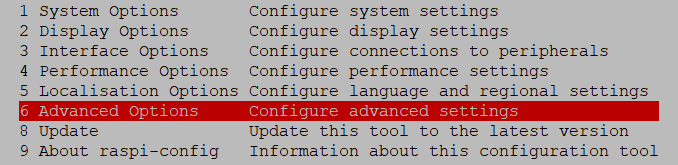

Zuletzt den Raspberry rebooten.
Lehrling seit 1975 !!!
Beitrag geholfen ? dann gerne ein upvote rechts unten im Beitrag klicken ;)
https://forum.iobroker.net/topic/51555/hinweise-f%C3%BCr-gute-forenbeitr%C3%A4ge -
@homoran
Hat das Auswirkungen das ich nur ein Bruchteil meiner SD Karte nutze?
Was kann ich dagegen tun?




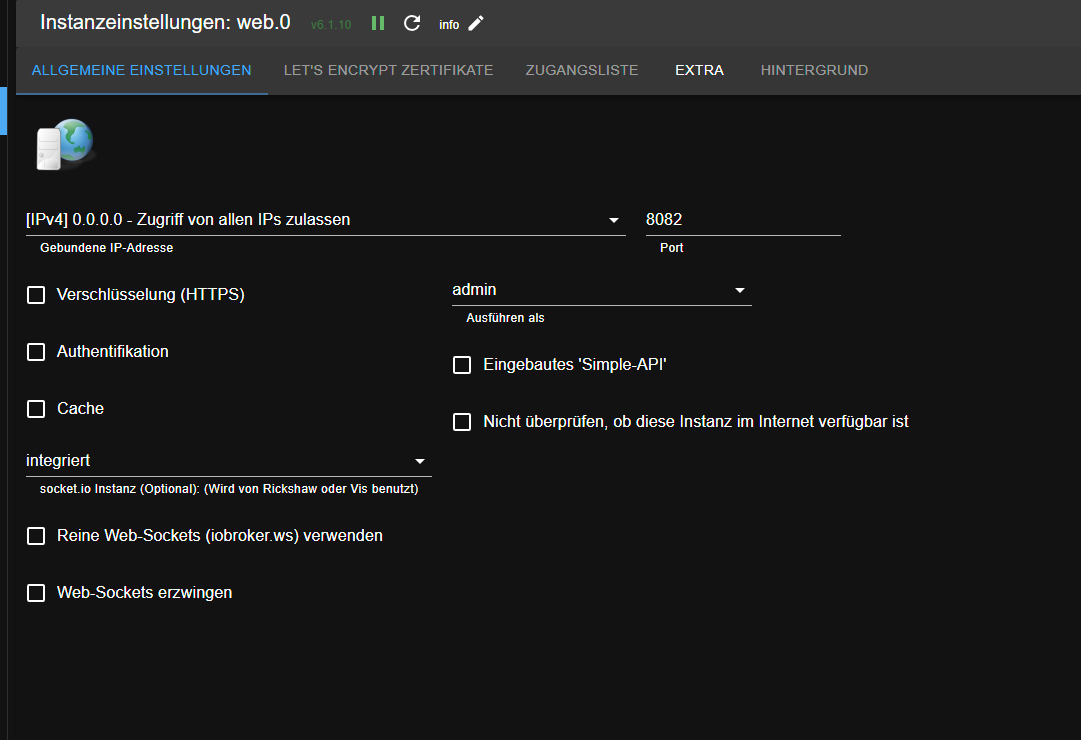

Hey! Du scheinst an dieser Unterhaltung interessiert zu sein, hast aber noch kein Konto.
Hast du es satt, bei jedem Besuch durch die gleichen Beiträge zu scrollen? Wenn du dich für ein Konto anmeldest, kommst du immer genau dorthin zurück, wo du zuvor warst, und kannst dich über neue Antworten benachrichtigen lassen (entweder per E-Mail oder Push-Benachrichtigung). Du kannst auch Lesezeichen speichern und Beiträge positiv bewerten, um anderen Community-Mitgliedern deine Wertschätzung zu zeigen.
Mit deinem Input könnte dieser Beitrag noch besser werden 💗
Registrieren AnmeldenSupport us
178
Online33.0k
Benutzer83.6k
Themen1.3m
Beiträge