




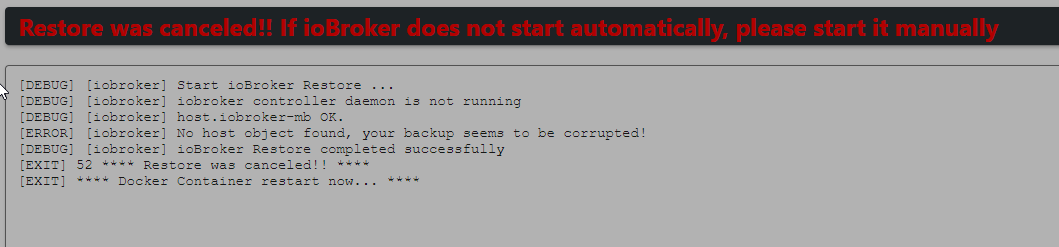
Backup aus älterer Version einspielen
-
Das ist mal der Log beim Backup einspielen.
ioBroker Backitup Restore Restore and Restart completed successfully!! [DEBUG] [iobroker] Start ioBroker Restore ... [DEBUG] [iobroker] iobroker controller daemon is not running [DEBUG] [iobroker] host.iobroker-1 OK. [DEBUG] [iobroker] The current version of js-controller differs from the version in the backup. [DEBUG] [iobroker] The js-controller version of the backup can not be restored automatically. [DEBUG] [iobroker] Note, that your backup might differ in behavior due to this version change! [DEBUG] [iobroker] Removing current installation of iobroker.admin [DEBUG] [iobroker] removed 22 packages in 3s [DEBUG] [iobroker] 35 packages are looking for funding [DEBUG] [iobroker] run `npm fund` for details [DEBUG] [iobroker] Removing current installation of iobroker.backitup [DEBUG] [iobroker] removed 124 packages in 3s [DEBUG] [iobroker] 25 packages are looking for funding [DEBUG] [iobroker] run `npm fund` for details [DEBUG] [iobroker] Removing current installation of iobroker.discovery [DEBUG] [iobroker] removed 43 packages in 2s [DEBUG] [iobroker] 13 packages are looking for funding [DEBUG] [iobroker] run `npm fund` for details [DEBUG] [iobroker] host.iobroker-1 Clear all objects and states... [DEBUG] [iobroker] clean 144 objects... [DEBUG] [iobroker] clean 101 states... [DEBUG] [iobroker] host.iobroker-1 done. [DEBUG] [iobroker] host.iobroker-1 Processed 0/9998 objects [DEBUG] [iobroker] host.iobroker-1 Processed 200/9998 objects [DEBUG] [iobroker] host.iobroker-1 Processed 400/9998 objects [DEBUG] [iobroker] host.iobroker-1 Processed 600/9998 objects [DEBUG] [iobroker] host.iobroker-1 Processed 800/9998 objects [DEBUG] [iobroker] host.iobroker-1 Processed 1000/9998 objects [DEBUG] [iobroker] host.iobroker-1 Processed 1200/9998 objects [DEBUG] [iobroker] host.iobroker-1 Processed 1400/9998 objects [DEBUG] [iobroker] host.iobroker-1 Processed 1600/9998 objects [DEBUG] [iobroker] host.iobroker-1 Processed 1800/9998 objects [DEBUG] [iobroker] host.iobroker-1 Processed 2000/9998 objects [DEBUG] [iobroker] host.iobroker-1 Processed 2200/9998 objects [DEBUG] [iobroker] host.iobroker-1 Processed 2400/9998 objects [DEBUG] [iobroker] host.iobroker-1 Processed 2600/9998 objects [DEBUG] [iobroker] host.iobroker-1 Processed 2800/9998 objects [DEBUG] [iobroker] host.iobroker-1 Processed 3000/9998 objects [DEBUG] [iobroker] host.iobroker-1 Processed 3200/9998 objects [DEBUG] [iobroker] host.iobroker-1 Processed 3400/9998 objects [DEBUG] [iobroker] host.iobroker-1 Processed 3600/9998 objects [DEBUG] [iobroker] host.iobroker-1 Processed 3800/9998 objects [DEBUG] [iobroker] host.iobroker-1 Processed 4000/9998 objects [DEBUG] [iobroker] host.iobroker-1 Processed 4200/9998 objects [DEBUG] [iobroker] host.iobroker-1 Processed 4400/9998 objects [DEBUG] [iobroker] host.iobroker-1 Processed 4600/9998 objects [DEBUG] [iobroker] host.iobroker-1 Processed 4800/9998 objects [DEBUG] [iobroker] host.iobroker-1 Processed 5000/9998 objects [DEBUG] [iobroker] host.iobroker-1 Processed 5200/9998 objects [DEBUG] [iobroker] host.iobroker-1 Processed 5400/9998 objects [DEBUG] [iobroker] host.iobroker-1 Processed 5600/9998 objects [DEBUG] [iobroker] host.iobroker-1 Processed 5800/9998 objects [DEBUG] [iobroker] host.iobroker-1 Processed 6000/9998 objects [DEBUG] [iobroker] host.iobroker-1 Processed 6200/9998 objects [DEBUG] [iobroker] host.iobroker-1 Processed 6400/9998 objects [DEBUG] [iobroker] host.iobroker-1 Processed 6600/9998 objects [DEBUG] [iobroker] host.iobroker-1 Processed 6800/9998 objects [DEBUG] [iobroker] host.iobroker-1 Processed 7000/9998 objects [DEBUG] [iobroker] host.iobroker-1 Processed 7200/9998 objects [DEBUG] [iobroker] host.iobroker-1 Processed 7400/9998 objects [DEBUG] [iobroker] host.iobroker-1 Processed 7600/9998 objects [DEBUG] [iobroker] host.iobroker-1 Processed 7800/9998 objects [DEBUG] [iobroker] host.iobroker-1 Processed 8000/9998 objects [DEBUG] [iobroker] host.iobroker-1 Processed 8200/9998 objects [DEBUG] [iobroker] host.iobroker-1 Processed 8400/9998 objects [DEBUG] [iobroker] host.iobroker-1 Processed 8600/9998 objects [DEBUG] [iobroker] host.iobroker-1 Processed 8800/9998 objects [DEBUG] [iobroker] host.iobroker-1 Processed 9000/9998 objects [DEBUG] [iobroker] host.iobroker-1 Processed 9200/9998 objects [DEBUG] [iobroker] host.iobroker-1 Processed 9400/9998 objects [DEBUG] [iobroker] host.iobroker-1 Processed 9600/9998 objects [DEBUG] [iobroker] host.iobroker-1 Processed 9800/9998 objects [DEBUG] [iobroker] 9998 objects restored. [DEBUG] [iobroker] host.iobroker-1 Processed 0/8477 states [DEBUG] [iobroker] host.iobroker-1 Processed 200/8477 states [DEBUG] [iobroker] host.iobroker-1 Processed 400/8477 states [DEBUG] [iobroker] host.iobroker-1 Processed 600/8477 states [DEBUG] [iobroker] host.iobroker-1 Processed 800/8477 states [DEBUG] [iobroker] host.iobroker-1 Processed 1000/8477 states [DEBUG] [iobroker] host.iobroker-1 Processed 1200/8477 states [DEBUG] [iobroker] host.iobroker-1 Processed 1400/8477 states [DEBUG] [iobroker] host.iobroker-1 Processed 1600/8477 states [DEBUG] [iobroker] host.iobroker-1 Processed 1800/8477 states [DEBUG] [iobroker] host.iobroker-1 Processed 2000/8477 states [DEBUG] [iobroker] host.iobroker-1 Processed 2200/8477 states [DEBUG] [iobroker] host.iobroker-1 Processed 2400/8477 states [DEBUG] [iobroker] host.iobroker-1 Processed 2600/8477 states [DEBUG] [iobroker] host.iobroker-1 Processed 2800/8477 states [DEBUG] [iobroker] host.iobroker-1 Processed 3000/8477 states [DEBUG] [iobroker] host.iobroker-1 Processed 3200/8477 states [DEBUG] [iobroker] host.iobroker-1 Processed 3400/8477 states [DEBUG] [iobroker] host.iobroker-1 Processed 3600/8477 states [DEBUG] [iobroker] host.iobroker-1 Processed 3800/8477 states [DEBUG] [iobroker] host.iobroker-1 Processed 4000/8477 states [DEBUG] [iobroker] host.iobroker-1 Processed 4200/8477 states [DEBUG] [iobroker] host.iobroker-1 Processed 4400/8477 states [DEBUG] [iobroker] host.iobroker-1 Processed 4600/8477 states [DEBUG] [iobroker] host.iobroker-1 Processed 4800/8477 states [DEBUG] [iobroker] host.iobroker-1 Processed 5000/8477 states [DEBUG] [iobroker] host.iobroker-1 Processed 5200/8477 states [DEBUG] [iobroker] host.iobroker-1 Processed 5400/8477 states [DEBUG] [iobroker] host.iobroker-1 Processed 5600/8477 states [DEBUG] [iobroker] host.iobroker-1 Processed 5800/8477 states [DEBUG] [iobroker] host.iobroker-1 Processed 6000/8477 states [DEBUG] [iobroker] host.iobroker-1 Processed 6200/8477 states [DEBUG] [iobroker] host.iobroker-1 Processed 6400/8477 states [DEBUG] [iobroker] host.iobroker-1 Processed 6600/8477 states [DEBUG] [iobroker] host.iobroker-1 Processed 6800/8477 states [DEBUG] [iobroker] host.iobroker-1 Processed 7000/8477 states [DEBUG] [iobroker] host.iobroker-1 Processed 7200/8477 states [DEBUG] [iobroker] host.iobroker-1 Processed 7400/8477 states [DEBUG] [iobroker] host.iobroker-1 Processed 7600/8477 states [DEBUG] [iobroker] host.iobroker-1 Processed 7800/8477 states [DEBUG] [iobroker] host.iobroker-1 Processed 8000/8477 states [DEBUG] [iobroker] host.iobroker-1 Processed 8200/8477 states [DEBUG] [iobroker] host.iobroker-1 Processed 8400/8477 states [DEBUG] [iobroker] 8477 states restored. [DEBUG] [iobroker] host.iobroker-1 Upload user file "vis//cache.manifest [DEBUG] [iobroker] host.iobroker-1 Upload user file "vis//cordova.js [DEBUG] [iobroker] host.iobroker-1 Upload user file "vis/css/add_kian.css [DEBUG] [iobroker] host.iobroker-1 Upload user file "vis/css/app.css [DEBUG] [iobroker] host.iobroker-1 Upload user file "vis/css/backgrounds.css [DEBUG] [iobroker] host.iobroker-1 Upload user file "vis/css/doc.css [DEBUG] [iobroker] host.iobroker-1 Upload user file "vis/css/montserrat-regular-webfont.woff [DEBUG] [iobroker] host.iobroker-1 Upload user file "vis/css/styles.css [DEBUG] [iobroker] host.iobroker-1 Upload user file "vis/css/vis-common-user.css [DEBUG] [iobroker] host.iobroker-1 Upload user file "vis/css/vis-editor.css [DEBUG] [iobroker] host.iobroker-1 Upload user file "vis/css/vis.css [DEBUG] [iobroker] host.iobroker-1 Upload user file "vis//edit.html [DEBUG] [iobroker] host.iobroker-1 Upload user file "vis//edit.src.html [DEBUG] [iobroker] host.iobroker-1 Upload user file "vis/icon/add.png [DEBUG] [iobroker] host.iobroker-1 Upload user file "vis/icon/align-height.png [DEBUG] [iobroker] host.iobroker-1 Upload user file "vis/icon/align-horizontal-center-2.png [DEBUG] [iobroker] host.iobroker-1 Upload user file "vis/icon/align-horizontal-left.png [DEBUG] [iobroker] host.iobroker-1 Upload user file "vis/icon/align-horizontal-right-2.png [DEBUG] [iobroker] host.iobroker-1 Upload user file "vis/icon/align-vertical-bottom-2.png [DEBUG] [iobroker] host.iobroker-1 Upload user file "vis/icon/align-vertical-center-2.png [DEBUG] [iobroker] host.iobroker-1 Upload user file "vis/icon/align-vertical-top-2.png [DEBUG] [iobroker] host.iobroker-1 Upload user file "vis/icon/align-width.png [DEBUG] [iobroker] host.iobroker-1 Upload user file "vis/icon/bar.png [DEBUG] [iobroker] host.iobroker-1 Upload user file "vis/icon/cancel.png [DEBUG] [iobroker] host.iobroker-1 Upload user file "vis/icon/checkbox.png [DEBUG] [iobroker] host.iobroker-1 Upload user file "vis/icon/container.png [DEBUG] [iobroker] host.iobroker-1 Upload user file "vis/icon/control.png [DEBUG] [iobroker] host.iobroker-1 Upload user file "vis/icon/copy.png [DEBUG] [iobroker] host.iobroker-1 Upload user file "vis/icon/delete.png [DEBUG] [iobroker] host.iobroker-1 Upload user file "vis/icon/dialog.png [DEBUG] [iobroker] host.iobroker-1 Upload user file "vis/icon/distribute-horizontal-equal.png [DEBUG] [iobroker] host.iobroker-1 Upload user file "vis/icon/distribute-vertical-equal.png [DEBUG] [iobroker] host.iobroker-1 Upload user file "vis/icon/door.png [DEBUG] [iobroker] host.iobroker-1 Upload user file "vis/icon/filter.png [DEBUG] [iobroker] host.iobroker-1 Upload user file "vis/icon/groupFixed.png [DEBUG] [iobroker] host.iobroker-1 Upload user file "vis/icon/groupVisibility.png [DEBUG] [iobroker] host.iobroker-1 Upload user file "vis/icon/info.png [DEBUG] [iobroker] host.iobroker-1 Upload user file "vis/icon/lamp.png [DEBUG] [iobroker] host.iobroker-1 Upload user file "vis/icon/lock.png [DEBUG] [iobroker] host.iobroker-1 Upload user file "vis/icon/lockIcon.png [DEBUG] [iobroker] host.iobroker-1 Upload user file "vis/icon/navigation.png [DEBUG] [iobroker] host.iobroker-1 Upload user file "vis/icon/ok.png [DEBUG] [iobroker] host.iobroker-1 Upload user file "vis/icon/refresh-4.png [DEBUG] [iobroker] host.iobroker-1 Upload user file "vis/icon/rename.png [DEBUG] [iobroker] host.iobroker-1 Upload user file "vis/icon/rgb.png [DEBUG] [iobroker] host.iobroker-1 Upload user file "vis/icon/shutter.png [DEBUG] [iobroker] host.iobroker-1 Upload user file "vis/icon/state.png [DEBUG] [iobroker] host.iobroker-1 Upload user file "vis/icon/stateful.png [DEBUG] [iobroker] host.iobroker-1 Upload user file "vis/icon/static.png [DEBUG] [iobroker] host.iobroker-1 Upload user file "vis/icon/table.png [DEBUG] [iobroker] host.iobroker-1 Upload user file "vis/icon/temperature.png [DEBUG] [iobroker] host.iobroker-1 Upload user file "vis/icon/timestamp.png [DEBUG] [iobroker] host.iobroker-1 Upload user file "vis/icon/tools.png [DEBUG] [iobroker] host.iobroker-1 Upload user file "vis/icon/value.png [DEBUG] [iobroker] host.iobroker-1 Upload user file "vis/icon/window.png [DEBUG] [iobroker] host.iobroker-1 Upload user file "vis/img/Heating.png [DEBUG] [iobroker] host.iobroker-1 Upload user file "vis/img/Lamp.png [DEBUG] [iobroker] host.iobroker-1 Upload user file "vis/img/OutsideTemp.png [DEBUG] [iobroker] host.iobroker-1 Upload user file "vis/img/Window.png [DEBUG] [iobroker] host.iobroker-1 Upload user file "vis/img/back/box-radial.png [DEBUG] [iobroker] host.iobroker-1 Upload user file "vis/img/back/flowers.jpg [DEBUG] [iobroker] host.iobroker-1 Upload user file "vis/img/back/oblique-line-bk.png [DEBUG] [iobroker] host.iobroker-1 Upload user file "vis/img/bg-dots-10.svg [DEBUG] [iobroker] host.iobroker-1 Upload user file "vis/img/bg-dots-15.svg [DEBUG] [iobroker] host.iobroker-1 Upload user file "vis/img/bg-dots-20.svg [DEBUG] [iobroker] host.iobroker-1 Upload user file "vis/img/bg-dots-25.svg [DEBUG] [iobroker] host.iobroker-1 Upload user file "vis/img/bg-dots-30.svg [DEBUG] [iobroker] host.iobroker-1 Upload user file "vis/img/bg-dots-40.svg [DEBUG] [iobroker] host.iobroker-1 Upload user file "vis/img/bg-dots-5.svg [DEBUG] [iobroker] host.iobroker-1 Upload user file "vis/img/bg-dots-50.svg [DEBUG] [iobroker] host.iobroker-1 Upload user file "vis/img/bulbOff.png [DEBUG] [iobroker] host.iobroker-1 Upload user file "vis/img/bulbOn.png [DEBUG] [iobroker] host.iobroker-1 Upload user file "vis/img/bulb_off.png [DEBUG] [iobroker] host.iobroker-1 Upload user file "vis/img/bulb_on.png [DEBUG] [iobroker] host.iobroker-1 Upload user file "vis/img/camera.png [DEBUG] [iobroker] host.iobroker-1 Upload user file "vis/img/cc-nc-by.png [DEBUG] [iobroker] host.iobroker-1 Upload user file "vis/img/disconnect.png [DEBUG] [iobroker] host.iobroker-1 Upload user file "vis/img/door-bell.mp3 [DEBUG] [iobroker] host.iobroker-1 Upload user file "vis/img/editmode-pattern.png [DEBUG] [iobroker] host.iobroker-1 Upload user file "vis/img/eg_trans.png [DEBUG] [iobroker] host.iobroker-1 Upload user file "vis/img/favicon.png [DEBUG] [iobroker] host.iobroker-1 Upload user file "vis/img/faviconEdit.png [DEBUG] [iobroker] host.iobroker-1 Upload user file "vis/img/garage-door-closed.png [DEBUG] [iobroker] host.iobroker-1 Upload user file "vis/img/garage-door-opened.png [DEBUG] [iobroker] host.iobroker-1 Upload user file "vis/img/gear-icon-md.png [DEBUG] [iobroker] host.iobroker-1 Upload user file "vis/img/hexabump.png [DEBUG] [iobroker] host.iobroker-1 Upload user file "vis/img/kde_folder.png [DEBUG] [iobroker] host.iobroker-1 Upload user file "vis/img/no_filter.png [DEBUG] [iobroker] host.iobroker-1 Upload user file "vis/img/sound.png [DEBUG] [iobroker] host.iobroker-1 Upload user file "vis/img/tank.png [DEBUG] [iobroker] host.iobroker-1 Upload user file "vis/img/vis.png [DEBUG] [iobroker] host.iobroker-1 Upload user file "vis/img/zip.png [DEBUG] [iobroker] host.iobroker-1 Upload user file "vis//index.html [DEBUG] [iobroker] host.iobroker-1 Upload user file "vis//index.src.html [DEBUG] [iobroker] host.iobroker-1 Upload user file "vis/js/app.js [DEBUG] [iobroker] host.iobroker-1 Upload user file "vis/js/config.js [DEBUG] [iobroker] host.iobroker-1 Upload user file "vis/js/conn.js [DEBUG] [iobroker] host.iobroker-1 Upload user file "vis/js/connSignalR.js [DEBUG] [iobroker] host.iobroker-1 Upload user file "vis/js/fm/fileManager.css [DEBUG] [iobroker] host.iobroker-1 Upload user file "vis/js/fm/fileManager.js [DEBUG] [iobroker] host.iobroker-1 Upload user file "vis/js/fm/icon/actions/add.png [DEBUG] [iobroker] host.iobroker-1 Upload user file "vis/js/fm/icon/actions/back.png [DEBUG] [iobroker] host.iobroker-1 Upload user file "vis/js/fm/icon/actions/delete.png [DEBUG] [iobroker] host.iobroker-1 Upload user file "vis/js/fm/icon/actions/down.png [DEBUG] [iobroker] host.iobroker-1 Upload user file "vis/js/fm/icon/actions/edit-rename.png [DEBUG] [iobroker] host.iobroker-1 Upload user file "vis/js/fm/icon/actions/folder-new-7.png [DEBUG] [iobroker] host.iobroker-1 Upload user file "vis/js/fm/icon/actions/folder-new.png [DEBUG] [iobroker] host.iobroker-1 Upload user file "vis/js/fm/icon/actions/icons.png [DEBUG] [iobroker] host.iobroker-1 Upload user file "vis/js/fm/icon/actions/list.png [DEBUG] [iobroker] host.iobroker-1 Upload user file "vis/js/fm/icon/actions/play.png [DEBUG] [iobroker] host.iobroker-1 Upload user file "vis/js/fm/icon/actions/refresh.png [DEBUG] [iobroker] host.iobroker-1 Upload user file "vis/js/fm/icon/actions/stop.png [DEBUG] [iobroker] host.iobroker-1 Upload user file "vis/js/fm/icon/actions/up.png [DEBUG] [iobroker] host.iobroker-1 Upload user file "vis/js/fm/icon/circleLeftIcon.png [DEBUG] [iobroker] host.iobroker-1 Upload user file "vis/js/fm/icon/mine/128/JS.png [DEBUG] [iobroker] host.iobroker-1 Upload user file "vis/js/fm/icon/mine/128/bmp.png [DEBUG] [iobroker] host.iobroker-1 Upload user file "vis/js/fm/icon/mine/128/css.png [DEBUG] [iobroker] host.iobroker-1 Upload user file "vis/js/fm/icon/mine/128/folder-blue.png [DEBUG] [iobroker] host.iobroker-1 Upload user file "vis/js/fm/icon/mine/128/folder-brown.png [DEBUG] [iobroker] host.iobroker-1 Upload user file "vis/js/fm/icon/mine/128/folder-green.png [DEBUG] [iobroker] host.iobroker-1 Upload user file "vis/js/fm/icon/mine/128/gif.png [DEBUG] [iobroker] host.iobroker-1 Upload user file "vis/js/fm/icon/mine/128/img2.png [DEBUG] [iobroker] host.iobroker-1 Upload user file "vis/js/fm/icon/mine/128/jpg.png [DEBUG] [iobroker] host.iobroker-1 Upload user file "vis/js/fm/icon/mine/128/misc.png [DEBUG] [iobroker] host.iobroker-1 Upload user file "vis/js/fm/icon/mine/128/mp3.png [DEBUG] [iobroker] host.iobroker-1 Upload user file "vis/js/fm/icon/mine/128/png.png [DEBUG] [iobroker] host.iobroker-1 Upload user file "vis/js/fm/icon/mine/128/prg.png [DEBUG] [iobroker] host.iobroker-1 Upload user file "vis/js/fm/icon/mine/128/svg.png [DEBUG] [iobroker] host.iobroker-1 Upload user file "vis/js/fm/icon/mine/128/undef.png [DEBUG] [iobroker] host.iobroker-1 Upload user file "vis/js/fm/icon/mine/128/wav.png [DEBUG] [iobroker] host.iobroker-1 Upload user file "vis/js/fm/icon/mine/128/zip.png [DEBUG] [iobroker] host.iobroker-1 Upload user file "vis/js/fm/icon/mine/24/bmp.png [DEBUG] [iobroker] host.iobroker-1 Upload user file "vis/js/fm/icon/mine/24/css.png [DEBUG] [iobroker] host.iobroker-1 Upload user file "vis/js/fm/icon/mine/24/folder-blue.png [DEBUG] [iobroker] host.iobroker-1 Upload user file "vis/js/fm/icon/mine/24/folder-brown.png [DEBUG] [iobroker] host.iobroker-1 Upload user file "vis/js/fm/icon/mine/24/folder-green.png [DEBUG] [iobroker] host.iobroker-1 Upload user file "vis/js/fm/icon/mine/24/gif.png [DEBUG] [iobroker] host.iobroker-1 Upload user file "vis/js/fm/icon/mine/24/img2.png [DEBUG] [iobroker] host.iobroker-1 Upload user file "vis/js/fm/icon/mine/24/jpg.png [DEBUG] [iobroker] host.iobroker-1 Upload user file "vis/js/fm/icon/mine/24/js.png [DEBUG] [iobroker] host.iobroker-1 Upload user file "vis/js/fm/icon/mine/24/misc.png [DEBUG] [iobroker] host.iobroker-1 Upload user file "vis/js/fm/icon/mine/24/mp3.png [DEBUG] [iobroker] host.iobroker-1 Upload user file "vis/js/fm/icon/mine/24/png.png [DEBUG] [iobroker] host.iobroker-1 Upload user file "vis/js/fm/icon/mine/24/prg.png [DEBUG] [iobroker] host.iobroker-1 Upload user file "vis/js/fm/icon/mine/24/svg.png [DEBUG] [iobroker] host.iobroker-1 Upload user file "vis/js/fm/icon/mine/24/undef.png [DEBUG] [iobroker] host.iobroker-1 Upload user file "vis/js/fm/icon/mine/24/wav.png [DEBUG] [iobroker] host.iobroker-1 Upload user file "vis/js/fm/icon/mine/24/zip.png [DEBUG] [iobroker] host.iobroker-1 Upload user file "vis/js/vis.js [DEBUG] [iobroker] host.iobroker-1 Upload user file "vis/js/visAbout.js [DEBUG] [iobroker] host.iobroker-1 Upload user file "vis/js/visEdit.js [DEBUG] [iobroker] host.iobroker-1 Upload user file "vis/js/visEditExt.js [DEBUG] [iobroker] host.iobroker-1 Upload user file "vis/js/visEditInspect.js [DEBUG] [iobroker] host.iobroker-1 Upload user file "vis/js/visEditTemplates.js [DEBUG] [iobroker] host.iobroker-1 Upload user file "vis/js/visEditWelcome.js [DEBUG] [iobroker] host.iobroker-1 Upload user file "vis/js/visUtils.js [DEBUG] [iobroker] host.iobroker-1 Upload user file "vis/js/visWizard.js [DEBUG] [iobroker] host.iobroker-1 Upload user file "vis/js/words.js [DEBUG] [iobroker] host.iobroker-1 Upload user file "vis/lib/ace/ace.js [DEBUG] [iobroker] host.iobroker-1 Upload user file "vis/lib/ace/ext-language_tools.js [DEBUG] [iobroker] host.iobroker-1 Upload user file "vis/lib/ace/ext-searchbox.js [DEBUG] [iobroker] host.iobroker-1 Upload user file "vis/lib/ace/mode-css.js [DEBUG] [iobroker] host.iobroker-1 Upload user file "vis/lib/ace/mode-html.js [DEBUG] [iobroker] host.iobroker-1 Upload user file "vis/lib/ace/mode-javascript.js [DEBUG] [iobroker] host.iobroker-1 Upload user file "vis/lib/ace/worker-css.js [DEBUG] [iobroker] host.iobroker-1 Upload user file "vis/lib/ace/worker-html.js [DEBUG] [iobroker] host.iobroker-1 Upload user file "vis/lib/ace/worker-javascript.js [DEBUG] [iobroker] host.iobroker-1 Upload user file "vis/lib/css/add2home-2.0.8.css [DEBUG] [iobroker] host.iobroker-1 Upload user file "vis/lib/css/fancytree/channel.png [DEBUG] [iobroker] host.iobroker-1 Upload user file "vis/lib/css/fancytree/device.png [DEBUG] [iobroker] host.iobroker-1 Upload user file "vis/lib/css/fancytree/icons.gif [DEBUG] [iobroker] host.iobroker-1 Upload user file "vis/lib/css/fancytree/loading.gif [DEBUG] [iobroker] host.iobroker-1 Upload user file "vis/lib/css/fancytree/state.png [DEBUG] [iobroker] host.iobroker-1 Upload user file "vis/lib/css/fancytree/ui.fancytree.jquery.min.css [DEBUG] [iobroker] host.iobroker-1 Upload user file "vis/lib/css/fancytree/ui.fancytree.min.css [DEBUG] [iobroker] host.iobroker-1 Upload user file "vis/lib/css/farbtastic.css [DEBUG] [iobroker] host.iobroker-1 Upload user file "vis/lib/css/jquery-ui-timepicker-addon-1.6.3.css [DEBUG] [iobroker] host.iobroker-1 Upload user file "vis/lib/css/jquery.jgrowl.min.css [DEBUG] [iobroker] host.iobroker-1 Upload user file "vis/lib/css/jquery.multiselect-1.13.css [DEBUG] [iobroker] host.iobroker-1 Upload user file "vis/lib/css/jquery.multiselect.filter.css [DEBUG] [iobroker] host.iobroker-1 Upload user file "vis/lib/css/superfish/megafish.css [DEBUG] [iobroker] host.iobroker-1 Upload user file "vis/lib/css/superfish/superfish-navbar.css [DEBUG] [iobroker] host.iobroker-1 Upload user file "vis/lib/css/superfish/superfish-vertical.css [DEBUG] [iobroker] host.iobroker-1 Upload user file "vis/lib/css/superfish/superfish.css [DEBUG] [iobroker] host.iobroker-1 Upload user file "vis/lib/img/delete.png [DEBUG] [iobroker] host.iobroker-1 Upload user file "vis/lib/img/edit-undo-8.png [DEBUG] [iobroker] host.iobroker-1 Upload user file "vis/lib/img/logout.png [DEBUG] [iobroker] host.iobroker-1 Upload user file "vis/lib/img/marker.png [DEBUG] [iobroker] host.iobroker-1 Upload user file "vis/lib/img/mask.png [DEBUG] [iobroker] host.iobroker-1 Upload user file "vis/lib/img/shape_align_bottom.png [DEBUG] [iobroker] host.iobroker-1 Upload user file "vis/lib/img/shape_align_left.png [DEBUG] [iobroker] host.iobroker-1 Upload user file "vis/lib/img/shape_align_right.png [DEBUG] [iobroker] host.iobroker-1 Upload user file "vis/lib/img/shape_align_top.png [DEBUG] [iobroker] host.iobroker-1 Upload user file "vis/lib/img/wheel.png [DEBUG] [iobroker] host.iobroker-1 Upload user file "vis/lib/js/add2home-2.0.8.js [DEBUG] [iobroker] host.iobroker-1 Upload user file "vis/lib/js/can.custom.min.js [DEBUG] [iobroker] host.iobroker-1 Upload user file "vis/lib/js/colResizable-1.5.min.js [DEBUG] [iobroker] host.iobroker-1 Upload user file "vis/lib/js/dropzone.js [DEBUG] [iobroker] host.iobroker-1 Upload user file "vis/lib/js/farbtastic.js [DEBUG] [iobroker] host.iobroker-1 Upload user file "vis/lib/js/html2canvas.min.js [DEBUG] [iobroker] host.iobroker-1 Upload user file "vis/lib/js/jquery-ui-1.10.3.dragdropsort.min.js [DEBUG] [iobroker] host.iobroker-1 Upload user file "vis/lib/js/jquery-ui-timepicker-addon-1.6.3.js [DEBUG] [iobroker] host.iobroker-1 Upload user file "vis/lib/js/jquery.ba-resize.min.js [DEBUG] [iobroker] host.iobroker-1 Upload user file "vis/lib/js/jquery.base64.min.js [DEBUG] [iobroker] host.iobroker-1 Upload user file "vis/lib/js/jquery.fancytree-all.min.js [DEBUG] [iobroker] host.iobroker-1 Upload user file "vis/lib/js/jquery.inputmask.bundle.min.js [DEBUG] [iobroker] host.iobroker-1 Upload user file "vis/lib/js/jquery.jgrowl.map [DEBUG] [iobroker] host.iobroker-1 Upload user file "vis/lib/js/jquery.jgrowl.min.js [DEBUG] [iobroker] host.iobroker-1 Upload user file "vis/lib/js/jquery.multiselect-1.13.min.js [DEBUG] [iobroker] host.iobroker-1 Upload user file "vis/lib/js/jquery.multiselect.filter-1.5pre.js [DEBUG] [iobroker] host.iobroker-1 Upload user file "vis/lib/js/jquery.ui.datepicker.min.js [DEBUG] [iobroker] host.iobroker-1 Upload user file "vis/lib/js/jquery.ui.touch-punch.min.js [DEBUG] [iobroker] host.iobroker-1 Upload user file "vis/lib/js/jquery.wakeup.js [DEBUG] [iobroker] host.iobroker-1 Upload user file "vis/lib/js/jqueryui.selectmenu.js [DEBUG] [iobroker] host.iobroker-1 Upload user file "vis/lib/js/loStorage.js [DEBUG] [iobroker] host.iobroker-1 Upload user file "vis/lib/js/moment-with-locales.min.js [DEBUG] [iobroker] host.iobroker-1 Upload user file "vis/lib/js/quo.standalone.js [DEBUG] [iobroker] host.iobroker-1 Upload user file "vis/lib/js/superclick.js [DEBUG] [iobroker] host.iobroker-1 Upload user file "vis/lib/js/translate.js [DEBUG] [iobroker] host.iobroker-1 Upload user file "vis//manifest.webmanifest [DEBUG] [iobroker] host.iobroker-1 Upload user file "vis//offline.html [DEBUG] [iobroker] host.iobroker-1 Upload user file "vis/signals/fire.png [DEBUG] [iobroker] host.iobroker-1 Upload user file "vis/signals/fireColor.png [DEBUG] [iobroker] host.iobroker-1 Upload user file "vis/signals/lowbattery.png [DEBUG] [iobroker] host.iobroker-1 Upload user file "vis/signals/motion.png [DEBUG] [iobroker] host.iobroker-1 Upload user file "vis/signals/motionColor.png [DEBUG] [iobroker] host.iobroker-1 Upload user file "vis/signals/online.png [DEBUG] [iobroker] host.iobroker-1 Upload user file "vis/signals/waterColor.png [DEBUG] [iobroker] host.iobroker-1 Upload user file "vis/signals/waterDrops.png [DEBUG] [iobroker] host.iobroker-1 Upload user file "vis/signals/wifiColor.png [DEBUG] [iobroker] host.iobroker-1 Upload user file "vis/signals/wifiColorRed.png [DEBUG] [iobroker] host.iobroker-1 Upload user file "vis/widgets/basic/css/table.css [DEBUG] [iobroker] host.iobroker-1 Upload user file "vis/widgets/basic/doc.html [DEBUG] [iobroker] host.iobroker-1 Upload user file "vis/widgets/basic/img/Prev_AckBool.png [DEBUG] [iobroker] host.iobroker-1 Upload user file "vis/widgets/basic/img/Prev_BasicState.png [DEBUG] [iobroker] host.iobroker-1 Upload user file "vis/widgets/basic/img/Prev_BulbOnOffCtrl.png [DEBUG] [iobroker] host.iobroker-1 Upload user file "vis/widgets/basic/img/Prev_ContainerView.png [DEBUG] [iobroker] host.iobroker-1 Upload user file "vis/widgets/basic/img/Prev_FilterDropdown.png [DEBUG] [iobroker] host.iobroker-1 Upload user file "vis/widgets/basic/img/Prev_FullScreen.png [DEBUG] [iobroker] host.iobroker-1 Upload user file "vis/widgets/basic/img/Prev_HTML.png [DEBUG] [iobroker] host.iobroker-1 Upload user file "vis/widgets/basic/img/Prev_HTMLnavigation.png [DEBUG] [iobroker] host.iobroker-1 Upload user file "vis/widgets/basic/img/Prev_HtmlLogout.png [DEBUG] [iobroker] host.iobroker-1 Upload user file "vis/widgets/basic/img/Prev_Image.png [DEBUG] [iobroker] host.iobroker-1 Upload user file "vis/widgets/basic/img/Prev_Note.png [DEBUG] [iobroker] host.iobroker-1 Upload user file "vis/widgets/basic/img/Prev_RedNumber.png [DEBUG] [iobroker] host.iobroker-1 Upload user file "vis/widgets/basic/img/Prev_ScreenResolution.png [DEBUG] [iobroker] host.iobroker-1 Upload user file "vis/widgets/basic/img/Prev_Shape.png [DEBUG] [iobroker] host.iobroker-1 Upload user file "vis/widgets/basic/img/Prev_Speech2Text.png [DEBUG] [iobroker] host.iobroker-1 Upload user file "vis/widgets/basic/img/Prev_StatefulContainerView8.png [DEBUG] [iobroker] host.iobroker-1 Upload user file "vis/widgets/basic/img/Prev_StatefulIFrame8.png [DEBUG] [iobroker] host.iobroker-1 Upload user file "vis/widgets/basic/img/Prev_StatefulImage.png [DEBUG] [iobroker] host.iobroker-1 Upload user file "vis/widgets/basic/img/Prev_TableBody.png [DEBUG] [iobroker] host.iobroker-1 Upload user file "vis/widgets/basic/img/Prev_TimeValue.png [DEBUG] [iobroker] host.iobroker-1 Upload user file "vis/widgets/basic/img/Prev_ValueBool.png [DEBUG] [iobroker] host.iobroker-1 Upload user file "vis/widgets/basic/img/Prev_ValueBoolCheckbox.png [DEBUG] [iobroker] host.iobroker-1 Upload user file "vis/widgets/basic/img/Prev_ValueBoolCtrl.png [DEBUG] [iobroker] host.iobroker-1 Upload user file "vis/widgets/basic/img/Prev_ValueBoolCtrlSvg.png [DEBUG] [iobroker] host.iobroker-1 Upload user file "vis/widgets/basic/img/Prev_ValueBoolSelect.png [DEBUG] [iobroker] host.iobroker-1 Upload user file "vis/widgets/basic/img/Prev_ValueFloat.png [DEBUG] [iobroker] host.iobroker-1 Upload user file "vis/widgets/basic/img/Prev_ValueFloatBar.png [DEBUG] [iobroker] host.iobroker-1 Upload user file "vis/widgets/basic/img/Prev_ValueGesture.png [DEBUG] [iobroker] host.iobroker-1 Upload user file "vis/widgets/basic/img/Prev_ValueInput.png [DEBUG] [iobroker] host.iobroker-1 Upload user file "vis/widgets/basic/img/Prev_ValueLastchange.png [DEBUG] [iobroker] host.iobroker-1 Upload user file "vis/widgets/basic/img/Prev_ValueList.png [DEBUG] [iobroker] host.iobroker-1 Upload user file "vis/widgets/basic/img/Prev_ValueListHtml.png [DEBUG] [iobroker] host.iobroker-1 Upload user file "vis/widgets/basic/img/Prev_ValueListHtml8.png [DEBUG] [iobroker] host.iobroker-1 Upload user file "vis/widgets/basic/img/Prev_ValueString.png [DEBUG] [iobroker] host.iobroker-1 Upload user file "vis/widgets/basic/img/Prev_ValueStringImg.png [DEBUG] [iobroker] host.iobroker-1 Upload user file "vis/widgets/basic/img/Prev_ValueStringRaw.png [DEBUG] [iobroker] host.iobroker-1 Upload user file "vis/widgets/basic/img/Prev_ValueTimestamp.png [DEBUG] [iobroker] host.iobroker-1 Upload user file "vis/widgets/basic/img/Prev_iFrame.png [DEBUG] [iobroker] host.iobroker-1 Upload user file "vis/widgets/basic/img/Prev_tplFrame.png [DEBUG] [iobroker] host.iobroker-1 Upload user file "vis/widgets/basic/img/Prev_tplLink.png [DEBUG] [iobroker] host.iobroker-1 Upload user file "vis/widgets/basic/img/doc_example_hm_val_number.png [DEBUG] [iobroker] host.iobroker-1 Upload user file "vis/widgets/basic/img/micActive.svg [DEBUG] [iobroker] host.iobroker-1 Upload user file "vis/widgets/basic/img/micDetected.svg [DEBUG] [iobroker] host.iobroker-1 Upload user file "vis/widgets/basic/img/micInactive.svg [DEBUG] [iobroker] host.iobroker-1 Upload user file "vis/widgets/basic/img/micSent.svg [DEBUG] [iobroker] host.iobroker-1 Upload user file "vis/widgets/basic/img/micStarted.svg [DEBUG] [iobroker] host.iobroker-1 Upload user file "vis/widgets/basic/img/pin_red5.svg [DEBUG] [iobroker] host.iobroker-1 Upload user file "vis/widgets/basic/js/table.js [DEBUG] [iobroker] host.iobroker-1 Upload user file "vis/widgets/basic.html [DEBUG] [iobroker] host.iobroker-1 Upload user file "vis/widgets/echarts/img/Prev_tplEchartsChart.png [DEBUG] [iobroker] host.iobroker-1 Upload user file "vis/widgets/echarts.html [DEBUG] [iobroker] host.iobroker-1 Upload user file "vis/widgets/fritzdect/css/style.css [DEBUG] [iobroker] host.iobroker-1 Upload user file "vis/widgets/fritzdect/js/fritzdect.js [DEBUG] [iobroker] host.iobroker-1 Upload user file "vis/widgets/fritzdect.html [DEBUG] [iobroker] host.iobroker-1 Upload user file "vis/widgets/info/css/style.css [DEBUG] [iobroker] host.iobroker-1 Upload user file "vis/widgets/info/img/calendar.png [DEBUG] [iobroker] host.iobroker-1 Upload user file "vis/widgets/info/img/messages.png [DEBUG] [iobroker] host.iobroker-1 Upload user file "vis/widgets/info/js/info.js [DEBUG] [iobroker] host.iobroker-1 Upload user file "vis/widgets/info/js/words.js [DEBUG] [iobroker] host.iobroker-1 Upload user file "vis/widgets/info.html [DEBUG] [iobroker] host.iobroker-1 Upload user file "vis/widgets/jqplot/css/jquery.jqplot.min.css [DEBUG] [iobroker] host.iobroker-1 Upload user file "vis/widgets/jqplot/doc.html [DEBUG] [iobroker] host.iobroker-1 Upload user file "vis/widgets/jqplot/img/Prev_MeterGauge.png [DEBUG] [iobroker] host.iobroker-1 Upload user file "vis/widgets/jqplot/js/jquery.jqplot.min.js [DEBUG] [iobroker] host.iobroker-1 Upload user file "vis/widgets/jqplot.html [DEBUG] [iobroker] host.iobroker-1 Upload user file "vis/widgets/jqui/doc.html [DEBUG] [iobroker] host.iobroker-1 Upload user file "vis/widgets/jqui/img/Prev_ContainerButtonDialog.png [DEBUG] [iobroker] host.iobroker-1 Upload user file "vis/widgets/jqui/img/Prev_ContainerDialog.png [DEBUG] [iobroker] host.iobroker-1 Upload user file "vis/widgets/jqui/img/Prev_ContainerDialogExternal.png [DEBUG] [iobroker] host.iobroker-1 Upload user file "vis/widgets/jqui/img/Prev_ContainerIconDialog.png [DEBUG] [iobroker] host.iobroker-1 Upload user file "vis/widgets/jqui/img/Prev_JquiDialog.png [DEBUG] [iobroker] host.iobroker-1 Upload user file "vis/widgets/jqui/img/Prev_JquiIconDialog.png [DEBUG] [iobroker] host.iobroker-1 Upload user file "vis/widgets/jqui/img/ct.png [DEBUG] [iobroker] host.iobroker-1 Upload user file "vis/widgets/jqui/img/hue.png [DEBUG] [iobroker] host.iobroker-1 Upload user file "vis/widgets/jqui/img/internet-web-browser-2.png [DEBUG] [iobroker] host.iobroker-1 Upload user file "vis/widgets/jqui.html [DEBUG] [iobroker] host.iobroker-1 Upload user file "vis/widgets/swipe/doc.html [DEBUG] [iobroker] host.iobroker-1 Upload user file "vis/widgets/swipe/img/Prev_Carousel.png [DEBUG] [iobroker] host.iobroker-1 Upload user file "vis/widgets/swipe/img/Prev_Swipe.png [DEBUG] [iobroker] host.iobroker-1 Upload user file "vis/widgets/swipe/img/noSwipe.jpg [DEBUG] [iobroker] host.iobroker-1 Upload user file "vis/widgets/swipe/js/jquery.roundabout-shapes.js [DEBUG] [iobroker] host.iobroker-1 Upload user file "vis/widgets/swipe/js/jquery.roundabout.min.js [DEBUG] [iobroker] host.iobroker-1 Upload user file "vis/widgets/swipe/js/jquery.touchSwipe.min.js [DEBUG] [iobroker] host.iobroker-1 Upload user file "vis/widgets/swipe.html [DEBUG] [iobroker] host.iobroker-1 Upload user file "vis/widgets/tabs/jquery.sliderTabs.js [DEBUG] [iobroker] host.iobroker-1 Upload user file "vis/widgets/tabs/styles/images/indicator.png [DEBUG] [iobroker] host.iobroker-1 Upload user file "vis/widgets/tabs/styles/images/indicatorActive.png [DEBUG] [iobroker] host.iobroker-1 Upload user file "vis/widgets/tabs/styles/images/leftArrow.png [DEBUG] [iobroker] host.iobroker-1 Upload user file "vis/widgets/tabs/styles/images/leftPanelArrow.png [DEBUG] [iobroker] host.iobroker-1 Upload user file "vis/widgets/tabs/styles/images/rightArrow.png [DEBUG] [iobroker] host.iobroker-1 Upload user file "vis/widgets/tabs/styles/images/rightPanelArrow.png [DEBUG] [iobroker] host.iobroker-1 Upload user file "vis/widgets/tabs/styles/jquery.sliderTabs.css [DEBUG] [iobroker] host.iobroker-1 Upload user file "vis/widgets/tabs/styles/jquery.sliderTabs.css.orig [DEBUG] [iobroker] host.iobroker-1 Upload user file "vis/widgets/tabs/styles/jquery.sliderTabs.min.css [DEBUG] [iobroker] host.iobroker-1 Upload user file "vis/widgets/tabs.html [DEBUG] [iobroker] host.iobroker-1 Upload user file "vis/widgets/todo/dev.html [DEBUG] [iobroker] host.iobroker-1 Upload user file "vis/widgets/todo/homematic.html [DEBUG] [iobroker] host.iobroker-1 Upload user file "vis/widgets/todo/special.html [DEBUG] [iobroker] host.iobroker-1 Upload user file "vis/widgets/todo/weather.html [DEBUG] [iobroker] host.iobroker-1 Upload user file "vis.0/main/vis-user.css [DEBUG] [iobroker] host.iobroker-1 Upload user file "vis.0/main/vis-views.json [DEBUG] [iobroker] Reinstalling adapter "admin" from "iobroker.admin@6.2.22" [DEBUG] [iobroker] added 87 packages, and changed 1 package in 12s [DEBUG] [iobroker] 24 packages are looking for funding [DEBUG] [iobroker] run `npm fund` for details [DEBUG] [iobroker] Reinstalling adapter "backitup" from "iobroker.backitup@2.4.12" [DEBUG] [iobroker] added 76 packages, and removed 9 packages in 9s [DEBUG] [iobroker] 28 packages are looking for funding [DEBUG] [iobroker] run `npm fund` for details [DEBUG] [iobroker] Forced restore - executing setup ... [DEBUG] [iobroker] System successfully restored! [DEBUG] [iobroker] ioBroker Restore completed successfully [EXIT] 0 **** Restore completed successfully!! **** [EXIT] **** Docker Container restart now... ****@firefighter166
Die VIS wird wegen eines Bugs erstmal nicht funktionieren, hier muss erstmal ein Downgrade gemacht werden.Guck mal hier: https://forum.iobroker.net/topic/70838/vis-kann-nach-restore-nicht-installiert-werden/3
Danach machst du ein Upgrade aller Adapter und des js-controllers auf die Version 5.0.x. Dieses Backup kannst du dann auch auf einem aktuellen Image einspielen.
-
@firefighter166
Die VIS wird wegen eines Bugs erstmal nicht funktionieren, hier muss erstmal ein Downgrade gemacht werden.Guck mal hier: https://forum.iobroker.net/topic/70838/vis-kann-nach-restore-nicht-installiert-werden/3
Danach machst du ein Upgrade aller Adapter und des js-controllers auf die Version 5.0.x. Dieses Backup kannst du dann auch auf einem aktuellen Image einspielen.
@marc-berg said in Backup aus älterer Version einspielen:
machst du ein Upgrade aller Adapter
Ich glaube es nicht es ist wieder da. Jetzt mache ich mal Stück für Stück weiter damit ich auf die neue Version umziehen kann.
Wo finde ich nochmal den Befehl für das Upgrade des js-controllers?
-
@marc-berg said in Backup aus älterer Version einspielen:
machst du ein Upgrade aller Adapter
Ich glaube es nicht es ist wieder da. Jetzt mache ich mal Stück für Stück weiter damit ich auf die neue Version umziehen kann.
Wo finde ich nochmal den Befehl für das Upgrade des js-controllers?
@firefighter166 sagte in Backup aus älterer Version einspielen:
Wo finde ich nochmal den Befehl für das Upgrade des js-controllers?
In dieser alten Versionskonstellation so:
pkill -u iobroker iobroker update iobroker upgrade self -
Vielen Dank bis hierhin für die super Unterstützung. Ich habe jetzt bis auf dem Raspberry welcher als Slave läuft alles auf dem neusten Stand.
-
Vielen Dank bis hierhin für die super Unterstützung. Ich habe jetzt bis auf dem Raspberry welcher als Slave läuft alles auf dem neusten Stand.
@firefighter166
In Zukunft bitte mit allen relevanten Infos gleich rausrücken. Dass du eine Multihost-Umgebung hast, wäre wichtig gewesen zu wissen.@homoran sagte in Backup aus älterer Version einspielen:
@firefighter166
jetzt bring mal alle notwendigen Informationen strukturiert bei.
https://forum.iobroker.net/topic/51555/hinweise-für-gute-forenbeiträge/1 -
Also ich habe im Keller einen Raspberry der in der Unterverteilung sitzt und mittels Node Red meine Zählerstände abliest. Diese wurde dann in einer Influx DB gespeichert.

-
Vielen Dank bis hierhin für die super Unterstützung. Ich habe jetzt bis auf dem Raspberry welcher als Slave läuft alles auf dem neusten Stand.
@firefighter166 sagte in Backup aus älterer Version einspielen:
Ich habe jetzt bis auf dem Raspberry welcher als Slave läuft alles auf dem neusten Stand.
Dann bring den auch auf Stand.
-
@firefighter166 sagte in Backup aus älterer Version einspielen:
Ich habe jetzt bis auf dem Raspberry welcher als Slave läuft alles auf dem neusten Stand.
Dann bring den auch auf Stand.
@thomas-braun
Habe ich über zwei Wege versucht, er lässt sich nicht Updaten. Egal ob über dem Update Button in der Oberfläche oder über die Konsole -
@thomas-braun
Habe ich über zwei Wege versucht, er lässt sich nicht Updaten. Egal ob über dem Update Button in der Oberfläche oder über die Konsole@firefighter166 sagte in Backup aus älterer Version einspielen:
er lässt sich nicht Updaten
Und der Raspi sagt dann "ich hab' kein Bock auf 'n Upgrade", oder gibt's auch eine Fehlermeldung? :-)
-
@thomas-braun
Habe ich über zwei Wege versucht, er lässt sich nicht Updaten. Egal ob über dem Update Button in der Oberfläche oder über die Konsole@firefighter166 sagte in Backup aus älterer Version einspielen:
er lässt sich nicht Updaten
Das glaube ich nicht.
-
@firefighter166 sagte in Backup aus älterer Version einspielen:
er lässt sich nicht Updaten
Und der Raspi sagt dann "ich hab' kein Bock auf 'n Upgrade", oder gibt's auch eine Fehlermeldung? :-)
Mit folgendem Befehl habe ich es direkt auf dem Pi mittels Putty probiert.
cd /opt/iobroker/
sudo iobroker stop
sudo iobroker update
sudo iobroker upgrade self
sudo iobroker start
Das macht er dann folgendes:
pi@iobrokerstrom:/opt/iobroker $ sudo iobroker stop pi@iobrokerstrom:/opt/iobroker $ sudo iobroker update Used repository: stable Adapter "admin" : 6.12.0 , installed 5.3.4 [Updatable] Adapter "backitup" : 2.8.7 , installed 2.3.3 [Updatable] Adapter "devices" : 1.1.5 , installed 1.0.12 [Updatable] Adapter "discovery" : 4.2.0 , installed 2.8.0 [Updatable] Controller "js-controller": 5.0.16 , installed 4.0.23 [Updatable] Adapter "node-red" : 4.0.3 , installed 3.3.1 [Updatable] Adapter "smartmeter" : 3.3.4 , installed 3.3.4 pi@iobrokerstrom:/opt/iobroker $ sudo iobroker upgrade self Update js-controller from @4.0.23 to @5.0.16 Stopped Objects DB Stopped States DB NPM version: 6.14.16 Installing iobroker.js-controller@5.0.16... (System call) pi@iobrokerstrom:/opt/iobroker $ sudo iobroker start pi@iobrokerstrom:/opt/iobroker $ -
Mit folgendem Befehl habe ich es direkt auf dem Pi mittels Putty probiert.
cd /opt/iobroker/
sudo iobroker stop
sudo iobroker update
sudo iobroker upgrade self
sudo iobroker start
Das macht er dann folgendes:
pi@iobrokerstrom:/opt/iobroker $ sudo iobroker stop pi@iobrokerstrom:/opt/iobroker $ sudo iobroker update Used repository: stable Adapter "admin" : 6.12.0 , installed 5.3.4 [Updatable] Adapter "backitup" : 2.8.7 , installed 2.3.3 [Updatable] Adapter "devices" : 1.1.5 , installed 1.0.12 [Updatable] Adapter "discovery" : 4.2.0 , installed 2.8.0 [Updatable] Controller "js-controller": 5.0.16 , installed 4.0.23 [Updatable] Adapter "node-red" : 4.0.3 , installed 3.3.1 [Updatable] Adapter "smartmeter" : 3.3.4 , installed 3.3.4 pi@iobrokerstrom:/opt/iobroker $ sudo iobroker upgrade self Update js-controller from @4.0.23 to @5.0.16 Stopped Objects DB Stopped States DB NPM version: 6.14.16 Installing iobroker.js-controller@5.0.16... (System call) pi@iobrokerstrom:/opt/iobroker $ sudo iobroker start pi@iobrokerstrom:/opt/iobroker $Joh...
Wie immer:
iobroker wird nie, gar nicht, unter keinen Umständen mit sudo angepackt.
iob stop iob fix iob start -
Mit folgendem Befehl habe ich es direkt auf dem Pi mittels Putty probiert.
cd /opt/iobroker/
sudo iobroker stop
sudo iobroker update
sudo iobroker upgrade self
sudo iobroker start
Das macht er dann folgendes:
pi@iobrokerstrom:/opt/iobroker $ sudo iobroker stop pi@iobrokerstrom:/opt/iobroker $ sudo iobroker update Used repository: stable Adapter "admin" : 6.12.0 , installed 5.3.4 [Updatable] Adapter "backitup" : 2.8.7 , installed 2.3.3 [Updatable] Adapter "devices" : 1.1.5 , installed 1.0.12 [Updatable] Adapter "discovery" : 4.2.0 , installed 2.8.0 [Updatable] Controller "js-controller": 5.0.16 , installed 4.0.23 [Updatable] Adapter "node-red" : 4.0.3 , installed 3.3.1 [Updatable] Adapter "smartmeter" : 3.3.4 , installed 3.3.4 pi@iobrokerstrom:/opt/iobroker $ sudo iobroker upgrade self Update js-controller from @4.0.23 to @5.0.16 Stopped Objects DB Stopped States DB NPM version: 6.14.16 Installing iobroker.js-controller@5.0.16... (System call) pi@iobrokerstrom:/opt/iobroker $ sudo iobroker start pi@iobrokerstrom:/opt/iobroker $ -
Joh...
Wie immer:
iobroker wird nie, gar nicht, unter keinen Umständen mit sudo angepackt.
iob stop iob fix iob start@thomas-braun said in Backup aus älterer Version einspielen:
iob start
Okay, das wusste ich mit Sudo nicht. Jetzt habe ich den Befehl über sie Konsole ausgeführt.
-
======== Start marking the full check here ========= Skript v.2023-10-10 *** BASE SYSTEM *** Static hostname: iobrokerstrom Icon name: computer Operating System: Raspbian GNU/Linux 11 (bullseye) Kernel: Linux 5.10.92-v7+ Architecture: arm Model : Raspberry Pi 3 Model B Rev 1.2 Docker : false Virtualization : none Kernel : armv7l Userland : armhf Systemuptime and Load: 14:28:37 up 45 min, 1 user, load average: 0.27, 0.46, 0.46 CPU threads: 4 *** RASPBERRY THROTTLING *** Current issues: ~ Under-voltage detected ~ Arm frequency capped Previously detected issues: ~ Under-voltage has occurred ~ Arm frequency capping has occurred *** Time and Time Zones *** Local time: Fri 2023-12-08 14:28:38 CET Universal time: Fri 2023-12-08 13:28:38 UTC RTC time: n/a Time zone: Europe/Berlin (CET, +0100) System clock synchronized: yes NTP service: active RTC in local TZ: no *** User and Groups *** pi /home/pi pi adm dialout cdrom sudo audio video plugdev games users input render netdev gpio i2c spi iobroker *** X-Server-Setup *** X-Server: false Desktop: Terminal: tty Boot Target: graphical.target *** MEMORY *** total used free shared buff/cache available Mem: 922M 86M 460M 0.0K 376M 776M Swap: 99M 0B 99M Total: 1.0G 86M 560M 922 M total memory 86 M used memory 217 M active memory 166 M inactive memory 459 M free memory 54 M buffer memory 321 M swap cache 99 M total swap 0 M used swap 99 M free swap Raspberry only: oom events: 0 lifetime oom required: 0 Mbytes total time in oom handler: 0 ms max time spent in oom handler: 0 ms *** FAILED SERVICES *** UNIT LOAD ACTIVE SUB DESCRIPTION 0 loaded units listed. *** FILESYSTEM *** Filesystem Type Size Used Avail Use% Mounted on /dev/root ext4 29G 5.2G 23G 19% / devtmpfs devtmpfs 333M 0 333M 0% /dev tmpfs tmpfs 462M 0 462M 0% /dev/shm tmpfs tmpfs 185M 736K 184M 1% /run tmpfs tmpfs 5.0M 4.0K 5.0M 1% /run/lock /dev/mmcblk0p1 vfat 253M 49M 204M 20% /boot tmpfs tmpfs 93M 0 93M 0% /run/user/1000 Messages concerning ext4 filesystem in dmesg: [Fri Dec 8 13:42:43 2023] Kernel command line: coherent_pool=1M 8250.nr_uarts=0 snd_bcm2835.enable_compat_alsa=0 snd_bcm2835.enable_hdmi=1 video=Composite-1:720x480@60i vc_mem.mem_base=0x3ec00000 vc_mem.mem_size=0x40000000 console=ttyS0,115200 console=tty1 root=PARTUUID=edaee7dd-02 rootfstype=ext4 fsck.repair=yes rootwait [Fri Dec 8 13:42:46 2023] EXT4-fs (mmcblk0p2): mounted filesystem with ordered data mode. Opts: (null) [Fri Dec 8 13:42:46 2023] VFS: Mounted root (ext4 filesystem) readonly on device 179:2. [Fri Dec 8 13:42:49 2023] EXT4-fs (mmcblk0p2): re-mounted. Opts: (null) Show mounted filesystems \(real ones only\): TARGET SOURCE FSTYPE OPTIONS / /dev/mmcblk0p2 ext4 rw,noatime `-/boot /dev/mmcblk0p1 vfat rw,relatime,fmask=0022,dmask=0022,codepage=437,iocharset=ascii,shortname=mixed,errors=remount-ro Files in neuralgic directories: /var: 3.3G /var/ 2.9G /var/log/journal/24f1b2dc7af348df8a22d9dfe87b5d3d 2.9G /var/log/journal 2.9G /var/log 150M /var/cache Archived and active journals take up 2.8G in the file system. /opt/iobroker/backups: 5.1M /opt/iobroker/backups/ /opt/iobroker/iobroker-data: 21M /opt/iobroker/iobroker-data/ 17M /opt/iobroker/iobroker-data/node-red/node_modules 17M /opt/iobroker/iobroker-data/node-red 5.2M /opt/iobroker/iobroker-data/node-red/node_modules/moment 5.0M /opt/iobroker/iobroker-data/node-red/node_modules/lodash The five largest files in iobroker-data are: 2.6M /opt/iobroker/iobroker-data/objects.jsonl 608K /opt/iobroker/iobroker-data/node-red/node_modules/moment/min/moment-with-locales.js 532K /opt/iobroker/iobroker-data/node-red/node_modules/lodash/lodash.js 440K /opt/iobroker/iobroker-data/node-red/node_modules/moment/min/locales.js 364K /opt/iobroker/iobroker-data/node-red/node_modules/moment/min/moment-with-locales.min.js USB-Devices by-id: USB-Sticks - Avoid direct links to /dev/* in your adapter setups, please always prefer the links 'by-id': /dev/serial/by-id/usb-Silicon_Labs_CP2102_USB_to_UART_Bridge_Controller_0023-if00-port0 /dev/serial/by-id/usb-Silicon_Labs_CP2102_USB_to_UART_Bridge_Controller_0038-if00-port0 /dev/serial/by-id/usb-Silicon_Labs_CP2102_USB_to_UART_Bridge_Controller_0030-if00-port0 *** NodeJS-Installation *** /home/iobroker/.diag.sh: line 277: nodejs: command not found /usr/bin/node v12.22.11 /usr/bin/npm 6.14.16 /usr/bin/npx 6.14.16 /home/iobroker/.diag.sh: line 281: corepack: command not found /home/iobroker/.diag.sh: line 288: nodejs: command not found *** nodejs is NOT correctly installed *** nodejs: Installed: 12.22.11-deb-1nodesource1 Candidate: 12.22.12-deb-1nodesource1 Version table: 12.22.12-deb-1nodesource1 500 500 https://deb.nodesource.com/node_12.x bullseye/main armhf Packages 12.22.12~dfsg-1~deb11u4 500 500 http://raspbian.raspberrypi.org/raspbian bullseye/main armhf Packages *** 12.22.11-deb-1nodesource1 100 100 /var/lib/dpkg/status Temp directories causing npm8 problem: 0 No problems detected -
======== Start marking the full check here ========= Skript v.2023-10-10 *** BASE SYSTEM *** Static hostname: iobrokerstrom Icon name: computer Operating System: Raspbian GNU/Linux 11 (bullseye) Kernel: Linux 5.10.92-v7+ Architecture: arm Model : Raspberry Pi 3 Model B Rev 1.2 Docker : false Virtualization : none Kernel : armv7l Userland : armhf Systemuptime and Load: 14:28:37 up 45 min, 1 user, load average: 0.27, 0.46, 0.46 CPU threads: 4 *** RASPBERRY THROTTLING *** Current issues: ~ Under-voltage detected ~ Arm frequency capped Previously detected issues: ~ Under-voltage has occurred ~ Arm frequency capping has occurred *** Time and Time Zones *** Local time: Fri 2023-12-08 14:28:38 CET Universal time: Fri 2023-12-08 13:28:38 UTC RTC time: n/a Time zone: Europe/Berlin (CET, +0100) System clock synchronized: yes NTP service: active RTC in local TZ: no *** User and Groups *** pi /home/pi pi adm dialout cdrom sudo audio video plugdev games users input render netdev gpio i2c spi iobroker *** X-Server-Setup *** X-Server: false Desktop: Terminal: tty Boot Target: graphical.target *** MEMORY *** total used free shared buff/cache available Mem: 922M 86M 460M 0.0K 376M 776M Swap: 99M 0B 99M Total: 1.0G 86M 560M 922 M total memory 86 M used memory 217 M active memory 166 M inactive memory 459 M free memory 54 M buffer memory 321 M swap cache 99 M total swap 0 M used swap 99 M free swap Raspberry only: oom events: 0 lifetime oom required: 0 Mbytes total time in oom handler: 0 ms max time spent in oom handler: 0 ms *** FAILED SERVICES *** UNIT LOAD ACTIVE SUB DESCRIPTION 0 loaded units listed. *** FILESYSTEM *** Filesystem Type Size Used Avail Use% Mounted on /dev/root ext4 29G 5.2G 23G 19% / devtmpfs devtmpfs 333M 0 333M 0% /dev tmpfs tmpfs 462M 0 462M 0% /dev/shm tmpfs tmpfs 185M 736K 184M 1% /run tmpfs tmpfs 5.0M 4.0K 5.0M 1% /run/lock /dev/mmcblk0p1 vfat 253M 49M 204M 20% /boot tmpfs tmpfs 93M 0 93M 0% /run/user/1000 Messages concerning ext4 filesystem in dmesg: [Fri Dec 8 13:42:43 2023] Kernel command line: coherent_pool=1M 8250.nr_uarts=0 snd_bcm2835.enable_compat_alsa=0 snd_bcm2835.enable_hdmi=1 video=Composite-1:720x480@60i vc_mem.mem_base=0x3ec00000 vc_mem.mem_size=0x40000000 console=ttyS0,115200 console=tty1 root=PARTUUID=edaee7dd-02 rootfstype=ext4 fsck.repair=yes rootwait [Fri Dec 8 13:42:46 2023] EXT4-fs (mmcblk0p2): mounted filesystem with ordered data mode. Opts: (null) [Fri Dec 8 13:42:46 2023] VFS: Mounted root (ext4 filesystem) readonly on device 179:2. [Fri Dec 8 13:42:49 2023] EXT4-fs (mmcblk0p2): re-mounted. Opts: (null) Show mounted filesystems \(real ones only\): TARGET SOURCE FSTYPE OPTIONS / /dev/mmcblk0p2 ext4 rw,noatime `-/boot /dev/mmcblk0p1 vfat rw,relatime,fmask=0022,dmask=0022,codepage=437,iocharset=ascii,shortname=mixed,errors=remount-ro Files in neuralgic directories: /var: 3.3G /var/ 2.9G /var/log/journal/24f1b2dc7af348df8a22d9dfe87b5d3d 2.9G /var/log/journal 2.9G /var/log 150M /var/cache Archived and active journals take up 2.8G in the file system. /opt/iobroker/backups: 5.1M /opt/iobroker/backups/ /opt/iobroker/iobroker-data: 21M /opt/iobroker/iobroker-data/ 17M /opt/iobroker/iobroker-data/node-red/node_modules 17M /opt/iobroker/iobroker-data/node-red 5.2M /opt/iobroker/iobroker-data/node-red/node_modules/moment 5.0M /opt/iobroker/iobroker-data/node-red/node_modules/lodash The five largest files in iobroker-data are: 2.6M /opt/iobroker/iobroker-data/objects.jsonl 608K /opt/iobroker/iobroker-data/node-red/node_modules/moment/min/moment-with-locales.js 532K /opt/iobroker/iobroker-data/node-red/node_modules/lodash/lodash.js 440K /opt/iobroker/iobroker-data/node-red/node_modules/moment/min/locales.js 364K /opt/iobroker/iobroker-data/node-red/node_modules/moment/min/moment-with-locales.min.js USB-Devices by-id: USB-Sticks - Avoid direct links to /dev/* in your adapter setups, please always prefer the links 'by-id': /dev/serial/by-id/usb-Silicon_Labs_CP2102_USB_to_UART_Bridge_Controller_0023-if00-port0 /dev/serial/by-id/usb-Silicon_Labs_CP2102_USB_to_UART_Bridge_Controller_0038-if00-port0 /dev/serial/by-id/usb-Silicon_Labs_CP2102_USB_to_UART_Bridge_Controller_0030-if00-port0 *** NodeJS-Installation *** /home/iobroker/.diag.sh: line 277: nodejs: command not found /usr/bin/node v12.22.11 /usr/bin/npm 6.14.16 /usr/bin/npx 6.14.16 /home/iobroker/.diag.sh: line 281: corepack: command not found /home/iobroker/.diag.sh: line 288: nodejs: command not found *** nodejs is NOT correctly installed *** nodejs: Installed: 12.22.11-deb-1nodesource1 Candidate: 12.22.12-deb-1nodesource1 Version table: 12.22.12-deb-1nodesource1 500 500 https://deb.nodesource.com/node_12.x bullseye/main armhf Packages 12.22.12~dfsg-1~deb11u4 500 500 http://raspbian.raspberrypi.org/raspbian bullseye/main armhf Packages *** 12.22.11-deb-1nodesource1 100 100 /var/lib/dpkg/status Temp directories causing npm8 problem: 0 No problems detectedDie Stromversorgung ist zu schwach.
Nodejs ist hoffnungslos veraltet.
Die Ausgabe ist nicht vollständig. -
======== Start marking the full check here ========= Skript v.2023-10-10 *** BASE SYSTEM *** Static hostname: iobrokerstrom Icon name: computer Operating System: Raspbian GNU/Linux 11 (bullseye) Kernel: Linux 5.10.92-v7+ Architecture: arm Model : Raspberry Pi 3 Model B Rev 1.2 Docker : false Virtualization : none Kernel : armv7l Userland : armhf Systemuptime and Load: 14:28:37 up 45 min, 1 user, load average: 0.27, 0.46, 0.46 CPU threads: 4 *** RASPBERRY THROTTLING *** Current issues: ~ Under-voltage detected ~ Arm frequency capped Previously detected issues: ~ Under-voltage has occurred ~ Arm frequency capping has occurred *** Time and Time Zones *** Local time: Fri 2023-12-08 14:28:38 CET Universal time: Fri 2023-12-08 13:28:38 UTC RTC time: n/a Time zone: Europe/Berlin (CET, +0100) System clock synchronized: yes NTP service: active RTC in local TZ: no *** User and Groups *** pi /home/pi pi adm dialout cdrom sudo audio video plugdev games users input render netdev gpio i2c spi iobroker *** X-Server-Setup *** X-Server: false Desktop: Terminal: tty Boot Target: graphical.target *** MEMORY *** total used free shared buff/cache available Mem: 922M 86M 460M 0.0K 376M 776M Swap: 99M 0B 99M Total: 1.0G 86M 560M 922 M total memory 86 M used memory 217 M active memory 166 M inactive memory 459 M free memory 54 M buffer memory 321 M swap cache 99 M total swap 0 M used swap 99 M free swap Raspberry only: oom events: 0 lifetime oom required: 0 Mbytes total time in oom handler: 0 ms max time spent in oom handler: 0 ms *** FAILED SERVICES *** UNIT LOAD ACTIVE SUB DESCRIPTION 0 loaded units listed. *** FILESYSTEM *** Filesystem Type Size Used Avail Use% Mounted on /dev/root ext4 29G 5.2G 23G 19% / devtmpfs devtmpfs 333M 0 333M 0% /dev tmpfs tmpfs 462M 0 462M 0% /dev/shm tmpfs tmpfs 185M 736K 184M 1% /run tmpfs tmpfs 5.0M 4.0K 5.0M 1% /run/lock /dev/mmcblk0p1 vfat 253M 49M 204M 20% /boot tmpfs tmpfs 93M 0 93M 0% /run/user/1000 Messages concerning ext4 filesystem in dmesg: [Fri Dec 8 13:42:43 2023] Kernel command line: coherent_pool=1M 8250.nr_uarts=0 snd_bcm2835.enable_compat_alsa=0 snd_bcm2835.enable_hdmi=1 video=Composite-1:720x480@60i vc_mem.mem_base=0x3ec00000 vc_mem.mem_size=0x40000000 console=ttyS0,115200 console=tty1 root=PARTUUID=edaee7dd-02 rootfstype=ext4 fsck.repair=yes rootwait [Fri Dec 8 13:42:46 2023] EXT4-fs (mmcblk0p2): mounted filesystem with ordered data mode. Opts: (null) [Fri Dec 8 13:42:46 2023] VFS: Mounted root (ext4 filesystem) readonly on device 179:2. [Fri Dec 8 13:42:49 2023] EXT4-fs (mmcblk0p2): re-mounted. Opts: (null) Show mounted filesystems \(real ones only\): TARGET SOURCE FSTYPE OPTIONS / /dev/mmcblk0p2 ext4 rw,noatime `-/boot /dev/mmcblk0p1 vfat rw,relatime,fmask=0022,dmask=0022,codepage=437,iocharset=ascii,shortname=mixed,errors=remount-ro Files in neuralgic directories: /var: 3.3G /var/ 2.9G /var/log/journal/24f1b2dc7af348df8a22d9dfe87b5d3d 2.9G /var/log/journal 2.9G /var/log 150M /var/cache Archived and active journals take up 2.8G in the file system. /opt/iobroker/backups: 5.1M /opt/iobroker/backups/ /opt/iobroker/iobroker-data: 21M /opt/iobroker/iobroker-data/ 17M /opt/iobroker/iobroker-data/node-red/node_modules 17M /opt/iobroker/iobroker-data/node-red 5.2M /opt/iobroker/iobroker-data/node-red/node_modules/moment 5.0M /opt/iobroker/iobroker-data/node-red/node_modules/lodash The five largest files in iobroker-data are: 2.6M /opt/iobroker/iobroker-data/objects.jsonl 608K /opt/iobroker/iobroker-data/node-red/node_modules/moment/min/moment-with-locales.js 532K /opt/iobroker/iobroker-data/node-red/node_modules/lodash/lodash.js 440K /opt/iobroker/iobroker-data/node-red/node_modules/moment/min/locales.js 364K /opt/iobroker/iobroker-data/node-red/node_modules/moment/min/moment-with-locales.min.js USB-Devices by-id: USB-Sticks - Avoid direct links to /dev/* in your adapter setups, please always prefer the links 'by-id': /dev/serial/by-id/usb-Silicon_Labs_CP2102_USB_to_UART_Bridge_Controller_0023-if00-port0 /dev/serial/by-id/usb-Silicon_Labs_CP2102_USB_to_UART_Bridge_Controller_0038-if00-port0 /dev/serial/by-id/usb-Silicon_Labs_CP2102_USB_to_UART_Bridge_Controller_0030-if00-port0 *** NodeJS-Installation *** /home/iobroker/.diag.sh: line 277: nodejs: command not found /usr/bin/node v12.22.11 /usr/bin/npm 6.14.16 /usr/bin/npx 6.14.16 /home/iobroker/.diag.sh: line 281: corepack: command not found /home/iobroker/.diag.sh: line 288: nodejs: command not found *** nodejs is NOT correctly installed *** nodejs: Installed: 12.22.11-deb-1nodesource1 Candidate: 12.22.12-deb-1nodesource1 Version table: 12.22.12-deb-1nodesource1 500 500 https://deb.nodesource.com/node_12.x bullseye/main armhf Packages 12.22.12~dfsg-1~deb11u4 500 500 http://raspbian.raspberrypi.org/raspbian bullseye/main armhf Packages *** 12.22.11-deb-1nodesource1 100 100 /var/lib/dpkg/status Temp directories causing npm8 problem: 0 No problems detected -
-
Kaum ist das System auf aktuellem Stand, schon funktioniert es...



Hey! Du scheinst an dieser Unterhaltung interessiert zu sein, hast aber noch kein Konto.
Hast du es satt, bei jedem Besuch durch die gleichen Beiträge zu scrollen? Wenn du dich für ein Konto anmeldest, kommst du immer genau dorthin zurück, wo du zuvor warst, und kannst dich über neue Antworten benachrichtigen lassen (entweder per E-Mail oder Push-Benachrichtigung). Du kannst auch Lesezeichen speichern und Beiträge positiv bewerten, um anderen Community-Mitgliedern deine Wertschätzung zu zeigen.
Mit deinem Input könnte dieser Beitrag noch besser werden 💗
Registrieren AnmeldenSupport us
237
Online33.0k
Benutzer83.6k
Themen1.3m
Beiträge