




Backup Größe ioBroker

-
@homoran said in Backup Größe ioBroker:
@iced112 du liest schon was ich schreibe?
@homoran sagte in Backup Größe ioBroker:
dass ein restore aber bis zu 1h dauern kann weisst du?
sorry, hab ich überlesen
@homoran sagte in Backup Größe ioBroker:
hier werden jetzt erst die Adapter Stück für Stück neu gebaut.
Das dauert!also kann ich den PC eigentlich aus machen und pennen gehen :-) und morgen nochmal alles checken?
also kann ich den PC eigentlich aus machen und pennen gehen 🙂 und morgen nochmal alles checken?
Ja! Das macht der Pi auch alleine.
... und schalte den Desktop ab
X-Server: trueSowas hat auf 'nem Server nix zu suchen.
-
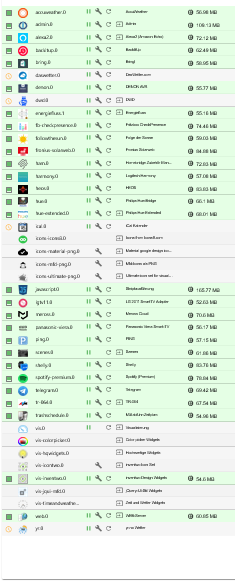
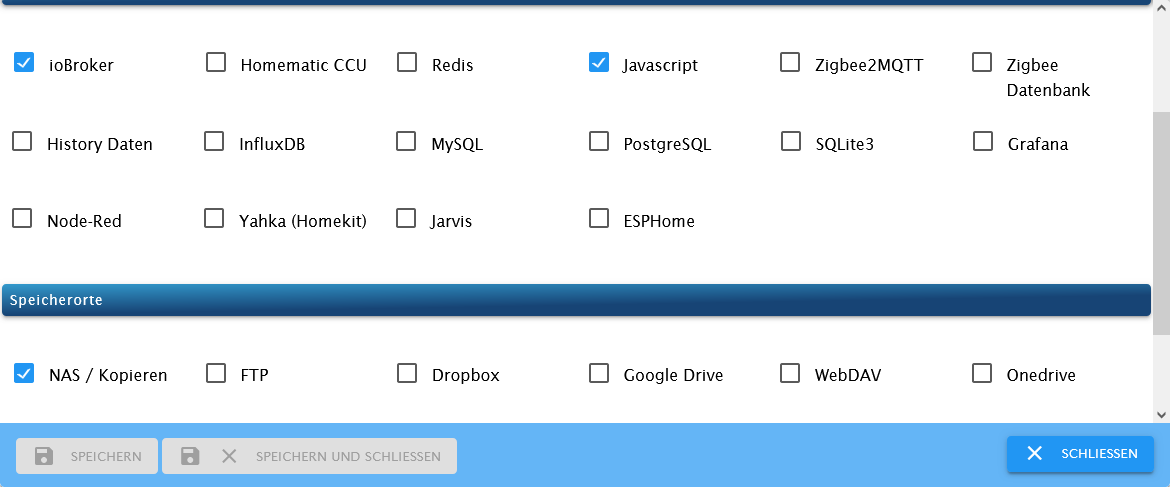
Die Wiederherstellung hat - sagen wir mal - so semi funktioniert.
Es wurden, soweit ich das überblicken kann, alle Objekte wieder hergestellt. Die Adapter sind auch eigentlich alle installiert aber die meisten Instanzen nicht. Wenn ich eine Instanz hinzufüge, dann erstellt er die Instanz.1 aber die .0, also die ursprüngliche Instanz kann ich nicht finden?
-
Die Wiederherstellung hat - sagen wir mal - so semi funktioniert.
Es wurden, soweit ich das überblicken kann, alle Objekte wieder hergestellt. Die Adapter sind auch eigentlich alle installiert aber die meisten Instanzen nicht. Wenn ich eine Instanz hinzufüge, dann erstellt er die Instanz.1 aber die .0, also die ursprüngliche Instanz kann ich nicht finden?
-
@homoran said in Backup Größe ioBroker:
@iced112 wie wär's mit zeigen?
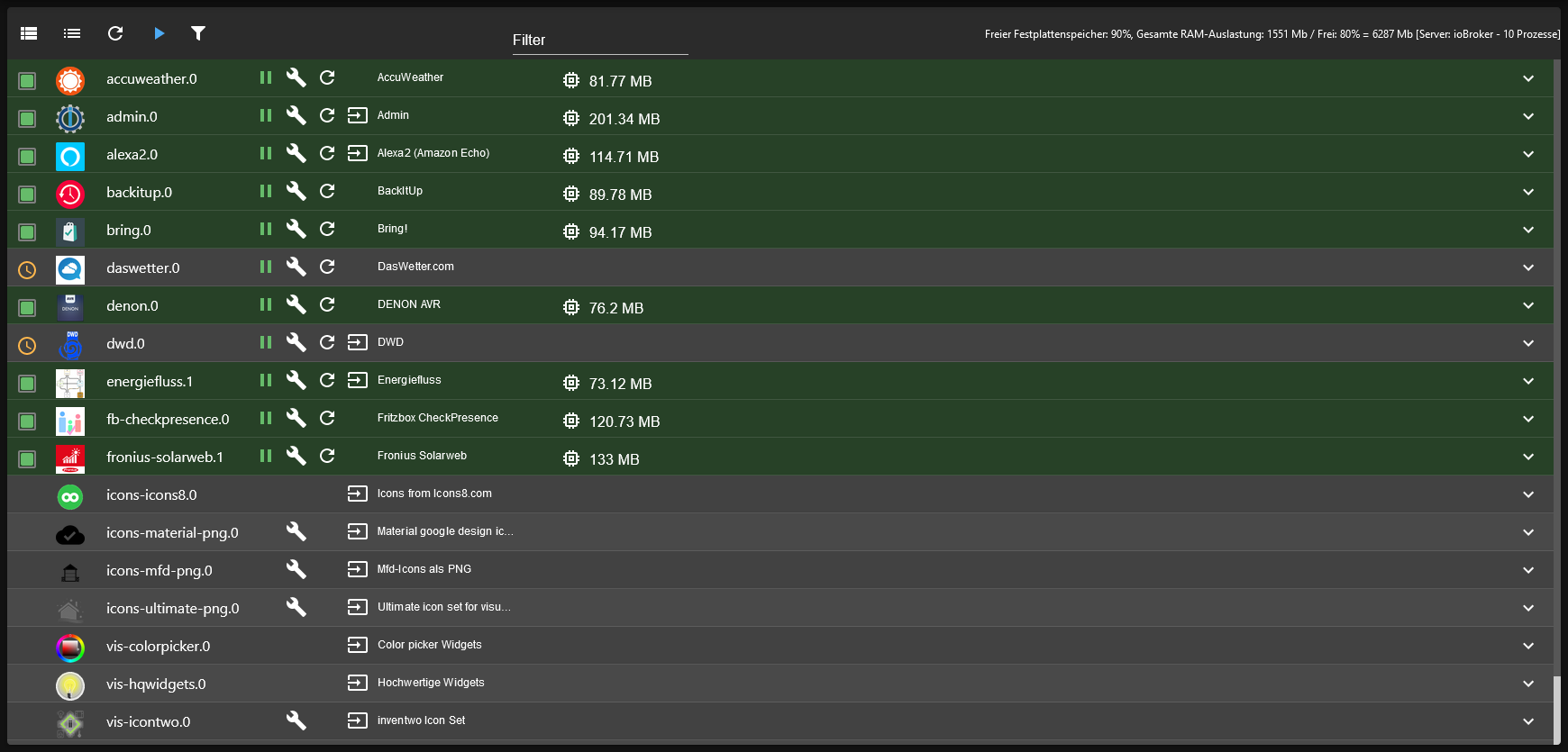
Als Beispiel der Heos Adapter, dort steht eine installierte Instanz
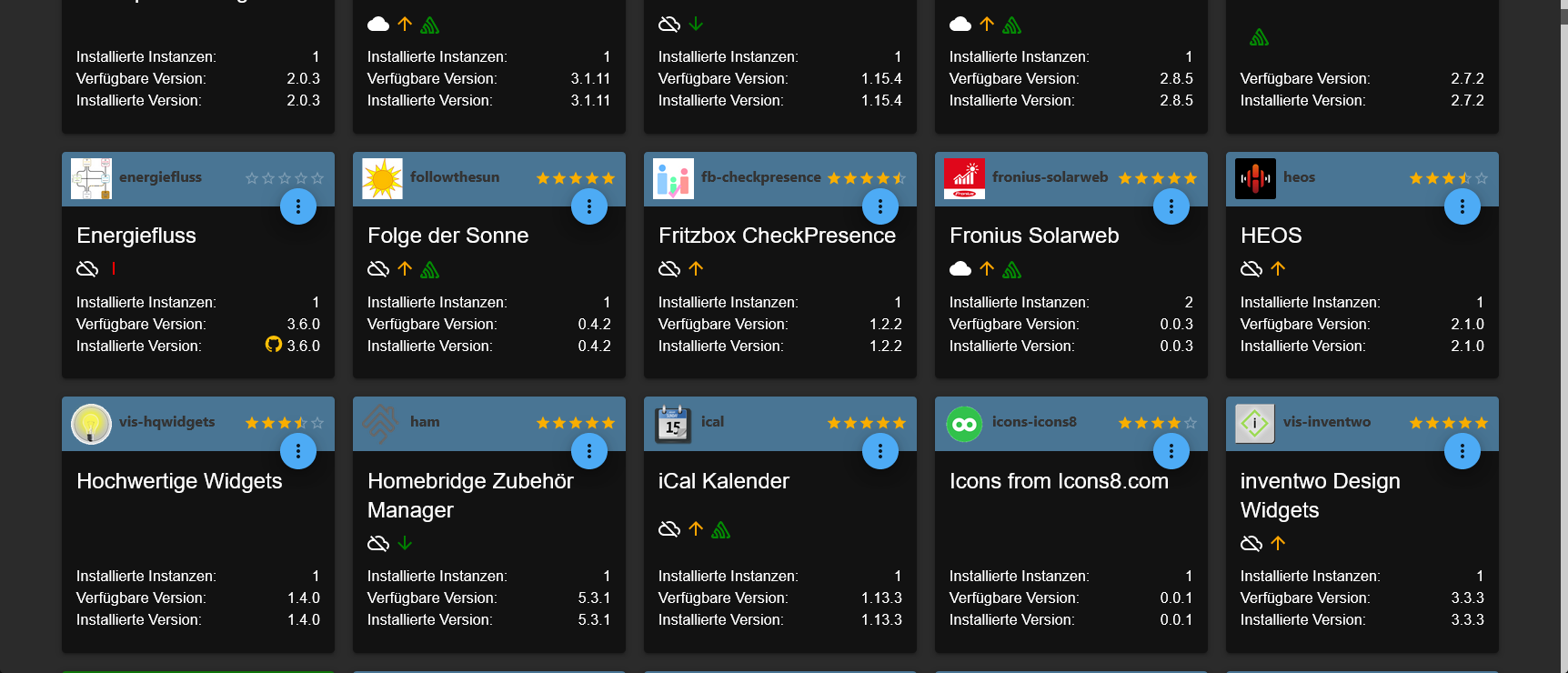
Taucht aber hier nicht auf
Skript v.2023-10-10 *** BASE SYSTEM *** Static hostname: ioBroker Icon name: computer Operating System: Debian GNU/Linux 11 (bullseye) Kernel: Linux 6.1.21-v8+ Architecture: arm64 Model : Raspberry Pi 4 Model B Rev 1.5 Docker : false Virtualization : none Kernel : aarch64 Userland : arm64 Systemuptime and Load: 14:37:36 up 17:06, 3 users, load average: 0.27, 0.51, 0.44 CPU threads: 4 *** RASPBERRY THROTTLING *** Current issues: No throttling issues detected. Previously detected issues: No throttling issues detected. *** Time and Time Zones *** Local time: Mon 2023-11-27 14:37:36 CET Universal time: Mon 2023-11-27 13:37:36 UTC RTC time: n/a Time zone: Europe/Berlin (CET, +0100) System clock synchronized: yes NTP service: active RTC in local TZ: no *** User and Groups *** pi /home/pi pi adm dialout cdrom sudo audio video plugdev games users input render netdev lpadmin gpio i2c spi iobroker *** X-Server-Setup *** X-Server: true Desktop: Terminal: tty Boot Target: graphical.target *** MEMORY *** total used free shared buff/cache available Mem: 7.8G 1.5G 3.6G 35M 2.7G 6.2G Swap: 99M 0B 99M Total: 7.9G 1.5G 3.7G 7812 M total memory 1457 M used memory 1643 M active memory 2166 M inactive memory 3630 M free memory 119 M buffer memory 2604 M swap cache 99 M total swap 0 M used swap 99 M free swap Raspberry only: oom events: 0 lifetime oom required: 0 Mbytes total time in oom handler: 0 ms max time spent in oom handler: 0 ms *** FAILED SERVICES *** UNIT LOAD ACTIVE SUB DESCRIPTION 0 loaded units listed. *** FILESYSTEM *** Filesystem Type Size Used Avail Use% Mounted on /dev/root ext4 59G 6.1G 50G 11% / devtmpfs devtmpfs 3.6G 0 3.6G 0% /dev tmpfs tmpfs 3.9G 0 3.9G 0% /dev/shm tmpfs tmpfs 1.6G 1.2M 1.6G 1% /run tmpfs tmpfs 5.0M 4.0K 5.0M 1% /run/lock /dev/mmcblk0p1 vfat 255M 31M 225M 13% /boot tmpfs tmpfs 782M 20K 782M 1% /run/user/1000 Messages concerning ext4 filesystem in dmesg: [Sun Nov 26 21:30:53 2023] Kernel command line: coherent_pool=1M 8250.nr_uarts=0 snd_bcm2835.enable_headphones=0 snd_bcm2835.enable_headphones=1 snd_bcm2835.enable_hdmi=1 snd_bcm2835.enable_hdmi=0 smsc95xx.macaddr=D8:3A:DD:46:90:AF vc_mem.mem_base=0x3ec00000 vc_mem.mem_size=0x40000000 console=ttyS0,115200 console=tty1 root=PARTUUID=49bd46ba-02 rootfstype=ext4 fsck.repair=yes rootwait quiet splash plymouth.ignore-serial-consoles [Sun Nov 26 21:30:54 2023] EXT4-fs (mmcblk0p2): INFO: recovery required on readonly filesystem [Sun Nov 26 21:30:54 2023] EXT4-fs (mmcblk0p2): write access will be enabled during recovery [Sun Nov 26 21:30:55 2023] EXT4-fs (mmcblk0p2): recovery complete [Sun Nov 26 21:30:55 2023] EXT4-fs (mmcblk0p2): mounted filesystem with ordered data mode. Quota mode: none. [Sun Nov 26 21:30:55 2023] VFS: Mounted root (ext4 filesystem) readonly on device 179:2. [Sun Nov 26 21:30:57 2023] EXT4-fs (mmcblk0p2): re-mounted. Quota mode: none. Show mounted filesystems \(real ones only\): TARGET SOURCE FSTYPE OPTIONS / /dev/mmcblk0p2 ext4 rw,noatime,commit=600 `-/boot /dev/mmcblk0p1 vfat rw,relatime,fmask=0022,dmask=0022,codepage=437,iocharset=ascii,shortname=mixed,errors=remount-ro Files in neuralgic directories: /var: 576M /var/ 177M /var/lib 167M /var/cache 155M /var/cache/apt 132M /var/log Archived and active journals take up 128.0M in the file system. /opt/iobroker/backups: 146M /opt/iobroker/backups/ /opt/iobroker/iobroker-data: 522M /opt/iobroker/iobroker-data/ 295M /opt/iobroker/iobroker-data/files 89M /opt/iobroker/iobroker-data/backup-objects 74M /opt/iobroker/iobroker-data/files/vis.0 67M /opt/iobroker/iobroker-data/files/javascript.admin The five largest files in iobroker-data are: 81M /opt/iobroker/iobroker-data/states.jsonl 59M /opt/iobroker/iobroker-data/objects.jsonl 21M /opt/iobroker/iobroker-data/files/web.admin/static/js/main.aaea95f8.js.map 8.9M /opt/iobroker/iobroker-data/files/scenes.admin/static/js/2.7de3299d.chunk.js.map 8.3M /opt/iobroker/iobroker-data/files/web.admin/static/js/main.aaea95f8.js USB-Devices by-id: USB-Sticks - Avoid direct links to /dev/* in your adapter setups, please always prefer the links 'by-id': find: '/dev/serial/by-id/': No such file or directory *** NodeJS-Installation *** /usr/bin/nodejs v18.18.2 /usr/bin/node v18.18.2 /usr/bin/npm 9.8.1 /usr/bin/npx 9.8.1 /usr/bin/corepack 0.19.0 nodejs: Installed: 18.18.2-1nodesource1 Candidate: 18.18.2-1nodesource1 Version table: *** 18.18.2-1nodesource1 500 500 https://deb.nodesource.com/node_18.x nodistro/main arm64 Packages 100 /var/lib/dpkg/status 18.18.1-1nodesource1 500 500 https://deb.nodesource.com/node_18.x nodistro/main arm64 Packages 18.18.0-1nodesource1 500 500 https://deb.nodesource.com/node_18.x nodistro/main arm64 Packages 18.17.1-1nodesource1 500 500 https://deb.nodesource.com/node_18.x nodistro/main arm64 Packages 18.17.0-1nodesource1 500 500 https://deb.nodesource.com/node_18.x nodistro/main arm64 Packages 18.16.1-1nodesource1 500 500 https://deb.nodesource.com/node_18.x nodistro/main arm64 Packages 18.16.0-1nodesource1 500 500 https://deb.nodesource.com/node_18.x nodistro/main arm64 Packages 18.15.0-1nodesource1 500 500 https://deb.nodesource.com/node_18.x nodistro/main arm64 Packages 18.14.2-1nodesource1 500 500 https://deb.nodesource.com/node_18.x nodistro/main arm64 Packages 18.14.1-1nodesource1 500 500 https://deb.nodesource.com/node_18.x nodistro/main arm64 Packages 18.14.0-1nodesource1 500 500 https://deb.nodesource.com/node_18.x nodistro/main arm64 Packages 18.13.0-1nodesource1 500 500 https://deb.nodesource.com/node_18.x nodistro/main arm64 Packages 18.12.0-1nodesource1 500 500 https://deb.nodesource.com/node_18.x nodistro/main arm64 Packages 18.11.0-1nodesource1 500 500 https://deb.nodesource.com/node_18.x nodistro/main arm64 Packages 18.10.0-1nodesource1 500 500 https://deb.nodesource.com/node_18.x nodistro/main arm64 Packages 18.9.1-1nodesource1 500 500 https://deb.nodesource.com/node_18.x nodistro/main arm64 Packages 18.9.0-1nodesource1 500 500 https://deb.nodesource.com/node_18.x nodistro/main arm64 Packages 18.8.0-1nodesource1 500 500 https://deb.nodesource.com/node_18.x nodistro/main arm64 Packages 18.7.0-1nodesource1 500 500 https://deb.nodesource.com/node_18.x nodistro/main arm64 Packages 18.6.0-1nodesource1 500 500 https://deb.nodesource.com/node_18.x nodistro/main arm64 Packages 18.5.0-1nodesource1 500 500 https://deb.nodesource.com/node_18.x nodistro/main arm64 Packages 18.4.0-1nodesource1 500 500 https://deb.nodesource.com/node_18.x nodistro/main arm64 Packages 18.3.0-1nodesource1 500 500 https://deb.nodesource.com/node_18.x nodistro/main arm64 Packages 18.2.0-1nodesource1 500 500 https://deb.nodesource.com/node_18.x nodistro/main arm64 Packages 18.1.0-1nodesource1 500 500 https://deb.nodesource.com/node_18.x nodistro/main arm64 Packages 18.0.0-1nodesource1 500 500 https://deb.nodesource.com/node_18.x nodistro/main arm64 Packages 12.22.12~dfsg-1~deb11u4 500 500 http://deb.debian.org/debian bullseye/main arm64 Packages 500 http://security.debian.org/debian-security bullseye-security/main arm64 Packages Temp directories causing npm8 problem: 0 No problems detected Errors in npm tree: *** ioBroker-Installation *** ioBroker Status iobroker is running on this host. Objects type: jsonl States type: jsonl Core adapters versions js-controller: 5.0.16 admin: 6.12.4 javascript: 7.1.6 Adapters from github: 1 Adapter State + system.adapter.accuweather.0 : accuweather : ioBroker - enabled + system.adapter.admin.0 : admin : ioBroker - enabled, port: 8081, bind: 0.0.0.0, run as: admin + system.adapter.alexa2.0 : alexa2 : ioBroker - enabled + system.adapter.backitup.0 : backitup : ioBroker - enabled + system.adapter.bring.0 : bring : ioBroker - enabled system.adapter.daswetter.0 : daswetter : ioBroker - enabled + system.adapter.denon.0 : denon : ioBroker - enabled system.adapter.dwd.0 : dwd : ioBroker - enabled + system.adapter.energiefluss.1 : energiefluss : ioBroker - enabled + system.adapter.fb-checkpresence.0 : fb-checkpresence : ioBroker - enabled system.adapter.followthesun.0 : followthesun : ioBroker - disabled system.adapter.fronius-solarweb.0 : fronius-solarweb : ioBroker - disabled + system.adapter.fronius-solarweb.1 : fronius-solarweb : ioBroker - enabled system.adapter.ham.0 : ham : ioBroker - disabled system.adapter.harmony.0 : harmony : ioBroker - disabled system.adapter.heos.0 : heos : ioBroker - disabled system.adapter.hue-extended.0 : hue-extended : ioBroker - disabled system.adapter.hue.0 : hue : ioBroker - disabled, port: 443 system.adapter.ical.0 : ical : ioBroker - disabled system.adapter.icons-icons8.0 : icons-icons8 : ioBroker - disabled system.adapter.icons-material-png.0 : icons-material-png : ioBroker - disabled system.adapter.icons-mfd-png.0 : icons-mfd-png : ioBroker - disabled system.adapter.icons-ultimate-png.0 : icons-ultimate-png : ioBroker - disabled system.adapter.javascript.0 : javascript : ioBroker - disabled system.adapter.lgtv11.0 : lgtv11 : ioBroker - disabled, port: 8080 system.adapter.meross.0 : meross : ioBroker - disabled system.adapter.panasonic-viera.0 : panasonic-viera : ioBroker - disabled system.adapter.ping.0 : ping : ioBroker - disabled system.adapter.scenes.0 : scenes : ioBroker - disabled system.adapter.shelly.0 : shelly : ioBroker - disabled, port: 1882, bind: 0.0.0.0 system.adapter.spotify-premium.0 : spotify-premium : ioBroker - disabled system.adapter.telegram.0 : telegram : ioBroker - disabled, port: 8443, bind: 0.0.0.0 system.adapter.tr-064.0 : tr-064 : ioBroker - disabled system.adapter.trashschedule.0 : trashschedule : ioBroker - disabled system.adapter.vis-colorpicker.0 : vis-colorpicker : ioBroker - disabled system.adapter.vis-hqwidgets.0 : vis-hqwidgets : ioBroker - disabled system.adapter.vis-icontwo.0 : vis-icontwo : ioBroker - disabled system.adapter.vis-inventwo.0 : vis-inventwo : ioBroker - disabled system.adapter.vis-jqui-mfd.0 : vis-jqui-mfd : ioBroker - disabled system.adapter.vis-timeandweather.0 : vis-timeandweather : ioBroker - disabled system.adapter.vis.0 : vis : ioBroker - disabled system.adapter.web.0 : web : ioBroker - disabled, port: 8082, bind: 0.0.0.0, run as: admin system.adapter.yr.0 : yr : ioBroker - disabled + instance is alive Enabled adapters with bindings + system.adapter.admin.0 : admin : ioBroker - enabled, port: 8081, bind: 0.0.0.0, run as: admin ioBroker-Repositories stable : http://download.iobroker.net/sources-dist.json beta : http://download.iobroker.net/sources-dist-latest.json Active repo(s): beta Installed ioBroker-Instances Used repository: beta Adapter "accuweather" : 1.3.1 , installed 1.3.1 Adapter "admin" : 6.12.5 , installed 6.12.4 [Updatable] Adapter "alexa2" : 3.26.3 , installed 3.26.1 [Updatable] Adapter "backitup" : 2.9.4 , installed 2.9.4 Adapter "bring" : 1.8.4 , installed 1.8.4 Adapter "daswetter" : 3.1.11 , installed 3.1.11 Adapter "denon" : 1.15.4 , installed 1.15.4 Adapter "dwd" : 2.8.5 , installed 2.8.5 Adapter "energiefluss" : 3.6.0 , installed 3.6.0 Adapter "fb-checkpresence": 1.2.2 , installed 1.2.2 Adapter "followthesun" : 0.4.2 , installed 0.4.2 Adapter "fronius-solarweb": 0.0.3 , installed 0.0.3 Adapter "ham" : 5.3.1 , installed 5.3.1 Adapter "harmony" : 1.3.0 , installed 1.3.0 Adapter "heos" : 2.1.0 , installed 2.1.0 Adapter "hue" : 3.10.1 , installed 3.10.1 Adapter "hue-extended" : 2.0.0 , installed 2.0.0 Adapter "ical" : 1.13.3 , installed 1.13.3 Adapter "icons-icons8" : 0.0.1 , installed 0.0.1 Adapter "icons-material-png": 0.1.0, installed 0.1.0 Adapter "icons-mfd-png": 1.1.0 , installed 1.1.0 Adapter "icons-ultimate-png": 1.0.1, installed 1.0.1 Adapter "javascript" : 7.1.6 , installed 7.1.6 Controller "js-controller": 5.0.16 , installed 5.0.16 Adapter "lgtv11" : 1.0.5 , installed 1.0.5 Adapter "meross" : 1.16.1 , installed 1.15.1 [Updatable] Adapter "panasonic-viera": 2.0.0 , installed 2.0.0 Adapter "ping" : 1.6.2 , installed 1.6.2 Adapter "scenes" : 2.3.9 , installed 2.3.9 Adapter "shelly" : 6.6.1 , installed 6.6.1 Adapter "simple-api" : 2.7.2 , installed 2.7.2 Adapter "socketio" : 6.6.0 , installed 6.6.0 Adapter "spotify-premium": 1.3.1 , installed 1.3.1 Adapter "telegram" : 3.0.0 , installed 3.0.0 Adapter "tr-064" : 4.2.18 , installed 4.2.18 Adapter "trashschedule": 2.3.0 , installed 2.3.0 Adapter "vis" : 1.5.1 , installed 1.5.1 Adapter "vis-colorpicker": 2.0.3 , installed 2.0.3 Adapter "vis-hqwidgets": 1.4.0 , installed 1.4.0 Adapter "vis-icontwo" : 0.98.0 , installed 0.97.3 [Updatable] Adapter "vis-inventwo" : 3.3.3 , installed 3.3.3 Adapter "vis-jqui-mfd" : 1.0.12 , installed 1.0.12 Adapter "vis-timeandweather": 1.2.2, installed 1.2.2 Adapter "web" : 6.1.10 , installed 6.1.10 Adapter "ws" : 2.5.8 , installed 2.5.8 Adapter "yr" : 5.3.0 , installed 5.3.0 Objects and States Please stand by - This may take a while Objects: 39455 States: 32474 *** OS-Repositories and Updates *** Hit:1 http://security.debian.org/debian-security bullseye-security InRelease Hit:2 http://archive.raspberrypi.org/debian bullseye InRelease Hit:3 http://deb.debian.org/debian bullseye InRelease Hit:4 http://deb.debian.org/debian bullseye-updates InRelease Hit:5 https://deb.nodesource.com/node_18.x nodistro InRelease Reading package lists... Pending Updates: 1 *** Listening Ports *** Active Internet connections (only servers) Proto Recv-Q Send-Q Local Address Foreign Address State User Inode PID/Program name tcp 0 0 0.0.0.0:22 0.0.0.0:* LISTEN 0 11072 554/sshd: /usr/sbin tcp 0 0 127.0.0.1:631 0.0.0.0:* LISTEN 0 29990 6904/cupsd tcp 0 0 127.0.0.1:9001 0.0.0.0:* LISTEN 1001 18178 2241/iobroker.js-co tcp 0 0 127.0.0.1:9000 0.0.0.0:* LISTEN 1001 18185 2241/iobroker.js-co tcp6 0 0 :::22 :::* LISTEN 0 11074 554/sshd: /usr/sbin tcp6 0 0 ::1:631 :::* LISTEN 0 29989 6904/cupsd tcp6 0 0 :::8081 :::* LISTEN 1001 27543 6030/io.admin.0 udp 0 0 0.0.0.0:36350 0.0.0.0:* 108 13741 396/avahi-daemon: r udp 0 0 0.0.0.0:68 0.0.0.0:* 0 12872 469/dhcpcd udp 0 0 0.0.0.0:631 0.0.0.0:* 0 30793 6909/cups-browsed udp 0 0 0.0.0.0:5353 0.0.0.0:* 108 13739 396/avahi-daemon: r udp6 0 0 :::33105 :::* 108 13742 396/avahi-daemon: r udp6 0 0 :::546 :::* 0 16441 469/dhcpcd udp6 0 0 :::5353 :::* 108 13740 396/avahi-daemon: r *** Log File - Last 25 Lines *** 2023-11-27 14:29:38.109 - info: admin.0 (6030) Unsubscribe from all states, except system's, because over 3 seconds the number of events is over 200 (in last second 0) 2023-11-27 14:30:00.144 - info: host.ioBroker instance system.adapter.dwd.0 started with pid 16169 2023-11-27 14:30:03.091 - info: dwd.0 (16169) starting. Version 2.8.5 in /opt/iobroker/node_modules/iobroker.dwd, node: v18.18.2, js-controller: 5.0.16 2023-11-27 14:30:04.210 - info: host.ioBroker instance system.adapter.daswetter.0 started with pid 16184 2023-11-27 14:30:07.157 - info: daswetter.0 (16184) starting. Version 3.1.11 in /opt/iobroker/node_modules/iobroker.daswetter, node: v18.18.2, js-controller: 5.0.16 2023-11-27 14:30:08.590 - info: dwd.0 (16169) Terminated (ADAPTER_REQUESTED_TERMINATION): Without reason 2023-11-27 14:30:09.142 - info: host.ioBroker instance system.adapter.dwd.0 terminated with code 11 (ADAPTER_REQUESTED_TERMINATION) 2023-11-27 14:30:22.962 - info: daswetter.0 (16184) still wrong data structure from server received! repaired... 2023-11-27 14:30:27.521 - info: daswetter.0 (16184) Terminated (ADAPTER_REQUESTED_TERMINATION): All data handled, adapter stopped until next scheduled moment 2023-11-27 14:30:28.037 - info: daswetter.0 (16184) cleaned everything up... 2023-11-27 14:30:28.060 - info: host.ioBroker instance system.adapter.daswetter.0 terminated with code 11 (ADAPTER_REQUESTED_TERMINATION) 2023-11-27 14:30:39.032 - info: admin.0 (6030) Subscribe to all states again 2023-11-27 14:31:39.156 - info: admin.0 (6030) Unsubscribe from all states, except system's, because over 3 seconds the number of events is over 200 (in last second 0) 2023-11-27 14:32:39.250 - info: admin.0 (6030) Subscribe to all states again 2023-11-27 14:33:38.387 - info: admin.0 (6030) Unsubscribe from all states, except system's, because over 3 seconds the number of events is over 200 (in last second 0) 2023-11-27 14:34:39.314 - info: admin.0 (6030) Subscribe to all states again 2023-11-27 14:35:00.076 - info: host.ioBroker instance system.adapter.dwd.0 started with pid 16204 2023-11-27 14:35:03.289 - info: dwd.0 (16204) starting. Version 2.8.5 in /opt/iobroker/node_modules/iobroker.dwd, node: v18.18.2, js-controller: 5.0.16 2023-11-27 14:35:07.239 - info: dwd.0 (16204) Terminated (ADAPTER_REQUESTED_TERMINATION): Without reason 2023-11-27 14:35:07.775 - info: host.ioBroker instance system.adapter.dwd.0 terminated with code 11 (ADAPTER_REQUESTED_TERMINATION) 2023-11-27 14:35:38.438 - info: admin.0 (6030) Unsubscribe from all states, except system's, because over 3 seconds the number of events is over 200 (in last second 0) 2023-11-27 14:36:39.358 - info: admin.0 (6030) Subscribe to all states again 2023-11-27 14:37:38.485 - info: admin.0 (6030) Unsubscribe from all states, except system's, because over 3 seconds the number of events is over 200 (in last second 0) 2023-11-27 14:38:39.454 - info: admin.0 (6030) Subscribe to all states again 2023-11-27 14:38:42.576 - info: admin.0 (6030) Unsubscribe from all states, except system's, because over 3 seconds the number of events is over 200 (in last second 0) -
@homoran said in Backup Größe ioBroker:
@iced112 wie wär's mit zeigen?
Als Beispiel der Heos Adapter, dort steht eine installierte Instanz
Taucht aber hier nicht auf
Skript v.2023-10-10 *** BASE SYSTEM *** Static hostname: ioBroker Icon name: computer Operating System: Debian GNU/Linux 11 (bullseye) Kernel: Linux 6.1.21-v8+ Architecture: arm64 Model : Raspberry Pi 4 Model B Rev 1.5 Docker : false Virtualization : none Kernel : aarch64 Userland : arm64 Systemuptime and Load: 14:37:36 up 17:06, 3 users, load average: 0.27, 0.51, 0.44 CPU threads: 4 *** RASPBERRY THROTTLING *** Current issues: No throttling issues detected. Previously detected issues: No throttling issues detected. *** Time and Time Zones *** Local time: Mon 2023-11-27 14:37:36 CET Universal time: Mon 2023-11-27 13:37:36 UTC RTC time: n/a Time zone: Europe/Berlin (CET, +0100) System clock synchronized: yes NTP service: active RTC in local TZ: no *** User and Groups *** pi /home/pi pi adm dialout cdrom sudo audio video plugdev games users input render netdev lpadmin gpio i2c spi iobroker *** X-Server-Setup *** X-Server: true Desktop: Terminal: tty Boot Target: graphical.target *** MEMORY *** total used free shared buff/cache available Mem: 7.8G 1.5G 3.6G 35M 2.7G 6.2G Swap: 99M 0B 99M Total: 7.9G 1.5G 3.7G 7812 M total memory 1457 M used memory 1643 M active memory 2166 M inactive memory 3630 M free memory 119 M buffer memory 2604 M swap cache 99 M total swap 0 M used swap 99 M free swap Raspberry only: oom events: 0 lifetime oom required: 0 Mbytes total time in oom handler: 0 ms max time spent in oom handler: 0 ms *** FAILED SERVICES *** UNIT LOAD ACTIVE SUB DESCRIPTION 0 loaded units listed. *** FILESYSTEM *** Filesystem Type Size Used Avail Use% Mounted on /dev/root ext4 59G 6.1G 50G 11% / devtmpfs devtmpfs 3.6G 0 3.6G 0% /dev tmpfs tmpfs 3.9G 0 3.9G 0% /dev/shm tmpfs tmpfs 1.6G 1.2M 1.6G 1% /run tmpfs tmpfs 5.0M 4.0K 5.0M 1% /run/lock /dev/mmcblk0p1 vfat 255M 31M 225M 13% /boot tmpfs tmpfs 782M 20K 782M 1% /run/user/1000 Messages concerning ext4 filesystem in dmesg: [Sun Nov 26 21:30:53 2023] Kernel command line: coherent_pool=1M 8250.nr_uarts=0 snd_bcm2835.enable_headphones=0 snd_bcm2835.enable_headphones=1 snd_bcm2835.enable_hdmi=1 snd_bcm2835.enable_hdmi=0 smsc95xx.macaddr=D8:3A:DD:46:90:AF vc_mem.mem_base=0x3ec00000 vc_mem.mem_size=0x40000000 console=ttyS0,115200 console=tty1 root=PARTUUID=49bd46ba-02 rootfstype=ext4 fsck.repair=yes rootwait quiet splash plymouth.ignore-serial-consoles [Sun Nov 26 21:30:54 2023] EXT4-fs (mmcblk0p2): INFO: recovery required on readonly filesystem [Sun Nov 26 21:30:54 2023] EXT4-fs (mmcblk0p2): write access will be enabled during recovery [Sun Nov 26 21:30:55 2023] EXT4-fs (mmcblk0p2): recovery complete [Sun Nov 26 21:30:55 2023] EXT4-fs (mmcblk0p2): mounted filesystem with ordered data mode. Quota mode: none. [Sun Nov 26 21:30:55 2023] VFS: Mounted root (ext4 filesystem) readonly on device 179:2. [Sun Nov 26 21:30:57 2023] EXT4-fs (mmcblk0p2): re-mounted. Quota mode: none. Show mounted filesystems \(real ones only\): TARGET SOURCE FSTYPE OPTIONS / /dev/mmcblk0p2 ext4 rw,noatime,commit=600 `-/boot /dev/mmcblk0p1 vfat rw,relatime,fmask=0022,dmask=0022,codepage=437,iocharset=ascii,shortname=mixed,errors=remount-ro Files in neuralgic directories: /var: 576M /var/ 177M /var/lib 167M /var/cache 155M /var/cache/apt 132M /var/log Archived and active journals take up 128.0M in the file system. /opt/iobroker/backups: 146M /opt/iobroker/backups/ /opt/iobroker/iobroker-data: 522M /opt/iobroker/iobroker-data/ 295M /opt/iobroker/iobroker-data/files 89M /opt/iobroker/iobroker-data/backup-objects 74M /opt/iobroker/iobroker-data/files/vis.0 67M /opt/iobroker/iobroker-data/files/javascript.admin The five largest files in iobroker-data are: 81M /opt/iobroker/iobroker-data/states.jsonl 59M /opt/iobroker/iobroker-data/objects.jsonl 21M /opt/iobroker/iobroker-data/files/web.admin/static/js/main.aaea95f8.js.map 8.9M /opt/iobroker/iobroker-data/files/scenes.admin/static/js/2.7de3299d.chunk.js.map 8.3M /opt/iobroker/iobroker-data/files/web.admin/static/js/main.aaea95f8.js USB-Devices by-id: USB-Sticks - Avoid direct links to /dev/* in your adapter setups, please always prefer the links 'by-id': find: '/dev/serial/by-id/': No such file or directory *** NodeJS-Installation *** /usr/bin/nodejs v18.18.2 /usr/bin/node v18.18.2 /usr/bin/npm 9.8.1 /usr/bin/npx 9.8.1 /usr/bin/corepack 0.19.0 nodejs: Installed: 18.18.2-1nodesource1 Candidate: 18.18.2-1nodesource1 Version table: *** 18.18.2-1nodesource1 500 500 https://deb.nodesource.com/node_18.x nodistro/main arm64 Packages 100 /var/lib/dpkg/status 18.18.1-1nodesource1 500 500 https://deb.nodesource.com/node_18.x nodistro/main arm64 Packages 18.18.0-1nodesource1 500 500 https://deb.nodesource.com/node_18.x nodistro/main arm64 Packages 18.17.1-1nodesource1 500 500 https://deb.nodesource.com/node_18.x nodistro/main arm64 Packages 18.17.0-1nodesource1 500 500 https://deb.nodesource.com/node_18.x nodistro/main arm64 Packages 18.16.1-1nodesource1 500 500 https://deb.nodesource.com/node_18.x nodistro/main arm64 Packages 18.16.0-1nodesource1 500 500 https://deb.nodesource.com/node_18.x nodistro/main arm64 Packages 18.15.0-1nodesource1 500 500 https://deb.nodesource.com/node_18.x nodistro/main arm64 Packages 18.14.2-1nodesource1 500 500 https://deb.nodesource.com/node_18.x nodistro/main arm64 Packages 18.14.1-1nodesource1 500 500 https://deb.nodesource.com/node_18.x nodistro/main arm64 Packages 18.14.0-1nodesource1 500 500 https://deb.nodesource.com/node_18.x nodistro/main arm64 Packages 18.13.0-1nodesource1 500 500 https://deb.nodesource.com/node_18.x nodistro/main arm64 Packages 18.12.0-1nodesource1 500 500 https://deb.nodesource.com/node_18.x nodistro/main arm64 Packages 18.11.0-1nodesource1 500 500 https://deb.nodesource.com/node_18.x nodistro/main arm64 Packages 18.10.0-1nodesource1 500 500 https://deb.nodesource.com/node_18.x nodistro/main arm64 Packages 18.9.1-1nodesource1 500 500 https://deb.nodesource.com/node_18.x nodistro/main arm64 Packages 18.9.0-1nodesource1 500 500 https://deb.nodesource.com/node_18.x nodistro/main arm64 Packages 18.8.0-1nodesource1 500 500 https://deb.nodesource.com/node_18.x nodistro/main arm64 Packages 18.7.0-1nodesource1 500 500 https://deb.nodesource.com/node_18.x nodistro/main arm64 Packages 18.6.0-1nodesource1 500 500 https://deb.nodesource.com/node_18.x nodistro/main arm64 Packages 18.5.0-1nodesource1 500 500 https://deb.nodesource.com/node_18.x nodistro/main arm64 Packages 18.4.0-1nodesource1 500 500 https://deb.nodesource.com/node_18.x nodistro/main arm64 Packages 18.3.0-1nodesource1 500 500 https://deb.nodesource.com/node_18.x nodistro/main arm64 Packages 18.2.0-1nodesource1 500 500 https://deb.nodesource.com/node_18.x nodistro/main arm64 Packages 18.1.0-1nodesource1 500 500 https://deb.nodesource.com/node_18.x nodistro/main arm64 Packages 18.0.0-1nodesource1 500 500 https://deb.nodesource.com/node_18.x nodistro/main arm64 Packages 12.22.12~dfsg-1~deb11u4 500 500 http://deb.debian.org/debian bullseye/main arm64 Packages 500 http://security.debian.org/debian-security bullseye-security/main arm64 Packages Temp directories causing npm8 problem: 0 No problems detected Errors in npm tree: *** ioBroker-Installation *** ioBroker Status iobroker is running on this host. Objects type: jsonl States type: jsonl Core adapters versions js-controller: 5.0.16 admin: 6.12.4 javascript: 7.1.6 Adapters from github: 1 Adapter State + system.adapter.accuweather.0 : accuweather : ioBroker - enabled + system.adapter.admin.0 : admin : ioBroker - enabled, port: 8081, bind: 0.0.0.0, run as: admin + system.adapter.alexa2.0 : alexa2 : ioBroker - enabled + system.adapter.backitup.0 : backitup : ioBroker - enabled + system.adapter.bring.0 : bring : ioBroker - enabled system.adapter.daswetter.0 : daswetter : ioBroker - enabled + system.adapter.denon.0 : denon : ioBroker - enabled system.adapter.dwd.0 : dwd : ioBroker - enabled + system.adapter.energiefluss.1 : energiefluss : ioBroker - enabled + system.adapter.fb-checkpresence.0 : fb-checkpresence : ioBroker - enabled system.adapter.followthesun.0 : followthesun : ioBroker - disabled system.adapter.fronius-solarweb.0 : fronius-solarweb : ioBroker - disabled + system.adapter.fronius-solarweb.1 : fronius-solarweb : ioBroker - enabled system.adapter.ham.0 : ham : ioBroker - disabled system.adapter.harmony.0 : harmony : ioBroker - disabled system.adapter.heos.0 : heos : ioBroker - disabled system.adapter.hue-extended.0 : hue-extended : ioBroker - disabled system.adapter.hue.0 : hue : ioBroker - disabled, port: 443 system.adapter.ical.0 : ical : ioBroker - disabled system.adapter.icons-icons8.0 : icons-icons8 : ioBroker - disabled system.adapter.icons-material-png.0 : icons-material-png : ioBroker - disabled system.adapter.icons-mfd-png.0 : icons-mfd-png : ioBroker - disabled system.adapter.icons-ultimate-png.0 : icons-ultimate-png : ioBroker - disabled system.adapter.javascript.0 : javascript : ioBroker - disabled system.adapter.lgtv11.0 : lgtv11 : ioBroker - disabled, port: 8080 system.adapter.meross.0 : meross : ioBroker - disabled system.adapter.panasonic-viera.0 : panasonic-viera : ioBroker - disabled system.adapter.ping.0 : ping : ioBroker - disabled system.adapter.scenes.0 : scenes : ioBroker - disabled system.adapter.shelly.0 : shelly : ioBroker - disabled, port: 1882, bind: 0.0.0.0 system.adapter.spotify-premium.0 : spotify-premium : ioBroker - disabled system.adapter.telegram.0 : telegram : ioBroker - disabled, port: 8443, bind: 0.0.0.0 system.adapter.tr-064.0 : tr-064 : ioBroker - disabled system.adapter.trashschedule.0 : trashschedule : ioBroker - disabled system.adapter.vis-colorpicker.0 : vis-colorpicker : ioBroker - disabled system.adapter.vis-hqwidgets.0 : vis-hqwidgets : ioBroker - disabled system.adapter.vis-icontwo.0 : vis-icontwo : ioBroker - disabled system.adapter.vis-inventwo.0 : vis-inventwo : ioBroker - disabled system.adapter.vis-jqui-mfd.0 : vis-jqui-mfd : ioBroker - disabled system.adapter.vis-timeandweather.0 : vis-timeandweather : ioBroker - disabled system.adapter.vis.0 : vis : ioBroker - disabled system.adapter.web.0 : web : ioBroker - disabled, port: 8082, bind: 0.0.0.0, run as: admin system.adapter.yr.0 : yr : ioBroker - disabled + instance is alive Enabled adapters with bindings + system.adapter.admin.0 : admin : ioBroker - enabled, port: 8081, bind: 0.0.0.0, run as: admin ioBroker-Repositories stable : http://download.iobroker.net/sources-dist.json beta : http://download.iobroker.net/sources-dist-latest.json Active repo(s): beta Installed ioBroker-Instances Used repository: beta Adapter "accuweather" : 1.3.1 , installed 1.3.1 Adapter "admin" : 6.12.5 , installed 6.12.4 [Updatable] Adapter "alexa2" : 3.26.3 , installed 3.26.1 [Updatable] Adapter "backitup" : 2.9.4 , installed 2.9.4 Adapter "bring" : 1.8.4 , installed 1.8.4 Adapter "daswetter" : 3.1.11 , installed 3.1.11 Adapter "denon" : 1.15.4 , installed 1.15.4 Adapter "dwd" : 2.8.5 , installed 2.8.5 Adapter "energiefluss" : 3.6.0 , installed 3.6.0 Adapter "fb-checkpresence": 1.2.2 , installed 1.2.2 Adapter "followthesun" : 0.4.2 , installed 0.4.2 Adapter "fronius-solarweb": 0.0.3 , installed 0.0.3 Adapter "ham" : 5.3.1 , installed 5.3.1 Adapter "harmony" : 1.3.0 , installed 1.3.0 Adapter "heos" : 2.1.0 , installed 2.1.0 Adapter "hue" : 3.10.1 , installed 3.10.1 Adapter "hue-extended" : 2.0.0 , installed 2.0.0 Adapter "ical" : 1.13.3 , installed 1.13.3 Adapter "icons-icons8" : 0.0.1 , installed 0.0.1 Adapter "icons-material-png": 0.1.0, installed 0.1.0 Adapter "icons-mfd-png": 1.1.0 , installed 1.1.0 Adapter "icons-ultimate-png": 1.0.1, installed 1.0.1 Adapter "javascript" : 7.1.6 , installed 7.1.6 Controller "js-controller": 5.0.16 , installed 5.0.16 Adapter "lgtv11" : 1.0.5 , installed 1.0.5 Adapter "meross" : 1.16.1 , installed 1.15.1 [Updatable] Adapter "panasonic-viera": 2.0.0 , installed 2.0.0 Adapter "ping" : 1.6.2 , installed 1.6.2 Adapter "scenes" : 2.3.9 , installed 2.3.9 Adapter "shelly" : 6.6.1 , installed 6.6.1 Adapter "simple-api" : 2.7.2 , installed 2.7.2 Adapter "socketio" : 6.6.0 , installed 6.6.0 Adapter "spotify-premium": 1.3.1 , installed 1.3.1 Adapter "telegram" : 3.0.0 , installed 3.0.0 Adapter "tr-064" : 4.2.18 , installed 4.2.18 Adapter "trashschedule": 2.3.0 , installed 2.3.0 Adapter "vis" : 1.5.1 , installed 1.5.1 Adapter "vis-colorpicker": 2.0.3 , installed 2.0.3 Adapter "vis-hqwidgets": 1.4.0 , installed 1.4.0 Adapter "vis-icontwo" : 0.98.0 , installed 0.97.3 [Updatable] Adapter "vis-inventwo" : 3.3.3 , installed 3.3.3 Adapter "vis-jqui-mfd" : 1.0.12 , installed 1.0.12 Adapter "vis-timeandweather": 1.2.2, installed 1.2.2 Adapter "web" : 6.1.10 , installed 6.1.10 Adapter "ws" : 2.5.8 , installed 2.5.8 Adapter "yr" : 5.3.0 , installed 5.3.0 Objects and States Please stand by - This may take a while Objects: 39455 States: 32474 *** OS-Repositories and Updates *** Hit:1 http://security.debian.org/debian-security bullseye-security InRelease Hit:2 http://archive.raspberrypi.org/debian bullseye InRelease Hit:3 http://deb.debian.org/debian bullseye InRelease Hit:4 http://deb.debian.org/debian bullseye-updates InRelease Hit:5 https://deb.nodesource.com/node_18.x nodistro InRelease Reading package lists... Pending Updates: 1 *** Listening Ports *** Active Internet connections (only servers) Proto Recv-Q Send-Q Local Address Foreign Address State User Inode PID/Program name tcp 0 0 0.0.0.0:22 0.0.0.0:* LISTEN 0 11072 554/sshd: /usr/sbin tcp 0 0 127.0.0.1:631 0.0.0.0:* LISTEN 0 29990 6904/cupsd tcp 0 0 127.0.0.1:9001 0.0.0.0:* LISTEN 1001 18178 2241/iobroker.js-co tcp 0 0 127.0.0.1:9000 0.0.0.0:* LISTEN 1001 18185 2241/iobroker.js-co tcp6 0 0 :::22 :::* LISTEN 0 11074 554/sshd: /usr/sbin tcp6 0 0 ::1:631 :::* LISTEN 0 29989 6904/cupsd tcp6 0 0 :::8081 :::* LISTEN 1001 27543 6030/io.admin.0 udp 0 0 0.0.0.0:36350 0.0.0.0:* 108 13741 396/avahi-daemon: r udp 0 0 0.0.0.0:68 0.0.0.0:* 0 12872 469/dhcpcd udp 0 0 0.0.0.0:631 0.0.0.0:* 0 30793 6909/cups-browsed udp 0 0 0.0.0.0:5353 0.0.0.0:* 108 13739 396/avahi-daemon: r udp6 0 0 :::33105 :::* 108 13742 396/avahi-daemon: r udp6 0 0 :::546 :::* 0 16441 469/dhcpcd udp6 0 0 :::5353 :::* 108 13740 396/avahi-daemon: r *** Log File - Last 25 Lines *** 2023-11-27 14:29:38.109 - info: admin.0 (6030) Unsubscribe from all states, except system's, because over 3 seconds the number of events is over 200 (in last second 0) 2023-11-27 14:30:00.144 - info: host.ioBroker instance system.adapter.dwd.0 started with pid 16169 2023-11-27 14:30:03.091 - info: dwd.0 (16169) starting. Version 2.8.5 in /opt/iobroker/node_modules/iobroker.dwd, node: v18.18.2, js-controller: 5.0.16 2023-11-27 14:30:04.210 - info: host.ioBroker instance system.adapter.daswetter.0 started with pid 16184 2023-11-27 14:30:07.157 - info: daswetter.0 (16184) starting. Version 3.1.11 in /opt/iobroker/node_modules/iobroker.daswetter, node: v18.18.2, js-controller: 5.0.16 2023-11-27 14:30:08.590 - info: dwd.0 (16169) Terminated (ADAPTER_REQUESTED_TERMINATION): Without reason 2023-11-27 14:30:09.142 - info: host.ioBroker instance system.adapter.dwd.0 terminated with code 11 (ADAPTER_REQUESTED_TERMINATION) 2023-11-27 14:30:22.962 - info: daswetter.0 (16184) still wrong data structure from server received! repaired... 2023-11-27 14:30:27.521 - info: daswetter.0 (16184) Terminated (ADAPTER_REQUESTED_TERMINATION): All data handled, adapter stopped until next scheduled moment 2023-11-27 14:30:28.037 - info: daswetter.0 (16184) cleaned everything up... 2023-11-27 14:30:28.060 - info: host.ioBroker instance system.adapter.daswetter.0 terminated with code 11 (ADAPTER_REQUESTED_TERMINATION) 2023-11-27 14:30:39.032 - info: admin.0 (6030) Subscribe to all states again 2023-11-27 14:31:39.156 - info: admin.0 (6030) Unsubscribe from all states, except system's, because over 3 seconds the number of events is over 200 (in last second 0) 2023-11-27 14:32:39.250 - info: admin.0 (6030) Subscribe to all states again 2023-11-27 14:33:38.387 - info: admin.0 (6030) Unsubscribe from all states, except system's, because over 3 seconds the number of events is over 200 (in last second 0) 2023-11-27 14:34:39.314 - info: admin.0 (6030) Subscribe to all states again 2023-11-27 14:35:00.076 - info: host.ioBroker instance system.adapter.dwd.0 started with pid 16204 2023-11-27 14:35:03.289 - info: dwd.0 (16204) starting. Version 2.8.5 in /opt/iobroker/node_modules/iobroker.dwd, node: v18.18.2, js-controller: 5.0.16 2023-11-27 14:35:07.239 - info: dwd.0 (16204) Terminated (ADAPTER_REQUESTED_TERMINATION): Without reason 2023-11-27 14:35:07.775 - info: host.ioBroker instance system.adapter.dwd.0 terminated with code 11 (ADAPTER_REQUESTED_TERMINATION) 2023-11-27 14:35:38.438 - info: admin.0 (6030) Unsubscribe from all states, except system's, because over 3 seconds the number of events is over 200 (in last second 0) 2023-11-27 14:36:39.358 - info: admin.0 (6030) Subscribe to all states again 2023-11-27 14:37:38.485 - info: admin.0 (6030) Unsubscribe from all states, except system's, because over 3 seconds the number of events is over 200 (in last second 0) 2023-11-27 14:38:39.454 - info: admin.0 (6030) Subscribe to all states again 2023-11-27 14:38:42.576 - info: admin.0 (6030) Unsubscribe from all states, except system's, because over 3 seconds the number of events is over 200 (in last second 0)@iced112 sagte in Backup Größe ioBroker:
X-Server: true
Ausschalten...
sudo systemctl default-set multi-user.targetWassen da passiert?
[Sun Nov 26 21:30:54 2023] EXT4-fs (mmcblk0p2): INFO: recovery required on readonly filesystem
[Sun Nov 26 21:30:54 2023] EXT4-fs (mmcblk0p2): write access will be enabled during recovery
[Sun Nov 26 21:30:55 2023] EXT4-fs (mmcblk0p2): recovery completeIMMER die Kiste ordentlich herunterfahren. Stromentzug ist kein ordentliches Herunterfahren...
-
@thomas-braun
Reicht es nicht mitiob stopund dann ausschalten?
@thomas-braun said in Backup Größe ioBroker:
@iced112 sagte in Backup Größe ioBroker:
X-Server: true
Ausschalten...
sudo systemctl default-set multi-user.targetist das der Befehl für den pi runter zu fahren?
-
@thomas-braun
Reicht es nicht mitiob stopund dann ausschalten?
@thomas-braun said in Backup Größe ioBroker:
@iced112 sagte in Backup Größe ioBroker:
X-Server: true
Ausschalten...
sudo systemctl default-set multi-user.targetist das der Befehl für den pi runter zu fahren?
@iced112 sagte in Backup Größe ioBroker:
ist das der Befehl für den pi runter zu fahren?
Nein - damit wird der Desktop abgeschaltet.
Runterfahren mit
sudo shutdown -h 0 -
@thomas-braun
Reicht es nicht mitiob stopund dann ausschalten?
@thomas-braun said in Backup Größe ioBroker:
@iced112 sagte in Backup Größe ioBroker:
X-Server: true
Ausschalten...
sudo systemctl default-set multi-user.targetist das der Befehl für den pi runter zu fahren?
@iced112 sagte in Backup Größe ioBroker:
und dann ausschalten?
Nein, die Kiste muss komplett heruntergefahren werden.
Du schredderst sonst das Dateisystem. (Siehe oben...)sudo poweroffund dann auch gerne eine Weile warten, das dauert bis zu einer Minute.
-
@iced112 sagte in Backup Größe ioBroker:
und dann ausschalten?
Nein, die Kiste muss komplett heruntergefahren werden.
Du schredderst sonst das Dateisystem. (Siehe oben...)sudo poweroffund dann auch gerne eine Weile warten, das dauert bis zu einer Minute.
ok, das wusste ich tatsächlich alles nicht
Also wenn ich den pi vom Strom trennen möchte oder muss, dann
iob stop
sudo systemctl default-set multi-user.target
sudo shutdown -h 0
sudo poweroff
oder ist das zuviel des Guten?
-
ok, das wusste ich tatsächlich alles nicht
Also wenn ich den pi vom Strom trennen möchte oder muss, dann
iob stop
sudo systemctl default-set multi-user.target
sudo shutdown -h 0
sudo poweroff
oder ist das zuviel des Guten?
-
ok, das wusste ich tatsächlich alles nicht
Also wenn ich den pi vom Strom trennen möchte oder muss, dann
iob stop
sudo systemctl default-set multi-user.target
sudo shutdown -h 0
sudo poweroff
oder ist das zuviel des Guten?
@iced112 sagte in Backup Größe ioBroker:
sudo systemctl default-set multi-user.target
Das ist nur einmal für das geänderte Boot Target zumachen.
Und
sudo shutdown -h 0
sudo poweroff
ist synonym. Du kannst also einen der beiden Befehle verwenden.
-
@iced112 sagte in Backup Größe ioBroker:
zuviel des Guten
die 2. Zeile nur jetzt einmalig
und die 3. oder 4. -
@iced112 sagte in Backup Größe ioBroker:
sudo systemctl default-set multi-user.target
Das ist nur einmal für das geänderte Boot Target zumachen.
Und
sudo shutdown -h 0 sudo poweroffist synonym. Du kannst also einen der beiden Befehle verwenden.
ok, danke
-
pi@ioBroker:~ $ sudo systemctl default-set multi-user.target
Unknown command verb default-set.
pi@ioBroker:~ $
@iced112 sagte in Backup Größe ioBroker:
sudo systemctl default-set multi-user.target
Wenn man aus der Erinnerung schreibt...
Das muss natürlichsudo systemctl set-default multi-user.targetlauten.
-
@iced112 sagte in Backup Größe ioBroker:
sudo systemctl default-set multi-user.target
Wenn man aus der Erinnerung schreibt...
Das muss natürlichsudo systemctl set-default multi-user.targetlauten.
-
pi@ioBroker:~ $ sudo systemctl set-default multi-user.target Removed /etc/systemd/system/default.target. Created symlink /etc/systemd/system/default.target → /lib/systemd/system/multi-user.target.Ja, das ist so richtig.
-
Ja, das ist so richtig.
@thomas-braun
Muss ich die Instanzen, die aktuell nicht angezeigt werden, denn evtl mitiobroker restart adapterName.instancestarten.
Also alle die laut diag auf disabled stehen?
-
@thomas-braun
Muss ich die Instanzen, die aktuell nicht angezeigt werden, denn evtl mitiobroker restart adapterName.instancestarten.
Also alle die laut diag auf disabled stehen?
Kannst du machen.
-
@thomas-braun
Muss ich die Instanzen, die aktuell nicht angezeigt werden, denn evtl mitiobroker restart adapterName.instancestarten.
Also alle die laut diag auf disabled stehen?
@iced112 said in Backup Größe ioBroker:
@thomas-braun
Muss ich die Instanzen, die aktuell nicht angezeigt werden, denn evtl mitiobroker restart adapterName.instancestarten.
Also alle die laut diag auf disabled stehen?
ok, da sind zwei Instanzen schonmal :-) vis.0 und fronius-solarweb.0, aber ich komme bei beiden nicht drauf. Seiten-Ladefehler
einen Sammelbefehl für alle zu starten gibts nicht? oder?
-
@iced112 said in Backup Größe ioBroker:
@thomas-braun
Muss ich die Instanzen, die aktuell nicht angezeigt werden, denn evtl mitiobroker restart adapterName.instancestarten.
Also alle die laut diag auf disabled stehen?
ok, da sind zwei Instanzen schonmal :-) vis.0 und fronius-solarweb.0, aber ich komme bei beiden nicht drauf. Seiten-Ladefehler
einen Sammelbefehl für alle zu starten gibts nicht? oder?
@iced112 sagte in Backup Größe ioBroker:
einen Sammelbefehl für alle zu starten gibts nicht? oder?
oder!
iob start all@iced112 sagte in Backup Größe ioBroker:
aber ich komme bei beiden nicht drauf. Seiten-Ladefehler
wie versuchst du es?


Hey! Du scheinst an dieser Unterhaltung interessiert zu sein, hast aber noch kein Konto.
Hast du es satt, bei jedem Besuch durch die gleichen Beiträge zu scrollen? Wenn du dich für ein Konto anmeldest, kommst du immer genau dorthin zurück, wo du zuvor warst, und kannst dich über neue Antworten benachrichtigen lassen (entweder per E-Mail oder Push-Benachrichtigung). Du kannst auch Lesezeichen speichern und Beiträge positiv bewerten, um anderen Community-Mitgliedern deine Wertschätzung zu zeigen.
Mit deinem Input könnte dieser Beitrag noch besser werden 💗
Registrieren Anmelden251
Online33.0k
Benutzende83.7k
Themen1.3m
Beiträge