




deconz App unter Ubuntu wird nicht angezeigt
-
@wollebit Wie bekomme ich ohne Desktop die grafische Oberfläche angezeigt?
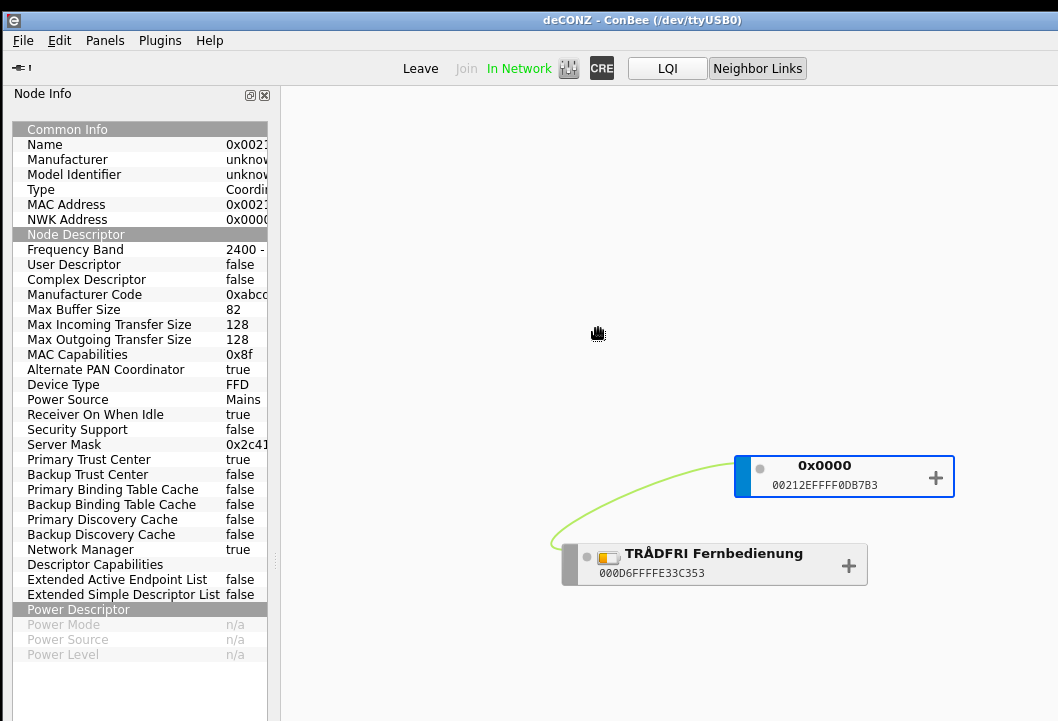
@smarti2015 sagte in deconz App unter Ubuntu wird nicht angezeigt:
Wie bekomme ich ohne Desktop die grafische Oberfläche angezeigt?
über IP:8099/pwa/login.html ODER IP:80/pwa/login.html
Ro75.
-
@wollebit Wie bekomme ich ohne Desktop die grafische Oberfläche angezeigt?
@smarti2015 Danke für den Tipp, aber sry hatte mich falsch ausgedrückt. Ich meinte de deconz Gui.
GEEKOM AS 6
-
@smarti2015 Danke für den Tipp, aber sry hatte mich falsch ausgedrückt. Ich meinte de deconz Gui.
Ein Server wird ohne Desktop betrieben.
-
@smarti2015 Danke für den Tipp, aber sry hatte mich falsch ausgedrückt. Ich meinte de deconz Gui.
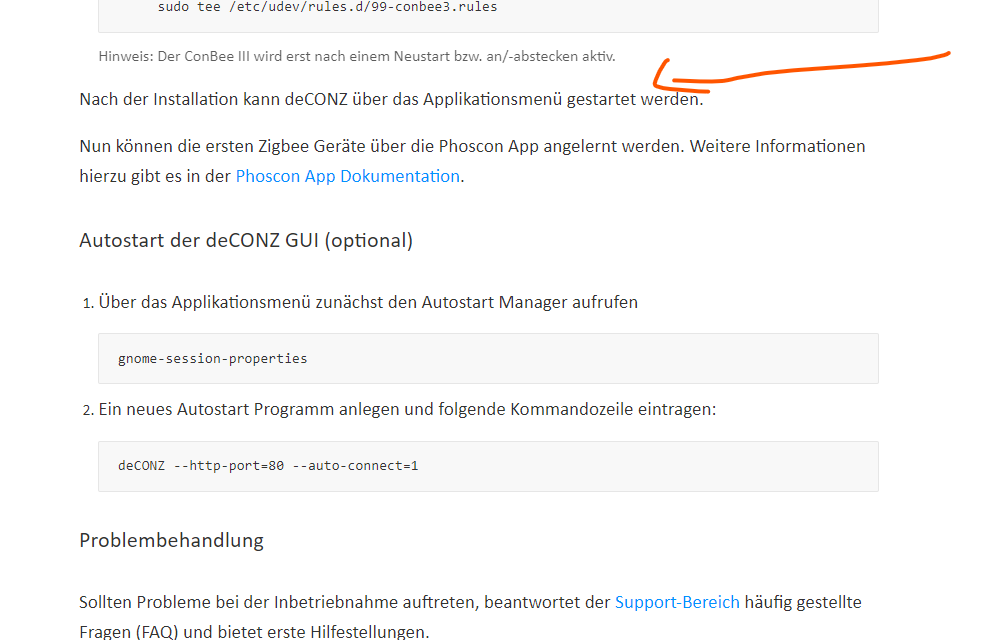
@smarti2015 danke für den Hinweis, ich hätte auch den Server installiert, aber es wird halt in der Installation von Applikations-Menü gesprochen und das gibt es ja unter dem Server nicht. Außerdem wird noch beschrieben, wie man die Gui in den Autostart-Manager trägt. Das geht alles nur mit der Destkop-Variante oder?
Könnt ihr kurz beschreiben, wie ihr alles installiert und eingerichtet habt?
GEEKOM AS 6
-
@smarti2015 danke für den Hinweis, ich hätte auch den Server installiert, aber es wird halt in der Installation von Applikations-Menü gesprochen und das gibt es ja unter dem Server nicht. Außerdem wird noch beschrieben, wie man die Gui in den Autostart-Manager trägt. Das geht alles nur mit der Destkop-Variante oder?
Könnt ihr kurz beschreiben, wie ihr alles installiert und eingerichtet habt?
systemctl status deconz deconz-guisagt?
Es läuft nur der deconz.service und der ist über die IP-Adresse erreichbar.
deconz-gui steht auf disabled. -
@smarti2015 danke für den Hinweis, ich hätte auch den Server installiert, aber es wird halt in der Installation von Applikations-Menü gesprochen und das gibt es ja unter dem Server nicht. Außerdem wird noch beschrieben, wie man die Gui in den Autostart-Manager trägt. Das geht alles nur mit der Destkop-Variante oder?
Könnt ihr kurz beschreiben, wie ihr alles installiert und eingerichtet habt?
-
@smarti2015
Ich glaube du hast einen Denkfehler. Die deconz app wird über einen Webbrowser an einem anderen PC aufgerufen und nicht an dem PC, auf dem das installiert wurde.
Deswegen benötigt man keine Oberfläche auf dem Server.@e-s sagte in deconz App unter Ubuntu wird nicht angezeigt:
Die deconz app wird über einen Webbrowser an einem anderen PC aufgerufen und nicht an dem PC, auf dem das installiert wurde
Jetzt hast du einen Denkfehler. Phoscon ist wovon du Sprichst und das ist die Bedienoberfläche. deConz GUI ist das Programm zur Verwaltung von deConz und das ist ein Desktop Programm das auf dem PC läuft auf dem auch deConz läuft.
-
@wollebit Wie bekomme ich ohne Desktop die grafische Oberfläche angezeigt?
@smarti2015 Hi, wie Du schreibst, steht deconz-gui auf desabled. Woher kommt der Screenshot?
Zum Verständnis (was schon in verschiedenen Foren beschrieben wurde):
1: deconz ist die headless-Version, d.h. ohne Desktop
2: deconz-gui ist die Variante mit Desktop
3: Du musst Dich also entscheiden, was bei Dir geht/Du willst
4: wenn deconz läuft, kannst Du mit phoscon (wie schon beschrieben) prüfen, ob das Gateway (Conbee) überhaupt erreichbar istGrüße wollebit
-
@smarti2015 Hi, wie Du schreibst, steht deconz-gui auf desabled. Woher kommt der Screenshot?
Zum Verständnis (was schon in verschiedenen Foren beschrieben wurde):
1: deconz ist die headless-Version, d.h. ohne Desktop
2: deconz-gui ist die Variante mit Desktop
3: Du musst Dich also entscheiden, was bei Dir geht/Du willst
4: wenn deconz läuft, kannst Du mit phoscon (wie schon beschrieben) prüfen, ob das Gateway (Conbee) überhaupt erreichbar istGrüße wollebit
Ok danke euch, hab es verstanden und auch hinbekommen:
Ich habe jetzt Ubuntu 22.04.3 installiert, dann deconz.
Mit sudo systemctl status deconz hab ich dann geprüft ob es läuft, war aber nicht der Fall.
Den Dienst hab ich dann mit sudo systemctl start deconz gestartet. Jetzt läuft deconz und ich komme auch auf die Phoscon App. Ich hätte halt gerne beides gehabt. Also auch die deconz App, weil man da noch ein paar Infos gesehen hat und vor allem eine Übersicht hatte, was alles worüber verbunden ist.Eine Frage hab ich noch, ich hab den ConbeeStick3 und in der Übersicht zeigt er mir den aber nicht korrekt an. Ist das normal?
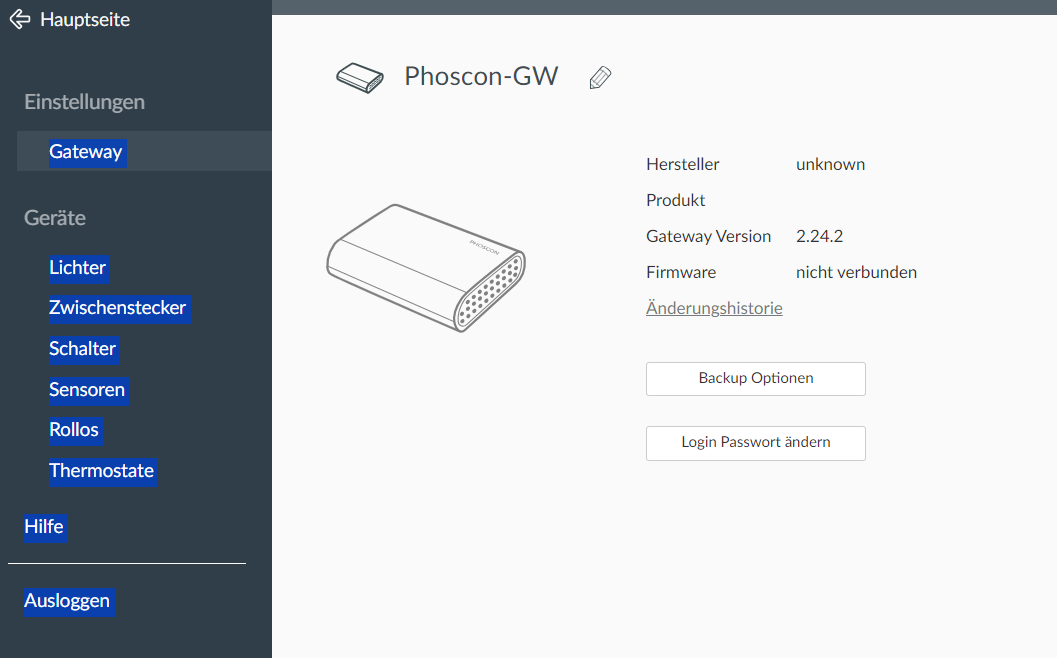
Ich bekomme eine Fehlermeldung, wenn ich ein Backup machen möchte. Irgendwie scheint er nicht richtig erkannt zu werden. Ich hab den Stick an einem Proxmox Server und an der VM hinzugefügt:
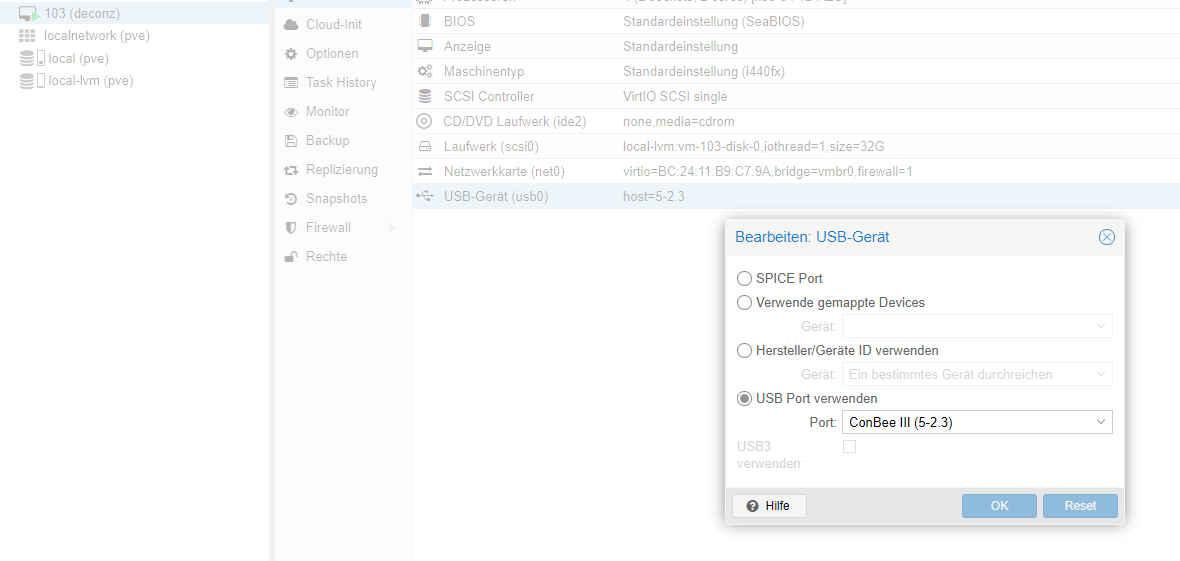

Wenn ich den Stick rausziehe, verschwindet: BUS 002 DEVICE 002, also muss das der Conbee Stick sein.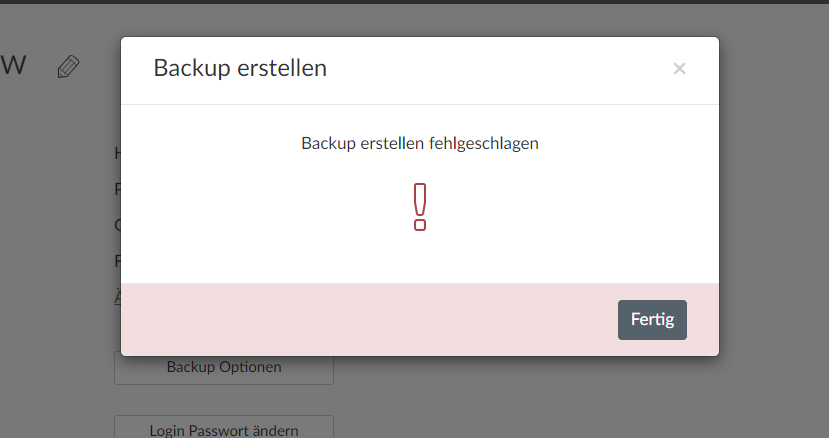
GEEKOM AS 6
-
Ok danke euch, hab es verstanden und auch hinbekommen:
Ich habe jetzt Ubuntu 22.04.3 installiert, dann deconz.
Mit sudo systemctl status deconz hab ich dann geprüft ob es läuft, war aber nicht der Fall.
Den Dienst hab ich dann mit sudo systemctl start deconz gestartet. Jetzt läuft deconz und ich komme auch auf die Phoscon App. Ich hätte halt gerne beides gehabt. Also auch die deconz App, weil man da noch ein paar Infos gesehen hat und vor allem eine Übersicht hatte, was alles worüber verbunden ist.Eine Frage hab ich noch, ich hab den ConbeeStick3 und in der Übersicht zeigt er mir den aber nicht korrekt an. Ist das normal?
Ich bekomme eine Fehlermeldung, wenn ich ein Backup machen möchte. Irgendwie scheint er nicht richtig erkannt zu werden. Ich hab den Stick an einem Proxmox Server und an der VM hinzugefügt:
Wenn ich den Stick rausziehe, verschwindet: BUS 002 DEVICE 002, also muss das der Conbee Stick sein.Nicht als root durch die VM hampeln...
User anlegen, den verwenden.und vor allem eine Übersicht hatte, was alles worüber verbunden ist.
Die Übersicht ist oftmals Mumpitz.
Ich hab den Stick an einem Proxmox Server und an der VM hinzugefügt:
Richtig durchgereicht?
Was sagt nun
iob diagdazu?
-
Nicht als root durch die VM hampeln...
User anlegen, den verwenden.und vor allem eine Übersicht hatte, was alles worüber verbunden ist.
Die Übersicht ist oftmals Mumpitz.
Ich hab den Stick an einem Proxmox Server und an der VM hinzugefügt:
Richtig durchgereicht?
Was sagt nun
iob diagdazu?
======== Start marking the full check here =========


Skript v.2023-10-25

*** BASE SYSTEM ***
 Static hostname: deconz
       Icon name: computer-vm
         Chassis: vm
  Virtualization: kvm
Operating System: Ubuntu 22.04.3 LTS
          Kernel: Linux 5.15.0-89-generic
    Architecture: x86-64
 Hardware Vendor: QEMU
  Hardware Model: Standard PC _i440FX + PIIX, 1996_

model name      : QEMU Virtual CPU version 2.5+
Docker          : false
Virtualization  : kvm
Kernel          : x86_64
Userland        : amd64

Systemuptime and Load:
 14:11:59 up  4:16,  2 users,  load average: 0.00, 0.00, 0.00
CPU threads: 4


*** Time and Time Zones ***
               Local time: Mon 2023-11-27 14:11:59 CET
           Universal time: Mon 2023-11-27 13:11:59 UTC
                 RTC time: Mon 2023-11-27 13:11:58
                Time zone: Europe/Berlin (CET, +0100)
System clock synchronized: yes
              NTP service: active
          RTC in local TZ: no

*** User and Groups ***
root
/root
root dialout

*** X-Server-Setup ***
X-Server:       false
Desktop:
Terminal:
Boot Target:    graphical.target

*** MEMORY ***
               total        used        free      shared  buff/cache   available
Mem:            3.9G        227M        3.3G        1.0M        380M        3.5G
Swap:           3.1G          0B        3.1G
Total:          7.0G        227M        6.4G

         3911 M total memory
          227 M used memory
          151 M active memory
          293 M inactive memory
         3303 M free memory
           21 M buffer memory
          358 M swap cache
         3061 M total swap
            0 M used swap
         3061 M free swap

*** FAILED SERVICES ***

  UNIT                  LOAD   ACTIVE SUB    DESCRIPTION
* deconz-init.service   loaded failed failed deCONZ: ZigBee gateway -- Initialisation
* deconz-update.service loaded failed failed deCONZ: ZigBee gateway -- Update Service

LOAD   = Reflects whether the unit definition was properly loaded.
ACTIVE = The high-level unit activation state, i.e. generalization of SUB.
SUB    = The low-level unit activation state, values depend on unit type.
2 loaded units listed.

*** FILESYSTEM ***
Filesystem                        Type   Size  Used Avail Use% Mounted on
tmpfs                             tmpfs  392M  1.1M  391M   1% /run
/dev/mapper/ubuntu--vg-ubuntu--lv ext4    15G  6.4G  7.6G  46% /
tmpfs                             tmpfs  2.0G     0  2.0G   0% /dev/shm
tmpfs                             tmpfs  5.0M     0  5.0M   0% /run/lock
/dev/sda2                         ext4   2.0G  129M  1.7G   8% /boot
tmpfs                             tmpfs  392M  4.0K  392M   1% /run/user/1000

Messages concerning ext4 filesystem in dmesg:
[Mon Nov 27 09:55:09 2023] EXT4-fs (dm-0): mounted filesystem with ordered data mode. Opts: (null). Quota mode: none.
[Mon Nov 27 09:55:09 2023] EXT4-fs (dm-0): re-mounted. Opts: (null). Quota mode: none.
[Mon Nov 27 09:55:10 2023] EXT4-fs (sda2): mounted filesystem with ordered data mode. Opts: (null). Quota mode: none.

Show mounted filesystems:
TARGET                                        SOURCE                            FSTYPE      OPTIONS
/                                             /dev/mapper/ubuntu--vg-ubuntu--lv ext4        rw,relatime
|-/sys                                        sysfs                             sysfs       rw,nosuid,nodev,noexec,relatime
| |-/sys/kernel/security                      securityfs                        securityfs  rw,nosuid,nodev,noexec,relatime
| |-/sys/fs/cgroup                            cgroup2                           cgroup2     rw,nosuid,nodev,noexec,relatime,nsdelegate,memory_recursiveprot
| |-/sys/fs/pstore                            pstore                            pstore      rw,nosuid,nodev,noexec,relatime
| |-/sys/fs/bpf                               bpf                               bpf         rw,nosuid,nodev,noexec,relatime,mode=700
| |-/sys/kernel/debug                         debugfs                           debugfs     rw,nosuid,nodev,noexec,relatime
| |-/sys/kernel/tracing                       tracefs                           tracefs     rw,nosuid,nodev,noexec,relatime
| |-/sys/fs/fuse/connections                  fusectl                           fusectl     rw,nosuid,nodev,noexec,relatime
| `-/sys/kernel/config                        configfs                          configfs    rw,nosuid,nodev,noexec,relatime
|-/proc                                       proc                              proc        rw,nosuid,nodev,noexec,relatime
| `-/proc/sys/fs/binfmt_misc                  systemd-1                         autofs      rw,relatime,fd=29,pgrp=1,timeout=0,minproto=5,maxproto=5,direct,pipe_ino=15212
|   `-/proc/sys/fs/binfmt_misc                binfmt_misc                       binfmt_misc rw,nosuid,nodev,noexec,relatime
|-/dev                                        udev                              devtmpfs    rw,nosuid,relatime,size=1944712k,nr_inodes=486178,mode=755,inode64
| |-/dev/pts                                  devpts                            devpts      rw,nosuid,noexec,relatime,gid=5,mode=620,ptmxmode=000
| |-/dev/shm                                  tmpfs                             tmpfs       rw,nosuid,nodev,inode64
| |-/dev/hugepages                            hugetlbfs                         hugetlbfs   rw,relatime,pagesize=2M
| `-/dev/mqueue                               mqueue                            mqueue      rw,nosuid,nodev,noexec,relatime
|-/run                                        tmpfs                             tmpfs       rw,nosuid,nodev,noexec,relatime,size=400540k,mode=755,inode64
| |-/run/lock                                 tmpfs                             tmpfs       rw,nosuid,nodev,noexec,relatime,size=5120k,inode64
| |-/run/credentials/systemd-sysusers.service none                              ramfs       ro,nosuid,nodev,noexec,relatime,mode=700
| |-/run/snapd/ns                             tmpfs[/snapd/ns]                  tmpfs       rw,nosuid,nodev,noexec,relatime,size=400540k,mode=755,inode64
| | `-/run/snapd/ns/lxd.mnt                   nsfs[mnt:[4026532309]]            nsfs        rw
| `-/run/user/1000                            tmpfs                             tmpfs       rw,nosuid,nodev,relatime,size=400536k,nr_inodes=100134,mode=700,uid=1000,gid=1000,inode64
|-/snap/snapd/20290                           /dev/loop0                        squashfs    ro,nodev,relatime,errors=continue
|-/snap/core20/2015                           /dev/loop2                        squashfs    ro,nodev,relatime,errors=continue
|-/snap/lxd/24322                             /dev/loop1                        squashfs    ro,nodev,relatime,errors=continue
|-/snap/snapd/19457                           /dev/loop3                        squashfs    ro,nodev,relatime,errors=continue
|-/snap/core20/1974                           /dev/loop4                        squashfs    ro,nodev,relatime,errors=continue
`-/boot                                       /dev/sda2                         ext4        rw,relatime

Files in neuralgic directories:

/var:
684M    /var/
551M    /var/lib
335M    /var/lib/snapd
229M    /var/lib/snapd/seed/snaps
229M    /var/lib/snapd/seed

Archived and active journals take up 24.0M in the file system.

/opt/iobroker/backups:
du: cannot access '/opt/iobroker/backups/': No such file or directory

/opt/iobroker/iobroker-data:
du: cannot access '/opt/iobroker/iobroker-data/': No such file or directory

The five largest files in iobroker-data are:
find: '/opt/iobroker/iobroker-data': No such file or directory

USB-Devices by-id:
USB-Sticks -  Avoid direct links to /dev/* in your adapter setups, please always prefer the links 'by-id':

/dev/serial/by-id/usb-dresden_elektronik_ConBee_III_DE03110757-if00-port0

*** NodeJS-Installation ***

./iob_diag: line 283: nodejs: command not found

./iob_diag: line 284: node: command not found

./iob_diag: line 285: npm: command not found

./iob_diag: line 286: npx: command not found

./iob_diag: line 287: corepack: command not found

./iob_diag: line 294: nodejs: command not found
./iob_diag: line 295: node: command not found
./iob_diag: line 296: npm: command not found
./iob_diag: line 297: npx: command not found

*** nodejs is NOT correctly installed ***
Run ob nodejs-update to fix it.

nodejs:
  Installed: (none)
  Candidate: 12.22.9~dfsg-1ubuntu3.2
  Version table:
     12.22.9~dfsg-1ubuntu3.2 500
        500 http://de.archive.ubuntu.com/ubuntu jammy-updates/universe amd64 Packages
        500 http://security.ubuntu.com/ubuntu jammy-security/universe amd64 Packages
     12.22.9~dfsg-1ubuntu3 500
        500 http://de.archive.ubuntu.com/ubuntu jammy/universe amd64 Packages

find: '/opt/iobroker/node_modules': No such file or directory
Temp directories causing npm8 problem: 0
No problems detected

Errors in npm tree:
./iob_diag: line 368: cd: /opt/iobroker: No such file or directory

*** ioBroker-Installation ***

ioBroker Status
./iob_diag: line 373: iobroker: command not found

Core adapters versions
./iob_diag: line 379: iob: command not found
js-controller:
./iob_diag: line 380: iob: command not found
admin:
./iob_diag: line 381: iob: command not found
javascript:

./iob_diag: line 383: cd: /opt/iobroker: No such file or directory
Adapters from github:

Adapter State
./iob_diag: line 386: iob: command not found

Enabled adapters with bindings
./iob_diag: line 389: iob: command not found

ioBroker-Repositories
./iob_diag: line 392: iob: command not found

Installed ioBroker-Instances
./iob_diag: line 395: iob: command not found

Objects and States
Please stand by - This may take a while
Objects:        0
States:         0

*** OS-Repositories and Updates ***
W: http://phoscon.de/apt/deconz/dists/jammy-beta/InRelease: Key is stored in legacy trusted.gpg keyring (/etc/apt/trusted.gpg), see the DEPRECATION section in apt-key(8) for details.
Hit:1 http://phoscon.de/apt/deconz jammy-beta InRelease
Hit:2 http://de.archive.ubuntu.com/ubuntu jammy InRelease
Hit:3 http://de.archive.ubuntu.com/ubuntu jammy-updates InRelease
Hit:4 http://de.archive.ubuntu.com/ubuntu jammy-backports InRelease
Hit:5 http://security.ubuntu.com/ubuntu jammy-security InRelease
Reading package lists... Done
W: http://phoscon.de/apt/deconz/dists/jammy-beta/InRelease: Key is stored in legacy trusted.gpg keyring (/etc/apt/trusted.gpg), see the DEPRECATION section in apt-key(8) for details.
Pending Updates: 0

*** Listening Ports ***
Netid               State                Recv-Q               Send-Q                               Local Address:Port                               Peer Address:Port               Process
udp                 UNCONN               0                    0                                          0.0.0.0:1900                                    0.0.0.0:*                   users:(("deCONZ",pid=680,fd=11))
udp                 UNCONN               0                    0                                    127.0.0.53%lo:53                                      0.0.0.0:*                   users:(("systemd-resolve",pid=663,fd=13))
tcp                 LISTEN               0                    50                                         0.0.0.0:443                                     0.0.0.0:*                   users:(("deCONZ",pid=680,fd=9))
tcp                 LISTEN               0                    50                                         0.0.0.0:80                                      0.0.0.0:*                   users:(("deCONZ",pid=680,fd=4))
tcp                 LISTEN               0                    4096                                 127.0.0.53%lo:53                                      0.0.0.0:*                   users:(("systemd-resolve",pid=663,fd=14))
tcp                 LISTEN               0                    128                                        0.0.0.0:22                                      0.0.0.0:*                   users:(("sshd",pid=719,fd=3))
tcp                 LISTEN               0                    128                                           [::]:22                                         [::]:*                   users:(("sshd",pid=719,fd=4))

*** Log File - Last 25 Lines ***

tail: cannot open '/opt/iobroker/log/iobroker.current.log' for reading: No such file or directory


============ Mark until here for C&P =============

iob diag has finished.
GEEKOM AS 6
-
======== Start marking the full check here ========= Skript v.2023-10-25 *** BASE SYSTEM *** Static hostname: deconz Icon name: computer-vm Chassis: vm Virtualization: kvm Operating System: Ubuntu 22.04.3 LTS Kernel: Linux 5.15.0-89-generic Architecture: x86-64 Hardware Vendor: QEMU Hardware Model: Standard PC _i440FX + PIIX, 1996_ model name : QEMU Virtual CPU version 2.5+ Docker : false Virtualization : kvm Kernel : x86_64 Userland : amd64 Systemuptime and Load: 14:11:59 up 4:16, 2 users, load average: 0.00, 0.00, 0.00 CPU threads: 4 *** Time and Time Zones *** Local time: Mon 2023-11-27 14:11:59 CET Universal time: Mon 2023-11-27 13:11:59 UTC RTC time: Mon 2023-11-27 13:11:58 Time zone: Europe/Berlin (CET, +0100) System clock synchronized: yes NTP service: active RTC in local TZ: no *** User and Groups *** root /root root dialout *** X-Server-Setup *** X-Server: false Desktop: Terminal: Boot Target: graphical.target *** MEMORY *** total used free shared buff/cache available Mem: 3.9G 227M 3.3G 1.0M 380M 3.5G Swap: 3.1G 0B 3.1G Total: 7.0G 227M 6.4G 3911 M total memory 227 M used memory 151 M active memory 293 M inactive memory 3303 M free memory 21 M buffer memory 358 M swap cache 3061 M total swap 0 M used swap 3061 M free swap *** FAILED SERVICES *** UNIT LOAD ACTIVE SUB DESCRIPTION * deconz-init.service loaded failed failed deCONZ: ZigBee gateway -- Initialisation * deconz-update.service loaded failed failed deCONZ: ZigBee gateway -- Update Service LOAD = Reflects whether the unit definition was properly loaded. ACTIVE = The high-level unit activation state, i.e. generalization of SUB. SUB = The low-level unit activation state, values depend on unit type. 2 loaded units listed. *** FILESYSTEM *** Filesystem Type Size Used Avail Use% Mounted on tmpfs tmpfs 392M 1.1M 391M 1% /run /dev/mapper/ubuntu--vg-ubuntu--lv ext4 15G 6.4G 7.6G 46% / tmpfs tmpfs 2.0G 0 2.0G 0% /dev/shm tmpfs tmpfs 5.0M 0 5.0M 0% /run/lock /dev/sda2 ext4 2.0G 129M 1.7G 8% /boot tmpfs tmpfs 392M 4.0K 392M 1% /run/user/1000 Messages concerning ext4 filesystem in dmesg: [Mon Nov 27 09:55:09 2023] EXT4-fs (dm-0): mounted filesystem with ordered data mode. Opts: (null). Quota mode: none. [Mon Nov 27 09:55:09 2023] EXT4-fs (dm-0): re-mounted. Opts: (null). Quota mode: none. [Mon Nov 27 09:55:10 2023] EXT4-fs (sda2): mounted filesystem with ordered data mode. Opts: (null). Quota mode: none. Show mounted filesystems: TARGET SOURCE FSTYPE OPTIONS / /dev/mapper/ubuntu--vg-ubuntu--lv ext4 rw,relatime |-/sys sysfs sysfs rw,nosuid,nodev,noexec,relatime | |-/sys/kernel/security securityfs securityfs rw,nosuid,nodev,noexec,relatime | |-/sys/fs/cgroup cgroup2 cgroup2 rw,nosuid,nodev,noexec,relatime,nsdelegate,memory_recursiveprot | |-/sys/fs/pstore pstore pstore rw,nosuid,nodev,noexec,relatime | |-/sys/fs/bpf bpf bpf rw,nosuid,nodev,noexec,relatime,mode=700 | |-/sys/kernel/debug debugfs debugfs rw,nosuid,nodev,noexec,relatime | |-/sys/kernel/tracing tracefs tracefs rw,nosuid,nodev,noexec,relatime | |-/sys/fs/fuse/connections fusectl fusectl rw,nosuid,nodev,noexec,relatime | `-/sys/kernel/config configfs configfs rw,nosuid,nodev,noexec,relatime |-/proc proc proc rw,nosuid,nodev,noexec,relatime | `-/proc/sys/fs/binfmt_misc systemd-1 autofs rw,relatime,fd=29,pgrp=1,timeout=0,minproto=5,maxproto=5,direct,pipe_ino=15212 | `-/proc/sys/fs/binfmt_misc binfmt_misc binfmt_misc rw,nosuid,nodev,noexec,relatime |-/dev udev devtmpfs rw,nosuid,relatime,size=1944712k,nr_inodes=486178,mode=755,inode64 | |-/dev/pts devpts devpts rw,nosuid,noexec,relatime,gid=5,mode=620,ptmxmode=000 | |-/dev/shm tmpfs tmpfs rw,nosuid,nodev,inode64 | |-/dev/hugepages hugetlbfs hugetlbfs rw,relatime,pagesize=2M | `-/dev/mqueue mqueue mqueue rw,nosuid,nodev,noexec,relatime |-/run tmpfs tmpfs rw,nosuid,nodev,noexec,relatime,size=400540k,mode=755,inode64 | |-/run/lock tmpfs tmpfs rw,nosuid,nodev,noexec,relatime,size=5120k,inode64 | |-/run/credentials/systemd-sysusers.service none ramfs ro,nosuid,nodev,noexec,relatime,mode=700 | |-/run/snapd/ns tmpfs[/snapd/ns] tmpfs rw,nosuid,nodev,noexec,relatime,size=400540k,mode=755,inode64 | | `-/run/snapd/ns/lxd.mnt nsfs[mnt:[4026532309]] nsfs rw | `-/run/user/1000 tmpfs tmpfs rw,nosuid,nodev,relatime,size=400536k,nr_inodes=100134,mode=700,uid=1000,gid=1000,inode64 |-/snap/snapd/20290 /dev/loop0 squashfs ro,nodev,relatime,errors=continue |-/snap/core20/2015 /dev/loop2 squashfs ro,nodev,relatime,errors=continue |-/snap/lxd/24322 /dev/loop1 squashfs ro,nodev,relatime,errors=continue |-/snap/snapd/19457 /dev/loop3 squashfs ro,nodev,relatime,errors=continue |-/snap/core20/1974 /dev/loop4 squashfs ro,nodev,relatime,errors=continue `-/boot /dev/sda2 ext4 rw,relatime Files in neuralgic directories: /var: 684M /var/ 551M /var/lib 335M /var/lib/snapd 229M /var/lib/snapd/seed/snaps 229M /var/lib/snapd/seed Archived and active journals take up 24.0M in the file system. /opt/iobroker/backups: du: cannot access '/opt/iobroker/backups/': No such file or directory /opt/iobroker/iobroker-data: du: cannot access '/opt/iobroker/iobroker-data/': No such file or directory The five largest files in iobroker-data are: find: '/opt/iobroker/iobroker-data': No such file or directory USB-Devices by-id: USB-Sticks - Avoid direct links to /dev/* in your adapter setups, please always prefer the links 'by-id': /dev/serial/by-id/usb-dresden_elektronik_ConBee_III_DE03110757-if00-port0 *** NodeJS-Installation *** ./iob_diag: line 283: nodejs: command not found ./iob_diag: line 284: node: command not found ./iob_diag: line 285: npm: command not found ./iob_diag: line 286: npx: command not found ./iob_diag: line 287: corepack: command not found ./iob_diag: line 294: nodejs: command not found ./iob_diag: line 295: node: command not found ./iob_diag: line 296: npm: command not found ./iob_diag: line 297: npx: command not found *** nodejs is NOT correctly installed *** Run ob nodejs-update to fix it. nodejs: Installed: (none) Candidate: 12.22.9~dfsg-1ubuntu3.2 Version table: 12.22.9~dfsg-1ubuntu3.2 500 500 http://de.archive.ubuntu.com/ubuntu jammy-updates/universe amd64 Packages 500 http://security.ubuntu.com/ubuntu jammy-security/universe amd64 Packages 12.22.9~dfsg-1ubuntu3 500 500 http://de.archive.ubuntu.com/ubuntu jammy/universe amd64 Packages find: '/opt/iobroker/node_modules': No such file or directory Temp directories causing npm8 problem: 0 No problems detected Errors in npm tree: ./iob_diag: line 368: cd: /opt/iobroker: No such file or directory *** ioBroker-Installation *** ioBroker Status ./iob_diag: line 373: iobroker: command not found Core adapters versions ./iob_diag: line 379: iob: command not found js-controller: ./iob_diag: line 380: iob: command not found admin: ./iob_diag: line 381: iob: command not found javascript: ./iob_diag: line 383: cd: /opt/iobroker: No such file or directory Adapters from github: Adapter State ./iob_diag: line 386: iob: command not found Enabled adapters with bindings ./iob_diag: line 389: iob: command not found ioBroker-Repositories ./iob_diag: line 392: iob: command not found Installed ioBroker-Instances ./iob_diag: line 395: iob: command not found Objects and States Please stand by - This may take a while Objects: 0 States: 0 *** OS-Repositories and Updates *** W: http://phoscon.de/apt/deconz/dists/jammy-beta/InRelease: Key is stored in legacy trusted.gpg keyring (/etc/apt/trusted.gpg), see the DEPRECATION section in apt-key(8) for details. Hit:1 http://phoscon.de/apt/deconz jammy-beta InRelease Hit:2 http://de.archive.ubuntu.com/ubuntu jammy InRelease Hit:3 http://de.archive.ubuntu.com/ubuntu jammy-updates InRelease Hit:4 http://de.archive.ubuntu.com/ubuntu jammy-backports InRelease Hit:5 http://security.ubuntu.com/ubuntu jammy-security InRelease Reading package lists... Done W: http://phoscon.de/apt/deconz/dists/jammy-beta/InRelease: Key is stored in legacy trusted.gpg keyring (/etc/apt/trusted.gpg), see the DEPRECATION section in apt-key(8) for details. Pending Updates: 0 *** Listening Ports *** Netid State Recv-Q Send-Q Local Address:Port Peer Address:Port Process udp UNCONN 0 0 0.0.0.0:1900 0.0.0.0:* users:(("deCONZ",pid=680,fd=11)) udp UNCONN 0 0 127.0.0.53%lo:53 0.0.0.0:* users:(("systemd-resolve",pid=663,fd=13)) tcp LISTEN 0 50 0.0.0.0:443 0.0.0.0:* users:(("deCONZ",pid=680,fd=9)) tcp LISTEN 0 50 0.0.0.0:80 0.0.0.0:* users:(("deCONZ",pid=680,fd=4)) tcp LISTEN 0 4096 127.0.0.53%lo:53 0.0.0.0:* users:(("systemd-resolve",pid=663,fd=14)) tcp LISTEN 0 128 0.0.0.0:22 0.0.0.0:* users:(("sshd",pid=719,fd=3)) tcp LISTEN 0 128 [::]:22 [::]:* users:(("sshd",pid=719,fd=4)) *** Log File - Last 25 Lines *** tail: cannot open '/opt/iobroker/log/iobroker.current.log' for reading: No such file or directory ============ Mark until here for C&P ============= iob diag has finished.@smarti2015 sagte in deconz App unter Ubuntu wird nicht angezeigt:
*** User and Groups ***
root
/root
root dialoutLeg dir einen user an und verwende den.
*** FAILED SERVICES ***
UNIT LOAD ACTIVE SUB DESCRIPTION-
deconz-init.service loaded failed failed deCONZ: ZigBee gateway -- Initialisation
-
deconz-update.service loaded failed failed deCONZ: ZigBee gateway -- Update Service
Schau warum die Services nicht gestartet werden.
systemctl status deconz*sagt vielleicht mehr dazu.
Boot Target: graphical.target
Setz das auf multi-user
sudo systemctl default-set multi-user.target -
-
@smarti2015 sagte in deconz App unter Ubuntu wird nicht angezeigt:
*** User and Groups ***
root
/root
root dialoutLeg dir einen user an und verwende den.
*** FAILED SERVICES ***
UNIT LOAD ACTIVE SUB DESCRIPTION-
deconz-init.service loaded failed failed deCONZ: ZigBee gateway -- Initialisation
-
deconz-update.service loaded failed failed deCONZ: ZigBee gateway -- Update Service
Schau warum die Services nicht gestartet werden.
systemctl status deconz*sagt vielleicht mehr dazu.
Boot Target: graphical.target
Setz das auf multi-user
sudo systemctl default-set multi-user.target@thomas-braun Danke für deine Hilfe und Tipps. Lege mir einen User an und dann versuche ich die Installation nochmal neu.
Das hier kommt bei systemctl status deconz*:
× deconz-update.service - deCONZ: ZigBee gateway -- Update Service
     Loaded: loaded (/lib/systemd/system/deconz-update.service; disabled; vendor preset: enabled)
     Active: failed (Result: exit-code) since Mon 2023-11-27 09:55:16 CET; 6h ago
    Process: 773 ExecStart=/usr/bin/deCONZ-update2.sh (code=exited, status=203/EXEC)
   Main PID: 773 (code=exited, status=203/EXEC)
        CPU: 496us

Nov 27 09:55:16 deconz systemd[1]: deconz-update.service: Scheduled restart job, restart counter is at 5.
Nov 27 09:55:16 deconz systemd[1]: Stopped deCONZ: ZigBee gateway -- Update Service.
Nov 27 09:55:16 deconz systemd[1]: deconz-update.service: Start request repeated too quickly.
Nov 27 09:55:16 deconz systemd[1]: deconz-update.service: Failed with result 'exit-code'.
Nov 27 09:55:16 deconz systemd[1]: Failed to start deCONZ: ZigBee gateway -- Update Service.

● deconz.service - deCONZ: ZigBee gateway -- REST API
     Loaded: loaded (/lib/systemd/system/deconz.service; enabled; vendor preset: enabled)
     Active: active (running) since Mon 2023-11-27 09:55:15 CET; 6h ago
   Main PID: 680 (deCONZ)
      Tasks: 5 (limit: 4557)
     Memory: 91.0M
        CPU: 2min 20.999s
     CGroup: /system.slice/deconz.service
             └─680 /usr/bin/deCONZ -platform minimal --http-port=80

Nov 27 09:55:15 deconz systemd[1]: Started deCONZ: ZigBee gateway -- REST API.
Nov 27 09:55:15 deconz deCONZ[680]: QStandardPaths: XDG_RUNTIME_DIR not set, defaulting to '/tmp/runtime-hwadmin'
Nov 27 09:55:15 deconz deCONZ[680]: libpng warning: iCCP: known incorrect sRGB profile
Nov 27 09:55:16 deconz deCONZ[680]: This plugin does not support propagateSizeHints()
Nov 27 09:55:16 deconz deCONZ[680]: This plugin does not support propagateSizeHints()

× deconz-init.service - deCONZ: ZigBee gateway -- Initialisation
     Loaded: loaded (/lib/systemd/system/deconz-init.service; disabled; vendor preset: enabled)
     Active: failed (Result: exit-code) since Mon 2023-11-27 09:55:15 CET; 6h ago
    Process: 678 ExecStart=/usr/bin/deCONZ-init.sh (code=exited, status=203/EXEC)
   Main PID: 678 (code=exited, status=203/EXEC)
        CPU: 289us

Nov 27 09:55:15 deconz systemd[1]: Starting deCONZ: ZigBee gateway -- Initialisation...
Nov 27 09:55:15 deconz systemd[678]: deconz-init.service: Failed to locate executable /usr/bin/deCONZ-init.sh: No such file or directory
Nov 27 09:55:15 deconz systemd[678]: deconz-init.service: Failed at step EXEC spawning /usr/bin/deCONZ-init.sh: No such file or directory
Nov 27 09:55:15 deconz systemd[1]: deconz-init.service: Main process exited, code=exited, status=203/EXEC
Nov 27 09:55:15 deconz systemd[1]: deconz-init.service: Failed with result 'exit-code'.
Nov 27 09:55:15 deconz systemd[1]: Failed to start deCONZ: ZigBee gateway -- Initialisation.
Wenn ich versuche Multi-User einzurichten mit dem Befehl kommt das hier:
Unknown command verb default-set.GEEKOM AS 6
-
-
@thomas-braun Danke für deine Hilfe und Tipps. Lege mir einen User an und dann versuche ich die Installation nochmal neu.
Das hier kommt bei systemctl status deconz*:
× deconz-update.service - deCONZ: ZigBee gateway -- Update Service
     Loaded: loaded (/lib/systemd/system/deconz-update.service; disabled; vendor preset: enabled)
     Active: failed (Result: exit-code) since Mon 2023-11-27 09:55:16 CET; 6h ago
    Process: 773 ExecStart=/usr/bin/deCONZ-update2.sh (code=exited, status=203/EXEC)
   Main PID: 773 (code=exited, status=203/EXEC)
        CPU: 496us

Nov 27 09:55:16 deconz systemd[1]: deconz-update.service: Scheduled restart job, restart counter is at 5.
Nov 27 09:55:16 deconz systemd[1]: Stopped deCONZ: ZigBee gateway -- Update Service.
Nov 27 09:55:16 deconz systemd[1]: deconz-update.service: Start request repeated too quickly.
Nov 27 09:55:16 deconz systemd[1]: deconz-update.service: Failed with result 'exit-code'.
Nov 27 09:55:16 deconz systemd[1]: Failed to start deCONZ: ZigBee gateway -- Update Service.

● deconz.service - deCONZ: ZigBee gateway -- REST API
     Loaded: loaded (/lib/systemd/system/deconz.service; enabled; vendor preset: enabled)
     Active: active (running) since Mon 2023-11-27 09:55:15 CET; 6h ago
   Main PID: 680 (deCONZ)
      Tasks: 5 (limit: 4557)
     Memory: 91.0M
        CPU: 2min 20.999s
     CGroup: /system.slice/deconz.service
             └─680 /usr/bin/deCONZ -platform minimal --http-port=80

Nov 27 09:55:15 deconz systemd[1]: Started deCONZ: ZigBee gateway -- REST API.
Nov 27 09:55:15 deconz deCONZ[680]: QStandardPaths: XDG_RUNTIME_DIR not set, defaulting to '/tmp/runtime-hwadmin'
Nov 27 09:55:15 deconz deCONZ[680]: libpng warning: iCCP: known incorrect sRGB profile
Nov 27 09:55:16 deconz deCONZ[680]: This plugin does not support propagateSizeHints()
Nov 27 09:55:16 deconz deCONZ[680]: This plugin does not support propagateSizeHints()

× deconz-init.service - deCONZ: ZigBee gateway -- Initialisation
     Loaded: loaded (/lib/systemd/system/deconz-init.service; disabled; vendor preset: enabled)
     Active: failed (Result: exit-code) since Mon 2023-11-27 09:55:15 CET; 6h ago
    Process: 678 ExecStart=/usr/bin/deCONZ-init.sh (code=exited, status=203/EXEC)
   Main PID: 678 (code=exited, status=203/EXEC)
        CPU: 289us

Nov 27 09:55:15 deconz systemd[1]: Starting deCONZ: ZigBee gateway -- Initialisation...
Nov 27 09:55:15 deconz systemd[678]: deconz-init.service: Failed to locate executable /usr/bin/deCONZ-init.sh: No such file or directory
Nov 27 09:55:15 deconz systemd[678]: deconz-init.service: Failed at step EXEC spawning /usr/bin/deCONZ-init.sh: No such file or directory
Nov 27 09:55:15 deconz systemd[1]: deconz-init.service: Main process exited, code=exited, status=203/EXEC
Nov 27 09:55:15 deconz systemd[1]: deconz-init.service: Failed with result 'exit-code'.
Nov 27 09:55:15 deconz systemd[1]: Failed to start deCONZ: ZigBee gateway -- Initialisation.
Wenn ich versuche Multi-User einzurichten mit dem Befehl kommt das hier:
Unknown command verb default-set. -
So, also nochmal alles frisch installiert und mit Benutzer eingerichtet. Jetzt sieht es ganz gut aus:
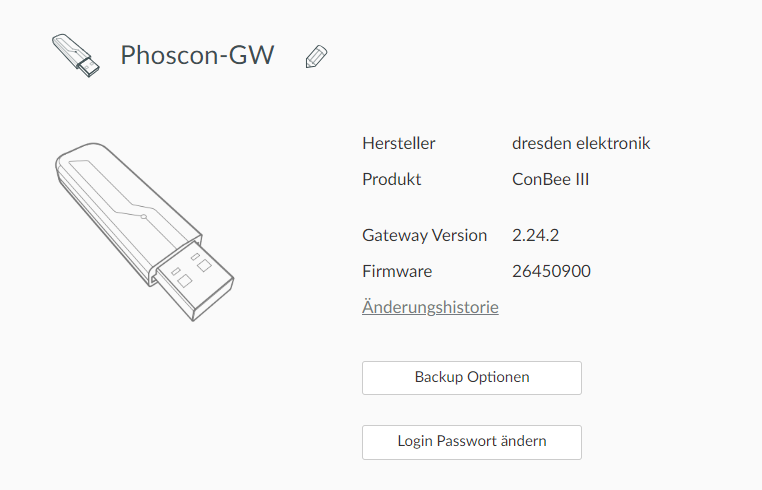
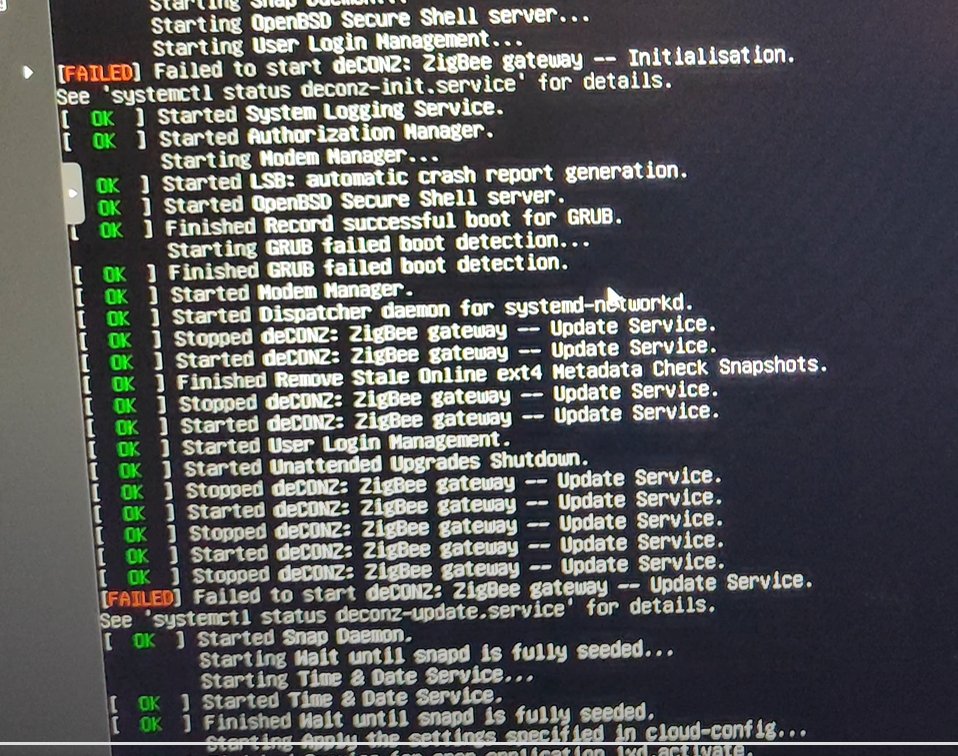
Es gibt beim booten immer noch eine Fehlermeldung, das rattert aber so schnell vorbei, seh nicht was es ist.
Am Linux-Rechner direkt konnte man ja immer über die F-Tasten nochmal in das Bootlog direkt wechseln, das geht unter Proxmox irgendwie nicht und im /var/log/syslog finde ich die Meldung nicht.Ich würde mal schauen, ob ich Geräte anlernen kann, vielleicht haut es hin. Ich danke dir erstmal !!!! :)
-
GEEKOM AS 6
-
Da steht aber auch dabei wie/wo man genaueres sehen kann.
-
Da steht aber auch dabei wie/wo man genaueres sehen kann.
Kannst du mir dabei bitte helfen? Ich glaub er meldet, das eine Datei oder Verzeichnis fehltr?
hwadmin@deconz:/$ systemctl status deconz-init.service
× deconz-init.service - deCONZ: ZigBee gateway -- Initialisation
     Loaded: loaded (/lib/systemd/system/deconz-init.service; disabled; vendor preset: enabled)
     Active: failed (Result: exit-code) since Mon 2023-11-27 16:59:54 CET; 17h ago
    Process: 677 ExecStart=/usr/bin/deCONZ-init.sh (code=exited, status=203/EXEC)
   Main PID: 677 (code=exited, status=203/EXEC)
        CPU: 268us

Nov 27 16:59:54 deconz systemd[1]: Starting deCONZ: ZigBee gateway -- Initialisation...
Nov 27 16:59:54 deconz systemd[677]: deconz-init.service: Failed to locate executable /usr/bin/deCONZ-init.sh: No such file or directory
Nov 27 16:59:54 deconz systemd[677]: deconz-init.service: Failed at step EXEC spawning /usr/bin/deCONZ-init.sh: No such file or directory
Nov 27 16:59:54 deconz systemd[1]: deconz-init.service: Main process exited, code=exited, status=203/EXEC
Nov 27 16:59:54 deconz systemd[1]: deconz-init.service: Failed with result 'exit-code'.
Nov 27 16:59:54 deconz systemd[1]: Failed to start deCONZ: ZigBee gateway -- Initialisation.
hwadmin@deconz:/$ systemctl status deconz-update.service × deconz-update.service - deCONZ: ZigBee gateway -- Update Service Loaded: loaded (/lib/systemd/system/deconz-update.service; disabled; vendor preset: enabled) Active: failed (Result: exit-code) since Mon 2023-11-27 16:59:55 CET; 17h ago Process: 766 ExecStart=/usr/bin/deCONZ-update2.sh (code=exited, status=203/EXEC) Main PID: 766 (code=exited, status=203/EXEC) CPU: 495us Nov 27 16:59:55 deconz systemd[1]: deconz-update.service: Scheduled restart job, restart counter is at 5. Nov 27 16:59:55 deconz systemd[1]: Stopped deCONZ: ZigBee gateway -- Update Service. Nov 27 16:59:55 deconz systemd[1]: deconz-update.service: Start request repeated too quickly. Nov 27 16:59:55 deconz systemd[1]: deconz-update.service: Failed with result 'exit-code'. Nov 27 16:59:55 deconz systemd[1]: Failed to start deCONZ: ZigBee gateway -- Update Service.Ich habe aber gestern erfolgreich eine Lampe und einen Schalter verbinden können.
GEEKOM AS 6
-
Kannst du mir dabei bitte helfen? Ich glaub er meldet, das eine Datei oder Verzeichnis fehltr?
hwadmin@deconz:/$ systemctl status deconz-init.service
× deconz-init.service - deCONZ: ZigBee gateway -- Initialisation
     Loaded: loaded (/lib/systemd/system/deconz-init.service; disabled; vendor preset: enabled)
     Active: failed (Result: exit-code) since Mon 2023-11-27 16:59:54 CET; 17h ago
    Process: 677 ExecStart=/usr/bin/deCONZ-init.sh (code=exited, status=203/EXEC)
   Main PID: 677 (code=exited, status=203/EXEC)
        CPU: 268us

Nov 27 16:59:54 deconz systemd[1]: Starting deCONZ: ZigBee gateway -- Initialisation...
Nov 27 16:59:54 deconz systemd[677]: deconz-init.service: Failed to locate executable /usr/bin/deCONZ-init.sh: No such file or directory
Nov 27 16:59:54 deconz systemd[677]: deconz-init.service: Failed at step EXEC spawning /usr/bin/deCONZ-init.sh: No such file or directory
Nov 27 16:59:54 deconz systemd[1]: deconz-init.service: Main process exited, code=exited, status=203/EXEC
Nov 27 16:59:54 deconz systemd[1]: deconz-init.service: Failed with result 'exit-code'.
Nov 27 16:59:54 deconz systemd[1]: Failed to start deCONZ: ZigBee gateway -- Initialisation.
hwadmin@deconz:/$ systemctl status deconz-update.service × deconz-update.service - deCONZ: ZigBee gateway -- Update Service Loaded: loaded (/lib/systemd/system/deconz-update.service; disabled; vendor preset: enabled) Active: failed (Result: exit-code) since Mon 2023-11-27 16:59:55 CET; 17h ago Process: 766 ExecStart=/usr/bin/deCONZ-update2.sh (code=exited, status=203/EXEC) Main PID: 766 (code=exited, status=203/EXEC) CPU: 495us Nov 27 16:59:55 deconz systemd[1]: deconz-update.service: Scheduled restart job, restart counter is at 5. Nov 27 16:59:55 deconz systemd[1]: Stopped deCONZ: ZigBee gateway -- Update Service. Nov 27 16:59:55 deconz systemd[1]: deconz-update.service: Start request repeated too quickly. Nov 27 16:59:55 deconz systemd[1]: deconz-update.service: Failed with result 'exit-code'. Nov 27 16:59:55 deconz systemd[1]: Failed to start deCONZ: ZigBee gateway -- Update Service.Ich habe aber gestern erfolgreich eine Lampe und einen Schalter verbinden können.
-
hwadmin@deconz:~$ sudo apt update
OK:1 http://phoscon.de/apt/deconz jammy InRelease
OK:2 http://de.archive.ubuntu.com/ubuntu jammy InRelease
OK:3 http://de.archive.ubuntu.com/ubuntu jammy-updates InRelease
OK:4 http://de.archive.ubuntu.com/ubuntu jammy-backports InRelease
OK:5 http://security.ubuntu.com/ubuntu jammy-security InRelease
Paketlisten werden gelesen… Fertig
Abhängigkeitsbaum wird aufgebaut… Fertig
Statusinformationen werden eingelesen… Fertig
Aktualisierung für 1 Paket verfügbar. Führen Sie »apt list --upgradable« aus, um es anzuzeigen.
W: http://phoscon.de/apt/deconz/dists/jammy/InRelease: Schlüssel ist im veralteten Schlüsselbund trusted.gpg gespeichert (/etc/apt/trusted.gpg), siehe den Abschnitt MISSBILLIGUNG in apt-key(8) für Details.
hwadmin@deconz:~$ apt policy deconz deconz: Installiert: 2.24.2 Installationskandidat: 2.24.2 Versionstabelle: *** 2.24.2 500 500 http://phoscon.de/apt/deconz jammy/main amd64 Packages 100 /var/lib/dpkg/status



Hey! Du scheinst an dieser Unterhaltung interessiert zu sein, hast aber noch kein Konto.
Hast du es satt, bei jedem Besuch durch die gleichen Beiträge zu scrollen? Wenn du dich für ein Konto anmeldest, kommst du immer genau dorthin zurück, wo du zuvor warst, und kannst dich über neue Antworten benachrichtigen lassen (entweder per E-Mail oder Push-Benachrichtigung). Du kannst auch Lesezeichen speichern und Beiträge positiv bewerten, um anderen Community-Mitgliedern deine Wertschätzung zu zeigen.
Mit deinem Input könnte dieser Beitrag noch besser werden 💗
Registrieren Anmelden240
Online33.0k
Benutzende83.7k
Themen1.3m
Beiträge