




[gelöst] - Fritzbox-Adapter startet nicht
-
@papi-0 Na ja, Informationen zu deinem System und Stand wären nicht schlecht. Zusätzlich vielleicht auch paar Daten zu deiner Fritzbox. So wird das sonst nichts werden.
Ro75.
Ok, da ich nicht weiß, welche Informationen für Euch relevant sind, führe ich hier einfach mal ein paar Dinge auf:
Die Fritz!Box ist eine 7590 mit Fritz!OS 7.57
Zum iobroker:
Plattform docker (auf einem Synology-NAS)
Betriebssystem linux
Architektur x64
CPUs 4
Geschwindigkeit 2400 MHz
Modell Intel(R) Atom(TM) CPU C2538 @ 2.40GHz
RAM 15.67 GB
System-Betriebszeit 7 T. 02:55:03
Node.js v18.17.1 (Es gibt eine neuere Version: v18.18.2)
time 1700682863084
timeOffset -60
NPM 9.6.7
Anzahl der Adapter 514
dockerInformation [object Object]
Datenträgergröße 47.14 TB
freier Festplattenspeicher 20.25 TB
Aktive Instanzen 28
Pfad /opt/iobroker/
Betriebszeit 3 T. 11:15:38
Hostname iobroker1Was kann ich noch liefern?
-
Hallo zusammen,
ich benötige bitte mal Hilfe, da ich zu dem Fehler nirgendwo etwas finden kann:
Mein Fritzbox-Adapter hat eigentlich lange gelaufen und funktioniert, aber irgendetwas hat dazu geführt, dass er mir mittlerweile beim Versuch, ihn zu starten, folgende Fehler anzeigt, bevor er immer wieder neu zu starten versucht:
fritzbox.0
2023-11-22 20:34:45.556	debug	Redis Objects: Use Redis connection: 127.0.0.1:9001

fritzbox.0
2023-11-22 20:34:45.664	debug	Objects client ready ... initialize now

fritzbox.0
2023-11-22 20:34:45.667	debug	Objects create System PubSub Client

fritzbox.0
2023-11-22 20:34:45.670	debug	Objects create User PubSub Client

fritzbox.0
2023-11-22 20:34:45.920	debug	Objects client initialize lua scripts

fritzbox.0
2023-11-22 20:34:45.942	debug	Objects connected to redis: 127.0.0.1:9001

fritzbox.0
2023-11-22 20:34:46.109	debug	Redis States: Use Redis connection: 127.0.0.1:9000

fritzbox.0
2023-11-22 20:34:46.187	debug	States create System PubSub Client

fritzbox.0
2023-11-22 20:34:46.188	debug	States create User PubSub Client

fritzbox.0
2023-11-22 20:34:46.352	debug	States connected to redis: 127.0.0.1:9000

fritzbox.0
2023-11-22 20:34:46.464	debug	Plugin sentry Initialize Plugin (enabled=true)

fritzbox.0
2023-11-22 20:34:46.475	info	Plugin sentry Sentry Plugin disabled for this process because sending of statistic data is disabled for the system

fritzbox.0
2023-11-22 20:34:47.275	info	starting. Version 0.5.0 in /opt/iobroker/node_modules/iobroker.fritzbox, node: v18.17.1, js-controller: 5.0.16

fritzbox.0
2023-11-22 20:34:47.319	debug	adapter.on-ready: << READY >>

fritzbox.0
2023-11-22 20:34:47.322	debug	< main >

fritzbox.0
2023-11-22 20:34:47.332	debug	Leerzeichen gegen utf-8 non breaking space ersetzt: <### ? ###>

fritzbox.0
2023-11-22 20:34:47.354	info	try to connect: 192.168.1.100

fritzbox.0
2023-11-22 20:34:47.359	info	Trying to connect to TR-064: 192.168.1.100:49000

fritzbox.0
2023-11-22 20:34:47.425	info	adapter connected to fritzbox: 192.168.1.100

fritzbox.0
2023-11-22 20:34:49.828	debug	TR-064: Calling GetPhonebook()

fritzbox.0
2023-11-22 20:34:49.972	debug	TR-064: Calling GetMessageList()

fritzbox.0
2023-11-22 20:34:49.975	debug	TR-064: calling GetInfo()

fritzbox.0
2023-11-22 20:34:50.878	debug	TR-064: Got phonebook uri: https://192.168.1.100:49443/phonebook.lua?sid=923a453cab69e31f&pbid=0

fritzbox.0
2023-11-22 20:34:51.171	debug	TR-064: got result from GetInfo()

fritzbox.0
2023-11-22 20:34:51.172	info	Successfully connected to TR-064

fritzbox.0
2023-11-22 20:34:51.173	debug	WLAN: 1

fritzbox.0
2023-11-22 20:34:51.177	debug	TR-064: Got TAM uri: https://192.168.1.100:49443/tamcalllist.lua?sid=923a453cab69e31f&tamindex=0

fritzbox.0
2023-11-22 20:34:51.178	debug	TR-064: sid=923a453cab69e31f

fritzbox.0
2023-11-22 20:34:54.043	debug	TR-064: Got valid phonebook content from, starting to parse ...

fritzbox.0
2023-11-22 20:34:54.763	debug	TR-064: Successfully parsed phonebook content, analyzing result ...

fritzbox.0
2023-11-22 20:34:54.768	error	uncaught exception: Cannot read properties of undefined (reading 'startsWith')

fritzbox.0
2023-11-22 20:34:54.770	error	TypeError: Cannot read properties of undefined (reading 'startsWith') at /opt/iobroker/node_modules/iobroker.fritzbox/main.js:1440:73 at Parser.<anonymous> (/opt/iobroker/node_modules/iobroker.fritzbox/node_modules/xml2js/lib/parser.js:304:18) at Parser.emit (node:events:514:28) at SAXParser.onclosetag (/opt/iobroker/node_modules/iobroker.fritzbox/node_modules/xml2js/lib/parser.js:262:26) at emit (/opt/iobroker/node_modules/sax/lib/sax.js:625:35) at emitNode (/opt/iobroker/node_modules/sax/lib/sax.js:630:5) at closeTag (/opt/iobroker/node_modules/sax/lib/sax.js:890:7) at SAXParser.write (/opt/iobroker/node_modules/sax/lib/sax.js:1437:13) at exports.Parser.Parser.parseString (/opt/iobroker/node_modules/iobroker.fritzbox/node_modules/xml2js/lib/parser.js:323:31) at Parser.parseString (/opt/iobroker/node_modules/iobroker.fritzbox/node_modules/xml2js/lib/parser.js:5:59)

fritzbox.0
2023-11-22 20:34:54.771	error	Cannot read properties of undefined (reading 'startsWith')

fritzbox.0
2023-11-22 20:34:54.776	debug	adapter.on-unload: << UNLOAD >>

fritzbox.0
2023-11-22 20:34:54.777	info	terminating

fritzbox.0
2023-11-22 20:34:54.779	debug	Plugin sentry destroyed

fritzbox.0
2023-11-22 20:34:54.780	warn	Terminated (UNCAUGHT_EXCEPTION): Without reason

fritzbox.0
2023-11-22 20:34:54.785	debug	TR-064: Got valid TAM content from, starting to parse ...

fritzbox.0
2023-11-22 20:34:54.858	debug	TR-064: Successfully parsed TAM content, analyzing result ...

fritzbox.0
2023-11-22 20:34:54.860	debug	TR-064: Successfully analyzed TAM results

fritzbox.0
2023-11-22 20:34:54.864	warn	TR-064: Error reading files from dir /tam: Error: ENOENT: no such file or directory, scandir 'tam'

fritzbox.0
2023-11-22 20:34:55.281	info	terminating
Kann jemand damit etwas anfangen?
Danke und Gruß Michael
@papi-0 sagte in Fritzbox-Adapter startet nicht:
hat eigentlich lange gelaufen und funktioniert, aber irgendetwas hat dazu geführt, dass er mir mittlerweile beim Versuch, ihn zu starten, folgende Fehler anzeigt
Und was hat sich geändert?
So einfach aus Jux und Tollerei verweigert so ein Adapter ja nicht seinen Dienst. -
@papi-0 sagte in Fritzbox-Adapter startet nicht:
hat eigentlich lange gelaufen und funktioniert, aber irgendetwas hat dazu geführt, dass er mir mittlerweile beim Versuch, ihn zu starten, folgende Fehler anzeigt
Und was hat sich geändert?
So einfach aus Jux und Tollerei verweigert so ein Adapter ja nicht seinen Dienst.Tja, wenn ich das mal sagen könnte. Ich weiß nämlich nicht genau, wann er sich verabschiedet hat.
Entweder beim Ersatz der alten, defekten Fritz!Box (TR-064 ist zugelassen, Call-Monitor ist eingeschaltet) oder beim Wiederherstellen des kompletten Dockers im Februar, als ich mein Dateisystem des NAS-Volumes auf btrfs umgestellt und damit ziemlich viele Einstellungen im Docker verloren hatte oder bei einem Update des iobroker-Hosts oder eines Adapters.
Ich hatte zunächst gehofft, dass jemand bei der Fehlermeldung aufmerksam wird, weil sie ihm vielleicht bekannt vorkommt.Ich habe jetzt auch eine ganze Weile keine Updates mehr über die iobroker-Oberfläche machen können und musste sie alle zu Fuß über die Kommandozeile im Portainer machen, was jetzt aber (vielleicht nach einem Update des iobroker-Hosts?) plötzlich wieder funktioniert.
Übrigens zickt auch (vielleicht seit gleicher Zeit sogar schon) mein Staubsauger-Adapter herum und meldet:
host.iobroker1
2023-11-22 21:09:22.240	error	instance system.adapter.mihome-vacuum.0 terminated with code 3 (NO_ADAPTER_CONFIG_FOUND)

mihome-vacuum.0
2023-11-22 21:16:02.477	error	YOUR DEVICE IS CONNECTED BUT DID NOT ANSWER YET - CONNECTION CAN TAKE UP TO 10 MINUTES - PLEASE BE PATIENT AND DO NOT TURN THE ADAPTER OFF
host.iobroker1
2023-11-22 21:18:05.059	error	Caught by controller[0]: FATAL ERROR: v8::ToLocalChecked Empty MaybeLocal.
host.iobroker1
2023-11-22 21:18:05.059	error	Caught by controller[1]: 1: 0xb83f50 node::Abort() [io.mihome-vacuum.0]
host.iobroker1
2023-11-22 21:18:05.060	error	Caught by controller[2]: 2: 0xa94749 node::OOMErrorHandler(char const*, bool) [io.mihome-vacuum.0]
host.iobroker1
2023-11-22 21:18:05.060	error	Caught by controller[3]: 3: 0xd644da v8::Utils::ReportApiFailure(char const*, char const*) [io.mihome-vacuum.0]
host.iobroker1
2023-11-22 21:18:05.060	error	Caught by controller[3]: 4: 0x7fc5fc6ac47c Context2d::GetImageData(Nan::FunctionCallbackInfo<v8::Value> const&) [/opt/iobroker/node_modules/canvas/build/Release/canvas.node]
host.iobroker1
2023-11-22 21:18:05.060	error	Caught by controller[3]: 5: 0x7fc5fc69e3d3 [/opt/iobroker/node_modules/canvas/build/Release/canvas.node]
host.iobroker1
2023-11-22 21:18:05.060	error	Caught by controller[4]: 6: 0xdc28b0 [io.mihome-vacuum.0]
host.iobroker1
2023-11-22 21:18:05.060	error	Caught by controller[5]: 7: 0xdc3def v8::internal::Builtin_HandleApiCall(int, unsigned long*, v8::internal::Isolate*) [io.mihome-vacuum.0]
host.iobroker1
2023-11-22 21:18:05.061	error	Caught by controller[6]: 8: 0x17036b9 [io.mihome-vacuum.0]
Ich führe einfach mal alles auf, vielleicht stellt es ja irgendeinen Hinweis dar.
-
Tja, wenn ich das mal sagen könnte. Ich weiß nämlich nicht genau, wann er sich verabschiedet hat.
Entweder beim Ersatz der alten, defekten Fritz!Box (TR-064 ist zugelassen, Call-Monitor ist eingeschaltet) oder beim Wiederherstellen des kompletten Dockers im Februar, als ich mein Dateisystem des NAS-Volumes auf btrfs umgestellt und damit ziemlich viele Einstellungen im Docker verloren hatte oder bei einem Update des iobroker-Hosts oder eines Adapters.
Ich hatte zunächst gehofft, dass jemand bei der Fehlermeldung aufmerksam wird, weil sie ihm vielleicht bekannt vorkommt.Ich habe jetzt auch eine ganze Weile keine Updates mehr über die iobroker-Oberfläche machen können und musste sie alle zu Fuß über die Kommandozeile im Portainer machen, was jetzt aber (vielleicht nach einem Update des iobroker-Hosts?) plötzlich wieder funktioniert.
Übrigens zickt auch (vielleicht seit gleicher Zeit sogar schon) mein Staubsauger-Adapter herum und meldet:
host.iobroker1
2023-11-22 21:09:22.240	error	instance system.adapter.mihome-vacuum.0 terminated with code 3 (NO_ADAPTER_CONFIG_FOUND)

mihome-vacuum.0
2023-11-22 21:16:02.477	error	YOUR DEVICE IS CONNECTED BUT DID NOT ANSWER YET - CONNECTION CAN TAKE UP TO 10 MINUTES - PLEASE BE PATIENT AND DO NOT TURN THE ADAPTER OFF
host.iobroker1
2023-11-22 21:18:05.059	error	Caught by controller[0]: FATAL ERROR: v8::ToLocalChecked Empty MaybeLocal.
host.iobroker1
2023-11-22 21:18:05.059	error	Caught by controller[1]: 1: 0xb83f50 node::Abort() [io.mihome-vacuum.0]
host.iobroker1
2023-11-22 21:18:05.060	error	Caught by controller[2]: 2: 0xa94749 node::OOMErrorHandler(char const*, bool) [io.mihome-vacuum.0]
host.iobroker1
2023-11-22 21:18:05.060	error	Caught by controller[3]: 3: 0xd644da v8::Utils::ReportApiFailure(char const*, char const*) [io.mihome-vacuum.0]
host.iobroker1
2023-11-22 21:18:05.060	error	Caught by controller[3]: 4: 0x7fc5fc6ac47c Context2d::GetImageData(Nan::FunctionCallbackInfo<v8::Value> const&) [/opt/iobroker/node_modules/canvas/build/Release/canvas.node]
host.iobroker1
2023-11-22 21:18:05.060	error	Caught by controller[3]: 5: 0x7fc5fc69e3d3 [/opt/iobroker/node_modules/canvas/build/Release/canvas.node]
host.iobroker1
2023-11-22 21:18:05.060	error	Caught by controller[4]: 6: 0xdc28b0 [io.mihome-vacuum.0]
host.iobroker1
2023-11-22 21:18:05.060	error	Caught by controller[5]: 7: 0xdc3def v8::internal::Builtin_HandleApiCall(int, unsigned long*, v8::internal::Isolate*) [io.mihome-vacuum.0]
host.iobroker1
2023-11-22 21:18:05.061	error	Caught by controller[6]: 8: 0x17036b9 [io.mihome-vacuum.0]
Ich führe einfach mal alles auf, vielleicht stellt es ja irgendeinen Hinweis dar.
@papi-0 sagte in Fritzbox-Adapter startet nicht:
beim Wiederherstellen des kompletten Dockers
Läuft der Container im Bridge- oder im Host-Mode?
Wenn Bridge-Mode: Sind alle benötigten Ports durchgereicht? -
@papi-0 sagte in Fritzbox-Adapter startet nicht:
beim Wiederherstellen des kompletten Dockers
Läuft der Container im Bridge- oder im Host-Mode?
Wenn Bridge-Mode: Sind alle benötigten Ports durchgereicht?Im Bridged-Mode
1880 1880/tcp
1883 1883/tcp
2001 2001/tcp
8081 8081/tcp
8088 8088/tcp
8282 8282/tcp
8284 8284/tcp -
Einen Benutzer in der FB mit den notwendigen Berechtigungen gibt es?
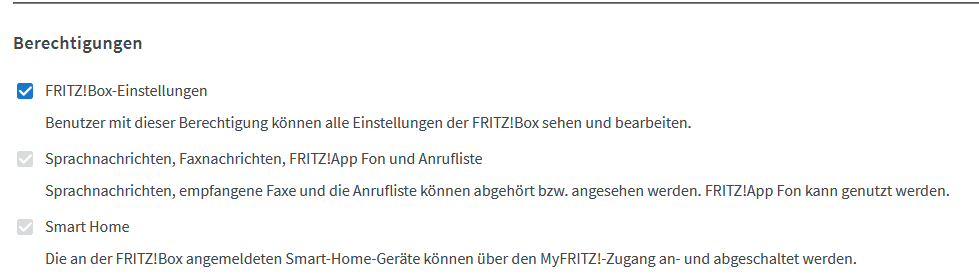
Wie sehen denn die Instanz Einstellungen aus?
Sollten da nicht auch diese Ports dann dabei sein:
Trying to connect to TR-064: 192.168.1.100:49000 TR-064: Got TAM uri: https://192.168.1.100:49443/tamcalllist.lua?sid=923a453cab69e31f&tamindex=0 -
@wendy2702
... und Port 1012 für den Call-Monitor? -
Einen Benutzer in der FB mit den notwendigen Berechtigungen gibt es?
Wie sehen denn die Instanz Einstellungen aus?
Sollten da nicht auch diese Ports dann dabei sein:
Trying to connect to TR-064: 192.168.1.100:49000 TR-064: Got TAM uri: https://192.168.1.100:49443/tamcalllist.lua?sid=923a453cab69e31f&tamindex=0Dadurch, dass TR-064 in den Netzwerkeinstellungen der Fritz!Box zugelassen sind, müssten die beiden Ports offen sein.
Welche Instanz-Einstellungen genau? Ich habe alles angehakt, Benutzer und Passwort sind korrekt. -
Dadurch, dass TR-064 in den Netzwerkeinstellungen der Fritz!Box zugelassen sind, müssten die beiden Ports offen sein.
Welche Instanz-Einstellungen genau? Ich habe alles angehakt, Benutzer und Passwort sind korrekt.@papi-0 sagte in Fritzbox-Adapter startet nicht:
müssten die beiden Ports offen sein
Die müssen aber dann auch in den Container weitergereicht werden.
-
@wendy2702
... und Port 1012 für den Call-Monitor?@codierknecht
1012 habe ich ja auch freigeschaltet.Oder meint Ihr, dass ich die Drei auch durchreichen muss?
-
@codierknecht
1012 habe ich ja auch freigeschaltet.Oder meint Ihr, dass ich die Drei auch durchreichen muss?
-
Dadurch, dass TR-064 in den Netzwerkeinstellungen der Fritz!Box zugelassen sind, müssten die beiden Ports offen sein.
Welche Instanz-Einstellungen genau? Ich habe alles angehakt, Benutzer und Passwort sind korrekt.@papi-0 sagte in Fritzbox-Adapter startet nicht:
Benutzer und Passwort sind korrekt.
Und der hat die Berechtigungen in der FB?
Und wie @Codierknecht schreibt: Ports müssen auch in den Container
-
@papi-0 sagte in Fritzbox-Adapter startet nicht:
Benutzer und Passwort sind korrekt.
Und der hat die Berechtigungen in der FB?
Und wie @Codierknecht schreibt: Ports müssen auch in den Container
@wendy2702
Jou, bin dabei, komme gleich mit Rückmeldung... -
@wendy2702
Jou, bin dabei, komme gleich mit Rückmeldung... -
@papi-0
Zeig mal die Ausgabe voniob diag -
@papi-0
Zeig mal die Ausgabe voniob diag======== Start marking the full check here ========= Skript v.2023-10-10 *** BASE SYSTEM *** Hardware Vendor : Insyde Kernel : x86_64 Userland : amd64 Docker : v8.1.0 Virtualization : Docker Kernel : x86_64 Userland : amd64 Systemuptime and Load: 22:34:22 up 7 days, 4:34, 0 users, load average: 3.25, 3.02, 2.95 CPU threads: 4 *** Time and Time Zones *** Wed Nov 22 21:34:22 UTC 2023 Wed Nov 22 22:34:22 CET 2023 CET +0100 Etc/UTC *** User and Groups *** root /root root *** X-Server-Setup *** X-Server: false Desktop: Terminal: *** MEMORY *** total used free shared buff/cache available Mem: 16G 4.6G 163M 46M 11G 11G Swap: 2.0G 1.4G 663M Total: 18G 5.9G 827M 16041 M total memory 4547 M used memory 4971 M active memory 5567 M inactive memory 166 M free memory 48 M buffer memory 11278 M swap cache 2047 M total swap 1384 M used swap 663 M free swap *** FILESYSTEM *** Filesystem Type Size Used Avail Use% Mounted on /dev/vg2/volume_1 btrfs 48T 27T 21T 58% / tmpfs tmpfs 64M 0 64M 0% /dev tmpfs tmpfs 7.9G 0 7.9G 0% /sys/fs/cgroup shm tmpfs 64M 0 64M 0% /dev/shm /dev/vg2/volume_1 btrfs 48T 27T 21T 58% /opt/iobroker /dev/vg2/volume_1 btrfs 48T 27T 21T 58% /etc/hosts tmpfs tmpfs 7.9G 0 7.9G 0% /proc/asound tmpfs tmpfs 7.9G 0 7.9G 0% /proc/acpi tmpfs tmpfs 7.9G 0 7.9G 0% /proc/scsi tmpfs tmpfs 7.9G 0 7.9G 0% /sys/firmware Messages concerning ext4 filesystem in dmesg: [Wed Nov 15 18:00:05 2023] EXT4-fs (md0): barriers disabled [Wed Nov 15 18:00:05 2023] EXT4-fs (md0): mounted filesystem with ordered data mode. Opts: [Wed Nov 15 18:00:07 2023] EXT4-fs (md0): mounted filesystem with ordered data mode. Opts: barrier=1 [Wed Nov 15 18:00:08 2023] EXT4-fs (md0): re-mounted. Opts: (null) Show mounted filesystems \(real ones only\): TARGET SOURCE FSTYPE OPTIONS / /dev/vg2/volume_1[/@docker/btrfs/subvolumes/9ab1c3faaeadf83f6f62dd1db43a34333cd29699762986eb66ad4c0a09a102a4] btrfs rw,relatime,ssd,synoacl,space_cache=v2,auto_reclaim_space,metadata_ratio=50 |-/opt/iobroker /dev/vg2/volume_1[/docker/iobroker1_data] btrfs rw,relatime,ssd,synoacl,space_cache=v2,auto_reclaim_space,metadata_ratio=50 |-/etc/resolv.conf /dev/vg2/volume_1[/@docker/containers/1a7f7c299ee380d7f600c1de144d6c14a8d7d32d35a0d83dcef115c7819c7e29/resolv.conf] btrfs rw,relatime,ssd,synoacl,space_cache=v2,auto_reclaim_space,metadata_ratio=50 |-/etc/hostname /dev/vg2/volume_1[/@docker/containers/1a7f7c299ee380d7f600c1de144d6c14a8d7d32d35a0d83dcef115c7819c7e29/hostname] btrfs rw,relatime,ssd,synoacl,space_cache=v2,auto_reclaim_space,metadata_ratio=50 `-/etc/hosts /dev/vg2/volume_1[/@docker/containers/1a7f7c299ee380d7f600c1de144d6c14a8d7d32d35a0d83dcef115c7819c7e29/hosts] btrfs rw,relatime,ssd,synoacl,space_cache=v2,auto_reclaim_space,metadata_ratio=50 Files in neuralgic directories: /var: 33M /var/ 30M /var/lib 18M /var/lib/apt/lists 18M /var/lib/apt 13M /var/lib/dpkg /opt/iobroker/backups: 48M /opt/iobroker/backups/ /opt/iobroker/iobroker-data: 311M /opt/iobroker/iobroker-data/ 201M /opt/iobroker/iobroker-data/files 77M /opt/iobroker/iobroker-data/backup-objects 52M /opt/iobroker/iobroker-data/files/javascript.admin 43M /opt/iobroker/iobroker-data/files/iot.admin The five largest files in iobroker-data are: 33M /opt/iobroker/iobroker-data/files/iot.admin/static/js/main.1797d034.js.map 21M /opt/iobroker/iobroker-data/objects.jsonl 21M /opt/iobroker/iobroker-data/files/web.admin/static/js/main.aaea95f8.js.map 13M /opt/iobroker/iobroker-data/states.jsonl 8.5M /opt/iobroker/iobroker-data/files/iot.admin/static/js/main.1797d034.js USB-Devices by-id: USB-Sticks - Avoid direct links to /dev/* in your adapter setups, please always prefer the links 'by-id': find: '/dev/serial/by-id/': No such file or directory /home/iobroker/.diag.sh: line 277: nodejs: command not found *** NodeJS-Installation *** /usr/bin/node v18.17.1 /usr/bin/npm 9.6.7 /usr/bin/npx 9.6.7 /usr/bin/corepack 0.18.0 /home/iobroker/.diag.sh: line 288: nodejs: command not found *** nodejs is NOT correctly installed *** nodejs: Installed: 18.17.1-deb-1nodesource1 Candidate: 18.17.1-deb-1nodesource1 Version table: *** 18.17.1-deb-1nodesource1 500 500 https://deb.nodesource.com/node_18.x bullseye/main amd64 Packages 100 /var/lib/dpkg/status 12.22.12~dfsg-1~deb11u4 500 500 http://deb.debian.org/debian bullseye/main amd64 Packages 500 http://deb.debian.org/debian-security bullseye-security/main amd64 Packages Temp directories causing npm8 problem: 0 No problems detected Errors in npm tree: *** ioBroker-Installation *** ioBroker Status iobroker is running on this host. Objects type: jsonl States type: jsonl Core adapters versions js-controller: 5.0.16 admin: 6.12.0 javascript: 7.1.4 Adapters from github: 0 Adapter State + system.adapter.admin.1 : admin : iobroker1 - enabled, port: 8081, bind: 0.0.0.0, run as: admin + system.adapter.alexa2.0 : alexa2 : iobroker1 - enabled + system.adapter.backitup.0 : backitup : iobroker1 - enabled system.adapter.daswetter.0 : daswetter : iobroker1 - enabled + system.adapter.discovery.0 : discovery : iobroker1 - enabled + system.adapter.divera247.0 : divera247 : iobroker1 - enabled system.adapter.dwd.0 : dwd : iobroker1 - enabled + system.adapter.email.0 : email : iobroker1 - enabled + system.adapter.fb-checkpresence.0 : fb-checkpresence : iobroker1 - enabled system.adapter.fritzbox.0 : fritzbox : iobroker1 - enabled + system.adapter.fritzdect.0 : fritzdect : iobroker1 - enabled + system.adapter.fullybrowser.0 : fullybrowser : iobroker1 - enabled + system.adapter.hm-rega.0 : hm-rega : iobroker1 - enabled + system.adapter.hm-rpc.0 : hm-rpc : iobroker1 - enabled, port: 0 + system.adapter.hm-rpc.1 : hm-rpc : iobroker1 - enabled, port: 0 + system.adapter.hm-rpc.2 : hm-rpc : iobroker1 - enabled, port: 0 + system.adapter.hm-rpc.3 : hm-rpc : iobroker1 - enabled, port: 0 + system.adapter.info.0 : info : iobroker1 - enabled + system.adapter.iot.0 : iot : iobroker1 - enabled + system.adapter.javascript.0 : javascript : iobroker1 - enabled system.adapter.mihome-vacuum.0 : mihome-vacuum : iobroker1 - disabled, port: 54321 + system.adapter.net-tools.0 : net-tools : iobroker1 - enabled system.adapter.openweathermap.0 : openweathermap : iobroker1 - enabled + system.adapter.ping.0 : ping : iobroker1 - enabled + system.adapter.pushover.0 : pushover : iobroker1 - enabled + system.adapter.tankerkoenig.0 : tankerkoenig : iobroker1 - enabled + system.adapter.tr-064.0 : tr-064 : iobroker1 - enabled + system.adapter.vesync.0 : vesync : iobroker1 - enabled system.adapter.vis-fancyswitch.0 : vis-fancyswitch : iobroker1 - disabled system.adapter.vis-hqwidgets.0 : vis-hqwidgets : iobroker1 - disabled system.adapter.vis-icontwo.0 : vis-icontwo : iobroker1 - disabled + system.adapter.vis-inventwo.0 : vis-inventwo : iobroker1 - enabled system.adapter.vis-jqui-mfd.0 : vis-jqui-mfd : iobroker1 - disabled system.adapter.vis-timeandweather.0 : vis-timeandweather : iobroker1 - disabled system.adapter.vis-weather.0 : vis-weather : iobroker1 - disabled system.adapter.vis.0 : vis : iobroker1 - enabled + system.adapter.web.0 : web : iobroker1 - enabled, port: 8088, bind: 0.0.0.0, run as: admin + system.adapter.worx.0 : worx : iobroker1 - enabled + system.adapter.ws.0 : ws : iobroker1 - enabled, port: 8084, bind: 0.0.0.0, run as: admin system.adapter.yr.0 : yr : iobroker1 - enabled + instance is alive Enabled adapters with bindings + system.adapter.admin.1 : admin : iobroker1 - enabled, port: 8081, bind: 0.0.0.0, run as: admin + system.adapter.hm-rpc.0 : hm-rpc : iobroker1 - enabled, port: 0 + system.adapter.hm-rpc.1 : hm-rpc : iobroker1 - enabled, port: 0 + system.adapter.hm-rpc.2 : hm-rpc : iobroker1 - enabled, port: 0 + system.adapter.hm-rpc.3 : hm-rpc : iobroker1 - enabled, port: 0 + system.adapter.web.0 : web : iobroker1 - enabled, port: 8088, bind: 0.0.0.0, run as: admin + system.adapter.ws.0 : ws : iobroker1 - enabled, port: 8084, bind: 0.0.0.0, run as: admin ioBroker-Repositories sources : conf/sources-dist.json online : https://raw.githubusercontent.com/ioBroker/ioBroker.repositories/master/sources-dist.json stable : http://download.iobroker.net/sources-dist.json beta : http://download.iobroker.net/sources-dist-latest.json Active repo(s): stable Installed ioBroker-Instances Used repository: stable Adapter "admin" : 6.12.0 , installed 6.12.0 Adapter "alexa2" : 3.26.1 , installed 3.26.1 Adapter "backitup" : 2.8.7 , installed 2.8.7 Adapter "daswetter" : 3.1.10 , installed 3.1.10 Adapter "discovery" : 4.2.0 , installed 4.2.0 Adapter "divera247" : 0.2.0 , installed 0.2.0 Adapter "dwd" : 2.8.5 , installed 2.8.5 Adapter "email" : 1.2.0 , installed 1.2.0 Adapter "fb-checkpresence": 1.2.2 , installed 1.2.2 Adapter "fritzbox" : 0.5.0 , installed 0.5.0 Adapter "fritzdect" : 2.3.1 , installed 2.3.1 Adapter "fullybrowser" : 3.0.6 , installed 2.2.0 [Updatable] Adapter "hm-rega" : 4.0.0 , installed 4.0.0 Adapter "hm-rpc" : 1.15.19 , installed 1.15.19 Adapter "info" : 2.0.0 , installed 2.0.0 Adapter "iot" : 2.0.11 , installed 2.0.11 Adapter "javascript" : 7.1.4 , installed 7.1.4 Controller "js-controller": 5.0.16 , installed 5.0.16 Adapter "mihome-vacuum": 4.1.0 , installed 4.1.0 Adapter "net-tools" : 0.2.0 , installed 0.2.0 Adapter "openweathermap": 0.4.5 , installed 0.4.5 Adapter "ping" : 1.6.2 , installed 1.6.2 Adapter "pushover" : 3.0.3 , installed 3.0.3 Adapter "simple-api" : 2.7.2 , installed 2.7.2 Adapter "socketio" : 6.5.5 , installed 6.6.0 Adapter "tankerkoenig" : 3.3.7 , installed 3.3.7 Adapter "tr-064" : 4.2.18 , installed 4.2.18 Adapter "vesync" : 0.0.3 , installed 0.0.3 Adapter "vis" : 1.4.16 , installed 1.4.16 Adapter "vis-fancyswitch": 1.1.0 , installed 1.1.0 Adapter "vis-hqwidgets": 1.4.0 , installed 1.4.0 Adapter "vis-icontwo" : 0.97.1 , installed 0.97.1 Adapter "vis-inventwo" : 3.3.3 , installed 3.3.3 Adapter "vis-jqui-mfd" : 1.0.12 , installed 1.0.12 Adapter "vis-timeandweather": 1.2.2, installed 1.2.2 Adapter "vis-weather" : 2.5.6 , installed 2.5.6 Adapter "web" : 6.1.10 , installed 6.1.10 Adapter "worx" : 2.3.4 , installed 2.3.4 Adapter "ws" : 2.5.8 , installed 2.5.8 Adapter "yr" : 5.3.0 , installed 5.3.0 Objects and States Please stand by - This may take a while Objects: 23727 States: 20029 *** OS-Repositories and Updates *** Hit:1 http://deb.debian.org/debian bullseye InRelease Hit:2 http://deb.debian.org/debian-security bullseye-security InRelease Hit:3 http://deb.debian.org/debian bullseye-updates InRelease Hit:4 https://deb.nodesource.com/node_18.x bullseye InRelease Reading package lists... Pending Updates: 35 *** Listening Ports *** Active Internet connections (only servers) Proto Recv-Q Send-Q Local Address Foreign Address State User Inode PID/Program name tcp 0 0 0.0.0.0:8701 0.0.0.0:* LISTEN 1000 130242998 - tcp 0 0 127.0.0.1:9000 0.0.0.0:* LISTEN 1000 130236565 - tcp 0 0 127.0.0.1:9001 0.0.0.0:* LISTEN 1000 130234447 - tcp 0 0 0.0.0.0:9292 0.0.0.0:* LISTEN 1000 130243065 - tcp 0 0 0.0.0.0:2001 0.0.0.0:* LISTEN 1000 130243663 - tcp 0 0 0.0.0.0:2010 0.0.0.0:* LISTEN 1000 130243202 - tcp6 0 0 :::8081 :::* LISTEN 1000 130238696 - tcp6 0 0 :::8084 :::* LISTEN 1000 130264322 - tcp6 0 0 :::8088 :::* LISTEN 1000 130259813 - udp 0 0 0.0.0.0:8472 0.0.0.0:* 0 130214941 - *** Log File - Last 25 Lines *** 2023-11-22 22:30:08.403 - info: host.iobroker1 instance system.adapter.yr.0 started with pid 5343 2023-11-22 22:30:11.070 - info: yr.0 (5343) Plugin sentry Sentry Plugin disabled for this process because sending of statistic data is disabled for the system 2023-11-22 22:30:11.243 - info: yr.0 (5343) starting. Version 5.3.0 in /opt/iobroker/node_modules/iobroker.yr, node: v18.17.1, js-controller: 5.0.16 2023-11-22 22:30:11.290 - info: yr.0 (5343) longitude/longitude not set, get data from system 2023-11-22 22:30:11.326 - info: yr.0 (5343) system latitude: 51.28058000 longitude: 6.45123000 2023-11-22 22:30:12.483 - info: host.iobroker1 instance system.adapter.daswetter.0 started with pid 5362 2023-11-22 22:30:15.224 - info: daswetter.0 (5362) Plugin sentry Sentry Plugin disabled for this process because sending of statistic data is disabled for the system 2023-11-22 22:30:15.421 - info: daswetter.0 (5362) starting. Version 3.1.10 in /opt/iobroker/node_modules/iobroker.daswetter, node: v18.17.1, js-controller: 5.0.16 2023-11-22 22:30:31.553 - info: openweathermap.0 (5321) Terminated (NO_ERROR): Without reason 2023-11-22 22:30:32.093 - info: host.iobroker1 instance system.adapter.openweathermap.0 terminated with code 0 (NO_ERROR) 2023-11-22 22:30:42.180 - info: yr.0 (5343) Data updated. 2023-11-22 22:30:42.183 - info: yr.0 (5343) Terminated (ADAPTER_REQUESTED_TERMINATION): Without reason 2023-11-22 22:30:42.735 - info: host.iobroker1 instance system.adapter.yr.0 terminated with code 11 (ADAPTER_REQUESTED_TERMINATION) 2023-11-22 22:30:46.955 - info: daswetter.0 (5362) Terminated (ADAPTER_REQUESTED_TERMINATION): All data handled, adapter stopped until next scheduled moment 2023-11-22 22:30:47.471 - info: daswetter.0 (5362) cleaned everything up... 2023-11-22 22:30:47.502 - info: host.iobroker1 instance system.adapter.daswetter.0 terminated with code 11 (ADAPTER_REQUESTED_TERMINATION) 2023-11-22 22:31:10.559 - info: hm-rega.0 (291) pollingTrigger 2023-11-22 22:33:11.546 - info: hm-rega.0 (291) pollingTrigger 2023-11-22 22:34:17.747 - info: hm-rega.0 (291) pollingTrigger 2023-11-22 22:35:00.072 - info: host.iobroker1 instance system.adapter.dwd.0 started with pid 6375 2023-11-22 22:35:03.088 - info: dwd.0 (6375) Plugin sentry Sentry Plugin disabled for this process because sending of statistic data is disabled for the system 2023-11-22 22:35:03.524 - info: dwd.0 (6375) starting. Version 2.8.5 in /opt/iobroker/node_modules/iobroker.dwd, node: v18.17.1, js-controller: 5.0.16 2023-11-22 22:35:06.569 - info: dwd.0 (6375) Terminated (ADAPTER_REQUESTED_TERMINATION): Without reason 2023-11-22 22:35:07.109 - info: host.iobroker1 instance system.adapter.dwd.0 terminated with code 11 (ADAPTER_REQUESTED_TERMINATION) 2023-11-22 22:35:16.459 - info: hm-rega.0 (291) pollingTrigger ============ Mark until here for C&P =============Copy text starting here: ======================= SUMMARY ======================= v.2023-10-10 model name : Intel(R) Atom(TM) CPU C2538 @ 2.40GHz Kernel : x86_64 Userland : amd64 Docker : v8.1.0 Installation: Docker Kernel: x86_64 Userland: amd64 Timezone: Etc/UTC User-ID: 0 X-Server: false Pending OS-Updates: 35 Pending iob updates: 1 /home/iobroker/.diag.sh: line 486: nodejs: command not found Nodejs-Installation: /usr/bin/node v18.17.1 /usr/bin/npm 9.6.7 /usr/bin/npx 9.6.7 /usr/bin/corepack 0.18.0 Recommended versions are nodejs 18.18.2 and npm 9.8.1 *** nodejs is NOT correctly installed *** Wrong installation path detected. This needs to be fixed. Please check https://forum.iobroker.net/topic/35090/howto-nodejs-installation-und-upgrades-unter-debian for more information on how to fix these errors. MEMORY: total used free shared buff/cache available Mem: 16G 4.5G 306M 46M 11G 11G Swap: 2.0G 1.4G 666M Total: 18G 5.9G 972M Active iob-Instances: 28 Active repo(s): stable ioBroker Core: js-controller 5.0.16 admin 6.12.0 ioBroker Status: iobroker is running on this host. Objects type: jsonl States type: jsonl Status admin and web instance: + system.adapter.admin.1 : admin : iobroker1 - enabled, port: 8081, bind: 0.0.0.0, run as: admin + system.adapter.web.0 : web : iobroker1 - enabled, port: 8088, bind: 0.0.0.0, run as: admin Objects: 23727 States: 20029 Size of iob-Database: 21M /opt/iobroker/iobroker-data/objects.jsonl 15M /opt/iobroker/iobroker-data/states.jsonl =================== END OF SUMMARY ==================== === Mark text until here for copying ===Ich sehe schon - *** nodejs is NOT correctly installed ***
Wrong installation path detected. This needs to be fixed.Hier ist aber mein Latein eingeschränkt, denn mit Linux habe ich es nicht so und ich weiß auch nicht, wo nodejs ansonsten hin muss und wie ich das bewerkstelligen muss.
-
======== Start marking the full check here =========

Skript v.2023-10-10

*** BASE SYSTEM ***
Hardware Vendor : Insyde
Kernel          : x86_64
Userland        : amd64
Docker          : v8.1.0
Virtualization  : Docker
Kernel          : x86_64
Userland        : amd64

Systemuptime and Load:
 22:34:22 up 7 days,  4:34,  0 users,  load average: 3.25, 3.02, 2.95
CPU threads: 4


*** Time and Time Zones ***
Wed Nov 22 21:34:22 UTC 2023
Wed Nov 22 22:34:22 CET 2023
CET +0100
Etc/UTC

*** User and Groups ***
root
/root
root

*** X-Server-Setup ***
X-Server:       false
Desktop:
Terminal:


*** MEMORY ***
               total        used        free      shared  buff/cache   available
Mem:             16G        4.6G        163M         46M         11G         11G
Swap:           2.0G        1.4G        663M
Total:           18G        5.9G        827M

        16041 M total memory
         4547 M used memory
         4971 M active memory
         5567 M inactive memory
          166 M free memory
           48 M buffer memory
        11278 M swap cache
         2047 M total swap
         1384 M used swap
          663 M free swap

*** FILESYSTEM ***
Filesystem        Type   Size  Used Avail Use% Mounted on
/dev/vg2/volume_1 btrfs   48T   27T   21T  58% /
tmpfs             tmpfs   64M     0   64M   0% /dev
tmpfs             tmpfs  7.9G     0  7.9G   0% /sys/fs/cgroup
shm               tmpfs   64M     0   64M   0% /dev/shm
/dev/vg2/volume_1 btrfs   48T   27T   21T  58% /opt/iobroker
/dev/vg2/volume_1 btrfs   48T   27T   21T  58% /etc/hosts
tmpfs             tmpfs  7.9G     0  7.9G   0% /proc/asound
tmpfs             tmpfs  7.9G     0  7.9G   0% /proc/acpi
tmpfs             tmpfs  7.9G     0  7.9G   0% /proc/scsi
tmpfs             tmpfs  7.9G     0  7.9G   0% /sys/firmware

Messages concerning ext4 filesystem in dmesg:
[Wed Nov 15 18:00:05 2023] EXT4-fs (md0): barriers disabled
[Wed Nov 15 18:00:05 2023] EXT4-fs (md0): mounted filesystem with ordered data mode. Opts:
[Wed Nov 15 18:00:07 2023] EXT4-fs (md0): mounted filesystem with ordered data mode. Opts: barrier=1
[Wed Nov 15 18:00:08 2023] EXT4-fs (md0): re-mounted. Opts: (null)

Show mounted filesystems \(real ones only\):
TARGET             SOURCE                                                                                                              FSTYPE OPTIONS
/                  /dev/vg2/volume_1[/@docker/btrfs/subvolumes/9ab1c3faaeadf83f6f62dd1db43a34333cd29699762986eb66ad4c0a09a102a4]       btrfs  rw,relatime,ssd,synoacl,space_cache=v2,auto_reclaim_space,metadata_ratio=50
|-/opt/iobroker    /dev/vg2/volume_1[/docker/iobroker1_data]                                                                           btrfs  rw,relatime,ssd,synoacl,space_cache=v2,auto_reclaim_space,metadata_ratio=50
|-/etc/resolv.conf /dev/vg2/volume_1[/@docker/containers/1a7f7c299ee380d7f600c1de144d6c14a8d7d32d35a0d83dcef115c7819c7e29/resolv.conf] btrfs  rw,relatime,ssd,synoacl,space_cache=v2,auto_reclaim_space,metadata_ratio=50
|-/etc/hostname    /dev/vg2/volume_1[/@docker/containers/1a7f7c299ee380d7f600c1de144d6c14a8d7d32d35a0d83dcef115c7819c7e29/hostname]    btrfs  rw,relatime,ssd,synoacl,space_cache=v2,auto_reclaim_space,metadata_ratio=50
`-/etc/hosts       /dev/vg2/volume_1[/@docker/containers/1a7f7c299ee380d7f600c1de144d6c14a8d7d32d35a0d83dcef115c7819c7e29/hosts]       btrfs  rw,relatime,ssd,synoacl,space_cache=v2,auto_reclaim_space,metadata_ratio=50

Files in neuralgic directories:

/var:
33M     /var/
30M     /var/lib
18M     /var/lib/apt/lists
18M     /var/lib/apt
13M     /var/lib/dpkg


/opt/iobroker/backups:
48M     /opt/iobroker/backups/

/opt/iobroker/iobroker-data:
311M    /opt/iobroker/iobroker-data/
201M    /opt/iobroker/iobroker-data/files
77M     /opt/iobroker/iobroker-data/backup-objects
52M     /opt/iobroker/iobroker-data/files/javascript.admin
43M     /opt/iobroker/iobroker-data/files/iot.admin

The five largest files in iobroker-data are:
33M     /opt/iobroker/iobroker-data/files/iot.admin/static/js/main.1797d034.js.map
21M     /opt/iobroker/iobroker-data/objects.jsonl
21M     /opt/iobroker/iobroker-data/files/web.admin/static/js/main.aaea95f8.js.map
13M     /opt/iobroker/iobroker-data/states.jsonl
8.5M    /opt/iobroker/iobroker-data/files/iot.admin/static/js/main.1797d034.js

USB-Devices by-id:
USB-Sticks -  Avoid direct links to /dev/* in your adapter setups, please always prefer the links 'by-id':

find: '/dev/serial/by-id/': No such file or directory
/home/iobroker/.diag.sh: line 277: nodejs: command not found

*** NodeJS-Installation ***


/usr/bin/node           v18.17.1
/usr/bin/npm            9.6.7
/usr/bin/npx            9.6.7
/usr/bin/corepack       0.18.0
/home/iobroker/.diag.sh: line 288: nodejs: command not found
*** nodejs is NOT correctly installed ***

nodejs:
  Installed: 18.17.1-deb-1nodesource1
  Candidate: 18.17.1-deb-1nodesource1
  Version table:
 *** 18.17.1-deb-1nodesource1 500
        500 https://deb.nodesource.com/node_18.x bullseye/main amd64 Packages
        100 /var/lib/dpkg/status
     12.22.12~dfsg-1~deb11u4 500
        500 http://deb.debian.org/debian bullseye/main amd64 Packages
        500 http://deb.debian.org/debian-security bullseye-security/main amd64 Packages

Temp directories causing npm8 problem: 0
No problems detected

Errors in npm tree:

*** ioBroker-Installation ***

ioBroker Status
iobroker is running on this host.


Objects type: jsonl
States  type: jsonl

Core adapters versions
js-controller:  5.0.16
admin:          6.12.0
javascript:     7.1.4

Adapters from github:   0

Adapter State
+ system.adapter.admin.1                  : admin                 : iobroker1                                -  enabled, port: 8081, bind: 0.0.0.0, run as: admin
+ system.adapter.alexa2.0                 : alexa2                : iobroker1                                -  enabled
+ system.adapter.backitup.0               : backitup              : iobroker1                                -  enabled
  system.adapter.daswetter.0              : daswetter             : iobroker1                                -  enabled
+ system.adapter.discovery.0              : discovery             : iobroker1                                -  enabled
+ system.adapter.divera247.0              : divera247             : iobroker1                                -  enabled
  system.adapter.dwd.0                    : dwd                   : iobroker1                                -  enabled
+ system.adapter.email.0                  : email                 : iobroker1                                -  enabled
+ system.adapter.fb-checkpresence.0       : fb-checkpresence      : iobroker1                                -  enabled
  system.adapter.fritzbox.0               : fritzbox              : iobroker1                                -  enabled
+ system.adapter.fritzdect.0              : fritzdect             : iobroker1                                -  enabled
+ system.adapter.fullybrowser.0           : fullybrowser          : iobroker1                                -  enabled
+ system.adapter.hm-rega.0                : hm-rega               : iobroker1                                -  enabled
+ system.adapter.hm-rpc.0                 : hm-rpc                : iobroker1                                -  enabled, port: 0
+ system.adapter.hm-rpc.1                 : hm-rpc                : iobroker1                                -  enabled, port: 0
+ system.adapter.hm-rpc.2                 : hm-rpc                : iobroker1                                -  enabled, port: 0
+ system.adapter.hm-rpc.3                 : hm-rpc                : iobroker1                                -  enabled, port: 0
+ system.adapter.info.0                   : info                  : iobroker1                                -  enabled
+ system.adapter.iot.0                    : iot                   : iobroker1                                -  enabled
+ system.adapter.javascript.0             : javascript            : iobroker1                                -  enabled
  system.adapter.mihome-vacuum.0          : mihome-vacuum         : iobroker1                                - disabled, port: 54321
+ system.adapter.net-tools.0              : net-tools             : iobroker1                                -  enabled
  system.adapter.openweathermap.0         : openweathermap        : iobroker1                                -  enabled
+ system.adapter.ping.0                   : ping                  : iobroker1                                -  enabled
+ system.adapter.pushover.0               : pushover              : iobroker1                                -  enabled
+ system.adapter.tankerkoenig.0           : tankerkoenig          : iobroker1                                -  enabled
+ system.adapter.tr-064.0                 : tr-064                : iobroker1                                -  enabled
+ system.adapter.vesync.0                 : vesync                : iobroker1                                -  enabled
  system.adapter.vis-fancyswitch.0        : vis-fancyswitch       : iobroker1                                - disabled
  system.adapter.vis-hqwidgets.0          : vis-hqwidgets         : iobroker1                                - disabled
  system.adapter.vis-icontwo.0            : vis-icontwo           : iobroker1                                - disabled
+ system.adapter.vis-inventwo.0           : vis-inventwo          : iobroker1                                -  enabled
  system.adapter.vis-jqui-mfd.0           : vis-jqui-mfd          : iobroker1                                - disabled
  system.adapter.vis-timeandweather.0     : vis-timeandweather    : iobroker1                                - disabled
  system.adapter.vis-weather.0            : vis-weather           : iobroker1                                - disabled
  system.adapter.vis.0                    : vis                   : iobroker1                                -  enabled
+ system.adapter.web.0                    : web                   : iobroker1                                -  enabled, port: 8088, bind: 0.0.0.0, run as: admin
+ system.adapter.worx.0                   : worx                  : iobroker1                                -  enabled
+ system.adapter.ws.0                     : ws                    : iobroker1                                -  enabled, port: 8084, bind: 0.0.0.0, run as: admin
  system.adapter.yr.0                     : yr                    : iobroker1                                -  enabled

+ instance is alive

Enabled adapters with bindings
+ system.adapter.admin.1                  : admin                 : iobroker1                                -  enabled, port: 8081, bind: 0.0.0.0, run as: admin
+ system.adapter.hm-rpc.0                 : hm-rpc                : iobroker1                                -  enabled, port: 0
+ system.adapter.hm-rpc.1                 : hm-rpc                : iobroker1                                -  enabled, port: 0
+ system.adapter.hm-rpc.2                 : hm-rpc                : iobroker1                                -  enabled, port: 0
+ system.adapter.hm-rpc.3                 : hm-rpc                : iobroker1                                -  enabled, port: 0
+ system.adapter.web.0                    : web                   : iobroker1                                -  enabled, port: 8088, bind: 0.0.0.0, run as: admin
+ system.adapter.ws.0                     : ws                    : iobroker1                                -  enabled, port: 8084, bind: 0.0.0.0, run as: admin

ioBroker-Repositories
sources       : conf/sources-dist.json
online        : https://raw.githubusercontent.com/ioBroker/ioBroker.repositories/master/sources-dist.json
stable        : http://download.iobroker.net/sources-dist.json
beta          : http://download.iobroker.net/sources-dist-latest.json

Active repo(s): stable

Installed ioBroker-Instances
Used repository: stable
Adapter    "admin"        : 6.12.0   , installed 6.12.0
Adapter    "alexa2"       : 3.26.1   , installed 3.26.1
Adapter    "backitup"     : 2.8.7    , installed 2.8.7
Adapter    "daswetter"    : 3.1.10   , installed 3.1.10
Adapter    "discovery"    : 4.2.0    , installed 4.2.0
Adapter    "divera247"    : 0.2.0    , installed 0.2.0
Adapter    "dwd"          : 2.8.5    , installed 2.8.5
Adapter    "email"        : 1.2.0    , installed 1.2.0
Adapter    "fb-checkpresence": 1.2.2 , installed 1.2.2
Adapter    "fritzbox"     : 0.5.0    , installed 0.5.0
Adapter    "fritzdect"    : 2.3.1    , installed 2.3.1
Adapter    "fullybrowser" : 3.0.6    , installed 2.2.0  [Updatable]
Adapter    "hm-rega"      : 4.0.0    , installed 4.0.0
Adapter    "hm-rpc"       : 1.15.19  , installed 1.15.19
Adapter    "info"         : 2.0.0    , installed 2.0.0
Adapter    "iot"          : 2.0.11   , installed 2.0.11
Adapter    "javascript"   : 7.1.4    , installed 7.1.4
Controller "js-controller": 5.0.16   , installed 5.0.16
Adapter    "mihome-vacuum": 4.1.0    , installed 4.1.0
Adapter    "net-tools"    : 0.2.0    , installed 0.2.0
Adapter    "openweathermap": 0.4.5   , installed 0.4.5
Adapter    "ping"         : 1.6.2    , installed 1.6.2
Adapter    "pushover"     : 3.0.3    , installed 3.0.3
Adapter    "simple-api"   : 2.7.2    , installed 2.7.2
Adapter    "socketio"     : 6.5.5    , installed 6.6.0
Adapter    "tankerkoenig" : 3.3.7    , installed 3.3.7
Adapter    "tr-064"       : 4.2.18   , installed 4.2.18
Adapter    "vesync"       : 0.0.3    , installed 0.0.3
Adapter    "vis"          : 1.4.16   , installed 1.4.16
Adapter    "vis-fancyswitch": 1.1.0  , installed 1.1.0
Adapter    "vis-hqwidgets": 1.4.0    , installed 1.4.0
Adapter    "vis-icontwo"  : 0.97.1   , installed 0.97.1
Adapter    "vis-inventwo" : 3.3.3    , installed 3.3.3
Adapter    "vis-jqui-mfd" : 1.0.12   , installed 1.0.12
Adapter    "vis-timeandweather": 1.2.2, installed 1.2.2
Adapter    "vis-weather"  : 2.5.6    , installed 2.5.6
Adapter    "web"          : 6.1.10   , installed 6.1.10
Adapter    "worx"         : 2.3.4    , installed 2.3.4
Adapter    "ws"           : 2.5.8    , installed 2.5.8
Adapter    "yr"           : 5.3.0    , installed 5.3.0

Objects and States
Please stand by - This may take a while
Objects:        23727
States:         20029

*** OS-Repositories and Updates ***
Hit:1 http://deb.debian.org/debian bullseye InRelease
Hit:2 http://deb.debian.org/debian-security bullseye-security InRelease
Hit:3 http://deb.debian.org/debian bullseye-updates InRelease
Hit:4 https://deb.nodesource.com/node_18.x bullseye InRelease
Reading package lists...
Pending Updates: 35

*** Listening Ports ***
Active Internet connections (only servers)
Proto Recv-Q Send-Q Local Address           Foreign Address         State       User       Inode      PID/Program name
tcp        0      0 0.0.0.0:8701            0.0.0.0:*               LISTEN      1000       130242998  -
tcp        0      0 127.0.0.1:9000          0.0.0.0:*               LISTEN      1000       130236565  -
tcp        0      0 127.0.0.1:9001          0.0.0.0:*               LISTEN      1000       130234447  -
tcp        0      0 0.0.0.0:9292            0.0.0.0:*               LISTEN      1000       130243065  -
tcp        0      0 0.0.0.0:2001            0.0.0.0:*               LISTEN      1000       130243663  -
tcp        0      0 0.0.0.0:2010            0.0.0.0:*               LISTEN      1000       130243202  -
tcp6       0      0 :::8081                 :::*                    LISTEN      1000       130238696  -
tcp6       0      0 :::8084                 :::*                    LISTEN      1000       130264322  -
tcp6       0      0 :::8088                 :::*                    LISTEN      1000       130259813  -
udp        0      0 0.0.0.0:8472            0.0.0.0:*                           0          130214941  -

*** Log File - Last 25 Lines ***

2023-11-22 22:30:08.403  - info: host.iobroker1 instance system.adapter.yr.0 started with pid 5343
2023-11-22 22:30:11.070  - info: yr.0 (5343) Plugin sentry Sentry Plugin disabled for this process because sending of statistic data is disabled for the system
2023-11-22 22:30:11.243  - info: yr.0 (5343) starting. Version 5.3.0 in /opt/iobroker/node_modules/iobroker.yr, node: v18.17.1, js-controller: 5.0.16
2023-11-22 22:30:11.290  - info: yr.0 (5343) longitude/longitude not set, get data from system
2023-11-22 22:30:11.326  - info: yr.0 (5343) system latitude: 51.28058000 longitude: 6.45123000
2023-11-22 22:30:12.483  - info: host.iobroker1 instance system.adapter.daswetter.0 started with pid 5362
2023-11-22 22:30:15.224  - info: daswetter.0 (5362) Plugin sentry Sentry Plugin disabled for this process because sending of statistic data is disabled for the system
2023-11-22 22:30:15.421  - info: daswetter.0 (5362) starting. Version 3.1.10 in /opt/iobroker/node_modules/iobroker.daswetter, node: v18.17.1, js-controller: 5.0.16
2023-11-22 22:30:31.553  - info: openweathermap.0 (5321) Terminated (NO_ERROR): Without reason
2023-11-22 22:30:32.093  - info: host.iobroker1 instance system.adapter.openweathermap.0 terminated with code 0 (NO_ERROR)
2023-11-22 22:30:42.180  - info: yr.0 (5343) Data updated.
2023-11-22 22:30:42.183  - info: yr.0 (5343) Terminated (ADAPTER_REQUESTED_TERMINATION): Without reason
2023-11-22 22:30:42.735  - info: host.iobroker1 instance system.adapter.yr.0 terminated with code 11 (ADAPTER_REQUESTED_TERMINATION)
2023-11-22 22:30:46.955  - info: daswetter.0 (5362) Terminated (ADAPTER_REQUESTED_TERMINATION): All data handled, adapter stopped until next scheduled moment
2023-11-22 22:30:47.471  - info: daswetter.0 (5362) cleaned everything up...
2023-11-22 22:30:47.502  - info: host.iobroker1 instance system.adapter.daswetter.0 terminated with code 11 (ADAPTER_REQUESTED_TERMINATION)
2023-11-22 22:31:10.559  - info: hm-rega.0 (291) pollingTrigger
2023-11-22 22:33:11.546  - info: hm-rega.0 (291) pollingTrigger
2023-11-22 22:34:17.747  - info: hm-rega.0 (291) pollingTrigger
2023-11-22 22:35:00.072  - info: host.iobroker1 instance system.adapter.dwd.0 started with pid 6375
2023-11-22 22:35:03.088  - info: dwd.0 (6375) Plugin sentry Sentry Plugin disabled for this process because sending of statistic data is disabled for the system
2023-11-22 22:35:03.524  - info: dwd.0 (6375) starting. Version 2.8.5 in /opt/iobroker/node_modules/iobroker.dwd, node: v18.17.1, js-controller: 5.0.16
2023-11-22 22:35:06.569  - info: dwd.0 (6375) Terminated (ADAPTER_REQUESTED_TERMINATION): Without reason
2023-11-22 22:35:07.109  - info: host.iobroker1 instance system.adapter.dwd.0 terminated with code 11 (ADAPTER_REQUESTED_TERMINATION)
2023-11-22 22:35:16.459  - info: hm-rega.0 (291) pollingTrigger


============ Mark until here for C&P =============
Copy text starting here: ======================= SUMMARY ======================= v.2023-10-10 model name : Intel(R) Atom(TM) CPU C2538 @ 2.40GHz Kernel : x86_64 Userland : amd64 Docker : v8.1.0 Installation: Docker Kernel: x86_64 Userland: amd64 Timezone: Etc/UTC User-ID: 0 X-Server: false Pending OS-Updates: 35 Pending iob updates: 1 /home/iobroker/.diag.sh: line 486: nodejs: command not found Nodejs-Installation: /usr/bin/node v18.17.1 /usr/bin/npm 9.6.7 /usr/bin/npx 9.6.7 /usr/bin/corepack 0.18.0 Recommended versions are nodejs 18.18.2 and npm 9.8.1 *** nodejs is NOT correctly installed *** Wrong installation path detected. This needs to be fixed. Please check https://forum.iobroker.net/topic/35090/howto-nodejs-installation-und-upgrades-unter-debian for more information on how to fix these errors. MEMORY: total used free shared buff/cache available Mem: 16G 4.5G 306M 46M 11G 11G Swap: 2.0G 1.4G 666M Total: 18G 5.9G 972M Active iob-Instances: 28 Active repo(s): stable ioBroker Core: js-controller 5.0.16 admin 6.12.0 ioBroker Status: iobroker is running on this host. Objects type: jsonl States type: jsonl Status admin and web instance: + system.adapter.admin.1 : admin : iobroker1 - enabled, port: 8081, bind: 0.0.0.0, run as: admin + system.adapter.web.0 : web : iobroker1 - enabled, port: 8088, bind: 0.0.0.0, run as: admin Objects: 23727 States: 20029 Size of iob-Database: 21M /opt/iobroker/iobroker-data/objects.jsonl 15M /opt/iobroker/iobroker-data/states.jsonl =================== END OF SUMMARY ==================== === Mark text until here for copying ===Ich sehe schon - *** nodejs is NOT correctly installed ***
Wrong installation path detected. This needs to be fixed.Hier ist aber mein Latein eingeschränkt, denn mit Linux habe ich es nicht so und ich weiß auch nicht, wo nodejs ansonsten hin muss und wie ich das bewerkstelligen muss.
-
Wo muss nodejs denn stattdessen hin und wie geht das?
Welche OS-Updates sind denn da pending?
Der Host meint zwar es gäbe ein Update von 5.0.16 auf 5.0.16 aber das hört sich etwas sinnfrei an.

-
======== Start marking the full check here =========

Skript v.2023-10-10

*** BASE SYSTEM ***
Hardware Vendor : Insyde
Kernel          : x86_64
Userland        : amd64
Docker          : v8.1.0
Virtualization  : Docker
Kernel          : x86_64
Userland        : amd64

Systemuptime and Load:
 22:34:22 up 7 days,  4:34,  0 users,  load average: 3.25, 3.02, 2.95
CPU threads: 4


*** Time and Time Zones ***
Wed Nov 22 21:34:22 UTC 2023
Wed Nov 22 22:34:22 CET 2023
CET +0100
Etc/UTC

*** User and Groups ***
root
/root
root

*** X-Server-Setup ***
X-Server:       false
Desktop:
Terminal:


*** MEMORY ***
               total        used        free      shared  buff/cache   available
Mem:             16G        4.6G        163M         46M         11G         11G
Swap:           2.0G        1.4G        663M
Total:           18G        5.9G        827M

        16041 M total memory
         4547 M used memory
         4971 M active memory
         5567 M inactive memory
          166 M free memory
           48 M buffer memory
        11278 M swap cache
         2047 M total swap
         1384 M used swap
          663 M free swap

*** FILESYSTEM ***
Filesystem        Type   Size  Used Avail Use% Mounted on
/dev/vg2/volume_1 btrfs   48T   27T   21T  58% /
tmpfs             tmpfs   64M     0   64M   0% /dev
tmpfs             tmpfs  7.9G     0  7.9G   0% /sys/fs/cgroup
shm               tmpfs   64M     0   64M   0% /dev/shm
/dev/vg2/volume_1 btrfs   48T   27T   21T  58% /opt/iobroker
/dev/vg2/volume_1 btrfs   48T   27T   21T  58% /etc/hosts
tmpfs             tmpfs  7.9G     0  7.9G   0% /proc/asound
tmpfs             tmpfs  7.9G     0  7.9G   0% /proc/acpi
tmpfs             tmpfs  7.9G     0  7.9G   0% /proc/scsi
tmpfs             tmpfs  7.9G     0  7.9G   0% /sys/firmware

Messages concerning ext4 filesystem in dmesg:
[Wed Nov 15 18:00:05 2023] EXT4-fs (md0): barriers disabled
[Wed Nov 15 18:00:05 2023] EXT4-fs (md0): mounted filesystem with ordered data mode. Opts:
[Wed Nov 15 18:00:07 2023] EXT4-fs (md0): mounted filesystem with ordered data mode. Opts: barrier=1
[Wed Nov 15 18:00:08 2023] EXT4-fs (md0): re-mounted. Opts: (null)

Show mounted filesystems \(real ones only\):
TARGET             SOURCE                                                                                                              FSTYPE OPTIONS
/                  /dev/vg2/volume_1[/@docker/btrfs/subvolumes/9ab1c3faaeadf83f6f62dd1db43a34333cd29699762986eb66ad4c0a09a102a4]       btrfs  rw,relatime,ssd,synoacl,space_cache=v2,auto_reclaim_space,metadata_ratio=50
|-/opt/iobroker    /dev/vg2/volume_1[/docker/iobroker1_data]                                                                           btrfs  rw,relatime,ssd,synoacl,space_cache=v2,auto_reclaim_space,metadata_ratio=50
|-/etc/resolv.conf /dev/vg2/volume_1[/@docker/containers/1a7f7c299ee380d7f600c1de144d6c14a8d7d32d35a0d83dcef115c7819c7e29/resolv.conf] btrfs  rw,relatime,ssd,synoacl,space_cache=v2,auto_reclaim_space,metadata_ratio=50
|-/etc/hostname    /dev/vg2/volume_1[/@docker/containers/1a7f7c299ee380d7f600c1de144d6c14a8d7d32d35a0d83dcef115c7819c7e29/hostname]    btrfs  rw,relatime,ssd,synoacl,space_cache=v2,auto_reclaim_space,metadata_ratio=50
`-/etc/hosts       /dev/vg2/volume_1[/@docker/containers/1a7f7c299ee380d7f600c1de144d6c14a8d7d32d35a0d83dcef115c7819c7e29/hosts]       btrfs  rw,relatime,ssd,synoacl,space_cache=v2,auto_reclaim_space,metadata_ratio=50

Files in neuralgic directories:

/var:
33M     /var/
30M     /var/lib
18M     /var/lib/apt/lists
18M     /var/lib/apt
13M     /var/lib/dpkg


/opt/iobroker/backups:
48M     /opt/iobroker/backups/

/opt/iobroker/iobroker-data:
311M    /opt/iobroker/iobroker-data/
201M    /opt/iobroker/iobroker-data/files
77M     /opt/iobroker/iobroker-data/backup-objects
52M     /opt/iobroker/iobroker-data/files/javascript.admin
43M     /opt/iobroker/iobroker-data/files/iot.admin

The five largest files in iobroker-data are:
33M     /opt/iobroker/iobroker-data/files/iot.admin/static/js/main.1797d034.js.map
21M     /opt/iobroker/iobroker-data/objects.jsonl
21M     /opt/iobroker/iobroker-data/files/web.admin/static/js/main.aaea95f8.js.map
13M     /opt/iobroker/iobroker-data/states.jsonl
8.5M    /opt/iobroker/iobroker-data/files/iot.admin/static/js/main.1797d034.js

USB-Devices by-id:
USB-Sticks -  Avoid direct links to /dev/* in your adapter setups, please always prefer the links 'by-id':

find: '/dev/serial/by-id/': No such file or directory
/home/iobroker/.diag.sh: line 277: nodejs: command not found

*** NodeJS-Installation ***


/usr/bin/node           v18.17.1
/usr/bin/npm            9.6.7
/usr/bin/npx            9.6.7
/usr/bin/corepack       0.18.0
/home/iobroker/.diag.sh: line 288: nodejs: command not found
*** nodejs is NOT correctly installed ***

nodejs:
  Installed: 18.17.1-deb-1nodesource1
  Candidate: 18.17.1-deb-1nodesource1
  Version table:
 *** 18.17.1-deb-1nodesource1 500
        500 https://deb.nodesource.com/node_18.x bullseye/main amd64 Packages
        100 /var/lib/dpkg/status
     12.22.12~dfsg-1~deb11u4 500
        500 http://deb.debian.org/debian bullseye/main amd64 Packages
        500 http://deb.debian.org/debian-security bullseye-security/main amd64 Packages

Temp directories causing npm8 problem: 0
No problems detected

Errors in npm tree:

*** ioBroker-Installation ***

ioBroker Status
iobroker is running on this host.


Objects type: jsonl
States  type: jsonl

Core adapters versions
js-controller:  5.0.16
admin:          6.12.0
javascript:     7.1.4

Adapters from github:   0

Adapter State
+ system.adapter.admin.1                  : admin                 : iobroker1                                -  enabled, port: 8081, bind: 0.0.0.0, run as: admin
+ system.adapter.alexa2.0                 : alexa2                : iobroker1                                -  enabled
+ system.adapter.backitup.0               : backitup              : iobroker1                                -  enabled
  system.adapter.daswetter.0              : daswetter             : iobroker1                                -  enabled
+ system.adapter.discovery.0              : discovery             : iobroker1                                -  enabled
+ system.adapter.divera247.0              : divera247             : iobroker1                                -  enabled
  system.adapter.dwd.0                    : dwd                   : iobroker1                                -  enabled
+ system.adapter.email.0                  : email                 : iobroker1                                -  enabled
+ system.adapter.fb-checkpresence.0       : fb-checkpresence      : iobroker1                                -  enabled
  system.adapter.fritzbox.0               : fritzbox              : iobroker1                                -  enabled
+ system.adapter.fritzdect.0              : fritzdect             : iobroker1                                -  enabled
+ system.adapter.fullybrowser.0           : fullybrowser          : iobroker1                                -  enabled
+ system.adapter.hm-rega.0                : hm-rega               : iobroker1                                -  enabled
+ system.adapter.hm-rpc.0                 : hm-rpc                : iobroker1                                -  enabled, port: 0
+ system.adapter.hm-rpc.1                 : hm-rpc                : iobroker1                                -  enabled, port: 0
+ system.adapter.hm-rpc.2                 : hm-rpc                : iobroker1                                -  enabled, port: 0
+ system.adapter.hm-rpc.3                 : hm-rpc                : iobroker1                                -  enabled, port: 0
+ system.adapter.info.0                   : info                  : iobroker1                                -  enabled
+ system.adapter.iot.0                    : iot                   : iobroker1                                -  enabled
+ system.adapter.javascript.0             : javascript            : iobroker1                                -  enabled
  system.adapter.mihome-vacuum.0          : mihome-vacuum         : iobroker1                                - disabled, port: 54321
+ system.adapter.net-tools.0              : net-tools             : iobroker1                                -  enabled
  system.adapter.openweathermap.0         : openweathermap        : iobroker1                                -  enabled
+ system.adapter.ping.0                   : ping                  : iobroker1                                -  enabled
+ system.adapter.pushover.0               : pushover              : iobroker1                                -  enabled
+ system.adapter.tankerkoenig.0           : tankerkoenig          : iobroker1                                -  enabled
+ system.adapter.tr-064.0                 : tr-064                : iobroker1                                -  enabled
+ system.adapter.vesync.0                 : vesync                : iobroker1                                -  enabled
  system.adapter.vis-fancyswitch.0        : vis-fancyswitch       : iobroker1                                - disabled
  system.adapter.vis-hqwidgets.0          : vis-hqwidgets         : iobroker1                                - disabled
  system.adapter.vis-icontwo.0            : vis-icontwo           : iobroker1                                - disabled
+ system.adapter.vis-inventwo.0           : vis-inventwo          : iobroker1                                -  enabled
  system.adapter.vis-jqui-mfd.0           : vis-jqui-mfd          : iobroker1                                - disabled
  system.adapter.vis-timeandweather.0     : vis-timeandweather    : iobroker1                                - disabled
  system.adapter.vis-weather.0            : vis-weather           : iobroker1                                - disabled
  system.adapter.vis.0                    : vis                   : iobroker1                                -  enabled
+ system.adapter.web.0                    : web                   : iobroker1                                -  enabled, port: 8088, bind: 0.0.0.0, run as: admin
+ system.adapter.worx.0                   : worx                  : iobroker1                                -  enabled
+ system.adapter.ws.0                     : ws                    : iobroker1                                -  enabled, port: 8084, bind: 0.0.0.0, run as: admin
  system.adapter.yr.0                     : yr                    : iobroker1                                -  enabled

+ instance is alive

Enabled adapters with bindings
+ system.adapter.admin.1                  : admin                 : iobroker1                                -  enabled, port: 8081, bind: 0.0.0.0, run as: admin
+ system.adapter.hm-rpc.0                 : hm-rpc                : iobroker1                                -  enabled, port: 0
+ system.adapter.hm-rpc.1                 : hm-rpc                : iobroker1                                -  enabled, port: 0
+ system.adapter.hm-rpc.2                 : hm-rpc                : iobroker1                                -  enabled, port: 0
+ system.adapter.hm-rpc.3                 : hm-rpc                : iobroker1                                -  enabled, port: 0
+ system.adapter.web.0                    : web                   : iobroker1                                -  enabled, port: 8088, bind: 0.0.0.0, run as: admin
+ system.adapter.ws.0                     : ws                    : iobroker1                                -  enabled, port: 8084, bind: 0.0.0.0, run as: admin

ioBroker-Repositories
sources       : conf/sources-dist.json
online        : https://raw.githubusercontent.com/ioBroker/ioBroker.repositories/master/sources-dist.json
stable        : http://download.iobroker.net/sources-dist.json
beta          : http://download.iobroker.net/sources-dist-latest.json

Active repo(s): stable

Installed ioBroker-Instances
Used repository: stable
Adapter    "admin"        : 6.12.0   , installed 6.12.0
Adapter    "alexa2"       : 3.26.1   , installed 3.26.1
Adapter    "backitup"     : 2.8.7    , installed 2.8.7
Adapter    "daswetter"    : 3.1.10   , installed 3.1.10
Adapter    "discovery"    : 4.2.0    , installed 4.2.0
Adapter    "divera247"    : 0.2.0    , installed 0.2.0
Adapter    "dwd"          : 2.8.5    , installed 2.8.5
Adapter    "email"        : 1.2.0    , installed 1.2.0
Adapter    "fb-checkpresence": 1.2.2 , installed 1.2.2
Adapter    "fritzbox"     : 0.5.0    , installed 0.5.0
Adapter    "fritzdect"    : 2.3.1    , installed 2.3.1
Adapter    "fullybrowser" : 3.0.6    , installed 2.2.0  [Updatable]
Adapter    "hm-rega"      : 4.0.0    , installed 4.0.0
Adapter    "hm-rpc"       : 1.15.19  , installed 1.15.19
Adapter    "info"         : 2.0.0    , installed 2.0.0
Adapter    "iot"          : 2.0.11   , installed 2.0.11
Adapter    "javascript"   : 7.1.4    , installed 7.1.4
Controller "js-controller": 5.0.16   , installed 5.0.16
Adapter    "mihome-vacuum": 4.1.0    , installed 4.1.0
Adapter    "net-tools"    : 0.2.0    , installed 0.2.0
Adapter    "openweathermap": 0.4.5   , installed 0.4.5
Adapter    "ping"         : 1.6.2    , installed 1.6.2
Adapter    "pushover"     : 3.0.3    , installed 3.0.3
Adapter    "simple-api"   : 2.7.2    , installed 2.7.2
Adapter    "socketio"     : 6.5.5    , installed 6.6.0
Adapter    "tankerkoenig" : 3.3.7    , installed 3.3.7
Adapter    "tr-064"       : 4.2.18   , installed 4.2.18
Adapter    "vesync"       : 0.0.3    , installed 0.0.3
Adapter    "vis"          : 1.4.16   , installed 1.4.16
Adapter    "vis-fancyswitch": 1.1.0  , installed 1.1.0
Adapter    "vis-hqwidgets": 1.4.0    , installed 1.4.0
Adapter    "vis-icontwo"  : 0.97.1   , installed 0.97.1
Adapter    "vis-inventwo" : 3.3.3    , installed 3.3.3
Adapter    "vis-jqui-mfd" : 1.0.12   , installed 1.0.12
Adapter    "vis-timeandweather": 1.2.2, installed 1.2.2
Adapter    "vis-weather"  : 2.5.6    , installed 2.5.6
Adapter    "web"          : 6.1.10   , installed 6.1.10
Adapter    "worx"         : 2.3.4    , installed 2.3.4
Adapter    "ws"           : 2.5.8    , installed 2.5.8
Adapter    "yr"           : 5.3.0    , installed 5.3.0

Objects and States
Please stand by - This may take a while
Objects:        23727
States:         20029

*** OS-Repositories and Updates ***
Hit:1 http://deb.debian.org/debian bullseye InRelease
Hit:2 http://deb.debian.org/debian-security bullseye-security InRelease
Hit:3 http://deb.debian.org/debian bullseye-updates InRelease
Hit:4 https://deb.nodesource.com/node_18.x bullseye InRelease
Reading package lists...
Pending Updates: 35

*** Listening Ports ***
Active Internet connections (only servers)
Proto Recv-Q Send-Q Local Address           Foreign Address         State       User       Inode      PID/Program name
tcp        0      0 0.0.0.0:8701            0.0.0.0:*               LISTEN      1000       130242998  -
tcp        0      0 127.0.0.1:9000          0.0.0.0:*               LISTEN      1000       130236565  -
tcp        0      0 127.0.0.1:9001          0.0.0.0:*               LISTEN      1000       130234447  -
tcp        0      0 0.0.0.0:9292            0.0.0.0:*               LISTEN      1000       130243065  -
tcp        0      0 0.0.0.0:2001            0.0.0.0:*               LISTEN      1000       130243663  -
tcp        0      0 0.0.0.0:2010            0.0.0.0:*               LISTEN      1000       130243202  -
tcp6       0      0 :::8081                 :::*                    LISTEN      1000       130238696  -
tcp6       0      0 :::8084                 :::*                    LISTEN      1000       130264322  -
tcp6       0      0 :::8088                 :::*                    LISTEN      1000       130259813  -
udp        0      0 0.0.0.0:8472            0.0.0.0:*                           0          130214941  -

*** Log File - Last 25 Lines ***

2023-11-22 22:30:08.403  - info: host.iobroker1 instance system.adapter.yr.0 started with pid 5343
2023-11-22 22:30:11.070  - info: yr.0 (5343) Plugin sentry Sentry Plugin disabled for this process because sending of statistic data is disabled for the system
2023-11-22 22:30:11.243  - info: yr.0 (5343) starting. Version 5.3.0 in /opt/iobroker/node_modules/iobroker.yr, node: v18.17.1, js-controller: 5.0.16
2023-11-22 22:30:11.290  - info: yr.0 (5343) longitude/longitude not set, get data from system
2023-11-22 22:30:11.326  - info: yr.0 (5343) system latitude: 51.28058000 longitude: 6.45123000
2023-11-22 22:30:12.483  - info: host.iobroker1 instance system.adapter.daswetter.0 started with pid 5362
2023-11-22 22:30:15.224  - info: daswetter.0 (5362) Plugin sentry Sentry Plugin disabled for this process because sending of statistic data is disabled for the system
2023-11-22 22:30:15.421  - info: daswetter.0 (5362) starting. Version 3.1.10 in /opt/iobroker/node_modules/iobroker.daswetter, node: v18.17.1, js-controller: 5.0.16
2023-11-22 22:30:31.553  - info: openweathermap.0 (5321) Terminated (NO_ERROR): Without reason
2023-11-22 22:30:32.093  - info: host.iobroker1 instance system.adapter.openweathermap.0 terminated with code 0 (NO_ERROR)
2023-11-22 22:30:42.180  - info: yr.0 (5343) Data updated.
2023-11-22 22:30:42.183  - info: yr.0 (5343) Terminated (ADAPTER_REQUESTED_TERMINATION): Without reason
2023-11-22 22:30:42.735  - info: host.iobroker1 instance system.adapter.yr.0 terminated with code 11 (ADAPTER_REQUESTED_TERMINATION)
2023-11-22 22:30:46.955  - info: daswetter.0 (5362) Terminated (ADAPTER_REQUESTED_TERMINATION): All data handled, adapter stopped until next scheduled moment
2023-11-22 22:30:47.471  - info: daswetter.0 (5362) cleaned everything up...
2023-11-22 22:30:47.502  - info: host.iobroker1 instance system.adapter.daswetter.0 terminated with code 11 (ADAPTER_REQUESTED_TERMINATION)
2023-11-22 22:31:10.559  - info: hm-rega.0 (291) pollingTrigger
2023-11-22 22:33:11.546  - info: hm-rega.0 (291) pollingTrigger
2023-11-22 22:34:17.747  - info: hm-rega.0 (291) pollingTrigger
2023-11-22 22:35:00.072  - info: host.iobroker1 instance system.adapter.dwd.0 started with pid 6375
2023-11-22 22:35:03.088  - info: dwd.0 (6375) Plugin sentry Sentry Plugin disabled for this process because sending of statistic data is disabled for the system
2023-11-22 22:35:03.524  - info: dwd.0 (6375) starting. Version 2.8.5 in /opt/iobroker/node_modules/iobroker.dwd, node: v18.17.1, js-controller: 5.0.16
2023-11-22 22:35:06.569  - info: dwd.0 (6375) Terminated (ADAPTER_REQUESTED_TERMINATION): Without reason
2023-11-22 22:35:07.109  - info: host.iobroker1 instance system.adapter.dwd.0 terminated with code 11 (ADAPTER_REQUESTED_TERMINATION)
2023-11-22 22:35:16.459  - info: hm-rega.0 (291) pollingTrigger


============ Mark until here for C&P =============
Copy text starting here: ======================= SUMMARY ======================= v.2023-10-10 model name : Intel(R) Atom(TM) CPU C2538 @ 2.40GHz Kernel : x86_64 Userland : amd64 Docker : v8.1.0 Installation: Docker Kernel: x86_64 Userland: amd64 Timezone: Etc/UTC User-ID: 0 X-Server: false Pending OS-Updates: 35 Pending iob updates: 1 /home/iobroker/.diag.sh: line 486: nodejs: command not found Nodejs-Installation: /usr/bin/node v18.17.1 /usr/bin/npm 9.6.7 /usr/bin/npx 9.6.7 /usr/bin/corepack 0.18.0 Recommended versions are nodejs 18.18.2 and npm 9.8.1 *** nodejs is NOT correctly installed *** Wrong installation path detected. This needs to be fixed. Please check https://forum.iobroker.net/topic/35090/howto-nodejs-installation-und-upgrades-unter-debian for more information on how to fix these errors. MEMORY: total used free shared buff/cache available Mem: 16G 4.5G 306M 46M 11G 11G Swap: 2.0G 1.4G 666M Total: 18G 5.9G 972M Active iob-Instances: 28 Active repo(s): stable ioBroker Core: js-controller 5.0.16 admin 6.12.0 ioBroker Status: iobroker is running on this host. Objects type: jsonl States type: jsonl Status admin and web instance: + system.adapter.admin.1 : admin : iobroker1 - enabled, port: 8081, bind: 0.0.0.0, run as: admin + system.adapter.web.0 : web : iobroker1 - enabled, port: 8088, bind: 0.0.0.0, run as: admin Objects: 23727 States: 20029 Size of iob-Database: 21M /opt/iobroker/iobroker-data/objects.jsonl 15M /opt/iobroker/iobroker-data/states.jsonl =================== END OF SUMMARY ==================== === Mark text until here for copying ===Ich sehe schon - *** nodejs is NOT correctly installed ***
Wrong installation path detected. This needs to be fixed.Hier ist aber mein Latein eingeschränkt, denn mit Linux habe ich es nicht so und ich weiß auch nicht, wo nodejs ansonsten hin muss und wie ich das bewerkstelligen muss.
@papi-0 sagte in Fritzbox-Adapter startet nicht:
Hier ist aber mein Latein eingeschränkt, denn mit Linux habe ich es nicht so und ich weiß auch nicht, wo nodejs ansonsten hin muss und wie ich das bewerkstelligen muss.
Du hast das Verzeichnis mit den Daten vom NAS in den Container gemappt?
- Container stoppen (und löschen)
- Neuen Container mit identischen EInstellungen erzeugen und starten
Dazu am besten das aktuelle Image von buanet verwenden - warten, warten, warten ... voilá
Container sind Wegwerfartikel. Dazu sind sie gedacht.
-
@papi-0 sagte in Fritzbox-Adapter startet nicht:
Hier ist aber mein Latein eingeschränkt, denn mit Linux habe ich es nicht so und ich weiß auch nicht, wo nodejs ansonsten hin muss und wie ich das bewerkstelligen muss.
Du hast das Verzeichnis mit den Daten vom NAS in den Container gemappt?
- Container stoppen (und löschen)
- Neuen Container mit identischen EInstellungen erzeugen und starten
Dazu am besten das aktuelle Image von buanet verwenden - warten, warten, warten ... voilá
Container sind Wegwerfartikel. Dazu sind sie gedacht.




Hey! Du scheinst an dieser Unterhaltung interessiert zu sein, hast aber noch kein Konto.
Hast du es satt, bei jedem Besuch durch die gleichen Beiträge zu scrollen? Wenn du dich für ein Konto anmeldest, kommst du immer genau dorthin zurück, wo du zuvor warst, und kannst dich über neue Antworten benachrichtigen lassen (entweder per E-Mail oder Push-Benachrichtigung). Du kannst auch Lesezeichen speichern und Beiträge positiv bewerten, um anderen Community-Mitgliedern deine Wertschätzung zu zeigen.
Mit deinem Input könnte dieser Beitrag noch besser werden 💗
Registrieren Anmelden274
Online33.0k
Benutzende83.7k
Themen1.3m
Beiträge