




Blink Camera System
-
@ofbeqnpolkkl6mby5e13
Ich habe es jetzt neu gestartet weiter keine Anzeige on Bewegung erkannt wird.@g-hawk ich habe das auch nicht zum Laufen gebracht und mache das deswegen per IFTT, aber das ist eine Notlösung
-
Hallo zusammen,
leider wird ja der IFTTT Service von Amazon nicht mehr unterstützt, weswegen ich jetzt wieder auf die „alte“ Variante zurückgreifen muss. Vorher hatte ich es über Homebridge.
Bedauerlicherweise bekomme ich es aber nicht mehr installiert. Habe mir alles von Github geklont, aber die setup.py fehlt leider. Somit funktioniert die alte Anleitung nicht mehr und auch mit
pip3 install blinkpyGehts nicht.
Bekomme immer folgende Meldung:
from blinkpy.blinkpy import Blink ImportError: No module named blinkpy.blinkpyHier ist mein Code:
#!/usr/bin/python3
from blinkpy.blinkpy import Blink
from blinkpy.auth import Auth
blink = Blink()
auth = Auth({"username": "steven.XXXXXXX@YXXX", "password": "XXXXXX"}, no_prompt=True)
blink.auth = auth
blink.start()
auth.send_auth_key(blink, "EuerKey")
blink.setup_post_verify()

blink.sync['XXXXX'].arm = True
Hat da jmd ne Lösung für mich?
EDIT:
Habs in den Ordner blinkpy kopiert und dort ausgeführt aber bekomme trotzdem ne Fehlermeldung:_
Traceback (most recent call last): File "blinkarm.py", line 2, in <module> from blinkpy.blinkpy import Blink File "/home/pi/blinkpy/blinkpy/blinkpy.py", line 83 async def refresh(self, force=False, force_cache=False): ^ SyntaxError: invalid syntax -
Hallo zusammen,
leider wird ja der IFTTT Service von Amazon nicht mehr unterstützt, weswegen ich jetzt wieder auf die „alte“ Variante zurückgreifen muss. Vorher hatte ich es über Homebridge.
Bedauerlicherweise bekomme ich es aber nicht mehr installiert. Habe mir alles von Github geklont, aber die setup.py fehlt leider. Somit funktioniert die alte Anleitung nicht mehr und auch mit
pip3 install blinkpyGehts nicht.
Bekomme immer folgende Meldung:
from blinkpy.blinkpy import Blink ImportError: No module named blinkpy.blinkpyHier ist mein Code:
#!/usr/bin/python3
from blinkpy.blinkpy import Blink
from blinkpy.auth import Auth
blink = Blink()
auth = Auth({"username": "steven.XXXXXXX@YXXX", "password": "XXXXXX"}, no_prompt=True)
blink.auth = auth
blink.start()
auth.send_auth_key(blink, "EuerKey")
blink.setup_post_verify()

blink.sync['XXXXX'].arm = True
Hat da jmd ne Lösung für mich?
EDIT:
Habs in den Ordner blinkpy kopiert und dort ausgeführt aber bekomme trotzdem ne Fehlermeldung:_
Traceback (most recent call last): File "blinkarm.py", line 2, in <module> from blinkpy.blinkpy import Blink File "/home/pi/blinkpy/blinkpy/blinkpy.py", line 83 async def refresh(self, force=False, force_cache=False): ^ SyntaxError: invalid syntaxLinux-Werkzeugkasten:
https://forum.iobroker.net/topic/42952/der-kleine-iobroker-linux-werkzeugkasten
NodeJS Fixer Skript:
https://forum.iobroker.net/topic/68035/iob-node-fix-skript
iob_diag: curl -sLf -o diag.sh https://iobroker.net/diag.sh && bash diag.sh -
leider nicht.
pi@HomePi:~ $ pip3 install blinkpy --include-deps

Usage:
  pip3 install [options] <requirement specifier> [package-index-options] ...
  pip3 install [options] -r <requirements file> [package-index-options] ...
  pip3 install [options] [-e] <vcs project url> ...
  pip3 install [options] [-e] <local project path> ...
  pip3 install [options] <archive url/path> ...

no such option: --include-deps
pi@HomePi:~ $ pipx install blinkpy --include-deps bash: pipx: Kommando nicht gefunden. -
leider nicht.
pi@HomePi:~ $ pip3 install blinkpy --include-deps

Usage:
  pip3 install [options] <requirement specifier> [package-index-options] ...
  pip3 install [options] -r <requirements file> [package-index-options] ...
  pip3 install [options] [-e] <vcs project url> ...
  pip3 install [options] [-e] <local project path> ...
  pip3 install [options] <archive url/path> ...

no such option: --include-deps
pi@HomePi:~ $ pipx install blinkpy --include-deps bash: pipx: Kommando nicht gefunden.@gurke258 sagte in Blink Camera System:
bash: pipx: Kommando nicht gefunden.
Musst du halt nachinstallieren.
sudo apt update sudo apt install pipx -
leider nicht.
pi@HomePi:~ $ pip3 install blinkpy --include-deps

Usage:
  pip3 install [options] <requirement specifier> [package-index-options] ...
  pip3 install [options] -r <requirements file> [package-index-options] ...
  pip3 install [options] [-e] <vcs project url> ...
  pip3 install [options] [-e] <local project path> ...
  pip3 install [options] <archive url/path> ...

no such option: --include-deps
pi@HomePi:~ $ pipx install blinkpy --include-deps bash: pipx: Kommando nicht gefunden.Es funktioniert hier aber auch mal wieder mit pip3:
echad@chet:~ $ pip3 install blinkpy Defaulting to user installation because normal site-packages is not writeable Collecting blinkpy Using cached blinkpy-0.22.2-py3-none-any.whl.metadata (13 kB) Requirement already satisfied: python-dateutil>=2.8.1 in /usr/lib/python3/dist-packages (from blinkpy) (2.8.2) Requirement already satisfied: requests>=2.24.0 in /usr/lib/python3/dist-packages (from blinkpy) (2.31.0) Collecting python-slugify>=4.0.1 (from blinkpy) Using cached python_slugify-8.0.1-py2.py3-none-any.whl (9.7 kB) Collecting sortedcontainers~=2.4.0 (from blinkpy) Using cached sortedcontainers-2.4.0-py2.py3-none-any.whl (29 kB) Collecting aiohttp>=3.8.4 (from blinkpy) Using cached aiohttp-3.8.6-cp311-cp311-manylinux_2_17_aarch64.manylinux2014_aarch64.whl.metadata (7.7 kB) Collecting aiofiles>=23.1.0 (from blinkpy) Using cached aiofiles-23.2.1-py3-none-any.whl.metadata (9.7 kB) Collecting attrs>=17.3.0 (from aiohttp>=3.8.4->blinkpy) Using cached attrs-23.1.0-py3-none-any.whl (61 kB) Requirement already satisfied: charset-normalizer<4.0,>=2.0 in /usr/lib/python3/dist-packages (from aiohttp>=3.8.4->blinkpy) (3.3.0) Collecting multidict<7.0,>=4.5 (from aiohttp>=3.8.4->blinkpy) Using cached multidict-6.0.4-cp311-cp311-manylinux_2_17_aarch64.manylinux2014_aarch64.whl (120 kB) Collecting async-timeout<5.0,>=4.0.0a3 (from aiohttp>=3.8.4->blinkpy) Using cached async_timeout-4.0.3-py3-none-any.whl.metadata (4.2 kB) Collecting yarl<2.0,>=1.0 (from aiohttp>=3.8.4->blinkpy) Using cached yarl-1.9.2-cp311-cp311-manylinux_2_17_aarch64.manylinux2014_aarch64.whl (278 kB) Collecting frozenlist>=1.1.1 (from aiohttp>=3.8.4->blinkpy) Using cached frozenlist-1.4.0-cp311-cp311-manylinux_2_17_aarch64.manylinux2014_aarch64.whl.metadata (5.2 kB) Collecting aiosignal>=1.1.2 (from aiohttp>=3.8.4->blinkpy) Using cached aiosignal-1.3.1-py3-none-any.whl (7.6 kB) Collecting text-unidecode>=1.3 (from python-slugify>=4.0.1->blinkpy) Using cached text_unidecode-1.3-py2.py3-none-any.whl (78 kB) Requirement already satisfied: idna>=2.0 in /usr/lib/python3/dist-packages (from yarl<2.0,>=1.0->aiohttp>=3.8.4->blinkpy) (3.3) Using cached blinkpy-0.22.2-py3-none-any.whl (30 kB) Using cached aiofiles-23.2.1-py3-none-any.whl (15 kB) Using cached aiohttp-3.8.6-cp311-cp311-manylinux_2_17_aarch64.manylinux2014_aarch64.whl (1.1 MB) Using cached async_timeout-4.0.3-py3-none-any.whl (5.7 kB) Using cached frozenlist-1.4.0-cp311-cp311-manylinux_2_17_aarch64.manylinux2014_aarch64.whl (252 kB) Installing collected packages: text-unidecode, sortedcontainers, python-slugify, multidict, frozenlist, attrs, async-timeout, aiofiles, yarl, aiosignal, aiohttp, blinkpy WARNING: The script slugify is installed in '/home/echad/.local/bin' which is not on PATH. Consider adding this directory to PATH or, if you prefer to suppress this warning, use --no-warn-script-location. Successfully installed aiofiles-23.2.1 aiohttp-3.8.6 aiosignal-1.3.1 async-timeout-4.0.3 attrs-23.1.0 blinkpy-0.22.2 frozenlist-1.4.0 multidict-6.0.4 python-slugify-8.0.1 sortedcontainers-2.4.0 text-unidecode-1.3 yarl-1.9.2 echad@chet:~ $ -
pipx geht bei mmir nicht:
pi@HomePi:~ $ sudo apt update
OK:1 http://security.debian.org/debian-security bullseye-security InRelease
OK:2 http://deb.debian.org/debian bullseye InRelease
OK:3 http://deb.debian.org/debian bullseye-updates InRelease
OK:4 http://archive.raspberrypi.org/debian bullseye InRelease
Holen:5 https://deb.nodesource.com/node_14.x bullseye InRelease [4.586 B]
Es wurden 4.586 B in 2 s geholt (2.264 B/s).
Paketlisten werden gelesen... Fertig
Abhängigkeitsbaum wird aufgebaut... Fertig
Statusinformationen werden eingelesen... Fertig
Alle Pakete sind aktuell.
pi@HomePi:~ $ sudo apt install pipx
Paketlisten werden gelesen... Fertig
Abhängigkeitsbaum wird aufgebaut... Fertig
Statusinformationen werden eingelesen... Fertig
E: Paket pipx kann nicht gefunden werden.
pi@HomePi:~ $
und mit pip3 ist es installiert:
pi@HomePi:~ $ pip3 install blinkpy Defaulting to user installation because normal site-packages is not writeable Looking in indexes: https://pypi.org/simple, https://www.piwheels.org/simple Requirement already satisfied: blinkpy in ./.local/lib/python3.9/site-packages (0.22.2) Requirement already satisfied: python-dateutil>=2.8.1 in ./.local/lib/python3.9/site-packages (from blinkpy) (2.8.2) Requirement already satisfied: requests>=2.24.0 in /usr/lib/python3/dist-packages (from blinkpy) (2.25.1) Requirement already satisfied: python-slugify>=4.0.1 in ./.local/lib/python3.9/site-packages (from blinkpy) (8.0.1) Requirement already satisfied: sortedcontainers~=2.4.0 in ./.local/lib/python3.9/site-packages (from blinkpy) (2.4.0) Requirement already satisfied: aiohttp>=3.8.4 in ./.local/lib/python3.9/site-packages (from blinkpy) (3.8.6) Requirement already satisfied: aiofiles>=23.1.0 in ./.local/lib/python3.9/site-packages (from blinkpy) (23.2.1) Requirement already satisfied: attrs>=17.3.0 in ./.local/lib/python3.9/site-packages (from aiohttp>=3.8.4->blinkpy) (23.1.0) Requirement already satisfied: charset-normalizer<4.0,>=2.0 in ./.local/lib/python3.9/site-packages (from aiohttp>=3.8.4->blinkpy) (3.3.2) Requirement already satisfied: multidict<7.0,>=4.5 in ./.local/lib/python3.9/site-packages (from aiohttp>=3.8.4->blinkpy) (6.0.4) Requirement already satisfied: async-timeout<5.0,>=4.0.0a3 in ./.local/lib/python3.9/site-packages (from aiohttp>=3.8.4->blinkpy) (4.0.3) Requirement already satisfied: yarl<2.0,>=1.0 in ./.local/lib/python3.9/site-packages (from aiohttp>=3.8.4->blinkpy) (1.9.2) Requirement already satisfied: frozenlist>=1.1.1 in ./.local/lib/python3.9/site-packages (from aiohttp>=3.8.4->blinkpy) (1.4.0) Requirement already satisfied: aiosignal>=1.1.2 in ./.local/lib/python3.9/site-packages (from aiohttp>=3.8.4->blinkpy) (1.3.1) Requirement already satisfied: six>=1.5 in /usr/lib/python3/dist-packages (from python-dateutil>=2.8.1->blinkpy) (1.16.0) Requirement already satisfied: text-unidecode>=1.3 in ./.local/lib/python3.9/site-packages (from python-slugify>=4.0.1->blinkpy) (1.3) Requirement already satisfied: idna>=2.0 in /usr/lib/python3/dist-packages (from yarl<2.0,>=1.0->aiohttp>=3.8.4->blinkpy) (2.10) pi@HomePi:~ $ -
pipx geht bei mmir nicht:
pi@HomePi:~ $ sudo apt update
OK:1 http://security.debian.org/debian-security bullseye-security InRelease
OK:2 http://deb.debian.org/debian bullseye InRelease
OK:3 http://deb.debian.org/debian bullseye-updates InRelease
OK:4 http://archive.raspberrypi.org/debian bullseye InRelease
Holen:5 https://deb.nodesource.com/node_14.x bullseye InRelease [4.586 B]
Es wurden 4.586 B in 2 s geholt (2.264 B/s).
Paketlisten werden gelesen... Fertig
Abhängigkeitsbaum wird aufgebaut... Fertig
Statusinformationen werden eingelesen... Fertig
Alle Pakete sind aktuell.
pi@HomePi:~ $ sudo apt install pipx
Paketlisten werden gelesen... Fertig
Abhängigkeitsbaum wird aufgebaut... Fertig
Statusinformationen werden eingelesen... Fertig
E: Paket pipx kann nicht gefunden werden.
pi@HomePi:~ $
und mit pip3 ist es installiert:
pi@HomePi:~ $ pip3 install blinkpy Defaulting to user installation because normal site-packages is not writeable Looking in indexes: https://pypi.org/simple, https://www.piwheels.org/simple Requirement already satisfied: blinkpy in ./.local/lib/python3.9/site-packages (0.22.2) Requirement already satisfied: python-dateutil>=2.8.1 in ./.local/lib/python3.9/site-packages (from blinkpy) (2.8.2) Requirement already satisfied: requests>=2.24.0 in /usr/lib/python3/dist-packages (from blinkpy) (2.25.1) Requirement already satisfied: python-slugify>=4.0.1 in ./.local/lib/python3.9/site-packages (from blinkpy) (8.0.1) Requirement already satisfied: sortedcontainers~=2.4.0 in ./.local/lib/python3.9/site-packages (from blinkpy) (2.4.0) Requirement already satisfied: aiohttp>=3.8.4 in ./.local/lib/python3.9/site-packages (from blinkpy) (3.8.6) Requirement already satisfied: aiofiles>=23.1.0 in ./.local/lib/python3.9/site-packages (from blinkpy) (23.2.1) Requirement already satisfied: attrs>=17.3.0 in ./.local/lib/python3.9/site-packages (from aiohttp>=3.8.4->blinkpy) (23.1.0) Requirement already satisfied: charset-normalizer<4.0,>=2.0 in ./.local/lib/python3.9/site-packages (from aiohttp>=3.8.4->blinkpy) (3.3.2) Requirement already satisfied: multidict<7.0,>=4.5 in ./.local/lib/python3.9/site-packages (from aiohttp>=3.8.4->blinkpy) (6.0.4) Requirement already satisfied: async-timeout<5.0,>=4.0.0a3 in ./.local/lib/python3.9/site-packages (from aiohttp>=3.8.4->blinkpy) (4.0.3) Requirement already satisfied: yarl<2.0,>=1.0 in ./.local/lib/python3.9/site-packages (from aiohttp>=3.8.4->blinkpy) (1.9.2) Requirement already satisfied: frozenlist>=1.1.1 in ./.local/lib/python3.9/site-packages (from aiohttp>=3.8.4->blinkpy) (1.4.0) Requirement already satisfied: aiosignal>=1.1.2 in ./.local/lib/python3.9/site-packages (from aiohttp>=3.8.4->blinkpy) (1.3.1) Requirement already satisfied: six>=1.5 in /usr/lib/python3/dist-packages (from python-dateutil>=2.8.1->blinkpy) (1.16.0) Requirement already satisfied: text-unidecode>=1.3 in ./.local/lib/python3.9/site-packages (from python-slugify>=4.0.1->blinkpy) (1.3) Requirement already satisfied: idna>=2.0 in /usr/lib/python3/dist-packages (from yarl<2.0,>=1.0->aiohttp>=3.8.4->blinkpy) (2.10) pi@HomePi:~ $@gurke258 sagte in Blink Camera System:
node_14
Bring das dringend auf nodejs@18.
pipx gibt es für Bullseye nicht, erst ab 'Bookworm'.
-
Ist eig auf 18 ^^
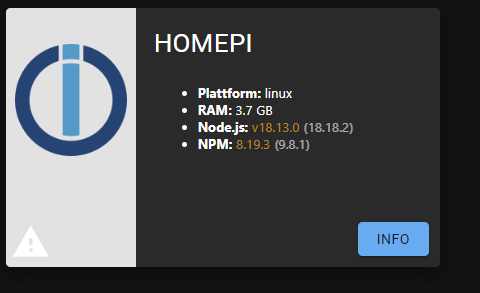
Aber dann muss ich mal schauen das ich den ioBroker sichern kann und auch dann auf dem neuen OS wiederherstellen kann ^^
Das ist die FALSCHE Version. Das ist die dfsg-Version.
iob stop iob fix iob nodejs-update iob start -
Hallo zusammen,
leider wird ja der IFTTT Service von Amazon nicht mehr unterstützt, weswegen ich jetzt wieder auf die „alte“ Variante zurückgreifen muss. Vorher hatte ich es über Homebridge.
Bedauerlicherweise bekomme ich es aber nicht mehr installiert. Habe mir alles von Github geklont, aber die setup.py fehlt leider. Somit funktioniert die alte Anleitung nicht mehr und auch mit
pip3 install blinkpyGehts nicht.
Bekomme immer folgende Meldung:
from blinkpy.blinkpy import Blink ImportError: No module named blinkpy.blinkpyHier ist mein Code:
#!/usr/bin/python3
from blinkpy.blinkpy import Blink
from blinkpy.auth import Auth
blink = Blink()
auth = Auth({"username": "steven.XXXXXXX@YXXX", "password": "XXXXXX"}, no_prompt=True)
blink.auth = auth
blink.start()
auth.send_auth_key(blink, "EuerKey")
blink.setup_post_verify()

blink.sync['XXXXX'].arm = True
Hat da jmd ne Lösung für mich?
EDIT:
Habs in den Ordner blinkpy kopiert und dort ausgeführt aber bekomme trotzdem ne Fehlermeldung:_
Traceback (most recent call last): File "blinkarm.py", line 2, in <module> from blinkpy.blinkpy import Blink File "/home/pi/blinkpy/blinkpy/blinkpy.py", line 83 async def refresh(self, force=False, force_cache=False): ^ SyntaxError: invalid syntaxOkay ist jetzt geupdatet auf 18 ;)
bekomme aber noch immer den gleichen fehler
@gurke258 sagte in Blink Camera System:
Hallo zusammen,
leider wird ja der IFTTT Service von Amazon nicht mehr unterstützt, weswegen ich jetzt wieder auf die „alte“ Variante zurückgreifen muss. Vorher hatte ich es über Homebridge.
Bedauerlicherweise bekomme ich es aber nicht mehr installiert. Habe mir alles von Github geklont, aber die setup.py fehlt leider. Somit funktioniert die alte Anleitung nicht mehr und auch mit
pip3 install blinkpyGehts nicht.
Bekomme immer folgende Meldung:
from blinkpy.blinkpy import Blink ImportError: No module named blinkpy.blinkpyHier ist mein Code:
#!/usr/bin/python3
from blinkpy.blinkpy import Blink
from blinkpy.auth import Auth
blink = Blink()
auth = Auth({"username": "steven.XXXXXXX@YXXX", "password": "XXXXXX"}, no_prompt=True)
blink.auth = auth
blink.start()
auth.send_auth_key(blink, "EuerKey")
blink.setup_post_verify()

blink.sync['XXXXX'].arm = True
Hat da jmd ne Lösung für mich?
EDIT:
Habs in den Ordner blinkpy kopiert und dort ausgeführt aber bekomme trotzdem ne Fehlermeldung:_
Traceback (most recent call last): File "blinkarm.py", line 2, in <module> from blinkpy.blinkpy import Blink File "/home/pi/blinkpy/blinkpy/blinkpy.py", line 83 async def refresh(self, force=False, force_cache=False): ^ SyntaxError: invalid syntax -
Okay ist jetzt geupdatet auf 18 ;)
bekomme aber noch immer den gleichen fehler
@gurke258 sagte in Blink Camera System:
Hallo zusammen,
leider wird ja der IFTTT Service von Amazon nicht mehr unterstützt, weswegen ich jetzt wieder auf die „alte“ Variante zurückgreifen muss. Vorher hatte ich es über Homebridge.
Bedauerlicherweise bekomme ich es aber nicht mehr installiert. Habe mir alles von Github geklont, aber die setup.py fehlt leider. Somit funktioniert die alte Anleitung nicht mehr und auch mit
pip3 install blinkpyGehts nicht.
Bekomme immer folgende Meldung:
from blinkpy.blinkpy import Blink ImportError: No module named blinkpy.blinkpyHier ist mein Code:
#!/usr/bin/python3
from blinkpy.blinkpy import Blink
from blinkpy.auth import Auth
blink = Blink()
auth = Auth({"username": "steven.XXXXXXX@YXXX", "password": "XXXXXX"}, no_prompt=True)
blink.auth = auth
blink.start()
auth.send_auth_key(blink, "EuerKey")
blink.setup_post_verify()

blink.sync['XXXXX'].arm = True
Hat da jmd ne Lösung für mich?
EDIT:
Habs in den Ordner blinkpy kopiert und dort ausgeführt aber bekomme trotzdem ne Fehlermeldung:_
Traceback (most recent call last): File "blinkarm.py", line 2, in <module> from blinkpy.blinkpy import Blink File "/home/pi/blinkpy/blinkpy/blinkpy.py", line 83 async def refresh(self, force=False, force_cache=False): ^ SyntaxError: invalid syntaxLinux-Werkzeugkasten:
https://forum.iobroker.net/topic/42952/der-kleine-iobroker-linux-werkzeugkasten
NodeJS Fixer Skript:
https://forum.iobroker.net/topic/68035/iob-node-fix-skript
iob_diag: curl -sLf -o diag.sh https://iobroker.net/diag.sh && bash diag.sh -
Okay ist jetzt geupdatet auf 18 ;)
bekomme aber noch immer den gleichen fehler
@gurke258 sagte in Blink Camera System:
Hallo zusammen,
leider wird ja der IFTTT Service von Amazon nicht mehr unterstützt, weswegen ich jetzt wieder auf die „alte“ Variante zurückgreifen muss. Vorher hatte ich es über Homebridge.
Bedauerlicherweise bekomme ich es aber nicht mehr installiert. Habe mir alles von Github geklont, aber die setup.py fehlt leider. Somit funktioniert die alte Anleitung nicht mehr und auch mit
pip3 install blinkpyGehts nicht.
Bekomme immer folgende Meldung:
from blinkpy.blinkpy import Blink ImportError: No module named blinkpy.blinkpyHier ist mein Code:
#!/usr/bin/python3
from blinkpy.blinkpy import Blink
from blinkpy.auth import Auth
blink = Blink()
auth = Auth({"username": "steven.XXXXXXX@YXXX", "password": "XXXXXX"}, no_prompt=True)
blink.auth = auth
blink.start()
auth.send_auth_key(blink, "EuerKey")
blink.setup_post_verify()

blink.sync['XXXXX'].arm = True
Hat da jmd ne Lösung für mich?
EDIT:
Habs in den Ordner blinkpy kopiert und dort ausgeführt aber bekomme trotzdem ne Fehlermeldung:_
Traceback (most recent call last): File "blinkarm.py", line 2, in <module> from blinkpy.blinkpy import Blink File "/home/pi/blinkpy/blinkpy/blinkpy.py", line 83 async def refresh(self, force=False, force_cache=False): ^ SyntaxError: invalid syntaxDie Readme hast du gelesen?
BREAKING CHANGE WARNING: As of 0.22.0 the library uses asyncio which will break any user scripts used prior to this version. Please see the updated examples below and the blinkapp.py or blinksync.py examples in the blinkapp/ directory for examples on how to migrate.
Linux-Werkzeugkasten:
https://forum.iobroker.net/topic/42952/der-kleine-iobroker-linux-werkzeugkasten
NodeJS Fixer Skript:
https://forum.iobroker.net/topic/68035/iob-node-fix-skript
iob_diag: curl -sLf -o diag.sh https://iobroker.net/diag.sh && bash diag.sh -
@thomas-braun sagte in Blink Camera System:
Gib mal die Langfassung von
iob diagbekannt.
Copy text starting here:
======================= SUMMARY =======================
			v.2023-10-10


   Static hostname: HomePi
         Icon name: computer
  Operating System: Debian GNU/Linux 11 (bullseye)
            Kernel: Linux 6.1.21-v8+
      Architecture: arm64

Installation: 		native
Kernel: 		aarch64
Userland: 		arm64
Timezone: 		Europe/Berlin (CET, +0100)
User-ID: 		1000
X-Server: 		true
Boot Target: 		graphical.target

Pending OS-Updates: 	0
Pending iob updates: 	0

Nodejs-Installation: 	/usr/bin/nodejs 	v18.18.2
			/usr/local/bin/node 		v18.13.0
			/usr/local/bin/npm 		8.19.3
			/usr/local/bin/npx 		8.19.3
			/usr/local/bin/corepack 	0.15.2

Recommended versions are nodejs 18.18.2 and npm 9.8.1
*** nodejs is NOT correctly installed ***
Wrong installation path detected. This needs to be fixed.

Please check
https://forum.iobroker.net/topic/35090/howto-nodejs-installation-und-upgrades-unter-debian
for more information on how to fix these errors.

MEMORY:
               total        used        free      shared  buff/cache   available
Mem:            3.8G        2.0G        484M         69M        1.3G        1.6G
Swap:            99M          0B         99M
Total:          3.9G        2.0G        584M

Active iob-Instances: 	27
Active repo(s): stable

ioBroker Core: 		js-controller 		5.0.12
			admin 			6.12.0

ioBroker Status: 	iobroker is running on this host.


Objects type: jsonl
States  type: jsonl

Status admin and web instance:
+ system.adapter.admin.0                  : admin                 : HomePi                                   -  enabled, port: 8081, bind: 0.0.0.0, run as: admin
+ system.adapter.web.0                    : web                   : HomePi                                   -  enabled, port: 8082, bind: 0.0.0.0, run as: admin

Objects: 		15766
States: 		13659

Size of iob-Database:

15M	/opt/iobroker/iobroker-data/objects.jsonl
18M	/opt/iobroker/iobroker-data/states.jsonl


=================== END OF SUMMARY ====================
Er sagt immer noch das es nicht korrekt installiert wurde :/
-
Die Readme hast du gelesen?
BREAKING CHANGE WARNING: As of 0.22.0 the library uses asyncio which will break any user scripts used prior to this version. Please see the updated examples below and the blinkapp.py or blinksync.py examples in the blinkapp/ directory for examples on how to migrate.
@thomas-braun sagte in Blink Camera System:
Die Readme hast du gelesen?
BREAKING CHANGE WARNING: As of 0.22.0 the library uses asyncio which will break any user scripts used prior to this version. Please see the updated examples below and the blinkapp.py or blinksync.py examples in the blinkapp/ directory for examples on how to migrate.
Hatte ich gelesen und getestet aber auch da nen fehler bekommen. Deswegen wollte ich die alte Version mal testen
-
@thomas-braun sagte in Blink Camera System:
Die Readme hast du gelesen?
BREAKING CHANGE WARNING: As of 0.22.0 the library uses asyncio which will break any user scripts used prior to this version. Please see the updated examples below and the blinkapp.py or blinksync.py examples in the blinkapp/ directory for examples on how to migrate.
Hatte ich gelesen und getestet aber auch da nen fehler bekommen. Deswegen wollte ich die alte Version mal testen
Schalt den DESKTOP aus.
Und nodejs ist noch falsch installiert.iob nodejs-updateDa dann die Pfade reparieren lassen.
-
@thomas-braun sagte in Blink Camera System:
Die Readme hast du gelesen?
BREAKING CHANGE WARNING: As of 0.22.0 the library uses asyncio which will break any user scripts used prior to this version. Please see the updated examples below and the blinkapp.py or blinksync.py examples in the blinkapp/ directory for examples on how to migrate.
Hatte ich gelesen und getestet aber auch da nen fehler bekommen. Deswegen wollte ich die alte Version mal testen
Das war auch nicht die Langfassung.
Also nochmal, nachdem nodejs repariert ist.Linux-Werkzeugkasten:
https://forum.iobroker.net/topic/42952/der-kleine-iobroker-linux-werkzeugkasten
NodeJS Fixer Skript:
https://forum.iobroker.net/topic/68035/iob-node-fix-skript
iob_diag: curl -sLf -o diag.sh https://iobroker.net/diag.sh && bash diag.sh -
@thomas-braun sagte in Blink Camera System:
Die Readme hast du gelesen?
BREAKING CHANGE WARNING: As of 0.22.0 the library uses asyncio which will break any user scripts used prior to this version. Please see the updated examples below and the blinkapp.py or blinksync.py examples in the blinkapp/ directory for examples on how to migrate.
Hatte ich gelesen und getestet aber auch da nen fehler bekommen. Deswegen wollte ich die alte Version mal testen
Moin,
die Frage ist, was willst Du noch mit dem alten script ? Das wird so nicht mehr funktionieren, da sich die syntax zum einloggen etc. etwas verändert hat.
Nutze doch einfach das homebridge plugin, sofern Du die Anlage scharf oder unscharf schalten möchtest.
Gruss
-
Moin,
die Frage ist, was willst Du noch mit dem alten script ? Das wird so nicht mehr funktionieren, da sich die syntax zum einloggen etc. etwas verändert hat.
Nutze doch einfach das homebridge plugin, sofern Du die Anlage scharf oder unscharf schalten möchtest.
Gruss
@pischleuder sagte in Blink Camera System:
Moin,
die Frage ist, was willst Du noch mit dem alten script ? Das wird so nicht mehr funktionieren, da sich die syntax zum einloggen etc. etwas verändert hat.
Nutze doch einfach das homebridge plugin, sofern Du die Anlage scharf oder unscharf schalten möchtest.
Gruss
Ja mit dem Homebridge funktioniert es bei mir nicht mehr :/ Keine ahnung warum :/
-
@pischleuder sagte in Blink Camera System:
Moin,
die Frage ist, was willst Du noch mit dem alten script ? Das wird so nicht mehr funktionieren, da sich die syntax zum einloggen etc. etwas verändert hat.
Nutze doch einfach das homebridge plugin, sofern Du die Anlage scharf oder unscharf schalten möchtest.
Gruss
Ja mit dem Homebridge funktioniert es bei mir nicht mehr :/ Keine ahnung warum :/
welches npm Modul hast Du denn in der Homebridge Instanz eingegeben ?
Es sollte homebridge-blink-for-home@3.9.2 dort stehen und die Instanz im Wrapper Modus
starten.in der Konfig dann so:
{
"description": "Add configuration for your accessories or platforms according to the docs of the plugins.",
"accessories": [],
"platforms": [
{
"name": "Blink",
"username": "Email-Adresse",
"password": "Dein Passwort",
"pin": "Deine Pin",
"platform": "Blink"
}
]
}




Hey! Du scheinst an dieser Unterhaltung interessiert zu sein, hast aber noch kein Konto.
Hast du es satt, bei jedem Besuch durch die gleichen Beiträge zu scrollen? Wenn du dich für ein Konto anmeldest, kommst du immer genau dorthin zurück, wo du zuvor warst, und kannst dich über neue Antworten benachrichtigen lassen (entweder per E-Mail oder Push-Benachrichtigung). Du kannst auch Lesezeichen speichern und Beiträge positiv bewerten, um anderen Community-Mitgliedern deine Wertschätzung zu zeigen.
Mit deinem Input könnte dieser Beitrag noch besser werden 💗
Registrieren AnmeldenSupport us
355
Online33.0k
Benutzende83.7k
Themen1.3m
Beiträge